1
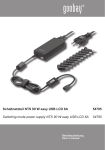
Schaltnetzteil NTS 90 W multi USB EuP 4,73A
Switching mode adaptor NTS 90 W multi USB EuP 4,73A
Art.No.
54791
Bedienungsanleitung
Manual
Bedienungsanleitung
Schaltnetzteil NTS 90 W multi USB EuP 4,73A
54791
ACHTUNG! Lesen Sie die Bedienungsanleitung vollständig und sorgfältig durch. Sie ist Bestandteil des Produktes und enthält wichtige Hinweise zur korrekten Inbetriebnahme und Benutzung. Bewahren Sie sie auf, damit Sie diese bei Weitergabe des Gerätes an andere Personen übergeben können.
Inhaltsverzeichnis:
Seite:
1 Beschreibung und Funktion 2 Bestimmungsgemäßer Gebrauch 3 Sicherheitshinweise
4 Lieferumfang 5 Grafische Darstellung
6 Bedienung
6.1 Netzteilnutzung für Notebooks
6.2 Nutzung der USB-Funktion
7 Pflege, Wartung, Lagerung und Transport 8 Problembehebung 9 Gewährleistung und Haftung 10 Technische Daten 11 Entsorgungshinweise 12 CE-Konformitätserklärung 2
2
3
3
4
4
4
5
5
6
6
6
7
7
1 Beschreibung und Funktion:
Das Produkt ist ein universales, umweltfreundliches und sicheres Schaltnetzteil für
Notebooks, N@tbooks, LCD-Displays, usw. Es verfügt über 14 verpolungssichere Adapterstecker für viele gängige Modelle und einen separaten 5,0 Volt USB-Ausgang zum Laden
oder Betreiben von MP3-Playern, Digitalkameras, Handys, usw. Das Netzteil wird auf die
passende Ausgangsspannung eingestellt. Das Gerät erfüllt die EuP-Richtlinie mit besonderer Energieeffizienz, Klasse 5.
Sicherheitsausstattung: • kurzschlusssicher
• Überladungsschutz
• Verpolschutz
2 Bestimmungsgemäßer Gebrauch:
Ihr Produkt ist nur zum Laden und betreiben der in Kapitel 1 genannten Geräte
vorgesehen. Ein anderer Gebrauch ist nicht gestattet. Die Verwendung darf nur in
trockenen Innenräumen erfolgen. Das Nichtbeachten und Nichteinhalten dieser
Bestimmungen und der Sicherheitshinweise kann zu schweren Unfällen und Schäden an
Personen und Sachen führen.
2
3 Sicherheitshinweise:
ACHTUNG! Die Montage und Demontage des Produktgehäuses sowie die Wartung der Elektronik darf nur durch ausgebildetes Elektro-Fachpersonal erfolgen! Es besteht u. a. Stromschlag- und Kurzschlussgefahr!
•
•
•
•
•
•
•
•
•
•
•
•
•
•
•
•
•
Ihr Produkt ist kein Spielzeug und gehört nicht in Kinderhände, weil zerbrechliche, kleine und verschluckbare Teile enthalten sind, die bei unsachgemäßem Gebrauch Per-
sonen schädigen können!
Installieren und Lagern Sie das Produkt und das Zubehör so, dass keine Personen oder S
achen z.B. durch Herabstürzen oder Stolpern verletzt oder beschädigt werden können.
Lassen Sie Verpackungsmaterial nicht einfach liegen, da sich spielende Kinder daran schneiden können. Weiterhin besteht die Gefahr des Verschluckens und Einatmens von Kleinteilen und Dämmmaterial.
Stellen Sie anhand der Bedienungsanleitung Ihres zu betreibenden Gerätes, wie Laptop, Handy, usw. sicher, dass die Anschlüsse und Betriebsspannungen zum Netzteil kompatibel sind und umgekehrt.
Ein defektes Gerät darf nicht in Betrieb genommen werden, sondern muss sofort vom Netz getrennt und gegen eine unbeabsichtigte Weiterbenutzung gesichert werden. Im Reparaturfall darf das Gerät nur von Elektro-Fachkräften geöffnet und repariert werden, die aufgrund ihrer Ausbildung dazu befugt sind. Ein Selbsteingriff birgt die Gefahr eines Stromschlags und führt zum Erlöschen des Garantieanspruchs.
Betreiben Sie das Gerät nur am 100-240 V ~ / 50-60 Hz Wechselstromnetz.
Ziehen Sie bei Nichtgebrauch und Gewitter das Netzkabel aus der Steckdose.
Setzen Sie das Gerät keiner starken Hitze oder Feuchtigkeit aus, bzw. Stellen, die mit Wasser in Berührung kommen können.
Legen und stellen Sie keine Gegenstände auf das Gerät.
Für den Einsatz in Industriebetrieben sind die entsprechenden gesetzlichen Bestim-
mungen zur Unfallverhütung einzuhalten.
Setzen Sie das Gerät und dessen Zubehör keinen hohen mechanischen Belastungen aus.
Modifizieren und ändern Sie den Artikel und dessen Zubehörteile nicht! Beachten Sie dazu auch das Kapitel „Gewährleistung und Haftung“
Verwenden Sie keine beschädigten Teile.
Das Gerät darf nur in trockenen Innenräumen installiert und betrieben werden.
Das Gerät erwärmt sich während des Betriebes.
Schließen Sie den DC-Anschluss nicht kurz.
Überlasten Sie das Produkt nicht.
4 Lieferumfang:
• 1 x
• 14 x
• 1x
• 1x
Schaltnetzteil
DC-Adapterstecker
EURO Netzstecker
Bedienungsanleitung
3
Bedienungsanleitung
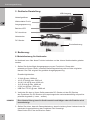
5 Grafische Darstellung:
Netzteilgehäuse
USB-Ausgang
Bild 1
Wahlschalter für die
Ausgangsspannung
Betriebs-LED
DC-Anschluss
Netzstecker
DC-Stecker
Einstellwerkzeug
6 Bedienung:
6.1Netzteilnutzung für Notebooks:
Ihr Notebook kann über diese Funktion betrieben und der interne Notebookakku geladen werden.
1. Stellen Sie die benötigte Ausgangsspannung am Produkt ein. Diese steht entweder auf Ihrem Gerät, in dessen Bedienungsanleitung oder auf dem originalen Netzteil. Der Pfeil zeigt auf die gewählte Ausgangsspannung.
Einstellmöglichkeiten:
•
•
•
•
•
•
12 Volt @ max. 6000 mA
14-15-16 Volt @ max. 5000 mA
18-18,5-19 Volt @ max. 4200 mA
19,5-20 Volt @ max. 4000 mA
21-22 Volt @ max. 3700 mA
USB Port 5 V DC @ max. 2000 mA
2. Verbinden Sie den zu Ihrem Gerät passenden DC-Stecker mit der DC-Buchse des Produktes. Die DC-Stecker sind verpolungssicher und standardmäßig auf positive
polarität eingestellt (+ innen, - außen).
HINWEIS: Eine falsche Polung kann Ihr Gerät massiv beschädigen oder die Funktion wird
beeinträchtigt.
3. Stellen Sie sicher, dass die Gesamtbelastung, also die Leistung Ihres Verbrauchers die
maximale Ausgangsleistung des Produktes nicht übersteigt.
Diese finden Sie in den technischen Daten.
4
4. Verbinden Sie das Netzteil mit dessen AC-Netzkabel.
5. Schließen Sie Ihr Notebook am zuvor ausgewählten und angeschlossenen DC-Ste cker an.
6. Stecken Sie das Netzkabel in eine Netzsteckdose. Die Kontroll-LED leuchtet nun konstant unabhängig der gewählten Ausgangsspannung bis das Netzteil wieder vom Netz getrennt wird. Es muss eine Ausgangsspannung eingestellt sein.
7. Schalten Sie nun Ihr Notebook ein.
6.2Nutzung der USB-Funktion:
Über die USB-Funktion können Sie Ihr USB-Gerät laden und betreiben, unabhängig davon,
ob Sie parallel Ihr Notebook laden oder betreiben.
1. Verbinden Sie Ihr USB-Gerät, wie MP3-PLayer, Handy oder PDA über ein passendes USB-kabel mit dem USB-Ausgang des Netzteils. Die maximale Ausgangsleistung finden Sie in den technischen Daten.
2. Stellen Sie sicher, dass die Gesamtbelastung, also die Leistung Ihres Verbrauchers die
maximale Ausgangsleistung des Netzteils nicht übersteigt.
3. Verbinden Sie das Netzteil mit dessen AC-Netzkabel.
4. Stecken Sie das Netzkabel in eine Netzsteckdose. Die Kontroll-LED leuchtet nun konstant unabhängig der gewählten Ausgangsspannung bis das Netzteil wieder vom Netz getrennt wird.
5. Schalten Sie nun Ihr USB-Gerät ein.
7 Pflege, Wartung, Lagerung und Transport:
ACHTUNG! Es besteht Stromschlag- und Kurzschlussgefahr!
•
•
•
•
•
•
•
Das Gerät ist wartungsfrei.
Ziehen Sie immer zuerst den Netzstecker!
Reinigen Sie Ihr Produkt mit einem trockenen oder bei starker Verschmutzung mit einem leicht angefeuchteten Leinentuch. Verwenden Sie keine Reinigungsmittel und lassen Sie keine Feuchtigkeit ins Geräteinnere kommen. Achten Sie hierbei unbedingt auf die stromführenden Leitungen Ihres Gerätes!
Vermeiden Sie Stellen mit hohen Temperaturen, Feuchtigkeit, bzw. Stellen, die nass werden können, auch bei Pflege, Wartung, Lagerung und Transport.
Beachten Sie die Sicherheitshinweise bzgl. Pflege, Wartung, Lagerung und Transport.
Das Produkt muss außerhalb des Einflussbereiches von Kindern aufbewahrt werden.
Heben Sie die Originalverpackung als Staub- und Feuchtigkeitsschutz und für den Transport auf. Achten Sie auf die Sicherheitszeichen auf der Verpackung.
5
Bedienungsanleitung
8 Problembehebung:
Problem
Hilfe
Das Netzteil funktioniert nicht.
Achten Sie die richtige Ausgangsspannung
und Polung des DC-Adaptersteckers.
Achten Sie auf schlüssige
Kabelverbindungen.
Die Ladefunktion arbeitet nicht.
Achten Sie die richtige Ausgangsspannung
und Polung des DC-Adaptersteckers.
Achten Sie auf schlüssige
Kabelverbindungen.
Die USB-Funktion ist gestört.
Lesen Sie kapitel 6.2 und achten Sie auf
schlüssige Kabelverbindungen.
andere Fragen
Wenden Sie sich an Ihren Händler.
9 Gewährleistung und Haftung:
•
•
•
•
•
•
•
•
Der Hersteller gewährt 2 Jahre Garantie.
Da der Hersteller keinen Einfluss auf örtliche Gegebenheiten und die Installation des Produktes hat, deckt die Garantie nur das Produkt selbst ab.
Falls ein Fehler oder Defekt an Ihrem Gerät festgestellt werden sollte, wenden Sie sich bitte an Ihren Fachhändler und zeigen Sie ggf. Ihre Quittung oder Rechnung als Kaufnachweis vor. Ihr Händler wird den Fehler entweder vor Ort beheben, oder das Gerät an den Hersteller weiterleiten. Sie erleichtern unseren Technikern Ihre Arbeit sehr, wenn Sie eventuelle Fehler ausführlich beschreiben – nur dann haben Sie Gewähr,
dass auch selten auftretende Fehler mit Sicherheit gefunden und beseitigt werden!
Sollte Ihr Händler nicht erreichbar sein, können Sie uns auch direkt kontaktieren.
Der Hersteller haftet nicht für Personen- oder Sachschäden, die durch unsachgemäße Installation oder B
edienungsschritte, die nicht in dieser Anleitung beschrieben sind, entstanden sind. Dazu zählt u. a. jegliche Änderung und Modifikation des Produktes und seines Zubehörs.
Ein anderer als in dieser Bedienungsanleitung beschriebener Einsatz ist unzulässig und führt zu Gewährleistungsverlust, Garantieverlust und Haftungsausschluss.
Druckfehler behält sich der Hersteller vor.
Der Hersteller behält sich weiterhin das Recht vor, Änderungen an Geräten, Verpackun-
gen und sämtlichen Begleitpapieren wie Bedienungsanleitungen ohne vorherige Ankündigung zu vollziehen.
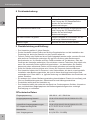
10Technische Daten:
Eingangsspannung
100-240 V ~ AC / 50-60 Hz
Ausgangsspannung Netzteil
USB
6
12/14/15/16/18/18,5/19/19,5/20/21/22 V DC
5 V DC
unterstützte Ausgangsspannungen
12/14/15/16/18/18,5/19/19,5/20/21/22 V DC
DC Adaptersteckergrößen
A,P,C,D,E,F,G,H,K,L,N,Q,R,T
Netzstecker
EURO
max. Ausgangsstrom
8 A (6 A DC+ 2 A USB)
max. Ausgangsleistung
91 W (81 W DC + 10 W)
Maße
154,4 x 59,8 x 38,0 mm
Gewicht
557 g (ohne DC-Stecker)
Kabellängen AC/DC
1800 / 1800 mm
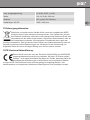
11Entsorgungshinweise:
lektrische und elektronische Geräte dürfen nach der europäischen WEEE
E
Richtlinie nicht mit dem Hausmüll entsorgt werden. Der Verbraucher ist nach dem ElektroG verpflichtet, elektrische und elektronische Geräte am Ende ihrer
Lebensdauer an den dafür eingerichteten, öffentlichen Sammelstellen oder an
die Verkaufsstelle kostenlos zurückzugeben. Einzelheiten dazu regelt das
jeweilige Landesrecht. Das Symbol auf dem Produkt, der Gebrauchsanleitung oder der
Verpackung weist auf diese Bestimmungen hin. Mit dieser Art der Verwertung von
Altgeräten leisten Sie einen wichtigen Beitrag zum Schutz unserer Umwelt.
12CE-Konformitätserklärung:
ieses Gerät ist mit der nach der Richtlinie 2004/108/EG und 2006/95/EG
D
vorgeschriebenen Kennzeichnung versehen: Mit dem CE Zeichen erklärt Goobay ®, eine registrierte Marke der Wentronic GmbH, dass das Gerät die
grundlegenden Anforderungen und Richtlinien der europäischen Bestimmungen erfüllt. Diese können online auf www.goobay.de angefragt werden. Alle
Handelsmarken und registrierten Marken sind das Eigentum ihrer jeweiligen Inhaber.
7
Manual
Switching mode adaptor NTS 90 W multi USB EuP 4,73A
54791
ATTENTION! Please read the user manual completely and carefully. It is part of the product and includes important information for proper installation and use. Keep this guide to have it available, when there are uncertainties, or the product will be passed on.
Content:
Page:
1 Description and Function
2 Intended Use
3 Notes on Safety
4 Parts Package 5 Graphic Diagram
6 Operating
6.1 Using the Power Supply for Notebooks
6.2 Using the USB Function
7 Care, Maintenance, Storage and Transport
8 Troubleshooting
9 Warranty and Liability
10 Specifications
11 Notes on Waste Disposal 12 CE Declaration
8
8
8
9
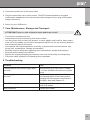
9
10
10
10
11
11
12
12
12
13
1 Description and Function:
This product is an universal, environmental friendly and safe power supply for Notebooks,
N@tbooks, LC Displays, etc. It comes with 14 adaptor plugs for lots of models and a
seperated 5 Volts USB output for charging or operating MP3-Players, Camcorders, Mobile
Phones, etc. The device is useable worldwide. You can select the prefered output voltage
manually. The device is conform to the EuP Directive with special energy efficiency, class 5.
Security Features: • short circuit safe
• over charging protection
• inverse-polarity protection
2 Intended Use:
Your product is made for charging and operating devices like described in chapter
1. We do not permit using the product in other ways. Use the product only in dry
interior rooms. If not attending to these regulations and notes on safety, it might
causes fatal accidents, injuries and damages to persons and property.
3 Notes on Safety:
ATTENTION! Only skilled electricians may assemble and disassemble the housing of the product. There is a risk of electric shock and short circuit!
• Your product is not a toy and is not meant for children, because it contains small parts which can be swallowed and injured when used inappropriately!
8
• Please install and store the product and its accessories in a way persons cannot be
injured, or objects not be damaged for example by dropping or stumbling.
• Please remove or store the packing materials well, because children may cut themsel-
ves on them while playing. Furthermore, there is a risk of swallowing and inhalating of incidentals and insulating material.
• Also read the manual of your device, which is to be charged or operated, like Notebook, Mobile Phone, etc. for checking the compatibility and fitting of the connectors to the power supply, and the other way round.
• A defective device may not be put into operation, but must be disconnected from mains and protected against further use. Repairing, such as assembling and disassembling the housing is only allowed to skilled professionals. By repairing it yourself you will loose all warranties and there is a risk of electric shock and short circuit.
• Drive the product only with 100 to 240 V ~ / 50-60 Hz a.c. networks.
• Unplug the mains cable when not in use and during thunder storms.
• Avoid places with high humidity, or places which might come into contact with water.
• Do not place things on the device.
• Mind and follow the terms of law and health care for using the device in industry.
• Never expose the product to high mechanical pressure.
• Do not modify or change the product or its accessories! Also mind chapter “warranty and liability“.
• Do not use damaged parts.
• The device may only be installed and used in dry interior rooms.
• The device may growing warm during use.
• Do not short circuit the DC connection.
• Do not overload the device.
4 Parts Package:
•
•
•
•
1 pc. power supply
14 pcs. D
C adaptor plugs with reverse polarity protection
1 pc. mains cable - EURO plug
1 pc. user manual
5 Graphic Diagram:
USB ouput
power
supply unit
Selection key for
output voltage
Operation LED
DC connection
mains cable
DC plugs
adjusting tool
9
Manual
6 Operating:
6.1Using the Power Supply for Notebooks:
You can operate and charge a Notebook and its battery by using this function.
1. Select the required output voltage of the device, required by your Notebook. You find it on y our device, in its manual or on the original power supply. The arrowhead shows the selected output voltage.
possible adjustments:
•
•
•
•
•
•
12 V DC @ max. 6,000 mA
14-15-16 V DC @ max. 5,000 mA
18-18.5-19 V DC @ max. 4,200 mA
19.5-20 V DC @ max. 4,000 mA
21-22 V DC @ max. 3,700 mA
USB Port 5 V DC @ max. 2,000 mA
2. Connect the fitting DC adaptor plug to the DC socket of the device. Mind the right polarity a
nd size of the DC plug. You will find detailed information in the manual of your device or on the original power supply. The DC plugs are reverse-polarity safe and standardized adjusted to positive polarity (+ inside, - outside).
NOTE: A wrong polarity can damage your device or there is no function at all.
3. Make sure of not overloading the product by a too high power consumption of your electricity consumer. Find the maximum output power in the specifications
4. Connect the device with its AC mains cable.
5. Connect your notebook with the DC adaptor plug after selecting and plugging the right one to the device.
6. Plug the mains cable into a mains socket. The LED indicator flashes on and lights continuously independent from the selected output voltage until you plug off the power supply from mains. You must select any output voltage.
7. Now switch on your notebook.
6.2Using the USB Function:
You can operate and charge an USB device independently from operating or charging a notebook simultaneously.
1. Connect your USB device, like MP3-Player, Mobile Phone or PDA to the USB outlet of the unit by using a fitting USB cable.
2. Make sure of not overloading the product by a too high power consumption of your USB device. Find more information in the specifications.
10
3. Connect the product to its AC mains cable.
4. Plug the mains cable into a mains socket. The LED indicator flashes on and lights continuously independent from the selected output voltage until you plug off the power supply from mains.
5. Switch on your USB device.
7 Care, Maintenance, Storage and Transport:
ATTENTION! There is a risk of electric shock and short circuit!
•
•
•
•
•
•
•
•
The device is maintenance-free.
Always disconnect the mains plug from mains at first!
Use a dry linen cloth to clean your product, or use a slightly moist cloth for heavy stains. Look out for live cables of your device during cleaning! Do not use any cleaning supplies and avoid liquid entry to the device.
Avoid places with high temperatures, humidity, or places which can become wet, also during care, maintenance, storage, and transport.
Mind the notes on safety also regarding care, maintenance, storage and transport.
Keep the product away from children!
Reposit the original packaging as protection from dust and humidity for transporting.
Follow the safety symbols on the packing during transport.
8 Troubleshooting:
Problem
Help
The adjustment of the power supply does
not work.
Mind assembling in right order in chapter
6.1. Check all cable connections for proper
fitting.
The charging function of the battery does
not work.
Mind assembling in right order. Check
the charging status of the battery before
charging and mind proper connections of
all cables. Also read chapter 6.2.
The USB charging function does not work.
Read chapter 6.3 and mind proper connections of all cables.
other questions
Contact your dealer.
11
Manual
9 Warranty and Liability:
•
•
•
•
•
•
The producer grants a 2 years warranty to a new device.
As the manufacturer has no influence on installation, warranty of the product only applies to the product.
If any fault or damage is detected on your device, please contact your dealer and provide your sales slip or invoice as evidence of the purchase, if necessary. Your dealer will repair the fault either o
n site, or send the device to the manufacturer. You make the work of our technicians considerably easier, describing possible faults in detail – only then you can be assured that faults, occurring only rarely, will be found and repaired with certainty! If your dealer cannot be contacted, you can also contact us directly.
The manufacturer is not liable for damages to persons or property caused by improper installation or operation not described in this guide. This includes, among others, any alteration and modification of the product and its accessories.
Any use other than described in this user manual is not permitted, and causes loss of warranty, loss of guarantee, and non-liability.
We reserve our right for misprints and changes of the device, packing, or user manual.
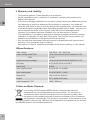
10Specifications:
input voltage
100-240 V ~ AC / 50-60 Hz
output voltage ADAPTOR
USB
12/14/15/16/18/18.5/19/19.5/20/21/22 V DC
5 V DC
supported output voltages
12/14/15/16/18/18.5/19/19.5/20/21/22 V DC
DC plugs
A,P,C,D,E,F,G,H,K,L,N,Q,R,T
mains plug
EURO
max. output current
8 A (6 A DC + 2 A USB)
max. output power
91 W (81 W DC + 10 W)
dimensions
154.4 x 59.8 x 38.0 mm
weight
557 g (without DC plug)
cable lengths AC / DC
1800 / 1800 mm
11 Note on Waste Disposal:
In according to the European WEEE directive, electrical and electronic equipment must not be disposed with consumers waste. The consumer is
committed by law to reposit electrical and electronic devices to public collec-
ting points or to the dealer at the end of the devices lifetime for free. Particulars are regulated in national right. The symbol on the product, in the manual or at the
packaging a
lludes to these terms. With this kind of application of used devices you achieve
an important share to environmental protection.
12
12 CE-Declaration:
his device corresponds to EU directives 2004/108/EC, 2005/32/EC and T
2006/95/EC: With the CE sign Goobay® , a registered trademark of the Wentronic GmbH ensures, that the product is conformed to the basic
standards and directives. These standards can be requested online on
www.goobay.de. The mentioned directives replace all former national permissions in the
European Union. All trademarks and registered brands are the property of their respective owners.
13
Revision Date: 2011-08-29
Version 1
Goobay ®
Pillmannstraße 12
38112 Braunschweig
Germany
www.goobay.de
Made in China