1
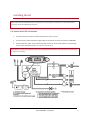
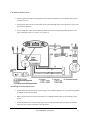
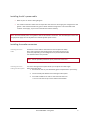
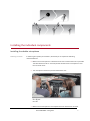
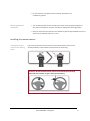
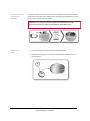
Parrot MKi9000 User guide Contents Contents ........................................................................................................................... 2 Installation ....................................................................................................................... 3 Before you begin ..................................................................................................................................................... 3 Checking the car configuration .................................................................................................................... 3 Caution ......................................................................................................................................................... 3 Removing the car stereo .............................................................................................................................. 3 Installing the kit ....................................................................................................................................................... 4 Car stereo with ISO connectors ................................................................................................................... 4 Car stereo with line-in.................................................................................................................................. 5 Installing the electronic box ......................................................................................................................... 5 Installing the kit’s power cable .................................................................................................................... 6 Installing the audio connectors.................................................................................................................... 6 Installing the individual components ...................................................................................................................... 7 Installing the double microphone ................................................................................................................ 7 Installing the remote control ....................................................................................................................... 8 Getting started ............................................................................................................... 10 Navigating through the menus ............................................................................................................................. 10 Associating the remote control to the electronic box ............................................................................... 10 Commands ................................................................................................................................................. 11 Establishing a Bluetooth connection with a phone ............................................................................................... 12 Using a phone with the Parrot MKi9000 for the first time ........................................................................ 12 Using the Parrot MKi9000 with 2 phones .................................................................................................. 12 Dual mode allows you to simultaneously connect two phones to the Parrot MKi9000. .......................... 12 Managing the “Memory full” problem ...................................................................................................... 13 Synchronizing the phonebook .............................................................................................................................. 14 Phone ............................................................................................................................. 15 Making and receiving calls .................................................................................................................................... 15 Making a call .............................................................................................................................................. 15 Receiving a call ........................................................................................................................................... 15 Using the Parrot MKi9000 while on a call .................................................................................................. 16 Using voice recognition ......................................................................................................................................... 18 Receiving a call via voice recognition......................................................................................................... 18 Making a call via voice recognition ............................................................................................................ 18 Music.............................................................................................................................. 20 Using the Parrot MKi9000 with an external source .............................................................................................. 20 Using the Parrot MKi9000 with an iPod / iPhone ...................................................................................... 20 Using the Parrot MKi9000 with a USB peripheral ...................................................................................... 21 Using the Parrot MKi9000 with an audio player connected via Bluetooth ............................................... 21 Using the Parrot MKi9000 with an analogue audio player ........................................................................ 21 Commands ............................................................................................................................................................ 22 Settings.................................................................................................................................................................. 23 Using the Virtual Super Bass effect ............................................................................................................ 23 Deactivating the Mute on Streaming ......................................................................................................... 23 Parrot MKi9000 – User guide 2 Installation WARNING: We advise our customers to have the Parrot MKi9000 fitted by a professional. Before you begin Checking the car configuration The cables supplied with the kit feature ISO connectors and two pairs of line-out jacks. The line-out jacks can be used if your audio system features this option (use of an amplifier). Several set-ups are therefore possible depending on the type of car stereo and your vehicle. If your car stereo is not fitted with ISO connectors, you need to purchase an ISO adapter cable to simplify the wiring procedure. Refer to the range of ISO adapters on our website. Caution Unplug the battery before installing the kit’s power cable. Before you install the individual components, check that the installation locations have been selected in such a way that the cable length is sufficient to connect every element. Do not install any component (remote control, microphone…) in the airbag deployment area. Once the installation is complete, make sure that no cables are pinched or trapped. Removing the car stereo Remove your car stereo from you vehicle. You may need release keys to do so. ► Refer to your car stereo user guide or contact your car dealer for more information. Remove the audio system from your vehicles dashboard to access the wiring harness. The mute function is used to cut the sound of your car stereo to enable a phone call. The choice of the mute-in jack depends on your car stereo’s configuration. Parrot MKi9000 – User guide 3 Installing the kit Note : If you have the possibility to use a multimeter, test and verify all connections on the vehicle before connecting the Parrot MKi9200 wiring loom. Car stereo with ISO connectors 1. Connect the male connectors of the hands-free kit to the car stereo. 2. Join the vehicle’s audio and power supply cables to the female connectors of the Parrot MKi9000. 3. On the installation cable, connect the free yellow wire to one of the audio system’s corresponding mute-in jacks if available (mute in 1, mute in 2 or mute in 3). Note : Mute in 1, mute in 2 and mute in 3 are only suggested mute locations. You first have to test and verify the mute on the vehicle. Parrot MKi9000 – User guide 4 Car stereo with line-in Use this type of connection by wiring the line-out (brown & white wire or red & black wire) to your car stereo’s line-in. Using the two pairs of line-out will enable you to take advantage of the music function in stereo over your vehicle’s speakers. On the installation cable, connect the free yellow wire to the corresponding audio system’s muteinput if available (mute in 1, mute in 2 or mute in 3). Installing the electronic box Avoid installing the electronic box near heating or air-conditioning system, on a spot directly exposed to sunlight or behind metal walls. Make sure the electronic box stays fixed once it is installed and that it will not move while you are driving. Do not reinstall the car stereo forcibly. If you are short of space behind the car stereo to install the electronic box, consider installing it in the glove box. Parrot MKi9000 – User guide 5 Installing the kit’s power cable Refer to your car stereo’s wiring diagram. The red wire of the kit’s cable must correspond to the constant +12V supply, the orange wire to the ignition +12V and the black wire to ground. Check that the orange wire is not connected to the constant +12V supply, as you could run down the vehicle’s battery. Note : On some vehicles, there is no ignition +12V on the vehicle’s connectors. You must therefore connect the orange power supply wire to the fuse box or another ignition power source. Installing the audio connectors Installing the music cable Connect the music cable to the electronic box and place the USB / iPod / Jack connectors into the glove box, the central console or the parcel tray depending on the configuration of your dashboard. Make sure that the cable is not pinched. Note : Use the provided protection cap to protect the connectors. Installing the music cable grommet system The music cable grommet system allows you to adjust the cable length while reducing its wear. 1. Drill a 20 mm hole in your dashboard (glove compartment or parcel tray). 2. Insert manually two flexible arms of the grommet system. 3. Use a flat screwdriver in order to insert the last two arms. > You can now connect your music cable to the bluebox . Parrot MKi9000 – User guide 6 Installing the individual components Installing the double microphone Selecting a location In order to get hi-quality conversations, we advise you to respect the following recommendations: Make sure the microphone is installed as close to the mouth of the user as possible. The ideal distance is 60 cm. The best possible location for the microphone is near the rear-view mirror. The microphone needs to be pointed towards the user. D < 60 cm α < 45° Make sure the microphone is not exposed to the air stream from air vents. Parrot MKi9000 – User guide 7 Do not install the microphone cable in heating, ventilation or air conditioning systems. Mounting the double microphone The mounting location for the microphone must be clean and free from grease or dust. Prior to installation, clean the area with an appropriate cleansing product. Once you have stuck the support on the dashboard, wait for approximately 2 hours to make sure the adhesive tape adheres well. Installing the remote control Installing the remote control on the steering wheel If you want to place the remote control on the steering wheel, make sure it is securely attached, so that it does not move when you are driving. WARNING: Do not install the remote control on the outside of the steering wheel and ensure it does not get in the way when driving. Parrot MKi9000 – User guide 8 Installing the remote control on the dashboard If you want to place the remote control on the dashboard, stick the double-sided tape located on the flat side of the bracket to fix it against the dashboard. You can then insert the remote onto the bracket. WARNING: Once you have stuck the support on the dashboard, wait for approximately 2 hours to make sure the adhesive tape adheres well. Replacing the battery The remote control only works with a 3V CR2032 battery. Make sure the battery is correctly positioned before inserting it into the remote control. Parrot MKi9000 – User guide 9 Getting started WARNING : If the remote control doesn’t seem to be associated to the electronic box while using the Parrot MKi for the first time, refer to the Associating the remote control to the electronic box section. Navigating through the menus Associating the remote control to the electronic box If the remote control doesn’t seem to be associated to the electronic box while using the Parrot MKi9000: After verifying the CR2032 battery is properly inserted in the remote unit, press and hold the and buttons then press the button several times. This has to be done during a 30 seconds period once the ignition is turned on. Within 1 to 2 seconds, you should then hear a voice message saying “Remote control pairing successful”. At that time, you can release the buttons and the remote should then be paired with the kit and the message will go away. You can verify remote operation by navigating through the menus. Note : If you are unsuccessful on the first attempt, power off the unit, power it back on, and repeat the process. Parrot MKi9000 – User guide 10 Commands Accessing the main menu Browsing through the menus Press the central jog wheel to access the menus. > The kit says the name of the current menu. Turn the jog wheel to browse through the menus. Press the button or the jog wheel to confirm. Press the button to get back to the previous menu. Parrot MKi9000 – User guide 11 Establishing a Bluetooth connection with a phone Using a phone with the Parrot MKi9000 for the first time Pairing a phone Automatic connection 1. From your phone, search for Bluetooth® peripherals. 2. Select «MKi9000» in the list. 3. Enter «0000» on your phone when prompted. > The Parrot MKi9000 says «Pairing successful». Once your phone is paired to the Parrot MKi9000, the connection between both devices will be automatically established each time you enter your vehicle. Using the Parrot MKi9000 with 2 phones Dual mode allows you to simultaneously connect two phones to the Parrot MKi9000. Activating dual mode To activate dual mode and connect two phones, select Dual mode. N.B. Dual mode is deactivated by default. Connecting two phones to the Parrot MKi9000 When the Parrot MKi9000 is switched on, it attempts to connect all paired phones in the vehicle. If there are more than two paired phones in the vehicle, the device connects the two phones with the oldest pairing. Main and secondary phones When two phones are connected to the Parrot MKi9000, one of them becomes the main phone and the other is the secondary phone. By default, the main phone is the one with the oldest pairing to the Parrot MKi9000. To define the secondary phone as your main phone (and make your main phone the new secondary phone), press and hold Making and receiving calls for two seconds. You can receive calls (manually or through voice recognition) to your main or secondary phones. The Parrot MKi9000 ringtone varies according to the phone receiving the call. Parrot MKi9000 – User guide 12 Only the phonebook for your main phone may be accessed through the Parrot MKi9000. You can only make calls using your main phone. However, you can easily switch between the connected phones by pressing and holding seconds. for two If you receive a call to one of your phones while you are on the other phone, only the latter will ring. You can take the call directly on that phone but not via the Parrot MKi9000. Managing the “Memory full” problem You can pair up to 10 devices with the Parrot MKi9000. th If you attempt to pair a 11 phone, the Parrot MKi9000 says “Memory full”. To pair a new phone, you must clear the memory by holding down simultaneously the delete all your contacts. and button for 3 seconds. Doing so will also Parrot MKi9000 – User guide 13 Synchronizing the phonebook Note : Only contacts stored in the memory of the phone will be synchronised in the kit’s memory. Automatic synchronisation With most of the Bluetooth phones, the phonebook is automatically synchronized in the kit’s memory. Refer to the compatibility section of our website for more information. WARNING : The automatic synchronization is limited to 2 000 contacts for each paired phone. Sending contacts via Object Push If your phone doesn’t support automatic synchronization, you can also send contacts from your mobile to the car kit via Object Push. To do so: 1. Press the jog wheel and select Settings > Receive contacts. 2. Refer to your phones ‘user guide for more information about sending contacts via Object Push. Parrot MKi9000 – User guide 14 Phone Before using your Parrot MKi9000 telephone function, you first have to connect it with your phone. ► For more information,refer to the Establishing a Bluetooth connection with a phone section. Making and receiving calls Making a call Calling a contact in the phonebook If the contact you want to call is in the phonebook of the phone connected to the Parrot MKi9000: 1. Press the jog wheel to enter the main menu and select Phonebook. 2. Select a letter and press the jog wheel. > Once the contact chosen: - Bringing up the last dialled number Press the button to call this contact. Or use the jog wheel to choose between different numbers of the same contact. Hold down the key of the Parrot MKi9000 for two seconds to redial the last dialled number. Receiving a call An incoming call is indicated by a ringtone. The name of the caller is announced if his details are stored in the phonebook of the phone connected to the Parrot MKi9000. Answering a call Press the button to answer an incoming call. Declining a call Press the button to decline an incoming call. Parrot MKi9000 – User guide 15 Using the Parrot MKi9000 while on a call Adjusting the volume Transfering a call to the phone Use the jog wheel during a call to adjust the communication volume. > The volume setting is saved for subsequent calls. During a call, if you want to continue the conversation on your phone (private conversation), press the button of the Parrot MKi9000. > The call is automatically transferred to the phone. If you want to switch back to the kit, press the Muting a call Managing a second call button again. If you want to deactivate the microphone during a call, press the button : you will still hear your caller but your caller will not be able to hear you. Press the button to reactivate it again. During a call, you can receive another call if your phone supports this functionality. Press the button to accept the second incoming call. > The first call is automatically put on hold. Press the button to decline the second incoming call. You can also hang up directly from your phone. Press the button to switch from a call to another. Parrot MKi9000 – User guide 16 Managing voice mail Ending a call During a call, the Parrot MKi9000 allows you to send DTMFs to manage your voice mail for example. To do so: 1. Press the jog wheel to access the DTMF menu. > « 0 » is said by the kit. 2. Use the jog wheel to select your DTMF between the following possibilities : 0,1,2,3,4,5,6,7,8,9,# or *. 3. Press the jog wheel to send this DTMF to your phone. Press the button to end a call. Parrot MKi9000 – User guide 17 Using voice recognition Receiving a call via voice recognition To receive a call via voice recognition, magic words must be activated. Activating / deactivating the magic words Note : Magic words are activated by default. 1. Press the jog wheel and select Settings > Magic words. 2. Press the jog wheel to activate/deactivate the magic words. Accepting a call Say « Accept » to answer an incoming call. Declining a call Say « Reject » to decline an incoming call. Making a call via voice recognition Calling a contact with one phone number 1. Press the button to launch the voice recognition feature. > The Parrot MKi9000 asks you the name of the contact you want to call. 2. Say the name of the contact. > The call is automatically launched if the voice tag is correctly understood. > If it is not the case, a confirmation message is asked. 3. Confirm if necessary by saying “Yes” or “call”. Parrot MKi9000 – User guide 18 Calling a contact with several phone numbers If there are several phone numbers associated to the contact you want to call, you can specify the type of number. To do so, the following vocal commands are available: - Home - At home Exiting voice recognition mode Press the - Work At work Office At office At the office - Mobile Cellular Cell On mobile On cellular On cell On mobile phone On cellular phone On cell phone Mobile phone Cellular phone Cell phone - Other General Default Preferred button to exit voice recognition mode. Parrot MKi9000 – User guide 19 Music Using the Parrot MKi9000 with an external source Using the Parrot MKi9000 with an iPod / iPhone WARNING: Make sure your iPod is updated before using it with the Parrot MKi9000. Compatibility If you are using the Parrot MKi9000 with the iPod Mini, iPod Photo, iPod 3G and iPod Shuffle, then connect your iPod to the Parrot MKi9000 using the Jack cable. Use the iPod connector if you are using another model of iPod or an iPhone. Playing music files If your iPod / iPhone is connected to the Parrot MKi9000 via the iPod connector, press the jog wheel and select iPod. If your iPod is connected to the Parrot MKi9000 via the jack cable, refer to the Using the Parrot MKi9000 with an analogue player section. Parrot MKi9000 – User guide 20 Using the Parrot MKi9000 with a USB peripheral WARNING: If your Parrot MKi9000 is connected to an iPhone and an USB flash drive, the iPhone has priority: you can only browse through your iPhone content. 1. Connect the USB flash drive or the MP3 player using the USB cable. 2. Press the jog wheel and select USB. Using the Parrot MKi9000 with an audio player connected via Bluetooth Compatibility Playing a music file You can use the Parrot MKi9000 to listen to songs stored on your mobile phone / PDA / smartphone. Your mobile phone must support the Bluetooth® A2DP profile (Advanced Audio Distribution Profile). If you are using a Bluetooth audio player for the 1st time, you have to pair both devices. ► Refer to the Pairing a phone section. If both devices are already paired : 1. Select Audio Bluetooth. 2. Start playing a song on your audio player. Note : Volume for calls and for streaming audio work separately. Using the Parrot MKi9000 with an analogue audio player 1. Connect your audio player to the Parrot MKi9000 using the Jack connector. 2. Press the jog wheel and select Line In. 3. Start playing a song on your audio player. WARNING: The Next/Previous tracks functions are not available if the Parrot MKi9000 is connected to the audio player via the Jack connector. Parrot MKi9000 – User guide 21 Commands To do so Proceed this way Pause a song Press the button. Resume playback Press the button. Raise or lower the volume Turn the jog wheel. Rewind or fast-forward Hold down the Restart a song Press the button. Skip to the next song Press the button. Skip to the previous song Press the button twice. Activate the Virtual Super Bass effect Hold down the Parrot MKi9000 – User guide or buttons. button for 2 seconds. 22 Settings Using the Virtual Super Bass effect The Virtual Super Bass effect allows you to amplify the low frequencies. To activate or deactivate it: 1. Press the jog wheel and select Settings > Virtual Super Bass. 2. Press the jog wheel to activate or deactivate this option. Deactivating the Mute on Streaming This option automatically mutes the tuner when a song is played. This option is activated by default. You can deactivate this option and mute the tuner manually via the Mute cable. To do so, hold down the and buttons simultaneously to activate / deactivate this option. Parrot MKi9000 – User guide 23