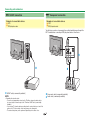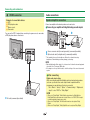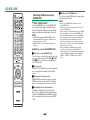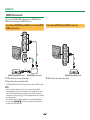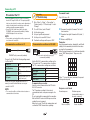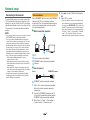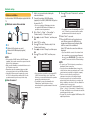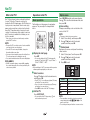
1
MODEL LC-70LE835E LC-70LE835RU LC-70LE836E LC-70LE836S OPERATION MANUAL LCD COLOUR TELEVISION CE Statement: Hereby, SHARP Electronics (Europe) GmbH declares that the wireless LAN USB adapter (WN8522D 7-JU) is in compliance with the essential requirements and other relevant provisions of Directive 1999/5/EC. The declaration of conformity may be consulted at: http://www.sharp.de/doc/ WN8522D_7.pdf. NOTE The wireless LAN USB adapter is designed for indoor use only. ASA [ ENGLISH ] Introduction Dear SHARP customer Thank you for your purchase of the SHARP LCD colour TV product. To ensure safety and many years of trouble-free operation of your product, please read Important safety precautions carefully before using this product. Contents Introduction............................................................. 1 Dear SHARP customer ....................................... 1 Contents ............................................................. 1 Important safety precautions ............................. 2 Supplied accessories ......................................... 4 Optional accessories .......................................... 4 Preparation ............................................................. 5 Attaching the stand unit ..................................... 5 Using the remote control unit ............................. 6 Part names and functions...................................... 7 TV (front/side view) ............................................. 7 TV (rear view) ...................................................... 7 Remote control unit ............................................ 8 Quick guide ............................................................. 9 Operation overview ............................................ 9 Inserting the CA card into the CI module ......... 11 Using the Menu screen .................................... 12 Initial auto installation .......................................... 14 Initial auto installation ....................................... 14 Watching TV .......................................................... 19 Daily operation ................................................. 19 EPG .................................................................. 21 Teletext ............................................................. 23 Connecting external devices ............................... 24 Introduction to connections ............................. 24 Video connections ............................................ 25 Audio connections ........................................... 27 AQUOS LINK ......................................................... 28 Controlling HDMI devices using AQUOS LINK ... 28 AQUOS LINK connection ................................. 29 AQUOS LINK setup .......................................... 30 Operating an AQUOS LINK device .................. 30 Basic adjustment .................................................. 32 Picture settings................................................. 32 Audio settings .................................................. 35 Power save settings ......................................... 36 View settings .................................................... 37 TV start-up time setting.................................... 40 Individual setting — PIN ................................... 40 Individual setting — Time ................................. 40 Individual setting — Language ......................... 41 Useful viewing functions...................................... 42 Optional features settings ................................ 42 Additional features ........................................... 46 Other useful features ........................................... 47 Using a USB device ......................................... 47 Time shift .......................................................... 48 USB media/Home network .............................. 51 USB device compatibility ................................. 54 Home network server compatibility ................. 54 Selecting the picture size for video mode ........ 54 Connecting a PC................................................... 55 Connecting a PC .............................................. 55 Displaying a PC image on the TV ..................... 55 PC control of the TV ......................................... 58 Network setup ...................................................... 60 Connecting to the network ............................... 60 Net TV .................................................................... 62 What is Net TV?................................................ 62 Operations in Net TV ........................................ 62 Disclaimers and software licences for Net TV ... 64 1 Enjoying 3D image viewing.................................. 65 Display format for 3D and 2D images .............. 66 Viewing 3D images ........................................... 67 Configuring the TV settings to enhance 3D image viewing ................................................ 68 Troubleshooting — 3D Images ......................... 70 Appendix ............................................................... 71 Troubleshooting ................................................ 71 Updating your TV via DVB-T/T2*1/C/S*2/S2*2 ... 72 Getting update information .............................. 72 Information on the software licence for this product ........................................................... 73 Updating your TV via USB/network ................. 73 Trademarks....................................................... 74 Specifications ................................................... 75 Specifications (Wireless LAN USB adapter) ..... 76 Environmental specifications ........................... 77 Mounting the TV on a wall................................ 77 Dimensional drawings ...................................... 79 EU Energy Label for Televisions ....................... 80 NOTE • The illustrations and the OSD in this operation manual are for explanation purposes and may vary slightly from the actual operations. Introduction Important safety precautions • Cleaning—Unplug the AC cord from the AC outlet before cleaning the product. Use a damp cloth to clean the product. Do not use liquid cleaners or aerosol cleaners. • Use a soft damp cloth to gently wipe the panel when it is dirty. To protect the panel, do not use a chemical cloth to clean it. Chemicals may cause damage or cracks in the cabinet of the TV. • Headphones—Do not set the volume at a high level. Hearing experts advise against extended listening at high volume levels. • Water and moisture—Do not use the product near water, such as bathtub, washbasin, kitchen sink, laundry tub, swimming pool and in a wet basement. • Do not place vases or any other water-filled containers on this product. The water may spill onto the product causing fire or electric shock. • There is power consumption always if main plug is connected. • Stand—Do not place the product on an unstable cart, stand, tripod or table. Doing so can cause the product to fall, resulting in serious personal injuries as well as damage to the product. Use only a cart, stand, tripod, bracket or table recommended by the manufacturer or sold with the product. When mounting the product on a wall, be sure to follow the manufacturer’s instructions. Use only the mounting hardware recommended by the manufacturer. • When relocating the product placed on a cart, it must be moved with utmost care. Sudden stops, excessive force and uneven floor surface can cause the product to fall from the cart. • Ventilation—The vents and other openings in the cabinet are designed for ventilation. Do not cover or block these vents and openings since insufficient ventilation can cause overheating and/or shorten the life of the product. Do not place the product on a bed, sofa, rug or other similar surface, since they can block ventilation openings. This product is not designed for built-in installation; do not place the product in an enclosed place such as a bookcase or rack, unless proper ventilation is provided or the manufacturer’s instructions are followed. • The LCD panel used in this product is made of glass. Therefore, it can break when the product is dropped or impact applied. If the LCD panel is broken, be careful not to be injured by broken glass. • Heat sources—Keep the product away from heat sources such as radiators, heaters, stoves and other heat-generating products (including amplifiers). • To prevent fire, never place any type of candle or naked flames on the top or near the TV set. • To prevent fire or shock hazard, do not place the AC cord under the TV set or other heavy items. • Do not display a still picture for a long time, as this could cause an afterimage to remain. • Servicing—Do not attempt to service the product yourself. Removing covers can expose you to high voltage and other dangerous conditions. Request a qualified person to perform servicing. The LCD panel is a very high technology product, giving you fine picture details. Due to the very large number of pixels, occasionally a few non-active pixels may appear on the screen as a fixed point of blue, green, red or yellow. This is within product specifications and does not constitute a fault. Precautions when transporting the TV When transporting the TV, never carry it by putting pressure onto the display. Be sure to always carry the TV by two people holding it with two hands—one hand on each side of the TV. Caring for the cabinet • Use a soft cloth (cotton, flannel, etc.) and gently wipe the surface of the cabinet. • Using a chemical cloth (wet/dry sheet type cloth, etc.) may deform the components of the main unit cabinet or cause cracking. • Wiping with a hard cloth or using strong force may scratch the surface of the cabinet. • If the cabinet is very dirty, wipe with a soft cloth (cotton, flannel, etc.) soaked in neutral detergent diluted with water and thoroughly wrung out, and then wipe with a soft dry cloth. • Avoid using benzene, thinner, and other solvents, as these may deform the cabinet and cause the paint to peel off. • Do not apply insecticides or other volatile liquids. Also, do not allow the cabinet to remain in contact with rubber or vinyl products for a long period of time. Plasticizers inside the plastic may cause the cabinet to deform and cause the paint to peel off. 2 Introduction Caring for the front panel • Gently wipe the surface of the front panel with a soft cloth (cotton, flannel, etc.). To protect the front panel, do not use a dirty cloth, liquid cleaners, or a chemical cloth (wet/dry sheet type cloth, etc.). This may damage the surface of the front panel. • Wiping with a hard cloth or using strong force may scratch the surface of the front panel. • Use a soft damp cloth to gently wipe the front panel when it is really dirty (It may scratch the surface of the front panel when wiped strongly). • If the front panel is dusty, use an anti-static brush, which is commercially available, to clean it. WARNING To prevent the spread of fire, keep candles or other open flames away from this product at all times. 3D glasses (AN-3DG20, sold separately) Prevention of accidental ingestion • Keep the accessory out of the reach of small children. Small children can accidentally swallow these parts. —If a child accidentally swallows any of these parts, seek immediate medical attention. Do not disassemble • Do not disassemble or modify the 3D glasses. Handling the 3D glasses • Do not drop, exert pressure on, or step on the 3D glasses. Doing so may damage the glass section, which may result in injury. • Be careful not to trap your finger in the hinge section of the 3D glasses. Doing so may result in injury. —Pay special attention when children are using this product. Using the 3D glasses • The 3D glasses vision should be limited. Security advisory establishes a maximum of 3 hours visualization, and in any case no more than one show length, break included. • Use the 3D glasses only for the specified purpose. • Do not move around while wearing the 3D glasses. The surrounding area appears dark, which may result in falling or other accidents that may cause injury. Caring for the 3D glasses • Use only the cloth provided with the 3D glasses to clean the lenses. Remove dust and soil from the cloth. Any dust or other soiling on the cloth may result in scratches on the product. Do not use solvents such as benzene or thinners as doing so may cause the coating to peel off. • When cleaning the 3D glasses, take care not to allow water or other fluids to come into contact with the glasses. • Always store the 3D glasses in the case provided when not in use. • When storing the 3D glasses, avoid very humid or hot locations. Viewing 3D images • If you experience dizziness, nausea, or other discomfort while viewing 3D images, discontinue use and rest your eyes. • Do not use the 3D glasses if they are cracked or broken. Keep away from heat • Do not place the 3D glasses in a fire, near heat or in an area with high humidity. This product may cause a fire or injury from ignition or explosion of the built-in lithium ion polymer rechargeable battery. Caution regarding rechargeable battery • Use the supplied USB cable to connect to a USB terminal of a 3D compatible SHARP TV when recharging. Recharging using other devices may lead to battery leakage, heat generation or explosion. Caution regarding the power supply • Use the supplied USB cable to connect to a USB terminal of a 3D compatible SHARP TV for supplying power. Supplying power using other devices may lead to heat generation or explosion. • During a thunderstorm, to avoid getting an electric shock, do not use 3D glasses that are power-supplied via USB, and unplug the USB cable from the USB terminal on the TV and the USB terminal on the 3D glasses. 3 Introduction Supplied accessories Remote control unit ( x 1) Optional accessories LR03 (“AAA” size alkaline) battery ( x 2) The listed optional accessories are available for this LCD colour TV. Please purchase them at your nearest shop. • Additional optional accessories may be available in the near future. When purchasing, please read the newest catalogue for compatibility and check the availability. No. Pages 6 and 8 Page 6 Stand unit ( x 1) Wireless LAN USB adapter (WN8522D 7-JU) ( x 1) Page 5 Page 61 Initial setup guide (printed document) USB memory (operation manual) Important safety precautions (printed document) 4 Part name Part number 1 Wall mount bracket AN-52AG4 2 3D glasses AN-3DG20 Notes The centre of the TV screen is 8 mm below the mark “c” on the wall bracket. Refer to the operation manual of the 3D glasses for details regarding usage. Preparation Attaching the stand unit • Before attaching (or detaching) the stand, unplug the AC cord. • Before performing work, spread cushioning over the surface on which you will be laying the TV. This will prevent it from being damaged. CAUTION • Attach the stand in the correct direction. • Be sure to follow the instructions. Incorrect installation of the stand may result in the TV falling over. 3 Insert the stand into the openings on the bottom of the TV (hold the stand so it will not drop from the edge of the base area). • Make sure that the stand is firmly inserted into the TV. Improper installation may result in tilting of the TV set. Soft cushion 1 Confirm that there are twelve screws (eight long screws and four short screws) supplied with the stand unit. 2 1 Set the supporting post for the stand unit onto the polystyrene foam. 2 Attach the stand base to the supporting post. 3 Insert and tighten the eight screws into the eight holes on the bottom of the stand base. 4 Insert and tighten the four screws into the four holes on the rear of the TV. • Hold the stand unit securely with one hand, and then tighten the screws. Stand base Long screws Short screws TV front Supporting post 5 NOTE • To detach the stand unit, perform the steps in reverse order. • A screwdriver is not supplied with this product. • In the installation procedure, be careful not to catch your fingers between the TV set and the floor. Preparation Using the remote control unit Inserting the batteries Before using the TV for the first time, insert the two supplied LR03 (“AAA” size alkaline) batteries. When the batteries become depleted and the remote control unit fails to operate, replace the batteries with new LR03 (“AAA” size alkaline) batteries. Angle of the remote control unit Use the remote control unit by pointing it towards the remote control sensor. Objects between the remote control unit and sensor may prevent proper operation. 1 Open the battery cover. 5m Remote control sensor 2 Insert the two supplied LR03 (“AAA” size alkaline) batteries. • Place batteries with their terminals corresponding to the (e) and (f) indications in the battery compartment. 3 Close the battery cover. Cautions regarding the remote control unit CAUTION Improper use of batteries can result in chemical leakage or explosion. Be sure to follow the instructions below. • Do not mix batteries of different types. Different types of batteries have different characteristics. • Do not mix old and new batteries. Mixing old and new batteries can shorten the life of new batteries or cause chemical leakage in old batteries. • Remove batteries as soon as they have worn out. Chemicals that leak from batteries can cause a rash. If you find any chemical leakage, wipe thoroughly with a cloth. • The batteries supplied with this product may have a shorter life expectancy due to storage conditions. • If you will not be using the remote control unit for an extended period of time, remove the batteries from it. • When replacing the batteries, use alkaline batteries instead of zinc-carbon ones. • Do not expose the remote control unit to shock. In addition, do not expose the remote control unit to liquids, and do not place in an area with high humidity. • Do not install or place the remote control unit under direct sunlight. The heat may cause deformation of the unit. • The remote control unit may not work properly if the remote control sensor of the TV is under direct sunlight or strong lighting. In such cases, change the angle of the lighting or the TV, or operate the remote control unit closer to the remote control sensor. Note on disposing batteries The batteries provided contain no harmful materials such as cadmium, lead or mercury. Regulations concerning used batteries stipulate that batteries may no longer be thrown out with the household rubbish. Deposit any used batteries free of charge into the designated collection containers set up at commercial businesses. 6 Part names and functions TV (front/side view) TV (rear view) — continued SD CARD (VIDEO STORE) slot Illumination LED*1 OUTPUT (Headphones/ AUDIO (L/R)) terminal*4 USB 1 port HDMI 1 (HDMI/ARC) terminal OPC sensor (Page 32) 3D infrared emitter*2 Remote control sensor (Page 6) I J HDMI 2 (HDMI) terminal 3D mode: Blue illumination 2D mode: White illumination This panel emits infrared signal towards the 3D glasses you wear when viewing 3D images. Do not place anything between the 3D infrared emitter on the TV and the infrared receiver on the 3D glasses. Refer to page 67 for details. RS-232C terminal PC terminal TV (rear view) HDMI 3 (HDMI) terminal HDMI 4 (HDMI) terminal EXT 1 (RGB) terminal EXT 2 (VIDEO/AUDIO (L/R)) terminal C.I. (COMMON INTERFACE) slot EXT 3 (Component/ AUDIO (L/R)) terminal USB 3 (WIRELESS LAN) port USB 2 (HDD) port ETHERNET (10/100) terminal Satellite antenna terminal (835 series only) K HDMI 2/PC AUDIO (L/R) jack*3 DIGITAL AUDIO OUTPUT terminal Antenna terminal The HDMI 2 and PC terminals can both use the same audio input terminal (HDMI 2/PC AUDIO (L/R)). However, the proper item must be selected in the “Audio select” menu (refer to page 43 for details). L When the headphone is connected to the OUTPUT terminal, the audio can be output from the speakers (Page 44). WARNING • Excessive sound pressure from earphones and headphones can cause hearing loss. • Do not set the volume at a high level. Hearing experts advise against extended listening at high volume levels. Important information: Satellite services are only available for the 835 model series. 7 Part names and functions Remote control unit 1 2 3 15 16 4 5 6 7 17 8 18 9 10 11 19 20 12 21 13 14 22 23 24 1 >a (Standby/On) (Page 19) 2 ATV Access conventional analogue TV mode. DTV Access digital TV mode. SAT Access satellite mode. RADIO DTV/SAT: Switch between radio and data mode. • When only data broadcasting (no radio broadcasting) is transmitted by DVB, the radio broadcasting will be skipped. 3 AQUOS LINK buttons (Pages 28 and 30) 4 CONTROL (Pages 48, 49, 53 and 62) Display a panel to operate some functions on the screen. NET: “NET MENU” screen on/off. 5 TIME SHIFT (READY/!/F/$) (Pages 48 and 49) Temporarily record a programme you are watching. 6 Numeric buttons 0_9 Set the channel. Enter desired numbers. Set the page in teletext mode. • When the five Nordic countries (Sweden, Norway, Finland, Denmark or Iceland) are selected in the country setting from initial auto installation (Page 14), DTV services are four digits. When another country is selected, DTV services are three digits. 7 A (Flashback) Return to the previously selected channel or external input. 8 7 (Sound mode) (Page 20) Select a sound multiplex mode. f (Wide mode) (Pages 42, 54 and 55) Select a wide mode. 9 e (Mute) TV sound on/off. 0 i+/- (Volume) Increase/decrease TV volume. Q@ “Menu” screen on/off. W 3D (Pages 67 and 68) Select between 3D and 2D image viewing. E a/b/c/d (Cursor) Select a desired item. ; Execute a command. ATV/DTV/SAT: Display “CH list” when no other “Menu” screen is running. R> ATV/DTV/SAT: Exit the “Menu” screen. NET: Return to the start page. T NET Access Net TV. Y p (Display information) (Page 20) Display the station information (channel number, signal, etc.) on the screen. P. INFO Display programme information transmitted through digital video broadcasting (DTV/SAT only). U b (INPUT) (Page 19) Select an input source. I # (Page 32) Select audio/video settings. ECO (Standard/Advanced/Off) (Page 36) Select “Energy save” setting. O m (Teletext) (Page 23) ATV: Display analogue teletext. DTV/SAT: Select MHEG-5 or teletext for DTV/SAT. 8 P :r/s ATV/DTV/SAT: Select the TV channel. NET: Scrolls pages up/down. A EPG (Pages 21_23) DTV/SAT: Display the EPG screen. S6 (Return) ATV/DTV/SAT: Return to the previous “Menu” screen. NET: Return to the previous page (This may not function for some services). D Buttons for useful operations [ (Subtitle) (Pages 23 and 41) Switch subtitle languages on/off. k (Reveal hidden teletext) (Page 23) 1 (Subpage) (Page 23) 3 (Freeze/Hold) (Page 23) Freeze a moving image on the screen. Teletext: Stop updating teletext pages automatically or release the hold mode. FR/G/Y/B (Colour) buttons The coloured buttons are correspondingly used to select the coloured items on the screen (e.g., EPG, MHEG-5, teletext). Important information: Satellite services are only available for the 835 model series. Quick guide Operation overview Follow the steps below one by one when using the TV. Some steps may not be necessary depending on your TV installation and connection. 1. Preparation — Connecting the TV 2. Preparation — Setting the TV p n w Language setting o w Home/Store setting q • Place the TV close to the AC outlet, and keep the power plug within reach. • Product shape varies in some countries. Press < on the TV (Page 19). Run the initial auto installation (Page 14). w Country setting Plug the standard DIN45325 plug (IEC 169-2) 75 q coaxial cable. Connect the satellite antenna cable. Insert a CA card into the CI slot to watch scrambled broadcasts (Page 11). Plug in the AC cord. w PIN setting w Channel search setting • Digital search − Terrestrial − Cable • Analogue search • Satellite search *Important information: Satellite services are only available for the 835 model series. Start searching channels 9 Congratulations! Now you can watch TV. • If necessary, adjust the antenna to attain maximum signal reception (Page 18). Quick guide 3. Watch TV — Daily operation 4. Watch TV — Advanced features 5. Enjoy additional features 1 Turn on/off the TV 1 Use Time shift function 1 Enjoy internet service* with the TV (Page 19) (Pages 48_50) (Pages 60_64) * The following service is now available: • You can turn on/off the power using both the remote control and the TV. • Net TV (Pages 62–63) 2 Connect external devices 2 Switch between digital, satellite and Connection overview (Pages 24_29) analogue broadcast (Page 19) • Be sure to turn off the TV and any devices before making any connections. Switch input sources (Page 19) 3 Change channels 3 Enjoy photos, music and video stored (Page 19) • You can also select a channel from “Menu” > “CH list”. in USB media/Home network (Pages 51_54) 4 Display a PC image on the TV screen 4 Select a programme using EPG (Pages 55_59) (Pages 21_23) 5 Watch 3D images (Pages 65_70) 2 Adjust TV settings (Pages 32_46) Menu • Some items cannot be selected depending on signal types, optional settings or connected devices. CH list :Enter Setup :Back View setting Auto installation Channel settings 10 • Some menu items are greyed out in 3D mode. This is not a malfunction. Quick guide Inserting the CA card into the CI module In order to receive coded digital stations, a common interface module (CI module) and a CA card must be inserted in the CI slot of the TV. 1 Carefully insert the CI module in the CI slot with the contact side forward. 2 The logo on the CI module must be facing outward from the rear of the TV. Checking CI module information Go to “Menu” > “Setup” > “Option” > “CI menu”. NOTE • It takes a few minutes to certify the licence key when you insert a CA card into the CI+ compatible CI module for the first time. This process may fail when there is no antenna input or you have never run “Auto installation”. • The CI+ compatible CI module sometimes upgrades its firmware. You may not receive any TV images before upgrading. You can only use the power button during upgrading. • Copy protected content may not be output or may be output with a copy control signal. The protect icon* is displayed when P.INFO is pressed while watching copy protected contents. * Protect icon: X • If the TV displays an update confirmation message for the CA card while receiving CI+ compatible broadcasts, follow the screen prompts. • Make sure that the CI module is properly inserted. • This menu is only available for digital stations. • The content of this menu depends on the provider of the CI module. Module General information on CI module displays. Menu Adjustment parameters of each CA card displays. Enquiry You can input numerical values such as passwords here. 11 Quick guide Using the Menu screen You need to call up the OSD to perform settings for the TV. The OSD for the settings is called “Menu”. The “Menu” enables various settings and adjustments. LCFONT Tips: Selecting in the Menu This product is embedded with LC Font technology, which was developed by SHARP Corporation for clearly displaying easy-to-read characters on LCD screens. Basic operation Press c/d to select the desired menu, and then press ;. Press 6 to return to the previous menu category. Press c/d to select the desired submenu, and then press ;. Press a/b to select the item you want to select/adjust, and then press ;. Menu 1 Display the Menu screen Picture AV mode 2 Select an item OPC The “Menu” is classified by setting categories for improving TV viewing. [Off] Yes Backlight See the right column for details on the operations in the “Menu” screen. 3D brightness boost [Middle] The operation will exit the “Menu” screen if you press > before it is completed. In this manual, the following expression is often used in order to simplify instructions. • “Menu” options differ in the selected input modes, but the operating procedures are the same. • Items with 4 cannot be selected for various reasons. • Some items cannot be selected depending on signal types, optional settings or connected devices. • Go to “Menu” > “Setup” > ... This indicates how to navigate through the menu screen using the a/b/ c/d and ; buttons. About the guide display :Select Setup :Enter NOTE Regarding the instructions in the manual NOTE CH list No • Refer to the guide display below the menu bar to see when to press the ; button. 3 Exit the Menu screen • The bar above is an operational guide for the remote control unit. The bar will change in accordance with each menu setting screen. Backlight :Back Press @ and the “Menu” screen displays. The guide display below the menu bar shows operations for the OSD. EXAMPLE Setup CH list :Enter Selecting options Press a/b or c/d to configure the control for improving TV viewing, and then press ;. :Back 12 Quick guide Using Software keyboard Use the software keyboard when you need to input text. 6 Char.Set 1 1 2 3 4 5 8 7 2 Caps 3 Done 4 Cancel 5 Cursor Left Char. Set Changes character set into the alphabet, numbers, symbols, etc. Caps Changes characters to capital/lower case. Done Confirm the entry. Cancel Abort input and close the software keyboard. R/G/Y/B (Colour) buttons Selects the coloured items on the screen. 9 SP Caps Char.Set 6 Input cursor Press c/d to move the cursor when highlighted. 7 Input field The text you enter is displayed as you type it in. 8 Character Input characters by using these buttons. 9 ? Put a line break. Clear 10 Delete 11 Cursor Right 0 Clear Erases the character string. • When the cursor is somewhere in a line: the character string to the right of the cursor will be erased. • When the cursor is at the right end of a line: the entire line will be erased. Q Delete If the cursor is at the right end of a line, this erases text one character at a time. • You can also delete text by pressing 6 on the remote control unit. 13 Initial auto installation 4 Setting the country. Initial auto installation When the TV is powered on for the first time after purchase, the initial auto installation wizard appears. Follow the menus and make the necessary settings one after another. Confirm the following before turning on the power E Is the antenna cable connected? E Is the AC cord plugged in? Satellite services are only available for the 835 model series. • Some functions may not display or be selectable depending on the country setting or cable provider selection. 5 Setting the PIN. 1 Press c/d to select “Yes”, and then press ;. 2 Enter a four-digit number as a PIN using the 0–9 buttons. 3 Enter the same four-digit number as in step 1 Press < on the TV. • The initial auto installation wizard appears. 2 Setting the OSD language. Press a/b/c/d to select the desired language, and then press ;. 3 Selecting the location of the TV. STORE Press c/d to select where you will use this TV, and then press ;. • The confirmation screen pops up only when selecting “STORE”. Press c/d to select “Yes” or “No”. • HOME: “STANDARD” will be the default value for the “AV mode” setting. • STORE: “DYNAMIC (Fixed)” will be the default value for the “AV mode” setting. If the “AV mode” is changed, the TV will automatically switch back to “DYNAMIC (Fixed)” when there is no operation using the TV or remote control unit for 30 minutes. • STORE: A demonstration image will be displayed after initial auto installation is completed. If you have chosen “STORE” by mistake, go to “Menu” > “Setup” > “View setting” > “Reset” > select “HOME” again. 6 Starting channel search. Digital search Analogue search NOTE • When “No” is selected, the PIN code setting is skipped. Important information: HOME Press a/b/c/d to select your country or area, and then press ;. • This setting screen only appears during the initial auto installation. 2 to confirm. 4 Press ;. NOTE • When “France” is selected in the country setting, the PIN code setting cannot be skipped. • “0000” cannot be set as the PIN code. • When the PIN code setting is skipped, the default PIN code (“1234”) will automatically be set. • To change the PIN setting, refer to Individual setting – PIN (Page 40). To reset the PIN setting (PIN input will no longer be needed), refer to Reset the PIN (Page 71). 14 Satellite search Press a/b to select “Digital search”, “Analogue search” or “Satellite search”, and then press ;. • (835 series only) After performing “Digital search” or “Analogue search”, the screen switches to the “Satellite search” setting. You should then execute “Yes” if you want to search for satellite channels. • To watch both digital broadcasts and analogue broadcasts, you should perform “Digital search” or “Analogue search” from “Auto installation” under the “Setup” menu (Page 37). • When you select “Satellite search”, only satellite broadcasts will be searched. • If you want to search for more broadcasts, execute “Additional search” from the “Programme setup” menu (Pages 37_39). NOTE • If you turn off the power on the TV while performing a channel search, the initial auto installation wizard will not appear. The auto installation function allows you to execute the installation again from “Menu” > “Setup” > “View setting” (Page 37). • The initial auto installation wizard will abort if you leave the TV unattended for 30 minutes before searching for channels. • When “Italy” or “France” is selected in the country setting, the default age restriction value is set to 18. Initial auto installation 3 Press a/b to select “Search start”, and then Digital broadcast setting Press c/d to select “Terrestrial” or “Cable”, and then press ;. 4 5 Terrestrial E Cable Searching for terrestrial broadcasts The TV searches for, sorts and stores all the receivable TV stations according to their settings and the connected antenna. • To abort the initial auto installation in progress, press 6. press ;. Press c/d to select “Yes” to start searching cable broadcasts, and then press ;. The TV searches for, sorts and stores all the receivable TV stations according to their settings and the connected antenna. • A region or service selection screen may display depending on the country settings or cable providers selections. Follow the screen prompts to make the selections. After searching for cable channels, the screen switches to the “Satellite search” setting (Page 16). Scrambled stations To change each item to the appropriate settings: 2 the menu, and then press ;. Press a/b/c/d or 0_9 to select or input the appropriate item/ value, and then press ;. Description Specifies if you need to add payTV services. Specifies how you search for channels.*2 Scrambled stations Search method [Yes] [Channel] Start frequency Network ID Network ID Symbol rate 1/ Symbol rate 2*1 Selectable items Yes, No Channel, Frequency, Quick L Set up “Symbol rate 2” if the cable provider uses several symbol rates. Details about the “Search method” items are as follows: _Channel: Extracts all information from a channel (quick, but needs corresponding TV stations). _Frequency: Checks every frequency in range (slow). _Quick: All services are searched by one frequency. This menu works only when your cable provider provides the frequency and the network ID (e.g., Homing channel). When “Quick” is selected, “Scrambled stations” is automatically set to “No”, and “None” for the “Network ID” menu cannot be selected. Set this to register only the specified network ID without registering any special services. The symbol rates are specified by the cable provider. Analogue broadcast setting The TV searches for, sorts and stores all the receivable TV stations according to their settings and the connected antenna. • To abort the initial auto installation in progress, press 6. From 47.0_858.0 MHz Start frequency After searching for terrestrial channels, the screen switches to the “Satellite search” setting (Page 16). E Searching for cable broadcasts 1 Press a/b to select K 835 series only Search method 835 series only J • To abort the initial auto installation in progress, press 6. Menu NOTE I Specifies the network.*3 Input the value received for CATV.*4 None, 0_65535 1000_9000 16, 32, 64, 128, 256 None, 16, 32, 64, 128, 256 QAM modulation 1 QAM modulation 2 [None] Symbol rate 1 Symbol rate 2 QAM modulation 1 QAM modulation 2 Reset Search start 15 835 series only After searching for analogue channels, the screen switches to the “Satellite search” setting (Page 16). Initial auto installation Searching for satellite broadcasts (835 series only) 1 When you change the antenna connection setting: Press c/d to select “Change setting”, and then press ;. Press c/d to select “Yes”, and then press ;. Yes 3 Press a/b/c/d to select your favorite satellite, and then press ;. • You cannot select “Next” unless you set the satellite broadcast in step 3. • The antenna connection setting screen is displayed. Atlantic Bird 1 No Single satellite Euro Bird 1 2 satellites on 22kHz switchbox • If you do not perform “Satellite search” setting, select “No”, and then press ;. • The current DVB-S/S2 setting screen is displayed. 2 satellites on toneburst switchbox Max. 4 satellites on DiSEqC multiswitch Communal satellite system Satellite System Max. 4 satellites on DiSEqC multiswitch LNB Frequency Satellite Low High Next Change setting SAT1 [ASTRA 1] • You can select the antenna connection method from the five types. Consult your dealers before using a method other than “Single satellite”. “Single satellite” setting 1 Press a/b to select “Single satellite”, and then 2 • You must first complete “Change setting” before moving to the “Next” setting. ;. NOTE E other 4 Press a/b to select “Next”, and then press press ;. Press a/b to select “SAT1 [None]” to display the satellite broadcasts that the TV can receive, and then press ;. SAT1 [None] Next Next 5 Press c/d to select “Yes (0/22kHz)” or “No” to set the LNB frequency, and then press ;. Yes (0/22kHz) 6 Press a/b to select the item and press c/d to adjust 9,000 MHz to 12,000 MHz to the appropriate value. EXAMPLE SAT1 low SAT1 high OK 16 No Initial auto installation 7 Press a/b to select “OK”, and then press ;. After completing this setting, the screen switches to the DVB-S/S2 setting screen shown in the left column on page 16. NOTE • Follow the instructions on the screen for “2 satellites on 22kHz switchbox”, “2 satellites on toneburst switchbox”, “Max. 4 satellites on DiSEqC multiswitch” and “Communal satellite system” settings. • To set multiple satellite channels, go to “Max. 4 satellites on DiSEqC multiswitch”. • Follow the procedure below when the supply of power is needed for a satellite antenna: Go to “Menu” > “Setup” > “View setting” > “Channel settings” > “Antenna setup-DIGITAL” > “Satellite setup” > “Change setting” > “Communal satellite system”. 2 When starting the satellite search after setting the scrambled stations: Press c/d to select “Next” on the DVB-S/S2 setting screen shown in the left column on page 16, and then press ;. E Change setting: 1 Press c/d to select “Change setting”, and then press ;. • The setting screen of “Scrambled stations” and “Symbol rate” is displayed. Scrambled stations NOTE • When you perform the initial auto installation, “Next” cannot be selected. Completing “Change setting” enables you to select “Next”. [No] SAT1-Symbol rate 1 SAT1-Symbol rate 2 SAT2-Symbol rate 1 Yes No Scrambled stations: No Search start Satellite Symbol rate 1 Symbol rate 2 2 Press a/b to select “Scrambled stations”, and then press ;. • Scrambled stations: Specifies if you need to add pay-TV services. other Start search E Change setting to modify, and then press ;. Start search: DVB-S/S2 channel searching. 1 Press c/d to select “Start search”, and then 2 3 Press c/d to select “Yes”, and then press ;. 4 Press a/b to select the symbol rate you want press ;. The TV searches for and stores all the receivable TV stations according to their settings and the connected antenna. • Select “Yes” to sort the search result in alphabetical order. • To abort the initial auto installation in progress, press 6. 17 • Symbol rate: You need to set each symbol rate of all the satellite broadcasts that the TV can receive (eight is the maximum number of symbol rates that can be displayed). 5 Press c/d to select “Search start”, and then press ;. 6 The TV searches for and stores all the receivable TV stations according to their settings and the connected antenna. • Select “Yes” to sort the search result in alphabetical order. • To abort the initial auto installation in progress, press 6. Initial auto installation Checking signal strength and channel strength (DVB-T/T2*1/C/S*2/ S2*2) If you install a DVB-T/T2/C/S/S2 antenna for the first time or relocate it, you should adjust the alignment of the antenna to receive a good reception while checking the antenna setup screen. I J 836 series only 835 series only E 4 Press a/b to select “Channel strength”, and then press ;. • You can input a specified frequency band using the 0_9 numeric buttons. Channel strength of DVB-T/T2 Supply voltage Signal strength Channel strength 1 Go to “Menu” > “Setup” > “View setting” > 2 “Channel settings” > “Antenna setup-DIGITAL”. Press a/b to select “Digital setup” or “Satellite setup”, and then press ;. E Checking signal strength 3 Press a/b to select “Signal strength”, and then press ;. Signal strength for DVB-T/T2/C Frequency MHz CH No. Signal strength Current Current Max. Max. Channel strength of DVB-C Supply voltage Signal strength Channel strength Frequency MHz Symbol rate QAM modulation Signal strength Signal strength CH No. Signal strength Current Current Current Max. Quality Max. Current Quality Max. Channel strength Signal strength Frequency MHz Symbol rate Band Channel strength Max. Channel strength of DVB-S/S2 Signal strength Signal strength for DVB-S/S2 Vert/Low Signal strength Signal strength Current Current Max. Quality Current Max. Quality Current Max. 18 Max. maximum possible values for “Signal strength” and “Quality” are obtained. NOTE • The values of “Signal strength” and “Quality” indicate when to check the appropriate alignment of the antenna. Supplying power to the antenna You must supply power to the antenna in order to receive digitally/terrestrially broadcast stations after connecting the antenna cable to the antenna terminal on the rear of the TV. 1 Go to “Menu” > “Setup” > “View setting” > “Channel settings” > “Antenna setup-DIGITAL” > “Supply voltage”. 2 Press c/d to select “On”, and then press ;. Quality Supply voltage Channel strength 5 Position and align the antenna so that the Checking channel strength Watching TV Daily operation Turning on/standby the power Turning on the power Press < on the TV or >a on the remote control unit. Switching between digital, satellite* and analogue broadcasts Watching digital broadcasts Watching analogue broadcasts Selecting an external video source Once the connection is made, press b to display the “INPUT” screen, and then press b or a/b to switch over to the appropriate external source with ;. CH list Watching satellite broadcasts INPUT TV Switchable Standby mode Press < on the TV or TV a on the remote control unit when TV is on. • The TV enters standby mode and the image on the screen disappears. • Weak electric power is still consumed even when the TV is turned standby mode. • To completely turn off the power to the TV, unplug the AC cord from the AC outlet. However, do not unplug the AC cord unless otherwise instructed. *Important information: Satellite services are only available for the 835 model series. NOTE • If multiple satellite services are set, each time you press the SAT button the channel switches as follows. SAT1 SAT2 SAT4 SAT3 Changing channels With :r/s With 0_9 NOTE • If you are not going to use this TV for a long period of time, be sure to remove the AC cord from the AC outlet. 19 NOTE • You can also select an external video source from “Menu” > “CH list” > “INPUT”. • Only HDMI inputs which are not set for “Input skip” (Page 43) and properly connected inputs can be selected. Watching TV Selecting a sound mode E DTV/SAT mode If multi sound modes are received, each time you press 7 the mode switches as follows. Audio (ENG) L/R STEREO L R Audio (ENG) CH A CH B Audio (ENG) LR CH A CH AB A2 TV broadcasts selection Signal Selectable items Stereo STEREO, MONO Bilingual CH A, CH B, CH AB Monaural MONO NOTE • When no signal is input, the sound mode will display “MONO”. Channel display You can display the channel information by pressing p on the remote control unit. MONO DTV mode ATV mode Press c/d to select L or R sound when the STEREO or DUAL MONO screen is displayed. Audio (ENG) L/R L Audio (ENG) STEREO Video Subtitle Off >> New information STEREO R LR NOTE I • The sound mode screen disappears in six seconds. • Selectable items vary depending on the received broadcasts. • When the “Audio description setting” menu is set to “On”, the audio description sound is selected depending on the main audio. E ATV mode Each time you press 7, the mode switches as shown in the following tables. NICAM TV broadcasts selection Signal Selectable items Stereo NICAM STEREO, MONO NICAM CH A, NICAM CH B, NICAM CH AB, Bilingual MONO Monaural NICAM MONO, MONO Auto MONO Subtitle Four digit numbers (e.g., 0001) are displayed after selecting the five Nordic countries in the country setting. NOTE • Skip step 1 if receiving DTV/SAT broadcasts. 1 Select a TV channel (the time information is automatically captured). 2 Press p. The channel display will appear on the TV. 3 Press p again within the several seconds 4 that the channel display is on the screen. Time information will be shown in the lower-right corner of the screen for several seconds. Even when you change the TV channel, you can display the time information with steps 2 and 3 above. NOTE • If acquired successfully, the time information will appear on the screen by pressing @. Operation without a remote control unit You can operate the menu settings using the TV control buttons. SAT mode Audio (ENG) STEREO Video Subtitle Off >> New information J K Satellite channels are displayed by four digit numbers (e.g., 0001). You can set four satellite stations to “SAT1”, “SAT2“, “SAT3“, “SAT4”. E Time display in channel information You can display the time information included in DTV, SAT and teletext broadcasts. 20 TV control buttons Remote control buttons @ @ # ; !r/s a/b Yk/l d/c Watching TV EPG Option EPG is a programme list that is displayed on the screen. With the EPG, you can check the schedule for DTV/SAT/RADIO/DATA, view detailed information about them and tune to an event currently on-air. Useful settings for using EPG View setting EPG If you want to use the EPG for digital stations, select “Yes”. The EPG data must be automatically captured while the TV is in standby mode. After setting to “Yes”, it may take some time to turn off the power using the remote control unit or the TV due to the data capture process. Go to “Menu” > “Setup” > “View setting” > “Individual setting” > “Standby search” > “EPG”. Option Display range setup The “Display range setup” allows you to select three types of time spans for display on the screen. Go to “Menu” > “Setup” > “Option” > “EPG setup” > “Display range setup”. Genre icon setup You can grey out or place a mark on desired genres and smoothly search for programmes you frequently watch. 1 Go to “Menu” > “Setup” > “Option” > “EPG setup” > “Genre icon setup”. 2 Press a/b to select the desired genre, and then press ;. E Genre icon list Icon Genre Icon Genre Movie/Drama Music/Ballet/Dance News/Current affairs Arts/Culture (without music) Social/Political issues/Economics Education/Science/ Factual topics Show/Game show Sports Children’s/Youth programmes Leisure hobbies 3 Press a/b to select a level to pick out or search for programmes you want to watch (“Standard”, “Light”, “Remark”). Item Displays six hours of programme information. Displays three hours of programme Mode 2 (Zoom) information. Mode 3 (Vertical Changes to the EPG display format angle) with a vertical time span. Mode 1 (Wide angle) 21 Watching TV Selecting a programme using EPG 4 Search a programme in a category 5 Search for a programme by date/time 1 Press G. 2 Press a/b to select the desired 1 Press Y. 2 Press c/d to select the desired The illustrations on this page are explained using three digit services. Display/Close the EPG screen Press EPG. AM Programme info. PM Search by genre Search by date Timer list 3 genre, and then press ;. Press a/b to select a programme you want to watch, and then press ;. time span, and then press ;. Today 0 AM - 6 AM Enter • Refer to page 21 for the genre setting. Movie/Drama Select Enter Back News/Current affairs Exit Show/Game show Sports Children’s/Youth programmes NOTE Music/Ballet/Dance • You can also display the EPG screen from “Menu” > “EPG” > “EPG”. Select a programme 1 Select the time span Press c/d to select the time span you want to search. NOTE 3 Check programme information 6 AM - 0 PM 0 PM - 6 PM Back to EPG Enter 6 PM - 0 AM +1 Week 3 Press a/b to select the desired programme, and then press ;. NOTE • You can also display this setting screen from “Menu” > “EPG” > “Search by date”. 6 Display the timer list for TV programmes • You can also display this setting screen from “Menu” > “EPG” > “Search by genre”. • Continue to press d to display programmes in the next time span. 2 Select the desired programme Press a/b to select the desired programme. • If a or b are displayed on the left of the services, continue to press a/b to display next or previous screen. Press B. • Refer to page 23 for the timer setup. 1 Press a/b/c/d to select the programme you want to check. 2 Press R, and then press ; to tune to the selected programme. 22 Watching TV Timer setup using EPG Teletext You can switch to a programme at a set time. 1 Press EPG. 2 Press a/b/c/d to select the programme you want to set, and then press ;. Programme info. Back to EPG Teletext broadcasts pages of information and entertainment to specially equipped TV. Your TV receives teletext signals broadcast by a TV network, and decodes them into graphical format for viewing. News, weather and sports information, stock exchange prices and programme previews are among the many services available. Turning teletext on/off Next Watch Colour (R/G/Y/B) What is teletext? No 1 Select a TV channel or external source providing k (Reveal hidden teletext) 3 (Freeze/ Hold) [ (Subtitle for teletext) a teletext programme. 2 Press m to display the teletext. 3 Press c/d to select “Watch”, and then press ;. • If you select “No”, the TV returns to the EPG screen. 4 Press c/d to select “Yes”, and then press ;. • The selected TV programme is marked with an icon. 5 Press ; to select “Back”. Cancelling the timer setup • Many stations use the TOP operating system, while some use FLOF (e.g., CNN). Your TV supports both these systems. The pages are divided into topic groups and topics. After switching on the teletext, up to 2,000 pages are stored for fast access. • If you select a programme with no teletext signal, “No Teletext available” displays. • The same message displays during other modes if no teletext signal is available. 1 Press EPG. 2 Press a/b/c/d to select the programme with 3 4 E timer setup, and then press ;. Press c/d to select “Cancel”, and then press ;. Press c/d to select “Yes”, and then press ;. Cancelling using B button on the remote control unit 1 Press EPG. 2 Press B to display the timer setup list. 3 Press a/b to select the programme you want 4 5 to cancel timer setup, and then press ;. Press c/d to select “Cancel”, and then press ;. Press c/d to select “Yes”, and then press ;. TELETEXT TELETEXT • Each time you press m, the screen switches as shown above. • Press m again to display the teletext on the right screen and the normal image on the left screen. ; Reveal or hide hidden information such as an answer to a quiz. Stop updating teletext pages automatically or release the hold mode. Display the subtitle or exit the subtitle screen. • Subtitles will not be displayed when the service does not contain subtitle information. Reveal or hide subpages. • Move to the previous subpage (R). • Move to the following subpage (G). • These two buttons are shown on the screen by the symbols “e” and “f”. Display the top menu. • The top menu will not be displayed when the service does not support top menus. MHEG-5 application (UK only) Some services bring you programmes with the MHEG application encoded, letting you experience DTV interactively. When provided, the MHEG-5 application will start when you press m. NOTE • MHEG may not be displayed properly in 3D mode. NOTE (836 series only) NOTE • Teletext will not work if the selected signal type is RGB (Page 44). • Teletext will not work in 3D mode. Buttons for teletext operations Buttons :r/s Numeric buttons 0_9 1 (Subpage) Select a group or block of pages displayed in the coloured brackets at the bottom of the screen by pressing the corresponding colour (R/G/Y/B) on the remote control unit. Description Increase or decrease the page number. Directly select any page from 100 to 899 by using the 0_9 numeric buttons. 23 • You can view some MHEG-5 content even if you do not perform “Network setup”. Furthermore, “Network setup” allows you to view additional content such as interactive content from “Menu” > “Setup” > “View setting” > “Network setup”. • You cannot view MHEG-5 content when MHEG5 content is not broadcast even if you perform the appropriate “Network setup”. Carefully check the broadcast programme. Connecting external devices Introduction to connections ø 3.5 mm stereo minijack cable The TV is equipped with the terminals as shown below. Find the cable corresponding the TV’s terminal and connect the device. E Before connecting ... HDMI device (Page 25) DVI/HDMI cable HDMI-certified cable • Be sure to turn off the TV and any devices before making any connections. • Firmly connect a cable to a terminal or terminals. • Carefully read the operation manual of each external device for possible connection types. This also helps you get the best possible audiovisual quality to maximise the potential of the TV and the connected device. HDMI-certified cable Game console or camcorder (Page 27) Connection method for other devices w PC AV cable Page 55 w USB device Component cable Page 47 Video recording device (Pages 26–27) w Internet Pages 60 and 61 Audio cable SCART cable Audio cable or Optical audio cable 24 Audio device (Page 27) Connecting external devices DVI/HDMI conversion Video connections Using a DVI/HDMI cable, the digital video signals of a DVD can also be played via the compatible HDMI connection. The sound must be fed in additionally. HDMI connection • When connecting a DVI/HDMI cable to the HDMI terminal, the image may not come in clearly. • Both HDMI and DVI use the same HDCP copy protection method. Example of connectable devices E DVD player/recorder E Blu-ray player/recorder E Game console E When using the HDMI 2 terminal You must set the audio signal input source depending on the type of HDMI cable connected (refer to page 43 for details). HDMI-certified cable 1 Press b to select “HDMI 2” from the “INPUT” menu, and then press ;. 2 Go to “Menu” > “Setup” > “Option” > “Terminal setting” > “Audio select” > select “HDMI (Digital)”. DVI/HDMI cable 1 Press b to select “HDMI 2” from the “INPUT” menu, and then press ;. 2 Go to “Menu” > “Setup” > “Option” > “Terminal setting” > “Audio select” > select “HDMI+Analog”. The HDMI connections permit digital video and audio transmission via a connection cable from a player/recorder. The digital picture and sound data are transmitted without data compression and therefore lose none of their quality. Analogue/digital conversion is no longer necessary in the connected devices, which also would result in quality losses. NOTE n o p • If a connected HDMI device is AQUOS LINK compatible, you can take advantage of versatile functions (Pages 28_31). • Video noise may occur depending on the type of HDMI cable used. Make sure to use a certified HDMI cable. • When playing the HDMI image, the best possible format for the picture will be detected and set automatically. • An ARC (Audio Return Channel) compatible audio receiver must be connected to the HDMI 1 terminal with an ARC-compatible cable. • All HDMI terminals support 3D image signals. Supported video signal 576i, 576p, 480i, 480p, 1080i, 720p, 1080p See page 57 for PC signal compatibility. Supported audio signal Linear PCM, sampling rate 32/44.1/48kHz. ø 3.5 mm stereo minijack cable (commercially available) DVI/HDMI cable (commercially available) HDMI-certified cable (commercially available) 25 Connecting external devices SCART connection Y Example of connectable devices PB (CB) PR (CR) Component connection Example of connectable devices E VCR E DVD player/recorder E VCR E DVD player/recorder You will enjoy accurate colour reproduction and high quality images through the EXT 3 terminal when connecting a DVD player/recorder or other device. o n SCART cable (commercially available) NOTE • Regarding the external output: − You can record programmes viewed on the TV with an external recording device by connecting the external output of the TV with an SCART cable (commercially available). − If you change TV channels during recording from the external devices or turn off the power on the TV, the recorded content may change or be interrupted. − The external output may not be performed depending on the status of use. n 26 Component cable (commercially available) Audio cable (commercially available) Connecting external devices Audio connections VIDEO connection Speaker/amplifier connection Example of connectable devices E E E E VCR DVD player/recorder Game console Camcorder Connect an amplifier with external speakers as shown below. E Connecting an amplifier with digital/analogue audio inputs n You can use the EXT 2 terminal when connecting to a game console, camcorder, a DVD player/recorder or other device. o Stereo conversion cable (for analogue audio) (commercially available) Optical audio cable (for digital audio) (commercially available) * This terminal is also used for headphones. Reduce the volume before using headphones. Overwhelming sound may damage your hearing. NOTE n • Optical digital audio will be output in 2-ch stereo when it is from the external equipment connected to the TV using an HDMI cable. • If the image is not in sync with the audio, check the settings of the connected surround system. E After connecting Digital audio output setting After connecting an amplifier with digital audio input and external speakers as shown, you should set an audio output format compatible with the programme you are watching or the device connected. Go to “Menu” > “Setup” > “Option” > “Terminal setting” > “Digital audio output” > select “PCM” or “Dolby Digital”. NOTE • When set to “Dolby Digital”, Dolby Digital is output when the Dolby Digital or Dolby Digital Plus audio formats are received. When set to “PCM”, PCM is output no matter what audio formats are received. • When set to “Dolby Digital”, HE-AAC audio formats can be output as Dolby Digital. • When set to “Dolby Digital”, Dolby Digital Plus can be output as Dolby Digital. AV cable (commercially available) 27 AQUOS LINK Controlling HDMI devices using AQUOS LINK E What is AQUOS LINK? Using the HDMI CEC protocol, with AQUOS LINK you can interactively operate compatible system devices (AV amplifier, DVD player/recorder, Blu-ray player/recorder) using a single remote control unit. NOTE • AQUOS LINK-compatible AQUOS AUDIO speaker system and AQUOS recorder are scheduled to be on sale after the release of this TV. • AQUOS LINK does not work while using time shift functions. E What you can do with AQUOS LINK w One touch recording (DTV/SAT only) You do not have to search for the remote control unit of your recording device. Press the REC E or REC STOP H buttons to start/stop recording what you see on the recorder. w One touch play When the TV is in standby mode, it will automatically turn on and play back the image from the HDMI source. w Single remote control operation AQUOS LINK automatically recognises connected HDMI devices and you can control the TV and the devices as if using a universal remote control unit. w Operating title list of external devices In addition to displaying the TV’s own timer list (Page 22), you can also call up the external player’s top menu or AQUOS BD player’s/AQUOS recorder’s title list provided that the devices support AQUOS LINK. 28 w Multiple control of HDMI devices You can select which HDMI device to operate using the “Link operation” menu. NOTE • When you use AQUOS LINK, make sure to use a certified HDMI cable. • Point the remote control unit toward the TV, not to the connected HDMI device. • Video noise may occur depending on the type of HDMI cable used. Make sure to use a certified HDMI cable. • Up to three HDMI recording devices, one AV amplifier and three players can be connected using this system. • These operations affect the HDMI device selected as the current external source. If the device does not operate, turn on the device and select the appropriate external source using b. • When you insert/remove HDMI cables or change connections, turn on all connected HDMI devices before turning on the TV. Confirm that picture and audio are correctly displayed/output by selecting “HDMI 1”, “HDMI 2”, “HDMI 3” or “HDMI 4” from the “INPUT” menu. AQUOS LINK AQUOS LINK connection First connect the AQUOS AUDIO speaker system or an AQUOS BD player/ AQUOS recorder that supports the HDMI CEC protocol. Connecting an AQUOS BD player/AQUOS recorder via the AQUOS AUDIO speaker system AQUOS BD player/AQUOS recorder Connecting an AQUOS BD player/AQUOS recorder only AQUOS AUDIO speaker system HDMI-certified cable (commercially available) Optical audio cable (commercially available) AQUOS BD player/AQUOS recorder * The ARC (Audio Return Channel) function works only when using the HDMI 1 terminal. NOTE • Refer to the operation manual of the device to be connected for further details. • After unplugging connection cables or changing the connection pattern, turn on the power of the TV after all relevant devices’ power have been turned on. Change the external input source by pressing b, select the appropriate external source and verify the audiovisual output. • The cables illustrated in the following explanation are commercially available items. • The four buttons (G, I, V, H) connected by a green line are used for time shift operations for the time shift function. 29 HDMI-certified cable (commercially available) AQUOS LINK AQUOS LINK setup Basic operation Go to “Menu” > “Link operation” > “AQUOS LINK setup” > select the menu you want to set. AQUOS LINK control Set to “On” to enable HDMI CEC functions. Auto power on If this is activated, the one touch play function is enabled. While the TV is in standby mode, it automatically turns on and plays back the image from the HDMI source. NOTE • The factory default for this item is “Off”. Operating an AQUOS LINK device Using genre info. This function allows you to automatically switch to the appropriate sound mode depending on the genre information included the digital broadcast. AQUOS LINK allows you to operate the HDMIconnected device with a single remote control unit. Audio return channel (ARC) If this function is set to “Auto”, the TV can send audio data for video content shown on the TV to a connected audio device with just one ARCcompatible cable. Using this function eliminates the need to use a separate digital or analogue audio cable. Connection for using “Audio return channel” • You need to use ARC-compatible cables/devices and connect to the HDMI 1 terminal to activate this function. The connection method is the same as Connecting an AQUOS BD player/AQUOS recorder via the AQUOS AUDIO speaker system (Page 29). Selecting recorder Here, you can select a recorder for the recording from several connected recorders. 1 Press I to start playback of a title. • See the section Top menu/title list if you want to start playback using the list of the titles in the AQUOS BD player/AQUOS recorder. 2 Press J to fast forward. Press G to reverse. Press REC E to start recording. Press REC STOP H to stop recording. Press H to stop. Press F to pause. Press SOURCE B to turn the HDMI-connected device on/off. AQUOS LINK menu NOTE • If you have connected the AQUOS AUDIO speaker system between the TV and an AQUOS recorder, the external source’s indication changes (e.g., from “HDMI 1” to “HDMI 1 (Sub)”). You can select the AQUOS LINK menu from the “Link operation” menu to arrange the settings for sound or an external device. Recorder power on/off Selecting channel key You can call up the CEC-compatible recorder’s EPG and preset timer recordings using the TV’s remote control unit. 1 Press a/b to select “Recorder power on/off”, and then press ;. This function allows you to select the channel of the connected HDMI device using the TV’s remote control unit. 1 Press a/b to select the input source of the connected HDMI device you want to control using the TV’s remote control unit, and then press ;. 2 Press c/d to select “On”, and then press ;. • The external input source switches and the recorder’s EPG is displayed. 2 Select the programme to record. • Refer to the operation manual of the recorder for details. 30 AQUOS LINK Top menu/title list This section explains how to play back a title in the AQUOS BD player/AQUOS recorder. 1 Press a/b to select “Top menu/title list”, and then press ;. • The linked recorder now powers on and the TV automatically selects the appropriate external input source. • The title list data from the connected AQUOS BD player/AQUOS recorder displays. 2 Press @ to hide the menu screen to operate a/b/c/d buttons. 3 Select the title with a/b/c/d, and then press PLAY I. Setup menu You can call up the menu of an HDMI CECcompatible external device (player, recorder, etc.) using the “Setup menu” function. Press a/b to select “Setup menu”, and then press ;. NOTE • If a connected device does not have this function or the device is in a status where the menu cannot be displayed (recording, entering standby, etc.), this function may not be available. Media change If your recorder has multiple storage media, select the media type here. 1 Press a/b to select “Media change”, and then press ;. 2 Select the desired medium, such as DVD recorder or HDD. The media type changes every time you press ;. Recorder EPG Model select You can call up the CEC-compatible recorder’s EPG and preset timer recordings using the TV’s remote control. 1 Press a/b to select “Recorder EPG”, and then press ;. • The external input source switches and the recorder’s EPG is displayed. 2 Select the programme to record. • Refer to the operation manual of the recorder for details. Change audio output device By AQUOS audio SP You can choose to listen to the TV sound only from the AQUOS AUDIO speaker system. Press a/b to select “By AQUOS audio SP”, and then press ;. • The sound from the TV speaker and headphone terminal is silenced and only the sound from the AQUOS AUDIO speaker system is audible. • Audio description sound is not available. By AQUOS SP You can choose to listen to the TV sound only from the AQUOS TV speaker system. Press a/b to select “By AQUOS SP”, and then press ;. Sound mode change You can manually change the AQUOS AUDIO speaker system’s sound mode. 1 Press a/b to select “Sound mode change”. 2 The sound mode changes every time you press ;. • Refer to the operation manual of the AQUOS AUDIO speaker system for details. 31 If multiple HDMI devices are connected in a daisy chain, you can specify which device to control here. Press a/b to select “Model select”, and then press ;. The HDMI device changes every time you press ;. Basic adjustment Picture settings Go to “Menu” > “Setup” > “Picture”. AUTO Menu CH list :Enter Setup STANDARD :Back MOVIE Picture GAME PC*1 AV mode OPC [Off] Backlight 3D brightness boost USER x.v.Colour*2 [Middle] DYNAMIC Picture AV mode DYNAMIC (Fixed) “AV mode” gives you several viewing options to choose from to best match the system environment, which can vary due to factors like room-brightness, type of programme watched or the type of image input from external equipment. Press a/b to select the desired mode, and then press ;. • You can also switch the mode on the “Picture” and “Audio” menu screen by pressing #. STANDARD (3D) MOVIE (3D) GAME (3D) I J Item The TV automatically sets the appropriate selection from the “AV mode” menu depending on the lighting conditions and the type of programme watched. For a highly defined image in a normally bright room. For viewing a movie in a darkened room. For playing of video games. For PC. Allows you to customise settings as desired. You can set the mode for each input source. Produce realistic colour on the TV screen unlike any other signal. For a clear-cut image emphasising high contrast for sports viewing. For a clear-cut image emphasising high contrast for sports viewing (the “Picture” and “Audio” settings cannot be adjusted). Refer to page 68 for details. “PC” is available only when selecting “HDMI 1”, “HDMI 2”, “HDMI 3”, “HDMI 4” or “PC” from the “INPUT” menu. “x.v.Colour” is available only when accepting an “x.v.Colour” signal through an HDMI terminal. NOTE • If you select “AUTO”, some selections in the “AV mode” menu may not be automatically set. Picture OPC Automatically adjusts the brightness of the screen. Off On On:Display NOTE • When set to “On”, the TV senses the surrounding light and automatically adjusts the backlight brightness. Make sure no object obstructs the OPC sensor, which could affect its ability to sense surrounding light. • This function does not work when “3D brightness boost” is set to “High” or “Low”. Picture Picture adjustments Adjusts the picture to your preference with the following picture settings. Adjustment items Selectable items Backlight 3D brightness boost Contrast Brightness Colour Tint Sharpness 32 Item The brightness is fixed at the value set in “Backlight”. Automatically adjusts. Displays the OPC effect on the screen while adjusting the brightness of the screen. c (Cursor) The screen dims d (Cursor) The screen brightens Refer to page 69 for details. For less contrast For less brightness For less colour intensity Skin tones become purplish For less sharpness For more contrast For more brightness For more colour intensity Skin tones become greenish For more sharpness Basic adjustment Picture Advanced This TV provides various advanced functions for optimising the picture quality. Go to “Menu” > “Setup” > “Picture” > “Advanced”. Colour temp. Adjusts the colour temperature to give the best white image. High Mid-High C.M.S.-hue Middle This function adjusts the hue of a selected colour using a six-colour adjustment system. C.M.S.-saturation This function increases or decreases the saturation of a selected colour using a six-colour adjustment system. C.M.S.-value This function adjusts the brightness of a selected colour using a six-colour adjustment system. Colour gamut range Adjusts the range of a subset of colour to display the image. Expanded colour gamut means more colourfulness; images become more vivid. Standard Expanded NOTE Item Standard colour gamut. More vivid colour with expanded colour gamut. • This function is available only when selecting “MOVIE” or “MOVIE (3D)” from the “AV mode” menu. Sub pixel control Mid-Low Low 10 point setting* R/G/B Gain (LO), R/G/B Gain (HI) Item White with bluish tone. Intermediate tone between “High” and “Middle”. Natural tone. Intermediate tone between “Middle” and “Low”. White with reddish tone. Finely adjusts each colour temperature between 1 to 10 points. Adjusts the white balance by changing the value of each item. * “10 point setting” is available only when selecting “STANDARD”, “MOVIE”, “STANDARD (3D)”, or “MOVIE (3D)” from the “AV mode” menu. Scanning backlight 200 “Scanning backlight 200” technologies provide superior solutions for digital display picture quality removing motion blur (“Scan”, “High”, “Low”, “Off”). NOTE • This effect is greater on fast moving images. • These functions will have no effect in the following cases. 1) The type of signal received is a PC signal. 2) An OSD is being displayed. 3) Teletext is activated. • If images appear blurred, set to “Off”. 33 Reproduces high-definition images with higher resolution. Gamma adjustment Selects the tone difference of the brightness and darkness of the image according to the type of programme watched from a maximum of e 2 to a minimum of f 2. Film mode Automatically detects a film-based source (originally encoded at 24 or 25 frames per second, depending on the vertical frequency), analyses it and then recreates each still film frame for high-definition picture quality (“Advanced (High)”, “Advanced (Low)”, “Standard”, “Off”). NOTE • You can select “Advanced”, “Standard” and “Off” in 3D mode. Active contrast Automatically adjusts the contrast of an image according to the scene. DNR “DNR” produces a clearer image (“Auto”, “High”, “Middle”, “Low”, “Off”). NOTE • This function may not be available depending on the input signal type. Basic adjustment Monochrome For viewing a video in black & white. Range of OPC The brightness level range of the OPC sensor’s automatic adjustments can be set according to your preferences. The adjustment range of the OPC sensor can be set to a maximum of e 16 and a minimum of f 16. NOTE • This function is available only when the “OPC” setting is set to “On” or “On:Display”. • The maximum setting cannot be set to a smaller number than the minimum setting. • The minimum setting cannot be set to a bigger number than the maximum setting. • The maximum and minimum settings cannot be set to the same number. • Depending on the brightness of the surrounding light, the OPC sensor might not operate if the adjustment range is small. 34 Basic adjustment Audio settings Go to “Menu” > “Setup” > “Audio”. Menu Setup CH list :Enter Audio Audio Audio adjustment Clear voice You can adjust the sound quality to your preference with the following settings. c (Cursor) For weaker treble For weaker bass Decrease audio from the right speaker Item Treble Bass :Back Audio STANDARD Balance Auto volume [Off] d (Cursor) For stronger treble For stronger bass Decrease audio from the left speaker Treble Surround Balance L30 R30 This function produces a surround effect from the speakers. Audio Auto volume Different sound sources sometimes do not have the same volume level, such as a programme and its commercial breaks. This function reduces this problem by equalizing levels. High Item Strongly reduces the volume gaps among different sound sources. Middle Low Off Slightly reduces the volume gaps among different sound sources. Does not adjust the volume gaps. 3D Hall 3D Movie 3D Standard Normal Off Audio Audio description setting This function allows you to enable output of audio description if the TV receives a signal including audio description. NOTE Audio Bass This function emphasises speech against background noise for greater clarity. Item Reproduces a concert hall experience with realistic live surround sound based on reverberant sounds measured in a concert hall. Reproduces a movie theater experience with realistic live surround sound based on reverberant sounds measured in a movie theater. Creates three-dimensional surround sound with detailed control of the signal phase. Provides limited surround sound. Outputs normal sound. Audio Bass enhancer This function allows you to enjoy bass-enhanced sound. 35 • When the “Audio description” is set to “On”, the audio description sound is superimposed on the main audio when you select a broadcast compatible with audio description. • If you do not clearly hear the sound for the visually impaired, go to “Menu” > “Setup” > “Audio” > “Audio description setting” > “Mix level”, and select the upper level to turn up the volume. • This function is available only for DTV broadcasts. This “Audio description setting” menu is not displayed for the ATV or the external inputs. • The audio description sound is superimposed on the main audio only when the sound is output on the speaker sound output, headphone sound output and sound for audio out output. The sound is not output on the S/PDIF sound output and the SCART sound output. • This function is not available for the AQUOS Audio speaker system. • This function does not work during time shift playback. Basic adjustment Power save settings Go to “Menu” > “Setup” > “ECO”. Menu CH list :Enter Setup :Back ECO ECO ECO Energy save No operation off This function enables you to reduce the backlight brightness in order to decrease the power consumption and increase the backlight life span as shown in the following table. Standard Advanced ECO picture control [On] Energy save [Off] Off No signal off Item Reduces the backlight brightness. Reduces the backlight brightness more than “Standard”. The backlight brightness is the same value of your settings in the selected “AV mode”. [Disable] No operation off [Disable] ECO ECO picture control This function automatically detects the image source and decreases the power consumption while keeping the brightness of the image unchanged. NOTE • This function does not work when “AV mode” is set to “DYNAMIC (Fixed)”. • This function does not work when “3D brightness boost” is set to “High” or “Low”. E “Energy save” status icons Icon NOTE • Five minutes before the TV enters standby mode, the remaining time displays every minute. ECO Sleep timer Allows you to set a time when the TV automatically enters standby mode. You can set the time span for entering standby mode after selecting “Change”. NOTE • Select “Off” to cancel the sleep timer. • When the time has been set, countdown automatically starts. • Five minutes before the preset of time expires, the remaining time displays each minute. Description ECO Audio only “Energy save” is set to “Standard”. NOTE • This function does not work when “AV mode” is set to “DYNAMIC (Fixed)”, “DYNAMIC” or “AUTO”. • This function does not work when “Energy save” is set to “Standard” or “Advanced”. • This function is greyed out in 3D mode. The TV will automatically enter standby mode if no operations are performed in three hours if “Enable” is selected. “Energy save” is set to “Advanced”. When “Energy save” is set to “Standard” or “Advanced”, “Energy save” status icons appear in the “Picture” menu and channel information windows. ECO No signal off When set to “Enable”, the TV will automatically enter standby mode if there is no signal input for 15 minutes. NOTE • Even if a TV programme finishes, this function may not operate because of interference from other TV stations or other signals. 36 When listening to music from a music programme, you can set the TV off and enjoy audio only. On Off Item Audio is output without a screen image. Both screen images and audio are output. Basic adjustment 4 Press a/b to select the broadcast standard View settings you want to search, and then press ;. Go to “Menu” > “Setup” > “View setting” E :Enter Setup :Back E Auto installation Quick start Individual setting Analogue search The TV searches for, sorts and stores all the receivable TV stations. Refer to Analogue broadcast setting on page 15. View setting Channel settings Terrestrial After selecting the service you want to search, either “Terrestrial” or “Cable”, refer to Digital broadcast setting on page 15. Menu CH list Digital search E Satellite search After selecting “Satellite search”, the current DVB-S/S2 setting screen is displayed. Refer to the “Satellite search” setting on pages 16_17. Important information: View setting Auto installation The TV automatically detects and stores all available services in your area. This function also allows you to perform the channel setting for digital, satellite and analogue individually and reconfigure the settings after the initial auto installation has been completed. 1 Go to “Menu” > “Setup” > “View setting” > “Auto installation”. 2 Press c/d to select “Yes”, and then press ;. 3 Press a/b/c/d to select the desired language, and then press ;. NOTE • PIN input is required when executing “Auto installation”. The default PIN is “1234”. To change the PIN setting, refer to Individual setting - PIN (Page 40). To reset the PIN setting (PIN input will no longer be needed), refer to Reset the PIN (Page 71). • You cannot set the Home/Store setting and the country setting in “Auto installation” in the “Setup” menu. If you want to reconfigure those settings, automatically execute initial auto installation after executing “Reset” from the “Setup” menu. • The current country setting is displayed on the screen. Digital setting Satellite services are only available for the 835 model series. NOTE • After selecting “Next” in the DVB-S/S2 setting screen, you need to select your preferred satellite broadcast to start searching. You can reconfigure the following settings when you select “Terrestrial” in the initial auto installation or the “Auto installation” menu. E Additional search Use this menu to add new services automatically after “Digital search” in the “Auto installation” menu has been completed. E Manual search Add new services within a specified frequency band. • Enter the frequency using 0_9 numeric buttons. • You can perform “Manual search” with a service number only when the five Nordic countries have been selected in the country setting. E Manual adjust Configure various settings for each service using the colour (R/G/Y/B) buttons. Service no. Service name Lock CH skip Old LCN View setting Programme setup You can reconfigure the DTV service settings automatically or manually. 1 Go to “Menu” > “Setup” > “View setting” > “Channel settings” > “Programme setup”. 2 Press a/b to select the broadcast standard you want to reconfigure, and then press ;. NOTE • PIN input is required when executing “Programme setup”. The default PIN is “1234”. To change the PIN setting, refer to Individual setting - PIN (Page 40). To reset the PIN setting (PIN input will no longer be needed), refer to Reset the PIN (Page 71). 37 Lock CH skip Delete Sort 1 Press a/b to select the desired service. 2 Press the colour button on the remote control unit corresponding with the item you want to reconfigure. • The ✔ mark indicates the operation is set to on. Each time the colour button is pressed, you can switch the corresponding operation on/off. Basic adjustment Buttons for “Manual adjust” operation Press R button. Lock When the service is locked, you must enter your PIN whenever you tune to the service. CH skip Press G button. Services with a ✔ mark are passed over when pressing :r/s on the TV or remote control unit. Delete Press Y button. The selected service is deleted. If you want to watch the service you deleted once again, perform “Auto installation”, “Additional search”, or “Manual search”. Sort Press B button. The item position of services can be sorted. 1 Press a/b to select the service whose item position you want to move, and then press ;. Satellite setting (835 series only) Cable You can reconfigure the following settings when you select “Cable” in the initial auto installation or the “Auto installation” menu. E Additional search Use this menu to add new services automatically after “Digital search” in the “Auto installation” menu has been completed. Follow steps 1 to 5 in Searching for cable broadcasts on page 15. E Manual search Add new services within a specified frequency band. After setting the items on the following screen, the TV starts searching. • Refer to the table about menu items in the centre column on page 15. Frequency Symbol rate MHz QAM modulation Search start 2 Press a/b to move it to the desired position, and then press ;. 3 Repeat steps 1 and 2 until all desired service items are sorted. Before selecting the type of search in “Satellite setting”, you need to select the satellite broadcast. SAT2 [Hot Bird 13E] SAT3 [None] SAT4 [Turksat] E Additional search Use this menu to add new services automatically after auto installation has been completed. Follow steps 1 to 6 in the right column on page 17. E Manual search Add new services within a specified frequency band. After setting the items on the following screen, select “Yes” from “Search start” menu. Band E Manual adjust This function is the same as in “Terrestrial”. Refer to “Manual adjust” in “Terrestrial”. Frequency Symbol rate Search start [Vert/Low] Vert/Low Vert/High Horiz/Low NOTE • Some functions may not display or be selectable depending on the country setting or cable provider selection. Horiz/High E Manual adjust This function is the same as in “Digital setting”. Refer to “Manual adjust” in “Digital setting”. 38 Basic adjustment Analogue setting You can reconfigure the analogue TV channels settings automatically or manually. E Additional search Use this menu to add new services automatically after “Analogue search” in the “Auto installation” menu has been completed. • Start searching channels after selecting the colour system and sound system. E Manual adjust Use this menu to set up analogue TV channels manually. After selecting “Yes” on the screen, press a/b/c/d to select the channel you want to set and then press ;. Fine You can adjust the frequency to the desired position. NOTE • Adjust while checking the background picture as a reference. • Instead of pressing c/d to adjust the frequency, you can set by directly entering the frequency number of the channel with 0_9 numeric buttons. EXAMPLE • 179.25 MHz: Press 1 > 7 > 9 > 2 > 5. • 49.25 MHz: Press 4 > 9 > 2 > 5 > ;. Colour sys. Select the optimum colour system to receive (“Auto”, “PAL”, “SECAM”). Sound sys. Select the optimum sound systems (broadcasting systems) to receive (“B/G”, “D/K”, “I”, “L/L’”). Label When a TV channel sends its network name, the “Auto installation” detects the information and assigns a name to it. However, you can change channel names individually. Select each character of the new name for the channel with using the software keyboard (Page 13). NOTE • The name can be five characters or less. E Sort Channel positions can be sorted freely. 1 Press c/d to select “Yes”, and then press ;. 2 Press a/b/c/d to select the channel you want to move, and then press ;. 3 Press a/b/c/d to move it to the desired position, and then press ;. 4 Repeat steps 2 and 3 until all desired channels are sorted. E Erase programme Channels can be erased individually. 1 Press c/d to select “Yes”, and then press ;. 2 Press a/b/c/d to select the channel you want to erase, and then press ;. • A message window pops up. Skip 3 Press c/d to select “Yes”, and then press Channels with “Skip” set to “On” are passed over when using :r/s even if selected while watching the image from the TV. 4 Lock You can block the viewing of any channel. NOTE • See “PIN” for setting a PIN. • When “Lock” is set to “On” for a channel, “Child lock has been activated” displays, and the image and sound of the channel are blocked. • When pressing 6 while “Child lock has been activated” displays, the PIN input window will display. Inputting the correct PIN unlocks the “PIN” temporarily until the power is turned off. 39 ; to erase the selected channel. All the subsequent channels move up. Repeat steps 2 and 3 until all desired channels are erased. Basic adjustment TV start-up time setting View setting Quick start You can reduce the TV’s start-up time after turning on the power with the remote control unit. Go to “Menu” > “Setup” > “View setting” > “Quick start”. Item The TV quickly starts up from standby. 14 W or more of power consumption is required during standby. Power consumption is small during standby. On Off Individual setting — PIN View setting PIN Allows you to use a PIN to protect certain settings from being accidentally changed. Go to “Menu” > “Setup” > “View setting” > “Individual setting” > “PIN”. NOTE • PIN input is required when executing “PIN”. The default PIN is “1234”. To reset the PIN setting (PIN input will no longer be needed), refer to Reset the PIN (Page 71). 3 Enter the same four-digit number as in step 2 to confirm. Individual setting — Time • “The system PIN has been changed successfully” displays. View setting Time display 4 Press ;. NOTE • As a precautionary measure, make a note of your PIN and keep it in a safe place that children cannot reach. • “0000” cannot be set as the PIN code. • To view a locked channel, you must enter the PIN (see pages 38 and 39 for locking channels from viewing in DTV, SAT and ATV mode). When you select a locked channel, a PIN prompt message pops up. Press 6 to display the PIN input window. View setting Parental rating This function allows DTV services to be restricted. It prevents children from watching violent or sexual scenes that may be harmful. 1 Go to “Menu” > “Setup” > “View setting” > “Individual setting” > “Parental rating”. 2 Repeat steps 1 to 4 in when selecting “Yes” to the left. NOTE • “Universal viewing” and “Parental approval pref.” are ratings used exclusively in France. • Refer to page 78 for details about ratings. E When selecting “Yes” Register a four-digit number to use the “PIN” function. 1 Press c/d to select “Yes”, and then press ;. 2 Enter the four-digit number as a PIN using 0_9 numeric buttons. 40 Go to “Menu” > “Setup” > “View setting” > “Individual setting” > “Time display”. Time display This function allows you to display the clock time in the lower-right corner of the screen. On On (half-hourly) Off Item Displays the clock time. Displays the clock time in 30-minute increments. Hides the clock time. Time format You can select the time format (either “24HR” or “AM/PM”) for the clock time. Basic adjustment Individual setting — Language View setting Digital audio language Set up to three preferred multi audio languages to display if the audio languages are available. Go to “Menu” > “Setup” > “View setting” > “Individual setting” > “Digital audio language”. E Switching the multi audio languages Each time you press 7 on the remote control unit, the audio language switches. View setting E Set “For hearing impaired” to “Yes” Subtitles for the hearing impaired have priority over each of the subtitle language settings (e.g., “1st language”, “2nd language”, etc.). EXAMPLE 1st language (For hearing impaired) 1st language NOTE • Subtitles will not be displayed when the programme does not contain subtitle information. • Subtitles may not be displayed properly in 3D mode. View setting Subtitle Language Set up to two preferred subtitle languages (including subtitles for the hearing impaired) to display if subtitles are available. Go to “Menu” > “Setup” > “View setting” > “Individual setting” > “Subtitle”. Selectable items You can select an OSD language from among 24 languages. Refer to the OSD language column in the specification table for the selectable languages (Page 75). Go to “Menu” > “Setup” > “View setting” > “Language”. E 1st language E 2nd language E For hearing impaired E Switching subtitle languages Each time you press [ on the remote control unit, the subtitle switches. Off 1st language 2nd language 41 Useful viewing functions NOTE Optional features settings Go to “Menu” > “Setup” > “Option”. Menu CH list :Enter Setup :Back Option Option for view 3D setup AQUOS LINK setup Terminal setting Selecting the picture size manually Option Wide mode You can select the picture size. Selectable picture size varies with the type of signal received. 1 Go to “Menu” > “Setup” > “Option” > “Option for view” > “Wide mode”. • You can also select an item by pressing f on the remote control unit. • The menu lists the “Wide mode” options selectable for the type of video signal currently received. 2 Press a/b to select the desired item. • As you toggle the options, each is immediately reflected on the screen. There is no need to press ;. Basically, if you set “WSS” to “On” in the “Option” menu, the optimum “Wide mode” is automatically chosen for every broadcast or programme played using a VCR or DVD player/ recorder. • Even if you select your desired “Wide mode” manually, the TV may automatically switch to the optimum “Wide mode” depending on the signal received when “WSS” is set to “On”. Item (for SD [Standard-Definition] signals) Keeps the original aspect ratio in a full Normal screen display. For 14:9 letterbox pictures. A thin side bar appears on each side, and Zoom 14:9 you may also see bars on the top and bottom with some programmes. In this mode, the picture is stretched toward each side of the screen. The Panorama picture may appear similar to “Full” depending on broadcast signals. Full For 16:9 squeeze pictures. For 16:9 letterbox pictures. Bars may Cinema 16:9 appear on the top and bottom with some programmes. For 14:9 letterbox pictures. Bars may Cinema 14:9 appear on the top and bottom with some programmes. Item (for HD [High-Definition] signals) Displays with an overscan image. Full Crops all sides of screen. Displays with an underscan image only when receiving a 720p signal. Displays with the High-Definition image Underscan adjusted optimally. Noise may appear on the edge of the screen with some programmes. Displays an image with the same Dot by Dot number of pixels on the screen when receiving 1080i/1080p signals only. NOTE • Some items do not appear depending on the type of received signal. • You may not be able to change the wide mode while in 3D mode. • Refer to page 55 for PC signal inputs. 42 Selecting the WSS picture size automatically Option WSS The “WSS” allows the TV to switch automatically among the different picture size. Go to “Menu” > “Setup” > “Option” > “WSS”. NOTE • Use “Wide mode” if an image does not switch to the appropriate picture size. When the broadcast signal contains no “WSS” information, the function will not work even if enabled. • This function is available for 3D images converted from 2D images or normal 2D images. Useful viewing functions Selecting the WSS picture size manually Terminal setting Skipping specified inputs Option Option Option 4:3 mode Audio select Input skip The “WSS” signal has 4:3 auto-switching that allows you to select between “Normal” and “Panorama”. Go to “Menu” > “Setup” > “Option” > “4:3 mode”. Normal Panorama Item Normal range keeping 4:3 or 16:9 aspect ratio. Wide image without side bars. WSS signal 4:3 screen 4:3 mode 4:3 mode “Normal” “Panorama” When using the PC terminal or HDMI 2 terminal, you must select which terminal uses the AUDIO (L/R) jack for analogue audio input. Go to “Menu” > “Setup” > “Option” > “Terminal setting” > “Audio select”. When selecting “HDMI 2” from the “INPUT” menu HDMI (Digital) HDMI+Analog This setting allows you to skip the SCART, HDMI, PC, ATV, DTV or SAT input on the input source selection operation. Go to “Menu” > “Setup” > “Option” > “Terminal setting” > “Input skip”. Setup Item When connecting devices (including a PC) with a HDMI cable to the HDMI 2 terminal. When connecting devices (including a PC) with a DVI/HDMI cable to the HDMI 2 terminal and inputting analogue audio signals from the AUDIO (L/R) jack. Terminal setting Input skip [Yes] [No] [No] When selecting “PC” from the “INPUT” menu Video Video+Audio [No] Item When connecting devices with an AV cable to the PC terminal, displays images without audio. When connecting a PC to the PC terminal, and inputting analogue audio signals from the AUDIO (L/R) jack. [No] [No] [No] [No] NOTE • When you select “ATV”, “DTV” or “SAT”, the skip function works only when using the # button on the TV. 43 Useful viewing functions Option Input select Option For setting the signal type of external equipment. 1 Press b to select the input source for setting the input signal (“EXT1”) from the “INPUT” menu, and then press ;. 2 Go to “Menu” > “Setup” > “Option” > “Terminal setting” > “Input select”. Item Y/C, CVBS, RGB EXT1 Option Selecting the HDMI picture size automatically Input source settings HDMI auto view This function allows you to automatically change to the appropriate picture size when viewing an HDMI signal using the HDMI 1, 2, 3 and 4 terminals. 1 Press b to select the input source (“HDMI 1”, “HDMI 2”, “HDMI 3” or “HDMI 4”) connected to your HDMI device, and then press ;. 2 Go to “Menu” > “Setup” > “Option” > “Terminal setting” > “HDMI auto view”. NOTE • If no (colour) image displays, try changing to another signal type. • Check the operation manual of the external equipment for the signal type. Option Input label You can label each input source with a custom description. 1 Press b to select the desired input source from the “INPUT” menu, and then press ;. 2 Go to “Menu” > “Setup” > “Option” > “Terminal setting” > “Input label”. 3 Select each character of the new name for the input source with using the software keyboard (Page 13). NOTE • The label can be six characters or less. • You cannot change labels if the input source is “TV”, “USB media”, “Home network” or “NET”. CH list INPUT Option Headphone/Audio out select You can select which device is used for outputting audio. Go to “Menu” > “Setup” > “Option” > “Terminal setting” > “Headphone/Audio out select”. Headphone Audio out Item Output audio through headphones. Output audio through an A/V receiver or surround audio controller. CAUTION • This terminal is also used for headphones. Reduce the volume before using headphones. Overwhelming sound may damage your hearing. NOTE • If you select “Audio out” when a cable is inserted in the HDMI 2/PC AUDIO (L/R) terminal, the TV speakers are muted. • When you select “Audio out”, you can adjust the TV sound volume with the Yk/l buttons on the TV or i+/- buttons on the remote control unit. TV Switchable 44 Headphone out setting You can select the headphone/speaker audio output when using the headphones. Go to “Menu” > “Setup” > “Option” > “Terminal setting” > “Headphone out setting”. Headphone Dual Item Audio output from headphones only. Audio output from headphones and speakers. NOTE • This function does not work when “Change audio output device” (Page 31) is set to “By AQUOS audio SP” or “Headphone/Audio out select” is set to “Audio out”. • Regarding the volume adjustment when “Dual” is set: − Adjust the speaker volume with the i+/- buttons on the remote control unit. − Adjust the headphone volume with the Yk/l buttons on the TV. − The headphone volume is not muted even by pressing e (Mute) button on the remote control unit. • When not using the headphones: − Audio outputs from the speakers regardless of the settings. Option Colour system You can change the colour system to one that is compatible with the image on the screen. Go to “Menu” > “Setup” > “Option” > “Colour system”. NOTE • The factory preset value is “Auto”. • If “Auto” is selected, the colour system for each channel is automatically set. If an image does not display clearly, select another colour system (e.g., “PAL”, “SECAM”). Useful viewing functions Screen effect settings Option Channel selecting effect This function shows a screen effect when choosing or changing channels. Go to “Menu” > “Setup” > “Option” > “Screen effect” > “Channel selecting effect”. NOTE • Adjustments are stored separately for each input source. • Depending on the input signal type, “Wide mode” setting or “Video mode” for the USB media mode, a position setting may not be available. • This function is not available for DTV broadcasts with MHEG signals. • This function is available for 3D images converted from 2D images or normal 2D images. Option Programme title display This function allows you to display programme information such as the title and airtime by tuning a channel. Go to “Menu” > “Setup” > “Option” > “Screen effect” > “Programme title display”. NOTE • This function is available only when the DTV/SAT mode is selected. Adjusting image position Option Position For adjusting a picture’s horizontal and vertical position. Go to “Menu” > “Setup” > “Option” > “Screen effect” > “Position”. H-Pos. V-Pos. Item Centres the image by moving it to the left or right. Centres the image by moving it up or down. 45 Useful viewing functions Additional features Option Illumination This function makes the LED on the front of TV illuminated in several ways. Go to “Menu” > “Setup” > “Option” > “Illumination”. Off Standby Watch Always Item The LED is not illuminated. The LED is illuminated while the TV is in standby mode. The LED is illuminated while you watch TV. The LED is illuminated all the time. NOTE • The factory default for this item is “Watch”. Set to “Off” if you do not want the LED to illuminate. • The LED is illuminated in white for 2D mode. • The LED is illuminated in blue for 3D mode. Option Game play time Option Key lock This function allows you to lock the buttons on the TV or remote control unit in order to prohibit children from changing the channel or volume. Go to “Menu” > “Setup” > “Option” > “Key lock”. Off RC control lock Button control lock Item Unlocks the buttons. Locks all buttons on the remote control unit. Locks the buttons on the TV except the power switch. NOTE • You cannot set both “RC control lock” and “Button control lock” at the same time. E Cancelling the lock Press @ on the TV and set to “Off” to cancel the “RC control lock”. Press @ on the remote control unit and set to “Off” to cancel the “Button control lock”. • Refer to page 20 for menu operation using @ on the TV. This function allows you to display the elapsed time on the screen when “AV mode” is set to “GAME”. Go to “Menu” > “Setup” > “Option” > “Game play time”. On Off Item Under connecting a game console to the TV, the elapsed time is displayed in 30-minute increments after you start playing a game. Hides the time. NOTE • This menu can be selected in the case of the following input sources: − EXT1–3 − HDMI1–4 − PC 46 Other useful features NOTE Using a USB device The TV provides you some functions using a USB device. You can select which function to use after inserting a USB device in the USB port, and the TV starts the settings for each function. USB usage • Storage device for time shift • USB media to enjoy photos, music and videos Connecting a USB device Connect a USB device to the TV as shown below. NOTE • Some USB devices may not work properly for this function. • Directly connect the USB storage device for time shift to the USB port. • Do not connect and disconnect a USB device from the TV repeatedly. Selecting USB usage You need to select which function a USB device is used for when the USB device is inserted in the USB port. 1 Connect a USB device to one of the USB ports. • The screen prompt pops up. NOTE • If a USB storage device is inserted during time shift operation, a screen prompt will not pop up. • When you want to configure a software update, you need to press > to close the window. For time shift You need to complete the following procedure to use the USB storage device for time shift. After selecting “Time shift”, the TV starts initializing the USB storage device. Follow the screen prompt to complete the setting. 1 Press c/d to select “Yes”, and then press ;. • Reconfirm use of the USB storage device for time shift. NOTE • The supplied USB memory is used for the operation manual of this TV and may not be used for time shift. • When you have inserted two or more USB storage devices in the ports, an error message appears. Insert only one USB storage device for time shift. • You can also set the USB storage device to be used for time shift in the “Device registration” menu (Page 50). • At least 1 GB is required for a USB storage device for time shift. • A USB HDD cannot be used as a USB storage device for time shift. 2 Press c/d to select “Yes”, and then press ;. • The TV starts initializing the USB storage device. • Delete the data in the USB storage device. NOTE • Do not disconnect the USB storage device when the TV is recognizing the memory for time shift. 3 Select “OK”. Press ;. After selecting “USB media”, the TV switches to the USB media. Go to USB media/Home network on page 51. NOTE • Depending on the USB device, the TV may not be able to recognise the contained data. • Use only alphanumeric characters for naming files. • File names over 80 characters (may vary depending on the character set) may not be displayed. • Do not disconnect a USB device or memory card from the TV while transferring files, using the slide show function, when a screen is switching to another or before you exit “USB media” from the “INPUT” menu. Disconnecting the USB device When you disconnect the USB device, be sure to the following steps. For time shift Go to “Menu” > “Setup” > “Option” > “Time shift setting” > “Device removal”. NOTE • This menu item cannot be selected when a USB storage device for time shift is not registered. • The USB storage device registration for time shift is cancelled in the following cases: − When the USB storage device is removed. − When another USB storage device is registered for time shift; only one USB device can be registered for time shift. For USB media NOTE • If an error message is displayed on the screen, follow the screen prompts and remove the USB storage device. Go to Time shift on page 48. 2 Select the function you want to use. Press c/d, and then press ;. USB media For USB media Time shift 47 1 Press B on the remote control unit. • Display “USB media menu”. 2 Press a/b to select “USB device removal”, and 3 then press ;. Press c/d to select “Yes”, and then press ;. Other useful features Time shift This function enables you to pause the digital TV or satellite programme you are watching and start watching it again from the paused scene. Buttons for time shift operation Buttons READY I H 1 Press READY. • The TV starts temporary recording of the real time broadcast in the background. 2 Press I. • The TV shows the programme from the scene that the TV started recording and the recording carries on. • When the TV again playbacks after once pressing H to stop the programme, the TV shows the programme from the stopped scene. F S J a b CONTROL*1 c*2 d*2 I J Description Start recording the programme you are watching. • You cannot playback the recorded programme until approximately three seconds after pressing READY to start recording. Playback the recorded programme. Stop the programme in playback (time shift recording continues) and go back to the real time broadcast (live). Pause the programme in playback (time shift recording continues). • This function is released in 15 minutes. Reverse (each time you press this button, the reverse speed changes in three levels). Fast forward (each time you press this button, the fast forward speed changes in three levels). Playback after jumping backwards by 10 seconds. Playback after jumping forward by 30 seconds. Activate the control panel. Playback will resume after jumping backwards by the time interval you set in “Jump time setting” (Page 49). Playback will resume after jumping forward by the time interval you set in “Jump time setting” (Page 49). The CONTROL button is only available on the remote control unit. The c and d buttons are only available on the control panel. 48 NOTE • Instead of pressing buttons on the remote control unit, most of the operations shown to the left are also available on the screen with the control panel. You can call up this control panel by pressing CONTROL on the remote control unit or select “Control (Time shift)” from “Menu” > “Setup” > “Option” > “Option for view”. • The control panel for time shift displays only during time shift operation. • The “Audio description setting” menu does not work during time shift playback. • When the amount of memory used for time shift reaches “Full” and the blue point is around the left edge of the bar (see and in the Counter section on page 49), you cannot operate some functions (F (Pause), S (Reverse), a (Jumping backwards by 10 seconds), c (Jumping backwards by the time interval you set in “Jump time setting” (Page 49)). • Time shift recording stops if no operation detected for three hours. • Time shift does not work for ATV, external inputs, data broadcasts and radio broadcasts. • To release time shift, press READY, change the DTV/ SAT channel, change “INPUT” or turn off the power of the TV. • Time shift will be released if no operations are performed for three hours. • Some functions do not work during time shift. • Time shift is not actually a recording function, so the recorded data is reset when you exit time shift. • Time shift does not work automatically, it starts only when you press READY. • The PIN is required when you use the buttons such as S, J, a, b, c, d if you set the PIN and any options for “Parental rating” except “None” are selected. • Time shift does not work for any copy protected programmes. • For certain signals, resolution may be reduced during time shift playback. • Do not disconnect the USB storage device used for time shift during time shift operation. Other useful features Examples of time shift usage When you move away from the TV for a while (press READY when you move away from the TV) Channel display Channel information displays by pressing p on the remote control unit. Without time shift Away You miss the scene while you are away. With time shift Audio (ENG) STEREO Video Subtitle Off >> New information Away You can watch the missed scene when you come back. When you want to watch the same scene again (you must press READY in advance for time shift to function) Without time shift You cannot watch the same scene again. With time shift Option Display information regarding time shift The time shift ready icon shows up when READY is pressed and the TV is recording the programme. Auto input selection You can choose whether or not to switch the input source automatically when receiving an AQUOS LINK or an Euro SCART compatible signal on the TV during time shift operations. Go to “Menu” > “Setup” > “Option” > “Time shift setting” > “Auto input selection”. Item Release time shift when receiving an AQUOS LINK or a Euro SCART compatible signal. Switch input source automatically. Time shift continues to work. The TV does not switch input source automatically even when receiving an AQUOS LINK or a Euro SCART compatible signal. Enable Disable The status icon shows up depending on what is shown on the screen. Option Counter The counter displays when you set “On” in “Display the Time shift memory” (Go to “Menu” > “Setup” > “Option” > “Time shift setting”). Time shift Memory used: Jump time setting You can set the time interval for playback to resume after jumping backwards/forward. Go to “Menu” > “Setup” > “Option” >”Time shift setting” > “Jump time setting”. • A time interval from 1 to 99 minutes can be selected. You can watch the same scene again. The grey bar shows how much memory is in use. This blue point shows how much time has progressed. “FULL” shows up when the grey bar reaches the right edge. The TV starts overwriting the previously recorded data. NOTE • You can also call up the information above by pressing CONTROL on the remote control unit or select “Control (Time shift)” from “Menu” > “Setup” > “Option” > “Option for view”. 49 NOTE • You can use the time interval you set using the c or d buttons on the control panel. Other useful features Option Device registration You need to perform this function to register the USB storage device for the time shift. Go to “Menu” > “Setup” > “Option” >“Time shift setting” > “Device registration”. • Refer to For time shift (Page 47) for registering a USB storage device. NOTE • Only one USB storage device can be registered for time shift. Remove all USB storage devices except the one used for time shift. • At least 1 GB is required for a USB storage device for time shift. • A USB HDD cannot be used as a USB storage device for time shift. • Some USB storage devices, such as ones which have multiple drives, etc., cannot be used for time shift. Option Device check You can manually check the condition of a USB storage device to be used for time shifting. Go to “Menu” > “Setup” > “Option” > “Time shift setting” > “Device check” > select “Yes”. NOTE • This menu item cannot be selected when a USB storage device for time shift is not registered. 50 Other useful features USB media/Home network USB media/Home network In both modes, you can enjoy viewing photos, listening to music and watching videos from external USB devices (USB Memory, USB card reader (Mass Storage Class), USB HDD) or Home network server. NOTE • To connect a Home network server, refer to Network setup (Page 60). • Some USB devices may not work properly for this function. • The corresponding file format is different between “USB media” and “Home network”. • “Wide mode” is fixed during “Photo mode”. During “Video mode”, you can select “Auto” or “Original”. • Depending on the Home network server, the TV may not be able to recognise the contained data. • Use only alphanumeric characters for naming files. • Do not disconnect a Home network server from the TV while transferring files, using the slide show function, when a screen is switching to another or before you exit “Home network” from the “INPUT” menu. • Do not connect and disconnect a Home network server from the TV repeatedly. Selecting the mode Common operation Select “USB media” or “Home network” from the “INPUT” menu to enter this mode. When the Home network menu is displayed Press a/b to select the Home network server where you want to find your files, and then press ;. • Press Y to search for servers. 2 Press c/d to select among “Photo mode”, “Music mode” or “Video mode”, and then press ;. Music mode ; a/b/c/d (Cursor) 6 R button Photo mode G button NOTE • The explanations for the buttons that can be used in each mode are the explanations when using USB media mode. Some operations may differ in Home network mode. Follow the guide display during operations. • You do not need to select the drive/server in step 1 when there is only one drive in the connected USB device or there is only one Home network server connected to the TV. • 16 is the maximum number of drives that can be displayed in USB media mode. • 10 is the maximum number of servers that can be displayed in Home network mode. • You cannot enter these modes when there is no server connected to the TV in Home network mode. Photo mode Viewing thumbnails Selecting modes and drives/servers 1 Press B. When the USB media menu is displayed 1 Press a/b to select “Select USB drive”, and then press ;. • The available selections are “Select USB drive” and “Folder display setting”. 2 Press a/b/c/d to select the USB device where you want to find your files, and then press ;. • You can select from “All” or “Folder” for the type of folder directory in “Folder display setting”. Buttons Video mode Another way to select the mode • USB media Select the USB media mode option on the screen when a USB device is connected to the TV. Buttons for thumbnail operations (When using USB media mode) * This screen image is for the USB media mode. It may be slightly different in the Home network mode. 51 Y button B button Description When selecting a folder icon: Enter this directory. When selecting a photo thumbnail: Enlarge the photo. Select a desired item. Return to the previous operation. Select/deselect items (✔ mark appears on the selected items). All*: Select BGM for the slide show. Folder*: Move to the parent folder. Start the slide show. Display “USB media menu”. • 3D display • Select slide show interval • Select slide show BGM • Set all slide show image • Reset all slide show image • USB device removal * The mode selected in “Folder display setting” NOTE • When there are invalid photo files, the g mark will be displayed for the file. • The 3D mode icon appears on the thumbnails of 3D images. If you do not switch to 3D mode for the 3D images, they will be displayed in 2D. • You can see the file name, shooting date, file size and pixel size of the selected photo on the left of the screen (shooting date is only available in the EXIF file format). Other useful features Viewing enlarged photos Buttons for slide show BGM select operation Buttons Buttons for enlarged photo display operation (When using USB media mode) Buttons c/d (Cursor) 6 3D R button G button B button p Description Go to the previous/next photo in the same directory. Return to the thumbnail selection screen. Switch between 2D and 3D modes. Rotate the photo by 90 degrees to the left. Rotate the photo by 90 degrees to the right. Display “USB media menu”. • USB device removal Reveal/hide the guide display. NOTE • Rotating photos only applies to the temporarily selected item and this setting is not saved. ; a/b/c/d (Cursor) 6 R button G button Description When selecting a music file: Play music. Select a desired item. When music is stopped: Return to the previous operation. When music is being played: Stop music. Select/deselect items (✔ mark appears on the selected items). All*: Stop music. Folder*: Move to the parent folder. Y button Play/pause music. B button Display “USB media menu”. • Set all BGM • Reset all BGM • USB device removal * The mode selected in “Folder display setting” NOTE • Slide show BGM will be reset in the cases below. • Select “Reset all BGM” by pressing B during selecting music files. • Go back to the top menu. • Change the “INPUT”. • When there are invalid music files, the g mark will be displayed for the file. • The displayed play time may differ slightly from the actual play time depending on the files. E Slide show Buttons for slide show operation (When using USB media mode) Buttons 6 3D B button p NOTE Description Return to the previous operation. Switch between 2D and 3D modes. Display “USB media menu”. • Select slide show interval • USB device removal Reveal/hide the guide display. • The selected BGMs are played repeatedly. • The slide show continues until you press 6. • Depending on the photo, the slide show interval per photo may be longer than the interval selected in the settings. Slide show E Selecting the BGM Setup the slide show BGM from “USB media menu” by pressing B when selecting photo thumbnails. This function is available only for the USB media mode. 52 Other useful features Music mode Video mode Buttons for file selecting operations (When using USB media mode) Buttons ; * This screen image is for the USB media mode. It may be slightly different in the Home network mode. Buttons for music mode (When using USB media mode) Buttons ; a/b/c/d (Cursor) 6 R button G button Y button B button Description When selecting a music file: Play music. Select a desired item. When music is stopped: Return to the previous operation. When music is being played: Stop music. Select/deselect items (✔ mark appears on the selected items). All*: Stop music. Folder*: Move to the parent folder. Play/pause music. Display “USB media menu”. • Set all auto play • Reset all auto play • USB device removal * The mode selected in “Folder display setting” NOTE • When there are invalid music files, the g mark will be displayed for the file. • The displayed play time may differ slightly from the actual play time depending on the files. a/b/c/d (Cursor) 6 R button G button B button Description When selecting a folder icon: Enter this directory. When selecting a video file: Play the video. Select a desired item. Return to the previous operation. Select/deselect items (✔ mark appears on the selected items). All*: Folder*: Move to the parent folder. Display “USB media menu”. • Set all auto play • Reset all auto play • USB device removal * The mode selected in “Folder display setting” Buttons for playing mode (When using USB media mode) Buttons ; a (Cursor) b (Cursor) c/d (Cursor) 6 3D R button G button Y button Description When video is being played: Pause the video. When video is paused: Play the video. Go to the beginning of a file by pressing a once and the previous file by pressing a twice. Go to the next file. Reverse/fast forward a video. Go back to the file selection screen. Switch between 2D and 3D modes. Start playback from the previously stopped scene. Stop a video. Display the USB control panel. 53 B button 0–9 p Display “USB media menu”. • Title (edition) • Chapter • Show video information • USB device removal Jump to scenes at 10% increments (0%–90%). • Limited to files without chapters. Reveal/hide the guide display. NOTE • Reverse/fast forward continues from one file to another during continuous playback. • Instead of pressing buttons on the remote control unit, the operations above are also available on the screen with the control panel. You can display this control panel by pressing CONTROL on the remote control unit or select “Control (USB)” or “Control (Home network)” from “Menu” > “Setup” > “Option” > “Option for view”. 3D mode You can view photos in 3D mode. 1 Press B to display the “USB media menu” screen. 2 Press a/b to select “3D display”, and then press ;. • See pages 65_70 for details on the 3D function. NOTE • In 3D mode, you cannot rotate the photos. • You can select “3D display” from “USB media menu” only when the thumbnails screen for the photo mode in USB media mode is displayed on the screen. Other useful features Video file format View setting DivX® setup File extension This is the function to confirm your registration code. You need to register the code at www.divx.com. Go to “Menu” > “Setup” > “View setting” > “DivX® setup”. E DivX® VOD registration You can find your registration code on this menu. You need to register the TV at www.divx.com before playing the DivX content. E DivX® VOD deregistration You can find your deregistration code on this menu. You need to deregister the TV at www.divx.com to release the registration. .avi .mkv .asf .wmv USB device compatibility USB device File system Photo file format Music file format USB memory, USB card reader (Mass Storage class), USB HDD FAT/FAT32, NTFS JPEG (.jpg) (DCF2.0 compliant), MP (.mpo) (CIPA DC-007) MP3 (.mp3) Bitrate: 32 k, 40 k, 48 k, 56 k, 64 k, 80 k, 96 k, 112 k, 128 k, 160 k, 192 k, 224 k, 256 k, 320 kbps Sampling frequency: 32 k, 44.1 k, 48 kHz Container AVI MKV ASF .mp4 .mov MP4 .mpg .mpeg PS Video DivX 3.11/4.x/5.1/6.0 XviD H.264 MPEG4 Motion Jpeg DivX 3.11/4.x/5.1/6.0 XviD H.264 MPEG4 DivX 3.11/4.x/5.1/6.0 XviD MPEG4 VC-1 Window Media Video v9 H.264 MPEG4 Motion Jpeg MPEG2 MPEG1 Home network server compatibility Audio MP3 Dolby Digital LPCM ADPCM Photo file format Music file format Video file format JPEG LPCM, MP3 MPEG2-PS, MPEG2-TS, WMV, ASF, MP4, MOV, AVI NOTE MP3 Dolby Digital LPCM ADPCM MP3 Dolby Digital LPCM WMA MP3 AAC Dolby Digital MPEG LPCM • Progressive format jpeg files are not supported. • Some video file formats may not be played depending on the file and server. Selecting the picture size for video mode You can select the picture size in “Video mode”. 1 Select “Video mode”. • Refer to Selecting modes and drives/servers on page 51. 2 Press f. • The “Wide mode” menu displays. 3 Press f or a/b to select the desired item. • As you toggle the options, each is immediately reflected on the screen. There is no need to press ;. EXAMPLE NOTE • • • • Progressive format jpeg files are not supported. Files in USB 1.1 devices may not be played properly. Operation using USB hubs is not guaranteed. Some video file formats may not be played depending on the file. • Some USB devices may not work properly depending on the file system. Auto Original Full 54 Item Keeps the original aspect ratio in a full screen display. Keeps the original aspect ratio and size. An image fully fills the screen. Connecting a PC Connecting a PC PC HDMI connection PC Displaying a PC image on the TV Analogue connection PC terminal* Selecting the picture size You can select the picture size. 1 Press f. HDMI 1, 2, 3 or 4 terminal • The “Wide mode” menu displays. 2 Press f or a/b to select the desired item. HDMI-certified cable (commercially available) PC RGB cable (commercially available) PC ø 3.5 mm stereo minijack cable (commercially available) EXAMPLE PC terminal* HDMI 2 terminal* Normal Normal ø 3.5 mm stereo minijack cable (commercially available) DVI/HDMI cable (commercially available) * When using the HDMI 2 terminal, you must select the proper item in the “Audio select” menu depending on the type of HDMI cable connected (refer to page 43 for details). DVI/RGB conversion cable (commercially available) ø 3.5 mm stereo minijack cable (commercially available) * When using the PC terminal, you must select “Video+Audio” in the “Audio select” menu (refer to page 43 for details). NOTE • The PC input terminals are DDC 2B-compatible. • Refer to page 57 for a list of PC signals compatible with the TV. 55 Cinema Full Dot by Dot NOTE Full Item Keeps the original aspect ratio in a full screen display. For letterbox pictures. Bars may appear on the top and bottom with some programmes. An image fully fills the screen. Displays an image with the same number of pixels on the screen. • You can also select an item from the “Wide mode” menu (Page 42). • Connect the PC before making adjustments. • Selectable picture size may vary with input signal type. • You may not be able to change the wide mode while in 3D mode. • Refer to page 42 for AV signals. HDMI: 480i/480p/576i/576p/720p/1080i/1080p ANALOGUE RGB: 576p/720p (50 Hz)/1080i • The PC terminal is not compatible with 480i/576i/1080p signals. Connecting a PC Adjusting the PC image automatically Adjusting the PC image manually Option Fine sync. Option Auto sync. This function enables the screen to be automatically adjusted to its best possible condition when the analogue terminals of the TV and PC are connected with a commercially available DVI/RGB conversion cable, etc. 1 Press b to select “PC” from the “INPUT” menu, and then press ;. 2 Go to “Menu” > “Setup” > “Option” > “Terminal setting” > “PC signal setting” > “Auto sync.”. NOTE • When “Auto sync.” is successful, “Auto Sync completed successfully” displays. If not, “Auto sync.” failed. • “Auto sync.” may fail even if “Auto Sync completed successfully” displays. • “Auto sync.” may fail if the PC image has low resolution, has unclear (black) edges, or is moved while executing “Auto sync.”. • Be sure to connect the PC to the TV and switch it on before starting “Auto sync.”. • “Auto sync.” can be executed only when inputting analogue signals through the PC terminal. • This function is available for 3D images converted from 2D images or normal 2D images. Ordinarily you can easily adjust the picture as necessary to change image position using “Auto sync.”. In some cases, however, manual adjustment is needed to optimise the image. 1 Press b to select “PC” from the “INPUT” menu, and then press ;. 2 Go to “Menu” > “Setup” > “Option” > “Terminal setting” > “PC signal setting” > “Fine sync.”. 3 Press a/b to select the specific adjustment item. 4 Press c/d to adjust the item to the desired position. H-Pos. V-Pos. Clock Phase Item Centres the image by moving it to the left or right. Centres the image by moving it up or down. Adjusts when the image flickers with vertical stripes. Adjusts when characters have low contrast or when the image flickers. NOTE • For resetting all adjustment items to the factory preset values, press a/b to select “Reset”, and then press ;. • “Clock” and “Phase” in the “Fine sync.” menu can be adjusted only when inputting analogue signals through the PC terminal. • This function is available for 3D images converted from 2D images or normal 2D images. 56 Connecting a PC PC compatibility chart Resolution Horizontal frequency Vertical frequency Analogue (D-Sub) Digital (HDMI) VESA standard VGA 640 x 480 31.5 kHz 60 Hz ✔ ✔ ✔ SVGA 800 x 600 37.9 kHz 60 Hz ✔ ✔ ✔ XGA 1,024 x 768 48.4 kHz 60 Hz ✔ ✔ ✔ WXGA 1,360 x 768 47.7 kHz 60 Hz ✔ ✔ ✔ 64.0 kHz 60 Hz ✔ ✔ ✔ 65.3 kHz 60 Hz ✔ ✔ ✔ 75.0 kHz 60 Hz ✔ ✔ ✔ 67.5 kHz 60 Hz ✔ ✔ SXGA SXGA+ UXGA 1080p 1,280 x 1,024 1,400 x 1,050 1,600 x 1,200 1,920 x 1,080 VGA, SVGA, XGA, WXGA, SXGA, SXGA+ and UXGA are registered trademarks of International Business Machines Corporation. NOTE • This TV has only limited PC compatibility, correct operation can only be guaranteed if the video card conforms exactly to the VESA 60 Hz standard. Any variations from this standard will result in picture distortions. 57 Connecting a PC PC control of the TV • When a programme is set, the TV can be controlled from the PC using RS-232C or IP. The input signal (PC/ video) can be selected, the volume can be adjusted and various other adjustments and settings can be made, enabling automatic programmed playing. • Use an RS-232C serial control cable (cross type), ETHERNET cable (commercially available) or wireless LAN USB adapter for the connections. NOTE • This operation system should be used by a person who is accustomed to using PCs. Communication conditions for IP View setting Command format IP Control setup Eight ASCII codes +CR 2 3 4 5 6 “Network setup” > “IP Control setup” > select “Change”. To use IP Control, select “Enable”. Set the device name. Set your login ID and password. Set the port to use with IP Control. Confirm the settings, and then press “OK”. Communication conditions for RS-232C LAN ETHERNET cable (commercially available) Connect to the TV with the following settings made for IP on the PC. IP protocol Host IP address Service TCP port# TCP/IP Set the IP address on the TV menu None (Do not select Telnet or SSH) Set a port number on the TV menu (Control port) When you set your ID and password on the TV menu, you need to enter them as soon as you connect to the TV. NOTE • The connection will be cut off when there has been no communication for 3 minutes. C1 C2 C3 C4 P1 P2 P3 1 Go to “Menu” > “Setup” > “View setting” > RS-232C serial control cable (cross type) (commercially available) n 9,600 bps 8 bits None 1 bit None 58 p Parameter Input the parameter values, aligning left, and fill with blank(s) for the remainder (be sure that four values are input for the parameter). When the input parameter is not within an adjustable range, “ERR” returns (refer to “Response code format”). 0 0 0 0 1 0 0 0 0 5 9 5 When “?” is input for some commands, the present setting value responds. ? Communication procedure Send the control commands from the PC via the RS-232C connector. The TV operates according to the received command and sends a response message to the PC. Do not send multiple commands at the same time. Wait until the PC receives the OK response before sending the next command. Make sure to send “A” with the carriage return and confirm that “ERR” returns before operating. o Command four digits: Command. The text of four characters. Parameter four digits: Parameter 0_9, blank, ?, minus Return code (0DH): ? Set the RS-232C communications settings on the PC to match the TV’s communications conditions. The TV’s communications settings are as follows: Baud rate Data length Parity bit Stop bit Flow control P4 ? ? ? Response code format Normal response O K Return code (0DH) Problem response (communication error or incorrect command) E R R Return code (0DH) Connecting a PC Command list CONTROL ITEM COMMAND PARAMETER CONTROL CONTENTS POWER SETTING P O W R 0 INPUT SELECTION A I CHANNEL T G D _ _ _ _ _ POWER OFF (STANDBY) AV MODE SELECTION _ INPUT SWITCHING (TOGGLE) _ _ _ TOGGLE A C S U 0 _ _ _ SURROUND TOGGLE A V M D 1 _ _ _ STANDARD A C S U 1 _ _ _ SURROUND ON A V M D 2 _ _ _ MOVIE A C S U 2 _ _ _ SURROUND OFF A V M D 3 _ _ _ GAME A C S U 4 _ _ _ SURROUND 3D HALL A V M D 4 _ _ _ USER A C S U 5 _ _ A V M D 5 _ _ _ DYNAMIC (Fixed) _ SURROUND 3D MOVIE A C S U 6 _ _ _ SURROUND 3D STANDARD _ _ _ TV (CHANNEL FIXED) I D T V _ _ _ _ DTV (CHANNEL FIXED) I A V D * _ _ _ EXT 1_3 (1_3), HDMI 1_4 (4_7), PC (8) A V M D 6 _ _ _ DYNAMIC A V M D 7 _ _ _ PC D C C H * * _ _ TV DIRECT CHANNEL (1_99) A V M D 8 _ _ _ x.v.Colour C H U P _ _ _ _ CHANNEL UP A V M D 1 4 _ _ STANDARD (3D)*2 C H D W _ _ _ _ CHANNEL DOWN A V M D 1 5 _ _ MOVIE (3D)*2 D T V D * * _ THREE DIGIT DIRECT CHANNEL (1_999) (Non-Nordic countries) A V M D 1 6 _ _ GAME (3D)*2 I * D E G _ * _ * _ * FOUR DIGIT DIRECT CHANNEL (1_9999) (Nordic countries only)*1 _ DIGITAL NETWORK CHANGE*1 A V M D 1 0 0 _ AUTO VOLUME V O L M * * _ _ VOLUME (0_60) POSITION H P O S * * * _ H-POSITION (AV/PC) V P O S * * * _ V-POSITION (AV/PC) C L C K * * * _ CLOCK (0_180) WIDE MODE P H S E * * _ _ PHASE (0_40) W I D E 0 _ _ _ TOGGLE (AV) D S C 1 * * * * DVB-S/S2 1 DIRECT CHANNEL (1_9999)*1 W I D E 1 _ _ _ NORMAL (AV) D S C 2 * * * * DVB-S/S2 2 DIRECT CHANNEL (1_9999)*1 W I D E 2 _ _ _ ZOOM 14:9 (AV) W I D E 3 _ _ _ PANORAMA (AV) W I D E 4 _ _ _ FULL (AV/USB-Video/ Home network-Video) W I D E 5 _ _ _ CINEMA 16:9 (AV) W I D E 6 _ _ _ CINEMA 14:9 (AV) _ DTV CHANNEL UP W I D E 7 _ _ _ NORMAL (PC) D S C 3 * * * * DVB-S/S2 3 DIRECT CHANNEL (1_9999)*1 D S C 4 * * * * DVB-S/S2 4 DIRECT CHANNEL (1_9999)*1 D T U P _ _ _ SURROUND COMMAND PARAMETER CONTROL CONTENTS A V M D 0 T V D _ * CONTROL ITEM COMMAND PARAMETER CONTROL CONTENTS I D T V D INPUT SELECTION B _ CONTROL ITEM AUDIO CHANGE A C H A SLEEP TIMER TELETEXT 3D _ _ _ _ TOGGLE O F T M 0 _ _ _ OFF O F T M 1 _ _ _ SLEEP TIMER 30 MIN O F T M 2 _ _ _ SLEEP TIMER 1 HOUR O F T M 3 _ _ _ SLEEP TIMER 1 HOUR 30 MIN O F T M 4 _ _ _ SLEEP TIMER 2 HOUR O F T M 5 _ _ _ SLEEP TIMER 2 HOUR 30 MIN _ TELETEXT OFF T E X T 0 _ _ T E X T 1 _ _ _ TELETEXT ON (TOGGLE) D C P G * * * _ DIRECT PAGE JUMP (100_899) T D C H 0 _ _ _ 3D OFF T D C H 1 _ _ _ 2D s 3D T D C H 2 _ _ _ SIDE BY SIDE T D C H 3 _ _ _ TOP AND BOTTOM T D C H 4 _ _ _ 3D s 2D (SIDE BY SIDE) T D C H 5 _ _ _ 3D s 2D (TOP AND BOTTOM) T D C H 6 _ _ _ 3D AUTO T D C H 7 _ _ _ 3D s 2D*2 D T D W _ _ _ _ DTV CHANNEL DOWN W I D E 8 _ _ _ CINEMA (PC) I N P 1 0 _ _ _ EXT 1 (Y/C) W I D E 9 _ _ _ FULL (PC) I N P 1 1 _ _ _ EXT 1 (CVBS) W I D E 1 0 _ _ DOT by DOT (AV/PC) I N P 1 2 _ _ _ EXT 1 (RGB) W I D E 1 1 _ _ UNDERSCAN (AV) T V N M 1 _ _ W I D E 1 2 _ _ AUTO (USB-Video/ Home network-Video) _ DISPLAY THE DEVICE NAME MODEL NAME M N R D 1 _ _ W I D E 1 3 _ _ ORIGINAL (USBVideo/Home networkVideo) _ DISPLAY THE MODEL NAME SOFTWARE VERSION S W V N 1 _ _ _ DISPLAY THE SOFTWARE VERSION M U T E 0 _ _ _ TOGGLE I _ _ M U T E 1 _ _ _ MUTE IP PROTOCOL VERSION _ DISPLAY THE IP PROTOCOL VERSION M U T E 2 _ _ _ MUTE OFF MUTE 59 DEVICE NAME I J P P Y 1 835 series only These commands are available only during 3D mode. Network setup Connecting to the network To enjoy internet services, you need to connect the TV to a router with a high speed connection to the internet. You can also connect the TV to your Home network server through a router or access point. The TV connection to the router can either be wired or wireless. 4 Press c/d to select “Wired”, and then press Wired installation ;. Use an ETHERNET cable to connect the ETHERNET terminal on the TV to your broadcast router as shown below. This is recommended when enjoying services which require stable connection speeds, such as streaming media. E Wired connection overview NOTE • If you choose a wired connection to the router, you need an ETHERNET cable (commercially available). • If you do not have a broadband internet connection, consult the store where you purchased your TV or ask your internet service provider or telephone company. • An Ethernet and wireless connection cannot be used at the same time. Use only one of the connection types. • A wireless LAN connection and performance cannot be guaranteed for all residential environments. In the following cases, the wireless LAN signal may be poor or drop, or the connection speed may become slower. − When used in buildings made with concrete, reinforced steel, or metal − When placed near objects that obstruct the signal − When used with other wireless devices that emit the same frequency − When used in the vicinity of microwave ovens and other devices that emit a magnetic field, electrostatic charge, or electromagnetic interference • A stable connection speed is required to play back streaming content. Use an Ethernet connection if the wireless LAN speed is unstable. E PC Router (commercially available) ETHERNET cable (commercially available) Network How to connect Router ETHERNET terminal LAN ETHERNET cable (commercially available) 1 Switch on the router (commercially available). 2 3 Refer to the router’s operation manual for switching on. Connect the ETHERNET terminal on the TV to the router (commercially available) with an ETHERNET cable (commercially available). Go to “Menu” > “Setup” > “View setting” > “Network setup” > “Connection type”. 60 5 Select “OK” to confirm. • If you have failed to connect to the internet in the above operation, an error message will appear. In this case, press ATV/DTV/SAT/b to return to the normal TV screen and check the relevant settings. • If you want to change the IP settings manually, go to “Menu” > “Setup” > “View setting” > “Network setup” > “IP setup” and follow the on-screen instructions and the operation manual of the router. Network setup Wireless installation Use the wireless LAN USB adapter supplied with the TV. E Wireless connection overview 1 Switch on your router before starting the 2 network installation. Connect the wireless LAN USB adapter (supplied) to the USB 3 (WIRELESS LAN) port on the rear of the TV. • Do not use a wireless LAN adapter other than the supplied SHARP wireless LAN adapter, as operations cannot be guaranteed. 3 Go to “Menu” > “Setup” > “View setting” > 4 PC Wireless LAN router/access point Wireless LAN USB adapter (supplied) Network NOTE • When using the SHARP wireless LAN USB adapter (supplied), try to provide as much free space around the device for best performance. • Make sure the firewalls in your network allows access to the TV wireless connection. • Operations cannot be guaranteed when used with access points that do not have Wi-Fi® certification. • A wireless LAN access point is required to connect the TV to the Internet using a wireless LAN. See the operation manual of your access point for setup. E How to connect 5 6 7 8 “Network setup” > “Connection type”. Press c/d to select “Wireless”, and then press ;. Select “OK” to confirm. Press a/b to select “Wireless setup” in the “Network setup” menu. Press c/d to select “Change”, and then press ;. Press a/b to select “WPS”, and then press ;. WPS Search Manual Setup • If your router/access point does not support WPS (= Wi-Fi Protected Setup), select “Search” and follow the on-screen instructions and the operation manual of the router/access point. • To establish the connection manually, select “Manual setup” and follow the on-screen instructions and the operation manual of the router/ access point. 61 9 Press a/b to select “Push button”, and then press ;. Push button PIN code • To establish the connection manually, select “PIN code”. Follow the on-screen instructions and the operation manual of the router/access point. 0 Select “Next” to proceed. Q Press the WPS button on the router/access point. When you press the WPS button, a progress bar will appear on the display. Wait until the connection is established. Select “OK” when the connection details are displayed. • If you have failed to connect to the internet in the above operation, an error message will appear. In this case, press ATV/DTV/SAT/b to return to the normal TV screen and check the relevant settings. NOTE • To connect your TV to the internet, you must have a broadband internet connection. • If you do not have a broadband internet connection, consult the store where you purchased your TV or ask your internet service provider or telephone company. • There is no need to enter the security key for subsequent connections to the wireless network. • If your access point is set to a stealth mode (that prevents detection by other devices), you may not be able to establish a connection. In this case, disable the stealth mode on the access point. • If you want to change the IP settings manually, go to “Menu” > “Setup” > “View setting” > “Network setup” > “IP setup” and follow the on-screen instructions and the operation manual of the router. • See page 76 to check the supplied SHARP wireless LAN adapter specifications. Net TV What is Net TV? Net TV offers internet service and websites tailored for your TV. Use the TV remote control unit to browse the Net TV internet pages. Net TV allows you to play movies, view pictures, listen to music, play games, rent a movie from a video store* and much more. Net TV provides variety of services for each country. You can browse other countries’ service as well. If a service is unsuitable for children, you can lock it as needed. Operations in Net TV Basic operation The illustrations on this page are for explanation purposes. They are subject to change without notice. • This may not function for some services. 1 Select “User setting”, and then press ;. 2 Press a/b/c/d to select the desired operation, and then press ;. NOTE E Display the start page Press NET. • You can also display the Net TV start page with pressing b and select “NET” or go to “Menu” > “CH list” > “INPUT” > “NET”. DISCLAIMERS • SHARP corporation bears no responsibility regarding the content and quality of the content provided by the content serve provider. Press CONTROL and the option menu displays. Press a/b to select the desired menu item, and then press ;. E User setting Changes some settings, such as lock/unlock the service, for Net TV. NOTE * Video store can only be used with country-exclusive special Net TV services. • Because Net TV is an online system, it can be modified over time to better serve its purpose. • Some Net TV services may be added, changed or discontinued after some time. • Some open internet websites may not be tailored for a TV screen and may not be displayed correctly. • You cannot download and save files nor install plug-ins. Option menu E Control panel Displays an on-screen control panel for watching online contents. 1 Select “Control panel”, and then press ;. 2 Press a/b/c/d to select the desired operation, and then press ;. 3 Press > to exit. NOTE • When switching to Net TV, a message which requests a software update may display in some cases. E Select a service Press a/b/c/d to select the desired service, and then press ;. • Press : r/s to scroll pages up/down (This may not function for some services). • Press 6 to return to the previous page (This may not function for some services). • Press > to return to the Net TV start page. E Exit Net TV Press ATV/DTV/SAT. • You can exit from Net TV by pressing b and select another input source. 62 Buttons I H F J G NOTE Description Playback Stop Pause Fast forward Reverse • These operations can also be done by pressing the corresponding buttons (I/H/F/J/G) on the remote control unit. • The control panel may not function on some services. Net TV E Reload Refreshes the page you are browsing. If an error occurs while loading the page, execute this function and reload it. Select “Reload”, and then press ;. E Zoom Adjusts the display size of the page you are browsing. Zoom [100] 20 :Adjust 400 END :Exit 1 Select “Zoom”, and then press ;. 2 Press c/d to adjust the display size. 3 Press > to exit. E Security info. Shows information regarding the security of the page you are browsing. 1 Select “Security info.”, and then press ;. 2 Select “OK” or press > to exit. Inputting texts Use the software keyboard (Page 13) when you need to input text. Clear Net TV memory You can clear the Net TV memory, which includes the lock code, passwords, cookies and browsing history. Go to “Menu” > “Setup” > “View setting” > “Net TV setting” > “Clear Net TV memory”. NOTE • PIN input is required when executing “Clear Net TV memory”. The default PIN is “1234”. To change the PIN setting, refer to Individual setting - PIN (Page 40). To reset the PIN setting (PIN input will no longer be needed), refer to Reset the PIN (Page 71). • This function is available only while browsing Net TV. CAUTION • If you exercise this operation, Net TV will be completely initialized. If there is important information for you, take notes before executing. Video store Rent and download a video With Net TV, you can rent a video from “Video store”. In most cases, you can rent a video for 1 day, for a couple of days, or just 1 hour. 1 Select the desired video store service and press ;. 2 Select the desired item on the video store page and press ;. • The procedure to select and rent a video varies according to store. 3 Make the online payment. • The store will ask you to login or create a new account if you don’t have one. The login might consist of your e-mail address and PIN code. You can enjoy watching your favourite movies from an online rental video store with Net TV. NOTE • Video store can only be used with country-exclusive special Net TV services. SD card 4 Download the video. • During the download, you can continue watching normal programmes until the TV notifies you that the download is completed. 5 With your login, select the store where you An SD memory card (commercially available) is required to rent and download a video from the video store. Be sure to use an SDHC (High capacity) card with a minimum of 4 GB memory (Class 6 is recommended). 1 Insert the SD card into the SD CARD (VIDEO STORE) slot. 2 The TV automatically starts formatting the SD card. 3 Leave the card in the slot when finished formatting. NOTE • A high-speed internet connection to the TV is also required to rent and download a video. • For HD movies, a minimum of 8 GB memory will be needed. • The TV could reject the SD card if the write speed is insufficient for video transfer. • SD cards are sold separately. • Some SD cards may not work properly for this function. 63 6 rented the video and press ;. Select the rented video and press ; to play. NOTE • This service is exclusive to some areas. • When you are creating the account, you can choose the payment method. Consult each video store website for more information on the payment terms. • To enter a number code (PIN), use the numbers on the remote control. • To enter an e-mail address, select the text field on the page and press ;. Select a character on the keyboard and press ; to enter it. • Even if a download has been cancelled, the video can still be downloaded until the rental period expires. • Register an SD card using the following procedure when the screen prompt pops up: Go to “Menu” > “Setup” > “View setting” > “Net TV setting” > “SD card registration”. Net TV Disclaimers and software licences for Net TV DISCLAIMERS • • • This product includes the Opera™ browser. • This product contains fonts provided by Monotype Imaging Inc. • Monotype® is a trademark of Monotype Imaging Inc. registered in the United States Patent and Trademark Office and may be registered in certain jurisdictions. • Tioga™ is a trademark of Monotype Imaging Inc. and may be registered in certain jurisdictions. • Letter Gothic™ is a trademark of The Monotype Corp. and may be registered in certain jurisdictions. • iType® is a trademark of Monotype Imaging Inc. registered in the United States Patent and Trademark Office and may be registered in certain jurisdictions. • This product contains the iType® font engine from Monotype Imaging Inc. • • • 64 Enjoying 3D image viewing You can enjoy 3D-supported images on this TV when you wear 3D glasses (AN3DG20), sold separately. To produce 3D images, liquid crystal shutters in the 3D glasses alternately open and close imperceptibly fast to exactly match alternating left and right video images displayed by the TV. NOTE • Refer to the operation manual of the 3D glasses for details regarding usage. • Some menu items are greyed out in 3D mode. This is not a malfunction. • Do not use the 3D function or 3D glasses while walking or moving around. This may result in injuries due to running into objects, tripping, and/or falling. • When using the 3D glasses, take care not to accidentally strike the TV screen or other people. Viewing 3D images may cause you to misjudge the distance to the TV screen and accidentally strike the screen, resulting in possible injury. • It is recommended that you do not view 3D images if you are sleep deprived or if you have been drinking alcohol. CAUTION • Not all consumers can experience and enjoy 3D TV. Some people suffer from stereo blindness which prevents them from perceiving the intended depth of 3D entertainment. Also, some people who watch 3D programming may experience initial feelings of motion sickness as they adjust to the picture. Others may experience headaches, eye fatigue or continued motion sickness, or some viewers might also experience epileptic seizures or strokes. Like a roller coaster, the experience is not for everyone. • The 3D glasses are precision equipment. Handle them with care. • Improper use of the 3D glasses or failure to follow these instructions can result in eye strain. • If you experience dizziness, nausea, or other discomfort while viewing 3D images, immediately discontinue use of the 3D glasses. Using the binocular disparity 3D system of the TV with incompatible 3D broadcasts or software can make images appear with a cross talk blur or create overlapping images. • When viewing 3D images continuously, be sure to take a break periodically to prevent eye strain. • If you are nearsighted or farsighted or have astigmatism or a different level of eyesight between the left and right eyes, you should take the necessary steps, such as wearing eyeglasses, to correct your eyesight before viewing 3D images. The 3D glasses can be worn over eyeglasses. • When viewing 3D images, keep the 3D glasses horizontally level with the TV screen. If you tilt the 3D glasses with respect to the TV screen, the images viewed by the left and right eyes may appear significantly different or images may appear overlapping. • View 3D images at the appropriate distance from the TV screen. The recommended distance is three times the effective height of the TV screen. • Be careful of your surroundings when viewing 3D images. When you view 3D images, objects may appear at a distance closer or farther than the actual TV screen. This may cause you to misjudge the distance to the TV screen and possibly result in injury if you accidentally hit the screen or surrounding objects. • The 3D glasses are not recommended for people aged less than 6. • When children are viewing 3D images, be sure a parent or guardian is present. Monitor children viewing 3D images, and if they show signs of discomfort, immediately discontinue use of the 3D glasses. • People with a known history of photosensitivity and people with heart problems or poor health should not use the 3D glasses. This can worsen existing health conditions. • Do not use the 3D glasses for other purposes (such as general eyeglasses, sunglasses, or protective goggles). 65 Enjoying 3D image viewing Display format for 3D and 2D images Image for input signals Selectable mode 2D s 3D 3D mode (using the 3D glasses) 2D mode (without using the 3D glasses) Side by Side Description • Converts normal 2D images into 3D images. • Creates 3D images from 3D images displayed side by side. The image is split into a left and right image, and then the images are stretched and displayed sequentially to create a 3D image. Top and Bottom • Creates 3D images from 3D images displayed on the top and bottom. The image is split into a top and bottom image, and then the images are stretched and displayed sequentially to create a 3D image. Side by Side s 2D • Creates 2D images from 3D images displayed side by side. Only the left image is stretched and displayed. The image does not appear in 3D. • Creates 2D images from 3D images displayed on the top and bottom. Only the top image is Top and Bottom s 2D stretched and displayed. The image does not appear in 3D. 66 Enjoying 3D image viewing Viewing 3D images 2 Turn on the power of the 3D glasses, and then 2 Press c/d to select “3D” or “2D”, and then NOTE E wear the 3D glasses. press ;. • If you do not want to switch to 3D mode automatically, set “3D auto change” to “No”. • When the TV is receiving a 3D image signal that can be detected automatically, the 3D mode icon is displayed in the channel display. To view in 3D mode 1 Press c/d to select the 3D signal type (“2D s 3D”,“Side by Side” or “Top and Bottom”), and then press ;. Switching 3D to 2D mode NOTE • Refer to the operation manual of the 3D glasses for details regarding usage. • The TV screen may temporarily become black when the TV is trying to detect a 3D image signal and when switching from 3D to 2D mode. Receiving a 3D image signal that can be detected automatically The image signal may contain a 3D identification signal. You can enable the TV to automatically detect the 3D image type (Page 66). 1 Go to “Menu” > “Setup” > “Option” > “3D setup” > “3D auto change”. E When “3D auto change” is set to “Yes” • The 3D display format is detected automatically and the appropriate 3D image is displayed. When you press 3D while you are watching the TV in 3D mode, the TV switches to 2D mode. 1 Press 3D during the 3D mode. 2 Select “Yes”, and then press ; to switch to 2D mode. 3 Take off the 3D glasses and turn off the power of the 3D glasses. NOTE • If the input signal switches to 2D, 2D images are displayed automatically. • 3D mode is canceled automatically when the setting is changed, input source is changed, the input signal resolution is changed or the power is turned off. Top and Bottom • If you select the same system as that of the input signal, 3D images are displayed. • You can select only “2D s 3D” in ATV mode. 2 Turn on the power of the 3D glasses, and then wear the 3D glasses. E To view in 2D mode • Switching from 3D to 2D mode. Press c/d to select the 2D signal type (“Side by Side” or “Top and Bottom”), and then press ;. Receiving a 3D image signal that cannot be detected automatically When the TV receives a 3D image signal that cannot be detected automatically, you can select between 3D and 2D image viewing. 1 Press 3D. • A screen appears prompting you to select between 3D and 2D image viewing. E Side by Side When “3D auto change” is set to “No” 1 The confirmation message is displayed. Press 3D. 2 Press c/d to select “Yes”, and then press ;. 67 Side by Side Top and Bottom • If you select the same system as that of the input signal, 2D images are displayed. Enjoying 3D image viewing Watching 2D images in 3D You can convert normal 2D images into 3D images. 1 Press 3D. 2 Press c/d to select “2D s 3D”, and then press ;. 3 Turn on the power of the 3D glasses, and then wear the 3D glasses. 3D Menu Pressing 3D in 3D mode displays the 3D menu. Press the coloured buttons to make the necessary settings. Configuring the TV settings to enhance 3D image viewing You can make various settings to enhance 3D image viewing. NOTE • The confirmation message to select either 3D or 2D mode is displayed on the screen once per hour. • When the TV converts normal 2D images into 3D images, you can display the “2D s 3D convert effect” menu to adjust the convert effect by pressing Y. Switching to the previous mode You can switch back to the previous mode by pressing 3D. 1 Press 3D. • A confirmation message is displayed. Buttons R button G button 2 Select “Yes”, and then press ;. • The TV returns to the previous mode. Y button B button Description 3D brightness boost (Page 69). Surround (Page 35). • The surround mode changes each time you press G. 2D s 3D convert effect (Page 69). • “2D s 3D convert effect” is available only when selecting “2D s 3D” (refer to Watching 2D images in 3D shown to the left). 3D setup (Page 69). 3D picture adjustments E Basic operation Go to “Menu” > “Setup” > “Picture” > select/ adjust the item you want to set. NOTE • Which items can be selected/adjusted differs depending on whether the TV is in 2D mode or in 3D mode. AV mode The audio and video settings can be changed to suit the programme or input content being watched. STANDARD (3D) MOVIE (3D) GAME (3D) NOTE Item For a highly defined image in a normal lighting. For a movie. Lowers image brightness for easier viewing. • You can select “AV mode” by pressing # on the remote control unit. 68 Enjoying 3D image viewing 3D brightness boost You can adjust the backlight of the TV for 3D image viewing. High Item The screen brightens Middle Low The screen dims NOTE • When “High” or “Low” is selected, “OPC”, “Backlight” and “Range of OPC” are not available. • The “3D brightness boost” is not available for 2D mode. • The “3D brightness boost” items can be saved for every 3D “AV mode” item (“STANDARD (3D)”, “MOVIE (3D)”, “GAME (3D)”). 2D s 3D convert effect You can adjust the 3D effect when converting images from 2D mode to 3D mode. Select a desired level of convert effect from e1 to e16. You can adjust the 3D still image effect (depth). Adjust the level from _5 to e10. “0” is the level where no adjustment is made (factory preset value). NOTE NOTE • This function is only available when converting 2D images to 3D images. • When you use this function, image conversion on the TV will result in some differences in the original images and how they appear. • 2D images that have been converted to 3D images may be viewed only for personal use. 3D still image effect setting Select the method for adjusting the 3D image effect (depth). 3D setup E Basic operation Go to “Menu” > “Setup” > “Option” > “3D setup” > select the menu you want to set. 3D auto change This function allows the TV to switch to 3D mode automatically when a 3D identification signal is detected. Yes No NOTE Item When a 3D signal is detected, the TV switches to 3D mode automatically. Automatic change is not performed. 3D still image effect adjustment Auto Manual Item Adjusts the still image effect (depth) automatically. For manual adjustment of the still image effect (depth). NOTE • If you select “Manual”, adjust the 3D still image effect (depth) with “3D still image effect adjustment”. • This function can be adjusted when viewing 3D still images in USB media mode. • Even if you select “Auto”, the 3D still image effect (depth) may not be correctly adjusted depending on the 3D still image. • 3D still images taken in macro mode will be displayed with excessive depth. • If you experience discomfort while viewing 3D images, immediately discontinue viewing. • 3D signals may not be detected depending on the signal format. 69 • This function can be adjusted when viewing 3D still images in USB media mode. • If you experience discomfort while viewing 3D images, immediately discontinue viewing. Viewing time info This function allows you to display the elapsed time of 3D image viewing on the screen. Yes No Item The elapsed time is displayed in one-hour increments after you start watching 3D images. Hide the time. 3D test This function displays 3D images for testing the 3D operation. Clicking “Start” on the screen plays back 3D test images. NOTE • If you press > during playback, the previous screen will be displayed. 3D glasses control To enable this function, set the location of the TV to “STORE” (Page 14). Selecting “Yes” prevents the 3D glasses from receiving 3D signals from other TVs. Enjoying 3D image viewing Troubleshooting — 3D Images Problem • 3D images are not displayed. • Images displayed in 3D mode appear doubled while you are wearing the 3D glasses. • Images displayed in 3D mode appear 2D while you are wearing the 3D glasses. Possible solution • Is “3D auto change” set to “No”? Press 3D to switch to 3D mode (Page 67). • If “3D auto change” is set to “Yes” but no 3D images are displayed, check the display format of the content being viewed. Some 3D image signals may not be recognized as 3D images automatically. Press 3D to select the appropriate display format for the 3D image (Page 67). • Is the power of the 3D glasses turned on? Slide the switch for the 3D glasses to 3D to turn on the 3D glasses. • Are the 3D glasses set to 2D mode? Slide the switch for the 3D glasses to 3D. • Is there an obstacle between the 3D glasses and the TV, or is something covering the infrared receiver on the 3D glasses? The 3D glasses operate by receiving a signal from the TV. Do not place anything between the 3D infrared emitter on the TV and the infrared receiver on the 3D glasses. • Is the power of the 3D glasses turned on? Slide the switch for the 3D glasses to 3D to turn on the 3D glasses. • Are the 3D glasses set to 2D mode? Slide the switch for the 3D glasses to 3D while viewing 2D images and the 2D images switch to 3D images. • For further details, refer to the operation manual of the 3D glasses. 3D glasses lenses • Do not apply pressure to the lenses of the 3D glasses. Also, do not drop or bend the 3D glasses. • Do not scratch the surface of the lenses of the 3D glasses with a pointed instrument or other object. Doing so may damage the 3D glasses and reduce the quality of the 3D image. • Use only the cloth provided with the 3D glasses to clean the lenses. 3D glasses infrared receiver • Do not allow the infrared receiver to become dirty, and do not attach stickers to or otherwise cover the infrared receiver. Doing so may prevent the receiver from operating normally. • If the 3D glasses are affected by other infrared data communication equipment, the 3D images may not be displayed correctly. Caution during viewing • Do not use devices that emit strong electromagnetic waves (such as cellular phones or wireless transceivers) near the 3D glasses. Doing so may cause the 3D glasses to malfunction. • The 3D glasses cannot operate fully at extreme high or low temperatures. Please use them within the specified usage temperature range. • If the 3D glasses are used in a room with fluorescent lighting (50/60 Hz), the light within the room may appear to flicker. In this case, either darken or turn off the fluorescent lights when using the 3D glasses. • Wear the 3D glasses correctly. 3D images will not be correctly visible if the 3D glasses are worn upside down or back-to-front. • Other displays (such as computer screens, digital clocks, and calculators) may appear dark and difficult to view while wearing the 3D glasses. Do not wear the 3D glasses when watching anything other than 3D images. • If you lie on your side while watching the TV with 3D glasses, the picture may look dark or may not be visible. • Be sure to stay within the viewing angle and optimum TV viewing distance when watching 3D images. Otherwise, you may not be able to enjoy the full 3D effect. • The 3D glasses may not work properly if there is any other 3D product or electronic devices turned on near the glasses or TV. If this occurs, turn off the other 3D product or electronic devices or keep the devices as far away as possible from the 3D glasses. • Stop using this product in any of the following situations: – When images consistently appear doubled while you are wearing the 3D glasses – When you have difficultly perceiving the 3D effect • If the 3D glasses are faulty or damaged, stop using them immediately. Continued use of the 3D glasses may cause eye fatigue, headaches and illness. • If you have any abnormal skin reaction, stop using the 3D glasses. In very rare instances, such reactions may be due to an allergic reaction to the coating or materials used. • If your nose or temples become red or you experience any pain or itchiness, stop using the 3D glasses. Pressure caused by long periods of use may lead to such reactions and may result in skin irritation. • You may not be able to use several menu items while you are watching the TV in 3D mode. • You cannot use the 3D function in radio or data mode. NOTE • These 3D glasses are only for use with SHARP LCD TVs supporting 3D. 70 Appendix Troubleshooting Problem • No power. • The TV cannot be operated. • Remote control unit does not operate. Possible solution • Is the AC cord disconnected? • Check if you pressed < on the TV. • External influences such as lightning, static electricity, etc., may cause improper operation. In this case, operate the TV after first turning off the power, or unplugging the AC cord and re-plugging it in after one or two minutes. • • • • • Picture is cut off. • • • Strange colour, light colour, or dark colour, or colour misalignment. • Power is suddenly turned off. • • • No picture. • • • • • • • No sound. • • • • • • • • • • Are batteries inserted with polarity (e, f) aligned? Are batteries worn out? (Replace with new batteries.) Are you using it under strong or fluorescent lighting? Is a fluorescent light illuminating to the remote control sensor? Is the image position correct? Are screen mode adjustments (Wide mode) such as picture size made correctly? (Pages 42, 54 and 55) Adjust the picture tone. Is the room too bright? The picture may look dark in a room that is too bright. Check the “Colour system” setting (Pages 39 and 44). The TV’s internal temperature has increased. Remove any objects blocking the vent or clean. Is the “Sleep timer” set? Select “Off” from the “Sleep timer” menu (Page 36). Is “No signal off” or “No operation off” activated? (Page 36) Are connections to external equipment correct? (Pages 24_29) Is the input signal type selected correctly after connection? (Page 44) Is the correct input source selected? (Page 19) Is a non-compatible signal being input? (Page 57) Is the picture adjustment correct? (Pages 32_34) Is the antenna connected properly? (Page 9) Is “On” selected in “Audio only”? (Page 36) Is the volume too low? If you do not clearly hear the sound for the visually impaired, go to “Menu” > “Setup” > “Audio” > “Audio description setting” > “Mix level”, and select the upper level to turn up the volume. Make sure that headphones are not connected. Check if you pressed e on the remote control unit. Is the proper item selected in the “Audio select” menu when connecting devices to the HDMI 2 terminal or the PC terminal? (Pages 25, 27 and 43) • The TV sometimes makes a cracking sound. • Net TV start page cannot be displayed. • Some Internet functions used on a PC are not available from the TV. • This is not a malfunction. This happens when the cabinet slightly expands and contracts according to changes in temperature. This does not affect the TV’s performance. • Is the ETHERNET cable connected correctly? (Page 60) • Check the settings of “Network setup” (Pages 61–62). • The TV has only limited functions compared with regular PC browsers (Page 62). Reset the PIN 1 Go to “Menu” > “Setup”. 2 Press a/b to select “Auto installation”, “Programme setup”, “PIN”, 3 “Parental rating” or “Reset”, and then press ;. The PIN input window will display. Press and hold both CHr and VOL+ on the TV simultaneously until the message appears on the screen. NOTE • When the PIN code is reset, the default PIN code (“1234”) is set. • The PIN is also available for the Net TV function. Reset If complex adjustments are made so that the settings cannot be restored to normal, you can reset the settings to the factory preset values. 1 Go to “Menu” > “Setup” > “View setting” > “Reset”. 2 Press c/d to select “Yes”, and then press ;. • “Now, TV will restart automatically, OK?” displays on the screen. 3 Press c/d to select “Yes”, and then press ;. • “Now initialising...” displays on the screen and blinks. • After the reset has completed, the power shuts off and then comes back on. The screen will have returned to its original settings. NOTE • PIN input is required when executing “Reset”. The default PIN is “1234”. To change the PIN setting, refer to Individual setting - PIN (Page 40). To reset the PIN setting (PIN input will no longer be needed), refer to Reset the PIN shown above. • “Reset” is greyed out in 3D mode. To select the “Reset” menu, you need to switch to 2D mode. 71 Appendix Updating your TV via DVB-T/T2*1/ C/S*2/S2*2 Ensure that your TV software version is always up to date. From time to time SHARP will make updated TV base software and DVB software available. I J Downloading the software You can select the method of update. 1 If the software is updated, the confirmation message “New download information has been detected.” appears.* • If the TV receives the update service while in standby mode, a confirmation message displays after turning on the power. * When the download is available only at a later time, a confirmation message regarding the scheduled date and time to start downloading from a TV station will be displayed. Download information may be displayed together with the confirmation message. 836 series only 835 series only View setting Download setup Go to “Menu” > “Setup” > “View setting” > “Individual setting” > “Standby search” > “Download setup”. 2 Follow the screen prompts. Searching for updates* * All countries except UK, Sweden, Finland and Italy are set to “No” for this function. The TV automatically determines whether a new software version is available when the TV is in standby mode. Yes No Now Item Automatically searches for new software updates available when the TV is in standby mode. Does not search for update information. Checks if there is new software immediately. Yes No Item Starts downloading immediately.* It takes approximately one hour to update. You cannot carry out other operations while downloading. • Cancels the download by pressing ; on the remote control unit when “Discontinue” is displayed on the screen during the update. Does not perform downloading. * The download will start at the date and time for the scheduled download. Turn on the power of the TV before the scheduled time for downloading or keep it in standby mode. NOTE • Updating the software may take some time. 72 Getting update information Information Message list When new software is detected, you can confirm the update information and download the software from “Message list”. Go to “Menu” > “Setup” > “Information” > “Message list”. NOTE • When the TV succeeds at downloading new software, the message is updated in the “Message list” of the “Information” menu. • The software update will not be carried out if there is no new software available at the specified download time. Information Receiver report Display reports regarding failures and changes for timer settings. Go to “Menu” > “Setup” > “Information” > “Receiver report”. Information Identification You can check the TV ID on the screen for reporting to customer service. Go to “Menu” > “Setup” > “Information” > “Identification”. Appendix Information on the software licence for this product Information Software licence You can read the software licences in this menu. Go to “Menu” > “Setup” > “Information” > “Software licence”. E Software composition The software included in this product is comprised of various software components whose individual copyrights are held by SHARP or by third parties. Updating your TV via USB/network Information Software update This function allows you to update to the latest software via a USB device or network. • To check the availability of the latest software versions, visit http://www.sharp.eu/software-download/ for links to the download pages for the appropriate countries. 1 Go to “Menu” > “Setup” > “Information” > “Software update” > “USB update”. • You can also update the software through the network. Go to “Menu” > “Setup” > “Information” > “Software update” > “Network update” and follow the on-screen instruction. • A broadband connection and Network setup are required to update the software using the internet (Pages 60–61). 2 Press ; and then insert the USB device containing the software update file. CAUTION • Be sure to insert the USB device correctly into the terminal. 3 Press > to close the window when a screen prompt pops up. 4 The TV displays a confirmation screen while checking the data in the inserted USB device. 73 CAUTION • If the data is not compatible with the system, an error message appears on the screen. Repeat steps 2 and 3 after pressing ;. • When an error message displays, check to see if: • The USB device is inserted firmly. • The USB memory has two or more software update files. • No data for updating the system exists in the USB memory. • The software update file is broken. • The software update file is not compatible with your TV’s software. • The current system is same as the system update data. 5 The TV displays the software version information 6 7 after checking the data. Press c/d to select “Yes” to update the system, and then press ;. The TV restarts automatically, and the software update will be complete. • This operation may take a while. Appendix Warning regarding basic use Trademarks Cautions regarding use in high and low temperature environments • “HDMI, the HDMI logo and High-Definition Multimedia Interface are trademarks or registered trademarks of HDMI Licensing LLC in the United States and other countries.” • When the TV is used in a low temperature space (e.g., room, office), the picture may leave trails or appear slightly delayed. This is not a malfunction, and the TV will recover when the temperature returns to normal. • Do not leave the TV in a hot or cold location. Also, do not leave the TV in a location exposed to direct sunlight or near a heater, as this may cause the cabinet to deform and the LCD panel to malfunction. Storage temperature: e 5 °C to e 35 °C. Devices connected to the protective earthing of the building installation through the MAINS connection or through other devices with a connection to protective earthing and to a television distribution system using coaxial cable, may in some circumstances create a fire hazard. Connection to a television distribution system therefore has to be provided through a device providing electrical isolation within a certain frequency range (galvanic isolator, see EN 60728-11). NOTE • For requirements in Norway and Sweden, the requirements for isolation are also relevant for devices that can be connected to television distribution systems. • Manufactured under license from Dolby Laboratories. • “Dolby” and the double-D symbol are trademarks of Dolby Laboratories. • The “HD TV 1080p” Logo is a trademark of DIGITALEUROPE. • The DVB logo is the registered trademark of the Digital Video Broadcasting—DVB— project. • LC_ LCFONT+ and LC logo mark are registered trademarks of SHARP Corporation. This product is embedded with LC Font technology, which was developed by SHARP Corporation for clearly displaying easy-to-read characters on an LCD screen. However, other non-LCD fonts are used for displaying some screen pages. • DivX®, DivX Certified®, DivX Plus® HD and associated logos are trademarks of Rovi Corporation or its subsidiaries and are used under license. • ABOUT DIVX VIDEO: DivX® is a digital video format created by DivX, LLC, a subsidiary of Rovi Corporation. This is an official DivX Certified® device that plays DivX video. Visit divx.com for more information and software tools to convert your files into DivX videos. • ABOUT DIVX VIDEO-ON-DEMAND: This DivX Certified® device must be registered in order to play purchased DivX Video-on-Demand (VOD) movies. To obtain your registration code, locate the DivX VOD section in your device setup menu. Go to vod. divx.com for more information on how to complete your registration. • “x.v.Colour” and are trademarks of Sony Corporation. • The Wi-Fi CERTIFIED Logo is a certification mark of the Wi-Fi Alliance. • The Wi-Fi Protected Setup Mark is a mark of the Wi-Fi Alliance. • DLNA®, the DLNA Logo and DLNA CERTIFIED™ are trademarks, service marks, or certification marks of the Digital Living Network Alliance. • All other company or product names are trademarks or registered trademarks of their respective companies. 74 Appendix Specifications Item LCD panel Resolution Video colour system TV TVfunction standard HDMI 1 (EXT 4) HDMI 2 (EXT 5) HDMI 3 (EXT 6) HDMI 4 (EXT 7) USB 1 USB 2 (HDD) USB 3 (WIRELESS LAN) ETHERNET (10/100) HDMI 2/PC AUDIO (L/R) DIGITAL AUDIO OUTPUT C. I. (Common Interface) OUTPUT/Headphones LCD COLOUR TV (70o/178 cm), LC-70LE835E LC-70LE835RU LC-70LE836E LC-70LE836S 178 cm (70o) X-Gen panel 1,920 x 1,080 x 4 dots PAL/SECAM/NTSC 3.58/NTSC 4.43/PAL 60 CCIR (B/G, I, D/K, L/L’) DVB-T (2K/8K OFDM), DVB-C, DVB-S/S2 Analogue Digital (835 series ) Digital DVB-T (2K/8K OFDM), (836 series ) DVB-T2 (1K/2K/4K/8K/16K/32K OFDM), DVB-C Receiving VHF/UHF IR A ch_E69 ch (Digital), E2_E69 ch, F2_F10 ch, channel I21_I69 ch, IR A_IR J ch CATV Hyper-band, S1_S41 ch Satellite 950_2150 MHz*1 (835 series only) TV-tuning system Auto Preset 999 ch (non-Nordic [DTV]), Auto Preset 9999 ch (Nordic [DTV]), Auto Preset 99 ch (ATV), Auto Label, Auto Sort, Auto Preset 9999 ch (SAT [835 series only]) Stereo/Bilingual A2/NICAM Audio amplifier 10 W x 2 Speaker (150 mm x 32 mm) x 2 Terminals Antenna VHF/UHF 75 q Din type (analogue & digital) Satellite 75 q F type (DVB-S/S2) (835 series only) RS-232C D-sub 9 pin male connector EXT 1 SCART (AV input, Y/C input, RGB input, TV output) EXT 2 RCA pin (AV input/AUDIO L/R) EXT 3 Component (AV input/Audio L/R) PC mini D-sub 15 pin SD CARD (VIDEO STORE) OSD language Power requirement Power consumption (method IEC62087) Weight Operating temperature HDMI (ARC) HDMI HDMI HDMI USB (DC 5 V, 500 mA) USB (DC 5 V, 1000 mA) USB (DC 5 V, 500 mA) Network connector Ø 3.5 mm jack*2 Optical S/PDIF digital audio output EN50221, R206001, CI Plus specification RCA pin (AUDIO L/R)/Ø 3.5 mm jack (audio output) SD card Czech, Danish, Dutch, English, Estonian, Finnish, French, German, Greek, Hungarian, Italian, Latvian, Lithuanian, Norwegian, Polish, Portuguese, Romanian, Russian, Slovak, Slovene, Spanish, Swedish, Turkish, Ukrainian AC 220_240 V, 50 Hz 235 W (0.10 W standby*3) 40.0 kg (without stand) 43.0 kg (with stand) 0 °C to e 40 °C The satellite channel’s frequency may vary according to satellites and antennas. The HDMI 2 and PC terminals can both use the same audio input terminal. Standby power consumption applies when the TV is set to not receive EPG data. • As a part of our policy of continuous improvement, SHARP reserves the right to make design and specification changes for product improvement without prior notice. The performance specification figures indicated are nominal values of production units. There may be some deviations from these values in individual units. I J K 75 Appendix Specifications (Wireless LAN USB adapter) Product name Standard Host interface Frequency band Dual Band 802.11n USB2.0 adapter IEEE 802.11a/b/g/n USB2.0 2412_2484 MHz 5150_5850 MHz Security Static WEP (64/128 bit, key index 1 only) WPA-PSK (TKIP) WPA2-PSK (AES) Modulation DBPSK@1 Mbps DQPSK@2 Mbps [email protected]/11 Mbps BPSK@6/9 Mbps QPSK@12/18 Mbps 16-QAM@24 Mbps 64-QAM@48/54 Mbps and above, Rx up to 300 Mbps Transmit Tx 2.4 GHz 11b 17 e/_ 1.5 dBm power and output 11g 14 e/_ 1.5 dBm sensitivity power: 11n 13 e/_ 1.5 dBm (Typical) 5 GHz 11a 14 e/_ 1.5 dBm (5150_5250 MHz, 11n 13 e/_ 1.5 dBm 5250_5350 MHz) 5 GHz 11a 13 e/_ 1.5 dBm (5470_5725 MHz, 11n 13 e/_ 1.5 dBm 5725_5850 MHz) Rx sensitivity: (Typical) _84 dBm@11 Mbps _72 dBm@54 Mbps _64 dBm@64-QAM, 20 MHz channel spacing _61 dBm@64-QAM, 40 MHz channel spacing Current Consumption (DC 5V) Tx: 2.2 W (Typical) Rx: 1.4 W (Typical) Weight 13 g Dimensions 20.0 (W) g 73.3 (D) g 8.0 (H) mm Operating temperature 0 °C to e 40 °C NOTE • This TV has received the following certifications when connected in an environment using the supplied SHARP wireless LAN adapter. _ Wi-Fi CERTIFIED™ (certification program from the Wi-Fi Alliance®) _ Wi-Fi Protected Setup™ (certification program from the Wi-Fi Alliance®) • When there is significant interference in the 2.4_GHz frequency (such as from other wireless LAN devices, Bluetooth® devices, 2.4_GHz cordless telephones, and microwave ovens), it is recommended that you use a wireless LAN access point that supports IEEE802.11a/n (5 GHz) and set the access point to transmit at 5 GHz. For setup details, see the operation manual of your access point. • Before transferring to a third party or disposal, be sure to initialize the wireless LAN settings. • Wireless LAN USB adapter (WN8522D 7-JU) is Peripheral Device for TV and supports WEP64, WEP128, TKIP and AES encryptions. • Using a wireless LAN adapter other than the supplied SHARP wireless LAN adapter may result in radio communications that do not comply with regulations on radio communications. Therefore, do not use a wireless LAN adapter other than the supplied SHARP wireless LAN adapter. 76 Appendix Environmental specifications Mounting the TV on a wall Item I On-Mode (W) (HOME MODE) J Energy-Save-Mode (W) K Standby-Mode (W) L Annual Energy Consumption (kWh) 199 kWh M Annual Energy Consumptioning Advanced Energy-Save-Mode (kWh) 143 kWh I J K L M 136 W Advanced 98 W 0.10 W • This TV should be mounted on a wall only with a SHARP wall mount bracket (Page 4). The use of other wall mount brackets may result in an unstable installation and may cause serious injuries. • Mounting the LCD colour TV requires special skills and should only be performed by qualified service personnel. Customers should not attempt to do the work themselves. SHARP bears no responsibility for improper mounting or mounting that results in accident or injury. • You can ask qualified service personnel about using an optional bracket to mount the TV to a wall. • When you mount the TV on a wall, you should attach the supporting post. Measured according to IEC 62087 Ed. 2 For further information about the Energy Save function, please see related pages in this operation manual Measured according to IEC 62301 Ed. 1 Annual energy consumption is calculated on the basis of the On-Mode (HOME MODE) power consumption, watching TV 4 hours a day, 365 days a year Annual energy consumption is calculated on the basis of the Energy-Save-Mode power consumption, watching TV 4 hours a day, 365 days a year NOTE • The power consumption of On-Mode varies depending on the images the TV displays. NOTE • Detach the cable tie on the rear of the TV when using the optional mount bracket. • Due to the terminal configuration on this TV, when you wall-mount this model, make sure there is enough space between the wall and the TV for the cables. • To use this TV mounted on a wall, remove the AC cord holder and the covers at the 4 locations on the rear of the TV, and then use the screws supplied with the wall mount bracket to secure the bracket to the rear of the TV. E Wall mount audio setup When you mount the TV on a wall, you can adjust the sound to a more suitable one by setting this function to “Yes”. Go to “Menu” > “Setup” > “View setting” > “Wall mount audio setup”. 77 Appendix Rating table for child lock Abbreviation list Broadcasted rating User-adjusted rating AGE 4 5 6 7 8 9 10 11 12 13 14 15 16 17 18 Universal viewing ✔ — — — — — — — — — — — — — — Parental approval pref. ✔ ✔ ✔ ✔ ✔ — — — — — — — — — — X-rated ✔ ✔ ✔ ✔ ✔ ✔ ✔ ✔ ✔ ✔ ✔ ✔ ✔ ✔ ✔ Broadcasted rating User-adjusted rating Universal viewing Parental approval pref. X-rated Universal viewing — — — Parental approval pref. ✔ — — X-rated ✔ ✔ — Abbreviated term ARC ATV CEC DivX® : DTV DVB-C DVB-S DVB-S2 DVB-T DVB-T2 DVI EPG HDCP HDMI LAN MHEG OSD PCM SAT USB WPS WSS 78 Stands for Audio Return Channel Analogue TV Consumer Electronics Control Digital Video Express® Digital Noise Reduction Digital TV Digital Video Broadcasting-Cable Digital Video Broadcasting-Satellite Digital Video Broadcasting-Satellite-Second Generation Digital Video Broadcasting-Terrestrial Digital Video Broadcasting-Terrestrial Version 2 Digital Visual Interface Electronic Programme Guide High-bandwidth Digital Content Protection High-Definition Multimedia Interface Local Area Network Multimedia and Hypermedia Expert Group On Screen Display Pulse Code Modulation Satellite Universal Serial Bus Wi-Fi® Protected Setup Wide Screen Signalling Appendix Dimensional drawings LC-70LE835E LC-70LE835RU LC-70LE836E LC-70LE836S (51.0) (51,0)*2 (1613) (89.0) (89,0) (136) (538) (865.62)*1 (865,62)*1 (975) (1008) (1538.88)*1 (1538,88)*1 (536) (333) (190) (400) (114) (400) (215) I J Active area Thinnest part NOTE • Dimensions do not include protrusions such as screws and some parts. 79 Appendix EU Energy Label for Televisions On 30 November, 2010 the European Commission adopted the Commission Delegated Regulation (EU) No 1062/2010 with regard to energy labelling of televisions. The Regulation entered into force on 20 December 2010 and applies in all Member States. Manufacturers and dealers are required to display the label shown below, on their televisions from 30 November 2011. The label provides information to assist consumers in evaluating televisions for energy efficiency and energy consumption and to make a purchasing decision that contributes to the protection of the environment and to a lower carbon society. The figure below shows the label design and explains the information included. For further information please visit the Sharp internet homepage (http://www. sharp.eu). The retailer or online shop where you purchased your television from would have displayed the label and its corresponding rating. If in doubt please consult them. In addition to saving energy many Sharp LCD televisions also carry the EU Ecolabel, a voluntary environmental label that is awarded to goods which meet the environmental requirements of the EU ecolabelling scheme (for details see http://ec.europa.eu/environment/ecolabel/). This voluntary label enhances further the environmental credentials of our televisions. NOTE • Methods for calculating the Energy Efficiency Index and the annual on-mode energy consumption are set out in Annex II of Regulation (EU) No 1062/2010. The determination of the on-mode consumption is based on the international standard IEC 62087 Ed. 2 June 2011 80