1
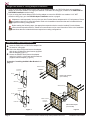
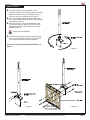
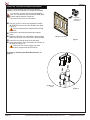
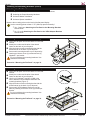
GB-MS1 Dual-Pole Cart/Stand Adapter Installation Use the Premier Mounts PSD-SPA (single-display) adapter to mount the GB-MS1 to a dual-pole cart/stand. You may also use other Premier Mounts adapters with 4½" bolt patterns, such as the PSD-DPB (backto-back display) adapter. Please see www.mounts.com for more information. PSD-SPA adapter (not included) Use four (4) M10 x 12mm hex head bolts to attach the PSD-SPA to the back of the GB-MS1 back plate (Figure 1). The hex head bolts are supplied with the PSDSPA. ®® Assemble the dual-pole base/stand and support ¯¯ °° ±± poles. Slide the PSD-SPA over and down the support poles. Make sure the front of the PSD-SPA is facing forward. Determine the viewing height of the flat panel. Insert four (4) M8 x 10mm set screws into the back of the PSD-SPA (Figure 2). Tighten the set screws using a 5/32 Allen wrench (supplied with the PSD-SPA). GB-MS1 Back Plate Figure 1 Proceed to “Installing the Media Box Bracket” on page 11. GB-MS1 not shown. Figure 2 Page 10 Visit the Premier Mounts website at http://www.premiermounts.com Installation Instructions