1
The stopwatch is stopped by pressing the [+] button twice within two seconds. This will eliminate accidental stops of the
stopwatch. The finish time is also stored in the memory. After the stopwatch has been stopped, the [-] button returns the
user to the countdown display.
PRESS the [Mode] button once to return to the Sailing Timer main mode.
2.1 SAILING TIMER MEMORY SUB MODE
In the Sail mode, PRESS the [Select] button once.
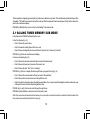
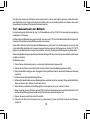
In the first display (Fig. 4):
•
Field 1 shows the year of race;
•
Field 2 shows the starting time of the race; and
•
Field 3 shows starting date of race and the text “log book” and “memory” to the left.
PRESS the [+] button to view the second display.
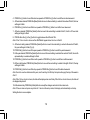
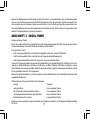
In the second display (Fig. 5):
•
Field 1 shows the seconds and tenths of seconds of the timed event;
•
Field 2 shows the hours and minutes of the event; and
•
Field 3 shows the text “dUr” (dUr = duration).
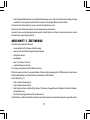
PRESS the [+] button to display the stored split times (way point times) (Fig. 6):
•
Field 1 shows the seconds and tenths of seconds of the split time;
•
Field 2 shows the hours and minutes of the split time; and
•
Field 3 shows the actual time when the split time was taken. If you stop to view this display the date as well as the year
of the split moment will start alternating with the time.
PRESS the [+] and [-] buttons to scroll through the split times.
PRESS the [Select] button to exit and return to the main mode.
Note: Only one race can be stored in the memory. As soon as the count down function is restarted, the information from
the previous race will be erased from the memory.
12