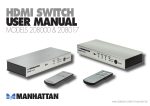
1
HDMI
switch
user
manual
Models 177290
177306 & 177313
Shown: Model 177313
MAN-177290/177306/177313-UM-0908-03
Thank you for purchasing this MANHATTAN ® HDMI Switch, Model
177290 (3-port), Model 177306 (4-port) or Model 177313 (6-port).
By being able to select among multiple high-definition sources sharing
a single display, you can keep devices connected and ready to use,
eliminating the need to swap cables and thus reducing the risk of highperformance cable and port damage. Using this manual for reference,
you’ll soon be enjoying the benefits of these features:
• Maintains highest single-link resolutions for clear, sharp images up to
2.5 Gbps, 1080p or VGA (1920 x 1200)
• Full-function, infrared remote control
• Automatically detects and selects active HDMI source and routes to
display (Model 177290 only)
• Lifetime Warranty
Package Contents
• HDMI Switch (Remote Control with Models 177306 & 177313 only)
• Power adapter (Models 177306 & 177313 only) and user manual
operation
HDMI DVD
HDMI DVD
→
HDMI switch
Input
Output
→
HDMI TV
1.Using HDMI cable no longer than 25 m (approx. 80 ft.) on either side
of the HDMI Switch, connect the HDMI input sources (for example, a
pair of HDMI DVDs, as shown above) to the Input port(s) of the switch.
2.Connect your HDMI viewing device to the Output port of the switch.
3.Select an input/signal source by pressing the button on the switch
that corresponds to the input port the desired device is connected to.
NOTE: Model 177290 features an “intelligent” function: If a connected
input source is disconnected or turned off, the switch will automatically select the connected and powered-on device that follows in the input
port sequence; for example, if the device connected to Input port 1 is
turned off or disconnected, the switch will select the device connected
to Input port 2. (Standby mode is read by the switch as still powered on.)
4.Insert a battery in the remote control (Models 177306 & 177313).
2
Operation Tips
• Always connect and remove cables gently to prevent damage.
• If using HDMI cable longer than 5 m (approx. 16 ft.), use a power
adapter (included with Models 177306 & 177313) and connect the
switch to an A/C outlet.
• If the switch’s Power LED doesn’t light, check that the switch is on.
• If there is no video display:
- check that the display unit is turned on;
- confirm that all cables are properly connected.
• If there is no audio:
- check the display device volume;
- turn off, then turn back on the HDMI source(s) and the HDMI Switch.
• If the remote control doesn’t work, replace the battery.
• If a DVI device doesn’t work, make sure that it’s HDCP-compliant.
specifications
Standards & Certifications
to 20 m (65 ft.)
• HDMI 1.3b, HDCP 1.0 / 1.1,
• Switch-to-display range: 1080p, up
DVI 1.0, CE, FCC, UL
to 15 m (50 ft.)
Connections
Video Resolutions
• 1 HDMI female (output)
• VGA: 640 x 480, 800 x 600,
•2, 3 or 5 HDMI female (input)
1024 x 768, 1920 x 1200
•Power adapter (Models 177306 & • DTV/HDTV: 480i/480p/576i/576p/
177313 only): 5 V DC / 2 A; cable, 720p/1080i/1080p
1.2 m (4 ft.)
Physical
Signal Input/Output
• Model 177290:
• Input video signal: 0.5 – 1.0 V p-p -86 x 44 x 16 mm (3.4 x 1.7 x 0.6 in.)
• Input DDC signal: 5 V p-p (TTL)
-Weight: 42 g (1.5 oz.)
• Max. single-link range: 2.5 Gbps, • Model 177306:
1920 x 1200 and 1080p resolution -160 x 68 x 19 mm (6.3 x 2.7 x 0.75 in.)
• Output video: HDMI 1.3b, HDCP -Weight: 138 g (4.8 oz.)
1.0 / 1.1, DVI 1.0
• Model 177313:
• Frequency: 2.25 Gbps / 250 MHz -192 x 98.8 x 26 mm (7.5 x 3.9 x 1 in.)
• Source-to-switch range: 1080p, up -Weight: 250 g (8.8 oz.)
3
MANHATTAN offers a complete line
of PC Components, Peripherals, Cables and Accessories.
Ask your local computer dealer for more information
or visit us online at
®
www.manhattan-products.com
Copyright © MANHATTAN
All products mentioned are trademarks or registered trademarks of their respective owners.