1
1
store your future
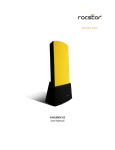
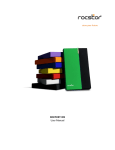
EAGLEROC E3
User Manual
TABLE OF CONTENTS
IMPORTANT NOTICES
• Safety Notices ________________________________________________________
• General Notices
• Capacity Disclaimer____________________________________________________
• Care and Handling
4
4
4
4
GENERAL
• Introduction ___ ________________________________________________
• Box Contents
• Minimum System Requirements _____________________________________
• Connectors and Eagleroc rear view
6
6
6
7
7
QUICK INSTALLATION
8
• How to Connect the Interface Cables - Connecting the Drive ___________________ 8
• Cable Types: USB, FireWire 800, FireWire 400, and SATA
10
INSTALLING YOUR DRIVE
• Eagleroc as a bootable device ____________________________________________
• Disconnecting Your Drive
o PC _______________________________________________________________
o Mac
• Reformatting Your Drive ________________________________________________
o Reformatting via PC (Window based computers)
o Reformatting via Mac _______________________________________________
• Important Note
11
11
11
11
11
11
12
12
13
PARTITIONING AND FORMATTING THE EAGLEROC DRIVE ON A MAC OS
• Warning _____________________________________________________________
• Important Notes
• Instructions for Partitioning and Formatting from FAT 32 to HFS+ _______________
13
13
13
14
PARTITIONING-FORMATTING the EAGLEROC Drive on WINDOWS 2000, XP and VISTA
• Warning _____________________________________________________________
• Important Notes
• Different ways to get to the Control Panel __________________________________
• Instructions upon reaching the Control Panel
• Instructions for Partitioning and Formatting from FAT 32 to NTFS _______________
21
21
21
22
24
25
ROCSTOR | EAGLEROC E3 user manual
Page | 2
TROUBLESHOOTING
32
• Troubleshooting for Macintosh computers _________________________________ 32
• Troubleshooting for PC Windows based computers
34
KNOWLEDGE BASE
36
• Eagleroc E3 Unique Features ________________________________________ 36
• Specifications
37
• Introduction to Interfaces (ports) and Cables ________________________________ 38
o FireWire (IEEE 1394)
38
o USB (Universal Serial Bus) ____________________________________________ 40
o SATA (Serial Advanced Technology Attachment)
41
o Comparison Chart __________________________________________________ 42
• Introduction to Formatting
43
o File Allocation Table (FAT) and FAT 32 __________________________________ 43
o HFS Plus or HFS+
44
LIMITED WARRANTY
45
TECHNICAL SUPPORT
48
ACKNOWLEDGEMENTS
50
• Trademarks __________________________________________________________ 50
• Copyrights
50
CONTACT INFORMATION
• Corporate Headquarters ________________________________________________
• Technical Support / Return Authorization “RMA”
• Sales Info ____________________________________________________________
51
51
51
51
ROCSTOR | EAGLEROC E3 user manual
Page | 3
IMPORTANT NOTICES
Safety Notices
•
•
•
•
•
The warranty is void if an unauthorized person attempts and/or repairs the hard disk drive.
Read all Manuals and instructions carefully before using the device.
Do not spill any liquid or insert any object into the device.
Use the device within the specifications indicated, including but not limited to: power
requirements, temperature, humidity, sunlight and magnetism from other devices such as
computers and televisions.
Please visit the Rocstor website, www.rocstor.com for further information concerning
specifications and use of the device.
General Notices
•
•
Consistently make multiple backup copies of your data for your protection. Hard disk drives
are subject to failure at any time.
Rocstorage, Inc. shall not be held liable for loss of data or the restoration or recovery of
data on the device. Please view complete Limited Warranty Information in this manual or
on the Rocstor website (www.rocstor.com) for further details.
Capacity Disclaimer
Actual accessible hard drive capacity will indicate up to 10% lower than stated under different
Operating Systems and formatting.
The storage volume is measured in total bytes before formatting. References to round
numbers of gigabytes or terabytes are an approximation only. For example, a disk drive labeled
as having 500GB (gigabytes) has space for approximately 500,000,000 bytes before formatting.
After formatting, the drive capacity is reduced by about 5% to 10% depending on the operating
system and formatting used.
Care and Handling
The following instructions concern the proper care and handling of Eagleroc E3 Drives. Please
take a moment to review these instructions.
• As with any storage solution, it is recommended that all data be backed up regularly.
• Ensure that you follow the proper removal procedure to disconnect the Eagleroc drive.
• Do not move or disconnect this device from your computer while it is reading or writing
data. This may cause damage to the Eagleroc drive.
• Do not place this device near a heat source or expose it to direct flame.
• Do not place the device near any equipment generating strong electromagnetic fields.
Exposure to strong electromagnetic fields may cause the device to malfunction or data to
be corrupted.
• Do not drop or cause shock to your Eagleroc drive.
ROCSTOR | EAGLEROC E3 user manual
Page | 4
•
Do not spill any liquid or insert any object into the device.
• Do not attempt to disassemble and service the Eagleroc drive during the warranty
period.
• Please read the Safety Notices and Limited Warranty information in this Manual and on
the Rocstor website (www.rocstor.com) for further details.
ROCSTOR | EAGLEROC E3 user manual
Page | 5
GENERAL
Introduction
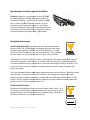
EAGLEROC E3 –USB (1.1/2.0)
The Eagleroc E3 external SATA Hard Drives delivers extraordinary
performance and reliability for both Mac and PC users. Eagleroc E3
contains a fast SATA high capacity 3.5” drive in a stylish and unique
case that can be placed horizontally or mounted vertically on its
stand. With its fan-less and quiet operation, the Eagleroc can be
easily moved from one desktop environment to another.
Choose Rocstor drives and “store your future.”
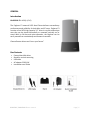
Box Contents
•
•
•
•
•
External hard disk drive
Stand for vertical mounting
USB cable
AC adaptor 220/110V
Installation user Guide
ROCSTOR | EAGLEROC E3 user manual
Page | 6
Minimum System Requirements
Mac Users:
Window Users:
Hardware: USB (1.1 or 2.0) port(s.)
Hardware: USB (1.1 or 2.0) port(s.)
Mac: PowerPC or Intel processor running
Mac OS 9, X, Leopard, Snow Leopard
Operating Systems: Microsoft Windows
2000, Me, XP, Vista, Windows 7
Recommended memory: 512 MB RAM
Recommended memory: 512 MB RAM
Connectors
•
•
USB 2.0 port x1
Standard AC adaptor connection
ROCSTOR | EAGLEROC E3 user manual
Page | 7
QUICK INSTALLATION
1. Turn ON your computer and wait until it fully boots up to load all programs.
2. Connect one end of the Adaptor cord directly to the Eagleroc and the other end to an AC
outlet, surge protector or battery Backup (UPS).
3. Connect one end of the USB cable to the USB port of your computer (or via Power Hub that
is connected to your computer) and then the other end to the USB port in the Eagleroc E3.
4. NOTE: Although, the AC adaptor MUST BE connected first to both the hard drive and to
electricity; however, the drive will not come “ON” until the USB interface cable is fully
connected.
ROCSTOR | EAGLEROC E3 user manual
Page | 8
5. The Hard drive is preformatted for Plug-and-Play operation. After a few seconds a Rocstor
HD icon will show on “My Computer” folder under the Windows OS. Under the Mac OS, the
Rocport HD will appear on the “Desktop.”
6. Click (double click) on the Rocstor HD icon to access the drive.
ROCSTOR | EAGLEROC E3 user manual
Page | 9
7. Cable Types
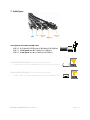
USB supports three data transfer rates:
• USB 2.0: A Hi-Speed (USB 2.0) rate of 480 Mbits/s (60 MB/sec)
• USB 1.1: A Full Speed rate of 12 Mbits/s (1.5 MB/sec)
• USB 1.0: A Low Speed rate of 1.5 Mbits/s (187 KB/sec)
FireWire 400 (IEEE 1394a) 6-Pin
Pin FireWire 400 connector
• FireWire 400 can transfer data between devices at 400 Mbits/sec
FireWire 800 (IEEE 1394b) 9-Pin
Pin FireWire 800 connector
• FireWire 400 can transfer data between devices at 800 Mbits/sec
ROCSTOR | EAGLEROC E3 user manual
Page | 10
INSTALLING YOUR DRIVE
All Rocstor hard drives are formatted as blank FAT32 (32-bit file allocation table) volumes
{unless otherwise stated on the box} that are compatible with most modern Windows and
Macintosh operating systems. To begin using your Rocstor drive, simply connect a data cable
and power cord. There’s no need to shut down your computer because your Rocstor drive is
hot-pluggable. Just plug it in and it’s ready to use.
Eagleroc as a bootable device
If you intend to use the drive as a startup device, check the documentation that came with your
computer to confirm compatibility with the various interfaces. PowerPC-based Macs require
FireWire connections for startup disks, whereas Intel-based Macs can use either FireWire or
USB connections.
Furthermore, using the drive as a startup device requires installing an authorized copy of the
Windows or Mac operating system (available separately from Microsoft and Apple,
respectively). To install the Mac OS 9 or OS X, you must reformat the drive as a Mac OS
Extended volume with Disk Utility. An Intel-based Mac cannot start from a device formatted on
a PowerPC-based Mac or vice versa.
Disconnecting Your Drive
Never disconnect or turn off an external drive when its activity light is ON. External drives must
be properly unmounted (or disconnected) to avoid data loss and possible damage to the hard
disk drive or computer.
PC
The easiest ways to safely unmount an external hard drive on your PC is to right-click the device
removal icon next to the clock in the system tray. Then choose Safely Remove Hardware.
Choose the external device you want to remove, and then click Stop. An alert will notify you if
the drive is in use by an application. If in use close any open documents or applications on the
drive and try again. Windows will display an alert when you can safely disconnect or turn off the
drive.
Mac
The easiest way to safely unmount an external hard drive is to drag its Finder icon to the Trash.
An alert will notify you if the drive is in use by an application. Close any open documents or
applications on the drive and try again. When the drive’s icon no longer appears on the Finder’s
Desktop and the drive’s activity light is green, you can safely disconnect or turn off the drive.
Reformatting Your Drive
As mentioned previously, all Rocstor hard drives are formatted as blank FAT32 volumes
(otherwise noted on the retail packaging) that are compatible with most modern Windows and
Macintosh operating systems. However, you can use your normal disk management tools to
ROCSTOR | EAGLEROC E3 user manual
Page | 11
erase or reformat the drive if needed. For example, Windows users may want to reformat the
drive as an NTFS (new technology file system) volume, or Mac OS X users may wish to reformat
the drive as a Mac OS Extended (Journal) or UFS (Unix file system) volume.
Please note that all of your data will be lost if the volume (Hard Drive) is formatted or reformatted.
Reformatting via PC (Window based computers)
Right-click the Eagleroc drive in the “My Computer” folder, then choose Format. In the dialog
window that appears, choose the desired capacity, file system and allocation unit size and then
click Start.
Reformatting via Mac
Open Disk Utility (/Applications/Utilities). Select the drive in the list at the left, and then click
the Erase tab. Choose the desired volume format, specify a name, and then click Erase.
ROCSTOR | EAGLEROC E3 user manual
Page | 12
PARTITIONING AND FORMATTING THE EAGLEROC DRIVE ON A MAC OS
All Rocstor drives are factory formatted with FAT32, unless otherwise stated on the box.
WARNING: Formatting and Partitioning the Eagleroc Drive will destroy all of its data. To
protect your data, back it up before formatting or partitioning this device.
IMPORTANT NOTES:
1.
2.
3.
4.
5.
All programs should be closed before beginning.
Connect the Rocstor hard disk drive adaptor to the drive and the other end plug into
electricity.
Connect the Rocstor hard disk drive to your computer using the appropriate cables.
“Click” means left click. “Right Click” will be so labeled.
Some computers are set so a single “click” will perform the task, such as opening a
window. Depending on your mouse setting, you may have to double click to get to the
next window. If a single click does not open the next window, please double click.
ROCSTOR | EAGLEROC E3 user manual
Page | 13
INSTRUCTIONS FOR PARTITIONING AND FORMATTING FROM FAT32 to HFS+:
1.
2.
Connect the Rocstor drive to the computer via a port.
The drive will appear as an icon on the Desktop on the middle right side. The icon will
represent the method of connection “USB.”
Note: If the Hard Drive is connected via USB port, the desktop would indicate the USB
“Macintosh HD” icon. The same procedures would also apply to the following steps.
steps
ROCSTOR | EAGLEROC E3 user manual
on the
Page | 14
3.
Once the icon appears on the “Desktop” click on the “Macintosh HD” icon.
4.
In the “Macintosh HD” menu, click on the “Applications” icon.
ROCSTOR | EAGLEROC E3 user manual
Page | 15
5.
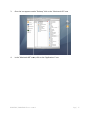
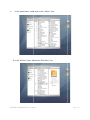
In the “Applications” menu, click on the “Utilities” icon.
6. In the “Utilities” menu, click on the “Disk Utility” icon.
ROCSTOR | EAGLEROC E3 user manual
Page | 16
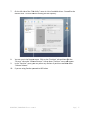
7.
On the left side of the “Disk Utility” menu is a list of available drives. One will be the
Rocstor drive. Click on the icon showing the disk capacity.
8.
You are now in the Rocport menu. Click on the “Partition” tab and then click the
“Current” tab under “Volume
ume Scheme.” A drop down “Partition” menu will appear.
In the “Partition” menu, you may select any number of partitions available under
“Volume Scheme.”
If you are using Panther proceed to #13 below.
9.
10.
ROCSTOR | EAGLEROC E3 user manual
Page | 17
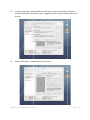
11.
If you are using Tiger, click on Options on the lower center of the window. Select the
Partition Scheme for your Rocstor drive. Suggest you select “Apple Partition Map” then
click OK.
12.
Volume Information: select a name for your drive.
ROCSTOR | EAGLEROC E3 user manual
Page | 18
13.
Format: Click on either the “Format” area or the Blue up/down arrows. Select Mac OS
extended (journal).
14.
After selecting the type of format, click the “Partition” tab in the lower right of the
screen. On the next screen, Partition Disk, click “Partition” again.
ROCSTOR | EAGLEROC E3 user manual
Page | 19
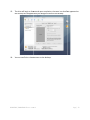
15.
The drive will begin to format and upon completion; the same icon that first appeared on
the Desktop will reappear with your designed name on the Desktop.
16.
You can now Exit or close to return to the desktop
desktop.
ROCSTOR | EAGLEROC E3 user manual
Page | 20
PARTITIONING AND FORMATTING THE EAGLEROC DRIVE ON WINDOWS
All Rocstor drives are factory formatted with FAT32.
WARNING: Formatting and Partitioning the Eagleroc Drive will destroy all of its data. To
protect your data, back it up before formatting or partitioning this device.
IMPORTANT NOTES:
1. All programs should be closed before beginning.
2. Connect the Rocstor hard disk drive adaptor to the drive and the other end plug into
electricity.
3. Connect the Rocstor hard disk drive to your computer using the appropriate cables.
4. The initial goal is to reach the Control Panel. If you know how to get there, skip this section
and go directly to Instruction 1 (Instructions for Partitioning and Formatting from FAT 32 to
NTFS.) A fast way of reaching “Disk Management” is to right click “My Computer” icon and
click on “Manage” in the drop down menu. The next window is “Computer Management.”
In the left menu, click “Disk Management.”
5. The ultimate goal is to reach Disk Management. If you know how to get there, skip this
section and go directly to Instruction 4 (Instructions for Partitioning and Formatting from
FAT 32 to NTFS).
6. Due to different views that are possible on Windows operating systems (2000, XP, Vista),
we will provide various ways of reaching the Control Panel.
7. “Click” means left click. “Right Click” will be so labeled.
8. Some computers are set so a single “click” will perform the task, such as opening a window.
Depending on your mouse setting, you may have to double click to get to the next window.
If a single click does not open the next window, please double click.
ROCSTOR | EAGLEROC E3 user manual
Page | 21
DIFFERENT WAYS TO GET TO THE CONTROL PANEL:
(You may use any one of the following methods)
1. If the icon “My Computer” shows on your desktop, click or double click on the icon. Under
“Other Places” click on “Control Panel.”
Under Windows XP
under Vista OS
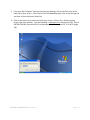
2. If the icon “My Computer” does not show on your desktop, click on the Start icon on the
lower left of your screen. If the Control Panel link is displayed, click on the Control Panel
link.
ROCSTOR | EAGLEROC E3 user manual
Page | 22
3. If the icon “My Computer” does not show on your desktop, click on the Start icon on the
lower left of your screen. If the Control Panel link is not displayed, click on the Settings link
and then click on the Control Panel link.
4. Click on the Start icon on the lower left of your screen. Click on Run. Delete anything
listed in the Open window. Type the following: compmgmt.msc and then click OK. Skip to
INSTRUCTION # 4 (Instructions for Partitioning and Formatting from FAT 32 to NTFS {page
24}).
ROCSTOR | EAGLEROC E3 user manual
Page | 23
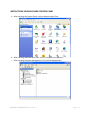
INSTRUCTIONS UPON REACHING CONTROL PANEL
a. After reaching the Control Panel, click on Administrative Tools.
b. After reaching Administrative Tools, click on Computer Management.
c. After reaching Computer Management, click on Disk Management.
ROCSTOR | EAGLEROC E3 user manual
Page | 24
INSTRUCTIONS FOR PARTITIONING AND FORMATTING FROM FAT32 to NTFS
1. In the “Disk Management” window, right click the Rocstor drive in the upper portion of the
menu to highlight it. In the drop down menu, select “Delete Partition.”
WARNING: Formatting and Partitioning the Eagleroc Drive will destroy all of its data. To
protect your data, back it up before formatting or partitioning this device.
2. The next window is “Delete primary partition.” Click on Yes.
3. At this point the Rocstor drive will not show up on the “Disk Management Volume”
window in the upper menu.
ROCSTOR | EAGLEROC E3 user manual
Page | 25
4. The Rocstor drive will show up in the lower menu as an “Unallocated” disk.
5. Right click anywhere in the “Unallocated” disk area in the lower menu.
6. Click on “New Partition.”
7. You are taken to “Welcome to the New Partition Wizard.” Click “Next”.
ROCSTOR | EAGLEROC E3 user manual
Page | 26
8. Click on “Primary partition” (it should be selected as the default partition). Click “Next”.
ROCSTOR | EAGLEROC E3 user manual
Page | 27
9. Under “Specific Partition Size,” click Next to accept the default setting, which is the
maximum size allowed.
10. Under “Assign Drive Letter or Path,” accept the default letter and click “Next”.
ROCSTOR | EAGLEROC E3 user manual
Page | 28
11. In the “Format Partition,” accept the default setting.
12. The “Volume label” can be changed to any name up to 11 characters.
13. Suggest that “Quick Format” be selected and then click “Next”.
14. You now reached the “Completing the New Partition Wizard” screen. It displays the
various settings you previously selected. If you are satisfied with your selections, click
“Finish” to complete the new formatting. At this time the Rocstor disk drive is being
formatted, which may take a few minutes.
ROCSTOR | EAGLEROC E3 user manual
Page | 29
15. You will return automatically to the “Disk Management” window and will see the newly
formatted Rocstor disk on the screen with the name you selected. If no new name was
entered in the “Volume label,” the Rocstor drive will show up as “New Volume.” To
rename the volume at this time, right click “New Volume” and click “Properties.” You can
now change the volume name up to 11 characters. Click OK.
ROCSTOR | EAGLEROC E3 user manual
Page | 30
16. You can also change the name at any time in the future by reaching the “Properties” menu
of the Rocstor drive.
17. You can now Exit or close to return to the desktop.
ROCSTOR | EAGLEROC E3 user manual
Page | 31
Troubleshooting
Rocstor data storage products are subjected to several quality control tests before leaving our
factory. However, from time to time, the product may not work after shipment or would
experience intermittent problems under certain criteria and/or situations. Should you
experience a problem with your Eagleroc HD, please review the Manual and read the possible
solutions that fit your problem. (The User Manual is updated regularly so check the Rocstor
website for an updated Manual). Please contact Rocstor technical support listed under contact
information at the end of this Manual.
Troubleshooting for MACINTOSH computers
Problem: The computer does not recognize the drive
Solutions:
• Is the Eagleroc blue light ON and is the cable connected from the HD device to the
computer. Eagleroc HD icon should appear on the desktop. Continue to review this guide
to find the solution.
•
Your computer’s Minimum requirements may not meet the minimum system requirements
as indicated in this Manual. Page 7
•
Confirm that the outlet is providing the correct voltage and the electrical power cord is
securely attached to both the outlet and the Eagleroc drive. Poor or loose connections can
result in loss of power and possible damage to the drive.
•
If the Eagleroc drive is connected to an outlet via an Undisrupted Power Supply (battery
Backup) or a surge protector, be sure that they provide the correct voltage and they are all
switched “ON” and receiving electricity.
•
Please review this Manual’s installation procedure for the operating system and interface
you are using.
•
Read the Manual’s installation procedure to ensure it was properly followed.
•
Please check the cable connections as the cables must be properly and securely attached
to the computer and hard drive. Ensure that there is a firm connection. It is suggested
that the cables be detached and reattached, and that the computer be shut off for 20
seconds and then restarted.
•
Ensure that the Eagleroc drive has been properly reformatted by reviewing the User
Manual.
ROCSTOR | EAGLEROC E3 user manual
Page | 32
•
Have you checked to confirm that the computer’s operating system works with the file
system?
•
Review the manual that came with your computer to ensure that the file system is
compatible with the operating system.
Problem: The Eagleroc drive is not working fast enough.
Solution:
• You may have too many devices connected to your computer (such as Laptop computers.)
Disconnect some devices and observe if there is an improvement in performance.
Problem: There is a decrease in performance when the Eagleroc drive is connected via the USB
cable to a USB 2.0 port.
Solution:
• Ensure that the USB 2.0 drivers for the host bus and device have been properly and securely
installed. You may reinstall to assure proper installation.
Notes:
• When connecting the device to USB 2.0 port in your computer, please be sure that the
connection at the host computer is High Speed USB 2.0 and drivers (if required) are
installed; otherwise you may experience slower transfer speed between the host computer
and the Eagleroc device.
Notes - Mac OS 10x:
•
Eagleroc drives are designed to save electricity and subsequently the wear and tear of the
internal hard drive by having the hard drive stop spinning when the Eagleroc is not accessed
for a certain amount of time (sleeping mode). Under Mac OS 10 you it might cause an error
please ignore the error message as it might take few seconds to start spinning at the
designated speed (wake up.)
•
You must avoid particular characters similar to ^!?\< when coping to FAT 32 volume section.
ROCSTOR | EAGLEROC E3 user manual
Page | 33
Troubleshooting for PC WINDOWS based computers
Problem: The computer does not appear to recognize the drive.
Solutions:
• A window should appear, notifying you that a device is connected and/or the Eagleroc HD
icon should appear on the “My Computer” folder.
•
Your computer’s Minimum requirements may not meet the minimum system
requirements as indicated in this Manual. Page 7
•
Confirm that the outlet is providing the correct voltage and the electrical power cord is
securely attached to both the outlet and the Eagleroc drive. Poor or loose connections can
result in loss of power and possible damage to the drive.
•
If the Eagleroc drive is connected to an outlet via an Undisrupted Power Supply (battery
Backup) or a surge protector, be sure that they provide the correct voltage and they are all
switched “ON” and receiving electricity.
•
Please review the Manual’s installation procedure in reference to Formatting, Operating
Systems and Interfaces you are using to ensure they were properly followed.
•
Please check the cable connections as the cables must be properly and securely attached to
the computer and hard drive. Ensure that there is a firm connection. It is suggested that
the cables be detached and reattached, and that the computer be shut off for 20 seconds
and then restarted.
•
If a conflict with drivers or extensions exists, contact Rocstor for assistance; email tech
support at [email protected] or call technical support department at 888.877.7716.
Problem: The Eagleroc drive is not working fast enough
Solution:
• You may have too many devices connected to your computer (in particular in case of
Laptops.) Disconnect some devices and observe if there is an improvement in performance.
Problem: The performance and/or transfer speeds are slow when the Eagleroc drive is
connected to my USB port.
Solution:
ROCSTOR | EAGLEROC E3 user manual
Page | 34
•
USB ports come in different speeds from 12Mbits/ s to 480MBits/s. USB 2.0 is a High-Speed
connection. If the Eagleroc HD is connected to a USB 1.1 port (low speed) or hub, the drive
will work slower than if connected to a USB 2.0 port or hub.
Problem: There is no increase in performance when the Eagleroc drive is connected via the USB
cable to a USB 2.0 port.
Solution:
• Ensure that the USB 2.0 drivers for the host bus and device have been properly and securely
installed. You may reinstall to assure proper installation.
Problem: The drive is working slow, when connected directly to a USB 2.0 port on your
computer
Solution:
• Review the minimum system requirements for your computer to ensure it supports High
Speed USB 2.0.
General Notes:
• When connecting the device to USB 2.0 port in your computer please be sure that the
connection at the host computer is High Speed USB 2.0 and drivers (if required) are
installed, otherwise you may experience slower transfer speed between the host comport
and the Eagleroc device.
Front Lights:
Problem: The front Light does not come ON.
Solutions:
• The Eagleroc device may not be connected to electricity.
• If connect to UPS (battery backup) system, the UPS switch is in the OFF position.
• The AC adaptor (Power Supply) does not work. Contact Rocstor technical support.
Situation: The light is Blue but it also flickers in Red.
Solutions:
• The Light is OFF when the drive is Reading/Writing; do not turn the device OFF in this
situation as you may lose the data being transferred in R/W.
•
The light remains Blue at normal operation or idle operation.
ROCSTOR | EAGLEROC E3 user manual
Page | 35
KNOWLEDGE BASE
Eagleroc E3 Unique Features
•
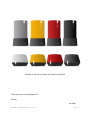
Stylish design with optional color cover (Charcoal Black, Yellow, Silver/Gray and Red)
U.S.A. and International: small Auto-Switch
adaptor 220/110V Power Supply.
•
•
Place Horizontally or Vertically
Stylish Vertical Base
•
The state of the art casing is designed and engineered to maximize heat dissipation.
•
The Fan-less enclosure significantly reduces noise and
vibration.
The case should be in an open environment to permit air to
flow around the drive. It is normal for the case to become
harm when it is being used.
The Eagleroc series is designed for stackable, horizontal and
vertical use.
•
•
•
•
•
•
•
•
•
•
Includes all necessary cables and software
Easy plug-and-play installation (pre-formatted Hard Drive)
Compatible with Mac, PC Window
Daisy-chain multiple drives as your storage needs grow
Designed for horizontal or vertical use
Small footprint
2 year limited warranty
2 year unlimited toll-free telephone tech support
ROCSTOR | EAGLEROC E3 user manual
Page | 36
Specifications
•
Dimensions: ~1.5 x 5.3 x 8.5 inches (3.7 x 13.5 x 21.5 cm)
•
Weight: ~ 2.5 Lbs (1Kilogram)
•
Transfer rates: USB 2.0 up to 480 Mbits/s; or USB 1.1 up to 12 Mbits/s.
ROCSTOR | EAGLEROC E3 user manual
Page | 37
Introductions: Interfaces (ports) and Cables
FireWire is Apple Inc.’s brand name for the IEEE 1394
interface (although the 1394 standard also defines a
backplane interface). FireWire is also known as i.LINK
(Sony’s name) and DV (Panasonic’s
Panasonic’s name, not to be
confused with DV camcorder tapes). It is a serial bus
interface standard for high-speed
speed communi
communications and
isochronous real-time
time data transfer, frequently used in a
personal computer and digital audio / digital video.
Standards and versions
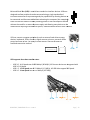
FireWire 400 (IEEE 1394) 6-Pin
Pin connector can transfer data between
devices at 100, 200, or 400 Mbits
Mbits/s half-duplex data rates (the actual
transfer rates are 98.304, 196.608, and 393.216 Mbits/s, i.e. 12.288,
24.576 and 49.152 megabytes per second respectively). These different
transfer modes are commonly referred to as S100, S200, and S400
S400.
Cable length is limited to 14.8 ft (4.5 meters), although up to 16 cables can be daisy-chained
daisy
using active repeaters, external hubs, or internal hubs often present in FireWire equipment.
The S400 standard limits any configuration's maximum cable length to 230Ft (72
72 meters.) The
6-pin
pin connector is commonly found on desktop computers and can supply the connected
device with power.
The 6-pin
pin powered connector adds power output to support external devices. Typically a device
can pull about 7 to 8 watts from the port
port. However,
ver, the voltage varies significantly from
different devices. Voltage is specified as unregulated and should nominally be about 25 volts
(range 24 to 30). Apple's implementation on laptops is typically related to battery power and
can be as low as 9 V but more likely about 12 V.
FireWire 400 (IEEE 1394a)
1394aa also standardized the 4 pin connector already widely in use. The 44pin version is used on many consumer devices such as camcorders, some
laptops and other small FireWire devices. Though fully data compatible
with 6-pin
pin interfaces, it lacks power connectors
connectors.
ROCSTOR | EAGLEROC E3 user manual
Page | 38
FireWire 800 (IEEE 1394b) 9-pin
pin FireWire 800/3200 (IEEE 1394b) connector
was introduced commercially by Apple in 2003. This newer 1394
specification (1394b)) and corresponding products allow a transfer rate of
786.432 Mbits/sec full-duplex
duplex via a new encoding scheme termed beta
mode. It is backwards compatible to the slower rates and 6-pin connectors
of FireWire 400. However, while the IEEE 1394a and IEEE 1394b standards
are compatible, the FireWire 800's connector is different from FireWire
400's connector, making the two cables incompatible. An adapter or adapter
cable,, purchased from a local electronics store allows the connection of older
devices to the newer port.
The full IEEE 1394b specification supports data rates up to 3200 Mbits/sec over beta-mode
optical connections up to 320 Ft ((100 meters) in length.
ROCSTOR | EAGLEROC E3 user manual
Page | 39
Universal Serial Bus (USB) is a serial bus standard to interface devices. USB was
designed to allow peripherals to be connected using a single standardized
interface socket and to improve Plug
Plug-and-play capabilities by allowing devicess to
be connected and disconnected without rebooting the computer (hot-swapping)
swapping).
Other convenient features include providing power to low
low-consumption
consumption devices
without the need for an external
nal power supply and allowing many devices to be
used without requiring manufacturer specific, individual device drivers to be installed.
installed
USB can connect computer peripherals such as external hard drives storage
devices, keyboards, PDAs, scanners, dig
digital cameras, printers, personal media
players and flash drives. For many of those devices USB has become the
standard connection method.
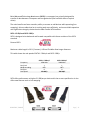
USB supports three data transfer rates:
•
•
•
USB 2.0: A Hi-Speed rate of 480 Mbits/s (60 MB/s). All Rocstor devices are integrated with
USB 2.0, Hi-Speed.
USB 1.1: A Full Speed rate of 12 Mbits/s (1.5 MB/s).
/s). All USB Hubs support Full Speed.
USB 1.0: A Low Speed rate of 1.5 Mbits/s (187 KB/s)
ROCSTOR | EAGLEROC E3 user manual
Page | 40
Serial Advanced Technology Attachment (SATA) is a computer bus primarily designed for
transfer of data between a computer and storage devices (like hard disk drives or optical
drives).
The main benefits are faster transfers, ability to remove or add devices while operating (hotswapping), thinner cables that let air cooling work more efficiently, and more reliable operation
with tighter data integrity checks than the older Parallel ATA interface.
SATA 1.5 GB/s and SATA 3 GB/s
SATA is designed to be backward and forward compatible with future revisions of the SATA
standard.
External SATA
Maximum cable length is 6.6 Ft (2 meters). USB and FireWire allow longer distances.
This table shows the real speed of SATA 1.5 Gbits/s and SATA 3 GB/s:
Frequency
Bits/clock
8b10b encoding
Bits/Byte
Real speed
SATA 1.5 Gbits/s
1500 MHz
1
80%
8
150 MB/s
SATA 3 Gbits/s
3000 MHz
1
80%
8
300 MB/s
SATA offers performance as high as 3.0 GB/sec per device with the current specification. It also
offers new features such as hot swapping.
ROCSTOR | EAGLEROC E3 user manual
Page | 41
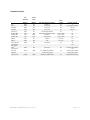
Compassion Chart:
SAS
eSATA
SATA 300
SATA 150
PATA (133)
FireWire 3200
FireWire 800
FireWire 400
USB 2.0
USB 3.0
Ultra -320 SCSI
Fiber Channel
Over Copper
Cable
Fiber Channel
Over Fiber
Infiniband
12x quad-rate
Raw
Bandwidth
Transfer
Speed
(Mbits/s)
(Mbits/s)
Max. Cable Length Feet (meters)
Power
Provided
3000
3000
3000
1500
1064
3144
786
393
480
4800
2560
375
375
375
187.5
133
393
98.25
49.13
60
600
320
26 Ft (8 m)
6.5 Ft (2 m)
3.3 Ft (1 m)
3.3 Ft (1 m)
18 inches (0.46 meters)
100; (Cables available for 100m+)
100 [11] m
15 Ft (4.5 m)
5 [14] m
TBD
39 Ft (12 m)
No
No
No
No
No
12–25 V, 15 W
12–25 V, 15 W
12–25 V, 15 W
5 V, 2.5 W
5 V, 2.5 W
No
4
1 (15 W/ port multiplier)
1 per line
1 per line
2
63
63
63
127
127
16
126
4000
400
39 Ft (12 m)
No
10520
2000
No
120000
12000
6.5- 164000 Ft (2–50000 m)
> 32 Ft (>10 m) Copper
<32,800 Ft (<10000 m) Fiber
16777216 with switches
126
16777216 with switches
1 with point to point
Many W/switched Fabric
ROCSTOR | EAGLEROC E3 user manual
No
Device per channel
Page | 42
Introductions: Formatting
File Allocation Table (FAT)
FAT is a file system developed by Microsoft for MS-DOS and is the primary file system for
consumer versions of Microsoft Windows.
The FAT file system is relatively uncomplicated and is supported by virtually all existing
operating systems for personal computers. This makes it an ideal format for hard drives and
other storage devices and a convenient way of sharing data between disparate operating
systems installed on the same computer (a dual boot environment).
FAT 32 is a disk formatting scheme which allows a maximum file size of 4 GB. Larger files
require another formatting type such as HFS+ or NTFS.
Microsoft’s Scan-Disk utility, included with Windows 95/98, places a volume limit of 127.53
gigabytes.
FAT 32 was introduced with Windows 95 OSR2. Windows 98 introduced a utility to convert
existing hard disks from FAT16 to FAT32 without loss of data. In the NT line, native support for
FAT32 arrived in Windows 2000.
Windows 2000 and Windows XP can read and write to FAT32 file systems of any size, but the
format program included in Windows 2000 and higher can only create FAT32 file systems of 32
GB or less. This limitation is by design and was imposed because many tasks on very large
FAT32 files become slow and inefficient when file systems exceed 32GB. This limitation can be
bypassed when using the Windows command line Format utility or by using third-party
formatting utilities.
The maximum possible size for a file on a FAT32 volume is 4 GB minus 1 byte. Video capture
and editing applications and some other software can easily exceed this limit.
Until mid-2006, those who run dual boot systems or who move external data drives between
computers with different operating systems had little choice but to stick with FAT32. Since
then, full support for NTFS has become available in Linux and many other operating systems, by
installing the FUSE library (on Linux) together with the NTFS-3G application. Data exchange is
also possible between Windows and Linux by using the Linux-native ext2 or ext3 file systems
through the use of external drivers for Windows, such as ext2 IFS. However, Windows cannot
boot from ext2 or ext3 partitions.
ROCSTOR | EAGLEROC E3 user manual
Page | 43
HFS Plus or HFS+
This is a file system developed by Apple Inc. to replace their Hierarchical File System (HFS) as
the primary file system used in Macintosh computers (or other systems running Mac OS). It is
also one of the formats used by the iPod digital music player. HFS Plus is also referred to as Mac
OS Extended (or, erroneously, “HFS Extended”), where its predecessor, HFS is also referred to
as Mac OS Standard (or, erroneously, as “HFS Standard”). During development, Apple referred
to this file system with the codename Sequoia.
HFS Plus is an improved version of HFS, supporting much larger files (block addresses are 32-bit
length instead of 16-bit) and using Unicode (instead of Mac OS Roman or any of several other
character sets) for naming the items (files, folders). Names were normalized to a form very
nearly the same as NFD (there are some minor differences derived from the fact that the HFS
Plus format was finalized before Unicode had standardized the NFD format). HFS Plus permits
filenames up to 255 UTF-16 characters in length, and n-forked files similar to NTFS, though
almost no software takes advantage of forks other than the data fork and resource fork. HFS
Plus also uses a full 32-bit allocation mapping table, rather than HFS’s 16 bits. This was a serious
limitation of HFS, meaning that no disk could support more than 65,536 allocation blocks under
HFS. When disks were small, this was of little consequence, but as larger-capacity drives
became available, it meant that the smallest amount of space that any file could occupy (a
single allocation block) became excessively large, wasting significant amounts of space. For
example, on a 1 GB disk, the allocation block size under HFS is 16 KB, so even a 1 byte file would
take up 16 KB of disk space.
HFS Plus volumes are divided into sectors (called logical blocks in HFS), that are usually 512
bytes in size. These sectors are then grouped together into allocation blocks which can contain
one or more sectors. The number of allocation blocks depends on the total size of the volume.
HFS Plus uses a larger value to address allocation blocks than HFS, 32 bits rather than 16 bits.
This means it can access 4,294,967,296 (=232) allocation blocks rather than the 65,536 (=216)
allocation blocks available to HFS.
ROCSTOR | EAGLEROC E3 user manual
Page | 44
LIMITED WARRANTY
This Limited Warranty is provided by Rocstorage, Inc. (hereinafter: Rocstor) for all lines of products.
General Terms
EXCEPT AS EXPRESSLY SET FORTH IN THIS LIMITED WARRANTY, ROCSTOR MAKES NO OTHER WARRANTIES OR
CONDITIONS, EXPRESS OR IMPLIED, INCLUDING ANY IMPLIED WARRANTIES OF MERCHANTABILITY AND FITNESS
FOR A PARTICULAR PURPOSE. ROCSTOR EXPRESSLY DISCLAIMS ALL WARRANTIES AND CONDITIONS NOT STATED
IN THIS LIMITED WARRANTY. ANY IMPLIED WARRANTIES THAT MAY BE IMPOSED BY LAW ARE LIMITED IN
DURATION TO THE LIMITED WARRANTY PERIOD. SOME STATES OR COUNTRIES DO NOT ALLOW A LIMITATION ON
HOW LONG AN IMPLIED WARRANTY LASTS OR THE EXCLUSION OR LIMITATION OF INCIDENTAL OR
CONSEQUENTIAL DAMAGES FOR CONSUMER PRODUCTS. IN SUCH STATES OR COUNTRIES, SOME EXCLUSIONS OR
LIMITATIONS OF THIS LIMITED WARRANTY MAY NOT APPLY TO YOU.
This Limited Warranty applies to the Rocstor branded hardware products sold by or leased from Rocstorage, Inc.,
its worldwide subsidiaries, affiliates, authorized resellers, or country distributors (collectively referred to in this
Limited Warranty as “Rocstor“) with this Limited Warranty. This Limited Warranty is applicable in all countries and
may be enforced in any country where Rocstor or its authorized service providers offer warranty service subject to
the terms and conditions set forth in this Limited Warranty. However, warranty service availability and response
times may vary from country to country and may also be subject to registration requirements in the country of
purchase.
Rocstor warrants that the Rocstor hardware product and all the internal components of the product that you have
purchased or leased from Rocstor are free from defects in materials or workmanship under normal use during the
Limited Warranty Period. The Limited Warranty Period starts on the date of purchase or lease from Rocstor. Your
dated sales or delivery receipt, showing the date of purchase or lease of the product, is your proof of the purchase
or lease date. You may be required to provide proof of purchase or lease as a condition of receiving warranty
service. You are entitled to warranty service according to the terms and conditions of this document if a repair to
your Rocstor branded hardware is required within the Limited Warranty Period. This Limited Warranty extends
only to the original purchaser or lessee of this Rocstor branded product and is not transferable to anyone who
obtains ownership of the Rocstor branded product from the original purchaser or lessee.
Rocstor products are manufactured using new materials or new and used materials equivalent to new in
performance and reliability. Spare parts may be new or equivalent to new. Spare parts are warranted to be free
from defects in material or workmanship for thirty (30) days or for the remainder of the Limited Warranty Period
of the Rocstor hardware product in which they are installed, whichever is longer.
Rocstor’s Obligation under the Limited Warranty
During the Limited Warranty Period, Rocstor will repair or replace the defective component parts or the hardware
product. All component parts or hardware products removed under this Limited Warranty become the property of
Rocstor. The replacement part or product takes on either the Limited Warranty status of the removed part or
product or the thirty (30) day limited warranty of the spare part. In the unlikely event that your Rocstor product
has a recurring failure, Rocstor, at its discretion, may elect to provide you with a replacement unit of Rocstor‘s
choosing that is at least equivalent to your Rocstor branded product in hardware performance. Rocstor reserves
the right to elect, at its sole discretion, to give you a refund of your purchase price or lease payments (less interest)
instead of a replacement. This is your exclusive remedy for defective products. The original Limited Warranty is
not extended when the product, or a part of the product, is repaired or replaced during the Limited
Warranty period. Rocstor shall not be responsible or liable for backing up any data that is on a drive being
returned for service
ROCSTOR | EAGLEROC E3 user manual
Page | 45
YOU SHOULD MAKE PERIODIC BACKUP COPIES OF THE DATA STORED ON YOUR HARD DRIVE OR OTHER
STORAGE DEVICES AS A PRECAUTION AGAINST POSSIBLE FAILURES, ALTERATION, OR LOSS OF THE DATA.
BEFORE RETURNING ANY UNIT FOR SERVICE, BE SURE TO BACK UP DATA AND REMOVE ANY CONFIDENTIAL,
PROPRIETARY, OR PERSONAL INFORMATION. ROCSTOR IS NOT RESPONSIBLE FOR DAMAGE TO OR LOSS OF ANY
PROGRAMS, DATA, OR REMOVABLE STORAGE MEDIA. ROCSTOR IS NOT RESPONSIBLE FOR THE RESTORATION
OR REINSTALLATION OF ANY PROGRAMS OR DATA OTHER THAN SOFTWARE INSTALLED BY ROCSTOR WHEN THE
PRODUCT WAS MANUFACTURED.
Rocstor does not warrant that the operation of this product will be uninterrupted or error-free. Rocstor is not
responsible for damage that occurs as a result of your failure to follow the instructions that came with the Rocstor
branded product.
This Limited Warranty does not apply to expendable parts. This Limited Warranty does not extend to any product
from which the serial number has been removed or that has been damaged or rendered defective (a) as a result of
accident, misuse, abuse, or other external causes; (b) by operation outside the usage parameters stated in the user
documentation that shipped with the product and/or posted on the Rocstor website; (c) by the use of parts not
manufactured or sold by Rocstor; (d) as a result of normal wear; or (e) by modification or service by anyone
other than (i) Rocstor, (ii) a Rocstor authorized service provider, or (iii) your own installation of end-user
replaceable Rocstor or Rocstor approved parts if available for your product in the servicing country.
These terms and conditions constitute the complete and exclusive limited warranty agreement between Rocstor
and you regarding the Rocstor branded product you have purchased or leased. These terms and conditions
supersede any prior agreements or representations including representations made in Rocstor sales literature or
advice given to you by Rocstor or an agent or employee of Rocstor-that may have been made in connection with
your purchase or lease of the Rocstor branded product. No change to the conditions of this Limited Warranty is
valid unless it is made in writing and signed by an authorized representative of Rocstor.
Buyer’s Obligation under the Warranty
The person requesting coverage under this warranty shall prove that he or she is the original purchaser and
declares that the product has not been sold, leased, bartered or otherwise changed possession. The purchaser
shall frequently backup the Eagleroc hard drive and backup the data immediately prior to returning the drive for
warranty service.
The buyer must notify Rocstor and show proof of notification, through any reasonable means of
communication. See full street address email address, and toll free phone numbers below or updated contact
information are available on Rocstor.com website. The notification shall identify any defect, malfunction, or
nonconformity promptly upon discovery. Rocstor will acknowledge receipt of the communication and issue a
Return Merchandise Authorization (RMA) code. The buyer is obligated to securely and safely package(s) the
product, preferably in the original packing materials, WITH THE RMA number, and deliver it together with a copy
of the original purchase receipt and a description of the problem to the Rocstor home office. Buyer is
responsible for the product until it is received by Rocstor. It is recommended that the product be insured during
transportation by the sender. You must prepay any shipping charges, taxes, or duties associated with
transportation of the product. In addition, you are responsible for insuring any product shipped or returned for
service. You assume risk of loss during shipping.
Limitation of damages (Liability)
IF YOUR ROCSTOR BRANDED HARDWARE PRODUCT FAILS TO WORK AS WARRANTED ABOVE, THE ORIGINAL
PURCHASER’S SOLE AND EXCLUSIVE REMEDY SHALL BE REPAIR OR REPLACEMENT. ROCSTOR‘S MAXIMUM
LIABILITY UNDER THIS LIMITED WARRANTY IS EXPRESSLY LIMITED TO THE LESSER OF THE PRICE YOU HAVE PAID
FOR THE PRODUCT OR THE COST OF REPAIR OR REPLACEMENT OF ANY ROCSTOR HARDWARE COMPONENTS THAT
ROCSTOR | EAGLEROC E3 user manual
Page | 46
MALFUNCTION IN CONDITIONS OF NORMAL USE. ROCSTOR IS NOT LIABILE FOR ANY DAMAGE TO ANY
OTHER PRODUCT CONNECTED TO A ROCSTOR PRODUCT.
Limitation on Consequential Damages
ROCSTOR IS NOT LIABLE FOR ANY DAMAGES CAUSED BY THE PRODUCT OR THE FAILURE OF THE PRODUCT TO
PERFORM, INCLUDING ANY LOST PROFITS OR SAVINGS OR SPECIAL, INCIDENTAL OR CONSEQUENTIAL DAMAGES.
ROCSTOR IS NOT LIABLE FOR ANY CLAIM MADE BY A THIRD PARTY OR MADE BY YOU FOR A THIRD PARTY. THIS
LIMITATION OF LIABILITY ALSO APPLIES WHETHER DAMAGES ARE SOUGHT OR A CLAIM IS MADE UNDER THIS
LIMITED WARRANTY OR AS A TORT CLAIM (INCLUDING NEGLIGENCE AND STRICT PRODUCT LIABILITY), A
CONTRACT CLAIM OR ANY OTHER CLAIM. THIS LIMITATION OF LIABILITY CANNOT BE WAIVED OR AMENDED BY
ANY PERSON. THIS LIMITATION OF LIABILITY WILL BE EFFECTIVE EVEN IF YOU HAVE ADVISED ROCSTOR OR AN
AUTHORIZED REPRESENTATIVE OF ROCSTOR OF THE POSSIBILITY OF ANY SUCH DAMAGES.
THIS LIMITED WARRANTY GIVES YOU SPECIFIC LEGAL RIGHTS. YOU MAY ALSO HAVE OTHER RIGHTS THAT MAY
VARY FROM STATE TO STATE OR FROM COUNTRY TO COUNTRY. YOU ARE ADVISED TO CONSULT APPLICABLE
STATE OR COUNTRY LAWS FOR A FULL DETERMINATION OF YOUR RIGHTS.
Disclaimer
We accept no liability for any loss of data, damages and the inability of Rocstor products to work with any third
party equipment. Nor can Rocstor accept any liability or responsibility for software or third party hardware
products.
Limited Warranty Period
The limited warranty period for Eagleroc E3 is two (2) Years Parts and Labor. This Limited Warranty extends only to
the original purchaser or lessee of this Rocstor branded product and is not transferable to anyone who obtains
ownership of the Rocstor branded product from the original purchaser or lessee.
Types of Limited Warranty Service
Your Rocstor Limited Warranty consists of repair or replacement of defective parts, including hard drives identified
by Rocstor Support Organization as “pre-failure.”
Carry-in Limited Warranty Service Available Monday - Friday
Under the terms of carry-in service, you may be required to deliver your Rocstor product to the Rocstor Service
Center or an authorized service location for warranty repair. You must prepay any shipping charges, taxes or duties
associated with transportation of the product. In addition, you are responsible for insuring any product shipped or
returned for service. You assume risk of loss during shipping.
YOU SHOULD MAKE PERIODIC BACKUP COPIES OF THE DATA STORED ON YOUR HARD DRIVE OR OTHER
STORAGE DEVICES AS A PRECAUTION AGAINST POSSIBLE FAILURES, ALTERATION OR LOSS OF THE DATA.
BEFORE RETURNING ANY UNIT FOR SERVICE, BE SURE TO BACK UP DATA AND REMOVE ANY CONFIDENTIAL,
PROPRIETARY OR PERSONAL INFORMATION. ROCSTORAGE IS NOT RESPONSIBLE FOR DAMAGE TO OR LOSS OF
ANY PROGRAMS, DATA OR REMOVABLE STORAGE MEDIA. ROCSTORAGE IS NOT RESPONSIBLE FOR THE
RESTORATION OR REINSTALLATION OF ANY PROGRAMS OR DATA OTHER THAN SOFTWARE INSTALLED BY
ROCSTORAGE WHEN THE PRODUCT WAS MANUFACTURED.
Rocstorage shall not be responsible or liable for backing up any data that is on a drive being returned for service.
Expect that all data on the drive will be destroyed and not retrievable when returned for warranty service.
Rocstor Replaceable Parts Program
ROCSTOR | EAGLEROC E3 user manual
Page | 47
Where available, the Rocstor Replaceable Parts program ships approved replacement parts directly to you to fulfill
your warranty. This will save considerable repair time. After you call the Rocstor Technical Support Center at
888.877.8777 a replaceable part can be sent directly to you. Once the part arrives, call the Rocstor Technical
Support Center. A technician will assist you over the phone to ensure that the installation is quick and easy.
Service Upgrades
Rocstor offers extra coverage for your product. For information on service upgrades, visit www.rocstor.com.
Service upgrades purchased in one country are not transferable to another country.
Capacity Disclaimer
Actual accessible hard drive capacity will indicate up to 10% lower than stated under different Operating Systems
and formatting.
The storage volume is measured in total bytes before formatting. References to round numbers of gigabytes or
terabytes are an approximation only. For example, a disk drive labeled as having 500GB (Gigabytes) has space for
approximately 500,000,000 bytes before formatting. After formatting, the drive capacity is reduced by about 5%
to 10% depending on the operating system and formatting used or “1GB = 1,000,000,000 bytes.
Options and Software
The Limited Warranty terms and conditions for Rocstor options are as indicated in the Limited Warranty applicable
to Rocstor options. ROCSTOR DOES NOT WARRANTY SOFTWARE PRODUCTS, INCLUDING ANY SOFTWARE
PRODUCTS OR THE OPERATING SYSTEM PREINSTALLED BY ROCSTOR. Rocstor‘s only obligations with respect to
software distributed by Rocstor under the Rocstor brand name are set forth in the applicable end-user license or
program license agreement. Non-Rocstor hardware and software products are provided “AS IS“ and without any
Warranty. However, non-Rocstor manufacturers, suppliers or publishers may provide their own warranties directly
to you.
The data stored in Rocstor and Rocsecure storage product lines are not guaranteed by Rocstor (or the
hard disk manufacturer.) We are not responsible for any loss of data. Always back up data regularly
TECHNICAL SUPPORT
Software Technical Support
Software technical support is defined as assistance with questions and issues about the software that was either
preinstalled by Rocstor on the Rocstor branded product or that was included with the Rocstor branded product at
the time of your purchase or lease of the product. Technical support for software is available for the first ninety
(90) days from date of product purchase or lease. Your dated sales or delivery receipt, showing the date of
purchase or lease of the product, is your proof of the purchase or lease date. You may be required to provide proof
of purchase or lease as a condition of receiving software technical support. After the first ninety (90) days,
technical support for software that was either preinstalled by Rocstor on the Rocstor branded product or included
with the Rocstor branded product at the time of your purchase or lease of the product is available for a fee.
ROCSTOR | EAGLEROC E3 user manual
Page | 48
WARNING: The individual user should take care to determine prior to use whether this device is suitable, adequate
or safe for the use intended. Since individual applications are subject to great variation, the manufacturer
“Rocstor” makes no representation or warranty as to the suitability or fitness of these devices for any specific
application.
Technical Support
All Rocstor hard drives are backed by free telephone technical support for two (2) years from the date of purchase.
Please register your product with Rocstor. To register, fill in the Limited Warranty Registration form in the Support
tab at www.rocstor.com.
Free telephone technical support is available weekdays from 9 AM until 6 PM Pacific Standard Time. Customers in
the United States and Canada can call toll-free: (888) 877-8777; all others must call (818) 449-2000.
When calling for support, please have the product’s serial number (printed on the label on the bottom of the drive)
and system hardware information available.
ROCSTOR | EAGLEROC E3 user manual
Page | 49
Trademarks Acknowledgements
© 2010, Rocstorage, Inc; acknowledges the following trademarks for company names or products
mentioned within the Rocstor site, portal pages and articles/text/manuals:
Rocstor, Rocsecure and Rocpower are registered trademarks of Rocstorage, Inc. Rocpro, Rocport, Rocbit,
Rocsafe … are the trademarks of Rocstorage, Inc. "store your future", "secure your future" and “power
your future” are the slogan marks of Rocstorage, Inc.
Apple, the Apple logo, Mac, Power Macintosh, FireWire, and Mac Pro, Leopard … are trademarks of
Apple Computer, Inc. in the United States and other countries.
Microsoft, MS-DOS, Windows CE, Windows NT, Windows 98, Soft Windows, Vista, Windows 7 … are
registered trademarks of Microsoft Corporation in the United States and other countries.
Intel, Itanium, Pentium XXX, Celeron, and Xeon MMX … are registered U.S. trademarks of Intel
Corporation or its subsidiaries in the United States and other countries.
This product is (may also be) integrated with SATA hard drives from the following manufactures:
Seagate, Samsung, Western Digital, Hitachi, Toshiba, Fujitsu …
All other names are trademarks of their respective companies.
Rocstor wishes to acknowledge the use of tables, charts, graphs and texts from the Wikipedia website.
© 2000 - 2010
Copyrights
© 2010 Rocstorage, Inc. This Manual is protected by United States copyright law and may not be
reproduced, distributed, transmitted, displayed, published or broadcast without the prior written
permission of Rocstorage, Inc. You may not alter or remove any trademark, copyright or other notice
from copies of this Manual.
Assembled/designed/integrated in U.S.A. using domestic and / or foreign components.
ROCSTOR | EAGLEROC E3 user manual
Page | 50
Contact Information
Corporate Headquarters
8130 Remmet Avenue
Canoga Park, CA 91304-4129
Office: +1 (818) 449-2000
Fax: +1 (818) 884-8777
Email: [email protected]
Technical Support / RMA
Tel: (888) 877-7716 (USA and Canada)
Tel: +1 (818) 449-2000 (Domestic and Internationals)
Fax: +1 (818) 884-8777
Hours: 9:00 am - 5:00 pm PST
Mon - Fri (excluding holidays)
Email: [email protected]
Sales Info
Hours: 8:00 am - 5:00 pm PST
Mon - Fri (excluding holidays)
Email: [email protected]
Tel: (888) 877-7716
Fax: (818) 884-8777
Corporate, Government and Academic Customers
Our Corporate Sales Team's goal is to help our U.S.A. and Canadian customers find a storage solution
that best serves their needs. We will help you determine your best purchasing options. For more
information please contact the appropriate department below or call us at +1 (888) 877-7716
General sales information: [email protected]
Corporate sales information: [email protected]
Educational sales information: [email protected]
Federal, State & Local government sales information: [email protected]
International inquiries: [email protected]
Resellers/Business Development/OEM Partners
All Channel National and International Resellers, VARs, Consultants … contact Rocstor Channel Sales:
In U.S., call: 888.877.7716
Out of USA call +1.818.449.2000
Email: [email protected]
ROCSTOR | EAGLEROC E3 user manual
Page | 51
Available in Silver/Gray, Yellow, Red, and Charcoal Black
Thank you for purchasing Eagleroc E3.
Rocstor
Ver.0426I
ROCSTOR | EAGLEROC E3 user manual
Page | 52