1
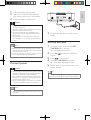
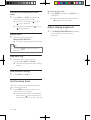
1Press DOCK key to select dock source.
2 Place the iPhone/iPod/iPad into the dock.
•
•
•
•
•
•
Install the rubber pad
If necessary, install the supplied rubber pad to
keep the iPad 2 stable before you place the
iPad 2.
To pause/resume play, press OK/ .
To skip to a track, press / .
To search during play, press and
hold / , then release to resume
normal play.
To go back to the previous iPod/
iPhone menu, press MENU.
To scroll through the menu, press / .
To confirm a selection, press OK/ .
»» If no key is pressed for more than
10 seconds, OK/
acts back as
the play/pause key.
Charge the iPod/iPhone/iPad
When the unit is connected to power, the
docked iPod/iPhone/iPad begins to charge.
Tip
•• For certain iPod models, it may take up to a
minute before the charging indication appears.
•• If clock is not manually set, when iPhone/iPod/
ipad is connected, the clock radio synchronizes
time from the iPhone/iPod/iPad automatically.
EN
15
English
Listen to the iPod/iPhone/iPad