1
00.Kaiser_OG.book Page 14 Friday, May 15, 2009 7:15 AM
Svenska
Nederlands
Français
Italiano
Deutsch
Español
English
SYSTEM SETUP
6
Inserting the
CineMate® GS
remote batteries
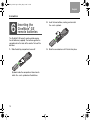
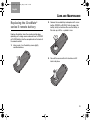
2. Insert the two batteries, making sure to match
the – and + symbols.
The CineMate® GS series II remote control requires
two AA batteries (supplied). The batteries go into the
compartment on the back of the remote. To insert the
batteries:
1. Slide the battery compartment cover off.
Symbols inside the compartment show how to
match the – and + symbols on the batteries.
14
3. Slide the cover back on until it clicks into place.