1
®
Epson Stylus NX420 Series
Quick Guide
Wireless Network Setup
Basic Copying, Printing, and Scanning
Maintenance
Solving Problems
Contents
Wireless Network Setup . . . . . . . . . . . . . . . . . . . . . . . . . . . . . . . . 4
Installing for the First Time . . . . . . . . . . . . . . . . . . . . . . . . . . . . . . . . . . . 4
Setting up Additional Computers . . . . . . . . . . . . . . . . . . . . . . . . . . . . . . 14
Loading Paper . . . . . . . . . . . . . . . . . . . . . . . . . . . . . . . . . . . . . . . . 18
Using Special Papers . . . . . . . . . . . . . . . . . . . . . . . . . . . . . . . . . . . . . . . 20
Copying a Document or Photo . . . . . . . . . . . . . . . . . . . . . . . . . 22
Placing Originals on the Glass . . . . . . . . . . . . . . . . . . . . . . . . . . . . . . . . 22
Copying Documents and Photos . . . . . . . . . . . . . . . . . . . . . . . . . . . . . . 23
Printing From a Memory Card . . . . . . . . . . . . . . . . . . . . . . . . . . 24
Inserting the Card . . . . . . . . . . . . . . . . . . . . . . . . . . . . . . . . . . . . . . . . 24
Printing Photos From the LCD Screen . . . . . . . . . . . . . . . . . . . . . . . . . . 25
Printing From Your Computer . . . . . . . . . . . . . . . . . . . . . . . . . . 26
Printing in Windows . . . . . . . . . . . . . . . . . . . . . . . . . . . . . . . . . . . . . . 26
Printing With a Macintosh . . . . . . . . . . . . . . . . . . . . . . . . . . . . . . . . . . 28
Selecting the Correct Paper Type . . . . . . . . . . . . . . . . . . . . . . . . . . . . . . 31
Scanning a Document or Photo . . . . . . . . . . . . . . . . . . . . . . . . 32
Quick Scanning With the Scan Button . . . . . . . . . . . . . . . . . . . . . . . . . .
Scanning With Epson Scan Software . . . . . . . . . . . . . . . . . . . . . . . . . . . .
Scanning with Mac OS X 10.6 . . . . . . . . . . . . . . . . . . . . . . . . . . . . . . . .
Restoring and Correcting Photos . . . . . . . . . . . . . . . . . . . . . . . . . . . . . .
32
33
34
35
Maintaining Your Printer . . . . . . . . . . . . . . . . . . . . . . . . . . . . . . 36
Checking the Print Head Nozzles . . . . . . . . . . . . . . . . . . . . . . . . . . . . . .
Cleaning the Print Head . . . . . . . . . . . . . . . . . . . . . . . . . . . . . . . . . . . .
Checking Ink Levels . . . . . . . . . . . . . . . . . . . . . . . . . . . . . . . . . . . . . . .
Purchasing Epson Ink Cartridges . . . . . . . . . . . . . . . . . . . . . . . . . . . . . .
Replacing Ink Cartridges . . . . . . . . . . . . . . . . . . . . . . . . . . . . . . . . . . . .
2 Contents
36
37
38
38
39
Solving Problems . . . . . . . . . . . . . . . . . . . . . . . . . . . . . . . . . . . . . 42
Checking for Software Updates . . . . . . . . . . . . . . . . . . . . . . . . . . . . . . .
Error Indicators . . . . . . . . . . . . . . . . . . . . . . . . . . . . . . . . . . . . . . . . . .
Problems and Solutions . . . . . . . . . . . . . . . . . . . . . . . . . . . . . . . . . . . . .
Where to Get Help . . . . . . . . . . . . . . . . . . . . . . . . . . . . . . . . . . . . . . . .
42
43
44
48
Notices. . . . . . . . . . . . . . . . . . . . . . . . . . . . . . . . . . . . . . . . . . . . . . . 49
Contents 3
Wireless Network Setup
This section provides detailed instructions for setting up your printer on a wireless
network.
Note:
If you’re having trouble setting up your wireless printer, see “Network Problems” on
page 44.
■
If this is the first time that you’re installing the printer, follow the steps in
“Installing for the First Time” below.
■
If your printer is already on your wireless network and you need to set up
additional computers to print to the printer, see “Setting up Additional
Computers” on page 14.
Installing for the First Time
Before you begin, make sure that you have the following information ready and
write it in the space provided below:
■
Network name (SSID): _________________________________________
■
Network password: ____________________________________________
Note:
If your network password contains uppercase (ABC) or lowercase (abc) letters, be
sure to note it correctly.
If you don’t know your network name (SSID) or network password, contact the person
who set up your wireless network.
1. Insert the printer software CD.
2. Windows® 7 and Windows Vista®: If you see the AutoPlay window, click
Run Setup.exe. When you see the User Account Control screen, click Yes or
Continue.
Windows XP: When you see the Software Installation screen, continue with
step 3.
Mac OS® X: Double-click the
4 Wireless Network Setup
Epson icon.
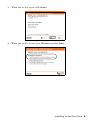
3. When you see this screen, click Install.
4. When you see this screen, select Wireless and click Next.
Installing for the First Time 5
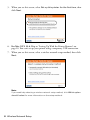
5. When you see this screen, select Set up this printer for the first time, then
click Next.
6. For Mac OS X 10.6: Skip to “Setting Up With the Printer Buttons” on
page 10. You can’t set up your printer using a temporary USB connection.
7. When you see this screen, select a wireless network setup method, then click
Next.
Note:
If you need help selecting a wireless network setup method, click Which option
should I select for more information on the setup methods.
6 Wireless Network Setup
8. Do one of the following:
■
If you selected Temporarily connect USB cable, continue with
“Setting Up With a Temporary USB Cable” below.
■
If you selected Select settings using printer buttons, continue with
“Setting Up With the Printer Buttons” on page 10.
Setting Up With a Temporary USB Cable
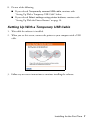
1. Wait while the software is installed.
2. When you see this screen, connect the printer to your computer with a USB
cable.
3. Follow any on-screen instructions to continue installing the software.
Installing for the First Time 7
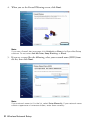
4. When you see the Firewall Warning screen, click Next.
Note:
If you see a firewall alert message, click Unblock or Allow to let EpsonNet Setup
continue. Do not select Ask Me Later, Keep Blocking, or Block.
5. If you see a screen like the following, select your network name (SSID) from
the list, then click Next.
Note:
If your network name isn’t in the list, select Enter Manually. If your network name
contains uppercase or lowercase letters, enter them correctly.
8 Wireless Network Setup
6. If you see a screen like the following, enter your security key or passphrase,
then click Next.
Note:
If your security key contains uppercase or lowercase letters, enter them correctly.
7. Wait while EpsonNet Setup configures your printer for the network.
8. Follow the instructions on the screen to remove the USB cable from the
printer and your computer.
9. When you see the Installation Complete screen, print a test page, then click
Finish.
Installing for the First Time 9
10. Follow the on-screen instructions to install the rest of your software.
When installation is complete, remove the CD.
To set up additional computers to print to the NX420 Series, see “Setting up
Additional Computers” on page 14.
Setting Up With the Printer Buttons
1. Follow the instructions on the screen to start the printer’s wireless Setup
Wizard.
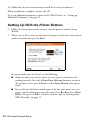
2. When you see this screen, use the printer’s buttons to select the name of your
wireless network, then press x Start.
If your network name isn’t listed, try the following:
■
Make sure that your wireless router or access point is turned on and
working correctly. Press the y Stop/Clear Settings button to return to
the previous screen, press x Start to select Setup Wizard, then repeat
step 2.
■
If you still can’t find the network name in the list, your router or access
point is not broadcasting its network name. Press l or r to select Other
SSIDs, then press x Start. Continue with the steps in “Entering Your
SSID Manually” on page 13.
10 Wireless Network Setup
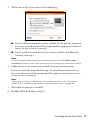
3. When you see this screen, do one of the following:
■
If your wireless network has security enabled, use the printer’s buttons to
enter your network password. If your password has uppercase or lowercase
letters, be sure to enter it correctly.
■
If your wireless network doesn’t have security enabled, click Next and
continue with step 4.
Note:
If you’re having trouble entering your network password, click Watch video
overview to watch a short video tutorial on how to enter your network password.
4. Follow the on-screen instructions to finish selecting network settings.
If you see a network setup failed message, the network password may have
been entered incorrectly. If your password has uppercase or lowercase letters,
be sure to enter it correctly.
Note:
If the printer still doesn’t connect to your wireless network, see “The printer
cannot find or connect to the wireless router or access point” on page 44.
5. Wait while the software is installed.
6. For Mac OS X 10.6: Skip to step 10.
Installing for the First Time 11
7. When you see the Firewall Warning screen, click Next.
Note:
If you see a firewall alert message, click Unblock or Allow to let EpsonNet Setup
continue. Do not select Ask Me Later, Keep Blocking, or Block.
8. Wait while EpsonNet Setup configures your printer for the network.
9. When you see the Installation Complete screen, print a test page, then click
Finish.
12 Wireless Network Setup
10. Follow the instructions on the screen to install the rest of your software.
When installation is complete, remove the CD.
To set up additional computers to print to the printer, see “Setting up Additional
Computers” on page 14.
Entering Your SSID Manually
If your network doesn’t broadcast it’s name (SSID), follow the steps in this section
to enter it manually.
1. From the Select SSID screen on the printer’s control panel, press l or r to
select Other SSIDs, then press x Start.
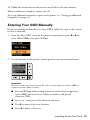
2. Use the buttons on the printer’s control panel to enter your network name.
Important:
Network names are case-sensitive. Be sure to enter uppercase letters (ABC) or
lowercase letters (abc) correctly.
■
Press the o Copy reduce/enlarge button to switch between uppercase
letters (ABC), lowercase letters (abc), or numbers and special
characters (123).
■
Press + or – until you see the character you want.
■
Press r to move to the next character.
■
Press l to delete a character.
Installing for the First Time 13
3. When you’re done entering your network name, press x Start.
4. Continue with step 3 on page 11 to enter your network password.
Setting up Additional Computers
1. Insert the printer software CD.
2. Windows 7 and Windows Vista: If you see the AutoPlay window, click Run
Setup.exe. When you see the User Account Control screen, click Yes or
Continue.
Windows XP: When you see the Software Installation screen, continue with
step 3.
Mac OS X: Double-click the Epson
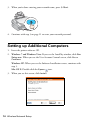
3. When you see this screen, click Install.
14 Wireless Network Setup
icon.
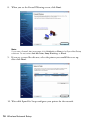
4. When you see this screen, select Wireless and click Next.
5. When you see this screen, select This printer is already on my wireless
network, then click Next.
6. Wait while the software is installed.
7. For Mac OS X 10.6: Skip to step 12.
Setting up Additional Computers 15
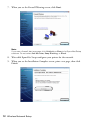
8. When you see the Firewall Warning screen, click Next.
Note:
If you see a firewall alert message, click Unblock or Allow to let EpsonNet Setup
continue. Do not select Ask Me Later, Keep Blocking, or Block.
9. If you see a screen like this one, select the printer you would like to set up,
then click Next.
10. Wait while EpsonNet Setup configures your printer for the network.
16 Wireless Network Setup
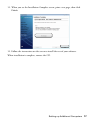
11. When you see the Installation Complete screen, print a test page, then click
Finish.
12. Follow the instructions on the screen to install the rest of your software.
When installation is complete, remove the CD.
Setting up Additional Computers 17
Loading Paper
You can print documents and photos on a variety of paper types and sizes. For
details, see page 20.
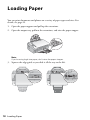
1. Open the paper support and pull up the extensions.
2. Open the output tray, pull out the extensions, and raise the paper stopper.
Note:
If you’re using legal-size paper, don’t raise the paper stopper.
3. Squeeze the edge guide as you slide it all the way to the left.
18 Loading Paper
4. Load paper against the right edge and behind the tab with the glossy or
printable side face up. (Load letterhead or pre-printed paper top edge first.)
Always load paper short edge
first, don’t load it sideways.
You can load up to 120 sheets of letter- or A4-size plain paper, 80 sheets of
matte, or 20 sheets of photo paper. Load other papers one sheet at a time. See
your online User’s Guide for more information.
Note:
Don’t load paper with holes punched in it.
The type of paper you choose affects the way your printout looks. If you are just
making a copy or printing a rough draft, plain paper is fine. However, for the best
results, you’ll want to use one of Epson’s special ink jet papers designed for your
printer. For example, your photos will look great printed on Epson Ultra Premium
Photo Paper Glossy (see page 20 for more information).
5. Squeeze the edge guide and slide it against the paper, but not too tightly.
Note:
For instructions on loading envelopes, see your online User’s Guide.
Loading Paper 19
Using Special Papers
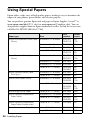
Epson offers a wide array of high quality papers, making it easy to maximize the
impact of your photos, presentations, and creative projects.
You can purchase genuine Epson ink and paper at Epson Supplies CentralSM at
www.epson.com/ink3 (U.S. sales) or www.epson.ca (Canadian sales). You can
also purchase supplies from an Epson authorized reseller. To find the nearest one,
call 800-GO-EPSON (800-463-7766).
Part
number
Sheet
count
Borderless 4 × 6 inches
S042181
S042174
60
100
Borderless 5 × 7 inches
S041945
20
Borderless 8 × 10 inches
S041946
20
Letter (8.5 × 11 inches)
S042182
S042175
25
50
Borderless 4 × 6 inches
S041808
S041727
40
100
Borderless 5 × 7 inches
S041464
20
Borderless 8 × 10 inches
S041465
20
Letter (8.5 × 11 inches)
S042183
S041667
25
50
Epson Premium Photo Paper
Semi-gloss
Borderless 4 × 6 inches
S041982
40
Letter (8.5 × 11 inches)
S041331
20
Epson Photo Paper Glossy
Borderless 4 × 6 inches
S041809
S042038
50
100
Letter (8.5 × 11 inches)
S041141
S041649
S041271
20
50
100
Epson Bright White Paper
Letter (8.5 × 11 inches)
S041586
500
Epson Premium Presentation
Paper Matte
Borderless 8 × 10 inches
S041467
50
Letter (8.5 × 11 inches)
S041257
S042180
50
100
Epson Premium Presentation
Paper Matte Double-sided
Letter (8.5 × 11 inches)
S041568
50
Epson Presentation Paper Matte
Letter (8.5 x 11 inches)
S041062
100
Legal (8.5 x 14 inches)
S041067
100
Paper type
Size
Epson Ultra Premium Photo Paper
Glossy
Epson Premium Photo Paper
Glossy
20 Loading Paper
Paper type
Size
Part
number
Sheet
count
Epson Photo Quality Self-adhesive
Sheets
A4 (8.3 × 11.7 inches)
S041106
10
Epson Iron-on Cool Peel Transfer
Paper
Letter (8.5 x 11 inches)
S041153
10
Using Special Papers 21
Copying a Document or Photo
Follow the instructions in this section to position your originals correctly on the
scanner glass and make color or black-and-white copies.
Placing Originals on the Glass
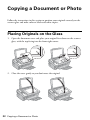
1. Open the document cover and place your original face-down on the scanner
glass, with the top facing into the front right corner.
2. Close the cover gently so you don’t move the original.
22 Copying a Document or Photo
Copying Documents and Photos
You can copy documents and photos onto letter- or A4-size plain paper or Epson
special paper or 4 × 6-inch Epson photo paper.
1. Load paper in the sheet feeder (see page 18).
2. Place your original document on the scanner glass (see page 22).
3. Press the
Copy button.
4. To print more than 1 copy, press + or – to select the number (up to 99).
5. Press l or r to select Color or B&W copies.
6. To adjust the copy size, press the reduce/enlarge button and select a
percentage using + or –. Or you can press l or r to select Auto (to
automatically size the image to fit your paper). When you’re finished, press the
reduce/enlarge button again.
7. Press the
paper size button, if necessary, to select Letter Size Plain Paper
or 4"× 6" Photo Paper.
8. Press x Start to begin copying.
Tip:
To make a quick draft copy on plain paper, hold down x Start until the P On light
starts flashing.
To cancel copying, press y Stop/Clear Settings.
Select copy mode
Change copy size
Select paper size and type
Start copying
Cancel copying
Copying Documents and Photos 23
Printing From a Memory Card
Your Epson printer lets you print photos directly from your digital camera’s
memory card; just insert it into the memory card slot and you’re ready to print.
See the online User’s Guide for instructions on copying memory card files between
your Epson printer and a computer, and printing photos pre-selected in your
camera (DPOF™ or Digital Print Order Format).
Inserting the Card
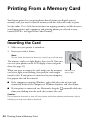
1. Make sure your printer is turned on.
2. Insert your card as shown.
Note:
Do not force the card into the slot; it won’t go in all the way.
The memory card access light flashes, then stays lit. Now you
can view your photos on the LCD display screen and print
them (see page 25)
When you want to remove the card, make sure the memory
card access light is not flashing, then pull the card straight
out of its slot. If your printer is connected to your computer,
first prepare the card for removal:
Memory card
access light
■
If the computer is running Windows, right-click the name of your card
(removable disk) in My Computer or Windows Explorer, and select Eject.
■
If your printer is connected to a Macintosh, drag the
removable disk icon
from your desktop into the trash, then remove the card.
Caution:
Do not remove the card or turn off your printer while the memory card access light is
flashing; you may lose data on the card.
24 Printing From a Memory Card
Printing Photos From the LCD Screen
You can select individual photos for printing as you view them on the LCD
display screen.
1. Load several sheets of 4 × 6-inch Epson photo paper (various types available;
see page 20).
2. Press the Print photos button.
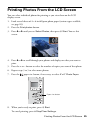
3. Press l or r until you see Select Photos, then press x Start. You see this
screen:
4. Press l or r to scroll through your photos and display one that you want to
print.
5. Press the + or – button to select the number of copies you want of that photo.
6. Repeat steps 3 to 5 to select more photos.
7. Press the
paper size button, if necessary, to select 4"× 6" Photo Paper.
Paper size button
8. When you’re ready to print, press x Start.
To cancel printing, press y Stop/Clear Settings.
Printing Photos From the LCD Screen 25
Printing From Your Computer
This section describes the basic steps for printing a photo or document stored on
your Windows or Macintosh computer. For detailed instructions on printing, see
the online User’s Guide.
Before you start, make sure you’ve installed your printer software and connected
your Epson printer to your computer as described on the Start Here sheet.
Tip:
It’s a good idea to check for updates to your Epson printer’s software (see page 42 for
instructions).
Printing in Windows
1. Open a photo or document in a Windows program.
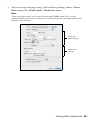
2. Open the File menu and select Print. You see a window like this one:
Select your Epson
printer
Click here to open
your printer software
3. Make sure your Epson printer is selected, then click the Preferences or
Properties button.
(If you see a Setup, Printer, or Options button, click it. Then click
Preferences or Properties on the next screen.)
26 Printing From Your Computer
4. On the Main tab, select the basic print settings. Make sure you choose the
correct paper Type setting for the paper you are using (see page 31 for
details).
Select the type of document you’re printing
(choose Photo or Best Photo for pictures)
Select your
paper Type
Select your
paper Size
Select your
document
Orientation
Note:
For quick access to the most common settings, click the Shortcuts tab and select
one of the presets. You can create your own presets by clicking the Save Settings
button on the Advanced tab.
5. If you want to reduce or enlarge your printout, or print double-sided, click the
Page Layout tab and select settings as necessary.
6. For more printing options, click the Advanced tab.
Note:
For more information about print settings, click Help or see your online User’s
Guide.
7. Click OK to save your settings.
Printing in Windows 27
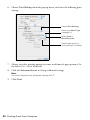
8. Click OK or Print to start printing. This window appears and shows the
progress of your print job.
Cancel
printing
Printing With a Macintosh
Follow the steps below to print from Mac OS X 10.5 to 10.6.
Note:
If you’re printing from Mac OS X 10.4, see your online User’s Guide for printing
instructions.
1. Open a photo or document in an application.
2. Open the File menu and select Print.
3. Select your Epson printer as the Printer setting.
Select your Epson printer
Click to expand
4. Click the arrow to expand the Print window, if necessary.
28 Printing From Your Computer
5. Select basic copy and page settings. For borderless printing, choose a Paper
Size setting with a Sheet Feeder - Borderless option.
Note:
If the setting you want isn’t shown (for example, Scale), check for it in your
application before printing. Or check for it in the settings for your application at the
bottom of this window.
Copy and
page settings
Application
settings
Printing With a Macintosh 29
6. Choose Print Settings from the pop-up menu, and select the following print
settings:
Choose Print Settings
Select your Media Type
(see page 31)
Select Color or
Black/Grayscale
Select higher quality or
faster printing (if available)
7. Choose any other printing options you may need from the pop-up menu. See
the online User’s Guide for details.
8. Click the Advanced button to change additional settings.
Note:
For more information on advanced settings click ?.
9. Click Print.
30 Printing From Your Computer
10. To monitor your print job, click the
printer icon in the dock.
Cancel
printing
Pause or
resume
printing
Select the
print job
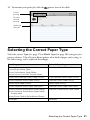
Selecting the Correct Paper Type
Select the correct Type (see page 27) or Media Type (see page 28) setting in your
printer software. This tells your Epson printer what kind of paper you’re using, so
the ink coverage can be adjusted accordingly.
For this paper
Select this setting
Plain paper
Epson Bright White Paper
Epson Presentation Paper Matte
Epson Iron-on Cool Peel Transfer Paper
Plain Paper/Bright White Paper
Epson Ultra Premium Photo Paper Glossy
Ultra Premium Photo Paper Glossy
Epson Premium Photo Paper Glossy
Premium Photo Paper Glossy
Epson Photo Paper Glossy
Photo Paper Glossy
Epson Premium Photo Paper Semi-gloss
Premium Photo Paper Semi-Gloss
Epson Premium Presentation Paper Matte
Epson Premium Presentation Paper Matte
Double-sided
Epson Photo Quality Self-adhesive Sheets
Premium Presentation Paper Matte
Envelopes
Envelope
Selecting the Correct Paper Type 31
Scanning a Document or Photo
You can use your Epson Stylus NX420 Series to scan a photo or document and
save it on your computer. The u Scan button lets you scan quickly using
preselected settings, or you can use the Epson Scan software to access more
advanced features. For example, you can use Epson Scan to restore faded colors in
old photos (see page 35).
Note:
For detailed scanning instructions, see the online User’s Guide.
Quick Scanning With the Scan Button
Use the u Scan button to quickly scan a photo or document and save it on your
computer. You can even scan a photo and have it automatically included in an
email message.
Note:
For Mac OS X 10.6, see “Scanning with Mac OS X 10.6” on page 34.
1. Open the document cover and place your original face-down on the glass, in
the front right corner, as shown on page 22.
2. Close the cover gently so you don’t move the original.
3. Press the u Scan button.
4. Press l or r to select one of the following options:
■
Scan to PC automatically creates a JPG image and saves it to your
computer; ideal for scanning photos
■
Scan to PDF automatically creates a PDF file and saves it to your
computer; ideal for scanning documents
■
Scan to Email automatically scans a photo, resizes it, launches your
email application, and attaches a JPG image to a new outgoing message
32 Scanning a Document or Photo
5. Do one of the following:
■
If your printer is connected directly to your computer with a USB cable,
press x Start to select USB Connection.
■
If your printer is connected to a wireless network, press l or r until you
see your computer name, then press x Start.
6. Press x Start to begin scanning.
Once your image is scanned, you see its icon in Windows Explorer or
Macintosh Finder, or as an attachment in your email application, depending
on the option you selected.
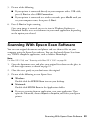
Scanning With Epson Scan Software
You can scan original documents and photos and save them as files on your
computer using the Epson Scan software. You can also launch Epson Scan from
any TWAIN-compliant application, such as Adobe® Photoshop®.
Note:
For Mac OS X 10.6, see “Scanning with Mac OS X 10.6” on page 34.
1. Open the document cover and place your original face-down on the glass, in
the front right corner, as shown on page 22.
2. Close the cover gently so you don’t move the original.
3. Do one of the following to start Epson Scan:
■
Windows:
Double-click the EPSON Scan icon on your desktop.
■
Macintosh:
Double-click EPSON Scan in the Applications folder.
■
If you are scanning from an application, start your application. Then
open the File menu, choose Import or Acquire, and select your Epson
printer.
Scanning With Epson Scan Software 33
You see the Epson Scan window:
4. Select Full Auto Mode as the Mode setting
in the upper right corner. (If you are in
Home, Office, or Professional Mode, you see
a different Epson Scan window.)
5. If you want to restore faded color in a photo
or make other corrections, click Customize.
Then follow the instructions on page 35.
6. Click the Scan button. The image is scanned
and you see its icon in Windows Explorer or
Macintosh Finder.
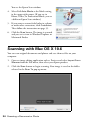
Scanning with Mac OS X 10.6
You can scan original documents and photos and save them as files on your
computer.
1. Open an image editing application such as Preview and select Import From
Scanner from the File menu, then select your Epson product.
2. Click the Scan button to begin scanning. Your image is saved to the folder
selected in the Scan To pop-up menu.
34 Scanning a Document or Photo
Restoring and Correcting Photos
You can automatically transform a faded, dusty, or badly exposed color photo into
one with true-to-life color and sharpness as you scan. Use the Color Restoration
and Dust Removal options in Epson Scan’s Full Auto Mode. In Home and
Professional Mode, you can also select Backlight Correction to remove shadows
from images with too much background light.
Note:
For Mac OS X 10.6, see “Scanning with Mac OS X 10.6” on page 34 to start scanning,
click the Show Details button, and select settings as necessary.
Full Auto Mode
Click the Customize button,
click Dust Removal and/or
Color Restoration, click
OK, and click Scan.
Automatically orients
your photos based
on detected faces
and other features.
If your photo is not
oriented correctly,
turn off Auto Photo
Orientation and try
again.
Note:
For more information, see the online User’s Guide. You can also click Help on the
Epson Scan screen for information about all the available settings.
Restoring and Correcting Photos 35
Maintaining Your Printer
Follow the instructions in this chapter for checking and cleaning the print head
nozzles and replacing ink cartridges. To align the print head, if necessary, see your
online User’s Guide.
Caution:
To keep your printer looking like new, don’t place anything on top of the cover or use it
as a writing surface. If you need to clean the cover, use only a soft, non-abrasive
microfiber-type cloth.
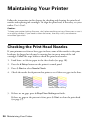
Checking the Print Head Nozzles
If your printouts are faint or have gaps in them, some of the nozzles in the print
head may be clogged or ink may be running low in one or more of the ink
cartridges. Follow the steps below to check the print head nozzles.
1. Load letter- or A4-size paper in the sheet feeder (see page 18).
2. Press the F Setup button on the printer’s control panel.
3. Press x Start to select Nozzle Check.
4. Check the nozzle check pattern that prints to see if there are gaps in the lines.
Nozzles are clean
Nozzles need cleaning
5. If there are no gaps, press y Stop/Clear Settings to finish.
If there are gaps or the pattern is faint, press x Start to clean the print head
(see page 37).
36 Maintaining Your Printer
Cleaning the Print Head
If print quality has declined and the nozzle check pattern indicates clogged
nozzles, you can clean the print head. Print head cleaning uses ink, so clean it only
if necessary.
Note:
You cannot clean the print head if an ink cartridge is expended, and may not be able to
clean it when a cartridge is low. You must replace the cartridge first (see page 39).
1. Load letter- or A4-size paper in the sheet feeder (see page 18).
2. Press the F Setup button.
3. Press l or r to select Head Cleaning, then press x Start.
Cleaning takes approximately one minute. When it’s finished, you see a
message on the display screen.
Caution:
Never turn off the printer during head cleaning or you may damage it.
4. Run a nozzle check (as described on page 36) to verify that the print head is
clean.
5. If there are still gaps or lines, or the test patterns are faint, run another
cleaning cycle and check the nozzles again.
Note:
If you don’t see any improvement after cleaning the print head four times, turn off the
printer and wait at least six hours to let any dried ink soften. Then try cleaning the print
head again. If quality does not improve, one of the ink cartridges may need to be
replaced. If that doesn’t help, contact Epson as described on page 48.
If you do not use your Epson printer often, it is a good idea to print a few pages at least
once a month to maintain good print quality.
Cleaning the Print Head 37
Checking Ink Levels
If an ink cartridge is expended, you see a message on
your printer’s LCD display screen:
Note:
You cannot print or copy when an ink cartridge is expended
even if the other cartridges are not expended. Replace any
expended cartridges before printing or copying.
You can check ink cartridge levels using your printer software:
■
Windows: Double-click the
your screen (the taskbar).
■
Macintosh: Open the Applications folder on your hard drive, then open the
EPSON Printer Utility 4. Select your Epson printer and click OK, then select
EPSON StatusMonitor.
printer icon in the bottom right corner of
A window may also appear on your computer screen when you try to print when
ink is low. This window can optionally display ink offers and other updates from
Epson.
Note:
To disable checking for ink offers or updates from Epson, see the instructions in your
online User’s Guide.
Purchasing Epson Ink Cartridges
You can purchase genuine Epson ink and paper from Epson Supplies Central at
www.epson.com/ink3 (U.S. sales) or www.epson.ca (Canadian sales). You can
also purchase supplies from an Epson authorized reseller. To find the nearest one,
call 800-GO-EPSON (800-463-7766).
Use the following list when you order or purchase new ink cartridges:
Ink color
Moderate-capacity
(For lighter use)
Standard-capacity
Black
124
125
Cyan
124
125
Magenta
124
125
Yellow
124
125
38 Maintaining Your Printer
Note:
We recommend that you use genuine Epson cartridges and do not refill them. The use
of other products may affect your print quality and could result in printer damage.
Yields vary considerably based on images printed, print settings, paper type, frequency
of use, and temperature. For print quality, a small amount of ink remains in the cartridge
after the “replace cartridge” indicator comes on. Your printer ships with full cartridges
and part of the ink from the first cartridges is used for priming the printer.
For best printing results, use up a cartridge within six months of opening the package,
and before the expiration date on the cartridge box.
Store ink cartridges in a cool, dark place. If cartridges have been exposed to cold
temperatures, allow them to warm up to room temperature for at least 3 hours before
using them.
Replacing Ink Cartridges
Make sure you have a new ink cartridge before you begin. You must install new
cartridges immediately after removing the old ones.
Caution:
Do not open ink cartridge packages until you are ready to install the ink. Cartridges are
vacuum packed to maintain reliability.
Note:
Leave the expended cartridge installed until you have obtained a replacement, or the
ink remaining in the print head nozzles may dry out.
1. Turn on your printer.
2. If an ink cartridge is expended, you see a message
on the LCD display screen. Note which cartridges
need to be replaced and press x Start.
If a cartridge is expended, you must replace it to be
able to print. If a cartridge is low, you can continue
printing until a cartridge needs replacement.
If you’re replacing a cartridge before you see a message on the LCD display
screen, press the F Setup button, select Ink Cartridge Replacement, and
press x Start.
Replacing Ink Cartridges 39
3. Open the scanner, and open the cartridge cover.
4. Squeeze the tab on the cartridge and lift it up. Dispose
of it carefully. Do not take the used cartridge apart or try
to refill it.
Warning:
If ink gets on your hands, wash them thoroughly with soap and
water. If ink gets into your eyes, flush them immediately with
water. Keep ink cartridges out of the reach of children.
5. Before you open the new cartridge package, shake it gently
four or five times. Then remove the cartridge from the package.
Caution:
Do not touch the green chip on the front of the cartridge. This can damage the ink
cartridge.
6. Remove the yellow tape from the bottom of
the ink cartridge.
Caution:
Do not remove any other labels or seals, or ink
may leak.
40 Maintaining Your Printer
7. Insert the new ink cartridge into the holder and push it down until it clicks
into place.
8. Once you replace all the cartridges that need replacing, close the cartridge
cover and push it down until it clicks into place.
9. Close the scanner.
10. Press OK to begin charging the ink. This takes
about 2 minutes. When you see a completion
message on the display screen, ink charging is
finished.
Caution:
Never turn off the your Epson printer while ink is
charging or you’ll waste ink. If you see an ink
replacement message on the display screen, press
x Start and press down all the cartridges securely. Then press x Start again.
Note:
If you replaced a cartridge while copying a document or photo, cancel printing and
make sure your original is still placed correctly on the document table. Then copy
your original again.
If you remove a low or expended ink cartridge, you cannot reinstall and use the
cartridge.
Replacing Ink Cartridges 41
Solving Problems
If you have a problem with your Epson printer, check the messages on the display
screen to diagnose the cause.
You can also check “Problems and Solutions” on page 44 for basic troubleshooting
suggestions, or double-click the User’s Guide icon on your computer desktop for
more detailed help.
Checking for Software Updates
Periodically, it’s a good idea to check Epson’s support website for free updates to
your NX420 Series software. Open your online User’s Guide and select Download
the Latest Software or visit Epson’s support website at epson.com/support
(U.S.) or epson.ca/support (Canada).
With Windows, you can select Driver Update on the Maintenance tab in the
printer settings window. You can also click Start or , select Programs or All
Programs, select EPSON, select EPSON NX420 Series, and click Driver
Update.
42 Solving Problems
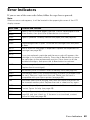
Error Indicators
If you see one of the error codes below, follow the steps here to proceed.
Note:
When an error code appears, it will be located in the upper-right corner of the LCD
display screen.
Error code
Problem and solution
I-01
W-05
Paper is out or multiple pages have fed. Load or reload paper in the
sheet feeder, then press the x Start button to continue.
W-02
Paper is jammed. Carefully remove the paper jam (see page 46).
W-03
W-04
The cartridge cover is open. Close the ink cartridge cover and press
x Start.
W-10
One or more ink cartridges is expended. Replace the expended ink
cartridge (see page 39).
W-11
W-13
W-41
W-12
If you just replaced a cartridge and the error code still appears, the
cartridge is not installed correctly. Press the x Start button to move
the cartridges to the replacement position. Press down on all the
installed cartridges, then press the x Start button to continue.
Cannot recognize the ink cartridge(s) shown on the LCD screen.
Replace the ink cartridge(s).
I-11
No memory card is inserted. Insert a memory card (see page 24).
W-30
The memory card is not installed correctly or there is a problem with
the card. Remove it and check the card. Make sure the card is
compatible with your Epson printer (see page 24).
W-31
I-53
The index sheet you’re printing from does not match the photos on
the inserted memory card. Replace the card or sheet and try again.
W-01
Parts inside your Epson printer are at the end of their service life.
Contact Epson for help (see page 48).
E-10
E-01
E-02
Turn your Epson printer off, make sure no paper is jammed inside (see
page 46), and turn it back on. If the error is not resolved, contact
Epson for help (see page 48).
Error Indicators 43
Problems and Solutions
Check the solutions below if you’re having trouble using your Epson printer.
Network Problems
The printer cannot find or connect to the wireless router or access point
■
Try connecting to the wireless router or access point with your computer or
another device to confirm that it is working correctly.
■
Make sure that the printer is within range of your router or access point.
■
Avoid placing the printer near a microwave oven, 2.4 GHz cordless phone, or
large metal object such as a filing cabinet.
■
Make sure there aren’t any access restrictions (such as MAC address filtering)
set on the wireless router or access point. If access restrictions are set, register
the printer’s MAC address on the router or access point. Print a Network
Status Sheet (see page 45) to obtain the MAC address. Then see your router or
access point’s documentation for instructions.
■
If your wireless router or access point doesn’t broadcast its network name
(SSID), see “Entering Your SSID Manually” on page 13 for instructions on
manually entering your wireless network name. If your wireless router or
access point has wireless security enabled, you will also need to know what
kind of security it is using.
■
If the printer doesn’t connect to your wireless network, the WEP key or WPA
passphrase may have been entered incorrectly.
EpsonNet Setup was unable to find my printer on the network
Make sure that the printer is turned on and the green WiFi light on the front of
the printer is on.
Network setup was unsuccessful
Make sure that the printer is turned on and the green WiFi light on the front of
the printer is on. Then remove and reinsert the CD to reinstall the printer
software.
44 Solving Problems
The printer does not appear in the Add Printer window (Mac OS X)
Make sure the printer driver was installed correctly and that your computer’s
TCP/IP settings are configured correctly.
Cannot print over the network
■
Make sure that the printer is turned on and the green WiFi light on the front
of the printer is on.
■
When using TCP/IP, make sure the printer’s IP address is set correctly for your
network. If your network does not assign IP addresses using DHCP, you need
to set the IP address manually.
Printing is slow or the print is cut off
Print a Network Status Sheet (see below) and check the signal strength. If it’s poor,
try moving the printer closer to your wireless router or access point. Avoid placing
the printer next to a microwave oven, 2.4 GHz cordless phone, or large metal
objects such as a filing cabinet.
Cannot find the scanner or start Epson Scan
■
Epson Scan is not available in Mac OS X 10.6, see “Scanning with Mac OS X
10.6” on page 34 for scanning instructions.
■
If network communication was interrupted while starting Epson Scan, exit
Epson Scan, and restart it after a few seconds. If Epson Scan cannot restart,
turn the printer off and back on, and then try restarting Epson Scan. Check
the Timeout Setting in EPSON Scan Settings. For details, see the Epson
Scan Help.
■
If you are scanning a large document at high resolution, a communication
error may occur. If the scan did not complete, lower the resolution.
Print a Network Status Sheet
1. Press the F Setup button on the printer’s control panel to enter the Setup
menu.
2. Select Network Settings, then press x Start.
3. Select Print Network Status, then press x Start.
4. Press the x Start button to print a network status sheet.
Problems and Solutions 45
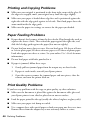
Printing and Copying Problems
■
Make sure your original is positioned in the front right corner of the glass. If
the edges are cropped, move your original away from the edges slightly.
■
Make sure your paper is loaded short edge first and is positioned against the
right side with the edge guide against its left side. Don’t load paper above the
arrow mark inside the edge guide.
■
Make sure the paper size settings are correct for the paper you loaded.
Paper Feeding Problems
■
If paper doesn’t feed, remove it from the sheet feeder. Flip through the stack to
separate the sheets a little. Then reload the paper against the right side, and
slide the left edge guide against the paper (but not too tightly).
■
Do not load too many sheets at once. You can load up to 120 sheets of letteror A4-size plain paper, 80 sheets of matte paper, or 20 sheets of photo paper.
Load other papers one sheet at a time. See your online User’s Guide for more
information.
■
Do not load paper with holes punched in it.
■
If paper is jammed, follow these steps:
1. Gently pull out jammed paper from the output tray or sheet feeder.
2. If paper is stuck inside, turn off your Epson printer.
3. Open the scanner, remove the jammed paper and torn pieces, close the
scanner, and turn the printer back on.
Print Quality Problems
If you have any problems with the copy or print quality, try these solutions:
■
Make sure the document is placed flat against the document table glass and
your Epson printer is not tilted or placed on an uneven surface.
■
Load the paper printable side up (usually the whiter, brighter, or glossy side).
■
Make sure your paper isn’t damp or curled.
■
Use a support sheet with special paper or load your paper one sheet at a time.
Remove sheets from the output tray so not too many collect at a time.
46 Solving Problems
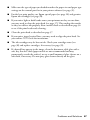
■
Make sure the type of paper you loaded matches the paper size and paper type
settings on the control panel or in your printer software (see page 31).
■
For the best print quality, use Epson special paper (see page 20) and genuine
Epson ink cartridges (see page 38).
■
If you notice light or dark bands across your printouts or they are too faint,
you may need to clean the print head (see page 37). This unclogs the nozzles
so they can deliver ink properly. Run a nozzle check as described on page 36
to see if the print head needs cleaning.
■
Clean the print head as described on page 37.
■
If you notice jagged vertical lines, you may need to align the print head. See
your online User’s Guide for instructions.
■
The ink cartridges may be low on ink. Check your cartridge status (see
page 38) and replace cartridges, if necessary (see page 39).
■
If a dotted line appears in the image, clean the document table glass with a
soft, dry, lint-free cloth (paper towels are not recommended and may
permanently scratch the surface), or use a small amount of glass cleaner on a
soft cloth, if necessary. Do not spray glass cleaner directly on the glass.
Problems and Solutions 47
Where to Get Help
Internet Support
Visit Epson’s support website at epson.com/support (U.S.) or epson.ca/support
(Canada) and select your product for solutions to common problems. You can
download drivers and documentation, get FAQs and troubleshooting advice, or email Epson with your questions.
Speak to a Support Representative
Before you call Epson for support, please have the following information ready:
■
Product name (Epson Stylus NX420 Series)
■
Product serial number (located on the label in back)
■
Proof of purchase (such as a store receipt) and date of purchase
■
Computer configuration
■
Description of the problem
Then call:
■
U.S.: (562) 276-4382, 6 AM to 6 PM, Pacific Time, Monday through Friday.
■
Canada: (905) 709-3839, 6 AM to 6 PM, Pacific Time, Monday through
Friday.
Days and hours of support are subject to change without notice. Toll or long
distance charges may apply.
Purchase Supplies and Accessories
You can purchase genuine Epson ink and paper at Epson Supplies Central at
www.epson.com/ink3 (U.S. sales) or www.epson.ca (Canadian sales). You can
also purchase supplies from an Epson authorized reseller. To find the nearest one,
call 800-GO-EPSON (800-463-7766).
48 Solving Problems
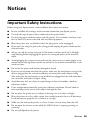
Notices
Important Safety Instructions
Before using your Epson printer, read and follow these safety instructions:
■
Be sure to follow all warnings and instructions marked on your Epson printer.
■
Use only the type of power source indicated on the printer label.
■
Use only the power cord that comes with the printer. Use of another cord may cause
fires or shock. Do not use the cord with any other equipment.
■
Place the printer near a wall outlet where the plug can be easily unplugged.
■
If you won’t be using the printer for a long period, unplug the power cord from the
electrical outlet.
■
Always turn off the printer using the P On button, and wait until the P On light
stops flashing before unplugging the printer or cutting off power to the electrical
outlet.
■
Avoid plugging the printer into an outlet on the same circuit as a photo copier or air
control system that regularly switches on and off, or on an outlet controlled by a wall
switch or timer.
■
Do not let the power cord become damaged or frayed.
■
If you use an extension cord with the printer, make sure the total ampere rating of the
devices plugged into the extension cord does not exceed the cord’s ampere rating.
Also, make sure the total ampere rating of all devices plugged into the wall outlet does
not exceed the wall outlet’s ampere rating.
■
Avoid locations that are subject to rapid changes in heat or humidity, shocks or
vibrations, or dust.
■
Leave enough room around the printer for sufficient ventilation. Do not block or
cover openings in the case or insert objects through the slots.
■
Do not place the printer near a radiator or heating vent or in direct sunlight.
■
Place the printer on a flat, stable surface that extends beyond its base in all directions.
It will not operate properly if it is tilted or at an angle.
■
Make sure the back of the printer is at least 4 inches (10 cm) away from the wall.
■
Do not open the scanner section while the NX420 Series is copying, printing, or
scanning.
■
Do not spill liquid on the printer.
Notices 49
■
Except as specifically explained in your documentation, do not attempt to service the
printer yourself.
■
Unplug the printer and refer servicing to qualified service personnel under the
following conditions: if the power cord or plug is damaged; if liquid has entered the
product; if the product has been dropped or the case damaged; if the product does not
operate normally or exhibits a distinct change in performance. Adjust only those
controls that are covered by the operating instructions.
■
When storing or transporting the printer, do not tilt it, stand it on its side, or turn it
upside down; otherwise ink may leak from the cartridges.
■
Do not use aerosol products that contain flammable gases inside or around the
printer. Doing so may cause fire.
Ink Cartridge Safety Instructions
■
Keep ink cartridges out of the reach of children and do not drink the ink.
■
Be careful when you handle used ink cartridges; there may be ink remaining around
the ink supply port. If ink gets on your skin, wash it off with soap and water. If it gets
in your eyes, flush them immediately with water.
■
Do not shake ink cartridges after opening their packages; this can cause leakage.
■
Do not put your hand inside the printer or touch any cartridges during printing.
■
Install a new ink cartridge immediately after removing an expended one. Leaving
cartridges uninstalled can dry out the print head and may prevent the printer from
printing.
■
If you remove an ink cartridge for later use, protect the ink supply area from dirt and
dust and store it in the same environment as the printer. Note that there is a valve in
the ink supply port, making covers or plugs unnecessary, but care is needed to prevent
the ink from staining items that the cartridge touches. Do not touch the ink cartridge
ink supply port or surrounding area.
LCD Display Screen Safety
■
Use only a dry, soft cloth to clean the LCD display screen. Do not use liquid or
chemical cleansers.
■
If the LCD display screen is damaged, contact Epson. If the liquid crystal solution
gets on your hands, wash them thoroughly with soap and water. If the liquid crystal
solution gets into your eyes, flush them immediately with water. If discomfort or
vision problems remain after a thorough flushing, see a doctor immediately.
50 Notices
FCC Compliance Statement
For United States Users
This equipment has been tested and found to comply with the limits for a Class B digital
device, pursuant to Part 15 of the FCC Rules. These limits are designed to provide
reasonable protection against harmful interference in a residential installation. This
equipment generates, uses, and can radiate radio frequency energy and, if not installed and
used in accordance with the instructions, may cause harmful interference to radio or
television reception. However, there is no guarantee that interference will not occur in a
particular installation. If this equipment does cause interference to radio and television
reception, which can be determined by turning the equipment off and on, the user is
encouraged to try to correct the interference by one or more of the following measures:
■
Reorient or relocate the receiving antenna.
■
Increase the separation between the equipment and receiver.
■
Connect the equipment into an outlet on a circuit different from that to which the
receiver is connected.
■
Consult the dealer or an experienced radio/TV technician for help.
WARNING
The connection of a non-shielded equipment interface cable to this equipment will
invalidate the FCC Certification of this device and may cause interference levels which
exceed the limits established by the FCC for this equipment. It is the responsibility of the
user to obtain and use a shielded equipment interface cable with this device. If this
equipment has more than one interface connector, do not leave cables connected to
unused interfaces. Changes or modifications not expressly approved by the manufacturer
could void the user’s authority to operate the equipment.
For Canadian Users
This Class B digital apparatus complies with Canadian ICES-003.
Cet appareil numérique de la classe B est conforme à la norme NMB-003 du Canada.
Notices 51
Declaration of Conformity
According to 47CFR, Part 2 and 15 for: Class B Personal Computers and Peripherals;
and/or CPU Boards and Power Supplies used with Class B Personal Computers:
We:
Located at:
Epson America, Inc.
MS 3-13
3840 Kilroy Airport Way
Long Beach, CA 90806
Telephone: (562) 290-5254
Declare under sole responsibility that the product identified herein, complies with 47CFR
Part 2 and 15 of the FCC rules as a Class B digital device. Each product marketed is
identical to the representative unit tested and found to be compliant with the standards.
Records maintained continue to reflect the equipment being produced can be expected to
be within the variation accepted, due to quantity production and testing on a statistical
basis as required by 47CFR §2.909. Operation is subject to the following two conditions:
(1) this device may not cause harmful interference, and (2) this device must accept any
interference received, including interference that may cause undesired operation.
Trade Name:
Epson
Type of Product: Multifunction printer
Model:
C353A
52 Notices
Epson America, Inc. Limited Warranty
What Is Covered: Epson America, Inc. (“Epson”) warrants to the original retail purchaser
that the Epson printer covered by this limited warranty statement, if purchased and
operated only in the United States or Canada, will be free from defects in workmanship
and materials for a period of one (1) year from the date of original purchase. For warranty
service, you must provide proof of the date of original purchase.
What Epson Will Do To Correct Problems: Should your Epson printer prove defective
during the warranty period, please call the Epson Connection at (562) 276-4382 (U.S.) or
(905) 709-3839 (Canada) for warranty repair instructions and return authorization. An
Epson service technician will provide telephone diagnostic service to determine whether
the printer requires service. If service is needed, Epson will, at its option, exchange or
repair the printer without charge for parts or labor. If Epson authorizes an exchange for the
defective unit, Epson will ship a replacement printer to you, freight prepaid, so long as you
use an address in Canada or the U.S. (excluding Puerto Rico and U.S. Possessions).
Shipments to other locations will be made freight collect. You are responsible for securely
packaging the defective unit and returning it to Epson within five (5) working days of
receipt of the replacement. Epson requires a debit or a credit card number to secure the
cost of the replacement printer in the event that you fail to return the defective one. If
Epson authorizes repair instead of exchange, Epson will direct you to send your printer to
Epson or its authorized service center, where the printer will be repaired and sent back to
you. You are responsible for packing the printer and for all costs to and from the Epson
authorized service center. When warranty service involves the exchange of the printer or a
part, the item replaced becomes Epson property. The replacement printer or part may be
new or refurbished to the Epson standard of quality, and, at Epson's option, may be
another model of like kind and quality. Exchange products and parts assume the
remaining warranty period of your original product covered by this limited warranty.
What This Warranty Does Not Cover: This warranty covers only normal use in the
United States and Canada. Using this product for continuous production or similar high
duty purposes is not considered normal use; damage, maintenance or service from such use
will not be covered under this warranty. This warranty is not transferable. This warranty
does not cover any color change or fading of prints or reimbursement of materials or
services required for reprinting. This warranty does not cover damage to the Epson
product caused by parts or supplies not manufactured, distributed or certified by Epson.
This warranty does not cover ribbons, ink cartridges or third party parts, components, or
peripheral devices added to the Epson product after its shipment from Epson, e.g., dealer
or user-added boards or components. Epson is not responsible for warranty service should
the Epson label or logo or the rating label or serial number be removed or should the
product fail to be properly maintained or fail to function properly as a result of misuse,
abuse, improper installation, neglect, improper shipping, damage caused by disasters such
as fire, flood, and lightning, improper electrical current, software problems, interaction
Notices 53
with non-Epson products, or service other than by an Epson Authorized Servicer. If a
claimed defect cannot be identified or reproduced, you will be held responsible for the
costs incurred.
THE WARRANTY AND REMEDY PROVIDED ABOVE ARE EXCLUSIVE AND IN
LIEU OF ALL OTHER EXPRESS OR IMPLIED WARRANTIES INCLUDING, BUT
NOT LIMITED TO, THE IMPLIED WARRANTIES OF MERCHANTABILITY,
NON-INFRINGEMENT OR FITNESS FOR A PARTICULAR PURPOSE. SOME
LAWS DO NOT ALLOW THE EXCLUSION OF IMPLIED WARRANTIES. IF
THESE LAWS APPLY, THEN ALL EXPRESS AND IMPLIED WARRANTIES ARE
LIMITED TO THE WARRANTY PERIOD IDENTIFIED ABOVE. UNLESS
STATED HEREIN, ANY STATEMENTS OR REPRESENTATIONS MADE BY ANY
OTHER PERSON OR FIRM ARE VOID. IN NO EVENT SHALL EPSON OR ITS
AFFILIATES BE LIABLE FOR ANY SPECIAL, INCIDENTAL OR
CONSEQUENTIAL DAMAGES RESULTING FROM THE USE OR INABILITY
TO USE THE EPSON PRODUCT, WHETHER RESULTING FROM BREACH OF
WARRANTY OR ANY OTHER LEGAL THEORY. IN NO EVENT SHALL EPSON
OR ITS AFFILIATES BE LIABLE FOR DAMAGES OF ANY KIND IN EXCESS OF
THE ORIGINAL RETAIL PURCHASE PRICE OF THE PRODUCT.
In Canada, warranties include both warranties and conditions.
Some jurisdictions do not allow limitations on how long an implied warranty lasts, and
some jurisdictions do not allow the exclusion or limitation of incidental or consequential
damages, so the above limitations and exclusions may not apply to you. This warranty
gives you specific legal rights and you may have other rights which vary from jurisdiction
to jurisdiction.
To find the Epson Authorized Reseller nearest you, visit our website at:
http://www.epson.com.
To find the Epson Customer Care Center nearest you, visit
http://www.epson.com/support.
You can also write to:
Epson America, Inc., P.O. Box 93012, Long Beach, CA 90809-3012
54 Notices
Copyright Notice
All rights reserved. No part of this publication may be reproduced, stored in a retrieval system, or
transmitted in any form or by any means, electronic, mechanical, photocopying, recording, or
otherwise, without the prior written permission of Seiko Epson Corporation. The information
contained herein is designed only for use with this Epson product. Epson is not responsible for any
use of this information as applied to other equipment.
Neither Seiko Epson Corporation nor its affiliates shall be liable to the purchaser of this product or
third parties for damages, losses, costs, or expenses incurred by purchaser or third parties as a result
of: accident, misuse, or abuse of this product or unauthorized modifications, repairs, or alterations to
this product, or (excluding the U.S.) failure to strictly comply with Seiko Epson Corporation’s
operating and maintenance instructions.
Seiko Epson Corporation shall not be liable for any damages or problems arising from the use of any
options or any consumable products other than those designated as Original Epson Products or
Epson Approved Products by Seiko Epson Corporation.
In addition to software program rights owned by Seiko Epson Corporation, this product also
includes open source software. Refer to OSS.pdf on your Printer Software CD-ROM for a list of
open source software and software license terms applied to this printer.
Responsible Use of Copyrighted Materials
Epson encourages each user to be responsible and respectful of the copyright laws when using any
Epson product. While some countries’ laws permit limited copying or reuse of copyrighted material
in certain circumstances, those circumstances may not be as broad as some people assume. Contact
your legal advisor for any questions regarding copyright law.
Trademarks
Epson and Epson Stylus are registered trademarks, Epson Exceed Your Vision is a registered
logomark, and Supplies Central is a service mark of Seiko Epson Corporation.
Epson Connection is a service mark of Epson America, Inc.
General Notice: Other product names used herein are for identification purposes only and may be
trademarks of their respective owners. Epson disclaims any and all rights in those marks.
This information is subject to change without notice.
© 2010 Epson America, Inc. 1/10
Notices 55
CPD-27831
Printed in XXXXXX