1
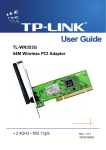
TL-WN723N
150Mbps Mini Wireless N USB Adapter
Rev: 1.0.0
1910010432
COPYRIGHT & TRADEMARKS
Specifications are subject to change without notice.
is a registered trademark
of TP-LINK TECHNOLOGIES CO., LTD. Other brands and product names are trademarks or
registered trademarks of their respective holders.
No part of the specifications may be reproduced in any form or by any means or used to make any
derivative such as translation, transformation, or adaptation without permission from TP-LINK
TECHNOLOGIES CO., LTD. Copyright © 2010 TP-LINK TECHNOLOGIES CO., LTD. All rights
reserved.
http://www.tp-link.com
FCC STATEMENT
This equipment has been tested and found to comply with the limits for a Class B digital device,
pursuant to part 15 of the FCC Rules. These limits are designed to provide reasonable protection
against harmful interference in a residential installation. This equipment generates, uses and can
radiate radio frequency energy and, if not installed and used in accordance with the instructions,
may cause harmful interference to radio communications. However, there is no guarantee that
interference will not occur in a particular installation. If this equipment does cause harmful
interference to radio or television reception, which can be determined by turning the equipment off
and on, the user is encouraged to try to correct the interference by one or more of the following
measures:
•
Reorient or relocate the receiving antenna.
•
Increase the separation between the equipment and receiver.
•
Connect the equipment into an outlet on a circuit different from that to which the receiver
is connected.
•
Consult the dealer or an experienced radio/ TV technician for help.
This device complies with part 15 of the FCC Rules. Operation is subject to the following two
conditions:
1)
This device may not cause harmful interference.
2)
This device must accept any interference received, including interference that may
cause undesired operation.
Any changes or modifications not expressly approved by the party responsible for compliance
could void the user’s authority to operate the equipment.
FCC RF Radiation Exposure Statement
This equipment complies with FCC radiation exposure limits set forth for an uncontrolled
environment. End users must follow the specific operating instructions for satisfying RF exposure
compliance. This transmitter must not be co-located or operating in conjunction with any other
antenna or transmitter. This equipment has been SAR-evaluated for use in hand. SAR
measurements are based on a 4mm spacing from the body and that compliance is achieved at
that distance.
CE Mark Warning
This is a class B product. In a domestic environment, this product may cause radio interference, in
which case the user may be required to take adequate measures.
National restrictions
This device is intended for home and office use in all EU countries (and other countries following
the EU directive 1999/5/EC) without any limitation except for the countries mentioned below:
Country
Restriction
Bulgaria
None
France
Reason/remark
General authorization required for outdoor use and
public service
Outdoor use limited to 10
Military Radiolocation use. Refarming of the 2.4 GHz
mW e.i.r.p. within the band
band has been ongoing in recent years to allow current
2454-2483.5 MHz
relaxed regulation. Full implementation planned 2012
Italy
None
Luxembourg
None
Norway
Implemented
Russian Federation
None
Note: Please don’t use the product outdoors in France.
If used outside of own premises, general authorization is
required
General authorization required for network and service
supply(not for spectrum)
This subsection does not apply for the geographical area
within a radius of 20 km from the centre of Ny-Ålesund
Only for indoor applications
TP-LINK TECHNOLOGIES CO., LTD
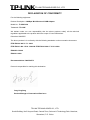
DECLARATION OF CONFORMITY
For the following equipment:
Product Description: 150Mbps Mini Wireless N USB Adapter
Model No.: TL-WN723N
Trademark: TP-LINK
We declare under our own responsibility that the above products satisfy all the technical
regulations applicable to the product within the scope of Council Directives:
Directives 1999/5/EC
The above product is in conformity with the following standards or other normative documents:
ETSI EN 300 328 V1.7.1: 2006
ETSI EN 301 489-1 V1.8.1:2008 & ETSI EN 301 489-17 V1.3.2:2008
EN60950-1:2006
EN62311:2008
Recommendation 1999/519/EC
Person is responsible for marking this declaration:
Yang Hongliang
Product Manager of International Business
TP-LINK TECHNOLOGIES CO., LTD.
South Building, No.5 Keyuan Road, Central Zone, Science & Technology Park, Nanshan,
Shenzhen, P. R. China
CONTENTS
Package Contents .................................................................................................... 1
Chapter 1.
Introduction ........................................................................................ 2
1.1
Overview of the product...................................................................................................... 2
1.2
Features ............................................................................................................................. 2
1.3
LED Status ......................................................................................................................... 3
Chapter 2.
Installation Guide ............................................................................... 4
2.1
Hardware Installation.......................................................................................................... 4
2.2
Software Installation ........................................................................................................... 4
2.2.1
Overview ..................................................................................................................... 4
2.2.2
Installation Guide......................................................................................................... 4
Chapter 3.
Configuration Guide........................................................................... 8
3.1
For Windows 7 ................................................................................................................... 8
3.2
For Windows XP/Vista........................................................................................................ 9
3.2.1
General Status .......................................................................................................... 10
3.2.2
Profile Management .................................................................................................. 11
3.2.3
Available Network...................................................................................................... 19
3.2.4
Status ........................................................................................................................ 19
3.2.5
Statistics .................................................................................................................... 20
3.2.6
QSS........................................................................................................................... 21
Appendix A: Specifications................................................................................... 25
Appendix B: Glossary............................................................................................ 26
TL-WN723N
150Mbps Mini Wireless N USB Adapter
Package Contents
The following contents should be found in your box:
¾
One TL-WN723N 150Mbps Mini Wireless N USB Adapter
¾
Quick Installation Guide
¾
One Resource CD for TL-WN723N, including:
•
TP-LINK Wireless Client Utility (TWCU) and Drivers
•
User Guide
•
Other Helpful Information
) Note:
Make sure that the package contains the above items. If any of the listed items are damaged or
missing, please contact with your distributor.
Conventions
The ‘Adapter’ mentioned in this user guide stands for TL-WN723N 150Mbps Mini Wireless N USB
Adapter without any explanations.
1
TL-WN723N
150Mbps Mini Wireless N USB Adapter
Chapter 1. Introduction
Thank you for choosing TL-WN723N 150Mbps Mini Wireless N USB Adapter.
1.1
Overview of the product
TL-WN723N 150Mbps Mini Wireless N USB Adapter, taking the exquisite appearance with mini
design, completely avoids covering the other ports around.
The adapter is designed to provide a high-speed and unrivaled wireless performance for your
notebook and PC. With a faster wireless connection, you can get a better Internet experience,
such as downloading, gaming, video streaming and so on.
The TL-WN723N’s auto-sensing capability allows high packet transfer rate of up to 150Mbps for
maximum throughput. It has good capability on anti-jamming; it can also interoperate with other
wireless (802.11b/g/n) products. The adapter supports WEP, WPA and WPA2 encryption to
prevent outside intrusion and protect your personal information from being exposed.
The Quick Setup Wizard guides you step-by-step through the installation process; the TP-LINK
Wireless Client Utility helps you create a wireless connection immediately.
With unmatched wireless performance, reception, and security protection, the TL-WN723N is the
best choice for easily adding or upgrading wireless connectivity.
1.2
Features
¾
IEEE802.11b, IEEE802.11g, IEEE802.11n standards
¾
Supports WPA/WPA2 data security, IEEE802.1x authentication, TKIP/AES encryption, WEP
encryption
¾
Make use of IEEE 802.11n wireless technology to provide a wireless data rate of up to
150Mbps
¾
supports automatically adjust to lower speeds due to distance or other operating limitations
¾
Provides USB interface
¾
Supports Ad-Hoc and Infrastructure modes
¾
Good capability on anti-jamming
¾
Supports roaming between access points when configured in Infrastructure mode
¾
Ease to configure and provides monitoring information
¾
Supports Windows 2000, Windows XP, Windows Vista and Windows 7
2
TL-WN723N
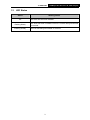
1.3
150Mbps Mini Wireless N USB Adapter
LED Status
Status
Off
Working Status
The driver has not been installed.
Flashing Slowly
The driver has been installed but there is no data being transmitted
or received.
Flashing Quickly
There is data being transmitted or received.
3
TL-WN723N
150Mbps Mini Wireless N USB Adapter
Chapter 2. Installation Guide
2.1
Hardware Installation
Plug the Adapter directly to the USB port on your computer.
) Note:
The promoted Found New Hardware Wizard screen will pop up when the adapter is installed
correctly. Click Cancel.
2.2
Software Installation
2.2.1 Overview
The Setup steps for Windows XP/Vista/7 are very similar. The following installation guide takes
Windows XP for example.
2.2.2 Installation Guide
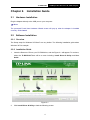
1.
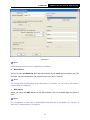
Insert the Resource CD into your CD-ROM drive, and the Figure 2-1 will appear. To continue,
select the TL-WN723N.There will be a menu including: Install Driver & Utility and User
Guide.
Figure 2-1
2.
Click Install Driver & Utility to load the following screen.
4
TL-WN723N
150Mbps Mini Wireless N USB Adapter
Figure 2-2
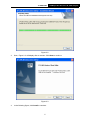
3.
Soon, Figure 2-3 will display after a moment. Click Next to continue.
X
X
Figure 2-3
4.
In the following figure, click Install to continue.
5
TL-WN723N
150Mbps Mini Wireless N USB Adapter
Figure 2-4
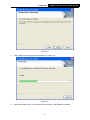
5.
Wait a while for the setup progress as shown in Figure 2-5.
X
Figure 2-5
6.
After all the steps above, you will see the screen below, click Finish to complete.
6
TL-WN723N
Figure 2-6
7
150Mbps Mini Wireless N USB Adapter
TL-WN723N
150Mbps Mini Wireless N USB Adapter
Chapter 3. Configuration Guide
3.1
For Windows 7
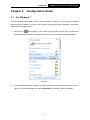
TP-LINK Wireless Client Utility (TWCU) is not available for Windows 7. So after the Adapter's
driver has been installed, we have to use Windows WLAN Autoconfig to establish a connection.
Please follow the steps below.
1.
Click the icon
at the bottom of your screen in your system tray and then you will see the
available wireless network list. Select the SSID of your Access Point and click Connect.
Figure 3-1
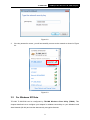
2.
If your wireless network is secured, you will be required to enter the security key as shown in
Figure 3-2. Enter the passphrase, take 1234567890 for example. And then click OK.
8
TL-WN723N
150Mbps Mini Wireless N USB Adapter
Figure 3-2
3.
If the key entered is correct, you will successfully connect to the network as shown in Figure
3-3.
Figure 3-3
3.2
For Windows XP/Vista
TP-LINK TL-WN723N can be configured by TP-LINK Wireless Client Utility (TWCU). This
chapter describes how to configure your Adapter for wireless connectivity on your Wireless Local
Area Network (WLAN) and use the data security encryption features.
9
TL-WN723N
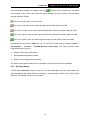
After Installing the Adapter, the Adapter’s tray icon
150Mbps Mini Wireless N USB Adapter
will appear in your system tray. It appears
at the bottom of the screen, and shows the signal strength using color and the received signal
strength indication (RSSI).
If the icon is gray, there is no connection.
If the icon is red, there is poor signal strength and the RSSI is less than 5dB.
If the icon is yellow, there is poor signal strength and the RSSI is between 5dB and 10dB.
If the icon is green, there is good signal strength and the RSSI is between 10dB and 20dB.
If the icon is green, there is excellent signal strength and the RSSI is more than 20dB.
Double-click the icon and the TWCU will run. You can also run the utility by clicking the Start →
All Programs → TP-LINK → TP-LINK Wireless Client Utility. The TWCU provides some
integrated and easy tools to:
¾
Display current status information
¾
Edit and add configuration profiles
¾
Display current diagnostics information
The section below takes Windows XP for example to introduce these above capabilities.
3.2.1 General Status
Choose the tab General as shown in Figure 3-4, the left filed displays the type of the adapter, the
right field displays the status about the connection, including Status, Speed, Type, SSID, Signal
Strength, Link Quality and other IP information.
10
TL-WN723N
150Mbps Mini Wireless N USB Adapter
Figure 3-4
¾
Signal Strength - This shows the strength of the wireless signal.
¾
Link Quality - This shows the quality of the wireless connection.
¾
ReNew IP - Click the button to get the IP address from the AP.
¾
Show Tray Icon - Select the option to display the icon
¾
Disable Adapter - If you select the option, the adapter can’t work.
¾
Radio Off - If you select the option, the wireless function will be ineffective.
on the bottom of the desktop.
Click Close to close the screen.
3.2.2 Profile Management
Click the tab Profile as shown in Figure 3-5 to add, remove, edit, duplicate or set default for a
profile.
11
TL-WN723N
150Mbps Mini Wireless N USB Adapter
Figure 3-5
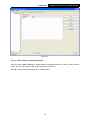
3.2.2.1. Add or Edit a Configuration Profile
Click the button Add or Edit (you should select an existed profile first to edit it) on the screen
above, and you can configure the profile as shown in Figure 3-6.
We add a new profile and configure it for example here.
12
TL-WN723N
150Mbps Mini Wireless N USB Adapter
Figure 3-6
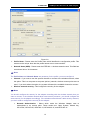
¾
Profile Name - Please enter the Profile name which identifies the configuration profile. This
name must be unique. Note that the profile names are not case-sensitive.
¾
Network Name (SSID) - Please enter the IEEE 802.11 wireless network name. This field has
a maximum limit of 32 characters.
) Note:
The Profile Name and Network Name are necessary for the profile, you must configure it.
¾
Channel - If you want to use the specific channel to connect to the wireless network, select
the option “This is a computer-to-computer (ad-hoc) network; wireless access points are not
used.” If you don't select the option, the system will search the available channel to connect.
¾
Wireless network security - This configure the security for the adapter.
) Note:
You should configure the security for the adapter according with the wireless network that you
want to connect. If the wireless network takes some security measure, you should configure the
same security for the adapter accordingly. If the wireless network doesn’t take security measure,
you don’t need to configure the security for the adapter.
•
Network Authentication - Select which mode the Wireless Adapter uses to
authenticate to an access point. These modes are: Open System, Shared key,
WPA-PSK, WPA2-PSK, WPA 802.1X, WPA2 802.1X, and WEP 802.1X.
13
TL-WN723N
•
150Mbps Mini Wireless N USB Adapter
Data encryption - Select the corresponding data encryption for the authentication.
These encryptions are: Disabled, WEP, TKIP and AES.
) Note:
1) Select different authentications and data encryptions, the security configuration is
different.
2) When you select channel manually, the available network authentication are Open
System, Shared key and WPA-None.
3) The RTWCU does not support WPA 802.1x authentication in Windows Vista, while the
Windows Zero Config Tools may satisfy your need.
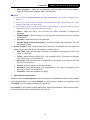
¾
•
ASCII - Select this option, you can enter any ASCII characters to compose the
password.
•
PASSPHRASE - Select this option, you can enter the characters from 0~9 to compose
the password.
•
•
Key Index - Select the index of the password.
Network Key & Confirm network key - The fields configure the network key. The two
should be the same.
802.1x configure - This configures the 802.1x security, it is available when you select the
data encryption as WPA 802.1X, WPA2 802.1X or WEP 802.1X.
1.
•
EAP TYPE - Select the EAP type for the 802.1x configuration, the options are: GTC, TLS,
LEAP, TTLS, PEAP.
•
Tunnel - Select the tunnel: MD5, GTC, TLS, and MSCHAP-V2. The option is necessary
for the EAP type of TTLS and PEAP.
•
Username - Enter the username for authentication. The option is necessary for the EAP
type of TTLS and PEAP.
•
•
Identity - Enter the identity for the authentication.
Password - Enter the password for the authentication. The option is necessary for the
EAP type of LEAP, TTLS and PEAP.
•
Certificate - Select the certificate you apply.
Open System authentication
When you select the Open System as the authentication, the Disabled and WEP can be available
for the data encryption. If you select Disabled, you don’t need to configure any passwords. If you
select WEP, you can configure the password as follows.
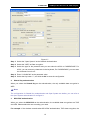
For example: If the wireless network takes Open System authentication, WEP data encryption,
the password is the value of 0123456789. The index is 1.
14
TL-WN723N
150Mbps Mini Wireless N USB Adapter
Figure 3-7
Step 1: Select the “Open System” as the Network Authentication.
Step 2: Select the “WEP” as Data encryption.
Step 3: Select the type for the password and you can select the ASCII or PASSPHRASE. For
ASCII, you can enter any characters in the keyboard; For PASSPHRASE, you can enter
the characters from 0 to 9.
Step 4: Enter “0123456789” as the password value.
Step 5: Select the Key index “1”, and click the OK to save the configuration.
2.
Shared Key authentication
When you select the Shared Key as the authentication, the only available data encryption is
WEP.
) Note:
The configuration for Shared Key authentication and Open System are similar, you can refer to
the Open System authentication to configure it.
3.
WPA-PSK authentication
When you select the WPA-PSK as the authentication, the available data encryptions are TKIP
and AES. Please select the one according your need.
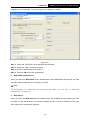
For example: If the wireless network takes WPA-PSK authentication, TKIP data encryption, the
15
TL-WN723N
150Mbps Mini Wireless N USB Adapter
network key is 0123456789. You can configure it for adapter as follows.
Figure 3-8
Step 1: Select the “WPA-PSK” as the Network Authentication.
Step 2: Select the “TKIP” as Data encryption.
Step 3: Enter the Network key and confirm it.
Step 4: Click the OK to save the configuration.
4.
WAP2-PSK authentication
When you select the WPA2-PSK as the authentication, the available data encryptions are TKIP
and AES. Please select the one according your need.
) Note:
The configuration for WPA2-PSK and WPA-PSK are similar, you can refer to WAP-PSK
authentication to configure it.
5.
WPA 802.1x
When you select the WPA 802.1x as the authentication, the available data encryptions are TKIP
and AES. For the authentication, you should configure the 802.1x security. Select the EAP Type
and configure the corresponding options.
16
TL-WN723N
150Mbps Mini Wireless N USB Adapter
Figure 3-9
) Note:
Select different EAP types, the configuration are different.
6.
WPA2 802.1x
When you select the WPA2 802.1x as the authentication, the available data encryptions are TKIP
and AES. For the authentication, you should configure the 802.1x security.
) Note:
The configuration for WPA2 802.1x and WPA 802.1x are similar, you can refer to WPA 802.1x
authentication to configure it.
7.
WEP 802.1x
When you select the WEP 802.1x as the authentication, the only available data encryption is
WEP.
) Note:
The configuration for WEP 802.1x authentication and WPA 802.1x are similar, you can refer to
WPA 802.1x authentication to configure it.
17
TL-WN723N
150Mbps Mini Wireless N USB Adapter
3.2.2.2. Remove a configuration profile
Follow the steps below to delete a configuration profile.
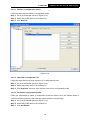
Step 1: Go to the Profile tab (shown in Figure 3-10).
Step 2: Select the profile name in the Profiles List.
Step 3: Click Remove.
Figure 3-10
3.2.2.3. Duplicate a configuration file
Follow the steps below to change the name of a configuration profile.
Step 1: Go to the Profile tab (shown in Figure 3-10).
Step 2: Select the profile name in the Profiles List.
Step 3: Click Duplicate, and then enter the new name for the configuration profile.
3.2.2.4. Set default configuration profile
Follow the steps below to select a configuration profile as default. Once the adapter wants to
connect a wireless network, it will select the default profile to connect firstly.
Step 1: Go to the Profile tab (shown in Figure 3-10).
Step 2: Select the profile name in the Profiles List.
Step 3: Click Set Default.
18
TL-WN723N
150Mbps Mini Wireless N USB Adapter
3.2.3 Available Network
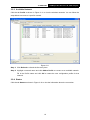
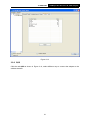
Click the tab Profile as shown in Figure 3-11 to view the wireless networks. You can follow the
steps below to access to a specific network.
Figure 3-11
Step 1: Click Refresh to refresh the list at any time.
Step 2: Highlight a network name and click Add to Profile to connect to an available network.
Fill in the Profile name and click OK to create the new configuration profile for that
network.
3.2.4 Status
Click the tab Status as shown in Figure 3-12 to view the information about the connection.
19
TL-WN723N
150Mbps Mini Wireless N USB Adapter
Figure 3-12
3.2.5 Statistics
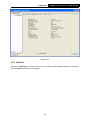
Click the tab Statistics as shown in Figure 3-13 to view the traffic statistics about the connection.
Click the Reset to refresh the information.
20
TL-WN723N
150Mbps Mini Wireless N USB Adapter
Figure 3-13
3.2.6 QSS
Click the tab QSS as shown in Figure 3-14, select different way to connect the adapter to the
wireless network.
21
TL-WN723N
150Mbps Mini Wireless N USB Adapter
Figure 3-14
) Note:
The QSS (other brands may call it WPS) function takes effect only when both the adapter and the
AP (the adapter wants to connect) support the QSS function. Or else, the adapter can’t connect
the AP.
3.2.6.1. PIN
Step 1: Select the PIN (shown in Figure 3-14).
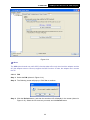
Step 2: The following screen will pop up. Click Yes to continue.
Step 3: Click the Refresh button, and then the searched AP will display in the screen (shown in
Figure 3-15). Select the AP name as you need, and click Select button.
22
TL-WN723N
150Mbps Mini Wireless N USB Adapter
Figure 3-15
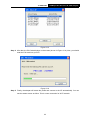
Step 4: After that, the PIN Code displays on the screen (shown in Figure 3-16). Now, you should
enter the PIN code into your AP.
Figure 3-16
Step 5: Finally, the adapter will create the profile and connect to the AP automatically. You can
see the status screen as follow. This is a new connection for Wi-Fi network.
23
TL-WN723N
150Mbps Mini Wireless N USB Adapter
Figure 3-17
3.2.6.2. PBC Method
Step 1: Click PBC as shown in Figure 3-14 until the following screen pops up.
Step 2: Push the physical button on the AP.
Step 3: Finally, the adapter will create the profile and connect to the AP automatically.
24
TL-WN723N
150Mbps Mini Wireless N USB Adapter
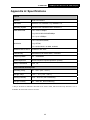
Appendix A: Specifications
Normal
Interface
USB 2.0 Interface
Standards
IEEE802.11b; IEEE802.11g; IEEE802.11n;
Operating System
Windows XP / Windows Vista / Windows 7
Radio Data Rate
11b: 1/2/5.5/11Mbps
11g: 6/9/12/18/24/36/48/54Mbps
11n: Up to 150Mbps
11b: CCK,QPSK,BPSK;
Modulation
11g: OFDM;
11n: QPSK, BPSK, 16-QAM, 64-QAM;
Media Access Protocol
CSMA/CA with ACK
Data Security
WPA/WPA2; 64/128-bit WEP; TKIP/AES
Frequency Band*
2.4 ~ 2.4835GHz
Spread Spectrum
Direct Sequence Spread Spectrum (DSSS)
Safety & Emissions
FCC, CE
Environmental and Physical
Operating Temp.
0℃ ~ 40℃ (32℉~104℉)
Storage Temp.
-40℃ ~ 70℃ (-40℉~158℉)
Working Humidity
10% ~ 90% RH, Non-condensing
Storage Humidity
5% ~ 90% RH, Non-condensing
* Only 2.412GHz~2.462GHz is allowed to be used in USA, which means only channel 1~11 is
available for American users to choose.
25
TL-WN723N
150Mbps Mini Wireless N USB Adapter
Appendix B: Glossary
¾
802.11b - The 802.11b standard specifies a wireless product networking at 11 Mbps using
direct-sequence spread-spectrum (DSSS) technology and operating in the unlicensed radio
spectrum at 2.4GHz, and WEP encryption for security. 802.11b networks are also referred to
as Wi-Fi networks.
¾
802.11g - specification for wireless networking at 54 Mbps using direct-sequence
spread-spectrum (DSSS) technology, using OFDM modulation and operating in the
unlicensed radio spectrum at 2.4GHz, and backward compatibility with IEEE 802.11b devices,
and WEP encryption for security.
¾
802.11n - 802.11n builds upon previous 802.11 standards by adding MIMO (multiple-input
multiple-output). MIMO uses multiple transmitter and receiver antennas to allow for increased
data throughput via spatial multiplexing and increased range by exploiting the spatial diversity,
perhaps through coding schemes like Alamouti coding. The Enhanced Wireless Consortium
(EWC)[3] was formed to help accelerate the IEEE 802.11n development process and promote
a technology specification for interoperability of next-generation wireless local area
networking (WLAN) products.
2
2U
H
¾
Ad-hoc Network - An ad-hoc network is a group of computers, each with a Wireless Adapter,
connected as an independent 802.11 wireless LAN. Ad-hoc wireless computers operate on a
peer-to-peer basis, communicating directly with each other without the use of an access point.
Ad-hoc mode is also referred to as an Independent Basic Service Set (IBSS) or as
peer-to-peer mode, and is useful at a departmental scale or SOHO operation.
¾
DSSS - (Direct-Sequence Spread Spectrum) - DSSS generates a redundant bit pattern for all
data transmitted. This bit pattern is called a chip (or chipping code). Even if one or more bits
in the chip are damaged during transmission, statistical techniques embedded in the receiver
can recover the original data without the need of retransmission. To an unintended receiver,
DSSS appears as low power wideband noise and is rejected (ignored) by most narrowband
receivers. However, to an intended receiver (i.e. another wireless LAN endpoint), the DSSS
signal is recognized as the only valid signal, and interference is inherently rejected (ignored).
¾
FHSS - (Frequency Hopping Spread Spectrum) - FHSS continuously changes (hops) the
carrier frequency of a conventional carrier several times per second according to a
pseudo-random set of channels. Because a fixed frequency is not used, and only the
transmitter and receiver know the hop patterns, interception of FHSS is extremely difficult.
¾
Infrastructure Network - An infrastructure network is a group of computers or other devices,
each with a Wireless Adapter, connected as an 802.11 wireless LAN. In infrastructure mode,
the wireless devices communicate with each other and to a wired network by first going
through an access point. An infrastructure wireless network connected to a wired network is
referred to as a Basic Service Set (BSS). A set of two or more BSS in a single network is
referred to as an Extended Service Set (ESS). Infrastructure mode is useful at a corporation
scale, or when it is necessary to connect the wired and wireless networks.
26
TL-WN723N
150Mbps Mini Wireless N USB Adapter
¾
Spread Spectrum - Spread Spectrum technology is a wideband radio frequency technique
developed by the military for use in reliable, secure, mission-critical communications systems.
It is designed to trade off bandwidth efficiency for reliability, integrity, and security. In other
words, more bandwidth is consumed than in the case of narrowband transmission, but the
trade off produces a signal that is, in effect, louder and thus easier to detect, provided that the
receiver knows the parameters of the spread-spectrum signal being broadcast. If a receiver is
not tuned to the right frequency, a spread-spectrum signal looks like background noise.
There are two main alternatives, Direct Sequence Spread Spectrum (DSSS) and Frequency
Hopping Spread Spectrum (FHSS).
¾
SSID - A Service Set Identification is a thirty-two character (maximum) alphanumeric key
identifying a wireless local area network. For the wireless devices in a network to
communicate with each other, all devices must be configured with the same SSID. This is
typically the configuration parameter for a wireless PC card. It corresponds to the ESSID in
the wireless Access Point and to the wireless network name. See also Wireless Network
Name and ESSID.
¾
WEP - (Wired Equivalent Privacy) - A data privacy mechanism based on a 64-bit or 128-bit or
152-bit shared key algorithm, as described in the IEEE 802.11 standard. To gain access to a
WEP network, you must know the key. The key is a string of characters that you create.
When using WEP, you must determine the level of encryption. The type of encryption
determines the key length. 128-bit encryption requires a longer key than 64-bit encryption.
Keys are defined by entering in a string in HEX (hexadecimal - using characters 0-9, A-F) or
ASCII (American Standard Code for Information Interchange – alphanumeric characters)
format. ASCII format is provided so you can enter a string that is easier to remember. The
ASCII string is converted to HEX for use over the network. Four keys can be defined so that
you can change keys easily.
¾
Wi-Fi - A trade name for the 802.11b wireless networking standard, given by the Wireless
Ethernet Compatibility Alliance (WECA, see http://www.wi-fi.net), an industry standards
group promoting interoperability among 802.11b devices.
¾
WLAN - (Wireless Local Area Network) - A group of computers and associated devices
communicate with each other wirelessly, which network serving users are limited in a local
area.
¾
WPA - (Wi-Fi Protected Access) - A wireless security protocol use TKIP (Temporal Key
Integrity Protocol) encryption, which can be used in conjunction with a RADIUS server.
27