1
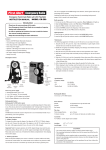
PANEL DESCRIPTIONS
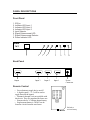
Front Panel
1. IR Eye
2. Indicator LED Input 1
3. Indicator LED Input 2
4. Indicator LED Input 3
5. Input Selector
6. Signal Enhancement LED
7. Signal Enhancement Selector
8. Power Indicator LED
SIMA
3x1
1
2
3
4
5
6
7
8
Back Panel
Output
Input 3
Input 2
Input 1
Power
Connector
Remote Control
Power button to toggle device on/off
9 digit keypad (1 –2 –3 will be used to
toggle between the inputs)
•
Buttons 4 through 9 are not available with
this device. They are populated for future use.
•
Remote takes a 3v Lithium button battery.
•
Replacement battery # CR2025 can be
found at a local electronic retail store.
•
•
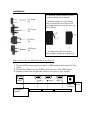
Connecting and Operating t
Pull tab to
activate battery

![User Manual [PDF 80.57KB]](http://vs1.manualzilla.com/store/data/005808718_1-0fabb64b5e1899e1380b2d49f3e9d3a7-150x150.png)