1
INSTALLATION INSTRUCTIONS
VCM
VIDEO CEILING MOUNT
Prior to assembly, unpack carton completely and verify contents.
If you are missing any components, please contact Customer Service at 1-800/582-6480
The Deluxe Video Ceiling Mounts are designed to provide fast, simple and secure ceiling installation of video
projectors. Special roll, pitch and horizontal adjustments simplify projection positioning for image alignment.
The ceiling mount also has positive registration lock so the projector may be removed without losing projector
mount registration.
BEFORE PROCEEDING, READ INSTALLATION INSTRUCTIONS COMPLETELY
WARNING!
IMPROPER INSTALLATION CAN RESULT IN SERIOUS
PERSONAL INJURY! MAKE SURE THAT THE CEILING
STRUCTURAL MEMBERS CAN SUPPORT A REDUNDANT
WEIGHT FACTOR FIVE TIMES THE TOTAL WEIGHT OF THE
EQUIPMENT. IF THE CEILING CANNOT SUPPORT THIS
WEIGHT, REINFORCE THE CEILING BEFORE INSTALLING THE
MOUNT.
THE MAXIMUM WEIGHT TO BE INSTALLED ON THE MOUNT
IS 250 POUNDS (113.4 KG).
INSTALLING THE CEILING MOUNT REQUIRES THE PRESENCE OF TWO
PERSONS FAMILIAR WITH MECHANICAL INSTALLATIONS. A THIRD
ASSISTANT IS RECOMMENDED.
1. Secure the VCM housing to your method of support and tighten firmly so the VCM is housing is
parallel to the screen.
2. Attach the HB-Hanging Bracket according to the instructions accompanying your HB-Hanging
Bracket. The model of your projector determines which HB-Hanging Bracket is included with your
VCM.
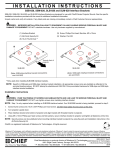
3. Using two people lift the projector and install it to the studs extending from the mounting
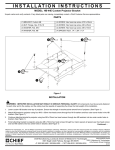
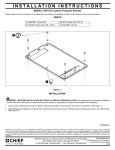
plate (see Figure 1, item 1). Be sure the HB-Hanging Bracket (2) is seated in the slots.
4. Using a wrench, tighten four 5/16” flange nuts securing slide bracket (6).
8809-000020 Rev A
Chief Manufacturing, a products division of
©2008 Milestone AV Technologies, a
Milestone AV Technologies
Duchossois Group Company
8401 Eagle Creek Parkway, Savage, MN 55378
11/08
P: 800.582.6480 / 952.894.6280 F: 877.894.6918 / 952.894.6918
Figure 1
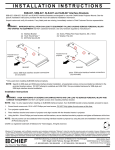
5. Tighten securely using the 5/16-18 flange nuts (3).
Align projector as follows:
WARNING!
MOUNTING HARDWARE IS TO BE LOOSENED ONLY TO
ALLOW FOR NECESSARY MOVEMENT. OVER-LOOSENING OR
REMOVAL OF MOUNTING HARDWARE MAY RESULT IN
SERIOUS DAMAGE TO EQUIPMENT OR PERSONAL INJURY.
Vertical Elevation (pitch):
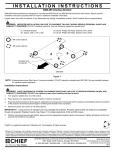
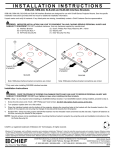
Adjust by loosening the three bolts (5) located on the mounting plate (1).
Loosen both sides, tilt projector to desired direction, and securely tighten
three bolts.
Horizontal Tilt (roll):
Adjust by loosening the three bolts (5) located on the mounting plate (1)
and turning the adjustment bolt (4). Adjustment may be performed on
both sides of the unit and securely tighten three bolts.
Positive Registration Lock: Tighten the pitch bolts loosen four flange nuts (3) securing the projector
and remove the projector, with the HB-Hanging Bracket attached, from
the VCM.
Horizontal Adjustments:
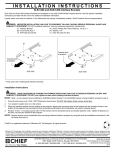
Loosen, but do not remove, the nuts holding the top slide bracket (6).
Adjust unit up to 1 ½” in any direction and tighten the nuts holding the top
slide bracket.