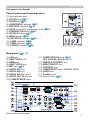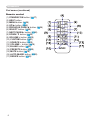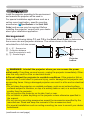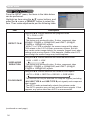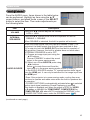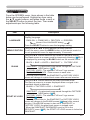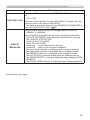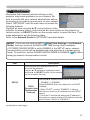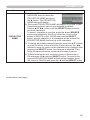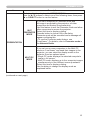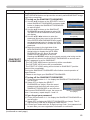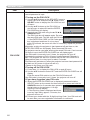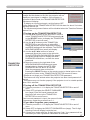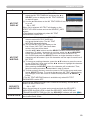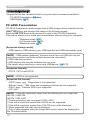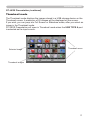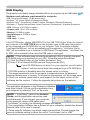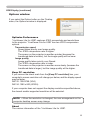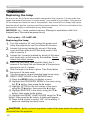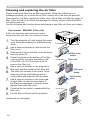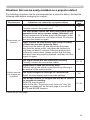
1
User’s Manual Manuel d’utilisation Bedienungsanleitung Manual de usuario Manuale d'istruzioni Gebruiksaanwijzing Instruções do Proprietário 㝜⇫㖖◦ ꩡ끞ꐺ Bruksanvisningens Руководство пользователя Regulatory models: W60, W61 010-0757-00 DISPERINDAG No. 0287/1.824.51/09.03 This page left blank intentionally Projector IN5122/IN5124 User's Manual Thank you for purchasing this projector. WARNING ►Before using this product, please read all manuals for this product. Be sure to read Safety Instructions first. After reading them, store them in a safe place for future reference. About this manual Various symbols are used in this manual. The meanings of these symbols are described below. WARNING This symbol indicates information that, if ignored, could possibly result in personal injury or even death due to incorrect handling. CAUTION This symbol indicates information that, if ignored, could possibly result in personal injury or physical damage due to incorrect handling. NOTICE This entry indicates fear of causing trouble. Please refer to the pages written following this symbol. NOTE • The information in this manual is subject to change without notice. • The manufacturer assumes no responsibility for any errors that may appear in this manual. • The reproduction, transfer or copy of all or any part of this document is not permitted without express written consent. Trademark acknowledgment • Mac® is a saved trademark of Apple Inc. • Windows®, DirectDraw® and Direct3D® are saved trademarks of Microsoft Corporation in the U.S. and/or other countries. • VESA and DDC are trademarks of the Video Electronics Standard Association. •H DMI, the HDMI logo, and High-Definition Multimedia Interface are trademarks or saved trademarks of HDMI Licensing LLC in the United States and other countries. • Trademark PJLink is a trademark applied for trademark rights in Japan, the United States of America and other countries and areas. • Blu-ray Disc is a trademark. 1 All other trademarks are the properties of their respective owners. Contents Introduction . . . . . . . . . . . . . . . 3 Features. . . . . . . . . . . . . . . . . . . . . . . 3 Checking the contents of package. . . . 3 Part names. . . . . . . . . . . . . . . . . . . . . 4 Setting up. . . . . . . . . . . . . . . . . 7 Arrangement. . . . . . . . . . . . . . . . . . . . 7 Connecting with your devices. . . . . . . 9 Connecting to a power supply. . . . . . 14 Using the security bar and slot. . . . . 14 Remote control. . . . . . . . . . . . 15 Installing the batteries. . . . . . . . . . . . 15 About the remote control signal . . . . 15 Using as a simple PC mouse & keyboard. . . 16 Power on and off. . . . . . . . . . . 17 Turning on the power . . . . . . . . . . . . 17 Turning off the power . . . . . . . . . . . . 17 Operating . . . . . . . . . . . . . . . . 18 Adjusting the volume. . . . . . . . . . . . . 18 Temporarily muting the sound. . . . . . 18 Selecting an input signal. . . . . . . . . . 18 Selecting an aspect ratio. . . . . . . . . . 19 Adjusting the projector's elevator . . . 20 Adjusting the lens. . . . . . . . . . . . . . . 21 Using the automatic adjustment feature. . . . 22 Correcting the distortion. . . . . . . . . . . 23 Temporarily blanking the screen . . . 25 Using the menu features. . . . . . . . . . 26 BASIC MENU. . . . . . . . . . . . . . 28 Aspect ratio, Auto keystone, Keystone, Keystone, Corner Correction, Presets, Low Power, Ceiling, Rear, Reset, Reset Filter hours, Language, Advanced menu, Exit PICTURE menu. . . . . . . . . . . . 30 Brightness, Contrast, Gamma, Color temperature, Color, Tint, Sharpness, Active iris, User Preset IMAGE menu. . . . . . . . . . . . . . 33 Aspect ratio, Overscan, Vertical position, Horizontal position, phase, Tracking, Auto image INPUT menu . . . . . . . . . . . . . . 36 Detect Film, Video noise reduction, Color space, Video standard, Computer in, Resolution 2 SETUP menu. . . . . . . . . . . . . . 38 Auto keystone, Keystone, Keystone, Corner Correction, Low Power, Ceiling, Rear, Power saving mode, Monitor out default AUDIO menu. . . . . . . . . . . . . . 41 Volume, Internal speakers, Audio source, Hdmi noise cancel, Mic level, Mic volume SCREEN menu. . . . . . . . . . . . . 43 Language, Menu position, Blank, Start up logo, Capture new, Capture lock, Display messages, Source name, Ruled lines, Closed Captions OPTION menu. . . . . . . . . . . . . 49 Autosource, Auto keystone, AC power on, Auto power, Usb type b, Custom Key, Sources, Power-up source, Service NETWORK menu. . . . . . . . . . . 57 Setup, Projector name, My image, Amx d.d., Presentation, Network info, Network restart SECURITY menu. . . . . . . . . . . 64 Security password change, Snapshot password, Pin lock, Transition detector, My text password, My text display, My text writing, Security indicator, Stack lock Presentation tools . . . . . . . . . 70 PC-LESS Presentation . . . . . . . 70 Thumbnail Mode, Full Screen Mode, Slideshow mode, Playlist USB Display. . . . . . . . . . . . . . . . . . 79 Right-Click menu, Floating menu, Options window Maintenance. . . . . . . . . . . . . . 82 Replacing the lamp. . . . . . . . . . . . . . 82 Cleaning and replacing the air filter . . 84 Other care. . . . . . . . . . . . . . . . . . . . . 86 Troubleshooting . . . . . . . . . . . 87 Related messages . . . . . . . . . . . . . . 87 Regarding the indicator lamps . . . . . 89 Resetting all settings. . . . . . . . . . . . . 90 Situations that may be easy to be mistaken for projector defects. . . . . . . . . . . . . . . 91 Specifications. . . . . . . . . . . . . 95 Introduction Introduction Features The projector provides you with the following features: ü T his projector has a variety of I/O ports that should cover all business applications. The HDMI port supports various types of image sources which have digital interfaces enabling you to display clearer images on the screen. ü This projector has a 2.0x optical zoom, and horizontal and vertical manual lens shift, giving you installation flexibility. ü If you insert a USB storage device, such as a USB memory stick, into the USB TYPE A port and select that port as the input source, you can view images stored on the device. ü This projector can be controlled and monitored via LAN connection. ü The built-in 16W speakers can deliver sufficient levels of sound to fill a large space such as a classroom without using external speakers. Checking the contents of package Please see the Contents of package section in the Quick Start Guide. Your projector should come with the items shown there. Contact your dealer immediately if any items are missing. NOTE • Keep the original packing materials, for future reshipment. Be sure to use the original packing materials when moving the projector. Use special caution with the lens. • The projector may make a rattling sound when tilted, moved or shaken, since a flap to control the air flow inside of the projector will move. Be aware that this is not a failure or malfunction. 3 Introduction Part names Projector (1) Lamp cover (& 82) The lamp unit is inside. (2) Speakers (x2) (&13, 41) (3) Filter cover (&86) The air filter and intake vent are inside. (4) Elevator feet (x2) (&20) (5) Elevator buttons (x2) (&20) (6) Remote sensor (&15) (7) Lens (&86) (8) Lens cover (9) Intake vents (10) Control panel (&5) (11) Lens adjuster door (&5) The adjusters for the lens are behind the door. (12) AC IN (AC inlet) (&14) (13) Exhaust vent (14) Rear panel (&5) (15) Security bar (&14) (16) Heel WARNING ►Do not open or remove any portion of the product, unless the manuals direct it. ►Do not subject the projector to unstable conditions. ►Do not shock or apply pressure to this product. ►Do not look into the lens or openings of the projector when the lamp is on. ►Keep the lens cap away from children and pets. Make sure they do not swallow the caps. If swallowed consult a physician immediately for emergency treatment. CAUTION ►Do not touch the projector anywhere around the lamp cover or the exhaust vents during use or just after use, since it is too hot. ►Do not attach anything onto the lens except the projector’s lens cover because it could melt or otherwise damage the lens. (continued on next page) 4 Introduction Part names (continued) Control panel and Lens adjusters (1) Lens adjuster door (2) FOCUS ring (&21) (3) ZOOM ring (&21) (4) HORIZONTAL adjuster (&21) (5) VERTICAL adjuster (& 21) (6) LOCK (horizontal lens position lock) (&21) (7) STANDBY/ON button (&17) (8) SOURCE button (&17) (9) MENU button (&26) (10) SECURITY indicator (&69) (11) LAMP indicator (&90) (12) TEMP indicator (&90) (13) POWER indicator (&90) LOCK STANDBY/ON SOURCE MENU SECURITY LAMP TEMP POWER Rear panel (&9 ~ 13) (1) LAN port (2) USB TYPE A port (3) HDMI port (4) USB TYPE B port (5) MIC port (&13) (6) AUDIO IN1 port (7) AUDIO IN2 port (8) AUDIO IN3 (R,L) ports (9) AUDIO OUT (R,L) ports (10) COMPUTER IN1 port (continued on next page) (11) COMPUTER IN2 ports (&12) (G/Y, B/Cb/Pb, R/Cr/Pr, H, V) (12) REMOTE CONTROL port (13) MONITOR OUT port (14) CONTROL port (15) COMPONENT ports (Y,Cb/Pb, Cr/Pr) (16) VIDEO port (17) S-video ports (18) Security slot (&14) 5 Introduction Part names (continued) Remote control (1) STANDBY/ON button (&17) (2) HELP button (3) MENU button (&26) (4) UP/▲ button (&26) (5) PREVIOUS PAGE/◄ button (&26) (6) SELECT button (&26) (7) NEXT PAGE/► button (&26) (8) DOWN/ ▼ button (&26) (9) VOLUME + button (&18) (10) CUSTOM button (&51) (11) SOURCE button (&18) (12) VOLUME - button (&18) (13) BLANK button (&25) (14) PRESETS button (&28) (15) MUTE button (&18) (16) AUTO IMAGE button (&22) (17) RESIZE button (&19) 6 Setting up Setting up Install the projector according to the environment and manner the projector will be used in. For special installation applications such as a ceiling mount application, specific mounting accessories (&Specifications in the Quick Start Guide) and service may be required. Before installing the projector, consult with your dealer about your installation application. Arrangement Refer to the following tables T-1 and T-2 in the Quick Start Guide to determine the screen size and projection distance. The values shown in the table are calculated for a full size screen. Ⓗ × Ⓥ : Screen size ⓐ : Projection distance (from the projector's end) ⓑ , ⓒ : Screen height Projector top Projector bottom WARNING ►Install the projector where you can access the power outlet easily. If anything unusual occurs, unplug the projector immediately. Otherwise this may result in a fire or electrical shock. ►Do not subject the projector to unstable conditions. If the projector falls or topples over, it could result in personal injury, and/or damage to the projector and surrounding items. Using a damaged projector can result in a fire and an electrical shock. • Do not place the projector on unstable surfaces, such as an inclined surface, surfaces subject to vibration, on top of a wobbly table or cart, or a surface that is smaller than the projector. • Do not position the projector on its side, front or rear. • Do not attach or place anything on the projector unless otherwise specified in the manual. • Do not use any mounting accessories except the accessories specified by the manufacturer. Read and keep the manuals of the accessories used. • For special installations such as ceiling mounting, be sure to consult your dealer beforehand. (continued on next page) 7 Setting up Arrangement (continued) WARNING ►Do not install the projector near thermally conductive or flammable items. These types of items can become heated by the projector and result in a fire and burns. • Do not place the projector on a metal stand. ►Do not place the projector in a place where it may get wet. Getting the projector wet or inserting liquid into the projector can cause a fire, electrical shock, and damage the projector. • Do not place the projector near water, such as in a bathroom, kitchen, or poolside. • Do not place the projector outdoors or by a window. • Do not place any item containing liquid near the projector. CAUTION ►Place the projector in a cool place with sufficient ventilation. The projector may shutdown automatically or may malfunction if its internal temperature is too high. • Using a damaged projector can result in a fire and an electrical shock. • Do not place the projector in direct sunlight or near hot objects such as heaters. • Keep a space of 12” (30 cm) or more between the side of the projector and other objects such as walls. • Do not place the projector on carpet, cushions or bedding. • Do not stop up, block or cover the projector's vent holes. Do not place any item around the projector that could be sucked in or stuck to the projector's intake vents. • Do not place the projector in places that are exposed to magnetic fields; doing so can cause the cooling fans inside the projector to malfunction. ►Avoid placing the projector in smoky, humid or dusty places. Placing the projector in such places can cause a fire, electrical shock and projector malfunction. • Do not place the projector near humidifiers, especially ultrasonic humidifiers, since chlorine and minerals contained in tap water are atomized and could be deposited in the projector causing image degradation or other problems. • Do not place the projector in a smoking area, kitchen, passageway or by a window. NOTICE • Position the projector so that light does not directly hit the projector's remote sensor. • Do not place the product in a place where radio interference may be caused. • Keep heat-sensitive items away from the projector. Otherwise, they may be damaged by the heat from the projector. 8 Setting up Connecting with your devices Before connecting the projector to a device, consult the device’s manual to confirm that the device is suitable for connecting with this projector and prepare needed accessories, such as a cable in accordance with the signal of the device. Consult your dealer if any needed accessories did not come with the product or if the needed accessory is damaged. After verifying that the projector and the devices are turned off, make the connection, according to the following instructions. Refer to the illustrations on subsequent pages. Before connecting the projector to a network system, be sure to read the Network Guide too. WARNING ►Only use appropriate accessories. Otherwise they may cause a fire or damage the projector and devices. • Only use accessories specified or recommended by the projector’s manufacturer. They may be regulated under some standard. • Do not disassemble or modify the projector or the projector’s accessories. • Do not use damaged accessories. Be careful not to damage the accessories. Route a cable so that it cannot be stepped on or pinched. CAUTION ►If the cable only has a core at one end, connect the end with the core to the projector. This may be required by EMI regulations. NOTE • The feature of some of the input ports can be selected based on your usage requirements. Refer to the page number indicated beside each port in the following illustration. • Be careful not to mistakenly connect a connector to an incorrect port. Otherwise it may cause a device or projector malfunction. - When connecting a connector to a port, make sure that the shape of the connector fits the port. -T ighten the screws to connect a connector equipped with screws to a port. - Use cables with straight plugs, not L-shaped ones, as the input ports of the projector are recessed. About Plug-and-Play capability • Plug-and-Play is a system composed of a computer, its operating system and peripheral equipment (i.e. display devices). This projector is VESA DDC 2B compatible. Plug-and-Play can be used by connecting this projector to a computer that is VESA DDC (display data channel) compatible. - Take advantage of this feature by connecting a computer cable to the COMPUTER IN1 port (DDC 2B compatible). Plug-and-Play may not work properly if any other type of connection is attempted. - Please use the standard drivers in your computer as this projector is a Plugand-Play monitor. (continued on next page) 9 Setting up Connecting with your devices (continued) Computer NOTE • Before connecting the projector to a computer, consult the computer’s manual and check the compatibility of the signal level, the synchronization methods and the display resolution output to the projector. - Some signals may require an adapter to plug into this projector. - Some computers have multiple screen display modes that may include some signals which are not supported by this projector. - Although the projector can display signals with resolutions up to WUXGA (1920X1200), the signal will be converted to the projector’s panel resolution before being displayed. The best display performance will be achieved if the resolutions of the input signal and the projector panel are identical. • If you connect this projector and a notebook computer, you need to output the display to an external monitor, or output simultaneously to the internal display and an external monitor. Consult the computer's manual for the setting. • Depending on the input signal, the projector’s automatic adjustment feature may take some time and may not feature correctly. - A composite sync signal or sync-on-green signal may confuse the projector’s automatic adjustment feature (&35). - If the automatic adjustment feature does not work correctly, you may not see the dialog to set the display resolution. In this situation, use an external display device. You may be able to see the dialog and set an appropriate display resolution. (continued on next page) 10 Setting up Connecting with your devices (continued) Computer Access point USB storage device CAUTION ► Before connecting the projector to a network system be sure to obtain the network administrator’s approval. ►Do not connect the LAN port to any network that might have excessive voltage. ►Before removing a USB storage device from the projector port, be sure to use the REMOVE USB feature on the thumbnail screen to secure your data. (&73) NOTE • If an oversized USB storage device blocks the LAN port, use a USB extension cable to connect the USB storage device. (continued on next page) 11 Setting up Connecting with your devices (continued) Digital video device VCR/DVD/Blu-ray Disc player NOTE • The HDMI port of this model is compatible with HDCP (High-bandwidth Digital Content Protection) and therefore capable of displaying a video signal from HDCP compatible DVD players and the like. - The HDMI supports the following video signals: 480i@60,480p@60,576i@50,576p@50,720p@50/60,1080i@50/60,1080p@50/60 - This projector can be connected with other equipment which have HDMI connectors, but with some equipment, the projector may not work properly (such as not displaying video). - Be sure to use an HDMI cable that has an HDMI logo. - When connecting the projector to a device with a DVI connector, use a DVI to HDMI cable to connect to the HDMI input. (continued on next page) 12 Setting up Connecting with your devices (continued) Speakers (with an amplifier) Microphone system Monitor Wired remote control (optional) NOTE • If loud feedback noise comes from the speakers, move the microphone away from the speaker. Microphone feature • You can connect a dynamic microphone to the MIC port with a 3.5 mm mini-plug. In that case, the built-in speaker outputs the sound from the microphone, even when the sound from the projector is output. You can input line level signal to the MIC port from equipment such as wireless microphone. Select HIGH in the MIC LEVEL item of the AUDIO menu when you input line level audio signal to the MIC port. In the normal mode, the volume of the microphone can be adjusted separately from the volume of the projector using the menu. (&41, 42) In the power saving mode, the volume of the microphone is adjustable with the VOLUME +/- buttons on the remote control, in synchronization with the volume of the projector. (&18) Even when the sound of projector is set to mute mode by the AUDIO SOURCE feature (&41), the volume of the microphone is adjustable. The MUTE button on the remote control works on the sounds of the microphone and the projector regardless of which mode is being used. (&18) • This projector doesn't support plug-in power for the microphone. 13 Setting up Connecting to a power supply the power cord into the projector's AC 1. Plug IN (AC inlet) port. plug the power cord’s plug into the 2. Firmly outlet. A few seconds after connecting the power supply, the POWER indicator will light steady orange. Please remember that when the AC POWER ON feature is activated (&49), the power supply connection will turn the projector on. AC IN Power cord WARNING ►Please use extra caution when connecting the power cord, as incorrect or faulty connections may result in fire and/or electrical shock. • Only use the power cord that came with the projector. If it is damaged, contact your dealer to get a new one. • Only plug the power cord into an outlet whose voltage is matched to the power cord. The power outlet should be close to the projector and easily available. Remove the power cord for complete separation. • Never modify the power cord. Using the security bar and slot A commercially available anti-theft chain or wire can be attached to the security bar on the projector. Refer to the illustration to choose an anti-theft chain or wire. This product also has a security slot for a Kensington lock. For details, refer to the security tool manual. Anti-theft chain or wire security bar Security slot WARNING ►Do not use the security bar and slot to prevent the projector from falling down, since it is was not designed for this purpose. CAUTION ►Do not place the anti-theft chain or wire near the exhaust vents. It may become too hot. NOTE • The security bar and slot will not prevent theft by themselves. They should be used as supplemental theft prevention measures. 14 Remote control Remote control Installing the batteries Please insert the batteries into the remote control before using it. If the remote control starts to malfunction, try replacing the batteries. If you will not be using the remote control for a long period, remove the batteries and store them in a safe place. Holding the hook part of the battery 1 2 3 cover, remove it. Align and insert the two AA batteries according to their plus and minus terminals as indicated in the remote control. 1. 2. 3. Replace the battery cover in the direction of the arrow and snap it back into place. WARNING ►Always handle the batteries with care and use them only as directed. Improper use may result in battery explosion, cracking or leakage, which could result in fire, injury and/or pollution of the surrounding environment. • Be sure to use only the batteries specified. Do not use different types of batteries simultaneously. Do not mix new batteries with used ones. • Make sure the plus and minus terminals are correctly aligned when loading a battery. • Keep batteries away from children and pets. • Do not recharge, short circuit, solder or disassemble batteries. • Do not place batteries in fire or water. Keep batteries in a dark, cool and dry place. • If you observe a battery leaking, wipe out the leakage and replace the battery. If the leakage adheres to your body or clothes, rinse well with water immediately. • Obey local battery disposal laws. About the remote control signal The remote control works with the projector’s remote sensor. This projector has a remote sensor on the front. When the sensor is active, the sensor senses the signal within the following range: 60 degrees (30 degrees to the left and right of the sensor) within approximately 9.8' (3 m). 30° 30° 3m (approx.) NOTE • You may be able to reflect the remote control signal from the screen. If you are having difficulty sending the signal to the sensor directly, try reflecting the signal. • The remote control uses infrared light to send signals to the projector (Class 1 LED), so be sure to use the remote control in an area free from obstacles that could block the remote control’s signal to the projector. • The remote control may not work correctly if strong light (e.g. direct sunlight) or light from an extremely close range (e.g. light from an inverter fluorescent lamp) shines on the projector's remote sensor. Adjust the position of the projector to avoid those lights. 15 Remote control Using as a simple PC mouse & keyboard The accessory remote control works as a simple mouse and keyboard of the computer, when the projector’s USB TYPE B port and the computer’s type A USB port are connected and MOUSE is selected for the USB TYPE B item in the OPTION menu (50). (1) PAGE UP key: Press ▲ button. (2) PAGE DOWN key: Press ▼ button. (3) Mouse left button: Press ◄ button. (4) Mouse right button: Press ► button. USB TYPE B port (1) (3) (4) (2) NOTICE ►Improper use of the simple mouse & keyboard feature could damage your equipment. When using this feature, please connect this product only to a computer. Be sure to check your computer’s manuals before connecting this product to the computer. NOTE When the simple mouse & keyboard feature of this product does not work correctly, please check the following. • When a USB cable connects this projector with a computer having a built-in pointing device (e.g. track ball) like a laptop PC, open BIOS setup menu, then select the external mouse and disable the built-in pointing device, because the built-in pointing device may have priority to this feature. • Windows 95 OSR 2.1 or higher is required for this feature. And also this feature may not work depending on the computer’s configurations and mouse drivers. This feature can work with the computer which can operate general USB mouse or keyboard. • You cannot do things like press two buttons at once (for instance, pressing two buttons simultaneously to move the mouse pointer diagonally). • This feature is activated only when the projector is working properly. This feature is not available in any of the following cases: - When the lamp is warming up. (The POWER indicator blinks in green.) - When either USB TYPE A or USB TYPE B port is selected. - When displaying BLANK (25), RULED LINES (47) or MY IMAGE (60) screen. - When any menu is displayed on the screen. -W hen using the cursor buttons to operate the sound or screen features such as adjusting the sound volume, correcting the keystone, correcting the image position and magnifying the screen. 16 Power on and off Power on and off Turning on the power sure that the power cord is firmly 1. Make connected correctly to the projector and the STANDBY/ON button outlet. POWER indicator Make sure that the POWER indicator is steady orange (89). Then remove the lens cover. Press STANDBY/ON on the projector or the remote control. The projection lamp will light up and the POWER indicator will begin blinking green. When the power is completely on, the indicator will stop blinking and become a steady green (89). To display an image, select an input signal based on the section Selecting an input signal (18). 2. STANDBY/ON SOURCE MENU SECURITY LAMP TEMP POWER 3. Turning off the power the STANDBY/ON button on the projector or the remote control. 1. Press The message “Power off?” will appear on the screen for about 5 seconds. the STANDBY/ON button again when the message appears. 2. Press The projector lamp will go off, and the POWER indicator will begin blinking 3. in orange. Then the POWER indicator will stop blinking and light a steady orange when the lamp has cooled completely (89). Attach the lens cover, after the POWER indicator turns steady orange. Do not turn the projector on for about 10 minutes or more after turning it off. Also, do not turn the projector off immediately after turning it on. Doing so may cause the lamp to malfunction or shorten the lifetime of some parts including the lamp. WARNING ►A strong light is emitted when the projector’s power is on. Do not look into the projector lens or look inside the projector through any of the projector’s openings. ►Do not touch anywhere around the lamp cover or exhaust vents during use or just after use, since it will be too hot. NOTE • Turn the power on and off in the correct order. Please power on the projector prior to the connected devices. • This projector has a feature which can make the projector automatically turn on and off. Please refer to the AC POWER ON (49) and AUTO POWER (50) items in the OPTION menu. 17 Operating Operating VOLUME +/- button Adjusting the volume the VOLUME +/VOLUME - buttons to adjust the volume. 1. Use A dialog will appear on the screen to help you adjust the volume. If you do not do anything, the dialog will automatically disappear after a few seconds. ● When is selected for the current image input port, the volume adjustment is disabled. Please see AUDIO SOURCE in the AUDIO menu (41). ●E ven if the projector is in a power saving mode, the volume is adjustable when both of the following conditions are true: - An option other than is selected for STANDBY in the AUDIO SOURCE item of the AUDIO menu (41). - DISABLE is the selected POWER SAVING MODE option in the SETUP menu (40). ● In Power Saving Mode, the volume of the microphone is adjustable with the VOLUME +/- buttons on the remote control, in synchronization with the volume of the projector (18). MUTE button Temporarily muting the sound MUTE button on the remote control. 1. Press A dialog will appear on the screen indicating that you have muted the sound. To restore the sound, press the MUTE, VOLUME + or VOLUME - button. Even if you do not do anything, the dialog will automatically disappear after a few seconds. ● When is selected for the current image input port, the sound is always muted. Please see AUDIO SOURCE in the AUDIO menu (41). ● CLOSED CAPTIONS is automatically activated when sound is muted and an input signal containing CLOSED CAPTIONS is received. This feature is available only when the signal is NTSC for VIDEO or S-video, or 480i@60 for COMPONENT, COMPUTER IN1 or COMPUTER IN2, and when AUTO is selected for DISPLAY in the CLOSED CAPTIONS menu under the SCREEN menu (48). Selecting an input signal the projector or the remote's SOURCE button. 1. Press Each time you press the button, the projector switches its input port from the current port as below. SOURCE button STANDBY/ON SOURCE MENU COMPUTER IN1 COMPUTER IN2 LAN VIDEO USB TYPE A S-video USB TYPE B COMPONENT (Y, Cb/Pb, Cr/Pr) HDMI ●W hen AUTOSOURCE has been set to ON in the OPTION menu (49), the projector will repeatedly check the ports in the above order until an input signal is detected. ● It may take several seconds to project the images from the USB TYPE B port. 18 Operating Selecting an aspect ratio the RESIZE button on the remote control. 1. Press Each time you press the button, the projector switches the RESIZE button aspect ratio mode as per below. IN5122: AUTO ó 16:10 ó 16:9 ó 4:3 IN5124: AUTO ó NATIVE ó 16:10 ó 16:9 ó 4:3 Note: For a LAN, USB TYPE A or USB TYPE B port input, or if there is no signal IN5122: 4:3 (fixed) IN5124: 16:10 (fixed) • The AUTO mode keeps the original aspect ratio of the signal. 19 Operating Adjusting the projector’s elevator When the location where the projector is being placed is slightly uneven to the left or right, use the elevator feet to help level the projector horizontally. Using the feet, you can also tilt the projector to project to a suitable angle to the screen, elevating the front side of the projector up to 12 degrees. This projector has 2 elevator feet and 2 elevator buttons. An elevator foot can be adjusted when you push the elevator button on the same side as it. Holding the projector, push the elevator buttons to loosen the elevator feet. Position the front side of the projector to the desired height. Release the elevator buttons in order to lock the elevator feet. After making sure that the elevator feet are locked, put the projector down gently. If necessary, the elevator feet can be manually twisted to make more precise adjustments. Hold the projector when twisting the feet. 1. 2. 3. 4. 5. To loosen an elevator foot, push the elevator button on the same side as it. For fine adjustments, twist the foot. CAUTION ►Do not handle the elevator buttons without holding the projector, since the projector can fall down. ►Do not tilt the projector except by elevating its front with the adjuster feet up to 12 degrees. Tilting the projector more than this could cause a malfunction or shorten the lifetime of the projector or projector consumables. 20 Operating Adjusting the lens 1. 2. Use the ZOOM ring to adjust the screen size. Use the FOCUS ring to focus the image. 3. Turn the VERTICAL adjuster completely counter clockwise. Then turn it clockwise and adjust the vertical lens position upward. Turn the LOCK counter clockwise to loosen the lock of the HORIZONTAL adjuster. Turn the HORIZONTAL adjuster clockwise or counter clockwise to adjust the horizontal lens position. 4. 5. 6. 7. FOCUS ring ZOOM ring LOCK LOCK (Horizontal adjuster lock) HORIZONTAL adjuster VERTICAL adjuster Turn the LOCK completely clockwise to tighten it and lock the horizontal lens position. Use the FOCUS ring to focus the image. CAUTION ►Operate the lens adjustment controls gently as the lens may malfunction when subjected to jolts. You may need to use more strength using the controls near the end of the their range. Be careful not to apply too much strength. NOTE • Use a hexagon wrench to turn the VERTICAL, HORIZONTAL adjustment controls and LOCK them in place. If you do not have a hexagon wrench, you can use a flathead screwdriver with careful handling. • Use the LOCK so that the lens does not shift from the adjusted horizontal lens position. Adjusting the vertical lens position may shift the horizontal lens position. This projector is not equipped with a vertical lens position lock. 21 Operating Using the automatic adjustment feature AUTO IMAGE button the AUTO IMAGE button on the remote control. 1. Press Pressing this button performs the following. F or a computer signal The vertical position, the horizontal position and the horizontal phase will be automatically adjusted. Make sure that the application window is set to its maximum size prior to attempting to use this feature. A dark image may still be incorrectly adjusted. Use a bright image when adjusting. or a video signal and S-video signal F The video standard best suited for the respective input signal will be selected automatically. This feature is available only when AUTO is the selected VIDEO STANDARD in the INPUT menu (37). The vertical and horizontal position will be automatically set to the default. For a component video signal The vertical and horizontal position will be automatically set to the default. The horizontal phase will be automatically adjusted. ● The automatic adjustment operation requires approximately 10 seconds. Also please note that it may not function correctly with some inputs. ● When this feature is performed for a video signal, certain items (e.g. a line) may appear outside an image. ● When this feature is performed for a computer signal, a black frame may be displayed on the edge of the screen, depending on the PC model. ●T he items adjusted by this feature may vary when FINE or DISABLE is selected for the AUTO IMAGE feature in the OPTION>SERVICE menu (52). 22 Operating Correcting the distortion To correct the distortion of the projected screen, you can select one of three options: AUTO KEYSTONE: performs automatic vertical keystone correction. (&38) MANUAL KEYSTONE: allows you to adjust the vertical and horizontal keystone. CORNER CORRECTION: allows you to adjust each of the screen corners and sides to correct the distortion. NOTE • The menu or dialog will automatically disappear after several seconds of inactivity. • When the TRANSITION DETECTOR is ON, these features are not available (&67). AUTO KEYSTONE Press the menu button to bring up the Basic menu. 1. 2. Highlight AUTO KEYSTONE and press the ► or SELECT buttons to perform automatic vertical keystone correction. MANUAL KEYSTONE Press the menu button to bring up the Basic menu. 1. 2. Select vertical or horizontal keystone ( 3. / ) with the ▲/▼ buttons. Use the ◄/► buttons to adjust the keystone distortion. 23 Operating CORNER CORRECTION Press the menu button to bring up the Basic menu. When CORNER CORRECTION is highlighted, pressing the ► or SELECT button displays the CORNER CORRECTION dialog. Select one of the corners or sides to be adjusted with the ▲/▼/◄/► buttons and press the SELECT button. 1. 2. 3. 4. Adjust the selected image portion as per below. ●T o adjust a corner, use the ▲/▼/◄/► buttons to adjust the position of the corner. ●T o adjust the upper or lower side, use the ◄/► buttons to select any one point on the side, and use the ▲/▼ buttons to adjust the distortion of the side. ● To adjust the left or right side, use the ▲/▼ buttons to select any one point on the side, and use the ◄/► buttons to adjust the distortion of the side. ● To adjust another corner or side press the SELECT button and follow the procedure from step 4. NOTE • Each corner and side can be adjusted individually but in some cases it may be adjusted in conjunction with another corner or side. This is due to control restrictions and is not a malfunction. 5. 24 To close the operation, press the KEYSTONE button, or highlight EXIT in the dialog with ▲/▼ buttons and press the ► or SELECT button. Alternatively, highlight RETURN in the dialog with the ▲/▼ buttons and press the ◄ or SELECT button to return to the menu in step 1. Operating Temporarily blanking the screen 1. Press the BLANK button on the remote control. The BLANK screen will display instead of the input signal image. Please refer to BLANK in the SCREEN menu (43). To exit the BLANK screen and return to the input signal screen, press the BLANK button again. BLANK button ● The projector automatically exits from the BLANK mode when some control buttons are pressed. CAUTION ►If you wish to have a blank screen when the projector's lamp is on, use the BLANK feature above. Taking any other action may cause the damage on the projector. NOTE • Sound is not affected by the BLANK screen feature. If necessary, mute or adjust volume first. To display the BLANK screen and mute the sound at one time, use the AV MUTE feature (51). 25 Operating Using the menu features This projector has the following menus: BASIC MENU, PICTURE, Image, Input, Setup, Audio, Screen, Option, Network, and security menus. BASIC MENU consists of commonly used features, and the other menus are organized by purpose and brought together in the ADVANCED MENU. Each of these menus can be controlled using the same methods. When the projector is displaying any of the menus, the MENU button on the projector also controls the cursor buttons. Basic menu operation follows. SELECT button MENU button (Cursor buttons) Cursor buttons STANDBY/ON SOURCE MENU start the MENU, press the MENU button. The MENU you last used (BASIC 1. To or ADVANCED) will appear. BASIC MENU will appear if the projector was just powered on. BASIC MENU 2. In(1)the Use the ▲/▼ cursor buttons to highlight which item you would like to operate. If you want to go to the ADVANCED MENU, select ADVANCED MENU. (2) Use the ◄/► cursor buttons to operate the item. In the ADVANCED MENU (1) Use the ▲/▼ cursor buttons to highlight a menu. If you want to go to the BASIC MENU, select the BASIC MENU. The items in the menu appear on the right side. (2) Press the ► cursor button or SELECT button to move the cursor to the right side. Then use the ▲/▼ cursor buttons to select an item to operate and press the ► cursor button or SELECT button to progress. The operation menu or dialog of the selected item will appear. (3) Use the buttons as instructed in the OSD to operate the item. (continued on next page) 26 Operating Using the menu features (continued) close the MENU, press the MENU button again or select EXIT and press 3. To the ◄ cursor button or SELECT button. Even if you do not do anything, the dialog will automatically disappear after about 30 seconds. ● Some features cannot be performed when a certain input port is selected, or when a certain input signal is displayed. ● In the ADVANCED MENU, when you want to return to the previous display, press the ◄ cursor button on the remote control. Indication in OSD (On Screen Display) The meanings of the general words on the OSD are as follows. Indication EXIT RETURN CANCEL or NO OK or YES Meaning Exits the OSD menu. It is the same as pressing the MENU button. Returns the menu to the previous menu. Cancels the operation in the current menu and returns to the previous menu. Executes the adjustment or shifts the menu to the next menu. 27 BASIC MENU BASIC MENU From the BASIC MENU, items shown in the table below can be performed. Highlight an item using the ▲/▼ cursor buttons and then make adjustments based on the table below. Item ASPECT RATIO AUTO KEYSTONE Description Using the ◄/► buttons switches the mode for aspect ratio. See the ASPECT RATIO item in IMAGE menu (33). Using the ► button executes auto keystone feature. See the AUTO KEYSTONE item in SETUP menu (38). KEYSTONE Using the ◄/► buttons corrects vertical keystone distortion. KEYSTONE item in SETUP menu (38). See the KEYSTONE Using the ◄/► buttons corrects horizontal keystone distortion. KEYSTONE in SETUP menu (39). See the CORNER CORRECTION Pressing the ► button displays CORNER CORRECTION dialog. See the CORNER CORRECTION item in SETUP menu (39). Using the ◄/► buttons switches the image mode. The image modes are combinations of GAMMA and COLOR TEMPERATURE settings. Choose the correct mode for the projected source. PRESENTATION ó VIDEO ó DYNAMIC ó BLACKBOARD BRIGHT ó WHITEBOARD ó GREENBOARD GAMMA PRESETS PRESENTATION VIDEO DYNAMIC BLACKBOARD GREENBOARD WHITEBOARD BRIGHT 1 DEFAULT 2 DEFAULT 3 DEFAULT 4 DEFAULT 4 DEFAULT 5 DEFAULT 6 DEFAULT COLOR TEMPERATURE 2 MID 3 LOW 1 HIGH 4 Hi-BRIGHT-1 5 Hi-BRIGHT-2 2 MID 6 Hi-BRIGHT-3 • When the combination of GAMMA and COLOR TEMPERATURE differs from pre-assigned modes above, the display on the menu for the PRESETS is “CUSTOM”. Please refer to the GAMMA and COLOR TEMPERATURE (30, 31) items in Image menu. • Lines or other noise may appear on the screen when this feature is operated, but this is not a malfunction. (continued on next page) 28 BASIC MENU Item LOW POWER CEILING Description Using the ◄/► buttons turns the Low Power mode on and off. See LOW POWER in the SETUP menu (39). Using the ◄/► buttons switches the ceiling mode. See CEILING in the SETUP menu (39). REAR Using the ◄/► buttons switches the rear projection mode. See REAR in the SETUP menu (39). RESET Performing this resets all of the BASIC MENU items except for RESET FILTER HOURS and LANGUAGE. A confirmation dialog will display. Using the ► button selects OK and performs the reset. RESET FILTER HOURS The air filter usage time is shown in the menu. Performing this resets the filter timer which counts air filter usage time. A confirmation dialog will display. Using the ► button selects OK and performs the reset. See RESET FILTER HOURS in the SERVICE menu (52). LANGUAGE Using the ◄/► buttons changes the display language. See LANGUAGE in the SCREEN menu (43). Press the ► or SELECT button to use the PICTURE, Image, ADVANCED MENU Input, Setup, Audio, Screen, Option, Network, and Security menus. EXIT Press the ◄ or SELECT button to close the OSD menu. 29 PICTURE menu Picture menu From the Picture menu, the following items can be performed as shown in the table below. Highlight an item using the ▲/▼ cursor buttons, and press the ► cursor button or SELECT button to execute the item. Then make adjustments based on the table below. Item BRIGHTNESS CONTRAST Description Using the ◄/► buttons adjusts brightness. Dark ó Light Using the ◄/► buttons adjusts contrast. Weak ó Strong Using the ▲/▼ buttons switches the gamma mode. 6 CUSTOM 3 CUSTOM 1 DEFAULT 1 CUSTOM 2 DEFAULT 2 CUSTOM 3 DEFAULT 6 DEFAULT 5 CUSTOM 5 DEFAULT 4 CUSTOM 4 DEFAULT To adjust CUSTOM GAMMA If you highlight one of the CUSTOM modes and then press the ► or the SELECT button, a dialog will appear to help you adjust the mode. This feature is useful when you want to change the brightness of particular tones. Choose an item using the ◄/► buttons, and adjust the level using the ▲/▼ buttons. You can display a test pattern to check your adjustment by pressing the SELECT button. Each time you press the SELECT button, the pattern changes as below: No pattern ð Gray scale of 9 steps Ramp Gray scale of 15 steps The eight equalizing bars correspond to eight tone levels (not the darkest one on the left) of the Gray scale test pattern. To adjust the 2nd tone on the left of the test pattern, use the equalizing adjustment bar “1”. The darkest tone on the left end of the test pattern cannot be controlled with any equalizing adjustment bar. • Lines or other noise may appear on the screen when this feature is operated, but this is not a malfunction. (continued on next page) 30 PICTURE menu Item Description 3 LOW 3 CUSTOM 6 Hi-BRIGHT-3 6 CUSTOM Using the ▲/▼ buttons switches the color temperature mode. 1 HIGH 1 CUSTOM 2 MID 2 CUSTOM 5 CUSTOM 5 Hi-BRIGHT-2 4 CUSTOM 4 Hi-BRIGHT-1 To adjust CUSTOM COLOR TEMPERATURE Highlighting a CUSTOM mode and then pressing the ► or the SELECT button will display a dialog to help you adjust the OFFSET and GAIN of the selected mode. OFFSET adjustments change the color intensity of the test pattern's whole tones. GAIN adjustments mainly affect color intensity on the test pattern's brighter tones. Choose an item using the ◄/► buttons, and adjust the level using the ▲/▼ buttons. You can display a test pattern to check your adjustments by pressing the SELECT button. Each time you press the SELECT button, the pattern changes as below. No pattern ð Gray scale of 9 steps Ramp Gray scale of 15 steps • Lines or other noise may appear on the screen when this feature is operated, but this is not a malfunction. COLOR Using the ◄/► buttons adjusts the strength of whole color. Weak ó Strong • This item can only be selected for a video, S-video and component video signal. • For an HDMI™ signal, this item can also be selected if either (1) or (2) applies. (1) HDMI FORMAT has been set to VIDEO in the INPUT menu. (2) HDMI FORMAT has been set to AUTO in the INPUT menu, and the projector recognizes the HDMI™ video signal. TINT Using the ◄/► buttons adjusts the tint. Reddish ó Greenish • This item can only be selected for a video, S-video and component video signal. • For an HDMI™ signal, this item can also be selected if either (1) or (2) applies. (1) HDMI FORMAT has been set to VIDEO in the INPUT menu. (2) HDMI FORMAT has been set to AUTO in the INPUT menu, and the projector recognizes the HDMI™ video signal. 31 PICTURE menu Item SHARPNESS Description Using the ◄/► buttons adjusts the sharpness. Weak ó Strong • There may be some noise and/or the screen may flicker for a moment when an adjustment is made. This is not a malfunction. Using the ▲/▼ cursor buttons changes the active iris control mode. PRESENTATION ó FILM ó OFF ACTIVE IRIS USER PRESET 32 PRESENTATION : The active iris displays the best presentation image for both bright and dark scenes. FILM : The active iris displays the best film image for both bright and dark scenes. OFF : The active iris is always open. • The screen may flicker when PRESENTATION or FILM modes are selected. If this occurs select OFF. This projector has 4 options to save the user's custom Image menu settings. Highlight one of the options using the ▲/▼ buttons and press the ► or SELECT button to load/save the current user Image menu settings. SAVE-1 ó SAVE-2 ó SAVE-3 ó SAVE-4 LOAD-4 óLOAD-3 ó LOAD-2 ó LOAD-1 SAVE-1, SAVE-2, SAVE-3, SAVE-4 Performing a SAVE option saves the current Image menu settings into the option associated with the number included in the option’s name. • Remember the current settings being stored will override preexisting settings in that SAVE option. LOAD-1, LOAD-2, LOAD-3, LOAD-4 Performing a LOAD option loads the saved settings linked to the option associated with the number included in the option’s name, and adjusts the image automatically based on the saved settings. • LOAD options which have no saved settings are skipped. • Remember the current settings will be overridden by loading the new settings. If you want to save your current settings, please save them before performing a LOAD. • There may be some noise, and the screen may flicker for a moment when loading data. This is not malfunction. • You can perform a LOAD using CUSTOM KEY. Please see CUSTOM KEY item in OPTION menu (51). IMAGE menu IMAGE menu From the IMAGE menu, the following items shown in the table below can be performed. Highlight an item using the ▲/▼ cursor buttons, and press the ► cursor button or SELECT button to select the item. And then make changes per the following table. Item Description Using the ▲/▼ buttons switches the mode for aspect ratio. IN5122: AUTO ó 16:10 ó 16:9 ó 4:3 IN5124: AUTO ó NATIVE ó 16:10 ó 16:9 ó 4:3 ASPECT RATIO Note: For a LAN, USB TYPE A or USB TYPE B port input, or if there is no signal IN5122: 4:3 (fixed) IN5124: 16:10 (fixed) • The AUTO mode keeps the original aspect ratio of the signal. OVERSCAN Using the ◄/► buttons adjusts the overscan ratio. CROP ó ZOOM ó OFF • This item can only be selected for a video, S-video and component video signal. • For an HDMI™ signal, this item can also be selected if either (1) or (2) applies. (1) HDMI FORMAT has been set to VIDEO in the INPUT menu. (2) HDMI FORMAT has been set to AUTO in the INPUT menu, and the projector recognizes the HDMI™ video signal. (continued on next page) 33 IMAGE menu Item Description VERTICAL POSITION Using the ◄/► buttons adjusts the vertical position. Down ó Up • Over-adjusting the vertical position may cause noise to appear on the screen. If this occurs, please reset the vertical position to its default setting. • When this feature is performed on a video signal or an S-video signal, the range of this adjustment depends on OVERSCAN (33) setting. When OVERSCAN is set to 10, you cannot adjust this feature. • This feature is not available for LAN, USB TYPE A, USB TYPE B or HDMI port input signals. HORIZONTAL POSITION Using the ◄/► buttons adjusts the horizontal position. Right ó Left • Over-adjusting the horizontal position may cause noise to appear on the screen. If this occurs, please reset the horizontal position to its default setting. • When this feature is performed on a video signal or an S-video signal, the range of this adjustment depends on OVERSCAN (33) setting. When OVERSCAN is set to 10, you cannot adjust this feature. • This feature is not available for LAN, USB TYPE A, USB TYPE B or HDMI port input signals (continued on next page) 34 IMAGE menu Item Description PHASE Using the ◄/► buttons adjusts the horizontal phase to eliminate flicker. Right ó Left • This feature is only available for computer and component signals. It is not available for LAN, USB TYPE A, USB TYPE B or HDMI™ port signals.. TRACKING Using the ◄/► buttons adjusts the horizontal size. Small ó Large • This feature is only available for computer signals. It is����������� not available for LAN, USB TYPE A, USB TYPE B or HDMI™ port signals. • When the adjustment is excessive, the image will not be displayed correctly. • Images may appear degraded when this feature is operated, but this is not a malfunction. AUTO IMAGE Selecting this causes the projector to automatically adjust. For a computer signal The vertical position, the horizontal position and the horizontal phase will be automatically adjusted. Make sure that the application window is set to its maximum size before using this feature. A dark image may still be incorrectly adjusted. Use a bright image when adjusting. For a video signal and S-video signal The video standard best suited for the respective input signal will be selected automatically. This feature is available only when VIDEO STANDARD has been set to AUTO in the INPUT menu (37). The vertical position and horizontal position will be automatically set to the default. For a component video signal The vertical position and horizontal position will be automatically set to the default. The horizontal phase will be automatically adjusted. • The automatic adjustment feature requires approx. 10 seconds. Also this feature may not function correctly with some inputs. • When this feature is performed for a video signal, an extra item such as a line may appear outside the image. • When this feature is performed for a computer signal, a black frame may be displayed on the edge of the screen, depending on the PC model. • The items adjusted by this feature may vary when AUTO IMAGE is set to FINE or DISABLE in the OPTION>SERVICE menu (52). 35 INPUT menu INPUT menu From the INPUT menu, the items in the table below can be performed. Highlight an item using the ▲/▼ cursor buttons, and press the ► cursor or SELECT button to select the item. Then make adjustments per the following table. Item Description Using the ▲/▼ buttons switches the progress mode. TV ó FILM ó OFF DETECT FILM • This feature only works with video, S-video, component video (480i@60, 576i@50 or 1080i@50/60) and HDMI™ (480i@60, 576i@50 or 1080i@50/60) signals. • When TV or FILM is selected, the screen image will be sharp. FILM adapts to the 2-3 Pull-Down conversion system. But this may cause certain image defects (for example, jagged lines) when viewing quick moving objects. If that happens, please select OFF, even though the screen image may lose sharpness. Using the ▲/▼ buttons switches the noise reduction mode. HIGH ó MID ó LOW VIDEO NOISE REDUCTION • This feature only works with video, S-video, component video (480i@60, 576i@50 or 1080i@50/60) and HDMI™ (480i@60, 576i@50 or 1080i@50/60) signals. Using the ▲/▼ buttons switches the mode for color space. AUTO ó RGB ó REC709 ó REC601 ó RGB VIDEO COLOR SPACE • This feature can only be selected for computer signals (excluding LAN, USB TYPE A and USB TYPE B port signals) and component video signals. • The AUTO mode automatically selects the optimum mode. • The AUTO operation may not work well with some signals. If that happens, any option other than AUTO is recommended. (continued on next page) 36 INPUT menu Item Description VIDEO STANDARD The video standard for the S-video port and VIDEO port can be selected. (1) U se the ▲/▼ buttons to highlight the input port. (2) U sing the ◄/► buttons switches the video standard mode. AUTO ó NTSC ó PAL ó SECAM N-PAL ó M-PAL ó NTSC4.43 • This feature is only for video signals from the VIDEO or S-video ports. • The AUTO mode automatically selects the optimum mode. • AUTO may not work well with some signals. If the image becomes unstable (e.g. an irregular image, lack of color), please select the mode appropriate for the input signal. COMPUTER IN The computer input signal type for COMPUTER IN1 and IN2 ports can be selected. (1) Use the ▲/▼ buttons to highlight the desired COMPUTER IN port. (2) U se the ◄/► buttons to select the computer input signal type. AUTO ó SYNC ON G OFF • Selecting AUTO allows you to input a sync on G signal or component video signal from the port. • In the AUTO mode, the image may be distorted with certain input signals. In this situation, remove the signal connector so that no signal is received and select the SYNC ON G OFF, and then reconnect the signal. RESOLUTION The COMPUTER IN1 and COMPUTER IN2 input signal resolutions can be selected for this projector. (1) H ighlight RESOLUTION from the INPUT menu using the ▲/▼ buttons and press the ► button. The RESOLUTION menu will be displayed. (2) In the RESOLUTION menu, highlight the resolution you wish to display using the ▲/▼ buttons. Selecting AUTO will set a resolution appropriate to the input signal. (3) P ressing the ► or SELECT button when selecting a STANDARD resolution will automatically adjust the horizontal and vertical positions, clock phase and horizontal size. The SOURCE_INFO dialog will display. 37 SETUP menu SETUP menu From the SETUP menu, items shown in the table below can be performed. Highlight an item using the ▲/▼ cursor buttons, and press the ► cursor button or SELECT button to select the item. Then make adjustments according to the table below. Item Description Selecting this feature performs automatic keystone distortion correction. The projector automatically corrects vertical keystone distortion due to the (forward/backward) setup angle by itself. This feature only executes once when selected in the menu. When the projector angle changes, select this feature again. • The adjustable range of this feature will vary based on the input. For some inputs, this feature may not work well. • When CEILING or REAR is enabled in the SETUP menu and the projector screen is inclined or angled downward, this feature may not work correctly. AUTO KEYSTONE • When the zoom adjustment is set to the TELE (telephoto focus), this feature may be excessive. This feature should be used when the zoom adjustment is set to full WIDE (wide-angle focus) whenever possible. • When the projector is placed on the level (about ±4°), this feature may not work. • When the projector is inclined close to or greater than 30°, this feature may not work well. • This feature is unavailable when the TRANSITION DETECTOR (67) is ON or when the screen is adjusted by CORNER CORRECTION (24). KEYSTONE Using the ◄/► buttons corrects the vertical keystone distortion. Shrink the bottom of the image ó Shrink the top of the image • The adjustable range of this feature will vary based on the input. For some inputs, this feature may not work well. • When the zoom adjustment is set to the TELE (telephoto focus), this feature may be excessive. This feature should be used when the zoom adjustment is set to the full WIDE (wide-angle focus) whenever possible. • This feature is unavailable when the TRANSITION DETECTOR (67) is ON or when the screen is adjusted by CORNER CORRECTION (24). (continued on next page) 38 SETUP menu Item KEYSTONE Description Using the ◄/► buttons corrects the vertical keystone distortion. Shrink the right side of the image ó Shrink the left side of the image. • The adjustable range of this feature will vary based on the input. For some inputs, this feature may not work well. • When the horizontal lens shift is not set to the center, this feature may not work well. • This feature is unavailable when the TRANSITION DETECTOR (67) is ON or the screen is adjusted by CORNER CORRECTION (24). CORNER CORRECTION Selecting this item displays the CORNER CORRECTION dialog. For details, refer to CORNER CORRECTION in Correcting the distortion (24). • This feature is unavailable when the TRANSITION DETECTOR is ON (67). LOW POWER Using the ▲/▼ buttons turns LOW POWER on and off. ENABLE ó DISABLE • When the ENABLE is selected, acoustic noise and screen brightness are reduced. Using the ▲/▼ buttons switches the ceiling mode. CEILING ENABLE ó DISABLE If the TRANSITION DETECTOR is ON and the CEILING status changes, the TRANSITION DETECTOR ON alarm (67) will display when projector is hard-powered off (AC power is turned off) and back on. Using the ▲/▼ buttons switches the rear projection mode. REAR ENABLE ó DISABLE If the TRANSITION DECTECTOR is ON and the REAR status changes, the TRANSITION DETECTOR ON alarm (67) will display when projector is hard-powered off (AC power is turned off) and back on. (continued on next page) 39 SETUP menu Item Description POWER SAVING MODE Using ▲/▼ buttons switches the power saving mode setting between ENABLE and DISABLE. ENABLE ó DISABLE When ENABLE is selected, the power consumption in the power saving mode is lowered with some functional restrictions as per below: • When ENABLE is selected and the projector is in power saving mode, all RS-232C communication control commands are disabled except for the projector's power on command. If COMMUNICATION TYPE is set to NETWORK BRIDGE in the COMMUNICATION menu, all of the RS-232C commands are disabled (53). • When ENABLE is selected and the projector is in power saving mode, the AUDIO SOURCE>STANDBY setting (41) is overridden, and no audio is output from AUDIO OUT port. • When ENABLE is selected and the projector is in power saving mode, the MONITOR OUT DEFAULT>STANDBY setting is overridden, and no signal is output from MONITOR OUT port. MONITOR OUT DEFAULT When the image signal from the input port chosen in step (1) is projected, the image signal from the input port selected in step (2) is output to the MONITOR OUT port. (1) Choose an image input port using ▲/▼ buttons. Choose STANDBY to select the image output in the power saving mode. (2) Select one of the COMPUTER IN ports using ◄/► buttons. Select OFF to disable the MONITOR OUT port for the input port or power saving mode chosen in the step (1). • You cannot select COMPUTER IN1 and COMPUTER IN2 for step (1) and step (2) respectively (or vice versa). 40 AUDIO menu AUDIO menu From the AUDIO menu, items shown in the table below can be performed. Highlight an item using the ▲/▼ cursor buttons, and press the ► cursor or the SELECT button to select the item. Then make adjustments per the following table. Item VOLUME INTERNAL SPEAKERS AUDIO SOURCE Description Using the ◄/► buttons adjusts the volume. LOW ó HIGH Using the ▲/▼ buttons turns the built-in speaker on and off. ENABLE ó DISABLE When DISABLE is selected, the built-in speaker will not work. When the image signal from the input port chosen in step (1) is projected, the audio signal from the input port selected in step (2) is output to both the AUDIO OUT port and built-in speaker of this projector. However, the built-in speaker does not work when INTERNAL SPEAKERS is set to OFF. (1) C hoose an image input port using the ▲/▼ buttons. Choose STANDBY to select the sound output in the power saving mode. (2) S elect one of the AUDIO IN ports using ◄/► buttons. Select to mute the sound from the input port or in the power saving mode chosen in step (1). • In the AUDIO SOURCE window, “H” symbolizes the audio signal from the HDMI port. It can only be selected for the image input from the HDMI port. • Even if the projector is in power saving mode, cooling fans may continue to operate and make noise when the built-in speakers are in operation. • CLOSED CAPTIONS is automatically activated when is selected and an input signal containing Closed Captioning is received. This feature is available only when the signal is NTSC for VIDEO or S-video, or 480i@60 for COMPONENT, COMPUTER IN1 or COMPUTER IN2, and when AUTO is selected for DISPLAY in the CLOSED CAPTIONS menu under the SCREEN menu (48). (continued on next page) 41 AUDIO menu Item Description HDMI NOISE CANCEL Using the ▲/▼ buttons switches the HDMI NOISE CANCEL mode. Select the best mode for your HDMI audio device. ENABLE ó DISABLE MIC LEVEL Using the ▲/▼ buttons switches the input level to match that of the microphone connected to the MIC port. HIGH ó LOW HIGH: for a microphone with an amplifier. LOW: for a microphone without an amplifier. MIC VOLUME 42 Using the ◄/► buttons adjusts the volume of the microphone connected to the MIC port. Low óHigh SCREEN menu SCREEN menu From the SCREEN menu, items shown in the table below can be performed. Highlight an item using the ▲/▼ cursor buttons, and press the ► cursor or the SELECT button to select the item. Then make adjustments per the following table. Item LANGUAGE Description Using the ▲/▼/◄/► buttons switches the OSD (On Screen Display) language. ENGLISH ó FRANÇAIS ó DEUTSCH ó ESPAÑOL (shown in the LANGUAGE dialog) Press the SELECT button to save the language setting. MENU POSITION Using the ▲/▼/◄/► buttons adjusts the menu position. To exit the menu, press the MENU button on the remote control or do not operate the menu for approximately 10 seconds. Using the ▲/▼ buttons switches the mode for the blank screen. The blank screen is a screen used for temporarily blanking (25). It is displayed by pressing the BLANK button on the remote control. BLACK ó BLUE ó WHITE ó SNAPSHOT ó FACTORY LOGO BLANK Snapshot : A customized image saved through the CAPTURE NEW feature (44). FACTORY LOGO : The standard "InFocus" logo screen. BLUE, WHITE, BLACK : P lain screens in each color. • To avoid screen burn-in, the Snapshot or FACTORY LOGO screen will change to a plain black screen after several minutes. Using the ▲/▼ buttons switches the start-up screen mode. The start-up screen is a screen displayed when no signal or an unsuitable signal is detected. BLANK ó FACTORY LOGO ó SNAPSHOT Snapshot : A customized image saved through the CAPTURE NEW feature (44). FACTORY LOGO : The standard "InFocus" logo screen. START UP LOGO BLANK: (above). • To avoid screen burn-in, the Snapshot or FACTORY LOGO screen will change to the BLANK screen (above) after several minutes. If the BLANK screen is also set to Snapshot or FACTORY LOGO, the plain black screen is instead used. • When the SNAPSHOT PASSWORD is set to ON in the SECURITY menu (65), the START UP LOGO screen is locked as Snapshot. 43 SCREEN menu Item Description This feature allows you to capture an image for use as a Snapshot image which then can be used as both a BLANK screen and a START UP LOGO screen. Display the image you want to capture before executing the following procedure. 1. Selecting this item displays a dialog called “CAPTURE NEW”. It will ask you if are ready to start capturing an image from the current screen. Please wait for the target image to be displayed, and press the SELECT button. The image will freeze and the frame for capturing will appear. CAPTURE NEW 2. Using the ▲/▼/◄/► buttons, adjust the frame position. Move the frame to the position of the image which you want to use. The frame may not move for some input signals. To start the capture, press the SELECT button on the remote control. The capturing process may take several minutes. When the capture process is completed, the captured screen and the following message is displayed for several seconds: “Capture success.” If the capture failed, the following message is displayed: “A capturing error has occurred. Please try again.” • This feature cannot be selected if the CAPTURE Lock is set to ON (45). • This feature cannot be selected if the SNAPSHOT PASSWORD is set to ON in the SECURITY menu (65). • This feature is unavailable for LAN, USB TYPE A, USB TYPE B and HDMI™ port signals. (continued on next page) 44 SCREEN menu Item Description CAPTURE LOCK Using the ▲/▼ buttons turns the CAPTURE lock feature on and off. ON ó OFF When the ON is selected, the item Snapshot is locked. Use this feature to protect the current Snapshot. • This feature cannot be selected if the SNAPSHOT PASSWORD is set to ON in SECURITY menu (65). DISPLAY MESSAGES Using the ▲/▼ buttons turns the message feature on and off. ENABLE DISABLE When ENABLE is selected, the following message feature works. “AUTO IN PROGRESS” when automatic adjustment is occuring “NO SOURCE IS DETECTED” “SYNC IS OUT OF RANGE” “INVALID SCAN FREQ.” “Searching….” when searching for the input “Detecting….” when an input signal is detected The input signal indicator is displayed when changing sources The aspect ratio indicator is displayed when changing formats The PRESETS indicator is displayed when changing modes The ACTIVE IRIS is indicator displayed when changing the iris The USER PRESETS is indicator displayed when changing User Presets The RULED LINES indicator is displayed when changing patterns. (continued on next page) 45 SCREEN menu Item Description Each input port's name can be customized on this projector. (1) Use the ▲/▼ buttons on the SCREEN menu to highlight SOURCE NAME and press the ► or SELECT button. The SOURCE NAME menu will display. (2) Use the ▲/▼ buttons on the SOURCE NAME menu to highlight the port to be named and press the ► button. The SOURCE NAME dialog will display. The right side of the menu will be blank until a name is specified. SOURCE NAME (3) Select an icon you would like to assign to the port in the SOURCE NAME dialog. The name assigned to the port will automatically change based on your icon selection. Press the SELECT button to save your icon selection. (4) Select a number you would like to assign to the port along with the icon. You can choose 1, 2, 3, 4, or blank (no number will be assigned). Then press the SELECT button. (5) To modify the name assigned to the port, select CUSTOM NAME and press the SELECT button. (continued on next page) 46 SCREEN menu Item Description SOURCE NAME (Continued) (6) The current name will display on the first line. Use the ▲/▼/◄/► buttons and the SELECT button to select and enter characters. To erase 1 character at a time, press the ◄ and SOURCE button simultaneously. You can also move the cursor to DELETE or ALL CLEAR and press the SELECT button to erase a single character or all characters. The name can be a maximum of 16 characters. (7) To change an existing character, press the ▲ button to move the cursor to the first line, and use the ◄/► buttons to move the cursor onto the character to be changed. After pressing the SELECT button, the character is selected. Then, follow the same procedure as described in step (6) above. (8) T o finish entering text, move the cursor to OK on the dialog and press the ►, SELECT button. To revert to the previous name without saving changes, move the cursor to CANCEL and press the ◄, SELECT button. Using the ▲/▼ cursor buttons switches the pattern screen mode. Press the ► cursor (or the SELECT) button to display the selected pattern, and press the ◄ cursor button to close the displayed screen. RULED LINES TEST PATTERN ó STACK ó MAP2 ó MAP1ó CIRCLE ON BLACK ó CIRCLE ON WHITE ó GRID ON BLACK ó GRID ON WHITE ó LINES ON BLACK ó LINES ON WHITE If CUSTOM KEY is set to RULED LINES, then the last selected pattern will be displayed when the CUSTOM KEY on the remote is pressed (51). (continued on next page) 47 SCREEN menu Item Description Closed captioning displays a transcript or dialog of the audio portion of a video, files, presentation or other relevant sounds. An NTSC format video or a 480i@60 format component video source which supports closed captioning is required to use this feature. CLOSED CAPTIONS Closed captioning may not work properly, depending on equipment or signal source. In this case, please turn CLOSED CAPTIONS off. Select the closed captioning DISPLAY from the following options using ▲/▼ buttons. CC1 ó CC2 ó OFF • Closed captions are not displayed when the OSD menu is active. • Closed captioning displays the dialogue, narration, and / or sound effects of a television program or other video sources. Closed captioning availability depends upon the broadcaster and/or content. 48 OPTION menu OPTION menu From the OPTION menu, items shown in the table below can be performed. Highlight an item using the ▲/▼ cursor buttons, and press the ► cursor or the SELECT button to select the item (except for RESET LAMP HOURS and RESET FILTER HOURS). Then make adjustments per the following table. Item Description AUTOSOURCE Using the ▲/▼ buttons turns the automatic signal search feature on and off. ENABLE DISABLE When ENABLE is selected and no signal is detected, this feature will automatically cycle through the input ports in the following order. The search starts from the current port. When an input is found, the projector will stop searching and display the image. COMPUTER IN1 COMPUTER IN2 LAN USB TYPE A VIDEO ï S-video ï COMPONENT ï HDMIï USB TYPE B • It may take several seconds to project images from the USB TYPE B port. AUTO KEYSTONE Using the ▲/▼ buttons turns the automatic keystone feature on and off. ENABLE DISABLE ENABLE : Automatic keystone distortion correction will be executed whenever the projector's slant is changed. DISABLE : This feature is disabled when OFF is selected. Select AUTO KEYSTONE (EXECUTE) in the SETUP menu for automatic keystone distortion correction. • When the projector is ceiling mounted, this feature will not function properly and therefore should be turned to DISABLE. • This feature will be unavailable when the Transition Detector is on (67). AC POWER ON Using the ▲/▼ buttons turns AC POWER ON on and off. ENABLE DISABLE When set to ENABLE, the projector (and its lamp) will automatically turn on when power is supplied to the projector (17). • If the projector is turned on via AC POWER ON but has no signal input or user operation within approximately 30 minutes, the projector will be turned off regardless of whether the AUTO POWER feature (50) has been disabled. (continued on next page) 49 OPTION menu Item AUTO POWER Description Automatically turns the projector off after no signals are detected for 30 minutes. Please refer to Turning off the power (17). USB TYPE B Using the ▲/▼ buttons selects the USB TYPE B port feature. To use this feature, you need to connect the USB TYPE B projector port and the type A USB port of a computer. MOUSE USB DISPLAY MOUSE : The projector remote control will operate simple mouse and keyboard functions of the computer. USB DISPLAY : Image signals from a computer will be transmitted through the USB TYPE B port (79). • It may take several seconds to project images from the USB TYPE B port. • In the following scenarios, a message will appear notifying you that USB TYPE B port is not available for image input (together with the USB TYPE B dialog): - The setting is switched to MOUSE when an image from the USB TYPE B port is projected. - The USB TYPE B port is selected for image input when this setting is set to MOUSE. Select USB DISPLAY in the dialog to project the image input to the USB TYPE B port. In this case, you cannot use the simple mouse and keyboard feature. Select another port for image input if mouse/keyboard functionality is desired. (continued on next page) 50 OPTION menu Item Description CUSTOM KEY This item assigns one of the following features to CUSTOM on the remote control (6). (1)Use the ▲/▼ buttons on the CUSTOM KEY menu to select a CUSTOM KEY and press the ► or SELECT button to display the CUSTOM KEY setup dialog. (2)Then using the ▲/▼/◄/► buttons sets one of the following features to the chosen button. Press the SELECT button to save the setting. • BLANK: Displays an empty screen. • MUTE Turns off all sound. • ASPECT RATIO: Sets the ratio of image width to image height. • SOURCE: Cycles through available sources. • AUTO IMAGE: Resychronizes the projector to the source. • FREEZE: Pauses the projected image. • MAGNIFY: Magnifies the projected image. • SOURCE INFO: The default action. Shows the Source Info menu. • SERVICE INFO: Shows the Service Info menu. • AV MUTE: Turns the image and audio on and off. • RULED LINES: Makes the pattern selected in the RULED LINES item appear or disappear. • SLIDESHOW: Selects the USB TYPE A input, and starts a Slideshow. • MY IMAGE: Displays the MY IMAGE menu. • MESSENGER: Turns the messenger text displayed on the screen on and off (Messenger Feature in the Network Guide). When there is no transferred text data to display, the message "NO MESSENGER DATA" appears. • AUTO KEYSTONE: Performs automatic keystone distortion correction. • ACTIVE IRIS: Changes the active iris mode. • RESET FILTER HOURS: Displays the filter hours reset confirmation dialogue. • RESOLUTION: Turns the RESOLUTION dialog on and off. • MIC VOLUME: Turns the MIC VOLUME dialog on and off. • LOW POWER: Turns the LOW POWER dialog on and off. SOURCES Enables or disables Source Keys on the optional Commander-2 remote. POWER-UP SOURCE Determines which source the projector checks first for active video during power-up. 51 OPTION menu Item Description Selecting this item displays the SERVICE menu. Highlight an item using the ▲/▼ buttons, and press the ► button or the SELECT button on the remote control to select the item. FAN SPEED HIGH Using the ▲/▼ buttons switches the rotation speed of the cooling fans. If the projector is used at an altitude of 3937' (1200m) or higher, select ENABLE. Otherwise select DISABLE. Note: The projector is noisier when ENABLE is selected. ENABLE ó DISABLE AUTO IMAGE Using the ▲/▼ buttons selects one of the modes. When the DISABLE is selected, the automatic adjustment feature is disabled. FINE ó FAST ó DISABLE SERVICE FINE: Provides finer tuning and includes TRACKING adjustment. FAST: P rovides faster tuning and selects a particular TRACKING based on the input signal. • Depending on conditions, such as the input image, the signal cable to the projector, the projector environment, etc., the automatic adjustment may not work correctly. In this scenario, please choose DISABLE to disable the automatic adjustment, and make adjustments manually. GHOST 1. Select a ghost color element using the ◄/► buttons. 2. Adjust the selected element using the ▲/▼ buttons to eliminate the ghosting. RESET LAMP HOURS counts the time the lamp has been used since it was last reset. Pressing the ► button of the projector displays the reset dialog. To reset the lamp hours, select OK using the ► button. CANCEL OK • Only reset the lamp hours when you have replaced the lamp in order to preserve the accuracy of the lamp timer. • For lamp replacement instructions, see Replacing the lamp (82). RESET FILTER HOURS counts the time the air filter has been used since it was last reset. Pressing ► button of the projector displays the reset dialog. To reset the filter time, select OK using the ► button. CANCEL OK • Only reset the filter time when you have cleaned or replaced the air filter in order to preserve the accuracy of filter timer. • For air filter cleaning information, see Cleaning and replacing the air filter (84). 52 OPTION menu Item Description FILTER MESSAGE Use the ▲/▼ button to set the timer which notifies users when it is time to replace the filter unit: 100h ó 200h ó 500h ó 1000h ó 2000h ó 5000h ó OFF After choosing the desired hours parameter (excluding OFF), the message “REMINDER *** HRS PASSED ....” will appear after the timer reaches the interval time set by this feature (89). When OFF is chosen, the message will not appear. Use this feature to select an appropriate time parameter for your projector environment and to keep your filter clean. • Monitor and clean the filter unit periodically, even if there is no message. If the air filter becomes blocked by dust or other matter, the internal temperature will rise, which can cause the projector to malfunction and reduce the projector's lifetime. • Take good care of the projector's operating environment and the filter unit. KEY LOCK Use the ▲/▼ buttons to highlight the item you want to adjust. ENABLE ó DISABLE SERVICE (continued) • This feature can be used to prevent tampering or accidental operation. Selecting this item displays the COMMUNICATION menu. In this menu, you can configure the projector's serial communication settings using the CONTROL port. COMMUNICATION • Highlight an item using the cursor buttons ▲/▼. Then press the ► button to open the submenu for the item you selected. Or, press the ◄ button to go to the previous menu without changing the setup. Each submenu can be operated as described above. • When COMMUNICATION TYPE (54) is set to OFF, all the other items in the COMMUNICATION menu are invalid. • For more information about serial communication, refer to the Network Guide. 53 OPTION menu Item Description COMMUNICATION TYPE Select the communication type for transmission via the CONTROL port. NETWORK BRIDGE ó OFF NETWORK BRIDGE: Select this type, if you will be controlling an external device from a computer via this projector. The CONTROL port does not accept RS-232C commands (Network Bridge in the Network Guide) OFF: Select this mode to receive RS-232C commands through the CONTROL port. • The default setting is OFF. • When you select NETWORK BRIDGE, also check TRANSMISSION METHOD (below). SERIAL SETTINGS Select the serial communication condition for the CONTROL port. BAUD RATE 4800bps ó 9600bps ó 19200bps ó 38400bps SERVICE (continued) COMMUNICATION (continued) PARITY NONE ó ODD ó EVEN • When the COMMUNICATION TYPE is set to OFF, the BAUD RATE is set to 19200bps and PARITY is set to NONE (above). TRANSMISSION METHOD Select the communication transmission method used by the NETWORK BRIDGE through the CONTROL port. HALF-DUPLEX ó FULL-DUPLEX HALF-DUPLEX: This method allows the projector to communicate both ways, however only one direction, either transmitting or receiving data, is allowed at a time. FULL-DUPLEX: This method allows the projector to communicate both ways, transmitting and receiving data simultaneously. • HALF-DUPLEX is the default setting. • If you select HALF-DUPLEX, also check the RESPONSE LIMIT TIME (55). (continued on next page) 54 OPTION menu Item Description RESPONSE LIMIT TIME Select the desired wait time for response data from the external device communicating via the NETWORK BRIDGE and the HALF-DUPLEX mode through the CONTROL port. OFF ó 1s ó 2s ó 3s SERVICE (continued) OFF: Select OFF when it is not necessary to check for responses from the external device that the projector is sending data to. In this mode, the projector can send data from the computer out continuously. 1s /2s /3s: Select the time period the projector needs to wait for responses from the external COMMUNICATION device that it is sending data to. The projector cannot send data from its CONTROL port to the (continued) external device when it is waiting for responses from the external device. • This menu is available only when the COMMUNICATION TYPE is set to NETWORK BRIDGE and the TRANSMISSION METHOD is set to HALF-DUPLEX (54). • OFF is the default setting. SERIAL PORT ECHO Controls whether the serial port echoes characters. STACK Selecting this item displays the STACK menu. For more information, please see Instant Stack Guide. 55 OPTION menu Item Description SOURCE INFO A read-only display of current source settings. • This item cannot be selected when there is no signal or sync out. • When MY TEXT DISPLAY is set to ON, MY TEXT is displayed together with the input information in the SOURCE_INFO box (76). SERVICE (continued) SERVICE INFO A read-only display of current projector settings. FACTORY RESET Selecting OK using the ► button performs a factory reset. All the menu items will be returned to their initial settings, except for RESET LAMP HOURS, RESET FILTER HOURS, LANGUAGE, FILTER MESSAGE, NETWORK and SECURITY. CANCEL OK SERVICE CODE Only used by authorized service personnel. 56 NETWORK menu NETWORK menu Remember that incorrect network settings on this projector may create problems on your network. Be sure to consult with your network administrator before connecting to an existing access point on your network. Select “NETWORK” from the main menu to access the following features. Highlight an item using the ▲/▼ cursor buttons on the projector or remote control, and press the ► cursor button on the projector or remote control, or SELECT button on the remote control to select the item. Then make adjustments per the following table. Refer to the Network Guide for NETWORK operation details. NOTE • If you are not utilizing SNTP (Date/Time Settings in the Network Guide), then you must set the DATE AND TIME during initial installation. • If POWER SAVING MODE is set to ENABLE in the SETUP menu, network communication control will be disabled when the projector is in power saving mode. To avoid this, set the POWER SAVING MODE to DISABLE (40) before setting up network communication control. Item Description Selecting this item displays the SETUP menu for the network. Use the ▲/▼ buttons to highlight an item, and the ► or SELECT button on the remote control to select the item. SETUP Use the ▲/▼ buttons to turn DHCP on and off. ENABLE DISABLE Select DISABLE when the network is not DHCP enabled. DHCP (Dynamic Host • When “DHCP” is set to “ENABLE”, it takes a Configuration little time to obtain an IP address from the DHCP Protocol) server. • The Auto IP feature will assign an IP address if the projector cannot obtain an IP address from the server (even if DHCP is “ENABLE”). (continued on next page) 57 NETWORK menu Item Description IP ADDRESS SUBNET MASK SETUP (continued) DEFAULT GATEWAY Use the ▲/▼/◄/► buttons to enter the same SUBNET MASK used by your computer. This feature can only be used when DHCP is set to OFF. • The SUBNET MASK “0.0.0.0” is prevented. Use the ▲/▼/◄/► buttons to enter the DEFAULT GATEWAY (a node on a computer network that serves as an access point to another network) address. This feature can only be used when DHCP is set to OFF. DNS SERVER Use the ▲/▼/◄/► buttons to input the DNS server address. The DNS server is a system to control domain names and IP addresses on the Network. TIME DIFFERENCE Use the ▲/▼ buttons to enter the TIME DIFFERENCE. Set the same TIME DIFFERENCE as the one set on your computer. If you are unsure of this setting, consult your IT manager. Use the ► button to return to the menu after setting the TIME DIFFERENCE. DATE AND TIME Use the ▲/▼/◄/► buttons to enter the Year (last two digits), Month, Date, Hour and Minute. • The projector will override this setting and retrieve DATE AND TIME information from the Time server when SNTP is enabled. ( Date/Time Settings in the Network Guide) (continued on next page) 58 Use the ▲/▼/◄/► buttons to enter the IP ADDRESS. This feature can only be used when DHCP is set to OFF. • The IP ADDRESS is the number that identifies this projector on the network. You cannot have two devices with the same IP ADDRESS on the same network. • The IP ADDRESS “0.0.0.0” is prevented. NETWORK menu Item Description PROJECTOR NAME (1) Use the ▲/▼ buttons on the NETWORK menu to select the PROJECTOR NAME and press the ► button. The PROJECTOR NAME dialog will display. (2) The current PROJECTOR NAME will display on the first 3 lines. A particular projector name is pre-assigned by default. Use the ▲/▼/◄/► buttons and the SELECT button to select and enter characters. To erase 1 character at one time, press the ◄ and SOURCE buttons simultaneously. Also if you move the cursor on the screen to DELETE or ALL CLEAR and push the SELECT button, a single character or all characters will be erased.The PROJECTOR NAME can have up to 64 characters. (3) To change an already inserted character, press the ▲/▼ buttons to move the cursor to one of the first 3 lines, and use the ◄/► buttons to move the cursor on the character to be changed. After pressing the SELECT button, the character is selected. Then, follow the same procedure as described in step (2) above. (4) To finish entering the text, move the cursor on the screen to OK and press the ► and the SELECT button. To revert to the previous PROJECTOR NAME without saving changes, move the cursor to CANCEL and press the ◄ and the SELECT button. (continued on next page) 59 NETWORK menu Item Description MY IMAGE Selecting this item displays the MY IMAGE menu. To store images in the projector, the application software PJImg/Projector Image Tool is required (this can be downloaded from our website). Use the ▲/▼ buttons to select a saved MY IMAGE image ( My Image Feature in the Network Guide) and the ► or SELECT button to display the selected image. • If an image is not stored, nothing can be selected. • Each image name will be displayed using a maximum of 16 characters. To switch the image displayed Use the ▲/▼ buttons. To return to the menu Press the ◄ button on the remote control. To erase the displayed image and its source file in the projector. (1) P ress the SELECT button on the remote control when displaying an image to display the MY IMAGE DELETE menu. (2) Press the ► button to perform an erase. To stop erasing, press the ◄ button. Use the ▲/▼ buttons to turn AMX Device Discovery on and off. AMX D.D. (AMX Device Discovery) ENABLE DISABLE When ENABLE is selected, the projector can be detected by AMX controllers connected to the same network. For the AMX Device Discovery details, visit the AMX website. URL: http://www.amx.com/ (as of Aug. 2010) (continued on next page) 60 NETWORK menu Item Description Selecting this item displays the PRESENTATION menu. Use the ▲/▼ buttons to select one of the following items, then press ► or SELECT button to use the feature. If you set a computer to Presenter mode and its image is projected by the projector, all other computers are blocked from presenting. Use this feature to exit the Presenter mode and allow other computers to access the projector. QUIT Select this item to display a dialog. PRESENTER Press ► button to choose OK in the dialog. MODE Presenter mode will be cancelled and a message will appear confirming this. • To use the Presenter mode feature, use “LiveViewer”. For details, refer to Presenter mode in PRESENTATION the Network Guide. MULTI PC MODE If you set one or more computers to the Multi PC mode on “LiveViewer” and send their images to the projector, you can select the display mode on the projector from two options below. -S ingle PC mode: displays the selected computer's image in full screen. -M ulti PC mode: displays up to four computer images simultaneously in four different screen quadrants. Select this item to display a dialog. Use the dialog to change the display mode as explained below. (continued on next page) 61 NETWORK menu Item Description MULTI PC MODE (continued) PRESENTATION (continued) • To change from Multi PC mode to Single PC mode, select one of the computers in the dialog using the ▲/▼/◄/► buttons and press the SELECT button. Press the ► button to choose OK, and then press SELECT again. The image for the selected computer is displayed in full screen. • To change from Single PC mode to Multi PC mode, press ► button to choose OK in the dialog and press the SELECT button. The display mode is changed. • For details on how to switch the display mode to Multi PC mode on your computer, refer to Switching the display mode in the Network Guide. • The Presenter mode settings of the selected computer become valid when the display mode is changed to Single PC mode. The Presenter mode settings become invalid when the display mode is changed to Multi PC mode, regardless of the settings on the computers. For details, refer to Presenter mode in the Network Guide. Selecting this will display the user name. This feature helps you identify which computer image is currently being displayed. DISPLAY • You can set user names for each computer on USER NAME “LiveViewer”. For details, refer to Display User Name in the Network Guide. (continued on next page) 62 NETWORK menu Item Description Selecting this displays the NETWORK_INFO dialog to confirm network settings. NETWORK INFO • For the PASSCODE details, refer to Selecting the network connection method in the Network Guide. • Only the first 16 characters of the projector name are displayed. • IP ADDRESS, SUBNET MASK and DEFAULT GATEWAY indicate “0.0.0.0” when DHCP is ON and the DHCP server has not provided address information to the projector. Executing this item restarts and initializes the network features. Choose the RESTART EXECUTE using the ►button. NETWORK RESTART Then use the ► button to execute. Network communication will be cut off once restart is chosen. If DHCP is ON, the IP address may be change. After selecting RESTART EXECUTE, the NETWORK menu may need up to 30 seconds to be refreshed. 63 SECURITY menu SECURITY menu This projector is equipped with security features. From the SECURITY menu, items shown in the table below can be performed. To use the SECURITY menu, the user must use a password first. Enter the SECURITY menu 1. P ress the ► button. The SELECT PASSWORD box will display. 2. U se the ▲/▼/◄/► buttons to enter the correct password. The factory default password is as follows. IN5122: 4102 IN5124: 2502 This password can be changed (below). Move the cursor to the right side of the SELECT PASSWORD box and press the ► button to display the SECURITY menu. • It is highly recommended that the factory default password be changed as soon as possible. • If an incorrect password is input, the SELECT PASSWORD box will display again. If the password is incorrectly input 3 times, the projector will turn off. After that, the projector will turn off every time an incorrect password is input. 3. Items shown in the table below can be performed. If you have forgotten your password (1) When the SELECT PASSWORD box is displayed, press and hold the SOURCE button for 3 seconds when pressing the ► button on the projector. (2) A 10 digit Inquiring Code will display. Contact your dealer with the 10 digit Inquiring Code. Your password will be sent after your user registration information is confirmed. • If the Inquiring Code is displayed and there is no key input within approximately 55 seconds, the menu will close. If necessary, repeat the process from step (1) above. Item SECURITY PASSWORD CHANGE 64 Description (1) U se the ▲/▼ buttons on the SECURITY menu to select SECURITY PASSWORD CHANGE and press the ► button to display the ENTER NEW PASSWORD box. (2) U se the ▲/▼/◄/► buttons to enter the new password. (3) M ove the cursor to the right side of the ENTER NEW PASSWORD box and press the ► button to display the NEW PASSWORD AGAIN box, re-enter the same password. (4) M ove the cursor to the right side of the NEW PASSWORD AGAIN box and press the ► button and the NOTE NEW PASSWORD box will display for about 30 seconds, Write the password down at this time. Pressing the SELECT button on the remote control or ► button on the projector will close the NOTE NEW PASSWORD message. • Please do not forget your password. SECURITY menu Item Description The SNAPSHOT PASSWORD feature can be used to prevent access to the CAPTURE NEW feature and prevent the currently saved Snapshot image from being overwritten. 1 Turning on the SNAPSHOT PASSWORD SNAPSHOT PASSWORD 1-1 Use the ▲/▼ buttons on the SECURITY menu to select SNAPSHOT PASSWORD and press the ► button to display the SNAPSHOT PASSWORD on and off menu. 1-2 Use the ▲/▼ buttons on the SNAPSHOT PASSWORD on and off menu to select ON. The ENTER NEW PASSWORD box (small) will display. ENTER NEW PASSWORD box (small) 1-3 Use the ▲/▼/◄/► buttons to enter the password. Move the cursor to the right side of the ENTER NEW PASSWORD box (small) and press the ► button to display the NEW PASSWORD AGAIN box, re-enter the same password. 1-4 Move the cursor to the right side of the NEW PASSWORD AGAIN box and press the ► button to display the NOTE NEW PASSWORD box for about 30 seconds. Please note the password at this time. Pressing the SELECT button on the remote control or ► button on the projector will return to the SNAPSHOT PASSWORD on and off menu. When a password is set for Snapshot: • The CAPTURE NEW feature (and menu) will be unavailable. • The CAPTURE Lock menu will be unavailable. • The START UP LOGO setting will be locked on Snapshot (and the menu will be unavailable). Turning the SNAPSHOT PASSWORD off will allow normal operation of these features. • Please do not forget your SNAPSHOT PASSWORD. 2 Turning off the SNAPSHOT PASSWORD 2-1 Follow the procedure in 1-1 to display the SNAPSHOT PASSWORD on and off menu. 2-2 Select OFF to display the SELECT PASSWORD box (large). Enter the saved password and the screen will return to the SNAPSHOT PASSWORD on and off menu. SELECT PASSWORD If an incorrect PASSWORD is input, the menu will box (large) close. If necessary, repeat steps 2-1 and 2-2. 3 If you forget your password 3-1 Follow the procedure in 1-1 to display the SNAPSHOT PASSWORD on and off menu. 3-2 Select OFF to display the SELECT PASSWORD box (large). The 10 digit Inquiring Code will be displayed inside the box. 3-3 Contact your dealer with the 10 digit Inquiring Code. Your password will be sent after your user registration information is confirmed. (continued on next page) 65 SECURITY menu Item Description PIN LOCK is a feature which prevents the projector from being used unless a saved password is input. 1 Turning on the PIN LOCK PIN LOCK 1-1 Use the ▲/▼ buttons on the SECURITY menu to select PIN LOCK and press the ► button or the SELECT button to display the PIN LOCK on and off menu. 1-2 Use the ▲/▼ buttons on the PIN LOCK on and off menu to select ON and the Enter PIN Code box will display. 1-3 Input a 4 part PIN code using the ▲/▼/◄/►, SOURCE button. The PIN Code box will appear again. Re-enter the same PIN code. This will save the PIN code. • If the Enter PIN Code (or PIN Code again) box is displayed and there is no key input within 55 seconds, the menu will close. If necessary, repeat the process from 1-1. Afterwards, anytime the projector is hard-powered off and then on, the Enter PIN Code box will display. Enter the saved PIN code. The projector can be used after entering the saved PIN code. If an incorrect PIN code is input, the Enter PIN code box will display again. If the PIN code is incorrectly input 3 times, the projector will turn off. Afterwards the projector will turn off every time an incorrect PIN code is input. The projector will also turn off when the Enter PIN code box is displayed and there is no key input for about 5 minutes. This feature will activate only when the projector has been hard-powered off and back on (AC power is turned off and on). • Please do not forget your PIN code. 2 Turning off the PIN LOCK 2-1 Follow step 1-1 to display the PIN LOCK on and off menu. 2-2 Use the ▲/▼ buttons to select OFF and the Enter PIN Code box will display. Enter the saved PIN code to turn the PIN LOCK feature off. If the PIN code is incorrectly input 3 times, the projector will turn off. 3 If you have forgotten your PIN code 3-1 When the Enter PIN code box is displayed, press and hold the SELECT button on the remote for three seconds or press and hold the SOURCE button for 3 seconds when pressing the ► button on the projector. A 10 digit Inquiring Code will display. • If the Inquiring Code is displayed and there is no key input within approx. 5 minutes, the projector will turn off. 3-2 Contact your dealer with the 10 digit Inquiring Code. Your PIN code will be sent after your user registration information is confirmed. 66 SECURITY menu Item Description If the projector's vertical angle or CEILING/REAR settings change and this feature is set ON, the projector will not display an input signal. In addition, if the projector is powered off and moved, the TRANSITION DETECTOR ON alarm will display. • To display an input signal again, set this feature OFF. • After displaying the TRANSITION DETECTOR ON alarm for about 5 minutes, the lamp will turn off. • The keystone adjustment feature will be disabled when the Transition Detector feature is on. 1 Turning on the TRANSITION DETECTOR TRANSITION DETECTOR 1-1 Use the ▲/▼ buttons on the SECURITY menu to select TRANSITION DETECTOR and press the ► or the SELECT button to display the TRANSITION DETECTOR on and off menu. 1-2 Use the ▲/▼ buttons on the TRANSITION DETECTOR on and off menu to select ON. Select ON and the current angle and CEILING and REAR settings will be recorded. The ENTER ENTER NEW PASSWORD NEW PASSWORD box (small) will display. box (small) 1-3 Use the ▲/▼/◄/► buttons to enter a password. Move the cursor to the right side of the ENTER NEW PASSWORD box (small) and press the ► button to display the NEW PASSWORD AGAIN box, re-enter the same password. 1-4 Move the cursor to the right side of the NEW PASSWORD AGAIN box and press the ► button to display the NOTE NEW PASSWORD box for about 30 seconds. Write the password down at this time. Pressing the SELECT button on the remote control or the ► button on the projector will return to the TRANSITION DETECTOR on and off menu. • Please do not forget your TRANSITION DETECTOR password. • This feature will only activate when the projector has been hard-powered off and on. • This feature may not function properly if the projector is not in a stable position when ON is selected. 2 Turning off the TRANSITION DETECTOR 2-1 Follow the procedure in 1-1 to display the TRANSITION DETECTOR on and off menu. 2-2 Select OFF to display the SELECT PASSWORD box (large). Enter the saved password and the screen will return to the TRANSITION DETECTOR on and off menu. box If an incorrect password is input, the menu will close. SELECT PASSWORD (large) If necessary, repeat the process from 2-1. 3 If you have forgotten your password 3-1 Follow the procedure in 1-1 to display the TRANSITION DETECTOR on and off menu. 3-2 Select OFF to display the SELECT PASSWORD box (large). The 10 digit Inquiring Code will display inside the box. 3-3 Contact your dealer with the 10 digit Inquiring Code. Your password will be sent after your user registration information is confirmed. 67 SECURITY menu Item Description The MY TEXT PASSWORD feature can prevent the MY TEXT from being overwritten. When the password is set for MY TEXT; • The MY TEXT DISPLAY menu will be unavailable, and can prevent DISPLAY settings from being changed. • The MY TEXT WRITING menu will be unavailable, and can prevent MY TEXT from being overwritten. 1 Turning on MY TEXT PASSWORD MY TEXT PASSWORD 1-1 Use the ▲/▼ buttons on the SECURITY menu to select MY TEXT PASSWORD and press the ► button to display the MY TEXT PASSWORD on and off menu. 1-2 Use the ▲/▼ buttons to select ON on the MY TEXT PASSWORD on and off menu. The ENTER NEW PASSWORD box (small) will display. 1-3 Use the ▲/▼/◄/► buttons to enter the ENTER NEW PASSWORD box (small) password. Move the cursor to the right side of the ENTER NEW PASSWORD box (small) and press the ► button to display the NEW PASSWORD AGAIN box, and then re-enter the same password. 1-4 Move the cursor to the right side of the NEW PASSWORD AGAIN box and press ► button to display the NOTE NEW PASSWORD box for about 30 seconds. Write down your password at this time. Pressing the SELECT button on the remote control or ► button on the projector will return to the MY TEXT PASSWORD on and off menu. 2 Turning off the MY TEXT PASSWORD 2-1 Follow the procedure in 1-1 to display the MY TEXT PASSWORD on and off menu. 2-2 Select OFF to display the SELECT PASSWORD box (large). Enter the saved password and the screen will return to the SELECT PASSWORD box MY TEXT PASSWORD on and off menu. (large) If an incorrect password is input, the menu will close. If necessary, repeat the process from 2-1 3 If you have forgotten your password 3-1 Follow the procedure in 1-1 to display the MY TEXT PASSWORD on and off menu. 3-2 Select OFF to display the SELECT PASSWORD box (large). The 10 digit inquiring code will display inside the box. 3-3 Contact your dealer with the 10 digit inquiring code. Your password will be sent after your user registration information is confirmed. (continued on next page) 68 SECURITY menu Item Description MY TEXT DISPLAY (1) U se the ▲/▼ buttons on the SECURITY menu to select the MY TEXT DISPLAY and press the ► or SELECT button to display the MY TEXT DISPLAY on and off menu. (2) U se the ▲/▼ buttons on the MY TEXT DISPLAY on and off menu to select on or off. ON ó OFF When ON is selected, MY TEXT will display on the START UP LOGO screen and on the SOURCE_INFO screen. • This feature is available only when MY TEXT PASSWORD is set to OFF. MY TEXT WRITING (1) U se the ▲/▼ buttons on the SECURITY menu to select MY TEXT WRITING and press the ► button. The MY TEXT WRITING dialog will display. (2) The current MY TEXT will display on the first 3 lines. If MY TEXT has never been written, the lines will be blank. Use the ▲/▼/◄/► buttons and the SELECT button to select and enter characters. To erase 1 character at one time, press the ◄ and SOURCE button simultaneously. You can also move the cursor to DELETE or ALL CLEAR and press the SELECT button, a single character or all the characters will be erased. Up to 24 characters can be input for each line of MY TEXT. (3) T o change an existing character, press the ▲/▼ buttons to move the cursor to one of the first 3 lines, and use the ◄/► buttons to highlight the character which needs to be changed. After pressing the SELECT button, the character will be selected. Then, follow the same procedure as described in step (2) above. (4) To finish entering the text, move the cursor to OK on the screen and press the ►, SELECT button. To revert to the previous MY TEXT without saving any changes, move the cursor to CANCEL and press the ◄, SELECT button. • The MY TEXT WRITING feature is available only when MY TEXT PASSWORD is set to OFF. SECURITY INDICATOR Selecting this displays the SECURITY INDICATOR dialog. Use the ▲/▼ buttons to select ON or OFF. ON ó OFF When the projector is in power saving mode and both the SECURITY INDICATOR and PIN LOCK (or both the SECURITY INDICATOR and TRANSITION DETECTOR) are ON, the SECURITY indicator will blink (69). STACK LOCK Selecting this displays the STACK LOCK dialog. For more information, please see Instant Stack Guide. 69 Presentation tools Presentation tools The projector has two convenient tools for easy and quick on-screen presentations: - PC-LESS Presentation (below) - USB Display (79) PC-LESS Presentation PC-LESS Presentation reads images from a USB storage device inserted into the USB TYPE A port and displays the image in the following modes. Select the USB TYPE A port as the input source in order to start PC-LESS Presentation. This feature allows you to make your presentations without using your computer. - Thumbnail mode (71) - Full Screen mode (75) - Slideshow mode (76) [Supported storage media] • USB memory (USB memory type, USB hard disk and USB card reader type) NOTE • USB readers (adapters) that have more than one USB slot may not work (the projector may think multiple devices are connected). • USB hubs may not work. • USB devices with security software may not work. • Be careful when inserting or removing a USB device. (11, 73) [Supported formats] • FAT12, FAT16 and FAT32 NOTE • NTFS is not supported. [Supported file formats] • JPEG (.jpeg, .jpg) - Progressive is not supported. • Bitmap (.bmp) - 16bit mode and compressed bitmap are not supported. • PNG (.png) - Interlace PNG is not supported. • GIF (.gif) NOTE • Files with resolutions larger than the following are not supported. IN5122: 1024X768 IN5124: 1280 x 800 (* Some computers may not support 1280 x 800.) • Files with a resolution smaller than 36x36 are not supported. • Files with a resolution smaller than 100x100 may not be displayed. • Some supported files may not be displayed. • Only a frame appears when the image data content cannot be displayed in the Thumbnail mode. 70 Presentation tools PC-LESS Presentation (continued) Thumbnail mode The Thumbnail mode displays the images stored in a USB storage device on the Thumbnail screen. A maximum of 20 images will be displayed on the screen. If you wish, you can jump into Full Screen or Slideshow mode, after you select an image in the Thumbnail mode. PC-LESS Presentation will open in Thumbnail mode when the USB TYPE A port is selected as the input source. Selected image Thumbnail menu Thumbnail images 71 Presentation tools PC-LESS Presentation (continued) Operating by buttons or keys You can control the images in the Thumbnail screen with the remote control, projector keypad or using web browser software. The following features are supported when the Thumbnail mode is displayed. Button operation The remote control The projector keypad Web Remote in web browser software. ▲/▼/◄/► ▲/▼/◄/► ▲/▼/◄/► Move cursor - PAGE UP PAGE DOWN Switches pages SELECT • Displays the selected image in Full Screen mode when the cursor is on the thumbnail image. • Displays the SETUP menu (next) for the selected image when the cursor is on the thumbnail image number. PAGE UP PAGE DOWN SELECT SOURCE Features The SETUP menu for the selected image Item SETUP 72 Features Use the ◄/► cursor buttons to switch modes or use the ► cursor button to execute the features as follows. RETURN Press the ► cursor button or SELECT to return to the Thumbnail screen. START Switch ON to choose the selected image as the SlideShow's starting point. The setting information will be saved in the “playlist.txt” file (78). STOP Switch ON to choose the selected image as the Slideshow's ending point. This setting information will be saved in the “playlist.txt” file (78). SKIP Switch ON to skip the selected image in the Slideshow. This setting information will be saved in the “playlist.txt” file (78). ROTATE Press the ► cursor button or SELECT to rotate the selected image 90 degrees clockwise. This setting information will be saved in the “playlist.txt” file (78). Presentation tools PC-LESS Presentation (continued) Operating the menu on the Thumbnail screen You can also control the images using the menu on the Thumbnail screen. Item Features Moves to an upper folder. SORT Allows you to sort files and folders as per the following. RETURN Press the ► cursor button or SELECT to return to the Thumbnail screen. NAME UP Sorts in ascending order by file name. NAME DOWN Sorts in descending order by file name. DATE UP Sorts in ascending order by file date. DATE DOWN Sorts in descending order.by file date. ▲/▼ Go to previous / next page. SLIDESHOW Configures and starts the Slideshow (76). RETURN Press the ► cursor button or SELECT to return to the Thumbnail screen. PLAY Press the ► cursor button or SELECT to start the Slideshow. START Sets the beginning number of the Slideshow. STOP Sets the end number of the Slideshow. INTERVAL Sets the interval time of the Slideshow. PLAY MODE Selects the Slideshow mode. SOURCE Switches the input port. MENU Displays the menu. REMOVE USB Be sure to use this feature before removing the USB storage device from the projector. After that, the projector will not recognize a USB storage device until you insert it again into the USB TYPE A input port. 73 Presentation tools PC-LESS Presentation (continued) NOTE • These options are not available when the projector OSD is displayed. • The Thumbnail mode shows 20 images maximum per page. • You cannot change input ports using the SOURCE button when the Thumbnail screen, Slideshow, or Full Screen is displayed. • Some error icons will display in the Thumbnail. This file is corrupt or not a supported format. A file that cannot be displayed on the thumbnail screen is indicated by a file format icon. 74 Presentation tools PC-LESS Presentation (continued) Full Screen Mode The Full Screen mode shows a full display image. To display in Full Screen mode, select an image in the Thumbnail screen. Then press the SELECT button on the remote control or the SOURCE button on the keypad, or click [SELECT] on the Web Remote Control. Full screen display The following features can be supported in the Full Screen mode. Button operation The remote control The keypad on the projector Web Remote in web browser software. ▼ ► or PAGE DOWN ▼ or ► ▼, ► or PAGE DOWN Shows the next image. ▲ ◄ or PAGE UP ▲ or ◄ ▲, ◄ or PAGE UP Shows the previous image. SELECT SOURCE SELECT Displays the Thumbnail. Features NOTE • These options are not available when the projector OSD is displayed. • You cannot change input ports using the SOURCE button when the Thumbnail screen, Slideshow, or Full Screen is displayed. 75 Presentation tools PC-LESS Presentation (continued) Slideshow mode The Slideshow mode displays images in full screen and switches the images at intervals set in INTERVAL on the Thumbnail screen menu (71). You can start this feature from the Slideshow menu. To display the Slideshow menu, select the SLIDESHOW button in the Thumbnail mode and press the SELECT button on the remote control or projector's SOURCE button. The following options can be available when the Slideshow is displayed. Button operation The remote control The keypad on the projector Web Remote in web browser software. SELECT SOURCE SELECT Features Displays thumbnail * These options are not available when the projector OSD is displayed. NOTE • You cannot change the input ports using the SOURCE button when the Thumbnail screen, Slideshow, or Full Screen is displayed. • When the Slideshow mode is set to ONE TIME, the last slide of the presentation will stay on the screen until the SELECT button on the remote control or Web Remote Control, or the projector's SOURCE button is pushed. 76 Presentation tools PC-LESS Presentation (continued) You can play the Slideshow with your desired configuration. Configure the Slideshow items in the Thumbnail. 1) RETURN : Returns to the thumbnail mode. 2) PLAY :P lay the Slideshow. 3) START :S et the beginning number of the Slideshow. 4) STOP : Set the end number of the Slideshow. 5) INTERVAL : Set the interval time of the Slideshow. D o not set the interval time too short (such as a few seconds), because it may take more than few seconds to read and display the image file if it is stored deep in a directory structure or is there are many files stored in the same directory. 6) PLAY MODE : S elect the Slideshow mode. ONE TIME : Play the Slideshow one time. ENDLESS : Play the Slideshow repeatedly. NOTE • The Slideshow settings are saved to the “playlist.txt” file that is stored in the storage media. If the file does not exist, it is generated automatically. • The settings for the START, STOP, INTERVAL, and PLAY MODE are saved to the Playlist. • If the storage media is write protected or the “playlist.txt” is a read-only type file, it is impossible to change the Slideshow settings. 77 Presentation tools PC-LESS Presentation (continued) Playlist The Playlist is a DOS format text file, which determines the image file order in the Thumbnail or Slideshow view. The playlist file name is “playlist.txt” and it can be edited on a computer. It is created in the same folder which contains your selected image files when PCLESS Presentation is started or Slideshow is configured. [Example of “playlist.txt” files] START setting : STOP setting : INTERVAL setting : PLAY MODE setting : img001.jpg: : : : img002.jpg:600: : : img003.jpg:700:rot1: : img004.jpg: : :SKIP: img005.jpg:1000:rot2:SKIP: The “playlist.txt” file contains the following information. Each piece of information must be separated by “:”, and “:” at the end of each line. 1st line: START, STOP, INTERVAL and PLAY MODE settings (78). 2nd and subsequent lines: file name, interval time, rotation setting and skip setting. interval time: Can be set 0 to 999900 (ms) with an increment of 100 (ms). rotation setting: “rot1” means a rotation at 90 degrees clockwise; “rot2” and “rot3” increase another 90 degrees in order. skip setting: “ SKIP” means that the image will not be displayed in the Slideshow. NOTE • The maximum line length in the "playlist.txt" file is 255 characters including linefeed. If any line exceeds the limit, the "playlist.txt" file becomes invalid. • Up to 999 files can be saved to the Playlist. However, if folders exist in the same directory, the limit number is decreased by the number of folders. Any files over the limit will not be shown in the Slideshow. • If the storage device is protected or does not have sufficient space, the “playlist.txt” file cannot be created. • For the Slideshow settings, refer to the section Slideshow mode (76). 78 Presentation tools USB Display The projector can display images transferred from a computer via an USB cable (&10). Hardware and software requirements for computer • OS: One of the following. (32 bit version only) Windows ® XP Home Edition /Professional Edition Windows Vista ® Home Basic /Home Premium /Business /Ultimate /Enterprise Windows ® 7 Starter /Home Basic /Home Premium /Professional / Ultimate /Enterprise • CPU: Pentium 4 (2.8 GHz or higher) • Graphic card: 16 bit, XGA or higher • Memory: 512 MB or higher • Hard disk space: 30 MB or higher • USB Port • USB cable : 1 piece In the OPTION menu, choose USB DISPLAY for the USB TYPE B item. When you connect your computer to the USB TYPE B port on the projector using a USB cable, the projector will be recognized as a CD-ROM drive on your computer. Then, the projector software, “LiveViewerLiteUSB.exe”, will run automatically and the application, “LiveViewer Lite for USB”, will be available on your computer for USB Display. The application, “LiveViewer Lite for USB”, will automatically close when the USB cable is unplugged. NOTE • If the software does not start automatically (this is typically because CD-ROM autorun is disabled on your OS), follow the instructions below. (1) Click the [Start] button on the toolbar and select “Run” (2) Enter F:\LiveViewerLiteUSB.exe and then press the [OK] If your CD-ROM drive is not drive F on your computer, you will need to replace F with the correct drive letter assigned to your CD-ROM drive. • CD-ROM autorun is disabled when the screen saver is running. • The image transmission from the computer is suspended when the passwordprotected screen saver is running. To resume the transmission, exit the screen saver. • Check our website (www.infocus.com/support) for the latest version of the software and its manual. Follow the upgrade instructions on the website. This application will appear in the Windows notification area once it starts. You can exit the application from your computer by selecting “Quit” on the menu. NOTE • “LiveViewer” (refer to the Network Guide) and this application cannot be used simultaneously. If you connect your computer to the projector using a USB cable when “LiveViewer” is running, the following message will display. • If any application software has a firewall on your computer, disable the firewall feature (refer to the user's manual). • Some security software may block image transmission. Please change the security software setting to allow the use of "LiveViewer Lite for USB". 79 Presentation tools USB Display (continued) Right-Click menu The menu shown in the right will display when you right-click the application icon in the Windows notification area. Display : The Floating menu is displayed, and the icon disappears from the Windows notification area. Quit : The application is closed, and the icon disappears from the Windows notification area. NOTE • If you wish to restart the application, you need to unplug the USB cable and plug it again. Floating menu If you select “Display” on the Right-Click menu, the Floating menu shown in the right will appear on your computer screen. Start capture button The transmission to the projector will start and the images will display. Stop button The image transmission will stop. Hold button The image on the projector’s screen will temporarily freeze. The last image before the button is clicked will remain on the screen. You can revise the image data on your computer without showing it on the projector's screen. Option button The Options window is displayed. Minimize button The Floating menu is closed, and the icon reappears in the Windows notification area. NOTE • If you click the Start Capture button and/or Stop button repeatedly, images may not be displayed on the screen. 80 Presentation tools USB Display (continued) Options window If you select the Option button on the Floating menu, the Options window is displayed. Optimize Performance “LiveViewer Lite for USB” captures JPEG screenshots and sends them to the projector. “LiveViewer Lite for USB” has two JPEG compression options. Transmission speed Speed takes priority over Image quality. The JPEG compression rate is higher. The screen on the projector is rewritten quicker (because the transferred data is smaller), but the image quality will be lower. Image quality Image quality takes priority over Speed. The JPEG compression rate is lower. The screen on the projector is rewritten more slowly (because the transferred data is larger), but the image quality will be higher. Keep PC resolution If you remove the check mark from the [Keep PC resolution] box, your computer's screen resolution will change per below, and the display speed may be faster. IN5122: 1024X768 (XGA) IN5124: 1280 x 800 (WXGA) If your computer does not support the display resolutions specified above, the closest smaller supported resolution will be selected. NOTE • When the resolution is changed, the icon arrangement on the computer desktop screen may change. About The version information of the “LiveViewer Lite for USB”. 81 Maintenance Maintenance Replacing the lamp Be sure to use the InFocus lamp module designed for this projector. You can order new lamps from www.infocus.com (in select areas), your retailer or your dealer. Only genuine InFocus lamps are tested for use in this projector. Use of non InFocus lamps may cause electrical shock and fire, and may void the projector warranty. InFocus is not liable for the performance, safety or certification of any other lamps. WARNING: Hg – Lamp contains mercury. Manage in accordance with local disposal laws. See www.lamprecycle.org. Part number : SP-LAMP-064 Replacing the lamp the projector off, and unplug the power cord. 1. Turn Allow the projector to cool for at least 45 minutes. the screw (marked by arrow) of the lamp 2. Loosen cover and then slide and lift the lamp cover to the side to remove it. Loosen the 3 screws (marked by arrow) of the lamp, and slowly pick up the lamp by the handles. Never loosen any other screws. Insert the new lamp, and retighten firmly the 3 screws of the lamp that are loosened in the previous process to lock it in place. Slide the lamp cover back in place. Then firmly fasten the screw of the lamp cover. Turn the projector on and reset the lamp hours using RESET LAMP HOURS in the SERVICE menu. (1) Press the MENU button to display a menu. (2) Highlight the ADVANCED MENU in the menu using the ▼/▲ button, then press the ► button. (3) Highlight OPTION in the left column of the menu using the ▼/▲button, then press the ► button. (4) Highlight SERVICE in the menu using the ▼/▲ button, then press the ► button. (5) Highlight the RESET LAMP HOURS using the ▼/▲ button, then press the ► button. A dialog will appear. (6) Press the ► button to select “OK” on the dialog. It performs resetting the lamp hours. lamp cover 3. 4. 5. 6. Handles CAUTION ►Do not touch anywhere inside of the area where the lamp was removed from the projector. 82 Maintenance Replacing the lamp (continued) Lamp warning HIGH VOLTAGE HIGH TEMPERATURE HIGH PRESSURE WARNING ►The projector uses a high-pressure mercury glass lamp. The lamp can break with a loud bang, or burn out, if jolted or scratched, handled when hot, or worn over time. Note that each lamp has a different lifetime, and some may burst or burn out soon after you start using them. In addition, if the bulb bursts, it is possible for shards of glass to fly into the lamp housing, and for gas containing mercury and dust containing fine particles of glass to escape from the projector’s vent holes. ►About disposal of a lamp: This product contains a mercury lamp; do not put it in the trash. Dispose of it in accordance with environmental laws. • For lamp recycling, go to www.lamprecycle.org (in the US). • For product disposal, consult your local government agency or www.eiae.org (in the US) or www.epsc.ca (in Canada). For more information, call your dealer. • If the lamp should break, unplug the power cord from the outlet, and make sure to request a replacement lamp from your local dealer. Note that shards of glass could damage the projector’s internals, or cause injury during handling, so please do not try to clean the projector or replace the lamp yourself. • If the lamp should break, ventilate the room well, and make sure not to inhale the gas or fine particles that come out from the projector's vent holes, and not to get them into Disconnect your eyes or mouth. the plug • Before replacing the lamp, turn the projector off and unplug the power cord, from the then wait at least 45 minutes for the lamp to cool sufficiently. Handling the lamp power when hot can cause burns, as well as damaging the lamp. outlet • Never unscrew except the appointed (marked by an arrow) screws. • Do not open the lamp cover when the projector is suspended from a ceiling. This is dangerous, since if the lamp’s bulb has broken, the shards will fall out when the cover is opened. In addition, working in high places is dangerous, so ask your local dealer to have the lamp replaced even if the bulb is not broken. • Do not use the projector with the lamp cover removed. When replacing the lamp, make sure that the screws are screwed in firmly. Loose screws could result in damage or injury. • Use only the lamp of the specified type. Use of a lamp that does not meet the lamp specifications for this model could cause a fire, damage or shorten the life of this product. • If the lamp breaks soon after the first time it is used, it is possible that there are electrical problems with the projector. If this happens, consult your local dealer or a service representative. • Handle with care: jolting or scratching could cause the lamp bulb to burst during use. • Using the lamp for long periods of time can cause it to darken, not to light up or to burst. When the images appear dark, or when the color tone is poor, please replace the lamp as soon as possible. Do not use old (used) lamps; this can cause breakage. 83 Maintenance Cleaning and replacing the air filter Please check and clean the air filter periodically. When the indicators or a message prompts you to clean the air filter, comply with it as soon as possible. This projector’s air filter consists of a filter cover and a filter unit with two types of filter. If one or both of the filters are damaged or heavily soiled, replace the filter unit with a new one. Use the following part number when purchasing a new filter unit from your dealer. Part number : MU06641 (Filter unit) A filter unit also ships with replacement lamps. Replace the filter unit when you replace the lamp. 1. 2. 3. 4. 5. 6. 7. 8. 9. Turn the projector off, and unplug the power cord. Allow the projector to sufficiently cool down. Use a vacuum cleaner on and around the filter cover. Grab and pull up on the filter cover knobs to take the cover off. Press the knobs on the bottom of the filter unit up slightly to unlock the bottom side of the filter unit. Pull the center knob to remove the filter unit. Use a vacuum cleaner on the projector's filter vent and the outside of the filter unit. The filter unit consists of two parts. Press down around the interlocking parts to unlock them and separate the two parts. Use a vacuum cleaner on the inner side of each filter unit part to clean them. If the filters are damaged or heavily soiled, replace them with new ones. Combine the two parts to reassemble the filter unit. Put the filter unit back into the projector. (continued on next page) 84 Filter cover Filter cover knobs Filter unit Filter unit knobs Interlocking parts Maintenance Cleaning and replacing the air filter (continued) Put the filter cover back into place. 10. the projector on and reset the filter hours using the RESET FILTER 11.Turn HOURS item in the BASIC MENU. (1) Press the MENU button to display the menu. (2) Highlight RESET FILTER HOURS using the ▲/▼ cursor buttons, then press the ► cursor (or the SELECT) button. A dialog will appear. (3) Press the ► cursor button to select the “OK”. This resets the filter hours. WARNING ► Before maintaining the air filter, make sure the power cable is unplugged, and allow the projector to cool sufficiently. ►Only use specified air filters. Do not use the projector without the air filter or the filter cover. This can result in a fire or projector malfunction. ►Clean the air filter periodically. If the air filter becomes clogged by dust or the like, internal temperatures rise and could cause a fire, a burn or projector malfunction. NOTE • Only reset the filter hours when you have cleaned or replaced the air filter to ensure filter hour accuracy. • The projector may display a message such as “CHECK THE AIR FLOW” or turn off the projector, to prevent internal temperatures from rising. 85 Maintenance Other care Inside the projector In order to ensure the safe use of your projector, please have it cleaned and inspected by your dealer every year. Caring for the lens If the lens is flawed, soiled or fogged, it could cause display quality deterioration. Please take good care of the lens and handle cautiously. the projector off and unplug the power cord. Allow the projector to cool 1. Turn sufficiently. making sure that the projector is cooled adequately, lightly wipe the 2. After lens with a commercially available lens-cleaning wipe. Do not touch the lens directly with your hand. Caring for the cabinet and remote control Incorrect care could cause adverse issues such as discoloration, peeling paint, etc. the projector off, and unplug the power cord. Allow the projector to cool 1. Turn sufficiently. making sure that the projector is cooled adequately, lightly wipe with 2. After gauze or a soft cloth. If the projector is extremely dirty, dip soft cloth in water or a neutral cleaner diluted in water, wring well and wipe lightly. Then, wipe lightly with a soft, dry cloth. WARNING ►Before maintaining, make sure the power cord is unplugged, and then allow the projector to cool sufficiently. Maintaining the projector when its internal temperature is high could cause a burn and/or projector malfunction. ►Never try to care for the inside of the projector personally. Doing so is dangerous. ►Avoid getting the projector wet or inserting liquids in the projector. It could result in a fire, electrical shock, and/or projector malfunction. • Do not put anything containing water, cleaners or chemicals near the projector. • Do not use aerosols or sprays. CAUTION ►Please maintain the projector properly according to the following. Incorrect maintenance could cause not only an injury but adverse issues such as discoloration, peeling paint, etc. ►Do not use cleaners or chemicals other than those specified in this manual. ►Do not polish or wipe with hard objects. NOTICE ►Do not directly touch the lens surface with hands. 86 Troubleshooting Troubleshooting If the projector is operating abnormally, stop using the projector immediately. WARNING ►Never use the projector if abnormal conditions occur such as Troubleshooting smoke, strange odors, excessive sounds, damaged casing, elements or cables, penetration by liquids or foreign matter, etc. In this situation, immediately disconnect the power plug from the power outlet. After making sure that the smoke or odors have stopped, contact your dealer or service company. Otherwise if a problem occurs with the projector, the following troubleshooting steps are recommended before requesting repair. If these do not resolve the problem, please contact your dealer or service company. They will tell you if the projector repair will be covered by warranty. Related messages When a message appears, follow the instructions per the following table. Although these messages will automatically disappear after several minutes, they will reappear every time the power is turned on. Message Description There is no input signal. Please confirm the signal input connection, and the status of the signal source. Although an image input source is plugged into the USB TYPE B port, USB TYPE B (50) is set to MOUSE. Change USB TYPE B to USB DISPLAY in order to project the image input to the USB TYPE B port. (You will not be able to use the simple mouse and keyboard feature in this case.) Otherwise select another port for image input. The projector is waiting for an image file. Check the hardware connection, projector settings and network-related settings. The computer-projector network connection might be disconnected. Please re-connect using “Connect button” of the “LiveViewer”. (Using the “LiveViewer” in the Network Guide) The horizontal or vertical frequency of the input signal is not within the specified range. Please confirm your projector's specifications and the signal source specifications. The input signal is not supported. Please confirm your projector's specification and the signal source specifications. (continued on next page) 87 Troubleshooting Related messages (continued) Message Description The internal temperature is rising. Please turn the power off, and allow the projector to cool down at least 20 minutes. After having confirmed the following items, please turn the power ON again. • Is anything blocking the air vents? • Is the air filter dirty? • Is the room temperature higher than 95°F (35°C)? If the same indicator re-appears after fixing the above, please review FAN SPEED HIGH in the OPTION>SERVICE menu (52). A cautionary note when cleaning the air filter. Please turn the power off immediately, and clean or change the air filter (refer to the Cleaning and replacing the air filter section of this manual). After you have cleaned or changed the air filter, please be sure to reset the filter hours (52). The button operation is not available. 88 Troubleshooting Regarding the indicator lamps When the LAMP, TEMP and POWER indicator operate differently than usual, follow the instructions below in the following table. For the SECURITY indicator, see SECURITY INDICATOR in the SECURITY menu. POWER LAMP TEMP Description indicator indicator indicator Solid Turned Turned The projector is in a standby state. Please refer to the section “Power on and off”. Orange off off Blinking Green Turned off Turned off The projector is warming up. Solid Green Turned off Turned off The projector is in an on state. Blinking Orange Turned off Turned off The projector is cooling down. Blinking Red (discretionary) (discretionary) Please wait. Ordinary functions can be performed. Please wait. The projector is cooling down. An error has been detected. Please wait until POWER indicator finishes blinking, and then follow the associated instructions below. The lamp will not light, and the projector may be overheating. Blinking Red or Solid Red Solid Red Turned off Please turn the power off, and allow the projector to cool down at least 20 minutes. After the projector has sufficiently cooled down, please confirm the following items, and then turn the power on again. • Are the air vents blocked? • Is the air filter dirty? • Is the room temperature higher than 95°F (35°C)? If the same indicator re-appears after fixing the above, please change the lamp referring to the section Replacing the lamp. The lamp cover has not been properly fixed. Blinking Red or Solid Red Blinking In Red Turned off Please turn the power off, and allow the projector to cool down at least 45 minutes. After the projector has sufficiently cooled down, please verify that the lamp cover is securely and properly fastened. After performing any needed maintenance, turn the power on again. If the same indicator re-appears after fixing the above, please contact your dealer or service company. The cooling fan is not operating. Blinking Red or Solid Red Turned off Blinking Red Please turn the power off, and allow the projector to cool down at least 20 minutes. After the projector has sufficiently cooled down, please confirm that no foreign matter has become caught in the fan, etc., and then turn the power on again. If the same indicator re-appears after fixing the above, please contact your dealer or service company. 89 Troubleshooting Regarding the indicator lamps (continued) POWER LAMP TEMP indicator indicator indicator Description There is a possibility that the projector has overheated. Blinking Red or Solid Red Turned off Solid Red Please turn the power off, and allow the projector to cool down at least 20 minutes. After the projector has sufficiently cooled down, please check the following items, and then turn the power on again. • Is there blockage of the air passage aperture? • Is the air filter dirty? • Does the peripheral temperature exceed 35°C? If the same indicator re-appears after fixing the above, please review FAN SPEED HIGH in the OPTION>SERVICE menu (52). It is time to clean the air filter. Solid Green Solid Green Blinking Green for approx. 3 seconds. Simultaneously blinking in Red Alternatively blinking Red Turned off Turned off Please immediately turn the power off, and clean or change the air filter referring to the section Cleaning and replacing the air filter. After cleaning or changing the air filter, please be sure to reset the filter hours. After the remedy, reset the power to ON. There is a possibility that the interior portion has become overcooled. Please use the unit within the usage temperature parameters (5°C to 35°C). After the treatment, reset the power to ON. At least 1 Power ON schedule is saved to the projector. Please refer to Schedule Settings in the Network Guide. NOTE • For safety purposes, the projector will automatically shut down (and the indicator lamps will turn off) when the projector becomes overheated. In this situation, disconnect the power cord, and wait at least 45 minutes. After the projector has sufficiently cooled down, please confirm that the lamp and lamp cover are securely and properly fastened, and then turn the power on again. Resetting all settings When you cannot easily correct the projector settings, you can use the FACTORY RESET feature in the OPTION>SERVICE menu (56) to reset the all the projector settings (except for: LANGUAGE, RESET LAMP HOURS, RESET FILTER HOURS, FILTER MESSAGE, SECURITY and NETWORK) to factory default. 90 Troubleshooting Situations that can be easily mistaken as a projector defect The following situations can be misinterpreted as a projector defect. Review the following table before arranging for a repair. Phenomenon Situations not caused by a projector defect The electrical power cord is unplugged. Correctly connect the power cord. The main power source has been interrupted during operation such as by a power outage (blackout), etc. Please disconnect the power plug from the power outlet, and allow the projector to cool down at least 10 minutes, Power does not then turn the power on again. come on. Either there is no lamp and/or lamp cover, or either of these has not been properly fixed. Please turn the power off and disconnect the power plug from the power outlet, and allow the projector to cool down at least 45 minutes. After the projector has sufficiently cooled down, please confirm that the lamp and lamp cover are properly attached, and then turn the power on again. The signal cables are not connected correctly. Correctly connect the connection cables. Neither sounds nor images are outputted. Reference page 14 14 82 9 ~ 13 Signal source does not correctly work. Correctly set up the signal source device by referring to the manual of the source device. – The input changeover settings are mismatched. Select the input signal, and correct the settings. 18 The BLANK feature for images and the MUTE feature for sounds are working. AV MUTE may be active. Refer to the item “Sound does not come out” and “No images are displayed” on the next page to turn off the MUTE and BLANK features. 51, 92 (Continued on next page) 91 Troubleshooting Situations that can be easily mistaken as a projector defect (continued) Phenomenon Situations not caused by a projector defect The signal cables are not connected correctly. Correctly connect the audio cables. MUTE is on. Restore sound by pressing MUTE or the VOLUME +/button on the remote control. No sound can be heard. No images are displayed. 92 Reference page 9 ~ 13 18 The volume is adjusted too low. Adjust the volume to a higher level using the menu feature or the remote control. 18, 41, 42 The AUDIO SOURCE>INTERNAL SPEAKERS setting is not correct. Correct the AUDIO SOURCE>INTERNAL SPEAKERS setting in the AUDIO menu. 41 The selected HDMI NOISE CANCEL mode is not correct. Check each mode and select the correct one for your HDMI™ audio device. 42 The lens cover is attached. Remove the lens cover. 4, 17 The signal cables are not connected correctly. Correctly connect the connection cables. 9 ~ 13 Brightness is adjusted too low. Adjust BRIGHTNESS to a higher level using the menu feature. 30 The computer cannot detect the projector as a plug and play monitor. Make sure that the computer can detect a plug and play monitor using another plug and play monitor. 9 The BLANK screen is displayed. Press BLANK button on the remote control. 25 Although an image input source is plugged into the USB TYPE B port, USB TYPE B is set to MOUSE. Change USB TYPE B to USB DISPLAY in order to project the image input to the USB TYPE B port. (You will not be able to use the simple mouse and keyboard feature in this case.) Otherwise select another port for image input. 50 The projector does not recognize the USB storage device inserted into USB TYPE A port. Use the REMOVE USB feature first, then remove the USB storage device, and re-insert it into the port. Before removing the USB storage device, be sure to use the REMOVE USB feature on the thumbnail screen, which appears when the USB TYPE A port is selected as the input source. 11, 73 Troubleshooting Situations that can be easily mistaken a projector defect (continued) Phenomenon Colors look faded- out or Color tone is poor. Images are too dark. Images are blurry. The image is degraded (e.g. flickering or stripes) on the screen. Situations not caused by a projector defect Color settings are not correctly adjusted. Perform image adjustments by changing the COLOR TEMPERATURE, COLOR, TINT and/or COLOR SPACE settings, using the menu features. Reference page 31, 36 The COLOR SPACE setting is not correct. Change the COLOR SPACE setting to AUTO, RGB, SMPTE240, REC709 or REC601. 36 The brightness and/or contrast are adjusted to an extremely low level. Adjust BRIGHTNESS and/or CONTRAST settings to a higher level using the menu feature. 30 The projector is in Low Power mode. Set LOW POWER to DISABLE in the SETUP menu. 39 The lamp is approaching the end of its product lifetime. Replace the lamp. 82 ~ 83 Either the focus and/or the horizontal phase settings are not adjusted properly. Adjust the focus using the focus ring, and/or PHASE using the menu feature. 21, 35 The lens is dirty or misty. Clean the lens referring to the section Caring for the lens. 86 When the projector is operating in Low Power mode, flickering may appear on screen. Set LOW POWER to DISABLE in the SETUP menu. 39 The OVERSCAN ratio is too big. Adjust OVERSCAN smaller in the IMAGE menu. 33 Excessive VIDEO NOISE REDUCTION. Change the setting of VIDEO NOISE REDUCTION in the INPUT menu. 36 (continued on next page) 93 Troubleshooting Situations that can be easily mistaken for a projector defect (continued) Phenomenon The computer connected to the USB TYPE B projector port does not start up. Situations not caused by a projector defect Reference page The computer cannot start up in the current hardware configuration. Disconnect the USB cable from the computer, then reconnect it after starting up the computer. 11 The SAVING feature is on. Select DISABLE for POWER SAVING MODE item in the SETUP menu. 40 RS-232C does not work. The COMMUNICATION TYPE for the CONTROL port is set to NETWORK BRIDGE. Change COMMUNICATION TYPE to OFF in the OPTION>SERVICE>COMMUNICATION menu. 54 Networking does not work The SAVING feature is on. Select DISABLE for POWER SAVING MODE item in the SETUP menu. 40 NETWORK BRIDGE does not work The NETWORK BRIDGE feature is turned off. Change COMMUNICATION TYPE to NETWORK BRIDGE in the OPTION>SERVICE>COMMUNICATION menu. 54 The schedule feature does not work The SAVING feature is on. Select DISABLE for POWER SAVING MODE item in the SETUP menu. When the projector is connected to the network, it powers off and on as described below. Powers off POWER indicator blinks in orange a few times Goes into power saving mode Video files are not playing properly on the "LiveViewer" computer. 40 Disconnect the LAN cable and check that the projector is working properly. If this phenomenon occurs after connecting to the network, there may be a loop between two Ethernet switching hubs within the network, as explained below. - There are two or more Ethernet switching hubs in a network. - Two of the hubs are doubly connected by LAN cables. -T his double connection forms a loop between the two hubs. Such a loop may have an adverse effect on the projector as well as the other network devices. Check the network connection and remove the loop by disconnecting the LAN cables such that there is only one connecting cable between two hubs. – "LiveViewer" has been intentionally or accidentally shut down. DirectDraw® or Direct3D® has been disabled on your Windows®. Please refer to the Microsoft® Help and Support home page on how to enable DirectDraw® or Direct3D®. – NOTE • Although bright spots or dark spots may appear on the screen, this is a unique characteristic of liquid crystal displays, and it does not constitute or imply a projector defect. 94 Specifications Specifications Please see the Specifications in the Quick Start Guide. End User License Agreement for the Projector Software • Software in this projector consists of multiple independent software modules and there are existing copyrights or/and third party copyrights for each of these software modules. • Be sure to read “End User License Agreement for the Projector Software” which is a separate document. 95