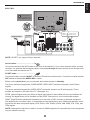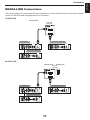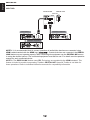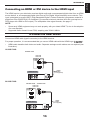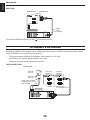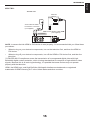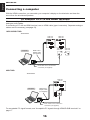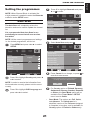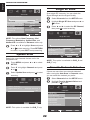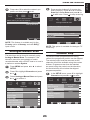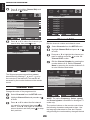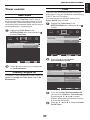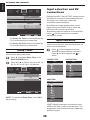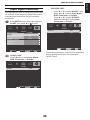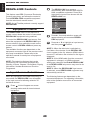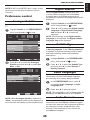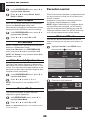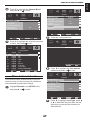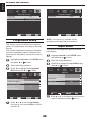
1
19/22/26/32/42 SL738G DIGITAL Series Contents Safety Precautions........................................ 3 Volume...................................................... 28 Installation and important information........ 4 Balance, Bass, Treble.............................. 28 The remote control........................................ 6 Surround Sound...................................... 28 Inserting batteries and effective range of the remote.................................................. 7 Stable Sound®.......................................... 28 Connecting external equipment................... 8 Bass Boost Level..................................... 28 Bass Boost............................................... 28 REGZA-LINK Connections.......................... 11 Audio Description.................................... 28 Connecting an HDMI or DVI device to the HDMI input.................................................... 13 Visually Impaired..................................... 29 Advanced Audio Settings....................... 29 To connect an HDMI device.................... 13 Widescreen viewing.................................... 30 To connect a DVI device.......................... 14 Picture controls........................................... 32 Connecting a computer.............................. 16 Picture Mode............................................ 32 To connect a PC to the HDMI terminal... 16 Brightness, Contrast, Colour and Tint... 32 Using the controls....................................... 18 Sharpness ............................................... 32 Switching on............................................ 19 Back Light Adjustment............................ 32 Using the remote control........................ 19 Colour Temperature................................. 32 Using the side-panel controls................ 19 Cinema Mode........................................... 33 Using the touch sensor........................... 19 DNR........................................................... 33 Tuning the television................................... 20 MPEG NR.................................................. 34 Initial Setup.............................................. 20 CTI............................................................. 34 Setting the programmes............................. 21 Adaptive Luma Control........................... 34 Auto Scan................................................. 21 Active Backlight....................................... 34 Update Scan............................................. 22 Blue Screen.............................................. 34 Single RF Scan......................................... 22 3D Colour Management........................... 34 Favorite Network Select.......................... 22 Base Colour Adjustment......................... 35 Analogue Manual Scan........................... 23 HDMI RGB Range..................................... 35 Channel Skip............................................ 23 H./V. Position............................................ 36 Channel Sort............................................ 24 ClearFrame............................................... 36 Channel Edit . .......................................... 24 PC.............................................................. 36 Channel Decode....................................... 25 Timer control................................................ 37 Analogue Channel Fine Tune ................ 25 Time Zone................................................. 37 Clean Channel List.................................. 25 Country Region ID................................... 37 Common Interface................................... 26 Time........................................................... 37 Reset TV................................................... 26 Sleep Timer............................................... 38 Automatic Power Down........................... 26 Input selection and AV connections.......... 38 General controls.......................................... 27 Input selection......................................... 38 Selecting programme positions............. 27 Input signal selection.............................. 39 Time Display............................................. 27 REGZA-LINK Controls................................. 40 Stereo and Bilingual transmissions....... 27 Equipment Control.................................. 40 Quick Access Menu................................. 27 Input Source Selection............................ 40 Sound controls............................................ 28 Pass-Through Control............................. 41 1 REGZA-LINK Menus.................................... 41 Auto Install............................................... 52 One Touch Play........................................ 41 Manual OAD............................................. 52 System Standby....................................... 41 System Information................................. 52 System Audio Control............................. 41 Text services................................................ 53 PC Link..................................................... 42 Setting the Language.............................. 53 Enable REGZA-LINK................................ 42 Text Information....................................... 53 Auto Power On......................................... 42 Control Buttons....................................... 53 Auto Standby........................................... 42 Questions and Answers.............................. 54 Amplifier Control..................................... 42 Specifications and accessories................. 56 Speaker Preference................................. 42 License Information used with Toshiba Televisions................................................... 57 Media Player................................................. 43 Exhibit A.................................................... 58 Enter Media Player................................... 43 Exhibit B................................................... 58 Photo Multi-View...................................... 43 Notes............................................................. 60 Playing Photo Slideshow........................ 44 Viewing Music Files................................. 44 Playing Music........................................... 44 Preference control....................................... 45 Analogue Subtitle.................................... 45 Digital Subtitle.......................................... 45 Subtitle Type............................................. 45 Audio Languages..................................... 45 Audio Channel......................................... 45 Auto Format............................................. 46 4:3 Stretch................................................ 46 Side Panel Adjustment............................ 46 Game Mode.............................................. 46 Parental control........................................... 46 Channel Block.......................................... 46 Time Interval Lock................................... 47 Programme Block.................................... 48 Input Block............................................... 48 Panel Lock................................................ 50 Factory Default......................................... 50 Digital on-screen information and programme guide........................................ 50 Information............................................... 50 Guide......................................................... 51 EPG Timer................................................. 51 Software upgrade and system . information................................................... 51 Auto Download........................................ 51 2 SETTING UP English Safety Precautions DO be careful with glass panels on equipment. This equipment has been designed and manufactured to meet international safety standards but, like any electrical equipment, care must be taken to obtain the best results and for safety to be assured. Please read the points below for your own safety. They are of a general nature, intended to help with all electronic consumer products and some points may not apply to the goods you have just purchased. DO NOT REMOVE ANY FIXED COVERS AS THIS WILL EXPOSE DANGEROUS AND 'LIVE' PARTS. THE MAINS PLUG IS USED AS A DISCONNECTING DEVICE AND THEREFORE SHOULD BE READILY OPERABLE. Air Circulation Do not Leave more than 10cm clearance around the television to allow adequate ventilation. This will prevent overheating and possible damage to the television. Dusty places should also be avoided. DO NOT obstruct the ventilation openings of the equipment with items such as newspapers, tablecloths, curtains, etc. Overheating will cause damage and shorten the life of the equipment. Heat Damage DO NOT allow electrical equipment to be exposed to dripping or splashing or objects filled with liquids, such as vases, to be placed on the equipment. Damage may occur if the television is left in direct sunlight or near a heater. Avoid places subject to extremely high temperatures or humidity. Place in a location where the temperature remains between 5°C (41°F) min. and 35°C (94°F) max. DO NOT place hot objects or naked flame sources, such as lighted candles or nightlights on, or close to equipment. High temperatures can melt plastic and lead to fires. Mains Supply The mains supply required for this equipment is 220-240V ˜, 50/60Hz. Never connect to a DC supply or any other power source. DO ensure that the television is not standing on the mains lead. Use only the supplied lead. DO NOT cut off the mains plug from this equipment, this incorporates a special Radio Interference Filter, the removal of which will impair its performance. In the UK, the fuse fitted in this plug is approved by ASTA or BSI to BS1362. It should only be replaced by a correctly rated and approved type and the fuse cover must be refitted. IF IN DOUBT PLEASE CONSULT A COMPETENT ELECTRICIAN. DO NOT use makeshift stands and NEVER fix legs with wood screws. To ensure complete safety, always fit the manufacturers’ approved stand, bracket or legs with the fixings provided according to the instructions. DO NOT leave equipment switched on when it is unattended, unless it is specifically stated that it is designed for unattended operation or has a standby mode. Switch off by withdrawing the plug, make sure your family know how to do this. Special arrangements may need to be made for people with disabilities. DO NOT continue to operate the equipment if you are in any doubt about it working normally, or it is damaged in any way – switch off, withdraw the mains plug and consult your dealer. Do DO read the operating instructions before you attempt to use the equipment. DO ensure that all electrical connections (including the mains plug, extension leads and inter-connections between pieces of equipment) are properly made and in accordance with the manufacturers’ instructions. Switch off and withdraw the mains plug before making or changing connections. DO consult your dealer if you are ever in doubt about the installation, operation or safety of your equipment. WARNING – excessive sound pressure from earphones or headphones can cause hearing loss. ABOVE ALL – NEVER let anyone, especially children, push or hit the screen, push anything into holes, slots or any other openings in the case. NEVER guess or take chances with electrical equipment of any kind – it is better to be safe than sorry. 3 English SETTING UP Installation and important information Where to install Locate the television away from direct sunlight and strong lights, soft, indirect lighting is recommended Sturdy tie for comfortable viewing. Use curtains or blinds to prevent direct sunlight falling on the screen. Place the TV set on a stable, level surface that can Hook support the weight of the TV. For model 26/32/42SL738G: As an additional safety measure you can secure the TV to the level surface or a wall, as shown in the illustration, using a sturdy Top View strap. Side View The LCD display panels are manufactured using an extremely high level of precision technology, however sometimes some parts of the screen may be missing picture elements or have luminous spots. This is not a sign of a malfunction. Make sure the television is located in a position where it cannot be pushed or hit by objects, as pressure will break or damage the screen, and that small items cannot be inserted into slots or openings in the case. Wall mounting of the TV should only be performed by qualified servicing personnel. Use only with the wall mount bracket specified by the manufacturer. Please take note EXCLUSION CLAUSE Toshiba shall under no circumstances be liable for loss and/or damage to the product caused by: i) fire; ii) earthquake; iii) accidental damage; iv) intentional misuse of the product; v) use of the product in improper conditions; vi) loss and/or damage caused to the product while in the possession of a third party; vii) any damage or loss caused as a result of the owner’s failure and/or neglect to follow the instructions set out in the owner’s manual; viii) any loss or damage caused directly as a result of misuse or malfunction of the product when used simultaneously with associated equipment; Furthermore, under no circumstances shall Toshiba be liable for any consequential loss and/or damage including but not limited to the following, loss of profit, interruption of business, the loss of recorded data whether caused during normal operation or misuse of the product. • T he digital reception function of this television is only effective in the countries listed in the "Country" section of the "SETUP" menu. Depending on country/area, some of this television's functions may not be available. Reception of future additional or modified services can not be guaranteed with this television. • If stationary images generated by 4:3 broadcasts, text services, channel identification logos, computer displays, video games, on-screen menus, etc. are left on the television screen for any length of time they could become conspicuous, it is always advisable to reduce both the brightness and contrast settings. • Very long, continuous use of the 4:3 picture on a 16:9 screen may result in some retention of the image at the 4:3 outlines, this is not a defect of the LCD TV and is not covered under the manufacturers warranty. Regular use of other size modes (eg: Superlive) and varying the “side panel” brightness (if available on the model) will prevent permanent retention. 4 SETTING UP SYMBOL DEFINITION DANGEROUS VOLTAGE: The lightning flash with arrowhead symbol within an equilateral triangle is intended to alert the user to the presence of un-insulated "DANGEROUS VOLTAGE" within the product's enclosure that may be of sufficient magnitude to constitute a risk of electric shock to persons. INSTRUCTIONS: The exclamation point within on equilateral triangle to alert the user to the presence of important operating and maintenance (servicing) instruction in the literature accompanying the appliance. WARNING: To prevent the spread of fire, keep candles or other open flames away from this product at all times. 5 English SYMBOL English SETTING UP The remote control Simple at-a-glance reference of your remote control. 2 3 4 1 5 6 7 8 9 12 10 11 14 16 13 15 18 1 For On/Standby mode 2 To select input from external sources 3 Still Picture 4 To call up text services in analogue mode and interactive services in digital mode 5 To turn the subtitle On/Off 6 Stereo/Bilingual transmissions 7 Number buttons 8 Switch the Audio Description On/Off 9 To toggle between ATV and DTV mode 10 To alter the volume 11 To change programme 12 In TV mode: To display on-screen information In Text mode: To access index page 13 To mute the sound 14 To display Quick access menu 15 To exit menus 16 To display the programme guide 17 To return to the previous level of the onscreen menu 17 19 18 To display the on-screen menu 19 ▲, ▼, ◄, ►: To move up, down, left or right in the on-screen menu 20 OK: To confirm the selection 20 Colour button: Text control buttons 6 To reveal concealed text To hold a wanted page To enlarge text display size In normal picture mode: To display clock on TV screen In Teletext mode: To toggle between Teletext and normal picture mode SETTING UP English Inserting batteries and effective range of the remote Remove the back cover to reveal the battery compartment and make sure the batteries are inserted the right way round. Suitable battery types for this remote are AAA, IEC R03 1.5V. Do not combine a used, old battery with a new one or mix battery types. Remove dead batteries immediately to prevent acid from leaking into the battery compartment. Dispose of them in accordance with instructions on page 60 of this manual. Warning: batteries must not be exposed to excessive heat such as sunshine, fire or the like. The performance of the remote control will deteriorate beyond a distance of ten meters or outside an angle of 30 degrees from the center of the television. If the operating range becomes reduced the batteries may need replacing. 7 English SETTING UP Connecting external equipment Before connecting any external equipment, turn off all main power switches. If there is no switch remove the mains plug from the wall socket. 19/22SL738G: *a decoder could be Digital Satellite or any other compatible decoder. AC-IN LOCK UNLOCK RGB/PC media recorder decoder* PC/HDMI 1 (AUDIO) 1 2 Digital Audio (1) (3) COMPONENT Y P B /C B L P R/C R AUDIO R 26/32SL738G: *a decoder could be Digital Satellite or any other compatible decoder. AC-IN media recorder (1) NOTE: SCART1 : SCART2 : (2) 1 decoder* (1) (INPUT/TV (2) (INPUT/TV 2 PC/HDMI 1 (AUDIO) Y Digital Audio RGB/PC 8 PB /C B PR /C R L AUDIO (4) COMPONENT R OUT) OUT) SETTING UP English 42SL738G: *a decoder could be Digital Satellite or any other compatible decoder. AC-IN HDMI 1/2/4 media recorder (1) NOTE: SCART1 : SCART2 : (2) 1 decoder* (1) (INPUT/TV (2) (INPUT/TV OUT) OUT) 2 4 PC/HDMI 1 (AUDIO) Digital Audio (4) COMPONENT RGB/PC Y PB /C B Y PB /C B PR /C R L AUDIO R PR /C R L AUDIO R (5) COMPONENT NOTE: SCART1 can support Canal+ decoder. Aerial cables: - - - - - - - - - - - - - - - - Connect the aerial to the ANT socket on the rear of the television. If you use a decoder and/or a media recorder, it is essential that the aerial cable is connected through the aerial socket on the decoder and/ or on the media recorder to the TV. SCART leads: - - - - - - - - - - - - - - - - Connect the video recorder IN/OUT or decoder TV socket to the television. Connect the media recorder SAT socket to the decoder MEDIA REC. socket. Before running Auto Scan, put your decoder and media recorder to Standby. The phono sockets alongside the COMPONENT VIDEO INPUT sockets will accept L and R audio signals. The phono sockets alongside the VIDEO INPUT socket will accept L and R audio signals. These sockets are located on the side of the TV. (See page 18.) SPDIF (Optical Digital Audio Out) When a digital audio signal is associated with the input selected for viewing, the digital audio will be available on this SPDIF connection to your home theater system. HDMI® (High-Definition Multimedia Interface) is for use with a DVD, decoder or electrical equipment with digital audio and video output. It is designed for best performance with 1080p high-definition video signals but will also accept and display VGA, SVGA, XGA, WXGA, SXGA, 480i, 480p, 576i, 576p, and 720p signals. NOTE: Although this television is able to connect to HDMI equipment it is possible that some equipment may not operate correctly. 9 English SETTING UP REGZA-LINK controls the basic functions of connected audio/video equipment using the television's remote control. A wide variety of external equipment can be connected to the back of the television, therefore the relevant owner's manuals for all additional equipment must be referred to. If the television automatically switches over to monitor external equipment, return to normal television by pressing the desired programme position button. To recall external equipment, press to select. 10 SETTING UP English REGZA-LINK Connections The basic functions of connected audio/video equipment can be controlled using the television's remote control if a REGZA-LINK compatible device is connected. 19/22SL738G: TV back view 19SL738 22SL738 1 2 AV amplifier Playback equipment HDMI in HDMI out HDMI out Playback equipment HDMI out 26/32SL738G: TV back view TV Side view 26SL738 32SL738 HDMI 3 1 2 AV amplifier Playback equipment HDMI in HDMI out HDMI out Playback equipment HDMI out 11 English SETTING UP 42SL738G: TV back view TV Side view 42SL738 HDMI 1/2/4 HDMI 3 1 2 4 AV amplifier Playback equipment HDMI in HDMI out HDMI out Playback equipment HDMI out NOTE 1: It is recommended that for correct operation all audio/video devices are connected using HDMI cables branded with the HDMI logo ( ). If several devices are connected, the REGZALINK feature may not operate properly. After connecting the equipment use the REGZA-LINK menus to setup the desired options. The connected equipment must also be set. For details see the operation manual for each connected device. NOTE 2: The REGZA-LINK feature uses CEC Technology as regulated by the HDMI standard. This feature is limited to models incorporating Toshiba’s REGZA-LINK. However,Toshiba is not liable for those operations. Refer to individual instruction manuals for compatibility information. 12 SETTING UP English Connecting an HDMI or DVI device to the HDMI input The HDMI input on your television receives digital audio and uncompressed digital video from an HDMI source device, or uncompressed digital video from a DVI (Digital Visual Interface) source device. This input is designed to accept HDCP (High-Bandwidth Digital- Content Protection) programme material in digital form from EIA/CEA-861-D–compliant [1] consumer electronic devices (such as a set-top box or DVD player with HDMI or DVI output). For acceptable video signal formats, see page 17. NOTE: • • Some early HDMI equipment may not work properly with your latest HDMI TV, due to the adoption of a new standard. Supported Audio format: Linear PCM, sampling rate 32/44.1/48kHz. To connect an HDMI device Connect an HDMI cable (type A connector) to the HDMI terminal. For proper operation, it is recommended that you use an HDMI cable with the HDMI Logo ( • ). HDMI cable transfers both video and audio. Separate analogue audio cables are not required (see illustration). 19/22SL738G: TV back view 19SL738 22SL738 1 2 HDMI device HDMI out HDMI cable (not supplied) 26/32SL738G: TV back view TV side view 26SL738 32SL738 HDMI 3 1 2 HDMI device HDMI out 13 HDMI cable (not supplied) English SETTING UP 42SL738G: TV back view TV Side view 42SL738 HDMI 1/2/4 HDMI 3 1 2 4 HDMI cable (not supplied) HDMI device HDMI out To view the HDMI device video, press to select the mode. To connect a DVI device Connect an HDMI-to-DVI adapter cable (HDMI type A connector) to HDMI1 terminal and audio cables to the PC/HDMI1 Audio socket (see illustration). • The recommended HDMI-to-DVI adapter cable length is 6.6 ft (2m). An HDMI-to-DVI adapter cable transfers video only. • Separate analogue audio cables are required. 19/22/26/32SL738G: TV back view 19SL738 22SL738 26SL738 32SL738 PC/HDMI 1 (AUDIO) 26SL738 32SL738 1 PC/HDMI 1 (AUDIO) Audio cable for HDMI to television connection (not supplied) 2 19SL738 22SL738 1 2 HDMI-to-DVI adapter cable (not supplied) DVI device 14 SETTING UP English 42SL738G: TV back view 42SL738 HDMI 1/2/4 1 PC/HDMI 1 (AUDIO) 2 Audio cable for HDMI to television connection (not supplied) 4 HDMI-to-DVI adapter cable (not supplied) DVI device NOTE: To ensure that the HDMI or DVI device is reset properly, it is recommended that you follow these procedures: • When turning on your electronic components, turn on the television first, and then the HDMI or DVI device. • When turning off your electronic components, turn off the HDMI or DVI device first, and then the television. [1] EIA/CEA-861-D compliance covers the transmission of uncompressed digital video with highbandwidth digital content protection, which is being standardized for reception of high-definition video signals. Because this is an evolving technology, it is possible that some devices may not operate properly with the television. HDMI, the HDMI Logo, and High-Definition Multimedia Interface are trademarks or registered trademarks of HDMI Licensing LLC in the United States and other countries. 15 English SETTING UP Connecting a computer With the HDMI connection, you can watch your computer’s display on the television and hear the sound from the televisions speakers. To connect a PC to the HDMI terminal When connecting a PC to the HDMI terminal on the television, use an HDMI-to-DVI adapter cable and analogue audio cables. If connecting a PC with an HDMI terminal, use an HDMI cable (type A connector). Separate analogue cables are not necessary (see page 13). 19/22/26/32SL738G: TV back view 19SL738 22SL738 26SL738 32SL738 1 1 2 2 Computer 19SL738 22SL738 HDMI-to-DVI adapter cable (not supplied) PC/HDMI 1 (AUDIO) 26SL738 32SL738 PC/HDMI 1 (AUDIO) Audio cable for PC to television connection (not supplied) 42SL738G: TV back view 42SL738 HDMI 1/2/4 1 Computer HDMI-to-DVI adapter cable (not supplied) 2 4 PC/HDMI 1 (AUDIO) Audio cable for PC to television connection (not supplied) For acceptable PC signal formats, see “Acceptable PC signals through HDMI/D-SUB terminals” on page 17. 16 SETTING UP English Acceptable Video signals through HDMI terminals Format VGA Resolution 640 x 480 480i 720 x 480 576i 720 x 576 480p 720 x 480 576p 720 x 576 720p 1080i 1080p 1280 x 720 1920 x 1080 1920 x 1080 Refresh Rate H. Frequency Pixel Clock 60.000Hz 31.500kHz 25.200MHz 59.940Hz 31.469kHz 25.175MHz 72.809Hz 37.861kHz 31.500MHz 75.000Hz 37.500kHz 31.500MHz 60.000Hz 15.750kHz 27.000MHz 59.940Hz 15.734kHz 27.000MHz 50.000Hz 15.625kHz 27.000MHz 60.000Hz 31.500kHz 27.027MHz 59.940Hz 31.469kHz 27.000MHz 50.000Hz 31.250kHz 27.000MHz 60.000Hz 45.000kHz 74.250MHz 59.940Hz 44.955kHz 74.176MHz 50.000Hz 37.500kHz 74.250MHz 60.000Hz 33.750kHz 74.250MHz 59.940Hz 33.716kHz 74.176MHz 50.000Hz 28.125kHz 74.250MHz 60.000Hz 67.500kHz 148.500MHz 59.940Hz 67.433kHz 148.352MHz 50.000Hz 56.250kHz 148.500MHz 24.000Hz 27.000kHz 74.250MHz 23.976Hz 26.975kHz 74.176MHz Acceptable PC signals through HDMI/D-SUB terminals Format VGA (for D-Sub only) SVGA XGA WXGA Resolution 640 x 480 800 x 600 1024 x 768 1280 x 768 1360 x 768 SXGA 1280 x 1024 Refresh Rate H. Frequency Pixel Clock 59.940Hz 31.469kHz 25.175MHz 72.809Hz 37.861kHz 31.500MHz 75.000Hz 37.500kHz 31.500MHz 56.250Hz 35.156kHz 36.000MHz 60.317Hz 37.879kHz 40.000MHz 72.188Hz 48.077kHz 50.000MHz 75.000Hz 46.875kHz 49.500MHz 60.004Hz 48.363kHz 65.000MHz 70.069Hz 56.476kHz 75.000MHz 75.029Hz 60.023kHz 78.750MHz 59.995Hz 47.396kHz 68.250MHz 59.870Hz 47.776kHz 79.500MHz 74.893Hz 60.289kHz 102.250MHz 60.015Hz 47.712kHz 85.500MHz 60.020Hz 63.981kHz 108.000MHz 75.025Hz 79.976kHz 135.000MHz HDMI, the HDMI Logo, and High-Definition Multimedia Interface are trademarks or registered trademarks of HDMI Licensing LLC in the United States and other countries. NOTE 1: The PC input signals are supported by the "HDMI 1" socket only. NOTE 2: Only a supported PC signal will show the correct resolution on the TV display. 17 English SETTING UP Using the controls While all the necessary adjustments and controls for the television are done using the remote control, the buttons on the television may be used for some functions. NOTE: COMMON INTERFACE (CI) The common interface is for a Conditional Access Module (CAM). Contact a service provider for details. 19/22SL738G: DVB COMMON INTERFACE CI Card Power Programme up Programme down R L VIDEO INPUT Volume up R Volume down AUDIO Menu L (2) Input Video VIDEO USB USB Headphone GREEN LED - On Timer/EPG Timer On IR SENSOR RED LED - Standby GREEN LED - Power on 26/32SL738G: DVB COMMON INTERFACE CI Card Power Programme up Programme down R R (3) VIDEO INPUT L Volume up AUDIO Volume down L Menu Video Input VIDEO USB USB Headphone HDMI 3 HDMI 3 GREEN LED - On Timer/EPG Timer On IR SENSOR RED LED - Standby GREEN LED - Power on 18 SETTING UP English 42SL738G: DVB COMMON INTERFACE CI Card R R (3) VIDEO INPUT L AUDIO L Video VIDEO USB USB Headphone HDMI 3 HDMI 3 IR SENSOR GREEN LED On Timer/EPG Timer On TOUCH SENSOR Switching on RED LED - Standby BLUE LED - Power on Using the side-panel controls Before switching on the television, make sure to connect the aerial cable, and select TV as the input source. To alter the volume, press – +. If the RED LED is off, check that the mains plug is connected to the power supply. If the picture does not appear, press on the remote control, it may take a few seconds to appear. Press MENU and , , , or to control the sound and picture options. Press MENU to finish. To alter the programme position, press To put the television into Standby mode, press on the remote control. To view the picture, press again. The picture may take a few seconds to appear. . To select the external input, press to move through the list until the appropriate input source is selected as described on page 38. Please always refer to the owner’s manual of the equipment to be connected for full details. Using the remote control Using the touch sensor To set up the television, you need to use the onscreen menus. Press on the remote control to see the menus. To use Touch Sensor on the television, use your finger to touch the indication on Touch Sensor. The on-screen menu appears as a list of five topics. As each symbol is selected by pressing ◄ or ►on the navigation ring on the remote control, its respective options will appear below. To alter the programme position, touch on . To alter the volume, touch on – To use the options, press or on the navigation ring to move up or down through them and use , ◄ or ► to select the required choice. Follow the on-screen instructions. The functions of each menu are described in detail throughout the manual. +. Touch MENU and – + or to control the sound and picture options. Touch MENU to finish. To select the external input, touch to move through the list until the appropriate input source is selected as described on page 38. 19 English TUNING THE TELEVISION 4 Tuning the television Before switching on the television, put your decoder and media recorder to Standby if they are connected. Press ▲ or ▼ to select your country and press ► to go to the next step. Initial Setup Country Please select your country: United Kingdom Italy Netherlands Sweden Bulgaria Greece Russia Make sure to connect the aerial cable, and select TV as the input source. To set up the television, press the buttons on the remote control as detailed on page 6. Back Initial Setup Initial Setup Welcome Back OK Initial Setup Exit EXIT Complete Initial Setup Complete. Please press [OK] to exit the wizard. Exit Press ▲ or ▼ to select between Home or Store mode (for normal home use, select Home), and then press ►. If Home mode is selected, the Standard picture mode will be selected Energy Saving Mode Back OK Exit NOTE 1: If you skip this step, the channel scan can be performed in the TV Menu. NOTE 2: The time will be set automatically using the broadcaster data but can be advanced or decreased by from -12 to +13 hours using Time Zone in Time Setup. (See page 37) Home PLEASE NOTE Store The Factory Default menu can also be accessed at any time in the Parental control from the SETUP menu. [Home] mode is recommended for normal home use. Select EXIT Congratulations!! Español Français Deutsch Italiano Ελληνικά Български To use this TV for displaying in a store showroom, please select [Store]. Next Initial Setup English Next Select The initial setup is now complete. Press to exit the wizard. Language Please select your language: Back Scan Skip Scan The search will begin for all available stations. The slide bar will move along the line as the search progresses. Next Press ▲ or ▼ to select your language, and then press ►. Initial Setup Exit 0% Please press [OK] to start the wizard. Select EXIT Channel Scan First, please connect antenna/cable. Start channel scan now ? If you skip this step, the channel scan can be performed in the TV Menu. Welcome to the initial setup wizard. Back Next To start channel scan, press ►. Connect the television to the main power and press the button. The Initial Setup screen will appear at the first use. Press to start the initial setup. Initial Setup Select Next EXIT Exit 20 TUNING THE TELEVISION 4 NOTE: When Channel Block is activated the 4-digit password is needed to enter the Channels submenu under SETUP menu. SETUP Country United Kingdom OSD Language English Channels Automatic Power Down On Location Home Software Upgrade Parental Reset TV Auto Scan The Auto Scan will completely re-tune the television and can be used to update the channel list. It is recommended that Auto Scan is run periodically to ensure that all new services are added. OK NOTE: All the current programmes and settings i.e. the locked programmes, will be lost. Select RETURN Back EXIT Exit . Channels Auto Scan Update Scan Analogue Manual Scan Favorite Network Select Channel Skip Channel Sort Channel Edit Channel Decode Analogue Channel Fine Tune Clean Channel List Select RETURN Back EXIT Exit OK Scan SETUP Country United Kingdom OSD Language English Channels Automatic Power Down On Location Home Software Upgrade Parental Reset TV Enter Enter Select Auto Scan and press Press MENU and press ◄ or ► to select SETUP. OK Press ▼ to highlight Channels and press ► or to enter. Press Cancel for no change, or press enter Auto start screen. Select RETURN Back EXIT Exit Press ▼ to highlight Country and press ◄ or ► to select. to Previous settings will be lost ! Press Cancel for no change, Press OK to start Auto scan. NOTE: In order to receive the information from the broadcaster correctly, please set the correct country. OK Cancel For Country option of Finland, Germany, Switzerland, Norway, Sweden, Denmark or Others, the Scan Mode option will be available if the Tuner Mode in SETUP menu is set to Cable. Press ▼ to highlight OSD Language and press ◄ or ► to select. • 21 Scan Mode: The options are Full, Quick, and Advance. The Quick scan is a simplified version of the Full scan designed to complete in less time, and is available for Country option of Finland or Others only. English Setting the programmes English TUNING THE TELEVISION Single RF Scan Scan single RF channels. You can check the Signal Strength and the Signal Quality. Auto Scan Scan All Channels. Select Channels from the SETUP menu. 0% Scan Mode Start Frequency (KHz) End Frequency (KHz) Modulation Symbol Rate (Ksym/s) Network ID Scan Highlight Single RF Scan and press ► or to enter. Advance 362000 362000 Auto 6900 100 Press ◄ and ► to select the RF Channel, then press to start scanning. Select EXIT Exit Single RF Scan NOTE: The options Start Frequency, End Frequency, Modulation, Symbol Rate, and Network ID is available for Advance mode only. Scan single RF channel. (Digital Only) 0% Press ▲ or ▼ to highlight Scan and press ► or to start scanning. Press RETURN to cancel, or press EXIT to stop scanning. Start Frequency (KHz) 474000 Modulation Auto Symbol Rate (Ksym/s) 6875 0 Signal Strength OK Scan RETURN Back EXIT Exit Update Scan Search the new channels that are not in the programme list. Press MENU and press ◄ or ► to select SETUP. Press ▼ to highlight Channels and press ► or . Select Update Scan and press scanning. to start NOTE: This option is available for DVB_C and DVB_T only. Favorite Network Select If there are more than two networks detected after running the Auto Scan in Channels menu, you can select the network you prefer. Select Channels from the SETUP menu. Highlight Favorite Network Select and press ► or to enter. Update Scan Status: Scanning.. Digital Channels: 0 Analogue Channels: 0 Channels Auto Scan Update Scan Single RF Scan Favorite Network Select Channel Skip Channel Sort Channel Edit Clean Channel List 0% RETURN Cancel EXIT Exit NOTE: This option is available for DVB_T only. OK 22 Enter Select RETURN Back EXIT Exit TUNING THE TELEVISION Press number buttons 0~9 to enter the Start Frequency. Press ▲ or ▼ to select Scan Up or Scan Down and press ► or to start scan. Press to stop scanning. Favorite Network Select Please select your favorite network: TVBS Network Oslo og Akershus Analogue Manual Scan Search for analogue channels OK Start Frequency (MHz) Scan Up Scan Down Select EXIT Exit NOTE: This feature is available only for the Country option of Norway, and with DVB_T input source. OK Press MENU and press ◄ or ► to select SETUP. P ress ▼ to highlight Channels and press ► or . Scan up RETURN Back EXIT Exit NOTE: This option is available for Analogue TV mode only. Analogue Manual Scan The television can be tuned-in manually using Analogue Manual Scan. For example: if the television cannot be connected to a media recorder/decoder with a SCART lead or to tune-in a station on another System. 45.00 Channel Skip To prevent certain programmes from being viewed, the programme position can be skipped. The remote control must be removed as the channels will still be available using the number buttons. Programmes can then be watched as normal using the controls on the television, but the television will not show the skipped programme position. In the SETUP menu, press ▼ to highlight Channels and press ► or to enter. Select Analogue Manual Scan and press ► or to confirm it. SETUP Country United Kingdom OSD Language English Channels Automatic Power Down On Location Home Software Upgrade Parental Reset TV Channels Auto Scan Update Scan Analogue Manual Scan Favorite Nework Select Channel Skip Channel Sort Channel Edit Channel Decode Analogue Channel Fine Tune Clean Channel List Select RETURN Back EXIT Exit OK Enter OK 23 Enter Select RETURN Back EXIT Exit English 4 Press ▲ or ▼ to select the network you prefer, and then press to set. English TUNING THE TELEVISION P ress ▼ to highlight Channel Skip and press ► or to enter. 1 2 3 4 5 6 7 8 9 10 Channels Auto Scan Update Scan Analogue Manual Scan Favorite Nework Select Channel Skip Channel Sort Channel Edit Channel Decode Analogue Channel Fine Tune Clean Channel List Select RETURN Back EXIT Exit OK Enter Analogue Analogue Analogue Analogue Analogue Analogue Analogue Analogue Analogue Analogue OK Set Channel Sort BBC1 ------------------------------------Select RETURN Back EXIT Exit Channel Edit P ress ▲ or ▼ to select the channels you want to skip, then press to set. Edit the channel number and channel name. Select Channels from the SETUP menu. 1 Highlight Channel Edit and press ► or to enter. Channel Skip Analogue BBC1 Press ▲ or ▼ to highlight the channel you want for editing and press to enter the "Channel Edit" screen. 4 OK Set Select RETURN Back EXIT Edit the Channel Number by pressing the number buttons 0~9. Edit the Channel Name by pressing the number buttons 0~9 to enter numbers and letters. Exit The Skipped programme positions cannot be selected by pressing P and P or by the controls on the television, but can still be accessed by the number buttons on the remote control. Network Name: Channel Number: Channel Name: Frequency Colour system Sound system Channel Sort Channel Edit 1 ----175.25 Auto D/K Change the order of the programme list. Select Channels from the SETUP menu. OK Highlight Channel Sort and press ► or to enter. Press ▲ or ▼ to select the first channel you want for sorting and then press to mark it. Press ▲ or ▼ again to select the second channel and then press to swap their positions. Set Select RETURN Back EXIT Exit NOTE: The option Frequency, Colour system, and Sound system is available for Analogue TV mode only. The number buttons on the remote control have the following characters assigned to them. Use the language characters to enter text. Repeatedly pressing the numbered key changes the text 24 TUNING THE TELEVISION Number 1 2 3 4 5 6 7 8 9 0 In the SETUP menu, press ▼ to highlight Channels and press ► or to enter. Character ABC1 DEF2 GHI3 JKL4 MNO5 PQR6 STU7 VWX8 YZ9 +-.0 P ress ▼ to highlight Analogue Channel Fine Tune and press to enter. Highlight and press channel. 4 Press ◄ or ► to adjust the frequency. Press ◄ to decrease and ► to increase the frequency. 1 2 3 4 5 6 7 8 9 10 Channel Decode Channel Decode support the Canal+ (paid television channel); however, the channel also broadcast some un-encrypted programmes. These programmes without encryption can be viewed free of charge. Select Channels from the SETUP menu. Analogue Channel Fine Tune 175.25 MHz BBC 1 687.25 MHz RTP1 55.85 MHz ----209.25 MHz ----223.2 MHz ----572.3 MHz ----590.25 MHz ----623.25 MHz --------759.2 MHz 772.2 MHz ----Select RETURN Back EXIT Exit OK Adjust Highlight Channel Decode and press ► or to enter. Press ▲or ▼ to highlight the channel and press to set. 1 2 3 4 5 6 7 8 9 10 to select the Clean Channel List This feature cleans all the TV channels while your channel list is not empty. In the SETUP menu, press ▼ to highlight Channels and press ► or to enter. Channel Decode AnalogueBBC1 AnalogueRTP1 Analogue----Analogue----Analogue----Analogue----Analogue----Analogue----Analogue----Analogue----Select RETURN Back EXIT Exit OK Set Press ▼ to highlight Clean Channel List and press ► or to enter. Channels Auto Scan Update Scan Single RF Scan Favorite Network Select Channel Skip Channel Sort Channel Edit Clean Channel List NOTE: This option is available for Analogue TV mode only. Analogue Channel Fine Tune OK When the reception is poor, you can use this function to do the fine tuning. Enter Select RETURN Back EXIT Exit The Clean Channel List screen appears. Press to clean now. 25 English character, pressing ◄ deletes the previous text character. English TUNING THE TELEVISION Automatic Power Down Previous settings will be lost ! Press Cancel for no change. Press OK to continue. OK The TV will automatically turn itself off (standby) after approximately 4 hours, if you do not touch the control buttons on the remote control or on the TV control panel. Cancel Common Interface In the SETUP menu, press ▼ to highlight Automatic Power Down. This function enables you to watch some pay services (encrypted services). When the module is inserted into the CI slot, you can access the module menu. To purchase a module and smart card, contact your dealer. Common Interface functions may not be possible depending upon the country broadcasting circumstances. Press ◄ or ► to select On or Off. Press MENU and press ◄ or ► to select APPLICATIONS. P ress ▼ to highlight Common Interface and press ► or . APPLICATIONS Media Player Time Setup Off Sleep Timer Common Interface OK Enter Select RETURN Back EXIT Exit Press to select the CI card to view the Module information. Reset TV Selecting Reset TV will reset all TV settings to their original factory values, excludes Country, OSD Language, and Channels. In the SETUP menu, press ▼ to highlight Reset TV and press ► or to enter. Select OK to confirm or select Cancel to exit. 26 CONTROLS AND FEATURES Quick Access Menu Quick access menu helps you access some options quickly, such as Picture Mode, Picture Size, Sleep, REGZA-LINK, and Media Player. Press QUICK button to display the Quick access menu and press ▲ or ▼ to select the option. Selecting programme positions To select a programme position, press the numbered buttons on remote control. Quick access The programme positions can also be selected by pressing P and P . Picture Mode Standard Picture Size Wide Sleep To display on-screen information, i.e. programme position, input mode, or stereo/mono signal, press . Press it again to cancel. REGZA-LINK Media Player Time Display The time display facility allows the current (text service) time to be seen on the television screen. Press on the remote control while watching a normal television broadcast to see the time display from the broadcaster. It will remain on screen for about 5 seconds. NOTE: This option is available for Analogue TV mode only and may not be available in some cases. Stereo and Bilingual transmissions If the stereo or dual language broadcasts are transmitted, the icon Stereo or Dual will appear on the screen each time the programme positions are changed, and will disappear after a few seconds. If the broadcast is not in stereo, the icon Mono will appear. Stereo… Press to select Stereo or Mono. Bilingual… Bilingual transmissions are rare. If they are transmitted, the icon Dual will display. Choose the required programme number. If the Dual appears, press to select Dual1, Dual2, or Mono. 27 Off English General controls English CONTROLS AND FEATURES Stable Sound® Sound controls Stable Sound reduces the volume level differences between channels. It automatically remains on the same volume level when you change channels. Volume Volume Press or to adjust the volume. In the SOUND menu, press ▼ to select Stable Sound. Sound Mute Press ◄ or ► to switch function On or Off. Press once to turn the sound off, press again to cancel. Bass Boost Balance, Bass, Treble Bass Boost enhances the depth of the sound on the TV speakers. The difference will only be noticeable on sound with strong bass. Press MENU and ◄ or ► to select SOUND. In the SOUND menu, press ▼ to highlight Bass Boost. Balance Bass Treble Surround Sound Stable Sound Bass Boost Bass Boost Level Audio Description Visually Impaired Advanced Audio OK Enter SOUND Off Off On Normal Select RETURN Back EXIT Press ◄ or ► to switch function On or Off. 0 0 0 NOTE: The Surround Sound and Bass Boost functions are available for the sound from the TV's built-in speakers only. Bass Boost Level 50 After setting the Bass Boost to On in the SOUND menu, you can adjust its level. Exit In the SOUND menu, press ▼ to highlight Bass Boost Level. Press ▼ to highlight Balance, Bass or Treble. Press ◄ or ► to change the setting. Press ◄ or ► to change the setting. Surround Sound Audio Description This function enriches (expanding and deepening) the sound quality. In the SOUND menu, press ▼ to select Surround Sound. Press ◄ or ► to switch function On or Off. Audio Description is an additional narration describing on-screen action, body language, expressions and movements for people with visual disabilities while watching the TV. This function enables you to choose the type of narrations. Press MENU and press ◄ or ► to select SOUND. Press ▼ to highlight Audio Description and press ◄ or ► to select Normal, Hard of Hearing, and Visually Impaired. NOTE: Press AD button on the remote control to switch the Audio Description On or Off. 28 CONTROLS AND FEATURES Advanced Audio Settings Visually Impaired: This function provides descriptive narration of key visual elements making television programmes, feature films, home video and other visual media accessible to people who are visually blind or visually impaired. The Advanced Audio settings help to create an enhanced surround sound experience with deep, rich bass from stereo sound sources. Your TV’s audio will sound fuller, richer, and wider. Highlight the Advanced Audio in the SOUND menu and press ► or to enter the Advanced Audio settings. Visually Impaired When the Audio Description is set to “Visually Impaired”, you can adjust the volume of the Audio Description. Advanced Audio PC / HDMI1 Audio PC HDMI1 Audio Auto Lip Sync On SPDIF Type PCM Press MENU and press ◄ or ► to select SOUND. Press ▼ to highlight Audio Description and use ◄ or ► to select Visually Impaired. Press ▼ to highlight Visually Impaired and press ► or to enter. 4 Make sure the Speaker Out option is set to On. Press ▼ to highlight Volume option, and press ◄ or ► to adjust the volume. Speaker Out Volume Visually Impaired On Select RETURN Back Select RETURN Back EXIT Exit • PC/HDMI1 Audio: Receive sound from a connected PC. • HDMI1 Audio: If the connected HDMI source does not support digital audio, plug the audio cable into PC/HDMI1 (Audio) on the back of the TV, then use the HDMI1 Audio setting. If the sound is missing, select an alternative setting. • Lip Sync: Activates an audio/video display timing adjustment that allows HDMI devices to automatically synchronize accurately. Available for HDMI source only. • SPDIF Type: Sends digital audio signal to the external audio system. The options are PCM, Dolby Digital, or Off. 20 EXIT Exit Manufactured under licence from Dolby Laboratories. "Dolby" and the double-D symbol are trademarks of Dolby Laboratories. 29 English Hard of Hearing: This function provides narration to deaf and hard of hearing viewers. English CONTROLS AND FEATURES Widescreen viewing Depending on the type of broadcast being transmitted, programmes can be viewed in a number of formats. Native Wide This setting is available when watching video signal source via HDMI, and will show the picture without over scan. Use this setting when watching a widescreen DVD, widescreen video tape or a 16:9 broadcast (when available). Due to the range of widescreen formats (16:9, 14:9, 20:9 etc.) black bars may be visible on the top and bottom of the screen. Cinema When watching "all sides panel format" films/video tapes, this setting will eliminate or reduce the black bars at all sides of the screen by zooming in and selecting the image without distortion. 4:3 Use this setting to view a true 4:3 broadcast. Super Live This setting will enlarge a 4:3 image to fit the screen by stretching the image horizontally and vertically, holding better proportions at the centre of the image. Some distortion may occur. Subtitle When subtitles are included on a letterbox format broadcast, this setting will raise the picture to ensure that all the text is displayed. Subtitle 30 CONTROLS AND FEATURES English 14:9 Use this setting when watching a 14:9 broadcast. PC Wide Use this setting for PC connected via HDMI or RGB/PC terminal when receiving PC signal format. This setting will display the image without picture clipping. PC Normal Use this setting for PC connected via HDMI or RGB/PC terminal when receiving PC signal format. This setting will display the image correctly without distortion or picture clipping. Dot by Dot “Dot by Dot” is a non-scaling display. Depending on the input signal format, the picture is displayed with side panels and/or bars at the top and bottom (i.e. VGA input source). Press QUICK to display the Quick access menu and press or to select the Picture Size and press . You can choose the picture size from Wide, Cinema, 4:3, Super Live, Subtitle, 14:9, Native, PC Wide, PC Normal, and Dot by Dot. Using the special functions to change the size of the displayed image (i.e. changing the height/width ratio) for the purposes of public display or commercial gain may infringe on copyright laws. Quick access Picture Mode Standard Picture Size Wide Sleep Off REGZA-LINK Media Player Available Picture Size Screen Mode Wide 4:3 Super Live Cinema Subtitle 14:9 Native PC Wide PC Normal Dot by Dot SD (up to 480p) Yes Yes Yes Yes Yes Yes Yes(only in HDMI) No No No HD (up to 1080p) Yes Yes No No No No Yes(only in HDMI) No No No 31 PC Mode No No No No No No No Yes Yes Yes English CONTROLS AND FEATURES Picture controls Back Light Adjustment Adjusting the Back Light can improve the clarity of the screen when viewing. Picture Mode Press MENU and press ◄ or ► to select PICTURE. You can adjust the best picture appearance by selecting the preset value in picture mode based on the programme category. Press ▼ to highlight Back Light and press ◄ or ► to adjust. Press MENU and press ◄ or ► to select PICTURE. Press ▼ to highlight Picture Mode and press ◄ or ► to select Store, Dynamic, Standard, Movie, PC, or User. PICTURE Picture Mode Standard 50 Brightness 100 Contrast 50 Colour 0 Tint 50 Sharpness Back Light 100 Picture Size Wide Colour Temperature Advanced Video Select RETURN Back EXIT Exit OK Adjust PICTURE Picture Mode Standard 50 Brightness 100 Contrast 50 Colour 0 Tint 50 Sharpness Back Light 100 Picture Size Wide Colour Temperature Advanced Video Select RETURN Back EXIT Exit OK Enter Colour Temperature Colour Temperature increases the ‘warmth’ or ‘coolness’ of a picture by increasing the red or blue tint. NOTE: The Store mode is available only when the Location in SETUP menu is set to Store. Brightness, Contrast, Colour and Tint In the PICTURE menu, press ▼ to select Brightness, Contrast, Colour or Tint. Press ◄ or ► to adjust your preference. Sharpness This function increase or decrease the sharpness of the picture. The picture shows the clear edge when you increase the values. In the PICTURE menu, press ▼ to select Sharpness. Press ◄ or ► to adjust your preference. 32 In the PICTURE menu, press ▼ to highlight Colour Temperature and press ► or to enter. PICTURE Picture Mode Standard 50 Brightness 100 Contrast 50 Colour 0 Tint 50 Sharpness Back Light 100 Picture Size Wide Colour Temperature Advanced Video Select RETURN Back EXIT Exit OK Enter CONTROLS AND FEATURES Colour Temperature Colour Temperature User R Gain G Gain B Gain English Press ◄ or ► to select Cool, Medium, Warm or User to suit your preference. DNR DNR (Digital Noise Reduction) enables you to ‘soften’ the screen representation of a weak signal to reduce the noise effect. In the PICTURE menu, press ▼ to highlight Advanced Video and press ► or to enter. 0 0 0 Press ▲ or ▼ to highlight NR and press ► or to enter. P ress ▲ or ▼ to highlight DNR and press ◄ or ► to select Low, Middle, High, Auto or Off. Select RETURN Back EXIT Exit NOTE: R/G/B Gain: Increase or decrease the red/green/blue levels in the picture. DNR MPEG NR Cinema Mode The frame rate of a movie film is generally 24 frames a second whereas the movie software such as DVD, etc. that you enjoy watching on television at home is 30 or 25 frames a second. The difference in frame rate may cause flickers while viewing the films on television; set the Cinema Mode to convert the signal to reproduce a smooth motion and picture quality. Auto Low Select RETURN Back EXIT Exit In the PICTURE menu, press ▼ to highlight Advanced Video and press ► to enter. Press ▼ to highlight Cinema Mode, and press ◄ or ► select from On or Off. Advanced Video Cinema Mode On NR Auto CTI Adaptive Luma Control Active Backlight On Blue Screen Off 3D Colour Management Off Base Colour Adjustment ClearFrame NR 7 Select RETURN Back EXIT Exit 33 English CONTROLS AND FEATURES MPEG NR Active Backlight When Active Backlight control is activated, it will automatically optimise the backlighting levels for dark scenes. If the receiving signal of MPEG has a grained noise depending on the compression and conversion, the noise may be reduced when using this function. In the PICTURE menu, press ▼ to highlight Advanced Video and press ► to enter. In the PICTURE menu, press ▲ or ▼ to highlight Advanced Video and press ► or to enter. Press ▼ to highlight Active Backlight and press ◄ or ► to select On or Off. Press ▲ or ▼ to highlight NR and press ► or to enter. S elect the MPEG NR and press ◄ or ► to select Low, Middle, High, or Off. DNR MPEG NR NR Blue Screen When Blue Screen is selected, the screen will turn blue and the sound will be muted when no signal is received. In the PICTURE menu, press ▼ to highlight Advanced Video and press ► or to enter Auto Low Press ▼ to highlight Blue Screen and press ◄ or ► to select On or Off. 3D Colour Management When 3D Colour Management is selected, it allows the ‘Base Colour Adjustment’ feature to become available. Select RETURN Back EXIT Exit CTI The Colour Transient Improvement (CTI) involves the detection and sharpening of edges around colour objects on the screen. In the PICTURE menu, press ▼ to highlight Advanced Video and press ► or to enter. Select the CTI, and press◄ or ► to select Auto or Off. Adaptive Luma Control Automatically adjusts the brightness and contrast after analyzing the input signal. This function enriches the colours and the depth of the picture. In the PICTURE menu, press ▼ to highlight Advanced Video and press ► or to enter. Press ▼ to highlight Adaptive Luma Control and press ◄ or ► to adjust your preference. 34 In the PICTURE menu, press ▲ or ▼ to highlight Advanced Video and press ► or to enter. Press ▲ or ▼ to highlight 3D Colour Management. Advanced Video Cinema Mode On NR CTI Auto Adaptive Luma Control Active Backlight On Blue Screen On 3D Colour Management Off Base Colour Adjustment ClearFrame 7 Select RETURN Back EXIT Exit Press ◄ or ► to select On or Off. CONTROLS AND FEATURES Press ▲ or ▼ to select an option, then press to enter the adjustment setting window. The Base Colour Adjustment feature allows the adjustment of individual colours to suit personal preference. This can be useful when using an external source. It only can be adjusted when Colour Management is set to On. Base Colour Adjustment Hue Saturation Brightness 0 0 0 Red Green 0 0 0 Blue 0 0 0 Yellow 0 0 0 Magenta 0 0 0 0 0 Cyan 0 Reset Highlight Advanced Video in the PICTURE menu. Press ▲ or ▼ to highlight 3D Colour Management and press ◄ or ► to select On. Advanced Video Cinema Mode On NR Auto CTI Adaptive Luma Control Active Backlight On Blue Screen Off 3D Colour Management Off Base Colour Adjustment ClearFrame OK 7 Select RETURN Back EXIT Exit Press ▲ or ▼ to highlight Base Colour Adjustment and then press ► or . Advanced Video Cinema Mode On NR CTI Auto Adaptive Luma Control Active Backlight On Blue Screen Off 3D Colour Management On Base Colour Adjustment ClearFrame OK Enter Select RETURN Back EXIT 4 Enter Select RETURN Back EXIT Exit Press ◄ or ► to select Hue, Saturation, or Brightness, then press ▲ or ▼ to adjust the settings as required. NOTE: To return to the original factory settings, select Reset and press . HDMI RGB Range Adjusts RGB full range signal automatically. When Limit is selected the RGB signal’s output range is 16 to 235. When Full is selected the RGB signal’s output range is 0 to 255. In the PICTURE menu, press ▲ or ▼ to highlight Advanced Video and press ► or to enter. 7 Exit Press ▲ or ▼ to highlight HDMI RGB Range and press ◄ or ► to select Auto, Full, or Limit. NOTE: If the HDMI connection is capable of 1080p and/or the television is capable of refresh rates greater than 50Hz or supports Deep Colour, a Category 2 cable will be required. Conventional HDMI/DVI cables may not work properly with this mode. 35 English Base Colour Adjustment English CONTROLS AND FEATURES H./V. Position Adjust the horizontal and vertical position of the picture. Advanced Video Cinema Mode On NR CTI Auto Adaptive Luma Control Active Backlight On Blue Screen Off 3D Colour Management On Base Colour Adjustment ClearFrame In the PICTURE menu, press ▲ or ▼ to highlight Advanced Video and press ► or to enter. Press ▼ to highlight H./V. Position and press ► or to enter. H.Position V.Position H./V. Position Select 0 0 RETURN Back EXIT 7 Exit Press ▲ or ▼ to select Low, Middle, High, or Off. NOTE: This feature is available for model 42SL738G only. PC OK Adjust The PC adjustment is available only when the input source is PC and your TV is receiving a computer signal. Select RETURN Back EXIT Exit In the PICTURE menu, press ▼ to highlight PC and press ► or to enter. Press ▲ or ▼ to select H. Position or V. Position and press◄ or ► to adjust. NOTE: For PC input, V. Position adjustment is not linear. In another words, when you adjust V. Position, the OSD value will change by 2 or greater value depending TV's calibration process. ClearFrame The ClearFrame feature doubles the displayed frame rate to 100 frames per second or 100 Hz. In the PICTURE menu, press ▲ or ▼ to highlight Advanced Video and press ► or to enter. Press ▼ to highlight ClearFrame and press ► or to enter. Select Auto Adjust for automatic adjusting, or press ◄ or ► to manually adjust the H.Position, V.Position, Phase, or Clock. Auto Adjust H.Position V.Position Phase Clock OK 36 Enter PC 5 0 9 127 Select RETURN Back EXIT Exit CONTROLS AND FEATURES Time Zone When you select a Time Zone, the TV time is set by the time offset information based on Time Zone and GMT (Greenwich Mean Time) which is received with the broadcast signal and the time is set automatically by a digital signal. Time The time is set automatically when receiving a digital signal. (You can set the time manually only if the TV has no DTV signal.) You must set the time correctly before using Power On/Off Timer function. Highlight the Time Setup in the APPLICATIONS menu and press ► or to enter. Highlight the Time Setup in the APPLICATIONS menu and press ► or to select Time Zone. Time Zone Country Region ID Time English Timer control APPLICATIONS Media Player Time Setup Off Sleep Timer Common Interface Time Setup As Broadcaster Country Region 1 OK Enter Select RETURN Back EXIT Exit P ress ◄ or ► to set the Auto Synchronization On/Off. Select RETURN Back EXIT Exit Press ◄ or ► to select your viewing area or “As Broadcaster". Auto Synchronization Date Time Country Region ID This option is only available for Country option of Spain or Portugal and Time Zone is set to As Broadcaster. Timer Power On Timer Power Off Timer Time On 2011/01/01 19:22:30 Off 00:00:00 00:00:00 Select RETURN Back EXIT Exit If you set the Auto Synchronization Off, you can set the Date and Time manually by pressing ▲, ▼, ◄ and ► to select position, and pressing the number buttons 0~9 to enter the figures. 4 37 Press ▲, ▼, ◄ and ► to select the Power On/Off Timer. English CONTROLS AND FEATURES Auto Synchronization Date Time Timer Power On Timer Power Off Timer Time Input selection and AV connections On 2011/01/01 19:22:30 Defining the INPUT and OUTPUT sockets so that the television recognises connected equipment. See page 8 for a clear view of the back connection recommendations. Both On 00:00:00 00:00:00 Most media recorders and decoders send a signal through the SCART lead to switch the television to the correct Input socket. Alternatively press the external source selection button until the picture from connected equipment is shown. Select RETURN Back EXIT Exit The Power On Timer function switches the TV on automatically at a preset time. Input selection The Power Off Timer function switches the TV off automatically at a preset time. Use the input selection if the television does not switch over automatically. Sleep Timer Press . A list will appear on screen showing all stored external equipment. Press ▲ and ▼to highlight and to select. The television can be set to turn itself Off automatically after a preset time. Press ▼ to highlight Sleep Timer in the APPLICATIONS menu. 19/22SL738G: Press ◄ or ► to set the timer from Off, 10, 20, 30, 40, 50, 60, 90 or 120 Minutes. APPLICATIONS Media Player Time Setup Off Sleep Timer Common Interface 26/32SL738G: Main Main TV TV 1 2 3C HDMI 1 HDMI 2 PC 1 2 3 4C HDMI 1 HDMI 2 HDMI 3 PC 42SL738G: Main TV 1 2 3 4C 5C HDMI 1 HDMI 2 HDMI 3 HDMI 4 PC Select RETURN Back EXIT Exit NOTE: To cancel the Sleep Timer, select Off in above setting. HDMI® displays equipment connected to Input HDMI on the back or side of the television. It is designed for best performance with 1080p high definition signals. 38 CONTROLS AND FEATURES 26/32/42SL738G: • This specifies the type of signal going into SCART on the back of the television. Please refer to the manufacturers instructions for the connected equipment. • In the SETUP menu, press ▼ to highlight SCART, then press ► or to enter. SETUP OSD Language SCART Automatic Power Down Location Software Upgrade Parental Reset TV Press ▲ or ▼ to select SCART 1 and press ◄ or ► to select Auto, Mixed, RGB, Composite, or S-Video. Press ▲ or ▼ to select SCRAT 2 and press ◄ or ► to select Auto, Composite, or S-Video. SCART 1 SCART 2 English SCART Enter Select RETURN Back EXIT Exit 19/22SL738G: Press ◄ or ► to select Auto, Mixed, RGB, Composite, or S-Video. SCART Auto Auto On Home Select OK English Input signal selection SCART EXIT Exit Check the signal output of the DVD or compatible device, please select the correct setting for “SCART input”. Auto Select RETURN Back RETURN Back EXIT Exit 39 English CONTROLS AND FEATURES REGZA-LINK Controls The REGZA-LINK icon appears automatically after detected with REGZALINK compatible equipment. Press ▼ to highlight the input source shown with the REGZA-LINK icon. This feature uses CEC (Consumer Electronics Control) technology, and allows the control of Toshiba REGZA-LINK compatible equipment from the television’s remote control. Main TV 1 2 3 4C HDMI 1 HDMI 2 HDMI 3 PC NOTE: Not all Toshiba products currently support REGZA-LINK. Equipment Control The REGZA-LINK mode on the television’s remote control allows the control of connected REGZA-LINK equipment being watched. To control the REGZA-LINK input source, first select the equipment with REGZA-LINK input source selection, then switch the mode on the remote control to REGZA-LINK and press any buttons. The available functions are dependent on the equipment connected. Not all the remote control keys may be available. Please refer to the operation manual for each piece of equipment connected. NOTE: The television features that can be controlled by the connected equipment are: Standby, Volume, Channel, Sound Mute, Display Information, Number Buttons and Previous Programme. Input Source Selection When any equipment using CEC technology is connected, the REGZA-LINK icon will appear in the input source list allowing selection of individual devices. REGZA-LINK Press ►. A second selection screen will appear showing all connected REGZALINK equipment. 4 Press ▲ or ▼ to highlight an input source, and then press to select. NOTE 1: When the television is switched on, it will take a few minutes for the REGZA-LINK icon to appear in the list, when an HDMI cable is removed, it will take a few minutes for the logo to disappear. NOTE 2: If the HDMI cable from the connected equipment is changed, or HDMI equipment settings are changed, the Enable REGZA-LINK in the REGZA-LINK setup menu may need to be reset to On. NOTE 3: When the REGZA-LINK input source is selected, some REGZA-LINK equipment may automatically switch on. The following features are dependent on the connected equipment. For operating information, refer to the operation manual for all connected equipment. Press . A list will appear on screen showing modes and all stored external equipment. Main TV 1 2 3 4C HDMI 1 HDMI 2 HDMI 3 PC 40 CONTROLS AND FEATURES The Pass-Through feature allows you to control the connected REGZA-LINK device by the television’s remote control. By activating the Enable REGZA-LINK feature in the REGZA-LINK setup menu, individual REGZA-LINK features can then be activated. Press ▲ or ▼ to select REGZA-LINK in the Quick Access Menu, and then press OK. The control panel will appear. One Touch Play When there are two or more REGZA-LINK devices connected to the television, a device selection menu will appear. Highlight the device you want to control, and then press to select. GUIDE EXIT MENU RETURN MENU ROOT CONTENTS TOP DVD Press the key on the television’s remote control as guided by the control panel shown. NOTE: The available functions are dependent on the connected equipment, not all the remote functions may be available. Please refer to the operation manual of the connected equipment. The function of REGZA-LINK will automatically power on the television that was in standby mode and switch the television’s input source to the port connected with the audio/video equipment by powering-on or playing from the audio/video equipment. NOTE: This feature is dependent on the connected equipment and television setting. System Standby This feature automatically switches the connected equipment into standby when the television goes into standby and conversely for the television to switch into standby when connected equipment goes into standby. It is selected in the REGZALINK setup menu. NOTE: This feature is dependent on the connected equipment and television setting. System Audio Control Using the Speaker Preference feature allows the televisions remote control to adjust the volume or mute the sound of the speakers connected to the television via an AV amplifier. Ensure that the connected AV amplifier and REGZA-LINK equipment are selected in the input source selection and that the Speaker Preference is set to Amplifier in the REGZALINK setup menu. NOTE: When the AV Amplifier is switched on, its input source changed or the volume adjusted, the sound will be output from the AV Amplifier’s speakers even if TV Speakers has been selected. Turn the television off then on again to output the sound from the TV’s speakers. The full function may not work and is dependent on the Amplifier being used. 41 English REGZA-LINK Menus Pass-Through Control English CONTROLS AND FEATURES PC Link This feature automatically adjusts the suitable widescreen formats and picture preferences when connected to a REGZA-LINK PC. Auto Power On The Auto Power On setting allows the television to be automatically switched On or Off if a REGZA-LINK device is turned On or Off. In the REGZA-LINK Setup menu, press ▼ to highlight Auto Power On. NOTE: This feature is dependent on the connected equipment. Press ◄ or ► to select On or Off. Enable REGZA-LINK When the Enable REGZA-LINK is set to On, it allows the other functions to be enabled. In the PREFERENCES menu, press ▼ to select REGZA-LINK Setup, and then press ► or . PREFERENCES REGZA-LINK Setup Teletext Audio Channel Stereo Off Auto Format 4:3 Stretch Off Side Panel 1 Off Game Mode OK Enter Auto Standby When the Auto Standby is enabled, switching off the television will automatically switch off all connected REGZA-LINK equipment. In the REGZA-LINK Setup menu, press ▼ to highlight Auto Standby. Press ◄ or ► to select On or Off. Amplifier Control When Amplifier Control is enabled REGZALINK allows some of the amplifier features to be controlled with the television remote control. In the REGZA-LINK Setup menu, press▼ to highlight Amplifier Control. Press ◄ or ► to select On or Off. Select RETURN Back EXIT Exit Press ▼ to highlight Enable REGZALINK, then press ◄ or ► to select On or Off. REGZA-LINK Setup Enable REGZA-LINK On Auto Power On On Auto Standby On Amplifier Control On Speaker Preference TV Speakers Speaker Preference This feature allows the audio output preference to be set to the TV speakers or AV amplifier speakers. The AV Amplifier option lets the televisions remote control adjust or mute the volume of the audio. In the REGZA-LINK Setup menu, press ▼ to highlight Speaker Preference. Press ◄ or ► to select TV Speakers or Amplifier. Select RETURN Back EXIT Exit 42 CONTROLS AND FEATURES English Media Player Photo Multi-View This view mode allows all the images within a selected folder to be viewed simultaneously, using thumbnail views in a grid. The initial highlighted position will be the top left image within the grid. Enter Media Player The Media Player allows the viewing of photos (JPEG files) and music (MP3 files) stored in a USB storage device. (Connectivity is not guaranteed for all devices.) Open Media Player. Press ▲, ▼, ◄, or ► to select a folder then press . All the images in the folder will appear in the Multi View grid. To open Media Player, highlight the Media Player in the APPLICATIONS menu and press ► or . 100MSDCF APPLICATIONS Media Player Time Setup Off Sleep Timer Common Interface DSC00166.J... 2048:1536 01/02 Photo DSC0016 ... DSC0016 ... DSC0016 ... DSC0016 ... DSC0016 ... DSC0016 ... DSC0016 ... DSC0016 ... DSC0016 ... DSC0016 ... DSC0016 ... DSC0016 ... DSC0016 ... DSC0016 ... DSC0016 ... DSC0016 ... DSC0016 ... DSC0016 ... DSC0016 ... Menu DSC0016 ... Size Sort Browser Press ▲, ▼, ◄, or ► to move through the images. If there are too many images for the screen, pressing ◄ on the top left image will show the previous page moving the highlight to the bottom right image. Alternatively, pressing ► on the bottom right image will show the next page moving the highlight to the top left image. Select RETURN Back EXIT Exit Press ▲ or ▼ to highlight Photo or Music, then press , the Media Player will open. You may also use the Quick Access Menu to enter. If there is more than one page of images within the folder pressing P and P will move through the pages. Media Player Photo Music NOTE 1: The Media Player will open even if there are no images on the USB flash drive. NOTE 2: On-screen menus will not display while the Media Player is being used. NOTE 3: MP3 is the MPEG Layer-3 audio coding technology licensed from Fraunhofer IIS and Thomson. NOTE 4: The maximum thickness of the USB flash drive should not exceed 9mm. Press RETURN to leave the current folder. Press EXIT to return to the last viewed source. • Menu: Enter menu option. The options are: Sort, Media Type, and Thumbnail Size. • Size: Decides to show the Multi View by Small, Middle, or Large thumbnail size. • Sort: Decides to sort the photo files by File Date or Name. • Browser/Menu: Decides to browse photos by thumbnail or list mode. 43 English CONTROLS AND FEATURES Playing Photo Slideshow Alan.Parsons... This view mode displays all the images in a selected folder as a slideshow, scrolling through them automatically. In the Multi View grid, press ▲, ▼, ◄, or ► to highlight an image. Press . Slideshow will now display all the images in the selected folder. Pressing P and P will display next or previous images. The images can also be rotated and their information displayed. Menu: Select the playing method. The options are: Pause, Repeat, Shuffle, Duration, Effect, and Show Info. • Duration/Rotate: While in play mode, press to select the duration to play next one. The options are: Short, Medium, and Long. While in pause mode, press to rotate the still photo. • Effect: While in play mode, press to select the playing effect. The options are: None, Dissolve, Wipe right, Wipe left, Wipe up, and Wipe down. 00:04:14 01/02 Music 01 - A Dr ... 01 - A Dr ... 01 - A Dr ... 01 - A Dr ... 01 - A Dr ... 01 - A Dr ... 01 - A Dr ... 01 - A Dr ... 01 - A Dr ... 01 - A Dr ... 01 - A Dr ... 01 - A Dr ... 01 - A Dr ... 01 - A Dr ... 01 - A Dr ... 01 - A Dr ... 01 - A Dr ... 01 - A Dr ... 01 - A Dr ... Menu 01 - A Dr ... Size Sort Browser Press ▲, ▼, ◄, or ► to move through the music files. If there are too many music files for the screen, pressing ◄ on the top left file will show the previous page moving the highlight to the bottom right file. Alternatively, pressing ► on the bottom right file will show the next page moving the highlight to the top left file. Press EXIT to return to the last viewed source. • 01 - A Dream... If there is more than one page of images within the folder pressing P and P will move through the pages. 4 Press RETURN to leave the current folder. Press EXIT to return to the last viewed source. • Pause/Play: Press to pause while in play mode. Press to play while in pause mode. Menu: Enter menu option. The options are: Sort, Media Type, and Thumbnail Size. • Size: Decides to show the thumbnail size by Small, Middle, or Large. Viewing Music Files • This view mode allows all the music files within a selected folder to be viewed simultaneously, using thumbnail views in a grid. The initial highlighted position will be the top left image within the grid. Sort: Decides to sort the music files by Name, Genre, Artist, or Album. • Browser/Menu: Decides to browse music files by thumbnail or list mode. • Open Media Player. Press ▼ to highlight Music. Playing Music The Music feature plays MP3 files stored on a USB storage device. Media Player In the Multi View grid, press ▲, ▼, ◄, or ► to highlight a music file. Press to start playing all the music files in the selected folder. Photo Music In Media Player, press ▲, ▼, ◄, or ► to select a folder then press . All the music files in the folder will appear in the Multi View grid. Press to pause, press it again to play. Press EXIT to return to the last viewed source NOTE 1: While playing the music files, you may select the playing methods among Repeat, Shuffle, Audio Only, or display the music file Info. 44 CONTROLS AND FEATURES Use the Digital Subtitle function when two or more subtitle languages are broadcasted. If subtitle data in a selected language is not broadcasted, the default language subtitle will be displayed. Preference control Analogue Subtitle Highlight Subtitle in the PREFERENCES menu, and press ► or to enter. You can set the subtitle on or off while watching TV. Press ▲ or ▼ to select the Digital Subtitle Language or Digital Subtitle Language 2nd and press ◄ or ► to select the language. Highlight Subtitle in the PREFERENCES menu, and press ► or to enter. NOTE: If the language in the Digital Subtitle Language is not available, the Digital Subtitle Language 2nd will be displayed. PREFERENCES REGZA-LINK Setup Teletext Subtitle Audio Channel Stereo Off Auto Format 4:3 Stretch Off Side Panel 1 OK Enter Subtitle Type You can choose the Subtitle Type from Normal or Hearing Impaired. If the "Hearing Impaired" is selected, it provides subtitle services to deaf and hard of hearing viewers with additional descriptions. Highlight Subtitle in the PREFERENCES menu, and press ► or to enter. Select RETURN Back EXIT Exit Press ▲ or ▼ to select the Analogue Subtitle and press ◄ or ► to select On, Mute, or Off. Subtitle Analogue Subtitle Digital Subtitle Language Digital Subtitle Language 2nd Subtitle Type Press ▲ or ▼ to select the Subtitle Type and press ◄ or ► to select Normal or Hearing Impaired. Audio Languages This feature allows a programme or film to be viewed with a choice of soundtrack language, provided they are currently being broadcast. On English English Normal In the PREFERENCES menu, press ▼ to highlight Audio Language or Audio Language 2nd. Press ◄ or ► to select an option. NOTE: The option V.O. is only available when the Country in the SETUP menu is set to France. Select RETURN Back EXIT Exit NOTE: When Analogue Subtitle is selected to “Mute”, the analogue subtitle will be displayed on the screen but the speaker muted simultaneously. Audio Channel If stereo or dual language broadcasts are transmitted, the word Stereo or Dual will appear on the screen each time the programme positions are changed, and then disappear after a few seconds. If the broadcast is not in stereo, the word Mono will appear. 45 English Digital Subtitle NOTE 2: MP3 is the MPEG Layer-3 audio coding technology licensed from Fraunhofer IIS and Thomson English CONTROLS AND FEATURES In the PREFERENCES menu, press ▼ to highlight Audio Channel. Parental control Press ◄ or ► to select Stereo, Dual1, Dual2, or Mono. This function blocks channels or programmes that you do not want to or that you do not want your children to watch. A password is required to access this function. The factory default password is “0000”. Auto Format When the television receives a true Widescreen picture and Auto Format is On, it will automatically be displayed in Widescreen format, irrespective of the television’s previous setting In the PREFERENCES menu, press ▼ to highlight Auto Format. NOTE: When Channel Block, Programme Block and Input Block are activated, you will need to enter the 4-digit password before you enter the Channels submenu under the SETUP. After auto scan, all the channel blocks will be cleared. Channel Block Press ◄ or ► to select On or Off. This function blocks channels that you do not want to or that you do not want your children to watch. 4:3 Stretch If the 4:3 stretch is On, the picture size will auto stretch to a Widescreen format. Highlight Parental in the SETUP menu, and press ► or to enter. Highlight 4:3 Stretch in the PREFERENCES menu, and press ◄ or ► to select On or Off. NOTE: 4:3 Stretch is only activated when Auto Format is set to On. Side Panel Adjustment The Side Panel feature lightens or darkens the band each side of the screen when in 4:3 or 14:9 format. This helps prevent image retention of the band and can also make viewing in bright or dark conditions more comfortable. In the PREFERENCES menu, press ▼ to highlight Side Panel. SETUP Country United Kingdom OSD Language English Channels Automatic Power Down On Location Home Software Upgrade Parental Reset TV OK Press ◄ or ► to select 1, 2, or 3. Enter Select RETURN Back EXIT Exit Enter the 4-digit password. NOTE: This function is not available in DTV mode. Game Mode Password Parental The Game Mode helps to speed up video response for game application. the PREFERENCES menu, press ▼ to highlight Game Mode. Press ◄ or ► to select On or Off. NOTE: The Game Mode feature is not available in DTV/ ATV source input. RETURN Back EXIT 46 Exit CONTROLS AND FEATURES English Press ▼ to highlight the Channel Block and press ► or to enter. Channel Block Programme Block Input Block Change Password Panel Lock Factory Default SETUP Country United Kingdom OSD Language English Channels Automatic Power Down On Location Home Software Upgrade Parental Reset TV Parental Off OK OK 4 Enter Select RETURN Back EXIT Enter Enter the 4-digit password. Exit Press ▼ to highlight the channels you want to block, then press to set. Password 1 4 6 9 10 1 12 14 24 31 Digital Digital Digital Digital Digital Digital Digital Digital Digital Digital OK Set Select RETURN Back EXIT Exit Channel Block TF1 TV4 Stockholm M6 W9 TMC NT1 NRJ12 TV4 Film TV4 Fakta PARIS PREMIERE Select RETURN Back EXIT Exit Parental RETURN Back EXIT Exit Press ▼ to highlight the Time Interval Lock and press ► or to enter. Time Interval Lock Channel Block Time Interval Lock Programme Block Input Block Change Password Panel Lock Factory Default This function blocks channels that you do not want to or that you do not want your children to watch between a preset time interval. Highlight Parental in the SETUP menu, and press ► or to enter. OK 4 47 Enter Parental Off Select RETURN Back EXIT Exit Press ▼ to highlight Lock Type, press ◄ or ► to select the day, and then use the digit keys to input the time interval you want to block. English CONTROLS AND FEATURES Lock Type Start Time End Time Time Interval Lock Off 00/00/00 23:59:59 Select RETURN Back EXIT Age Rating Programme Block None Exit Select RETURN Back EXIT Exit NOTE: This function is available for the programme with Age Rating information. Programme Block This function prevents children from watching certain TV programmes, according to the rating limit set. Input Block This function can disable the specific external input signals. This function operates according to information from the broadcasting station. Therefore if the signal has no information, this function does not operate. Highlight Parental in the SETUP menu, and press ► or to enter. Highlight the Parental in the SETUP menu, and press ► or to enter. Enter the 4-digit password. Press ▼ to highlight the Input Block and press ► or to enter. Enter the 4-digit password. Press ▼ to highlight the Programme Block and press ► or to enter. Channel Block Programme Block Input Block Change Password Panel Lock Factory Default Channel Block Programme Block Input Block Change Password Panel Lock Factory Default Parental 4 Enter Off Off OK OK Parental Select RETURN Back EXIT 4 Exit Press ◄ or ► to set the Age Rating from age 4~18 or select None to turn this function off. 48 Enter Select RETURN Back EXIT Exit Press ▲ or ▼ to highlight the input that you want to disable and press to lock. CONTROLS AND FEATURES English Change Password 19/22SL738G: Change the 4-digit parental control password. The default password is 0000. 1 2 3 4 5 6 7 TV 1 2 3C HDMI 1 HDMI 2 PC OK Set Input Block Select RETURN Back EXIT Exit TV 1 2 3 4C HDMI 1 HDMI 2 HDMI 3 PC OK Set TV 1 2 3 4C 5C HDMI 1 HDMI 2 HDMI 3 HDMI 4 OK Set Enter the 4-digit password. Press ▲ or ▼ to highlight the Change Password and press ► or to enter. Parental Off Input Block OK 4 Select RETURN Back EXIT Enter Select RETURN Back EXIT Exit Enter the 4-digit new password, and re-enter the new password again to confirm. Exit Change Password New Password Confirm Password 42SL738G: 1 2 3 4 5 6 7 8 9 10 Highlight Parental in the SETUP menu, and press ► or to enter. Channel Block Programme Block Input Block Change Password Panel Lock Factory Default 26/32SL738G: 1 2 3 4 5 6 7 8 9 Input Block RETURN Back EXIT Select RETURN Back EXIT Exit 49 Exit English CONTROLS AND FEATURES Panel Lock You can lock the control buttons on your TV by using this Panel Lock. When this function enables, the TV can be controlled only by the remote control. Highlight Parental in the SETUP menu, and press ► or to enter. Digital on-screen information and programme guide The on-screen information and programme guide give access to programme details for all available channels. Information Enter the 4-digit password. Press ▼ to highlight the Panel Lock and press ◄ or ► to switch the function On or Off. Press , the information screen will appear giving details of the programme and event currently being viewed. 1 Channel Block Programme Block Input Block Change Password Panel Lock Factory Default 2 3 4 Parental 6 AD English D+ Off 5 10:52 Fri, 10 April 1 Channel Title 7 8 9 10:00 - 11:00 Now Current Programme Title 11:00 - 11:45 Next Next Programme Title SD 16:9 AD 18 Entertainment 8 mins left Display current programme information ...... Change Select RETURN Back EXIT Exit 10 NOTE: When the Panel Lock is set to “On”, TV can be turned off by pressing the power keys on the TV or the remote control, but can be turned on only by the remote control. Factory Default Selecting Factory Default will reset all TV settings, including stored channels, to their original factory values. EXIT Exit 11 12 1 Service type 2 Skip 3 Channel block 4 Signal strength 5 Current time and date 6 Audio information 7 Current programme and time 8 Next programme and time Highlight Parental in the SETUP menu, and press ► or to enter. 9 Event information 10 Current programme information Enter the 4-digit password. 11 Press ▼ to highlight the Factory Default and press ► or to select. Change between Now and Next programme list 12 Exit the information screen Press screen. Previous settings will be lost ! Press Cancel for no change. Press OK to continue. OK Cancel 50 again to close the information CONTROLS AND FEATURES Select the on-screen guide by pressing GUIDE, the guide screen will appear highlighting details of the programme and event currently being viewed. This may take a few moments to appear. Auto Download This feature enables your TV to download new software automatically upon broadcasting. Press ◄ or ► for information on other events scheduled for the programme selected. In the SETUP menu, press ▼ to highlight Software Upgrade and press ► or to enter. For details of other programmes currently available, press ▲ and ▼ to scroll up and down the programme list. Press ▼ to highlight Auto Download. Press ◄ or ► to select On or Off. NOTE: For the recording operation to work properly, the media recorder must be set to the same time as the TV. Regarding the process for recording, please refer to the owner's manual of the recording equipment. Software Upgrade Auto Download Off Auto Install Off Manual OAD System Information EPG Timer EPG (Electronic Programme Guide) supports 8 sets of timers. You can set or cancel a timer for a selected programme within the guide. When the TV is on and the timer activates, a dialogue box is shown informing you that the programme is about to start. When the TV is in standby mode and the timer activates, the TV will wake up with backlight off, speaker mute on, and change to the channel selected. You must set the time correctly before using this function. All set timers are cleared when performing a new channel scan. Press button to set/unset Timer in the selected programme. An indicator will be shown in the detail information area when a timer function is set.. Press BLUE button to enter the programme timer list page. NOTE: Time can be set manually in the Menu/ Timer/Time OSD menu. After adjustment, the TV clock may not match the time in the EPG Programme Guide. The EPG Programme Guide time follows the broadcast stream time which can not be adjusted. 51 Select RETURN Back EXIT Exit English Software upgrade and system information Guide English CONTROLS AND FEATURES Auto Install Over-Air Download This feature enables your TV to install new software automatically. Scanning. In the SETUP menu, press ▼ to highlight Software Upgrade and press ► or to enter. Cancel Press ▼ to highlight Auto Install. Press ◄ or ► to select On or Off. Exit EXIT System Information This feature can be used to check the version of software currently installed. Software Upgrade Auto Download Off Off Auto Install Manual OAD System Information In the SETUP menu, press ▼ to highlight Software Upgrade and press ► or to enter. Press ▼ to highlight System Information. Select RETURN Back EXIT Exit Manual OAD This feature enables upgrading your TV software by air manually. Software Upgrade Auto Download Off Auto Install Off Manual OAD System Information In the SETUP menu, press ▼ to highlight Software Upgrade and press ► or to enter. Press ▼ to highlight Manual OAD and press ► or to enter. OK Press ► or information. Software Upgrade Auto Download Off Auto Install Off Manual OAD System Information Enter to display the system Service Page TOSHIBA 2010 V1.19B 20100203 Signal Strength Signal Quality OK Select RETURN Back EXIT Exit Enter Good 100 Select RETURN Back EXIT Exit The Over-Air Download screen appears. Follow the on-screen instruction to complete the software upgrade. RETURN Back EXIT 52 Exit TEXT SERVICES Text services Text Information The first text page shown will be the index page. Any text page can be accessed by entering the 3-digit page number using the numbered buttons, pressing the coloured buttons or pressing P to advance to the next page and P to go back to the previous page. This television has a multi-page text memory, which takes a few moments to load. Setting the Language You can set the teletext language. In the PREFERENCES menu, press ▼ to highlight Teletext, then press ► or to confirm. PREFERENCES REGZA-LINK Setup Teletext Subtitle Audio Channel Stereo Off Auto Format 4:3 Stretch Off Side Panel 1 OK Enter Select RETURN Back EXIT Exit Press ▲ and ▼ to select the options, and then press ◄ and ► to select the language. Control Buttons Below is a guide to the functions of the remote control text buttons. To display the index/initial page: Press to access the index/initial page. The one displayed is dependant on the broadcaster. To reveal concealed text: To discover the solutions on quiz and joke pages press the button. To hold a wanted page: At times it is convenient to hold a page of text. Press and will appear in the top of the screen. The page will be held on screen until the button is pressed again. To enlarge the text display size: Press once to enlarge the top half of the page, press again to enlarge the bottom half of the page. Press again to revert to normal size. To toggle between Teletext and normal picture mode: Enter the page number then press , a normal picture will be displayed. The television will indicate when the page is present by displaying the page number at the top of the screen. Sub page will be automatically displayed. Teletext English Digital Teletext Language WEST EUR Decoding Page Language Select RETURN Back EXIT Exit 53 English NOTE: In DTV mode, this service page includes additional diagnostic information, such as signal strength, signal quality, center frequency, modulation, etc. English PROBLEM SOLVING Questions and Answers Below are the answers to some of the most common queries. Q A Q A Q A Q A Q A Q A Why is there no sound or picture? Check the television is not in standby mode. Check the mains plug and all mains connections. Why is there incorrect or no sound when in DTV mode? Press to ensure the hard of hearing option has not been selected. Q A Q A Why is there a message permanently on the screen? Q A Why are the four coloured text numbers visible but no text? Why doesn’t the video/DVD being played show on screen? Make sure the Media Recorder or DVD player is connected to the television as shown on page 8, then select the correct input by pressing . Why is there a good video picture but no sound? Check all lead connections. Why is there a picture but no sound? Q A Check the volume has not been turned down or that sound mute has not been selected. Why is the Media Recorder/DVD picture in black and white? Check the correct input has been chosen, S-VIDEO or AV. See AV connections on page 38. Q A What else can cause a poor picture? Q A Why doesn’t the remote control work? Remove it by pressing . Why are there problems with analogue text? Good performance of text depends on a good strong broadcast signal. This normally requires a roof or loft aerial. If the text is unreadable or garbled, check the aerial. Go to the main index page of the text service and look for the User Guide. This will explain the basic operation of text in some detail. Text has been selected while viewing an external source i.e. DVD or Media Recorder. No text will appear on screen or a box may appear stating no information is available. Select a broadcasting channel and press to access. Why don't the devices connected via HDMI operate properly? Make sure to use cables with the HDMI logo (see page 13). Some early HDMI equipment may not work properly with the latest HDMI TV products, due to new standard adoption. HDMI, the HDMI Logo, and High-Definition Multimedia Interface are trademarks or registered trademarks of HDMI Licensing LLC in the United States and other countries. Q A Q A Interference or a weak signal. Try a different television station. Analogue Manual Scan may help. Check the batteries aren’t dead or inserted incorrectly. 54 Why when digital subtitles have been selected are they not showing on screen? Subtitles are not currently being transmitted by the broadcaster. Why is there no digital text service? The digital programme being viewed is not broadcasting digital text. Try another digital programme. PROBLEM SOLVING English Q A Q A Q What can be done if the user-defined password has been forgotten? Use the universal password 1276, then change to a new number of your choice. Why does the TV turn off by itself? After roughly 15 minutes without any input video signal at TV mode, the TV will turn off to save power. Does this TV support the DPMS? A This set is equipped with a function for saving energy which supports the VESA Display Power Management Signaling (DPMS) standard. This means that the monitor must be connected to a computer which supports VESA DPMS. To exit DPMS mode, press button on the remote control to wake up the TV. Q A Why does some on-screen information appear as strange symbols? Please make sure your “Country” setting is correct. Q Why don't the REGZA-LINK devices work? A When the connected REGZA-LINK device does not work correctly after you have changed the settings of the device, turn off your television and unplug the power cord, and then plug and turn on again. Unplug the HDMI cable of the REGZA-LINK device and lead again. Q A Why is the REGZA-LINK logo still showing when the equipment has been disconnected? If the REGZA-LINK device is disconnected, the logo will disappear after approximately one minute. 55 English INFORMATION Specifications and accessories • • This television complies with the specification listed below. Design and specifications are subject to change without notice. DVB-T Broadcast systems/ channels Broadcast systems/channels Stereo UK UHF 21-68 PAL-I France VHF 05-10 (VHF PAL-B/G 01-05) UHF 21-69 Visible Screen Size Model 19 (cm)(diagonal) 22 47.0 26 66.1 32 80.0 42 106.7 UHF E21-E69 VHF E2-E12, S1S41 VHF 05-12 UHF 21-69 SECAM-L UHF F21-F69 VHF F1-F10, B-Q Austria VHF 05-12 UHF 21-69 SECAM-D/K UHF R21-R69 VHF R1-R12 Switzerland Display Sound output (at 10% distortion) VHF 05-12 UHF 21-69 Italia VHF 05-12 (D,E,F,G,H,H1,H2) UHF 21-69 Spain UHF 21-69 Nederlands VHF 05-12 UHF 21-69 Sweden 2 carrier system UHF UK21-UK69 Germany Power consumption as specified in EN60065:2002 VHF 05-12 UHF 21-69 Finland VHF 05-12 UHF 21-69 Greece VHF 05-12 UHF 21-69 Video Input PAL, SECAM, NTSC 3.58/4.43 Input Component Input Composite Input 75 Ohm Phono jacks Y, PB/CB, PR/CR Phono jacks Audio L + R Phono jack Vídeo Phono jacks Audio L + R SCART Input/Output 21-pin SCART Auto, Mixed, RGB, Composite, S-Vídeo / TV Out PC Input D-sub HDMI Input PC/HDMI1 Audio Input Digital Audio Output USB Port Interface version: USB 2.0 3W + 3W 22 3W + 3W 26 5W + 5W 32 10W + 10W 42 10W + 10W 40W 22 46W 26 60W 32 73W 42 145W Standby (approx.) Model 19 0.5W 22 0.5W 26 0.5W 32 0.5W 42 0.5W 42 342.8 x 469.9 x 188.0 379.3 x 538.1 x 211.3 442.6 x 645.1 x 205.2 518.5 x 775.4 x 208.2 668.5 x 1004.7 x 284.5 Weight (approx.) Model 19 (includes foot stand) 22 4.0 kg 26 7.0 kg HDMI® 32 11.5 kg R3.5mm stereo Audio L + R 42 20.5 kg S/PDIF RGB Optical USB class: Mass Storage File system: FAT12, FAT16 and FAT32 Output 16:9 Model 19 Dimensions Model 19 (H x W x D mm) 22 (approx.) 26 (includes foot stand) 32 USB flash drive 9mm (max.) thickness: Headphone 54.8 Model 19 External connections Antenna Nicam R3.5mm stereo 56 5.5 kg Operating condition Temperature: 5°C ~ 35°C (41°F ~ 94°F) Humidity: 20 ~ 80% (non-condensing) Accessories Remote control 2 batteries (AAA, IEC R03 1.5V) User Manual INFORMATION The software pre-installed in the TOSHIBA Digital Televisions consists of multiple, independent software components. Each software component is copyrighted by TOSHIBA or a third party. The TOSHIBA Digital Televisions uses software components that are distributed as freeware under a third-party end-user license agreement or copyright notice (hereinafter referred to as a “EULA”). Some EULAs require that the source code of the applicable component be disclosed as the condition for distributing the software component in executable format. You can check the software components subject to such EULA requirements on the following Home Page: URL : http://tesc.toshiba.co.uk/Web/Website.nsf/ContentFrameSet?OpenFrameset In addition, some of the software components which are used in Toshiba Digital Televisions include the software that are made or developed originally by TOSHIBA. These software and accompanied documents are copyrighted by TOSHIBA, and protected by Copyright Act, an international treaty's articles and other governing laws. The software components which are made or developed originally by TOSHIBA and not subject to EULAs are not a target of source code offering. The Toshiba warranty provided in respect of the Digital TV is the only warranty provided and no additional warranties are provided in respect of the software components subject to EURAs. Some of the software components distributed under EULAs are made available for use by the user on the premise that they are not copyrighted or warranted by TOSHIBA or any third party. These software components are licensed to the user free of charge and therefore not covered by any warranty within the scope of the applicable laws. These software components are provided in “as is” condition without any warranty, whether express or implied. “Warranty” here includes, but not limited to, an implied warranty for marketability or fitness for specific uses. All risks associated with the quality or performance of these software components are assumed by the user. TOSHIBA shall not be liable whatsoever for any cost of repair or correction or other incidental expense incurred in connection with a defect found in any of these software components. Unless specified under the applicable laws or in a written agreement, a party who changes or redistributes the software with consent from the copyright holders or based on the aforementioned licenses shall not be held liable whatsoever for any loss arising from the use of or inability to use such software components. The same applies even when the copyright holders or relevant third parties have been informed of the possibility of such loss. “Loss” here includes normal, special, incidental and indirect loss (including, but not limited to, the loss of data or its accuracy; loss incurred by the user or any third party; and interface incompatibility with other software). Please read each EULA for details on the use conditions and items that must be observed regarding these software components. The table below lists the software components pre-installed in the TOSHIBA Digital Televisions, which are subject to EULAs. The user should read the applicable EULAs carefully before using these software components. The EULAs are exhibited in their original text (English) as exactly written by the respective parties other than TOSHIBA. Pre-Installed Software EULA FreeType Exhibit A ICU Exhibit B 57 English License Information used with Toshiba Televisions English INFORMATION Exhibit A Portions of this software are copyright © <2007> The FreeType Project (www.freetype.org). All rights reserved Exhibit B ICU License - ICU 1.8.1 and later COPYRIGHT AND PERMISSION NOTICE Copyright © 1995-2006 International Business Machines Corporation and others All rights reserved. Permission is hereby granted, free of charge, to any person obtaining a copy of this software and associated documentation files (the "Software"), to deal in the Software without restriction, including without limitation the rights to use, copy, modify, merge, publish, distribute, and/or sell copies of the Software, and to permit persons to whom the Software is furnished to do so, provided that the above copyright notice(s) and this permission notice appear in all copies of the Software and that both the above copyright notice(s) and this permission notice appear in supporting documentation. THE SOFTWARE IS PROVIDED "AS IS", WITHOUT WARRANTY OF ANY KIND, EXPRESS OR IMPLIED, INCLUDING BUT NOT LIMITED TO THE WARRANTIES OF MERCHANTABILITY, FITNESS FOR A PARTICULAR PURPOSE AND NONINFRINGEMENT OF THIRD PARTY RIGHTS. IN NO EVENT SHALL THE COPYRIGHT HOLDER OR HOLDERS INCLUDED IN THIS NOTICE BE LIABLE FOR ANY CLAIM, OR ANY SPECIAL INDIRECT OR CONSEQUENTIAL DAMAGES, OR ANY DAMAGES WHATSOEVER RESULTING FROM LOSS OF USE, DATA OR PROFITS, WHETHER IN AN ACTION OF CONTRACT, NEGLIGENCE OR OTHER TORTIOUS ACTION, ARISING OUT OF OR IN CONNECTION WITH THE USE OR PERFORMANCE OF THIS SOFTWARE. Except as contained in this notice, the name of a copyright holder shall not be used in advertising or otherwise to promote the sale, use or other dealings in this Software without prior written authorization of the copyright holder. ICU License - ICU 1.8.1 and later COPYRIGHT AND PERMISSION NOTICE Copyright © 1995-2006 International Business Machines Corporation and others All rights reserved. THE SOFTWARE IS PROVIDED "AS IS", WITHOUT WARRANTY OF ANY KIND, EXPRESS OR IMPLIED, INCLUDING BUT NOT LIMITED TO THE WARRANTIES OF MERCHANTABILITY, FITNESS FOR A PARTICULAR PURPOSE AND NONINFRINGEMENT OF THIRD PARTY RIGHTS. IN NO EVENT SHALL THE COPYRIGHT HOLDER OR HOLDERS INCLUDED IN THIS NOTICE BE LIABLE FOR ANY CLAIM, OR ANY SPECIAL INDIRECT OR CONSEQUENTIAL DAMAGES, OR ANY DAMAGES WHATSOEVER RESULTING FROM LOSS OF USE, DATA OR PROFITS, WHETHER IN AN ACTION OF CONTRACT, NEGLIGENCE OR OTHER TORTIOUS ACTION, ARISING OUT OF OR IN CONNECTION WITH THE USE OR PERFORMANCE OF THIS SOFTWARE. 58 INFORMATION English DVB is a registered trademark of the DVB Project HDMI, the HDMI Logo, and High-Definition Multimedia Interface are trademarks or registered trademarks of HDMI Licensing LLC in the United States and other countries. Printed on recycled paper. 100% Chlorine free. © TOSHIBA Television Central Europe Sp. z o.o. All rights reserved. Reproduction in whole or part without written permission is strictly prohibited. TOSHIBA Television Central Europe Sp. z o.o. ul. Pokoju 1, Biskupice Podgórne, 55-040 Kobierzyce, Poland Specification is subject to change without notice 59 English INFORMATION Notes For your own records Cleaning the screen and cabinet… Turn off the power, clean the screen and cabinet with a soft, dry cloth. We recommend that you do not use any proprietary polishes or solvents on the screen or cabinet as this may cause damage. Disposal… The following information is only for EU-member states: Disposal of products The crossed out wheeled dust bin symbol indicates that products must be collected and disposed of separately from household waste. Integrated batteries and accumulators can be disposed of with the product. They will be separated at the recycling center. The black bar indicates that the product was placed on the market after August 13, 2005. By participating in separate collection of products and batteries, you will help to assure the proper disposal of products and batteries and thus help to prevent potential negative consequences for the environment and human health. For more detailed information about the collection and recycling programmes available in your country, please contact your local city office or the shop where you purchased the product. Disposal of batteries and/or accumulators. The crossed out wheeled dust bin symbol indicates that batteries and/or accumulators must be collected and disposed of separately from household waste. If the battery or accumulator contains more than the specified values of lead (Pb), mercury (Hg), and/or cadmium (Cd) defined in the Battery Directive (2006/66/EC), then the chemical symbols for lead (Pb), mercury (Hg) and/or cadmium (Cd) will appear below the crossed out wheeled dust bin symbol. By participating in separate collection of batteries, you will help to assure the proper disposal of products and batteries and thus help to prevent potential negative consequences for the environment and human health. For more detailed information about the collection and recycling programmes available in your country, please contact your local city office or the shop where you purchased the product. 60