1
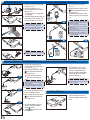
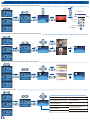
USING A TRIPOD STAND
SWITCH ON
ADJUSTING THE PROJECTED IMAGE
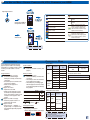
Projection Distance (A)
1. Screw a standard tripod into the
screw hole on the projector.
1. Press the Power button.
Screen Size - Width (B)
Screen Size - Height (C)
Screen Diagonal (D)
Meter
inch
(mm)
(inch)
(mm)
(inch)
(mm)
0.245
9.6
111
4.4
63
2.5
128
(inch)
5.0
0.500
19.7
227
8.9
128
5.0
261
10.3
0.700
27.6
318
12.5
179
7.0
365
14.4
0.975
38.4
443
17.4
249
9.8
508
20.0
1.500
59.1
682
26.8
384
15.1
782
30.8
2.000
78.7
909
35.8
511
20.1
1043
41.1
2.500
98.4
1136
44.7
639
25.2
1304
51.3
3.215
126.6
1461
57.5
822
32.4
1677
66.0
B
1
1. Adjust Focus (1) until image is
clear.
DOWNLOADING THE PC SOFTWARE
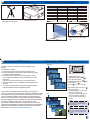
HOW TO USE THE MENU
Main menu
Use the PC software to encode and transfer all file types to the
Projector.
To install the PC software:
1. Connect the Projector for data transfer (see previous item).
2. Browse the Projector internal memory (like a USB memory stick)
for a folder called "PC Software".
3. In this folder, double-click on the file called "Setup" or "setup.
exe" to begin the installation process, then follow the on screen
instructions.
Note: You can find Arcsoft license key on Quick Start Guide
4. After the installation, the "Arcsoft Media Convertor" application is
launched.
5. To convert and transfer files to the Projector, drag and drop files
to the Arcsoft Media Convertor application window.
THIS PRODUCT IS LICENSED UNDER THE MPEG-4 VISUAL PATENT
PORTFOLIO LICENSE FOR THE PERSONAL AND NON-COMMERCIAL USE OF
A CONSUMER FOR (i) ENCODING VIDEO IN COMPLIANCE WITH THE MPEG4 VISUAL STANDARD ("MPEG-4 VIDEO") AND/OR (ii) DECODING MPEG-4
VIDEO THAT WAS ENCODED BY A CONSUMER ENGAGED IN A PERSONAL
AND NONCOMMERCIAL ACTIVITY AND/OR WAS OBTAINED FROM A VIDEO
PROVIDER LICENSED BY MPEG LA TO PROVIDE MPEG-4 VIDEO.
NO LICENSE IS GRANTED OR SHALL BE IMPLIED FOR ANY OTHER USE.
ADDITIONAL INFORMATION INCLUDING THAT RELATING TO PROMOTIONAL,
INTERNAL AND COMMERCIAL USES AND LICENSING MAY BE OBTAINED
FROM MPEG LA, LLC. SEE HTTP://WWW.MPEGLA.COM.
1. Display the Main Menu. (
)
2. Highlight the desired option ( )
3. Enter the desired option. (
)
▲▼)
4. Highlight the desired item. (
5. Select the item. (
)
6. Press ( ) to go up one directory.
Under external signal mode, press ( )
to bring out the OSD.
• The OSD disappears in 5 seconds if
there is no OSD operation.
• The projector will automatically shut
down if the projector is left idle at
its main menu or file browser for 3
minutes.
Item
<Note>
External signal mode is applicable for
connecting VGA, Composite, HDMI and
Component signals.
F
<Note>
The first time you use the projector, you
can select your preferred language from
the quick menu after the startup screen
displays.
5