1
B
Appendix B
Firmware Upgrade Procedure
Software features for Moxa embedded computers continue to be developed, improving quality and
enhancing functionality. Firmware updates will be made available in the Moxa download center.
When updating the firmware for your embedded computer, follow these instructions:
1.
2.
3.
4.
Visit the MOXA download center at http://web4.moxa.com/support/download_center.asp to
download the appropriate firmware update file for your embedded computer. This will be an
executable file such as DA660CE_V1.2.07052314.
Copy this file to the root directory (i.e., \) of your embedded computer. We do not recommend
that you perform the update from a CompactFlash card or a USB drive, because performance
will be very slow.
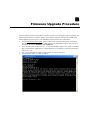
Log onto the embedded computer using a Telnet or console connection.
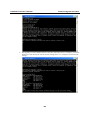
Execute the file. Enter “y” when prompted.