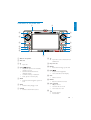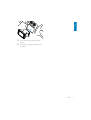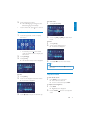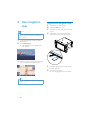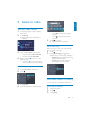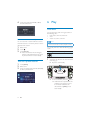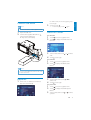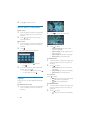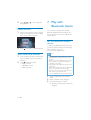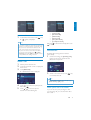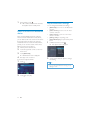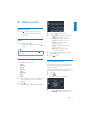
1
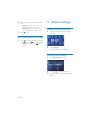
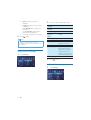
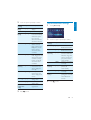
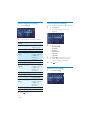
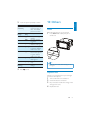
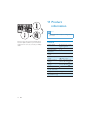
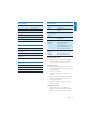
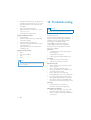
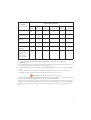
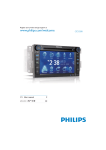
Register your product and get support at www.philips.com/welcome EN User manual ZH-CN Ⴌ߀൱Ҭ 3 33 CID3282 1 Important 4 Safety Notice 4 4 2 Your in-car entertainment system Introduction What’s in the box Overview of the main unit 3 Get started Install the car audio Turn on Set date and time Adjust screen 5 5 6 7 8 8 10 11 11 7 Play with Bluetooth device 18 Pair the Bluetooth-enabled devices Make a call Receive call Listen to music from Bluetooth device Adjust Bluetooth settings 8 Adjust sound 21 Adjust volume Mute Select preset equalizer Adjut fader/balance Set Dynamic Bass Boost (DBB) 21 21 21 21 22 9 Adjust settings 4 Use navigation map Upgrade the navigation map 5 Listen to radio Tune to a radio station Store radio stations in memory Tune to a preset station 6 Play Load discs Connect USB device Play/Pause Search for a folder Search within a title/folder Repeat Repeat a section Random play Select audio language Select audio mode Select subtitle language Zoom Rotate pictures Select slide show duration 12 12 13 13 13 14 14 14 15 15 15 16 16 17 17 17 17 17 17 18 18 18 19 19 20 20 22 Display system setup menu Adjust general settings Adjust sound settings Adjust video settings Adjust Bluetooth settings Adjust language settings Adjust volume settings Adjust DVD rating 22 22 24 24 25 26 26 26 10 Others 27 Reset Replace fuse 27 27 11 Product information 28 General Disc player Radio LCD Bluetooth 28 29 29 29 29 12 Troubleshooting 30 About Bluetooth device 31 13 Glossary 32 EN 3 English Contents 1 Important Notice Safety 4 Read and understand all instructions before you use the apparatus. If damage is caused by failure to follow instructions, the warranty does not apply. Use of controls or adjustments or performance of procedures other than herein may result in hazardous radiation exposure or other unsafe operation. This unit is designed for negative ground (earth) 12 V DC operation only. 7RUHGXFHWKHULVNRIWUDIÀFDFFLGHQWGR no watch video during driving. To ensure safe driving, adjust the volume to a safe and comfortable level. Improper fuses can cause damage or ÀUH:KHQ\RXQHHGWRFKDQJHWKHIXVH consult a professional. Use only the supplied mounting hardware for a safe and secure installation. To avoid short circuit, do not expose the apparatus to rain or water. Never insert objects into the ventilation slots or other openings on the apparatus. Never place any objects other than discs into the disc tray/slot. Visible and invisible laser radiation when open. Avoid exposure to beam. Risk of damage to the screen! Never touch, push, rub or strike the screen with any object. Never use solvents such as benzene, thinner, cleaners available commercially, or anti-static sprays intended for discs. Clean the apparatus with soft, damp cloth. Never use substances such as alcohol, chemicals or household cleaners on the apparatus. EN The making of unauthorized copies of copy-protected material, including computer SURJUDPVÀOHVEURDGFDVWVDQGVRXQG recordings, may be an infringement of copyrights and constitute a criminal offence. This equipment should not be used for such purposes. ´'LY;'LY;µ&HUWLÀHGDQGDVVRFLDWHGORJRV are trademarks of DivX, Inc. and are used under license. 2IÀFDO'LY;&HUWLÀHGSURGXFW3OD\VDOO YHUVLRQVRI'LY;YLGHRLQFOXGLQJ'LY; ZLWKVWDQGDUGSOD\EDFNRI'LY;PHGLDÀOHV 7KH%OXHWRRWKZRUGPDUNDQGORJRVDUH registered trademarks owned by Bluetooth SIG, Inc. and any use of such marks by Philips is under license. Manufactured under license from Dolby Laboratories. “Dolby” and the double-D symbol are trademarks of Dolby Laboratories. Other trademarks and trade names are those of their respective owners. This apparatus includes this label: 2 Your in-car entertainment system English Environmental information All unnecessary packaging has been omitted. We have tried to make the packaging easy to separate into three materials: cardboard (box), polystyrene foam (buffer) and polyethylene (bags, protective foam sheet.) Your system consists of materials which can be recycled and reused if disassembled by a specialized company. Please observe the local regulations regarding the disposal of packaging materials, exhausted batteries and old equipment. $Q\FKDQJHVRUPRGLÀFDWLRQVPDGHWRWKLV device that are not expressly approved by Philips Consumer Lifestyle may void the user’s authority to operate the equipment. 2010 © Koninklijke Philips Electronics N.V. All rights reserved. 6SHFLÀFDWLRQVDUHVXEMHFWWRFKDQJHZLWKRXW notice. Trademarks are the property of Koninklijke Philips Electronics N.V. or their respective owners. Philips reserves the right to change products at any time without being obliged to adjust earlier supplies accordingly. Congratulations on your purchase, and ZHOFRPHWR3KLOLSV7RIXOO\EHQHÀWIURPWKH support that Philips offers, register your product at www.philips.com/welcome. Introduction With the car entertainment system, you can Quickly found routine through the navigation system And you can also enjoy: Audio/video/JPEG pictures from DVD, VCD or CD USB devices External devices FM or AM (MW) radio Audio from Bluetooth-enabled devices Besides, you can make/receive phone calls with Bluetooth-enabled devices. EN 5 What’s in the box Check and identify the contents of your package: a b c d e f g h a Main unit b AV out cable c Power connector d CMMB cable e GPS annenna f CDC/Control/Camera wire g Screen cleaning cloth h Printing material (include User manual, Quick start guide) 6 EN a English Overview of the main unit b o c n d m e l f k g j h i a Built-in microphone h b Disc slot c Eject disc. SELECT d TUNE/ Skip to the previous or next title, chapter, or track. Search backward/forward at different speeds. &RQÀUPDQHQWU\RUVHOHFWLRQ Start, pause or resume play. e NAVI Enter the GPS navigation system or exit. f DISC Switch to disc playing mode. g FM/AM Switch to the FM/AM source. Open the cover to insert/remove USB device. i Map card slot j RESET Reset when it hangs up. the unit k DISP/ / Adjust screen brightness. Turn on/off the screen display. l SRC Select a source. m MENU Return to the home menu. n VOL/ /MUTE Adjust volume. Turn the unit on or off. Turn mute on or off. o Answer phone. Dial number. EN 7 3 Get started Caution Use of controls or adjustments or performance of procedures other than herein may result in hazardous radiation exposure or other unsafe operation. Always follow the instructions in this chapter in sequence. Note on the power supply lead (yellow) When you connect other devices to this system, ensure that the rating of the car circuit is higher than the total fuse value of all the connected devices. Notes on speaker connection Never connect speaker wires to the metal body or chassis of the car. Never connect speaker wires with stripes to one another. Mount in the dashboard Install the car audio These instructions are for a typical installation. However, if your car has different requirements, make the corresponding adjustment. If you have any questions regarding installation kits, consult your Philips car audio dealer. Note Check wire connection before you mount the unit into a car. If preset radio stations are lost when the ignition key is turned OFF and then back ON, reconnect the red leads crosswise to the yellow ones. 1 If the car does not have an on-board drive or navigation computer, disconnect the negative terminal of the car battery. If you disconnect the car battery in a car that has an on-board drive or navigation computer, the computer may lost its memory. If the car battery is not disconnected, to avoid short-circuit, ensure that bare wires do not touch each other. 2 Take out the original car audio and keep the screws. 3 Connect wires (see “Connect wires” section). 4 Slide the unit into the dashboard until a click sound is heard. Caution This unit is designed for negative ground (earth) 12 V DC operation only. Always install this unit in the car dashboard. 8 Other locations can be dangerous as the rear of the unit heats up during use. To avoid short-circuit: before you connect, ensure that the ignition is off. Ensure that you connect the yellow and red power supply leads after all other leads are connected. Ensure that all loose leads are insulated with electrical tape. Ensure that the leads do not get caught under screws orin parts that will move (e.g. seat rail). Ensure that all ground (earth) leads are run to a common ground (earth) point. Use only the supplied mounting hardware for a safe and secure installation. ,PSURSHUIXVHVFDQFDXVHGDPDJHRUÀUH When you need to change the fuse, consult a professional. EN English 5 Fix the unit onto the dashboard with screws. 6 Reconnect the negative terminal of the car battery. EN 9 Connect wires Caution Ensure that all loose leads are insulated with electrical tape. 1 Check the car’s wiring carefully, then do the other connections: 㾚乥䕧ߎ VIDEO OUT 1 Yellow 㾚乥䕧ߎ VIDEO OUT 2 Rear display ᬊ䷇㒓 Radio antenna Antenna connector RADIO ANT ৢ㾚䬰կ⬉ഄ㒓 CAMERA-GND ৢ㾚䬰կ⬉⬉⑤ CAMERA-B+ Blue Yellow Black Red Green ৢ㾚䬰㾚乥䕧ܹ CAMERA-VIDEO Yellow Rear display Yellow b CMMB BUS ࡳᬒࠊP.CONT 䬂䕧ܹB KEY B KEY ACC e CTL ACC f Purple/white 䬂ഄKEY GND 䬂䕧ܹA KEY A ࠍ䔺Ẕ⌟ BRAKE Green/white Pink צ䔺Ẕ⌟ REVERSE GPS antenna CAN BUS Gearbox &$1%2; d 䕙ࡽে䷇乥䕧ܹ AUX IN R 2 Brown Red White Red White 䕙ࡽᎺ䷇乥䕧ܹ AUX IN L 2 ৢে䷇乥䕧ߎ REAR R Red 䕙ࡽ㾚乥䕧ܹ AUX IN VIDEO 2 䞡Ԣ䷇䕧ߎ SUB. W ৢᎺ䷇乥䕧ߎ REAR L White Yellow 䕙ࡽᎺ䷇乥䕧ܹ AUX IN L 2 䕙ࡽ㾚乥䕧ܹ AUX IN VIDEO 2 䕙ࡽে䷇乥䕧ܹ AUX IN R 2 Red White Yellow Yellow Brown/black Black Red range/whit O Brown Green Green/black Grey White Grey/black White/black Pu rple Pu rple/black e a ࠡে䷇乥䕧ߎ FRONT R ࠡᎺ䷇乥䕧ߎ FRONT L c AV system AV system Amplifier AUX AUX Note: 1. If there is built-in CAN box, connect c to d. No need to connect these wires indicated in a and to connect e to f. 2. If there is not CAN box, do all the connections as indicated in a and connect e to f. Turn on Caution Risk of road accidents! Never watch video or adjust settings while you drive. 10 EN 1 Press to turn on the unit. » The available OSD (On-Screen Display) languages are displayed. Touch a language to select. » The OSD language is changed to the selected language immediately. To turn off the unit, press Set clock mode 1 Touch [Time mode]. 2 Touch on [12H] or[24H] to select clock mode. English 2 for 3 seconds. Set date and time 1 Touch the upper left corner to display main menu. Set time 2 3 1 2 Touch [Time]. 3 Touch Touch on the displayed time. » A submenu is displayed. If necessary, touch in the middle right side of the screen to display the 2nd screen. Touch [Settings]. Touch [Time]. » The date/time setup menu is displayed. or to set hour and minute. Tip When date/time is set, touch to return to main menu. Set date Adjust screen 1 2 Touch [Date]. To turn off the screen Touch on the displayed date information. » A submenu is displayed. 1 Press DISP for over 2 seconds. » The screen is turned off. » To turn on the screen, press DISP. To adjust screen brightness 3 Touch or 1 Press DISP. » Brightness bar is displayed. 2 Rotate TUNE/ value. SELECT to adjust the to set year, month and day. EN 11 4 Use navigation map Note You may need to upgrade the navigation map Upgrade the navigation map 1 Turn off the car audio system. 2 Open the MAP card cover. 3 Press the map card until you hear a click sound. 4 before using it (see “Upgrade the navigation map” section) 1 Touch the upper left corner to display home menu. 2 Touch [Navigation]. » The navigation menu is displayed in a few seconds. Take out the card and bring it to the authorized service center for upgrade. a b 3 Refer to the user manual of the navigation map to operate the navigation tool. Tip You can press NAVI to enter/exit the navigation system. 12 EN 5 Insert the upgraded map card back into the map card slot. 6 Turn on the car audio. » The map upgrades in a few minutes. English 5 Listen to radio Tune to a radio station 1 Touch the upper left corner to display 2 home menu. Touch [Radio]. » Band and frequency information is displayed. 5 Touch to clear the last entered number. Touch to clear all the entered numbers. Touch WRFRQÀUP » The radio station is broadcast. Select radio range Before you start to search for radio stations, you can select radio range. 3 Touch on FM or AM to select band: FM band options: FM1, FM2, FM3 AM band options: AM1, AM2 4 %ULHÁ\WRXFK or to tune to a radio station by step. Touch or for over 1 seconds to tune to a radio station automatically. 1 2 Touch . Touch [Radio range] to toggle tuner sensitivity from normal to high sensitivity. [Distance]: Only stations with strong signals can be broadcast. [Local]: Stations with strong and weak signals can be broadcast. Tune by frequency 1 2 Touch FM or AM to select band. Touch . Store radio stations in memory You can store up to 6 stations in each band. 3 4 Touch [Goto]. Touch the numbers to enter frequency. Store stations manually 1 2 3 Tune to the station. Touch . Touch [Save]. EN 13 4 Touch one of the channels 01 to 06 to save the select band. 6 Play Load discs Store stations automatically You can search for a station with intro search, which broadcasts a 10-second preview of each detected radio station. 1 2 3 Select band. Touch . Touch [Search]. » Auto search starts. The six strongest stations of the selected band are saved in preset channels 1-6 automatically. You can play video, audio or images stored on the following discs: DVD video, DVD-R, DVD-RW VCD Audio CD, CD-R, CD-RW Note Ensure that the disc contains playable content. You can play DVD discs with the following region codes: DVD region code 1 Tune to a preset station 1 Touch [Radio]. 2 Select band. 3 Touch one of the preset channels (01 to 06) Country China Insert the disc into the disc slot with label side facing up. » Play starts automatically. to select a preset station. » To remove the disc, press the button. » When the disc is ejected, the unit switches to the previous source, if connected. Otherwise, the unit switches to [Radio] mode automatically. 14 EN 2 Note To pause, touch . To resume play, touch English For DVD movie, if a menu appears, press to start play. Connect USB device again. Ensure that the device contains playable content. 1 2 Open the USB door. Search for a folder Connect the supplied USB cable to socket and the USB device. » Play starts automatically. )RUYLGHRÀOHV 1 2 to return to playlist menu. Touch WRGLVSOD\DOODYDLODEOHYLGHRÀOH folders. 3 Touch a folder, then touch DÀOH 4 Touch a b Touch or to select to start play. )RUDXGLRÀOHV 1 2 Touch to return to playlist menu. Touch to display all available audio folders. Note To remove the USB device, switch to disc, radio RURWKHUVRXUFHÀUVW Play/Pause 1 Once a disc or USB device is inserted, play starts automatically. 3 Touch a folder, then touch VHOHFWDÀOH 4 Touch or to to start play. )RUSLFWXUHÀOHV 1 2 3 Touch to return to playlist menu. Touch to display all available picture folders. Touch a folder, then touch a picture. or to select EN 15 4 Touch to view the picture. Search within a title/folder Search by step 1 Touch anywhere except for the upper left corner to display menu on the screen, if necessary. 2 Touch or to skip to the previous or next chapter/track. 2 Touch 3 Touch to select: [Repeat chapter]: play the current chapter repeatedly. [Repeat title]: play all chapters in the title repeatedly. [Repeat all]: play the disc repeatedly. [Repeat off]: cancel repeat play. to display the 2nd menu. Direct search 1 Touch anywhere except for the upper left corner to display menu on the screen, if necessary. 2 Touch . » The search screen is displayed. For VCD karaoke: » )RUYLGHRÀOHVWRXFK ÀUVWWKHQ touch . 3 During play, you can select different repeat play modes. For DVD/VCD movie disc: 16 Touch anywhere except for the upper left corner to display menu on the screen, if necessary. 2 Touch to select: [Repeat one]: play the current track repeatedly. [Repeat all]: play all tracks repeatedly. [Repeat off]: cancel repeat play. 7RXFKWKHQXPEHUVWRHQWHUFKDSWHUÀOH number, then touch . To clear the previous input, touch . To clear all input, touch . Repeat 1 1 Touch anywhere except for the upper left corner to display menu on the screen, if necessary. EN For audio CD: Touch to select: -1: play the current track repeatedly. : play all tracks repeatedly. -OFF: cancel repeat play. )RU03:0$ÀOHV: 1 Touch anywhere except for the upper left corner to display menu on the screen, if necessary. 2 Touch to select: -1: play the current track repeatedly. -Folder: play all the tracks in the current folder repeatedly. : play all tracks repeatedly. -OFF: cancel repeat play. 3 Touch repeatedly. » The audio channel information is displayed on the upper line of the screen. English Repeat a section Select audio mode <RXFDQUHSHDWDVSHFLÀFVHFWLRQRIYLGHRÀOH (repeat A-B). When you play VCDs, you can select an audio mode (R/L/Stereo). 1 During play, touch anywhere except for the upper left corner to display menu on the screen, if necessary. 1 2 During play, touch anywhere except for the upper left corner to display menu on the screen. Touch to display the 2nd menu, if necessary. 2 3 Touch repeatedly until the audio mode is selected. Touch repeatedly to mark: [Repeat A-]: the start of the section to repeat. [Repeat A-B]: the end of the section to repeat. The selected section plays repeatedly. Select subtitle language 4 To exit A-B repeat mode, touch repeatedly until [Repeat A-B off] is displayed. Random play For DVD or DivX discs that contain two or more subtitle languages. 1 During play, touch anywhere except for the upper left corner to display menu on the screen, if necessary. 2 3 Touch to display the 2nd menu Touch repeatedly to select a language. » The selected language is displayed. <RXFDQSOD\DXGLRWUDFNVÀOHVLQUDQGRPRUGHU 1 During play, touch repeatedly to turn random play on or off. is highlighted : start random play. turns gray: cancel random play. Select audio language Zoom You can zoom in pictures for a close view. 1 During view pictures, touch anywhere except for the upper left corner to display menu on the screen, if necessary. 2 Touch repeatedly to zoom in the picture. For video discs that contain two or more audio channels. 1 During play, touch anywhere except for the upper left corner to display menu on the screen, if necessary. 2 Touch to display the 2nd menu. EN 17 3 Touch , , or enlarged picture. to pan through the Rotate pictures 1 When you view pictures, touch anywhere except for the upper left corner to display menu on the screen, if necessary. 7 Play with Bluetooth device You can make or receive phone calls with Bluetooth-enabled phones through the unit. You can also listen to music from a Bluetoothenabled device. Pair the Bluetooth-enabled devices 2 Touch repeatedly to rotate the picture. Select slide show duration 1 Touch anywhere except for the upper left corner to display menu on the screen, if necessary. 2 Touch repeatedly to select: Fast: 3 seconds Normal: 5 seconds Slow: 8 seconds To connect your Bluetooth device to the unit, you need to pair the device to the unit. Pairing needs only to be done once. You can pair up to eight devices. Note The operational range between this unit and a 18 EN Bluetooth device is approximately 10 meters (30 feet). Before you connect a Bluetooth device to this unit, familiarize yourself with the Bluetooth capabilities of the device. Compatibility with all Bluetooth devices is not guaranteed. Any obstacle between this unit and a Bluetooth device can reduce the operational range. Keep this unit away from any other electronic device that may cause interference. Turn on the Bluetooth function on the device. 1 Search for Bluetooth device with the device. 2 3 Select “CID3282” in the pairing list. Enter default password “0000”. » if pairing succeeds. phone call record is displayed. English Disconnect Bluetooth devices 1 To disconnect one device, touch » (green) is displayed. (red). Tip The device will also be disconnected when the [Missed calls] [Received calls] [Dialed calls] [Phone book] [Sim phone book] [Local phone book] Or touch to dial number directly, then touch to dial. device is moved beyond the operational range. If you want to reconnect the device to the unit, place it within the operational range. If you do not want to reconnect the device to the unit automatically, touch > [Auto connect], then select [Off]. For details, see the “Adjust Bluetooth settings” section. Receive call By default, all incoming calls are received automatically. 1 If there is incoming call, [Incoming call...] ÁDVKHVRQWKHVFUHHQ6SHDNLQWRWKH Bluetooth microphone. 2 When conversation ends, touch to terminate the call. Make a call 1 Pair the phone with the unit. 2 Touch the upper left corner to display the home menu. 3 Touch [Bluetooth]. » The Bluetooth menu is displayed. (red) Tip You can select to receive calls manually by set [Auto answer] to [Off] status. 4 Touch or then touch 5 Touch or to search for phone number from the following list: to select the paired phone, . Switch phone call to the mobile If you do not want your passenger to hear your incoming call, you can switch the call to the mobile. EN 19 1 During talking, touch . » The voice is transferred from the unit’s loudspeaker to the mobile phone. Listen to music from Bluetooth device If the connected Bluetooth device supports $GYDQFHG$XGLR'LVWULEXWLRQ3URÀOH$'3 you can listen to the music stored on the device through the unit. If the device also supports $XGLR9LGHR5HPRWH&RQWURO3URÀOH$95&3 SURÀOH\RXFDQXVHWKHFRQWURORQWKHXQLWWR play music stored on the device. 1 2 Pair the phone with the unit. 3 Touch [Bluetooth]. » The Bluetooth menu is displayed. 4 Start play music via device. You can change below Bluetooth settings: [Bluetooth]: to turn on or off “Bluetooth” function [Auto connect]: to turn on or off “Auto connect” function [Auto answer]: to turn on or off “Auto answer” function [Pairing code]: to set paring code [Phone Book Sync]: to synchronize phone book 1 In Bluetooth menu, touch . » The option menu is displayed. 2 Touch on the selected option to change the setting. Touch the upper left corner to return to home menu. If your device support AVRCP. 1 Adjust Bluetooth settings Touch . Tip You can also adjust Bluetooth settings in the “Settings” menu. 2 Touch 20 EN to start play. English 8 Adjust sound Adjust volume 1 Turn clockwise to increase volume. Turn anti-clockwise to reduce volume. 3 4 Mute 1 During play, press . To turn the sound back on, press again. Tip You can also turn off sound by touching on the screen. Select preset equalizer You can select preset equalizer: [User] [Techno] [Rock] [Classic] [Jazz] [Optimal] [Flat] [Pop] 1 Touch anywhere except for the upper left corner to display menu on the screen, if necessary. 2 Touch . » The current Equalizer setting is displayed. Touch or to select an EQ. Touch or to adjust below settings: [Bass] bass range: -14 to +14. [Mid] middle range: -14 to +14. [Treb] treble range: -14 to +14. [LPH]ORZSDVVÀOWHUUDQJH 60, 80, 100, 200. [MPF]PLGGOHSDVVÀOWHUUDQJH 500, 1K, 1.5K, 2.5K. [HPF]KLJKSDVVÀOWHUUDQJH 10K, 12.5K, 15K, 17.5K. 5 Touch to restore the above settings into default settings. 6 Press to exit. Adjut fader/balance You can also adjust the front and rear speaker balance, the left and right speaker balance, and subwoofer settings. Touch anywhere except for the upper left corner to display menu on the screen, if necessary. 1 2 3 Touch . Touch » Below options are displayed: Touch or to select subwoofer volume. [Sub] subwoofer volume: 0 to 24. EN 21 4 5 Touch F, R, L, or R to adjust fader/balance value. [Fade]fader range: +24 to -24. (F = front speaker, R = rear speaker) [Balance] balance range: -24 to +24. (L = left speaker, R = right speaker) Touch to exit. 9 Adjust settings Display system setup menu 1 Touch the upper left corner to display main menu. Set Dynamic Bass Boost (DBB) 1 Touch to toggle between the settings. [DBB] on: The icon is illuminated. icon is [DBB] off (default): The gray. 2 Touch [Settings]. » The settings menu is displayed. Adjust general settings 1 Touch [General], if necessary. 2 3 22 EN Touch or to highlight a setting. Touch on the option to display/select an option. [Radio range] Options Description [USA], [S.Amer-1], [Arabia], [China], [S.Amer-2], [Europe], [Korea], [OIRT] [Local] Select one that matches your location. [Distance] [Blackout] [off] [10s] [20s] [Dimmer Mode] [Night] [Dusk] [Normal] [Bright] [Key color] [Blue] [Green] General settings [Beep] Options Description [On] Turn on the beep sound. Each time you press a button, the unit beeps. Turn off the beep sound. Turn background color to blue. Turn background color to black. Select the F1 picture as background. Select a picture as wall paper. Calibrate the touch screen. Search for GPS system. [Off] [WallPaper] [Blue] Only stations with strong signals can be broadcast. Stations with strong and weak signals can be broadcast. Never turn on the screen saver. Turn on the screen saver automatically 10 seconds after last operation. Turn on the screen saver automatically 20 seconds after last operation. Select this mode at night. Select this mode at dusk. Set screen dimmer to normal mode. Select this mode in bright environment. Button backlight turns blue. Button backlight turns green. [Black] [F1] [User] [Calibration] [Start] [GPS Setup] [Start] 4 Press to exit. Set wallpaper You can change the screen background by using one built-in picture or your picture. 1 To use your picture as wallpaper, convert the picture into .bmp format and make sure it is in 800 x 480 pixel resolution ÀUVWWKHQVDYHWKHSLFWXUHRQWRWKH navigation map card, and then insert the map card into MAP slot. 2 3 4 Touch [Settings] > [General]. Touch or to highlight [WallPaper]. Touch or to select an option. [Blue]: Turn background color to blue. [Black]: Turn background color to black. [F1]: Select the F1 picture as background. EN 23 English General settings [Radio region] 5 [User]: Choose a picture as wallpaper. If [User] is selected, a new window is displayed. Press or select a picture from the list. Or Touch [Scan SD] > to select a picture from the map card. The background picture is changed. Press to exit. Note Only picture saved in 800 x 480 pixel (resolution) and in .bmp format can be used as wallpaper. Adjust sound settings 1 Touch [Sound]. 2 Touch an option repeatedly to select: Sound Options Description settings [Sub [On] Turn on the subwoofer. woofer] [Off] Turn off the subwoofer. [Sub [80Hz] 6HOHFWVXEZRRIHUÀOWHU woofer criteria. ÀOWHU@ [120Hz] [160Hz] [DBB] [On] The Dynamic Bass Boost (DBB) function is on. [Off] The DBB function is off. [DRC] [On] Makes loud sound level softer and soft sound level louder so that you can watch the DVD movies at a low volume, without disturbing others [Off] The DRC function is off. 3 Press to exit. Adjust video settings 1 Touch [Video]. 24 EN Touch an option repeatedly to select: Video settings [Aspect ratio] Options Description For widescreen display. [Normal] For normal display. [Video [Auto] The correct format input] is set automatically. Select this option if you are not sure which format should be selected. [NTSC] Used in the United States, Canada, Japan, Mexico, the Philippines, South Korea, Taiwan, and some other countries. [PAL] Used in China, India, Singapore, the western European countries (except France), Australia, and some other countries. [Rear [Normal] When you drive in camera] reverse, the rear view is displayed normally. [Mirror] When you drive in reverse, the rear view is displayed in mirror. [Parking] [On] Disable video view during drive. [Off] Enable video view during drive. [DivX View code for DivX registration registration. code] 3 Press Adjust Bluetooth settings 1 Touch [Bluetooth]. English 2 [Full] 2 Touch an option repeatedly to select: Bluetooth settings [Bluetooth] Options Description [On] [Off] [Auto connect] [On] [Off] [Auto answer] [On] [Off] [Pairing code] 3 Press Turn on the Bluetooth function. Turn off the Bluetooth function. If the pre-paired device is within the effective range, the unit re-connects to pre-paired device automatically. Need to re-connect manually. Answer paired phone call automatically. Answer phone call manually. View code for pairing the unit with other Bluetooth devices. to exit. to exit. EN 25 Adjust language settings 1 Touch [Language]. 2 Adjust volume settings You can set different volume for different modes. 1 Touch [Volume]. » The volume setting sub-menu is displayed. 2 Touch on a source. [DVD]/[USB] [CMMB] [Radio] [Bluetooth] [AV-IN1] [AV-IN2] 3 Touch or to assign value: 0 to 12. » When switches to the source, the volume increases automatically. 4 Press Touch an option repeatedly to select: Language settings [OSD] [DVD audio] [DVD subtitle] [Disc menu] 3 Press 26 EN Options Description [English] Select on-screendisplay language. [ࡩᇓ໗] [ْᇓ໗] [English] Select DVD audio language. Options available are depends on DVD disc. [ࡩᇓ໗] [ْᇓ໗] [English] Select DVD subtitle language. Options available are depends on DVD disc. [ࡩᇓ໗] [ْᇓ໗] [Off] Turn off subtitle language display. [English] Select DVD menu language. Options available are depends on DVD disc. [ࡩᇓ໗] [ْᇓ໗] to exit. to exit. Adjust DVD rating 1 Touch [DVD rating]. Touch an option repeatedly to select: DVD rating Options Description [Set Set password to password] restrict the play of discs. The default password is 0000. [Rating [Kid Acceptable for children. level] safe] [G] Acceptable for general viewers. [PG] Parental guidance suggested. [PG-13] Unsuitable for children under age 13. [PG-R] Recommend parents to restrict children under 17 to view. [R] Restricted. Recommend parent to guide children under 17 to view. [NC-17] Unsuitable for children under age 17. [Adult] Acceptable for adults only. [Load Restore to default factory] settings. 3 Press 10 Others English 2 Reset When the unit hangs up, you can reset it. 1 Press RESET with a ball-point pen or similar tool. Tip When the unit is reset, all the settings remain unchanged. to exit. Replace fuse If there is no power, the fuse may be damaged and need to be replaced. 1 2 3 Take out the unit from dashboard. 4 Replace the fuse. Check the electric connection. Buy a fuse that matches the voltage of the damaged fuse (15A) EN 27 11 Product information Note Product information is subject to change without prior notice. If the fuse gets damaged immediately after it has been replaced, there may be an internal malfunction. In such case, consult your Philips dealer. General Power supply Fuse Suitable speaker impedance Maximum power output Continuous power output Pre-Amp output voltage Subwoofer output voltage Aux-in level Dimensions (W x H x D) (main unit) Weight (main unit) Operating temperature range 28 EN 12 V DC (11 V - 16 V), negative ground 15 A 4-8 50 W x 4 channels 24 W x 4 channels (4 10% T.H.D.) 2.0 V ( CD play mode; 1 kHz, 0 dB, 10 k load) 2.0 V (CD play mode, 61 Hz, 0 dB, 10 k load) 500 mV 178 x 100 x 160 mm 2.5 kg -20 °C to 70 °C System Frequency response Signal/noise ratio Total harmonic distortion Channel separation Video signal format Video output Bluetooth DVD / CD audio / MP3 system 20 Hz - 20k Hz >75dB Less than 1% >55dB NTSC only 2 +/- 0.2V Radio Frequency range - FM Frequency range AM (MW) Usable sensitivity - FM Usable sensitivity AM (MW) 87.5 - 108.0 MHz 522 - 1620 KHz 5 uV 50 uV Compatible USB devices: 86%ÁDVKPHPRU\86%RU86% 86%ÁDVKSOD\HUV86%RU86% memory cards (SD / MMC / SDHC) LCD Screen size Display resolution Contrast ratio Brightness Communication Bluetooth Standard system version 2.0 Output Bluetooth Standard Power Class 2 Line of sight approx. 8m Maximum communication range Frequency band 2.4 GHz band (2.4000 GHz 2.4835 GHz) +DQGV)UHH3URÀOH+)3 Compatible Bluetooth +DQGVHW3URÀOH+63 SURÀOHV Advanced Audio 'LVWULEXWLRQ3URÀOH$'3 Audio Video Remote &RQWURO3URÀOH$95&3 Supported codecs SBC (Sub Band Codec) Receive SBC (Sub Band Codec) Transmit 7 inches (16:9) 800 x 480 dots 600 400 cd/m2 Supported formats: 86%RUPHPRU\ÀOHIRUPDW)$7)$7 MP3 bit rate (data rate): 32-320 Kbps and variable bit rate WMA v9 or earlier Directory nesting up to a maximum of 8 levels Number of albums/ folders: maximum 99 Number of tracks/titles: maximum 999 ID3 tag v2.0 or later File name in Unicode UTF8 (maximum length: 128 bytes) Unsupported formats: Empty albums: an empty album is an album that does not contain MP3/WMA ÀOHVDQGLVQRWEHVKRZQLQWKHGLVSOD\ EN 29 English Disc player 8QVXSSRUWHGÀOHIRUPDWVDUHVNLSSHG)RU example, Word documents (.doc) or MP3 ÀOHVZLWKH[WHQVLRQGOIDUHLJQRUHGDQG not played. $$&:$93&0DXGLRÀOHV '50SURWHFWHG:0$ÀOHVZDYPD .m4p, .mp4, .aac) :0$ÀOHVLQ/RVVOHVVIRUPDW Supported MP3 disc format: ISO9660, Joliet Maximum title number: 512 (depending RQÀOHQDPHOHQJWK Maximum album number: 255 Supported sampling frequencies: 32 kHz, 44.1 kHz, 48 kHz Supported Bit-rates: 32-320 Kbps and variable bit rate Supported video formats: DVD Divx Home theater MP4 Xvid Note To ensure a better playback, bit rate of 4.5 Mbps is recommended. 12 Troubleshooting Warning Never remove the casing of this apparatus. To keep the warranty valid, never try to repair the system yourself. If you encounter problems when using this apparatus, check the following points before requesting service. If the problem remains unsolved, go to the Philips web site (www.philips.com/welcome). When you contact Philips, ensure that the apparatus is nearby and the model number and serial number are available. No power Car engine has not been started. Start the car engine. Connections is incorrect. Fuse has been damaged. Replace fuse. No sound Volume is too low. Adjust volume. Speaker connections is incorrect. Disc does not play Disc is upside down. Ensure the printed side is upwards. Disc is dirty. Clean the disc with a clean, soft, lint-free cloth. Wipe the disc outwards from the center. Disc is defective. Try another disc. incompatible disc is used. Try another disc. Disc rating exceeds the restrict setting. Change the rating settings to lower one. Disc region code is not compatible with the unit. Use disc with proper region code. No image Parking brake wire connection is incorrect. Check the parking wiring. ,PDJHÁDVKHVRUGLVWRUWHG Video DVD settings do not match with the DVD. Adjust video DVD settings. Video connection is improper. Check the connections. 30 EN Preset stations lost. Battery cable is not correctly connected. Connect the battery cable to the terminal that is always live. Fuse is broken The Fuse type is incorrect. Replace it with a 15A fuse. Speaker wire or power wire is grounded. Check the connections. The paired mobile phone connects and disconnects constantly. The Bluetooth reception is poor. Move the mobile phone closer to the system or remove any obstacle between the mobile phone and the system. Some mobile phones may connect and disconnect constantly when you make or end calls. This does not indicate any malfunction of the system. For some mobile phones, the Bluetooth connection may be deactivated automatically as a power-saving feature. This does not indicate any malfunction of the system. Display show ERR-12 USB data error. Check the USB device. About Bluetooth device Music playback is unavailable on the system even after successful Bluetooth connection. The device cannot be used with the system to play music. The audio quality is poor after connection with a Bluetooth-enabled device. The Bluetooth reception is poor. Move the device closer to the system or remove any obstacle between the device and the system. Cannot connect with the system. 7KHGHYLFHGRHVQRWVXSSRUWWKHSURÀOHV required for the system. The Bluetooth function of the device is not enabled. Refer to the user manual of the device for how to enable the function. The system is not in the pairing mode. The system is already connected with another Bluetooth-enabled device. Disconnect that device or all other connected devices and then try again. EN 31 English Noise in broadcasts. Signals are too weak. Select other stations with stronger signals. Check the connection of the car antenna. Change broadcast from stereo to mono. 13 Glossary B Bite rate The max data transfer through the USB port. Bluetooth %OXHWRRWKLVDVKRUWUDQJZLUHOHVVSURWRFRO that is meant to allow mobile devices to share information and applications without the worry of cables or interface incompatibilities. 7KHQDPHUHIHUVWRD9LNLQJ.LQJZKRXQLÀHG Denmark. Operate at 2.4GHz. For more information, see www.bluetooth.com. M MP3 $ÀOHIRUPDWZLWKDVRXQGGDWDFRPSUHVVLRQ system. MP3 is the abbreviation of Motion Picture Experts Group 1 (or MPEG-1) Audio Layer 3. With the MP3 format, one CD-R or CD-RW can contain about 10 times more data than a regular CD. R Region code A system that allows discs to be played only in the region designated. This unit only plays discs that have compatible region codes. You FDQÀQGWKHUHJLRQFRGHRI\RXUXQLWRQWKH product label. Some discs are compatible with more than one region (or ALL regions.) W WMA (Windows Media Audio) An audio format owned by Microsoft, is a part of Microsoft Windows Media technology. Includes Microsoft Digital Rights Management tools, Windows Media Video encoding technology, and Windows Media Audio encoding technology. 32 EN Ҋࡵӯ 1DPHRIWKH3DUWV ႹႹݡ༂ᇍࠋჱෑ +D]DUGRXVWR[LF6XEVWDQFH ಅ3E /HDG ݪ+J 0HUFXU\ ᭢&G FDGPLXP તࢰݒ &KURPLXP ځᝪ҈ 3%% ځᝪ҈ڟସ 3%'( +RXVLQJ শ 2 2 2 2 2 2 '9'&'ORDGHU '9'&'ߩޝ ; 2 2 2 2 2 /&'3DQHO Ⴃस୍ђ ; ; 2 2 2 2 /RXGVSHDNHUV ৻еרᅏ 2 2 2 2 2 2 3:%V تીђከ࣓ ; 2 2 2 2 2 $FFHVVRULHV 5HPRWHFRQWURO FDEOHV ࣓ܚĥႌে౸ĩ تᅙྮĩआྮĦ ; 2 2 2 2 2 2ҸභܠᄗٟᄗའራᅿܠӨ࣓๐ᄗঊራӭሱ؇߅੪ঊᅿ6-7ҵቻىޡ؇ ྭ੪႓Ⴝྑd 2 ,QGLFDWHVWKDWWKLVWR[LFRUKD]DUGRXVVXEVWDQFHFRQWDLQHGLQDOORIWKHKRPRJHQHRXVPDWHULDOVIRU WKLVSDUWLVEHORZWKHOLPLWUHTXLUHPHQWLQ6-7 ; Ҹභܠᄗٟᄗའራሢ൴ᅿܠӨ࣓؇Ⴄঊራӭሱ؇߅੪Գս6-7 – ҵቻىޡ؇ྭ੪ ႓d ; ,QGLFDWHVWKDWWKLVWR[LFRUKD]DUGRXVVXEVWDQFHFRQWDLQHGLQDWOHDVWRQHRIWKHKRPRJHQHRXV PDWHULDOVXVHGIRUWKLVSDUWLVDERYHWKHOLPLWUHTXLUHPHQWLQ6-7 – 2006. Ѯᄊྭ(QYLURQPHQWDO3URWHFWLRQ8VH3HULRG تኒཱԣసሱ߅ᄗ؇ᄗٟᄗའራࡩᅏฯᅿሀԪᄊ؇ສ࣓ྑӤࡘڡඕࡩ໎үĩتኒཱԣసᄊࠞᄊ تܠኒཱԣసӤࡘॄٵᆑՐၚሹཌࡩٵഈඈcӯԣᆑՐၚሹ็؇ྭd 7KLVORJRUHIHUVWRWKHSHULRG\HDUVGXULQJZKLFKWKHWR[LFRUKD]DUGRXVVXEVWDQFHVRUHOHPHQWV FRQWDLQHGLQHOHFWURQLFLQIRUPDWLRQSURGXFWVZLOOQRWOHDNRUPXWDWHVRWKDWWKHXVHRIWKHVH>VXEVWDQFHV RUHOHPHQWV@ZLOOQRWUHVXOWLQDQ\VHYHUHHQYLURQPHQWDOSROOXWLRQDQ\ERGLO\LQMXU\RUGDPDJHWRDQ\ DVVHWV 59 © 2010 Koninklijke Philips Electronics N.V. All rights reserved. Document order number: CID3282_93_UM_V1.0