1
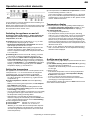
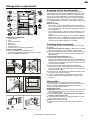
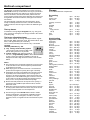
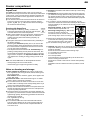
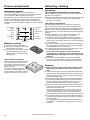
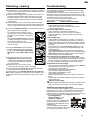
Operating instructions for combined refrigerator-freezers with BioFresh compartment GB 7082 679-01 CBP 210 The appliance at a glance Operating and control elements, fig. A1 Freezer compartment 1Temperature and setting display, with nA display for power failure and FrostControl with query of highest temperature 2Setting buttons for temperature: Up-button = higher, Down = lower, recommended setting: -18 °C 3Main on/off button 4SuperFrost button, lit = function activated. For fast freezing of fresh food 5Audible warning on/off button 6Child-proofing (illuminated symbol = active, refrigerator and freezer compartment are protected against being switched on accidentally) Refrigerator compartment 7Temperature display and setting display 8Setting buttons for temperature: Up-button = higher, Down = lower, recommended setting: 5 °C 9On button appliance/off button refrigerator blSuperCool button, showing active function. For fast cooling of food in refrigerator Humidity setting in the BioFresh compartment, fig. A2: slider to left = dry, slider to right = humid storage climate Description of appliance and equipment Refrigerator, approx. 5 0C Transport grips Operating and control elements Butter and cheese compartment Fan slits Egg tray* Adjustable* storage shelves Interior light Bottle shelf* Vegetable, salad and fruit bins Defrost drain refrigerator Adjustable bottle holder* Door rack for large bottles and drinks BioFresh compartment, 0 to 30C Coldest area of the refrigerator compartment, suitable for cold-sensitive and highly perishable foods Drawer for dry or wrapped food Drawer with humidity control for humid storage of salad, vegetables, fruit Type plate Freezer, approx. -18 °C Cold storage accumulator* Drawers Information system* Ice-cube tray* Adjustable feet, transport grips 14 * Depending on model and options GB Keep these operating instructions in a safe place and pass them on to the next owner, where applicable. The instruction is valid is for several models, deviations are therefore possible. Contents Operating instructions Page The appliance at a glance.................................................... 14 Contents......................................................................... 15 Safety regulations........................................................... 15 Energy saving ................................................................ 15 Safety instructions and warnings......................................... 16 Disposal notes................................................................ 16 Setting up....................................................................... 16 Connecting to the mains................................................. 16 Operation and control elements........................................... 17 Switching the appliance on and off................................. 17 Setting the temperature.................................................. 17 Temperature display....................................................... 17 Audible warning signal.................................................... 17 SuperCooling................................................................. 18 Power failure-/"FrostControl"-display.............................. 18 Additional functions........................................................ 18 Child-proof lock ........................................................ 18 Brightness of the display........................................... 18 BioFresh temperature............................................... 18 Refrigerator compartment.................................................... 19 Arranging food in the refrigerator.................................... 19 Changing shelf arrangement.......................................... 19 Interior light..................................................................... 19 BioFresh compartment ....................................................... 20 Freezer compartment . ........................................................ 21 SuperFrost . ................................................................... 21 Notes on freezing and storage . ..................................... 21 Information system......................................................... 22 Cold-storage accumulators............................................ 22 Making ice-cubes........................................................... 22 Defrosting ........................................................................... 23 Cleaning......................................................................... 23 Troubleshooting................................................................... 23 Customer service and type plate.................................... 23 Instructions for installation and modification External dimensions of the appliance........................ 24-25 Changing over door hinges....................................... 24-25 Insertion into row of kitchen units.................................... 25 Safety regulations W The appliance is designed to cool, freeze and store food and to make ice. It is designed as a household appliance. If used commercially, the relevant regulations on commercial use must be observed. W The appliance is set to operate within specific ambient temperature limits according to its climate rating. These temperature limits should not be exceeded. The correct climate rating for your appliance is indicated on the type plate. This is explained as follows: Climate class designed for ambient temperatures of SN N ST T +10 °C to +32 °C +16 °C to +32 °C +16 °C to +38 °C +16 °C to +43 °C - The refrigerant circuit has been tested for leaks. - The appliance complies with the relevant safety regulations and EC directives 2004/108/EC and 2006/95/EC. Range of appliance use The appliance is suited only for cooling food. In the case of commercial food cooling, the pertinent statutory regulations have to be observed. The appliance is not suited for storing and cooling pharmaceuticals, blood plasma, laboratory preparations or similar substances and products subject to the Medical Devices Directive 2007/47/EC. Any misuse of the appliance may result in damage to or spoilage of the stored goods. Furthermore, the appliance is unsuited for use in areas exposed to an explosion hazard. Saving energy - Always ensure good ventilation. Do not cover ventilation openings or grille. - Always keep fan louvres clear. - Do not place appliance in areas of direct sunlight or next to a stove, heater or similar object. - The energy consumption depends on the installation conditions, e.g. the ambient temperature. - Keep the time the appliance is open to a minimum. - Store food logically. - Ensure that all food is well packed and covered for storage. This will prevent frost from forming. - First cool warm food to room temperature before storing it. - Defrost frozen food in the refrigerator. - If there is a thick layer of frost in the appliance: defrost the appliance. - Empty and switch off refrigerating unit for longer vacation periods. Accumulated dust increases the energy consumption: - Once a year, dust the refrigerating unit together with the metal grille of the heat exchanger at the back of the appliance. 15 Safety instructions and warnings Disposal notes packaging materials away from children - poly• Keep thene sheets and bags can cause suffocation! • Please return the packaging to an official collection point. Your old appliance: This contains some reusable materials and should be disposed of properly - not simply with unsorted household refuse. Discarded appliances should be disabled: Remove the plug, cut through the connection cable and render the catch unusable so that children cannot become trapped inside. Ensure that the refrigerant circuit is not damaged when the appliance that is no longer needed is taken away for disposal. Details of the refrigerant can be found on the type plate. Appliances which are no longer needed must be disposed of in a professional and appropriate way, in accordance with the current local regulations and laws. • • • • Technical safety W To prevent injury or damage to the unit, the appliance should only be transported wrapped and set up by two people. W The refrigerant R 600a is environmentally friendly but flammable. WDo not damage the refrigerant circuit pipes. Splashes of refrigerant can harm your eyes or ignite. W If refrigerant escapes, remove all naked flames or sources of ignition in the vicinity of the leak, disconnect the appliance from the mains and ventilate the area well. W In the event that the appliance is damaged, contact the supplier immediately before connecting to the mains. W To guarantee safe operation, ensure that the appliance is set up and connected as described in these operating instructions. W In the event of a fault, disconnect appliance from mains: pull out the plug (do not pull on connection cable) or trip or turn out fuse. W Any repairs and work on the appliance should only be carried out by the customer service department, as unauthorised work could prove highly dangerous for the user. The same applies to changing the mains power cable. Safety during use WDo not store any explosive materials or spray cans with flammable propellants in the appliance, such as butane, propane, pentane etc. Electrical components might cause leaking gas to ignite. You can identify such sprays by the printed contents or a flame symbol. W Only store high-percentage alcohol in tightly sealed, upright containers. W Do not allow naked flames or ignition sources to enter the appliance. W Do not use electrical appliances inside the appliance (e.g. steam cleaners, heaters). W Do not stand on the plinth, drawers or doors or use them to support anything else. W This appliance is not intended for use by persons (including children) with reduced physical, sensory or mental capabilities or lack of experience and knowledge unless they have been given initial supervision or instruction concerning use of the appliance by a person responsible for their safety. Children should be supervised to ensure that they do not play with the appliance. WAvoid prolonged skin contact with cold surfaces or chilled/ frozen food. This could cause pain, numbness and frostbite. In the case of prolonged skin contact, protective measures should be taken, e.g. gloves should be worn. 16 W Do not eat ice-cream, particularly ice lollies or ice-cubes, immediately after taking them from the freezer compartment as there is a risk of "burning" because of the very cold temperatures. W Do not consume food which has been stored for too long, as it could cause food poisoning. W The appliance is designed for use in enclosed areas. Do not operate the appliance outdoors or in areas where it is exposed to splash water or damp conditions. Setting up WWhen setting up/fitting ensure that the refrigerant circuit pipes are not damaged. WStandard EN 378 specifies that the room in which you install your appliance must have a volume of 1 m3 per 8 g of R 600a refrigerant used in the appliance, so as to avoid the formation of inflammable gas/air mixtures in the room where the appliance is located in the event of a leak in the refrigerant circuit. The quantity of refrigerant is given on the type plate in the interior of the appliance. W Always position the appliance directly up against the wall. W Avoid positioning in direct sunlight or next to an oven, radiator or similar, in damp locations or near spraying water. W Once in position, use the 10 spanner provided to adjust the feet so that the appliance is level and does not wobble. WThe ventilation grilles should not be obstructed. Always ensure that there is good ventilation and that the outward flowing air is able to escape. Condensation may form on the outside of the refrigerator/ freezer during periods of high humidity.Constant ventilation of the installation site is recommend. More information can be found in the installation and modification instructions. W Do not place heat-emitting appliances, e.g. microwave oven, toaster, etc., on top of the refrigerator or freezer. W In order to avoid the risk of fire, do not place any burning candles, lamps or other objects with open flames on the refrigerator/freezer. W Remove all transportation safety components: - Remove sticky tape or spacers* from shelves and insert shelves in the required position. - Remove all protective film: from the decorative trims, front walls and side walls*. Connecting to the mains Power supply (AC) and voltage at the operating point must comply with the details on the type plate, which is located inside the appliance on the left, fig. A. W Connect the appliance with a properly earthed fused plug and socket only. W The socket must be fused with a 10 A fuse or higher, it must be away from the rear of the appliance and must be easily accessible. W Do not connect the appliance to the supply with other equipment using an extension cable - risk of overheating. W When removing the mains cable from the back of the appliance, remove the cable holder so as to avoid vibration noise. GB Operation and control elements W The temperature in the BioFresh compartment is controlled automatically, between 0 and 3°C. If you require a higher or lower temperature, e.g. for storing fish, you can alter the temperature setting in the BioFresh compartment. For more information on this, please see the section "Additional functions". You are advised to clean the appliance before switching it on for the first time (see "Cleaning"). Switch on the appliance approx. 2 hours before loading it with frozen food for the first time. Do not load with frozen food until the temperature shows at least -18°C. Switching the appliance on and off Pressing the main on/off switch 3 always switches the entire appliance, both the refrigerator and the freezer compartment, on or off. W Switching on: Press the on/off buttons 3 or 9 so that the temperature displays light up or flash. - Refrigerator with BioFresh compartment: The interior light will light up when the door is open. - Freezer compartment: When putting the appliance into operation and when it is warm, lines are shown in the freezer compartment display until a temperature less than 0 °C is reached. W Switching off: Press the main on/off switch 3 for about one second, so that the temperature displays go out. W If you only want to switch off the refrigerator and BioFresh compartment (keeping the freezer compartment switched on; useful when you go on holiday, for example), press the on/off switch 9. The refrigerator temperature display 7 and the interior light will go out. The freezer temperature display 1 must remain on. Setting the temperature The appliance is set as standard for normal operation mode, a temperature of + 5 °C is recomended for the refrigerator compartment and -18 °C for the freezer compartment. Lower temperature/colder: Press the Down-setting button, left for refrigerator compartment: 8, right for freezer compartment: 2. Increase temperature / warmer: Press the Up-setting button. - While you are entering the temperature, the set temperature will flash on the display. - When you press the temperature setting buttons for the first time, the most recent setting (known as the "reference setting") is displayed. - You can change the settings in increments of 1°C by briefly pressing the buttons again. If the buttons are held down the temperature setting will change faster. - Approximately 5 seconds after the button has been released, the display will automatically show the actual freezing or cooling temperature (known as the "actual setting"). You can change the temperatures W in the refrigerator: between 9 °C and 4 °C, and W in the freezer: between -16 °C and -26 °C. Whether you can obtain the lowest temperature depends on where the appliance is positioned (if it is located in an area with a high ambient temperature it will not reach the lowest temperature). Temperature display In normal operation, the following settings will be displayed: - the average refrigerator temperature in display 7 and - the warmest frozen food temperature in display 1. The display will flash: - if you change the temperature or - if the temperature rises by several degrees, indicating cold loss, e.g. if you place fresh, "warm" food in the freezer or if you remove or re-pack frozen food the temperature may rise for a short time due to warm air flowing into the freezer. Once you have finished loading or re-packing, the electronics will automatically re-set the temperature to the most recent setting. Short-term rises in temperature will not affect the frozen food. W If "F 1" to "F 5" appears in the display, the appliance has a fault. Consult the customer service department indicating the fault number displayed. Audible warning signal The audible warning signal helps to protect frozen food and to save energy. W The audible warning device is switched off by pressing the audible warning on/off button 5. - It switches off automatically as soon as the temperature is low enough. It always sounds - if the freezer temperature is not low enough (dependent on the temperature setting). The temperature display flashes at the same time. - if warm, fresh food has been placed in the freezer. - if too much warm air from the outside has entered when re-arranging or removing frozen food. The temperature display will continue to flash until the cause of the alarm has been rectified. * Depending on model and options 17 Operation and control elements SuperCooling The SuperCooling button switches the refrigerator compartment to maximum cooling. It is recommended particularly if you wish to cool large quantities of food, drinks, freshly baked cakes or meals rapidly. W Switch on: Briefly press SuperCooling button bl so that it is lit. The refrigerator temperature will drop to its lowest value. NB: "SuperCooling" consumes slightly more energy. After approx. 6 hours, however, the refrigerator switches back automatically to normal energy-saving operation. If required, the "SuperCooling" function can be switched off earlier. W Switch off: press again briefly, so that the button is unlit. Power failure- / FrostControl-display If appears in the display , this means that: the freezer temperature has risen too high during the last few hours or days due to a power failure. W If you press the audible warning on/off button 5 , the highest whilst the display is reading temperature registered dur- ing the power failure will be displayed. Check the quality of the food and its suitability for consumption in case it has become too warm or even defrosted. - The highest temperature will appear for approx. 1 minute. After that, the actual temperature in the freezer will reappear. The display can be switched off by repeatedly pressing the audible warning on/off button. Once the power is re-instated, the appliance will continue to operate at the most recent temperature setting. Additional functions In set-up mode you can set the child-proof lock, adjust the brightness of the display* and set the temperature in the BioFresh compartment slightly lower or higher. Activating set-up mode: W Press SuperFrost button for approx. 5 secs - the SuperFrost button flashes - the display shows c for child-proof lock. Note: the value to be altered flashes. W Select the required function by pressing the Up/Down button: c = child-proof lock, h = brightness or b = BioFresh temperature. W Now select/acknowledge function by pressing SuperFrost button briefly: • For c = child-proof lock, press the Up/Down button to select c1 = child-proof lock on or c0 = child-proof lock off and acknowledge with the SuperFrost button. When the symbol 6 is lit, the child-proof lock is activated. • For h = brightness, press Up/Down button to select h1= minimum to h5 = maximum brightness and acknowledge with the SuperFrost button. • With b = BioFresh temperature, press the Up/Down button to select from b1= lowest to b9 = highest setting and confirm with the SuperFrost button. The altered BioFresh temperature adjusts slowly to the new value. NB: b5 = factory setting. By decreasing the temperature, b4 to b1, minus temperatures can be reached and the food in the BioFresh compartment will freeze slightly. Exit set-up mode: W To exit the set-up mode, press the On/Off button; after 2 min. the electronic system switches over automatically. - The normal operating mode is activated again. 18 GB Refrigerator compartment Arranging food in the refrigerator Refrigerator compartment: 1 butter, cheese 2 eggs 3 cans, drinks, bottles 4 preserves 5 baked goods 6 dairy products 7 Tropical fruits, cold-sensitive vegetables BioFresh compartment: 8 meat, sausages, fish, pre-cooked meals 9 salad, fruit, vegetables, for more information see the section "BioFresh compartment" Because of the natural circulation of air in the refrigerator compartment, the temperature in different parts of the refrigerator will differ, each area being suitable for different types of food. The coldest temperature is immediately above the vegetable bins and on the rear wall; the warmest temperature is at the top front area and in the door (useful, for example, for spreadable butter and cheese). See fig. B for food storage suggestions. Notes on cooling - Store food in such a way that the air can circulate well, i.e. do not store goods too close together. Do not cover the fan slits* on the rear wall - otherwise the refrigerating capacity will be impaired! - Food which gives off or absorbs odours and flavours, and liquids should always be stored covered or in closed containers. - Always store food which gives off or is sensitive to ethylene gases, such as fruit, vegetables and salads, separately or wrapped in order not to affect their storage life; e.g. do not store tomatoes together with kiwis or cabbage. Changing shelf arrangement You can re-arrange the height of the shelves and door racks as required. W Re-positioning the door racks, fig. C: Slide the door rack up, pull out towards you and replace in reverse order. W By adjusting the bottle holder you can prevent bottles from tipping when the door is opened and closed. Always grip the plastic part. W Re-positioning the shelves, fig. D: - Lift the shelf, slide forwards and remove. Always insert shelves with the guard bar at the back pointing upwards, otherwise food may freeze onto the rear wall. - The glass shelves are fitted with stops to prevent them being pulled out accidentally. WIf you require space for large bottles and containers, - lift the front half glass shelf* slightly and carefully slide under the rear shelf until the pull-out stops lock into position in the recesses, fig. E1. W The bottle rack*, fig. E2, provides additional chilling space for bottles up to 300 mm in height. W In order to utilise additional storage space in the refrigerator compartment, the vegetable bin 7, fig. B, can be removed. Interior light This switches off automatically after the door has been opened for approx. 15 minutes. If it does not switch on when the door is opened briefly, but the temperature display is working, the bulb may be defective. Replacing the bulb: WBulb data: max. 25 W; current and voltage must agree with the details on the type plate. Only use bulbs of the same size. Bulb fitting: E 14. WSwitch off the appliance. Disconnect from the mains or remove or unscrew the fuse. W Push the sides of the lamp cover fig. F1 together 1, disengage and unhook from rear 2. WReplace the bulb as in fig. F2. WClip the back end of the cover in and clip the sides into place. * Depending on model and options 19 BioFresh compartment The BioFresh compartment enables you to keep a range of fresh food fresh for up to three times as long as you would in a standard refrigerator, thus making your stocks last longer. Flavour, freshness, and nutritional value (vitamin B and Cgroup content) remain largely intact. Spoilage and weight loss in vegetables and fruit are reduced, leaving food more fresh and natural. The automatically controlled storage temperature, which is kept constantly between 0 and 3°C, and the resultant humidity provide the ideal storage conditions for different types of food. The top drawer is suitable for storing dry or wrapped food (e.g. dairy products, meat, fish, sausages). The storage climate in this drawer is relatively dry. The large, adjustable drawer can be set to "humid" for storing unwrapped salads, vegetables and fruit. When the drawer is full, the climate will be "dewfresh", with approximately 90 % humidity. You can set the humidity in this drawer to dry or humid as required. Humidity selection, fig. A2: W "dry" setting: small humidity symbol - slide control to left. Insert food that is suitable for being stored in a dry climate. W "humid" setting: high relative humidity of max. 90 %, large humidity symbol - slide control to right. This setting is suitable for storing unwrapped food with a high moisture content, such as fresh lettuce. Notes: WThe humidity in the compartment depends on the moisture content of the food in it and the frequency with which the compartment is opened. W When buying food, check that it is fresh - the fresher the product and the higher its quality, the longer it will keep. W Unwrapped animal and vegetable foods should be stored separately in the drawers. If there is not enough space for them to be stored separately, make sure that they are wrapped! Do not allow different types of meat to come into contact with one another but keep them packaged separately so as to avoid premature bacterial spoilage. W Please note that protein-rich food spoils more quickly, i.e. crustaceans and shellfish spoil faster than fish, and fish faster than meat. W Remove food from the drawers some time before consumption. Enjoyment will be enhanced in this way as the aroma and flavour develop best at room temperature. W The following products should not be stored in the BioFresh compartment: cold-sensitive vegetables such as cucumber, peppers, aubergines, avocados, semi-ripe tomatoes, beans, courgettes and all cold-sensitive tropical fruits. 20 Storage of food in the BioFresh compartment: Dry setting butter cheese, soft milk, fresh sausage, cold cuts fish shellfish poultry pork large portions cut up beef game up to 30 days up to 30 days up to 7 days up to up to up to up to 7 days 4 days 3 days 5 days up to up to up to up to 7 days 5 days 7 days 7 days up to up to up to up to up to up to up to up to up to up to up to up to up to up to up to 21 days 14 days 14 days 30 days 180 days 150 days 21 days 30 days 30 days 14 days 14 days 21 days 180 days 7 days 30 days up to up to up to up to up to up to up to up to up to up to 21 days 14 days 60 days 10 days 7 days 10 days 21 days 14 days 60 days 7 days Humid setting Vegetables, salad artichokes asparagus broccoli Brussels sprouts cabbage carrots cauliflower celery chicory Chinese cabbage curly kale fennel garlic green onions herbs iceberg salad, endives, lamb's lettuce kohlrabi leeks lettuce mushrooms peas radicchio radishes savoy cabbage spinach Fruit apples apricots bilberries blackberries cherries black and red currants dates (fresh) figs (fresh) gooseberries grapes kiwi fruits peaches pears plums quinces raspberries rhubarb strawberries up to 180 days up to 14 days up to 14 days up to 8 days up to 14 days up to up to up to up to up to up to up to up to up to up to up to up to up to 21 days 60 days 7 days 21 days 90 days 120 days 30 days 120 days 21 days 90 days 5 days 21 days 5 days GB Freezer compartment SuperFrost The fresh food should be frozen to the core as rapidly as possible and already stored frozen food will be provided with a "cold reserve". This is provided by the SuperFrost facility and ensures that the nutritional value, appearance and flavour of the food remain intact. W The maximum amount of fresh food which can be frozen in 24 hours is shown on the type plate "Freezing capacity ... kg/24h", fig. A3, pos. 4. This amount varies according to the model and climate rating. Freezing with SuperFrost W Press SuperFrost button 4 briefly, so that it is lit. The freezer temperature will decrease and the appliance will switch to the lowest temperature. W With a small quantity of food to be frozen, wait/pre-freeze for approx. 6 hours - normally sufficient, for maximum quantity see type plate under freezing capacity, approx. 24 hours. WThen place the fresh food inside the freezer, preferably in the bottom drawers. If freezing the maximum quantity of food, do not use the drawers; instead, place the wrapped food directly on the floor of the freezer compartment. Once the food is frozen you can load it into the drawers. - The SuperFrost function switches off automatically. Depending on the quantity of food placed in the freezer, this will normally be between 30 and max. 65 hours. The freezing process is complete - the SuperFrost button is unlit - the appliance is working in energy-saving normal mode again. Note: You should not switch on the SuperFrost function: - when placing frozen food in the freezer; - when freezing up to approx. 2 kg fresh food daily. W Storage: Each drawer and shelf can take up to max. 25 kg frozen food . W VarioSpace: By removing the drawer and the storage tray, you obtain the storage space for bulky goods equivalent to two drawer heights. Poultry, meat, large game pieces and tall baked goods can be frozen whole and further prepared in one piece. WIf you want to use the maximum net capacity, you can remove the drawers and store items directly on the shelves. This will enable you to make use of the entire volume of the compartment. - Removing drawers, fig. G1: Pull forward until the drawer stops and lift out. - Removing storage tray, fig. G2: Lift storage tray up at front and pull out. To insert: Proceed in reverse order, simply G1 push storage tray in as far as it will go. 2-6 4-8 6 -12 W Always store identical food items together to avoid the door being open for unnecessarily long periods and to save energy. W Do not exceed storage times given. 2 1 G2 W Thawing: Only take out as much food as is immediately required for thawing. Cook food which has been thawed as quickly as possible. Frozen food can be thawed in the following ways: - in a conventional or fan oven - in a microwave oven - at room temperature - in the refrigerator: the cold given off by the frozen food is used for cooling the other food. - Flat portions of meat or fish can be cooked when partially thawed. - Vegetables can be cooked from frozen (in half the normal time). Notes on freezing and storage W Items suitable for freezing: meat, game, poultry, fresh fish, vegetables, fruit, dairy products, bread, baked goods, pre-cooked meals. Not suitable: lettuce, radishes, grapes, whole apples and pears, fatty meat. W Pack frozen food in standard freezer bags or re-usable plastic, metal or aluminium containers. W Do not allow fresh food which is to be frozen to come into contact with food already frozen. Always keep packs dry in order to avoid them sticking together. W Always write the date and contents on the pack and do not exceed the stated storage time for the food. This prevents any risk of quality impairment. W Pack food which you are freezing yourself in quantities appropriate to your household. To ensure that the food freezes right through quickly, the following quantities should not be exceeded per package: - fruit, vegetables up to 1 kg - meat: up to 2.5 kg. W Do not freeze bottles and cans with carbonated drinks. They may burst. Drinks can be cooled down quickly, but take the bottles out of the freezer compartment after an hour at the most. 21 Freezer compartment Defrosting, cleaning Information system* Defrosting Use frozen food within the recommended period. The numbers between the symbols indicate the storage period in months for different kinds of frozen foods. Storage times given are guide times for food frozen at home. Whether or not the lower or upper value is applicable depends on the food quality and how it was processed prior to freezing. The lower values always apply to food with a high fat content. pre-cooked meals ice-cream fish pork vegetables fruit Making ice-cubes WFill the ice-cube tray with water. W Place the ice-cube tray in the appliance and leave it to freeze. W The ice-cubes can be removed from the tray by twisting or by holding upside down for a short time under running water. Cold-storage accumulators The cold-storage accumulators provided prevent the temperature in the freezer from rising too quickly in the event of a power failure, thus preserving the quality of the food. To ensure maximum storage time in the event of a power failure, place the cold-storage accumulators in the topmost freezer drawer on top of the food. sausages bread mushrooms game poultry beef/veal The refrigerator and BioFresh compartment defrost automatically. The defrost water is evaporated by the heat from the compressor. WSimply ensure that the defrost water can flow freely through the drain hole in the rear wall behind the top BioFresh drawer (arrow in fig. A). The freezer compartment after the appliance has been in operation for some time, a layer of ice will form if the door is opened and fresh food placed inside the freezer regularly. This is completely normal. However, a thick layer of ice will increase the appliance’s energy consumption. You should therefore defrost the appliance regularly: W Switch „Superfrost“ on one day before defrosting. The frozen goods are provided with a „cold reserve“. W To defrost, disconnect the appliance from the mains or press the freezer on/off button so that the temperature display goes out. If the display does not go out, the child-proof lock is activated. W If possible, put the frozen goods in the freezer drawer with the cold-storage accumulators on top, wrap in newspaper or a blanket and store in a cool place. W To speed up the defrosting process put a saucepan of hot but not boiling water on one of the shelves. Do not use electric heaters or steam cleaners, defrosting sprays or naked flames for defrosting nor any metal objects for removing the ice. Risk of injury and damage! W Leave the door of the appliance open while defrosting. Soak up the defrost water in the recess in the floor with a sponge or cloth. Then clean the appliance and wipe dry. Cleaning W Before cleaning, always switch off the appliance. Disconnect from the mains or unscrew or remove the fuse. W Clean the outer walls, inside and equipment by hand with lukewarm water and a little detergent. Because of the risk of injury and damage to the appliance, steam cleaning equipment should not be used. W First clean the side panels with a conventional stainless steel cleaner. Subsequently, apply the enclosed stainless steel care product evenly onto the surfaces in the same direction in with they have been ground or polished. W Only clean the door surfaces with a clean and soft cloth. If necessary, moisten the cloth (water + detergent). Alternatively, use a micro-fibre cloth. - Do not use abrasive sponges or scourers, do not use concentrated cleaning agents and never use cleaning agents containing sand, chloride or acid or chemical solvents, as these would damage the surfaces and could cause corrosion. W Do not allow cleaning water to run down the drain gulley or to penetrate the ventilation grilles or electrical components. Dry the appliance. - Do not damage or remove the type plate on the inside of the appliance - it is important for the customer service department. 22 * Depending on model and options GB Defrosting, cleaning Troubleshooting W The butter dish* can be cleaned in a dishwasher; clean the storage shelves, glass trays and other equipment by hand, they are not dishwasher-safe. W Always remove the top door rack (butter and cheese compartment) together with the flap*. Then press one of the side walls carefully to the outside to release the flap pin. The flap can then be lifted out. Make sure not to damage any bushings*. W Shelves and door racks can be taken apart for cleaning remove cover strips and side sections from the glass trays. Remove all protective film from the decorative trims, fig. L. Your appliance is designed and manufactured for a long life span and reliable operation. If a malfunction nonetheless occurs during operation, check whether it is due to an operating error. Please note that even during the warranty period the resultant servicing costs in this case will have to be borne by the owner. You may be able to rectify the following faults by checking the possible causes yourself: Malfunction Possible cause and remedy W To clean the BioFresh drawers, pull the drawers right out, grip at back and lift out, fig. M1. - To re-insert: place the drawers on the extended rails - the rails must be aligned with the front of the drawer - and slide in, fig. M2. - Simply pull the drawer cover out towards you. When replacing, slot the bearing pins into position in the guide slots. The drawer and the cover must be flush with one another. W Clean the drain hole in the rear wall behind the top BioFresh drawer frequently, fig. N, arrow. If necessary, clean with a thin object, e.g. a cotton swab or similar. W The dust should be removed from the refrigeration unit and heat exchanger - metal grid at the back of the appliance once a year. Dust deposits increase energy consumption. W Ensure that none of the wires or other components are dislodged, bent or damaged. W Then connect/switch on the appliance and start to insert the food to be frozen as the temperature drops. If the appliance is to be left switched off for any length of time, empty the appliance, disconnect from the mains, clean as described above and leave the door open so as to avoid odours. appliance does not work, display is unlit - Is the appliance switched on properly? - Is the mains plug properly inserted in the socket? - Is the socket fuse intact? The interior light does not come on - Is the refrigerator compartment switched on? - Has the door been open for more than 15 minutes? - The bulb is defective. Change the bulb as described in "Interior light". Loud running noise - Is the appliance standing firmly on the floor, or does the compressor cause nearby items of furniture or objects to vibrate? If necessary, move the appliance slightly, align by adjusting the adjustable feet, or move bottles and containers apart. - The following are normal: flow noises, bubbling or dripping noises, they come from the refrigerant flowing in the refrigerant circuit. A short clicking sound: This will be heard whenever the refrigeration unit (the motor) switches on or off automatically. Motor noise: This will be slightly louder for a brief period when the refrigeration unit switches on. The compressor will continue to run for a while - On energy saving models, this is caused by the functions and is perfectly normal. When less refrigeration is required, the VCC compressor switches to a low speed. It will then be running almost constantly, but it does save energy. Temperature is not low enough - Have you put too much fresh food into the freezer without activating SuperFrost? (See "SuperFrost") - Does the door close properly? - Is the appliance sufficiently well ventilated? Clear ventilation grilles if necessary. - Is the ambient temperature too hot? (See "Safety regulations") - Has the appliance been opened too often or left open too long? - If applicable, wait until the appliance reaches the required temperature itself. appears in the display - A power failure/interruption has occurred, proceed according to the section "Power failure- / FrostControl-display". Customer service and type plate If none of the above causes apply and you cannot rectify the fault yourself, or if "F 0" to " F 5" appears in the temperature display, this means that a fault has occurred. In this case, please contact your nearest service centre (see attached list). Inform the service centre of the display number, the type designation 1 service number 2 and appliance number 3 of the type plate. This enables rapid, specific service. The type plate is located inside the appliance on the left-hand side. Leave the appliance shut until the customer service engineer arrives so as to prevent any further cold loss. 23 Instructions for installation and modification Do not install the appliance immediately side-by-side with another refrigerator/freezer. This is important to prevent condensation water and consequential damage. Installation dimensions For the external dimensions of the appliance, see fig. S attached to the rear of the appliance and the table below. appliance, gross capacity of models (l) height H see type plate (mm) ________________________________________________ 332 (36..) 1788 366 (40..) 1982 Changing over door hinges Fig. T. The door hinges can be changed from one side to the other if required: Only change over door hinges when mains plug is discon-nected! WWith the door open, lever out plinth panel 1 on the hinge side with a screwdriver and remove from front. - Lever out cover 2 with a screwdriver. Close door. - Unscrew screw M5 3. W Pull hinge component 4 with hinge pin 5 out from underneath and remove. - Open door, lift out at bottom and remove. - Pull middle hinge pin 6out from underneath. - Tilt out top door and lift off from underneath (with version I, do not lose spacer sleeve 9). W Transfer all hinge components onto the other side: W Top: depending on version, proceed as follows: Version I (visible operating panel): Lever out covers 8with a screwdriver at the front and remove at an angle from below. Remove hinge pin 7 and insert on the opposite side. Use the hexagon socket on the open-ended spanner provided (spanner width 5). Fit covers 8 again: insert at rear and click into place at front. Version II (concealed operating panel): Lift up cover 8 on handle side, push outwards; lift up cover on hinge side and pull off. - Unscrew earthing plate cm: first earthing screw cl, then inner retaining screw cq. - Unscrew hinge 9: first undo earthing screw cl, then retaining screws cq. Fit hinge 9to opposite side: for easy assembly, fit hinge from above and first tighten with the upper retaining screw cq M5, then screw cq and finally earthing screw cl M4. - Turn earthing plate cm through 180° and screw tight again on the new handle side: first retaining screw cq, then earthing screw cl. - Insert hinge pin 7 in the other retaining hole. Use the hexagon socket on the open-ended spanner provided (spanner width 5). - Fit covers 8 again: insert hinge-side cover by sliding outwards and click into position; insert handle-side cover by sliding inwards and click into position. 24 W Centre: Change over cover bl with hinge bm: unscrew screws, lift off cover bl and hinge bm to the side, turn through 180° and replace on the other side, remove hinge bushing bn and re-insert from top. - Bottom: Using a screwdriver, remove the spacer bo, fig. T1, and replace on the other side. WMoving the BioFresh drawers, fig. T1, 2, 3: - Pull each drawer right out, grip at back and lift out, fig. T1 - Fig T2: Pull the drawer cover cr out towards you and replace in the grooves so that it is offset towards the new handle side. Slide in until the support pins snap into place. - Replace the drawers by placing on the fully extended guide rails - the rails must be aligned with the front of the drawer and slide in, fig. T3. The drawer and the cover must be flush with one another vertically. W Re-attach the doors: - Remove plugs bp from the door mounting points and replace on the other side. - Suspend top door in hinge pin 7(with version I, do not lose spacer sleeve 9), close door. - Slide middle hinge pin 6 into the door mounting from below through the hinge bm. Make sure the door is flush with the body of the appliance; adjust if necessary using the slots on the hinge. - Suspend lower door, close. - Rotate hinge component 4by 180°, remove hinge pin 5, turn by 180° and replace. Mount both parts in the hinge bq: slide the pin into the door mounting through the hinge, tilt in the hinge component, slide up and attach with screw 3. W Align the door flush with the body of the appliance using the slot on the hinge bq, then tighten screw 3. W Attach the plinth panel 1and click into place by pressing. W With the door open, insert the cover 2 in the plinth panel at the front and click into place at the back. WTransfer* door handles br and plugs bt. With the door open, carefully lift out the pressure plates* bs at the front and slide away; unscrew handle using a Torx® or Phillips screwdriver*. Reassemble in reverse order: replace the pressure plates and click into position. W If your appliance has a bottle rack*, fig. T: put the vegetable bins on the other side (the bottle rack should always be on the same side as the door handle) to facilitate removal of the bottles. GB Instructions for installation and modification Insertion into row of kitchen units Fig. U. The appliance can be integrated into the kitchen units. To adapt the appliance to the height of the row of kitchen units, a suitable top cupboard can be fitted above the appliance 1. For ventilation and air extraction, an exhaust air shaft at least 50 mm deep must be provided on the rear of the top cupboard over the entire width of the cupboard. The ventilation crosssection below the ceiling of the room should be at least 300 cm2. Generally, the bigger the cross section, the more economically the appliance operates. W When integrating with standard kitchen units (depth max. 580 mm) and decor panels of up to max. 2 mm thick, the appliance can be installed directly next to the kitchen unit. The door of the appliance protrudes beyond the front of the kitchen unit 34 mm at the side and 51 mm in the centre of the appliance. This allows it to be opened and closed easily. W When installing the appliance next to a wall 4, a distance on the hinge side of min. 36 mm is required between the appliance and the wall (handle projection with door open). 1top cupboard 3side of kitchen unit 2refrigerator freezer 4wall Note on fitting decor panel* (with white appliances of height H = 1982 mm) With decor panel and decor frame, you can adapt the appliance to the front of the kitchen units or contrast with them. The decor panels can be obtained from your kitchen furniture supplier. The decor frames can be retrofitted and are available through your specialist dealer. If you wish to fit the decor panel yourself, you require a drill or cordless screwdriver to pre-drill the retaining holes. The door handles are to be replaced by the rigid handles included in the decor frame retrofit set. For further assembly instructions and dimensions, please see the assembly instructions included in the retrofit set. ________________________________________________ The manufacturer is continually working on the continous improvement of all types and models. We therefore hope for your understanding that we reserve the right to alter design, equipment and technology without notice. * depending on model and options 25