Transcript
• Moderate Temperature - Ambient air temperature should be between
32oF - 86oF (0oC - 30oC). Keep the inverter out of direct sunlight.
• Free Air Flow - Keep the inverter's ventilation slots unobstructed to ensure
air flow to the unit. Do not place any items on or over the inverter during
operation. The unit will shut down if it overheats.
Storage Tips
• Proper storage temperature range is 50oF - 85oF (10oC - 28oC)
• Store and use the inverter in a cool and dry environment.
• Avoid exposing the inverter to heating elements, direct sunlight, or high
humidity.
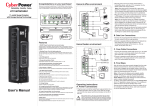
AC Mobile Power Inverter
CPS160SU-DC User Guide
Specifications
Important Safety Information
Before installing and using the CyberPower CPS160SU-DC Mobile
Power Inverter please read and follow these safety instructions:
• Do not operate the CPS160SU-DC near flammable materials, fumes, or
gases.
• Always use the inverter where there is adequate ventilation. Do not
obstruct the ventilation slots.
• Never immerse the unit in water.
• Proper cooling is essential when operating the inverter. Refrain from
placing the inverter near the vehicle's heat vent, or in direct sunlight.
• Always turn the inverter off when not in use by removing it from the DC
accessory socket.
• Check the warning labels on battery chargers or adapters before
connecting them to the inverter. Do not connect battery chargers or
adapters with warnings about using with inverters.
10.5 to 15.5 volts
160 Watts
120 Watts
120 Volts
60 Hz
5Vdc
12Vdc
Simulated Sine Wave
Low Voltage, Overheat,
Overload, Short Circuit
Troubleshooting
Problem
• AC Mobile Power Inverter
• Product Registration Card
• User Guide
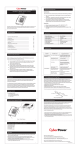
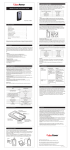
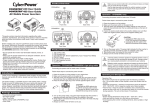
Product Features
3
1
The foregoing Limited Warranty is the consumer’s sole and exclusive remedy and excludes any
incidental or consequential damages. Some States do not allow the exclusion or limitation of
incidental and consequential damages, so certain of the above limitations or exclusions may not
apply to you (the Consumer). This limited warranty gives the Consumer specific legal rights and the
Consumer may have other rights, which vary from State to State.
To make a Limited Warranty claim:
1.
2.
3.
Pack and ship the Inverter to CyberPower at 4241 12th Ave. E., Suite 400, Shakopee, MN
55379.
Clearly indicate on the outside of the packaging that this is a “WARRANTY RETURN”
Clearly include your name and address (a) on the outside packaging and (b) on a sheet of
paper enclosed in the box with the Inverter that is being returned.
You MUST prepay all shipping costs and you are responsible for packaging and shipment.
CAUTION: Any changes or modifications not expressly approved by the guarantee of this device
could void the user’s authority to operate the equipment.
This Warranty is provided by:
Cyber Power Systems (USA), Inc.
4241 12th Avenue East, Suite 400, Shakopee, MN 55379, U.S.A.
Product Registration
Thank you for purchasing a CyberPower product. Prompt product registration entitles coverage
under the Limited Warranty and Connected Equipment Guarantee, and also allows the opportunity
to be notified of product enhancements, upgrades, and other announcements.
Registration is quick and easy at www.cpsww.com/register
Technical Support
Feel free to contact our Tech Support department with installation, troubleshooting, or general
product questions.
Possible Cause
Poor contact with DC power
outlet.
Automotive electrical system
requires ignition to be on.
Package Contents
CyberPower warrants this CPS160SU-DC (the "Inverter") to be free from material and
manufacturing defects for two years. If a defect results in product failure during its normal use,
CyberPower’s sole responsibility is to repair or replace (at its sole option) the Inverter.
4.
Input Voltage
Output Peak Power
Output Continuous Power
Output Voltage
Output Frequency
USB Voltage
DC Outlet Voltage
Output Waveform
Protection Features
No AC output power
Limited Warranty
Suggested Solutions
Ensure the inverter is securely plugged
into vehicle's DC power outlet. Replace
the DC power outlet if necessary.
Turn the vehicle ignition to the
"Accessory" position.
Car's DC power outlet fuse is
blown.
Check the vehicle fuse panel and
replace the damaged fuse.
Over-heating.
Allow inverter to cool. Ensure that there
is adequate ventilation around the unit
and load does not exceed the unit's
Continuous Power rating (see
specifications).
Vehicle's battery voltage is
below 10.5 volts.
Unplug the inverter and start the vehicle
to charge the battery.
Vehicle's battery input voltage
is higher than 15.5 volts.
Check your vehicle's user guide for
troubleshooting.
Inverter is overloaded.
Ensure load does not exceed the unit's
Continuous Power rating (see
specifications).
CyberPower Technical Support
Phone: 1-877-297-6937
Email: [email protected]
Web: www.CPSww.com
Mail: 4241 12th Avenue E, Suite 400 Shakopee, MN 55379
Hours of Operation: Monday – Friday, 8:00am – 5:00pm (CST)
Legal notices (FCC Part 15)
This equipment has been tested and found to comply with the limits for a Class B Digital Device,
pursuant to Part 15 of the FCC Rules. These limits are designed to provide reasonable protection
against harmful interference in residential installation. This equipment generates, uses and can
radiate radio frequency energy and, if not installed and used in accordance with the instructions,
may cause harmful interference to radio communications. However, there is no guarantee that
interference will not occur in a particular installation. If this equipment does cause harmful
interference to radio or television reception, which can be determined by turning the equipment off
and on, the user is encouraged to try to correct the interference by one or more of the following
measures: (1) Reorient or relocate the receiving antenna. (2) Increase the separation between the
equipment and receiver. (3) Connect the equipment into an outlet on a circuit different from that to
which the receiver is connected. (4) Consult the dealer or an experienced radio/TV technician for
help. Any special accessories needed for compliance must be specified in the instruction.
CAUTION: A shielded-type power cord is required in order to meet FCC emission limits and also to
prevent interference to the nearby radio and television reception. It is essential that only the
supplied power cord be used. Use only shielded cables to connect I/O devices to this equipment.
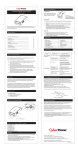
Fuse Replacement
4
2
5
1. 120V AC outlet
2. 12VDC Inlet
3. USB charging port
4. Power LED
5. DC outlet
1. Unplug the inverter from the DC power outlet.
2. Unscrew the contact retainer at the end of the power plug.
3. Replace the 15 amp fuse.
4. Reassemble unit by reversing the instructions above.
Operating and Storage Tips
Operating Tips
The inverter should only be operated under the following conditions:
• Dry - Do not allow water or other liquids to come into contact with the
inverter.
Cyber Power Systems (USA), Inc.
4241 12th Avenue East, Suite 400, Shakopee, MN 55379, U.S.A.
Spring
Ring
12V power plug
Contact Pin
15A Fuse
Contact Retainer
TEL: (952) 403-9500 FAX: (952) 403-0009 Toll-Free: (877) 297-6937
E-mail: [email protected]
Web: www.cpsww.com
Entire contents copyright C 2010 Cyber Power Systems, Inc.
All rights reserved. Reproduction in whole or in part without permission is
prohibited.
K01-0000154-00