1
SUPER
®
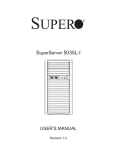
SuperServer 5036I-I/5036I-IF
USER’S MANUAL
Revision 1.0
The information in this User’s Manual has been carefully reviewed and is believed to be accurate.
The vendor assumes no responsibility for any inaccuracies that may be contained in this document,
makes no commitment to update or to keep current the information in this manual, or to notify any
person or organization of the updates. Please Note: For the most up-to-date version of this
manual, please see our web site at www.supermicro.com.
Super Micro Computer, Inc. ("Supermicro") reserves the right to make changes to the product
described in this manual at any time and without notice. This product, including software, if any,
and documentation may not, in whole or in part, be copied, photocopied, reproduced, translated or
reduced to any medium or machine without prior written consent.
IN NO EVENT WILL SUPERMICRO BE LIABLE FOR DIRECT, INDIRECT, SPECIAL, INCIDENTAL,
SPECULATIVE OR CONSEQUENTIAL DAMAGES ARISING FROM THE USE OR INABILITY TO
USE THIS PRODUCT OR DOCUMENTATION, EVEN IF ADVISED OF THE POSSIBILITY OF
SUCH DAMAGES. IN PARTICULAR, SUPERMICRO SHALL NOT HAVE LIABILITY FOR ANY
HARDWARE, SOFTWARE, OR DATA STORED OR USED WITH THE PRODUCT, INCLUDING THE
COSTS OF REPAIRING, REPLACING, INTEGRATING, INSTALLING OR RECOVERING SUCH
HARDWARE, SOFTWARE, OR DATA.
Any disputes arising between manufacturer and customer shall be governed by the laws of Santa
Clara County in the State of California, USA. The State of California, County of Santa Clara shall
be the exclusive venue for the resolution of any such disputes. Super Micro's total liability for
all claims will not exceed the price paid for the hardware product.
This equipment has been tested and found to comply with the limits for a Class B digital device
pursuant to Part 15 of the FCC Rules. These limits are designed to provide reasonable protection
against harmful interference in a residential installation. This equipment generates, uses, and can
radiate radio frequency energy and, if not installed and used in accordance with the manufacturer’s
instruction manual, may cause interference with radio communications. However, there is no
guarantee that interference will not occur in a particular installation. If this equipment does cause
harmful interference to radio or television reception, which can be determined by turning the
equipment off and on, you are encouraged to try to correct the interference by one or more of the
following measures: Reorient or relocate the receiving antenna. Increase the separation between
the equipment and the receiver. Connect the equipment into an outlet on a circuit different from
that to which the receiver is connected. Consult the dealer or an experienced radio/television
technician for help.
California Best Management Practices Regulations for Perchlorate Materials: This Perchlorate
warning applies only to products containing CR (Manganese Dioxide) Lithium coin cells. “Perchlorate
Material-special handling may apply. See www.dtsc.ca.gov/hazardouswaste/perchlorate”
WARNING: Handling of lead solder materials used in this
product may expose you to lead, a chemical known to
the State of California to cause birth defects and other
reproductive harm.
Manual Revision 1.0
Release Date: October 6, 2009
Unless you request and receive written permission from Super Micro Computer, Inc., you may
not copy any part of this document.
Information in this document is subject to change without notice. Other products and companies
referred to herein are trademarks or registered trademarks of their respective companies or mark
holders.
Copyright © 2009 by Super Micro Computer, Inc.
All rights reserved.
Printed in the United States of America
Preface
Preface
About This Manual
This manual is written for professional system integrators and PC technicians. It
provides information for the installation and use of the SuperServer 5036I-I/5036I-IF.
Installation and maintenance shall be performed by experienced technicians only.
The SuperServer 5036I-I/5036I-IF is a single processor system based on the
SC731i-300 mini-tower chassis and the Super X8SIL/X8SIL-F motherboard.
Manual Organization
Chapter 1: Introduction
The first chapter provides a checklist of the main components included with the
system and describes the main features of the Super X8SIL/X8SIL-F motherboard
and the SC731i-300 chassis.
Chapter 2: Installation
This chapter describes the steps necessary to setup the system. If your server was
ordered without the processor and memory components, this chapter will refer you
to the appropriate sections of the manual for their installation.
Chapter 3: System Interface
Refer to this chapter for details on the system interface, which includes the functions
and information provided by the control panel on the chassis as well as other LEDs
located throughout the system.
Chapter 4: System Safety
You should thoroughly familiarize yourself with this chapter for a general overview
of safety precautions that should be followed when installing and servicing the
SuperServer 5036I-I/5036I-IF.
Chapter 5: Advanced Motherboard Setup
Chapter 5 provides detailed information on the X8SIL/X8SIL-F motherboard, including the locations and functions of connectors, headers and jumpers. Refer
iii
SUPERSERVER 5036I-I/5036I-IF User's Manual
to this chapter when adding or removing processors or main memory and when
reconfiguring the motherboard.
Chapter 6: Advanced Chassis Setup
Refer to Chapter 6 for detailed information on the SC731i-300 chassis. You should
follow the procedures given in this chapter when installing, removing or reconfiguring Serial ATA or peripheral drives and when replacing system power supply units
and cooling fans.
Chapter 7: BIOS
The BIOS chapter includes an introduction to BIOS and provides detailed information on running the CMOS Setup Utility.
Appendix A: POST Error Beep Codes
Appendix B: Installing Windows
Appendix C: System Specifications
iv
Preface
Notes
v
SUPERSERVER 5036I-I/5036I-IF User's Manual
Table of Contents
Chapter 1 Introduction
1-1
Overview ......................................................................................................... 1-1
1-2
Motherboard Features ..................................................................................... 1-2
Processors ...................................................................................................... 1-2
Memory ........................................................................................................... 1-2
Serial ATA ....................................................................................................... 1-2
PCI Expansion Slots ....................................................................................... 1-2
I/O Ports .......................................................................................................... 1-2
Other Features ................................................................................................ 1-2
1-3
Chassis Features ............................................................................................ 1-3
System Power ................................................................................................. 1-3
SATA Subsystem ............................................................................................. 1-3
Front Control Panel ......................................................................................... 1-3
Cooling System ............................................................................................... 1-3
1-4
Contacting Supermicro .................................................................................... 1-5
Chapter 2 System Setup
2-1
Overview ......................................................................................................... 2-1
2-2
Unpacking the System .................................................................................... 2-1
2-3
Setting Up the System .................................................................................... 2-2
Checking the Motherboard Setup ................................................................... 2-2
Checking the Drive Bay Setup ........................................................................ 2-2
Chapter 3 System Interface
3-1
Overview ......................................................................................................... 3-1
3-2
Control Panel Button ....................................................................................... 3-1
Power .............................................................................................................. 3-1
3-3
Control Panel LEDs ........................................................................................ 3-1
HDD................................................................................................................. 3-1
NIC .................................................................................................................. 3-2
Overheat/Fan Fail ........................................................................................... 3-2
Power On ........................................................................................................ 3-2
3-4
SATA Drive Carrier LEDs ................................................................................ 3-2
Chapter 4 System Safety
4-1
Electrical Safety Precautions .......................................................................... 4-1
4-2
General Safety Precautions ............................................................................ 4-2
4-3
ESD Precautions ............................................................................................. 4-3
4-4
Operating Precautions .................................................................................... 4-4
vi
Table of Contents
Chapter 5 Advanced Motherboard Setup
5-1
Handling the Motherboard .............................................................................. 5-1
Precautions ..................................................................................................... 5-1
Unpacking ....................................................................................................... 5-1
5-2
Motherboard Installation .................................................................................. 5-2
5-3
Connecting Cables .......................................................................................... 5-2
Connecting Data Cables ................................................................................. 5-2
Connecting Power Cables .............................................................................. 5-3
Connecting the Control Panel ......................................................................... 5-3
5-4
I/O Ports .......................................................................................................... 5-4
5-5
Processor and Heatsink Installation................................................................ 5-4
Installing the LGA1156 Processor ................................................................. 5-5
Installing an Active CPU Heatsink .................................................................. 5-7
5-6
Installing Memory .......................................................................................... 5-10
DIMM Installation .......................................................................................... 5-10
Memory Support ............................................................................................ 5-10
Memory Population Guidelines ......................................................................5-11
5-7
Installing PCI Add-On Cards ......................................................................... 5-13
5-8
Motherboard Details ...................................................................................... 5-15
5-9
Connector Definitions ................................................................................... 5-17
Main ATX Power Supply Connector ......................................................... 5-17
Processor Power Connector .................................................................... 5-17
Power Button ........................................................................................... 5-17
Reset Button ........................................................................................... 5-17
Overheat (OH)/Fan Fail ............................................................................ 5-18
NIC1/NIC2 (LAN1/LAN2) .......................................................................... 5-18
HDD LED.................................................................................................. 5-18
Power On LED ......................................................................................... 5-18
Chassis Intrusion ...................................................................................... 5-19
ATX PS/2 Keyboard and PS/2 Mouse Ports ............................................ 5-19
Fan Headers............................................................................................. 5-19
Onboard Speaker ..................................................................................... 5-19
Speaker .................................................................................................... 5-20
Serial Ports ............................................................................................... 5-20
Universal Serial Bus (USB) ...................................................................... 5-20
LAN1/LAN2 (Ethernet Ports) .................................................................... 5-20
Onboard Power LED ................................................................................ 5-21
Power Supply I2C Connector.................................................................... 5-21
T-SGPIO 0/1 Headers .............................................................................. 5-21
vii
SUPERSERVER 5036I-I/5036I-IF User's Manual
Alarm Reset.............................................................................................. 5-21
5-10
Jumper Settings ............................................................................................ 5-22
Explanation of Jumpers ............................................................................ 5-22
CMOS Clear ............................................................................................. 5-22
VGA Enable .............................................................................................. 5-22
LAN1/LAN2 Enable/Disable .................................................................... 5-23
PCI Slot SMB Enable ............................................................................... 5-23
USB Wake-Up ......................................................................................... 5-23
BMC Jumper ............................................................................................ 5-23
5-11
Onboard Indicators........................................................................................ 5-24
LAN1/2 LEDs............................................................................................ 5-24
IPMI Dedicated LAN LEDs ..................................................................... 5-24
Onboard Power LED
............................................................................................................ 5-24
IPMI Heartbeat LED ................................................................................. 5-24
5-12
SATA and Floppy Drive Connections ............................................................ 5-25
SATA Ports ............................................................................................... 5-25
Floppy Connector ..................................................................................... 5-25
Chapter 6 Advanced Chassis Setup
6-1
Static-Sensitive Devices .................................................................................. 6-1
Precautions ..................................................................................................... 6-1
Unpacking ....................................................................................................... 6-1
6-2
Front Control Panel ......................................................................................... 6-2
6-3
Front Bezel ...................................................................................................... 6-4
6-4
Removing the Chassis Cover ......................................................................... 6-5
6-5
System Fans ................................................................................................... 6-6
Fan Failure ...................................................................................................... 6-6
Replacing the System Fan ......................................................................... 6-6
6-6
Drive Bay Installation ...................................................................................... 6-7
SATA Drives .................................................................................................... 6-7
Installing Drives in the Optional Drive Bays ................................................... 6-9
Chapter 7 BIOS
7-1
Introduction...................................................................................................... 7-1
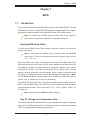
Starting BIOS Setup Utility .............................................................................. 7-1
How To Change the Configuration Data ......................................................... 7-1
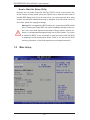
How to Start the Setup Utility ......................................................................... 7-2
7-2
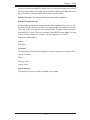
Main Setup ...................................................................................................... 7-2
7-3
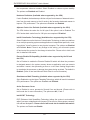
Advanced Setup Configurations...................................................................... 7-4
7-4
Security Settings ........................................................................................... 7-20
viii
Table of Contents
7-5
Boot Settings ................................................................................................ 7-21
7-6
Exit Options ................................................................................................... 7-22
Appendix A POST Error Beep Codes
Appendix B Installing Windows
Appendix C System Specifications
SUPERSERVER 5036I-I/5036I-IF User's Manual
Notes
Chapter 1: Introduction
Chapter 1
Introduction
1-1
Overview
The SuperServer 5036I-I/5036I-IF is a high-end server comprised of two main subsystems: the SC731i-300 mini-tower chassis and the X8SIL/X8SIL-F motherboard.
Please refer to our web site for information on operating systems that have been
certified for use with the SuperServer 5036I-I/5036I-IF (www.supermicro.com).
In addition to the motherboard and chassis, various hardware components have
been included with the SuperServer 5036I-I/5036I-IF, as listed below:
•
One cooling fan (FAN-0076L4)
•
One I/O shield (MCP-260-00027-0N)
•
SATA Accessories
Four SATA cables (CBL-0044L)
•
One SuperServer 5036I-I/5036I-IF User's Manual
Optional
•
One active heatsink (SNK-P0046A4)
•
One intake fan (FAN-0113L4)
•
One DVD-ROM drive (DVM-LITE-DVDRW-HBT or DVM-LITE-DVD-HBT)
1-1
SUPERSERVER 5036I-I/5036I-IF User's Manual
1-2
Motherboard Features
At the heart of the SuperServer 5036I-I/5036I-IF lies the X8SIL/X8SIL-F, a single
processor motherboard based on the Intel® 3400 (X8SIL) and Intel 3420 (X8SIL-F)
chipsets. Below are the main features of the X8SIL/X8SIL-F. (See Figure 1-1 for a
block diagram of the chipset).
Processors
The X8SIL/X8SIL-F supports a single Intel® 3400 series processor in an LGA1156
socket. Please refer to the motherboard description pages on our web site for a
complete listing of supported processors (www.supermicro.com).
Memory
The X8SIL/X8SIL-F has four DIMM slots that can support up to 16 GB of UDIMM
(unbuffered DIMMs) or up to 32 GB or RDIMM (registered DIMMs) DDR3-1333/1066/800 memory. Dual-channel configurations are supported. Memory modules
of the same size and speed should be used. See Chapter 5 for details.
Serial ATA
A SATA controller is integrated into the chipset to provide a 3 Gb/s Serial ATA subsystem, which is RAID 0, 1, 10 and (Windows only) 5 capable. The SATA drives
are hot-swappable units. The X8SIL has four SATA ports while the X8SIL-F has
six SATA ports.
PCI Expansion Slots
The X8SIL/X8SIL-F has two PCI-Express 2.0 x8 slots, one PCI-Express 2.0 x4 (in
a x8 slot) and one 32-bit PCI 33 MHz slot.
I/O Ports
The color-coded I/O ports include a COM port, two USB 2.0 ports, PS/2 mouse
and keyboard ports and two Gb Ethernet ports. An IPMI LAN port is also included
on the X8SIL-F.
Other Features
Other onboard features that promote system health include onboard voltage monitors, a chassis intrusion header, 3-phase switching voltage regulators, chassis and
CPU overheat sensors, Thermal Monitor 2 (TM2) support and a BIOS flash upgrade
utility.
1-2
Chapter 1: Introduction
1-3
Chassis Features
The SC731i-300 is a mini-tower chassis with a unique design that allows most
configurations to be performed without the need for tools The following is a general
outline of the main features of the SC731i-300 chassis.
System Power
The SC731i-300 features a high-efficiency 300W power supply. Power must be
removed from the system before servicing or replacing the power supply.
SATA Subsystem
The chassis was designed to support four SATA hard drives.
Front Control Panel
The control panel provides you with system monitoring and control. LEDs indicate
network activity, hard disk drive activity and overheat conditions. The control panel
also includes a main power button, which has a blue LED that illuminates when
the system is powered on.
Cooling System
The SC731i-300 chassis includes one whisper-quiet 9-cm exhaust fan located at
the rear of the chassis and an 8-cm fan located in the power supply. Both fans
operate continuously.
1-3
SUPERSERVER 5036I-I/5036I-IF User's Manual
Figure 1-1. Intel 3400/3420 Chipset:
System Block Diagram
Note: This is a general block diagram. Please see Chapter 5 for details.
PCIe x8 SLOT
PCIe2.0_x8
PCIe x8 SLOT
PCIe2.0_x8
5.0Gb
5.0Gb
Xeon 3400
Series
VID[0-7]
PCIe_x4
1 PCI 32 SLOT
PCI 32
2.5Gbps
IBexPeak
Intel 3400/3420
FLASH
SPI 16Mb
300MB/s
PCH
USB2.0
PCIe_x1
2.5Gbps
GLAN1
82574L
PCIe_x1
2.5Gbps
GLAN2
82574L
LPC
PCI32
480Mbps
LPC
CLOCK
TPM1.2
RJ45
(option)
HERMON WPCM450
WINBOND
RTL8201N
PHY
RJ45
HEALTH
INFO
RJ45
P15
COM1,2
P/S2
DIMM1(Far)
DIMM2
RMII
SPI
LPC
CK505
Rev1.0
SATA-II
DIMM1(Far)
DIMM2
2.5Gb
x4 DMI
PCIe x8 SLOT
5/7 USB PORTS
DDR3 (CHB)
1333/1066MHz
VRM 11.1
MISC VRs
4/6 SATA PORTS
DDR3 (CHA)
1333/1066MHz
W83627DHG
LPC I/O
1-4
VGA
PORT
4 UDIMM
4 RDIMM
(4 Quad rank
RDIMM run on
800MHz)
Chapter 1: Introduction
1-4
Contacting Supermicro
Headquarters
Address:
Super Micro Computer, Inc.
980 Rock Ave.
San Jose, CA 95131 U.S.A.
Tel:
+1 (408) 503-8000
Fax:
+1 (408) 503-8008
Email:
[email protected] (General Information)
[email protected] (Technical Support)
Web Site:
www.supermicro.com
Europe
Address:
Super Micro Computer B.V.
Het Sterrenbeeld 28, 5215 ML
's-Hertogenbosch, The Netherlands
Tel:
+31 (0) 73-6400390
Fax:
+31 (0) 73-6416525
Email:
[email protected] (General Information)
[email protected] (Technical Support)
[email protected] (Customer Support)
Asia-Pacific
Address:
Super Micro Computer, Inc.
4F, No. 232-1, Liancheng Rd.
Chung-Ho 235, Taipei County
Taiwan, R.O.C.
Tel:
+886-(2) 8226-3990
Fax:
+886-(2) 8226-3991
Web Site:
www.supermicro.com.tw
Technical Support:
Email:
[email protected]
Tel:
886-2-8228-1366, ext.132 or 139
1-5
SUPERSERVER 5036I-I/5036I-IF User's Manual
Notes
1-6
Chapter 2: System Setup
Chapter 2
System Setup
2-1
Overview
This chapter provides a quick setup checklist to get your SuperServer 5036I-I/5036IIF up and running. Following the steps in the order given should enable you to
have the system operational within a minimal amount of time. If your system is
not already fully integrated with a motherboard, processor, system memory etc.,
please turn to the chapter or section noted in each step for details on installing
specific components.
2-2
Unpacking the System
You should inspect the box the SuperServer 5036I-I/5036I-IF was shipped in and
note if it was damaged in any way. If the server itself shows damage, you should
file a damage claim with the carrier who delivered it.
Decide on a suitable location for setting up and operating the SuperServer 5036II/5036I-IF. It should be situated in a clean, dust-free area that is well ventilated.
Avoid areas where heat, electrical noise and electromagnetic fields are generated.
You will also need it placed near a grounded power outlet.
!
•
•
Warnings and Precautions!
!
Review the electrical and general safety precautions in Chapter 4.
Use a regulating uninterruptible power supply (UPS) to protect the server from
power surges, voltage spikes and to keep your system operating in case of a
power failure.
•
Allow the power supply units and Serial ATA drives to cool before touching
them.
•
To maintain proper cooling, always keep all chassis panels closed when not
being serviced.
2-1
SUPERSERVER 5036I-I/5036I-IF User's Manual
2-3
Setting Up the System
You should first open the left side panel (when facing the front of the chassis) to
make sure the motherboard is properly installed and all connections have been
made.
Warning: Only qualified service technicians should access the inside of
!
the system. Except for short periods of time, do NOT operate the system
without the cover in place. The chassis cover must be in place to allow
proper airflow and prevent overheating.
Checking the Motherboard Setup
1.
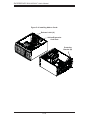
Accessing the inside of the system (Figure 2-1): Begin by disconnecting the
chassis from any power source. Grasp the cover handle (A) with your fingers.
Use your thumb to lift the cover latch (B). Slide the cover back, toward the
rear of the chassis, then lift the cover off.
2. Check the CPU (processor): You may have a processor already installed into
the system board. The processor should have its own heatsink attached. See
Chapter 5 for instructions on processor installation.
3. Check the system memory: Your system may have come with system
memory already installed. Make sure all DIMMs are fully seated in their slots.
For details on adding system memory, refer to Chapter 5.
4. Installing add-on cards: If desired, you can install up to six add-on cards to
the system. See Chapter 5 for details on installing PCI- add-on cards.
5. Check all cable connections and airflow: Make sure all power and data cables
are properly connected and not blocking the airflow. See Chapter 5 for details
on cable connections.
Checking the Drive Bay Setup
Next, you should check to make sure the peripheral drives and the SATA drives have
been properly installed and all essential connections have been made.
1. Accessing the peripheral drive bays: To install a component to either of the
two 5.25" drive bays, you will need to remove the side chassis cover. See the
installation and removal sections for the peripheral drives in Chapter 6.
2-2
Chapter 2: System Setup
Figure 2-1. Accessing the Inside of the System
3
Release Tab (B)1
Handle (A)
2-3
SUPERSERVER 5036I-I/5036I-IF User's Manual
2. Check the SATA disk drives: Depending upon your system's configuration,
your system may have up to four SATA drives already installed. If you need
to install or remove an SATA drive, please refer to the appropriate section in
Chapter 6.
3. Check the airflow: Cooling air is provided by the chassis fan and the power
supply fan. The system component layout was carefully designed to promote
sufficient airflow throughout the chassis. Also note that all power and data
cables have been routed in such a way that they do not block the airflow
generated by the fan. Please keep this in mind when rerouting or adding/
removing cables.
4. Supplying power to the system: The last thing you must do is to provide input
power to the system. Plug the power cord from the power supply unit into a
high-quality power strip that offers protection from electrical noise and power
surges. It is recommended that you use an uninterruptible power supply
(UPS).
2-4
Chapter 3: System Interface
Chapter 3
System Interface
3-1
Overview
There are four LEDs on the control panel to keep you constantly informed of the
overall status of the system as well as the activity and health of specific components.
The control panel also is where to find the main power on/off button.
3-2
Control Panel Button
Power
The main power switch is used to apply or remove power from the power supply
to the server system. Turning off system power with this button removes the main
power but keeps standby power supplied to the system. Therefore, you must
unplug system before servicing.
3-3
Control Panel LEDs
The control panel located on the front of the SC731i-300B chassis has four LEDs.
These LEDs provide you with critical information related to different parts of the
system. This section explains what each LED indicates when illuminated and any
corrective action you may need to take.
HDD
This LED indicates SATA drive and/or DVD-ROM drive activity when flashing.
3-1
SUPERSERVER 5036I-I/5036I-IF User's Manual
NIC
Indicates network activity on a Gigabit LAN port when flashing.
Overheat/Fan Fail
When this LED flashes it indicates a fan failure. When on continuously (on and not
flashing) it indicates an overheat condition, which may be caused by cables obstructing the airflow in the system or the ambient room temperature being too warm.
Check the routing of the cables and make sure all fans are present and operating
normally. You should also check to make sure that the chassis covers are installed.
Finally, verify that the heatsinks are installed properly (see Chapter 5). This LED
will remain flashing or on as long as the overheat condition exists.
Power On
A blue LED located behind the main power button is illuminated when the system
is powered on and running.
3-4
•
•
SATA Drive Carrier LEDs
Green: Each SATA drive carrier has a green LED. When illuminated, this
green LED (on the front of the SATA drive carrier) indicates drive activity. A
connection to the SATA backplane enables this LED to blink on and off when
that particular drive is being accessed. Please refer to Chapter 6 for instructions
on replacing failed SATA drives.
Red: The red LED to indicate an SATA drive failure. If one of the SATA drives
fail, you should be notified by your system management software. Please refer
to Chapter 6 for instructions on replacing failed SATA drives.
3-2
Chapter 4: System Safety
Chapter 4
System Safety
4-1
Electrical Safety Precautions
Note: power should always be disconnected before perform-
!
ing any service on the system.
Basic electrical safety precautions shall be followed to protect yourself from harm
and the SuperServer 5036I-I/5036I-IF from damage:
•
Be aware of the locations of the power on/off switch on the chassis as well
as the room's emergency power-off switch, disconnection switch or electrical
outlet. If an electrical accident occurs, you can then quickly remove power from
the system.
•
Do not work alone when working with high voltage components.
•
Power should always be disconnected from the system when removing or installing main system components, such as the serverboard, memory modules
and floppy drive. When disconnecting power, you should first power down the
system with the operating system first and then unplug the power cords of all
the power supply units in the system.
•
When working around exposed electrical circuits, another person who is familiar
with the power-off controls should be nearby to switch off the power if necessary.
•
Use only one hand when working with powered-on electrical equipment. This
is to avoid making a complete circuit, which will cause electrical shock. Use
extreme caution when using metal tools, which can easily damage any electrical
components or circuit boards they come into contact with.
•
Do not use mats designed to decrease static electrical discharge as protection
from electrical shock. Instead, use rubber mats that have been specifically
designed as electrical insulators.
•
The power supply power cords must include a grounding plug and must be
plugged into grounded electrical outlets.
4-1
SUPERSERVER 5036I-I/5036I-IF User's Manual
•
This product may be connected to an IT power system. In all cases, make sure
that the unit is also reliably connected to Earth (ground).
•
Serverboard Battery: CAUTION - There is a danger of explosion if the onboard
battery is installed upside down, which will reverse its polarites (see Figure
4-1). This battery must be replaced only with the same or an equivalent type
recommended by the manufacturer. Dispose of used batteries according to the
manufacturer's instructions.
•
DVD-ROM Laser: CAUTION - this server may have come equipped with a
DVD-ROM drive. To prevent direct exposure to the laser beam and hazardous
radiation exposure, do not open the enclosure or use the unit in any unconventional way.
•
Mainboard replaceable soldered-in fuses: Self-resetting PTC (Positive Temperature Coefficient) fuses on the mainboard must be replaced by trained service
technicians only. The new fuse must be the same or equivalent as the one
replaced. Contact technical support for details and support.
4-2
General Safety Precautions
!
Follow these rules to ensure general safety:
•
Keep the area around the SuperServer 5036I-I/5036I-IF clean and free of clutter.
•
The SuperServer 5036I-I/5036I-IF weighs approximately 43 lbs. (19.5 kg) when
fully loaded. When lifting the system, two people at either end should lift slowly
with their feet spread out to distribute the weight. Always keep your back straight
and lift with your legs.
•
Place the chassis top cover and any system components that have been removed away from the system or on a table so that they won't accidentally be
stepped on.
•
While working on the system, do not wear loose clothing such as neckties and
unbuttoned shirt sleeves, which can come into contact with electrical circuits or
be pulled into a cooling fan.
4-2
Chapter 4: System Safety
•
Remove any jewelry or metal objects from your body, which are excellent metal
conductors that can create short circuits and harm you if they come into contact
with printed circuit boards or areas where power is present.
•
After accessing the inside of the system, close the system back up and secure
it to the rack unit with the retention screws after ensuring that all connections
have been made.
4-3
ESD Precautions
!
Electrostatic Discharge (ESD) is generated by two objects with different electrical
charges coming into contact with each other. An electrical discharge is created to
neutralize this difference, which can damage electronic components and printed
circuit boards. The following measures are generally sufficient to neutralize this
difference before contact is made to protect your equipment from ESD:
•
Use a grounded wrist strap designed to prevent static discharge.
•
Keep all components and printed circuit boards (PCBs) in their antistatic bags
until ready for use.
•
Touch a grounded metal object before removing the board from the antistatic
bag.
•
Do not let components or PCBs come into contact with your clothing, which may
retain a charge even if you are wearing a wrist strap.
•
Handle a board by its edges only; do not touch its components, peripheral chips,
memory modules or contacts.
•
When handling chips or modules, avoid touching their pins.
•
Put the serverboard and peripherals back into their antistatic bags when not
in use.
•
For grounding purposes, make sure your computer chassis provides excellent
conductivity between the power supply, the case, the mounting fasteners and
the serverboard.
4-3
SUPERSERVER 5036I-I/5036I-IF User's Manual
4-4
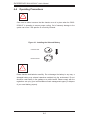
Operating Precautions
!
Care must be taken to assure that the chassis cover is in place when the 5036II/5036I-IF is operating to assure proper cooling. Out of warranty damage to the
system can occur if this practice is not strictly followed.
Figure 4-1. Installing the Onboard Battery
LITHIUM BATTERY
BATTERY HOLDER
!
Please handle used batteries carefully. Do not damage the battery in any way; a
damaged battery may release hazardous materials into the environment. Do not
discard a used battery in the garbage or a public landfill. Please comply with the
regulations set up by your local hazardous waste management agency to dispose
of your used battery properly.
4-4
Chapter 5: Advanced Motherboard Setup
Chapter 5
Advanced Motherboard Setup
This chapter covers the steps required to install the X8SIL/X8SIL-F motherboard
into the chassis, connect the data and power cables and install add-on cards. All
jumpers and connections are described and a layout and quick reference chart are
included for your reference. Remember to completely close the chassis when you
have finished working with the motherboard to better cool and protect the system.
5-1
Handling the Motherboard
Electrostatic Discharge (ESD) can damage electronic components. To prevent damage to any printed circuit boards (PCBs), it is important to handle them very carefully
(see previous chapter). To prevent the motherboard from bending, keep one hand
under the center of the board to support it when handling. The following measures
are generally sufficient to protect your equipment from electric static discharge.
Precautions
•
Use a grounded wrist strap designed to prevent Electrostatic Discharge.
•
Touch a grounded metal object before removing any board from its antistatic
bag.
•
Handle a board by its edges only; do not touch its components, peripheral chips,
memory modules or gold contacts.
•
When handling chips or modules, avoid touching their pins.
•
Put the motherboard, add-on cards and peripherals back into their antistatic
bags when not in use.
•
For grounding purposes, make sure your computer chassis provides excellent
conductivity between the power supply, the case, the mounting fasteners and
the motherboard.
Unpacking
The motherboard is shipped in antistatic packaging to avoid electrical static discharge. When unpacking the board, make sure the person handling it is static
protected.
5-1
SUPERSERVER 5036I-I/5036I-IF User's Manual
5-2
Motherboard Installation
This section explains the first step of physically mounting the X8SIL/X8SIL-F into the
SC731i-300 chassis. Following the steps in the order given will eliminate the most
common problems encountered in such an installation. To remove the motherboard,
follow the procedure in reverse order.
Installing to the Chassis
1. Access the inside of the system (see procedure in Chapter 6).
2. Make sure that the I/O ports on the motherboard align properly with their
respective holes in the I/O shield at the back of the chassis.
3. Carefully mount the motherboard to the motherboard tray by aligning the
board holes with the raised metal standoffs that are visible in the chassis. You
may need to add an extra standoff for the hole near the Fan 3 header.
4. Insert screws into all the mounting holes on your motherboard that line up
with the standoffs and tighten until snug (if you screw them in too tight, you
might strip the threads).
5. Finish by replacing the top cover of the chassis.
Note: Metal screws provide an electrical contact to the serverboard ground to
provide a continuous ground for the system.
Warning: To avoid damaging the serverboard and its components, do not apply
any force greater than 8 lbs. per square inch when installing a screw into a mounting hole.
5-3
Connecting Cables
Now that the motherboard is installed, the next step is to connect the cables to the
board. These include the data (ribbon) cables for the peripherals and control panel
and the power cables.
Connecting Data Cables
The cables used to transfer data from the peripheral devices have been carefully
routed to prevent them from blocking the flow of cooling air that moves through
the system from front to back. If you need to disconnect any of these cables, you
should take care to keep them routed as they were originally after reconnecting
them (make sure the red wires connect to the pin 1 locations). The following data
5-2
Chapter 5: Advanced Motherboard Setup
cables (with their locations noted) should be connected. (See the layout on page
5-9 for connector locations.)
•
SATA drive data cable (I-SATA0 ~ I-SATA3)
•
Control Panel cable (JF1)
Important! Make sure the the cables do not come into contact with the fans.
Connecting Power Cables
The X8SIL/X8SIL-F has a 24-pin primary power supply connector (JPW1) for connection to the ATX power supply. In addition, an 8-pin processor power connector
(JPW2) must also be connected to your power supply. See Section 5-9 for power
connector pin definitions.
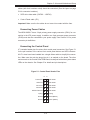
Connecting the Control Panel
JF1 contains header pins for various front control panel connectors. See Figure 5-1
for the pin locations of the various front control panel buttons and LED indicators.
All JF1 wires have been bundled into a single ribbon cable to simplify this connection. Make sure the red wire plugs into pin 1 as marked on the board. The other
end connects to the Control Panel PCB board, located just behind the system status
LEDs on the chassis. See Chapter 5 for details and pin descriptions.
Figure 5-1. Control Panel Header Pins
16
15
Power LED
LED Anode
HDD LED
LED Anode
NIC1 LED
LED Anode
NIC2 LED
LED Anode
OH/Fan Fail LED
LED Anode
x (Key)
x (Key)
Ground
Reset (Button)
Ground
Power (Button)
2
1
5-3
SUPERSERVER 5036I-I/5036I-IF User's Manual
5-4
I/O Ports
The I/O ports are color coded in conformance with the PC 99 specification. See
Figure 5-2 below for the colors and locations of the various I/O ports.
Figure 5-2. I/O Ports
2
1
5
4
6
7
8
9
3
1. Keyboard (Purple)
6. COM1 Port
2. PS/2 Mouse (Green)
7. VGA Port (Blue)
3. USB Port 0
8. LAN1
4. USB Port 1
9. LAN2
5. IPMI LAN Port*
*X8SIL-F only
5-5
Processor and Heatsink Installation
!
When handling the processor package, avoid placing direct pressure on
the label area of the fan.
Notes:
Always connect the power cord last and always remove it before adding, re-
•
moving or changing any hardware components. Make sure that you install the
processor into the CPU socket before you install the CPU heatsink.
•
If you buy a CPU separately, make sure that you use an Intel-certified multidirectional heatsink only.
•
Make sure to install the serverboard into the chassis before you install the CPU
heatsinks.
•
When receiving a serverboard without a processor pre-installed, make sure that
the plastic CPU socket cap is in place and none of the socket pins are bent;
otherwise, contact your retailer immediately.
•
Refer to the Supermicro web site for updates on CPU support.
5-4
Chapter 5: Advanced Motherboard Setup
Installing the LGA1156 Processor
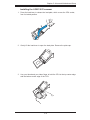
1. Press the load lever to release the load plate, which covers the CPU socket,
from its locked position.
2. Gently lift the load lever to open the load plate. Remove the plate cap.
3. Use your thumb and your index finger to hold the CPU at the top center edge
and the bottom center edge of the CPU.
5-5
SUPERSERVER 5036I-I/5036I-IF User's Manual
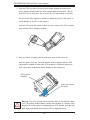
4. Align the CPU key that is the semi-circle cutouts against the socket keys.
Once aligned, carefully lower the CPU straight down to the socket. (Do not
drop the CPU on the socket. Do not move the CPU horizontally or vertically.
Do not rub the CPU against the surface or against any pins of the socket to
avoid damage to the CPU or the socket.)
With the CPU inside the socket, inspect the four corners of the CPU to make
sure that the CPU is properly installed.
5. Use your thumb to gently push the load lever down to the lever lock.
Save the plastic PnP cap. The motherboard must be shipped with the PnP
cap properly installed to protect the CPU socket pins. Shipment without the
PnP cap properly installed will cause damage to the socket pins.
CPU properly
installed
Load lever locked
into place.
!
Warning: The CPU will only seat inside the socket in one direction. Make
sure it is properly inserted before closing the load plate. If it doesn't close
properly, do not force it as it may damage your CPU. Instead, open the load
plate again and double-check that the CPU is aligned properly.
5-6
Chapter 5: Advanced Motherboard Setup
Installing an Active CPU Heatsink
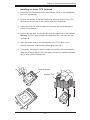
1. Locate the CPU Fan header on the motherboard. (Refer to the motherboard
layout for the location.)
2. Position the heatsink so that the heatsink fan wires are closest to the CPU
fan power connector and do not interfere with other components.
3. Inspect the CPU Fan wires to make sure that they are routed through the
bottom of the heatsink.
4. Remove the thin layer of protective film from the copper core of the heatsink.
Warning: The CPU may overheat if the protective film is not removed from
the heatsink.
5. Apply the proper amount of thermal grease to the CPU. (Note: if your
heatsink came with a thermal pad, please ignore this step.)
6. If necessary, rearrange the wires to make sure that they are not pinched between the heatsink and the CPU. Also make sure there is clearance between
the fan wires and the heatsink fins.
Thermal Grease
Heatsink Fins
5-7
SUPERSERVER 5036I-I/5036I-IF User's Manual
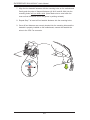
7. Align the four heatsink fasteners with the mounting holes on the motherboard.
Gently push the pairs of diagonal fasteners (#1 & #2, and #3 & #4) into the
mounting holes until you hear a click. (Note: Make sure to orient each fastener so that the narrow end of the groove is pointing outward.)
8. Repeat Step 7 to insert all four heatsink fasteners into the mounting holes.
9. Once all four fasteners are securely inserted into the mounting holes and the
heatsink is properly installed on the motherboard, connect the heatsink fan
wires to the CPU Fan connector.
5-8
Chapter 5: Advanced Motherboard Setup
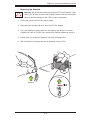
Removing the Heatsink
Warning: We do not recommend removing the CPU or the heatsink. How!
ever, if you do need to remove the heatsink, please follow the instructions
below to prevent damage to the CPU or other components.
1. Unplug the power cord from the power supply.
2. Disconnect the heatsink fan wires from the CPU fan header.
3. Use your fingertips to gently press on the fastener cap and turn it counterclockwise to make a 1/4 (900) turn, then pull the fastener upward to loosen it.
4. Repeat Step 3 to loosen all fasteners from their mounting holes.
5. With all fasteners loosened, remove the heatsink from the CPU.
Pull Up
Remove
5-9
SUPERSERVER 5036I-I/5036I-IF User's Manual
5-6
Installing Memory
Note: Check the Supermicro web site for recommended memory modules.
CAUTION
Exercise extreme care when installing or removing DIMM modules to
prevent any possible damage.
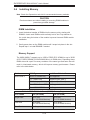
DIMM Installation
1. Insert the desired number of DIMMs into the memory slots, starting with
DIMM1A. Insert each DIMM module vertically into its slot. Pay attention to
the notch along the bottom of the module to prevent incorrect DIMM module
installation.
2. Gently press down on the DIMM module until it snaps into place in the slot.
Repeat step 1 to install DIMM1B if needed.
Memory Support
The X8SIL/X8SIL-F supports up to 16GB of DDR3 ECC UDIMM or up to 32GB
of ECC DDR3 RDIMM (1333/1066/800 MHz in 4 DIMM slots.) Populating these
DIMM slots with a pair of memory modules of the same type and same size will
result in interleaved memory, which will improve memory performance. Please
refer to the table below:
Platform
DIMM Type
Intel® Xeon® Series Processors
X8SIL/X8SIL-F
Non-ECC UDIMM Only
Not Supported
ECC UDIMM Only
Supported (see Table 1)
RDIMM Only (with ECC)
Supported (see Table 2)
Mixed ECC with non-ECC
Not Supported
Mixed UDIMM/RDIMM
Not Supported
Table 1 - DDR3 ECC/Unbuffered (UDIMM) Memory Support
ECC UDIMM
1Gb (x8 DRAM)
2Gb (x8 DRAM)
Single Rank
Up to 4GB
(4 x 1GB DIMM Modules)
Up to 8GB
(4 x 2GB DIMM Modules)
Dual Rank
Up to 8GB
(4 x 2GB DIMM Modules)
Up to 16GB
(4 x 4GB DIMM Modules)
Quad Rank
Not Supported
Not Supported
5-10
Chapter 5: Advanced Motherboard Setup
Table 2 - DDR3 ECC Registered (RDIMM) Memory Support
RDIMM
1Gb (x8 DRAM)
2Gb (x8 DRAM)
Single Rank
Up to 4GB
(4 x 1GB DIMM Modules)
Up to 8GB
(4 x 2GB DIMM Modules)
Dual Rank
Up to 8GB
(4 x 2GB DIMM Modules)
Up to 16GB
(4 x 4GB DIMM Modules)
Quad Rank
Up to 16GB
(4 x 4GB DIMM Modules)
Up to 32GB
(4 x 8GB DIMM Modules)
Note: All other memory sizes, types, die, density, that are not listed in these tables
are NOT supported.
Memory Population Guidelines
Please follow the tables below when populating the X8SIL/X8SIL-F.
DDR3 ECC UDIMM Memory
DIMM Slots
per Channel
DIMMs
Populated
per Channel
DIMM Type
POR Speeds
Ranks per DIMM
(any combination)
2
1
Unbuffered
DDR3 ECC
1066, 1333
Single Rank, Dual
Rank
2
2
Unbuffered
DDR3 ECC
1066, 1333
Single Rank, Dual
Rank
DDR3 ECC RDIMM Memory
DIMM Slots
per Channel
DIMMs
Populated
per Channel
DIMM Type
POR Speeds
Ranks per DIMM
(any combination)
2
1
Registered
DDR3 ECC
1066, 1333
Single Rank, Dual
Rank
2
1
Registered
DDR3 ECC
1066
Quad Rank
2
2
Registered
DDR3 ECC
1066, 1333
Single Rank, Dual
Rank
2
2
Registered
DDR3 ECC
800*
Quad Rank
*Note: 1066 RDIMMs running at 800MHz-BIOS will have their speed automatically
downgraded to 800 MHz.
Slot 2, Channel B
Slot 2, Channel A
Slot 1, Channel B
Slot 1, Channel A
5-11
SUPERSERVER 5036I-I/5036I-IF User's Manual
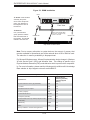
Figure 5-3. DIMM Installation
Notch
Notch
To Install: Insert module
vertically and press
down until it snaps into
place. Pay attention to
the alignment notch at
the bottom.
Front View
To Remove:
Use your thumbs to
gently push the release
tabs near both ends of
the module. This should
release it from the slot.
Note: Notch should align
with the receptive key
point on the slot.
Release Tab
Release Tab
Top View of DDR3 Slot
Note: Due to memory allocation to system devices, the amount of memory that
remains available for operational use will be reduced when 4 GB of RAM is used.
The reduction in memory availability is disproportional.
For Microsoft Windows users: Microsoft implemented a design change in Windows
XP with Service Pack 2 (SP2) and Windows Vista. This change is specific to the
Physical Address Extension (PAE) mode behavior which improves driver compatibility. For more information, please read the following article at Microsoft’s Knowledge
Base website at: http://support.microsoft.com/kb/888137.
Possible System Memory Allocation & Availability
System Device
Size
Physical Memory
Remaining (Available)
(4 GB Total System
Memory)
Firmware Hub flash memory (System BIOS)
1 MB
3.99
Local APIC
4 KB
3.99
Area Reserved for the chipset
2 MB
3.99
I/O APIC (4 Kbytes)
4 KB
3.99
PCI Enumeration Area 1
256 MB
3.76
PCI Express (256 MB)
256 MB
3.51
PCI Enumeration Area 2 (if needed) -Aligned on 256MB boundary-
512 MB
3.01
VGA Memory
16 MB
2.85
TSEG
1 MB
2.84
Memory available to OS and other applications
5-12
2.84
Chapter 5: Advanced Motherboard Setup
5-7
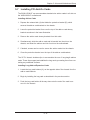
Installing PCI Add-On Cards
The 5036I-I/5036I-IF can accommodate standard size add-on cards in all slots on
the X8SIL/X8SIL-F motherboard.
Installing Add-on Cards
1. Depress the release latch (A) that holds the protective bracket (B), which
secures the add-on card brackets to the chassis.
2. Lower the protective bracket from over the top of the add-on card dummy
brackets as shown in the lower illustration.
3. Remove the add-on card dummy brackets from their slots.
4. Simultaneously, slide the add-on card and its bracket into the slot on the
chassis, and insert the add-on card into its slot on the motherboard.
5. If desired, screws can be used to secure the add-on cards into the chassis.
6. Close the protective bracket over the tops of the add-on card brackets.
The SC731 chassis includes clips to accomodate the use of long-length add-on
cards. These clips support and stabilize the long cards, preventing them from contacting any undesired surfaces.
Installing Long Add-on/Expansion Cards
1. Locate the long card holders (A), on the opposite side of the chassis from the
add-on card brackets.
2. Begin by installing the long card as described in the previous section.
3. Push the long card holder all the way down onto the end of the card to secure it in the chassis.
5-13
SUPERSERVER 5036I-I/5036I-IF User's Manual
Figure 5-4: Installing Add-on Cards
Release Latch (A)
Add-on/Expansion
Card Slots
Protective
Bracket (B)
5-14
Chapter 5: Advanced Motherboard Setup
5-8
Motherboard Details
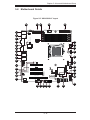
Figure 5-5. X8SIL/X8SIL-F Layout
37
36
35
JPUSB1:B/P USB WAKE UP
1-2:ENABLE
2-3:DISABLE
KB/MOUSE
1
JPI2C:PWR I2C
34
JPI2C
38
FLOPPY
DIMM1B DIMM1A DIMM2B DIMM2A
DDR3 1066/1333 UDIMM/RDIMM required
JPW1
1
JPUSB1
FAN2 FAN1
1
4
JAR
COM1
3
JAR:PSU ALARM RST
2
JD1:Buzzer/Speaker
30
JLED1
JD1
LAN1
8
31
1
U26
JLAN1
SPKR1
1
7
FAN5
1
VGA
6
32
JLED1:Power LED
5
29
NIC1
HDD PWR
LED LED
CPU
JLAN2
9
33
PWR RST
ON
JF1
JF1
28
11
JPB:BMC
1-2:ENABLE
2-3:DISABLE
J6
1
JPB
JPL11
JPL2 1
JI2C1 1
JI2C2 1
X OH/FF
NIC2
10
SLOT7 PCI-E X8 GEN2
27
LE4
SLOT6 PCI-E X8 GEN2
JBT1:CMOS CLEAR
BAR CODE
J13
I-SATA1
I-SATA5
I-SATA3
I-SATA4
I-SATA0
I-SATA2
PCI1
USB 10/11
JL1
JPG1
JPT1:TPM
1-2:Enable
2-3:Disable
25
24
J24
USB4
USB2/3
FAN4
JL1:CHASSIS INTRUSION
J14
JPL1:LAN1
1-2:ENABLE
2-3:DISABLE
COM2
U61
J16
JPL2:LAN2
1-2:ENABLE
2-3:DISABLE
JPG1: VGA
1-2:Enable
2-3:Disable
1
15
JBT1
JPT1
MAC CODE
T-SGPIO1 T-SGPIO2
U2
X8SIL
SLOT4 PCI 33MHZ
LE2
REV:1.00
J8
SLOT5 PCI-E X4 on X8
14
26
LE3
DESIGNED IN USA
LE7
13
J5
12
FAN3
JI2C1/JI2C2
ON:Enable
OFF:Disable
23
16 17 18 19 20
5-15
21
22
SUPERSERVER 5036I-I/5036I-IF User's Manual
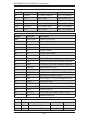
X8SIL/X8SIL-F Jumpers
Number
Jumper
Description
Default
38
JPUSB1
BP USB0/1 Wake-up
Pins 1-2 (Enabled)
25
JBT1
CMOS Clear
(See Section 5-9)
13,14
JI2C1/JI2C2
SMB to PCI Slots
(See Section 5-9)
17
JPG1
Onboard VGA Enable
Pins 1-2 (Enabled)
11,12
JPL1/JPL2
LAN1/LAN2 Enable
Pins 1-2 (Enabled)
10
JPB
BMC Jumper
Pins 1-2 (Enabled)
X8SIL/X8SIL-F Headers/Connectors
Number
Connector
Description
4,16
COM1/COM2
COM1/2 Serial Ports
33,32,27,23,7
Fans 1~5
System/CPU Fan Headers
34
Floppy
Floppy Disk Drive Connector
5
JAR
Alarm Reset
30
JD1
Speaker Header
28
JF1
Control Panel Header
18
JL1
Chassis Intrusion Header
29
JLED
Power LED Indicator Header
37
JPW1
24-pin ATX Main Power Connector (required)
36
JPW2
+12V 8-pin CPU Power Connector (required)
1
KB/Mouse
Keyboard/Mouse Ports
8,9
LAN1~LAN2,
Gigabit Ethernet (RJ45) Ports
22
I-SATA 0~5
Serial ATA Ports (X8SIL has 4 SATA Ports)
2
IPMI
IPMI LAN Port (X8SIL-F Only)
35
JPI2C
PWR Supply (I2C) System Management Bus
31
SPKR1
Onboard Speaker
24
T-SGPIO-0/1
Serial General Purpose IO Headers (for SATA)
3,21
USB0/1, USB 2/3 Rear (USB0/1) and Front Accessible (USB2/3)
20
USB 4
Type A USB Port
19
USB 10/11
Front Panel USB Header (X8SIL-F Only)
6
VGA
Onboard Video Port
X8SIL/X8SIL-F LED Indicators
Number
LED
Description
Color/State
Status
26
LE4
Standby PWR LED Indicator
Green: Solid on
PWR On
15
LE7
IPMI Heartbeat LED
Yellow: Blinking
IPMI: Normal
5-16
Chapter 5: Advanced Motherboard Setup
5-9
Connector Definitions
ATX Power 24-pin Connector
Pin Definitions (JPW1)
Pin#
Definition
Main ATX Power Supply
Connector
13
+3.3V
1
+3.3V
14
-12V
2
+3.3V
The primary power supply connec-
15
COM
3
COM
tor (JPW1) meets the SSI EPS 12V
16
PS_ON
4
+5V
specification. Refer to the table on
the right for the pin definitions of the
17
COM
5
COM
18
COM
6
+5V
ATX 24-pin power connector. You
19
COM
7
COM
must also connect the 8-pin (JPW2)
20
Res (NC)
8
PWR_OK
21
+5V
9
5VSB
22
+5V
10
+12V
23
+5V
11
+12V
24
COM
12
+3.3V
power connector to your power supply
(see below).
Pin #
Definition
Required Connection
Processor Power Connector
JPW2 must also be connected to provide power to the South Bridge, North
Bridge and all VRMs. See the table on
the right for pin definitions.
8-pin (+12V) Processor Power
Pin Definitions (JPW2)
Pins
Definition
1-4
Ground
5-8
+12V
Required Connection
Power Button
The Power Button connection is located
on pins 1 and 2 of JF1. Momentarily
contacting both pins will power on/off
the system. This button can also be configured to function as a suspend button
(with a setting in the BIOS - see Chapter
7). To turn off the power in the suspend
mode, press the button for at least 4
seconds. Refer to the table on the right
for pin definitions.
Power Button
Pin Definitions (JF1)
Pin#
Definition
1
PW_ON
2
Ground
Reset Button
The Reset Button connection is located
on pins 3 and 4 of JF1. Attach it to a
hardware reset switch on the computer
case to reset the system. Refer to the
table on the right for pin definitions.
5-17
Reset Button
Pin Definitions (JF1)
Pin#
Definition
3
Reset
4
Ground
SUPERSERVER 5036I-I/5036I-IF User's Manual
Overheat (OH)/Fan Fail
OH/Fan Fail LED
Pin Definitions (JF1)
Connect an LED cable to pins 7 and 8
of JF1 to provide warnings for chassis
overheating or fan failure. Refer to the
table on the right for pin definitions.
Pin#
OH/Fan Fail Indicator
Status
Definition
State
Definition
7
Vcc/Blue UID LED
Off
Normal
8
OH/Fan Fail LED
On
Overheat
Flashing
Fan Fail
NIC1/NIC2 (LAN1/LAN2)
LAN1/LAN2 LED
Pin Definitions (JF1)
The NIC (Network Interface Controller) LED connection for LAN port 1 is
located on pins 11 and 12 of JF1, and
the LED connection for LAN Port 2 is
on pins 9 and 10. NIC1 LED and NIC2
LED are 2-pin NIC LED headers. Attach NIC LED cables to NIC1 LED and
NIC2 LED to display network activities
for LAN 1 and LAN2. Refer to the table
on the right for pin definitions.
Pin#
Definition
9/11
Vcc
10/12
Ground
HDD LED
The HDD LED connection is located
on pins 13 and 14 of JF1. This LED is
used to display HDD activity. See the
table on the right for pin definitions.
Power On LED
The Power On LED connector is located on pins 15 and 16 of JF1 This
connection is used to provide LED
indication of power being supplied to
the system. See the table on the right
for pin definitions.
5-18
HDD LED
Pin Definitions (JF1)
Pin#
Definition
13
+5V
14
HD Active
Power LED
Pin Definitions (JF1)
Pin#
Definition
15
+5V
16
Control
Chapter 5: Advanced Motherboard Setup
Chassis Intrusion
Chassis Intrusion
Pin Definitions (JL1)
The Chassis Intrusion header is designated JL1. Attach an appropriate
Pin#
Definition
cable from the chassis to inform you
1
Intrusion Input
of a chassis intrusion when the chas-
2
Ground
sis is opened
PS/2 Keyboard and
Mouse Port Pin
Definitions
ATX PS/2 Keyboard and PS/2
Mouse Ports
The ATX PS/2 keyboard and the PS/2
mouse are located on the I/O backpanel. The mouse port is above the
keyboard port. See the table on the
right for pin definitions.
Pin#
Definition
1
Data
2
NC
3
Ground
4
VCC
5
Clock
6
NC
Fan Headers
The X8SIL/X8SIL-F has five fan
headers, all of which are 4-pin fans.
However, pins 1-3 of the fan headers
are backward compatible with the
traditional 3-pin fans. See the table
on the right for pin definitions. Fan 1
is intended for use with the CPU. A
fan speed control setting in the BIOS
Hardware Monitoring section allows
the BIOS to automatically set fan
speeds based on the system temperature. The default setting is Disabled
which allows the onboard fans to run
at full speed. Refer to the table on the
right for pin definitions.
Fan Header
Pin Definitions
(FAN1-5)
Pin#
Definition
1
Ground (Black)
2
2.5A/+16V (Red)
3
Tachometer
4
PWM Control
Note: Please use all 3-pin fans or all 4-pin fans
on a motherboard. Please do not use 3-pin fans
and 4-pin fans on the same board.
Onboard Speaker
Onboard Speaker
Pin Definition
The onboard speaker (SPKR1) can be
used to provide audible indications for
various beep codes. See the table on
the right for pin definitions.
5-19
Pin#
Definitions
Pin 1
Pos. (+)
Beep In
Pin 2
Neg. (-)
Alarm
Speaker
SUPERSERVER 5036I-I/5036I-IF User's Manual
Speaker
Speaker Connector
Pin Definitions
On the JD1 header, pins 3~4 are used
for internal speaker. Close pins 3~4
Pin Setting
Definition
with a cap to use the onboard speaker.
Pins 3~4
Internal Speaker
If you wish to use an external speaker,
Pins1~4
External Speaker
close pins 1~4 with a cable. See the
table on the right for pin definitions.
Serial Port
Pin Definitions
Serial Ports
Pin #
Two serial ports are included on the
X8SIL/X8SIL-F. See the table on the
right for pin definitions.
1
DCD
6
DSR
2
RXD
7
RTS
3
TXD
8
CTS
4
DTR
9
RI
5
Ground
10
NC
Definition
Pin #
Definition
NC = No Connection
USB Port
Pin Definitions
Universal Serial Bus (USB)
Pin# Definition
Two Universal Serial Bus ports (USB
0 and USB 1) are located on the I/O
backplane. Additionally, a Type A
USB header (USB4) and two USB
connections (USB2/3 and USB 10/11,
X8SIL-F only) are provided on the
motherboard to provide front chassis
access. (Cables are not included).
See the tables on the right for pin
definitions.
1
+5V
5
+5V
2
USB_PN1
6
USB_PN0
3
USB_PP1
7
USB_PP0
4
Ground
8
Ground
LAN1/LAN2 (Ethernet Ports)
Two Ethernet ports are located on the
I/O backplane. These ports accept
RJ45 type cables.
5-20
Pin#
Definition
Front Panel USB Port
Pin Definitions
USB 8, 9, 10
Pin #
Definition
USB 11
Pin #
Definition
1
+5V
6
+5V
2
USB_PN2
7
USB_PN3
3
USB_PP2
8
USB_PP3
4
Ground
9
Ground
5
No Connection
10
Key
Chapter 5: Advanced Motherboard Setup
Onboard Power LED
Onboard PWR LED
Pin Definitions
An onboard Power LED header is
located at JLED. This Power LED
header is connected to Control Panel
header located at JF1 to indicate the
status of system power. See the table
on the right for pin definitions.
Pin#
Definition
1
VCC
2
No Connection
3
Connection to PWR
LED in JF1
PWR Supply I2C
Pin Definitions
2
Power Supply I C Connector
The Power Supply (I2C) connector is
located at SMB_PS1 and is used to
monitor the status of the power supply,
fan and system temperature. See the
table on the right for pin definitions.
Pin#
Definition
1
Clock
2
Data
3
PWR Fail
4
Ground
5
3.3V
T-SGPIO 0/1 Headers
Two T-SGPIO (Serial-Link General
Purpose Input/Output) headers are
located near the SATA connectors
on the motherboard. These headers
are used to communicate with the
enclosure management chip in the
system. See the table on the right for
pin definitions.
Serial_Link-SGPIO
Pin Definitions
Pin#
Definition
Pin
Definition
1
NC
2
NC
3
Ground
4
DATA Out
5
Load
6
Ground
7
Clock
8
NC
NC = No Connection
Alarm Reset
If three power supplies are installed
and Alarm Reset (JAR) is connected,
the system will notify you when any of
the three power modules fail. Connect
JAR to a micro-switch to turn off the
alarm that is activated when a power
module fails. See the table on the right
for pin definitions.
5-21
Alarm Reset
Pin Definitions
Pin Setting
Definition
Pin 1
Ground
Pin 2
+5V
SUPERSERVER 5036I-I/5036I-IF User's Manual
5-10 Jumper Settings
Explanation of Jumpers
To modify the operation of the motherboard, jumpers can be used to choose
between optional settings. Jumpers
3
2
1
3
2
1
Connector
Pins
create shorts between two pins to
change the function of the connector.
Pin 1 is identified with a square solder
Jumper
pad on the printed circuit board. See
the motherboard layout pages for
jumper locations.
Setting
Note: On a two-pin jumper, "Closed"
means the jumper is on both pins and
"Open" means the jumper is either on
only one pin or completely removed.
CMOS Clear
JBT1 is used to clear CMOS (which will also clear any passwords). Instead of pins,
this jumper consists of contact pads to prevent accidentally clearing the contents
of CMOS.
To clear CMOS,
1. First power down the system and unplug the power cord(s).
2. With the power disconnected, short the CMOS pads with a metal object such
as a small screwdriver.
3. Remove the screwdriver (or shorting device).
4. Reconnect the power cord(s) and power on the system.
Note: Do not use the PW_ON connector to clear CMOS.
VGA Enable
JPG1 allows you to enable or disable
the onboard VGA connector. The default
position is on pins 1 and 2 to enable
VGA. See the table on the right for
jumper settings.
5-22
VGA Enable/Disable
Jumper Settings (JPG1)
Both Jumpers
Definition
Pins 1-2
Enabled (Default)
Pins 2-3
Disabled
Chapter 5: Advanced Motherboard Setup
LAN1/LAN2 Enable/Disable
LAN1/LAN2 Enable/Disable
Jumper Settings (JPL1/JPL2)
Change the setting of jumper JPL1 or
JPL2 to enable or disable the LAN1 and
Jumper Setting
LAN2 Ethernet ports, respectively. See
Pins 1-2
Enabled
the table on the right for jumper set-
Pins 2-3
Disabled
Definition
tings. The default setting is enabled.
PCI Slot SMB Enable
PCI Slot_SMB Enable
Jumper Settings
Use Jumpers I2C1/I2C2 to enable PCI
Slot SMB (System Management Bus)
Jumper Setting
support to improve system management for the PCI slots. See the table
on the right for jumper settings.
Short
Enabled
Open (Default)
Disabled
Definition
USB Wake-Up
Use the JPUSB1 jumper to "wake-up"
your system by pressing a key on a
USB keyboard or clicking the USB
mouse. The JPUSB1 jumper is used
together with the USB Wake-Up feature
in the BIOS. Enable this jumper and the
USB feature in the BIOS to wake-up
your system via USB devices.
Note: When the USB function is set
to Enabled in the BIOS, and a USB
Wake-up jumper is set to Disabled,
remove the USB devices from the
USB ports whose USB jumper is Disabled before the system goes into the
standby mode.
USB0/1 Port Wake-up
Enable/Disable (JPUSB1)
Pin#
Definition
1-2
Enabled (Default)
2-3
Disabled
BMC Jumper
JPB is used to enable or disable the
BMC (Baseboard Management Control) Chip and the onboard IPMI connection. This jumper is used together
with the IPMI settings in the BIOS. The
default position is on pins 1 and 2 to
Enable BMC. See the table on the right
for jumper settings.
5-23
BMC IPMI Enable/Disable Jumper
Settings
Settings
Definition
Pins 1-2
Enabled (Default)
Pins 2-3
Disabled
SUPERSERVER 5036I-I/5036I-IF User's Manual
5-11 Onboard Indicators
LAN1/LAN2
Activity LED
LAN1/2 LEDs
Color
Status
Yellow
The Ethernet ports (located on the I/O
backplane) have two LEDs. On each
Blinking
Definition
Active
LAN1/2 LED
Link LED
port, one LED indicates activity while
the other LED may be green, amber
LED Color
Definition
or off to indicate the speed of the connection. See the tables on the right for
Off
No Connection or 10 Mb/s
Green
100 Mb/s
Amber
1 Gb/s
more information.
IPMI Dedicated LAN LEDs
In addition to LAN1/LAN2, a dedicated
IPMI LAN port is also provided on the
X8SIL/X8SIL-F. The yellow LED indicates activity, while the green LED
indicates the speed of the connection. See the table at right for more
information.
IPMI LAN Link LED (Left) &
Activity LED (Right)
LED
Status
Definition
Link
Green: Solid
100 Mb/s
Activity
Yellow: Blinking
Active
Onboard Power LED
An Onboard Power LED is located at
LE4 on the motherboard. When LE4 is
on, the AC power cable is connected.
Make sure to disconnect the power
cable before removing or installing any
component. See the table on the right
for more details.
Onboard PWR LED
LED Color
Definition
Off
System Off
On
System on, or
System off and PWR
Cable Connected
IPMI Heartbeat LED
An IPMI Heartbeat LED is located at
LE7. When LE7 blinks, IPMI is functioning properly. Refer to the table on
the right for details.
5-24
IPMI Heartbeat LED
Green: Blinking
IPMI is ready for use
Chapter 5: Advanced Motherboard Setup
5-12 SATA and Floppy Drive Connections
SATA Port
Pin Definitions
SATA Ports
(I-SATA0 ~ I-SATA5)
Six Serial ATA (SATA) ports (I-SATA
0~5) are located on the X8SIL-F
Pin #
Definition
1
Ground
motherboard (4 SATA ports on the
2
TXP
X8SIL). These Serial Link connections
3
TXN
provide faster data transmission than
traditional Parallel ATA. See the table
4
Ground
5
RXN
on the right for pin definitions.
6
RXP
7
Ground
Floppy Connector
The floppy connector is located next
to the DIMM slots on the motherboard.
See the table on the right for pin
definitions.
Floppy Drive Connector
Pin Definitions (Floppy)
Pin#
Definition
1
Ground
2
FDHDIN
3
Ground
4
Reserved
Note the following when connecting
the floppy cable:
5
Key
6
FDEDIN
7
Ground
8
Index
•
The fl oppy disk drive cable has
9
Ground
10
Motor Enable
seven twisted wires.
11
Ground
12
Drive Select B
13
Ground
14
Drive Select B
A red mark on a wire typically des-
15
Ground
16
Motor Enable
ignates the location of pin 1.
17
Ground
18
DIR
19
Ground
20
STEP
A single floppy disk drive ribbon
21
Ground
22
Write Data
cable has 34 wires and two connectors to provide for two floppy
disk drives. The connector with
twisted wires always connects to
drive A, and the connector that
does not have twisted wires always connects to drive B.
23
Ground
24
Write Gate
25
Ground
26
Track 00
27
Ground
28
Write Protect
29
Ground
30
Read Data
31
Ground
32
Side 1 Select
33
Ground
34
Diskette
•
•
5-25
Pin #
Definition
SUPERSERVER 5036I-I/5036I-IF User's Manual
Notes
5-26
Chapter 6: Advanced Chassis Setup
Chapter 6
Advanced Chassis Setup
This chapter covers the steps required to install components and perform simple
maintenance on the SC731i-300 chassis. Following the component installation
steps in the order given will eliminate most common problems. If some steps are
unnecessary, skip ahead to the next step.
Tools Required
The only tool you will need is a Philips screwdriver.
6-1
Static-Sensitive Devices
Static electrical discharge can damage electronic components. To prevent damage
to any printed circuit boards (PCBs), it is important to handle them very carefully.
The following measures are generally sufficient to protect your equipment from
static discharge.
Precautions
•
•
•
Use a grounded wrist strap designed to prevent static discharge.
Touch a grounded metal object before removing any board from its antistatic
bag.
Handle a board by its edges only; do not touch its components, peripheral chips,
memory modules or gold contacts.
•
When handling chips or modules, avoid touching their pins.
•
Put the motherboard, add-on cards and peripherals back into their antistatic
bags when not in use.
•
For grounding purposes, make sure your computer chassis provides excellent
conductivity between the power supply, the case, the mounting fasteners and
the motherboard.
Unpacking
The motherboard is shipped in antistatic packaging. When unpacking the board,
make sure the person handling it is static protected.
6-1
SUPERSERVER 5036I-I/5036I-IF User's Manual
6-2
Front Control Panel
The front control panel must be connected to the JF1 connector on the motherboard
to provide you with system status and alarm indications. A ribbon cable has bundled
these wires together to simplify this connection. Connect the cable from JF1 on the
motherboard (making sure the red wire plugs into pin 1) to the appropriate comnnector on the front control panel PCB (printed circuit board). Pull all excess cabling
over to the control panel side of the chassis.
The LEDs inform you of system status - see Figure 6-1 for details. See Chapter 5
for details on JF1.
Figure 6-1. Front Control Panel LEDs
HDD
NIC
Overheat
Power On
Indicates SATA hard disk/DVD-ROM drive activity.
Indicates network activity a GLAN port.
Indicates an overheat condition or fan failure.
Indicates the system is powered on.
6-2
Chapter 6: Advanced Chassis Setup
Figure 6-2. Chassis Rear View
Power Supply
I/O Backplane
(see Figure 5-2)
PCI Expansion Slots
6-3
SUPERSERVER 5036I-I/5036I-IF User's Manual
6-3
Front Bezel
A bezel may be installed to cover the front of the chassis.
Front Bezel Installation
1. Remove the dummy cover (A) on the peripheral drive bay.
2. Push the front bezel into place on the front of the chassis to complete the
installation (see Figure 6-4).
1
Remove the
Dummy Cover (A)
12
Figure 6-3: Installing the Front Bezel
6-4
Chapter 6: Advanced Chassis Setup
6-4
Removing the Chassis Cover
The left side cover of the chassis must be removed before replacing the system
fan or installing and removing hard drives.
Warning: Only qualified service technicians should access the inside of
!
the system. Except for short periods of time, do NOT operate the system
without the cover in place. The chassis cover must be in place to allow
proper airflow and prevent overheating.
15
Cover
13
Handle (B)
12
Slide Tab
A Toward
Handle B
Release
Tab (A)
14
13
Figure 6-4: Removing the Chassis Cover
Removing the Chassis Cover:
1. Power down the server and disconnect it from the power source.
2. Slide the release tab (A) towards the cover handle (B).
3. Grasp the cover handle with your fingers and slide it toward the rear of the
chassis
4. Remove the cover from the chassis.
6-5
SUPERSERVER 5036I-I/5036I-IF User's Manual
6-5
System Fans
The SC731 includes a super quiet system fan that provides cooling for the chassis.
No tools or screws are required to install the system fan.
Fan Failure
Under normal operation, the chassis fan and the power supply fan both run continuously. If the chassis fan fails, the system must be powered down before replacing
it. If the power supply fan fails, the power supply itself must be replaced.
Replacing the System Fan
1. Power down the server and disconnect it from the power source.
2. Remove the left chassis cover as described in Section 6-4.
3. Insert the four rubber pins into the four mounting holes surrounding the fan
grill on the rear of the chassis.
4. Place the system fan on top of the fan grill, aligning the mounting holes of the
fan grill with the mounting holes of the system fan.
5. Pull the rubber pins through the mounting holes of the system fan to secure
the fan to the chassis.
Figure 6-5. Replacing the System Fan
14
6-6
Chapter 6: Advanced Chassis Setup
6-6
Drive Bay Installation
The SC731 chassis must be powered-down before hard drives can be removed
from the hard drive carriers, which are not hot-swappable.
SATA Drives
The SATA drive IDs are preconfigured as 0 through 3 in order from bottom to top.
In order to access and install components in the chassis interior, it is necessary to
rotate the hard drive cage. This will provide sufficient room to install and configure
the chassis components. See Figures 6-6 and 6-7.
Rotating the Hard Drive Cage
1. Power down the server and disconnect it from the power source.
2. Remove the left chassis cover as described in Section 6-4.
3. Lift the release tab (A).
4. Rotate the hard disk drive cage (B) outward.
Removing and Installing Hard Drives
1. Rotate the hard drive cage as described above.
2. Press the release tab on the side of the hard drive carrier that is to be removed from the hard drive cage.
3. Gently slide the hard drive carrier out of the hard drive cage. See Figure 6-6.
Mounting a SATA Drive in a Drive Carrier
1. Insert a new hard drive into a hard drive carrier by sliding it towards the back
of the the hard drive cage until it clicks into a locked position.
2. Connect the power and data cables to the hard drive.
3. Rotate the hard drive cage 90 degrees inward, returning it to the closed,
operational position in the chassis.
4. If desired, each hard drive may be further secured to the drive cage with an
additional (optional) screw at the middle of the drive.
6-7
SUPERSERVER 5036I-I/5036I-IF User's Manual
Release Tab (A)
HDD Cage (B)
Figure 6-6: Rotating the Hard Drive Cage
13
12
Release Tabs
Figure 6-7: Removing a Hard Drive Carrier from the Hard Drive Cage
6-8
Chapter 6: Advanced Chassis Setup
Installing Drives in the Optional Drive Bays
The SC731 chassis has two empty drive bays that support optional devices such
as a DVD-ROM.
Installing an Optional Device
1. Power down the server and disconnect it from the power source.
2. Remove the front bezel from the chassis by lifting it upwards from the bottom,
and pulling off the front of the chassis.
3. Remove the cover plate from the optical device slot on the front of the chassis.
4. Install the bracket rail (A) onto one side of the device by inserting the pins of
the bracket into the mounting holes on the side of the device.
5. Slide the device into the chassis.
6. If desired, screws may be used to secure the device into chassis.
7. Attach the power and data cables to the drive.
8. Replace the chassis cover before restoring power to the system.
14
15
Figure 6-8: Installing an Optional Device
6-9
Bracket
Rail (A)
SUPERSERVER 5036I-I/5036I-IF User's Manual
6-7
Power Supply
The SC731 chassis includes a 300-watt power supply. The power supply has the
capability to automatically sense and operate with an input voltage of 100 or 240V
AC.
If it becomes necessary to replace the power supply, follow the instructions below.
Replacing the Power Supply
1. Disconnect the chassis from any power source. Also disconnect all power
cables that are connected to the motherboard.
2. Remove the screws securing the power supply to the chassis. These are
located on the rear of the chassis. Set these screws aside for later use.
3. Gently lift the power supply out of the chassis.
4. Replace the failed power supply with an identical power supply model.
5. Secure the new power supply using the screws previously set aside.
6. Reconnect the power cables to the motherboard.
7. Plug the AC power cord back into the module and power up the server.
8. Finish by replacing the chassis left cover and then restoring power to the
system.
6-10
Chapter 7: BIOS
Chapter 7
BIOS
7-1
Introduction
This chapter describes the AMI BIOS Setup Utility for the X8SIL/X8SIL-F. The AMI
ROM BIOS is stored in a Flash EEPROM and can be easily updated. This chapter
describes the basic navigation of the AMI BIOS Setup Utility setup screens.
Note: For instructions on BIOS recovery, please refer to the instruction
guide posted at http://www.supermicro.com/support/manuals/.
Starting BIOS Setup Utility
To enter the AMI BIOS Setup Utility screens, press the <Delete> key while the
system is booting up.
Note: In most cases, the <Delete> key is used to invoke the AMI BIOS
setup screen. There are a few cases when other keys are used, such as
<F1>, <F2>, etc.
Each main BIOS menu option is described in this manual. The Main BIOS setup
menu screen has two main frames. The left frame displays all the options that can
be configured. Grayed-out options cannot be configured. Options in blue can be
configured by the user. The right frame displays the key legend. Above the key
legend is an area reserved for a text message. When an option is selected in the
left frame, it is highlighted in white. Often a text message will accompany it. (Note:
the AMI BIOS has default text messages built in. Supermicro retains the option to
include, omit, or change any of these text messages.)
The AMI BIOS Setup Utility uses a key-based navigation system called "hot keys".
Most of the AMI BIOS setup utility "hot keys" can be used at any time during the
setup navigation process. These keys include <F1>, <F10>, <Enter>, <ESC>, arrow keys, etc.
Note: Options printed in Bold are default settings.
How To Change the Configuration Data
The configuration data that determines the system parameters may be changed by
entering the AMI BIOS Setup utility. This Setup utility can be accessed by pressing
<Del> at the appropriate time during system boot.
7-1
SUPERSERVER 5036I-I/5036I-IF User's Manual
How to Start the Setup Utility
Normally, the only visible Power-On Self-Test (POST) routine is the memory test.
As the memory is being tested, press the <Delete> key to enter the main menu of
the AMI BIOS Setup Utility. From the main menu, you can access the other setup
screens. An AMI BIOS identification string is displayed at the left bottom corner of
the screen, below the copyright message.
Warning! Do not upgrade the BIOS unless your system has a BIOS-related
issue. Flashing the wrong BIOS can cause irreparable damage to the system. In no event shall Supermicro be liable for direct, indirect, special, incidental, or consequential damages arising from a BIOS update. If you have
to update the BIOS, do not shut down or reset the system while the BIOS
is updating to avoid possible boot failure. Refer to our web site for BIOS
recovery procedures < http://www.supermicro.com/support/manuals/ >.
7-2
Main Setup
7-2
Chapter 7: BIOS
When you first enter the AMI BIOS Setup Utility, you will enter the Main setup screen.
You can always return to the Main setup screen by selecting the Main tab on the
top of the screen. The Main BIOS Setup screen is shown below.
System Overview: The following BIOS information will be displayed:
System Time/System Date
Use this option to change the system time and date. Highlight System Time or System Date using the arrow keys. Enter new values through the keyboard. Press the
<Tab> key or the arrow keys to move between fields. The date must be entered in
Day MM/DD/YY format. The time is entered in HH:MM:SS format. (Note: The time
is in the 24-hour format. For example, 5:30 P.M. appears as 17:30:00.)
Supermicro X8SIL/X8SIL-F
Version
Build Date
Processor
The AMI BIOS will automatically display the status of processor as shown below:
Type of Processor
Speed
Physical Count
Logical Count
System Memory
This displays the size of memory available in the system:
7-3
SUPERSERVER 5036I-I/5036I-IF User's Manual
7-3
Advanced Setup Configurations
Use the arrow keys to select Boot Setup and hit <Enter> to access the submenu
items:
XBOOT Feature
Quick Boot
If Enabled, this option will skip certain tests during POST to reduce the time needed
for system boot. The options are Enabled and Disabled.
Quiet Boot
This option allows the bootup screen options to be modified between POST messages or the OEM logo. Select Disabled to display the POST messages. Select
Enabled to display the OEM logo instead of the normal POST messages. The options are Enabled and Disabled.
AddOn ROM Display Mode
This sets the display mode for Option ROM. The options are Force BIOS and
Keep Current.
Bootup Num-Lock
This feature selects the Power-on state for Numlock key. The options are Off
and On.
PS/2 Mouse Support
This feature enables support for the PS/2 mouse. The options are Disabled,
Enabled and Auto.
7-4
Chapter 7: BIOS
Wait For 'F1' If Error
This forces the system to wait until the 'F1' key is pressed if an error occurs. The
options are Disabled and Enabled.
Hit 'Del' Message Display
This feature displays "Press DEL to run Setup" during POST. The options are
Enabled and Disabled.
Watch Dog Function
If enabled, the Watch Dog Timer will allow the system to reboot when it is inactive
for more than 5 minutes. The options are Enabled and Disabled.
Restore on AC Power Loss
Use this feature to set the power state after a power outage. Select Power-Off for
the system power to remain off after a power loss. Select Power-On for the system
power to be turned on after a power loss. Select Last State to allow the system to
resume its last state before a power loss. The options are Power-On, Power-Off
and Last State.
Interrupt 19 Capture
Interrupt 19 is the software interrupt that handles the boot disk function. When this
item is set to Enabled, the ROM BIOS of the host adaptors will "capture" Interrupt
19 at boot and allow the drives that are attached to these host adaptors to function
as bootable disks. If this item is set to Disabled, the ROM BIOS of the host adaptors will not capture Interrupt 19, and the drives attached to these adaptors will not
function as bootable devices. The options are Enabled and Disabled.
XProcessor & Clock Options
Warning: Take Caution when changing the Advanced settings. An incorrect
value, a very high DRAM frequency or incorrect DRAM timing may cause
system to become unstable. When this occurs, revert to the default setting.
CPU Ratio
This feature allows the user to use the CPU clock multiplier to multiply CPU
speed in order to enhance performance. Select Manual to Manually set the
multiplier setting. Select Auto for the BIOS to automatically select the CPU
multiplier setting for your system. The options are Auto and Manual.
Clock Spread Spectrum
Select Enable to use the feature of Clock Spectrum, which will allow the BIOS to
monitor and attempt to reduce the level of Electromagnetic Interference caused by
7-5
SUPERSERVER 5036I-I/5036I-IF User's Manual
the components whenever needed. Select Disabled to enhance system stability.
The options are Disabled and Enabled.
Hardware Prefetcher (Available when supported by the CPU)
If set to Enabled, the hardware pre fetcher will pre fetch streams of data and instructions from the main memory to the L2 cache in the forward or backward manner to
improve CPU performance. The options are Disabled and Enabled.
Adjacent Cache Line Prefetch (Available when supported by the CPU)
The CPU fetches the cache line for 64 bytes if this option is set to Disabled. The
CPU fetches both cache lines for 128 bytes as comprised if Enabled.
Intel® Virtualization Technology (Available when supported by the CPU)
Select Enabled to use the feature of Virtualization Technology to allow one platform
to run multiple operating systems and applications in independent partitions, creating multiple "virtual" systems in one physical computer. The options are Enabled
and Disabled. Note: If there is any change to this setting, you will need to power
off and restart the system for the change to take effect. Please refer to Intel’s web
site for detailed information.
Execute-Disable Bit Capability (Available when supported by the OS and
the CPU)
Set to Enabled to enable the Execute Disable Bit which will allow the processor
to designate areas in the system memory where an application code can execute
and where it cannot, thus preventing a worm or a virus from flooding illegal codes
to overwhelm the processor or damage the system during an attack. The default is
Enabled. (Refer to Intel and Microsoft Web Sites for more information.)
Simultaneous Multi-Threading (Available when supported by the CPU)
Set to Enabled to use the Hyper-Threading Technology, which will result in increased
CPU performance. The options are Disabled and Enabled.
Active Processor Cores
Set to Enabled to use a processor's Second Core and beyond. (Please refer to
Intel's web site for more information.) The options are All, 1 and 2.
Intel® EIST Technology
EIST (Enhanced Intel SpeedStep Technology) allows the system to automatically
adjust processor voltage and core frequency in an effort to reduce power consumption and heat dissipation. Please refer to Intel’s web site for detailed information.
The options are Disable and Enable.
7-6
Chapter 7: BIOS
Intel® Turbo Boost Technology (Available if Intel® EIST technology is
Enabled)
This feature allows processor cores to run faster than marked frequency in specific
conditions. The options are Disabled and Enabled.
C1E Support
Select Enabled to use the "Enhanced Halt State" feature. C1E significantly reduces
the CPU's power consumption by reducing the CPU's clock cycle and voltage during
a "Halt State." The options are Disabled and Enabled.
Intel® C-STATE Tech
If enabled, C-State is set by the system automatically to either C2, C3 or C4 state. The options are Disabled and Enabled.
C-State package limit setting
If set to Auto, the AMI BIOS will automatically set the limit on the C-State package register.
The options are Auto, C1, C3, C6 and C7.
C1 Auto Demotion
When enabled, the CPU will conditionally demote C3, C6 or C7 requests to C1 based on
un-core auto-demote information. The options are Disabled and Enabled.
C3 Auto Demotion
When enabled, the CPU will conditionally demote C6 or C7 requests to C3 based on un-core
auto-demote information. The options are Disabled and Enabled.
XAdvanced Chipset Control
The items included in the Advanced Settings submenu are listed below.
Memory Remap Feature
This feature when enabled, allows the remapping of everlapped PCI memory above
the total physical memory. The settings are Enabled and Disabled.
Intel VT-d
Select Enabled to enable Intel's Virtualization Technology support for Direct I/O VT-d
by reporting the I/O device assignments to VMM through the DMAR ACPI Tables.
This feature offers fully-protected I/O resource-sharing across the Intel platforms,
providing the user with greater reliability, security and availability in networking and
data-sharing. The settings are Enabled and Disabled.
7-7
SUPERSERVER 5036I-I/5036I-IF User's Manual
Active State Power Management
Select Enabled to start Active-State Power Management for signal transactions
between L0 and L1 Links on the PCI Express Bus. This maximizes power-saving
and transaction speed. The options are Enabled and Disabled.
Route Port 80h Cycles to
This feature allows the user to decide which bus to send debug information to. The
options are Disabled, PCI and LPC.
USB Functions
This feature allows the user to decide the number of onboard USB ports to be
enabled. The Options are: Disabled and Enabled.
Legacy USB Support (available if USB Functions above is Enabled)
Select Enabled to use Legacy USB devices. If this item is set to Auto, Legacy
USB support will be automatically enabled if a legacy USB device is installed
on the motherboard, and vise versa. The settings are Disabled, Enabled and
Auto.
XSATA / Floppy Configuration
When this submenu is selected, the AMI BIOS automatically detects the presence
of the IDE Devices and displays the following items:
Floppy A
This feature allows the user to select the type of floppy drive connected to the system. The options are Disabled, 360KB 5 1/4", 1.2MB 5 1/4", 720KB 3 1/2", 1.44MB
3 1/2" and 2.88MB 3 1/2".
SATA#1 Configuration
If Compatible is selected, it sets SATA#1 to legacy compatibility mode, while selecting Enhanced sets SATA#1 to native SATA mode. The options are Disabled,
Compatible, Enhanced.
Configure SATA as
This feature allows the user to select the drive type for SATA#1. The options are
IDE, RAID, AHCI and Disabled.
ICH RAID CodeBase (Available if RAID is selected above)
Select Intel to enable the Intel SATA Host RAID Utility. Select Adaptec to use the
Adaptec Host RAID Utility. The options are Intel and Adaptec.
7-8
Chapter 7: BIOS
SATA#2 Configuration (Available if IDE is enabled under "Configure SATA#1
as" above)
Selecting Enhanced will set SATA#2 to native SATA mode. The options are
Compatible and Enhanced
IDE Detect Timeout (sec)
Use this feature to set the time-out value for the BIOS to detect the ATA, ATAPI
devices installed in the system. The options are 0 (sec), 5, 10, 15, 20, 25, 30, and
35.
Primary IDE Master/Slave, Secondary IDE Master/Slave, Third IDE Master,
and Fourth IDE Master
These settings allow the user to set the parameters of Primary IDE Master/Slave,
Secondary IDE Master/Slave, Third and Fourth IDE Master slots. Hit <Enter> to
activate the following submenu screen for detailed options of these items. Set the
correct configurations accordingly. The items included in the submenu are:
Type
Select the type of device connected to the system. The options are Not Installed,
Auto, CD/DVD and ARMD.
LBA/Large Mode
LBA (Logical Block Addressing) is a method of addressing data on a disk drive.
In the LBA mode, the maximum drive capacity is 137 GB. For drive capacities
over 137 GB, your system must be equipped with a 48-bit LBA mode addressing.
If not, contact your manufacturer or install an ATA/133 IDE controller card that
supports 48-bit LBA mode. The options are Disabled and Auto.
Block (Multi-Sector Transfer)
Block Mode boosts the IDE drive performance by increasing the amount of data
transferred. Only 512 bytes of data can be transferred per interrupt if Block Mode
is not used. Block Mode allows transfers of up to 64 KB per interrupt. Select
Disabled to allow data to be transferred from and to the device one sector at
a time. Select Auto to allow data transfer from and to the device occur multiple
sectors at a time if the device supports it. The options are Auto and Disabled.
PIO Mode
The IDE PIO (Programmable I/O) Mode programs timing cycles between the
IDE drive and the programmable IDE controller. As the PIO mode increases, the
cycle time decreases. The options are Auto, 0, 1, 2, 3, and 4.
7-9
SUPERSERVER 5036I-I/5036I-IF User's Manual
Select Auto to allow the AMI BIOS to automatically detect the PIO mode. Use
this value if the IDE disk drive support cannot be determined.
Select 0 to allow the AMI BIOS to use PIO mode 0. It has a data transfer rate
of 3.3 MBs.
Select 1 to allow the AMI BIOS to use PIO mode 1. It has a data transfer rate
of 5.2 MBs.
Select 2 to allow the AMI BIOS to use PIO mode 2. It has a data transfer rate
of 8.3 MBs.
Select 3 to allow the AMI BIOS to use PIO mode 3. It has a data transfer rate
of 11.1 MBs.
Select 4 to allow the AMI BIOS to use PIO mode 4. It has a data transfer bandwidth of 32-Bits. Select Enabled to enable 32-Bit data transfer.
DMA Mode
Select Auto to allow the BIOS to automatically detect IDE DMA mode when the
IDE disk drive support cannot be determined.
Select SWDMA0 to allow the BIOS to use Single Word DMA mode 0. It has a
data transfer rate of 2.1 MBs.
Select SWDMA1 to allow the BIOS to use Single Word DMA mode 1. It has a
data transfer rate of 4.2 MBs.
Select SWDMA2 to allow the BIOS to use Single Word DMA mode 2. It has a
data transfer rate of 8.3 MBs.
Select MWDMA0 to allow the BIOS to use Multi Word DMA mode 0. It has a
data transfer rate of 4.2 MBs.
Select MWDMA1 to allow the BIOS to use Multi Word DMA mode 1. It has a
data transfer rate of 13.3 MBs.
Select MWDMA2 to allow the BIOS to use Multi-Word DMA mode 2. It has a
data transfer rate of 16.6 MBs.
Select UDMA0 to allow the BIOS to use Ultra DMA mode 0. It has a data transfer
rate of 16.6 MBs. It has the same transfer rate as PIO mode 4 and Multi Word
DMA mode 2.
Select UDMA1 to allow the BIOS to use Ultra DMA mode 1. It has a data transfer
rate of 25 MBs.
Select UDMA2 to allow the BIOS to use Ultra DMA mode 2. It has a data transfer
rate of 33.3 MBs.
Select UDMA3 to allow the BIOS to use Ultra DMA mode 3. It has a data transfer
rate of 66.6 MBs.
7-10
Chapter 7: BIOS
Select UDMA4 to allow the BIOS to use Ultra DMA mode 4 . It has a data
transfer rate of 100 MBs.
The options are Auto, SWDMAn, MWDMAn, and UDMAn.
S.M.A.R.T. For Hard disk drives
Self-Monitoring Analysis and Reporting Technology (SMART) can help predict
impending drive failures. Select Auto to allow the AMI BIOS to automatically detect hard disk drive support. Select Disabled to prevent the AMI BIOS from using
the S.M.A.R.T. Select Enabled to allow the AMI BIOS to use the S.M.A.R.T. to
support hard drive disk. The options are Disabled, Enabled, and Auto.
32-Bit Data Transfer
Select Enable to enable the function of 32-bit IDE data transfer. The options are
Enabled and Disabled.
XPCI/PnP Configuration
This feature allows the user to set the PCI/PnP configurations for the following
items:
Clear NVRAM
This feature clears the NVRAM during system boot. The options are No and
Yes.
Plug & Play OS
Selecting Yes allows the OS to configure Plug & Play devices. (This is not required
for system boot if your system has an OS that supports Plug & Play.) Select No to
allow the AMI BIOS to configure all devices in the system.
PCI Latency Timer
This feature sets the latency Timer of each PCI device installed on a PCI bus. Select
64 to set the PCI latency to 64 PCI clock cycles. The options are 32, 64, 96, 128,
160, 192, 224 and 248.
PCI IDE Bus Master
When enabled, the BIOS uses PCI bus mastering for reading/writing to IDE drives.
The options are Disabled and Enabled.
PCIE I/O Performace
This feature selects the setting for the IOH PCIE maximum payload size. The options are 128B and 256B.
7-11
SUPERSERVER 5036I-I/5036I-IF User's Manual
PCI Slots 5, 6, 7 & PCI Slot 4 OPROM
Use this feature to enable or disable PCI slot Option ROMs. The options are Disabled and Enabled.
Onboard LAN Option ROM Select
This feature selects whether to load the iSCSI or PXE onboard LAN option ROM.
The options are iSCSI and PXE.
Load Onboard LAN1 Option ROM/Load Onboard LAN2 Option ROM
This feature is to enable or disable the onboard option ROMs. The options are
Disabled and Enabled.
Initiate Graphic Adapter
Use the feature to select the graphics controller to be used as the primary boot
device. The options are Other and Onboard VGA.
XSuper IO Device Configuration
Serial Port1 Address/ Serial Port2 Address
This option specifies the base I/O port address and the Interrupt Request address
of Serial Port 1 and Serial Port 2. Select Disabled to prevent the serial port from
accessing any system resources. When this option is set to Disabled, the serial
port physically becomes unavailable. Select 3F8/IRQ4 to allow the serial port to
use 3F8 as its I/O port address and IRQ 4 for the interrupt address. The options
for Serial Port1 are Disabled, 3F8/IRQ4, 2E8/IRQ3. The options for Serial Port2 are
Disabled, 2F8/IRQ3, and 2E8/IRQ3.
Onboard Floppy Controller
Select Enabled to enable the onboard Floppy Controller. The options are Enabled
and Disabled.
7-12
Chapter 7: BIOS
XRemote Access Configuration
Remote Access
This allows the user to enable the Remote Access feature. The options are Disabled and Enabled.
If Remote Access is set to Enabled, the following items will display:
Serial Port Number
This feature allows the user decide which serial port to be used for Console
Redirection. The options are COM 1, COM 2 and COM 3.
Note: Serial Over LAN (SOL) is enabled on COM 3 on the X8SIL-F.
Serial Port Mode
This feature allows the user to set the serial port mode for Console Redirection.
The options are 115200 8, n 1; 57600 8, n, 1; 38400 8, n, 1; 19200 8, n, 1; and
9600 8, n, 1.
Flow Control
This feature allows the user to set the flow control for Console Redirection. The
options are None, Hardware, and Software.
Redirection After BIOS POST
Select Disabled to turn off Console Redirection after Power-On Self-Test
(POST). Select Always to keep Console Redirection active all the time after
POST. (Note: This setting may not be supported by some operating systems.)
Select Boot Loader to keep Console Redirection active during POST and Boot
Loader. The options are Disabled, Boot Loader, and Always.
Terminal Type
This feature allows the user to select the target terminal type for Console Redirection. The options are ANSI, VT100, and VT-UTF8.
VT-UTF8 Combo Key Support
A terminal keyboard definition that provides a way to send commands from a
remote console. Available options are Enabled and Disabled.
Sredir Memory Display Delay
This feature defines the length of time in seconds to display memory information.
The options are No Delay, Delay 1 Sec, Delay 2 Sec, and Delay 4 Sec.
7-13
SUPERSERVER 5036I-I/5036I-IF User's Manual
XHardware Health Configuration
This feature allows the user to monitor Hardware Health of the system and review
the status of each item when displayed.
CPU Overheat Alarm
This option allows the user to select the CPU Overheat Alarm setting which determines
when the CPU OH alarm will be activated to provide warning of possible CPU overheat.
Warning: Any temperature that exceeds the CPU threshold temperature
predefined by the CPU manufacturer may result in CPU overheat or system
instability. When the CPU temperature reaches this predefined threshold, the
CPU and system cooling fans will run at full speed.
The options are:
•
The Early Alarm: Select this setting if you want the CPU overheat alarm (including the LED and the buzzer) to be triggered as soon as the CPU temperature
reaches the CPU overheat threshold as predefined by the CPU manufacturer.
•
The Default Alarm: Select this setting if you want the CPU overheat alarm
(including the LED and the buzzer) to be triggered when the CPU temperature
reaches about 5oC above the threshold temperature as predefined by the CPU
manufacturer to give the CPU and system fans additional time needed for CPU
and system cooling. In both the alarms above, please take immediate action
as shown below.
System Temperature
This feature displays the absolute system temperature (i.e., 34oC).
CPU Temperature
The CPU Temperature feature will display the CPU temperature status as detected
by the BIOS:
Low – This level is considered as the ‘normal’ operating state. The CPU temperature
is well below the CPU ‘Temperature Tolerance’. The motherboard fans and CPU will
run normally as configured in the BIOS (Fan Speed Control).
User intervention: No action required.
Medium – The processor is running warmer. This is a ‘precautionary’ level and
generally means that there may be factors contributing to this condition, but the CPU
is still within its normal operating state and below the CPU ‘Temperature Tolerance’.
The motherboard fans and CPU will run normally as configured in the BIOS. The
fans may adjust to a faster speed depending on the Fan Speed Control settings.
7-14
Chapter 7: BIOS
User intervention: No action is required. However, consider checking the CPU
fans and the chassis ventilation for blockage.
High – The processor is running hot. This is a ‘caution’ level since the CPU’s ‘Temperature Tolerance’ has been reached (or has been exceeded) and may activate
an overheat alarm:
The Default Alarm – the Overheat LED and system buzzer will activate if the High
condition continues for some time after it is reached. The CPU fan will run at full
speed to bring the CPU temperature down. If the CPU temperature still increases
even with the CPU fan running at full speed, the system buzzer will activate and
the Overheat LED will turn on.
The Early Alarm – the Overheat LED and system buzzer will be activated exactly
when the High level is reached. The CPU fan will run at full speed to bring the
CPU temperature down.
Note: In both the alarms above, please take immediate action as shown below.
See CPU Overheat Alarm to modify the above alarm settings.
User intervention: If the system buzzer and Overheat LED has activated, take
action immediately by checking the system fans, chassis ventilation and room
temperature to correct any problems. Note: the system may shut down if it continues for a long period to prevent damage to the CPU.
Notes: The CPU thermal technology that reports absolute temperatures
(Celsius/Fahrenheit) has been upgraded to a more advanced feature by Intel
in its newer processors. The basic concept is that each CPU is embedded
by a unique temperature information that the motherboard can read. This
‘Temperature Threshold’ or ‘Temperature Tolerance’ has been assigned at
the factory and is the baseline by which the motherboard takes action during
different CPU temperature conditions (i.e., by increasing CPU Fan speed,
triggering the Overheat Alarm, etc). Since CPUs can have different ‘Temperature Tolerances’, the installed CPU can now send its ‘Temperature Tolerance’ to the motherboard resulting in better CPU thermal management.
Supermicro has leveraged this feature by assigning a temperature status to
certain thermal conditions in the processor (Low, Medium and High). This
makes it easier for the user to understand the CPU’s temperature status,
rather than by just simply seeing a temperature reading (i.e., 25oC).
The information provided above is for your reference only. For more information on
thermal management, please refer to Intel’s Web site at www.Intel.com.
Fan Speed Control Modes
This feature allows the user to decide how the system controls the speeds of the
onboard fans. The CPU temperature and the fan speed are correlative. When the
7-15
SUPERSERVER 5036I-I/5036I-IF User's Manual
CPU on-die temperature increases, the fan speed will also increase, and vice versa.
Select Workstation if your system is used as a Workstation. Select Server if your
system is used as a Server. Select “Disabled, (Full Speed @12V)” to disable the
fan speed control function and allow the onboard fans to constantly run at the full
speed (12V). The Options are: Disabled, 4-pin (Server), and 4-pin (Workstation).
Fan1 ~ Fan 6 Reading
This feature displays the fan speed readings from fan interfaces Fan1 through
Fan5.
Vcore, AVCC, 3.3Vcc, 12V, V_DIMM, 5V, -12V, 3.3Vsb, and Vbat
XACPI Configuration
Use this feature to configure Advanced Configuration and Power Interface (ACPI)
power management settings for your system.
High Performance Event Timer
Select Enabled to activate the High Performance Event Timer (HPET) that produces
periodic interrupts at a much higher frequency than a Real-time Clock (RTC) does in
synchronizing multimedia streams, providing smooth playback and reducing the dependency on other timestamp calculation devices, such as an x86 RDTSC Instruction embedded in the CPU. The High Performance Event Timer is used to replace
the 8254 Programmable Interval Timer. The options are Enabled and Disabled.
ACPI Aware O/S
Enable ACPI support if it is supported by the OS to control ACPI through the Operating System. Otherwise, disable this feature. The options are Yes and No.
ACPI APIC Support
Select Enabled to include the ACPI APIC Table Pointer in the RSDT (Root System
Description Table) pointer list. The options are Enabled and Disabled.
APIC ACPI SCI IRQ
When this item is set to Enabled, APIC ACPI SCI IRQ is supported by the system.
The options are Enabled and Disabled.
Headless Mode
This feature is used to enable the system to function without a keyboard, monitor
or mouse attached The options are Enabled and Disabled.
7-16
Chapter 7: BIOS
ACPI Version Features
The options are ACPI v1.0, ACPI v2.0 and ACPI v3.0. Please refer to ACPI's website
for further explanation: http://www.acpi.info/
XIPMI Configuration (X8SIL-F Only)
Intelligent Platform Management Interface (IPMI) is a set of common interfaces that
IT administrators can use to monitor system health and to manage the system as a
whole. For more information on the IPMI specifications, please visit Intel's website
at www.intel.com.
IPMI Firmware Revision
This item displays the current IPMI firmware revision.
Status of BMC
Baseboard Management Controller (BMC) manages the interface between system
management software and platform hardware. This is an informational feature which
returns the status code of the BMC micro controller.
View BMC System Event Log
This feature is used to view any BMC events. It shows the total number of entries
and will allow the viewing of each event by scrolling down on an Entry Number
and pressing Enter.
Clear BMC System Event Log
This feature is used to clear the System Event Log. Caution: Any cleared information
is unrecoverable. Make absolutely sure you no longer need any data stored in the
log before clearing the BMC Event Log.
Set LAN Configuration
Set this feature to configure the IPMI LAN adapter with a network address.
Channel Number - Enter the channel number for the SET LAN Config command. This is initially set to [1]. Press "+" or "-" on your keyboard to change
the Channel Number.
Channel Number Status - This feature returns the channel status for the
Channel Number selected above: "Channel Number is OK" or "Wrong Channel
Number".
IP Address Source - This feature selects whether the IP address, Subnet Mask
and Gateway Address are automatically assigned by the network's DHCP server
(Dynamic Host and Configuration Protocol) or manually entered by the user
(Static). If Static is selected, the IP Address, Subnet Mask and Gateway Address
must be manually entered below. The options are Static and DHCP.
7-17
SUPERSERVER 5036I-I/5036I-IF User's Manual
IP Address - Enter the IP address for this machine. This should be in decimal
and in dotted quad form (i.e., 192.168.10.253). The value of each three-digit
number separated by dots should not exceed 255.
Subnet Mask - Subnet masks tell the network which subnet this machine belongs to. The value of each three-digit number separated by dots should not
exceed 255.
Gateway Address - Enter the Gateway address this machine will use (i.e.,
192.168.10.1).
MAC Address - The BIOS will automatically enter the MAC address of this
machine, however it may be over-ridden. MAC addresses are 6 two-digit hexadecimal numbers (Base 16, 0 ~ 9, A, B, C, D, E, F) separated by dots. (i.e.,
00.30.48.D0.D4.60)
BMC Watch Dog Timer Action
Allows the BMC to reset or power down the system if the operating system hangs
or crashes. The options are Disabled, Reset System, Power Down, Power Cycle.
BMC WatchDog TimeOut [Min:Sec]
This option appears if BMC Watch Dog Timer Action (above) is enabled. This
is a timed delay in minutes or seconds, before a system power down or reset
after an operating system failure is detected. The options are [5 Min], [1 Min],
[30 Sec], and [10 Sec].
XEvent Log Configuration
View Event Log
Use this option to view the System Event Log.
Mark all events as read
This option marks all events as read. The options are OK and Cancel.
Clear event log
This option clears the Event Log memory of all messages. The options are OK
and Cancel.
XIntel® TXT (LT) Configuration
Intel TXT Initialization
Intel TXT (Trusted Execution Technology) helps protect against software-based attacks and ensures protection, confidentiality and integrity of data stored or created
7-18
Chapter 7: BIOS
on the system. The options are Enabled and Disabled. When enabled the following
information are displayed along with their status.:
BIOS AS [SCLEAN]
BIOS AC [SCHECK]
Lock DPR
Reset TPM Establishment Flag
7-19
SUPERSERVER 5036I-I/5036I-IF User's Manual
7-4
Security Settings
The AMI BIOS provides a Supervisor and a User password. If you use both passwords, the Supervisor password must be set first.
Supervisor Password
This item indicates if a supervisor password has been entered for the system. Clear
means such a password has not been used and Set means a supervisor password
has been entered for the system.
User Password:
This item indicates if a user password has been entered for the system. Clear
means such a password has not been used and Set means a user password has
been entered for the system.
Change Supervisor Password
Select this feature and press <Enter> to access the submenu, and then type in a
new Supervisor Password.
User Access Level (Available when Supervisor Password is set as above)
Available options are Full Access: grants full User read and write access to the
Setup Utility, View Only: allows access to the Setup Utility but the fields cannot be
changed, Limited: allows only limited fields to be changed such as Date and Time,
No Access: prevents User access to the Setup Utility.
Change User Password
Select this feature and press <Enter> to access the submenu , and then type in a
new User Password.
7-20
Chapter 7: BIOS
Clear User Password (Available only if User Password has been set)
Password Check
Available options are Setup and Always.
Boot Sector Virus Protection
When Enabled, the AMI BOIS displays a warning when any program (or virus) issues a Disk Format command or attempts to write to the boot sector of the hard
disk drive. The options are Enabled and Disabled.
7-5
Boot Settings
Use this feature to configure Boot Settings:
XBoot Device Priority
This feature allows the user to specify the sequence of priority for the Boot Device.
The settings are 1st boot device, 2nd boot device, 3rd boot device, 4th boot device,
5th boot device and Disabled.
•
1st Boot Device - 1st Floppy Drive
•
2nd Boot Device - [USB: XXXXXXXXX]
•
3rd Boot Device - [SATA: XXXXXXXXX]
•
4th Boot Device - [Network: XXXXXXXXX]
•
5th Boot Device - [Network: XXXXXXXXX]
7-21
SUPERSERVER 5036I-I/5036I-IF User's Manual
XRemovable Drives
This feature allows the user to specify the boot sequence from available Removable
Drives. The settings are 1st boot device, 2nd boot device, and Disabled.
•
1st Drive
•
2nd Drive - [USB: XXXXXXXXX]
Retry Boot Devices
Select this option to retry booting from the configured boot devices if the systems
fail to boot initially. The options are Disabled and Enabled.
XCD/DVD Drives
This feature allows the user to specify the boot sequence from available CD/DVD
Drives (i.e., 1st Drive, 2nd Drive, etc).
7-6
Exit Options
Select the Exit tab from the AMI BIOS Setup Utility screen to enter the Exit BIOS
Setup screen.
Save Changes and Exit
When you have completed the system configuration changes, select this option
to leave the BIOS Setup Utility and reboot the computer, so the new system configuration parameters can take effect. Select Save Changes and Exit from the Exit
menu and press <Enter>.
7-22
Chapter 7: BIOS
Discard Changes and Exit
Select this option to quit the BIOS Setup without making any permanent changes
to the system configuration, and reboot the computer. Select Discard Changes and
Exit from the Exit menu and press <Enter>.
Discard Changes
Select this option and press <Enter> to discard all the changes and return to the
AMI BIOS Utility Program.
Load Optimal Defaults
To set this feature, select Load Optimal Defaults from the Exit menu and press
<Enter>. Then, select OK to allow the AMI BIOS to automatically load Optimal Defaults to the BIOS Settings. The Optimal settings are designed for maximum system
performance, but may not work best for all computer applications.
Load Fail-Safe Defaults
To set this feature, select Load Fail-Safe Defaults from the Exit menu and press
<Enter>. The Fail-Safe settings are designed for maximum system stability, but not
for maximum performance.
7-23
SUPERSERVER 5036I-I/5036I-IF User's Manual
Notes
7-24
Appendix A: POST Error Beep Codes
Appendix A
POST Error Beep Codes
This section lists POST (Power On Self Test) error beep codes for the AMI BIOS.
POST error beep codes are divided into two categories: recoverable and terminal.
This section lists Beep Codes for recoverable POST errors.
Recoverable POST Error Beep Codes
When a recoverable type of error occurs during POST, BIOS will display a POST
code that describes the problem. BIOS may also issue one of the following beep
codes:
1 long and eight short beeps - video configuration error
1 repetitive long beep - no memory detected
1 continuous beep with the front panel Overheat LED on - system overheat
A-1
SUPERSERVER 5036I-I/5036I-IF User's Manual
Notes
A-2
Appendix B: Installing Windows
Appendix B
Installing Windows
After all hardware components have been installed, you must first configure Intel
South Bridge RAID Settings before you install the Windows OS and other software
drivers. To configure RAID settings, please refer to RAID Configuration User Guides
posted on our web site at www.supermicro.com/support/manuals.
Note: The following OS installation instructions are written for the Windows XP/2003
OS only. If you have the Windows 2008 or Windows Vista OS, please follow the
instructions displayed on your screen to install the OS.
B-1 Installing Windows to a RAID System
1. Insert Microsoft's Windows XP/Windows 2003 Setup CD in the CD-ROM drive
and the system will start booting up from the CD.
2. Press the <F6> key when the message "Press F6 if you need to install a third
party SCSI or RAID driver" displays.
3. When the Windows XP/Windows 2003 Setup screen appears, press "S" to
specify additional device(s).
4. Insert the driver diskette "Intel AA RAID XP/2003 Driver for ICH10R" into
Drive A: and press the <Enter> key.
5. Choose the Intel(R) ICH10R SATA RAID Controller from the list indicated in
the XP/2003 Setup Screen and press the <Enter> key.
6. Press the <Enter> key to continue the installation process. (If you need to
specify any additional devices to be installed, do it at this time.) Once all
devices are specified, press the <Enter> key to continue with the installation.
7. From the Windows XP/Windows 2003 Setup screen, press the <Enter> key.
The XP/2003 Setup will automatically load all device files and then, continue
the Windows XP/Windows 2003 installation.
8. After the Windows XP/Windows 2003 OS Installation has completed, the
system will automatically reboot.
B-1
SUPERSERVER 5036I-I/5036I-IF User's Manual
B-2 Installing Windows to a Non-RAID System
1. Insert Microsoft's Windows OS Setup CD in the CD-ROM drive and the system will start booting up from the CD.
2. Continue with the installation. The Windows OS Setup screen will display.
3. From the Windows OS Setup screen, press the <Enter> key. The OS Setup
will automatically load all device files and then continue with the Windows
installation.
4. After the installation has completed, the system will automatically reboot.
5. Insert the Supermicro Setup CD that came with your system into the CDROM drive during system boot and the main screen will display.
B-2
Appendix C: System Specifications
Appendix C
System Specifications
Processors
One Intel® 3400 series processor in an LGA1156 socket
Note: Please refer to our web site for a complete listing of supported processors.
Chipset
Intel 3400 (X8SIL) / Intel 3420 (X8SIL-F)
BIOS
8 Mb AMI® BIOS
Memory Capacity
Four DIMM slots supporting up to 16 GB of UDIMM (unbuffered DIMMs) or up
to 32 GB or RDIMM (registered DIMMs) DDR3-1333/1066/800 memory
Note: See the memory section in Chapter 5 for details.
SATA Controller
Intel on-chip controller for 3 Gb/s Serial ATA, RAID 0, 1, 5 and 10 supported
(10 supported with Windows OS only)
Drive Bays
Four (4) internal drive bays to house four (4) standard SATA drives
Expansion Slots
Supports the use of four standard size PCI add-on cards: two PCI-Express 2.0
x8, one PCI-Express 2.0 x4 (in a x8 slot) and one 32-bit PCI 33 MHz
Serverboard
5036I-I: X8SIL (microATX form factor)
Dimensions: 9.6" x 9.6" (244 x 244 mm)
5036I-IF: X8SIL-F (microATX form factor)
Dimensions: 9.6" x 9.6" (244 x 244 mm)
Chassis
SC731i-300B (Mini-tower)
Dimensions: (WxHxD) 7.25 x 14.25 x 16.75 in. (184 x 362 x 425 mm)
D-1
SUPERSERVER 5036I-I/5036I-IF User's Manual
Weight
Gross (Bare Bone): 16 lbs. (7.26 kg.)
System Cooling
One whisper-quiet 9-cm exhaust fan
System Input Requirements
AC Input Voltage: 100-240 VAC
Rated Input Current: 6A (115V) to 3A (240V)
Rated Input Frequency: 50/60 Hz
Power Supply
Rated Output Power: 300W (Part# PWS-303-PQ)
Rated Output Voltages: +3.3V (16A), +5V (19A), +12V (11A), -12V (0.15A),
+5Vsb (2A)
Operating Environment
Operating Temperature: 10º to 35º C (50º to 95º F)
Non-Operating Temperature: -40º to 70º C (-40º to 158º F)
Operating Relative Humidity: 8% to 90% (non-condensing)
Non-Operating Relative Humidity: 5 to 95% (non-condensing)
Regulatory Compliance
Electromagnetic Emissions: FCC Class A, EN 55022 Class A, EN 61000-3-2/-3-3,
CISPR 22 Class A
Electromagnetic Immunity: EN 55024/CISPR 24, (EN 61000-4-2, EN 61000-4-3,
EN 61000-4-4, EN 61000-4-5, EN 61000-4-6, EN 61000-4-8, EN 61000-4-11)
Safety: CSA/EN/IEC/UL 60950-1 Compliant, UL or CSA Listed (USA and
Canada), CE Marking (Europe)
California Best Management Practices Regulations for Perchlorate Materials:
This Perchlorate warning applies only to products containing CR (Manganese
Dioxide) Lithium coin cells. “Perchlorate Material-special handling may apply. See
www.dtsc.ca.gov/hazardouswaste/perchlorate”
D-2
Appendix C: System Specifications
Notes
D-3
SUPERSERVER 5036I-I/5036I-IF User's Manual
(continued from front)
The products sold by Supermicro are not intended for and will not be used in life support systems,
medical equipment, nuclear facilities or systems, aircraft, aircraft devices, aircraft/emergency communication devices or other critical systems whose failure to perform be reasonably expected to
result in significant injury or loss of life or catastrophic property damage. Accordingly, Supermicro disclaims any and all liability, and should buyer use or sell such products for use in such ultra-hazardous
applications, it does so entirely at its own risk. Furthermore, buyer agrees to fully indemnify, defend
and hold Supermicro harmless for and against any and all claims, demands, actions, litigation, and
proceedings of any kind arising out of or related to such ultra-hazardous use or sale.
D-4