1
Contents
Contents
Notices ..................................................................................................... 5
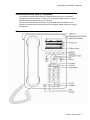
Introduction to the 9620 IP Telephone .................................................. 7
Overview .................................................................................................................. 7
About Scrolling and Navigation ................................................................................ 8
About Your Telephone Stand ................................................................................... 9
About the Avaya Menu ........................................................................... 9
About Options & Settings ......................................................................................... 9
Setting Go To Phone Screen on Calling ........................................................ 10
Setting Go To Phone Screen on Ringing ....................................................... 10
Setting redial options ..................................................................................... 10
Configuring call timers ................................................................................... 11
Configuring visual alerts ................................................................................ 11
Adjusting the brightness or contrast of the display ........................................ 11
Turning button click sounds on and off .......................................................... 11
Turning error tones on or off .......................................................................... 12
Turning large text on or off ............................................................................. 12
Changing the ring pattern .............................................................................. 12
Editing button labels ...................................................................................... 12
About the Browser .................................................................................................. 13
Accessing your browser ................................................................................. 13
About the Features menu ..................................................................... 13
Accessing the Features menu ................................................................................ 13
Calling a person from the directory ........................................................................ 14
Configuring simultaneous ringing for multiple telephones (EC500) ....................... 14
Answering a Call ................................................................................... 14
Sending an incoming call directly to voicemail ................................. 15
Ignoring an incoming call ..................................................................... 15
Making a Call ......................................................................................... 15
Clearing a number .................................................................................................. 15
Redialing a number ................................................................................................ 15
Calling a person from the Contacts list ................................................................... 15
Calling a person from the call log ........................................................................... 15
Muting a Call .......................................................................................... 15
Putting a Call on Hold ........................................................................... 16
Transferring a Call ................................................................................ 16
About Forwarding Calls ........................................................................ 16
Send all calls .......................................................................................................... 16
Call Forwarding ...................................................................................................... 16
Turning off call forwarding ...................................................................................... 17
About Conference Calls ....................................................................... 17
2 Avaya one-X™ Deskphone Edition for 9620 IP Telephone User Guide