1
Controlling the Monitor with a PC (RS-232C)
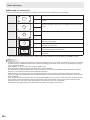
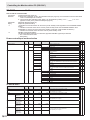
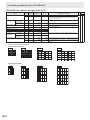
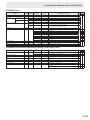
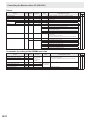
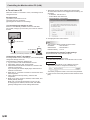
nCommands for ID control
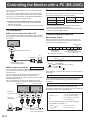
The command examples shown on this page assume the
following connection and ID number set up.
ID number: 1
ID number: 2
ID number: 3
ID number: 4
IDST..........A monitor receiving this command sets its own ID
number in the parameter field.
Example:
IDST0001
OK
001 ← The ID number of this monitor is set to 1.
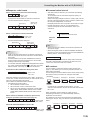
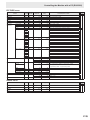
IDLK.........The parameter of this command sets the ID
number of the monitor. The monitor is subject to all
subsequent commands.
Example:
← with ID number: 2.
WAIT
←
OK
002
ID number: 1
Sets volume of monitor with ID
← number: 2 to 30.*
WAIT
← Processing
OK
ID number: 2
ID number: 3
ID number: 4
OK
002
Sets volume of monitor with ID
← number: 2 to 20.*
IDST001 +
← ID setting command with repeater control
WAIT
OK
001
← “OK” response from ID number: 1
OK
002
← “OK” response from ID number: 2
OK
003
← “OK” response from ID number: 3
OK
004
← “OK” response from ID number: 4 (End)
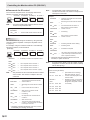
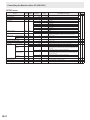
IDSL.........The parameter of this command sets the ID number
of the monitor. The monitor is subject to the next
command.
Example:
IDSL0002
←
The next command is for the monitor
with ID number: 2.
WAIT
←
Searching for monitor with ID number:
2
OK
002
← Found monitor with ID number: 2
Sets volume of monitor with ID
number: 2 to 30.
VOLM0030
←
WAIT
← Processing
OK
002
OK response from monitor with ID
← number: 2
VOLM0020
← Sets volume to 20.
OK
← number: 1 (the one directly connected
001
The volume of the monitor with ID
to the PC) is set to 20.*
* The IDSL command is effective only once, for the
immediately succeeding command.
002
IDLK0000
← Canceling fixed ID number setting
WAIT
← Canceling IDLK
OK
002
← Cancelation complete
VOLM0010
OK
20
← Found monitor with ID number: 2
WAIT
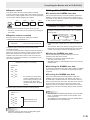
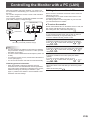
You can automatically assign ID numbers by using the IDST
command with the Repeater control (see “Repeater control”
on page 21).
For example, using the command “IDST001+” automatically
sets the ID numbers, as shown below.
[Example]
E
Searching for monitor with ID number:
2
VOLM0030
VOLM0020
TIPS
Following commands are for the monitor
IDLK0002
001
The volume of the monitor with ID number:
← 1 (the one directly connected to the PC) is
set to 10. (IDLK is canceled.)
* The IDLK command remains effective until it is
canceled, or power is shut off.
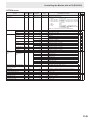
IDCK.........Provides screen display of the ID number currently
assigned to a monitor, and the ID number currently
set for IDLK (if any).
Example:
(After executing IDLK0002)
← (Parameter has no meaning.)
IDCK0000
ID : 001
IDLK : 002
IDCK000 +
WAIT
ID : 001
IDLK : 000
ID : 002
IDLK : 000
ID : 003
IDLK : 000
ID : 004
IDLK : 000
Returned response. The ID
← number is also displayed on the
monitor screen.
← Repeater control. (If a command
is used with repeater control, ID
designation using IDSL or IDLK
is canceled.)