1
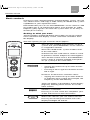
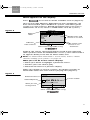
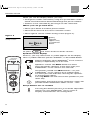
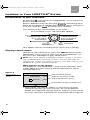
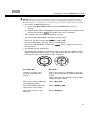
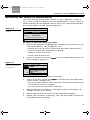
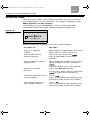
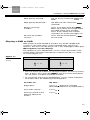
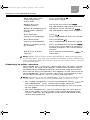
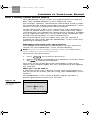
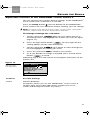
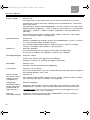
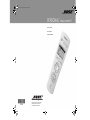
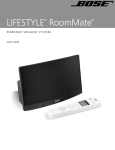
AM279725 Cover.fm Page 1 Friday, February 4, 2005 3:07 PM PERSONAL Owner’s Guide ©2005 Bose Corporation, The Mountain, Framingham, MA 01701-9168 USA 279725 AM Rev.00 CCM-001417 ® music center II B5&2*ERRN3DJH7XHVGD\)HEUXDU\30 Français Español English INTRODUCTION Thank you By choosing a Bose® PERSONAL® music center II, you have opened the door to a variety of new options for playing your LIFESTYLE® DVD home entertainment system – in almost any area of your home! This new music center II provides you with: • Control of your LIFESTYLE® (18 or 28 Series II or the 38 or 48) system from a different room or floor of your house. • On-screen information about your stored music and the uMusicTM intelligent playback system choices for enjoying it (on LIFESTYLE® 38 or 48 systems, only). • The option to readily switch between the two audio streams from the system and multiply your choice of programs. • Control of speakers set up in the same area as the remote, or a local Bose system with other audio sources you can play. • Easy access to system options, which appear right on the remote control screen. • Instant confirmation, because you not only hear, but also see what you’ve selected on the display screen. Other equipment you can control To enjoy the full benefit of your LIFESTYLE® system outside the main room where the system is set up, you need to have speakers or a local system that can reproduce the sound where you want it. For that purpose, Bose offers a selection of expansion products that work together seamlessly due to one common ingredient: Bose® link compatibility. These products include: • LIFESTYLE® SA-2 or SA-3 amplifiers that work with a variety of Bose passive speakers. • Bose 3•2•1 Series II and 3•2•1 GS Series II systems. • The Bose Wave® music system. Instead, you can use a previously purchased Bose product, called a legacy product, which does not have built-in Bose® link compatibility. Products by other manufacturers can also be a part of your expansion room setup. However, they allow varying degrees of control when paired with your PERSONAL® music center II. Note: Unauthorized modification of the receiver or radio remote control could void the user’s authority to operate this equipment. The remote control conforms to the RTTE Directive 99/5/EC (R+TTED). The complete Declaration of Conformity can be found on <www.bose.com> 2 B5&2*ERRN3DJH7XHVGD\)HEUXDU\30 English Español Français CONTENTS Introduction . . . . . . . . . . . . . . . . . . . . . . . . . . . . . . . . . . . . . . . . . . . . . . . . . . . . . . . . 2 Thank you . . . . . . . . . . . . . . . . . . . . . . . . . . . . . . . . . . . . . . . . . . . . . . . . . . . . . . . 2 Other equipment you can control . . . . . . . . . . . . . . . . . . . . . . . . . . . . . . . . . . . . 2 Preparing for Use . . . . . . . . . . . . . . . . . . . . . . . . . . . . . . . . . . . . . . . . . . . . . . . . . . . 4 Where to begin . . . . . . . . . . . . . . . . . . . . . . . . . . . . . . . . . . . . . . . . . . . . . . . . . . . 4 Installing the batteries . . . . . . . . . . . . . . . . . . . . . . . . . . . . . . . . . . . . . . . . . . 4 Confirm that current settings are right . . . . . . . . . . . . . . . . . . . . . . . . . . . . . . 5 Change the settings, as needed . . . . . . . . . . . . . . . . . . . . . . . . . . . . . . . . . . 5 Basic controls . . . . . . . . . . . . . . . . . . . . . . . . . . . . . . . . . . . . . . . . . . . . . . . . . . . 6 Getting to what you want . . . . . . . . . . . . . . . . . . . . . . . . . . . . . . . . . . . . . . . 6 What appears on the display . . . . . . . . . . . . . . . . . . . . . . . . . . . . . . . . . . . . . 7 Buttons to use while you listen . . . . . . . . . . . . . . . . . . . . . . . . . . . . . . . . . . . 9 Listening to Your LIFESTYLE® System . . . . . . . . . . . . . . . . . . . . . . . . . . . . . . . . . 10 Performance at your command . . . . . . . . . . . . . . . . . . . . . . . . . . . . . . . . . . . . . 10 Playing stored music . . . . . . . . . . . . . . . . . . . . . . . . . . . . . . . . . . . . . . . . . . . . . 10 Searching the library of stored music . . . . . . . . . . . . . . . . . . . . . . . . . . . . . . . . 13 Using the radio . . . . . . . . . . . . . . . . . . . . . . . . . . . . . . . . . . . . . . . . . . . . . . . . . . 14 Playing a CD . . . . . . . . . . . . . . . . . . . . . . . . . . . . . . . . . . . . . . . . . . . . . . . . . . . . 15 Playing a DVD or VCD . . . . . . . . . . . . . . . . . . . . . . . . . . . . . . . . . . . . . . . . . . . . 17 Listening to other sources . . . . . . . . . . . . . . . . . . . . . . . . . . . . . . . . . . . . . . . . . 18 Listening to Your Local Source . . . . . . . . . . . . . . . . . . . . . . . . . . . . . . . . . . . . . . . 19 How a nearby sound source differs . . . . . . . . . . . . . . . . . . . . . . . . . . . . . . . . . . 19 Choosing and using your local source . . . . . . . . . . . . . . . . . . . . . . . . . . . . 19 Beyond the Basics . . . . . . . . . . . . . . . . . . . . . . . . . . . . . . . . . . . . . . . . . . . . . . . . . 21 Adjustable features of the PERSONAL® music center II . . . . . . . . . . . . . . . . . . 21 To change settings for a feature . . . . . . . . . . . . . . . . . . . . . . . . . . . . . . . . . 21 The importance of room codes . . . . . . . . . . . . . . . . . . . . . . . . . . . . . . . . . . 23 Why would you change the house code? . . . . . . . . . . . . . . . . . . . . . . . . . . 24 Audio streams multiply your options . . . . . . . . . . . . . . . . . . . . . . . . . . . . . . 24 To add more rooms of sound . . . . . . . . . . . . . . . . . . . . . . . . . . . . . . . . . . . . . . 25 Bose® link products for expansion . . . . . . . . . . . . . . . . . . . . . . . . . . . . . . . . 25 Connecting another Bose® link system . . . . . . . . . . . . . . . . . . . . . . . . . . . . 25 Using other products for expansion . . . . . . . . . . . . . . . . . . . . . . . . . . . . . . 26 Reference . . . . . . . . . . . . . . . . . . . . . . . . . . . . . . . . . . . . . . . . . . . . . . . . . . . . . . . . 28 Troubleshooting . . . . . . . . . . . . . . . . . . . . . . . . . . . . . . . . . . . . . . . . . . . . . . . . . 28 Contacting customer service . . . . . . . . . . . . . . . . . . . . . . . . . . . . . . . . . . . . . . . 29 Limited warranty . . . . . . . . . . . . . . . . . . . . . . . . . . . . . . . . . . . . . . . . . . . . . . . . . 29 Technical information . . . . . . . . . . . . . . . . . . . . . . . . . . . . . . . . . . . . . . . . . . . . . 29 3 B5&2*ERRN3DJH7XHVGD\)HEUXDU\30 Français PREPARING FOR Español English USE Where to begin Your expansion system or speakers must be set up and connected to the LIFESTYLE® system before you can use them with the PERSONAL® music center II. If you have a Bose® link product and still need to set it up, see “To add more rooms of sound” on page 25. If you have an older (legacy) product to use with the remote, refer to “Using other products for expansion” on page 26. If you have already set up and connected your expansion system, you can get your remote ready to use now. Installing the batteries Use your PERSONAL® music center II with the LIFESTYLE® system after installing the supplied batteries, as follows: 1. On the back of the PERSONAL® music center II, slide the battery compartment cover off. 2. Install the four AA (IEC LR6) batteries, matching the polarity markings (+ and –) to the markings inside the battery compartment (Figure 1). 3. Slide the battery cover back into place. Figure 1 Inserting the batteries + + + + Note: Change the batteries when you notice a marked decrease in the range or response of the remote. Please dispose of used batteries properly, following any local regulations. Do not incinerate. 4 B5&2*ERRN3DJH7XHVGD\)HEUXDU\30 English Español Français PREPARING FOR USE Confirm that current settings are right Your PERSONAL® music center II is pre-set at the factory for compatibility, as follows: • To control sound in a single expansion room – Room B – or area (not in Room A, the location of your LIFESTYLE® media center). • A house code identical to the one given every new LIFESTYLE® system. For details, see “Why would you change the house code?” on page 24. • To receive Audio stream 2, which is different from the stream that delivers sound in the main room where the LIFESTYLE® media center is located. For details, see “Audio streams multiply your options” on page 24. • English as the language used for display text. With a LIFESTYLE® system previously set up and used with another language, your PERSONAL® music center II detects the difference (only the first time you turn it on), and pauses operation to switch to that language. Note: To learn how to select a different text display language for your system, refer to “Media center options” in the Operating Guide that came with the system. If the above settings are right, you can begin to use your remote now. Change the settings, as needed • Language: to change display text to your preferred language, press the Setup button. For further information on how to make the change, see “Adjustable features of the PERSONAL music center II” on page 21. • Room codes: to choose a different code that will either be unique to your PERSONAL® music center II or the same as the main room, see “The importance of room codes” on page 23. • House codes: to learn how to match your PERSONAL® music center II house code to one that has been changed in your LIFESTYLE® primary remote, see “Why would you change the house code?” on page 24. • Audio stream: for instructions on changing streams and an explanation of your choices, see “Audio streams multiply your options” on page 24. 5 B5&2*ERRN3DJH7XHVGD\)HEUXDU\30 Français Español English PREPARING FOR USE Basic controls Using just a few selection buttons and the display screen, you can see, choose from, and enjoy a wide variety of LIFESTYLE® system capabilities in your expansion room. Remember that you can use the PERSONAL® music center II, with no need to aim it, all around your home, even outside. Its radio frequency (RF) signals can reach the system from as far away as 80 feet (24.4 meters). Getting to what you want The few buttons explained below will enable you to get started, move around on the display screen, and make selections from the display. See how quickly you get a feel for what happens. Turns on the amplifier and speakers or local system that your PERSONAL® music center II is assigned to control. Alerts the LIFESTYLE® system media center in the main room. Activates the last used source, which is set to its previous volume and preset, if that applies. Turns off the current source, the PERSONAL® music center II, and the amplifier and speakers (or system) in the same room. Moves around on the display. 7LSSLQJWKHFHQWHUEDUXSRUGRZQPRYHV XSRUGRZQ 3UHVVLQJDOHIWRUULJKWDUURZEXWWRQPRYHV OHIWRUULJKW Increases or decreases selection values. 7LSSLQJWKHFHQWHUEDUXSRUGRZQDGGVWR RUVXEWUDFWVIURPDYDOXHIRUH[DPSOHWKH IUHTXHQF\RIWKH)0VWDWLRQV There are guides at the bottom of the display (Figure 2) showing which arrows to use for other actions. Confirms a selection. Pressing in on the center bar completes your action and moves to the next choice Shows the sources you can choose to hear. Pressing and holding this button turns the display backlight off and on. 6 B5&2*ERRN3DJH7XHVGD\)HEUXDU\30 English Español Français PREPARING FOR USE What appears on the display Press to see the list of the available sources (Figure 2). Your list may look different, depending on the components you have connected to your LIFESTYLE® system, and what type of system it is. (For instance, Stored will appear only if you have a LIFESTYLE® 38 or 48, not on a LIFESTYLE® 18 or 28 system.) Bedroom Figure 2 Source display Stored FM Radio AM Radio CD/DVD AUX Local Room label Cancel Indicates more choices On Audio 2 On Audio 1 Audio steam and source in use here [Ok] Other choices available using: Audio stream and source in use elsewhere Audio 2, the stream selected to deliver sound to the expansion room speakers when the PERSONAL® music system commands it to, appears briefly in the line for Room label, also. Note: To understand what Audio 1 and 2 mean, refer to “Audio streams multiply your options” on page 24. What you can do in the source display: • Move up or down to highlight a preferred source. • Confirm your new choice [OK]. • Move left to return to a previous display. When you confirm or cancel a choice, the display changes to information about the source that is playing now (Figure 3). Figure 3 FM radio display FM Radio Station Selected source Selected preset What you can change here Current station 2 FM 103.3 Jump to preset Back Tune Other choices available using: 7 B5&2*ERRN3DJH7XHVGD\)HEUXDU\30 Français Español English PREPARING FOR USE When you see the display above, you may: • Change the station selected by using the up and down arrows, which move forward or backward through the preset stations. • Confirm a new selection by pressing in on the center bar. Where you can go from here: • Move up or down to another preset station. • Move left to return to the source selection screen. • Move right to see the station tuning screen (Figure 4). Figure 4 FM Tune Example of a radio tuning screen Station FM 103.3 Battery indicator appears only as explained below. Tune station Back Or, press to return to the list of the sources. Symbols on the display At times, you may notice that a symbol appears on the display. These symbols indicate special conditions, as described below: Battery indicator: Your PERSONAL® music center II battery is depleted by 75% or more. Speakers muted: The Mute button has been pressed and the speakers in the room with your PERSONAL® music center II are silenced. All speakers muted: The Mute button – on your PERSONAL® music center II or in another room – has been pressed and held, silencing the speakers in all expansion rooms. Pressing Mute now will unmute the speakers in your room only. Information: Pressing in on the center bar provide further information about a track. will Setup button: use as needed Pressing this button presents a list of the adjustable features on your PERSONAL® music center II. Display characteristics are among them. 8 B5&2*ERRN3DJH7XHVGD\)HEUXDU\30 English Español Français PREPARING FOR USE Buttons to use while you listen There are two circular button sets for use while listening to a source. For details on how each button works for a specific source, refer to “Listening to Your LIFESTYLE® System” on page 10. Use this button set to: 2. 1. 4. 3. 1. Adjust the speaker volume up or down. 2. Establish and select presets. 3. Skip and scan forward and back. 4. Begin or pause play. Use the second button set while listening to a music disc or stored music (if available on your system). 5. Each press of the top button moves from normal play to the next* play mode in the following order: 6KXIIOH&' 5HSHDW&' 6KXIIOHDQGUHSHDW&' 5HSHDWWUDFN 1RUPDO *Modes above apply to LIFESTYLE® system CD play; they may not apply to another Bose® system used as an expansion room local source. 5. Use the remaining buttons in this circular set only with stored music, available on LIFESTYLE® 38 and 48 systems. 6. Use these buttons with your stored music to: 6. Select the uMusicTM system stored source and turn on the LIFESTYLE® system if it is off. 7. Hear all other tracks from the CD that provided the current track. 8. Rate the track that is playing, or multiple tracks or CDs selected in the Music Library. 9. Hear the tracks that are included in the Playlist or add a selection to the Playlist. 7. 8. 9. 10. 10. Hear music that is similar in mood and style to the track that is playing. Mutes and unmutes the speakers in the room where the PERSONAL® music center II is used. When pressed and held, mutes all speakers connected to the LIFESTYLE® system. When pressed and held again, unmutes them. 9 B5&2*ERRN3DJH7XHVGD\)HEUXDU\30 Français LISTENING TO Español English YOUR LIFESTYLE® SYSTEM Performance at your command By pressing , you turn on your PERSONAL® music center II to the last source selected. and moving up or Select a different source by pressing down on the display to highlight the preferred source. Then press in on the center bar ( ) to confirm your selection. Use sections of this circular button as you listen. Press to Select or Press and hold to Set a preset Press to Seek backward or Play previous track Press and hold to Fast reverse Press to Seek forward or Play next track Press and hold to Fast forward Press to: Play/Pause or Press and hold to: Stop Your options will vary according to the source that is playing. Playing stored music To listen to your stored music, press the uMusic button on the PERSONAL® music center II. This turns on the LIFESTYLE® system, if it is off, and begins to play stored tracks. Note: Use of the uMusicTM intelligent playback system is possible only on LIFESTYLE® 38 and 48 systems, and only after CDs are stored in the system. For details on how to store CDs, refer to your LIFESTYLE® system operating manual. What appears on the display The display on your PERSONAL® music center II provides information about the music playing and the Stored music preset selected (Figure 5). Figure 5 Stored Stored music display Album Name Artist Name 4 Title and Artist playing Stord music preset number and assigned name (if any) Roberta Searchable catalog of stored music Back L Library • Check to be sure that the uMusic system preset currently selected is the one you want. Presets, for use by different people or assigned for specific themes, help the system match its music selections to preferences associated with that preset. 10 English Español Français LISTENING TO YOUR LIFESTYLE® SYSTEM Note: Refer to your LIFESTYLE® 38 or 48 system Operating Guide for detailed information on the uMusic intelligent playback system, the importance of presets, and how the system knows what to play. • To select a different preset: 1. Press the Presets button on the PERSONAL® music center. 2. Move up or down to highlight the preferred preset and press in on the center bar to confirm the new selection. This returns to the original display screen. • To see more information on the current track: Press in on the center bar to select . • To stop text from moving across the display: Press in and hold the center bar movement. . Press again to resume • To simply listen and enjoy No particular action is required. You may want to simply listen and respond to the music as you normally do. For this, use the circular button sets on the music center II. In order to... Do this... Tell the system your strong reaction to a track... Press the minus (–) button if you are not in the mood for or do not like this song. Press the plus (+) button if you especially like this song. Play more tracks like the one playing now... Press Encore. Play the whole CD that this track came from... Press Whole CD. Play the tracks in the Playlist... Press Playlist. 11 Français Español English LISTENING TO YOUR LIFESTYLE® SYSTEM 12 Delete this track from the Playlist... While listening to the Playlist, press and hold Playlist. Add this track to the Playlist... While listening to a track in uMusic, Encore or Whole CD play modes, but not in the Playlist, press and hold Playlist. Let the system pick the tracks for you... Press uMusic to exit the Encore, Whole CD, or Playlist play mode. Hear this track again... Press Repeat. Hear the music playing in a different order... Press Shuffle while in Whole CD, Playlist, or Encore play mode. Otherwise, it has no effect. Pause the music... Press . Resume play where the music paused... Press . Scan forward through the current track... Press and hold . Scan backward through the current track... Press and hold . Skip to the beginning of this track... Press . Or, tip down on the center bar Skip to the beginning of the previous track... Press twice. Or, tip down on center bar twice. Skip this track... Tip up on the center bar . Tip up and hold to skip more tracks. Return to a previous track... Tip down on the center bar . Tip down and hold to skip more tracks. See the list of other sources... Press the left arrow button move left. Or, press . . to B5&2*ERRN3DJH7XHVGD\)HEUXDU\30 English Español Français LISTENING TO YOUR LIFESTYLE® SYSTEM Searching the library of stored music You may want to locate other tracks in your collection, which is easy to do using the display on your PERSONAL® music center II. While listening to the Stored source, press the right arrow button to see the library search screen (Figure 6): Figure 6 Music Library display Music Library Genre: - All genres - Artist: - All artists- Album: - All albums- Track: - All tracks- 16 albums / 221 tracks Back [Open] Play To search and use what you find 1. Move up or down to highlight the category you want to use to search the library. The categories are: • Genre: one of 19 music types that describe stored tracks. • Artist: the primary performer or group • Album: name of the disc • Track: title of the track 2. Figure 7 Results of the search for artists in all genres Press in on the center bar that category (Figure 7). to see the possible choices in Select Artist Genre: - All Rock / Pop artists Artist: ABBA The Beatles The Album: Beatles, - All albums Bee Gees, The Track: - All tracks Big Audio Dynam... Cure, The 16 albums / 221 tracks Cancel [Ok] Play 3. Move up or down to make a selection. 4. Press in on the center bar return to the category list. to confirm the selection and • Or, move right to play your selection and continue browsing the choices for this category. • Or, move left to cancel the selection. 5. Move down the categories and repeat steps 2 through 4 to further narrow your search. 6. Move right to play all tracks in the selected category. 7. When you are done searching, you can move left to return to the Stored music display. 13 B5&2*ERRN3DJH7XHVGD\)HEUXDU\30 Français Español English LISTENING TO YOUR LIFESTYLE® SYSTEM Using the radio To listen to the radio, select AM or FM from your list of sources. The LIFESTYLE® system activates, as needed, and begins play. What appears on the display The display on your PERSONAL® music center II provides information about the radio station and preset (Figure 8). Figure 8 FM Radio Station information display Station 2 FM 103.3 Jump to preset Back Tune While listening to a station, you have several options. 14 In order to... Do this... Tune to a specific station... Move right for FM tuning, then up or down to the station you want. Tune to the next or previous preset... Tip up on the center bar . Tip up and hold to tune more quickly. Tune to higher or lower frequencies... Move right into station tuning, then tip up or down on the center bar . Tip and hold to tune more quickly. Choose a specific preset... Press the Presets button. Tune forward to the next strong station... Press . Press and hold to tune quickly and release to stop at the next station. Tune backward to the next strong station... Press . Press and hold to tune quickly and release to stop at the next station. Or, tip up or down on the center bar to select the next preset. B5&2*ERRN3DJH7XHVGD\)HEUXDU\30 English Español Français LISTENING TO YOUR LIFESTYLE® SYSTEM Using radio presets Your LIFESTYLE® system can store up to 20 AM and 20 FM stations as radio presets. By assigning a preset number to the stations you like most, you can get to them quickly and easily. All of the presets can be used in any of the expansion rooms. To assign preset numbers: Most simply, you can let the system assign the next available preset number to the station you have tuned in. • Press and hold the Presets button until a preset number appears on the display next to the station identity. Or, assign a specific preset number to a station by following steps 1 through 5: 1. Press the Presets button to see the list of established presets for FM or AM. 2. Move up or down to highlight the preset you prefer. 3. Move right to select that preset number. 4. Tip up or down on the center bar to tune in the station you want assigned to the selected preset number. 5. Press in on the center bar to confirm the assignment. Playing a CD Make sure there is a CD in the disc tray. The player can then begin play as soon as you select CD/DVD from the source list. What appears on the display The display on your PERSONAL® music center II provides information about the disc and track playing. The display indicates whether the disc is a regular or MP3 CD (Figure 9). Figure 9 CD and MP3-CD displays CD MP3-CD Track Song, Title, Artist Name 3 Back of 14 [123... ] Track 9 Back of 127 [123... ] • Move up or down to change tracks one by one. 15 B5&2*ERRN3DJH7XHVGD\)HEUXDU\30 Français Español English LISTENING TO YOUR LIFESTYLE® SYSTEM • Press in on and hold the center bar to see the numeric selection display, where you can choose the track directly by number (Figure 10). Figure 10 Enter number Numeric selection display Track 123 Erase [Add] Done To select a specific track by number When the numeric selection display appears: • Move up or down to increase or decrease the highlighted number. • Press in on the center bar another. to confirm the digit and add • Move left to erase a number. • Move right when you have set the number as you want it. Or, simply listen and use the PERSONAL® music center II buttons to choose from the full range of control options. 16 In order to... Do this... Pause the music... Press . Resume play from where the music paused... Press . Stop and start again at the beginning of the CD... . Press and hold Then press again. Scan forward through the current track... Press and hold . Scan backward through the current track... Press and hold . Skip to the next track... once. Press Or, tip up on the center bar Skip to the beginning of the current track... Press Skip to the beginning of the previous track... twice. Press Or, tip down on the center bar . once. B5&2*ERRN3DJH7XHVGD\)HEUXDU\30 English Español Français LISTENING TO YOUR LIFESTYLE® SYSTEM and Skip quickly forward... Tip up on the center bar hold. Skip quickly backward... Tip down on the center bar and hold. Select a track by number... Press in on the center bar . Move up or down to change to the first digit of the track number. Press in to confirm the number and move on to the next digit, etc. See the list of other sources... Press the left arrow button to move left. Playing a DVD or VCD With a DVD or VCD loaded in the disc tray of the LIFESTYLE® system in your main room, select CD/DVD from your list of sources. This turns on the player, if it is off, and begins video play. What appears on the display The display on your PERSONAL® music center II provides information about the DVD and indicates whether the disc is a DVD or a VCD (Figure 11). Figure 11 DVD or VCD display DVD VCD Chapter Track 5 Back 5 of 36 [123... ] Back of 36 [123... ] • You can move up or down to change chapters (or tracks) one by to see the screen that allows one, or press the center bar you to select a chapter (track) by number. • Or, just listen and use the PERSONAL® music center II buttons to choose from the following control options. In order to... Do this... Begin play... Press . Repeat as needed. (See Note above for an explanation.) Pause the sound... Press . Resume sound at the point of advanced action... Press . 17 B5&2*ERRN3DJH7XHVGD\)HEUXDU\30 Français Español English LISTENING TO YOUR LIFESTYLE® SYSTEM Stop and start again at the beginning of the DVD... Press and hold . Then press again. Skip to the next chapter (track)... Tip up on the center bar . Tip and hold to skip more than one. Skip to the beginning of the previous chapter (track)... Tip down on the center bar . Tip and hold to skip more chapters. Scan forward... (silences termporarily) Press . Press repeatedly to increase speed. Scan backward... (silences termporarily) Press and hold . Press repeatedly to increase speed. Select a chapter (track) by number... Press and hold the center bar . Then move up or down to change a number and press the center bar to confirm. See the list of other sources... Press the left arrow button move left. to Note: DVDs vary in their content presentation. After pressing Play for the first time, you may see a menu of multiple options. Before the main attraction begins to play, you may need to press Play a second or even third time. Listening to other sources Your LIFESTYLE® system has connection jacks for other components, like a TV, VCR, and cable or satellite box, and can select and operate the additional source connected using these jacks. Each one of these components also appears in the source list of your PERSONAL® music center II. So, once a component in the list has been turned on, you can select and listen to it. Note: Except for a TV, the PERSONAL® music center II will not turn components connected to your LIFESTYLE® system on or off. • For a video component, use the up and down arrows your PERSONAL® music center II to change channels. on Or use numeric entry as described on page 15. You can enter up to 5 digits. • For other components, you may also be able to seek, pause, and resume play as you can for a CD or DVD playing on the system. However, this depends on the type and brand of the connected equipment. 18 B5&2*ERRN3DJH7XHVGD\)HEUXDU\30 English Español Français LISTENING TO YOUR LOCAL SOURCE How a nearby sound source differs Your PERSONAL® music center II is engineered for use with any Bose® link enabled products in your expansion room. For example, speakers connected to a Bose SA-2 or SA-3 amplifier respond to on and off commands from the PERSONAL® music center II, as well as muting and volume changes. On the other hand, a Bose 3•2•1 Series II or 3•2•1 GS Series II system or a Bose Wave® music system connected in the expansion room gives you another full sound source. If an SA-3 amplifier in your expansion room has a TV or other audio component connected, that too qualifies as a local sound source. Because this local source is within view, you can see how it responds to commands from the PERSONAL® music center II by observing its display panel. Choosing and using your local source This additional sound source is identified as Local in the list of sources on your PERSONAL® music center II display. Note: Local is not an available selection when your PERSONAL® music center II is set for use in Room A. To listen to your local source: to see the list of sources. 1. Press 2. Move up or down to highlight Local and press in on the center bar to confirm the selection. This turns on the nearby Bose link compatible system to the volume, play medium (radio, CD, etc.), and preset (if that applies) last selected. What you can do with it If your local source has a display screen, refer to this display to see the results of actions you take using your PERSONAL® music center II. The PERSONAL® music center II display (Figure 12) offers a generic guide to the actions you can take. Figure 12 Generic display for the moves you can make Local — See Local Device — Station/Folder/Disc Back [123... ] Input 19 B5&2*ERRN3DJH7XHVGD\)HEUXDU\30 Français Español English LISTENING TO YOUR LOCAL SOURCE • Move up or down to scroll through local selections. • Move right to change inputs (for audio on your local source or connected to it). One example, with AM and FM radio and CD/DVD options You can make the following choices: • To switch from one to the other, move right. The change appears on the local source display. • To set presets in the numeric selection screen, press the center bar : ± Move up or down to increase or decrease the highlighted number. ± Press the center bar to move right for the next digit. ± Move left to erase a number. ± Move right when you have made all the changes. • To begin disc play, inserting the disc may be all that is necessary. Or you may need to press the play/pause button on the PERSONAL® music center II one or more times. This depends on the disc and type of local source being used. For other source selections You can use the PERSONAL® music center II arrow buttons to make these choices: • Select external components connected to the local system. (Turn them on using the local source remote or the remote specific to that component.) • Change channels or radio stations. Using other PERSONAL® music center II buttons Use the other buttons as you do with the LIFESTYLE® system in the main room, to: • Skip forward or backward (scan is not available). • Pause, stop, and restart disc play. • Adjust or mute the volume. • Turn the local system off or on (must have Local source selected). • Switch back to one of the sources on your LIFESTYLE® system. For access to settings and advanced options on your local source, use the remote that came with it. 20 B5&2*ERRN3DJH7XHVGD\)HEUXDU\30 English Español Français BEYOND THE BASICS Adjustable features of the PERSONAL music center II You can change some factory default settings of the PERSONAL® music center II to customize it as you like. Press the Setup button near the bottom of the PERSONAL® music center II to see a list of the feature settings you can change. Note: To learn more about house codes, room codes, and audio streams, refer to the sections about these features. To change settings for a feature 1. Tip the center bar down to move down the list in the Setup menu, and highlight the feature you want to adjust (Figure 13). 2. Press the right arrow button to move right for the setting options for the selected feature. 3. Tip the center bar up or down to move through the list and highlight the setting you want. 4. Press the center bar 5. Or, if you decide no change is needed, press the left arrow button to confirm your choice. instead. Following step 4 or 5 will exit the list of options and return to the features list. Figure 13 Music center II features that are adjustable Setup Name: Bedroom Room Code: B Audio Stream: 2 Contrast: Default Backlight Bright: 100% Backlight: On Back Open Features Possible Settings Name Default: Bedroom. Designates where you use this PERSONAL® music center II. Choose from a list of possible rooms to label your music center and distinguish it from any others. 21 B5&2*ERRN3DJH7XHVGD\)HEUXDU\30 Français Español English BEYOND THE BASICS Room Code Default: B. Distinguishes each room (up to 15) connected to the system. Choosing A will match the setting for the LIFESTYLE® remote in the main room. Choosing O allows the PERSONAL® music center II to work with older (legacy) products, such as Bose® Acoustimass® 5 powered speakers, a Wave® radio, or other amplifiers, with limited functionality. For further information about room codes, refer to “The importance of room codes” on page 23. Audio Stream Default: 2. Delivers audio to the room where the PERSONAL® music center II is used and possibly to other rooms. For further information about audio streams, refer to “Audio streams multiply your options” on page 24. Contrast Default: Default Visually distinguishes display text from background. Increase or reduce the display contrast as needed. Backlight Bright Default: 100% Varies the amount of light on the display. Choose a lower % setting to reduce intensity. Backlight Default: On. Choose Off to eliminate backlighting. LCD Delay Default: 30 seconds. Increase or decrease (in 10-second increments) the pause before the Setup display turns off. House Code (Change ONLY under certain conditions.) Default: 0. Language (Change ONLY when situation underlined at right occurs.) Default: Update For further information about house codes, refer to “Why would you change the house code?” on page 24. Matches the display text to language selected for use on the LIFESTYLE® system. This match should occur automatically.* *If it does not, select the new language that should appear on your PERSONAL® music center II display. Version (not adjustable) 22 Indicates which version of the PERSONAL® music center II software is installed currently . B5&2*ERRN3DJH7XHVGD\)HEUXDU\30 English Español Français BEYOND THE BASICS The importance of room codes Your PERSONAL® music center II is set at the factory for use in an expansion room, while the LIFESTYLE® system media center and primary remote are set for use in the main room. The use of unique room codes lets your LIFESTYLE® system know where commands that come to it originate, so it can respond in the appropriate room. With just one expansion room set up, the PERSONAL® music center should remain set to Room Code B, as shown (Figure 14). Figure 14 Room Code B setting, for one expansion room However, to use more than one PERSONAL® music center II, or with other LIFESTYLE® system remotes for use in other rooms, leaving them all set for Room B will not work. When to change the room code • If you have set up other expansion rooms already. There are14 room codes in addition to Room A. • If you prefer to use your PERSONAL® music center II in the main room, in addition to the primary remote control, it must be set for Room A. • For use with an SA-2 or SA-3 amplifier the PERSONAL® music center II must have an identical room code. Like the PERSONAL® music center II, these Bose® link compatible amplifiers are set at the factory for Room B. If you change this setting, because you have more than one expansion room set up, your PERSONAL® music center II room code must change to match it. To learn how to choose a different room code, see “To change settings for a feature” on page 21. Note: For more room code details, refer to the operating guide that came with your LIFESTYLE® system. 23 B5&2*ERRN3DJH7XHVGD\)HEUXDU\30 Français Español English BEYOND THE BASICS Why would you change the house code? Your PERSONAL® music center II is set at the factory with a house code identical to the factory setting on other LIFESTYLE® systems and remote controls. If you have not changed the house code setting in your LIFESTYLE® system, there is no need to change that code in your PERSONAL® music center II. A LIFESTYLE® system radio frequency (RF) remote has a long range and the ability to penetrate walls. Therefore, the signals from a remote in one home can possibly reach and affect the operation of a LIFESTYLE® system in another. Changing the house code for the system and all the remotes used with it avoids the conflict. To learn how to choose a different house code, see “To change settings for a feature” on page 21. Note: For more details on the system house code, refer to the operating guide included with your system. Audio streams multiply your options While the LIFESTYLE® system is playing in the main room, you can use your PERSONAL® music center II in another room to play a completely different choice from that same system. The system provides this choice by employing two independent audio streams to deliver the sound. So, while the Audio 1 stream fills the main room with spine-tingling DVD special effects, you can move to another room and switch to FM radio on the other stream. While the PERSONAL® music center II is set at the factory to control the Audio 2 steam, you can easily change it to Audio 1 – the stream that delivers sound in the main room. For example, there may be times when you don’t want to hear what is playing in one of your multiple expansion rooms. Without disturbing the person enjoying sound on the Audio 2 stream there, you can switch to Audio 1, which may not otherwise be in use. This option also allows people in different rooms to use the uMusicTM system with two different presets selected. To learn how to choose a different audio stream, see “To change settings for a feature” on page 21. 24 B5&2*ERRN3DJH7XHVGD\)HEUXDU\30 English Español Français BEYOND THE BASICS To add more rooms of sound Your LIFESTYLE® system is capable of supplying up to 14 expansion rooms to fill your entire living space with Bose® sound. There are numerous Bose products designed specifically for use in these expansion rooms, and some older Bose products can serve this purpose as well. Products from other suppliers may also fit into your whole-house solution. For each choice your approach may differ. Bose® link products for expansion Bose® link-enabled products have compatibility built in, making them easy to connect to your system and ready to respond to commands from your PERSONAL® music center II. Examples Include the Bose SA-2 or SA-3 amplifiers that connect to a variety of Bose indoor and outdoor speakers. You can even use the Bose® link A cable supplied with each amplifier to connect multiple amplifiers together in a daisy chain arrangement for all 14 expansion rooms. For details on setting up one or more amplifiers, refer to the owner’s guide provided with the amplifier. Another example is the Bose® link 50-foot extension/expansion cable that allows you to connect a mix of amplifiers and amplified systems for sound in multiple expansion rooms. This cable connects at one end to the Bose® link jack on the LIFESTYLE® system media center, while the other end features a 4-jack connector for several amplifiers and one or more additional systems. For the added systems, you can use a 3•2•1 Series II or 3•2•1 GS Series II system or the Wave® music system. Connecting another Bose® link system By choosing a Wave® music system, or a 3•2•1 Series II or 3•2•1 GS Series II DVD home entertainment system for expansion, you gain another set of sources to play, using your PERSONAL® music center II. For either of these systems, you need to use the Bose® link B cable to make the connection. 25 B5&2*ERRN3DJH7XHVGD\)HEUXDU\30 Français Español English BEYOND THE BASICS Insert one end of a Bose® link B cable into the Bose® link jack on the rear panel of the additional system (Figure 15). Connect the other end directly to the Bose® link jack on the rear of the LIFESTYLE® system media center, or to an extension/expansion cable (when adding products for more than one expansion room). Figure 15 Connecting another system to the Bose® link jack on the LIFESTYLE® system media center LIFESTYLE® 38 or 48 system media center Bose link jack ® Bose® link B cable Bose® link jack 3•2•1 Series II media center 7RSXUFKDVHDQ\RIWKHVH%RVH®OLQNSURGXFWVRUFDEOHVFRQWDFW \RXUDXWKRUL]HG%RVHGHDOHU • For the Bose® link B cable, ask for Part Number 273619. • )RUWKH%RVH®OLQNextension/expansion FDEOHDVNIRU3DUW 1XPEHU275475-050. Or, to contact Bose directly, refer to the address list included in the carton with your system. Using other products for expansion There are other Bose products, which you may already own, that can also connect to your LIFESTYLE® system. However, adding an older, legacy product, which is not Bose® link enabled, may limit you to just one expansion room where the Audio 2 stream is the only option. How you make the connections depends on the type of product used. Considerations specific to some Some special settings and operational limitations apply to certain legacy Bose products that pre-date Bose® link compatibility. There may be other considerations for products from other manufacturers. 26 B5&2*ERRN3DJH7XHVGD\)HEUXDU\30 English Español Français BEYOND THE BASICS When using a Bose® SA-1 amplifier – Use the cable that came with the amplifier and connect the cable to the Bose® link jack on the LIFESTYLE® media center. Do not turn the amplifier on until you change the LIFESTYLE® system setting (in the System menu, under Media Center) for Protocol to Legacy. Note: Refer to your LIFESTYLE® operating guide for details on making System menu changes. Be sure the PERSONAL® music center II is set for Room B, so it will work with this amplifier. Using it, you can turn the amplifier on or off, change the volume and mute or unmute the speakers. When using LIFESTYLE® powered speakers – Set the room code for your Bose PERSONAL® music center II for Room O. With Acoustimass® 5 powered speakers – Use a Bose variable speaker adapter (Part Number 278894-103) to connect to your LIFESTYLE® system media center. Set the Bose PERSONAL® music center II in that expansion room for Room O and use it to turn these speakers on or off, change the volume and mute the speakers. With a Wave® radio or Wave® radio/CD – Set the room code for your Bose PERSONAL® music center II for Room O. Use the remote that came with it to turn either of these units on or off. For a product with its own remote control – Set the product to the maximum volume you may want. Then use the Bose PERSONAL® music center II to adjust the volume as needed. For more information on compatibility and cables, please contact Bose. Refer to the address list provided with your LIFESTYLE® system. 27 B5&2*ERRN3DJH7XHVGD\)HEUXDU\30 Français Español English REFERENCE Troubleshooting Problem What to do Your PERSONAL® music center II doesn’t work as expected No sound ,WFRXOGEHWLPHWRFKDQJHEDWWHULHV ,QVRPHEXLOGLQJV\RXPD\H[SHULHQFH³GHDGVSRWV´ ZKHQWKH3(5621$/®PXVLFFHQWHU,,ZLOOQRWRSHUDWH HIIHFWLYHO\,IWKLVKDSSHQVVLPSO\PRYHLWDIRRWRUWZR DQGWU\DJDLQ 0DNHVXUHWKHFRUGWKDWFRQQHFWVWKHSRZHUVXSSO\WRWKH /,)(67</(®V\VWHPPHGLDFHQWHUZKLFKFRQWDLQVWKH UHPRWHDQWHQQDLVYHUWLFDOO\RULHQWHGVWUHWFKHGWRLWVIXOO OHQJWKDQGVHSDUDWHGIURPRWKHUSRZHUFRUGV 7U\PRYLQJWKH/,)(67</(® PHGLDFHQWHUDIHZIHHWWR VHHLIWKLVSURYLGHVDEHWWHUUHVSRQVH <RXPD\QHHGDQDQWHQQDH[WHQGHUZKLFKLVGHVFULEHG LQWKH/,)(67</(®LQVWDOODWLRQJXLGH 0DNHVXUHWKHKRXVHFRGHVHWWLQJIRUWKH3(5621$/ ® PXVLFFHQWHU,,PDWFKHVWKHKRXVHFRGHLQWKHSULPDU\ UHPRWH8QOHVV\RXFKDQJHGLWWKHKRXVHFRGHVHWWLQJLQ ERWKVKRXOGEH 0DNHVXUHWKH3(5621$/®PXVLFFHQWHU,,URRPFRGH VHWWLQJLVXQLTXHWRWKHURRP ,I\RXDUHXVLQJD%RVH®6$RU6$DPSOLILHUPDNH VXUH the room codes are the same in the amplifier and in the PERSONAL® music center II. the status indicator on the amplifier is lit to show it is working. Intermittent response from the LIFESTYLE® system to commands from the PERSONAL® music center II ,WFRXOGEHWLPHWRFKDQJHEDWWHULHV 0RYHWKH3(5621$/®PXVLFFHQWHU,,WRVHHLIWKHSURE OHPLVFDXVHGE\³GHDGVSRWV´LQWKHEXLOGLQJ <RXPD\QHHGDQDQWHQQDH[WHQGHUZKLFKLVGHVFULEHG LQWKH/,)(67</(®LQVWDOODWLRQJXLGH Your system turns on or off unexpectedly or other tuning changes occur when no buttons on the PERSONAL® music center II have been pressed &KHFNWRVHHLIVRPHRQHLQWKHPDLQURRPLVXVLQJWKH SULPDU\UHPRWHDQGLVH[SHULHQFLQJWKHVDPHSUREOHP,I QRW\RXPD\EHH[SHULHQFLQJDFRQWUROFRQIOLFWZLWK DQRWKHUQHDUE\/,)(67</(®V\VWHP&KDQJLQJWKH KRXVHFRGHPD\VROYHWKHSUREOHP 5HIHUWR\RXU/,)(67</(®RSHUDWLQJJXLGHIRUGHWDLOVRQ ZKHQDQGKRZWRFKDQJHWKHKRXVHFRGH Audio 1 stream doesn’t work 28 ,I\RXDUHXVLQJDQROGHU%RVHSURGXFWZKLFKLVQRW %RVH®OLQNFRPSDWLEOH\RXPD\EHOLPLWHGWRWKH$XGLR VWUHDPRQO\ B5&2*ERRN3DJH7XHVGD\)HEUXDU\30 English Español Français REFERENCE Contacting customer service For additional help in solving problems, contact Bose® Customer Service. See the address and phone number list included with your LIFESTYLE® system. Limited warranty Your PERSONAL® music center II is covered by a transferable limited warranty. See your product registration card for details. Please be sure to fill out the information section on the card and mail it to Bose. Failure to do so will not affect your limited warranty. Technical information Remote control range 80 ft (24.4 m) Size 8¼ in. L x 1 in. H x 2½ in. W (21 cm x 3 cm x 6 cm) Weight with batteries installed 0.7 lb (.3 kg) Battery type 1.5V AA (IEC LR6) batteries (4) Frequency U.S./Canada: 27.145 MHz Euro: 40.685 MHz RF Field Strength Peak level: 88 dBPV/m @ 3 meters 29 AM279725 Cover.fm Page 1 Friday, February 4, 2005 3:07 PM PERSONAL Owner’s Guide Guía de usario Notice d’utilitsation ©2005 Bose Corporation, The Mountain, Framingham, MA 01701-9168 USA 279725 AM Rev.00 CCM-001417 ® music center II