1
Advanced Operation
The numerical command functions shown in this section are recommended
only for advanced users. Improper use of these commands may interfere
with the functionality of the PTZ system.
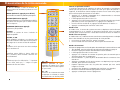
The PRO-650 PTZ dome can accept many additional commands to those already
listed. As there are not enough buttons on the remote control to assign one to
each function or setting applicable to the dome, they are presented and used as a
series of numerical commands.
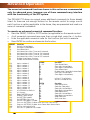
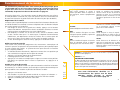
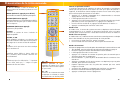
To execute an advanced numerical command function:
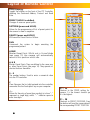
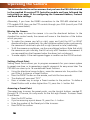
• Press the PRESET, CLEAR or GOTO button (as applicable) on the remote control.
• As all numerical commands are more than a single digit, press the -/-- button.
• Enter the applicable numerical code for the function you wish to execute.
• Press ENTER to confirm and execute the function.
PRESET
62
63
76
77
78
79
80
81
82
Function
Set Left limited point
Set Right limited point
Set Home Point
Set Home Point Wait Time to
Set Home Point Wait Time to
Set Home Point Wait Time to
Set Home Point Wait Time to
Enable Auto-Home function
Disable Auto-Home function
224
225
226
227
228
229
230
231
232
233
234
235
236
237
238
239
240
241
242
243
244
245
246
247
248
249
255
CLEAR
Function
Input number 0
1 -- 32
Clear Preset Point
Input number 1
62
Clear Left Limited Point
Input number 2
63
Clear Right Limited Point
Input number 3
76
Clear Home Point
Input number 4
81
Disable Auto Come Back Home Point
Input number 5
92
Clear Left Limited Point
Input number 6
93
Clear Right Limited Point;
Input number 7
Input number 8
240
Init Pan Tilt to Default
Input number 9
249
Set Pan Limited to 0x3F
Input number 10
Input number 11
GOTO
Function
Input number 12
1 -- 32
Goto Preset Point
Input number 13
34
Goto Pan Zero point
Input number 14
62
Goto Left Limited Point
Input number 15
63
Goto Right Limited Point
Init EEPROM to Default
76
Goto Home Point
Init System
92
Goto Left Limited Point
Begin PATTERN setup
93
Goto Right Limited Point
End PATTERN setup
96
Stop Auto Scan
Set PATTERN speed
99
Start Auto Scan
Set PATTERN stay time
Set PATTERN point number
Start run PATTERN, Enable Auto Start PATTERN cruise
Stop run PATTERN, Disable Auto Come Back Home Point
Set Pan Limited to 0x38
Set Pan/Tilt speed to fast mode
16
64 seconds
128 seconds
192 seconds
255 seconds