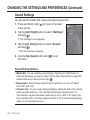
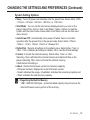
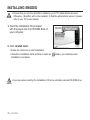
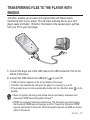
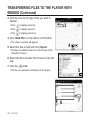
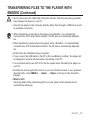
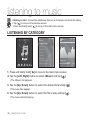
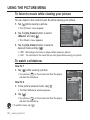
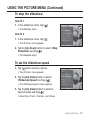
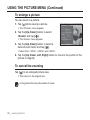
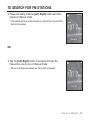
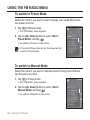
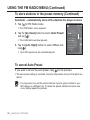
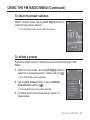
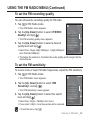
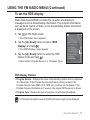
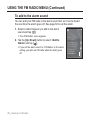
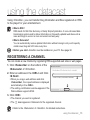
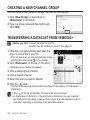
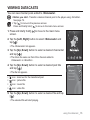
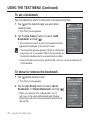
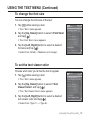
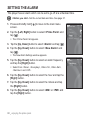
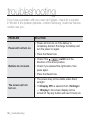
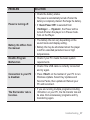
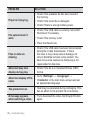
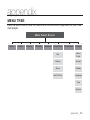
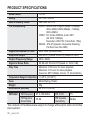
1
YP-S3 MP3 Player user manual imagine the possibilities Thank you for purchasing this Samsung product. To receive a more complete service, please register your product at www.samsung.com/global/register features of your new MP3 Player Good looking. Smart. Reliable. And lots of fun. Your new MP3 player is all this and more. Its compact silhouette takes up the tiniest space in your pocket, and its state-of-the-art technology delivers rich sound, vibrant pictures, and action-packed games. You’ll love your new MP3 player, whether you’re exercising, downloading your favorite tunes, watching videos, playing games, or even listening to FM Radio. Use it once, and you’ll wonder how you ever lived without it. PUTTING THE “MULTI” IN MULTIMEDIA We call it an MP3 player, but it’s much more than that. It allows you to view pictures, text, and videos and listen to FM radio and play games. LONGER PLAY TIME AND SHORTER DOWNLOADING! TOUCH NAVIGATION! A fully charged battery can play up to 25 hours of music, or 4 hours of video. Download times are shorter. Because of its USB 2.0 capability, the player is much faster than models with USB 1.1. You can tap on the touch pad to navigate through the menus. ACOUSTIC WONDER WHERE FORM MEETS FUNCTION Sure, it’s sleek and good-looking. But it’s easy to hold and use, too. Your new MP3 player has built-in DNSe™ (Digital Natural Sound engine), Samsung’s unique sound technology created to deliver richer, deeper sound for an unbelievable listening experience. safety information What the icons and signs in this user manual mean : Means that death or serious personal injury is a risk. WARNING CAUTION Means that there is a potential risk for personal injury or material damage. CAUTION To reduce the risk of fire, explosion, electric shock, or personal injury when using your MP3 Player, follow these basic safety precautions: NOTE Means hints or referential pages that may be helpful to operate the player. Do NOT attempt. Do NOT disassemble. Do NOT touch. Follow directions explicitly. Unplug the power plug from the wall socket. Call the service center for help. These warning signs are here to prevent injury to you and others. Please follow them explicitly. After reading this section, keep it in a safe place for future reference. safety information This manual describes how to properly use your new mp3 player. Read it carefully to avoid damaging the player and injuring yourself. Pay particular attention to the following serious warnings: PROTECT YOURSELF Do not disassemble, repair, or modify this product on your own. CAUTION Do not get the product wet or drop it in water. If the product gets wet, do not switch it on because you could get an electric shock. Instead, contact a Samsung Customer Service Center near you. Do not use the product during a thunderstorm, as it may cause malfunction or a risk of electric shock. CAUTION Do not use the earphones while you are driving a bicycle, automobile or motorcycle. It can cause a serious accident, and furthermore, is prohibited by law in some areas. Using the earphones while walking or jogging on a road, in particular, on a crosswalk can lead to a serious accident. For your safety, make sure the earphone cable does not get in the way of your arm or other surrounding objects while you are taking exercise or a walk. WARNING Do not place the product in damp, dusty, or sooty areas because these environments could lead to fire or electric shock. PROTECT YOURSELF WARNING Using earphones or headphones for an extended time may cause serious damage to your hearing. If you are exposed to sound louder than 85db for an extended time, you may adversely affect your hearing. The louder the sound is, the more seriously damaged your hearing may be (an ordinary conversation is between 50 to 60db and road noise is approximately 80db). You are strongly advised to set the volume level to medium (the medium level is usually less than 2/3 of the maximum). If you feel a ringing in the ear(s), lower the volume or stop using the earphones or headphones. PROTECT YOUR MP3 PLAYER Do not leave the player in temperatures above 95°F (35°C), such as a sauna or a parked car. Do not cause excessive impact on the player by dropping it. Do not place heavy objects on top of the player. Prevent any foreign particles or dust from entering into the product. Do not place the product near magnetic objects. Be sure to backup important data. Samsung is not responsible for data loss. Use only accessories provided by or approved by Samsung. CAUTION CAUTION NOTE Do not spray water on the product. Never clean the product with chemical substances such as benzene or thinner, as it may cause fire, electric shock or deteriorate the surface. Failure to follow these instructions may lead to physical injuries or damage to the player. When printing this user manual, we recommend that you print in color and check “Fit to Page” in the print option for better viewing. contents THE BASICS 10 10 11 14 17 18 19 19 20 20 21 21 22 23 23 24 25 26 27 28 30 EMODIO 31 31 32 33 What’s included Your MP3 Player Screen displays Using the touch button Charging the battery Caring for the battery Turning the Power on & off Playing music Controlling the volume Disabling the buttons Browsing for files using “File Browser” Deleting files with “File Browser” Changing the settings and preferences Menu Style Settings Sound Settings Display Settings Language Settings Time Settings System Settings Resetting the system PC requirements Installing EmoDio Transferring files to the player with EmoDio contents LISTENING TO MUSIC 36 36 38 38 38 43 44 44 45 Listening by category Pausing Searching within a track Playing from the beginning of the current track Playing the previous track Playing the next track Creating a playlist using EmoDio Creating a Playlist Adding music files to a playlist you’ve created Transferring a playlist to your player using EmoDio Creating a playlist on your mp3 player Playing a playlist Deleting a file from the playlist Deleting all files from the playlist Using the music menu 53 54 54 54 55 Pausing To move to a specific frame To play the previous video file To play the next video file Using the video menu 38 38 39 39 40 41 42 WATCHING A VIDEO 53 contents VIEWING PICTURES 57 LISTENING TO FM RADIO 62 73 USING THE DATACAST ENJOYING THE PRIME PACK 76 57 58 Viewing pictures Using the picture menu 62 63 64 To use the mute function To search for FM stations Using the FM radio menu 73 74 74 75 Registering a channel Creating a new channel group Transferring a datacast from <EmoDio> Viewing Datacasts 76 77 80 82 85 Reading text Using the text menu Playing video games Setting the alarm Viewing the world clock contents TROUBLESHOOTING 86 Troubleshooting 89 90 91 Menu Tree Product Specifications License 86 APPENDIX 89 the basics WHAT’S INCLUDED Your new mp3 player comes with these accessories. If you’re missing any of these items, contact Samsung Customer Service center near you. Player Earphones USB Cable Installation CD The accessories in your box may look slightly different than these. 10 _ the basics YOUR MP3 PLAYER Neck string hole Screen display Power & Hold switch Slide and hold in the opposite direction of the arrow for power on/off. Slide in the direction of the arrow to lock the button functions. Reset hole If a player malfunction occurs, press the reset hole with a pointed object to re-initialize the system. the basics _ 11 YOUR MP3 PLAYER (Continued) These buttons are ‘Touch Sensitive’ buttons. Menu button Tap to display the menu. Up volume button Tap to increase the volume or move to an upper item/menu. Back button Tap to move to the previous screen. Press and briefly hold to move to the main menu screen. Left file browser button Tap to move to the previous track/ menu or play the current track from the beginning. Press and briefly hold to quickly scan tracks. Play/Pause, Select button Tap to select the play/pause and a function, or move to the next screen. Down volume button Tap to reduce the volume or move to a lower item/menu. Right file browser button Tap to move to the next track/ menu. Press and briefly hold to quickly scan tracks. 12 _ the basics YOUR MP3 PLAYER (Continued) Earphone connection jack USB connection port Earphones Labeled “L” for the left earpiece and “R” for the right earpiece. Also serves as an antenna for FM Radio in the MP3 player. the basics _ 13 SCREEN DISPLAYS Music 1 Parent Menu Indicator 2 2 Lock/Alarm/Sleep Timer Indicator 3 3 Battery Status 4 Current track playing / Total number of tracks Indicator 5 Play Speed Indicator 6 Current Time 7 Total Play Time 8 Play/Pause, Search Indicator 9 Music Mode Indicator 10 Play Mode Indicator 11 DNSe Mode Indicator 12 Music Play Screen 13 Music Title 14 Play Status Bar 15 Current Play Time 8 1 9 Music 15/20 10 4 5 11 6 12 13 Rising Sun 14 15 02:13 04:28 7 The screen pictures are for illustration purposes only. The actual screen may differ. NOTE 14 _ the basics SCREEN DISPLAYS (Continued) Video 1 5 6 2 Video Track 1 3 7 8 9 4 1 Lock/Alarm/Sleep Timer Indicator 6 Video Mode Indicator 2 Battery Status 7 File Name 3 Current Time 8 Play Status Bar 4 Total Play Time 9 Current Play Time 5 Play/Pause, Search Indicator the basics _ 15 SCREEN DISPLAYS (Continued) Picture 5 1 Lock/Alarm/Sleep Timer Indicator 2 2 Battery Status 3 3 Current file / Total number of files Indicator 4 Current Time 5 Music Play Status 6 Picture Mode Indicator 7 Parent Menu Indicator 8 File Name 1 1 Current Time 2 2 Battery Status 3 Lock/Alarm/Sleep Timer Indicator 4 Radio Mode Indicator 5 Manual/Preset Indicator 6 Current Frequency(MHz) Indicator 7 Frequency Location Indicator 8 RDS Indicator 1 6 7 Pictures Picture Image 1.jpg 1/8 4 8 [Preview Screen] FM Radio 3 4 5 6 7 8 16 _ the basics BBC R2 USING THE TOUCH BUTTON Tap on the touch button with your fingertip. NOTE To avoid damage to the touch button, do not use any object other than your fingers to operate it. Do not tap on the touch button if your fingers are not clean. Do not tap on the touch button with gloves on. The touch button may not function if you use a fingernail or other instruments such as a ballpoint pen. the basics _ 17 CHARGING THE BATTERY Charge the player before using it for the first time and when you haven’t used it for awhile. The battery for your mp3 player will fully charge in about 4 hours, although total charging time varies depending on your PC environment. Screen Display USB Connected 2 1 1. Connect the larger end of the USB cable to the USB Connection Port on the bottom of the player. 2. Connect the USB cable to the USB port ( ) on your PC. 18 _ the basics CARING FOR THE BATTERY Your battery will last longer if you follow these simple guidelines for caring and storing it. • Recharge the battery within the temperature range of 5°C~35°C (40°F~95°F). • Do not overcharge (longer than 12 hours). Excessive charging or discharging may shorten the battery’s life. • Battery life naturally shortens slowly over time. If you are charging the player while it is connected to a laptop computer, make sure the laptop’s battery is also fully charged or that the laptop is plugged into its power source. The rechargeable battery incorporated in this product is not user replaceable. For information on its replacement, please contact your service provider. CAUTION NOTE TURNING THE POWER ON & OFF Turning the Power on Slide and hold the of the arrow. switch in the opposite direction Power is turned on. Turning the Power off Slide and hold the of the arrow again. switch in the opposite direction Power is turned off. NOTE Your mp3 player will be automatically turned off when none of the buttons have been pressed for a specific length of time in the pause mode. The factory setting for <Auto Power Off> is 1 minute, but you can change this length of time. See page 29 for more information. the basics _ 19 PLAYING MUSIC Load music files onto your new mp3 player using EmoDio. Learn more about EmoDio on pages 33~35. 1. Press and briefly hold [ screen. ] to move to the main menu Music 2. Tap the [Left, Right] button to select <Music> and tap [ 3. Use the [Up, Down] button and [ of your choice. 4. Tap [ NOTE ]. ] to move to the previous screen. Press and briefly hold [ ]. ] to select a music file The music file will begin playing. Tap [ 15/20 Rising Sun 02:13 04:28 ] to move to the main menu screen. CONTROLLING THE VOLUME Tap the [Up, Down] button. Music 15/20 You will see a volume control icon. The volume range is 0 to 30. Tap the [Up] button to increase the volume and tap the [Down] button to decrease it. Rising Sun 02:13 20 _ the basics 04:28 DISABLING THE BUTTONS The hold function disables all the other buttons on the mp3 player, so that if you accidentally bump one-while working out, for example-your music won’t be interrupted. 1. Slide the switch in the direction of the arrow. Music 15/20 switch in the opposite direction of the 2. Slide the arrow to release the Lock function. Rising Sun 02:13 04:28 BROWSING FOR FILES USING “File Browser” Search easily for files using the “File Browser” function. 1. Press and briefly hold [ screen. ] to move to the main menu 2. Tap the [Left, Right] button to select <File Browser> and tap [ ]. The <File Browser> folder list containing “Music, Playlists, Video, Pictures, Datacasts, Texts, and Recorded Files” appears. 3. Tap the [Up, Down] button to select a desired folder. 4. Tap [ Tap [ ] to bring up the file list in the selected folder. ] to move to the previous screen. 5. Tap the [Up, Down] button to select a desired file. 6. Tap [ ]. The file will start playing. the basics _ 21 DELETING FILES WITH “File Browser” 1. Press and briefly hold [ screen. ] to move to the main menu File Browser 2. Tap the [Left, Right] button to select <File Browser> and tap [ ]. Texts Recorded Files 4. Tap the [Up, Down] button to select the file that you want to delete and tap [ ]. ]. The confirmation window will appear. The file will be deleted Once files are deleted, they cannot be recovered. CAUTION 22 _ the basics Video Datacasts 3. Tap the [Up, Down] button to select a desired folder and tap [ ]. 6. Tap the [Left, Right] button to select <Yes> and tap [ Playlists Pictures The <File Browser> folder list appears. 5. Tap the [Up, Down] button to select <Delete> and tap [ Music ]. CHANGING THE SETTINGS AND PREFERENCES Your mp3 player comes with settings and preferences that were set up at the factory, but you can change these pre-set values to truly customize your player. NOTE Tap [ ] to move to the previous screen. Press and briefly hold [ ] to move to the main menu screen. Menu Style Settings You can change the menu design and font and delete the background image of the main menu. 1. Press and briefly hold [ ] to move to the main Settings menu screen. Menu Style 2. Tap the [Left, Right] button to select <Settings> Sound Display and tap [ ]. The <Settings> menu appears. 3. Tap the [Up, Down] button to select <Menu Style> and tap [ ]. Language Time System The <Menu Style> menu appears. 4. Use the [Up, Down] button and [ functions. Tap [ ] to set ] to move to the next item/select the menu. Tap the [Up, Down] button to move up or down through the current menu. Menu Style Setting Options Menu Design : You can change the style of the main menu screen. Select from <Sparkling>, <Crystal>, <My Skin>. Font : You can change the font type of the menu language. Select one from 3 font types. In some menu languages, <Font> will be disabled. Reset My Skin : Initializes the background image of the screen display to its default image. If you set <Sparkling> or <Crystal> in <Menu Design>, <Reset My Skin> will be disabled. the basics _ 23 CHANGING THE SETTINGS AND PREFERENCES (Continued) Sound Settings You can set the master EQ, beep sound and volume limit. 1. Press and briefly hold [ menu screen. ] to move to the main 2. Tap the [Left, Right] button to select <Settings> and tap [ ]. Settings Menu Style Sound Display Language The <Settings> menu appears. 3. Tap the [Up, Down] button to select <Sound> and tap [ ]. Time System The <Sound> menu appears. 4. Use the [Up, Down] button and [ functions. ] to set Sound Setting Options Master EQ : You can optimize sound settings. Tap the [Left, Right] button to select the frequency you want to adjust. Tap the [Up, Down] button to adjust the selected frequency’s level and then tap [ ]. Beep Sound : Sets the beep sound for button operations to on or off. Select from <Off> and <On>. Volume Limit : You can avoid hearing damage by setting the limit of the volume when using the earphone. <On> will limit the maximum volume level to 15. The maximum volume level when volume limit is set to <Off> is 30. Even if you have selected <Off>, the volume will be set back to 15 to avoid hearing damage when you turn the player back on. 24 _ the basics CHANGING THE SETTINGS AND PREFERENCES (Continued) Display Settings Change the display off time, the screen saver and brightness of your screen. 1. Press and briefly hold [ menu screen. ] to move to the main 2. Tap the [Left, Right] button to select <Settings> and tap [ ]. The <Settings> menu appears. 3. Tap the [Up, Down] button to select <Display> and tap [ ]. Settings Menu Style Sound Display Language Time System The <Display> menu appears. 4. Use the [Up, Down] button and [ functions. ] to set Display Setting Options Display Off : If no button is tapped within the time shown below, the screen display will automatically be turned off. Select either <15sec>, <30sec>, <1min>, <3min>, <5min>, or <Always On>. Press any button to turn the display back on. Screen Saver : You can set an image to use as a screen saver. Select either <Auto Change>, <Sweet>, <Blue Rain>, <Cheers>, <Analog Clock>, <Digital Clock> and set the wait time. You can select from <Off>, <15sec>, <30sec>, <1min>, <3min> and <5min>. If no button is tapped within the time shown above, the player will display the screen saver image. You can change the screen saver image by tapping [ ] during its operation. Brightness : You can adjust the brightness of the display screen. Select a level from <0-10>, where 10 is the brightest. the basics _ 25 CHANGING THE SETTINGS AND PREFERENCES (Continued) Language Settings The menus on your new mp3 player can be set to appear in any one of the available languages. You can change your preference language easily. 1. Press and briefly hold [ ] to move to the main menu screen. 2. Tap the [Left, Right] button to select <Settings> and tap [ ]. The <Settings> menu appears. 3. Tap the [Up, Down] button to select <Language> and tap [ ]. Settings Menu Style Sound Display Language Time System The <Language> menu appears. 4. Use the [Up, Down] button and [ functions. Language Setting Options ] to set Menu : Set the menu language. Select from <English>, <한국어>, <Français>, <Deutsch>, <Italiano>, <日本語>, <简体中文>, <繁體中文>, <Español>, <Русский>, <Magyar>, <Nederlands>, <Polski>, <Português>, <Svenska>, <ไทย>, <Čeština>, <Ελληνικά>, <Türkçe>, <Norsk>, <Dansk>, <Suomi>, <Español (Sudamérica)>, <Português (Brasil)>, <Indonesia>, <Tiếng Việt>, <Bulgarian>, <Română>, <Українська>, <Slovenščina> or <Slovenský>. Contents : Set the language in which the track information and Text will appear. Select from <English>, <Korean>, <French>, <German>, <Italian>, <Japanese>, <Simplified Chinese>, <Tranditional Chinese>, <Spanish>, <Russian>, <Hungarian>, <Dutch>, <Polish>, <Portuguese>, <Swedish>, <Thai>, <Finnish>, <Danish>, <Norwegian>, <Farsi>, <Afrikaans>, <Basque>, <Catalan>, <Czech>, <Estonian>, <Greek>, <Hrvatski>, <Icelandic>, <Rumanian>, <Slovak>, <Slovene>, <Turkish> or <Vietnamese>. The supported languages can be changed or added. NOTE 26 _ the basics CHANGING THE SETTINGS AND PREFERENCES (Continued) Time Settings Setting the time allows you to use the date/time set, date type and even time zone. 1. Press and briefly hold [ menu screen. ] to move to the main 2. Tap the [Left, Right] button to select <Settings> and tap [ ]. The <Settings> menu appears. 3. Tap the [Up, Down] button to select <Time> and tap [ ]. Settings Menu Style Sound Display Language Time System The <Time> menu appears. 4. Use the [Up, Down] button and [ functions. ] to set Time Setting Options Date & Time : You can set the current time and date. Tap the [Left, Right] button to move to <Year, Month, Date, Hour, Min, AM/PM> and tap the [Up, Down] button to set each item. Date Type : You can set the time display type for the World Clock. Select from <YY-MM-DD>, <MM-DD-YY> and <DD-MM-YY>. Time Zone : You can change the current time by selecting an international cityspecific time zone. You must set the time zone before you can display the world time information. See page 85. the basics _ 27 CHANGING THE SETTINGS AND PREFERENCES (Continued) System Settings Choose the sleep timer, start mode, auto power off and default setting that’s right for you. 1. Press and briefly hold [ menu screen. ] to move to the main 2. Tap the [Left, Right] button to select <Settings> and tap [ ]. The <Settings> menu appears. 3. Tap the [Up, Down] button to select <System> and tap [ ]. The <System> menu appears. 4. Use the [Up, Down] button and [ functions. 28 _ the basics ] to set Settings Menu Style Sound Display Language Time System CHANGING THE SETTINGS AND PREFERENCES (Continued) System Setting Options Sleep : Turns off power automatically after the preset time. Select either <Off>, <15 min>, <30 min>, <60 min>, <90 min>, or <120 min>. Start Mode : You can set the start screen displayed when you turn on the player. Select from <Home> and <Last State>. Select <Home> to start the system with the main menu screen while <Last State> will use the last used menu screen. Auto Power Off : Automatically turns power off when there is no button operation after the preset time in the pause mode. Select either <15sec>, <30sec>, <1min>, <3min>, <5min> or <Always On>. Default Set : Returns all settings to the default value. Select either <Yes> or <No>. <Yes> initializes all settings to default. <No> cancels default settings. Format : Formats the internal memory. Select either <Yes> or <No>. Selecting <Yes> will format the internal memory and delete all files on the player. Selecting <No> does not format the internal memory. Check before formatting it. About : Checks the firmware version and memory capacity. <Firmware Version> displays the current firmware version. <Used> indicates the usage, <Available> indicates the remaining capacity and <Total> indicates the total memory capacity. NOTE Regarding the Built-In Memory 1GB=1,000,000,000 bytes : actual formatted capacity may be less as the internal firmware uses a portion of the memory. the basics _ 29 RESETTING THE SYSTEM If your mp3 player won’t turn on, won’t play music, or isn’t recognized by your computer when you connect it, you may have to reset the system. Press the Reset hole at the rear of the player with a pointed object such as a safety clip. The system will be initialized. Your settings and files will not be affected. 30 _ the basics EmoDio EmoDio is an easy-to-use software application that helps you organize your files on your PC. With your files already sorted and organized in EmoDio, you can quickly transfer them to your mp3 without searching your entire hard drive for the right file. PC REQUIREMENTS Your PC system must meet the following minimum specifications in order to install and run EmoDio: • Pentium 500MHz or higher • USB Port 2.0 • Windows XP Service Pack 2 or higher • DirectX 9.0 or higher • 100MB of free hard disc space • CD Rom Drive (2X or higher) • Windows Media Player 10.0 or higher • Resolution 1024 X 768 or higher • Internet Explorer 6.0 or higher • 512 MB RAM or higher EmoDio _ 31 INSTALLING EMODIO CAUTION Ensure that you run the <EmoDio> installer in your PC’s administrator account. Otherwise, <EmoDio> will not be installed. To find the administrator account, please refer to your PC’s user manual. 1. Insert the Installation CD provided with the player into the CD-ROM drive of your computer. 2. Click <Install now>. Follow the instruction to start installation. <EmoDio> installation starts and then creates an installation is complete. icon on your desktop when Use care when inserting the Installation CD into a vertically oriented CD-ROM drive. CAUTION 32 _ EmoDio TRANSFERRING FILES TO THE PLAYER WITH EMODIO <EmoDio> enables you to select and organize files and folders before transferring them to your player. This will make scanning files on your mp3 player easier and faster. <EmoDio> file transfer is the easiest way to get files from your PC to your mp3 player. 2 1 1. Connect the larger end of the USB cable to the USB Connection Port on the bottom of the player. ) on your PC. 2. Connect the USB cable to the USB port ( <USB Connected> appears on the screen display of the player. <EmoDio> will automatically start when the player is connected to your PC. If the program does not start automatically, double click the <EmoDio> icon desktop. NOTE on the Music recognition technology and related data are provided by Gracenote and Gracenote CDDB® Music Recognition ServiceSM. CDDB is a registered trademark of Gracenote. The Gracenote logo and logotype, the Gracenote CDDB logo and logotype, and the “Powered by Gracenote CDDB” logo are trademarks of Gracenote. Music Recognition Service and MRS are service marks of Gracenote. EmoDio _ 33 TRANSFERRING FILES TO THE PLAYER WITH EMODIO (Continued) 3. Click the icon for the type of file you want to transfer. Click to display music list. Click to display video list. Click to display picture list. 3 4. Click <Add File> on the bottom of <EmoDio>. The <Open> window will appear. 4 5. Select the files to add and click <Open>. The files are added to the list on the left side of the <EmoDio> Screen. 6. Select the file to transfer from the list on the left side. 7. Click the icon. 5 The file you selected is transferred to the player. 6 34 _ EmoDio 7 TRANSFERRING FILES TO THE PLAYER WITH EMODIO (Continued) CAUTION Do not disconnect the USB cable during file transfer. Disconnecting during transfer may damage the player or your PC. Connect the player to the computer directly rather than through a USB hub to avoid an unstable connection. NOTE When transferring a video file to the player using EmoDio, it is automatically converted into .SVI format before transfer. The file size is automatically adjusted, too. When transferring a picture file to the player using <EmoDio>, it is automatically converted into JPG format before transfer. The file size is automatically adjusted, too. All functions are disabled during connection. If you connect the USB cable to the PC in the Low Battery condition, the player will be charged for several minutes before connecting to the PC. It is recommended to use FAT 32 for the file system when formatting the player on your PC. EmoDio has a thorough Help function. If you can’t find the answer to your question about EmoDio, click <MENU> → <Help> → <Help> on the top of the <EmoDio> program. What is SVI? Samsung Audio Video interleaving(SVI) is a new video format developed and controlled by Samsung. EmoDio _ 35 listening to music Before you start - Connect the earphones, then turn on the player, and check the battery. NOTE Tap [ ] to move to the previous screen. Press and briefly hold [ ] to move to the main menu screen. LISTENING BY CATEGORY Music Music 15/20 Now Playing Artists Albums Songs Genres Playlists Recorded Files Music Browser 1. Press and briefly hold [ Rising Sun 02:13 04:28 ] to move to the main menu screen. 2. Tap the [Left, Right] button to select <Music> and tap [ ]. The <Music> list appears. 3. Tap the [Up, Down] button to select the desired list and tap [ ]. The music files appear. 4. Tap the [Up, Down] button to select the file to play and tap [ The music will start playing. 36 _ listening to music ]. LISTENING BY CATEGORY (Continued) Music List File information including the artist name, album name, music title and genre will be displayed according to the ID3 Tag information on the appropriate music file. A file without an ID3 Tag is displayed as [Unknown]. Now Playing : Plays a recently played file or moves to the playback screen of the current file. Artists : To play by artist Albums : To play by album Songs : To play in numeric or alphabetical order Genres : To play by genre Playlists : To play by Playlist. Recorded Files : Shows all recorded files. Music Browser : Shows all the music files stored in the Music Folder. NOTE MP3 and WMA music files are compatible with the player. MP1 or MP2 files which only have a changed extension to MP3 may not play on the player. Disconnecting the earphones during music playback will pause the playback. What is an ID3 Tag? This is what is attached to an MP3 to carry information relevant to the file such as the title, artist, album, year, genre and a comment field. listening to music _ 37 PAUSING 1. Tap [ ] while the music is playing. The music playback will be paused. 2. Tap [ ] again. The music will play from the point where it stopped. SEARCHING WITHIN A TRACK 1. Press and briefly hold the [Left, Right] button while the selected track is playing. It searches to the beginning or the end of the track. 2. Release the button at the point you wish to start. It starts playing from the point you release the button. PLAYING FROM THE BEGINNING OF THE CURRENT TRACK 1. Tap the [Left] button after 3 seconds of play has elapsed from the beginning of the track. The current track starts playing from the beginning. PLAYING THE PREVIOUS TRACK Tap the [Left] button before 3 seconds of play has elapsed from the beginning of the track. Tap the [Left] button twice after 3 seconds of play has elapsed from the beginning of the track. The previous track will start playing. PLAYING THE NEXT TRACK Tap the [Right] button. The next track will start playing. When playing VBR files, the previous track may not play even if you tap the [Left] button within 3 seconds. 38 _ listening to music CAUTION CREATING A PLAYLIST USING EMODIO With <EmoDio>, you can create your own collection, or playlist, of audio files. Before you start - Connect the player to your PC. EmoDio must be installed on your PC. Creating a Playlist 1 OK 3 2 1. Click <Playlists> on the top of <EmoDio>. The <Playlists> window appears. 2. Click <New Playlists> on the bottom. The <Create Playlists> window appears. 3. Type in the playlist title and click [OK]. A new playlist will be named and stored in the <Playlists> section of <EmoDio>. listening to music _ 39 CREATING A PLAYLIST USING EMODIO (Continued) Adding music files to a Playlist you’ve created 2 1 4 3 5 1. Click <My PC> on the top of <EmoDio>. The <My PC> window appears. 2. Click <Playlists> in the right corner of the window. The <Playlists> window appears. 3. Double click on a playlist in the right window. 4. Select files that you want to transfer in the <My PC> window. 5. Click . The selected files will be added to the playlist. 40 _ listening to music CREATING A PLAYLIST USING EMODIO (Continued) Transferring a Playlist to your player using EmoDio 1 2 3 1. Click <Playlists> on the top of <EmoDio>. The <Playlists> window appears. 2. Select a playlist in the <Playlists> section. 3. Click . The selected playlist will be transferred to the player in <File Browser> → <Playlists>. The player can play up to 999 music files for each playlist. NOTE listening to music _ 41 CREATING A PLAYLIST ON YOUR MP3 PLAYER If you’ve already downloaded files to your mp3 player, you can create a “Favorites” playlist without EmoDio or your PC. 1. Press and briefly hold [ screen. ] to move to the main menu Music 2. Tap the [Left, Right] button to select <File Browser> and tap [ ]. 3. Tap the [Up, Down] button to select <Music> and tap [ ]. Life is cool My love Add to Playlist Delete from Pla.. Delete The music file(s) appear. 4. Tap the [Up, Down] button to select a file to add to the playlist list and tap [ ]. The Playlist menu appears. 5. Tap the [Up, Down] button to select <Add to Playlist> and tap [ ]. <Playlist 1> to <Playlist 5> appears. 6. Tap the [Up, Down] button to select a playlist number to add the selected file and tap [ ]. The selected file will be added to the playlist. You can check the playlist in <Music> → <Playlists> → <Playlist 1> to <Playlist 5> in the main menu. Music Life is cool My love Playlist 1 Playlist 2 Playlist 3 Playlist 4 Playlist 5 You can add up to 100 music files to each playlist (<Playlist 1> to <Playlist 5>). NOTE 42 _ listening to music PLAYING A PLAYLIST 1. Press and briefly hold [ screen. ] to move to the main menu 2. Tap the [Left, Right] button to select <Music> and tap [ Music ]. The <Music> list appears. 3. Tap the [Up, Down] button to select <Playlists> and tap [ ]. The playlist(s) appear. 4. Tap the [Up, Down] button to select the playlist of your choice and tap [ ]. Music files stored in the selected playlist appear. If there is no playlist found, you will see a <No file> message on the screen. 5. Tap the [Up, Down] button to select a music file to play and tap [ ]. The music file will start playing. NOTE Now Playing Artists Albums Songs Genres Playlists Recorded Files Music Browser Playlists 1/5 Playlist 1 Playlist 2 Playlist 3 Playlist 4 Playlist 5 See pages 39 and 41 to see how to transfer the playlist using <EmoDio>. listening to music _ 43 DELETING A FILE FROM THE PLAYLIST 1. Press and briefly hold [ ] to move to the main menu screen. 2. Tap the [Left, Right] button to select <Music> and tap [ Playlist 1 ]. Delete from Playlist Delete All from .. The <Music> list appears. 3. Tap the [Up, Down] button to select <Playlists> and tap [ Life is cool My love ]. The playlist(s) appear. 4. Tap the [Up, Down] button to select the playlist of your choice and tap [ ]. Music files stored in the selected playlist appear. 5. Tap the [Up, Down] button to select a file to delete from the playlist and tap [ The Playlist menu appears. 6. Tap the [Up, Down] button to select <Delete from Playlist> and tap [ ]. The delete confirmation window appears. 7. Tap the [Left, Right] button to select <Yes> and tap [ ]. The selected file is deleted from the playlist. DELETING ALL FILES FROM THE PLAYLIST Follow the steps 1-4 above. 5. Tap [ ]. Playlist 1 Life is cool My love The Playlist menu appears. Delete from Pla.. Delete All from Pla 6. Tap the [Up, Down] button to select <Delete All from Playlist> and tap [ ]. The delete confirmation window appears. 7. Tap the [Left, Right] button to select <Yes> and tap [ All files are deleted from the playlist. 44 _ listening to music ]. ]. USING THE MUSIC MENU The Music menu allows you manage all facets of listening - from repeating tracks and albums to choosing the background on the screen as you listen. To set the sound effect You can enjoy clearer sound. 1. Tap [ ] while listening to music. Music The <Music> menu appears. 2. Tap the [Up, Down] button to select <Sound Effect> and tap [ ]. The <Sound Effect> menu appears. 3. Tap the [Up, Down] button to select the desired sound effect and tap [ ]. 15/20 Sound Effect DNSe Play Mode Music Play Scre.. Add to Alarm Play Speed Rising Sun Skip Interval 02:13 04:28 Sound Effect Options Street Mode : Allows you to hear the music outdoors clearly by filtering out some of the street noise. Select either <Off> or <On>. Clarity: You can enjoy clearer sound with improved quality. Select from <0 - 2>. To exit the menu, tap [ ]. NOTE listening to music _ 45 USING THE MUSIC MENU (Continued) To set the Digital Natural Sound engine (DNSe) Select the right sound for each music genre. 1. Tap [ ] while listening to music. Music The <Music> menu appears. 2. Tap the [Up, Down] button to select <DNSe> and tap [ ]. The <DNSe> menu appears. 3. Tap the [Up, Down] button to select a desired DNSe and tap [ ]. Select from <Normal>, <Rock>, <Vocal>, <Bass Boost>, <Classical>, <Studio>, <Concert Hall>, and <User>. Sound Effect DNSe Play Mode Music Play Scre.. Add to Alarm Play Speed Rising Sun Skip Interval 02:13 You can also set <EQ> and <3D & BASS> in the DNSe mode when you have selected <User>. See page 47. NOTE What is DNSe? Digital Natural Sound Engine (DNSe) is a sound effect function for MP3 players developed by Samsung. It provides various sound settings to enhance the type of music you’re listening to. 46 _ listening to music 15/20 04:28 USING THE MUSIC MENU (Continued) To set the Digital Natural Sound engine (DNSe) (Continued) <EQ> You can adjust individual frequencies to adjust the sound to your preference. 1 Tap the [Up, Down] button in the DNSe menu to Music select <User> and tap the [Right] button. 2. Tap the [Up, Down] button to select <EQ> and tap EQ [ ]. 15/20 3D & BASS The <EQ> setting screen appears. 3. Tap the [Left, Right] button to select the frequency you want to adjust and tap the [Up, Down] button to adjust the selected frequency’s level. Rising Sun 02:13 04:28 You can select from –10 to +10 for the selected frequency’s level. 4. Tap [ ]. The setting is completed. <3D & BASS> You can set the 3D surround sound and bass boost level. 1. Tap the [Up, Down] button in the DNSe menu to Music select <User> and tap the [Right] button. 2. Tap the [Up, Down] button to select <3D & BASS> and tap [ ]. EQ The <3D & BASS> setting screen appears. 15/20 3D & BASS 3. Tap the [Left, Right] button to select <3D> or <Bass> and tap the [Up, Down] button. You can select a <3D> level from 0 to 4, and <Bass> from 0 to 4. 4. Tap [ Rising Sun 02:13 04:28 ]. The setting is completed. listening to music _ 47 USING THE MUSIC MENU (Continued) To set the play mode Select playback mode such as repeat settings. 1. Tap [ ] while listening to music. Music The <Music> menu appears. 2. Tap the [Up, Down] button to select <Play Mode> and tap [ ]. The <Play Mode> menu appears. 3. Tap the [Up, Down] button to select a desired play mode and tap [ ]. Sound Effect DNSe Play Mode Music Play Scre.. Add to Alarm Play Speed Rising Sun Skip Interval 02:13 Play Mode Options Normal : To play all the tracks in order one time. Repeat : To repeat all files in the current folder. Repeat One : To repeat one file. Shuffle : To play files at random. 48 _ listening to music 15/20 04:28 USING THE MUSIC MENU (Continued) To select the music play screen Choose a background image from those provided, or choose an image of your own to be displayed as you listen to music. 1. Tap [ ] while listening to music. Music 15/20 The <Music> menu appears. 2. Tap the [Up, Down] button to select <Music Play Screen> and tap [ ]. The <Music Play Screen> menu appears. 3. Tap the [Up, Down] button to select a desired music play screen and tap [ ]. Sound Effect DNSe Play Mode Music Play Screen Add to Alarm Play Speed Rising Sun Skip Interval 02:13 04:28 Music Play Screen Options Type 1 ~ Type 3 : You can select a desired music play screen. Album Info. : Information on the artist name, album and genre is displayed if ID3 Tag information is stored on the music file. Album Art : The album cover image is displayed if an album cover image is included in the ID3 Tag information of the music file. Album cover images less than 200 pixel (horizontal) x 200 pixel(vertical) in size are supported. Auto Change : Automatically switches <Type 1> through <Type 3> each time a different music file is played. NOTE What is an ID3 Tag? This is what is attached to an MP3 to carry information relevant to the file such as the title, artist, album, year, genre and a comment field. listening to music _ 49 USING THE MUSIC MENU (Continued) To add to alarm sound You can add your favorite music file to the alarm sound list, so it can be heard the next time the alarm goes off. See page 82 to set the alarm. 1. Select a music file to add to the alarm sound and tap [ ]. Music 15/20 The <Music> menu appears. 2. Tap the [Up, Down] button to select <Add to Alarm> and tap [ ]. The selected music will be added to the alarm sound list. One music file can be added to the alarm sound. Sound Effect DNSe Play Mode Music Play Scre.. Add to Alarm Play Speed Rising Sun Skip Interval 02:13 04:28 To set the play speed Speed up or slow down your favorite music by adjusting the play speed. 1. Tap [ ] while listening to music. The <Music> menu appears. 2. Tap the the [Up, Down] button to select <Play Speed> and tap [ ]. The <Play Speed> menu appears. 3. Tap the [Up, Down] button to select a desired play speed and tap [ ]. Select from <X 0.7>, <X 0.8>, <X 0.9>, <X 1.0 (Normal)>, <X 1.1>, <X 1.2>, <X 1.3>. Music 15/20 Sound Effect DNSe Play Mode Music Play Scre.. Add to Alarm Play Speed Rising Sun Skip Interval 02:13 04:28 The higher the number is, the faster the speed is. NOTE The adjusted play speed may differ from the actual speed, depending on the file. 50 _ listening to music USING THE MUSIC MENU (Continued) To set the skip interval You can fast forward through a file at various intervals. Skip a whole track or skip several seconds at a time. 1. Tap [ ] while listening to music. Music The <Music> menu appears. 2. Tap the [Up, Down] button to select <Skip Interval> and tap [ ]. The <Skip Interval> menu appears. 3. Tap the [Up, Down] button to select a desired skip interval and tap [ ]. Select from <1 Song>, <5 sec>, <10 sec>, <30 sec> and <1 min>. NOTE 15/20 Sound Effect DNSe Play Mode Music Play Scre.. Add to Alarm Play Speed Rising Sun Skip Interval 02:13 04:28 If the file was developed with a variable bit rate, the actual length of the skip interval may not be exactly what you select. listening to music _ 51 USING THE MUSIC MENU (Continued) To set a bookmark Once you set a bookmark, you can easily find that position later. 1. Tap [ ] at the point you want while listening to music. Music The <Music> menu appears. 2. Tap the [Up, Down] button to select <Bookmark> and tap [ ]. The <Bookmark> menu appears. 3. Tap the [Up, Down] button to select <Add Bookmark> and tap [ ]. 15/20 DNSe Play Mode Music Play Scre.. Add to Alarm Play Speed Skip Interval Rising Sun Bookmark The current play / stop point will be added to the 02:13 04:28 bookmark. You will see the [ │ ] symbol on the play status bar. The Overwrite window appears if there is a bookmark previously set. If you select <Yes>, the previously set bookmark is deleted and a new bookmark NOTE is added. One bookmark can be set for each music file, and a maximum number of 50 bookmarks can be set. To move to (play) / remove the bookmark 1. Tap [ ] while listening to music. Music 15/20 The <Music> menu appears. 2. Tap the [Up, Down] button to select <Bookmark> and tap [ ]. Add Bookmark Go to Bookmark Delete Bookmark The <Bookmark> menu appears. 3. Tap the [Up, Down] button to select <Go to Bookmark> or <Delete Bookmark> and tap [ ]. Rising Sun 02:13 04:28 When you selected <Go to Bookmark> then the player will move to the selected bookmark in the file and start playback. <Delete Bookmark> will remove the selected bookmark from the music file. 52 _ listening to music watching a video Before you start - Connect the earphones, then turn on the player, and check the battery. Transfer a video file to the player. See pages 33~35. NOTE Tap [ ] to move to the previous screen. Press and briefly hold [ ] to move to the main menu screen. 1. Press and briefly hold [ screen. ] to move to the main menu 2. Tap the [Left, Right] button to select <Videos> and tap [ ]. The <Videos> list appears. 3. Tap the [Up, Down] button to select a video to play and tap [ ]. The selected video file starts to play horizontally. [Up, Down] button PAUSING 1. Tap [ ] during video playback. The player pauses playing. 2. Tap [ ] again. [Left, Right] button The player resumes playing from the last played point. NOTE <In horizontal view> When transferring a video file to the player using <EmoDio>, it is automatically converted into SVI format before transfer. The file size is automatically adjusted, too. watching a video _ 53 TO MOVE TO A SPECIFIC FRAME 1. In horizontal view, press and briefly hold the [Left, Right] button. Video Track 1 This enables you to move backwards or forwards within the current video file. 2. Release the button when you have moved to the position you want. The video starts playing from the position. TO PLAY THE PREVIOUS VIDEO FILE Tap the [Left] button once before 3 seconds of play has elapsed from the beginning of the file. Video Track 1 Tap the [Left] button twice after 3 seconds of play has elapsed from the beginning of the file. This will return to the previous video. TO PLAY THE NEXT VIDEO FILE Tap the [Right] button. This will move to the next video. 54 _ watching a video Video Track 2 USING THE VIDEO MENU To set a bookmark Once you set a bookmark, you can easily find that position later. 1. Tap [ ] at the desired scene you want during video playback. The <Video> menu appears. 2. Tap the [Up, Down] button to select <Add Bookmark> and tap [ ]. Add Bookmark Go to Bookmark Delete Bookmark DNSe Brightness The current play / stop point will be added to the bookmark. You will see the [ │ ] symbol on the play status bar. NOTE The Overwrite window appears if there is a bookmark previously set. If you select <Yes>, the previously set bookmark is deleted and a new bookmark is added. One bookmark can be set for each video file, and a maximum number of 50 bookmarks can be set. To move to (play) / remove the bookmark 1. Tap [ ] during video playback. The <Video> menu appears. 2. Tap the [Up, Down] button to select <Go to Bookmark> or <Delete Bookmark> and tap [ ]. Add Bookmark Go to Bookmark Delete Bookmark DNSe Brightness When you selected <Go to Bookmark> then the player will move to the selected bookmark in the file and start playback. <Delete Bookmark> will remove the selected bookmark from the video file. To exit the menu, tap [ NOTE ]. watching a video _ 55 USING THE VIDEO MENU (Continued) To set the Digital Natural Sound engine (DNSe) Select the right sound for each video genre. 1. Tap [ ] during video playback. The <Video> menu appears. 2. Tap the [Up, Down] button to select <DNSe> and tap [ ]. The <DNSe> menu appears. Add Bookmark Go to Bookmark Delete Bookmark DNSe Brightness 3. Tap the [Up, Down] button to select a desired DNSe and tap [ ]. Select from <Normal>, <Drama> and <Action>. NOTE What is DNSe? Digital Natural Sound Engine (DNSe) is a sound effect function for MP3 players developed by Samsung. It provides various sound settings to enhance the type of music you’re listening to. To adjust the brightness You can adjust the screen brightness. 1. Tap [ ] during video playback. The <Video> menu appears. 2. Tap the [Up, Down] button to select <Brightness> and tap [ ]. The <Brightness> menu appears. 3. Tap the [Up, Down] button to adjust a desired brightness and tap [ ]. Select from <0~10>. 56 _ watching a video Add Bookmark Go to Bookmark Delete Bookmark DNSe Brightness viewing pictures Before you start - Connect the earphones, then turn on the player, and check the battery. NOTE Tap [ ] to move to the previous screen. Press and briefly hold [ ] to move to the main menu screen. 1. Press and briefly hold [ screen. ] to move to the main menu 2. Tap the [Left, Right] button to select <Pictures> and tap [ ]. The picture preview window appears. 3. Tap the [Up, Down, Left, Right] button to select the picture you want to look at and tap [ ]. The selected picture will be displayed. Tap [ ] to move to the preview window. [Up, Down] button To move to the previous/next picture In horizontal view, tap the [Left, Right] button. The previous/next picture will be displayed. NOTE A JPG file including incorrect thumbnail data will be displayed in . [Left, Right] button <In horizontal view> Some pictures may be slow to appear. When transferring a picture to the player using <EmoDio>, it is automatically converted into JPG format before transfer. The file size is automatically adjusted, too. You can also use the <File Browser> to search for a picture. See page 21. viewing pictures _ 57 USING THE PICTURE MENU To listen to music while viewing your picture You can listen to the current music file while viewing your picture. 1. Tap [ ] while viewing a picture. The <Picture> menu appears. 2. Tap the [Up, Down] button to select <Music> and tap [ ]. The <Music> menu appears. Music Start Sildeshow Slideshow Speed Zoom Rotate Select as My Skin 3. Tap the [Up, Down] button to select a desired mode and tap [ ]. <Off> : No background music is played while viewing a picture. <On> : You can listen to the music that you last played while viewing your picture. To watch a slideshow How To 1 1. Tap [ ] while viewing a picture. ] on the screen and then the player You will see [ will start the slideshow. How To 2 1. In the picture preview mode, tap [ Start Slideshow ]. The Start Slideshow window appears. 2. Tap [ ]. ] on the screen and then the player You will see [ will start the slideshow. To exit the menu, tap [ NOTE 58 _ viewing pictures ]. Pictures Picture Image 1 1/8 USING THE PICTURE MENU (Continued) To stop the slideshow How To 1 1. In the slideshow mode, tap [ ]. The slideshow stops. How To 2 1. In the slideshow mode, tap [ ]. The <Picture> menu appears. Music Stop Sildeshow Slideshow Speed Zoom Rotate Select as My Skin 2. Tap the [Up, Down] button to select <Stop Slideshow> and tap [ ]. The slideshow stops. To set the slideshow speed 1. Tap [ ] while viewing a picture. The <Picture> menu appears. 2. Tap the [Up, Down] button to select <Slideshow Speed> and tap [ ]. The <Slideshow Speed> menu appears. Music Start Sildeshow Slideshow Speed Zoom Rotate Select as My Skin 3. Tap the [Up, Down] button to select a desired speed and tap [ ]. Select from <Fast>, <Normal>, and <Slow>. viewing pictures _ 59 USING THE PICTURE MENU (Continued) To enlarge a picture You can zoom in a picture. 1. Tap [ ] while viewing a picture. The <Picture> menu appears. 2. Tap the [Up, Down] button to select <Zoom> and tap [ ]. The <Zoom> menu appears. Music Start Sildeshow Slideshow Speed Zoom Rotate Select as My Skin 3. Tap the [Up, Down] button to select a desired zoom factor and tap [ ]. Select from <100%>, <200%> and <400%>. 4. Tap the [Up, Down, Left, Right] button to move to the portion of the picture to magnify. To cancel the zooming Tap [ ] in an enlarged picture view. This returns to the original size. A big picture file may take awhile to zoom. NOTE 60 _ viewing pictures USING THE PICTURE MENU (Continued) To rotate a picture You can rotate a picture for your convenience. 1. Tap [ ] while viewing a picture. The <Picture> menu appears. 2. Tap the [Up, Down] button to select <Rotate> and tap [ ]. The <Rotate> menu appears. Music Start Sildeshow Slideshow Speed Zoom Rotate Select as My Skin 3. Tap the [Up, Down] button to select a desired angle and tap [ ]. Select from <Left 90°>, <Right 90°>, and <180°>. To set a picture as a background image You can set a desired picture as a background image for the display window. 1. Select a picture file to set as a background image and tap [ ]. The <Picture> menu appears. 2. Tap the [Up, Down] button to select <Select as My Skin> and tap [ ]. Music Start Sildeshow Slideshow Speed Zoom Rotate Select as My Skin The save confirmation window appears. 3. Tap the [Left, Right] button to select <Yes> and tap [ ]. The selected picture will be set to the background image. If <My Skin> is selected from <Settings> → <Menu Style> → <Menu Design>, the set image will be displayed. viewing pictures _ 61 listening to FM radio Before you start - Connect the earphones, then turn on the player, and check the battery. NOTE Tap [ ] to move to the previous screen. Press and briefly hold [ ] to move to the main menu screen. 1. Press and briefly hold [ screen. ] to move to the main menu 2. Tap the [Left, Right] button to select <FM Radio> and tap [ ]. FM radio reception will start. TO USE THE MUTE FUNCTION 1. Tap [ ] while listening to FM Radio. Sound is muted. 2. Tap [ NOTE ] once again to resume listening. Always connect your earphones to the player when searching or setting frequencies and listening to FM Radio. The earphones serve as antennas to receive FM radio reception. In poor reception areas, the player may not be able to find an available FM frequency. 62 _ listening to FM radio TO SEARCH FOR FM STATIONS 1. Press and briefly hold the [Left, Right] button and then release in Manual mode. The search will stop at the frequency nearest from the point the button is released. Searching OR, 1. Tap the [Left, Right] button to progress through the frequencies one by one in Manual mode. Moves to frequencies whenever the button is pressed. BBC R2 listening to FM radio _ 63 USING THE FM RADIO MENU To switch to Preset Mode Select this mode if you want to search through your saved FM presets one preset at a time. 1. Tap [ ] in Manual mode. The <FM Radio> menu appears. 2. Tap the [Up, Down] button to select <Go to Preset Mode> and tap [ ]. You will see <Preset> on the screen. NOTE If no preset frequencies are set, the player will not switch to Preset mode. Go to Preset Mo.. Add to Preset Auto Preset Start Recording FM REC Quality FM Sensitivity FM Region To switch to Manual Mode Select this mode if you want to manually search through the FM band one frequency at a time. 1. Tap [ ] in Preset mode. The <FM Radio> menu appears. 2. Tap the [Up, Down] button to select <Go to Manual Mode> and tap [ ]. You will see <Manual> on the screen. 64 _ listening to FM radio Go to Manual M.. Delete from Pre.. Auto Preset Start Recording FM REC Quality FM Sensitivity FM Region USING THE FM RADIO MENU (Continued) To store stations in the preset memory You can store up to 30 stations in your MP3 player’s memory and return to them with the press of just one number. Have the MP3 player choose only the stations you want using the manual process, or find and store the local stations automatically. Manual - choose only the stations you want to store 1. Tap the [Left, Right] button to select a frequency to preset in Manual mode and tap [ ]. The <FM Radio> menu appears. 2. Tap the [Up, Down] button to select <Add to Preset> and tap [ ]. The selected frequency will be added to the preset list. 3. To set a preset for other frequencies, follow 1-2 steps above. Go to Preset Mo.. Add to Preset Auto Preset Start Recording FM REC Quality FM Sensitivity FM Region If the same frequency is already set, the setting is disabled. NOTE listening to FM radio _ 65 USING THE FM RADIO MENU (Continued) To store stations in the preset memory (Continued) Automatic – automatically store all the stations the player receives 1. Tap [ ] in FM Radio mode. The <FM Radio> menu appears. 2. Tap the [Up, Down] button to select <Auto Preset> and tap [ ]. The confirmation window appears. 3. Tap the [Left, Right] button to select <Yes> and tap [ ]. Go to Preset Mo.. Add to Preset Auto Preset Start Recording FM REC Quality FM Sensitivity FM Region Up to 30 frequencies are automatically set. To cancel Auto Preset If you want to cancel the auto preset, tap [ ] in the process. The auto preset setting is canceled, and only frequencies set up to that point are stored. NOTE You may want to re-set the stored stations if you’re going to listen to your MP3 player in a different city. To delete the preset stations and store new ones, simply repeat the process. 66 _ listening to FM radio USING THE FM RADIO MENU (Continued) To listen to preset stations While in Preset mode, tap the [Left, Right] button to scroll through preset stations. You can listen to the stored radio frequency. BBC R2 To delete a preset Follow the steps below to delete frequencies while listening to FM Radio. 1. While in Preset mode, tap the [Left, Right] button to search for a preset frequency to delete and tap [ ]. The <FM Radio> menu appears. 2. Tap the [Up, Down] button to select <Delete from Preset> and tap [ ]. The selected frequency will be deleted. 3. To delete other preset frequencies, follow 1-2 steps above. Go to Manual M.. Delete from Pre.. Auto Preset Start Recording FM REC Quality FM Sensitivity FM Region listening to FM radio _ 67 USING THE FM RADIO MENU (Continued) To record FM Radio broadcasting You can record an FM radio program at any time while listening to the radio. 1. Tap the [Left, Right] button to select a frequency to record in FM Radio mode and tap [ ]. The <FM Radio> menu appears. 2. Tap the [Up, Down] button to select <Start Recording> and tap [ ]. An automatically created file name appears and the recording starts. Go to Manual M.. Delete from Pre.. Auto Preset Start Recording FM REC Quality FM Sensitivity FM Region To stop recording 1. Tap [ ] during the recording. A message appears asking you if you want to listen to the file you just recorded. 2. Tap the [Left, Right] button to select <Yes> or <No> and tap [ ]. Selecting <Yes> will play the just recorded file. Selecting <No> will not play the recorded file. The recorded file is stored in <File Browser> → <Recorded Files> → <FM Radio>. You can store a maximum of 999 files for FM radio recording. You can make a recording for up to approximately 30 hours. (based on 128Kbps, 2GB) The recording file name will be automatically specified, for example, as such as “FM_XXX.mp3”. “FM” indicates FM radio recording and “XXX” is the recording file number. 68 _ listening to FM radio NOTE USING THE FM RADIO MENU (Continued) To set the FM recording quality You can choose the recording quality for FM radio. 1. Tap [ ] in FM Radio mode. The <FM Radio> menu appears. 2. Tap the [Up, Down] button to select <FM REC Quality> and tap [ ]. The FM recording quality menu appears. 3. Tap the [Up, Down] button to select a desired quality level and tap [ ]. Select from <Super High(192kbps)>, <High(160kbps)> and <Normal(128kbps)>. Go to Manual M.. Delete from Pre.. Auto Preset Start Recording FM REC Quality FM Sensitivity FM Region The higher the number is, the better the audio quality and the larger the file size becomes. To set the FM sensitivity To receive more or fewer FM radio frequencies, adjust the FM sensitivity. 1. Tap [ ] in FM Radio mode. The <FM Radio> menu appears. 2. Tap the [Up, Down] button to select <FM Sensitivity> and tap [ ]. The< FM Sensitivity> menu appears. 3. Tap the [Up, Down] button to select the search level and tap [ ]. Select from <High>, <Middle> and <Low>. If you select <High>, more frequencies will be received. To exit the menu, tap [ NOTE Go to Manual M.. Delete from Pre.. Auto Preset Start Recording FM REC Quality FM Sensitivity FM Region ]. listening to FM radio _ 69 USING THE FM RADIO MENU (Continued) To set the FM region You can change an FM region setting in preparation for overseas travel. 1. Tap [ ] in FM Radio mode. The <FM Radio> menu appears. 2. Tap the [Up, Down] button to select <FM Region> and tap [ ]. The <FM Region> menu appears. 3. Tap the [Up, Down] button to select your regional area for FM radio and tap [ ]. Select from <Korea/US>, <Japan> and <Other Countries>. NOTE Go to Manual M.. Delete from Pre.. Auto Preset Start Recording FM REC Quality FM Sensitivity FM Region Your previously stored radio frequencies will be deleted when you change the <FM Region> on your player. FM region can be deleted or changed according to the target region of the player. Frequency range by region - Korea/US: Search for FM frequencies in 100 kHz increments between 87.5 MHz~108.0 MHz. - Japan: Search for FM frequencies in 100 kHz increments between 76.0 MHz~108.0 MHz. - Other Countries: Search for FM frequencies in 50 kHz increments between 87.50 MHz~108.00 MHz. 70 _ listening to FM radio USING THE FM RADIO MENU (Continued) To set the RDS display Radio Data System(RDS) provides the reception and display of messages such as broadcasting information. The program information such as News, Sports or Music, or the broadcasting station information is displayed on the screen. 1. Tap [ ] in FM Radio mode. The <FM Radio> menu appears. 2. Tap the [Up, Down] button to select <RDS Display> and tap [ ]. Delete from Pre.. Auto Preset Start Recording FM REC Quality FM Sensitivity FM Region RDS Display The <RDS Display> menu appears. 3. Tap the [Up, Down] button to select the RDS display mode and tap [ ]. Select either <Program Service> or <Program Type>. RDS Display Options Program Service : Displays the name of broadcasting station and is composed of 8 characters. If the Program Service information is being received, the Program Service name (BBC, AFO, NDR, etc.) is shown on the display. If the Program Service information isn’t received, the original FM frequency is shown. Program Type : Displays the type of program currently being broadcast. If FM signal strength is weak, the RDS information might not be displayed. NOTE using the datacast _ 71 USING THE FM RADIO MENU (Continued) To add to the alarm sound You can add your FM radio to the alarm sound list, so it can be heard the next time the alarm goes off. See page 82 to set the alarm. 1. Select a radio frequency to add to the alarm sound and tap [ ]. The <FM Radio> menu appears. 2. Tap the [Up, Down] button to select <Add to Alarm> and tap [ ]. If you set the alarm sound to <FM Radio> in the alarm setting, you will hear FM radio when the alarm goes off. 72 _ listening to FM radio Auto Preset Start Recording FM REC Quality FM Sensitivity FM Region RDS Display Add to Alarm using the datacast Using <EmoDio>, you can transfer blog information and files registered on RSS to the player for your entertainment. NOTE What is RSS? RSS stands for Rich Site Summary or Really Simple Syndication. It is an xml-based data transmission system used to deliver information on frequently updated web sites such as news and blogs to users in a more convenient and easy way. What is Datacasts? You can automatically receive updated information without having to visit your frequently visited news, blog and UCC sites every time. Before you start - EmoDio must be installed on your PC. See page 32. REGISTERING A CHANNEL You can create a new channel by registering RSS-supported web sites or web pages. 1. Click <Subscribe> on the bottom of the <Datacasts> of <EmoDio>. 2. Enter an address in the <URL> and Click <►Next>. 2 When you copy a web address and click <Subscribe>, the copied address is displayed automatically in the <URL>. The setting confirmation window appears if the Web address supports RSS. 2 3. Click <OK>. The channel you want is registered. The icon appears in Datacasts for the registered channel. Refer to the <Datacasts> of <EmoDio> for detailed instructions. NOTE using the datacast _ 73 CREATING A NEW CHANNEL GROUP You can create a new group to manage channels by the category. 1. Click <New Group> on the bottom of <Datacasts> of <EmoDio>. 2. Type in a group name and description and click <OK>. 2 TRANSFERRING A DATACAST FROM <EMODIO> Before you start - Connect the player to your PC. EmoDio must be installed on your PC. See page 32. 1. <EmoDio> will automatically start when the player is connected to your PC. 2 If the program does not start automatically, double on the desktop. click the <EmoDio> icon 2. Click <Datacasts> on the top of <EmoDio>. Datacasts group channel list appears. 3. Click a desired group channel. 4. Click a desired channel. 5. Select the post you want to transfer. 6. Click the 5 6 icon. The Post of the selected channel will be transferred to the player in <File Browser> → <Datacasts>. NOTE on the top of <EmoDio> to move to the previous screen. Click In <Datacasts> of <EmoDio>, if the post has the attachment, you can download the attachment to the player. However, there may be times the attachment will not download, depending on the policy of the applicable website. 74 _ using the datacast VIEWING DATACASTS You can view channel posts added to <Datacasts>. Before you start - Transfer a desired channel post to the player using <EmoDio>. See page 74. NOTE Tap [ ] to move to the previous screen. Press and briefly hold [ ] to move to the main menu screen. 1. Press and briefly hold [ screen. ] to move to the main menu 2. Tap the [Left, Right] button to select <Datacasts> and tap [ ]. The <Datacasts> list appears. 3. Tap the [Up, Down] button to select a desired channel list and tap [ ]. The title is the same as that of the channel added to <Datacasts> in <EmoDio>. 4. Tap the [Up, Down] button to select a desired post title and tap [ ]. Datacasts The file list appears. icon : main text for the transferred post icon : picture file icon : music file icon : video file 1/4 Datacast 1 Datacast 2 Datacast 3 Datacast 4 5. Tap the [Up, Down] button to select a desired file and tap [ ]. The selected file will start playing. using the datacast _ 75 enjoying the prime pack Prime Pack enables you to enjoy various functions such as reading text, playing games and the alarm setting, etc. READING TEXT Whether it’s a novel, the manuscript of a new story, or your research paper, your mp3 player allows you to read it… all while listening to music! NOTE Before you start - Turn on the player and check the battery. Transfer text files to the player using <EmoDio>. See page 33. Set a preferred text language for text in <Settings> → <Language> → <Contents>. See page 26. Tap [ ] to move to the previous screen. Press and briefly hold [ ] to move to the main menu screen. 1. Press and briefly hold [ ] to move to the main menu screen. 2. Tap the [Left, Right] button to select <Prime Pack> and tap [ ]. The <Prime Pack> list appears. 3. Tap the [Up, Down] button to select <Text> and tap [ Prime Pack Text Games Alarm ]. World Clock The Text file list appears. 4. Tap the [Up, Down] button to select a desired text file and tap [ ]. You will see the text on the screen. To move to previous/next page Tap the [Left, Right] button. Press and briefly hold the [Left, Right] button to move continuously to the previous / next page. You can also use the <File Browser>>to search for a text file. See page 21. Your mp3 player supports the TXT file format in Text mode. 76 _ enjoying the prime pack NOTE USING THE TEXT MENU To listen to music while viewing your text You can listen to the music that you last played while viewing your text. 1. Tap [ ] while viewing a text. Book1 The <Text> menu appears. 2. Tap the [Up, Down] button to select <Music> and tap [ ]. The <Music> menu appears. 3. Tap the [Up, Down] button to select a desired mode and tap [ ]. 45.40% It's a common fantasy: rewind your life, erase all the mistakes and cringe-worthy Music moments and start over Go 1st slate. PageBut for with to a clean Samantha Newly, the fantasy Add Bookmark is far too real. Go to Bookmark Delete Bookmark Font Size Text Viewer Col.. <Off> : No background music is played while viewing your text. <On> : You can listen to the music that you last played while viewing your text. To move to the first page Use this if you want to view the text from the first page. 1. Tap [ ] while viewing a text. Book1 The <Text> menu appears. 2. Tap the [Up, Down] button to select <Go to 1st Page> and tap [ ]. The Confirmation window will appear. 3. Tap the [Left, Right] button to select <Yes> and tap [ ]. 45.40% It's a common fantasy: rewind your life, erase all the mistakes and cringe-worthy Music moments and start over Go 1st slate. PageBut for with to a clean Samantha Newly, the fantasy Add Bookmark is far too real. Go to Bookmark Delete Bookmark Font Size Text Viewer Col.. Moves to the first page of the text file. To exit the menu, tap [ ]. NOTE enjoying the prime pack_ 77 USING THE TEXT MENU (Continued) To set a bookmark Set a bookmark to return to that point in the text at any time. 1. Tap [ ] at the desired page you want while viewing a text. Book1 The <Text> menu appears. 2. Tap the [Up, Down ] button to select <Add Bookmark> and tap [ ]. The current text screen is set to a bookmark with the [ ] symbol displayed on the top left corner. NOTE 45.40% It's a common fantasy: rewind your life, erase all the mistakes and cringe-worthy Music moments and start over Go 1st slate. PageBut for with to a clean Samantha Newly, the fantasy Add Bookmark is far too real. The Overwrite window appears if there is a bookmark previously set. If you select <Yes>, the previously set bookmark is deleted and a new bookmark is added. Go to Bookmark Delete Bookmark Font Size Text Viewer Col.. One bookmark can be set for each text file, and you can set a maximum of 50 bookmarks. To move to/ remove the bookmark 1. Tap [ ] while viewing a text. Book1 The <Text> menu appears. 2. Tap the [Up, Down] button to select <Go to Bookmark> or <Delete Bookmark> and tap [ When you selected <Go to Bookmark> then it will move to the selected bookmark and <Delete Bookmark> will remove the selected bookmark from the text file. 78 _ enjoying the prime pack ]. 45.40% It's a common fantasy: rewind your life, erase all the mistakes and cringe-worthy Music moments and start over Go 1st slate. PageBut for with to a clean Samantha Newly, the fantasy Add Bookmark is far too real. Go to Bookmark Delete Bookmark Font Size Text Viewer Col.. USING THE TEXT MENU (Continued) To change the font size You can change the font size of the text. 1. Tap [ ] while viewing a text. Book1 The <Text> menu appears. 2. Tap the [Up, Down] button to select <Font Size> and tap [ ]. The <Font Size> menu appears. 3. Tap the [Left, Right] button to select a desired font size and tap [ ]. Select from <Small>, <Medium> and <Large>. 45.40% It's a common fantasy: rewind your life, erase all the mistakes and cringe-worthy Music moments and start over Go 1st slate. PageBut for with to a clean Samantha Newly, the fantasy Add Bookmark is far too real. Go to Bookmark Delete Bookmark Font Size Text Viewer Col.. To set the text viewer color Choose what color you’d like the text to appear. 1. Tap [ Book1 ] while viewing a text. 45.40% It's a common fantasy: rewind your life, erase all the mistakes and cringe-worthy Music moments and start over Go 1st slate. PageBut for with to a clean Samantha Newly, the fantasy Add Bookmark is far too real. The <Text> menu appears. 2. Tap the [Up, Down] button to select <Text Viewer Color> and tap [ ]. The <Text Viewer Color> menu appears. 3. Tap the [Left, Right] button to select a desired text viewer color and tap [ ]. Go to Bookmark Delete Bookmark Font Size Text Viewer Color Select from <Type 1> ~ <Type 6>. enjoying the prime pack_ 79 PLAYING VIDEO GAMES Your mp3 player comes with exciting games already loaded! NOTE Before you start - Connect the earphones, then turn on the player, and check the battery. Tap [ ] to move to the previous screen. Press and briefly hold [ ] to move to the main menu screen. 1. Press and briefly hold [ ] to move to the main menu. 2. Tap the [Left, Right] button to select <Prime Pack> and tap [ ]. Prime Pack Text Games Alarm The <Prime Pack> list appears. 3. Tap the [Up, Down] button to select <Games> and tap [ The <Games> list appears. 4. Tap the [Up, Down] button to select a desired game and tap [ ]. Baseball Try to score against one of the league’s best pitchers in this version of America’s favorite pastime. Tap the [Up, Down, Left, Right] button to select a menu or function. Tap [ ] to pitch or hit the ball. Pizza Delivery See if you can get the pizza delivered on time and avoid the many obstacles along the way. Tap [ ] to jump up. 80 _ enjoying the prime pack ]. World Clock PLAYING VIDEO GAMES (Continued) Honeybee This is a puzzle game where you can match more than 3 blocks to gain scores. Use the [Up, Down, Left, Right] button to select a menu or move the object’s direction. Tap [ ] to select or cancel. Jungmumun This is a game requiring instantaneous reactionary ability, in which you have to remove the stone according to the arrow direction marked on the stone. Use the [Up, Down, Left, Right] button and [ ] to remove the stone. Food King This is a brain game that requires you to make food as much as you can by changing the order of three blocks to match 3 directions of width, length and diagonal. Use the [Left, Right] button to move the object. Use the [Up] button to change the position of the object. Tap the [Down] button to drop the object. NOTE Games may be added or changed without notice. For more information about the manipulation, see the Help section. enjoying the prime pack_ 81 SETTING THE ALARM This player has an alarm which can be set to go off at a scheduled time. Before you start - Set the current date and time. See page 27. 1. Press and briefly hold [ screen. ] to move to the main menu Prime Pack 2. Tap the [Left, Right] button to select <Prime Pack> and tap [ ]. Games Alarm World Clock The <Prime Pack> list appears. 3. Tap the [Up, Down] button to select <Alarm> and tap [ Text ]. 4. Tap the [Up, Down] button to select <New Alarm> and tap [ ]. The New Alarm Settings window appears. 5. Tap the [Up, Down] button to select an alarm frequency and tap the [Right] button. Select from <Once>, <Everyday>, <Mon~Fri>, <Mon~Sat>, <Sat~Sun> and <Off>. 6. Tap the [Up, Down] button to select the hour and tap the [Right] button. 7. Tap the [Up, Down] button to select the minute and tap the [Right] button. 8. Tap the [Up, Down] button to select <AM> or <PM> and tap the [Right] button. 82 _ enjoying the prime pack Alarm New Alarm SETTING THE ALARM (Continued) 9. Tap the [Up, Down] button to select an alarm sound and tap the [Right] button. New Alarm Settings Select one from <Alarm Sound 1> through <Alarm Sound 3>, music files or FM Radio added to the alarm sound. Once 08 10. Tap the [Up, Down] button to select an alarm interval and tap [ ]. 00 AM ▲ Alarm Sound 1 ▼ Select one from <Interval : Off>, <Interval : 3min>, <Interval : 5min> and <Interval : 10min>. Interval : Off The save confirmation window will appear. 11. Tap the [Left, Right] button to select <Yes> and tap [ When the alarm setting is done, the symbol ( ]. ) will appear on the top. You can store up to 7 alarms. NOTE The player will sound the alarm when it reaches the scheduled time. To end the alarm, tap [ ]. When the confirmation window appears, tap the [Left, Right] button to select <Yes> and tap [ ]. This will exit the alarm and return to the main menu. enjoying the prime pack_ 83 SETTING THE ALARM (Continued) To edit the alarm setting 1. Tap the [Up, Down] button to select the alarm setting to change in the alarm list and tap [ ]. Alarm New Alarm 08:00 AM The Alarm Settings window appears. 2. Use the [Up, Down, Left, Right] button and [ to edit the settings you prefer. ] To delete an alarm setting 1. Tap the [Up, Down] button to select the alarm setting to delete in the alarm list and tap [ ]. The delete menu appears. 2. Tap [ ]. The Delete window appears. 3. Tap the [Left, Right] button to select <Yes> and tap [ ]. The selected alarm will be deleted. 84 _ enjoying the prime pack Alarm New Alarm 08:00 AM Delete VIEWING THE WORLD CLOCK You can check the location and date/time of major world cities based on their respective time zone. Before you start - Set the current date and time. See page 27. Set the time zone you want in the <Settings> → <Time> → <Time Zone>. 1. Press and briefly hold [ screen. ] to move to the main menu Prime Pack 2. Tap the [Left, Right] button to select <Prime Pack> and tap [ ]. The <Prime Pack> list appears. Text Games Alarm World Clock 3. Tap the [Up, Down] button to select <World Clock> and tap [ ]. The world clock screen appears. 4. Tap the [Left, Right] button to select a time zone. You can check local time of the following time zones. (‘/’ indicates the standard time zone in the region) Cape Verde / London, Lisbon / Rome, Paris, Berlin, Stockholm, Madrid, Frankfurt/ Athens, Helsinki, Cairo, Ankara / Moscow, Riyadh / Abu Dhabi, Muscat / Tashkent, Ashgabat / Alma Ata, Kathmandu / Bangkok, Jakarta, Rangoon / Hongkong, Beijing, Manila, Singapore / Seoul, Tokyo, Pyongyang / Guam, Sydney, Brisbane / Okhotsk / Wellingtons, Oakland, Fiji / Samoa, Midway / Honolulu, Hawaii, Tahiti / Alyeska / Los Angeles, San Francisco, Vancouver, Seattle / Denver, Phoenix, Salt Lake City / Chicago, Dallas, Houston, Mexico City / New York, Miami, Washington DC, Montreal, Atlanta / Caracas, LA Paz, Santiago / Buenos Aires, Brasilia, Sao Paulo / The middle Atlantic enjoying the prime pack_ 85 troubleshooting If you have a problem with your new mp3 player, check for a solution in this list. If the problem persists, contact Samsung Customer Service center near you. PROBLEM SOLUTION Power will not turn on. • Power will not turn on if the battery is completely drained. Recharge the battery and turn the power on again. • Press the Reset hole. Buttons do not work. switch is in the • Check if the direction of the arrow position. • Check if you pressed the right button, then press again. • Press the Reset hole. The screen will not turn on. 86 _ troubleshooting • The screen may not be visible under direct sunlight. • If <Display Off> is selected from <Settings> → <Display>, the screen display can be turned off. Tap any button and see if it turns on. PROBLEM SOLUTION Power is turning off. • Check the battery status. • The power is automatically turned off when the battery is completely drained. Recharge the battery. • If <Auto Power Off> is selected from <Settings> → <System>, the Power will be turned off when the player is in Pause mode. Turn on the Player. Battery life differs from the manual. • The battery life can vary depending on the sound mode and display setting. • Battery life may be shortened when the player is left for extended periods in low or high temperatures. EmoDio Program Malfunction • Check if your PC meets the basic system requirements. • Check if the USB cable is correctly connected and try again. Connection to your PC is disabled. The file transfer rate is too slow. • Press <Start> on the toolbar of your PC to run Windows Update. Select Key Updates and Service Packs, then update all. Reboot your PC and reconnect. • If you are running multiple programs including <EmoDio> on your PC, the file transfer rate will be slow. Exit unnecessary programs and try transferring again. troubleshooting _ 87 PROBLEM SOLUTION Player isn’t playing. • Check if the available file has been saved in the memory. • Check if the music file is damaged. • Check if there is enough battery power. File upload doesn’t work. • Check if the USB cable is securely connected. Reconnect if necessary. • Check if the memory is full. • Press the Reset hole. Files or data are missing. • Check if the USB cable has been disconnected during file or data transmission. If this is the case, it may cause serious damage not only to files/data but also to the product. You have to be extra cautious as Samsung is not responsible for data loss. Abnormal play time display during play. • Check if the file is in Variable Bit Rate (VBR) format. Abnormal display of file name. • Go to <Settings> → <Language> → <Contents> in the main menu screen and set an appropriate language. The product is hot. • Heat may be generated during recharging. This has no effect on the product life or functions. A message appears while watching a video. • Try to download the video clip through EmoDio again. 88 _ troubleshooting appendix MENU TREE Here’s a quick look at how the menus and functions are organized on your new mp3 player. Menu Select Screen Music Videos Pictures FM Radio Datacasts Prime Pack File Browser Settings Text Menu Style Games Sound Alarm Display World Clock Language Time System appendix _ 89 PRODUCT SPECIFICATIONS Model Name YP-S3 Rating DC 5.0V/ 500mA 580 mAh/ DC 3.7V AUDIO : MPEG1/2/2.5 Layer3 (8kbps ~ 320kbps, 8kHz~48kHz) WMA (48kbps ~ 192kbps, 8kHz~48kHz) VIDEO : SVI (Video: MPEG4, Audio: MP3 (44.1kHZ, 128kbps), Resolution: 208X176, Frame Rate: 15fps) IMAGE : JPG (Progressive, Sequential Scanning, File Size: less than 3MB) Max. 5000 (Include folder) 20mW/Ch (France 5mW/Ch) (based on 16Ω) 40Hz~20kHz 90 dB with 20 kHz LPF(based on 1kHz 0 dB) Maximum of 25 hours for music playback, Maximum of 4 hours for video playback (based on: MP3 128kbps, Volume: 15, Normal Mode) -5~35°C (23~95°F) Metal Plating, Plastic 53g 44 X 95 X 9.8 mm Built-in Battery Power File Compatibility Supported Number of Files Earphone Output Output Frequency Range Signal to Noise Ratio Play Time Temperature Range for Operation Case Weight Dimensions (WxHxD) FM Radio FM Frequency FM Signal to Noise Ratio 87.5~108.0MHz FM T.H.D 1% 55 dB FM Useable Sensitiivity 38dBμ The contents of this Manual are subject to change without prior notice for further improvement. 90 _ appendix LICENSE The product player accompanying this user manual is licensed under certain intellectual property rights of certain third parties. This license is limited to private non-commercial use by end-user consumers for licensed contents. No rights are granted for commercial use. The license does not cover any product player other than this product player and the license does not extend to any unlicensed product player or process conforming to ISO/IEC 11172-3 or ISO/IEC 13818-3 used or sold in combination with this product player. The license only covers the use of this product player to encode and/or decode audio files conforming to the ISO/IEC 11172-3 or ISO/IEC 13818-3. No rights are granted under this license for product features or functions that do not conform to the ISO/IEC 11172-3 or ISO/IEC 13818-3. CORRECT DISPOSAL OF THIS PRODUCT (WASTE ELECTRICAL & ELECTRONIC EQUIPMENT) (Applicable in the European Union and other European countries with separate collection systems) This marking shown on the product or its literature, indicates that it should not be disposed with other household wastes at the end of its working life. To prevent possible harm to the environment or human health from uncontrolled waste disposal, please separate this from other types of wastes and recycle it responsibly to promote the sustainable reuse of material resources. Household users should contact either the retailer where they purchased this product, or their local government office, for details of where and how they can take this item for environmentally safe recycling. Business users should contact their supplier and check the terms and conditions of the purchase contract. This product should not be mixed with other commercial wastes for disposal. appendix _ 91 CORRECT DISPOSAL OF BATTERIES IN THIS PRODUCT (Applicable in the European Union and other European countries with separate battery return systems.) This marking on the battery, manual or packaging indicates that the batteries in this product should not be disposed of with other household waste at the end of their working life. Where marked, the chemical symbols Hg, Cd or Pb indicate that the battery contains mercury, cadmium or lead above the reference levels in EC Directive 2006/66. If batteries are not properly disposed of, these substances can cause harm to human health or the environment. To protect natural resources and to promote material reuse, please separate batteries from other types of waste and recycle them through your local, free battery return system. 92 _ appendix CONTACT SAMSUNG WORLD WIDE If you have any questions or comments relating to Samsung products, please contact the SAMSUNG customer care center. Country CANADA MEXICO U.S.A ARGENTINE BRAZIL CHILE NICARAGUA HONDURAS COSTA RICA ECUADOR EL SALVADOR GUATEMALA JAMAICA PANAMA PUERTO RICO REP. DOMINICA TRINIDAD & TOBAGO VENEZUELA COLOMBIA BELGIUM CZECH REPUBLIC DENMARK FINLAND FRANCE GERMANY HUNGARY ITALIA LUXEMBURG NETHERLANDS NORWAY Customer Care Center 1-800-SAMSUNG(726-7864) 01-800-SAMSUNG(726-7864) 1-800-SAMSUNG(726-7864) 0800-333-3733 0800-124-421, 4004-0000 800-SAMSUNG(726-7864) 00-1800-5077267 800-7919267 0-800-507-7267 1-800-10-7267 800-6225 1-800-299-0013 1-800-234-7267 800-7267 1-800-682-3180 1-800-751-2676 1-800-SAMSUNG(726-7864) 0-800-100-5303 01-8000112112 02 201 2418 800-726-786 (800 - SAMSUNG) 70 70 19 70 030-6227 515 3260 SAMSUNG (€ 0,15/Min) 08 25 08 65 65 (€ 0,15/Min) 01805 - SAMSUNG(726-7864 € 0,14/Min) 06-80-SAMSUNG(726-7864) 800-SAMSUNG(726-7864) 02 261 03 710 0900-SAMSUNG (726-7864 € 0,10/Min) 815-56 480 Web Site www.samsung.com/ca www.samsung.com/mx www.samsung.com/us www.samsung.com/ar www.samsung.com/br www.samsung.com/cl www.samsung.com/latin www.samsung.com/latin www.samsung.com/latin www.samsung.com/latin www.samsung.com/latin www.samsung.com/latin www.samsung.com/latin www.samsung.com/latin www.samsung.com/latin www.samsung.com/latin www.samsung.com/latin www.samsung.com/latin www.samsung.com.co www.samsung.com/be www.samsung.com/cz www.samsung.com/dk www.samsung.com/fi www.samsung.com/fr www.samsung.de www.samsung.com/hu www.samsung.com/it www.samsung.com/lu www.samsung.com/nl www.samsung.com/no Country POLAND PORTUGAL SLOVAKIA SPAIN SWEDEN U.K EIRE AUSTRIA SWITZERLAND RUSSIA KAZAKHSTAN UZBEKISTAN KYRGYZSTAN TADJIKISTAN UKRAINE LITHUANIA LATVIA ESTONIA AUSTRALIA NEW ZEALAND CHINA HONG KONG INDIA INDONESIA MALAYSIA PHILIPPINES SINGAPORE THAILAND TAIWAN VIETNAM TURKEY SOUTH AFRICA U.A.E Customer Care Center 0 801 801 881, 022-607-93-33 80820-SAMSUNG(726-7864) 0800-SAMSUNG(726-7864) 902-1-SAMSU(72678) 0771-400 200 0845 SAMSUNG (7267864) 0818 717 100 0800-SAMSUNG(726-7864) 0800-SAMSUNG(726-7864) 8-800-555-55-55 8-10-800-500-55-500 8-10-800-500-55-500 00-800-500-55-500 8-10-800-500-55-500 8-800-502-0000 8-800-77777 8000-7267 800-7267 1300 362 603 0800 SAMSUNG (0800 726 786) 800-810-5858, 400-810-5858, 010-6475 1880 3698-4698 3030 8282, 1800 110011, 1-800-3000-8282 0800-112-8888 1800-88-9999 1800-10-SAMSUNG(726-7864) 1800-SAMSUNG(726-7864) 1800-29-3232, 02-689-3232 0800-329-999 1 800 588 889 444 77 11 0860-SAMSUNG(726-7864 ) 800-SAMSUNG (726-7864), 8000-4726 Web Site www.samsung.com/pl www.samsung.com/pt www.samsung.com/sk www.samsung.com/es www.samsung.com/se www.samsung.com/uk www.samsung.com/ie www.samsung.com/at www.samsung.com/ch www.samsung.ru www.samsung.com/kz_ru www.samsung.com/kz_ru www.samsung.ua www.samsung.lt www.samsung.com/lv www.samsung.ee www.samsung.com/au www.samsung.com/nz www.samsung.com/cn www.samsung.com/hk www.samsung.com/in www.samsung.com/id www.samsung.com/my www.samsung.com/ph www.samsung.com/sg www.samsung.com/th www.samsung.com/tw www.samsung.com/vn www.samsung.com/tr www.samsung.com/za www.samsung.com/ae REV.2.0