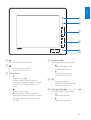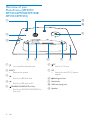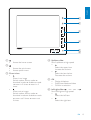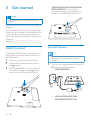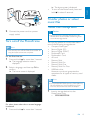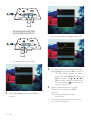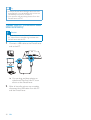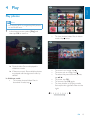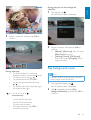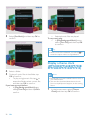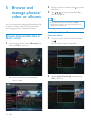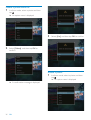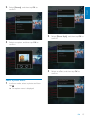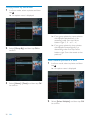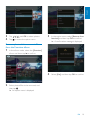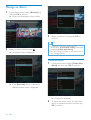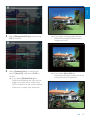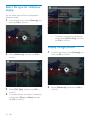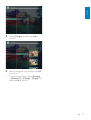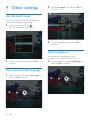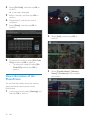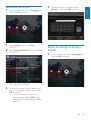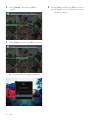
1
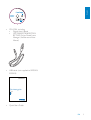
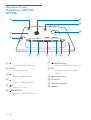
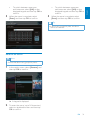
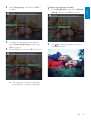
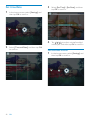
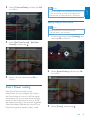
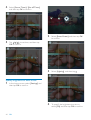
Register your product and get support at www.philips.com/welcome PhotoFrame SPF5008 SPF5208 SPF5010 SPF5210 SPF7008 SPF7208 SPF7010 SPF7210 EN User manual Transfer from PC (SPF5008/ SPF5208/SPF5010/SPF5210) Contents 1 Important Safety Safety precautions and maintenance Notice CE Declaration of Conformity (SPF5008/SPF5208/SPF5010/ SPF5210) CE Declaration of Conformity (SPF7008/SPF7208/SPF7010/ SPF7210) Recycling End of life disposal Recycling Information for Customers Compliance with Electro-Magnetic Field (EMF) North Europe Information (Nordic Countries) Banned Substance Declaration Bluetooth Statement (SPF7008/ SPF7208/SPF7010/SPF7210) Third party software 2 Your PhotoFrame Introduction What’s in the box Overview of your PhotoFrame (SPF5008/SPF5208) Overview of your PhotoFrame (SPF5010/SPF5210/SPF7008/ SPF7208/SPF7010/SPF7210) 3 Get started Install the stand Connect power Turn on/off the PhotoFrame 7UDQVIHUSKRWRVRUYLGHRPXVLFÀOHV Transfer from a storage device Transfer by Philips PhotoFrame Manager (SPF7008/SPF7208/ SPF7010/SPF7210) 2 EN 4 4 4 4 4 Play Play photos Play video Play background music Display a theme clock (SPF5008/ SPF5208/SPF7008/SPF7208/ SPF7010/SPF7210) 18 19 19 20 21 22 4 5 Browse and manage photos/video or albums 24 5 5 5 5 5 6 6 6 6 8 8 8 %URZVHSKRWRVYLGHRÀOHVLQ album mode $GGDSKRWRYLGHRÀOHWR the Favorites album &RS\DSKRWRYLGHRÀOH 0RYHDSKRWRYLGHRÀOH 'HOHWHDSKRWRYLGHRÀOH Rotate a photo Select a photo effect Group photos by name/date Select several photos at a time Remove photos/video or music ÀOHVIURPWKH)DYRULWHVDOEXP Manage an album Create an album Rename an album 24 24 25 25 26 26 27 28 28 29 30 30 31 6 Show date/time in slideshow 32 7 Create a reminder 34 35 10 12 14 14 14 15 15 15 17 Edit a reminder 8 Slideshow setting Select a transition effect Select background 6HOHFWÀOHW\SHIRUVOLGHVKRZGLVSOD\ Display collage photos 9 Other settings Use the quick menu Select an on-screen language Adjust brightness 36 36 36 38 38 40 40 40 40 42 42 43 43 44 45 46 46 47 48 48 48 49 50 51 51 10 Upgrade the PhotoFrame 53 11 Product information 54 12 Frequently asked questions 56 13 Appendix 57 Send photos from your mobile phone with Bluetooth connection 14 Glossary E n g lish Set time/date Set time/date format Smart Power setting Specify time to auto on/off Specify brightness to auto on/off Hibernate your PhotoFrame Set Auto Orientation Turn on/off button sound Protect/Unprotect content on a storage device Set Demo Bluetooth (SPF7008/SPF7208/ SPF7010/SPF7210) Set up Bluetooth connection Set Bluetooth pin code View information of the PhotoFrame Rename the PhotoFrame Reset all settings to factory default 57 58 Please visit www.philips.com/welcome where you can access a full set of supporting materials such as user manual, the latest software updates and answers to frequently asked questions. EN 3 1 Important Safety Safety precautions and maintenance Never touch, push, rub or strike the screen with hard objects as this may damage the screen permanently. When the product is not used for long periods, unplug it. Before you clean the screen, turn off and unplug the power cord. Only clean the screen with a soft, water-damp cloth. Never use substances such as alcohol, chemicals or household cleaners to clean the product. Never place the product near naked ÁDPHVRURWKHUKHDWVRXUFHVLQFOXGLQJ direct sunlight. Never expose the product to rain or water. Never place liquid containers, such as vases, near the product. Never drop the product. When you drop the product, it will be damaged. Keep the stand away from cables. Ensure that you install and use services or software only from trustworthy sources free of virus or harmful software. This product is designed for indoor use only. Only use the supplied power adaptor for the product. Caution (For SPF7008/SPF7208/SPF7010/SPF7210) Bluetooth connectivity of the PhotoFrame may cause wireless interference. Ensure that you disconnect Bluetooth connection or switch off your PhotoFrame when you use it in a vehicle. 4 EN Notice Warranty No components are user serviceable. Do not open or remove covers to the inside of the product. Repairs may only be done by Philips 6HUYLFH&HQWUHVDQGRIÀFLDOUHSDLUVKRSV Failure to do so shall void any warranty, stated or implied. Any operation expressly prohibited in this manual, any adjustments, or assembly procedures not recommended or authorised in this manual shall void the warranty. CE Declaration of Conformity (SPF5008/SPF5208/SPF5010/SPF5210) Philips Consumer Lifestyle declares under our responsibility that the product is in conformity with the following standards EN60950-1:2006 (Safety requirement of Information Technology Equipment) EN55022:2006 (Radio Disturbance requirement of Information Technology Equipment) EN55024:1998 (Immunity requirement of Information Technology Equipment) EN61000-3-2:2006 (Limits for Harmonic Current Emission) EN61000-3-3:1995 (Limitation of Voltage Fluctuation and Flicker) following provisions of directives applicable 73/23/EEC (Low Voltage Directive) 2004/108/EC (EMC Directive) 2006/95/EC (Amendment of EMC and Low Voltage Directive) and is produced by a manufacturing organization on ISO9000 level. Hereby Philips Consumer Lifestyle, P&A, declares that this Digital PhotoFrame SPF7008/SPF7208/SPF7010/SPF7210/00-/05 is in compliance with the essential requirements and other relevant provisions of Directive 1999/5/EC. Recycling Your product is designed and manufactured with high quality materials and components, which can be recycled and reused. When you see the crossed-out wheel bin symbol attached to a product, it means the product is covered by the European Directive 2002/96/EC: Never dispose of your product with other household waste. Please inform yourself about the local rules on the separate collection of electrical and electronic products. The correct disposal of your old product helps prevent potentially negative consequences on the environment and human health. End of life disposal Your new product contains materials that can be recycled and reused. Specialized companies can recycle your product to increase the amount of reusable materials and to minimize the amount to be disposed of. 3OHDVHÀQGRXWDERXWWKHORFDOUHJXODWLRQV on how to dispose of your old monitor from your local Philips dealer. (For customers in Canada and U.S.A.) Dispose of in accordance to local-state and federal regulations. For additional information on recycling contact www.eia.org (Consumer Education Initiative). E n g lish CE Declaration of Conformity (SPF7008/SPF7208/SPF7010/SPF7210) Recycling Information for Customers Philips establishes technically and economically viable objectives to optimize the environmental performance of the organization’s product, service and activities. From the planning, design and production stages, Philips emphasizes the importance of making products that can easily be recycled. At Philips, end-of-life management primarily entails participation in national take-back initiatives and recycling programs whenever possible, preferably in cooperation with competitors. There is currently a system of recycling up and running in the European countries, such as The Netherlands, Belgium, Norway, Sweden and Denmark. In U.S.A., Philips Consumer Lifestyle North America has contributed funds for the Electronic Industries Alliance (EIA) Electronics Recycling Project and state recycling initiatives for end-of-life electronics products from household sources. In addition, the Northeast Recycling Council (NERC) - a multi-state QRQSURÀWRUJDQL]DWLRQIRFXVHGRQSURPRWLQJ recycling market development - plans to implement a recycling program. ,Q$VLD3DFLÀF7DLZDQWKHSURGXFWVFDQ be taken back by Environment Protection Administration (EPA) to follow the IT product recycling management process, detail can be found in web site www.epa.gov.tw. Compliance with Electro-Magnetic Field (EMF) Koninklijke Philips Electronics N.V. manufactures and sells many products targeted at consumers, which, like any electronic apparatus, in general have the ability to emit and receive electromagnetic signals. EN 5 One of Philips’ leading Business Principles is to take all necessary health and safety measures for our products, to comply with all applicable legal requirements and to stay well within the EMF standards applicable at the time of producing the products. Philips is committed to develop, produce and market products that cause no adverse health HIIHFWV3KLOLSVFRQÀUPVWKDWLILWVSURGXFWVDUH handled properly for their intended use, they DUHVDIHWRXVHDFFRUGLQJWRVFLHQWLÀFHYLGHQFH available today. Philips plays an active role in the development of international EMF and safety standards, enabling Philips to anticipate further developments in standardisation for early integration in its products. North Europe Information (Nordic Countries) VARNING: FÖRSÄKRA DIG OM ATT HUVUDBRYTARE OCH UTTAG ÄR LÄTÅTKOMLIGA, NÄR DU STÄLLER DIN UTRUSTNING PÅPLATS. Placering/Ventilation ADVARSEL: SØRG VED PLACERINGEN FOR, AT NETLEDNINGENS STIK OG STIKKONTAKT ER NEMT TILGÆNGELIGE. Paikka/Ilmankierto VAROITUS: SIJOITA LAITE SITEN, ETTÄ VERKKOJOHTO VOIDAAN TARVITTAESSA HELPOSTI IRROTTAA PISTORASIASTA. Plassering/Ventilasjon ADVARSEL: NÅR DETTE UTSTYRET PLASSERES, MÅ DU PASSE PÅ AT KONTAKTENE FOR STØMTILFØRSEL ER LETTE Å NÅ. 6 EN Banned Substance Declaration This product complies with RoHs and Philips BSD (AR17-G04-5010-010) requirements. Bluetooth Statement (SPF7008/ SPF7208/SPF7010/SPF7210) The Bluetooth® word mark and logos are registered trademarks owned by Bluetooth SIG, Inc. and any use of such marks by Philips is under license. Third party software This product contains wpa_supplicant software that is licensed subject to the following conditions: Copyright © 2006, Jouni Malinen MNPDOLQH#FFKXWÀ! All rights reserved. Redistribution and use in source and binary IRUPVZLWKRUZLWKRXWPRGLÀFDWLRQDUH permitted provided that the following conditions are met: Redistributions of source code must retain the above copyright notice, this list of conditions and the following disclaimer. Redistributions in binary form must reproduce the above copyright notice, this list of conditions and the following disclaimer in the documentation and/or other materials provided with the distribution. Neither the name of the 25*$1,=$7,21!QRUWKHQDPHV of its contributors may be used to endorse or promote products derived from this software without VSHFLÀFSULRUZULWWHQSHUPLVVLRQ THIS SOFTWARE IS PROVIDED BY THE COPYRIGHT HOLDERS AND CONTRIBUTORS “AS IS” AND ANY E n g lish EXPRESS OR IMPLIED WARRANTIES, INCLUDING, BUT NOT LIMITED TO, THE IMPLIED WARRANTIES OF MERCHANTABILITY AND FITNESS FOR A PARTICULAR PURPOSE ARE DISCLAIMED. IN NO EVENT SHALL THE COPYRIGHT OWNER OR CONTRIBUTORS BE LIABLE FOR ANY DIRECT, INDIRECT, INCIDENTAL, SPECIAL, EXEMPLARY, OR CONSEQUENTIAL DAMAGES (INCLUDING, BUT NOT LIMITED TO, PROCUREMENT OF SUBSTITUTE GOODS OR SERVICES; LOSS OF USE, DATA, OR PROFITS; OR BUSINESS INTERRUPTION) HOWEVER CAUSED AND ON ANY THEORY OF LIABILITY, WHETHER IN CONTRACT, STRICT LIABILITY, OR TORT (INCLUDING NEGLIGENCE OR OTHERWISE) ARISING IN ANY WAY OUT OF THE USE OF THIS SOFTWARE, EVEN IF ADVISED OF THE POSSIBILITY OF SUCH DAMAGE. Class II equipment symbol: This symbol indicates that this product has a double insulation system. The making of unauthorized copies of copy-protected material, including computer SURJUDPVÀOHVEURDGFDVWVDQGVRXQG recordings, may be an infringement of copyrights and constitute a criminal offence. This equipment should not be used for such purposes. EN 7 2 Your PhotoFrame What’s in the box Congratulations on your purchase, and ZHOFRPHWR3KLOLSV7RIXOO\EHQHÀWIURPWKH support that Philips offers, register your product at www.philips.com/welcome. Philips Digital PhotoFrame Stand AC-DC power adaptor Introduction With your PhotoFrame, you can enjoy: Digital photo Home video MP3 music as background (SPF5008/SPF5208/SPF7008/SPF7208/ SPF7010/SPF7210) Theme clock <RXFDQSODFHLWRQDÁDWVXUIDFHRUKDQJLWRQ the wall for a continuous play. For SPF5008/SPF5208/SPF5010/SPF5020 After you connect your PhotoFrame to D3&\RXFDQHDVLO\GUDJDQGGURSÀOHV from the PC to your PhotoFrame. For SPF7008/SPF7208/SPF7010/SPF7210 You can use Philips PhotoFrame Manager, an application software on a PC, to transfer SKRWRVRUYLGHRPXVLFÀOHVIURPD3&WR your PhotoFrame easily by drag and drop. You can also use it to manage photos and albums on the PhotoFrame. For details, refer to Philips PhotoFrame Manager in the supplied CD-ROM. With Bluetooth connectivity available on the PhotoFrame, you can set up wireless connection between your PhotoFrame and a compatible device like a mobile phone. 8 EN E n g lish CD-ROM, including Digital User Manual (SPF7008/SPF7208/SPF7010/ SPF7210) Philips PhotoFrame Manager (Software and User Manual) USB cable (not supplied to SPF5010/ SPF5210) PhotoFrame Quick start guide 1 2 3 Get started Play Setup Eng Quick Start Guide EN 9 Overview of your PhotoFrame (SPF5008/ SPF5208) l a k j b c d e f g a Turn on/off the PhotoFrame b RESET Restore the system c 6ORWIRUD86%ÁDVKGULYH g h MS/MS Pro Duo Slot for an MS/MS Pro Duo card h DC Socket for the AC-DC power adaptor i Kensington lock j Stand hole d Slot for a USB cable to PC e CF Slot for a CF card f SD/MMC/xD Slot for an SD/MMC/xD card 10 EN i k Wall mounting hole l Speaker E n g lish a b c d e f a Access the home screen Access the quick menu Access option menu b c Zoom in/out Zoom in an image Switch modes: Album mode = thumbnail mode = slideshow mode = zoom in 2 times = zoom in 4 times Zoom out an image Switch modes: Album mode + thumbnail mode + slideshow mode + zoom out 2 times + zoom out 4 times d Up/down slider Scroll up/down at high speed Select the upper item Increase the volume Select the item below Decrease the volume e OK Display slideshow Play/Pause slideshow/video &RQÀUPDVHOHFWLRQ f Left/right slider Scroll left/right at high speed Select the left item Select the right item EN 11 Overview of your PhotoFrame (SPF5010/ SPF5210/SPF7008/SPF7208/ SPF7010/SPF7210) k a j i b c d e a f f Turn on/off the PhotoFrame b RESET Restore the system c 6ORWIRUD86%ÁDVKGULYH d g CF Slot for a CF card g DC Socket for the AC-DC power adaptor h Kensington lock i Stand hole Slot for a USB cable to PC e SD/MMC/xD/MS/MS Pro Duo Slot for an SD/MMC/xD/MS/MS Pro Duo card 12 EN h j Wall mounting hole k Speaker E n g lish a b c d e f a Access the home screen Access the quick menu Access option menu b c Zoom in/out Zoom in an image Switch modes: Album mode = thumbnail mode = slideshow mode = zoom in 2 times = zoom in 4 times Zoom out an image Switch modes: Album mode + thumbnail mode + slideshow mode + zoom out 2 times + zoom out 4 times d Up/down slider Scroll up/down at high speed Select the upper item Increase the volume Select the item below Decrease the volume e OK Display slideshow Play/Pause slideshow/video &RQÀUPDVHOHFWLRQ f Left/right slider Scroll left/right at high speed Select the left item Select the right item EN 13 3 Get started (SPF5010/SPF5210/SPF7008/SPF7208/ SPF7010/SPF7210) Turn the stand clockwise 45 degrees to the position DQGORFNLWWRWKH3KRWR)UDPHÀUPO\ Caution Use the controls only as stated in this user manual. Always follow the instructions in this chapter in sequence. If you contact Philips, you will be asked for the model and serial number of this apparatus. The model number and serial number are on the back of the apparatus. Write the numbers here: Model No. __________________________ Serial No. ___________________________ Install the stand 7RSODFHWKH3KRWR)UDPHRQDÁDWVXUIDFH\RX need install the supplied stand at the back of the PhotoFrame. 1 2 Insert the stand into the PhotoFrame. 3 (SPF5008/SPF5208) Turn the stand anticlockwise 45 degrees to the position DQGORFNLWWRWKH3KRWR)UDPHÀUPO\ Position the indication on the stand to the position. Connect power Note When you position the PhotoFrame, ensure that the power plug and outlet are easily accessible. 1 Connect the supplied power cord to the DC socket of the PhotoFrame. SPF5008/SPF5208 b a 14 EN SPF5010/SPF5210/SPF7008/ SPF7208/SPF7010/SPF7210 » The home screen is displayed. b a To turn off the PhotoFrame, press and hold for about 2 seconds. E n g lish Transfer photos or video/ PXVLFÀOHV Transfer from a storage device 2 Connect the power cord to a power supply socket. Caution Do not remove a storage device from the 3KRWR)UDPHZKHQÀOHVDUHWUDQVIHUULQJIURP or to the storage device. Turn on/off the PhotoFrame Note You can only turn off the PhotoFrame after all copy and save actions are complete. )RUWKHÀUVWWLPHXVH: 1 Press and hold for more than 1 second. » The language selection menu is displayed. 2 Select a language, and then tap OK to FRQÀUP » The home screen is displayed. <RXFDQSOD\SKRWRVRUPXVLFYLGHRÀOHVLQ one of the following storage device: Compact Flash type I Secure Digital (SD) Secure Digital (SDHC) Multimedia Card Multimedia+ Card xD card Memory Stick Memory Stick Pro Memory Stick Duo Memory Stick Pro Duo 86%ÁDVKGULYH However, we do not guarantee the operations for all types of memory card media. Note For SPF5008/SPF5208, Memory Stick/Memory Stick Pro/Memory Stick Duo/Memory Stick Pro Duo should be used with an adaptor. 1 Insert a storage device into the 3KRWR)UDPHÀUPO\ SPF5008/SPF5208 For other times when the on screen language is selected: 1 Press and hold for more than 1 second. EN 15 SPF5010/SPF5210/SPF7008/ SPF7208/SPF7010/SPF7210 » $FRQÀUPDWLRQPHVVDJHLVGLVSOD\HG 2 16 An option menu is displayed. 3 7RVHOHFWDOOSKRWRVRUYLGHRPXVLFÀOHV select [Yes] and then tap OKWRFRQÀUP To select some of photos or video/ PXVLFÀOHVVHOHFW[No] and then tap OKWRFRQÀUP7DS / / / and OK to select photos or video/music ÀOHVDQGWKHQWDS to continue the transfer operation. 4 Select a destination album on the PhotoFrame, and then tap OK to FRQÀUP » Files are transferred to the PhotoFrame. To remove a storage device, pull it out from the PhotoFrame. Select [Transfer], and then tap OK to FRQÀUP EN E n g lish Transfer by Philips PhotoFrame Manager (SPF7008/SPF7208/SPF7010/ SPF7210) Recommended way for SPF7008/SPF7208/ SPF7010/SPF7210. Caution Do not disconnect the PhotoFrame from the 3&ZKHQÀOHVDUHWUDQVIHUULQJEHWZHHQWKH PhotoFrame and the PC. 3 Under [My frame photos] / [My frame music] / [My frame videos], select a destination album/folder. 4 Under [My computer photos] / [My computer music] / [My computer videos], VHOHFWSKRWRVRUYLGHRPXVLFÀOHV 5 6 Click the Note Ensure that Philips PhotoFrame Manager is installed on your PC. 1 Connect the supplied USB cable to the PhotoFrame and to a PC. » Philips PhotoFrame Manager starts automatically. 2 Select [Transfer Photos] / [Tranfer Music] / [Transfer Video]. icon to start transfer. After all transfer actions are complete, disconnect the USB cable from the PC and the PhotoFrame. EN 17 Tip If Philips PhotoFrame Manager does not start automatically, you can double click its icon on the desktop of your PC to start it. You can also drag and drop photos from the PhotoFrame to a PC. Transfer from PC (SPF5008/SPF5208/ SPF5010/SPF5210) Caution Do not disconnect the PhotoFrame from the 3&ZKHQÀOHVDUHWUDQVIHUULQJEHWZHHQWKH PhotoFrame and the PC. 1 Connect a USB cable to the PhotoFrame and to the PC. » You can drag and drop photos or YLGHRPXVLFÀOHVIURPWKH3&WRDQ album on the PhotoFrame. 2 After all transfer actions are complete, disconnect the USB cable from the PC and the PhotoFrame. 18 EN E n g lish 4 Play Play photos Note You can play JPEG or progressive JPEG photos on the PhotoFrame. 1 In the home screen, select [Play] and then tap OKWRFRQÀUP 7RYLHZSKRWRVYLGHRÀOHVLQDOEXP mode, tap twice. To zoom in an image, tap . To zoom out an image, tap . To select the previous/next photo, tap / . To pause, tap OK. To resume, tap OK again. 7RYLHZSKRWRVLQÀOPVWULSPRGH fast swipe the right/left slider to the right. » 3KRWRVYLGHRÀOHVDUHGLVSOD\HGLQ slideshow mode. » ,IWKHUHDUHPXVLFÀOHVDYDLODEOHSKRWRV are played with background music by default. In slideshow mode: 7REURZVHSKRWRVYLGHRÀOHVLQ thumbnail mode, tap . EN 19 ,QÀOPVWULSPRGH: To resume slideshow mode, tap OK. Play video Tip ,QÀOPVWULSPRGH$ERXWÀIWHHQVHFRQGVODWHU ZLWKRXWXVHURSHUDWLRQÀOPVWULSGLVDSSHDUV and the selected photo is displayed in full screen. In slideshow mode, you can also manage the photo displayed. 1 2 In slideshow mode, tap . » An option menu is displayed. Select an option, and then tap OK to FRQÀUP Tip If [Slideshow Photo Only] is enabled, video ÀOHVDUHQRWSOD\HGLQVOLGHVKRZPRGH 20 EN Note The PhotoFrame plays most video clips of a digital still camera in M-JPEG (*.avi/*.mov), MPEG-1 (*.mpg), MPEG-4 (*.avi/*.mov/*.mp4), H.263 (*.avi/*.mov) format. Some video clips might have compatibility issues when played on your PhotoFrame. Before playing, ensure that these video clips are compatible with your PhotoFrame. Some video clips in a format which is not compatible well with your PhotoFrame, like *.3gp/*.3g2 and some others, may be played with no audio output. When a video clip is played with no audio output, the icon is displayed on the screen. ,QDOEXPWKXPEQDLOÀOPVWULSPRGHDYLGHR ÀOHLVGLVSOD\HGZLWKWKH icon on the left top corner. 1 In the home screen, select [Play] and then tap OKWRFRQÀUP 2 Fast swipe the right-left slider to the right. » 3KRWRVYLGHRÀOHVDUHGLVSOD\HGLQ ÀOPVWULSPRGH 3 E n g lish During play, you can also manage the YLGHRÀOH 1 During play, tap . » An option menu is displayed. 2 Select an option, and then tap OK to FRQÀUP [Repeat] ([Play Loop]: Play in a loop; [Play Once]: Play once) [Viewing Format] ([Full Screen]: Play in full screen; [Original]: Play in original format) 6HOHFWDYLGHRÀOHDQGWKHQWDSOK to FRQÀUP Play background music During video play: To view the album in which the slideshow video is saved, tap twice. To adjust volume, tap / . To pause/resume play, tap OK. 7RSOD\WKHSUHYLRXVQH[WÀOHWDS / . For fast forward, fast swipe the rightleft slider to the right. Note 2QO\0303(*$XGLR/D\HU,,,PXVLFÀOHV can be played on the PhotoFrame. 1 During photo display, tap . » An option menu is displayed. 2 Tap repeatedly to select [Play Background Music], and then tap OK to FRQÀUP 1 time: 2X fast forward 2 times: 4X fast forward 3 times: normal speed During fast forward, tap OK to resume normal play. EN 21 3 Select [Set Music], and then tap OK to FRQÀUP 6HOHFWHGPXVLFÀOHVDUHSOD\HG To stop music play: In [Play Background Music] menu, select [Turn Off] and then tap OK WRFRQÀUP Tip $IWHUDPXVLFÀOHLVVHOHFWHG\RXFDQWDS to access the option menu to copy/delete it. Display a theme clock (SPF5008/SPF5208/SPF7008/ SPF7208/SPF7010/SPF7210) 4 5 Select a folder. 7RSOD\DOOPXVLFÀOHVLQWKHIROGHUWDS OKWRFRQÀUP 7RSOD\DVLQJOHPXVLFÀOHWDS to DFFHVVWKHIROGHUVHOHFWDPXVLFÀOH and then tap OKWRFRQÀUP If you have set music before: In [Play Background Music]menu, select[Turn On]and then tapOKto FRQÀUP 22 EN Note Ensure that you have installed a theme clock in your PhotoFrame. You can also download latest theme clocks from www.philips.com/support, in the coming future. 1 In the home screen, select [Theme Clock] and then tap OKWRFRQÀUP E n g lish 2 Select [Show Current], and then tap OK WRFRQÀUP 4 Select a theme clock, and then tap OK to FRQÀUP » After the theme clock is installed, it is displayed automatically. To select and install another theme clock: 1 Download a theme clock and save it in an SD card before you install it. 2 3 Insert the SD card into the PhotoFrame. In [Theme Clock] menu, select [Select Other] and then tap OKWRFRQÀUP EN 23 5 Browse and manage photos/ video or albums 2 Select an album, and then tap the album. 3 Tap / / / to browse photos/video ÀOHVLQWKHDOEXP to access Tip If you select an album and then tap OK, SKRWRVYLGHRÀOHVLQWKHVHOHFWHGDOEXPDUH displayed in slideshow. <RXFDQEURZVHDQGPDQDJHSKRWRVYLGHRÀOHV or album in album ode. You can also browse and manage photos in thumbnail mode. %URZVHSKRWRVYLGHRÀOHVLQ album mode 1 1 In album mode, select a photo and then tap . » An option menu is displayed. 2 Select [Add to Favorites], and then tap OKWRFRQÀUP In the home screen, select [Browse] and then tap OKWRFRQÀUP » 3KRWRVYLGHRÀOHVDUHGLVSOD\HGLQ album mode. 24 $GGDSKRWRYLGHRÀOHWRWKH Favorites album EN 0RYHDSKRWRYLGHRÀOH 1 In album mode, select a photo and then tap . » An option menu is displayed. 2 Select [Move], and then tap OK to FRQÀUP 3 Select a destination album, and then tap OKWRFRQÀUP &RS\DSKRWRYLGHRÀOH 1 2 3 In album mode, select a photo and then tap . » An option menu is displayed. Select [Copy], and then tap OK to FRQÀUP Select a storage device and a destination album, and then tap OKWRFRQÀUP EN 25 E n g lish » The photo is added to the [Favorites] album. 'HOHWHDSKRWRYLGHRÀOH 1 In album mode, select a photo and then tap . » An option menu is displayed. 3 2 Select [Yes], and then tap OKWRFRQÀUP Select [Delete], and then tap OK to FRQÀUP Rotate a photo 1 » $FRQÀUPDWLRQPHVVDJHLVGLVSOD\HG 26 EN In album mode, select a photo and then tap . » An option menu is displayed. 3 Select [Rotate], and then tap OK to FRQÀUP E n g lish 2 2 Select [Photo Style], and then tap OK to FRQÀUP 3 Select an effect, and then tap OK to FRQÀUP Select an option, and then tap OK to FRQÀUP Select a photo effect 1 In album mode, select a photo and then tap . » An option menu is displayed. EN 27 Group photos by name/date 1 In album mode, select a photo and then tap . » An option menu is displayed. » If you group photos by name, photos are displayed alphabetically in an ascending order from top left to bottom right (1, 2, ... a, b , ... z). 2 » If you group photos by time, photos are displayed chronologically in a descending order from top left to bottom right (from the recent to the previous). Select [Group By], and then tap OK to FRQÀUP Select several photos at a time 3 28 1 In album mode, select a photo and then tap . » An option menu is displayed. 2 Select [Select Multiple], and then tap OK WRFRQÀUP Select [Name] / [Date], and then tap OK WRFRQÀUP EN E n g lish 3 4 Tap / / / and OK to select photos. Tap 3 In the option menu, select [Remove from favorites] and then tap OKWRFRQÀUP » $FRQÀUPDWLRQPHVVDJHLVGLVSOD\HG 4 Select [Yes], and then tap OKWRFRQÀUP to access the option menu. 5HPRYHSKRWRVYLGHRRUPXVLFÀOHV from the Favorites album 1 2 In the album mode, select the [Favorites] album and them tap WRFRQÀUP 6HOHFWSKRWRVÀOHVWREHUHPRYHGDQG then tap . » An option menu is displayed. EN 29 Manage an album 1 In the home screen, select [Browse] and then tap OKWRFRQÀUP » Photos are displayed in album mode. 3 Select an option, and then tap OK to FRQÀUP Tip For albums on sources other than the 2 Select an album, and then tap . » An option menu is displayed. PhotoFrame, [Create New Folder] is displayed instead of [Create New Album]. You can manage an album in the similar way as you manage a photo. Create an album 1 In the option menu, select [Create New Album] and then tap OKWRFRQÀUP » If the [Favorites] album is selected, a different option menu is displayed. » A keypad is displayed. 2 30 EN To enter the name (up to 24 characters), select an alphabet/number and then tap OKWRFRQÀUP 3 To switch between uppercase and lowercase, select [a/A] on the displayed keypad and then tap OK to FRQÀUP When the name is complete, select [Enter] and then tap OKWRFRQÀUP 3 To switch between uppercase and lowercase, select [a/A] on the displayed keypad and then tap OK to FRQÀUP When the name is complete, select [Enter] and then tap OKWRFRQÀUP Tip If albums are grouped by date, the album cannot be renamed. Rename an album Note Ensure that albums are grouped by name. 1 In the option menu, select [Rename] and then tap OKWRFRQÀUP » A keypad is displayed. 2 To enter the name (up to 24 characters), select an alphabet/number and then tap OKWRFRQÀUP EN 31 E n g lish 6 Show date/time in slideshow 1 3 Select [Month] / [Week] / [Clock], and then tap OKWRFRQÀUP [Month] In the home screen, select [Extra] and then tap OKWRFRQÀUP 2 Select [Calendar], and then tap OK to FRQÀUP 32 EN [Week] [Clock] To play slideshow without date/time shown, select [Off] and then tap OK WRFRQÀUP In calendar mode:You can tap to access the option menu to manage the photo displayed. E n g lish EN 33 7 Create a reminder Note Ensure that you set time and date correctly on the PhotoFrame. 1 In the home screen, select [Extra] and then tap OKWRFRQÀUP 2 Select [Reminder], and then tap OK to FRQÀUP 3 Select [<Create New>], and then tap OKWRFRQÀUP 34 EN 4 Tap / / / to set the date and month of the reminder, and then tap OK WRFRQÀUP » A key pad is displayed. 5 To enter the name (up to 24 characters), select an alphabet/number and then tap OKWRFRQÀUP To switch between uppercase and lowercase, select [a/A] on the displayed keypad and then tap OK to FRQÀUP 6 When the name is complete, select [Enter] and then tap OKWRFRQÀUP » A preview message is displayed. 7 Tap OKWRFRQÀUP » 3KRWRVYLGHRÀOHVDUHGLVSOD\HGLQ thumbnail mode. 6HOHFWDSKRWRRUYLGHRÀOHDQGWKHQWDS OKWRFRQÀUP » A preview message is displayed. » To select background music for the reminder photo, tap to select the music icon and then tap OK to FRQÀUP 2 Select [Reminder], and then tap OK to FRQÀUP 3 Select a reminder, and then tap . » An option menu is displayed. E n g lish 8 6HOHFWDPXVLFÀOHDQGWKHQWDSOK to FRQÀUP 9 Select [Finish], and then tap OK to FRQÀUP Edit a reminder 1 In the home screen, select [Extra] and then tap OKWRFRQÀUP EN 35 8 Slideshow setting Select a transition effect 1 In the home screen, select [Settings] and then tap OKWRFRQÀUP 4 Select a slideshow effect, and then tap OKWRFRQÀUP Select background You can select a background border color for photos that are smaller than the PhotoFrame display. 2 1 In the home screen, select [Settings] and then tap OKWRFRQÀUP 2 Select [Slideshow], and then tap OK to FRQÀUP Select [Slideshow], and then tap OK to FRQÀUP 3 Select [Transition Effect], and then tap OKWRFRQÀUP 36 EN E n g lish 3 Select [Background Color], and then tap OKWRFRQÀUP 4 Select [RadiantColor] / a background colour/ [Auto Fit], and then tap OK to FRQÀUP » If you select [RadiantColor], the PhotoFrame extends the color on the edges of a photo that is smaller than WKHIXOOVFUHHQWRÀOOWKHVFUHHQZLWKRXW black bars or aspect ratio distortion. » If you select a background color, the PhotoFrame displays a photo with a background color. » If you select [Auto Fit], the 3KRWR)UDPHH[WHQGVDSKRWRWRÀOOWKH screen with picture distortion. EN 37 6HOHFWÀOHW\SHIRUVOLGHVKRZ display <RXFDQVHOHFWW\SHRIÀOHWREHGLVSOD\HGLQ slideshow mode. 1 In the home screen, select [Settings] and then tap OKWRFRQÀUP To display only photos in slideshow mode, select [Photo Only] and then tap OKWRFRQÀUP Display collage photos 2 1 In the home screen, select [Settings] and then tap OKWRFRQÀUP 2 Select [Slideshow], and then tap OK to FRQÀUP Select [Slideshow], and then tap OK to FRQÀUP 3 Select [File Type], and then tap OK to FRQÀUP 4 To display photos and videos in slideshow mode, select [Photo + Video] and then tap OKWRFRQÀUP 38 EN E n g lish 3 Select [Collage], and then tap OK to FRQÀUP 4 Select a collage format, and then tap OK WRFRQÀUP To stop collage display, select [Settings] ![Slideshow]![Collage]![Single] and then tap OKWRFRQÀUP EN 39 9 Other settings 2 Select [Language], and then tap OK to FRQÀUP 3 Select a language, and then tap OK to FRQÀUP Use the quick menu In the quick menu, you can access directly to some most-frequently used settings. 1 In the home screen, press . » The quick menu is displayed. Adjust brightness 2 You can adjust the brightness of the PhotoFrame to achieve the best view. Select an option, and then tap OK to FRQÀUP Select an on-screen language 1 In the home screen, select [Settings] and then tap OKWRFRQÀUP 40 EN 1 In the home screen, select [Settings] and then tap OKWRFRQÀUP 3 4 Select [Brightness], and then tap OK to FRQÀUP To adjust the brightness automatically, select [Smart Brightness] and then tap OKWRFRQÀUP To adjust the brightness manually: 1 In the [Brightness] menu, select [Manual Adjust] and then tap OKWRFRQÀUP 2 Tap / to adjust brightness, and then tap OKWRFRQÀUP Select [On], and then tap OKWRFRQÀUP » The brightness of display is adjusted DXWRPDWLFDOO\WRÀWWKHDPELHQWOLJKW EN 41 E n g lish 2 Set time/date 1 2 3 Select [Set Time] / [Set Date], and then tap OKWRFRQÀUP 4 Tap / / / to adjust minute/hour/day/ month/year, and then tap OKWRFRQÀUP In the home screen, select [Settings] and then tap OKWRFRQÀUP Select [Time and Date], and then tap OK WRFRQÀUP Set time/date format 1 42 EN In the home screen, select [Settings] and then tap OKWRFRQÀUP Select [Time and Date], and then tap OK WRFRQÀUP Note You can enable only one Smart Power function at a time, either by timer or by light sensor. Ensure that your PhotoFrame is turned on. Specify time to auto on/off Note Ensure that the current time of the PhotoFrame is set correctly. 3 4 1 In the home screen, select [Settings] and then tap OKWRFRQÀUP 2 Select [Smart Power], and then tap OK WRFRQÀUP 3 Select [Timer], and then tap . Select [Set Time Format] / [Set Date Format], and then tap . Select a format, and then tap OK to FRQÀUP Smart Power setting With Smart Power function on the 3KRWR)UDPH\RXFDQFRQÀJXUHWKHWLPHIRU the PhotoFrame to turn on or off the display automatically. Or you can also adjust the light sensor for the PhotoFrame to turn on or off the display according to the ambient brightness. When the display automatically turns off, your PhotoFrame goes to standby (sleep) mode. EN 43 E n g lish 2 4 5 Select [Set on Timer] / [Set off Timer], and then tap OKWRFRQÀUP 2 Select [Smart Power], and then tap OK WRFRQÀUP 3 Select [Lighting], and then tap . 4 To specify the brightness to auto on, select [On] and then tap OKWRFRQÀUP Tap / / / to set time, and then tap OKWRFRQÀUP Specify brightness to auto on/off 1 44 In the home screen, select [Settings] and then tap OKWRFRQÀUP EN To specify the brightness to auto off, select [Off] and then tap OK to FRQÀUP E n g lish 5 Tap / to adjust brightness sensor, and then tap OKWRFRQÀUP To switch off Smart Power function: In the [Smart Power] menu, select [Off] and then tap OKWRFRQÀUP 2 Select [Hibernate], and then tap OK to FRQÀUP 3 Select an option, and then tap OK to FRQÀUP To disable hibernate function, select [Never] and then tap OK to FRQÀUP Tip When the ambient light reaches the set auto on/off level and lasts about 10 seconds, the Smart Power (Lighting) function takes effect. The auto on level must be set higher than that of the auto off level. When the PhotoFrame is in standby (sleep) mode, you can press to wake up the PhotoFrame. Hibernate your PhotoFrame 1 In the home screen, select [Settings] and then tap OKWRFRQÀUP EN 45 After the selected period, your PhotoFrame hibernates. To get your PhotoFrame out of hibernation, press . 3 Select [On], and then tap OKWRFRQÀUP Set Auto Orientation You can play photos in the correct orientation depending the horizontal/vertical orientation of the PhotoFrame. 1 In the home screen, select [Settings] and then tap OKWRFRQÀUP Turn on/off button sound 1 2 Select [Auto Orientation], and then tap OKWRFRQÀUP 46 EN In the home screen, select [Settings] and then tap OKWRFRQÀUP Select [Set Beep], and then tap OK to FRQÀUP 2 Select [Memory card], and then tap OK WRFRQÀUP 3 Select [On] / [Off], and then tap OK to FRQÀUP 3 Select [Delete Enable] / [Delete Disable], and then tap OKWRFRQÀUP Protect/Unprotect content on a storage device You can enable the delete function on a storage device available on the PhotoFrame. To protect ÀOHVRQDVWRUDJHGHYLFHIURPDFFLGHQWDOGHOHWHV you can disable the delete function on a storage device. 1 In the home screen, select [Settings] and then tap OKWRFRQÀUP EN 47 E n g lish 2 Set Demo Bluetooth (SPF7008/SPF7208/ SPF7010/SPF7210) Note Note The demo function is only effective during photo slideshow. 1 Bluetooth connectivity is available only on SPF7008/SPF7208/SPF7010/SPF7210. In the home screen, select [Settings] and then tap OKWRFRQÀUP Set up Bluetooth connection With the PhotoFrame, you can set up Bluetooth connection with a device like a mobile phone. Once a device is recognized, it is automatically accepted when it tries to connect with the PhotoFrame. 2 Select [Demo], and then tap OK to FRQÀUP 3 Select [On], and then tap OKWRFRQÀUP » The demo function is activated. 48 EN 1 In the home screen, select [Settings] and then tap OKWRFRQÀUP 2 Select [Bluetooth], and then tap OK to FRQÀUP Select [Setup], and then tap OK to FRQÀUP 4 Select [Bluetooth On], and then tap OK WRFRQÀUP E n g lish 3 2 Select [Bluetooth], and then tap OK to FRQÀUP 3 Select [Security], and then tap OK to FRQÀUP To set off Bluetooth connection, select [Bluetooth Off] and then tap OKWRFRQÀUP Tip If Bluetooth connection on your PhotoFrame is enabled, the Bluetooth icon is displayed on the top-right corner of the screen. Photos obtained via Bluetooth connection are saved in the Bluetooth album. You can access or manage the Bluetooth album the same way you access or manage other albums on the PhotoFrame. Set Bluetooth pin code To keep security, you can set a pin code (from 1 to 16 digits) on the PhotoFrame. The default pin code is 0000. 1 In the home screen, select [Settings] and then tap OKWRFRQÀUP EN 49 4 Select [Pin Code], and then tap OK to FRQÀUP » A key pad is displayed. 5 Select a number, and then tap OK to FRQÀUP 6 Repeat Step 5 until the pin code is complete. 7 Select [Enter], and then tap OK to FRQÀUP 8 To set the pin code on, select [Pin Code On] and then tap OKWRFRQÀUP To set the pin code off, select [Pin Code Off] and then tap OK to FRQÀUP View information of the PhotoFrame <RXFDQÀQGWKHIULHQGO\QDPHWKHPHPRU\ VWDWXVDQGWKHÀUPZDUHYHUVLRQRIWKH PhotoFrame. 1 In the home screen, select [Settings] and then tap OKWRFRQÀUP 50 EN 2 Select [Info], and then tap OK to FRQÀUP 3 Select [Friendly Name] / [Memory Status] / [Firmware] to view related information. 1 In the home screen, select [Settings] and then tap OKWRFRQÀUP 2 Select [Info], and then tap OK to FRQÀUP 3 Select [Friendly Name], and then tap OK WRFRQÀUP 5 When the name is complete, select [Enter] and then tap OKWRFRQÀUP E n g lish Rename the PhotoFrame Reset all settings to factory default 1 In the home screen, select [Settings] and then tap OKWRFRQÀUP » A key pad is displayed. 4 To enter the name (up to 24 characters), select an alphabet/number and then tap OKWRFRQÀUP To switch between uppercase and lowercase, select [a/A] on the displayed keypad and then tap OK to FRQÀUP EN 51 2 Select [Reset], and then tap OK to FRQÀUP 3 Select [Yes], and then tap OKWRFRQÀUP » $FRQÀUPDWLRQPHVVDJHLVGLVSOD\HG 52 EN 4 Select [Yes], and then tap OKWRFRQÀUP » All settings on the PhotoFrame are set to factory default. E n g lish 10 Upgrade the PhotoFrame Caution Do not power off the PhotoFrame during upgrade. If there is a software update, you can download the latest software from www.philips.com/ support to upgrade your PhotoFrame. The earlier software is unavailable online. 1 2 Visit www.philips.com/support. 3 Download the latest software onto the root directory of an SD card. 4 5 Insert the SD card into the PhotoFrame. 6 Select [Yes], and then tap OKWRFRQÀUP » When the update is complete, the PhotoFrame reboots. Search for your PhotoFrame and go to the software section. Turn on the PhotoFrame » $FRQÀUPDWLRQPHVVDJHLVGLVSOD\HG EN 53 11 Product information Note Product information is subject to change without prior notice. Picture/Display 9LHZLQJDQJOH#&5! (H)/110° (V) Lifetime, to 50% brightness: 20000 hr Aspect ratio: 4:3 Panel resolution: 800 x 600 Brightness (typical): 220 cd/m² Contrast ratio (typical): 300:1 Photo format support: JPEG photo (maximum: 8000 x 6000 pixel resolution) Progressive JPEG photo (maximum: 1024 x 768 pixel resolution) Video feature Video supported format: M-JPEG (*.avi/*. mov), MPEG-1 (*.mpg), MPEG-4 (*.avi/*. mov/*.mp4), H.263 (*.avi/*.mov) Video size: For M-JPEG: 640 x 480 For MPEG-1, MPEG-4, H.263: 720 x 576 Frame rate: 30 fps Audio feature Audio supported format: MP3 (MPEG Audio Layer III) Bit rate: 16 ~ 320 Kbps Sample rate: 8 ~ 48 kHz Speaker output power (RMS): 0.83 W Storage Media Memory Card Types: Compact Flash type I Secure Digital (SD) Secure Digital (SDHC) Multimedia Card xD card Memory Stick 54 EN Memory Stick Pro Memory Stick Duo Memory Stick Pro Duo 86%86%ÁDVKGULYH Built-in memory capacity: SPF5008/SPF5208/SPF5010/SPF5210: 512 MB, for up to 500 High 'HÀQLWLRQSKRWRV SPF7008/SPF7208/SPF7010/ SPF7210: 1 GB, for up to 1,000 High 'HÀQLWLRQSKRWRV Connectivity USB: USB 2.0 Host, USB 2.0 Slave Bluetooth® (SPF7008/SPF7208/SPF7010/ SPF7210): Bluetooth V2.0 + EDR, Class 2, Receiver only Dimensions Set dimensions with stand (W x H x D): SPF5008/SPF5208/SPF7008/ SPF7208: 224.9 x 184.3 x 113.8 mm SPF5010/SPF5210/SPF7010/SPF7210: 275.8 x 226 x 121 mm Set dimensions without stand (W x H x D): SPF5008/SPF5208/SPF7008/ SPF7208: 224.9 x 184.3 x 33.2 mm SPF5010/SPF5210/SPF7010/SPF7210: 275.8 x 226 x 34.8 mm Weight (Main unit): SPF5008/SPF5208/SPF7008/ SPF7208: 0.60 kg SPF5010/SPF5210: 0.84 kg SPF7010/SPF7210: 0.87 kg Temperature range (operation): 0 °C - 40 °C/32 °F - 104 °F Temperature range (storage): -10 °C - 60 °C/14 °F - 140 °F Power Power mode supported: AC powered Input: SPF5008/SPF5208: 100 - 240 V ~ 50/60 Hz 0.3 A SPF5010/SPF5210/SPF7008/ SPF7208/SPF7010/SPF7210: 100 - 240 V ~ 50/60 Hz 0.6 A Output: SPF5008/SPF5208: 9 V 1A SPF5010/SPF5210/SPF7008/ SPF7208/SPF7010/SPF7210: 9 V 2.0 A (IÀFLHQF\OHYHO,9 Maximum consumption: SPF5008/SPF5208 (system on with slideshow + MP3): 6.5 W SPF7008/SPF7208 (system on with slideshow + MP3): 5.1 W SPF5010/SPF5210 (system on with slideshow + MP3): 7.0 W SPF7010/SPF7210 (system on with slideshow + MP3): 7.1 W Accessories AC-DC adaptor USB cable (not supplied to SPF5010/ SPF5210) Stand Quick start guide CD-ROM, including User Manual (SPF7008/SPF7208/SPF7010/ SPF7210) Philips PhotoFrame Manager Convenience Card Reader: Built-in Photo format supported: JPEG photo (maximum: 8000 x 6000 pixel resolution) Progressive JPEG photo (1024 x 768 pixel resolution only) Placement supported: Photo auto orientation, Landscape, Portrait Buttons and controls: Touch boarder control, power button Playback mode: Full screen browse, Slideshow, Thumbnail browse Album management: Create, Delete, Edit, Rename, Group, Add to Favorites Photo edit: Copy, Delete, Rotate Photo effects: Black and White, Sepia Slideshow setting: Transition Effect, Background Color, File Type, Collage (multiple pictures) Screen background: Black, White, Gray, $XWRÀW5DGLDQWFRORU Setup function: Brightness adjustment, Language, Status, Event reminder, Beep on/off, Set time and date, Clock display enable/disable, Auto on/off, Slideshow System status: Firmware version, Remaining memory Plug & Play Compatibility: Windows Vista, Windows XP or later, Mac OS X 10.4 or later Regulatory Approvals: C-Tick, CCC, CE, GOST, PSB, Switzerland Other convenience: Kensington lock compatible On-Screen Display languages: English, French, German, Spanish, Italian, Danish, 'XWFK3RUWXJXHVH5XVVLDQ6LPSOLÀHG Chinese EN 55 E n g lish 12 Frequently asked questions Is the LCD screen touch-enabled? The LCD screen is not touch-enabled. After you turn on the PhotoFrame, you can use the touch boarder on the front panel to control the PhotoFrame. Can I use the PhotoFrame to delete photos on a memory card? Yes, it supports operations to delete photos on external devices such as a memory card. Ensure that you enable the delete function on a memory card available on the PhotoFrame. Can I use the PhotoFrame during its display auto-off periods? Yes. When the PhotoFrame is in standby (sleep) mode, you can press to wake up the PhotoFrame. Why does my PhotoFrame not show some of my photos? The PhotoFrame plays only JPEG photos (maximum: 8000 x 6000 pixel resolution) and progressive JPEG photos (maximum: 1024 x 768 pixel resolution). Ensure that these photos are not damaged. Why does my PhotoFrame not show some of P\YLGHRÀOHV" The PhotoFrame plays most video clips of a digital still camera in M-JPEG (*.avi/*. mov), MPEG-1 (*.mpg), MPEG-4 (*.avi/*. mov/*.mp4), H.263 (*.avi/*.mov) format. Some video clips might have compatibility issues when played on your PhotoFrame. Before playing, ensure that these video clips are compatible with your PhotoFrame. (QVXUHWKDWWKHVL]HRIWKHYLGHRÀOHV are applicable to your PhotoFrame (For details, see “Product information” in the User Manual). 56 EN (QVXUHWKDWWKHYLGHRÀOHVDUHQRW damaged. :K\FDQQRWP\3KRWR)UDPHVKRZYLGHRÀOHV even I could see them in [Browse] mode, and I played them before? Ensure that [Slideshow Photo Only] is not enabled. To play video in slideshow mode: 1. In slideshow mode, tap . 2. In the displayed option menu, select [Slideshow Photo Only]. 3. In the displayed message, select [No] and then tap OKWRFRQÀUP 1RZ\RXFDQSOD\WKHVHYLGHRÀOHVLQVOLGHVKRZ Why does my PhotoFrame not show some of P\PXVLFÀOHV" The PhotoFrame only supports MP3 (MPEG $XGLR/D\HU,,,PXVLFÀOHV(QVXUHWKDWWKHVH 0303(*$XGLR/D\HU,,,PXVLFÀOHVDUH not damaged. Why does the PhotoFrame not go into autooff status after I set it? Ensure that you set the current time, auto-off time, and auto-on time correctly. The PhotoFrame automatically turns off its display exactly at the auto-off time. If the time has already passed for the day, it starts to enter auto-off status at the VSHFLÀHGWLPHIURPWKHQH[WGD\ Ensure that you adjust brightness sensor correctly. If the auto-on level is too close to the auto-off level, this function cannot take effect. Does the PhotoFrame support CF II? No. The PhotoFrame does not support CF II. Can I increase the memory size to store more pictures on the PhotoFrame? No. The internal memory of the PhotoFrame LVÀ[HGDQGFDQQRWEHH[SDQGHG+RZHYHU you could switch between different photos by using different storage devices on the PhotoFrame. The PhotoFrame is ON but the PhotoFrame does not respond anymore. What can I do? Ensure that the PhotoFrame is turned on. Then, use a pin to trigger the RESET button located on the back to restore the system. E n g lish 13 Appendix Send photos from your mobile phone with Bluetooth connection Note Bluetooth connectivity is available only on SPF7008/SPF7208/SPF7010/SPF7210. Ensure that Bluetooth connection on your mobile phone is enabled. Ensure that Bluetooth connection on your PhotoFrame is enabled. Detailed operation procedures depend on the type of mobile phones. Consult the user manual of your mobile phone to proceed: 1 On your mobile phone, select photos to be sent to the PhotoFrame. 2 Activate Bluetooth feature on your mobile phone. 3 Pair your mobile with the PhotoFrame. » Your Philips PhotoFrame is searched. 4 If a pin code is required, enter the pin code (0000 by default) of the PhotoFrame. 5 Send photos from your mobile to the PhotoFrame. » The PhotoFrame saves photos in the Bluetooth album. EN 57 14 Glossary K A Kbps Kilobits per second. A digital-data-rate measurement system which is often used with highly compressed formats such as AAC, DAB, MP3 etc. The higher the amount, the better the quality generally is. Aspect ratio Aspect ratio refers to the length to height ratio of TV screens. The ratio of a standard 79LVZKLOHWKHUDWLRRIDKLJKGHÀQLWLRQ or wide TV is 16:9. The letter box allows you to enjoy a picture with a wider perspective on a standard 4:3 screen. B Bluetooth® Bluetooth® is a short-range wireless protocol that is meant to allow mobile devices to share information and applications without the worry of cables or interface incompatibilities. 7KHQDPHUHIHUVWRD9LNLQJ.LQJZKRXQLÀHG Denmark. Operates at 2.4 GHz. For more information, see bluetooth.com. C CF Card CompactFlash card. A memory card that uses ÁDVKPHPRU\WRVWRUHGDWDRQDVPDOOFDUG$ CompactFlash card makes data easy to add to a wide variety of computing devices, including digital cameras and music players, desktop computers, personal digital assistants (PDAs), digital audio recorders, and photo printers. J JPEG A very common digital still picture format. A still-picture data compression system proposed by the Joint Photographic Expert Group, which features small decrease in image quality in spite of its high compression ratio. )LOHVDUHUHFRJQL]HGE\WKHLUÀOHH[WHQVLRQ ‘.jpg’ or ‘.jpeg.’ 58 EN Kensington lock A Kensington Security Slot (also called a K-Slot or Kensington lock). Part of an antitheft system. It is a small, metal-reinforced hole found on almost all small or portable computer and electronics equipment, particularly on expensive and/or relatively light ones, such as laptops, computer monitors, desktop computers, gaming consoles, and video projectors. It is used for attaching a lock-and-cable apparatus, in particular those from Kensington. M Memory Stick 0HPRU\6WLFN$ÁDVKPHPRU\FDUGIRUGLJLWDO storage on cameras, camcorders and other handheld devices. MMC Card 0XOWL0HGLD&DUG$ÁDVKPHPRU\FDUGWKDW provides storage for cellphones, PDAs and RWKHUKDQGKHOGGHYLFHV7KHFDUGXVHVÁDVK memory for read/write applications or ROM chips (ROM-MMC) for static information, the latter widely used for adding applications to a Palm PDA. Motion JPEG Motion JPEG (M-JPEG) is an informal name for multimedia formats where each video frame RULQWHUODFHGÀHOGRIDGLJLWDOYLGHRVHTXHQFH is separately compressed as a JPEG image. It is often used in mobile appliances such as digital cameras. MP3 $ÀOHIRUPDWZLWKDVRXQGGDWDFRPSUHVVLRQ system. MP3 is the abbreviation of Motion E n g lish Picture Experts Group 1 (or MPEG-1) Audio Layer 3. With the MP3 format, one CD-R or CD-RW can contain about 10 times more data than a regular CD. MPEG Motion Picture Experts Group. A collection of compression systems for digital audio and video. S SD Card 6HFXUH'LJLWDO0HPRU\&DUG$ÁDVKPHPRU\ card that provides storage for digital cameras, cellphones and PDAs. SD Cards use the same 32 x 24mm form factor as the MultiMediaCard (MMC), but are slightly thicker (2.1mm vs. 1.4mm), and SD Card readers accept both formats. Cards up to 4GB are available. T Thumbnail A thumbnail is reduced-size versions of a picture that is used to make it easier to recognize an them. Thumbnails serve the same role for images as a normal text index does for words. X xD Card (;WUHPH'LJLWDO3LFWXUH&DUG$ÁDVKPHPRU\ card used in digital cameras. EN 59 © 2008 Koninklijke Philips Electronics N.V. All rights reserved. UM_V2.1