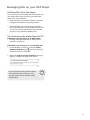
1
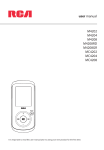
user manual
M4102
M4104
M4108
MC4102
MC4104
MC4108
It is important to read this user manual prior to using your new product for the first time.
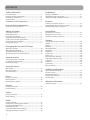
Contents
Safety information
Audiobooks
FCC information ...............................................................................3
Important battery information ...................................................4
Electrostatic disturbance ...............................................................4
Headset safety ..................................................................................4
IMPORTANT SAFETY INFORMATION ..........................................5
Playing audiobooks .........................................................................21
Audiobooks playback controls ....................................................21
Skipping through audiobook sections ....................................21
Favorites
End user license agreement .........................................................6
Creating a "Favorites" playlist ......................................................22
Removing files from "Favorites" playlist ..................................22
Downloading playlists to player .................................................22
Before you begin
Voice Memo
Copyright warning...........................................................................8
Back up your data ............................................................................8
Unpacking your player ...................................................................8
Computer system requirements .................................................8
Secure music transfer requirements .........................................8
Connecting to the computer .......................................................9
Charging the player.........................................................................9
Recording voice memo ..................................................................23
Playing back voice memo .............................................................23
Copying recordings to your PC ...................................................23
End user license agreement
Managing files on your RCA Player
Using RCA easyRip ...........................................................................10
Using Windows Explorer................................................................10
Deleting files from the player ......................................................11
Disconnecting the player from the PC .....................................11
General controls
Turning the player on and off......................................................12
Locking the player controls ..........................................................12
Resetting the player ........................................................................12
Settings
Changing the player’s settings ....................................................24
Shuffle .................................................................................................24
Repeat ..................................................................................................24
Equalizer ..............................................................................................24
Customize menu ..............................................................................24
Slideshow ............................................................................................24
Brightness ..........................................................................................24
Screensaver ........................................................................................24
Power save .........................................................................................24
RecDur (Record duration) .............................................................24
FreqStep (Frequency Step) ...........................................................24
Language ...........................................................................................24
Protocol ................................................................................................24
System info .........................................................................................24
Restore defaults ................................................................................24
Using the menus
Menu types .........................................................................................13
Menu navigation ..............................................................................13
The Home menu ...............................................................................14
Music
Playing music files............................................................................15
Music playback..................................................................................15
Music playback display ..................................................................15
Additional information
Tips and troubleshooting..............................................................25
For your records ...............................................................................26
Visiting RCA website .......................................................................26
Technical specification ...................................................................26
Specifications .....................................................................................26
Warranty information
Limited warranty ..............................................................................27
Pictures
Playing picture files .........................................................................16
Picture viewing .................................................................................16
Videos
Playing video files ............................................................................17
Video viewing ....................................................................................17
Radio
Playing FM radio ...............................................................................18
Storing and recalling preset stations ........................................18
Improving FM radio sound ...........................................................19
Recording FM radio .........................................................................19
Playing back FM radio recordings ..............................................20
Copying recordings to your PC ...................................................20
2
Safety information
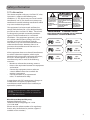
FCC information
This device complies with part 15 of the FCC rules.
Operation is subject to the following two
conditions: (1) This device may not cause harmful
interference, and (2) This device must accept any
interference received including interference which
may cause undesired operation.
This equipment has been tested and found to
comply with the limits for a Class B digital device,
pursuant to Part 15 of the FCC Rules. These limits
are designed to provide reasonable protection
against harmful interference in a residential
installation. This equipment generates, uses and
can radiate radio frequency energy and, if not
installed and used in accordance with the
instructions, may cause harmful interference to
radio communications. However, there is no
guarantee that interference will not occur in a
particular installation.
If this equipment does cause harmful interference
to radio or television reception, which can be
determined by turning the equipment off and on,
the user is encouraged to try to correct the
interference by one or more of the following
measures:
• Reorient or relocate the receiving antenna.
• Increase the separation between the equipment
and receiver.
• Connect the equipment into an outlet on
a circuit different from that to which the
receiver is connected.
• Consult the dealer or an experienced
radio / TV technician for help.
CAUTION
THE LIGHTNING FLASH
AND ARROWHEAD
WITHIN THE TRIANGLE
IS A WARNING SIGN
ALERTING YOU OF
"DANGEROUS
VOLTAGE" INSIDE THE
PRODUCT.
RISK OF ELECTRIC SHOCK
DO NOT OPEN
CAUTION: TO REDUCE THE
RISK OF ELECTRIC SHOCK,
DO NOT REMOVE COVER (OR
BACK). NO
USER-SERVICEABLE PARTS
INSIDE. REFER SERVICING TO
QUALIFIED SERVICE
PERSONNEL.
THE EXCLAMATION
POINT WITHIN THE
TRIANGLE IS A
WARNING SIGN
ALERTING YOU OF
IMPORTANT
INSTRUCTIONS
ACCOMPANYING
THE PRODUCT.
SEE MARKING ON BOTTOM / BACK OF PRODUCT
WARNING: TO PREVENT FIRE OR
ELECTRICAL SHOCK HAZARD, DO NOT EXPOSE
THIS PRODUCT TO RAIN OR MOISTURE.
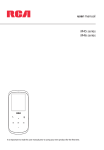
RCA
RCA
M4102
MC4102
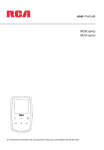
RCA
RCA
M4104
MC4104
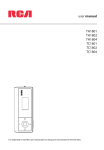
RCA
RCA
M4108
MC4108
In accordance with FCC requirements, changes or
modifications not expressly approved by
manufacturer could void the user’s authority to
operate this product.
This Class B digital apparatus complies with Canadian
ICES-003.
Cet appareil numérique de la classe B est conforme à la
norme NMB-003 du Canada.
Manufacturer/Responsible party
Audiovox Electronics Corp,
150 Marcus Blvd, Hauppauge, NY 11788
1-317-810-4880
(Please note this phone number is for regulatory
matters only. No technical or product support is
available via this number.)
3
Safety information
Important battery information
Electrostatic disturbance
Warning: Your product contains a battery and
charging system which is designed to work in
temperatures that do not exceed 50°C (122°F).
Leaving this product in a closed automobile or the
trunk of an automobile where temperatures may
exceed 50°C may result in permanent battery
damage, fire, or explosion. Please remove your
product from the automobile when you exit, do not
place your product in the trunk of your automobile,
and do not leave your product in any location where
temperatures may exceed 50°C.
This unit may temporarily cease to function if
subjected to electrostatic disturbance. To resume
normal operation, you may reset the player by
pressing and holding /MENU for more than 10
seconds.
Important Battery Precautions
• Any battery may present a risk of fire, explosion,
or chemical burn if abused. Do not try to charge
a battery that is not intended to be recharged,
do not incinerate, and do not puncture.
• Non-rechargeable batteries, such as alkaline
batteries, may leak if left in your product for a
long period of time. Remove the batteries from
the product if you are not going to use it for a
month or more.
• If your product uses more than one battery, do
not mix types and make sure they are inserted
correctly. Mixing types or inserting incorrectly
may cause them to leak.
• Discard any leaky or deformed battery
immediately. They may cause skin burns or other
personal injury.
• Please help to protect the environment by
recycling or disposing of batteries according to
federal, state, and local regulations.
To minimize the risk of fire, explosion, or
chemical burn, observe the following
precautions:
• Do not use an unauthorized battery. Use only the
rechargeable battery that came with your
product or that is listed in the user’s guide.
• Do not use unauthorized chargers or power
adapters. Use only chargers that came with your
product or that is listed in the user’s guide.
• Do not attempt to open the rechargeable
battery or battery pack. There are no user
serviceable parts inside.
• Do not leave in a hot automobile or in
temperatures exceeding 50°C (122°F).
Caution: Danger of explosion if battery is incorrectly
replaced. Replace only with the same or equivalent
type.
4
Precautions for the player
•
•
•
•
•
•
•
Do not use the unit immediately after
transportation from a cold place to a warm place;
condensation problems may result.
Avoid shock to the unit.
Do not store the unit near fire, places with high
temperature or in direct sunlight. Exposure to
direct sunlight or extreme heat (such as inside a
parked car) may cause damage or malfunction.
Do not expose to rain or moisture.
Do not operate or store unit in places with
frequent static electricity or electrical noise (e.g.
speaker, TV set).
Clean the unit with a soft cloth or a damp
chamois leather. Never use solvents.
The unit must only be opened by qualified
personnel.
Headset safety
To use a headset safely, please keep the following in
mind:
• Do not play your headset at a high volume.
Hearing experts advise against continuous
extended play.
• If you experience ringing in your ears, turn down
the volume or stop using the headset.
• Do not use a headset while driving a motorized
vehicle or riding a bike. It may cause a traffic
hazard and is illegal in many areas.
• Even if your headset is an open-air type designed
to let you hear outside sounds, don’t turn up the
volume so high that can’t hear sounds around
you.
Keep player out of direct sunlight.
Exposure to direct sunlight or extreme
heat (such as inside a parked car) may
cause damage or malfunction.
Safety information
IMPORTANT SAFETY INFORMATION
PLEASE READ AND SAVE FOR FUTURE REFERENCE
Some of the following information may not apply to
your particular product; however, as with any
electronic product, precautions should be observed
during handling and use.
• Read these instructions.
• Keep these instructions.
• Heed all warnings.
• Follow all instructions.
• Do not use this apparatus near water.
• Clean only with dry cloth.
• Do not block any ventilation openings. Install in
accordance with the manufacturer’s instructions.
• Do not install near any heat sources such as
radiators, heat registers, stoves, or other
apparatus (including amplifiers) that produce
heat.
• Do not defeat the safety purpose of the
polarized or grounding-type plug. A polarized
plug has two blades with one wider than the
other. A grounding type plug has two blades and
a third grounding prong. The wide blade or the
third prong is provided for your safety. If the
provided plug does not fit into your outlet,
consult an electrician for replacement of the
obsolete outlet.
• Protect the power cord from being walked on or
pinched particularly at plugs, convenience
receptacles, and the point where they exit from
the apparatus.
• Only use attachments/accessories specified by
the manufacturer.
• Use only with the cart, stand,
tripod, bracket, or table
]
specified by the manufacturer,
or sold with the apparatus.
When a cart is used, use
caution when moving the
Portable Cart Warning
cart/apparatus combination
to avoid injury from tip-over.
• Unplug this apparatus during lightning storms or
when unused for long periods of time.
• Refer all servicing to qualified service personnel.
Servicing is required when the apparatus has
been damaged in any way, such as power-supply
cord or plug is damaged, liquid has been spilled
or objects have fallen into the apparatus, the
apparatus has been exposed to rain or moisture,
does not operate normally, or has been dropped.
•
•
•
•
•
•
•
•
•
ADDITIONAL SAFETY INFORMATION
Apparatus shall not be exposed to dripping or
splashing and no objects filled with liquids, such
as vases, shall be placed on the apparatus.
Always leave sufficient space around the product
for ventilation. Do not place product in or on a
bed, rug, in a bookcase or cabinet that may
prevent air flow through vent openings.
Do not place lighted candles, cigarettes, cigars,
etc. on the product.
Connect power cord only to AC power source as
marked on the product.
Care should be taken so that objects do not fall
into the product.
Do not attempt to disassemble the cabinet. This
product does not contain customer serviceable
components.
The marking information is located at the
bottom of apparatus.
Caution marking is located at bottom of
apparatus.
Important Battery Precautions
• Any battery may present a risk of fire, explosion,
or chemical burn if abused. Do not try to charge
a battery that is not intended to be recharged,
do not incinerate, and do not puncture.
• Non-rechargeable batteries, such as alkaline
batteries, may leak if left in your product for a
long period of time. Remove the batteries from
the product if you are not going to use it for a
month or more.
• If your product uses more than one battery, do
not mix types and make sure they are inserted
correctly. Mixing types or inserting incorrectly
may cause them to leak.
• Discard any leaky or deformed battery
immediately. They may cause skin burns or other
personal injury.
• Please help to protect the environment by
recycling or disposing of batteries according to
federal, state, and local regulations.
• Do not expose batteries to excessive heat (for
example, by leaving them in sunlight or close to
fire).
5
End user license agreement
End user license agreement
IMPORTANT: READ CAREFULLY BEFORE DOWNLOADING OR
INSTALLING THIS SOFTWARE!
THIS END USER LICENSE AGREEMENT (THIS “EULA”) IS A LEGAL
AGREEMENT BETWEEN YOU AND AUDIOVOX CORPORATION
AND, AS APPLICABLE, ANY AUDIOVOX SUBSIDIARY, AS DEFINED
BELOW (COLLECTIVELY “AUDIOVOX”), FOR THE RCA BRANDED
PORTABLE DIGITAL AUDIO/VIDEO DEVICE APPLICATION/DRIVER
SOFTWARE PROGRAM WHICH MAY INCLUDE ASSOCIATED
SOFTWARE COMPONENTS, SOFTWARE LICENSED BY AUDIOVOX
FROM THIRD PARTIES (“LICENSORS”) AND ASSOCIATED
DOCUMENTATION, IF ANY (COLLECTIVELY, THE “PROGRAM”). THIS
EULA CONTAINS IMPORTANT LEGAL LIMITATIONS, RESTRICTIONS
AND DISCLAIMERS, AND ALSO SPECIFIES THE DURATION OF
YOUR LICENSE.
BY INSTALLING THE PROGRAM OR CLICKING ON THE
ACCEPTANCE BUTTON OF THE PROGRAM, COPYING OR
OTHERWISE USING THE PROGRAM, YOU ACKNOWLEDGE AND
AGREE THAT YOU HAVE READ THIS EULA, UNDERSTAND IT, AND
AGREE TO BE BOUND BY ITS TERMS AND CONDITIONS. THIS
PROGRAM IS PROTECTED BY COPYRIGHT LAWS AND
INTERNATIONAL COPYRIGHT TREATIES, AS WELL AS OTHER
INTELLECTUAL PROPERTY LAWS AND TREATIES. YOU MAY USE
THE PROGRAM ONLY IN ACCORDANCE WITH THIS EULA, AND
ANY SUCH USE IS HEREBY UNDERSTOOD TO BE CONDITIONAL
UPON YOUR SPECIFIC AGREEMENT TO THE UNMODIFIED TERMS
SET FORTH HEREIN. IF YOU DO NOT AGREE WITH ALL OF THE
TERMS OF THIS EULA, CLICK ON THE REJECTION BUTTON AND/
OR DO NOT INSTALL THE PROGRAM AND/OR DO NOT USE THE
PROGRAM.
1. LICENSE
(a) Under this EULA, you are granted a non-exclusive, nonsublicenseable, non-assignable and non-transferable (except
as expressly set forth below) license (i) to use and install the
Program on a single workstation, and (ii) to make one (1)
copy of the Program into any machine-readable form for
backup of the Program, provided the copy contains all of
the original Program's proprietary notices.
(b) You may transfer the Program and license to another party
only as a part of the RCA branded Portable Digital Audio/
Video Device (“A/V Device”), and only if the other party
agrees to accept the terms and conditions of this EULA. If
you transfer the Program, you must at the same time either
transfer all copies to the same party or destroy any copies
not transferred.
(c) The terms of this EULA will govern any software upgrades or
updates provided by AUDIOVOX that replace and/or
supplement the original Program, unless such upgrade or
update is accompanied by separate license terms and
conditions in which case the terms of that separate license
will govern. You acknowledge and agree that AUDIOVOX
may automatically download upgrades or updates to the
Program software to your computer in order to update,
enhance, and/or further develop the Program.
2. LICENSE RESTRICTIONS
(a) Except for the licenses expressly granted to you in this EULA,
no other licenses or rights are granted or implied.
(b) You may not (i) make the Program available over a network
where it could be used by multiple computers at the same
time; (ii) modify, translate, reverse engineer, decompile,
disassemble (except to the extent that this restriction is
expressly prohibited by law), or create derivative works
6
based upon the Program; (iii) copy the Program, except as
expressly permitted herein; (iv) remove or alter any
copyright notices on all copies of the Program; or (v) rent,
lease or lend the Program. You agree that you shall only use
the Program in a manner that complies with all applicable
laws in the jurisdictions in which you use the Program,
including, but not limited to, applicable restrictions
concerning copyright and other intellectual property rights.
(c) The Program may contain pre-release code that does not
perform at the level of a final code release. In such case, the
Program may not operate properly. Updated versions of the
Program may be downloaded from www.rcaaudiovideo.
com/downloads
(d) AUDIOVOX is not obligated to provide support services for
the Program.
(e) The Program is provided with “RESTRICTED RIGHTS”. Use,
duplication, or disclosure by the U.S. Government is subject
to restrictions as set forth in subparagraph (c)(1)(ii) of DFARS
252.227-7013, or FAR 52.227-19, or in FAR 52.227-14 Alt. III,
as applicable.
3. TERM AND TERMINATION
(a) Your license is effective on the date you accept this EULA
and remains in effect until this EULA is terminated by either
party.
(b) You may terminate this EULA and the associated license,
without any notice or delay, by destroying or permanently
erasing the Program and all copies thereof.
(c) If you fail to comply with any of the terms of this EULA, in
whole or part, your license will automatically terminate
without notice from AUDIOVOX.
(d) Upon termination of this EULA and your associated license,
you shall cease all use of the Program and destroy or
permanently erase the Program and all full or partial copies
thereof.
4. WARRANTY DISCLAIMER
THE PROGRAM IS PROVIDED “AS IS” WITHOUT WARRANTY OF
ANY KIND, EITHER EXPRESSED OR IMPLIED, INCLUDING, BUT NOT
LIMITED TO THE IMPLIED WARRANTIES OF MERCHANTABILITY,
FITNESS FOR A PARTICULAR PURPOSE, TITLE OR NONINFRINGEMENT. THE ENTIRE RISK AS TO THE QUALITY AND
PERFORMANCE OF THE PROGRAM IS WITH YOU. SHOULD THE
PROGRAM PROVE DEFECTIVE, YOU (AND NOT AUDIOVOX, ITS
SUPPLIERS, OR ITS DEALERS) ASSUME THE ENTIRE COST FOR ALL
NECESSARY REPAIR OR CORRECTION.
This exclusion of warranty may not be allowed under some
applicable laws. As a result, the above exclusion may not apply
to you, and you may have other rights depending on the law
that applies to you.
5. OWNERSHIP RIGHTS
All title and intellectual property rights, including but not
limited to copyrights, in and to the Program and any copies
thereof are owned by AUDIOVOX, its Licensors or its suppliers.
All title and intellectual property rights in and to the content
which may be accessed through use of the Program is the
property of the respective content owner and may be protected
by applicable copyright or other intellectual property laws and
treaties. This license grants you no rights to use such content.
All rights not expressly granted are reserved by AUDIOVOX or its
Licensors.
End user license agreement
6. LIMITATION OF LIABILITY
(a) TO THE MAXIMUM EXTENT PERMITTED BY APPLICABLE LAW,
IN NO EVENT SHALL AUDIOVOX, OR ITS DEALERS BE LIABLE
FOR ANY SPECIAL, INCIDENTAL, INDIRECT, OR
CONSEQUENTIAL DAMAGES WHATSOEVER (INCLUDING,
WITHOUT LIMITATION, DAMAGES FOR LOSS OF PROFITS,
BUSINESS INTERRUPTION, CORRUPTION OF FILES, LOSS OF
BUSINESS INFORMATION, OR ANY OTHER PECUNIARY LOSS)
REGARDLESS OF CAUSE OR FORM OF ACTION, INCLUDING
CONTRACT, TORT, OR NEGLIGENCE, ARISING OUT OF YOUR
USE OF OR INABILITY TO USE THE PROGRAM, EVEN IF
AUDIOVOX HAS BEEN ADVISED OF THE POSSIBILITY OF
SUCH DAMAGES. BECAUSE SOME STATES AND
JURISDICTIONS DO NOT ALLOW THE EXCLUSION OR
LIMITATION OF LIABILITY OF CONSEQUENTIAL OR
INCIDENTAL DAMAGES, THE ABOVE LIMITATION MAY NOT
APPLY TO YOU.
(b) YOU ASSUME RESPONSIBILITY FOR THE SELECTION OF THE
APPROPRIATE PROGRAM TO ACHIEVE YOUR INTENDED
RESULTS, AND FOR THE INSTALLATION, USE, AND RESULTS
OBTAINED.
7. WINDOWS MEDIA
The software embedded within your A/V Device (the “Device
Firmware”) contains software licensed from Microsoft that
enables you to play Windows Media Audio (WMA) files (“WMA
Software”). The WMA Software is licensed to you for use with
your A/V Device under the following conditions. By installing
and using this version of the Device Firmware, you are agreeing
to these conditions. IF YOU DO NOT AGREE TO THE END USER
CONDITIONS OF THIS SECTION 7, DO NOT INSTALL OR USE THIS
VERSION OF THE DEVICE FIRMWARE.
The WMA Software is protected by copyright and other
intellectual property laws. This protection also extends to
documentation for the WMA Software, whether in written or
electronic form.
GRANT OF LICENSE: The WMA Software is only licensed to you
as follows:
You may use this version of the Device Firmware containing the
WMA Software only as such use relates to your A/V Device.
You may not reverse engineer, decompile, or disassemble the
WMA Software, except and only to the extent that such activity
is expressly permitted by applicable law.
You may transfer your right to use the Device Firmware only as
part of a sale or transfer of your A/V Device, on the condition
that the recipient agrees to the conditions set forth herein. If
the version of the Device Firmware that you are transferring is an
upgrade, you must also transfer all prior versions of the Device
Firmware that you have which include the WMA Software.
MICROSOFT IS NOT PROVIDING ANY WARRANTY OF ANY KIND
TO YOU FOR THE WMA SOFTWARE, AND MICROSOFT MAKES NO
REPRESENTATION CONCERNING THE OPERABILITY OF THE WMA
SOFTWARE.
to protect the content, content owners may ask Microsoft to
revoke the software’s ability to use WMDRM to play or copy
protected content. Revocation does not affect unprotected
content. When you download licenses for protected content,
you agree that Microsoft may include a revocation list with the
licenses. Content owners may require you to upgrade WMDRM
to access their content. If you decline to accept an upgrade, you
will not be able to access content that requires the upgrade.
8. THIRD PARTY SOFTWARE
ANY THIRD PARTY SOFTWARE THAT MAY BE PROVIDED WITH THE
PROGRAM IS INCLUDED FOR USE AT YOUR OPTION. IF YOU
CHOOSE TO USE SUCH THIRD PARTY SOFTWARE, THEN SUCH
USE SHALL BE GOVERNED BY SUCH THIRD PARTY'S LICENSE
AGREEMENT, AN ELECTRONIC COPY OF WHICH WILL BE
INSTALLED IN THE APPROPRIATE FOLDER ON YOUR COMPUTER
UPON INSTALLATION OF THE SOFTWARE. AUDIOVOX IS NOT
RESPONSIBLE FOR ANY THIRD PARTY’S SOFTWARE AND SHALL
HAVE NO LIABILITY FOR YOUR USE OF THIRD PARTY SOFTWARE.
9. GOVERNING LAW
If you acquired this A/V Device in the United States, this EULA
shall be governed and construed in accordance with the laws of
the State of Indiana, U.S.A. without regard to its conflict of laws
principles. If you acquired this A/V Device outside the United
States or the European Union, then local law may apply.
10. GENERAL TERMS
This EULA can only be modified by a written agreement signed
by you and AUDIOVOX, and changes from the terms and
conditions of this EULA made in any other manner will be of no
effect. If any portion of this EULA shall be held invalid, illegal, or
unenforceable, the validity, legality, and enforceability of the
remainder of the Agreement shall not in any way be affected or
impaired thereby. This EULA is the complete and exclusive
statement of the agreement between you and AUDIOVOX,
which supersedes all proposals or prior agreements, oral or
written, and all other communications between you and
AUDIOVOX, relating to the subject matter of this hereof.
AUDIOVOX’S Licensors shall be considered third party
beneficiaries of this Agreement and shall have the right to
enforce the terms herein.
“AUDIOVOX SUBSIDIARY” shall mean any person, corporation, or
other organization, domestic or foreign, including but not
limited to subsidiaries, that is directly or indirectly controlled by
Audiovox Corporation including, but not limited to, Audiovox
Consumer Electronics, Inc. and Audiovox Electronics
Corporation. For purposes of this definition only, the term
“control” means the possession of the power to direct or cause
the direction of the management and policies of an entity,
whether by ownership of voting stock or partnership interest, by
contract, or otherwise, including direct or indirect ownership of
at least fifty percent (50%) of the voting interest in the entity in
question.
The WMA Software is of U.S. origin. Any export of this version of
the Device Firmware must comply with all applicable
international and national laws, including the U.S. Export
Administration Regulations, that apply to the WMA Software
incorporated in the Device Firmware.
Content owners use Windows Media digital rights management
technology (“WMDRM”) to protect their intellectual property,
including copyrights. This device uses WMDRM software to
access WMDRM-protected content. If the WMDRM software fails
7
Before you begin
Dear RCA Customer,
Thank you for purchasing the Player. This product
will play mp3 and Windows Media™ audio (WMA)
content as well as content purchased from most
online music download services.
Computer system requirements
RCA easyRip™ Media Software, installed
automatically when you connected this player to
your PC, lets you import music files from CDs and
other sources, organize your music library, and
transfer unprotected MP3 and WMA files to and
from this player.
•
•
To transfer DRM-protected files to this player, you
must use the application provided by the online
music store.
Copyright warning
This player is for your personal use only.
Unauthorized recording or duplication of
copyrighted material may infringe upon the rights
of third parties and may be contrary to copyright
laws.
•
•
•
•
•
•
•
Pentium III 500MHz or higher recommended
Windows® XP (service pack 1 or higher) or
Windows Vista™
Internet Explorer 6.0 or higher with Internet
access
Windows Media Player 10 or higher
250MB or more free hard disk space for the
software
128MB RAM (256MB recommended)
CD-ROM drive capable of digital audio
extraction
USB port (2.0 recommended)
Sound card
Secure music transfer requirements
The default setting of this player is in MSC (Mass
Storage Class) mode when connected to your PC.
To enable function of transferring subscription
music content to the player, select MTP (Media
Transfer Protocol) mode under Protocol in the
player's Settings menu (refer to page 24).
Back up your data
As with any portable player, you must back up the
drive regularly. The manufacturer is not responsible
for lost data.
Unpacking your player
All of the items listed below should have been
packed in the box with your player.
• RCA player (contains music management
software installer and user manual)
• Quick Start Guide
• USB cable
• Earphones
Windows, Windows Media, and Windows Vista are trademarks or registered trademarks of Microsoft Corporation in the United States and other
countries.
8
Before you begin
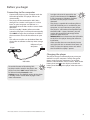
Connecting to the computer
•
•
•
•
Connect the player to your computer with the
USB cable provided. The player will turn on
automatically.
The player will be connected in MSC (Mass
Storage Class) mode. It will appear as a drive
letter on your computer and behave as a
detachable drive for file transfer in one or both
directions.
The RCA easyRip™ Media Software installer
(stored in the player*) will launch automatically.
Click NEXT to begin the installation and follow
the instructions to install the software on your
PC.
The software installer can be deleted from the
player after installation to free up more storage
spaces.
USB port of your
computer
Player
•
•
•
•
It might take several seconds for the
player to be detected. Click Refresh
in My Computer or Windows Explorer
to make sure the player has been
detected.
The player is capable of transferring files at
USB 2.0. If USB 2.0 port is available on your
computer, use it to connect to your player.
The player is still backward compatible with
the older USB 1.1 ports. However, you will
not be able to take full advantage of the
potential speed increase.
IMPORTANT: Don’t disconnect the USB cable
to the PC or the player during the software
installation.
If the installer does not auto-launch, locate
and right-click the associated drive letter (i.e.
OPAL) to show the option menu and select
the “Install RCA easyRip™” option.
Charging the player
USB cable
To enable function of launching RCA
easyRip installer stored in the player, the
player must be in MSC mode which can
be selected under Protocol in the
Settings menu. The default setting of this player
is already in MSC mode. Refer to page 24 for
more information.
The player charges automatically every time you
connect it to your computer. To fully charge the
player, make sure your computer is on and the
device is connected for at least 3 hours. Refer to the
battery level icon on the display to check the
battery level. Recharge the player when the icon is
empty.
* The latest software can be downloaded from www.rcaaudiovideo.com.
9
Managing files on your RCA Player
Before you begin using your RCA player, you’ll want
to copy your media files to the player. You can use
any of the following methods to transfer content:
•
•
•
RCA easyRip
Drag and drop files in Windows Explorer
Software provided by online music stores
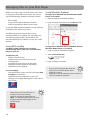
Using Windows Explorer
To copy files in Windows XP with Windows Media
Player 10 installed:
1. Open the player in Windows Explorer.
2. Drag and drop music files onto the Music folder.
To transfer DRM-protected content, use the software
provided by the online music store.
The following sections explain how to copy
unprotected files to the player. For instructions on
transferring protected files, please refer to the
documentation for the software you use to transfer
the files.
Using RCA easyRip
The RCA easyRip software was installed
automatically the first time you connected this
player to your PC.
easyRip lets you:
• Import music from CDs
• Organize your music library on your PC
• Create playlists
• Copy files from your library to the player
• Copy files from the player to your library
• Delete files from the player
To copy files in Windows Vista or Window XP with
Windows Media Player 11 installed:
1. Open the player in Windows Explorer
2. Open Internal Storage.
3. Drag and drop music files.
•
To start easyRip:
• Click on the RCA system tray icon and select RCA
easyRip from the menu.
• Double-click the easyRip icon on your PC’s
desktop. The easyRip dock appears at the side of
your screen.
•
•
10
Video files must be transferred via
easyRip, which automatically
converts the files to optimal format.
Help – For detailed explanation on using
easyRip, click the Help widget on the
module dock.
•
Drag-and-drop picture files onto the
root level or a specific folder of the
player for viewing.
Video files must be converted and transferred
via RCA easyRip for playback.
Managing files on your RCA Player
Deleting files from the player
For any files you have transferred to the player, you
may delete them while you have connected the
player with your computer.
1. Open the player in Windows Explorer and then
navigate to the folder containing the files.
2. Select the files you want to remove and then
press the Delete key on the keyboard of your PC.
• It is best to remove subscription files from the
player by using Windows Media Player.
Disconnecting the player from the PC
If Windows sees the player as an MTP device:
• Unplug the player from the PC when no file
transfer is in progress.
If Windows sees the player as a removable disk:
1. In the Windows system tray, click the Safely
Remove Hardware icon and then select the
player from the list of devices.
2. When the Safe to remove hardware message
appears, unplug the player from the PC.
Do not disconnect the USB connection
during file download. Doing so may
corrupt system files or the files being
downloaded.
11
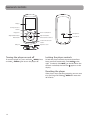
General controls
Display
Scroll up/increase
volume
Play/pause
Power on/off, Menu
MIC
Skip back/reverse/
menu back
Skip forward/fast
forward/menu advance
Microphone
Lock/unlock
Scroll down/decrease
volume
USB jack
Earphones Jack
Turning the player on and off
Locking the player controls
To turn the player on, press and hold /MENU. Press
and hold /MENU again to turn the player off.
To lock the player controls to prevent them from
being activated accidentally, slide LOCK to the
right. To unlock, slide LOCK to the left. When the
controls are locked, the lock icon appears on the
display.
Resetting the player
If the player stops operating properly, you can reset
it by pressing and holding /MENU for more than
10 seconds.
12
Using the menus
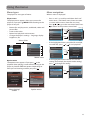
Menu types
Menu navigation
The player has two types of menu:
When a menu is displayed:
Player menu
The player menu appears when you turn on the
player or if you press /MENU while listening to the
player. It lets you:
•
•
•
•
•
•
Browse for and play music, audiobook, video and
picture files
Listen to the radio
Record and play back voice memos
Change the player’s settings – language, display
brightness, etc.
Press + and – to scroll up and down the list of
menu items. (The Home menu shows one item
at a time; other menus show five at a time.)
Press or to go to the next menu level. Press
to return to the previous menu level.
Press +
Titles
Press
or
Artists
Play All Albums
Artist1
Albums
Artist2
Genres
Press
Years
Artist3
Artist4
Menu titles
Press –
•
Settings
Titles
If the highlighted item is playable (for example,
an audio file), press or to start playback.
Now Playing
001/090
Artists
Music
Pictures
ThisDesertLife
Song3
Song4
Menu items
Option menu
The option menu appears if you press at the
playback (Now playing) screen while listening to the
player. It provides different options depending on
what you are listening to when you press .
•
00:05:30
001/090
mp3 320k
Pause
Off
Press
Counting Crows
All
Counting
Add to
Favorites Crows
Delete
ThisDesertLife
Repeat
ThisDesertLife
00:05:30
00:06:15
00:05:30
00:06:15
Off
Counting Crows
Add to Favorites
Delete
ThisDesertLife
4:30
Repeat
Press
mp3 320k
Resume
All My Friends
All My Friends
mp3 320k
Resume
All My Friends
Delete
0001/0090
001/090
Resume
All My Friends
Counting
Add to
Favorites Crows
mp3 320k
00:06:15
If the highlighted item indicates the current
setting (for example, the repeat mode setting),
press to change the setting.
Repeat
0001/0090
Counting Crows
Song2
Years
Now Playing
All My Friends
Press
or
All My Friends
Genres
Videos
mp3 320k
Play All Songs
Albums
6:15
"Now playing"
screen
ThisDesertLife
4:30
6:15
Option menu
13
Using the menus
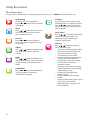
The Home menu
The top-level or “Home” menu is always displayed when you press /MENU. The menu options are:
Now Playing
Available only during playback.
Press or to return to the currently
playing file.
Music
Press or to enter the Music menu
and choose an artist, album, genre,
year, or individual title.
Pictures
Press or to enter the Pictures
menu and choose a particular image
for viewing.
Videos
Press or to enter the Videos menu
and choose a particular video for
viewing.
Radio
Press or to enter the Radio menu
and choose to either listen to the radio
or play recordings of previous radio
shows.
Audiobooks
Press or to enter the Audiobook
menu and choose a particular
audiobook for listening.
14
Favorites
As you listen to music, you can add
individual titles to a “favorites” playlist.
Press or to enter the Favorites
menu and choose a particular title or
edit the playlist.
Voice memo
Press or to enter the Voice memo
menu and choose to either start
recording or play recordings of
previous voice memo.
Settings
Press or to enter the Settings
menu, which lets you:
• Choose the shuffle playback mode
• Choose a repeat playback mode
• Choose an equalizer setting
• Customize the music menu
• Set the slideshow image duration
• Change the screen brightness
• Change the screensaver setting
• Turn on/off the automatic
shutdown feature
• Choose a record duration setting
• Switch between US and European
radio frequency steps
• Change the language of the
player’s menus
• Switch between MTP and MSC
modes
• Display the firmware version, space
used, and space available
• Reset the player’s settings to the
factory defaults
Music
Playing music files
The player sorts your music files by track name
(title), artist, album, genre and year.
1. Press /MENU to display the Home menu, then
press + or – to select Music.
Settings
Now Playing
Music
Pictures
Videos
2. Press or to enter the Music menu.
3. Use + or – and or to navigate through the
menus and select the desired item, then press
or to start listening.
Music playback
Option menu (music playback)
Press at the playback (Now playing) screen to
pause the playback and show the Option menu.
Press + or – to highlight an option and then press
to confirm the selection or change the setting.
The following options are available:
• Resume – to resume playback
• Repeat – press repeatedly to select repeat
current 1 or all files (corresponding icon
shows on the display)
• Add to Favorites – to add the current file in the
Favorites playlist (read page 22). If the file is
already in the playlist, this option changes to
Clear from Favorites to remove the current file
from the playlist
• Delete – to remove current file from the player
Music playback display
Now Playing
1
Skips to the previous file*, press and
hold to scan backwards within a file
Skips to the next file, press and hold to
scan forward within a file
Starts/ pauses playback and shows/
hides the Option menu
+ or –
Increases or decreases the volume
during playback
* Press within the beginning 4 seconds of the
current music file to skip to previous file. Otherwise,
you will return to the beginning of the current file.
0001/0090
mp3 320k
2
All My Friends
3
Counting Crows
4
ThisDesertLife
5
1.
2.
3.
4.
5.
6.
7.
8.
9.
4:30
6:15
9
8
7
6
Current file number/total number of files
Song name
Artist name
Album name
Elapsed playback time
File total time
Playback progress bar
File bitrate
File type
The information provided in the playback screen
depends upon the ID3 tags that have been set up
for the music file.
15
Pictures
Playing picture files
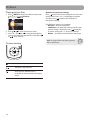
1. Press /MENU to display the Home menu, then
press
+ or – to select Pictures.
Home
Now Playing
Music
Pictures
Videos
Radio
2. Press or to enter the Pictures menu.
3. Use + or – and or to navigate through the
menus and select the desired item, then press
or to start viewing.
Picture viewing
Goes back, skips backward
Advances, skips forward
Starts/pauses slideshow if it is
activated, also shows/hides the Option
menu
16
Option menu (picture viewing)
Press to pause the picture playback and show the
Option menu. Press + or – to highlight an option
and then press to confirm the selection or
change the setting.
The following options are available:
• Resume – to resume playback
• Slideshow – to select the viewing time for each
picture during a slideshow. Press repeatedly
to select among off, 3, 5, 10 and 15 seconds
• Delete – to remove current file from the player
Refer to page 10 for transferring picture
files to the player.
Videos
Playing video files
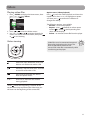
1. Press /MENU to display the Home menu, then
press
Home + or – to select Videos.
Music
Pictures
Videos
Radio
Audiobooks
2. Press or to enter the Videos menu.
3. Use + or – and or to navigate through the
menus and select the desired item, then press
or to start viewing.
Video viewing
Option menu (video playback)
Press to pause the video playback and show the
Option menu. Press + or – to highlight an option
and then press to confirm the selection or
change the setting.
The following options are available:
• Resume – to resume playback
• Repeat – press repeatedly to select repeat
current 1 or all files (corresponding icon
shows on the display)
• Delete – to remove current file from the player
Video files must be converted to optimal
format for playback on this player. The
RCA easyRip Media Software can
convert the video files automatically while
transferring to the player.
Goes back, skips backward*. Press and
hold to scan backwards within a file
Advances, skips forward. Press and hold
to scan forward within a file
Starts/pauses playback and shows/
hides the option menu
+ or –
Increases or decreases the volume
during playback
* Press within the beginning 4 seconds of the
current file to skip to previous file. Otherwise, you
will return to the beginning of the current file.
17
Radio
Storing and recalling preset stations
The radio uses the earphones as an
antenna. For better reception, extend
the earphone cable as far as possible.
You can store up to 20 preset stations in the player.
To store the currently playing station as a preset:
1. Press to display the Option menu.
Playing FM radio
To turn the radio on:
1. Press /MENU to display the player menu.
2. Press + or – to select Radio and press
enter the radio menu.
or
to
2. Press + or – to highlight Save to Preset and then
press .
• If all 20 preset station numbers are occupied, the
option changes to Replace Preset.
Back
Save to Preset
Pictures
ModeFM103.00 MHz
Stereo
Videos
Start Recording
Radio
Audiobooks
Favorites
3. While Listen is highlighted, press or to start
listening.
The frequency screen appears.
Radio
Listen
Playback
Play
Pl
yback
b k
4. Press
To tune the radio:
• Press and hold or to start scanning through
the frequency range. The player stops scanning
when it detects the next station.
•
Press or
range.
3. The first available preset number is displayed.
Press + or – to select a different preset number if
desired.
• If you choose a preset number that already
contains an FM station, you will replace the
existing station with the new station.
to step through the frequency
To turn the radio off:
• Either turn the player off or press /MENU and
choose a different option.
to highlight Yes and then press
.
Save to Preset01?
No
Yes
To listen to a preset station:
1. When the radio is playing, press
Option menu.
to display the
to
2. Press + or – to highlight Tuning and press
switch from Manual to Preset.
Save to Preset
Mode
Stereo
Start Recording
FM103.00 MHz
Tuning
Manual
3. Press + or – to highlight Back and press
return to the frequency screen.
18
to
Radio
4. Press or to choose the desired station
preset number. The preset number shows at the
top left of the screen.
Listen
P01
Recording FM radio
You can record the radio and play back recordings
as well as copy the recordings (WAV files) to your
PC.
Stereo
Preset number
To record the currently playing radio station:
1. Press to display the Option menu.
FM103.00 MHz
88
93
96
103
2. Press + or – to highlight Start Recording and
then press to start recording.
108
Back
Save to Preset
Improving FM radio sound
ModeFM103.00 MHz
Stereo
If stereo reception is noisy, you can often reduce the
noise by switching to mono.
To switch between stereo and mono:
1. While the radio is playing, press to display the
Option menu.
2. Press + or – to highlight Mode and then press
to switch between Stereo and Mono.
Start Recording
•
Press
to pause or resume recording.
3. Press /MENU to stop recording.
• The player names each recording FMRecXXX.wav
where XXX is a unique number.
To record for a specific duration:
Refer to RecDur on page 24.
Back
Save to Preset
FM103.00 MHz
Mode
Stereo
Start Recording
3. Press + or – to highlight Back and press
return to the frequency screen.
to
19
Radio
Playing back FM radio recordings
Copying recordings to your PC
To play back a recording:
1. Press /MENU to display the player menu.
Recordings are stored as WAV files in the “FMRecord”
folder on the player.
2. Press + or – to select Radio and press
enter the radio menu.
or
to
3. Press + or – to highlight Playback and press
orRadio to see the list of recordings.
To copy recordings to the PC:
1. Plug the player into the PC.
2. Open the player’s Record folder.
3. Select the files you want to copy and drag and
drop them onto a folder on the PC.
Li ten
Listen
List
Playback
•
4. Press + or – to select a recording and press
to start playback.
or
Option menu (recording playback)
Press to show or hide the Option menu during
playback. Press + or – to highlight an option and
then press to confirm the selection or change the
setting.
The following options are available:
• Resume – to resume playback
• Repeat – press repeatedly to select repeat
current 1 or all files (corresponding icon
shows on the display)
• Delete – to remove current file from the player
20
Almost all audio applications can play WAV files.
Audiobooks
Playing audiobooks
Audiobook playback is similar to music playback.
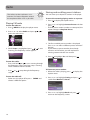
1. Press /MENU to display the Home menu, then
press
+ or – to select Audiobooks.
Home
Videos
Radio
Audiobooks
Favorites
Voice Memo
2. Press or to enter the Audiobooks menu.
3. Use + or – and or to navigate through the
menus and select the desired item, then press
or to start listening.
Audiobooks playback controls
Option menu (Audiobook playback)
Press at the playback (Now playing) screen to
pause the playback and show the Option menu.
Press + or – to highlight an option and then press
to confirm the selection or change the setting.
The following options are available:
• Resume – to resume playback
• Skip – to select section-by-section or file-by-file
skipping (read below section for details)
• Delete – to remove current file from the player
Skipping through audiobook sections
If the currently playing audiobook contains sections,
you can choose to skip forward and back between
sections when you press or , instead of
skipping between files.
To choose section-by-section skipping:
1. Press to pause playback and display the
Option menu.
2. Press + or – to select Skipping, then press
switch to Section.
to
Resume
Skipping
Section
DeleteFM103.00 MHz
Skips to previous file/section, press and
hold to scan backward within a file
Skips to the next file or section, press
and hold to scan forward within a file
3. Press + to select Resume and press to resume
playback.
• Section-by-section skipping is indicated by Sect
on the display.
Now Playing
Starts/pauses playback and shows/
hides the option menu
+ or –
Increases or decreases the volume
during playback
Sect 2/5
aa 8k
Title
•
The player returns to file-by-file skipping
automatically when you play another file or turn
the player off.
21
Favorites
Creating a "Favorites" playlist
You can create a playlist of your favorite music by
adding new files to the playlist as you listen to them.
This function is not available for other media
formats such as videos, pictures, audiobooks and
recordings.
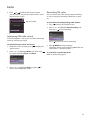
To add the currently playing music file in the
playlist:
1. Press to pause playback and display the
Option menu.
2. Press + or – to highlight Add to Favorites and
then press .
3. Press to highlight Yes and then press
remove the file from the playlist.
to
To remove all music files from the playlist:
1. Press /MENU to display the Home menu.
2. Press + or – to select Favorites and press
to enter the Favorites menu.
or
3. Press + or – to highlight Clear Favorites and
press .
Favorites
Play Music
Clear Favorites
ResumeAll My Friends
Repeat
Off
Counting Crows
Add to Favorites
4. Press to highlight Yes and then press
remove all files from the playlist.
to
DeleteThisDesertLife
File
•
•
Added Successfully shows on the display.
Repeat the above steps for adding more music
files.
To listen to the Favorites playlist:
1. Press /MENU to display the Home menu.
2. Press + or – to select Favorites.
Home
Radio
Audiobooks
Favorites
Voice Memo
Settings
•
To play back a particular file, press or to
enter the Favorites menu and then press press
or to list the files. Press + or – to select the
desired file and press or .
Removing files from "Favorites"
playlist
To remove a music file from the playlist:
1. While the music file is playing, press to pause
playback and display the Option menu.
2. Press + or – to highlight Clear from Favorites
and press .
ResumeAll My Friends
Repeat
Counting Crows
Clear from Favorites
DeleteThisDesertLife
File
22
Off
Clear Favorites?
No
Yes
Downloading playlists to player
You can also download playlists of your favorite
music created on the RCA easyRip software. Please
refer to the Help section of the easyRip software for
details on creating playlists and downloading the
created playlists to the player.
Voice Memo
Recording voice memo
Playing back voice memo
You can record voice and play back recordings as
well as copy the recordings (WAV files) to your PC.
To play back a recording:
1. Press /MENU to display the player menu.
To record voice:
1. Press /MENU to display the Home menu.
2. Press + or – to select Voice Memo and press
or to enter the voice memo menu.
2. Press
+ or – to select Voice Memo.
Home
3. Press + or – to highlight Playback and press
or
to see the list of recordings.
Voice Recording
Audiobooks
Start Recording
Favorites
Playback
Voice Memo
Settings
Now Playing
3. Press
press
or
or
g
to highlight Start Recording and
to start recording.
Start Recording
Playback
•
•
Press to pause or resume recording.
The microphone is located at the back of the
player.
4. Press + or – to select a recording and press
to start playback.
or
Option menu (recording playback)
Press at the playback (Now playing) screen to
pause the playback and show the Option menu.
Press + or – to highlight an option and then press
to confirm the selection or change the setting.
4. Press /MENU to stop recording.
• The player names each recording VRecXXX.wav
where XXX is a unique number.
The following options are available:
• Resume – to resume playback
• Repeat – press repeatedly to select repeat
current 1 or all files (corresponding icon
shows on the display)
• Delete – to remove current file from the player
To record for a specific duration:
Refer to RecDur on page 24.
Copying recordings to your PC
Recordings are stored as WAV files in the “VRecord”
folder on the player.
To copy recordings to the PC:
1. Plug the player into the PC.
2. Open the player’s Record folder.
3. Select the files you want to copy and drag and
drop them onto a folder on the PC.
•
Almost all audio applications can play WAV files.
23
Settings
Changing the player’s settings
Customize menu
To change the player settings:
1. Press /MENU to display the Home menu.
To select what you wish to display in the submenu
of the Music menu: Artists, Album, Titles, Genres,
and Years.
2. Press + or – to select Settings and press
toHome
enter the settings menu.
or
Favorites
Voice Memo
Slideshow
To select the slideshow image duration. Press
repeatedly to select among: off, 3, 5, 10 and 15
seconds.
Settings
Now Playing
Brightness
Music
To adjust the display light brightness.
3. Press + or – to select a setting and then press
toSettings
change it.
Shuffle
Screensaver
To set the duration (10s, 20s, 30s and 1m) before
the screensaver activates.
Off
Repeat
Off
Power save
Equalizer
Jazz
To set the time interval (Off, 1m, 2m, 5m and 10m)
before the player turns off if no key is pressed.
Customize Menu
Slideshow
3s
RecDur (Record duration)
Shuffle
•
•
Press repeatedly to select shuffle on or off.
Music files (mp3/wma/wav) will be played
randomly when shuffle is activated.
The shuffle icon ( ) shows on display when
shuffle is on.
Repeat
•
Press repeatedly to select repeat current 1 or
all files (corresponding icon shows on the
display).
Equalizer
•
Press repeatedly to choose an equalizer setting
(Flat, Bass, Graphic, Pop, Rock and Jazz).
Setting Graphic mode:
• Press repeatedly until
Graphic appears and then press
. In graphic mode, you can
customize the five band
equalizer. Press or to
select a band and then press +
or – to adjust the band level. When finished,
press /MENU to exit Graphic mode.
To change the duration (Max, 5 minutes, 30
minutes, 1 hour) for radio and voice memo
recording.
FreqStep (Frequency Step)
To changes the way that the player scans through
the radio frequencies. Switch to EU if you bring the
player to Europe; switch back to US when you
return to North America.
Language
To change the language of the player menus.
Protocol
To switch between MSC (Mass Storage Class) and
MTP (Media Transfer Protocol) modes when
connected to your PC. To enable function of
transferring subscription music content, select MTP
mode.
System info
To show the amount of free space available and the
firmware version.
Restore defaults
To reset all menus to factory defaults.
24
Additional information
Tips and troubleshooting
Cannot delete files on the player.
• For any files you have transferred to the player,
you may delete them while you have connected
the player with your computer. Highlight the
unwanted file in the player’s file directory on
your computer and press the delete key on your
computer to delete the file. Subscribed files are
best to be removed through Windows Media®
Player.
• For deleting files from the player, refer to Option
menu from page 15-23 for details.
Player repeats same tracks or all tracks.
• Repeat play is turned on. Press the PLAY button
to show the option menu and change the play
mode.
Audio distorted at high volume.
• Change the Equalizer mode to Flat.
• Turn down the volume.
The audio tracks on my player keep skipping or
popping.
• You’ll need to re-record the audio track – make
sure you close all other applications on your PC
when you record.
• Try recording with Error Correction setting
turned on.
Player turns itself off.
• Your player turns itself off if you leave it in pause
mode or navigation mode for the duration
specified in PowerSave setting.
The player cannot be turned on.
• Battery is empty.
• Ensure the keys lock is not activated.
• Reset the player by pressing and holding /
MENU for more than 10 seconds.
• If the player still cannot be turned on after
resetting, perform a firmware upgrade to restore
it.
• Please go to www.rcaaudiovideo.com for more
details.
Player does not respond to key presses.
• If your player stops responding to key presses,
you can reset it by pressing and holding /
MENU for more than 10 seconds. Most of your
settings will be preserved; only the settings that
you have changed after your last power off will
be lost.
•
This player may temporarily cease to function if
subjected to electrostatic disturbance.
To resume normal operation, it may be
necessary to cycle the power off and back on or
you can reset it by pressing and holding /
MENU for more than 10 seconds.
Player cannot play WMA songs.
• Secure music download files must be transferred
to your player through the Windows Media
Player or the application recommended by your
online music download service (Note: Services
and applications must be Windows Media
audio-compliant and support Digital Rights
Management.) (Apple iTunes music content is
not supported).
The player takes a long time to read files in a
folder.
• File reading may take longer if too many files are
put in a single folder. Re-organize your files into
a number of folders.
Song information is not showing correctly.
• Song information may not match your current
player’s language setting. Change the language
setting.
Cannot play AAC songs.
• Visit www.rcaaudiovideo.com to download the
latest firmware for the player to support the
playback of AAC songs.
Cannot view picture files.
• The player only supports .jpg extension file, and
do not support other formats like .bmp, .tiff,
.jpeg.
Cannot play video files.
• All video contents must be converted by RCA
easyRip software which comes with the player.
Other format of video file will not be supported.
Cannot play audible files.
• Make sure the file format is correct. The player
supports Format 4 Audible file.
The player reports that it is full.
• You have filled the capacity of the internal
memory of the player.
• You have exceeded the maximum number of
items that this player supports. Your player can
only support up to 2000 media files within eight
hierarchy of folder in maximum.
25
Additional information
Cannot playback tracks on the player.
• Make sure audio tracks are encoded in the mp3
or Windows Media formats at supported bitrates.
• Bitrates support by the player:
mp3 – 32 to 320 kbps
wma – 48 to 192 kbps
• WMA files may be DRM protected and you don’t
have the proper rights (license) to play the files.
• Check the website and/or application help
system of the music download service provider
from where the content was purchased from for
license acquisition details. For more information
on how license acquisition works, go to www.
microsoft.com/windowsmedia/drm.
Cannot playback songs downloaded from my
paid Music Server Provider subscription service.
• The internal clock in your portable player may
not be up to date. Downloading a new
subscription song from your Music Server
Provider should update your player's clock and
allow it to playback all your songs again.
• The license for your subscription songs may have
expired. Synchronize your device with your PC
again to obtain an update to your license. If the
problem persists, please contact your Music
Service Provider for additional support.
Cannot transfer subscription music content to
the player.
• To enable function of transferring subscription
music content, select MTP mode under Protocol
in the Settings menu. Refer to page 24 for more
information.
Voice recording stops automatically after 5
hours.
• Maximum duration for each recording is 5 hours.
Start a new recording after the maximum
duration has reached.
What is MTP mode?
• MTP (Media Transfer Protocol) mode is essential
if you want to transfer DRM10 content to your
player. In MTP mode your player will no longer
show up as a drive letter. So programs that were
designed to work with a player that shows up as
a drive letter will not be able to work directly
with the player.
26
Cannot launch RCA easyRip installer stored in
the player to install easyRip on my PC.
• To enable function of launching RCA easyRip
installer stored in the player, select MSC mode
under Protocol in the Settings menu. Refer to
page 24 for more information.
For your records
Keep your sales receipt for proof of purchase to
obtain warranty parts and service. In the event that
service should be required, you may need both the
model number and the serial number. In the space
below, record the date and place of purchase, and
the serial number:
Model No.
Date of Purchase
Place of Purchase
Serial No.
Visiting RCA website
Please visit www.rcaaudiovideo.com for:
• Product registration
• Latest software and firmware
• Latest RCA easyRip software
• User manual
• Frequently asked questions (FAQ)
• Customer service and technical support
information
Technical specification
Product: Digital Audio Player
Brand: RCA
Model: M4102, M4104, M4108, MC4102, MC4104,
MC4108
Electrical Consumption: 3.7V Lithium battery (builtin)
Specifications
Hardware
• Dimensions: 93.5 mm H, 42.4 mm W, 9.5 mm D
• Unit Weight: 36 g, 1.3oz
• Stereo Headphones jack
• USB Connection Jack
• Battery Operated: Rechargeable lithium battery.
USB Drive
• External USB Drive: When connected to a
computer via USB, the player is capable of
storing any file type allowing the user a fast,
convenient method of storing, retrieving, and
Additional information
•
•
transferring files. This includes word processing
files, presentations, spreadsheets and any other
computer files.
Capacity: M4102/MC4102 - 2GB, M4104/MC4104
- 4GB, M4108/MC4108 - 8GB
Connection: USB 2.0, Hi-speed capable
Software
• Includes the player applications and media
management software.
Warranty information
Limited warranty
12 Month Limited Warranty
Applies to RCA Audio/Video Products
AUDIOVOX ELECTRONICS CORP. (the Company)
warrants to the original retail purchaser of this
product that should this product or any part
thereof, under normal use and conditions, be
proven defective in material or workmanship within
12 months from the date of original purchase, such
defect(s) will be repaired or replaced with
reconditioned product (at the Company's option)
without charge for parts and repair labor.
To obtain repair or replacement within the terms of
this Warranty, the product is to be delivered with
proof of warranty coverage (e.g. dated bill of sale),
specification of defect(s), transportation prepaid, to
the Company at the address shown below.
This Warranty does not extend to the elimination of
externally generated static or noise, to correction of
antenna problems, loss/interruptions of broadcast
or internet service, to costs incurred for installation,
removal or reinstallation of product, to corruptions
caused by computer viruses, spyware or other
malware, to loss of media, files, data or content, or
to damage to tapes, discs, removable memory
devices or cards, speakers, accessories, computers,
computer peripherals, other media players, home
networks or vehicle electrical systems.
This Warranty does not apply to any product or part
thereof which, in the opinion of the Company, has
suffered or been damaged through alteration,
improper installation, mishandling, misuse, neglect,
accident, or by removal or defacement of the
factory serial number/bar code label(s). THE EXTENT
OF THE COMPANY'S LIABILITY UNDER THIS
WARRANTY IS LIMITED TO THE REPAIR OR
REPLACEMENT PROVIDED ABOVE AND, IN NO
EVENT, SHALL THE COMPANY'S LIABILITY EXCEED
THE PURCHASE PRICE PAID BY PURCHASER FOR THE
PRODUCT.
This Warranty is in lieu of all other express
warranties or liabilities. ANY IMPLIED WARRANTIES,
INCLUDING ANY IMPLIED WARRANTY OF
MERCHANTABILITY, SHALL BE LIMITED TO THE
DURATION OF THIS WRITTEN WARRANTY. ANY
ACTION FOR BREACH OF ANY WARRANTY
HEREUNDER INCLUDING ANY IMPLIED WARRANTY
OF MERCHANTABILITY MUST BE BROUGHT WITHIN A
PERIOD OF 24 MONTHS FROM DATE OF ORIGINAL
PURCHASE. IN NO CASE SHALL THE COMPANY BE
LIABLE FOR ANY CONSEQUENTIAL OR INCIDENTAL
DAMAGES FOR BREACH OF THIS OR ANY OTHER
WARRANTY. No person or representative is
authorized to assume for the Company any liability
other than expressed herein in connection with the
sale of this product.
Some states do not allow limitations on how long an
implied warranty lasts or the exclusion or limitation
of incidental or consequential damage so the above
limitations or exclusions may not apply to you. This
Warranty gives you specific legal rights and you may
also have other rights which vary from state to state.
How to make a warranty claim:
• If your product is capable of storing content
(such as an mp3 player, digital voice recorder,
etc), it is recommended to make periodic backup
copies of content stored on the product. If
applicable, before shipping a product, make a
back up copy of content or data stored on the
device. Also, it is advisable to remove any
personal content which you would not want
exposed to others. IT IS LIKELY THAT CONTENTS
AND DATA ON THE DEVICE WILL BE LOST DURING
27
Warranty information
•
•
SERVICE AND REFORMATTING. AUDIOVOX
ACCEPTS NO LIABILITY FOR LOST CONTENT OR
DATA, OR FOR THE SECURITY OF ANY PERSONAL
CONTENT OR DATA ON THE RETURNED DEVICE.
Product will be returned with factory default
settings, and without any pre-loaded content
which may have been installed in the originally
purchased products. Consumer will be
responsible for reloading data and content.
Consumer will be responsible to restore any
personal preference settings.
Properly pack your unit. Include any remotes,
memory cards, cables, etc. which were originally
provided with the product. However DO NOT
return any removable batteries, even if batteries
were included with the original purchase. We
recommend using the original carton and
packing materials.
Include evidence of purchase date such as the
bill of sale. Also print your name and address and
a description of the defect. Send via standard
UPS or its equivalent to:
Audiovox Electronics Corp.
Attn: Service Department.
150 Marcus Blvd.
Hauppauge N.Y. 11788
1-800-878-5779
•
•
•
Insure your shipment for loss or damage.
Audiovox accepts no liability in case of damage
or loss en route to Audiovox.
Pay any charges billed to you by the Exchange
Center for service not covered by the warranty.
A new or refurbished unit will be shipped to you
freight prepaid.
What we will do:
Provide you with a new, or at our option, a
refurbished unit. The exchange unit is under
warranty for the remainder of the original product’s
warranty period.
For Canada Customers, please ship to:
Audiovox Return Centre
c/o Genco
6685 Kennedy Road,
Unit#3, Door 16,
Mississuaga, Ontario
L5T 3A5
28
Illustrations contained within this publication are for representation only and subject to change.
The descriptions and characteristics given in this document are given as a general indication and not as a
guarantee. In order to provide the highest quality product possible, we reserve the right to make any
improvement or modification without prior notice.
Audiovox Electronics Corp.
150 Marcus Blvd., Hauppauge, NY 11788
© 2009 Audiovox Electronics Corp.
Trademark(s) ® Registered
Marca(s) ® Registrada(s)
Marque(s) ® Deposée(s)
www.rcaaudiovideo.com
v1.0
29