1
Bedienungsanweisung Redracy
Irrtümer und Auslassungen vorbehalten
2
… touch the difference
1. Einleitung Redrapid
1.1 Besondere Eigenschaften
•
•
•
•
•
•
•
•
•
•
•
1
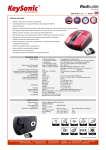
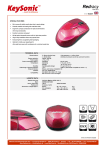
Laser-Mini-Maus im sportlichen Design mit einziehbarem USB-Kabel
Effektvolle Metallic-Rot-Lackierung mit seitlicher matt schwarzer, spürbar sanfter SoftSkinBeschichtung
Ergonomisch kompakte Universalbauform für Rechts- und
Linkshänder mit 3-Tasten-Funktionalität (inkl. 4-Wege Scrollrad)
Hervorragende Präzision und volle Geschwindigkeit –
30× genauer gegenüber optischen Standardmäusen
1600 dpi Laser-Sensor mit Umschalttaste für
1200 dpi und 800 dpi während des Betriebs (on the fly)
Anzeige der eingestellten dpi-Auflösung durch LED in der Mittel-Taste
Komfortable Aufbewahrung des
USB-Kabels durch integrierten
Kabelaufroller mit Federrückzug
Praktischer Magnet-Pin zur einfachen
Entnahme des USB-Steckers aus
dem Kabelaufroller
Plug & Play-Installation ohne
speziellen Treiber
Exklusive Geschenk-Box als
ansprechende Retail-Verpackung
Optimal für den mobilen
Notebook-Einsatz
Version 1.0 (2008/10/31) ● © 2008 by MaxPoint Handelsges. mbH
Bedienungsanweisung Redrapid
1.2 Technische Daten
Maus-Tasten:
2× Maus-Funktionstasten (zu erwartende Lebensdauer >5 Mio. Klicks)
1× Vier-Wege-Scroll-Rad (Klick auf Druck sowie auf-, ab-, links-, rechts-Funktion)
1× dpi-Umschalttaste (inkl. LED: an = 1600 dpi, schwach = 1200 dpi, aus = 800 dpi)
Maus-Sensor / Wellenlänge:
Pixart ACX-1001 830 – 860 mm
Sensor-Auflösung:
1600 dpi / 1200 dpi / 800 dpi, (Auflösung per Umschalttaste on the fly wählbar)
Beschleunigung / Geschwindigkeit /
Abtastrate:
20 g
Spannungsversorgung:
+5 VDC ±5 %
Stromaufnahme ca.:
Betrieb:
Standby:
31 mA
23 mA (nach 1 Sek.)
Temperatur:
Betrieb:
Lagerung:
0 °C bis +40 °C
-20 °C bis +60 °C
Feuchtigkeit:
Betrieb und Lagerung:
0 % bis 90 % rel.
Kabellänge / Schnittstelle:
0,75 m
USB 2.0 (abwärtskompatibel zu Version 1.1)
Lieferumfang:
Maus, Bedienungsanleitung, Installations-CD
Zertifiziert:
CE, FCC, WEEE/RoHS
Kompatibilität:
Win 98SE / ME / 2000 / XP / Vista
Mac OS X ab V10.2 und höher
Irrtümer und Auslassungen vorbehalten
0,71 m/s
6700 fps
2
… touch the difference
2. Sicherheitshinweise
Sicherheitshinweise
1. Diese Produkt ist ein Laser-Produkt gemäß
IEC 60825-1, Klasse 1
2. Unser Produkt entspricht den FCC und CE
Anforderungen
3. Dieses Produkt enthält keine austauschbaren
Teile. Eine andere Nutzung als in der
Bedienungsanleitung beschrieben kann zu
Schäden oder Gefahren führen.
Bitte richten Sie den Laserstrahl niemals auf die Augen eines Menschen!
3
Version 1.0 (2008/10/31) ● © 2008 by MaxPoint Handelsges. mbH
Bedienungsanweisung Redrapid
Maustasten
1.
2.
3.
4.
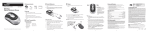
Linke Taste
Rechte Taste
Scrollrad
DPI Umschalter
DPI Umschalter
Die Helligkeit der LED-Anzeige am
Scrollrad zeigt die DPI-Einstellung,
die verwendet wird. Es gibt drei verschiedene
Einstellungen:
z Hell:
z Dunkler:
z Kein Licht:
1600 DPI
1200 DPI
800 DPI
Die Standard-Einstellung ist 1600 DPI. Sie können die DPI-Einstellungen einfach umschalten.
Um Energie zu sparen ist die LED-Anzeige nur 10 Sekunden aktiv.
Wie lässt sich das USB-Kabel verlängern?
Drehen Sie die Maus um und öffnen Sie die Klappe auf der Rückseite. Halten Sie die Maus in
einer Hand, ziehen Sie das USB-Kabel heraus und fixieren Sie die Länge, indem Sie die Klappe
wieder schließen.
Klappe
Wie lässt sich das USB-Kabel einziehen?
Öffnen Sie die Klappe auf der Rückseite der Maus. Ziehen Sie das
USB-Kabel leicht heraus und das integrierte Rad wird das Kabel
automatisch aufrollen. Falls sich das USB-Kabel nicht einrollt, ziehen
Sie es nochmal heraus und gewährleisten Sie, dass es beim Einrollen
keine Pause gibt.
Bitte entnehmen Sie weitere Details der Software von der beiliegenden CD.
Irrtümer und Auslassungen vorbehalten
4
… touch the difference
Haftungsausschlusserklärung des Herstellers
Für Informationen in diesem Dokument behält sich der Hersteller Änderungen ohne Mitteilung vor und geht
keinerlei Verpflichtungen ein. Durch dieses Dokument wird, weder ausgedrückt noch angedeutet, keinerlei
Garantie oder Erklärung in Bezug auf Qualität, Genauigkeit oder Eignung für einen bestimmten Zweck
übernommen. Der Hersteller behält sich das Recht vor, jederzeit Änderungen zum Inhalt dieses Dokumentes zu
machen und/ oder die dazugehörigen Produkte unverbindlich zu ändern ohne Verpflichtung, Personen oder
Organisationen über derartige Änderungen in Kenntnis zu setzen. Unter keinen Umständen ist der Hersteller
haftbar für direkte, indirekte, spezielle, zufällige oder Folgeschäden, die durch die Nutzung oder Unmöglichkeit
der Nutzung des Produktes oder der Dokumentation entstehen, selbst wenn auf die Möglichkeit solcher
Schäden hingewiesen wurde. Dieses Dokument enthält Materialien, die durch Copyright geschützt sind. Alle
Rechte sind vorbehalten. Es ist untersagt, diese Bedienungsanleitung oder Teile daraus ohne die schriftliche
Einwilligung der Autoren in irgendeiner Form zu vervielfältigen oder zu verbreiten, in welcher Form, zu welchem
Zweck und mit welchen Mitteln auch immer. Produktnamen, die in diesem Dokument erwähnt werden, dienen
ausschließlich als Verkaufsbezeichnung. Alle Handelsmarken, Produktnamen oder Markennamen, die in
diesem Dokument erwähnt werden, sind eingetragenes Eigentum des jeweiligen Inhabers.
5
Version 1.0 (2008/10/31) ● © 2008 by MaxPoint Handelsges. mbH
Operation Manual Redrapid
1. Introduction Redrapid
1.1 Special Features
•
•
•
•
•
•
•
•
•
•
•
Laser mini mouse in sporty design with retractable USB cable
Dramatically metallic-red coating with matt black, noticeably gentle SoftSkin coating on
both sides
Ergonomic compact universal construction for right and left handers
with 3 keys functionality (incl. 4 ways scroll wheel)
Excellent precision and full speed – 30× exacter than optical standard mice
1600 dpi laser sensor with shift key between 1200 dpi and 800 dpi
during operation (on the fly)
Indication of the set dpi resolution by a LED in the middle button
Convenient storage of the USB cable through integrated spring-driven cable reels
Practical magnetic pin for easy
removal of the USB connector from
the cable reel
Plug & Play installation without any
special driver
Exclusive gift box as appealing
retail packaging
Optimal for mobile use
E&OE
6
… touch the difference
1.2 Technical data:
Mouse buttons:
2× Mouse function keys (Life expectancy >5 million clicks)
1× Four ways scroll wheel (Clicking on pressure as well as up, down, left, right function)
1× dpi shift key (incl. LED: on = 1600 dpi, low = 1200 dpi, off = 800 dpi)
Mouse sensor / Wave length:
Pixart ACX-1001 830 – 860 mm
Sensor resolution:
1600 dpi / 1200 dpi / 800 dpi, Resolution selectable via shift key on the fly
Acceleration / Speed / Scanning
rate:
20 g
Power supply:
+5 VDC ±5 %
Power consumption approx.:
Operating:
Standby:
31 mA
23 mA (nach 1 Sek.)
Temperature:
Operating:
Storage:
0 °C bis +40 °C
-20 °C bis +60 °C
Humidity:
Operating and Storage:
0 % bis 90 % rel.
Cable length / Interface:
0,75 m
USB 2.0 (downwards compatible to version 1.1)
Scope of delivery:
Mouse, user manual, installation CD
0,71 m/s
Certified:
CE, FCC, WEEE/RoHS
Compatibility:
Win 98SE / ME / 2000 / XP / Vista
Mac OS X from V10.2 and higher
7
6700 fps
Version 1.0 (2008/10/31) ● © 2008 by MaxPoint Handelsges. mbH
Operation Manual Redrapid
Safety notice
Safety Notice
1. This product complies with IEC 60825-1, class 1
laser product.
2. Your product complies with FCC and CE rules.
3. This product has no serviceable parts. Use of
controls or adjustments of procedures other than
the user guide may result in danger.
Please DO NOT direct the laser beam at anyone’s eye.
E&OE
8
… touch the difference
Mouse Buttons
1.
2.
3.
4.
Left button
Right button
Tilt Wheel
DPI Switch
DPI Switch
The brightness of LED indicator on the
scrolling wheel indicates the DPI setting
in use. There are three different settings:
z Bright:
z Dim:
z No light:
1600 DPI
1200 DPI
800 DPI
The default setting is 1600 DPI. You can easily switch between DPI settings. In order to save
power, the LED display will only last for 10 seconds.
How to extend the USB cord?
Flip the mouse over and open the cap in the back. Hold the mouse in one hand, pull out the
USB cord and adjust to your desired length, then close the cap.
How to retract the USB cord?
Open the cap in the back of the mouse. Slightly pull out the USB
cord and the embedded reel will wind the cord automatically, and if the
USB cord is unable to retract, then pull the cord out again and be
sure not to stop/pause while retracting.
Cap
Please see the included software on CD for details.
9
Version 1.0 (2008/10/31) ● © 2008 by MaxPoint Handelsges. mbH
Operation Manual Redrapid
Manufacturer's Disclaimer Statement
The information in this document is subject to change without notice and does not represent a commitment on
the part of the vendor. No warranty or representation, either expressed or implied, is made with respect to the
quality, accuracy or fitness for any particular purpose of this document. The manufacturer reserves the right to
make changes to the content of this document and/or the products associated with it at any time without
obligation to notify any person or organization of such changes. In no event will the manufacturer be liable for
direct, indirect, special, incidental or consequential damages arising out of the use or inability to use this product
or documentation, even if advised of the possibility of such damages. This document contains materials
protected by copyright. All rights are reserved. No part of this manual may be reproduced or transmitted in any
form, by any means or for any purpose without expressed written consent of its authors. Product names
appearing in this document are mentioned for identification purchases only. All trademarks, product names or
brand names appearing in this document are registered property of their respective owner.
E&OE
10
… touch the difference
1. Introduction Redrapid
1.1 Caractéristiques
•
•
•
•
•
•
•
•
•
•
•
11
Laser mini souris au design sportif
Couleur rouge métallique laquée avec noir mat; revêtement SoftSkin sur les côté de la
souris
Construction ergonomique, compact et universel, pour droitier et gaucher;
3 boutons de fonction (dont une roulette à 4 directions)
Vitesse et précision excellente – 30x plus précise qu’une souris optique standard
Capteur laser 1600 dpi avec changement de la sensibilité possible à 800 ou
1200 dpi pendant l’utilisation (à la volée)
Led sur le bouton central, indiquant la résolution dpi
Gestion facile du câble USB grâce à l’enrouleur intelligent intégré
Attache magnétique facilitant
le détachement du connecteur
USB de l’enrouler
Installation Plug & Play sans pilote
spécial
Boite cadeau exclusive faisant office
d’emballage
Optimale pour une utilisation nomade
Version 1.0 (2008/10/31) ● © 2008 by MaxPoint Handelsges. mbH
Manuel d’Utilisation Redrapid
1.2 Information Technique
Boutons de la souris :
2× boutons de fonction (Durée de vie > 5 millions de clic)
1× roulette 4 directions (Pressez pour cliquer et fonction haut, bas, gauche, droite)
1× touche shift pour dpi (incluLed:marche=1600dpi,réduite=1200dpi,arrêt=800dpi)
Capteur de la souris /
Longueur d'onde :
Pixart ACX-1001 830 – 860 mm
Résolution du Capteur :
1600 dpi / 1200 dpi / 800 dpi ; Résolution changeable à la volée par un bouton,
Accélération / vitesse /
rafraichissement :
20 g / 0,71 m/s / 6700 fps
Alimentation :
+5 VDC ±5 %
Consommation Courant env. :
Utilisation :
En stand-by :
31 mA
23 mA (après 1 sec.)
Température :
Utilisation :
Stockage :
0 °C jusqu’à +40 °C
-20 °C jusqu’à +60 °C
Humidité :
Utilisation et stockage :
0 % jusqu’à 90 % rel.
Longeur du câble / Interface :
0,75 m
USB 2.0 (compatibilité descendante USB 1.1)
Contenu de l’emballage :
Souris, Manuel d’Utilisation, CD d’installation
Certifié :
CE, FCC, WEEE/RoHS
Compatibilité :
Win 98SE / ME / 2000 / XP / Vista
Mac OS X V10.2 et supérieur
Sous réserve d’erreurs ou d’omissions
12
… touch the difference
Avis de sécurité
Information de conformité
1. Ce produit répond aux normes IEC 60825-1
concernant les produits laser de classe 1.
2. Ce produit répond aux normes FCC et CE.
3. Ce produit ne contient pas de pièces
réparables par l’utilisateur. Toutes opérations
autres que celles indiquées par le manuel
d’utilisation ne sont pas recommandées.
Ne surtout pas diriger le faisceau laser vers les yeux d’une personne.
.
13
Version 1.0 (2008/10/31) ● © 2008 by MaxPoint Handelsges. mbH
Manuel d’Utilisation Redrapid
Boutons de la souris
5.
6.
7.
8.
Bouton gauche
Bouton droit
Souris Tilt
Switch DPI
Switch DPI
La luminosité de l’indicateur Led sur la
souris indique le paramètre DPI utilisé.
Il y a 3 différents paramètres :
z Fort:
1600 DPI
z Faible: 1200 DPI
z Eteint:
800 DPI
Le paramètre par défaut est à 1600 DPI. Vous pouvez facilement changer de résolution DPI.
Afin d’économiser les piles, l’affichage LED ne restera que 10 secondes.
Comment allonger le cordon USB
Retournez votre souris et ouvrez la trappe. Tenez la souris dans une main, et tirez le cordon
USB jusqu’à la longeur désirée, puis refermez la trappe.
Comment rétrécir le cordon USB
Ouvrez la trappe situez à l’arrière de la souris.
Tirez légèrement sur le cordon USB afin que le
cordon puisse être enroulé automatiquement.
Si le cordon USB ne s’enroule pas, tirez de nouveau
sur le cordon USB et vérifies que rien n’entrave
le processus d’enroulement.
S’il vous plaît voir le Readme pour plus de détails.
Sous réserve d’erreurs ou d’omissions
Cap
Cache
14
… touch the difference
Clause d’exonération de responsabilité du fabricant
Les informations dans ce document peuvent être sujet à changement sans avertissement
préalable et ne représente pas un engagement de la part du vendeur.
Aucune garantie ou représentation, exprimée ou implicite, n'est faite en ce qui concerne la
qualité, l'exactitude ou l’apparence pour n'importe quelle partie de ce document. Le fabricant se
réserve le droit, à n’importe quel moment, d’effectuer des changements dans le contenue de ce
document et/ou sur les produits associés avec, sans avoir l’obligation de le notifier à des
personnes ou des organisations. En aucun cas, le fabricant ne sera tenu responsable des
dommages directs, indirects, spéciaux ou consécutifs à l’utilisation ou l’incapacité d’utiliser ce
produit ou ce document. Ce document contient des éléments protégés par le Copyright. Tous
droits réservés. Aucunes parties de ce document ne peuvent être reproduite ou transmises sous
aucunes formes, moyens ou but sans le consentement écrit de ses auteurs. Le nom des produits
apparaissant dans ce document le sont pour l’identification pour la vente seulement. Toutes les
marques déposées, les noms de produits ou les noms de marques apparaissant dans ce
document sont des marques déposées de leurs propriétaires respectifs.
15
Version 1.0 (2008/10/31) ● © 2008 by MaxPoint Handelsges. mbH
… touch the difference
Version 1.0 (2008/10/31) ● © 2008 by MaxPoint Handelsges. mbH
16
… touch the difference
Federal Communication Commission Interference Statement
This equipment has been tested and found to comply with the limits for a Class B digital device, pursuant to Part
15 of the FCC Rules. These limits are designed to provide reasonable protection against harmful interference in
a residential installation. This equipment generates, uses and can radiate radio frequency energy and, if not
installed and used in accordance with the instructions, may cause harmful interference to radio communications.
However, there is no guarantee that interference will not occur in a particular installation. If this equipment does
cause harmful interference to radio or television reception, which can be determined by turning the equipment
off and on, the user is encouraged to try to correct the interference by one of the following measures:
-
Reorient or relocate the receiving antenna.
Increase the separation between the equipment and receiver.
Connect the equipment into an outlet on a circuit different from that to which the receiver is
connected.
Consult the dealer or an experienced radio/TV technician for help.
FCC Caution: Any changes or modifications not expressly approved by the party responsible for compliance
could void the user's authority to operate this equipment.
This device complies with Part 15 of the FCC Rules. Operation is subject to the following two conditions: (1)
This device may not cause harmful interference, and (2) this device must accept any interference received,
including interference that may cause undesired operation.
17
Version 1.0 (2008/10/31) ● © 2008 by MaxPoint Handelsges. mbH
… touch the difference
Version 1.0 (2008/10/31) ● © 2008 by MaxPoint Handelsges. mbH
18