1
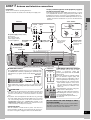
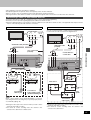
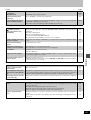
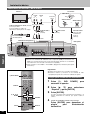
Antenna and television connections
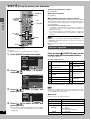
To enjoy sound through other audio equipment (➜page 42)
To enjoy progressive video
Preparation
≥Refer to the television’s operating instructions.
≥Turn the television off and disconnect its AC power supply cord.
Connect to the component video (480P) input terminals on a television compatible with this unit’s copy guard system. (Video will not
be displayed correctly if connected to an incompatible television.)
≥All Panasonic televisions that have 480P input terminals are compatible. Consult the manufacturer if you have another brand of
television.
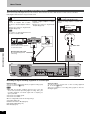
To the antenna
Television
AUDIO
IN
R L
Cable TV
VIDEO
IN
VHF/UHF
RF IN
Outdoor antenna
AC power supply cord (included)
Connect last.
Also connect the AC
power supply cords for
the other equipment.
Red White Yellow
Audio/Video cable
(included)
Indoor antenna
Setting up
STEP 1
or
If the connector
doesn’t match
➜page 44
75 ≠ coaxial cable
(included) ➜below
Antenna cable
(usually disconnected from the
television).
To household AC outlet
(AC 120 V, 60 Hz)
Red White Yellow
Cooling fan
This unit
RF IN
R-AUDIO-L
VIDEO
S-VIDEO
(L1)
IN 1
Y
PB
PR
OPTICAL
RF OUT
OUT
IN 3
R-AUDIO-L
VIDEO
S-VIDEO
(L3)
R-AUDIO-L
VIDEO
COMPONENT
VIDEO OUT
(480P/480I)
S-VIDEO
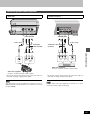
The S-VIDEO OUT terminal achieves a more vivid picture than
the VIDEO OUT terminal by separating the chrominance (C)
and luminance (Y) signals. (Actual results depend on the television.)
Television
S video cable
(not included)
COMPONENT
VIDEO IN
Y
PB
PR
S VIDEO
IN
OUT
R-AUDIO-L
VIDEO
S-VIDEO
When making this connection, ensure you connect the audio
cables to the corresponding audio input terminals on the television.
Video cable
(not included)
75 ≠ coaxial cable
≥The signal from the antenna passes through this unit and along
the 75 ≠ coaxial cable to the television even when this unit is
turned off. You don’t have to connect the antenna to the television.
≥The picture and sound signal from this unit does not go through
the 75 ≠ coaxial cable to the television. Make sure you connect
one of the following terminals on this unit to the television: the
AUDIO/VIDEO terminal, the S-VIDEO OUT terminal or the
COMPONENT VIDEO OUT terminal. If the television has none
of these terminals, consult your local dealer.
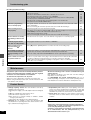
Conserving power
This unit consumes a small amount of power, even when it is
turned off (approx. 3.2 W). To save power when the unit is not to
be used for a long time, unplug it from the household AC outlet.
Y
PB
PR
OPTICAL
COMPONENT
VIDEO OUT
(480P/480I)
VHF/UHF
COMPONENT VIDEO OUT terminal
Television
S-VIDEO OUT terminal
DIGITAL AUDIO OUT
(PCM/BITSTREAM)
DIGITAL AUDIO OUT
(PCM/BITSTREAM)
These terminals can be used for either
interlace or progressive output and
provide a purer picture than the S-VIDEO
OUT terminal.
Connection using these terminals outputs
the color difference signals (PB/PR) and
luminance signal (Y) separately in order to
achieve high fidelity in reproducing colors.
≥The description of the component video
input terminals depends on the television or monitor (e.g. Y/PB/PR, Y/B-Y/R-Y,
Y/CB/CR). Connect to terminals of the
same color.
≥After making this connection, change the
black level for a better picture
(➜page 47, Video–Black Level Control).
When making this connection, ensure you
connect the audio cables to the
corresponding audio input terminals on
the television.
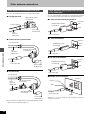
Do not connect the unit through a video
cassette recorder
Video signals fed through video cassette recorders will be
affected by copyright protection systems and the picture
will not be shown correctly on the television.
5
RQT6920