1
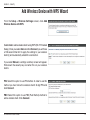
Preface
D-Link reserves the right to revise this publication and to make changes in the content hereof without obligation to
notify any person or organization of such revisions or changes.
Manual Revisions
Revision
Date
1.0
July 2, 2008
Description
DIR-825 Revision A1 with Firmware version 1.00
Trademarks
D-Link and the D-Link logo are trademarks or registered trademarks of D-Link Corporation or its subsidiaries in the
United States or other countries. All other company or product names mentioned herein are trademarks or registered
trademarks of their respective companies.
Copyright © 2008 by D-Link Systems, Inc.
All rights reserved. This publication may not be reproduced, in whole or in part, without prior expressed written permission
from D-Link Systems, Inc.
D-Link DIR-825 User Manual
Table of Contents
Table of Contents
Preface............................................................................ i
Manual Revisions...................................................... i
Trademarks................................................................ i
Product Overview......................................................... 1
Package Contents.................................................... 1
System Requirements.............................................. 2
Introduction............................................................... 3
Features.................................................................... 4
Hardware Overview.................................................. 5
Connections........................................................ 5
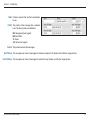
LEDs................................................................... 6
Installation..................................................................... 7
Before you Begin...................................................... 7
Wireless Installation Considerations......................... 8
Connect to Cable/DSL/Satellite Modem................... 9
Connect to Another Router..................................... 10
Getting Started....................................................... 12
Configuration.............................................................. 13
Web-based Configuration Utility............................. 13
Setup Wizard.................................................... 14
Manual Internet Connection Setup................... 18
Dynamic (Cable)........................................... 19
PPPoE (DSL)................................................ 20
PPTP............................................................. 21
L2TP.............................................................. 23
D-Link DIR-825 User Manual
Static (assigned by ISP)................................ 25
Wireless Settings.............................................. 26
Manual Wireless Settings................................. 27
802.11n/g (2.4GHz)....................................... 27
802.11n/a (5GHz).......................................... 29
Network Settings............................................... 31
Router Settings............................................. 31
DHCP Server Settings.................................. 32
DHCP Reservation........................................ 33
Virtual Server.................................................... 34
Port Forwarding................................................ 36
Application Rules.............................................. 37
QoS Engine...................................................... 38
Network Filters.................................................. 40
Access Control.................................................. 41
Access Control Wizard.................................. 41
Website Filters.................................................. 44
Inbound Filters.................................................. 45
Firewall Settings................................................ 46
Routing............................................................. 47
Advanced Wireless Settings............................. 48
802.11n/g (2.4GHz)....................................... 48
802.11n/a (5GHz).......................................... 49
WISH Settings.................................................. 50
Wi-Fi Protected Setup (WPS)........................... 52
ii
Table of Contents
Advanced Network Settings.............................. 54
UPnP............................................................. 54
Internet Ping Block........................................ 54
Internet Port Speed....................................... 54
Multicast Streams.......................................... 54
Guest Zone....................................................... 55
Administrator Settings....................................... 56
Time Settings.................................................... 57
SysLog.............................................................. 58
Email Settings................................................... 59
System Settings................................................ 60
Update Firmware.............................................. 61
DDNS................................................................ 62
System Check................................................... 63
Schedules......................................................... 64
Device Information............................................ 65
Log.................................................................... 66
Statistics........................................................... 67
Internet Sessions.............................................. 68
Wireless............................................................ 69
WISH................................................................ 69
Support............................................................. 70
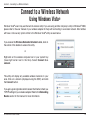
Connect to a Wireless Network................................. 78
Using Windows Vista®. ........................................... 78
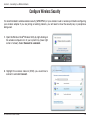
Configure Wireless Security.............................. 79
Connect Using WCN 2.0................................... 81
Using Windows® XP................................................ 82
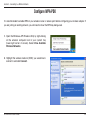
Configure WPA-PSK......................................... 83
Troubleshooting.......................................................... 85
Wireless Basics.......................................................... 89
What is Wireless?................................................... 90
Tips......................................................................... 92
Wireless Modes...................................................... 93
Networking Basics..................................................... 94
Check your IP address........................................... 94
Statically Assign an IP address.............................. 95
Technical Specifications............................................ 96
Contacting Technical Support................................... 97
Warranty...................................................................... 98
Registration............................................................... 104
Wireless Security........................................................ 71
What is WPA?......................................................... 71
Wireless Security Setup Wizard............................. 72
Add Wireless Device with WPS Wizard.................. 74
Configure WPA-Personal (PSK).............................. 75
Configure WPA-Enterprise (RADIUS)..................... 76
D-Link DIR-825 User Manual
iii
Section 1 - Product Overview
Product
PackageOverview
Contents
D-Link DIR-825 Xtreme N™
Dual Band Gigabit Router
Power Adapter
Ethernet Cable
CD-ROM
Stand
Note: Using a power supply with a different voltage rating than the one included with the DIR-825 will cause damage and void the warranty for this
product.
D-Link DIR-825 User Manual
Section 1 - Product Overview
System Requirements
Network Requirements
• An Ethernet-based Cable or DSL modem
• IEEE 802.11n-draft or 802.11g wireless clients
• IEEE 802.11a wireless clients
• 10/100/1000 Ethernet
Computer with the following:
• Windows®, Macintosh, or Linux-based operating system
• An installed Ethernet adapter
Web-based Configuration
Utility Requirements
Browser Requirements:
• Internet Explorer 6.0 or higher
• Mozilla 1.7.12 or higher
• Firefox 1.5 or higher
• Safari 1.0 or higher (with Java 1.3.1 or higher)
• Flock 0.7.14 or higher
• Opera 6.0 or higher
Windows® Users: Make sure you have the latest version of Java
installed. Visit www.java.com to download the latest version.
CD Installation Wizard
Requirements
D-Link DIR-825 User Manual
Computer with the following:
• Windows® XP with Service Pack 2 or Vista®
• An installed Ethernet adapter
• CD-ROM drive
Section 1 - Product Overview
Introduction
TOTAL PERFORMANCE
Combines award winning router features and IEEE 802.11a/g/Draft 802.11n wireless technology to provide the best wireless
performance.
TOTAL SECURITY
The most complete set of security features including Active Firewall and WPA/WPA2 to protect your network against outside
intruders.
TOTAL COVERAGE
Provides greater wireless signal rates even at farther distances for best-in-class Whole Home Coverage.
ULTIMATE PERFORMANCE
The D-Link Xtreme N™ Dual Band Gigabit Router (DIR-825) is a draft 802.11n/802.11a compliant device that delivers real world
performance of up to 14x faster than an 802.11g wireless connection (also faster than a 100Mbps wired Ethernet connection).
Create a secure wireless network to share photos, files, music, video, printers, and network storage throughout your home.
Connect the DIR-825 router to a cable or DSL modem and share your high-speed Internet access with everyone on the network.
In addition, this Router includes a Quality of Service (QoS) engine that keeps digital phone calls (VoIP) and online gaming
smooth and responsive, providing a better Internet experience.
EXTENDED WHOLE HOME COVERAGE
Powered by Xtreme N™ Duo™ technology, this high performance router provides superior Whole Home Coverage while reducing
dead spots. The router is designed for use in bigger homes and for users who demand higher performance networking. Add a
Xtreme N™ notebook or desktop adapter and stay connected to your network from virtually anywhere in your home.
TOTAL NETWORK SECURITY
The Xtreme N™ router supports all of the latest wireless security features to prevent unauthorized access, be it from over the
wireless network or from the Internet. Support for WPA/WPA2 standards ensure that you’ll be able to use the best possible
encryption method, regardless of your client devices. In addition, this router utilizes dual active firewalls (SPI and NAT) to prevent
potential attacks from across the Internet.
* Maximum wireless signal rate derived from IEEE Standard 802.11a, 802.11g and Draft 802.11n specifications. Actual data throughput will vary. Network conditions and
environmental factors, including volume of network traffic, building materials and construction, and network overhead, lower actual data throughput rate. Environmental
conditions will adversely affect wireless signal range.
D-Link DIR-825 User Manual
Section 1 - Product Overview
Features
•Faster Wireless Networking - The DIR-825 provides up to 300Mbps* wireless connection with other
802.11n wireless clients. This capability allows users to participate in real-time activities online, such as
video streaming, online gaming, and real-time audio. The performance of this 802.11n wireless router
gives you the freedom of wireless networking at speeds 650% faster than 802.11g.
•Compatible with 802.11a/g Devices - The DIR-825 is still fully compatible with the IEEE 802.11g
and 802.11a standards, so it can connect with existing 802.11g and 802.11a PCI, USB, and Cardbus
adapters.
•Advanced Firewall Features - The Web-based user interface displays a number of advanced network
management features including:
• Content Filtering - Easily applied content filtering based on MAC Address, URL, and/or
Domain Name.
• Filter Scheduling - These filters can be scheduled to be active on certain days or for a
duration of hours or minutes.
• Secure Multiple/Concurrent Sessions - The DIR-825 can pass through VPN sessions. It
supports multiple and concurrent IPSec and PPTP sessions, so users behind the DIR-825
can securely access corporate networks.
• User-friendly Setup Wizard - Through its easy-to-use Web-based user interface, the DIR-825 lets you
control what information is accessible to those on the wireless network, whether from the Internet or from
your company’s server. Configure your router to your specific settings within minutes.
* Maximum wireless signal rate derived from IEEE Standard 802.11g, 802.11a, and Draft 802.11n specifications. Actual data throughput will vary. Network conditions and
environmental factors, including volume of network traffic, building materials and construction, and network overhead, lower actual data throughput rate. Environmental
conditions will adversely affect wireless signal range.
D-Link DIR-825 User Manual
Section 1 - Product Overview
Hardware Overview
Connections
USB
Connect a USB 1.1 or 2.0 flash
drive to configure the wireless
settings using WCN.
Gigabit LAN Ports (1-4)
Connect Ethernet devices such as
computers, switches, and hubs.
D-Link DIR-825 User Manual
Reset
Pressing the Reset button restores the router to
its original factory default settings.
Internet Port
The auto MDI/MDIX Internet port is
the connection for the Ethernet cable
to the cable or DSL modem.
Power Receptor
Receptor for the supplied power
adapter.
Section 1 - Product Overview
Hardware Overview
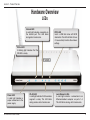
LEDs
Internet LED
A solid light indicates connection on
the Internet port. This LED blinks
during data transmission.
WCN LED
Insert a USB flash drive with WCN
information. The LED will blink 3 times
if it successfully transfers the wireless
settings.
Status LED
A blinking light indicates that the
DIR-825 is ready.
Power LED
A solid light indicates a
proper connection to the
power supply.
D-Link DIR-825 User Manual
WLAN LED
A solid light indicates that the wireless
segment is ready. This LED blinks
during wireless data transmission.
Local Network LEDs
A solid light indicates a connection to an
Ethernet-enabled computer on ports 1-4.
This LED blinks during data transmission.
Section 2 - Installation
Installation
This section will walk you through the installation process. Placement of the router is very important. Do not place the
router in an enclosed area such as a closet, cabinet, or in the attic or garage.
Before you Begin
• Please configure the router with the computer that was last connected directly to your modem.
• You can only use the Ethernet port on your modem. If you were using the USB connection before using
the router, then you must turn off your modem, disconnect the USB cable and connect an Ethernet cable
to the Internet port on the router, and then turn the modem back on. In some cases, you may need to call
your ISP to change connection types (USB to Ethernet).
• If you have DSL and are connecting via PPPoE, make sure you disable or uninstall any PPPoE software
such as WinPoet, Broadjump, or Enternet 300 from your computer or you will not be able to connect to
the Internet.
• When running the Setup Wizard from the D-Link CD, make sure the computer you are running the CD
from is connected to the Internet and online or the wizard will not work. If you have disconnected any
hardware, re-connect your computer back to the modem and make sure you are online.
D-Link DIR-825 User Manual
Section 2 - Installation
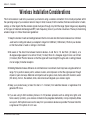
Wireless Installation Considerations
The D-Link wireless router lets you access your network using a wireless connection from virtually anywhere within
the operating range of your wireless network. Keep in mind, however, that the number, thickness and location of walls,
ceilings, or other objects that the wireless signals must pass through, may limit the range. Typical ranges vary depending
on the types of materials and background RF (radio frequency) noise in your home or business. The key to maximizing
wireless range is to follow these basic guidelines:
1.Keep the number of walls and ceilings between the D-Link router and other network devices to a minimum
- each wall or ceiling can reduce your adapter’s range from 3-90 feet (1-30 meters.) Position your devices
so that the number of walls or ceilings is minimized.
2.Be aware of the direct line between network devices. A wall that is 1.5 feet thick (.5 meters), at a
45-degree angle appears to be almost 3 feet (1 meter) thick. At a 2-degree angle it looks over 42 feet
(14 meters) thick! Position devices so that the signal will travel straight through a wall or ceiling (instead
of at an angle) for better reception.
3.Building Materials make a difference. A solid metal door or aluminum studs may have a negative effect on
range. Try to position access points, wireless routers, and computers so that the signal passes through
drywall or open doorways. Materials and objects such as glass, steel, metal, walls with insulation, water
(fish tanks), mirrors, file cabinets, brick, and concrete will degrade your wireless signal.
4.Keep your product away (at least 3-6 feet or 1-2 meters) from electrical devices or appliances that
generate RF noise.
5.If you are using 2.4GHz cordless phones or X-10 (wireless products such as ceiling fans, lights, and
home security systems), your wireless connection may degrade dramatically or drop completely. Make
sure your 2.4GHz phone base is as far away from your wireless devices as possible. The base transmits
a signal even if the phone in not in use.
D-Link DIR-825 User Manual
Section 2 - Installation
Connect to Cable/DSL/Satellite Modem
If you are connecting the router to a cable/DSL/satellite modem, please follow the steps below:
1. Place the router in an open and central location. Do not plug the power adapter into the router.
2. Turn the power off on your modem. If there is no on/off switch, then unplug the modem’s power adapter.
Shut down your computer.
3. Unplug the Ethernet cable (that connects your computer to your modem) from your computer and place
it into the Internet port on the router.
4. Plug an Ethernet cable into one of the four LAN ports on the router. Plug the other end into the Ethernet
port on your computer.
5. Turn on or plug in your modem. Wait for the modem to boot (about 30 seconds).
6. Plug the power adapter to the router and connect to an outlet or power strip. Wait about 30 seconds for
the router to boot.
7. Turn on your computer.
8. Refer to page 12 to configure your router.
D-Link DIR-825 User Manual
Section 2 - Installation
Connect to Another Router
If you are connecting the D-Link router to another router to use as a wireless access point and/or switch, you will have
to do the following before connecting the router to your network:
• Disable UPnP™
• Disable DHCP
• Change the LAN IP address to an available address on your network. The LAN ports on the router cannot
accept a DHCP address from your other router.
To connect to another router, please follow the steps below:
1. Plug the power into the router. Connect one of your computers to the router (LAN port) using an Ethernet cable.
Make sure your IP address on the computer is 192.168.0.xxx (where xxx is between 2 and 254). Please see the
Networking Basics section for more information. If you need to change the settings, write down your existing settings
before making any changes. In most cases, your computer should be set to receive an IP address automatically in
which case you will not have to do anything to your computer.
2. Open a web browser and enter http://192.168.0.1 and press Enter. When the login window appears, set the user
name to Admin and leave the password box empty. Click Log In to continue.
3. Click on Advanced and then click Advanced Network. Uncheck the Enable UPnP checkbox. Click Save Settings
to continue.
4. Click Setup and then click Network Settings. Uncheck the Enable DHCP Server checkbox. Click Save Settings
to continue.
5. Under Router Settings, enter an available IP address and the subnet mask of your network. Click Save Settings to
save your settings. Use this new IP address to access the configuration utility of the router in the future. Close the
browser and change your computer’s IP settings back to the original values as in Step 1.
D-Link DIR-825 User Manual
10
Section 2 - Installation
6. Disconnect the Ethernet cable from the router and reconnect your computer to your network.
7. Connect an Ethernet cable in one of the LAN ports of the router and connect it to your other router. Do not plug
anything into the Internet (WAN) port of the D-Link router.
8. You may now use the other 3 LAN ports to connect other Ethernet devices and computers. To configure your wireless
network, open a web browser and enter the IP address you assigned to the router. Refer to the Configuration and
Wireless Security sections for more information on setting up your wireless network.
D-Link DIR-825 User Manual
11
Section 2 - Installation
Getting Started
The DIR-825 includes a Quick Router Setup Wizard CD. Follow the simple steps below to run the Setup Wizard to
guide you quickly through the installation process.
Insert the Quick Router Setup Wizard CD in the CD-ROM drive. The step-by-step instructions that follow are shown
in Windows® XP. The steps and screens are similar for the other Windows operating systems.
If the CD Autorun function does not automatically start on your computer, go to Start > Run. In the run box type
“D:\DIR825.exe” (where D: represents the drive letter of your CD-ROM drive).
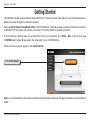
When the autorun screen appears, click Install Router.
Click Install Router
Note: It is recommended to write down the SSID and Security Key, followed by the login password on the provided CD
holder.
D-Link DIR-825 User Manual
12
Section 3 - Configuration
Configuration
This section will show you how to configure your new D-Link wireless router using the web-based configuration
utility.
Web-based Configuration Utility
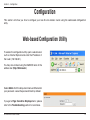
To access the configuration utility, open a web-browser
such as Internet Explorer and enter the IP address of
the router (192.168.0.1).
You may also connect using the NetBIOS name in the
address bar (http://dlinkrouter).
Select Admin from the drop-down menu and then enter
your password. Leave the password blank by default.
If you get a Page Cannot be Displayed error, please
refer to the Troubleshooting section for assistance.
D-Link DIR-825 User Manual
13
Section 3 - Configuration
Setup Wizard
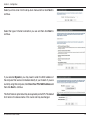
Click Launch Internet Connection Setup Wizard to begin.
If you want to enter your settings without running the wizard, click
Manual Configuration and skip to page 18.
Click Next to continue.
Create a new password and then click Next to continue.
D-Link DIR-825 User Manual
14
Section 3 - Configuration
Select your time zone from the drop-down menu and then click Next to
continue.
Select the type of Internet connection you use and then click Next to
continue.
If you selected Dynamic, you may need to enter the MAC address of
the computer that was last connected directly to your modem. If you are
currently using that computer, click Clone Your PC’s MAC Address and
then click Next to continue.
The Host Name is optional but may be required by some ISPs. The default
host name is the device name of the router and may be changed.
D-Link DIR-825 User Manual
15
Section 3 - Configuration
If you selected PPPoE, enter your PPPoE username and password. Click
Next to continue.
Select Static if your ISP assigned you the IP address, subnet mask, gateway,
and DNS server addresses.
Note: Make sure to remove your PPPoE software from your computer. The
software is no longer needed and will not work through a router.
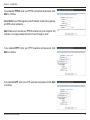
If you selected PPTP, enter your PPTP username and password. Click
Next to continue.
If you selected L2TP, enter your L2TP username and password. Click Next
to continue.
D-Link DIR-825 User Manual
16
Section 3 - Configuration
If you selected Static, enter your network settings supplied by your Internet
provider. Click Next to continue.
Click Connect to save your settings.
Click Reboot Now to reboot the router so the new settings can take effect.
Once the router is finished rebooting, click Continue. Please allow 1-2
minutes to connect.
Close your browser window and reopen it to test your Internet connection.
It may take a few tries to initially connect to the Internet.
D-Link DIR-825 User Manual
17
Section 3 - Configuration
Manual Internet Connection Setup
Click Manual Internet Connection Setup to begin.
If you want to configure your router to connect to the
Internet using the wizard, click Internet Connection
Setup Wizard and refer to page 14.
D-Link DIR-825 User Manual
18
Section 3 - Configuration
Dynamic (Cable)
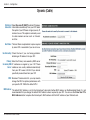
My Internet Select Dynamic IP (DHCP) to obtain IP Address
Connection: information automatically from your ISP. Select
this option if your ISP does not give you any IP
numbers to use. This option is commonly used
for cable modem services such as Comcast
and Cox.
Host Name: The Host Name is optional but may be required
by some ISPs. Leave blank if you are not sure.
Use Unicasting: Check the box if you are having problems
obtaining an IP address from your ISP.
Primary/ Enter the Primary and secondary DNS server
Secondary DNS IP addresses assigned by your ISP. These
Server: addresses are usually obtained automatically
from your ISP. Leave at 0.0.0.0 if you did not
specifically receive these from your ISP.
MTU: Maximum Transmission Unit - you may need to
change the MTU for optimal performance with
your specific ISP. 1500 is the default MTU.
MAC Address: The default MAC Address is set to the Internet port’s physical interface MAC address on the Broadband Router. It is not
recommended that you change the default MAC address unless required by your ISP. You can use the Clone Your PC’s
MAC Address button to replace the Internet port’s MAC address with the MAC address of your Ethernet card.
D-Link DIR-825 User Manual
19
Section 3 - Configuration
Internet Setup
PPPoE (DSL)
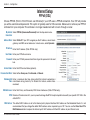
Choose PPPoE (Point to Point Protocol over Ethernet) if your ISP uses a PPPoE connection. Your ISP will provide
you with a username and password. This option is typically used for DSL services. Make sure to remove your PPPoE
software from your computer. The software is no longer needed and will not work through a router.
My Internet Select PPPoE (Username/Password) from the drop-down menu.
Connection:
Address Mode: Select Static IP if your ISP assigned you the IP address, subnet mask,
gateway, and DNS server addresses. In most cases, select Dynamic.
IP Address: Enter the IP address (Static PPPoE only).
User Name: Enter your PPPoE user name.
Password: Enter your PPPoE password and then retype the password in the next
box.
Service Name: Enter the ISP Service Name (optional).
Reconnection Mode: Select either Always-on, On-Demand, or Manual.
Maximum Idle Enter a maximum idle time during which the Internet connection is
Time: maintained during inactivity. To disable this feature, enable Autoreconnect.
DNS Addresses: Enter the Primary and Secondary DNS Server Addresses (Static PPPoE only).
MTU: Maximum Transmission Unit - you may need to change the MTU for optimal performance with your specific ISP. 1492 is the
default MTU.
MAC Address: The default MAC Address is set to the Internet port’s physical interface MAC address on the Broadband Router. It is not
recommended that you change the default MAC address unless required by your ISP. You can use the Clone Your PC’s
MAC Address button to replace the Internet port’s MAC address with the MAC address of your Ethernet card.
D-Link DIR-825 User Manual
20
Section 3 - Configuration
Internet Setup
PPTP
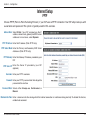
Choose PPTP (Point-to-Point-Tunneling Protocol ) if your ISP uses a PPTP connection. Your ISP will provide you with
a username and password. This option is typically used for DSL services.
Address Mode: Select Static if your ISP assigned you the IP
address, subnet mask, gateway, and DNS server
addresses. In most cases, select Dynamic.
PPTP IP Address: Enter the IP address (Static PPTP only).
PPTP Subnet Mask: Enter the Primary and Secondary DNS Server
Addresses (Static PPTP only).
PPTP Gateway: Enter the Gateway IP Address provided by your
ISP.
PPTP Server IP: Enter the Server IP provided by your ISP
(optional).
Username: Enter your PPTP username.
Password: Enter your PPTP password and then retype the
password in the next box.
Reconnect Mode: Select either Always-on, On-Demand, or
Manual.
Maximum Idle Time: Enter a maximum idle time during which the Internet connection is maintained during inactivity. To disable this feature,
enable Auto-reconnect.
D-Link DIR-825 User Manual
21
Section 3 - Configuration
DNS Servers: The DNS server information will be supplied by your ISP (Internet Service Provider.)
MTU: Maximum Transmission Unit - you may need to change the MTU for optimal performance with your specific ISP. 1400 is the
default MTU.
MAC Address: The default MAC Address is set to the Internet port’s physical interface MAC address on the Broadband Router. It is not
recommended that you change the default MAC address unless required by your ISP. You can use the Clone Your PC’s
MAC Address button to replace the Internet port’s MAC address with the MAC address of your Ethernet card.
D-Link DIR-825 User Manual
22
Section 3 - Configuration
Internet Setup
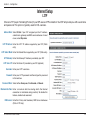
L2TP
Choose L2TP (Layer 2 Tunneling Protocol) if your ISP uses a L2TP connection. Your ISP will provide you with a username
and password. This option is typically used for DSL services.
Address Mode: Select Static if your ISP assigned you the IP address,
subnet mask, gateway, and DNS server addresses. In most
cases, select Dynamic.
L2TP IP Address: Enter the L2TP IP address supplied by your ISP (Static
only).
L2TP Subnet Mask: Enter the Subnet Mask supplied by your ISP (Static only).
L2TP Gateway: Enter the Gateway IP Address provided by your ISP.
L2TP Server IP: Enter the Server IP provided by your ISP (optional).
Username: Enter your L2TP username.
Password: Enter your L2TP password and then retype the password
in the next box.
Reconnect Mode: Select either Always-on, On-Demand, or Manual.
Maximum Idle Time: Enter a maximum idle time during which the Internet
connection is maintained during inactivity. To disable this
feature, enable Auto-reconnect.
DNS Servers: Enter the Primary and Secondary DNS Server Addresses
(Static L2TP only).
D-Link DIR-825 User Manual
23
Section 3 - Configuration
MTU: Maximum Transmission Unit - you may need to change the MTU for optimal performance with your specific ISP. 1400 is the
default MTU.
Clone MAC The default MAC Address is set to the Internet port’s physical interface MAC address on the Broadband Router. It is not
Address: recommended that you change the default MAC address unless required by your ISP. You can use the Clone Your PC’s
MAC Address button to replace the Internet port’s MAC address with the MAC address of your Ethernet card.
D-Link DIR-825 User Manual
24
Section 3 - Configuration
Internet Setup
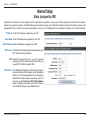
Static (assigned by ISP)
Select Static IP Address if all the Internet port’s IP information is provided to you by your ISP. You will need to enter in the IP address,
subnet mask, gateway address, and DNS address(es) provided to you by your ISP. Each IP address entered in the fields must be in the
appropriate IP form, which are four octets separated by a dot (x.x.x.x). The Router will not accept the IP address if it is not in this format.
IP Address: Enter the IP address assigned by your ISP.
Subnet Mask: Enter the Subnet Mask assigned by your ISP.
Default Gateway: Enter the Gateway assigned by your ISP.
DNS Servers: The DNS server information will be supplied by your
ISP (Internet Service Provider.)
MTU: Maximum Transmission Unit - you may need to
change the MTU for optimal performance with your
specific ISP. 1500 is the default MTU.
MAC Address: The default MAC Address is set to the Internet port’s
physical interface MAC address on the Broadband
Router. It is not recommended that you change the
default MAC address unless required by your ISP.
You can use the Clone Your PC’s MAC Address
button to replace the Internet port’s MAC address
with the MAC address of your Ethernet card.
D-Link DIR-825 User Manual
25
Section 3 - Configuration
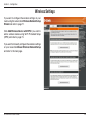
Wireless Settings
If you want to configure the wireless settings on your
router using the wizard, click Wireless Network Setup
Wizard and refer to page 71.
Click Add Wireless Device with WPS if you want to
add a wireless device using Wi-Fi Protected Setup
(WPS) and refer to page 73.
If you want to manually configure the wireless settings
on your router click Manual Wireless Network Setup
and refer to the next page.
D-Link DIR-825 User Manual
26
Section 3 - Configuration
Manual Wireless Settings
802.11n/g (2.4GHz)
Enable Wireless: Check the box to enable the wireless function. If you do
not want to use wireless, uncheck the box to disable all
the wireless functions.
Schedule: Select the time frame that you would like your wireless
network enabled. The schedule may be set to Always. Any
schedule you create will be available in the drop-down
menu. Click Add New to create a new schedule.
Wireless Network Service Set Identifier (SSID) is the name of your wireless
Name: network. Create a name using up to 32 characters. The
SSID is case-sensitive.
802.11 Mode: Select one of the following:
802.11g Only - Select if all of your wireless clients are
802.11g.
Mixed 802.11n and 802.11g - Select if you are using both
802.11n and 802.11g wireless clients.
802.11n Only - Select only if all of your wireless clients
are 802.11n.
Enable Auto The Auto Channel Scan setting can be selected to allow the DIR-825 to choose the channel with the least amount of
Channel Scan: interference.
Wireless Channel: Indicates the channel setting for the DIR-825. By default the channel is set to 6. The Channel can be changed to fit the
channel setting for an existing wireless network or to customize the wireless network. If you enable Auto Channel Scan,
this option will be greyed out.
Transmission Rate: Select the transmit rate. It is strongly suggested to select Best (Auto) for best performance.
D-Link DIR-825 User Manual
27
Section 3 - Configuration
Channel Width: Select the Channel Width:
Auto 20/40 - This is the default setting. Select if you are using both 802.11n and non-802.11n wireless devices.
20MHz - Select if you are not using any 802.11n wireless clients.
Visibility Status: Select Invisible if you do not want the SSID of your wireless network to be broadcasted by the DIR-825. If Invisible is
selected, the SSID of the DIR-825 will not be seen by Site Survey utilities so your wireless clients will have to know the
SSID of your DIR-825 in order to connect to it.
Wireless Security: Refer to page 71 for more information regarding wireless security.
D-Link DIR-825 User Manual
28
Section 3 - Configuration
802.11n/a (5GHz)
Enable Wireless: Check the box to enable the wireless function. If you do
not want to use wireless, uncheck the box to disable all
the wireless functions.
Schedule: Select the time frame that you would like your wireless
network enabled. The schedule may be set to Always. Any
schedule you create will be available in the drop-down
menu. Click Add New to create a new schedule.
Wireless Network Service Set Identifier (SSID) is the name of your wireless
Name: network. Create a name using up to 32 characters. The
SSID is case-sensitive.
802.11 Mode: Select one of the following:
802.11a Only - Select if all of your wireless clients are
802.11a.
Mixed 802.11n and 802.11a - Select if you are using both
802.11n and 802.11a wireless clients.
802.11n Only - Select only if all of your wireless clients
are 802.11n.
Enable Auto The Auto Channel Scan setting can be selected to allow the DIR-825 to choose the channel with the least amount of
Channel Scan: interference.
Wireless Channel: Indicates the channel setting for the DIR-825. By default the channel is set to 6. The Channel can be changed to fit the
channel setting for an existing wireless network or to customize the wireless network. If you enable Auto Channel Scan,
this option will be greyed out.
Transmission Rate: Select the transmit rate. It is strongly suggested to select Best (Auto) for best performance.
D-Link DIR-825 User Manual
29
Section 3 - Configuration
Channel Width: Select the Channel Width:
Auto 20/40 - This is the default setting. Select if you are using both 802.11n and non-802.11n wireless devices.
20MHz - Select if you are not using any 802.11n wireless clients.
Visibility Status: Select Invisible if you do not want the SSID of your wireless network to be broadcasted by the DIR-825. If Invisible is
selected, the SSID of the DIR-825 will not be seen by Site Survey utilities so your wireless clients will have to know the
SSID of your DIR-825 in order to connect to it.
Wireless Security: Refer to page 71 for more information regarding wireless security.
D-Link DIR-825 User Manual
30
Section 3 - Configuration
Network Settings
This section will allow you to change the local network settings of the router and to configure the DHCP settings.
Router Settings
Router IP Address: Enter the IP address of the router. The default IP
address is 192.168.0.1.
If you change the IP address, once you click Apply,
you will need to enter the new IP address in your
browser to get back into the configuration utility.
Subnet Mask: Enter the Subnet Mask. The default subnet mask is
255.255.255.0.
Local Domain: Enter the Domain name (Optional).
Enable DNS Relay: Uncheck the box to transfer the DNS server information
from your ISP to your computers. If checked, your
computers will use the router for a DNS server.
D-Link DIR-825 User Manual
31
Section 3 - Configuration
DHCP Server Settings
DHCP stands for Dynamic Host Control Protocol. The DIR-825 has a built-in DHCP server. The DHCP Server will automatically assign
an IP address to the computers on the LAN/private network. Be sure to set your computers to be DHCP clients by setting their TCP/IP
settings to “Obtain an IP Address Automatically.” When you turn your computers on, they will automatically load the proper TCP/IP settings
provided by the DIR-825. The DHCP Server will automatically allocate an unused IP address from the IP address pool to the requesting
computer. You must specify the starting and ending address of the IP address pool.
Enable DHCP Check this box to enable the DHCP server on your router.
Server: Uncheck to disable this function.
DHCP IP Address Enter the starting and ending IP addresses for the DHCP
Range: server’s IP assignment.
Note: If you statically (manually) assign IP addresses to
your computers or devices, make sure the IP addresses are
outside of this range or you may have an IP conflict.
DHCP Lease Time: The length of time for the IP address lease. Enter the Lease
time in minutes.
Always Broadcast: Enable this feature to broadcast your networks DHCP server
to LAN/WLAN clients.
NetBIOS NetBIOS allows LAN hosts to discover all other computers
Announcement: within the network, enable this feature to allow the DHCP
Server to offer NetBIOS configuration settings.
Learn NetBIOS Enable this feature to allow WINS information to be learned from the WAN side, disable to allow manual configuration.
from WAN:
NetBIOS Scope: This feature allows the configuration of a NetBIOS ‘domain’ name under which network hosts operates. This setting has no
effect if the ‘Learn NetBIOS information from WAN’ is activated.
NetBIOS Node: Select the different type of NetBIOS node; Broadcast only, Point-to-Point, Mixed-mode, and Hybrid.
WINS IP Address: Enter your WINS IP address
D-Link DIR-825 User Manual
32
Section 3 - Configuration
DHCP Reservation
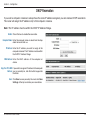
If you want a computer or device to always have the same IP address assigned, you can create a DHCP reservation.
The router will assign the IP address only to that computer or device.
Note: This IP address must be within the DHCP IP Address Range.
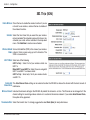
Enable: Check this box to enable the reservation.
Computer Name: Enter the computer name or select from the drop
down menu and click <<.
IP Address: Enter the IP address you want to assign to the
computer or device. This IP Address must be within
the DHCP IP Address Range.
MAC Address: Enter the MAC address of the computer or
device.
Copy Your PC’s MAC If you want to assign an IP address to the computer
Address: you are currently on, click this button to populate
the fields.
Save: Click Save to save your entry. You must click Save
Settings at the top to activate your reservations.
D-Link DIR-825 User Manual
33
Section 3 - Configuration
Virtual Server
The DIR-825 can be configured as a virtual server so that remote users accessing Web or FTP services via the public
IP address can be automatically redirected to local servers in the LAN (Local Area Network).
The DIR-825 firewall feature filters out unrecognized packets to protect your LAN network so all computers networked
with the DIR-825 are invisible to the outside world. If you wish, you can make some of the LAN computers accessible
from the Internet by enabling Virtual Server. Depending on the requested service, the DIR-825 redirects the external
service request to the appropriate server within the LAN network.
The DIR-825 is also capable of port-redirection meaning incoming traffic to a particular port may be redirected to a
different port on the server computer.
Each virtual service that is created will be listed at the bottom of the screen in the Virtual Servers List. There are
pre-defined virtual services already in the table. You may use them by enabling them and assigning the server IP to
use that particular virtual service.
For a list of ports for common applications, please visit http://support.dlink.com/faq/view.asp?prod_id=1191.
D-Link DIR-825 User Manual
34
Section 3 - Configuration
This will allow you to open a single port. If you would like to open a range of ports, refer to the next page.
Name: Enter a name for the rule or select an application
from the drop-down menu. Select an application
and click << to populate the fields.
IP Address: Enter the IP address of the computer on your
local network that you want to allow the incoming
service to. If your computer is receiving an IP
address automatically from the router (DHCP),
you computer will be listed in the “Computer
Name” drop-down menu. Select your computer
and click <<.
Private Port/ Enter the port that you want to open next to
Public Port: Private Port and Public Port. The private and
public ports are usually the same. The public
port is the port seen from the Internet side, and
the private port is the port being used by the
application on the computer within your local
network.
Protocol Type: Select TCP, UDP, or Both from the drop-down
menu.
Schedule: The schedule of time when the Virtual Server
Rule will be enabled. The schedule may be set
to Always, which will allow the particular service
to always be enabled. You can create your own
times in the Tools > Schedules section.
Inbound Filter: Select Allow All (most common) or a created
Inbound filter. You may create your own inbound
filters in the Advanced > Inbound Filter page.
D-Link DIR-825 User Manual
35
Section 3 - Configuration
Port Forwarding
This will allow you to open a single port or a range of ports.
Name: Enter a name for the rule or select an application
from the drop-down menu. Select an application
and click << to populate the fields.
IP Address: Enter the IP address of the computer on your
local network that you want to allow the incoming
service to. If your computer is receiving an IP
address automatically from the router (DHCP),
you computer will be listed in the “Computer
Name” drop-down menu. Select your computer
and click <<.
TCP/UDP: Enter the TCP and/or UDP port or ports that you
want to open. You can enter a single port or a
range of ports. Separate ports with a common.
Example: 24,1009,3000-4000
Schedule: The schedule of time when the Virtual Server
Rule will be enabled. The schedule may be set
to Always, which will allow the particular service
to always be enabled. You can create your own
times in the Tools > Schedules section.
Inbound Filter: Select Allow All (most common) or a created
Inbound filter. You may create your own inbound
filters in the Advanced > Inbound Filter page.
D-Link DIR-825 User Manual
36
Section 3 - Configuration
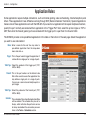
Application Rules
Some applications require multiple connections, such as Internet gaming, video conferencing, Internet telephony and
others. These applications have difficulties working through NAT (Network Address Translation). Special Applications
makes some of these applications work with the DIR-825. If you need to run applications that require multiple connections,
specify the port normally associated with an application in the “Trigger Port” field, select the protocol type as TCP or
UDP, then enter the firewall (public) ports associated with the trigger port to open them for inbound traffic.
The DIR-825 provides some predefined applications in the table on the bottom of the web page. Select the application
you want to use and enable it.
Name: Enter a name for the rule. You may select a
pre-defined application from the drop-down
menu and click <<.
Trigger: This is the port used to trigger the application. It
can be either a single port or a range of ports.
Traffic Type: Select the protocol of the trigger port (TCP,
UDP, or Both).
Firewall: This is the port number on the Internet side
that will be used to access the application. You
may define a single port or a range of ports.
You can use a comma to add multiple ports or
port ranges.
Traffic Type: Select the protocol of the firewall port (TCP,
UDP, or Both).
Schedule: The schedule of time when the Application Rule
will be enabled. The schedule may be set to
Always, which will allow the particular service
to always be enabled. You can create your own
times in the Tools > Schedules section.
D-Link DIR-825 User Manual
37
Section 3 - Configuration
QoS Engine
The QoS Engine option helps improve your network gaming performance by prioritizing applications. By default the
QoS Engine settings are disabled and application priority is not classified automatically.
Enable Traffic This option is disabled by default. Enable this option for
Shaping: better performance and experience with online games
and other interactive applications, such as VoIP.
Automatic Uplink This option is enabled by default when the QoS Engine
Speed: option is enabled. This option will allow your router to
automatically determine the uplink speed of your Internet
connection.
Measured Uplink This displays the detected uplink speed.
Speed:
Manual Uplink The speed at which data can be transferred from the
Speed: router to your ISP. This is determined by your ISP. ISP’s
often speed as a download/upload pair. For example,
1.5Mbits/284Kbits. Using this example, you would enter
284. Alternatively you can test your uplink speed with a
service such as www.dslreports.com.
Connection Type: By default, the router automatically determines whether
the underlying connection is an xDSL/Frame-relay
network or some other connection type (such as cable
modem or Ethernet), and it displays the result as
Detected xDSL or Frame Relay Network. If you have an unusual network connection in which you are actually connected
via xDSL but for which you configure either “Static” or “DHCP” in the Internet settings, setting this option to xDSL or Other
Frame Relay Network ensures that the router will recognize that it needs to shape traffic slightly differently in order to give
the best performance. Choosing xDSL or Other Frame Relay Network causes the measured uplink speed to be reported
slightly lower than before on such connections, but gives much better results.
Detected xDSL: When Connection Type is set to automatic, the automatically detected connection type is displayed here.
D-Link DIR-825 User Manual
38
Section 3 - Configuration
Enable QoS Engine: This option is disabled by default. Enable this option for better performance and experience with online games and other
interactive applications, such as VoIP.
Automatic This option is enabled by default. This will allow your router to automatically determine the network priority of running
Classification: programs.
Dynamic This option should be enabled when you have a slow Internet uplink. It helps to reduce the impact that large low priority
Fragmentation: network packets can have on more urgent ones.
D-Link DIR-825 User Manual
39
Section 3 - Configuration
Network Filters
Use MAC (Media Access Control) Filters to allow or deny LAN (Local Area Network) computers by their MAC addresses
from accessing the network. You can either manually add a MAC address or select the MAC address from the list of
clients that are currently connected to the Broadband Router.
Configure MAC Select Turn MAC Filtering Off, Allow MAC
Filtering: addresses listed below, or Deny MAC
addresses listed below from the drop-down
menu.
MAC Address: Enter the MAC address you would like to
filter.
To find the MAC address on a computer,
please refer to the Networking Basics section
in this manual.
DHCP Client: Select a DHCP client from the drop-down menu
and click << to copy that MAC Address.
Clear: Click to remove the MAC address.
D-Link DIR-825 User Manual
40
Section 3 - Configuration
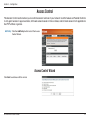
Access Control
The Access Control section allows you to control access in and out of your network. Use this feature as Parental Controls
to only grant access to approved sites, limit web access based on time or dates, and/or block access from applications
like P2P utilities or games.
Add Policy: Click the Add Policy button to start the Access
Control Wizard.
Access Control Wizard
Click Next to continue with the wizard.
D-Link DIR-825 User Manual
41
Section 3 - Configuration
Access Control Wizard (continued)
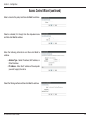
Enter a name for the policy and then click Next to continue.
Select a schedule (I.E. Always) from the drop-down menu
and then click Next to continue.
Enter the following information and then click Next to
continue.
• Address Type - Select IP address, MAC address, or
Other Machines.
• IP Address - Enter the IP address of the computer
you want to apply the rule to.
Select the filtering method and then click Next to continue.
D-Link DIR-825 User Manual
42
Section 3 - Configuration
Access Control Wizard (continued)
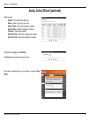
Enter the rule:
Enable - Check to enable the rule.
Name - Enter a name for your rule.
Dest IP Start - Enter the starting IP address.
Dest IP End - Enter the ending IP address.
Protocol - Select the protocol.
Dest Port Start - Enter the starting port number.
Dest Port End - Enter the ending port number.
To enable web logging, click Enable.
Click Save to save the access control rule.
Your newly created policy will now show up under Policy
Table.
D-Link DIR-825 User Manual
43
Section 3 - Configuration
Website Filters
Website Filters are used to allow you to set up a list of allowed Web sites that can be used by multiple users through
the network. To use this feature select to Allow or Deny, enter the domain or website and click Save Settings. You
must also select Apply Web Filter under the Access Control section (page 41).
Add Website Select Allow or Deny.
Filtering Rule:
Website URL/ Enter the keywords or URLs that you want to
Domain: allow or block. Click Save Settings.
D-Link DIR-825 User Manual
44
Section 3 - Configuration
Inbound Filters
The Inbound Filter option is an advanced method of controlling data received from the Internet. With this feature you
can configure inbound data filtering rules that control data based on an IP address range. Inbound Filters can be used
with Virtual Server, Port Forwarding, or Remote Administration features.
Name: Enter a name for the inbound filter rule.
Action: Select Allow or Deny.
Enable: Check to enable rule.
Remote IP Start: Enter the starting IP address. Enter 0.0.0.0
if you do not want to specify an IP range.
Remote IP End: Enter the ending IP address. Enter
255.255.255.255 if you do not want to
specify and IP range.
Add: Click the Add button to apply your settings.
You must click Save Settings at the top to
save the settings.
Inbound Filter This section will list any rules that are created.
Rules List: You may click the Edit icon to change the
settings or enable/disable the rule, or click
the Delete icon to remove the rule.
D-Link DIR-825 User Manual
45
Section 3 - Configuration
Firewall Settings
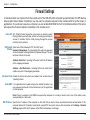
A firewall protects your network from the outside world. The DIR-825 offers a firewall type functionality. The SPI feature
helps prevent cyber attacks. Sometimes you may want a computer exposed to the outside world for certain types of
applications. If you choose to expose a computer, you can enable DMZ. DMZ is short for Demilitarized Zone. This option
will expose the chosen computer completely to the outside world.
Enable SPI: SPI (Stateful Packet Inspection, also known as dynamic packet
filtering) helps to prevent cyber attacks by tracking more state per
session. It validates that the traffic passing through the session
conforms to the protocol.
NAT Endpoint Select one of the following for TCP and UDP ports:
Filtering: Endpoint Independent - Any incoming traffic sent to an open port
will be forwarded to the application that opened the port. The port
will close if idle for 5 minutes.
Address Restricted - Incoming traffic must match the IP address
of the outgoing connection.
Address + Port Restriction - Incoming traffic must match the IP
address and port of the outgoing connection.
Anti-Spoof Check: Enable this feature to protect your network from certain kinds of
“spoofing” attacks.
Enable DMZ: If an application has trouble working from behind the router, you
can expose one computer to the Internet and run the application
on that computer.
Note: Placing a computer in the DMZ may expose that computer to a variety of security risks. Use of this option is only
recommended as a last resort.
DMZ IP Address: Specify the IP address of the computer on the LAN that you want to have unrestricted Internet communication. If this
computer obtains it’s IP address automatically using DHCP, be sure to make a static reservation on the Setup > Network
Settings page so that the IP address of the DMZ machine does not change.
D-Link DIR-825 User Manual
46
Section 3 - Configuration
Routing
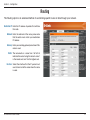
The Routing option is an advanced method of customizing specific routes of data through your network.
Destination IP: Enter the IP address of packets that will take
this route.
Netmask: Enter the netmask of the route, please note
that the octets must match your destination
IP address.
Gateway: Enter your next hop gateway to be taken if this
route is used.
Metric: The route metric is a value from 1 to 16 that
indicates the cost of using this route. A value 1
is the lowest cost and 15 is the highest cost.
Interface: Select the interface that the IP packet must
use to transit out of the router when this route
is used.
D-Link DIR-825 User Manual
47
Section 3 - Configuration
Advanced Wireless Settings
802.11n/g (2.4GHz)
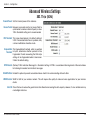
Transmit Power: Set the transmit power of the antennas.
Beacon Period: Beacons are packets sent by an Access Point to
synchronize a wireless network. Specify a value.
100 is the default setting and is recommended.
RTS Threshold: This value should remain at its default setting of
2432. If inconsistent data flow is a problem, only
a minor modification should be made.
Fragmentation The fragmentation threshold, which is specified
Threshold: in bytes, determines whether packets will be
fragmented. Packets exceeding the 2346 byte
setting will be fragmented before transmission.
2346 is the default setting.
DTIM Interval: (Delivery Traffic Indication Message) 3 is the default setting. A DTIM is a countdown informing clients of the next window
for listening to broadcast and multicast messages.
WLAN Partition: Enable this option to prevent associated wireless clients from communicating with each other.
WMM Function: WMM is QoS for your wireless network. This will improve the quality of video and voice applications for your wireless
clients.
Short GI: Check this box to reduce the guard interval time therefore increasing the data capacity. However, it’s less reliable and may
create higher data loss.
D-Link DIR-825 User Manual
48
Section 3 - Configuration
Advanced Wireless Settings
802.11n/a (5GHz)
Transmit Power: Set the transmit power of the antennas.
Beacon Period: Beacons are packets sent by an Access Point to
synchronize a wireless network. Specify a value.
100 is the default setting and is recommended.
RTS Threshold: This value should remain at its default setting of
2432. If inconsistent data flow is a problem, only
a minor modification should be made.
Fragmentation The fragmentation threshold, which is specified
Threshold: in bytes, determines whether packets will be
fragmented. Packets exceeding the 2346 byte
setting will be fragmented before transmission.
2346 is the default setting.
DTIM Interval: (Delivery Traffic Indication Message) 3 is the default setting. A DTIM is a countdown informing clients of the next window
for listening to broadcast and multicast messages.
WLAN Partition: Enable this option to prevent associated wireless clients from communicating with each other.
WMM Function: WMM is QoS for your wireless network. This will improve the quality of video and voice applications for your wireless
clients.
Short GI: Check this box to reduce the guard interval time therefore increasing the data capacity. However, it’s less reliable and may
create higher data loss.
D-Link DIR-825 User Manual
49
Section 3 - Configuration
WISH Settings
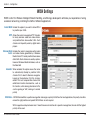
WISH is short for Wireless Intelligent Stream Handling, a technology developed to enhance your experience of using
a wireless network by prioritizing the traffic of different applications.
Enable WISH: Enable this option if you want to allow WISH
to prioritize your traffic.
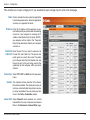
HTTP: Allows the router to recognize HTTP transfers
for many common audio and video streams
and prioritize them above other traffic. Such
streams are frequently used by digital media
players.
Windows Media Enables the router to recognize certain audio
Center: and video streams generated by a Windows
Media Center PC and to prioritize these above
other traffic. Such streams are used by systems
known as Windows Media Extenders, such as
the Xbox 360.
Automatic: When enabled, this option causes the router
to automatically attempt to prioritize traffic
streams that it doesn’t otherwise recognize,
based on the behaviour that the streams
exhibit. This acts to deprioritize streams that
exhibit bulk transfer characteristics, such as
file transfers, while leaving interactive traffic,
such as gaming or VoIP, running at a normal
priority.
WISH Rules: A WISH Rule identifies a specific message flow and assigns a priority to that flow. For most applications, the priority classifiers
ensure the right priorities and specific WISH Rules are not required.
WISH supports overlaps between rules. If more than one rule matches for a specific message flow, the rule with the highest
priority will be used.
D-Link DIR-825 User Manual
50
Section 3 - Configuration
Name: Create a name for the rule that is meaningful
to you.
Priority: The priority of the message flow is entered
here. The four priorities are defined as:
BK: Background (least urgent)
BE: Best Effort.
VI: Video
VO: Voice (most urgent)
Protocol: The protocol used by the messages.
Host IP Range: The rule applies to a flow of messages for which one computer’s IP address falls within the range set here.
Host Port Range: The rule applies to a flow of messages for which host’s port number is within the range set here.
D-Link DIR-825 User Manual
51
Section 3 - Configuration
Wi-Fi Protected Setup (WPS)
Wi-Fi Protected Setup (WPS) System is a simplified method for securing your wireless network during the “Initial setup”
as well as the “Add New Device” processes. The Wi-Fi Alliance (WFA) has certified it across different products as well
as manufactures. The process is just as easy, as depressing a button for the Push-Button Method or correctly entering
the 8-digit code for the Pin-Code Method. The time reduction in setup and ease of use are quite beneficial, while the
highest wireless Security setting of WPA2 is automatically used.
Enable: Enable the Wi-Fi Protected Setup feature.
Lock Wireless Locking the wireless security settings prevents the
Security Settings: settings from being changed by the Wi-Fi Protected
Setup feature of the router. Devices can still be added
to the network using Wi-Fi Protected Setup. However,
the settings of the network will not change once this
option is checked.
PIN Settings: A PIN is a unique number that can be used to add
the router to an existing network or to create a new
network. The default PIN may be printed on the
bottom of the router. For extra security, a new PIN
can be generated. You can restore the default PIN at
any time. Only the Administrator (“admin” account)
can change or reset the PIN.
Current PIN: Shows the current value of the router’s PIN.
Reset PIN to
Default: Restore the default PIN of the router.
Generate New PIN: Create a random number that is a valid PIN. This becomes the router’s PIN. You can then copy this PIN to the user interface
of the registrar.
D-Link DIR-825 User Manual
52
Section 3 - Configuration
Add Wireless This Wizard helps you add wireless devices to the wireless network.
Station:
The wizard will either display the wireless network settings to guide you through manual configuration, prompt you to enter
the PIN for the device, or ask you to press the configuration button on the device. If the device supports Wi-Fi Protected Setup
and has a configuration button, you can add it to the network by pressing the configuration button on the device and then
the on the router within 60 seconds. The status LED on the router will flash three times if the device has been successfully
added to the network.
There are several ways to add a wireless device to your network. A “registrar” controls access to the wireless network. A
registrar only allows devices onto the wireless network if you have entered the PIN, or pressed a special Wi-Fi Protected Setup
button on the device. The router acts as a registrar for the network, although other devices may act as a registrar as well.
Add Wireless Start the wizard.
Device Wizard:
D-Link DIR-825 User Manual
53
Section 3 - Configuration
Advanced Network Settings
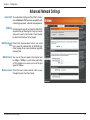
Enable UPnP: To use the Universal Plug and Play (UPnP™) feature
click on Enabled. UPNP provides compatibility with
networking equipment, software and peripherals.
WAN Ping: Unchecking the box will not allow the DIR-825 to
respond to pings. Blocking the Ping may provide
some extra security from hackers. Check the box
to allow the Internet port to be “pinged”.
WAN Ping Inbound Select from the drop-down menu if you would
Filter: like to apply the Inbound Filter to the WAN ping.
Refer to page 45 for more information regarding
Inbound Filter.
UPnP
Internet Ping Block
Internet Port Speed
Multicast Streams
WAN Port Speed: You may set the port speed of the Internet port
to 10Mbps, 100Mbps, or auto. Some older cable
or DSL modems may require you to set the port
speed to 10Mbps.
Multicast streams: Check the box to allow multicast traffic to pass
through the router from the Internet.
D-Link DIR-825 User Manual
54
Section 3 - Configuration
Guest Zone
The Guest Zone feature will allow you to create temporary zones that can be used by guests to access the Internet.
These zones will be separate from your main wireless network. You may configure different zones for the 2.4GHz and
5.0GHz wireless bands.
Enable Guest Zone: Check to enable the Guest Zone feature.
Schedule: The schedule of time when the Guest Zone will
be active. The schedule may be set to Always,
which will allow the particular service to always
be enabled. You can create your own times in the
Tools > Schedules section.
Wireless Network Enter a wireless network name (SSID) that is
Name: different from your main wireless network.
Enable Routing Check to allow network connectivity between the
Between Zones: different zones created.
Security Mode: Select the type of security or encryption you would
like to enable for the guest zone.
D-Link DIR-825 User Manual
55
Section 3 - Configuration
Administrator Settings
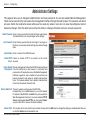
This page will allow you to change the Administrator and User passwords. You can also enable Remote Management.
There are two accounts that can access the management interface through the web browser. The accounts are admin
and user. Admin has read/write access while user has read-only access. User can only view the settings but cannot
make any changes. Only the admin account has the ability to change both admin and user account passwords.
Admin Password: Enter a new password for the Administrator Login Name.
The administrator can make changes to the settings.
User Password: Enter the new password for the User login. If you login as
the User, you can only see the settings, but cannot change
them.
System Name: Enter a name for the DIR-825 router.
Enable HTTPS Check to enable HTTPS to connect to the router
Server: securely.
Enable Remote Remote management allows the DIR-825 to be configured
Management: from the Internet by a web browser. A username and
password is still required to access the Web-Management
interface. In general, only a member of your network can
browse the built-in web pages to perform Administrator
tasks. This feature enables you to perform Administrator
tasks from the remote (Internet) host.
Remote Admin Port: The port number used to access the DIR-825.
Example: http://x.x.x.x:8080 whereas x.x.x.x is the Internet
IP address of the DIR-825 and 8080 is the port used for the
Web Management interface. If you have enabled HTTPS
Server and checked Use HTTPS, you must enter https://
as part of the URL to access the router remotely.
Inbound Filter: This section will list any rules that are created. You may click the Edit icon to change the settings or enable/disable the rule,
or click the Delete icon to remove the rule.
D-Link DIR-825 User Manual
56
Section 3 - Configuration
Time Settings
The Time Configuration option allows you to configure, update, and maintain the correct time on the internal system
clock. From this section you can set the time zone that you are in and set the Time Server. Daylight Saving can also
be configured to automatically adjust the time when needed.
Time Zone: Select the Time Zone from the drop-down
menu.
Daylight Saving: To select Daylight Saving time manually, select
enabled or disabled, and enter a start date and
an end date for daylight saving time.
Enable NTP Server: NTP is short for Network Time Protocol.
NTP synchronizes computer clock times in a
network of computers. Check this box to use a
NTP server. This will only connect to a server
on the Internet, not a local server.
NTP Server Used: Enter the NTP server or select one from the
drop-down menu.
Manual: To manually input the time, enter the values
in these fields for the Year, Month, Day, Hour,
Minute, and Second and then click Set Time.
You can also click Copy Your Computer’s
Time Settings.
D-Link DIR-825 User Manual
57
Section 3 - Configuration
SysLog
The Broadband Router keeps a running log of events and activities occurring on the Router. You may send these logs
to a SysLog server on your network.
Enable Logging to Check this box to send the router logs to a
SysLog Server: SysLog Server.
SysLog Server IP The address of the SysLog server that will be
Address: used to send the logs. You may also select
your computer from the drop-down menu (only
if receiving an IP address from the router via
DHCP).
D-Link DIR-825 User Manual
58
Section 3 - Configuration
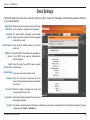
Email Settings
The Email feature can be used to send the system log files, router alert messages, and firmware update notification
to your email address.
Enable Email When this option is enabled, router activity logs
Notification: are e-mailed to a designated email address.
From Email This email address will appear as the sender
Address: when you receive a log file or firmware upgrade
notification via email.
To Email Address: Enter the email address where you want the
email sent.
SMTP Server Enter the SMTP server address for sending email.
Address: If your SMTP server requires authentication,
select this option.
Enable Check this box if your SMTP server requires
Authentication: authentication.
Account Name: Enter your account for sending email.
Password: Enter the password associated with the
account. Re-type the password associated with
the account.
On Log Full: When this option is selected, logs will be sent
via email when the log is full.
On Schedule: Selecting this option will send the logs via email
according to schedule.
Schedule: This option is enabled when On Schedule is selected. You can select a schedule from the list of defined schedules. To create
a schedule, go to Tools > Schedules.
D-Link DIR-825 User Manual
59
Section 3 - Configuration
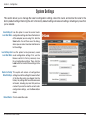
System Settings
This section allows you to manage the router’s configuration settings, reboot the router, and restore the router to the
factory default settings. Restoring the unit to the factory default settings will erase all settings, including any rules that
you’ve created.
Save Settings to Use this option to save the current router
Local Hard Drive: configuration settings to a file on the hard disk
of the computer you are using. First, click the
Save button. You will then see a file dialog,
where you can select a location and file name
for the settings.
Load Settings from Use this option to load previously saved
Local Hard Drive: router configuration settings. First, use the
Browse control to find a previously save
file of configuration settings. Then, click the
Load button to transfer those settings to the
router.
Restore to Factory This option will restore all configuration
Default Settings: settings back to the settings that were in effect
at the time the router was shipped from the
factory. Any settings that have not been saved
will be lost, including any rules that you have
created. If you want to save the current router
configuration settings, use the Save button
above.
Reboot Device: Click to reboot the router.
D-Link DIR-825 User Manual
60
Section 3 - Configuration
Update Firmware
You can upgrade the firmware of the Router here. Make sure the firmware you want to use is on the local hard drive of
the computer. Click on Browse to locate the firmware file to be used for the update. Please check the D-Link support
site for firmware updates at http://support.dlink.com. You can download firmware upgrades to your hard drive from the
D-Link support site.
Firmware Upgrade: Click on Check Now to find out if there is an
updated firmware; if so, download the new
firmware to your hard drive.
Browse: After you have downloaded the new firmware,
click Browse to locate the firmware update on
your hard drive. Click Upload to complete the
firmware upgrade.
Notifications Check Automatically Check Online for
Options: Latest Firmware Version to have the router
check automatically to see if there is a new
firmware upgrade.
Check Email Notification of Newer Firmware
Version to have the router send an email when
there is a new firmware available.
D-Link DIR-825 User Manual
61
Section 3 - Configuration
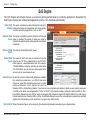
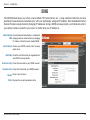
DDNS
The DDNS feature allows you to host a server (Web, FTP, Game Server, etc…) using a domain name that you have
purchased (www.whateveryournameis.com) with your dynamically assigned IP address. Most broadband Internet
Service Providers assign dynamic (changing) IP addresses. Using a DDNS service provider, your friends can enter in
your domain name to connect to your server no matter what your IP address is.
Enable Dynamic Dynamic Domain Name System is a method of
DNS: keeping a domain name linked to a changing
IP Address. Check the box to enable DDNS.
Server Address: Choose your DDNS provider from the drop
down menu.
Host Name: Enter the Host Name that you registered with
your DDNS service provider.
Username or Key: Enter the Username for your DDNS account.
Password or Key: Enter the Password for your DDNS account.
Timeout: Enter a time (in hours).
Status: Displays the current connection status.
D-Link DIR-825 User Manual
62
Section 3 - Configuration
System Check
Ping Test: The Ping Test is used to send Ping packets to test if a
computer is on the Internet. Enter the IP Address that
you wish to Ping, and click Ping.
Ping Results: The results of your ping attempts will be displayed
here.
D-Link DIR-825 User Manual
63
Section 3 - Configuration
Schedules
Schedules can be created for use with enforcing rules. For example, if you want to restrict web access to Mon-Fri from
3pm to 8pm, you could create a schedule selecting Mon, Tue, Wed, Thu, and Fri and enter a Start Time of 3pm and
End Time of 8pm.
Name: Enter a name for your new schedule.
Days: Select a day, a range of days, or All Week to
include every day.
Time: Check All Day - 24hrs or enter a start and end
time for your schedule.
Save: Click Save to save your schedule. You must click
Save Settings at the top for your schedules to
go into effect.
Schedule Rules The list of schedules will be listed here. Click the
List: Edit icon to make changes or click the Delete
icon to remove the schedule.
D-Link DIR-825 User Manual
64
Section 3 - Configuration
Device Information
This page displays the current information for the DIR-825. It will display the LAN, WAN (Internet), and Wireless
information. If your Internet connection is set up for a Dynamic IP address then a Release button and a Renew button
will be displayed. Use Release to disconnect from your ISP and use Renew to connect to your ISP.
If your Internet connection is set up for PPPoE, a Connect button and a Disconnect button will be displayed. Use
Disconnect to drop the PPPoE connection and use Connect to establish the PPPoE connection.
General: Displays the router’s time and firmware version.
WAN: Displays the MAC address and the public IP settings for the router.
LAN: Displays the MAC address and the private (local) IP settings for the
router.
Wireless LAN: Displays the wireless MAC address and your wireless settings such as
SSID and Channel.
LAN Computers: Displays computers and devices that are connected to the router via Ethernet
and that are receiving an IP address assigned by the router (DHCP).
D-Link DIR-825 User Manual
65
Section 3 - Configuration
Log
The router automatically logs (records) events of possible interest in it’s internal memory. If there isn’t enough internal
memory for all events, logs of older events are deleted but logs of the latest events are retained. The Logs option allows
you to view the router logs. You can define what types of events you want to view and the level of the events to view.
This router also has external Syslog Server support so you can send the log files to a computer on your network that
is running a Syslog utility.
What to View: You can select the types of messages that you want
to display from the log. Firewall & Security, System,
and Router Status messages can be selected.
View Levels: There are three levels of message importance:
Informational, Warning, and Critical. Select the
levels that you want displayed in the log.
Apply Log Settings: Will filter the log results so that only the selected
options appear.
Refresh: Updates the log details on the screen so it displays
any recent activity.
Clear: Clears all of the log contents.
Email Now: This option will send a copy of the router log to
the email address configured in the Tools > Email
Settings screen.
Save Log: This option will save the router to a log file on your
computer.
D-Link DIR-825 User Manual
66
Section 3 - Configuration
Statistics
The screen below displays the Traffic Statistics. Here you can view the amount of packets that pass through the DIR-825
on both the Internet, LAN ports and both the 802.11n/g (2.4GHz) and 802.11n/a (5GHz) wireless bands. The traffic
counter will reset if the device is rebooted.
D-Link DIR-825 User Manual
67
Section 3 - Configuration
Internet Sessions
The Internet Sessions page displays full details of active Internet sessions through your router. An Internet session is a
conversation between a program or application on a LAN-side computer and a program or application on a WAN-side
computer.
D-Link DIR-825 User Manual
68
Section 3 - Configuration
Wireless
The wireless client table displays a list of current connected wireless clients. This table also displays the connection
time and MAC address of the connected wireless clients.
WISH
The WISH details page displays full details of wireless clients that are connected when WISH is enabled.
D-Link DIR-825 User Manual
69
Section 3 - Configuration
Support
D-Link DIR-825 User Manual
70
Section 4 - Security
Wireless Security
This section will show you the different levels of security you can use to protect your data from intruders. The
DIR-825 offers the following types of security:
• WPA2 (Wi-Fi Protected Access 2) • WPA (Wi-Fi Protected Access)
• WPA2-PSK (Pre-Shared Key)
• WPA-PSK (Pre-Shared Key)
What is WPA?
WPA, or Wi-Fi Protected Access, is a Wi-Fi standard that was designed to improve the security features of WEP (Wired
Equivalent Privacy).
The 2 major improvements over WEP:
• Improved data encryption through the Temporal Key Integrity Protocol (TKIP). TKIP scrambles the keys
using a hashing algorithm and, by adding an integrity-checking feature, ensures that the keys haven’t
been tampered with. WPA2 is based on 802.11i and uses Advanced Encryption Standard (AES) instead
of TKIP.
• User authentication, which is generally missing in WEP, through the extensible authentication protocol
(EAP). WEP regulates access to a wireless network based on a computer’s hardware-specific MAC
address, which is relatively simple to be sniffed out and stolen. EAP is built on a more secure public-key
encryption system to ensure that only authorized network users can access the network.
WPA-PSK/WPA2-PSK uses a passphrase or key to authenticate your wireless connection. The key is an alpha-numeric
password between 8 and 63 characters long. The password can include symbols (!?*&_) and spaces. This key must
be the exact same key entered on your wireless router or access point.
WPA/WPA2 incorporates user authentication through the Extensible Authentication Protocol (EAP). EAP is built on a
more secure public key encryption system to ensure that only authorized network users can access the network.
D-Link DIR-825 User Manual
71
Section 4 - Security
Wireless Security Setup Wizard
To run the security wizard, click on Setup at the top and then
click Launch Wireless Security Setup Wizard.
Check the Manually set 5GHz band Network Name... box to
manually set your desired wireless network name for the 5GHz
band.
Type your desired wireless network name (SSID).
Automatically: Select this option to automatically generate
the router’s network key and click Next.
Manually: Select this option to manually enter your network
key and click Next.
D-Link DIR-825 User Manual
72
Section 4 - Security
If you selected Automatically, the summary window will
display your settings. Write down the security key and
enter this on your wireless clients. Click Save to save your
settings.
If you selected Manually, the following screen will appear.
D-Link DIR-825 User Manual
73
Section 4 - Security
Add Wireless Device with WPS Wizard
From the Setup > Wireless Settings screen, click Add
Wireless Device with WPS.
Select Auto to add a wireless client using WPS (Wi-Fi Protected
Setup). Once you select Auto and click Connect, you will have
a 120 second time limit to apply the settings to your wireless
client(s) and successfully establish a connection.
If you select Manual, a settings summary screen will appear.
Write down the security key and enter this on your wireless
clients.
PIN: Select this option to use PIN method. In order to use this
method you must know the wireless client’s 8 digit PIN and
click Connect.
PBC: Select this option to use PBC (Push Button) method to
add a wireless client. Click Connect.
D-Link DIR-825 User Manual
74
Section 4 - Security
Configure WPA-Personal (PSK)
It is recommended to enable encryption on your wireless router before your wireless network adapters. Please establish
wireless connectivity before enabling encryption. Your wireless signal may degrade when enabling encryption due to
the added overhead.
1.Log into the web-based configuration by opening a web browser
and entering the IP address of the router (192.168.0.1). Click on
Setup and then click Wireless Settings on the left side.
2. Next to Security Mode, select WPA-Personal.
3.Next to WPA Mode, select Auto, WPA2 Only, or WPA Only. Use
Auto if you have wireless clients using both WPA and WPA2.
4.Next to Cypher Type, select TKIP and AES, TKIP, or AES.
5. Next to Group Key Update Interval, enter the amount of time before
the group key used for broadcast and multicast data is changed
(3600 is default).
6.Next to Pre-Shared Key, enter a key (passphrase). The key is
entered as a pass-phrase in ASCII format at both ends of the
wireless connection. The pass-phrase must be between 8-63
characters.
7.Click Save Settings to save your settings. If you are configuring the router with a wireless adapter, you will lose
connectivity until you enable WPA-PSK on your adapter and enter the same passphrase as you did on the router.
D-Link DIR-825 User Manual
75
Section 4 - Security
Configure WPA-Enterprise (RADIUS)
It is recommended to enable encryption on your wireless router before your wireless network adapters. Please establish
wireless connectivity before enabling encryption. Your wireless signal may degrade when enabling encryption due to
the added overhead.
1. Log into the web-based configuration by opening a web browser
and entering the IP address of the router (192.168.0.1). Click
on Setup and then click Wireless Settings on the left side.
2. Next to Security Mode, select WPA-Enterprise.
3. Next to WPA Mode, select Auto, WPA2 Only, or WPA Only. Use
Auto if you have wireless clients using both WPA and WPA2.
4. Next to Cypher Type, select TKIP and AES, TKIP, or AES.
5. Next to Group Key Update Interval, enter the amount of time
before the group key used for broadcast and multicast data is
changed (3600 is default).
6. Next to Authentication Timeout, enter the amount of time before
a client is required to re-authenticate (60 minutes is default).
7. Next to RADIUS Server IP Address enter the IP Address of your RADIUS server.
D-Link DIR-825 User Manual
76
Section 4 - Security
8.Next to RADIUS Server Port, enter the port you are using with
your RADIUS server. 1812 is the default port.
9.Next to RADIUS Server Shared Secret, enter the security
key.
10.If the MAC Address Authentication box is selected then the
user will need to connect from the same computer whenever
logging into the wireless network.
11. Click Advanced to enter settings for a secondary RADIUS
Server.
12. Click Apply Settings to save your settings.
D-Link DIR-825 User Manual
77
Section 5 - Connecting to a Wireless Network
Connect to a Wireless Network
Using Windows Vista®
Windows Vista® users may use the built-in wireless utility. If you are using another company’s utility or Windows® 2000,
please refer to the user manual of your wireless adapter for help with connecting to a wireless network. Most utilities
will have a “site survey” option similar to the Windows Vista® utility as seen below.
If you receive the Wireless Networks Detected bubble, click on
the center of the bubble to access the utility.
or
Right-click on the wireless computer icon in your system tray
(lower-right corner next to the time). Select Connect to a
network.
The utility will display any available wireless networks in your
area. Click on a network (displayed using the SSID) and click
the Connect button.
If you get a good signal but cannot access the Internet, check you
TCP/IP settings for your wireless adapter. Refer to the Networking
Basics section in this manual for more information.
D-Link DIR-825 User Manual
78
Section 5 - Connecting to a Wireless Network
Configure Wireless Security
It is recommended to enable wireless security (WPA/WPA2) on your wireless router or access point before configuring
your wireless adapter. If you are joining an existing network, you will need to know the security key or passphrase
being used.
1. Open the Windows Vista® Wireless Utility by right-clicking on
the wireless computer icon in your system tray (lower right
corner of screen). Select Connect to a network.
2. Highlight the wireless network (SSID) you would like to
connect to and click Connect.
D-Link DIR-825 User Manual
79
Section 5 - Connecting to a Wireless Network
3. Enter the same security key or passphrase that is on your router
and click Connect.
It may take 20-30 seconds to connect to the wireless network. If the
connection fails, please verify that the security settings are correct.
The key or passphrase must be exactly the same as on the wireless
router.
D-Link DIR-825 User Manual
80
Section 5 - Connecting to a Wireless Network
Connect Using WCN 2.0 in Windows Vista®
The router supports Wi-Fi protection, referred to as WCN 2.0 in Windows Vista®. The following instructions for setting
this up depends on whether you are using Windows Vista® to configure the router or third party software.
When you first set up the router, Wi-Fi protection is disabled and unconfigured. To enjoy the benefits of Wi-Fi protection,
the router must be both enabled and configured. There are three basic methods to accomplish this: use Windows Vista’s
built-in support for WCN 2.0, use software provided by a third party, or manually configure.
If you are running Windows Vista®, log into the router and click the Enable checkbox in the Basic > Wireless section.
Use the Current PIN that is displayed on the Advanced > Wi-Fi Protected Setup section or choose to click the Generate
New PIN button or Reset PIN to Default button.
For additional information, please refer to page 52.
If you are using third party software to set up Wi-Fi Protection, carefully follow the directions. When you are finished,
proceed to the next section to set up the newly-configured router.
D-Link DIR-825 User Manual
81
Section 5 - Connecting to a Wireless Network
Connect to a Wireless Network
Using Windows® XP
Windows® XP users may use the built-in wireless utility (Zero Configuration Utility). The following instructions are for
Service Pack 2 users. If you are using another company’s utility or Windows® 2000, please refer to the user manual
of your wireless adapter for help with connecting to a wireless network. Most utilities will have a “site survey” option
similar to the Windows® XP utility as seen below.
If you receive the Wireless Networks Detected bubble, click on
the center of the bubble to access the utility.
or
Right-click on the wireless computer icon in your system tray
(lower-right corner next to the time). Select View Available
Wireless Networks.
The utility will display any available wireless networks in your
area. Click on a network (displayed using the SSID) and click the
Connect button.
If you get a good signal but cannot access the Internet, check you
TCP/IP settings for your wireless adapter. Refer to the Networking
Basics section in this manual for more information.
D-Link DIR-825 User Manual
82
Section 5 - Connecting to a Wireless Network
Configure WPA-PSK
It is recommended to enable WPA on your wireless router or access point before configuring your wireless adapter. If
you are joining an existing network, you will need to know the WPA key being used.
1. Open the Windows® XP Wireless Utility by right-clicking
on the wireless computer icon in your system tray
(lower-right corner of screen). Select View Available
Wireless Networks.
2. Highlight the wireless network (SSID) you would like to
connect to and click Connect.
D-Link DIR-825 User Manual
83
Section 5 - Connecting to a Wireless Network
3. The Wireless Network Connection box will appear. Enter the
WPA-PSK passphrase and click Connect.
It may take 20-30 seconds to connect to the wireless network. If the
connection fails, please verify that the WPA-PSK settings are correct.
The WPA-PSK passphrase must be exactly the same as on the
wireless router.
D-Link DIR-825 User Manual
84
Section 6 - Troubleshooting
Troubleshooting
This chapter provides solutions to problems that can occur during the installation and operation of the DIR-825. Read
the following descriptions if you are having problems. (The examples below are illustrated in Windows® XP. If you have
a different operating system, the screenshots on your computer will look similar to the following examples.)
1. Why can’t I access the web-based configuration utility?
When entering the IP address of the D-Link router (192.168.0.1 for example), you are not connecting to a website on
the Internet or have to be connected to the Internet. The device has the utility built-in to a ROM chip in the device itself.
Your computer must be on the same IP subnet to connect to the web-based utility.
• Make sure you have an updated Java-enabled web browser. We recommend the following:
• Internet Explorer 6.0 or higher
• Netscape 8 or higher
• Mozilla 1.7.12 (5.0) or higher
• Opera 8.5 or higher
• Safari 1.2 or higher (with Java 1.3.1 or higher)
• Camino 0.8.4 or higher
• Firefox 1.5 or higher
• Verify physical connectivity by checking for solid link lights on the device. If you do not get a solid link light, try using
a different cable or connect to a different port on the device if possible. If the computer is turned off, the link light may
not be on.
• Disable any Internet security software running on the computer. Software firewalls such as Zone Alarm, Black Ice,
Sygate, Norton Personal Firewall, and Windows® XP firewall may block access to the configuration pages. Check the
help files included with your firewall software for more information on disabling or configuring it.
D-Link DIR-825 User Manual
85
Section 6 - Troubleshooting
• Configure your Internet settings:
• Go to Start > Settings > Control Panel. Double-click the Internet Options Icon. From the Security tab,
click the button to restore the settings to their defaults.
• Click the Connection tab and set the dial-up option to Never Dial a Connection. Click the LAN Settings
button. Make sure nothing is checked. Click OK.
• Go to the Advanced tab and click the button to restore these settings to their defaults. Click OK three
times.
• Close your web browser (if open) and open it.
• Access the web management. Open your web browser and enter the IP address of your D-Link router in the address
bar. This should open the login page for your the web management.
• If you still cannot access the configuration, unplug the power to the router for 10 seconds and plug back in. Wait
about 30 seconds and try accessing the configuration. If you have multiple computers, try connecting using a different
computer.
2. What can I do if I forgot my password?
If you forgot your password, you must reset your router. Unfortunately this process will change all your settings back
to the factory defaults.
To reset the router, locate the reset button (hole) on the rear panel of the unit. With the router powered on, use a
paperclip to hold the button down for 10 seconds. Release the button and the router will go through its reboot process.
Wait about 30 seconds to access the router. The default IP address is 192.168.0.1. When logging in, the username is
admin and leave the password box empty.
D-Link DIR-825 User Manual
86
Section 6 - Troubleshooting
3. Why can’t I connect to certain sites or send and receive emails when connecting through my router?
If you are having a problem sending or receiving email, or connecting to secure sites such as eBay, banking sites, and
Hotmail, we suggest lowering the MTU in increments of ten (Ex. 1492, 1482, 1472, etc).
Note: AOL DSL+ users must use MTU of 1400.
To find the proper MTU Size, you’ll have to do a special ping of the destination you’re trying to go to. A destination could
be another computer, or a URL.
• Click on Start and then click Run.
• Windows® 95, 98, and Me users type in command (Windows® NT, 2000, and XP users type in cmd) and
press Enter (or click OK).
• Once the window opens, you’ll need to do a special ping. Use the following syntax:
ping [url] [-f] [-l] [MTU value]
Example: ping yahoo.com -f -l 1472
D-Link DIR-825 User Manual
87
Section 6 - Troubleshooting
You should start at 1472 and work your way down by 10 each time. Once you get a reply, go up by 2 until you get a
fragmented packet. Take that value and add 28 to the value to account for the various TCP/IP headers. For example,
lets say that 1452 was the proper value, the actual MTU size would be 1480, which is the optimum for the network
we’re working with (1452+28=1480).
Once you find your MTU, you can now configure your router with the proper MTU size.
To change the MTU rate on your router follow the steps below:
• Open your browser, enter the IP address of your router (192.168.0.1) and click OK.
• Enter your username (admin) and password (blank by default). Click OK to enter the web configuration
page for the device.
• Click on Setup and then click Manual Configure.
• To change the MTU enter the number in the MTU field and click Save Settings to save your settings.
•Test your email. If changing the MTU does not resolve the problem, continue changing the MTU in
increments of ten.
D-Link DIR-825 User Manual
88
Appendix A - Wireless Basics
Wireless Basics
D-Link wireless products are based on industry standards to provide easy-to-use and compatible high-speed wireless
connectivity within your home, business or public access wireless networks. Strictly adhering to the IEEE standard,
the D-Link wireless family of products will allow you to securely access the data you want, when and where you want
it. You will be able to enjoy the freedom that wireless networking delivers.
A wireless local area network (WLAN) is a cellular computer network that transmits and receives data with radio signals
instead of wires. Wireless LANs are used increasingly in both home and office environments, and public areas such
as airports, coffee shops and universities. Innovative ways to utilize WLAN technology are helping people to work and
communicate more efficiently. Increased mobility and the absence of cabling and other fixed infrastructure have proven
to be beneficial for many users.
Wireless users can use the same applications they use on a wired network. Wireless adapter cards used on laptop
and desktop systems support the same protocols as Ethernet adapter cards.
Under many circumstances, it may be desirable for mobile network devices to link to a conventional Ethernet LAN in
order to use servers, printers or an Internet connection supplied through the wired LAN. A Wireless Router is a device
used to provide this link.
D-Link DIR-825 User Manual
89
Appendix A - Wireless Basics
What is Wireless?
Wireless or Wi-Fi technology is another way of connecting your computer to the network without using wires. Wi-Fi
uses radio frequency to connect wirelessly, so you have the freedom to connect computers anywhere in your home or
office network.
Why D-Link Wireless?
D-Link is the worldwide leader and award winning designer, developer, and manufacturer of networking products.
D-Link delivers the performance you need at a price you can afford. D-Link has all the products you need to build your
network.
How does wireless work?
Wireless works similar to how cordless phone work, through radio signals to transmit data from one point A to point
B. But wireless technology has restrictions as to how you can access the network. You must be within the wireless
network range area to be able to connect your computer. There are two different types of wireless networks Wireless
Local Area Network (WLAN), and Wireless Personal Area Network (WPAN).
Wireless Local Area Network (WLAN)
In a wireless local area network, a device called an Access Point (AP) connects computers to the network. The access
point has a small antenna attached to it, which allows it to transmit data back and forth over radio signals. With an
indoor access point as seen in the picture, the signal can travel up to 300 feet. With an outdoor access point the signal
can reach out up to 30 miles to serve places like manufacturing plants, industrial locations, college and high school
campuses, airports, golf courses, and many other outdoor venues.
D-Link DIR-825 User Manual
90
Appendix A - Wireless Basics
Wireless Personal Area Network (WPAN)
Bluetooth is the industry standard wireless technology used for WPAN. Bluetooth devices in WPAN operate in a range
up to 30 feet away.
Compared to WLAN the speed and wireless operation range are both less than WLAN, but in return it doesn’t use
nearly as much power which makes it ideal for personal devices, such as mobile phones, PDAs, headphones, laptops,
speakers, and other devices that operate on batteries.
Who uses wireless?
Wireless technology as become so popular in recent years that almost everyone is using it, whether it’s for home, office,
business, D-Link has a wireless solution for it.
Home
• Gives everyone at home broadband access
• Surf the web, check email, instant message, etc.
• Gets rid of the cables around the house
• Simple and easy to use
Small Office and Home Office
• Stay on top of everything at home as you would at office
• Remotely access your office network from home
• Share Internet connection and printer with multiple computers
• No need to dedicate office space
D-Link DIR-825 User Manual
91
Appendix A - Wireless Basics
Where is wireless used?
Wireless technology is expanding everywhere not just at home or office. People like the freedom of mobility and it’s
becoming so popular that more and more public facilities now provide wireless access to attract people. The wireless
connection in public places is usually called “hotspots”.
Using a D-Link Cardbus Adapter with your laptop, you can access the hotspot to connect to Internet from remote
locations like: Airports, Hotels, Coffee Shops, Libraries, Restaurants, and Convention Centers.
Wireless network is easy to setup, but if you’re installing it for the first time it could be quite a task not knowing where to
start. That’s why we’ve put together a few setup steps and tips to help you through the process of setting up a wireless
network.
Tips
Here are a few things to keep in mind, when you install a wireless network.
Centralize your router or Access Point
Make sure you place the router/access point in a centralized location within your network for the best performance. Try
to place the router/access point as high as possible in the room, so the signal gets dispersed throughout your home.
If you have a two-story home, you may need a repeater to boost the signal to extend the range.
Eliminate Interference
Place home appliances such as cordless telephones, microwaves, and televisions as far away as possible from the
router/access point. This would significantly reduce any interference that the appliances might cause since they operate
on same frequency.
D-Link DIR-825 User Manual
92
Appendix A - Wireless Basics
Security
Don’t let you next-door neighbors or intruders connect to your wireless network. Secure your wireless network by turning
on the WPA or WEP security feature on the router. Refer to product manual for detail information on how to set it up.
Wireless Modes
There are basically two modes of networking:
•Infrastructure – All wireless clients will connect to an access point or wireless router.
•Ad-Hoc – Directly connecting to another computer, for peer-to-peer communication, using wireless network
adapters on each computer, such as two or more DIR-825 wireless network Cardbus adapters.
An Infrastructure network contains an Access Point or wireless router. All the wireless devices, or clients, will connect
to the wireless router or access point.
An Ad-Hoc network contains only clients, such as laptops with wireless cardbus adapters. All the adapters must be in
Ad-Hoc mode to communicate.
D-Link DIR-825 User Manual
93
Appendix B - Networking Basics
Networking Basics
Check your IP address
After you install your new D-Link adapter, by default, the TCP/IP settings should be set to obtain an IP address from a
DHCP server (i.e. wireless router) automatically. To verify your IP address, please follow the steps below.
Click on Start > Run. In the run box type cmd and click OK. (Windows Vista® users type cmd in the Start Search
box.)
At the prompt, type ipconfig and press Enter.
This will display the IP address, subnet mask, and
the default gateway of your adapter.
If the address is 0.0.0.0, check your adapter
installation, security settings, and the settings
on your router. Some firewall software programs
may block a DHCP request on newly installed
adapters.
D-Link DIR-825 User Manual
94
Appendix B - Networking Basics
Statically Assign an IP address
If you are not using a DHCP capable gateway/router, or you need to assign a static IP address, please follow the steps
below:
Step 1
Windows Vista® - Click on Start > Control Panel > Network and Internet > Network and Sharing Center > Manage
Network Connections.
®
Windows XP -
Click on Start > Control Panel > Network Connections.
Windows® 2000 - From the desktop, right-click My Network Places > Properties.
Step 2
Right-click on the Local Area Connection which represents your network adapter and select Properties.
Step 3
Highlight Internet Protocol (TCP/IP) and click Properties.
Step 4
Click Use the following IP address and enter an IP address that is on the same
subnet as your network or the LAN IP address on your router.
Example: If the router´s LAN IP address is 192.168.0.1, make your IP address
192.168.0.X where X is a number between 2 and 99. Make sure that the number
you choose is not in use on the network. Set Default Gateway the same as the LAN
IP address of your router (192.168.0.1).
Set Primary DNS the same as the LAN IP address of your router (192.168.0.1). The
Secondary DNS is not needed or you may enter a DNS server from your ISP.
Step 5
Click OK twice to save your settings.
D-Link DIR-825 User Manual
95
Appendix C - Technical Specifications
Technical Specifications
Standards
• IEEE 802.11n (draft 2.0)
• IEEE 802.11g
• IEEE 802.11a
• IEEE 802.3
• IEEE 802.3u
• IEEE 802.3ab
Frequency Range2 (North America)
• 2.412GHz to 2.462GHz (802.11g/n)
• 5.15GHz to 5.825GHz (802.11a/n)3
Transmitter Output Power
• 15dBm ± 2dB
Security
• WPAtm - Personal/Enterprise
• WPA2tm - Personal/Enterprise
Wireless Signal Rates1
IEEE 802.11n Draft 2.0 (HT20/40):
• 144.4Mbps (300)
• 130Mbps (270)
• 117Mbps (243)
• 104Mbps (216)
• 78Mbps (162)
• 66Mbps (135)
• 58.5Mbps (121.5)
• 52Mbps (108)
• 39Mbps (81)
• 26Mbps (54)
• 19.5Mbps (40.5)
• 12Mbps (27)
• 6.5Mbps (13.5)
IEEE 802.11a:
• 54Mbps
• 48Mbps
• 24Mbps
• 18Mbps
• 11Mbps
• 9Mbps
• 36Mbps
• 12Mbps
• 6Mbps
IEEE 802.11g:
• 54Mbps
• 48Mbps
• 24Mbps
• 18Mbps
• 11Mbps
• 9Mbps
• 5.5Mbps • 2Mbps
• 36Mbps
• 12Mbps
• 6Mbps
• 1Mbps
External Antenna Type
• Two (2) detachable reverse SMA Antennas
Operating Temperature
• 32°F to 131°F ( 0°C to 55°C)
Humidity
• 95% maximum (non-condensing)
Safety & Emissions
• FCC
• IC
Dimensions
• L = 7.6 inches
• W = 4.6 inches
• H = 1.2inches
Warranty
• 1 Year
1 Maximum wireless signal rate derived from IEEE Standard 802.11a, 802.11g, and Draft 802.11n specifications. Actual data throughput will vary. Network conditions and environmental
factors, including volume of network traffic, building materials and construction, and network overhead, lower actual data throughput rate. Environmental factors will adversely affect
wireless signal range.
2 Frequency Range varies depending on country’s regulation
3 The DIR-825 does not include 5.25-5.35GHz & 5.47-5.725GHz in some regions.
D-Link DIR-825 User Manual
96
Appendix D - Contacting Technical Support
Contacting Technical Support
U.S. and Canadian customers can contact D-Link technical support through our web site or by phone.
Before you contact technical support, please have the following ready:
• Model number of the product (e.g. DIR-825)
• Hardware Revision (located on the label on the bottom of the router (e.g. rev A1))
• Serial Number (s/n number located on the label on the bottom of the router).
You can find software updates and user documentation on the D-Link website as well as frequently asked questions
and answers to technical issues.
For customers within the United States:
For customers within Canada:
Phone Support:
(877) 453-5465
Phone Support:
(800) 361-5265
Internet Support:
http://support.dlink.com
Internet Support:
http://support.dlink.com
D-Link DIR-825 User Manual
97
Appendix E - Warranty
Warranty
Subject to the terms and conditions set forth herein, D-Link Systems, Inc. (“D-Link”) provides this Limited Warranty:
• Only to the person or entity that originally purchased the product from D-Link or its authorized reseller or distributor, and
• Only for products purchased and delivered within the fifty states of the United States, the District of Columbia, U.S. Possessions or Protectorates, U.S. Military Installations, or addresses with an APO or FPO.
Limited Warranty:
D-Link warrants that the hardware portion of the D-Link product described below (“Hardware”) will be free from material defects in
workmanship and materials under normal use from the date of original retail purchase of the product, for the period set forth below
(“Warranty Period”), except as otherwise stated herein.
• Hardware (excluding power supplies and fans): One (1) year
• Power supplies and fans: One (1) year
• Spare parts and spare kits: Ninety (90) days
The customer’s sole and exclusive remedy and the entire liability of D-Link and its suppliers under this Limited Warranty will be, at
D-Link’s option, to repair or replace the defective Hardware during the Warranty Period at no charge to the original owner or to refund the
actual purchase price paid. Any repair or replacement will be rendered by D-Link at an Authorized D-Link Service Office. The replacement
hardware need not be new or have an identical make, model or part. D-Link may, at its option, replace the defective Hardware or any part
thereof with any reconditioned product that D-Link reasonably determines is substantially equivalent (or superior) in all material respects
to the defective Hardware. Repaired or replacement hardware will be warranted for the remainder of the original Warranty Period or ninety
(90) days, whichever is longer, and is subject to the same limitations and exclusions. If a material defect is incapable of correction, or if
D-Link determines that it is not practical to repair or replace the defective Hardware, the actual price paid by the original purchaser for the
defective Hardware will be refunded by D-Link upon return to D-Link of the defective Hardware. All Hardware or part thereof that is replaced
by D-Link, or for which the purchase price is refunded, shall become the property of D-Link upon replacement or refund.
D-Link DIR-825 User Manual
98
Appendix E - Warranty
Limited Software Warranty:
D-Link warrants that the software portion of the product (“Software”) will substantially conform to D-Link’s then current functional specifications
for the Software, as set forth in the applicable documentation, from the date of original retail purchase of the Software for a period of ninety
(90) days (“Software Warranty Period”), provided that the Software is properly installed on approved hardware and operated as contemplated
in its documentation. D-Link further warrants that, during the Software Warranty Period, the magnetic media on which D-Link delivers the
Software will be free of physical defects. The customer’s sole and exclusive remedy and the entire liability of D-Link and its suppliers under
this Limited Warranty will be, at D-Link’s option, to replace the non-conforming Software (or defective media) with software that substantially
conforms to D-Link’s functional specifications for the Software or to refund the portion of the actual purchase price paid that is attributable
to the Software. Except as otherwise agreed by DLink in writing, the replacement Software is provided only to the original licensee, and
is subject to the terms and conditions of the license granted by D-Link for the Software. Replacement Software will be warranted for the
remainder of the original Warranty Period and is subject to the same limitations and exclusions. If a material non-conformance is incapable
of correction, or if D-Link determines in its sole discretion that it is not practical to replace the non-conforming Software, the price paid by
the original licensee for the non-conforming Software will be refunded by D-Link; provided that the non-conforming Software (and all copies
thereof) is first returned to D-Link. The license granted respecting any Software for which a refund is given automatically terminates.
Non-Applicability of Warranty:
The Limited Warranty provided hereunder for Hardware and Software portions of D-Link’s products will not be applied to and does not cover
any refurbished product and any product purchased through the inventory clearance or liquidation sale or other sales in which D-Link, the
sellers, or the liquidators expressly disclaim their warranty obligation pertaining to the product and in that case, the product is being sold
“As-Is” without any warranty whatsoever including, without limitation, the Limited Warranty as described herein, notwithstanding anything
stated herein to the contrary.
Submitting A Claim:
The customer shall return the product to the original purchase point based on its return policy. In case the return policy period has expired
and the product is within warranty, the customer shall submit a claim to D-Link as outlined below:
• The customer must submit with the product as part of the claim a written description of the Hardware defect or Software
nonconformance in sufficient detail to allow DLink to confirm the same, along with proof of purchase of the product (such
as a copy of the dated purchase invoice for the product) if the product is not registered.
• The customer must obtain a Case ID Number from D-Link Technical Support at 1-877-453-5465, who will attempt to assist
the customer in resolving any suspected defects with the product. If the product is considered defective, the customer must
obtain a Return Material Authorization (“RMA”) number by completing the RMA form and entering the assigned Case ID
Number at https://rma.dlink.com/.
D-Link DIR-825 User Manual
99
Appendix E - Warranty
• After an RMA number is issued, the defective product must be packaged securely in the original or other suitable shipping
package to ensure that it will not be damaged in transit, and the RMA number must be prominently marked on the outside
of the package. Do not include any manuals or accessories in the shipping package. DLink will only replace the defective
portion of the product and will not ship back any accessories.
• The customer is responsible for all in-bound shipping charges to D-Link. No Cash on Delivery (“COD”) is allowed. Products
sent COD will either be rejected by D-Link or become the property of D-Link. Products shall be fully insured by the customer
and shipped to D-Link Systems, Inc., 17595 Mt. Herrmann, Fountain Valley, CA 92708. D-Link will not be held responsible
for any packages that are lost in transit to D-Link. The repaired or replaced packages will be shipped to the customer via
UPS Ground or any common carrier selected by D-Link. Return shipping charges shall be prepaid by D-Link if you use an
address in the United States, otherwise we will ship the product to you freight collect. Expedited shipping is available upon
request and provided shipping charges are prepaid by the customer. D-Link may reject or return any product that is not
packaged and shipped in strict compliance with the foregoing requirements, or for which an RMA number is not visible from
the outside of the package. The product owner agrees to pay D-Link’s reasonable handling and return shipping charges
for any product that is not packaged and shipped in accordance with the foregoing requirements, or that is determined by
D-Link not to be defective or non-conforming.
What Is Not Covered:
The Limited Warranty provided herein by D-Link does not cover:
Products that, in D-Link’s judgment, have been subjected to abuse, accident, alteration, modification, tampering, negligence, misuse, faulty
installation, lack of reasonable care, repair or service in any way that is not contemplated in the documentation for the product, or if the
model or serial number has been altered, tampered with, defaced or removed; Initial installation, installation and removal of the product for
repair, and shipping costs; Operational adjustments covered in the operating manual for the product, and normal maintenance; Damage
that occurs in shipment, due to act of God, failures due to power surge, and cosmetic damage; Any hardware, software, firmware or other
products or services provided by anyone other than D-Link; and Products that have been purchased from inventory clearance or liquidation
sales or other sales in which D-Link, the sellers, or the liquidators expressly disclaim their warranty obligation pertaining to the product.
While necessary maintenance or repairs on your Product can be performed by any company, we recommend that you use only an Authorized
D-Link Service Office. Improper or incorrectly performed maintenance or repair voids this Limited Warranty.
Disclaimer of Other Warranties:
EXCEPT FOR THE LIMITED WARRANTY SPECIFIED HEREIN, THE PRODUCT IS PROVIDED “AS-IS” WITHOUT ANY WARRANTY
OF ANY KIND WHATSOEVER INCLUDING, WITHOUT LIMITATION, ANY WARRANTY OF MERCHANTABILITY, FITNESS FOR A
PARTICULAR PURPOSE AND NONINFRINGEMENT.
D-Link DIR-825 User Manual
100
Appendix E - Warranty
IF ANY IMPLIED WARRANTY CANNOT BE DISCLAIMED IN ANY TERRITORY WHERE A PRODUCT IS SOLD, THE DURATION OF
SUCH IMPLIED WARRANTY SHALL BE LIMITED TO THE DURATION OF THE APPLICABLE WARRANTY PERIOD SET FORTH ABOVE.
EXCEPT AS EXPRESSLY COVERED UNDER THE LIMITED WARRANTY PROVIDED HEREIN, THE ENTIRE RISK AS TO THE QUALITY,
SELECTION AND PERFORMANCE OF THE PRODUCT IS WITH THE PURCHASER OF THE PRODUCT.
Limitation of Liability:
TO THE MAXIMUM EXTENT PERMITTED BY LAW, D-LINK IS NOT LIABLE UNDER ANY CONTRACT, NEGLIGENCE, STRICT LIABILITY
OR OTHER LEGAL OR EQUITABLE THEORY FOR ANY LOSS OF USE OF THE PRODUCT, INCONVENIENCE OR DAMAGES OF ANY
CHARACTER, WHETHER DIRECT, SPECIAL, INCIDENTAL OR CONSEQUENTIAL (INCLUDING, BUT NOT LIMITED TO, DAMAGES FOR
LOSS OF GOODWILL, LOSS OF REVENUE OR PROFIT, WORK STOPPAGE, COMPUTER FAILURE OR MALFUNCTION, FAILURE OF
OTHER EQUIPMENT OR COMPUTER PROGRAMS TO WHICH D-LINK’S PRODUCT IS CONNECTED WITH, LOSS OF INFORMATION
OR DATA CONTAINED IN, STORED ON, OR INTEGRATED WITH ANY PRODUCT RETURNED TO D-LINK FOR WARRANTY SERVICE)
RESULTING FROM THE USE OF THE PRODUCT, RELATING TO WARRANTY SERVICE, OR ARISING OUT OF ANY BREACH OF
THIS LIMITED WARRANTY, EVEN IF D-LINK HAS BEEN ADVISED OF THE POSSIBILITY OF SUCH DAMAGES. THE SOLE REMEDY
FOR A BREACH OF THE FOREGOING LIMITED WARRANTY IS REPAIR, REPLACEMENT OR REFUND OF THE DEFECTIVE OR
NONCONFORMING PRODUCT. THE MAXIMUM LIABILITY OF D-LINK UNDER THIS WARRANTY IS LIMITED TO THE PURCHASE
PRICE OF THE PRODUCT COVERED BY THE WARRANTY. THE FOREGOING EXPRESS WRITTEN WARRANTIES AND REMEDIES
ARE EXCLUSIVE AND ARE IN LIEU OF ANY OTHER WARRANTIES OR REMEDIES, EXPRESS, IMPLIED OR STATUTORY.
Governing Law:
This Limited Warranty shall be governed by the laws of the State of California. Some states do not allow exclusion or limitation of incidental
or consequential damages, or limitations on how long an implied warranty lasts, so the foregoing limitations and exclusions may not apply.
This Limited Warranty provides specific legal rights and you may also have other rights which vary from state to state.
Trademarks:
D-Link is a registered trademark of D-Link Corporation/D-Link Systems, Inc. Other trademarks or registered trademarks are the property
of their respective owners.
Copyright Statement:
No part of this publication or documentation accompanying this product may be reproduced in any form or by any means or used to make
any derivative such as translation, transformation, or adaptation without permission from D-Link Corporation/D-Link Systems, Inc., as
stipulated by the United States Copyright Act of 1976 and any amendments thereto. Contents are subject to change without prior notice.
Copyright ©2008 by D-Link Corporation/D-Link Systems, Inc. All rights reserved.
D-Link DIR-825 User Manual
101
Appendix E - Warranty
CE Mark Warning:
This is a Class B product. In a domestic environment, this product may cause radio interference, in which case the user may be required
to take adequate measures.
FCC Statement:
This equipment has been tested and found to comply with the limits for a Class B digital device, pursuant to Part 15 of the FCC Rules.
These limits are designed to provide reasonable protection against harmful interference in a residential installation. This equipment
generates, uses and can radiate radio frequency energy and, if not installed and used in accordance with the instructions, may cause
harmful interference to radio communications. However, there is no guarantee that interference will not occur in a particular installation.
If this equipment does cause harmful interference to radio or television reception, which can be determined by turning the equipment off
and on, the user is encouraged to try to correct the interference by one of the following measures:
• Reorient or relocate the receiving antenna.
• Increase the separation between the equipment and receiver.
• Connect the equipment into an outlet on a circuit different from that to which the receiver is connected.
• Consult the dealer or an experienced radio/TV technician for help.
This device complies with Part 15 of the FCC Rules. Operation is subject to the following two conditions: (1) This device may not cause harmful
interference, and (2) this device must accept any interference received, including interference that may cause undesired operation.
FCC Caution:
Any changes or modifications not expressly approved by the party responsible for compliance could void the user’s authority to operate
this equipment.
IMPORTANT NOTICE:
FCC Radiation Exposure Statement:
This equipment complies with FCC radiation exposure limits set forth for an uncontrolled environment. This equipment should be installed
and operated with minimum distance 20cm between the radiator & your body. To maintain compliance with FCC RF exposure compliance
requirements, please avoid direct contact to the transmitting antenna during transmitting.
If this device is going to be operated in 5.15 ~ 5.25GHz frequency range, then it is restricted in indoor environment only. This transmitter
must not be co-located or operating in conjunction with any other antenna or transmitter.
The availability of some specific channels and/or operational frequency bands are country dependent and are firmware programmed at
the factory to match the intended destination. The firmware setting is not accessible by the end user.
D-Link DIR-825 User Manual
102
Appendix E - Warranty
ICC Notice:
Operation is subject to the following two conditions:
1) This device may not cause interference and
2) This device must accept any interference, including interference that may cause undesired operation of the device.
IMPORTANT NOTE:
IC Radiation Exposure Statement:
This equipment complies with IC radiation exposure limits set forth for an uncontrolled environment. End users must follow the specific
operating instructions for satisfying RF exposure compliance. This equipment should be installed and operated with minimum distance
20cm between the radiator & your body.
This transmitter must not be co-located or operating in conjunction with any other antenna or transmitter.
(i) The device for the band 5150-5250 MHz is only for indoor usage to reduce potential for harmful interference to
co-channel mobile satellite systems;
(ii) The maximum antenna gain (2dBi) permitted (for devices in the band 5725-5825 MHz) to comply with the e.i.r.p. limits
specified for point-to-point and non point-to-point operation as appropriate, as stated in section A9.2(3).
In addition, users should also be cautioned to take note that high-power radars are allocated as primary users (meaning they have priority)
of the bands 5250-5350 MHz and 5650-5850 MHz and these radars could cause interference and/or damage to LE-LAN devices.
Règlement d’Industry Canada
Les conditions de fonctionnement sont sujettes à deux conditions:
(1) Ce périphérique ne doit pas causer d’interférence et.
(2) Ce périphérique doit accepter toute interférence, y compris les interférences pouvant perturber le bon fonctionnement
de ce périphérique.
D-Link DIR-825 User Manual
103
Appendix F - Registration
Registration
Product registration is entirely voluntary and failure to complete or return this form will not diminish your warranty
rights.
Version 1.0
July 2, 2008
D-Link DIR-825 User Manual
104