1
2669.3.qxd
15-10-2007
10:26
Pagina 1
1
1.1
1.2
1.3
Important 3
Safety 3
Care of the screen 3
Recycling 3
2
2.1
2.2
Your TV 4
Television overview 4
Product highlights 5
3
3.1
3.2
3.3
3.4
3.5
3.6
Getting started 5
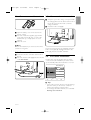
Position the TV 5
Wall mounting - VESA 6
Remote control batteries 7
Antenna cable 7
Connect the mains 7
First time installation 7
4
4.1
4.2
4.3
4.4
4.5
4.6
Use your TV 7
Switch on or off - Standby 7
Watch TV 8
Watch channels from a digital receiver 8
Watch connected devices 8
Watch a DVD 9
Select a Teletext page 9
5
5.1
5.2
5.3
5.4
5.5
5.6
5.7
5.8
5.9
Use more of your TV 10
Remote Control overview 10
TV menu overview 11
Picture and sound settings 13
Teletext 17
Create favourite channel lists 18
Timers and locks 18
Subtitles 19
View and play photos, MP3... 20
Software update 22
6
6.1
6.2
6.3
6.4
6.5
Channel installation 24
Automatic channel installation 24
Manual channel installation 25
Rearrange stored channels 25
Automatic channel management 26
Factory settings 26
Table of contents
7
7.1
7.2
7.3
7.4
Connections (DVD, receiver, ...) 27
Connections overview 27
About connecting 28
Connect your devices 30
Connections setup 35
8
Technical data 36
9
Troubleshooting 37
10
Index 39
ENGLISH
Table of contents
Register your product and get support at
www.philips.com/welcome.
1
2669.3.qxd
15-10-2007
10:26
2007 © Koninklijke Philips Electronics
N.V. All rights reserved. Specifications
are subject to change without notice.
Trademarks are the property of
Koninklijke Philips Electronics N.V. or
their respective owners.
Philips reserves the right to change
products at any time without being
obliged to adjust earlier supplies
accordingly.
The material in this manual is believed
adequate for the intended use of the
system. If the product, or its individual
modules or procedures, are used for
purposes other than those specified
herein, confirmation of their validity and
suitability must be obtained. Philips
warrants that the material itself does
not infringe any United States patents.
No further warranty is expressed or
implied.
Warranty
No components are user-serviceable.
Do not open or remove covers to the
inside of the product. Repairs may only
be done by Philips Service Centres and
official repairshops. Failure to do so shall
void any warranty, stated or implied.
Any operation expressly prohibited in
this manual, any adjustments, or
assembly procedures not recommended
or authorised in this manual shall void
the warranty.
Pixel characteristics
This LCD product has a high number of
colour pixels. Although it has effective
pixels of 99,999% or more, black dots or
bright points of light (red, green or blue)
may appear constantly on the screen.This
is a structural property of the display
(within common industry standards) and
is not a malfunction.
2
Pagina 2
Open source software
This television contains open source
software. Philips hereby offers to deliver
or make available, upon request, for a
charge no more than the cost of
physically performing source distribution,
a complete machine-readable copy of
the corresponding source code on a
medium customarily used for software
interchange.
This offer is valid for a period of 3 years
after the date of purchase of this
product. To obtain the source code,
write to
Philips Innovative Applications N.V.
Ass. to the Development Manager
Pathoekeweg 11
B-8000 Brugge
Belgium
Compliance with EMF
Koninklijke Philips Electronics N.V.
manufactures and sells many products
targeted at consumers, which, like any
electronic apparatus, in general have the
ability to emit and receive
electromagnetic signals.
One of Philips’ leading Business Principles
is to take all necessary health and safety
measures for our products, to comply
with all applicable legal requirements and
to stay well within the EMF standards
applicable at the time of producing the
products.
Philips is committed to develop, produce
and market products that cause no
adverse health effects.
Philips confirms that if its products are
handled properly for their intended use,
they are safe to use according to scientific
evidence available today.
Philips plays an active role in the
development of international EMF and
safety standards, enabling Philips to
anticipate further developments in
standardisation for early integration in its
products.
Copyrights
VESA, FDMI and the VESA Mounting
Compliant logo are trademarks of the
Video Electronics Standards Association.
Manufactured under license from Dolby
Laboratories. ‘Dolby’, ‘Pro Logic’ and the
double D symbol G, are trademarks of
Dolby Laboratories.
Manufactured under license from BBE
Sound, Inc. Licensed by BBE, Inc under
one or more of the following US patents:
5510752, 5736897. BBE and BBE symbol
are registered trademarks of BBE Sound
Inc.
® Kensington and MicroSaver are
registered US trademarks of ACCO
World Corporation with issued
registrations and pending applications in
other countries throughout the world.
All other registered and unregistered
trademarks are the property of their
respective owners.
® Windows Media is either a registered
trademark or trademark of Microsoft
Corporation in the United States and/or
other countries.
1
15-10-2007
10:26
Pagina 3
Important
Read this user manual before you start to use this
product.
Pay attention to this section and closely follow the
instructions. The warranty does not apply to
damage caused by not taking into account the
instructions.
• Stationary images
Avoid stationary images as much as possible. If
you can not, reduce screen contrast and
brightness to prevent damage to the screen.
Stationary images are images that remain on the
screen for a long time. Examples of stationary
images are: on screen menus, teletext pages, black
bars, stock market information,TV channel logos,
time displays, and so on.
1.3
1.1
• To avoid short circuit, do not expose the product
to rain or water.
• To avoid a risk of fire or electric shock do not
place naked flame sources (e.g. lighted candles)
close to the TV.
• Leave a space of at least 10cm (4 inches) all
around the TV for ventilation.
• Keep away from radiators or other heat sources.
• Do not install the TV in a confined space such as
a book case. Make sure that curtains, cupboards
and so on cannot obstruct the air flow through
the ventilation slots.
• Make sure the TV can not fall down. Place the TV
on a solid and flat surface and only use the stand
provided with the TV.
• To prevent damaging the mains cord which may
cause a fire or electric shock, do not place the TV
on the cord or anything else that can pinch the
cord.
• When mounted on a swivel stand or VESA wall
bracket avoid force coming on the mains plugs.
Partly loosened mains plugs can cause arcing or
fire.
1.2
Recycling
Safety
• Take the packaging to your local recycling centre.
• Dispose old batteries safely according local
regulations.
• This product is designed and manufactured for
material recycling and re-use.
• This product should not be disposed with other
household waste. Inform yourself or ask your
dealer about local environmentally safe recycling
and local regulations. Uncontrolled waste disposal
harms the environment and human health.
(EEC 2002/96/EC)
Care of the screen
• Unplug the TV before cleaning.
• Clean the surface with a soft damp cloth. Do not
apply any other substance (chemical or
household cleaning agent). This may damage the
screen.
• Do not touch, push or rub or strike the screen
with anything hard as this may scratch, mar or
damage the screen permanently.
• To avoid deformations and colour fading, wipe off
water drops as soon as possible.
Important
3
ENGLISH
2669.3.qxd
2669.3.qxd
15-10-2007
2
10:26
Pagina 4
Your TV
This section gives you an overview of the controls
and functions of this TV.
2.1
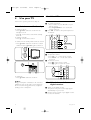
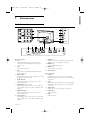
Television overview
Remote control
Side controls
B
+
1
VOLUME
1
-
DVD STB TV VCR AUX
i
b
SELECT
MENU
DEMO
2
+
2
a
CHANNEL
OPTION
®
B
4
POWER
-
3
OK
®
3
®
5-6
®
BROWSE
1
2
3
4
5
6
Volume up and down
Menu
Program or Channel up and down
Power switch
Led indicator (Blue: On; Red: Standby)
Remote control sensor
b
MENU
+
4
5
+
V
P
¬
-
6
-
7
Side connectors
1
2
3
4
5
6
7
8
9
AV
0
0
8
v
Ò
‡
π
†
MHEG
CANCEL
®
To connect a camera, game console, headphone or
a USB memory device.
1
2
3
Back connectors
4
5
6
7
8
FAV
Standby or On
Colour keys
Navigation key (up, down, left,
right) OK
Teletext key
Menu key
Programme up or down
Volume up or down
DVD, VCR, ... device selection
Find more on your remote control in section 5.1
Remote control overview.
To connect the antenna, DVD, VCR or other device.
4
Your TV
2.2
15-10-2007
10:26
Pagina 5
Product highlights
3
Getting started
Your new TV is equipped with some of the most
modern audio or video innovations.
Your TV offers the following advantages ...
This section helps you with the positioning and the
first time installation of the TV.
Perfect Pixel HD
Offers perfect picture quality from any source.
3.1
100 Hz Clear LCD
Results in superior sharpness of motion
reproduction, better black level, high contrast with a
flicker free, quiet image and a larger viewing angle.
HDMI connectors
3 HDMI connectors for highest quality high
definition connectivity.
USB connection
Multimedia connection for instantly view or play
your photos or music.
ENGLISH
2669.3.qxd
Position the TV
) Warning
Carefully read the safety precautions in section 1.1
Safety before you position the TV.
Large screen TVs are heavy. Carry and handle the
TV with at least two persons.
Connect your devices first before you position your
TV or mount it on the wall.
The ideal viewing distance for watching TV is three
times its screensize.
For ideal viewing conditions, position the TV where
light does not fall directly on the screen.
Kensington Security Slot
Your TV is equipped with a Kensington Security Slot
at the back of the TV for an anti-theft lock.
An anti-theft Kensington lock has to be purchased
separately.
Your TV
5
2669.3.qxd
3.2
15-10-2007
10:26
Pagina 6
VESA compliant mounting
) Caution
Use a VESA compliant bracket that meets safety
standards according to the TV’s weight.
Closely follow the instructions that come with your
VESA compliant bracket to mount the TV.
Koninklijke Philips Electronics N.V. bears no
responsibility for improper mounting or mounting
that results in accident or injury.
The TV is prepared for VESA compliant mounting.
This bracket is not included.
Use a VESA compliant bracket with code
VESA MIS-E, 200, 100, 4.
Prepare the TV for VESA compliant mounting.
Locate the 6 VESA screwholes on the back of
the TV.
6
Your TV
3.3
15-10-2007
10:26
Pagina 7
Remote control batteries
3.5
Connect the mains cord
‡ Verify that your mains voltage corresponds with
the voltage printed on the sticker at the back of
the TV. Do not insert the mains cord if the
voltage is different.
® Insert the mains cord tightly.
‡ Open the battery cover on the back of the
remote control.
® Insert the 2 batteries supplied (Type AA-R61,5V). Make sure the + and - ends of the
batteries line up correctly (inside of case is
marked.)
Ò Close the cover.
rNote
Remove the batteries if you don’t use the remote
control for a long time.
3.4
The TV is never powered off completely unless the
mains cord is physically unplugged. Therefore the
mains plug must be accessible at all time.
Antenna cable
‡ Locate the antenna connection at the back of
the TV.
® Insert the antenna cable tightly into the antenna
socket x Antenna.
3.6
First time installation
The first time, and only the first time, the mains
cord is inserted, the installation procedures starts
up automatically. Follow the instructions on screen.
ANTENN A
Menu language
Please select your
language...
English
Français
using cursor up and
down
Next
à Tips
• If you notice you have selected a wrong language,
press the red key on the remote control to
return to the language selection menu.
• To rearrange the stored channels, see section 6.3
Rearrange stored channels.
Your TV
7
ENGLISH
2669.3.qxd
2669.3.qxd
4
15-10-2007
10:26
Pagina 8
4.2
Use your TV
Learn how to operate your TV for daily use.
4.1
Switch on or off - Standby
Watch TV
4.2.1 Switch channels
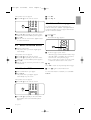
‡ To switch TV channels:
• Press a number or press P+ or P- on your
remote control.
• Press Program/Channel - or + on the side
controls of the TV.
® Press 0 to return to the previously viewed
TV channel .
®
To switch on the TV:
• Press B Power at the side of the TV if the
standby led is off.
• Press B on the remote control if the standby
led in on.
To switch to standby:
• Press B on the remote control.
®
®
®
b
MENU
+
+
+
V
¬
-
P
P
-
-
To switch on from standby without remote control:
• Press B Power at the side of the TV to switch
off first and press B Power again to switch on.
1
2
3
4
5
6
7
8
9
AV
0
0
-
0
9
+ CHA
0
v
B
POWER
4.2.2 Adjust volume
‡ To adjust the volume:
• Press V + or - on the remote control
• Press Volume + or - on the side controls
of your TV.
® To mute the sound:
• Press ¬ on the remote control
• Press ¬ again to restore the sound.
®
®
®
®
B
B
DVD STB TV VCR AUX
+
i
SELECT
+
b
DEMO
V
-
a
OPTION
®
V
+
¬
-
P
-
1
2
3
4
5
6
7
8
9
AV
0
0
¬
To switch off:
• Press B Power at the side of the TV.
®
®
®
rNote
Energy consumption contributes to air and water
pollution. As long as the mains cord is plugged in,
the TV consumes energy. This TV has a very low
standby power consumption.
8
4.3
Watch channels from a
digital receiver
‡ Switch on the digital receiver.
The picture from your receiver might appear
automatically on your screen.
® Use the remote control of your digital receiver
to select TV channels.
Use your TV
®
2669.3.qxd
15-10-2007
10:26
Pagina 9
®
®
®
AV
v
4
5
6
7
8
9
AV
0
0
v
Ò
π
‡
†
MHEG
CANCEL
®
FAV
® Press AV v repeatedly to select the device.
Wait a few seconds until the picture appears.
Ò Press OK.
† Use the remote control of the digital receiver
to select TV channels.
Ò Press OK.
† Press Play π.
4.6
ENGLISH
If the picture does not appear :
‡ Press AV v on the remote control.
Select a Teletext page
TV channels often broadcast information via
Teletext. If Teletext is available only English Teletext
is supported. China does not support this function
due to no Teletext available.
To watch Teletext:
‡ Press b.
The main index page appears.
®
®
OK
®
®
4.4
Watch connected devices
BROWSE
b
MENU
b
‡ Switch on the device.
The picture from your device might appear
automatically.
If the picture does not appear :
® Press AV v on the remote control.
Ò Press AV v repeatedly to select the device.
Wait a few seconds until the picture appears.
† Press OK.
º Use the remote control of your device to select
TV channels.
4.5
Watch a DVD
+
V
+
¬
P
® To select a page of your choice:
• Enter the page number with the number keys.
• Press P- or P+ or navigation key up, down to
view the next or the previous page.
• Press a colour key to select one of the colour
coded items at the bottom of the screen.
à Tip
Press 0 to return to the previously viewed page.
Ò Press b again to switch Teletext off.
®
‡ Insert a DVD disc in your player.
® Press Play π.
The picture from your player appears
automatically on your screen.
®
®
®
For more information on teletext, see section 5.4
Teletext.
If the picture does not appear :
‡ Press AV v on the remote control.
AV
v
4
5
6
7
8
9
AV
0
0
v
Ò
‡
π
†
MHEG
CANCEL
®
FAV
® Press AV v repeatedly to select the DVD
player. Wait a few seconds until the picture
appears.
Use your TV
9
2669.3.qxd
5
15-10-2007
10:26
Pagina 10
Use more of your TV
This section deals with the more advanced use of
your TV:
• how to use the menus
• to adjust the picture and sound settings
• more about Teletext (if available)
• how to create favourite channel lists
• how to set locks and timers
• to set subtitles and select a subtitle language
• how you can view your photos or play your
favourite music from a USB memory device.
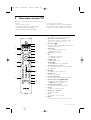
5.1
1
Standby B
To switch the TV on or back to standby.
2
DVD STB TV VCR AUX
Remote control overview
B
1
DVD STB TV VCR AUX
20
19
i
b
SELECT
DEMO
3
2
3
4
4
18
a
OPTION
5
®
OK
®
6
®
7
®
BROWSE
17
16
MENU
b
+
+
V
P
¬
-
15
8
7
8
9
9
10
10
-
1
2
3
4
5
6
7
8
9
AV
0
0
v
Ò
5
6
‡
π
11
12
†
13
FAV
14
11
12
13
MHEG
CANCEL
®
14
15
16
17
18
10
SELECT
To select the control of connected Philips
devices or to return to TV mode.
Dual screen b
To show teletext on the right and the picture
on the left of the screen.
Colour keys
• Easy selection of teletext pages.
• Easy selection of tasks.
Guide a no function
OK
• To display the channel list.
• To activate a setting.
Navigation key
To navigate the menu.
Teletext b
To switch teletext on or off, if available.
+P- Channel up or down
To switch to the next or previous channel in
the channel list.
Mute ¬
To mute the sound or restore it.
Number keys
To select a TV channel.
Previous channel 0
To return to the previously viewed channel.
Audio and video keys Ò ‡π†®
To use with connected Philips devices.
• MHEG cancel no function
Favourite channel list FAV
To display the favourite channels list.
AV v
To select a connected device.
Volume up or down V
To adjust the volume.
Menu
To switch the menu on or off.
Option
To switch the Quick access menu on or off.
Use more of your TV
2669.3.qxd
15-10-2007
10:26
Pagina 11
5.2
TV menu overview
See section 10 Index to find the section in the
manual about a specific remote control key.
5.2.1 The menu
‡ Press Menu on the remote control to show the
main menu.
® Press Menu to quit the menu.
ENGLISH
19 Demo
To switch the Demo menu on and to get a
demonstration of the features of the TV.
20 On screen information i
To show channel or programme information if
available.
With the on screen menus you install your TV,
adjust picture and sound settings and access
features. This section gives an overview of the
menus and describes how to navigate.
®
Operate connected Philips devices
with the TV remote control
Most of the audio and video devices from our
range of products can be operated with the
remote control of the TV.
‡ Press SELECT to select one of the devices you
want to operate with this remote control.
® Use the audio and video keys to:
• rewind or search down (Ò)
• stop (‡)
• play or pause (π)
• fast forward or search up (†)
• record (®)
®
®
5.1.2
®
BROWSE
BROWSE
b
MENU
MENU
+
V
+
¬
-
1
Television
P
-
2
3
TV menu
Channel list
Multimedia
The main menu offers the following items:
• TV menu
Select this menu for installation, picture and
sound settings and other feature settings.
• Channel list
Select this item to show the Channel list.
Create your Favourite channel lists here.
• Multimedia
Select this item to view photos or play music
stored on a USB device. See section 5.8 View and
play photos, MP3, ...
Use more of your TV
11
2669.3.qxd
15-10-2007
10:26
Pagina 12
5.2.2 Use of the menu
Learn to use the menus with this example.
‡ Press Menu on the remote control.
º Press navigation key right to enter the picture
settings.
Picture
a
OPTION
®
®
®
BROWSE
OK
®
Contrast
Contrast
Brightness
90
47
Colour
Hue
52
0
Sharpness
4
®
BROWSE
MENU
MENU
b
Tint
+
+
...
The main menu appears on the screen.
◊Press navigation key down to select Brightness.
Television
TV menu
Channel list
Multimedia
® Press navigation key right to enter the TV
menu.
Picture
Brightness
Contrast
Brightness
98
47
Colour
Hue
52
0
Sharpness
4
Tint
...
TV menu
TV settings
settings
Features
Settings assistant
Reset to standard
Installation
Picture
Sound
Software update
‹ Press navigation key right to enter the
Brightness setting.
Brightness
ÒPress navigation key right to enter the TV
settings menu.
TV settings
Settings assistant
Reset to standard
Picture
Start now
Sound
≈Press navigation key up or down to adjust the
setting.
Ú Press navigation key left to return to the Picture
settings or press Menu to quit the menu.
† Press navigation key down to select Picture.
TV settings
Picture
Contrast
Reset to standard
Picture
Brightness
Colour
Sound
Hue
Ambilight
Sharpness
Tint
Perfect Pixel HD
...
12
Use more of your TV
15-10-2007
10:26
Pagina 13
5.2.3 Quick access menu
The Quick access menu gives direct access to some
often needed menu items.
‡ Press Option on the remote control.
® Press navigation key up or down to select an
option.
Ò Press OK to show the selected option menu.
† Press navigation key up, down, left, right to
adjust the settings in the menu.
º Press Option to quit the menu.
DVD STB TV VCR AUX
i
SELECT
b
DEMO
a
OPTION
OPTION
®
®
OK
®
• Subtitles
See section 5.7 Subtitles.
• Picture format
See section 5.3.4 Widescreen picture format.
• Equalizer
See section 5.3.5 Sound settings.
• Clock
Not applicable in case of no Teletext present.
®
Display the clock
‡ Press OK to display the clock permanently.
® Press Option and press navigation key up or
down to select Clock again.
Ò Press OK to hide the clock.
Quick access
Subtitle
5.3
Picture and Sound settings
ENGLISH
2669.3.qxd
This section describes how to adjust picture and
sound in the menus.
5.3.1 Settings assistant
Use the Settings assistant to guide you through
basic picture and sound settings in an easy way.
‡ Press Menu on the remote control and select
TV menu > TV settings > Settings assistant and
press navigation key right to enter.
® Press OK.
Ò Press the green key on the remote control to
start the assistant.
† Press navigation key left or right to select the
left or right side to make your choice.
º Press the green key to go to the next setting.
You will go through several settings. When
finished the TV will ask you to store these
settings.
◊Press the green key to store all your settings.
‹ Press Menu to quit the menu.
5.3.2 Reset to standards
Sets the TV to one of the predefined settings. Each
setting combines picture and sound.
‡ Press Menu on the remote control and select
TV menu > TV settings > Reset to standard
and press navigation key right to enter the list.
® Press navigation key up or down to select a
setting.
Ò Press the green key to store your selection.
† Press Menu to quit the menu.
Standard settings: Current, Natural, Vivid, Movie
Picture format
Equalizer
Clock
Use more of your TV
13
2669.3.qxd
15-10-2007
10:26
Pagina 14
5.3.3 Picture settings
This section describes how to adjust all picture
settings.
‡ Press Menu on the remote control and select
TV menu > TV settings > Picture and press
navigation key right to enter the list.
® Press navigation key up or down to select a
setting.
TV settings
Picture
Settings assistant
Reset to standard
Contrast
Brightness
Picture
Colour
Sound
Hue
Ambilight
Sharpness
Tint
Perfect Pixel HD
HD Natural Motion
100Hz Clear LCD
Dynamic contrast
Noise reduction
MPEG artefact red.
Colour enhanc …
Active control
Light sensor
Picture format
• Contrast
Changes the level of bright parts in the picture
but keeps the dark parts unchanged.
• Brightness
Changes the level of light of the total picture.
• Colour
Changes the level of saturation.
• Hue
If NTSC is broadcasted, this level compensates
the colour variations.
• Sharpness
Changes the level of sharpness of fine details.
• Tint
Sets the colours to Normal, Warm (reddish) or
Cool (bluish). Select Custom to make a setting of
your own in the Custom tint menu.
• Custom tint
If Custom is selected in the Tint menu you can
make a setting of your own here.
Press the green key to select each bar to change
the value of:
- R-WP red whitepoint
- G-WP green whitepoint
- B-WP blue whitepoint
- R-BL red blacklevel
- G-BL green blacklevel
14
• Perfect Pixel HD
Enables or disables Perfect Pixel HD, the most
ideal picture setting.
• HD Natural Motion
Reduces the field and line flicker and reproduces
smooth movement especially in movies.
Set the level to Minimum, Maximum or Off.
• 100 Hz Clear LCD
Switches 100 Hz Clear LCD on or off.
• Dynamic contrast
Enhances the contrast in the picture as the image
on the screen changes.
Set the level to Minimum, Medium, Maximum or
Off. The level medium is recommended.
• Noise reduction
Filters out and reduces the noise in the picture.
Set the level to Minimum, Medium, Maximum or
Off.
• MPEG artefact reduction
Smoothens the transitions on digital pictures.
Switches MPEG artefact reduction on or off.
• Colour enhancement
Makes the colours more vivid and improves the
resolution of details in bright colours.
Set the level to Minimum, Medium, Maximum or
Off.
• Active control
Corrects all incoming signals in order to provide
the best picture possible.
Switches Active control on or off.
• Light sensor
Adjusts the picture settings on the lighting
conditions in the room.
Switches Light sensor on or off.
• Picture format
See section 5.3.4 Widescreen picture format.
Use more of your TV
15-10-2007
10:26
Pagina 15
5.3.4 Widescreen picture format
Avoid black bars on the sides or on top and
bottom of the picture. Change the picture format
to a format that fills the screen.
‡ Press Menu on the remote control and select
TV menu > TV settings > Picture > Picture
format and press navigation key right to enter
the list.
® Press navigation key up or down to select an
available picture format.
Ò Press navigation key up to shift the picture
upwards to make partly covered subtitles
visible.
à Tip
The Auto format setting is recommended for
minimal distortion .
Auto format (Not for PC)
Enlarges the picture
automatically to fill the
screen. Subtitles remain
visible.
Super zoom (Not for HD)
Removes the black bars on
the side of 4:3 broadcasts.
There is a minimal
distortion.
Unscaled
(Only for HD and PC.)
Maximum sharpness.
Distortion may appear on
borders. Black bars may
appear with pictures from
your PC.
ENGLISH
2669.3.qxd
rNote
Do not forget to name the connection in the
Connection menu. See section 7.4.3 Naming your
devices.
5.3.5 Sound settings
This section describes how to adjust all sound
settings.
‡ Press Menu on the remote control and select
TV menu > TV settings > Sound and press
navigation key right to enter the list.
® Press navigation key up or down to select a
setting.
TV settings
Sound
Settings assistant
Equalizer
Volume
Reset to standard
Picture
Sound
Dual I/II
Mono/Stereo
Surround mode
4:3 (Not for HD)
Shows the classical 4:3
format
Movie expand 14:9
(Not for HD)
Scales classical 4:3 format to
14:9
Movie expand 16:9
(Not for HD)
Scales classical 4:3 format to
16:9.
Wide screen
Stretches 4:3 format to 16:9.
Use more of your TV
Headphone volume
e
Auto volume level....
Delta volume
Auto surround
• Equalizer
Changes the bass and treble of the sound. Select
each bar to change the setting. See also section
5.2.3 Quick access menu.
• Volume
Changes the volume.
When adjusting the volume with V a volume
bar appears. If you don’t want it to appear go to
TV menu > Installation > Preferences and press
navigation key right to enter the list and select
Volume bar off.
‡ Press navigation key up or down to select
Volume bar.
® Press navigation key right to enter.
Ò Select On to activate the temporarily display of
the volume bar when adjusting the volume.
• Balance
Sets the balance of the left and right
loudspeakers to fit best your listening position.
15
2669.3.qxd
15-10-2007
10:26
Pagina 16
• Dual I/II
If broadcasted, you can choose between two
different languages.
• Mono/stereo
If stereo broadcasting is available, you can select
Mono or Stereo per TV channel.
• Surround mode
To select a more spatial sound if broadcasted or
if available from a connected device.
• Headphone volume
Changes the volume of the headphone.
You can mute the TV speakers with ¬ on the
remote control.
• Automatic volume leveller
Reduces sudden volume differences like at the
beginning of commercials or when switching from
one channel to another.
Select on or off.
• Delta volume
Levels out volume differences between channels
or connected devices.
‡ Switch to the channel or device you want to
level out the volume difference.
® Select Delta volume in the Sound menu and
change the volume level.
• Auto surround
Switches the TV automatically to the best
surround sound mode broadcasted.
Select on or off.
5.4
Teletext
If available only English Teletext is supported. China
does not support this function due to no Teletext
available.
Your TV has a 1200 pages memory that stores
broadcasted teletext pages and subpages to reduce
waiting time.
To select a teletext page see section 4.6 Select a
Teletext page.
5.4.1 Select pagenumber subpages
A teletext page number can hold several subpages.
The pages are shown on a bar next to the main
pagenumber.
‡ Press b.
® Select a teletext page.
Ò Press navigation key left or right to select a
subpage.
5.4.2 Select T.O.P. teletext broadcasts
T.O.P. teletext (Table of Pages) is not broadcast by
all TV channels. You can easily jump from one
subject to another without using pagenumbers.
‡ Press b.
® Press i.
The T.O.P. overview appears.
Ò Use navigation key left,right or up, down to
select a subject.
† Press OK to view the page.
DVD STB TV VCR AUX
i
i
SELECT
b
DEMO
a
OPTION
®
®
OK
®
®
5.4.3 Dual screen teletext
View the TV channel and teletext next to each
other.
‡ Press b for Dual screen teletext.
® Press b again to show normal teletext .
Ò Press b to switch off teletext.
5.4.4
Search teletext
Quickly jump to a subject linked to a series of
pagenumbers or search for specific words in
teletext pages.
‡ Press b.
16
Use more of your TV
15-10-2007
10:26
Pagina 17
® Press OK to highlight the first word or number.
Ò Press navigation key up or down, left or right to
jump to the next word or number on the page.
† Press OK the search a page which holds the
highlighted word or number.
º Press navigation key up until no word or
number is highlighted to quit Search.
5.4.5 Enlarge teletext pages
For a more comfortable reading, you can enlarge
the teletext page.
‡ Press b and select a teletext page.
® Press Option on the remote control to enlarge
the top part of the page.
Ò Press Option again to view the enlarged lower
part of the page.
† Press navigation key up or down to scroll
through the enlarged page.
º Press Option again to return to the normal
page size.
5.4.5 Teletext menu
With the options in the teletext menu you can
reveal hidden info, let cycle subpages automatically
and change the character setting.
• Reveal
Hide or unhide hidden information on a page,
such as solutions to riddles or puzzles.
• Cycle subpages
If subpages are available for the selected page,
you can make subpages cycle automatically.
• Language
Some languages use a different set of characters.
Switch to the other group to show the text
correctly.
5.4.6 Teletext 2.5
If broadcasted by the TV channel this teletext offers
more colours and better graphics.
Teletext 2.5 is switched on as a factory setting.
‡ Press Menu on the remote control and select
TV menu > Installation > Preferences >
Teletext 2.5 and press navigation key right to
enter the list.
® Select on or off.
5.5
Create favourite channel
lists
View the All channels list or set up a Favourite list
of your own with your preferred TV channels. For
example, each member of your family can create his
or her own favourite list.
5.5.1 Select a favourite list
Learn how to select one of the favourite channel
lists.
‡ Press OK.
The first time after you have finished the
installation, the All channels list is shown. In
other situations, it brings up the last selected
favourite list.
All channels
....
AV 3
HDMI ...
1 Channel 1
2 Channel 2
3 Channel 3
4 Channel 4
....
‡ Press b.
® Press Menu.
Select list
Teletext menu
Reveal
Off
Cycle subpages
Off
Language
Gr. II
Ò Press navigation key up or down to select an
option.
† Press OK to change a setting.
º Press Menu to quit the teletext menu.
◊Press b to switch off teletext.
Use more of your TV
® Press the red key to show all favourite lists.
Ò Press navigation key up or down to select a list.
† Press OK.
The selected favourite list appears.
º Press OK again to quit.
5.5.2 To set up a favourite list
Create or modify your own favourite list.
‡ Press OK.
The last selected list appears.
® Press the red key to show all favourite lists.
Ò Press navigation key up or down to select a list.
17
ENGLISH
2669.3.qxd
2669.3.qxd
15-10-2007
10:26
Pagina 18
† Press OK.
º Press the green key to enter the Edit mode.
The selected list brings up a full channel list.
◊Press navigation key up or down to highlight a
channel.
‹ Press OK to mark (or unmark) the highlighted
channel.
The channel is added to (or removed from) the
selected list.
≈Press the green key again to leave the Edit
mode.
The modified channel list appears again.
5.5.3 Select a channel from a favourite list
‡ Press OK.
The last selected channel list appears.
® Use navigation key up or down to highlight a
channel.
Ò Press OK.
The TV tunes to that channel.
à Tip
• Use -P+ to go through the TV channels of the
selected favourite list.
• With the number keys you can still select
channels which are not marked as favourite.
®
®
b
MENU
+
+
¬
-
P
+
-
P
1
2
3
4
5
6
7
8
9
AV
0
0
-
0
-
9
v
5.6
à Tip
To switch off the On timer, select Off in the On
timer menu.
5.6.3 Lock TV channels and programmes
Lock TV channels and/or programmes from
connected devices to prevent children from
watching them. Lock and unlock with a four number
code.
®
®
V
5.6.2 Automatically switch the TV on
Not applicable in case of no Teletext present.
On timer switches the TV on automatically to a
specified channel at a specified time, from standby.
‡ Press Menu on the remote control and select
TV menu > Features > On timer and press
navigation key right to enter the On timer
menu.
® Use navigation key up or down, left or right to
select and enter the menu items one by one to
set a channel, a day of the week or daily, and a
starting time.
Ò Press OK to confirm.
† Press Menu to quit the menu.
Timers and locks
This section describes how to switch the TV on or
off at a specified time and to lock or unlock the TV.
Set or change your code
‡ Press Menu on the remote control and select
TV menu > Features > Set or Change code
and press navigation key right to enter your
code.
® Enter your code with the number keys.
The Features menu reappears with a message
confirming that your code has been created or
changed.
Did you forget your code ?
‡ Select Change code.
® Press navigation key right.
Ò Enter the overriding code 8-8-8-8.
† Enter a new personal code.
º Confirm your new entered code.
The previous code is erased and the new code
is stored.
5.6.1 Automatically switch to standby
Sleeptimer switches the TV to standby after a time.
‡ Press Menu on the remote control and select
TV menu > Features > Sleeptimer and press
navigation key right to enter the sleeptimer bar.
® Press navigation key up or down to set the time
up to 180 minutes in steps of 5 minutes. If set
to 0 minutes, the Sleeptimer is switched off.
You can always switch off your TV earlier or reset
the time during countdown.
18
Use more of your TV
15-10-2007
10:26
Pagina 19
5.6.4 Activate or deactivate Child lock
If your code is set, you can lock all channels and
devices, lock a specific channel or device, set a time
after which all channels and devices are locked.
‡ Press Menu on the remote control and select
TV menu > Features > Child lock and press
navigation key right to enter your code.
® Enter your code with the number keys.
Ò Select one of the options.
† Press navigation key right.
5.7
Subtitles
ENGLISH
2669.3.qxd
For each TV channel, subtitles can be set, coming
from Teletext.
TV menu
Features
TV settings
Features
Installation
Subtitle
Sleeptimer
Software update
Set/Change code
Child lock
On timer
Lock or unlock all channels and connected devices
‡ Select Lock or Unlock.
® Press OK.
Demo
Lock a certain programme or all channels from a
certain time
Child lock
Custom lock
Lock
Custom lock
Lock after
Channel lock
Unlock
‡ Select Custom lock.
® Press navigation key right to enter the Custom
lock menu.
Ò Press navigation key right again to enter the
Lock after menu.
† Select On to switch on the Timer lock.
º Press navigation key left.
◊Select Time.
‹ Press navigation key right.
≈Enter the time with navigation key up or down
and right.
Ú Press OK.
Lock one or more channels and connected devices
‡ Select Custom lock.
® Press navigation key right to enter.
Ò Press navigation key up or down to select
Channel lock.
† Press navigation key right.
º Press navigation key up or down to select the
channel(s) you want to lock or unlock.
◊Each time press OK to lock or unlock the
channel.
Use more of your TV
5.7.1 Subtitling from TV channels
‡ Select an TV channel.
® Press b to switch on Teletext.
Ò Enter the three number pagenumber of the
subtitle page.
† Press b to switch off Teletext.
rNote
The Teletext subtitle page must be stored for each
TV channel separately.
5.7.2 Activate or deactivate subtitling
‡ Press Menu on the remote control and select
TV menu > Features > Subtitle and press
navigation key right to enter the list.
® Press navigation key up or down to select On
to show the subtitles always or On during mute
to show the subtitles only when the sound is
muted with the ¬ key on the remote control.
Ò Press navigation key left to return to the
Features menu.
à Tip
Select the Subtitle menu directly with Option on
the remote control. See section 5.2.3 Quick access
menu.
19
2669.3.qxd
5.8
15-10-2007
10:26
Pagina 20
View and play: photos,
MP3, ...
Watch pictures or listen to music stored on a USB
device (not supplied with the TV). Watch your
pictures as a slideshow or listen to a self made
music playlist.
rNote
Philips can not be held responsible if your USB
device is not supported nor shall Philips accept any
liability for damage or loss of stored data.
Ò Press navigation key up or down to select a
picture or a picture album on the USB device.
Picture
Afrika_2001
Afrika_2001
Paris_2005
My_car.jpg
Jean.jpg
Kenya.jpg
Congo.jpg
Victoria.jpg
Mary.jpg
Cairo.jpg
Afrika_2001
Afrika_2001
Kenya.jpg
Congo.jpg
5.8.1 Insert a USB device
Insert a device at the side of the TV while the TV is
switched on.
The main menu appears automatically and the
name of the USB device is highlighted next to
Multimedia.
Television
TV menu
Channel list
Multimedia
5.8.2 Remove the USB device
ç Caution
To avoid damaging the USB device always quit the
menu on screen and wait five seconds before you
remove the USB device.
‡ Press Menu to quit the menu.
® Remove the USB device.
5.8.3 View your pictures
The Multimedia menu shows the files you have
stored on your USB device.
‡ Press navigation key right to enter the
Multimedia menu.
Picture is highlighted.
USB
Picture
Music
Picture
Afrika_2001
Paris_2006
My_car.jpg
Jean.jpg
Mary.jpg
Victoria.jpg
Dakar.jpg
Kenya.jpg
Cairo.jpg
† Press OK to view the picture or to start a
slideshow of the pictures in the album.
º Press OK to pause the slideshow. Press again to
restart.
◊Press one of the colour keys on the remote
control to perform the corresponding function
shown at the bottom of the screen.
Press the blue key to stop the show and to see
more functions.
If the function bar at the bottom disappeared,
press any colour key to let it reappear.
‹ Press navigation key left and select another
picture or another album.
Slideshow settings
• Details / More details
Shows the picture name, date, size and next
picture in the slideshow.
• Transitions
Shows the list of available transition styles of the
pictures.
Press navigation key up or down to select and
press OK to activate.
• Slide time
Sets the time lag for the picture transitions:
Short, Medium or Long.
• Rotate
To rotate a picture.
• Zoom
Show a list of available zoom magnifications to
select.
• Start/Show
To stop and restart the slideshow.
® Press navigation key right to enter the Picture
folder.
20
Use more of your TV
2669.3.qxd
15-10-2007
10:26
Pagina 21
Afrika_2001
—
USB
—
ENGLISH
5.8.4 Thumbnails
View the pictures of a selected album in an
overview.
‡ Select a picture album.
® Press navigation key right to enter the picture
list.
Ò Press the green key.
† Press navigation key up or down, left or right to
highlight a picture.
º Press OK to view the picture.
◊Press navigation key left to return to the
thumbnail overview.
‹ Press the green key again to go back to the
picture list.
Kenya.jpg
Kenya.jpg
5.8.5 Listen to music
Find your songs in the Music album of the
Multimedia menu.
‡ Highlight Music in the Multimedia menu.
® Press navigation key right to enter the Music
folder.
Ò Press navigation key up or down to select a
song or a music album.
† Press OK to play the selected song or to play a
song followed by the next song in the same
album.
Music settings
• Details
Shows the file name.
• Repeat one/all
Repeat all songs in the album until you stop a
song or only repeat the one song selected until
you stop the song.
• Shuffle
Play songs in a random sequence.
5.8.6 Slideshow with background music
Watch a slideshow of your stored pictures
accompanied with your stored background music.
‡ Select an album of songs first and press OK.
® Highlight the Picture folder and select an album
of pictures and press OK.
Use more of your TV
21
2669.3.qxd
5.9
15-10-2007
10:26
Pagina 22
Software update
5.9.2
Software download from the PC
to the USB device
rNote
The device must have at least 48Mb free space.
Make sure the write protection is turned off.
Some USB devices do not work with our TV.
Contact your dealer.
‡ Insert the USB memory device into a PC linked
to the internet.
® Locate and open the file “update.htm” on your
USB device.
Ò Read the instructions on screen and click on
the Send ID button.
The software update is downloaded on the
USB memory device.
† Remove the USB memory device from your
PC.
5.9.1Update assistant
5.9.3
Philips continuously tries to improve its products. It
may be recommended for you to update the TV’s
software. To update your TV software you need a
USB Memory device (not supplied).
The Update assistant helps you to update the TV’s
software.
TV identification
The TV will identify itself to your USB memory
device.
‡ Switch the TV on.
® Press Menu.
Ò Press navigation key right.
† Press navigation key up down to select
Software update.
º Press navigation key right.
TV menu
Update assistant
TV settings
Features
Installation
Update assistant
Transfer of the downloaded
software update to the TV
The downloaded software on the USB memory
device must now be uploaded to your TV.
ç Caution
• Do not remove the USB memory device during
the software update.
• If a power drop occurs during the update, do not
remove the USB memory device from the TV.
The TV will continue the update as soon as the
power comes back.
‡ Insert the USB memory device to the USB
connector at the side of the TV.
Current software...
Local updates
Software update
◊Press navigation key up down to select Update
assistant.
‹Press navigation key right.
≈Press OK to activate.
Ú Insert a USB memory device to the USB
connector at the side of the TV.
The main menu appears.
œ Press the green key to proceed.
A message appears the TV has successfully
written the identification file to the USB
memory device.
π Press the green key again to finish.
Y Remove the USB memory device from the TV.
22
® The TV switches off. The screen stays black for
about 10 seconds. Wait and do not use the
power switch B on the TV.
Use more of your TV
15-10-2007
10:26
Pagina 23
Ò The update process starts automatically. Please
wait.
The update is finished when the message
‘Operation successful’ appears on the screen.
Pr
◊The TV switches off.The screen stays black for
about 10 seconds. Please, wait.
ENGLISH
2669.3.qxd
‹The TV switches back on again.The update is
done.
g
Operation Successful! Re
† Remove the USB memory device from the TV.
5.9.4
Verify the current software
version
Updating software is only possible if the version of
the new available software is different from the
current one.You can verify your current software
version.
‡ Select Software update in the TV menu.
® Press navigation key right.
Ò Press navigation key up or down to select
Current software info.
The version and the description of the current
software appears.
º Press B on the remote control.
B
B
DVD STB TV VCR AUX
i
SELECT
b
DEMO
a
OPTION
®
rNote
Do not press more than once and do not use the
Power B switch on the TV.
®
®
®
Use more of your TV
23
2669.3.qxd
6
15-10-2007
10:26
Pagina 24
Channel installation
The first time you switched on your TV you’ve
selected the language of the TV menus and all the
available channels have been installed.
This chapter will help you if you find it necessary to
re-do the initial installation or if you want to tune in
a new TV channel.
rNotes:
- You do not have to follow every step described if
it is not necessary.
- Re-installation will modify the All channels list and
new added channels will not be added to any
favourite list.
6.1
Automatic installation
This section describes how to search for and store
all available channels automatically.
Step 1 Menu language
Sets the language of the TV menus. Go to a next
step if your language settings are correct.
‡ Press Menu on the remote control and select
TV menu > Installation > Language.
® Press navigation key right to enter the menu
Language.
Ò Press navigation key up or down to select your
language.
† Press OK to confirm.
º Press navigation key left to return to the
Installation menu.
Installation
Language
Language
English
Channel install...
Français
Ò Press navigation key right to select Start now.
† Press OK.
º Press the green key to start.
The installation may take a few minutes.
◊When the channel search is completed, press
the red key to return to the Installation menu.
‹ Press Menu to quit the TV menu.
If you want to rename, reorder or uninstall stored
channels, see section 6.3 Rearrange channels.
6.2 Manual installation
You can tune-in TV channels channel by channel
manually with Manual installation.
6.2.1 Select the system
‡ Press Menu on the remote control and select
TV menu > Installation > Channel installation >
Manual installation.
® Press navigation key right to enter the Manual
installation menu.
System is highlighted.
Ò Press navigation key right to enter the System
list.
† Press navigation key up or down to select your
TV system: PAL BG, PAL I, PAL DK or NTSC M.
º Press navigation key left to return to the
Manual installation menu.
Channel install...
Manual installation
Automatic install... System
Manual installation Search
Rearrange
Fine tune
Store current ch...
Store as new ch...
Preferences
Connections
Factory settings
Step 2 Install TV channels
Your TV will search for and store all available TV
channels.
‡ Press navigation key down to select Channel
installation.
® Press navigation key right to enter the Channel
installation menu.
Automatic installation is highlighted.
24
6.2.2 Search for and store a new channel
‡ Press Menu on the remote control and select
TV menu > Installation > Channel installation >
Manual installation > Search.
® Press navigation key right to enter the Search
menu.
Ò Press the red key to enter the frequency
yourself or press the green key to search for a
next channel.
Use more of your TV
15-10-2007
10:26
Pagina 25
à Tip
If you know the frequency, enter the three numbers
of the frequency with the number keys of the
remote control.
† Press navigation key left when the new channel
has been found.
º Select Store as new channel to store the new
channel under a new channel number.
◊Press navigation key right to enter.
‹ Press OK.
Done appears.
≈Press Menu to quit the channel installation
menu.
6.2.3 Fine tune a channel
Fine tune a found channel when the reception is
poor.
‡ Press Menu on the remote control and select
TV menu > Installation > Channel installation >
Analogue: manual installation > Fine tune.
® Press navigation key right to enter the Fine tune
menu.
Ò Press navigation key up or down to adjust the
frequency
† Press navigation key left when you finished fine
tuning.
º Select Store current channel to store the fine
tuned channel under the current channel
number.
◊Press navigation key right to enter.
‹ Press OK.
Done appears.
≈Press Menu to quit the Channel installation
menu.
6.3
Rearrange stored channels
To rename, reorder, uninstall or reinstall stored
channels.
6.3.1 Rename a channel
Assign or change a channel name to a channel for
which a name has not yet been entered.
‡ Press Menu on the remote control and select
TV menu > Installation > Channel installation >
Rearrange.
® Press navigation key right to enter the channel
list.
Ò Press navigation key up or down in the channel
list to select the channel you want to rename.
Use more of your TV
† Press the red key.
º Press navigation key left or right to select a
character or navigation key up or down to
change the characters. Space, numbers and
other special characters are located between z
and A.
◊Press the green key or OK to finish.
à Tip
With the yellow key all characters can be deleted.
With the blue key you can delete the character
which is highlighted.
6.3.2
Uninstall or reinstall a channel
To uninstall a stored channel so that it is no longer
possible to tune to.
Reinstall an earlier uninstalled channel.
‡ Press Menu on the remote control and select
TV menu > Installation > Channel installation >
Rearrange.
® Press navigation key right to enter the channel
list.
Ò Press navigation key up or down in the channel
list to select the channel you want to uninstall
or reinstall.
† Press the green key to uninstall or reinstall the
channel.
º Press Menu to quit the menu.
6.3.3 Reorder the channels
Change the order of the stored channels.
‡ Press Menu on the remote control and select
TV menu > Installation > Channel installation >
Rearrange.
® Press navigation key right to enter the channel
list.
Ò Press navigation key up or down in the channel
list to select the channel you want to reorder.
† Press the yellow key to move up the highlighted
channel in your channel list.
º Press the blue key to move down the
highlighted channel in your channel list.
◊Press Menu to quit the menu.
25
ENGLISH
2669.3.qxd
2669.3.qxd
6.4
15-10-2007
10:26
Pagina 26
Automatic
channel management
Once a day, at 3 AM, all available TV channels are
updated automatically. The update is done if your
TV is in standby.
Earlier stored channels not found by the update will
be removed from the channel list.
You can do this update yourself anytime.
‡ Press Menu on the remote control and select
TV menu > Installation > Channel installation >
Installation update.
® Press navigation key right to enter the
Installation update menu.
Ò Press OK.
† Press the green key to start.
The update starts and may take a few minutes.
º When the update is completed, press the red
key to return to the Channel installation menu.
◊Press Menu to quit the menu.
6.5
Factory settings
If you are lost in the picture and sound settings, you
can reset the TV to the factory settings of picture
and sound
‡ Press Menu on the remote control and select
TV menu > Installation > Factory settings.
® Press navigation key right to enter the Factory
settings menu.
Ò Press OK.
† Press Menu to quit the menu.
rNote
The channel installation settings are not changed.
26
Use more of your TV
2669.3.qxd
15-10-2007
10:26
Pagina 27
Connections
7.1
Connection overview
AV 3
Y
Pb
Pr
17
1
L
AUDIO
ENGLISH
7
VIDEO
USB
L AUDIO R
16
15
2
R
AV 2
VIDEO
R
AUDIO
L
L AUDIO R
3
S-VIDEO
Y
Pb
14
Pr
AV 1
VIDEO
13
4
5
6 7
8
9
10
S-VIDEO
11
12
DISPLAY
SYNC.
MONITOR
OUT
L
OUT
R
IN
DIGITAL
AUDI O
AUDIO
OUT
DISPLAY
SYNC.
+
AV 1 HDMI 1
AV 2 HDMI 2
AV 3 HDMI 3
L
R
ANALOG
AUDIO IN
+
HDMI 1
HDMI 3
SERVICE
UART
ANTENNA
HDMI 1
HDMI 2
HDMI 3
Back connectors
1 AV3
Component Video Y Pb Pr and Audio L/R
connectors for DVD, digital receiver or game
console, etc.
2 AV2
Second AV connector.
3 AV1
AV connector for DVD,VCR, digital receiver,
game console, etc.
4 Monitor Out
Output connector for daisy chaining or to record
programmes from your TV.
5 Audio Out L/R
Sound output cinch connectors for a Home
Theatre System, etc.
6 Digital Audio In (if present)
Sound input cinch connector for use with any
of the HDMI connectors with a HDMI to DVI
adaptor.
7 Digital Audio Out
Sound output cinch connector for a Home
Theatre System, etc.
8 Analog Audio In
Sound input cinch connectors for use with any
of the HDMI connectors with a HDMI to DVI
adaptor.
Connections
HDMI 2
9
HDMI 1 In
HDMI in connector for Blu-ray Disc player, HD
digital receiver or HD game console, etc.
10 HDMI 2 In
Second HDMI in connector.
11 HDMI 3 In
Third HDMI in connector.
12 Antenna input
Side connectors
13 S-Video
S-Video input connector to be used together
with Audio L/R connectors for camcorder, game
console, etc.
14 Video
Video input cinch connector to be used together
with Audio L/R connectors for camcorder, game
console, etc.
15 Audio L/R in
Audio L/R for camcorder, game console, etc.
16 Headphones
Stereo Mini Jack.
17 USB
USB connector.
27
2669.3.qxd
7.2
15-10-2007
10:26
Pagina 28
About connecting
Learn here how to make the best connection for
your device.
Six connections are ready to use at the back of the
TV - AV1, AV2, AV3, HDMI1, HDMI2 and HDMI3.
Connect your device with the highest possible
quality connection. Look for the highest quality
connection on your device. Use that connection to
your TV.
Connection set up
When connecting is done the TV needs to know
what connections you made, which device is
connected to which connector. Use the TV menu to
do this. See section 7.4 Connection set up.
7.2.1 HDMI - Highest quality ★★★★★
A HDMI connection has the best picture and sound
quality. One cable combines video and audio signals.
Use HDMI for HD (High Definition) TV signals. A
device connected with HDMI to the TV can only
send out audio and video signals to your TV. The
device cannot receive or record audio and video
from your TV.
HDMI cable (max. 5m)
7.2.2 HDMI-control (if present)
HDMI with Consumer Electronics Control (CEC)
adds to the normal HDMI advantages. It offers easy
operation of the TV and connected devices. These
devices also have to be equipped with HDMI with
CEC.
‡ Press Menu on the remote control and select
TV menu > Installation > Preferences and press
navigation key right to enter the list.
® Press navigation key up or down to select
HDMI-control.
ÒPress navigation key right to enter.
† Select On to activate HDMI with CEC.
rNote
HDMI-control might not work with other brands.
One touch play
Insert a DVD disc to watch and your TV will switch
on from standby and show the DVD programme
automatically when you start playing the disc.
‡ Press Play π on the device.
The TV is switched on from standby.
System standby
Switches off all devices with the TV remote control.
‡ Press B on the TV remote control for a few
seconds.
All devices will switch to standby.
7.2.2 YPbPr - Higher quality ★★★★
Use the Component Video YPbPr connections
together with the Audio L and R jack. Match the
cable colours when you connect.
YPbPr can handle HD TV signals.
à Tip
Use a HDMI / DVI adaptor in case your device has
only a DVI connection. An extra audio cable is
needed to complete this connection.
rNote
HDMI supports HDCP (High-bandwidth Digital
Contents Protection). HDCP is a copy protection
signal that comes with HD content (DVD disc or
Blu-ray Disc).
Component Video
YPbPr cable
- Red, Green, Blue
28
Audio L/R to
Red, White cable
Connections
2669.3.qxd
15-10-2007
10:26
Pagina 29
An S-Video cable
ENGLISH
7.2.3 S-Video - Good quality ★★
Use a S-Video cable together with an Audio L/R
(cinch) cable. Match the cable colours when you
connect.
Audio L/R cable
- Red, White
7.2.4 Video - Basic quality ★
Use a Video (cinch) cable together with an Audio
L/R (cinch) cable. Match the cable colours when
you connect
Combined Video - yellow and Audio L/R cable
- red and white
7.2.6
Display synchronised audio out
For the best match of image and sound in speech
on screen, connect a Home Theatre System to
Audio L/R or Digital Audio outputs.
See diagrams 7.3.4 and 7.3.8.
Do not connect the audio signal of a DVD player,
digital receiver or other audio/video device directly
to the Home Theatre System.
Connections
29
2669.3.qxd
15-10-2007
7.3
10:26
Pagina 30
Connect your devices
The connections shown in this section are
recommendations for the most used cases.
Other solutions may be possible.
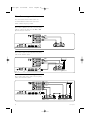
7.3.1 DVD player
Use a YPbPr cable and an audio L and R (cinch)
cable to connect the device to the AV1 or AV3
input at the back of the TV.
AV 3
Y
Pb
Pr
AV1/AV3
YPbPr
L
AUDIO
VIDEO
L AUDIO R
R
AV 2
VIDEO
S-VIDEO
Y
AV1/AV3
AUDIO L + R
L AUDIO R
Pb
Pr
AV 1
L
OUT
L
R
IN
R
MONITOR AUDIO
OUT
OUT
DIGITAL
AUDIO
ANALOG
AUDIO IN
HDMI 1
HDMI 2
HDMI 3
ANTENNA
DVD Player
7.3.2 DVD Recorder or Digital Receiver
Use a YPbPr cable and an audio L and R (cinch)
cable and 2 antenna cables.
AV 3
Y
Pb
AV1/AV3
YPbPr
Pr
L
AUDIO
VIDEO
L AUDIO R
R
AV1/AV3
AUDIO L + R
AV 2
VIDEO
S-VIDEO
Y
L AUDIO R
Pb
Pr
OUT
AV 1
IN
L
R
MONITOR AUDIO
OUT
OUT
OUT
IN
DIGITAL
AUDIO
L
R
ANALOG
AUDIO IN
HDMI 1
HDMI 2
HDMI 3
ANTENNA
DVD recorder / Digital receiver
7.3.3 DVD Recorder and Digital Receiver
Use 3 YPbPr cables and 2 audio L and R (cinch)
cables and 3 antenna cables.
AV 3
Y
Pb
Pr
AV3 : YPbPr
L
AUDIO
VIDEO
L AUDIO R
AV3 : AUDIO L + R
L AUDIO R
AV1 : YPbPr
R
AV 2
VIDEO
S-VIDEO
Y
Pb
Pr
AV1 : AUDIO L/R
AV 1
L
OUT
L
R
IN
R
MONITOR AUDIO
OUT
OUT
DIGITAL
AUDIO
ANALOG
AUDIO IN
HDMI 1
HDMI 2
HDMI 3
ANTENNA
OUT
DVD Recorder
30
IN
OUT
IN
Receiver / Cable box
Connections
2669.3.qxd
15-10-2007
10:26
Pagina 31
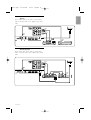
DVD Recorder and Home Theatre
System
Use a YPbPr cable and an audio L and R (cinch)
cable, 2 antenna cables and 1 digital audio (cinch)
cable.
AV 3
Y
Pb
ENGLISH
7.3.4
Pr
L
AUDIO
VIDEO
AV1/AV3
YPbPr
L AUDIO R
R
AV 2
VIDEO
S-VIDEO
DIGITAL
AUDIO
OUT
L
OUT
L
IN
R
DIGITAL
AUDIO
L AUDIO R
Pb
AV1/AV3
AUDIO L/R
Pr
AV 1
R
MONITOR AUDIO
OUT
OUT
Y
ANALOG
AUDIO IN
HDMI 1
HDMI 2
HDMI 3
ANTENNA
OUT IN
DVD Recorder
DIGITAL
AUDIO
IN
Home Theatre System
7.3.5
DVD Recorder and DVD Home
Theatre System
Use 2 YPbPr cables and 2 audio L and R (cinch)
cables, 2 antenna cables and 1 digital audio (cinch)
cable.
AV 3
Y
Pb
Pr
L
AUDIO
VIDEO
L AUDIO R
R
AV1/AV3
YPbPr
AV 2
VIDEO
S-VIDEO
DIGITAL
AUDIO
OUT
L
OUT
L
IN
R
DIGITAL
AUDIO
L AUDIO R
Pb
Pr
AV1/AV3
AUDIO
L/R
AV 1
R
MONITOR AUDIO
OUT
OUT
Y
ANALOG
AUDIO IN
HDMI 1
HDMI 2
HDMI 3
ANTENNA
DIGITAL
AUDIO
IN
DVD Recorder
Home Theatre System
OUT IN
Connections
31
2669.3.qxd
15-10-2007
10:26
Pagina 32
7.3.6 Satellite receiver
Use a YPbPr cable and and audio L and R (cinch)
cable and 2 antenna cables.
AV 3
Y
Pb
Pr
AV1/AV3
YPbPr
L
AUDIO
VIDEO
L AUDIO R
R
AV 2
VIDEO
S-VIDEO
AV1/AV3
AUDIO L + R
L AUDIO R
Y
Pb
Pr
AV 1
L
OUT
L
R
IN
R
MONITOR AUDIO
OUT
OUT
DIGITAL
AUDIO
ANALOG
AUDIO IN
HDMI 1
HDMI 2
HDMI 3
ANTENNA
Satellite receiver
7.3.7
HD Digital receiver / HD satellite
receiver
Use a HDMI cable and 2 antenna cables.
AV 3
Y
Pb
Pr
L
AUDIO
VIDEO
L AUDIO R
R
AV 2
VIDEO
AUDIO
S-VIDEO
L AUDIO R
Y
Pb
Pr
OUT IN
AV 1
L
OUT
L
R
IN
R
HDMI
MONITOR AUDIO
OUT
OUT
DIGITAL
AUDIO
ANALOG
AUDIO IN
HDMI 1
HDMI 2
HDMI 3
ANTENNA
HD Digital receiver / HD Satellite receiver
7.3.8
DVD-R, Home Theatre System and
Digital receiver
Use 3 YPbPr cables and 3 audio L and R (cinch)
cables, 3 antenna cables and 1 digital audio (cinch)
cable.
AV3 : YPbPr
AV 3
Y
Pb
Pr
L
AUDIO
AV3 :
AUDIO
L/R
VIDEO
L AUDIO R
R
AV 2
VIDEO
S-VIDEO
DIGITAL
AUDIO
OUT
L
OUT
L
IN
R
DIGITAL
AUDIO
Pb
Pr
AV1 : AUDIO L/R
AV 1
R
MONITOR AUDIO
OUT
OUT
AV1 : YPbPr
L AUDIO R
Y
ANALOG
AUDIO IN
HDMI 1
HDMI 2
HDMI 3
ANTENNA
YPbPr
AUDIO L/R
DIGITAL
AUDIO
IN
OUT
DVD Recorder
Digital Receiver
IN
32
Home Theatre System
OUT IN
Connections
15-10-2007
10:26
Pagina 33
ENGLISH
2669.3.qxd
7.3.9 Blu-ray Disc player
Use a HDMI cable.
AV 3
Y
Pb
Pr
L
AUDIO
VIDEO
L AUDIO R
R
AV 2
VIDEO
S-VIDEO
Y
L AUDIO R
Pb
Pr
AV 1
L
R
MONITOR AUDIO
OUT
OUT
OUT
IN
DIGITAL
AUDIO
HDMI
L
R
ANALOG
AUDIO IN
HDMI 1
HDMI 2
HDMI 3
ANTENNA
Blu-ray Disc player
7.3.10 Game console
The most practical connection for a game console
is at the side of the TV. More qualitative
connections are at the back of the TV.
7.3.11 Camcorder
The most practical connection for a camcorder is at
the side of the TV. More qualitative connections are
at the back of the TV.
Connected at the side of the TV
Use the Video and Audio L/R (cinch) connectors.
Connected at the side of the TV
Use the Video and Audio L/R (cinch) connectors or
use the S-Video and Audio L/R connectors.
USB
USB
R
AUDIO
L
R
AUDIO
L
VIDEO
VIDEO
S-VIDEO
S-VIDEO
USB
R
AUDIO
L
VIDEO
S-VIDEO
Connected at the back of the TV
Use a HDMI or the YPbPr (AV1 or AV3) input for
HD quality.
Connections
Connected at the back of the TV
Use a HDMI or the YPbPr (AV1 or AV3) input for
HD quality.
33
2669.3.qxd
15-10-2007
10:26
Pagina 34
7.3.12 Personal Computer
The best connection for a PC is at the back of the
TV. A more practical connection, but only for
viewing photos and films from your PC, is the
connection at the side of the TV.
ç Caution
Before connecting the PC, set the PC monitor
refresh rate to 60Hz.
Connected at the back of the TV
Use the DVI connection of your PC to connect to
a HDMI connection of the TV. Use a HDMI to DVI
cable or a HDMI-to-DVI-adaptor.
Add an Audio L and R cable and connect it to
Audio L and R jacks of ANALOG AUDIO IN of the
TV.
ANALOG
AUDIO IN
HDMI
DVI
AUDIO
DVI
HDMI
OUT
AUDIO
OUT
In the Connections menu, link this AUDIO IN L/R to
the HDMI connector you are using.
See section 7.4 Connections setup.
Connected at the side of the TV
If your PC has no DVI connection, use the S-Video
and Audio L/R (cinch) connectors at the side of the
TV. This connection is only suited for applications
like Windows Media Center or similar.
à Tip
Change the TV picture format to Unscaled in the
Picture format menu for maximal picture sharpness.
See section 5.3.4.Widescreen picture format.
For supported PC monitor resolutions, see section
8 Technical data.
34
Connections
7.4
15-10-2007
10:26
Pagina 35
Connections setup
When all devices have been connected the TV
needs to know what connections you have made,
which device is connected to which connector.
7.4.1 Digital Audio In (if present)
If you use the Digital Audio In connection,
assign this connection, in the menu, to the device
from where the sound comes from.
‡ Press Menu on the remote control and select
TV menu > Installation > Connections > Digital
Audio In.
® Press navigation key right to enter the list.
Ò Press navigation key up or down to select the
connector used by the device.
Connections
DIGITAL AUDIO IN
...
AV 3
HDMI 1
HDMI 2
None
AV 1
AV 2
AV 3
HDMI 3
Side
HDMI 1
AUDIO IN L/R
HDMI 3
7.4.3 Naming your devices
Name the connected devices for easy selection and
best signal handling.
Assign the type of device (DVD, VCR, Game ...) to
the connector you use for that device.
‡ Press Menu on the remote control and select
TV menu > Installation > Connections > AV1.
® Press navigation key right to enter the list.
Ò Press navigation key up or down to select the
type of device.
† Press Menu to quit the menu.
Connections
AV 1
AV 1
None
DVD
AV 2
HDMI 1
Blu-ray
HDD/DVDR
HDMI 2
HD rec.
HDMI 3
Side
Game
...
...
AV 3
VCR
HDMI 2
DIGITAL AUDIO IN Side
7.4.2 Audio In L/R
If you use the Audio In L/R connection, assign this
connection, in the menu, to the device from where
the sound comes from.
‡ Press Menu on the remote control and select
TV menu > Installation > Connections > Audio
In L/R.
® Press navigation key right to enter the list.
Ò Press navigation key up or down to select the
connector used by the device.
Connections
AUDIO IN L/R
...
None
AV 3
HDMI 1
AV 3
HDMI 1
HDMI 2
HDMI 2
HDMI 3
Side
HDMI 3
AUDIO IN L/R
Connections
35
ENGLISH
2669.3.qxd
2669.3.qxd
15-10-2007
10:26
Pagina 36
8 Technical data
Picture / Display
• Display type: LCD HD W-XGA
• Panel resolution: 1366x768p
• Perfect Pixel HD picture enhancement
• 1080p 24/25/30/50/60Hz processing
Supported display resolutions
• Computer formats
Resolution
Refresh rate
640 x 480
60Hz
800 x 600
60Hz
1024 x 768
60Hz
1280 x 768
60Hz
1360 x 768
60Hz
1920 x 1080i
60Hz
1920 x 1080p 60Hz
• Video formats
Resolution
Refresh rate
480i
60Hz
480p
60Hz
576i
50Hz
576p
50Hz
720p
50Hz, 60Hz
1080i
50Hz, 60Hz
1080p
24Hz, 25Hz, 30Hz
1080p
50Hz, 60Hz
Tuner / Reception / Transmission
• Antenna input: 75ohm coaxial (IEC75)
• TV system: DVD COFDM 2K/8K
• Video playback: PAL BG; PAL I, PAL DK, NTSC M
• DVD
Dimensions and weights (approx.)
TV model
- width
- height
- depth
- weight
TV + stand
- width
- height
- depth
- weight
36
32PFL9432
804mm
546mm
115mm
14kg
Sound
• Sound system:
- Virtual Dolby Digital
- BBE
Multimedia
• Connection: USB
• Playback formats: MP3, LPCM, Slideshow (.alb)
JPEG
Remote control
• Type: RC4350
• Batteries: 2 Size AA- R6 type
Connectivity
• AV1: Audio L/R, CVBS in, YPbPr, S-Video
• AV2: Audio L/R, CVBS in
• AV3: YPbPr, Audio L/R in
• HDMI 1
• HDMI 2
• HDMI 3
• HDMI-control 1.3a
• Analog Audio L/R out - display synchronised
• Analog Audio L/R in
• Digital Audio in (coaxial-cinch-S/PDIF) (if present)
• Digital Audio out (coaxial-cinch-S/PDIF) display synchronised
• Monitor out
• Side: Audio L/R in, Video (CVBS) in, S-Video
Headphone out (stereo mini jack), USB
Power
• Mains power: AC 220-240V (±10%)
• Power and standby power consumption:
See technical specification on www.philips.com
• Ambient temperature: 5°C - 35°C
Specifications are subject to change without notice.
For more specification details of this product see
www.philips.com/support.
804mm
609mm
210mm
17kg
Technical data
9
15-10-2007
10:26
Pagina 37
Troubleshooting
Television and remote control
The TV does not switch on
• Verify the mains cord connection.
• Verify if the batteries of the remote control are
flat or weak. Verify their + / - orientation.
You can use the keys on the TV to switch the TV
on.
• Unplug the mains cord, wait for one minute and
plug in the mains again.
The TV does not react on the remote control
• Verify if the batteries of the remote control are
not empty or weak. Verify their + / - orientation.
• Clean the remote control and TV sensor lens.
• Use the side control keys to change some of the
basic settings of picture and sound.
‡ Press Volume - and + to adjust the volume.
® Press Program/Channel - and + to go through
the channels marked as favourites.
Ò Press Menu to show the main menu.
Press Program/Channel - and + to select and
adjust picture and sound menu items.
The red light on the TV blinks
• Unplug the mains cord for half a minute and
insert it again. Verify if there is enough space for
ventilation. Wait until the TV has cooled down.
When the TV does not restart to standby and
the blinking occurs again, call our Customer
Support Centre.
You forgot your code to unlock Child lock
• See section 5.6.3 Set code / Change code.
Wrong language in the TV menu ?
Follow these steps to change the language.
‡ Press Menu on the remote control.
® Press navigation key right.
Ò Use navigation key down to highlight the third
line.
† Press navigation key right three times.
º Press navigation key up or down to select your
language.
◊Press OK.
‹Press Menu to quit the menus.
Troubleshooting
TV channels
Some TV channels are gone
• Verify if the correct channel list is chosen.
• A channel could be uninstalled in the Rearrange
menu.
Picture
There is no picture
• Verify if the antenna is connected properly.
• Verify if the correct device is selected.
The sound is on, but there is no picture
• Verify the contrast or brightness setting in the
menu.
The TV picture is poor
• Verify if the antenna is connected properly.
• Loudspeakers, non-earthed audio devices, neon
lights, high buildings or mountains can influence
the picture quality. Try to improve the picture by
changing the antenna direction or place devices
away from the TV.
• Verify if the correct TV system is chosen in the
Manual installation menu.
• If only a certain channel is poor, try to fine tune
this channel in the Fine tune menu. See section
6.2.3.
The picture has poor colour
• Verify the colour settings in the Picture menu.
Select any of the Reset to standard settings in
the Reset to standard menu. See section 5.3.2.
• Verify the connections and cables of the
connected devices.
• Verify if the correct colour system (Automatic,
PAL, Secam, NTSC) has been selected in the TV
menu > Installation > Preferences > Colour.
The TV did not remember my settings when I
switch back on
• Verify if the TV is set to Home in the TV menu >
Installation > Preferences > Location menu.
The picture does not fit the screen, it is too big or
too small
• Select a more fitting picture format in the Picture
format menu.
See section 5.3.4 Widescreen picture format.
• Name your connected device in the Connections
menu to obtain the best signal handling.
See section 7.4.3 Naming your devices.
37
ENGLISH
2669.3.qxd
2669.3.qxd
15-10-2007
10:26
Pagina 38
The picture position on screen is not correct
• Some picture signals from some devices do not
fit the screen correctly. You can shift the picture
with the navigation key left, right or up, down
keys on the remote control. Check the signal
output of the device.
• The USB device may need specific driver
software. Unfortunately this software can not be
downloaded to your TV.
I can not see my files in the Multimedia menu.
• Not all audio and picture files are supported. See
section 8 Technical data.
Sound
Audio and picture files do not playback smoothly
• The transfer performance of the USB device
limits the transfer rate.
There is a picture but no sound
• Verify the volume is not set to 0.
• Verify the sound has not been muted with the
¬ key.
• Verify if all cables are connected properly.
• If no sound signal is detected, the TV
automatically switches off the sound.
This is proper operation and does not indicate
malfunction.
The sound is poor
• Verify if the sound is set to Stereo.
• Verify the Equalizer settings.
• Select any of the Reset to standards settings in
the Reset to standard menu. See section 5.3.2.
The sound comes from one speaker only
• Verify if the Balance is not set to extreme left or
right.
HDMI connections
Trouble with devices connected with HDMI
• The HDMI - HDCP procedure might take a few
seconds before the TV shows the picture from a
device.
• If the TV does not recognise the device and the
screen shows no picture, try switching from one
device to another and back again to restart the
HDCP procedure.
• If sound interruptions occur persistently, see the
user manual of the device to verify the output
settings. If that does not help, connect an
additional audio cable.
• If an HDMI-to-DVI adaptor is used, verify if an
additional audio connection is in place to
complete the DVI connection.
Personal computer
The PC display on my TV is not stable or is not
synchronised
• Verify if the correct resolution mode is selected
on your PC. See section 8 Technical data.
If your problem is not solved
Switch your TV off and on again. If the problem is
not solved, call the Customer Support Centre or
consult our website www.philips.com/support.
See the Customer Support Centre telephone
numbers on the last page of this user manual.
Please, have the TV Model and Product Number
ready before you call.
You can find these numbers on the packaging label
or on the typelabel on the back and bottom of the
TV.
) Warning
Never try to repair the TV yourself.
USB connection
The TV does not show the USB device content
• Set your device (camera) to ‘Mass Storage Class’
compliant.
38
Troubleshooting
2669.3.qxd
15-10-2007
10:26
Pagina 39
A
Active Control 14
Antenna
cable 6
connect 6
with devices 27
Auto format 15
Automatic installation 24
Auto surround 16
Automatic Volume Leveler 16
AV1, AV2, AV3 27
B
Balance
sound 15
Batteries 3,6
Blacklevel 14
Blu-ray 27,30,32
Brightness 14
C
Cable
HDMI 28
YPbPr 28
S-Video 29
Video 29
Camcorder 35
Camera (photo) 35
Care of the screen 3
Change code 18
Channel
all channels list 17
favourite list 17
installation 24
lock 18
management 25
previous 10
rearrange 25
store / install 25
Child lock 18
Clock 13
Code 18
Colour enhancement 14
Colour
menu 14
keys 4,10
Connection
best 28
overview 27
ENGLISH
10 Index
Contrast 14
Custom lock 19
Custom tint 14
D
Delta volume 16
Device
connecting 28
naming 35
watch 7
Digital
audio out 27
receiver 30
Dual I/II 16
Dual screen 10
DVD
connect 30
playback 7
player 30
recorder 30
Dynamic contrast 14
E
Equalizer 15
F
Factory settings 26
Favourite channel lists 17
Fine tune 25
I
Installation
automatic 24
manual 24
menu 24
K
Kensington Security Slot 5
Key(s)
colour 10
on TV 4
on remote control 4,10
L
Language
menu 24
Light sensor 14
Location 27
Locks 20
M
Mains cord 7
Manual installation 27
Menu key 11
Mono 16
Movie expand 15
MPEG artefact reduction 14
Music 21
Mute key 10
N
G
Game console 33
Naming devices 33
Noise reduction 14
H
O
HDCP 28
HDMI
connection 27
HD digital receiver 32
HD Natural Motion 14
Headphone
connect 4,27
volume 16
Home
location 37
Home theatre system 31
Hue 14
OK key 10
On timer 18
P
Personal Computer
connect 33
display resolutions 36
Photo viewer 21
Picture
format 14
menu 14
Perfect Pixel HD 14
Position the TV 5
Power 7
Programme up/down 10
set up 28,33
Index
39
2669.3.qxd
15-10-2007
10:26
Pagina 40
Q
U
Quick access menu 13
Unscaled 15
USB
connector 27
device 20
photo viewer 20
R
Rearrange channels 25
Recorder 30
Recycling 3
Remote control
batteries 7
overview 10
Rename 25
Reorder 25
Reset to standards 13
S
Safety 3
Satellite receiver 32
Screen cleaning 3
Search
channels 24
teletext pages 16
Set code 18
Settings assistant 13
Sharpness 14
Sleeptimer 18
Software update 22
Sound
menu 15
surround mode 16
Standby 18
Stationary images 3
Stereo 16
Subtitles 19
shift 15
Super zoom 15
Switch on 7
V
VCR
connect 30
Video cable 29
Video formats 36
Volume
key 10
menu 15
W
Whitepoint 14
Widescreen picture format 15
Y
YPbPr 28
T
Technical data 36
Teletext 17
teletext 2.5 17
dual screen 16
menu 17
Teletext page 16
Timers 18
Tint 14
Troubleshooting 37
TV settings menu 13
40
Chapter indication
Index