1
English
This section describes how you can route the
sound from other devices to this Digital AV
Receiver unit in order to enjoy sound output or
audio play with multi-channel surround
capabilities.
Connect audio from DVD player/
cable box/recorder/game console
You can choose to connect to analogue or
digital socket depending on the device
capabilities.
Connect
Connect other devices
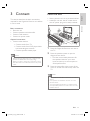
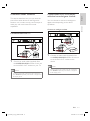
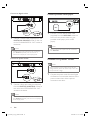
Connect to analogue sockets
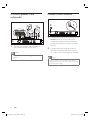
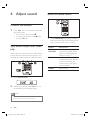
Connect audio from TV
AUX 2
AUX 1
1
1
Connect an audio cable (supplied) from
the AUDIO IN-AUX1 sockets on this unit
to the AUDIO OUT sockets on your TV.
Note
• To listen to the audio output from this connection,
Connect an audio cable (supplied) from
the AUDIO IN-AUX2 sockets on this unit
to the AUDIO OUT sockets on the
device.
Note
• To listen to the audio output from this connection,
press DI/AUX repeatedly until ‘AUX2’ is displayed
on the display panel.
press DI/AUX repeatedly until ‘AUX1’ is displayed on
the display panel.
EN
1_htr3465_98_eng3_final815.indd 13
13
2008-04-10 5:32:18 PM