1
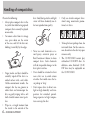
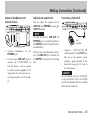
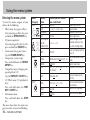
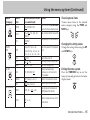
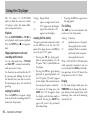
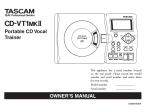
» CD-BT1 @# Portable CD Bass Guitar Trainer This appliance has a serial number located on the rear panel. Please record the model number and serial number and retain them for your records. Model number _____________ Serial number _____________ OWNER’S MANUAL D00851300A Important Safety Precautions Y CAUTION: TO REDUCE THE RISK OF ELECTRIC SHOCK, DO NOT REMOVE COVER (OR BACK). NO USER-SERVICABLE PARTS INSIDE. REFER SERVICING TO QUALIFIED SERVICE PERSONNEL. E The lightning flash with arrowhead symbol, within an equilateral trinagle, is intended to alert the user to the presence of uninsulated “dangerous voltage” within the product’s enclosure that may be of sufficient magnitude to constitute a risk of electric shock to persons. R WARNING: TO PREVENT FIRE OR SHOCK HAZARD, DO NOT EXPOSE THIS APPLIANCE TO RAIN OR MOISTURE. FOR U.S.A. TO THE USER This equipment has been tested and found to comply with the limits for a Class B digital device, pursuant to Part 15 of the FCC Rules. These limits are designed to provide reasonable protection against harmful interference when the equipment is operated in a commercial environment. This equipment generates, uses, and can radiate radio frequency energy and, if not installed and used in accordance with the instruction manual, may cause harmful interference to radio communications.. However, there is no guarantee that interference will not occur in a particular installation. If this equipment does cause harmful interference to radio or television reception, which can be determined by turning the equipment off and on, the user is encouraged to try to correct the interference by one or more of the following countermeasures. a) Reorient or relocate the receiving antenna b) Increase the separation between the equipment and receiver. c) Connect the equipment into an outlet on a circuit other from that to which the receiver is connected. d) Consult the dealer or an experienced radio/ TV technician for help. CAUTION Changes or modifications to this equipment not expressly approved by TEAC CORPORATION for compliance could void the user’s authority to operate this equipment. 2 — TASCAM CD-BT1MKII Important Safety Instructions 1 Read these instructions. 2 Keep these instructions. 3 Heed all warnings. 4 Follow all instructions. 5 Do not use this apparatus near water. 6 Clean only with dry cloth. 7 Do not block any ventilation openings. Install in accordance with the manufacturer’s instructions. 8 Do not install near any heat sources such as radiators, heat registers, stoves, or other apparatus (including amplifiers) that produce heat. 9 Do not defeat the safety purpose of the polarized or grounding-type plug. A polarized plug has two blades with one wider than the other. A grounding type plug has two blades and a third grounding prong. The wide blade or the third prong are provided for your safety. If the provided plug does not fit into your outlet, consult an electrician for replacement of the obsolete outlet. 10 Protect the power cord from being walked on or pinched particularly at plugs, convenience receptacles, and the point where they exit from the apparatus. 11 Only use attachments/accessories specified by the manufacturer. 12 Use only with the cart, stand, tripod, bracket, or table specified by the manufacturer, or sold with the apparatus. When a cart is used, use caution when moving the cart/apparatus combination to avoid injury from tip-over. 13 Unplug this apparatus during lightning storms or when unused for long periods of time. 14 Refer all servicing to qualified service personnel. Servicing is required when the apparatus has been damaged in any way, such as power-supply cord or plug is damaged, liquid has been spilled or objects have fallen into the apparatus, the apparatus has been exposed to rain or moisture, does not operate normally, or has been dropped. • Do not expose this apparatus to drips or splashes. • Do not place any objects filled with liquids, such as vases, on the apparatus. • Do not install this apparatus in a confined space such as a book case or similar unit. • The apparatus draws nominal non-operating power from the AC outlet with its POWER switch in the off position. TASCAM CD-BT1MKII — 3 Important Safety Instructions Safety Information This product has been designed and manufactured according to FDA regulations “title 21, CFR, chapter1, subchapter J, based on the Radiation Control for Health and Safety Act of 1968”, and is classified as a class 1 laser product. There is no hazardous invisible laser radiation during operation because invisible laser radiation emitted inside of this product is completely confined in the protective housings. The label required in this regulation is shown here. CAUTION • DO NOT REMOVE THE PROTECTIVE HOUSING USING A SCREWDRIVER. • USE OF CONTROLS OR ADJUSTMENTS OR PERFORMANCE OF PROCEDURES OTHER THAN THOSE SPECIFIED HEREIN MAY RESULT IN HAZARDOUS RADIATION EXPOSURE. • IF THIS PRODUCT DEVELOPS TROUBLE, CONTACT YOUR NEAREST QUALIFIED SERVICE PERSONNEL, AND DO NOT USE THE PRODUCT IN ITS DAMAGED STATE. Optical pickup: Type KSM-900AAA Manufacturer: SONY CORPORATION Laser output: <1 mW play on the objective lens Wavelength: 775—816 nm 4 — TASCAM CD-BT1MKII Table of contents Handling of compact discs ....................................................6 About the power supply ........................................................7 Part names and functions ......................................................9 Making connections ............................................................12 Using the menu system .......................................................14 Using the CD player .............................................................16 Pitch and tempo changes ....................................................17 Using CD effects ..................................................................18 Using built-in effects ...........................................................19 Equalizer ..............................................................................21 Using the metronome ..........................................................22 Using the tuner ....................................................................23 Changing your preferences for the CD-BT1MKII .................24 Facts and figures (specifications) ........................................25 About this Manual: When we refer to a key or connector or control on the CD-BT1MKII, the typeface looks like this: PLAY. When we refer to items shown on the display, the typeface looks like this: MENU. TASCAM CD-BT1MKII — 5 Handling of compact discs disc. Small dust particles and light stains will have absolutely no effect on reproduction quality. Observe the following: Always place compact discs in the tray with their label facing upward (compact discs can only be played on one side). To remove a disc from its storage case, press down on the center of the case, and lift the disc out, holding it carefully by the edges. Finger marks and dust should be carefully wiped off the disc’s recorded surface with a soft cloth. Unlike conventional records, the compact disc has no grooves to collect dust and microscopic debris, so gently wiping with a soft cloth should remove most particles. Wipe in a straight motion from the inside to the outside of the 6 — TASCAM CD-BT1MKII Never use such chemicals as record sprays, antistatic sprays or fluid, benzine or thinner to clean compact discs. Such chemicals will do irreparable damage to the disc’s plastic surface. Discs should be returned to their cases after use to avoid serious scratches that could cause the laser pickup to “skip”. Don’t expose discs to direct sunlight or high humidity and temperature for extended periods. Long exposure to high temperature can warp the disc. Only use circular compact discs. Avoid using noncircular promotional, etc. discs. To keep the laser pickups clean, do not touch them. For the same reason, do not leave the disc tray open unnecessarily. The CD-BT1MKII cannot play unfinalized CD-R/RW discs. In addition, some finalized CD-R/ RW discs may be unplayable on the CD-BT1MKII. About the power supply Operation using batteries Remove the cover of the battery compartment at the back of the CDBT1MKII and insert four AA (SUM3) batteries (not supplied) following the + and – markings inside the battery compartment. CAUTION We strongly recommend the use of rechargeable Ni-MH batteries (alkaline batteries may also be used). Your CD-BT1MKII may not operate properly with batteries of other types. WARNING Misuse of batteries may cause leaks and explosions. Please carefully read and follow the instructions below: Notes on batteries When you are using the CDBT1MKII with batteries, unplug the AC adapter. Make sure the batteries are inserted in the correct direction, according to the markings inside the battery compartment. Always use batteries of the same type, and replace all batteries together. Do not attempt to recharge batteries that are not rechargeable. If you are not going to use the CD-BT1MKII for longer than one month, remove the batteries. Do not throw batteries into water or fire. Do not disassemble batteries. If a battery leaks in the compartment, wipe the liquid away completely with a disposable cloth. Make certain no residue remains before inserting new batteries. Remaining battery charge level display When the CD-BT1MKII is running on batteries, a rough indication of the remaining battery charge is displayed as as the battery symbol as follows: 3 parts are lit There is plenty of battery charge left. 2 parts are lit Battery charge is approximately half. 1 part is lit Not much battery charge is left. 3 parts blink Battery charge is nearly gone. Replace with fully charged batteries. Length of battery life Ni-MH batteries: Approx. 4.5 hours Alkaline batteries: Approx. 1.5 hours Auto power-save While using battery power, the CD player and CD functions of the CDBT1MKII shut down automatically if any of the following conditions lasts more than 5 minutes: (the CD part of the display shows CD OFF). (continued on the next page) TASCAM CD-BT1MKII — 7 About the power supply (Continued) To Being in Stop mode CD drive cover is open No CD is loaded turn the CD player on, press the PLAY key. CAUTION Because the CD-BT1MKII is equipped with special functions such as key change and effects, the battery life is shorter compared with standard portable CD players. The length of battery life in CD-BT1MKII is affected by both the environment and the number of functions in use. Factors that affect battery life include temperature, humidity, the number of special functions used, and so on. Under some circumstances, there may not be enough power in the batteries to power the CD-BT1MKII, despite the battery power indication on the display. If this happens, change the batteries, or use an AC adapter. Always dispose of used batteries as recommended by your local authorities. 8 — TASCAM CD-BT1MKII Operation using an AC adapter Connect a TASCAM PS-PS5 AC adapter (sold separately) to the DC IN jack at the back of the CD-BT1MKII. Insert the plug of the AC adapter into a domestic AC power outlet. Make sure that the voltage of the outlet corresponds to that marked on the adapter. PS-PS5 Wall outlet DC plug forgotten to take out the batteries, turn the power off using the POWER switch, and take out the batteries. Likewise, turn the power off before you change between using the batteries and using the AC adapter. Unplug the AC adapter from the domestic AC power outlet when you are not using the CD-BT1MKII. Settings may not be properly saved if you turn the power off immediately after inserting a CD or changing settings. If settings are not saved properly, the system may not start with the last settings and instead will start using the default values. Switching the unit on and off Use the POWER switch to turn the power to the whole unit on and off. WARNING Use only a PS-PS5 AC adapter with your CDBT1MKII. Using another type of AC adapter may damage your CD-BT1MKII. N Remove the batteries before operating the CD-BT1MKII with an AC adapter. There is a possibility of slight noise if you use the unit with an AC adapter while the batteries are inside. If you plug in an AC adapter but have Part names and functions When there are two different words above and below the same key (e.g. TUNER and SETUP), you use the key like this: To activate the function written above the key: Tap the key once To activate the function written below the key: Press and hold down the key For example, in the case of the TUNER/ SETUP key, the Tuner menu is activated when you tap the key lightly, and if you press and hold it down the key activates the Setup menu. TASCAM CD-BT1MKII — 9 Part names and functions (Continued) 1) DC IN Jack 2) Battery Compartment modify the setting values while in menu mode (See Using the menu system). You can also set the functions of the UP and DOWN keys in the home display mode (See Changing your preferences). Remove the battery compartment cover at the back of the CD-BT1MKII in order to insert 4 AA (SUM-3) batteries. Use this key to start the repeat (loop) mode. Use this jack to connect the DC plug of a TASCAM PS-PS5 AC adapter (sold separately). 7) LOOP Key 3) CD Drive Cover 8) I/O Key To open, pull up the unlocking lever. Push down the cover and it will latch automatically. Use this key to set the “IN point” and “OUT point” of the section of music that you want repeated (See Using the CD player). 4) Display The CD-BT1MKII status is seen here. 5) TIME/ESC Key Use this key in the home display mode to change the way CD and track time is displayed. Use this key when you are in a menu mode in order to escape and return to the home display mode. 6) PREV, NEXT, UP, DOWN Keys Use these keys to select menu items or 10 — TASCAM CD-BT1MKII 9) TUNER/SETUP Key Use this key to enter the Tuner menu and the Setup menu (See Using the menu system). 10) TMP/KEY / CD EFF Key Use this key to enter the Tempo/Key menu and the CD Effect menu (See Using the menu system). 11) EQ/EDIT Key Use this key to switch the EQ between A, B and OFF (See Equalizer). Press and hold this key down to go to the EQ menu (See Using the menu system). 12) EFFECT/EDIT Key Use this key to move consecutively between effects slots (See Using built-in effects). Press and hold this key down to go to the Effect menu (See Using the menu system). 13) Track Skip/Search Keys [m/.�/\,] Track Skip: Use these keys to skip to the previous track or the next track. Press these keys while playing a CD to skip to the previous track or the next track. Pressing these keys while the CD is not playing allows you to choose the track you want to start. (To play, press the PLAY key.) Search: Fast forward/Fast rewind Keep one of these keys pressed down while playing a CD to fast Part names and functions (Continued) forward or fast rewind. The speed of the search increases if you continue to hold either of these keys pressed down. 14) STOP/MTRO Key [H] Press this key to stop playback. Pressing and holding this key down activates the metronome menu (See Using the metronome). 15) PLAY/PAUSE Key [G/J] Use this key to start playing a CD. While a CD is playing, you can pause playback by pressing this key. Press again to resume playing. 16) CUE Key Use this key to return to the cue point (the point where playback last started). Use the Setup menu to choose a mode that the CUE key can perform (See Changing your preferences). 17) PHONES Jack Connect your headphones here. 18) LINE OUT Jack Use this port to connect the CD- BT1MKII to devices such as speakers with a built-in amplifier, a stereo system AUX input jack, a cassette tape recorder, or a CD recorder. You can hear the results of the effects and key changes through devices connected here. 19) OUTPUT Control 22) BASS IN Jack Connect a bass guitar to this jack. Set the BASS IN switch (see 26) according to the type of bass guitar you are using, whether passive or active. 23) FOOT Jack Use this control to adjust the output level of the PHONES jack and the LINE OUT jack. This control adjusts the level of the two jacks together (the two jack levels cannot be adjusted separately). Connect a standard footswitch to this jack, such as the recommended TASCAM RC-30P (sold separately). You can choose from variety of functions to use with a footswitch. (See Changing your preferences). 20) INPUT Control 24) POWER Switch Use this control to change the input level of the BASS IN jack. This switch turns the power to the whole unit on and off. 21) LINE IN Jack 25) CD EFF Switch Use this stereo jack to connect external devices such as a synthesizer, guitar preamplifier, cassette tape recorder, rack-mount effects unit, etc., to the CD-BT1MKII. This jack has no level control, so you must adjust the output level at the source device. This switch turns CD effects on and off. 26) BASS IN Switch (PASSIVE/ ACTIVE) You can use both passive and active bass guitars with CD-BT1MKII. Set this switch according to whether your bass guitar is passive or active. TASCAM CD-BT1MKII — 11 Making connections Connecting a bass guitar (BASS IN) BASS GUITAR Connect a bass guitar to the BASS IN jack. Set the BASS IN switch to either PASSIVE or ACTIVE at the side of the unit according to the type of your bass guitar. The BASS IN jack of the CDBT1MKII accepts unbalanced input signals. Use a ¼ inch mono phone plug. Adjusting the input level Use the INPUT control to adjust the level of the input signal from the BASS IN jack. 12 — TASCAM CD-BT1MKII Inputting signals from external devices (LINE IN) Adjusting the output level after adding built-in effects Press and hold down the EFFECT/ EDIT key to open the Effect menu, and press the NEXT or PREV key to choose LVL and use the UP and DOWN keys to set the output level between 0 and 64. The LINE IN jack accepts a stereo mini-jack plug (3.5mm). The input level at the LINE IN jack cannot be adjusted on the CDBT1MKII, so adjust the output level on the external device you have connected. LINE OUT OF EXTERNAL DEVICE WARNING NEVER connect a bass guitar amplifier to the CD-BT1MKII’s BASS IN jack, as you will damage your equipment if you do this. Adjusting mix balance between bass guitar and CD Press and hold down the TUNER/ SETUP key to open the Setup menu, and press either the NEXT or PREV key to choose MIX. You can set the mix balance using values between B (Bass) 10 – B1, 0, C (CD) 1 – C10. Making Connections (Continued) Output to headphones and external devices Adjusting the output level Connecting a footswitch You can adjust the output level of LINE OUT and PHONES by using the OUTPUT control. NOTE Connect headphones Use the stereo LINE OUT jack to connect the CD-BT1MKII to external devices, such as speakers with a built-in amplifier, AUX input jacks of a stereo system, cassette tape recorders, or CD recorders. PHONES jack. to the The levels from both the LINE OUT and PHONES jacks are controlled together by the OUTPUT control and cannot be adjusted independently. When you have a recording device connected to the LINE OUT jack, remember that the OUTPUT control affects the recording level. RC-30P FOOTSWITCH Connect a TASCAM RC-30P (sold separately) to the FOOT jack. You can set the polarity (pushto-make / push-to-break) of the footswitch using the POL item in the Setup menu. CAUTION To avoid problems with your CD-BT1MKII, use only a footswitch such as the TASCAM RC-30P (sold separately) that has a standard phone (tip and sleeve) plug. TASCAM CD-BT1MKII — 13 Using the menu system Entering the menu system To enter the menu category of your choice, do the following: Effect menu (bass guitar effects) After selecting an effect slot, press and hold the EFFECT/EDIT key EQ menu (equalizer) After selecting an EQ slot (A or B), press and hold the EQ/EDIT key Tuner menu (bass guitar tuner) Tap the TUNER/SETUP key Setup menu (system setup) Press and hold down the TUNER/ SETUP key Tempo/Key menu (changing tempo and pitch of CD) Tap the TMP/KEY / CD EFF key CD Effect menu (CD playback effects) Press and hold down the TMP/ KEY / CD EFF key Metronome menu Press and hold down the STOP key. The menu then shows the menu category you select, reversed and blinking. 14 — TASCAM CD-BT1MKII Menu Category EFFECT EQ TUNER SETUP Menu Item EFF LIB Parameter LVL EQ L/ EQLM/ EQ M/ EQMH/ EQ H Values (default values are underlined) ON/OFF 1 – 4, c1 – c7, d1 – d5 – 0 to 64 MID ON/OFF TUNE MODE=BAS: 5B, 4E, 3A, 2D, 1G MODE OSC CHR/BAS _ _ OFF, _C – _B, C – A, B, C – B, (3 octaves) CAL 435–440–445 MIX B10 – B1, 0, C1 – C10 PLAY ALL/SGL sets base frequency (A4, unit: Hz) sets mix balance between CD and input selects all or single play CUE CUE/FLS selects action of CUE -15 – 0 – +15 Notes turns effect on or off preset number depends on effect type effect output level adjusts the gain of the equalizer band (low, midlow, mid, mid-high, high) turns mid shaping function on or off sets string number in Bass Mode selects tuner mode sets pitch of the oscillator Using the menu system (Continued) Menu Category SETUP TEMPO KEY Menu Item Values (default values are underlined) UPDN MIX, TMP, KEY, FIN FOOT EQ+, FX+, FX-, CUE. FLS, REW, FF POL NOR/INV sets function of UP/DOWN key in the home display mode sets function of the footswitch VSA KEY FINE BEE OFF, BST, ENH, CUT MONO OFF (stereo), L+R, L, R turns VSA on or off sets key control in semitones sets fine tuning (cent) selects between boost, enhance, or cut function for CD playback selects mono monitor mode SPLT OFF (mix), C-B, B-C selects split monitor mode MTRO (OFF), 40 – 120 – 220 sets tempo of metronome in BPM (Beats Per Minute) BEAT OFF, 2 – 6 selects number of beats of the metronome TMP Choosing menu items Choose menu items in the selected menu category using the PREV and NEXT keys. sets polarity of the footswitch VSA=OFF: -50 to +16 VSA=ON: -50, -32, -16,-12, -8, -4, 0, +4, +8, +12, +16 ON/OFF I6 – 0 – O6 -50 – 0 – +50 CD EFF METRONOME Notes sets the speed of CD playback in % Changing the setting values Change the setting values using the UP and DOWN keys. Exiting the menu system Press the TIME/ESC key to exit the menu system and go back to the home display mode. TASCAM CD-BT1MKII — 15 Using the CD player The CD player in CD-BT1MKII works in much the same way as other CD players, with a few minor differences and special features. Playback Press the PLAY/PAUSE key (G/J) to start playback and to pause playback. Press the STOP key (H) to stop playback. Skipping between tracks and searching within tracks Use the skip/search keys (m/.� and //,) to move back and forward one track at a time. Use these keys to search within the CD by pressing and holding the key for the direction that you want to search. By continuing to press, the search will speed up. Looping (track/disc) Press the LOOP key to repeat a single track, or all tracks, according to the PLAY item in the Setup menu. 16 — TASCAM CD-BT1MKII Setting SGL ALL Repeat Mode repeats a single current track. LOOP 1 appears on the display. repeats the whole disc. LOOP appears on the display. Looping (In/Out points) To repeat a particular section of a track, use the I/O key to set the start (IN) point of the loop, then use the I/O key to set the end (OUT) point. Pressing the I/O key during playback or paused playback sets the IN point. The I-O symbol blinks on the display. Pressing the I/O key again during playback or paused playback sets the OUT point. LOOP and I-O appear on the display. The section between the two points repeats seamlessly. To cancel an I/O loop, press the LOOP key. LOOP disappears from the display and the loop mode is canceled. Pressing the LOOP key again will restart the previously determined loop. Pressing the I/O key again clears the loop points. The CUE key The CUE key has two functions that can be set in the Setup menu: Setting Function CUE playback pauses at the point where playback last started. FLS playback “flashes” automatically back to the last pointwhere playback started. With a TASCAM RC-30P footswitch (sold separately) connected, you can use it instead of the CUE key for handsfree operation. Set the FOOT item in the Setup menu to CUE or FLS (flash). Display In the home display mode press the TIME/ESC key to change the time display between track elapsed time, track remaining time, and total remaining time of the CD. Pitch and tempo changes There are four ways to change the way a CD is played back, using menu items in the Tempo Key menu: Tempo control (TMP), VSA (Variable Speed Audition) setup (VSA), Key control (KEY), and Fine tuning (FINE) Tempo control Tempo control allows you to change the tempo of a track. Tap the TMP/KEY / CD EFF key to enter the Tempo Key menu, and select TMP by pressing either the PREV or NEXT key. TEMPO blinks on the display. When VSA is ON (see below), the settings you can choose are: -50, -32, -16, -12, -8, -4, 0 (off), +4, +8, +12, and +16%. Press the UP or DOWN keys to set the value. When VSA is OFF you can change the setting between –50 and +16% in 1% steps. Press either the UP or DOWN key to set the tempo.When the tempo is set to a value other than zero, TEMPO shows in the home display mode. VSA When VSA is ON, you can change the tempo without changing the key. Tap the TMP/KEY / CD EFF key to enter the Tempo Key menu, select VSA by pressing either the PREV or NEXT key. Press either the UP or DOWN key to choose either ON or OFF. TEMPO blinks on the display. When the VSA is set to ON, the letters VSA are shown in the display. NOTE If the tempo control value is not set to 0 and you change VSA from OFF to ON, the tempo value will be automatically reset to a “VSA ON value.” For example, if the value is [-33] when VSA is OFF, it will automatically be adjusted to [-50] when you turn VSA ON. Key control Key control changes the key of the music up or down by six semitones. Tap the TMP/KEY / CD EFF key to enter the Tempo Key menu, and select KEY by pressing either the PREV or NEXT key. KEY blinks on the display. Press either the UP or DOWN key to set the value for the key. The range is ± 6 semitones (I6 – 0 (off) – O6). When the key is set to a value other than zero, KEY shows in the home display mode. Fine tuning Fine tuning changes the key of the music by cents (100 cents = 1 semitone). This allows you to make fine adjustments and allow for slight tuning differences between your instruments and the CD. Tap the TMP/KEY / CD EFF key to enter the Tempo Key menu, and select FINE by pressing either the PREV or NEXT key. KEY blinks on the display. Press either the UP or DOWN key to set the fine tuning value. The range for adjustment is ±50 cents (-50 – 0 (off) – +50). If the key control is set to O6, however, the available range of fine tuning is between -50 – 0, and when it is set to I6, the fine tuning range is between 0 – +50. When the fine tuning is set to a value other than zero, KEY shows in the home display mode. (continued on the next page) TASCAM CD-BT1MKII — 17 Using CD effects (continued from the previous page) CAUTION If you set the key control to O6 while the fine tuning value is greater than 0, the fine tuning value is automatically reset to 0. Similarly, if you set the key control to I6 while the fine tuning value is less than 0, the fine tuning value is automatically reset to 0. Also note that when key control or VSA is ON, you may find that the music played back has a “vibrato” feel. This is not a fault of the CD player – it is a natural result of the special effects. Using CD effects Turning CD effects on and off Pressing the CD EFF switch at the side of the CD-BT1MKII turns on the preset CD effects: guitar cancel, mono monitor, split monitor. These three CD effect components can be used simultaneously. The CD EFF symbol is shown on the display. Press the CD EFF switch again to turn off the CD effects. BEE (Bass Enhancement Effect) BEE reduces or enhances the bass component of the CD playback. 18 — TASCAM CD-BT1MKII Press and hold the TMP/KEY / CD EFF key to enter the CD Effect menu. Press either the PREV or NEXT key to choose BEE. Press either the UP or DOWN key to select from the choices listed below: OFF: normal playback (the sound is not affected in any way) BST: the bass component of the sound will be boosted ENH: the bass component of the sound will be boosted and the definition of the bass part of the music will be enhanced CUT: bass component of the sound will be cut out Mono monitor Setting the monitor mode allows you to control the output signal between mono and stereo with alternate options for both. Press and hold the TMP/KEY / CD EFF key to enter the CD Effect menu, and select MONO by pressing either the PREV or NEXT key. Press either the UP or DOWN key to select from the following: L+R: outputs a mono signal, mixing the L (left) and R (right) channels. L: outputs the L channel signal only. R: outputs the R channel signal only. OFF: outputs normal stereo signal. Split monitor Setting the split monitor mode allows you to split the CD output and the bass guitar into left and right outputs. Press and hold the TMP/KEY / CD EFF key to enter the CD Effect menu, and select SPLT by pressing either the PREV or NEXT key. Press the UP or DOWN key to select from the following: C-B: outputs the sound of the CD from the left, and the sound of the bass guitar from the right. B-C: outputs the sound of the bass guitar from the left, and the CD sound from the right. OFF: outputs stereo mixed sound of CD and bass guitar from left and right. Using built-in effects CD-BT1MKII has five effect slots, numbered from 1 through 5, where you can store your own effect settings that you create from the 16 available preset effects. When an effect slot is selected, if a preset effect is recalled and edited, the edited effect is automatically stored in the selected effect slot. Components DLY FLA CHO WAH COMPL COMPH OCT TECH DIST HCUT Delay setting Flanger setting Chorus setting Auto-wah setting Low compressor High compressor Octave setting Techno filter setting Distortion gain High cut filter Storing your own effect settings in an effect slot 1. The display shows the effect slot numbers 1 through 5 in the upper right corner. Press the EFFECT/ EDIT key to select a slot. Each time you press the EFFECT/EDIT key, the selection indicator (black dot) moves between the slot numbers. 2. Press and hold the EFFECT/EDIT key to open the Effect menu. The word Effect blinks on the display. gether (such as LIB:d3), which represents a set of effect presets. 6. As you scroll through the effect presets using either the UP or DOWN key, the effect presets appear in this order: numbers 1– 4, compressor c1– c7, distortion d1– d5. Press either the UP or DOWN key to select a library preset effect number. TIP See the Effect Library chart to determine the content of a selected library number. CAUTION 3. Select EFF by pressing either the PREV or NEXT key. 4. Press either the UP or DOWN key to turn EFF ON. 5. Select LIB (effect preset library) by pressing either the PREV or NEXT key. The CD-BT1MKII display shows the effect presets as a number, or a letter and a number to- If there are any settings in the selected effect slot to start with, you will overwrite them when you recall a preset effect. 7. Press either the PREV or NEXT key to move between the components of the effect preset. For example, if you choose “compressor 5,“ the display shows LIB:c5. The components displayed are COMPL, COMPH, WAH, DLY. All four compo(continued on the next page) TASCAM CD-BT1MKII — 19 Using built-in effects (Continued) (continued from the previous page) nents can be adjusted by pressing either the UP or DOWN key. Components shown in bold in the Effect Library Chart are mixable. In the example of “compressor 5,“ the WAH and DLY components are followed by their own mix parameters in the display, with MIX1 following WAH and MIX2 following DLY. Use either the UP and DOWN keys to mix the WAH and DLY components in this effect. DLY is always mixed using MIX2. 8. Continue selecting the components to edit by pressing either the PREV or NEXT key. Select values for the components by pressing either the UP or DOWN key. 9. The last parameter of the sequence for each library effect preset is LVL (the output level from the effect unit). Set the output level from 0 to 64 by pressing either the UP or DOWN key. Note that the output 20 — TASCAM CD-BT1MKII level is only available when the effect is turned on and is bypassed when the effect is off. 10. Press the TIME/ESC key to exit the effect settings. The effect settings you have made are automatically stored in the effect slot you first chose in steps 1 and 2. Adjusting the mix You can adjust the mix level of the effects of the components shown in bold in the Effect Library Chart. In MIX1 mode the components FLA, CHO, WAH, OCT and TECH can be mixed. In MIX2 mode the component DLY can be mixed. Recalling an effect with your settings When you have stored the effect settings in an effect slot as described above, you can recall them simply by pressing the EFFECT/EDIT key to select the appropriate effect slot. TIP If you have connected a footswitch such as TASCAM RC-30P (sold separately), you can step through the bank slots by pressing the footswitch. Make sure that FOOT in the Setup menu is set to either FX+ or FX-. 1 2 3 4 c1 c2 c3 c4 c5 c6 c7 d1 d2 d3 d4 d5 EFFECT LIBRARY CHART DLY FLA-DLY CHO-DLY WAH-DLY COMPL-COMPH COMPL-COMPH-DLY COMPL-COMPH-FLA-DLY COMPL-COMPH-CHO-DLY COMPL-COMPH-WAH-DLY COMPL-COMPH-OCT-DLY COMPL-COMPH-TECH-DLY DIST-HCUT DIST-HCUT-DLY DIST-HCUT-FLA-DLY DIST-HCUT-CHO-DLY DIST-HCUT-WAH-DLY Equalizer The CD-BT1MKII has a 5-band equalizer for bass guitar input and two EQ slots (A and B) for the equalizer. After an EQ slot is selected and you edit the equalizer settings, the edited EQ settings will automatically be stored in the selected EQ slot. Setting the equalizer 1. Tap the EQ/EDIT key to select either EQ slot A or B (pressing the EQ/EDIT key cycles through EQ slot A, B, and OFF). 2. Press and hold the EQ/EDIT key to enter the EQ menu. 3. Select a parameter from the choices below by pressing either the PREV or NEXT key: EQ L EQLM EQ M EQHM EQ H MID (Lo : 80 Hz) (Lo-Mid : 200 Hz) (Mid : 500 Hz) (Hi-Mid : 1.25 kHz) (Treble : 3.15 kHz) Mid Shape (EQ adjust ment) ON/OFF 4. When the selected parameter appears on the display, use either the UP or DOWN key to adjust the level of gain. The available range of values for adjustment is between -15 – +15. 5. Press the TIME/ESC key to exit the EQ menu and return to the home display mode. The parameters set in the EQ menu are automatically saved in the EQ slot selected in step 1. Recalling equalizer settings Press the EQ/EDIT key to select the EQ slot you want to recall. TIP If you have connected a footswitch such as TASCAM RC-30P (sold separately), you can step through the bank slots by pressing the footswitch. Make sure that FOOT in the Setup menu is set to EQ+. TASCAM CD-BT1MKII — 21 Using the metronome The CD-BT1MKII has a built-in metronome. To use the metronome, press and hold the STOP key to open the Metronome menu. Choosing the metronome tempo 1. Press either the PREV or NEXT key to select MTRO. 2. When the menu is first opened, the metronome sound is off. The metronome will begin generating the sound of beats at the previously set tempo when you press either the UP key or the DOWN key to set the tempo. Press once to change by one beat per minute; press and hold either the UP or DOWN key to fast forward or backward through the tempos. You can set the value between 40 and 220 BPM (beats per minute) and you will hear the sound of 22 — TASCAM CD-BT1MKII metronome beats as soon as you set the value. Choosing the beats 1. Press either the PREV or NEXT key to select BEAT. 2. Select the rhythm (2 through 6 or OFF) by pressing either the UP or DOWN key. When you choose a rhythm you will notice that the first beat is a higher pitch and volume than the other beats. In the OFF setting, all beats are the same pitch and volume. NOTE The metronome functions only when a CD is not being played back. If you start playing a CD while using the metronome, the metronome function stops automatically. Using the tuner CD-BT1MKII includes a guitar tuner that operates in two modes, chromatic (CHR) and bass guitar (BAS). Chromatic mode (CHR): The pitch of the incoming signal is detected and displayed automatically. Bass guitar mode (BAS): You choose the string you want to tune before you start tuning. To select the tuner mode: 1. Tap the TUNER/SETUP key and enter the Tuner menu. 2. Select MODE by pressing either the PREV or NEXT key. 3. Set the mode to either BAS or CHR by pressing either the UP or DOWN key. In chromatic mode, TUNE:--- is shown on the display. When you play a single note on your bass guitar when it is connected to the CD-BT1MKII, the tuner “guesses” the closest note, and the note name appears on the display. Tune the string so that it is close to the note you want, and so that the right note appears in the display, and then fine-tune the guitar until the display shows a large center “blob” and the string is tuned. Repeat for all strings. by the setting in the CAL (calibration) function. On-key Tap the TUNER/SETUP key to enter the Tuner menu, and select the OSC (oscillator) by pressing either the PREV or NEXT key. Press either the UP or DOWN key to set the note tuning you want. Flat I SharpO If the tuner is in the bass guitar mode, use the TUNE: XX item in the Tuner menu to set the note on the display, and then tune as above. You can choose the note from 5B, 4E, 3A, 2D, and 1G, (the names of the bass guitar strings in standard tuning). The selected note is shown on the display as TUNE: XX. Using the oscillator The CD-BT1MKII can output notes (sine waves) in the standard Western musical scale between C and B in a three octave range. Standard tuning frequency in this case is determined TIP This is a convenient feature to use when tuning, as you can listen to both the sound of the oscillator and your instrument. It is also useful if you are tuning an acoustic instrument not connected to the CD-BT1MKII. Calibration Usually, A4 (A above Middle C = standard tuning frequency) is tuned to 440 Hz. The CD-BT1MKII allows you to set A4 between 435Hz and 445Hz. Tap the TUNER/SETUP key to enter the Tuner menu, and select the CAL function by pressing either the PREV or NEXT key. Press either the UP or DOWN key to set a value between 435 and 445 (Hz). TASCAM CD-BT1MKII — 23 Changing your preferences for the CD-BT1MKII Use the Setup menu to make changes to the setup of the CD-BT1MKII. To open the Setup menu, press and hold down the TUNER/SETUP key. CUE key function This function allows you to set the function of the CUE key. Select CUE in the Setup menu, and set it to either CUE or FLS (FLASH). Mix balance This function allows you to adjust the mix balance between the bass guitar sound and the CD sound. Select MIX in the Setup menu, and select a value between B (Bass) 10 – B1, 0, C (CD) 1 – C10. CD playback mode This function allows you to set the CD playback mode. Select PLAY in the Setup menu, and set it to either ALL (plays all tracks) or SGL (plays a single track). 24 — TASCAM CD-BT1MKII FIN: key control (See Pitch and tempo changes) fine tuning (See Pitch and tempo changes) Footswitch function UP key and DOWN key function The function of the UP and DOWN This function allows you to use a footswitch such as the recommended TASCAM RC-30P (sold separately), to change the effect slot, cue, or CD rewind/fast forward. Select FOOT in the Setup menu, and select the function from the following: MIX: mix balance (See Changing your preferences) selects the EQ slot selects the effect slot CUE, FLS: CUE function REW, FF: selects CD rewind or fast forward of the CD Once you select a function the footswitch can be used to operate the function. (continued on the next page) TMP: CD playback tempo (See Pitch and tempo changes) CUE: Press either the PREV or NEXT key to select between menu items, and press either the UP or DOWN key to select values. KEY: FLS: playback is paused at the last point where playback started. playback starts automatically from the last point where playback started. keys when you are in the home display mode can be set so that they change the value of the menu item that you select. This can be a useful shortcut. Select UPDN in the Setup menu, and select one of the four functions by pressing either the UP or DOWN key. Choose from the following list: EQ+: FX+, FX-: Facts and figures (specifications) (continued from the previous page) Footswitch polarity This function allows you to set a polarity suitable for the footswitch that you are using. Select POL in the Setup menu, and set it to either NOR (NORMAL) or INV (INVERT) by pressing either the UP or DOWN key. Disc types AD/DA Nominal output level (LINE OUT) Maximum output level (LINE OUT) without distortion Output impedance Maximum output level (PHONES) Nominal input levels LINE IN BASS IN 8 cm single, 12 cm CD 16-bit –10 dBV 0 dBV (1 Vrms) Weight (excluding batteries) CD playback characteristics Frequency response 20 Hz to 20 kHz ±1.0 dB 1 kΩ > 18mW (into 32$) –10 dBV –15 dBV (Passive) –10 dBV (Active) Voltage requirements DC 9V (PS-PS5 AC adapter) AA batteries x 4 (NiMH or alkaline) Power consumption 4 W (PS-PS5 AC adapter) Dimensions (w x d x h) 232 x 138 x 40 including feet (mm) / 9.1 x 5.4 x 1.6 (in) 620g / 1 lb, 6 oz. Dynamic range > 88 dB S/N ratio > 88 dB THD < 0.01% Digital signal processing 32-bit Specifications and the appearance of the CD-BT1MKII may change without notice for improvement reasons. The illustrations in this manual may differ slightly from the actual product. TASCAM CD-BT1MKII — 25 » CD-BT1@# TEAC CORPORATION 3-7-3 Nakacho Musashino-shi Tokyo 180-8550 JAPAN +81-422-52-5082 www.tascam.com TEAC AMERICA, INC 7733 Telegraph Road Montebello CA 90640 USA +1-323-726-0303 www.tascam.com TEAC CANADA LTD. 5939 Wallace Street Mississauga Ontario L4Z 1Z8 CANADA +1-905-890-8008 www.tascam.com TEAC MEXICO, S.A de C.V Campesinos No. 184 Colonia Granjas Esmeralda, Delegacion Iztapalapa CP 09810 Mexico DF MEXICO +52-555-581-5500 www.tascam.com TEAC UK LIMITED 5 Marlin House, Croxley Business Park Watford Hertfordshire WD18 8TE UNITED KINGDOM +44-1923-438880 www.tascam.co.uk TEAC EUROPE GmbH Bahnstrasse 12 65205 Wiesbaden-Erbenheim GERMANY +49-611-71580 TEAC FRANCE SA 17 Rue Alexis-de-Tocqueville CE 005 92182 Antony Cedex FRANCE +33-1-42-37-01-02 TEAC ITALIANA S.p.A. Via C Cantu 11 20092 Cinisello Balsamo Milano ITALY +39-02-66010500 TEAC AUSTRALIA PTY., LTD. 280 William St Melbourne Victoria 3000 AUSTRALIA +61-3-9672-2400 www.tascam.de www.tascam.fr www.teac.it www.teac.com.au Printed in China