1
SUPER
®
SUPERSERVER 5013S-8
SUPERSERVER 5013S-i
USER’S MANUAL
Revision 1.0a
The information in this User’s Manual has been carefully reviewed and is believed to be
accurate. The vendor assumes no responsibility for any inaccuracies that may be
contained in this document, makes no commitment to update or to keep current the
information in this manual, or to notify any person or organization of the updates. Please
Note: For the most up-to-date version of this manual, please see our
web site at www.supermicro.com.
SUPERMICRO COMPUTER reserves the right to make changes to the product described in
this manual at any time and without notice. This product, including software, if any, and
documentation may not, in whole or in part, be copied, photocopied, reproduced, translated
or reduced to any medium or machine without prior written consent.
IN NO EVENT WILL SUPERMICRO COMPUTER BE LIABLE FOR DIRECT, INDIRECT,
SPECIAL, INCIDENTAL, SPECULATIVE OR CONSEQUENTIAL DAMAGES ARISING FROM
THE USE OR INABILITY TO USE THIS PRODUCT OR DOCUMENTATION, EVEN IF
ADVISED OF THE POSSIBILITY OF SUCH DAMAGES. IN PARTICULAR, THE VENDOR
SHALL NOT HAVE LIABILITY FOR ANY HARDWARE, SOFTWARE, OR DATA STORED
OR USED WITH THE PRODUCT, INCLUDING THE COSTS OF REPAIRING, REPLACING,
INTEGRATING, INSTALLING OR RECOVERING SUCH HARDWARE, SOFTWARE, OR
DATA.
Any disputes arising between manufacturer and customer shall be governed by the laws of
Santa Clara County in the State of California, USA. The State of California, County of
Santa Clara shall be the exclusive venue for the resolution of any such disputes.
Supermicro's total liability for all claims will not exceed the price paid for the hardware
product.
Unless you request and receive written permission from SUPER MICRO COMPUTER, you
may not copy any part of this document.
Information in this document is subject to change without notice. Other products and
companies referred to herein are trademarks or registered trademarks of their respective
companies or mark holders.
Copyright © 2004 by SUPER MICRO COMPUTER INC.
All rights reserved.
Printed in the United States of America
Preface
Preface
About This Manual
This manual is written for professional system integrators and PC technicians. It provides information for the installation and use of the SuperServer 5013S-8/5013S-i. Installation and maintainance should be performed
by experienced technicians only.
The SuperServer 5013S-8/5013S-i is a high-end single Xeon processor, 1U
rackmount server based on the SC810 1U rackmount server chassis and
the Super X5SS8-GM (5013S-8)/X5SSE-GM (5013S-i) mainboard. The
X5SS8-GM/X5SSE-GM supports single Intel ® XeonTM processors up to 3.06
GHz in 604-pin PGA sockets.
Manual Organization
Chapter 1: Introduction
The first chapter provides a checklist of the main components included with
the server system and describes the main features of the Super X5SS8GM/X5SSE-GM mainboard and the SC810 chassis.
Chapter 2: Server Installation
This chapter describes the steps necessary to install the SuperServer
5013S-8/5013S-i into a rack and check out the server configuration prior to
powering up the system. If your server was ordered without the processor and memory components, this chapter will refer you to the appropriate
sections of the manual for their installation.
Chapter 3: System Interface
Refer to this chapter for details on the system interface, which includes the
functions and information provided by the control panel on the chassis as
well as SCSI and system LEDs.
iii
SUPERSERVER 5013S-8/5013S-i Manual
Chapter 4: System Safety
You should thoroughly familiarize yourself with this chapter for a general
overview of safety precautions that should be followed when installing and
servicing the SuperServer 5013S-8/5013S-i.
Chapter 5: Advanced Motherboard Setup
Chapter 5 provides detailed information on the X5SS8-GM/X5SSE-GM
motherboard, including the locations and functions of connectors, headers
and jumpers. Refer to this chapter when adding or removing processors or
main memory and when reconfiguring the motherboard.
Chapter 6: Advanced Chassis Setup
Refer to Chapter 6 for detailed information on the SC810 1U rackmount
server chassis. You should follow the procedures given in this chapter
when installing, removing or reconfiguring SCSI or peripheral drives and
when replacing system power supply units and cooling fans.
Chapter 7: BIOS
The BIOS chapter includes an introduction to BIOS and provides detailed
information on running the CMOS Setup Utility.
Appendix A: BIOS Error Beep Codes and Messages
Appendix B: POST Diagnostic Error Messages
Appendix C: System Specifications
iv
Preface
Notes
SUPERSERVER 5013S-8/5013S-i Manual
Table of Contents
Preface
About This Manual ...................................................................................................... iii
Manual Organization ................................................................................................... iii
Chapter 1: Introduction
1-1
Overview ......................................................................................................... 1-1
1-2
Server Chassis Features .............................................................................. 1-2
1-3
Mainboard Features ....................................................................................... 1-4
1-4
Contacting Supermicro .................................................................................. 1-6
Chapter 2: Server Installation
2-1
Overview ......................................................................................................... 2-1
2-2
Unpacking the SuperServer 5013S-8/5013S-i .......................................... 2-1
2-3
Preparing for Setup ....................................................................................... 2-1
Choosing a Setup Location .................................................................... 2-2
Rack Precautions ..................................................................................... 2-2
Server Precautions .................................................................................. 2-2
2-4
Installing the SuperServer 5013S-8/5013S-i into a Rack ........................ 2-3
Identifying the Sections of the Rack Rails .......................................... 2-3
Installing the Chassis Rails ..................................................................... 2-4
Installing the Rack Rails .......................................................................... 2-4
Installing the Server into the Rack ........................................................ 2-5
Installing the Server into a Telco Rack ................................................ 2-6
2-5
Checking the Motherboard Setup ................................................................ 2-7
2-6
Checking the Drive Bay Setup ..................................................................... 2-9
Chapter 3: System Interface
3-1
Overview ......................................................................................................... 3-1
3-2
Control Panel Buttons .................................................................................... 3-1
Reset .......................................................................................................... 3-1
Power ........................................................................................................ 3-1
3-3
Control Panel LEDs ........................................................................................ 3-2
Overheat ................................................................................................... 3-2
NIC2 ............................................................................................................ 3-2
NIC1 ............................................................................................................ 3-2
HDD ............................................................................................................ 3-2
Power ........................................................................................................ 3-3
vi
Table of Contents
3-4
SCSI Drive Carrier LEDs (5013S-8) ............................................................ 3-3
3-5
Motherboard LEDs .......................................................................................... 3-3
Chapter 4: System Safety
4-1
Electrical Safety Precautions ........................................................................ 4-1
4-2
General Safety Precautions .......................................................................... 4-2
4-3
ESD Precautions .............................................................................................. 4-3
4-4
Operating Precautions .................................................................................... 4-4
Chapter 5: Advanced Motherboard Setup
5-1
Handling the X5SS8-GM/X5SSE-GM Motherboard ..................................... 5-1
5-2
Motherboard Installation ................................................................................. 5-2
5-3
Connecting Cables .......................................................................................... 5-3
Connecting Data Cables .......................................................................... 5-3
Connecting Power Cables ....................................................................... 5-3
Connecting the Control Panel ................................................................. 5-3
5-4
I/O Ports ............................................................................................................ 5-4
5-5
PGA Processor and Heatsink Installation ................................................... 5-5
5-6
Installing Memory ............................................................................................. 5-8
5-7
Adding PCI Cards ............................................................................................ 5-9
5-8
Motherboard Details ........................................................................................ 5-9
X5SS8-GM Layout .................................................................................. 5-10
X5SS8-GM Quick Reference ................................................................. 5-11
X5SSE-GM Layout .................................................................................. 5-12
X5SSE-GM Quick Reference ................................................................. 5-13
5-9
Connecting Cables ........................................................................................ 5-14
ATX Power Connection ........................................................................ 5-14
Processor Power Connection .............................................................. 5-14
Power LED ............................................................................................... 5-14
HDD LED .................................................................................................. 5-14
L2 LED ...................................................................................................... 5-15
L1 LED ...................................................................................................... 5-15
Overheat LED (OH) ............................................................................... 5-15
Power Fail LED ...................................................................................... 5-15
Reset Button ............................................................................................ 5-15
PWR_ON ................................................................................................... 5-16
Universal Serial Bus .............................................................................. 5-16
Extra Universal Serial Bus ................................................................... 5-16
Serial Ports ............................................................................................. 5-17
ATX PS/2 Keyboard and Mouse Ports ................................................ 5-17
vii
SUPERSERVER 5013S-8/5013S-i Manual
Fan Headers ............................................................................................ 5-17
LAN (Ethernet) Ports .............................................................................. 5-17
Chassis Intrusion Header ..................................................................... 5-18
External Speaker Header ...................................................................... 5-18
Wake-On-LAN ......................................................................................... 5-18
SMB .......................................................................................................... 5-18
5-10 Onboard Indicators ....................................................................................... 5-19
LAN Port LEDs ........................................................................................ 5-19
CR1 LED ................................................................................................... 5-19
5-11 DIP Switch Settings ...................................................................................... 5-20
DIP Switch 1: Processor Speed .......................................................... 5-20
5-12 Jumper Settings ............................................................................................. 5-21
Explanation of Jumpers ......................................................................... 5-21
CMOS Clear .............................................................................................. 5-21
VGA Enable/Disable ............................................................................... 5-22
Fan Status Select ................................................................................... 5-22
Watch Dog Enable/Disable .................................................................... 5-22
Mb LAN Enable/Disable .......................................................................... 5-22
Gb LAN Enable/Disable .......................................................................... 5-23
SCSI Termination Enable/Disable .......................................................... 5-23
5-13 Parallel Port/Floppy/Hard Disk and SCSI Connections ............................ 5-24
Parallel Port .............................................................................................. 5-24
Floppy Connector ................................................................................... 5-25
IDE Connectors ...................................................................................... 5-25
Ultra320 SCSI Connectors ..................................................................... 5-26
5-14 Installing Software Drivers .......................................................................... 5-27
Chapter 6: Advanced Chassis Setup
6-1
Static-Sensitive Devices ................................................................................ 6-1
6-2
Control Panel .................................................................................................... 6-2
6-3
System Fans .................................................................................................... 6-3
System Fan Failure .................................................................................. 6-3
Replacing System Cooling Fans ............................................................ 6-3
6-4
Drive Bay Installation/Removal ...................................................................... 6-4
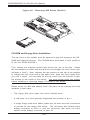
Accessing the Drive Bays ..................................................................... 6-4
SCSI Drive Installation ............................................................................. 6-5
IDE Drive Installation ................................................................................ 6-7
CD-ROM and Floppy Drive Installation ................................................. 6-8
viii
Table of Contents
6-5
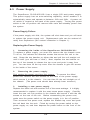
Power Supply .................................................................................................. 6-9
Power Supply Failure ............................................................................. 6-9
Replacing the Power Supply ................................................................. 6-9
Chapter 7: BIOS
7-1
Introduction ....................................................................................................... 7-1
7-2
BIOS Features .................................................................................................. 7-2
7-3
Running Setup .................................................................................................. 7-2
7-4
Advanced BIOS Setup .................................................................................... 7-4
7-5
Chipset Setup ................................................................................................. 7-15
7-6
PCI PnP Setup ................................................................................................ 7-17
7-7
Power Setup .................................................................................................. 7-19
7-8
Boot Setup ...................................................................................................... 7-20
7-9
Security Setup ............................................................................................... 7-22
The Main BIOS Setup Menu .................................................................... 7-3
7-10 Exit Setup ....................................................................................................... 7-24
Appendices:
Appendix A: AwardBIOS POST Messages ......................................................... A - 1
Appendix B: AwardBIOS POST Codes ................................................................. B-1
Appendix C: System Specifications ...................................................................... C-1
ix
SUPERS ERVER 5013S-8/5013S-i User's Manual
Notes
x
Chapter 1: Introduction
Chapter 1
Introduction
1-1
Overview
The Supermicro SuperServer 5013S-8/5013S-i is a high-end single processor, 1U rackmount server that features some of the most advanced technology currently available. The SuperServer 5013S-8/5013S-i is comprised of
two main subsystems: the SC810 1U rackmount chassis and the X5SS8GM/X5SSE-GM single Intel Xeon PGA processor mainboard. Please refer to
our web site for information on operating systems that have been certified
for use with the SuperServer 5013S-8/5013S-i (www.supermicro.com).
In addition to the mainboard and chassis, various hardware components
may have been included with your SuperServer 5013S-8/5013S-i, as listed
below.
One CPU heatsink (SNK-0039)
One (1) CPU air shroud
One (1) 1.44" floppy drive
One (1) slim CD-ROM drive
Two (2) IDE Drive Trays (5013S-i)
One (1) SCA SCSI backplane (5013S-8)
Two (2) SCA SCSI drive carriers (5013S-8)
SCSI Accessories (5013S-8):
One (1) internal 68-pin Ultra320 SCSI cable for SCA SCSI backplane
One (1) set of SCSI driver diskettes
One (1) SCSI manual
One (1) 64-bit, 66 MHz PCI slot riser card
Rackmount hardware (with screws):
Two (2) rack rail assemblies
Six (6) brackets for mounting the rack rails in a rack/telco rack
1-1
SUPERSERVER 5013S-8/5013S-i Manual
One (1) CD-ROM containing drivers and utilities:
Intel's ® LANDesk Client Manager
LAN driver
SCSI driver
SuperServer 5013S-8/5013S-i User's Manual
1-2
Server Chassis Features
The SuperServer 5013S-8/5013S-i is a high-end, scaleable 1U rackmount
server platform designed with today's most state-of-the-art features. The
following is a general outline of the main features of the SC810 chassis.
System Power
When configured as a SuperServer 5013S-8/5013S-i, the SC810 chassis
includes a 250W power supply.
SCSI Subsystem (5013S-8)
The SCSI subsystem on the 5013S-8 supports two 80-pin SCA Ultra320
SCSI hard drives. (Standard 1" drives are supported. SCA = Single Connection Attachment.) The SCSI drives are connected to an SCA backplane
that provides power, bus termination and configuration settings. The SCSI
drives are also hot-swap units.
Control Panel
The SC810's control panel provides important system monitoring and control
information. LEDs indicate power on, network activity, hard disk drive activity and system overheat conditions. The control panel also includes a
main power button and a system reset button.
1-2
Chapter 1: Introduction
Rear I/O Panel
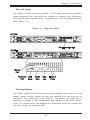
The SC810 is a 1U rackmount chassis. Its I/O panel provides one motherboard expansion slot, one COM port (another is internal), two USB ports,
PS/2 mouse and keyboard ports, a graphics port and two Ethernet ports.
(See Figure 1-1.)
Figure 1-1.
Rear I/O Panel
Cooling System
The SC810 chassis has an innovative cooling design that includes a 10-cm
blower system cooling (intake) fan and one optional 4-cm fan that can be
installed in the midsection of the chassis. The blower fan plugs into a
chassis fan header on the motherboard and operates at full rpm continuously. If it breaks down, the ambient air temperature inside the chassis will
rise and activate an overheat LED.
1-3
SUPERSERVER 5013S-8/5013S-i Manual
1-3
Mainboard Features
At the heart of the SuperServer 5013S-8/5013S-i lies the X5SS8-GM/
X5SSE-GM, a single Xeon processor motherboard designed to provide maximum performance. Below are the main features of the X5SS8-GM/X5SSEGM.
Chipset Overview
ServerWorks Grand Champion SL chipset, comprised of a North Bridge
(CMIC-SL) and a South Bridge (CSB6).
North Bridge (CMIC-SL)
The North Bridge interfaces directly to the processors via a 533/400 MHz
Host bus and integrates the functions of the main memory subsystem and
the IMB bus interface unit. The memory subsystem consists of a 4 DIMM
configuration accessed over a 266 MHz memory bus at a peak bandwidth
of 1.6 GB/sec.
South Bridge (CSB6)
The South Bridge provides various integrated functions, including the PCI
bridge and support for UDMA100, security (passwords and system protection), Plug & Play, USBs, power management, interrupt controllers and the
LPC Bus.
Processors
The X5SS8-GM/X5SSE-GM supports single 604 and 603-pin Intel Xeon TM
processors of up to at 3.06 GHz at a front side (system) bus speeds of 533
and 400 MHz. Please refer to the support section of our web site for a
complete listing of supported processors (http://www.supermicro.com/
TechSupport.htm).
Memory
The X5SS8-GM/X5SSE-GM has four (4) 168-pin DIMM sockets that can support up to 4 GB of registered ECC DDR-266/200 low-profile SDRAM modules. Module sizes of 128 MB, 256 MB, 512 MB and 1 GB may be used to
populate the DIMM slots.
1-4
Chapter 1: Introduction
Onboard SCSI (5013S-8)
Onboard SCSI is provided with an Adaptec AIC-7902 SCSI controller chip,
which supports dual channel, Ultra320 SCSI at a burst throughput rate of
320 MB/sec for each channel. The X5SS8-GM provides two internal 68-pin
LVD Ultra320 SCSI port connector (Channel A and Channel B).
PCI Expansion Slots
The X5SS8-GM/X5SSE-GM has three 64-bit 66 MHz PCI and two 32-bit 33
MHz PCI slots available. One riser card is included with the system for use
with one of the 64-bit PCI slots.
Network Interface Controllers (NIC)
The X5SS8-GM/X5SSE-GM supports two Network Interface controllers (NIC)
based on Intel's 82551 10/100 Mbps fast Ethernet controller and Broadcom's
5702 Gigabit Ethernet controller. Both a 10/100 Mb and a 1 Gb Ethernet port
are included on the I/O panel.
Onboard Controllers/Ports
An onboard IDE controller supports one floppy drive and up to four UDMA/
100 hard drives or ATAPI devices. Onboard I/O ports include one COM port,
one parallel port, two USB ports, PS/2 mouse and keyboard ports, a video
(graphics) port and two LAN (NIC) ports, which back each other up in case
one port loses its connection.
Other Features
Other onboard features that promote system health include eight voltage
monitors, a chassis intrusion header, auto-switching voltage regulators,
chassis and CPU overheat sensors, virus protection and BIOS rescue.
1-5
SUPERSERVER 5013S-8/5013S-i Manual
1-4
Contacting Supermicro
Headquarters
Address:
Tel:
Fax:
Email:
Web Site:
SuperMicro Computer, Inc.
980 Rock Ave.
San Jose, CA 95131 U.S.A.
+1 (408) 503-8000
+1 (408) 503-8008
[email protected] (General Information)
[email protected] (Technical Support)
www.supermicro.com
Europe
Address:
Tel:
Fax:
Email:
SuperMicro Computer B.V.
Het Sterrenbeeld 28, 5215 ML
's-Hertogenbosch, The Netherlands
+31 (0) 73-6400390
+31 (0) 73-6416525
[email protected] (General Information)
[email protected] (Technical Support)
[email protected] (Customer Support)
Asia-Pacific
Address:
SuperMicro, Taiwan
D5, 4F, No. 16 Chien-Ba Road
Chung-Ho 235, Taipei Hsien, Taiwan, R.O.C.
Tel:
+886-(2) 8226-3990
Fax:
+886-(2) 8226-3991
Web Site:
www.supermicro.com.tw
Technical Support:
Email:
[email protected]
Tel:
886-2-8226-3990, ext.132 or 139
1-6
Chapter 2: Server Installation
Chapter 2
Server Installation
2-1 Overview
This chapter provides a quick setup checklist to get your SuperServer
5013S-8/5013S-i up and running. Following these steps in the order given
should enable you to have the system operational within a minimum amount
of time. This quick setup assumes that your SuperServer 5013S-8/5013Si system has come to you with the processor and memory preinstalled. If
your system is not already fully integrated with a motherboard, processor,
system memory etc., please turn to the chapter or section noted in each
step for details on installing specific components.
2-2
Unpacking the SuperServer 5013S-8/5013S-i
You should inspect the box the SuperServer 5013S-8/5013S-i was shipped
in and note if it was damaged in any way. If the server itself shows
damage, you should file a damage claim with the carrier who delivered it.
Decide on a suitable location for the rack unit that will hold
5013S-8/5013S-i. It should be situated in a clean, dust-free
ventilated. Avoid areas where heat, electrical noise and
fields are generated. You will also need it placed near a
outlet. Read the Rack and Server Precautions in the next
2-3
the SuperServer
area that is well
electromagnetic
grounded power
section.
Preparing for Setup
The box the SuperServer 5013S-8/5013S-i was shipped in should include
two sets of rail assemblies, two rail mounting brackets and the mounting
screws you will need to install the system into the rack. Follow the steps
in the order given to complete the installation process in a minimum amount
of time. Please read this section in its entirety before you begin the installation procedure outlined in the sections that follow.
2-1
SUPERSERVER 5013S-8/5013S-i Manual
Choosing a Setup Location
- Leave enough clearance in front of the rack to enable you to open
the front door completely (~25 inches).
- Leave approximately 30 inches of clearance in the back of the rack
to allow for sufficient airflow and ease in servicing.
!
Warnings and Precautions!
!
Rack Precautions
- Ensure that the leveling jacks on the bottom of the rack are fully
extended to the floor with the full weight of the rack resting on them.
- In a single rack installation, stabilizers should be attached to the rack.
- In multiple rack installations, the racks should be coupled together.
- Always make sure the rack is stable before extending a component
from the rack.
- You should extend only one component at a time - extending two or
more simultaneously may cause the rack to become unstable.
Server Precautions
- Review the electrical and general safety precautions in Chapter 4.
- Determine the placement of each component in the rack before you
install the rails.
- Install the heaviest server components on the bottom of the rack
first, and then work up.
- Use a regulating uninterruptible power supply (UPS) to protect the
server from power surges, voltage spikes and to keep your
system operating in case of a power failure.
- Allow the power supply units and hot plug SCSI drives to cool before
touching them.
- Always keep the rack's front door and all panels and components on
the servers closed when not servicing to maintain proper cooling.
2-2
Chapter 2: Server Installation
Rack Mounting Considerations
Ambient Operating Temperature
If installed in a closed or multi-unit rack assembly, the ambient operating
temperature of the rack environment may be greater than the ambient
temperature of the room. Therefore, consideration should be given to
installing the equipment in an environment compatible with the
manufacturer’s maximum rated ambient temperature (Tmra).
Reduced Airflow
Equipment should be mounted into a rack so that the amount of airflow
required for safe operation is not compromised.
Mechanical Loading
Equipment should be mounted into a rack so that a hazardous condition
does not arise due to uneven mechanical loading.
Circuit Overloading
Consideration should be given to the connection of the equipment to the power
supply circuitry and the effect that any possible overloading of circuits might
have on overcurrent protection and power supply wiring. Appropriate consideration of equipment nameplate ratings should be used when addressing this
concern.
Reliable Ground
A reliable ground must be maintained at all times. To ensure this, the rack
itself should be grounded. Particular attention should be given to power
supply connections other than the direct connections to the branch circuit
(i.e. the use of power strips, etc.).
2-3
SUPERSERVER 5013S-8/5013S-i Manual
2-4
Installing the Server into a Rack
This section provides information on installing the SuperServer 5013S-8/
5013S-i into a rack unit. If the 5013S-8/5013S-i has already been mounted
into a rack, you can skip ahead to Sections 2-5 and 2-6. There are a
variety of rack units on the market, which may mean the assembly procedure will differ slightly. The following is a guideline for installing the 5013S8/5013S-i into a rack with the rack rails provided with the system. You
should also refer to the installation instructions that came with the rack unit
you are using.
Identifying the Sections of the Rack Rails
You should have received two rack rail assemblies with the SuperServer
5013S-8/5013S-i. Each of these assemblies consist of two sections: an
inner fixed chassis rail that secures to the 5013S-8/5013S-i (A) and an
outer fixed rack rail that secures directly to the rack itself (B). A sliding rail
guide sandwiched between the two should remain attached to the fixed
rack rail (see Figure 2-1). The A and B rails must be detached from each
other to install.
To remove the fixed chassis rail (A), pull it out as far as possible - you
should hear a "click" sound as a locking tab emerges from inside the rail
assembly and locks the inner rail. Then depress the locking tab to pull the
inner rail completely out. Do this for both the left and right side rack rail
assemblies.
Mounting Holes
B
Locking Tab
A
Figure 2-1.
Identifying the Sections of the Rack Rails
2-4
Chapter 2: Server Installation
Installing the Chassis Rails
Position the fixed chassis rail sections you just removed along the side of
the 5013S-8/5013S-i chassis making sure the five screw holes line up.
Note that these two rails are left/right specific. Screw the rail securely to
the side of the chassis (see Figure 2-2). Repeat this procedure for the
other rail on the other side of the chassis. You will also need to attach the
rail brackets when installing into a telco rack.
Locking Tabs: As you have seen, both chassis rails have a locking tab,
which serves two functions.
The first is to lock the server into place
when installed and pushed fully into the rack, which is its normal position.
Secondly, these tabs also lock the server in place when fully extended
from the rack. This prevents the server from coming completely out of
the rack when you pull it out for servicing.
Figure 2-2.
Installing Chassis Rails
Installing the Rack Rails
Determine where you want to place the SuperServer 5013S-8/5013S-i in
the rack (see Rack and Server Precautions in Section 2-3). Position the
fixed rack rail/sliding rail guide assemblies at the desired location in the
rack, keeping the sliding rail guide facing the inside of the rack. Screw the
2-5
SUPERSERVER 5013S-8/5013S-i Manual
assembly securely to the rack using the brackets provided. Attach the
other assembly to the other side of the rack, making sure that both are at
the exact same height and with the rail guides facing inward.
Installing the Server into the Rack
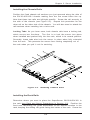
You should now have rails attached to both the chassis and the rack
unit.
The next step is to install the server into the rack.
Do this by
lining up the rear of the chassis rails with the front of the rack rails.
Slide the chassis rails into the rack rails, keeping the pressure even on
both sides (you may have to depress the locking tabs when inserting).
See Figure 2-3.
When the server has been pushed completely into the rack, you should
hear the locking tabs "click". Finish by inserting and tightening the
thumbscrews that hold the front of the server to the rack.
Figure 2-3.
Installing the Server into a Rack
2-6
Chapter 2: Server Installation
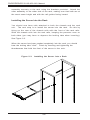
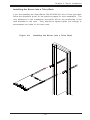
Installing the Server into a Telco Rack
If you are installing the SuperServer 5013S-8/5013S-i into a Telco type rack,
follow the directions given on the previous pages for rack installation. The
only difference in the installation procedure will be the positioning of the
rack brackets to the rack. They should be spaced apart just enough to
accomodate the width of the telco rack.
Figure 2-4.
Installing the Server into a Telco Rack
2-7
SUPERSERVER 5013S-8/5013S-i Manual
2-5
Checking the Motherboard Setup
After you install the 5013S-8/5013S-i in the rack, you will need to open the
unit to make sure the motherboard is properly installed and all the connections have been made.
1. Accessing the inside of the 5013S-8/5013S-i (Figures 2-5)
First, release the retention screws that secure the unit to the rack.
Grasp the two handles on either side and pull the unit straight out until it
locks (you will hear a "click"). Next, depress the two buttons on the top
of the chassis to release the top cover. There is a large rectangular
recess in the middle front of the top cover to help you push the cover
away from you until it stops. You can then lift the top cover from the
chassis to gain full access to the inside of the server.
2. Check the CPU (processor)
You should have one processor already installed into the system
board. Each processor should have its own heatsink attached. See
Section 5-5 for instructions on processor installation.
3. Check the system memory
Your 5013S-8/5013S-i server system may have come with system
memory already installed. Make sure all DIMMs are fully seated in their
slots. For details on adding system memory, refer to Section 5-5.
4. Installing add-on cards
If desired, you can install an add-on card to the system. See Section 57 for details on installing a PCI add-on card.
5. Check all cable connections and airflow
Make sure all power and data cables are properly connected and not
blocking the airflow. See Section 5-3 for details on cable connections.
Also, check the air seals for damage. The air seals are located under
the blower fan and beneath the frame cross section that separates the
drive bay area from the motherboard area of the chassis.
Note: Make sure that the air seals are properly installed.
2-8
Chapter 2: Server Installation
Figure 2-5.
Accessing the Inside of the Server
(5013S-8 shown, 5013S-i same but IDE)
2-9
SUPERSERVER 5013S-8/5013S-i Manual
2-6
Checking the Drive Bay Setup
Next, you should check to make sure the peripheral drives and the SCSI
drives and SCA backplane have been properly installed and all connections have been made (SCSI on 5013S-8 only).
1. Accessing the drive bays
All drives can be accessed from the front of the server. For servicing
the CD-ROM and floppy drives, you will need to remove the top chassis
cover. The SCSI disk drives can be installed and removed from the front
of the chassis without removing the top chassis cover.
2. Installing a CD-ROM and floppy disk drives
Refer to Section 6-4 if you need to reinstall a CD-ROM and/or floppy disk
drive to the system.
3. Check the SCSI disk drives (5013S-8)
Depending upon your system's configuration, your system may have one
or two SCSI drives already installed. If you need to install SCSI drives,
please refer to Section 6-4.
4. Check the IDE disk drives (5013S-i)
Depending upon your system's configuration, your system may have one
or two IDE hard drives already installed. If you need to install an IDE hard
drive, please refer to Section 6-4.
5. Check the airflow
Airflow is provided by a 10-cm input fan and one (optional) 4-cm cooling
fan. The system component layout was carefully designed to promote
sufficient airflow through the small 1U rackmount space. Also note that
all power and data cables have been routed in such a way that they do
not block the airflow generated by the fans.
6. Supplying power to the system
The last thing you must do is to provide input power to the system. Plug
the power cord from the power supply unit into a high-quality power
strip that offers protection from electrical noise and power surges. It is
recommended that you use an uninterruptible power supply (UPS).
2-10
Chapter 3: System Interface
Chapter 3
System Interface
3-1
Overview
There are several LEDs on the control panel as well as others on the SCSI
drive carriers and the motherboard to keep you constantly informed of the
overall status of the system as well as the activity and health of specific
components. There are also two buttons on the chassis control panel and
an on/off switch on the power supply. This chapter explains the meanings
of all LED indicators and the appropriate response you may need to take.
3-2
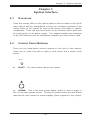
Control Panel Buttons
There are two push-button buttons located on the front of the chassis.
These are (in order from left to right) a reset button and a power on/off
button.
RESET
RESET: The reset switch reboots the system.
POWER: This is the main power switch, which is used to apply or
turn off the main system power. Turning off system power with this button
removes the main power but keeps standby power supplied to the system.
3-1
SUPERSERVER 5013S-8/5013S-i Manual
3-3
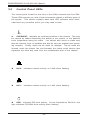
Control Panel LEDs
The control panel located on the front of the SC810 chassis has five LEDs.
These LEDs provide you with critical information related to different parts of
the system. This section explains what each LED indicates when illuminated and any corrective action you may need to take.
OVERHEAT: Indicates an overheat condition in the chassis. This may
be caused by cables obstructing the airflow in the system, or the ambient
room temperature being too warm. You should also check to make sure
that the chassis cover is installed and that all fans are present and operating normally. Finally, check the air seals for damage. The air seals are
located under the blower fan and beneath the frame cross section that
separates the drive bay area from the motherboard area of the chassis.
NIC2
NIC2:
Indicates network activity on LAN2 when flashing.
NIC1
NIC1:
Indicates network activity on LAN1 when flashing.
HDD: Indicates IDE drive activity. On the SuperServer 5013S-8, this
light indicates CD-ROM drive activity when flashing.
3-2
Chapter 3: System Interface
Power: Indicates power is being supplied to the system's power
supply units. This LED should normally be illuminated when the system is
operating.
3-4
SCSI Drive Carrier LEDs (5013S-8)
Each SCSI drive carrier has two LEDs.
Green: When illuminated, the green LED on the front of the SCSI drive
carrier indicates drive activity. A connection to the SCSI SCA backplane
enables this LED to blink on and off when that particular drive is being
accessed.
Red: A SAF-TE compliant backplane is needed to activate the red LED
to indicate a drive failure. (A SAF-TE compliant SCSI backplane is optional
on the 5013S-8.) If one of the SCSI drives fail, you should be notified by
your system management software. Please refer to Section 6-4 for instructions on replacing failed SCSI drives.
3-5
Motherboard LEDs
CR1 (Power On) LED
The CR1 LED is located near the JF1 connector. When illuminated, it indicates that system power is present on the motherboard.
3-3
SUPERSERVER 5013S-8/5013S-i Manual
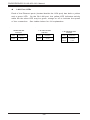
LAN Port LEDs
Each of the Ethernet ports (located beside the VGA port) has both a yellow
and a green LED. On the Gb LAN port, the yellow LED indicates activity
while the the other LED may be green, orange or off to indicate the speed
of the connection. See tables below for full explanation.
100 M b LAN LED
Indicators
LED
Color
Green
Yellow
Definition
Connected
Active
1 Gb LAN Left LED
Indicator
LED
Color
Off
Yellow
Definition
Not Active
Active
3-4
1 Gb LAN Right LED
Indicator
LED
Color
Off
Green
Orange
Definition
No Connection
100 M Hz
1 GHz
Chapter 4: System Safety
Chapter 4
System Safety
4-1
Electrical Safety Precautions
!
Basic electrical safety precautions should be followed to protect
yourself from harm and the SuperServer 5013S-8/5013S-i from damage:
Be aware of the locations of the power on/off switch on the chassis
as well as the room's emergency power-off switch, disconnection
switch or electrical outlet. If an electrical accident occurs, you can
then quickly remove power from the system.
Do not work alone when working with high voltage components.
Power should always be disconnected from the system when removing
or installing main system components, such as the motherboard,
memory modules and IDE/CD-ROM/floppy drives. When disconnecting
power, you should first power down the system with the operating
system first and then unplug the power cords of all the power supply
units in the system.
When working around exposed electrical circuits, another person who
is familiar with the power-off controls should be nearby to switch off
the power if necessary.
Use only one hand when working with powered-on electrical
equipment. This is to avoid making a complete circuit, which will
cause electrical shock. Use extreme caution when using metal tools,
which can easily damage any electrical components or circuit boards
they come into contact with.
Do not use mats designed to decrease static electrical discharge as
protection from electrical shock. Instead, use rubber mats that have
been specifically designed as electrical insulators.
The power supply power cords must include a grounding plug and must
be plugged into grounded electrical outlets.
4-1
SUPERSERVER 5013S-8/5013S-i Manual
Motherboard Battery: CAUTION - There is a danger of explosion if the
onboard battery is installed upside down, which will reverse its
polarites. This battery must be replaced only with the same or an
equivalent type recommended by the manufacturer. Dispose of used
batteries according to the manufacturer's instructions.
CD-ROM Laser: CAUTION - this server may have come equipped with
a CD-ROM drive. To prevent direct exposure to the laser beam and
hazardous radiation exposure, do not open the enclosure or use the
unit in any unconventional way.
4-2
General Safety Precautions
!
Follow these rules to ensure general safety:
Keep the area around the SuperServer 5013S-8/5013S-i clean and free
of clutter.
The SuperServer 5013S-8/5013S-i weighs approximately 26 lbs (11.8
kg) when fully loaded. When lifting the system, two people at either
end should lift slowly with their feet spread out to distribute the
weight. Always keep your back straight and lift with your legs.
Place the chassis top cover and any system components that have been
removed away from the system or on a table so that they won't
accidentally be stepped on.
While working on the system, do not wear loose clothing such as
neckties and unbuttoned shirt sleeves, which can come into contact
with electrical circuits or be pulled into a cooling fan.
Remove any jewelry or metal objects from your body, which are
excellent metal conductors that can create short circuits and harm you
if they come into contact with printed circuit boards or areas where
power is present.
After accessing the inside of the system, close the system back up
and secure it to the rack unit with the retention screws after ensuring
that all connections have been made.
4-2
Chapter 4: System Safety
4-3
ESD Precautions
!
Electrostatic discharge (ESD) is generated by two objects with different
electrical charges coming into contact with each other. An electrical
discharge is created to neutralize this difference, which can damage
electronic components and printed circuit boards. The following
measures are generally sufficient to neutralize this difference before
contact is made to protect your equipment from ESD:
Use a grounded wrist strap designed to prevent static discharge.
Keep all components and printed circuit boards (PCBs) in their
antistatic bags until ready for use.
Touch a grounded metal object before removing the board from the
antistatic bag.
Do not let components or PCBs come into contact with your clothing,
which may retain a charge even if you are wearing a wrist strap.
Handle a board by its edges only; do not touch its components,
peripheral chips, memory modules or contacts.
When handling chips or modules, avoid touching their pins.
Put the motherboard and peripherals back into their antistatic bags
when not in use.
For grounding purposes, make sure your computer chassis provides
excellent conductivity between the power supply, the case, the mounting
fasteners and the motherboard.
4-3
SUPERSERVER 5013S-8/5013S-i Manual
4-4
Operating Precautions
!
Care must be taken to assure that the chassis cover is in place when
the 5013S-8/5013S-i is operating to assure proper cooling. Out of
warranty damage to the 5013S-8/5013S-i system can occur if this
practice is not strictly followed.
4-4
Chapter 5: Advanced Motherboard Setup
Chapter 5
Advanced Motherboard Setup
This chapter covers the steps required to install the X5SS8-GM/X5SSE-GM
motherboard into the SC810 chassis, connect the data and power cables
and install add-on cards. All motherboard jumpers and connections are
also described. A layout and quick reference chart are included in this
chaptor for your reference. Remember to completely close the chassis
when you have finished working with the motherboard to better cool and
protect the system.
Tools Required
The only tools you will need to install the X5SS8-GM/X5SSE-GM into
the chassis are a long and a short Philips screwdriver.
5-1
Handling the X5SS8-GM/X5SSE-GM Motherboard
Electric-static discharge (ESD) can damage electronic components. To prevent damage to any printed circuit boards (PCBs), it is important to handle
them very carefully (see previous chapter). Also note that the size and
weight of the X5SS8-GM/X5SSE-GM motherboard may cause it to bend if
handled improperly, which may result in damage. To prevent the X5SS8GM/X5SSE-GM motherboard from bending, keep one hand under the center
of the board to support it when handling. The following measures are
generally sufficient to protect your equipment from electric static discharge.
Precautions
• Use a grounded wrist strap designed to prevent Electric Static Discharge
(ESD).
• Touch a grounded metal object before removing any board from its antistatic bag.
• Handle a board by its edges only; do not touch its components, peripheral chips, memory modules or gold contacts.
• When handling chips or modules, avoid touching their pins.
• Put the motherboard, add-on cards and peripherals back into their anti-
5-1
SUPERSERVER 5013S-8/5013S-i Manual
static bags when not in use.
• For grounding purposes, make sure your computer chassis provides excellent conductivity between the power supply, the case, the mounting
fasteners and the motherboard.
Unpacking
The motherboard is shipped in antistatic packaging to avoid electrical static
discharge. When unpacking the board, make sure the person handling it is
static protected.
5-2
Motherboard Installation
This section explains the first step of physically mounting the X5SS8-GM/
X5SSE-GM into the SC810 chassis. Following the steps in the order given
will eliminate the most common problems encountered in such an installation. To remove the motherboard, follow the procedure in reverse order.
1.
Accessing the inside of the 5013S-8/5013S-i (see Figure 2-5)
Two release buttons are located on the top cover of the chassis.
Depressing both of these buttons while pushing the cover away from
you until it stops. You can then lift the top cover from the chassis to
gain full access to the inside of the server. (If already installed in a
rack, you must first release the retention screws that secure the unit
to the rack. Then grasp the two handles on either side and pull the unit
straight out until the rails lock into place.)
2.
Check compatibility of motherboard ports and I/O shield:
The X5SS8-GM/X5SSE-GM requires a chassis big enough to support a
12" x 8.7" motherboard, such as Supermicro's SC810 1U rackmount.
Make sure that the I/O ports on the motherboard align properly with
their respective holes in the I/O shield at the back of the chassis.
3.
Mounting the motherboard onto the motherboard tray:
Carefully mount the motherboard to the motherboard tray by aligning
the board holes with the raised metal standoffs that are visible on the
bottom of the chassis. Insert screws into all the mounting holes on
your motherboard that line up with the standoffs and tighten until snug
(if you screw them in too tight, you might strip the threads). Metal
screws provide an electrical contact to the motherboard ground to
provide a continuous ground for the system.
5-2
Chapter 5: Advanced Motherboard Setup
5-3
Connecting Cables
Now that the motherboard is installed, the next step is to connect the cables
to the board. These include the data (ribbon) cables for the peripherals and
control panel and the power cables.
Connecting Data Cables
The ribbon cables used to transfer data from the peripheral devices have
been carefully routed to prevent them from blocking the flow of cooling air
that moves through the system from front to back. If you need to disconnect any of these cables, you should take care to keep them routed as they
were originally after reconnecting them (make sure the red wires connect
to the pin 1 locations). The following data cables (with their locations
noted) should be connected. (See the motherboard layout pages in this
chapter for connector locations.)
IDE Device Cables (J39 and J40)
Floppy Drive Cable (J28)
SCSI Device Cables (X5SS8-GM only; JA2, JA3)
Control Panel Cable (JF1, see next page)
Connecting Power Cables
The X5SS8-GM/X5SSE-GM has a 24-pin primary power supply connector
designated "ATX Power" for connection to the ATX power supply. See
Section 5-9 for power connector pin definitions.
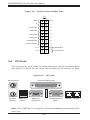
Connecting the Control Panel
JF1 contains header pins for various front control panel connectors. See
Figure 5-1 for the pin locations of the various front control panel buttons
and LED indicators.
All JF1 wires have been bundled into a single ribbon cable to simplify their
connection to the motherboard. Make sure the red wire plugs into pin 1 as
marked on the board. The other end connects to the Control Panel PCB
board, located just behind the system status LEDs on the chassis. The
control signals are all on the even numbered pins. See Section 5-9 for
details and pin descriptions.
5-3
SUPERSERVER 5013S-8/5013S-i Manual
Figure 5-1. Control Panel Header Pins
JF1
20
19
NMI
Ground
X
X
Power LED
Vcc
HDD LED
Vcc
NIC1 LED
Vcc
NIC2 LED
Vcc
Overheat LED
Vcc
Power Fail LED
Vcc
Ground
Reset
Reset Button
Ground
Pw r
Power Button
2
5-4
1
I/O Ports
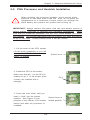
The I/O ports are color coded in conformance with the PC 99 specification.
See Figure 5-2 below for the colors and locations of the various I/O ports.
Figure 5-2.
I/O Ports
Parallel Port (Burgundy)
Mouse (Green)
Keyboard
USB Ports
COM1 Port
VGA Graphics Port
(Purple)
(Black)
(Turquoise)
(Blue)
Mb LAN
Gb LAN
Note: The COM2 port is a header on the motherboard, located behind the
VGA port.
5-4
Chapter 5: Advanced Motherboard Setup
5-5
PGA Processor and Heatsink Installation
!
When handling the processor package, avoid placing direct
pressure on the label area of the fan. Also, do not place the
motherboard on a conductive surface, which can damage the
BIOS battery and prevent the system from booting up.
IMPORTANT: Always connect the power cord last and always remove it
before adding, removing or changing any hardware components. Make
sure that you install the processor into the CPU socket before you install
the heatsink. The X5SS8-GM/X5SSE-GM can support one Xeon processors
of up to 3.06 GHz. Pictures below show a 603-pin socket.
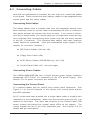
1. Lift the lever on the CPU socket.
Lift the lever completely or you will
damage the CPU socket when
power is applied.
2. Install the CPU in the socket.
Make sure that pin 1 of the CPU is
seated on pin 1 of the socket (both
corners are marked with a
triangle).
3. Press the lever down until you
hear it *click* into the locked
position. See Figure 5-3 for
pictures of the 604-pin CPU socket
before and after the processor is
installed.
5-5
Socket lever
Pin 1
Socket lever in
locked position
SUPERSERVER 5013S-8/5013S-i Manual
4. Apply the proper amount of thermal compound to the CPU die and place
the heatsink on top of the CPU. Make sure the heatsink sits completely
flat on the CPU. If it's not completely flat, the space between the two will
degrade the heat dissipation function of the heatsink, which may cause
the processor to overheat.
5. Secure the heatsink by locking the retention clips into their proper
position. When correctly installed, the retention clips should *click* into
place and the three black tabs on the CPU retention pieces should
protrude fully through the corresponding holes on the retention clips.
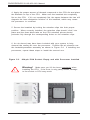
6. An air shroud may have been included with your system to help
channel the cooling air over the processor. Position the air shrould over
the heatsink/processor assembly as shown in Figure 5-4. If installing two
processors, repeat these steps to install the second one.
Figure 5-3.
604-pin PGA Socket: Empty and with Processor Installed
Warning!
!
Make sure you lift the lever completely when
installing the CPU. If the lever is only partly raised, damage
to the socket or CPU may result.
5-6
Chapter 5: Advanced Motherboard Setup
Figure 5-4.
Heatsink and Air Shroud Installation
5-7
SUPERSERVER 5013S-8/5013S-i Manual
5-6
Installing Memory
!
CAUTION! Exercise extreme care when installing or removing DIMM modules to prevent any
possible damage.
1.
Memory support
The X5SS8-GM/X5SSE-GM has four 184-pin DIMM sockets that support up
to 4 GB of low profile, registered ECC DDR-266/200 SDRAM. You must
be running a 533 MHz FSB processor to use DDR-266 SDRAM.
2.
Installing memory modules
Insert one to four memory modules. Memory is not interleaved, so you
can add any number of DIMMs into the slots in any order. Pay attention
to the two notches along the bottom of the module to prevent inserting
the module incorrectly. Gently press down on the DIMM module until it
snaps into place in the slot (see Figure 5-5). Repeat for more modules
as desired.
Note: you should not mix memory modules of different sizes and speeds.
Figure 5-5.
Side View of DIMM Installation into Slot
To Install: Insert module vertically and press down until it snaps into
place. Pay attention to the bottom notches.
To Remove: Use your thumbs to gently push each release tab outward
to free the DIMM from the slot.
5-8
Chapter 5: Advanced Motherboard Setup
5-7
Adding PCI Cards
1.
64-bit PCI slot
The X5SS8-GM/X5SSE-GM has three 64-bit 66 MHz and two 32-bit, 33
MHz PCI slots available. A riser card designed specifically for use in a
1U rackmount chassis is included with your system. This riser card
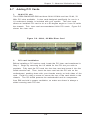
allows an installed PCI card to sit at a 90 degree angle so it can fit inside
the chassis. This riser card accommodates 64-bit PCI cards. Figure 5-6
shows the riser card.
Figure 5-6. 64-bit, 66 MHz Riser Card
2.
PCI card installation
Before installing a PCI add-on card, locate the PCI riser card mentioned in
Step 1. Begin by removing the I/O shield for the PCI slot you wish to
populate. Fully seat the PCI card into the riser card and screw it into the
metal retention rail. Then, insert the riser card into the PCI slot on the
motherboard, pushing down with your thumbs evenly on both sides of the
card. Finish by using a screw to secure the top of the card shield to the
chassis. The I/O shield protects the motherboard and its components
from EMI and aid in proper ventilation, so make sure there is always a
shield covering each PCI slot.
5-9
SUPERSERVER 5013S-8/5013S-i Manual
5-8
Motherboard Details
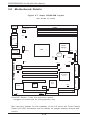
Figure 5-7. Super X5SS8-GM Layout
(not drawn to scale)
Keyboard/
Mouse
ATX POWER
J35
J32
DDR4
Processor Power
USB0/1
J50
DDR3
DDR2
COM1
DDR1
JP19
Parallel
Port
J29
VGA
COM2
North
Bridge
CPU
JP11 (WOL)
Mb LAN Port
CR1
CHS Fan
JP15
J8
JP13
BATTERY
Gb LAN Port
JP22
J49
JBT1
JP16
CHS Fan
CHS Fan
JP28
CPU Fan
JF2 JF1
JPA2
J36
64-bit/66 MHz PCI #1
SCSI CH B
Broadcom
LAN
Controller
JA1
JP27
64-bit/66 MHz PCI #2
SUPER
®
X5SS8-GM
JP10
AIC-7902 SCSI
64-bit/66 MHz PCI #3
JA3
SCSI CH A
Controller
32-bit/33 MHz PCI #4
South
Bridge
BIOS
JPA1
Rage XL
SW1
IDE #1
JP9
32-bit/33 MHz PCI #5
JP20
IDE #2
USB2/3
JA2
J39
J40
FLOPPY
Note: DIP Switch 1 sets the processor speed.
Jumpers not noted are for test purposes only.
Also see this chapter for the locations of the I/O ports and Front Control
Panel (JF1/JF2) connectors and for details on jumper settings and pin definitions.
5-10
Chapter 5: Advanced Motherboard Setup
X5SS8-GM Quick Reference
Jumper
JA1
JBT1
JPA1/A2
JP9
JP10
JP15
JP19
JP20
JP22
JP27
Description
SCSI Enable/Disable
CMOS Clear
SCSI Channel A/B Termination
VGA Enable/Disable
Mb LAN Enable/Disable
Fan Status Select
Watch Dog Enable/Disable
Main Power Override
System Bus Speed Select
Gb LAN Enable/Disable
Default Setting
Pins 1-2 (Enabled)
See Section 5-9
Off (Terminated)
Pins 1-2 (Enabled)
Pins 1-2 (Enabled)
Open (OH Condition)
Open (Disabled)
Off (Normal)
Pins 1-2 (Auto)
Pins 1-2 (Enabled)
Switch
DIP Switch 1
Description
Processor Speed
Connector
COM1/COM2
CPU/CHS/OH FAN
CPU
DDR1-DDR4
JA2/JA3
JF1
JF2
JP11
JP16
JP28
J7
J8
J28
J29
J32
J35
J36
J39/J40
J49
J50
USB0/1
USB2/3
Description
COM1/COM2 Serial Ports
CPU/Chassis/Overheat Fan Headers
CPU Socket
Memory (SDRAM) Slots
Ultra320 LVD SCSI CH A/B Connector
Front Control Panel Headers
ChInt/NMI/HD LED/PWR LED Headers
Wake-on-LAN Header
Chassis Intrusion Header
External Speaker Header
VGA Display (Monitor) Port
Mb Ethernet Port
Floppy Disk Drive Connector
Parallel Printer Port
PS/2 Keyboard/Mouse Ports
Primary ATX Power Connector
SMB Header
IDE1/2 Hard Disk Drive Connector
Gb Ethernet Port
Processor Power Connector
Universal Serial Bus Ports
Universal Serial Bus Headers
5-11
SUPERSERVER 5013S-8/5013S-i Manual
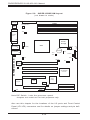
Figure 5-8. SUPER X5SSE-GM Layout
(not drawn to scale)
Keyboard/
Mouse
ATX POWER
J35
J32
DDR4
Processor Power
USB0/1
J50
DDR3
DDR2
COM1
DDR1
JP19
Parallel
Port
J29
VGA
COM2
North
Bridge
CPU
JP11 (WOL)
Mb LAN Port
CHS Fan
CR1
JP15
J8
JP13
BATTERY
Gb LAN Port
JP22
J49
JBT1
JP16
CHS Fan
CHS Fan
JF2 JF1
JP28
CPU Fan
J36
Broadcom
LAN
Controller
JP27
64-bit/66 MHz PCI #1
64-bit/66 MHz PCI #2
SUPER
®
X5SSE-GM
JP10
AIC-7899 SCSI
64-bit/66 MHz PCI #3
Controller
32-bit/33 MHz PCI #4
South
Bridge
BIOS
Rage XL
SW1
IDE #1
JP9
32-bit/33 MHz PCI #5
JP20
IDE #2
USB2/3
J39
J40
FLOPPY
Note: DIP Switch 1 sets the processor speed.
Jumpers not noted are for test purposes only.
Also see this chapter for the locations of the I/O ports and Front Control
Panel (JF1/JF2) connectors and for details on jumper settings and pin definitions.
5-12
Chapter 5: Advanced Motherboard Setup
X5SSE-GM Quick Reference
Jumper
JBT1
JP9
JP10
JP15
JP19
JP20
JP22
JP27
Description
CMOS Clear
VGA Enable/Disable
Mb LAN Enable/Disable
Fan Status Select
Watch Dog Enable/Disable
Main Power Override
System Bus Speed Select
Gb LAN Enable/Disable
Default Setting
See Section 5-9
Pins 1-2 (Enabled)
Pins 1-2 (Enabled)
Open (OH Condition)
Open (Disabled)
Off (Normal)
Pins 1-2 (Auto)
Pins 1-2 (Enabled)
Switch
DIP Switch 1
Description
Processor Speed
Connector
COM1/COM2
CPU/CHS/OH FAN
CPU
DDR1-DDR4
JF1
JF2
JP11
JP16
JP28
J7
J8
J28
J29
J32
J35
J36
J39/J40
J49
J50
USB0/1
USB2/3
Description
COM1/COM2 Serial Ports
CPU/Chassis/Overheat Fan Headers
CPU Socket
Memory (SDRAM) Slots
Front Control Panel Headers
ChInt/NMI/HD LED/PWR LED Headers
Wake-on-LAN Header
Chassis Intrusion Header
External Speaker Header
VGA Display (Monitor) Port
Mb Ethernet Port
Floppy Disk Drive Connector
Parallel Printer Port
PS/2 Keyboard/Mouse Ports
Primary ATX Power Connector
SMB Header
IDE1/2 Hard Disk Drive Connector
Gb Ethernet Port
Processor Power Connector
Universal Serial Bus Ports
Universal Serial Bus Headers
5-13
SUPERSERVER 5013S-8/5013S-i Manual
5-9
Connecting Cables
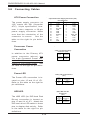
ATX Power Connection
24-pin ATX Power Supply Connector (J35)
Pin Definitions
The power supply connector (at
J35) meets the SSI (Superset
ATX) 24-pin specification, however it also supports a 20-pin
power supply connector. Make
sure that the orientation of the
connector is correct.
See the
table on the right for pin definitions.
Pin Number Definition
13
+3.3V
14
-12V
15
COM
16
PS_ON#
17
COM
18
COM
19
COM
20
Res(NC)
21
+5V
22
+5V
23
+5V
24
COM
Pin Number Definition
1
+3.3V
2
+3.3V
3
COM
4
+5V
5
COM
6
+5V
7
COM
8
PW R_OK
9
5VSB
10
+12V
11
+12V
12
+3.3V
Processor Power
Connection
4-Pin +12v Power Supply
Connector (J50)
In addition to the Primary ATX
power connector (above), the
12v 4-pin Processor Power connector at J50 must also be connected to your power supply. See
the table on the right for pin definitions.
Power LED
Pins
Definition
1&2
3&4
Ground
+12v
PW R_LED Pin Definitions
(JF1)
The Power LED connection is located on pins 15 and 16 of JF1.
Refer to the table on the right for
pin definitions.
HDD LED
Pin
Number
15
16
Definition
+5V
Control
(IDE) HDD LED Pin
Definitions
(JF1)
The HDD LED (for IDE Hard Disk
Drives) connection is located on
pins 13 and 14 of JF1. Attach the
IDE hard drive LED cable to these
pins to display disk activity. Refer
to the table on the right for pin
definitions.
5-14
Pin
Number Definition
13
+5V
14
HD Active
Chapter 5: Advanced Motherboard Setup
L2 LED
The L2 (LAN2 - Gb LAN) LED connection is located on pins 9 and 10
of JF1. Attach an LED cable to
display network activity. Refer to
the table on the right for pin definitions.
L1 LED
L2 LED Pin
Definitions
(JF1)
Pin
Number Definition
+5V
9
GN D
10
L1 LED Pin
Definitions
(JF1)
The L1 (LAN1 - Mb LAN) LED connection is located on pins 11 and
12 of JF1. Attach an LED cable to
display network activity. Refer to
the table on the right for pin definitions.
Overheat LED (OH)
Pin
Number Definition
11
+5V
12
GN D
Overheat (OH) LED
Pin Definitions
(JF1)
Connect an LED to the OH connection on pins 7 and 8 of JF1 to provide advanced warning of chassis
overheating. Refer to the table on
the right for pin definitions.
Pin
Number Definition
+5V
7
GN D
8
Pow er Fail LED Pin
Definitions
(JF1)
Power Fail LED
The Power Fail LED connection is
located on pins 5 and 6 of JF1.
Refer to the table on the right for
pin definitions.
Reset
The Reset connection is located
on pins 3 and 4 of JF1. Attach it
to the hardware reset switch on
the computer case. Refer to the
table on the right for pin definitions.
5-15
Pin
Number Definition
5
Control
6
GN D
Reset Pin
Definitions
(JF1)
Pin
Number Definition
Reset
3
Ground
4
SUPERSERVER 5013S-8/5013S-i Manual
PWR_ON
PW R _ON Connector
Pin Definitions
(JF1)
The PWR_ON connection is located on pins 1 and 2 of JF1. Momentarily contacting both pins will
power on/off the system. This
button can also be configured to
function as a suspend button (see
the Power Button Mode setting in
BIOS). To turn off the power
when set to suspend mode, depress the button for at least 4
seconds. Refer to the table on the
right for pin definitions.
Universal Serial Bus
(USB0/1)
Pin
Number Definition
PW _O N
1
Ground
2
Universal Serial B us Pin Definitio ns
USB0
Two Universal Serial Bus ports
are located beside the keyboard/
mouse ports. USB0 is the bottom
connector and USB1 is the top
connector. See the table on the
right for pin definitions.
Extra Universal Serial Bus
Connection (USB2/3)
Two additional USB headers on
the motherboard can provide convenient front side USB access.
The odd numbered pins (toward
the DIMM slots) are for USB2 and
the even numbered pins are for
USB3. You will need a USB cable
(not included) to use each of these
connections. Refer to the tables
on the right for pin definitions.
Pin
Number
1
2
3
4
5
USB1
Pin
Definition Number
+5V
1
P02
P0+
3
Ground 4
N/A
5
USB2 Pin
Definitions
Pin
N um ber Definition
Pow er
1
3
+
5
Ground
7
Key
9
USB3 Pin
Definitions
Pin
N um ber Definition
Pow er
2
4
+
6
Ground
8
NC
10
NC = No Connection
5-16
D efinition
+5V
P0P0+
G round
Key
Chapter 5: Advanced Motherboard Setup
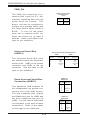
Serial Ports
Serial Port Pin Definitions
(COM1, COM2)
The COM1 serial port is located
under the parallel port (see Figure
5-2). See the table on the right for
pin definitions. The COM2 connector is a header located behind the
VGA port.
PS/2 Keyboard and Mouse
Ports
The ATX PS/2 keyboard and the
PS/2 mouse are located on J32.
See the table on the right for pin
definitions. (The mouse port is
above the keyboard port. See Figure 5-2.)
Fan Headers
Pin Number
1
2
3
4
5
Definition Pin Number
DCD
6
DSR
7
Serial In
8
RTS
9
Serial Out
10
PS/2 Keyboard
and M ouse Port
Pin Definitions
(J32)
Pin
Num ber Definition
Data
1
NC
2
Ground
3
VCC
4
Clock
5
NC
6
NC = No Connection
Fan H eader Pin Definitions
(C PU/CHS/OH Fans)
The X5SS8-GM/X5SSE-GM has
one CPU, two Chassis and one
Chassis/Overheat fan headers.
See the table on the right for pin
definitions.
LAN (Ethernet) Ports
Two Ethernet ports are located
beside the VGA port on the IO
backplane. These ports accept
RJ45 type cables. See the next
section for a description of the
LEDs on the LAN ports.
Note: The X5SS8-GM/X5SSE-GM
has one 10/100 Mb and one 1 Gb
LAN port. When viewed from the
rear, the Mb port is on the left
(see Figure 5-2).
5-17
Pin
Number
1
2
3
Definition
Ground (black)
+12V (red)
Tachometer
Caution: These fan headers
are D C power.
Definition
CTS
DTR
RI
G round
NC
SUPERSERVER 5013S-8/5013S-i Manual
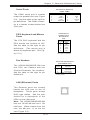
Chassis Intrusion
A Chassis Intrusion header is located on JP16. Attach the appropriate connector here to inform
you of a chassis intrusion condition.
External Speaker Header
Connect a cable from an external
speaker to the JP28 header on the
motherboard if you wish to use
external speakers instead of the
onboard speaker.
Wake-On-LAN
Wake-On-LAN Pin
Definitions (JP11)
The Wake-On-LAN header is designated JP11. See the table on the
right for pin definitions. You must
have a LAN card with a Wake-onLAN connector and cable to use
this feature.
SMB
Pin
Num ber
1
2
3
Definition
+5V Standby
Ground
W ake-up
SMB Header
Pin Definitions (J36)
An SMB (System Management
Bus) header is located at J36.
Connect the appropriate cable
here to utilize SMB on your system.
5-18
Pin
Number
1
2
3
4
Definition
Data
Ground
Clock
+5V Standby
Chapter 5: Advanced Motherboard Setup
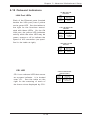
5-10 Onboard Indicators
100 M b LAN LED
Indicators
LAN Port LEDs
Each of the Ethernet ports (located
beside the VGA port) has a yellow
and a green LED. See the tables to
the right for the functions associated with these LEDs. On the Gb
LAN port, the yellow LED indicates
activity while the other LED may be
green, orange or off to indicate the
speed of the connection (as specified in the table at right).
LED
Color
Green
Yellow
Definition
Connected
Active
1 Gb LAN Right LED
Indicator
LED
Color
Off
Green
Orange
Definition
No Connection
100 M Hz
1 GHz
1 Gb LAN Left LED
Indicator
LED
Color
Off
Yellow
Definition
Not Active
Active
CR1 LED
Onboard LED Power
Indicator (CR1)
CR1 is an onboard LED that serves
as a power indicator. It is located
near JF1. See the table on the
right for the meaning of each of
the three colors displayed by CR1.
5-19
LED
Color
Green
Yellow
Red
Definition
Pow er On
Standby Mode
CPU Error
SUPERSERVER 5013S-8/5013S-i Manual
5-11 DIP Switch Settings
DIP Switch 1:
Processor Speed
The red "DIP" switch labeled SW1
has four individual switches,
which are used to set the speed
of the processor.
On the X5SS8-GM/X5SSE-GM, the
BIOS automatically detects the
speed of the processor(s), meaning you do not have to make any
changes to DIP Switch 1.
5-20
Chapter 5: Advanced Motherboard Setup
5-12 Jumper Settings
Explanation of
Jumpers
Connector
Pins
To modify the operation of the
motherboard, jumpers can be used
to choose between optional
settings. Jumpers create shorts
between two pins to change the
function of the connector. Pin 1 is
identified with a square solder pad
on the printed circuit board. See
the motherboard layout pages for
jumper locations.
3
2
1
3
2
1
Jumper
Cap
Setting
Pin 1-2 short
Note : On two pin jumpers,
"Closed" means the jumper is on
and "Open" means the jumper is
off the pins. "Off" means open
with no jumper cap included for
those pins.
CMOS Clear
JBT1 is used to clear CMOS (which will also clear any passwords). Instead of pins, this jumper consists of contact pads to prevent accidentally
clearing the contents of CMOS.
To clear CMOS,
1) First power down the system and unplug the power cord(s)
2) With the power disconnected, short the CMOS pads with a metal object
such as a small screwdriver
3) Remove the screwdriver (or shorting device)
4) Reconnect the power cord(s) and power on the system.
Note: Do not use the PW_ON connector to clear CMOS.
5-21
SUPERSERVER 5013S-8/5013S-i Manual
VGA Enable/Disable
VGA Enable/Disable
Jumper Settings
(JP9)
JP9 allows you to enable or disable the VGA port. The default
position is on pins 1 and 2 to enable VGA. See the table on the
right for jumper settings.
Fan Status Select
Jum per
Position
1-2
2-3
Definition
Enabled
Disabled
Fan Status Select
Jumper Settings (JP15)
JP15 allows you to change the status of the Overheat/Chassis fan to
either activate only during an overheat condition (set in BIOS) or to
reamin active at all times. The default position is open. See the table
on the right for jumper settings.
Watch Dog Enable/Disable
JP19 is used to enable or disable
the Watch Dog function. This
jumper is used together with the
Watch Dog enable function in
BIOS. Enable both the jumper and
the BIOS setting to use the Watch
Dog feature. See the table on the
right for pin definitions.
Jum per
Position
Open
Closed
Definition
Overheat
Alw ays On
W atch Dog Enable/
Disable
Jumper Settings (JP19)
Jumper
Position
Open
Closed
Definition
Disabled
Enabled
M b LAN
Enable/Disable
Jumper Settings
(JP10)
Mb LAN Enable/Disable
Change the setting of jumper JP10
to enable or disable the Mb LAN
port on the motherboard. See the
table on the right for jumper settings. The default setting is pins
1-2.
5-22
Jum per
Position
Pins 1-2
Pins 2-3
Definition
Enabled
Disabled
Chapter 5: Advanced Motherboard Setup
Gb LAN Enable/Disable
Change the setting of jumper JP27
to enable or disable the Gb LAN
port on the motherboard. See the
table on the right for jumper settings. The default setting is pins
1-2.
SCSI Termination Enable/
Disable (5013S-8)
Gb LAN
Enable/Disable
Jumper Settings
(JP27)
Jumper
Position
Pins 1-2
Pins 2-3
Definition
Enabled
Disabled
SCSI Channel T ermination
Enable/Disable
Jumper Settings
(JPA1, JPA2)
Jumpers JPA1 and JPA2 allow you
to enable or disable termination for
the SCSI connectors. Jumper JPA1
controls SCSI channel A and JPA2
is for SCSI channel B. The normal
(default) setting is open to enable
(teminate) both SCSI channels. See
the table on the right for jumper settings.
Jumper
Position
Open
Closed
Definition
Enabled
Disabled
Note: In order for the SCSI drives
to function properly, please do not
change the default setting set by
the manufacturer. See the table on
the right for jumper settings.
SCSI Controller Enable/
Disable (5013S-8)
SCSI Enable/Disable
Jumper Settings
(JA1)
Jumper JA1 allows you to enable or
disable the SCSI headers. The default setting is pins 1-2 to enable
SCSI. See the table on the right for
jumper settings.
5-23
Jum per
Position
Pins 1-2
Pins 2-3
Definition
Enabled
Disabled
SUPERSERVER 5013S-8/5013S-i Manual
5-13 Parallel Port, Floppy/Hard Disk Drive and SCSI
Connections
Note the following when connecting the floppy and hard disk drive cables:
• The floppy disk drive cable has seven twisted wires.
• A red mark on a wire typically designates the location of pin 1.
• A single floppy disk drive ribbon cable has 34 wires and two connectors
to provide for two floppy disk drives. The connector with twisted wires
always connects to drive A, and the connector that does not have
twisted wires always connects to drive B.
Parallel Port Connector
The parallel port is located on J29.
See the table below right for pin
definitions.
P arallel (Printer) Port Pin Definitions
(J29)
Pin Num ber
1
3
5
7
9
11
13
15
17
19
21
23
25
5-24
Function Pin Num ber Function
2
Auto FeedStrobe4
E rrorData Bit 0
6
InitData Bit 1
8
SLCT INData Bit 2
10
GND
Data Bit 3
12
GND
Data Bit 4
14
GND
Data Bit 5
16
GND
Data Bit 6
18
GND
Data Bit 7
20
GND
ACK
22
GND
BUSY
24
GND
PE
26
NC
SLCT
Chapter 5: Advanced Motherboard Setup
Floppy Connector
The floppy connector is located
on J28. See the table below for
pin definitions.
Floppy Connector Pin Definitions
(J28)
Function
Pin Number Function
GND
2
FDHDIN
GND
4
Reserved
Key
6
FDEDIN
GND
8
IndexGND
10
Motor Enable
GND
12
Drive Select BGND
14
Drive Select AGND
16
Motor Enable
GND
18
DIRGND
20
STEPGND
22
Write DataGND
24
Write GateGND
26
Track 00GND
28
Write ProtectGND
30
Read DataGND
32
Side 1 SelectGND
34
Diskette
Pin Number
1
3
5
7
9
11
13
15
17
19
21
23
25
27
29
31
33
IDE Connectors
There are no jumpers to
configure the onboard
IDE#1, #2 and #3 connectors (J39, J40 and J41, respectively). See the table
on the right for pin definitions.
Note: IDE#3 only supports a
CD-ROM device.
IDE#1 and #2 support all devices and can also be used
to support IDE RAID levels
0,1 and 10.
IDE Connector Pin Definitions
(J39, J40. J41)
Pin Number
1
3
5
7
9
11
13
15
17
19
21
23
25
27
29
31
33
35
37
39
5-25
Function
Reset IDE
Host Data 7
Host Data 6
Host Data 5
Host Data 4
Host Data 3
Host Data 2
Host Data 1
Host Data 0
GND
DRQ3
I/O W riteI/O ReadIOCHRDY
DACK3IRQ14
Addr 1
Addr 0
Chip Select 0
Activity
Pin Number
2
4
6
8
10
12
14
16
18
20
22
24
26
28
30
32
34
36
38
40
Function
G ND
Host Data 8
Host Data 9
Host Data 10
Host Data 11
Host Data 12
Host Data 13
Host Data 14
Host Data 15
Key
G ND
G ND
G ND
BALE
G ND
IOC S16G ND
Addr 2
Chip Select 1G ND
SUPERSERVER 5013S-8/5013S-i Manual
Ultra320 SCSI
Connectors (5013S-8)
Refer to the table below for
the pin definitions of the Ultra320 SCSI connectors located at JA2 and JA3.
68-pin Ultra320 SCSI Connectors
(JA2, JA3)
Connector
Contact
Number
Signal Names
Connector
Contact
Number
Signal Names
1
2
3
4
5
6
7
8
9
10
11
12
13
14
15
16
17
18
19
20
21
22
23
24
25
26
27
28
29
30
31
32
33
34
+D B(12)
+D B(13)
+D B(14)
+D B(15)
+D B(P1)
+DB(0)
+DB(1)
+DB(2)
+DB(3)
+DB(4)
+DB(5)
+DB(6)
+DB(7)
+DB(P)
GR OUND
DIF FSENS
TER MPW R
TER MPW R
RESERVED
GR OUND
+ATN
GR OUND
+BSY
+ACK
+RST
+MSG
+SEL
+C/D
+REQ
+I/O
+DB(8)
+DB(9)
+D B(10)
+D B(11)
35
36
37
38
39
40
41
42
43
44
45
46
47
48
49
50
51
52
53
54
55
56
57
58
59
60
61
62
63
64
65
66
67
68
-DB(12)
-DB(13)
-DB(14)
-DB(15)
-DB(P1)
-DB(0)
-DB(1)
-DB(2)
-DB(3)
-DB(4)
-DB(5)
-DB(6)
-DB(7)
-DB(P)
GROUND
GROUND
TERMPW R
TERMPW R
RESERVED
GROUND
-ATN
GROUND
-BSY
-ACK
-RST
-MSG
-SEL
-C/D
-REQ
-I/O
-DB(8)
-DB(9)
-DB(10)
-DB(11)
5-26
Chapter 5: Advanced Motherboard Setup
5-14 Installing Software Drivers
After all the hardware has been installed you must install the software
drivers. The necessary drivers are all included on the Supermicro CD that
came packaged with your motherboard. After inserting this CD into your
CD-ROM drive, the display shown in Figure 5-9 should appear. (If this
display does not appear, click on the My Computer icon and then on the icon
representing your CD-ROM drive. Finally, double click on the S "Setup"
icon.)
Figure 5-9.
Driver/Tool Installation Display Screen
Click the icons showing a hand writing on paper to view the readme files
for each item. The bottom icon with a CD on it allows you to view the
entire contents of the CD.
5-27
SUPERSERVER 5013S-8/5013S-i Manual
Notes
5-28
Chapter 6: Advanced Chassis Setup
Chapter 6
Advanced Chassis Setup
This chapter covers the steps required to install components and perform
maintenance on the SC810 chassis. For component installation, follow the
steps in the order given to eliminate the most common problems encountered.
If some steps are unnecessary, skip ahead to the step that follows.
Tools Required
The only tool you will need to install components and perform maintainance
is a Philips screwdriver.
6-1
Static-Sensitive Devices
Electric Static Discharge (ESD) can damage electronic components. To
prevent damage to any printed circuit boards (PCBs), it is important to
handle them very carefully. The following measures are generally sufficient to protect your equipment from ESD discharge.
Precautions
Use a grounded wrist strap designed to prevent static discharge.
Touch a grounded metal object before removing any board from its antistatic bag.
Handle a board by its edges only; do not touch its components, peripheral chips, memory modules or gold contacts.
When handling chips or modules, avoid touching their pins.
Put the motherboard, add-on cards and peripherals back into their antistatic bags when not in use.
For grounding purposes, make sure your computer chassis provides excellent conductivity between the power supply, the case, the mounting
fasteners and the motherboard.
Unpacking
The motherboard is shipped in antistatic packaging to avoid static damage.
When unpacking the board, make sure the person handling it is static protected.
6-1
SUPERSERVER 5013S-8/5013S-i Manual
6-2
Figure 6-1.
Chassis Front View
Figure 6-2.
Chassis
Rear View
Control Panel
The control panel (located on the front of the chassis) must be connected
to the JF1 connector on the motherboard to provide you with system control
6-2
Chapter 6: Advanced Chassis Setup
buttons and status indicators. These wires have been bundled together in
a ribbon cable to simplify the connection. Connect the cable from JF1 on
the motherboard to JP4 on the Control Panel PCB (printed circuit board).
Make sure the red wire plugs into pin 1 on both JF1 and JP4. Pull all excess
cabling out of the airflow path. The LEDs inform you of system status. See
Chapter 3 for details on the LEDs and the control panel buttons. Details on
JF1 can be found in Chapter 5.
6-3
System Fans
One 10-cm blower fan provides all the cooling needed for the SuperServer
5013S-8/5013S-i. The chassis includes air seals under the blower fan and
at the chassis cross section, which separates the drive bay area from the
motherboard area of the chassis to promote better airflow. It is highly
important that the air seal is properly installed and making a good seal in
order for the cooling air to circulate properly through the chassis. See
Figure 6-3 for locations.
System Fan Failure
The blower fan runs at a full 100% rpm. If the fan fails, the ambient air
temperature in the chassis will rise and activate the overheat LED on the
control panel. You will need to power down the system to replace this fan.
Replacing System Cooling Fans
1.
Removing the blower fan
After turning off the power to the system, first remove the chassis cover
and unplug the fan cable from the motherboard. Lift the blower fan from
the mounting posts and pull it completely out from the motherboard. See
Figure 6-3.
2.
Installing a new blower fan
Replace the failed fan with an identical 10-cm, 12 volt fan (available from
Supermicro). Position the new fan in its proper place in the chassis by
fitting the fan onto the fan mounting posts in the chassis. After the new
fan has been installed, plug the fan cable back into the same chassis fan
header on the motherboard you removed it from. Make sure the air seal
under the fan is properly installed and creating a good seal. Power up
the system and check that the fan is working properly and that the LED
on the control panel has turned off. Finish by replacing the top panel of
the chassis.
6-3
SUPERSERVER 5013S-8/5013S-i Manual
Fan Mounting Posts
Chassis Cross Section
Blower Fan
Figure 6-3.
6-4
System Cooling Fans
Drive Bay Installation/Removal
Accessing the Drive Bays
SCSI Drives: You do not need to access the inside of the chassis to replace
or swap SCSI drives. Proceed to the next step for instructions.
Note: You must use standard 1" high, 80-pin SCA SCSI drives in the
SuperServer 5013S-8.
CD-ROM/IDE/Floppy Disk Drives: For installing/removing the CD-ROM, IDE or
floppy disk drives, you will need to gain access to the inside of the 5013S8/5013S-i by removing the top cover of the chassis. Proceed to the "CDROM and Floppy Drive Installation" section later in this chapter for instructions.
Note: Only a "slim" CD-ROM drive will fit in the 5013S-8/5013S-i.
6-4
Chapter 6: Advanced Chassis Setup
SCSI Drive Installation (5013S-8)
1.
Mounting a SCSI drive in a drive carrier
The SCSI drives are mounted in drive carriers to simplify their installation
and removal from the chassis. These carriers also help promote proper
airflow for the SCSI drive bays. For this reason, even empty carriers
without SCSI drives installed must remain in the chassis. To add a new
SCSI drive, install a drive into the carrier with the printed circuit board
side toward the carrier so that the mounting holes align with those in the
carrier. Secure the drive to the carrier with four screws, as shown in
Figure 6-4.
Figure 6-4. Mounting a SCSI Drive in a Carrier
!
!
Use caution when working around the SCSI backplane.
Do not touch the backplane with any metal objects
and make sure no ribbon cables touch the backplane
or obstruct the holes, which aid in proper airflow.
Important: Regardless of how many SCSI hard drives
are installed, both SCSI drive carriers must remain in
the drive bays to maintain proper airflow.
6-5
SUPERSERVER 5013S-8/5013S-i Manual
2.
Installing/removing hot-swap SCSI drives
Two SCSI drive bays are located in the front of the chassis, making them
easily accessible for installation and removal. These SCSI drives are hotswap units, meaning they can be installed and removed without powering
down the system. To remove, first push the release button located
beside the drive LEDs, then swing the colored handle fully out and use it
to pull the unit straight out (see Figure 6-5).
Handle
Release Button
Figure 6-5.
!
Removing SCSI Drives
Important: Regardless of how many SCSI hard drives
are installed, both SCSI drive carriers must remain in
the drive bays to maintain proper airflow.
6-6
Chapter 6: Advanced Chassis Setup
SCSI Power Cables
SCSI power cables should be routed so that they do not block the airflow
through the chassis. There is a 4-pin connector for the power cables.
SCA Backplane
The SCSI drives plug into an SCA backplane that provides power, SCSI ID
and bus termination. A RAID controller can be used with the SCA backplane
to provide data security. The operating system you use must have RAID
support to enable the hot-swap capability of the SCSI drives. The SCA
SCSI backplane is already preconfigured, so there are no jumpers or
switches present on it.
IDE Drive Installation (5013S-i)
1.
Mounting an IDE drive in a drive carrier
Like SCSI drives, IDE drives are also mounted in drive carriers to simplify
their installation and removal from the chassis. These carriers also help
promote proper airflow. For this reason, even empty carriers without IDE
drives installed must remain in the chassis. To add a new IDE drive,
install a drive into the carrier with the printed circuit board side toward
the carrier so that the mounting holes align with those in the carrier.
Secure the drive to the carrier with the four screws.
2.
Installing/removing IDE drives
The two IDE drive bays are located in the front of the chassis, making
them easily accessible for installation and removal. The IDE drives are
not hot-swap units, meaning system power must be turned off before
installing and/or removing them. To install or remove a drive, first power
down the system and then remove the top cover of the chassis. Unscrew the retention screw at the top center of the drive, then push the
drive carrier out from the back until you can grasp and pull it out through
the front of the chassis (see Figure 6-6). Reverse this procedure when
installing a drive carrier, making sure you screw in the retention screw.
Replace the top cover when finished.
6-7
SUPERSERVER 5013S-8/5013S-i Manual
Figure 6-6.
Removing IDE Drives (5013S-i)
CD-ROM and Floppy Drive Installation
The top cover of the chassis must be opened to gain full access to the CDROM and floppy drive bays. The CD-ROM drive must have a "slim" profile to
fit into the 5013S-8/5013S-i.
First, release the retention screws that secure the unit to the rack. Grasp
the two handles on either side and pull the unit straight out until it locks (you
will hear a "click"). Next, depress the two buttons on the top of the chassis
to release the top cover and at the same time, push the cover away from
you until it stops. You can then lift the top cover from the chassis to gain
full access to the inside of the server. You must power down the system
before installing or removing floppy, CD-ROM or IDE drives.
Drives mount on rails and should "click" into place to be correctly and fully
installed in their bays.
• The floppy disk drive cable has seven twisted wires.
• A red mark on a wire typically designates the location of pin 1.
• A single floppy disk drive ribbon cable has 34 wires and two connectors
to provide for two floppy disk drives. The connector with twisted wires
always connects to drive A, and the connector that does not have
twisted wires always connects to drive B.
6-8
Chapter 6: Advanced Chassis Setup
6-5
Power Supply
The SuperServer 5013S-8/5013S-i has a single 250 watt power supply.
This power supply has an auto-switching capability, which enables it to
automatically sense and operate at between 100v and 240v. A power on/
off switch is located at the back of the power supply. Turning this power
switch to the off position will remove both main and standby power from
the system.
Power Supply Failure
If the power supply unit fails, the system will shut down and you will need
to replace the power supply unit. Replacement units can be ordered directly from Supermicro (see contact infomation in Chapter 1).
Replacing the Power Supply
1.
Accessing the inside of the SuperServer 5013S-8/5013S-i
To replace a power supply, you must first remove the top chassis cover.
To do so, first release the retention screws that secure the unit to the
rack. Grasp the two handles on either side and pull the unit straight out
until it locks (you will hear a "click"). Next, depress the two buttons on
the top of the chassis to release the top cover and push it away from
you. You can then lift the top cover from the chassis to gain full access
to the inside of the server.
2.
Removing the power supply
First unplug the power cord from the system. To remove the failed
power unit, remove the two screws on the back of the power supply,
which secure it to the chassis. You can then lift the unit straight out of
the chassis. (The power cord should have already been removed.)
3.
Installing a new power supply
Replace the failed unit with another unit of the same wattage. It is highly
recommended to replace it with the exact same power supply. Carefully
insert the new unit into position in the chassis and secure it with the two
screws at the rear of the unit. Before reconnecting the power cord,
make sure the power switch on the power supply is in the off position.
Then reconnect the power cord, replace the chassis top cover and push
the unit back into the rack. Finish by turning the power switch on the
power supply on, and then depress the power button on the front of the
system.
6-9
SUPERSERVER 5013S-8/5013S-i Manual
Notes
6-10
Chapter 7: BIOS
Chapter 7
BIOS
7-1
Introduction
This chapter describes the AMIBIOS for the X5SS8-GM/X5SSE-GM. The AMI
ROM BIOS is stored in a Flash EEPROM and can be easily upgraded using a
floppy disk-based program.
Note: Due to periodic changes to BIOS, some settings may have been
added or deleted and might not yet be recorded in this manual. Refer to the
Manual Download area of our web site for any changes to BIOS that are
not reflected in this manual.
System BIOS
The BIOS is the Basic Input Output System used in all IBM® PC, XT™, AT® ,
and PS/2 ® compatible computers. The BIOS ROM stores the system parameters, such as amount of memory, type of disk drives and video displays,
etc. BIOS ROM requires very little power. When the computer is turned off,
a back-up battery provides power to the BIOS ROM, enabling it to retain the
system parameters. Each time the computer is powered-on, the computer is
then configured with the values stored in the BIOS ROM by the system
BIOS, which gains control when the computer is powered on.
How To Change the Configuration Data
The configuration data that determines the system parameters may be
changed by entering the BIOS Setup utility. This Setup utility can be accessed by pressing <Del> at the appropriate time during system boot.
Starting the Setup Utility
Normally, the only visible POST (Power On Self Test) routine is the memory
test. As the memory is being tested, press the <Delete> key to enter the
main menu of the BIOS Setup utility. From the main menu, you can access
the other setup screens, such as the Chipset and Power menus. Section 43 gives detailed descriptions of each parameter setting in the Setup utility.
An AMIBIOS identification string is displayed at the left bottom corner of the
screen, below the copyright message.
7-1
SUPERSERVER 5013S-8/5013S-i Manual
7-2
BIOS Features
•
Supports Plug and Play V1.0A and DMI 2.3
•
Supports Intel PCI (Peripheral Component Interconnect) (PME) local bus
specification 2.2
•
Supports Advanced Power Management (APM) specification v 1.1
•
Supports ACPI
•
Supports Flash ROM
AMIBIOS supports the LS120 drive made by Matsushita-Kotobuki Electronics
Industries Ltd. The LS120:
•
Can be used as a boot device
•
Is accessible as the next available floppy drive
AMIBIOS supports PC Health Monitoring chips. When a failure occurs in a
monitored activity, AMIBIOS can sound an alarm and display a message.
The PC Health Monitoring chips monitor:
•
CPU temperature
•
Chassis intrusion detector
•
Five positive voltage inputs
•
Three fan speed monitor inputs
7-3
Running Setup
*Optimal default settings are in bold text unless otherwise noted.
The BIOS setup options described in this section are selected by choosing
the appropriate text from the Standard Setup screen. All displayed text is
described in this section, although the screen display is often all you need
to understand how to set the options (see on next page).
7-2
Chapter 7: BIOS
The Main BIOS Setup Menu
Press the <Delete> key during the POST (Power On Self Test) to enter the Main Menu
of the BIOS Setup Utility. All Main Setup options are described in this section. The
Main BIOS Setup screeen is displayed below.
BIOS SETUP UTILITY
Main
Advanced Chipset PCIPnP
Power Boot Security Exit
AMIBIOS Version:
BIOS Build Date:
BIOS ID:
07.00xx
05/22/02
4DS80603
Processor Type:
Processor Speed:
Intel®Xeon®
2400 MHz
System Memory:
2048 MB
System Date
System Time
[10:10:00]
[05/29/02]
↔
↑↓
+F1
F10
ESC
Select Screen
Select Item
Change Option
General Help
Save and Exit
Exit
V07.00 (C)Copyright 1985-2001, American Megatrends, Inc.
Use the Up/Down arrow keys or the <Tab> key to move between the different
settings in the above menu.
When the items "System Time", and "System Date" are highlighted, type in the
correct time/date in the time field, and then press "Enter". The date must be entered
in MM/DD/YY format. The time is entered in HH:MM:SS format. The time is in also 24hour format. For example, 5:30 a.m. appears as 05:30:00 and 5:30 p.m. as 17:30:00.
Press the <ESC> key to exit the Main Menu and use the Left/Right arrow keys to
enter the the other categories of BIOS settings. The next section is described in
detail to illustrate how to navigate through the menus.
Note: Items displayed in gray are preset and cannot be selected. Items
with a blue arrow are commands, not options (i.e. Discard Changes).
7-3
SUPERSERVER 5013S-8/5013S-i Manual
7-4
Advanced BIOS Setup
Choose Advanced BIOS Setup from the AMIBIOS Setup Utility main menu with the
Left/Right arrow keys. You should see the following display. Select one of the items
in the left frame of the screen, such as SuperIO Configuration, to go to the sub screen
for that item. Advanced BIOS Setup options are displayed by highlighting the option
using the arrow keys. All Advanced BIOS Setup options are described in this
section.
BIOS SETUP UTILITY
Main
Advanced
Chipset
PCIPnP
Power
Setup Warning
Setting items on this screen to incorrect values
may cause the system to malfunction!
>
>
>
>
>
>
>
>
Boot
Security
Exit
Configure SuperIO
Chipset Winbond627F
SuperIO Configuration
IDE Configuration
Floppy Configuration
Boot Settings Configuration
Event Log Configuration
Peripheral Device Configuration
System Health Monitor
Remote Access Configuration
↔ Select Screen
↑↓ Select Item
Enter Go to Sub Screen
F1 General Help
F10 Save and Exit ESC
Exit
V7.00 (C)Copyright 1985-2001, American Megatrends, Inc.
Use the Up/Down arrow keys to select the "Super I/O Configuration line.
When the "Super IO Configuration" line is highlighted, hit "ENTER" to display its menu.
The following Super IO Configuration screen will appear. Here you can select your
options for the your computer's I/O (Input/Output) devices.
7-4
Chapter 7: BIOS
Super IO Configuration
BIOS SETUP UTILITY
Advanced
Configure Winbond627F Serial Port(s) and Parallel P
Serial Port1 Address
Serial Port1 IRQ
Serial Port2 Address
Serial Port2 IRQ
Serial Port2 Mode
Parallel Port Address
Parallel Port IRQ
Parallel Port Mode
ECP Mode DMA Channel
[3F8]
[4]
[2F8]
[3]
[Normal]
[378]
[7]
[ECP]
[3]
↔
↑↓
+F1
F10
ESC
Select Screen
Select Item
Change Option
General Help
Save and Exit
Exit
V07.00 (C)Copyright 1985-2001, American Megatrends, Inc.
The Super IO Configuration includes the following items:
Serial Port 1 Address
This option specifies the base I/O port address of serial port 1. The settings for this item include Disabled, 3F8 and 3E8 and 2E8. Select the desired setting and then press "Enter".
Serial Port 1 IRQ
This option specifies the Interrupt Request address of serial port 1.
settings for this item include Disabled, 4 and 3.
The
Serial Port 2 Address
This option specifies the base I/O port address of serial port 2. The settings
for this item include Disabled, 2F8, 3E8 and 2E8.
Serial Port 2 IRQ
This option specifies the Interrupt Request address of serial port 2.
settings for this item include Disabled, 4 and 3.
7-5
The
SUPERSERVER 5013S-8/5013S-i Manual
Serial Port 2 Mode
Use this option to choose the Serial Port 2 Mode. The settings are
Normal, Sharp-IR, SIR and consumer.
Parallel Port Address
This option specifies the I/O address used by the parallel port. The settings
for this item include Disabled, 378, 278 and 3BC. Select your setting and
then press "Enter".
Parallel Port IRQ
This option allows the user to set the Parallel Port IRQ. The settings
for this item include 5 and 7.
Parallel Port Mode
This option specifies the parallel port mode. The settings for this item
include Normal, Bi-directional, EPP and ECP.
ECP Mode DMA Channel
This option allows the user to set the setting for the ECP
Mode of the DMA Channel. The settings for this item include
0, 1 and 3.
IDE Configuration
Onboard PCI IDE Controller
This option allows the user to enable or disable the integrated IDE Controller. The settings include Disabled, Primary, Second and Both. Select "Disabled" to disable the Integrated IDE Controller. Select "Primary" to enable
the Primary IDE ontroller only. Select "Secondary" to enable the Secondary
IDE Controller only. Select "Both" to enable both Primary and Secondary
IDE Controllers.
7-6
Chapter 7: BIOS
Primary IDE Master
When entering "Setup", BIOS automatically detects the presence of
IDE devices. This displays the auto detection status of the IDE devices. You can also manually configure the IDE drives by providing the
following information:
This option allows the user to configure the IDE devices. When the desired
item is highlighted (selected), press "Enter" and the following screen will be
displayed:
Type
This option sets the type of device that the AMIBIOS attempts
to boot from after AMIBIOS POST is completed. The settings
include Not installed, Auto, CDROM and ARMD. The "Auto"
setting allows BIOS to automatically detect the presence of
the IDE controller.
LBA/Large Mode
LBA (Logical Block Addressing) is a method of addressing
data on a disk drive. In LBA mode, the maximum drive capac
ity is 137 GB. The settings are Disabled and Auto. Select
"Disabled" to disable LBA mode. Select "Auto" to enable LBA
mode if your device supports it and is not already formatted
with the LBA mode.
Block (Multi-Sector Transfer) Mode
This option sets the block mode multi sector transfers option
The settings include Disabled and Auto. Disabled: This op
tion prevents the BIOS from using Multi-Sector Transfer on
the specified channel. The data to and from the device will
occur one sector at a time. Auto: This option allows the
BIOS to auto detect device support for Multi-Sector Trans
fers on the specified channel. If supported, this option al
lows the BIOS to auto detect the number of sectors per block
for transfer from the hard disk drive to memory. The data
transfer to and from the device will occur multiple sectors at
a time (if the device supports it).
7-7
SUPERSERVER 5013S-8/5013S-i Manual
PIO Mode
IDE PIO (Programmable I/O) mode programs timing cycles between the
IDE drive and the programmable IDE controller. As the PIO mode increases, the cycle time decreases. The settings are: Auto, 0, 1, 2, 3
and 4.
DMA Mode
This item allows the users to select the DMA mode. The
settings are: Auto, SWDMA0, SWDMA1, SWDMA2,
MWDMA0, MWDMA1, MWDM2, UWDMA0, UWDMA1,
UWDMA2, UWDMA3 and UWDMA4. Select Auto to auto detect the DMA Mode. Select SWDMA0 through SWDMA2 to
set single word DMA0 through DMA2. Select MWDMA0
through MWDMA2 to set Multi-word DMA0 through DMA2.
Select UDMA0 trhough UDMA4 to set Ultra DMA0 through
Ultra DMA4.
S.M.A.R.T.
S.M.A.R.T stands for Self-Monitoring Analysis and Reporting
Technology, a feature that can help predict impending drive
failures. The settings are Auto, Disabled and Enabled.
Select "Enabled" or "Disabled" to enable or disable the
S.M.A.R.T. Select "Auto" to auto detect S.M.A.R.T.
32Bit Data Transfer
The settings are Auto, Disabled and Enabled. Select "Enabled" or "Disabled" to enable or disable the 32-bit Data
Transfer function. Select "Auto" to auto detect the 32-bit
Data Transfer function.
ARMD Emulation Type
This option is used to select the ARMD emulation type used when
configuring an LS120, MO (Magneto-Optical), or Iomega Zip drive.
The settings are Auto, Floppy and HardDisk. (ARMD stands for
ATA(PI) Removable Media Disk).
7-8
Chapter 7: BIOS
Primary IDE Slave
When the system enters "Setup", BIOS automatically detects the presence
of IDE devices. This option displays the auto detection status of IDE devices. The settings for "Primary IDE Slave" are the same as those for the
"Primary IDE Master".
Secondary IDE Master
This displays the status of auto detection of IDE devices. The settings for
"Secondary IDE Master" are the same as those for the "Primary IDE Master".
Secondary IDE Slave
This displays the status of auto detection of IDE devices. The settings for
"Secondary IDE Slave" are the same as those for the "Primary IDE Master".
Hard Disk Write Protect
This item allows the user to prevent the hard disk from being overwritten.
The options are Enabled or Disabled. Disabled allows the drive to be used
normally; read, write and erase functions can all be performed. Enabled
prevents the hard disk from being erased. This function is effective only
when the device is accessed through BIOS.
ATA(PI) Detect Timeout (Seconds)
Set this option to stop the system search for ATAPI devices within the
specified number of seconds. The options are 0, 5, 10, 15, 20, 25, 30 and
35 (seconds). Most ATA disk drives can be detected within 5 seconds.
ATA(PI) 80pin Cable Detection
This option allows you to select the mechanism used to detect the 80-pin
ATA(PI) cable. The settings are Host, Device and Host & Device.
7-9
SUPERSERVER 5013S-8/5013S-i Manual
Floppy Configuration
Floppy A
Use this option to specify which of floppy drive you have installed in the A
drive. The settings are Disabled, 360 KB 5 1/4", 1.2 MB 5 1/4", 720 KB 3 1/
2", 1.44 MB 3 1/2" and 2.88 MB 3 1/2".
Floppy B
Use this option to specify which of floppy drive you have installed in the B
drive. The settings are Disabled, 360 KB 5 1/4", 1.2 MB 5 1/4", 720 KB 3
1/2", 1.44 MB 3 1/2" and 2.88 MB 3 1/2".
Floppy Drive Seek
Use this option to Enable or Disable the floppy seek routine on bootup.
Boot Settings Configuration
Quick Boot
This option allows the BIOS to skip certain tests that are normally perfomred
on boot up. You can disable the option to speed up boot time. The settings
are Disabled and Enabled.
Quiet Boot
If Disabled, this option will cause the normal POST messages to be displayed upon setup. When Enabled, the OEM logo is displayed instead of the
POST messages. The settings are Enabled and Disabled.
Add-On ROM Display Mode
Set this option to display add-on ROM (read-only memory) messages. The
settings for this option are Force BIOS and Keep Current. Force BIOS
allows the computer to force a third party BIOS to display during system
boot. Keep Current has the system display AMIBIOS information on bootup.
7-10
Chapter 7: BIOS
BootUp Num Lock
This option is used to select the status of the Number Lock function on your
keyboard on bootup. The settings are On and Off.
BootUp CPU Speed
This option is used set the CPU speed to either High or Low.
PS/2 Mouse Support
This option specifies whether a PS/2 Mouse will be supported. Settings are
Enabled and Disabled.
Typematic Rate
Set this option to select the rate at which the computer repeats a key that
is held down. Settings are Fast and Slow. Fast: This sets the rate the
computer repeats a key to over 20 times per second. Under normal operations, this setting should not be changed. Slow: This sets the rate the
computer repeats a key to under 8 times per second.
System Keyboard
This option is to let the system know if a keyboard is Present or Absent.
Primary Display
This option specifies the type of monitor display you have installed on the
system. The settings are Absent, VGA/EGA, Color 40 x 25, Color 80 x 25
and monochrome.
Parity Check
Use this option to either Enable or Disable the use of memory parity checking.
Boot to OS/2
This option can be used to boot the system to an OS/2 operating system.
The settings are No and Yes.
7-11
SUPERSERVER 5013S-8/5013S-i Manual
Wait for F1 if Error
This settings for this option are Enabled and Disabled. Disabled: This
prevents the AMIBIOS to wait on an error for user intervention. This setting
should be used if there is a known reason for a BIOS error to appear. An
example would be a system administrator must remote boot the system.
The computer system does not have a keyboard currently attached. If this
setting is set, the system will continue to bootup in to the operating system.
If ‘F1’ is enabled, the system will wait until the BIOS setup is entered.
Enabled: This option allows the system BIOS to wait for any error. If an
error is detected, pressing <F1> will enter Setup and the BIOS setting can
be adjusted to fix the problem. This normally happens when upgrading the
hardware and not setting the BIOS to recognize it.
Hit "Delete" Message Display
This option tells the system to display or not display the "Hit Delete to Enter
Setup" message. The settings are Enabled and Disabled.
Cache
This option is for enabling or disabling the internal CPU L1 cache. Settings
include Disabled, Write-Thru, Write-Back and Reserved. Disabled: This
option prevents the system from using the internal CPU L1 cache. This
setting should be used to slow the computer system down or to troubleshoot error messages. Write-Thru: This option allows the computer system
to use the internal CPU L1 cache as Write-Though cache. Write-Through
cache is slower than Write-Back cache. It performs write operations to the
internal L1 CPU cache and system memory simultaneously. Write-Back:
This option allows the computer system to use the internal CPU L1 cache as
Write-Back cache. Write-Back cache is faster than Write-Through cache.
Write-Back cache is a caching method in which modifications to data in the
cache aren’t copied to the cache source until absolutely necessary. Writeback caching is available on all CPUs supported by this BIOS. With these
CPUs, write operations stored in the L1 cache aren’t copied to main memory
until absolutely necessary. This is the default setting.
System BIOS Cacheable
This option enables you to move the system BIOS to the memory cache to
improve performance. Settings are Enabled and Disabled.
7-12
Chapter 7: BIOS
Event Log Configuration
Event Logging
This option Enables or Disables the logging of events. You can use this
screen to select options for the Event Log Configuration Settings. You can
access sub screens to view the event log and mark all events as read. Use
the up and down arrow keys to select an item, and the plus (+) and minus
(-) keys to change the option setting. The settings are described on the
following pages. The screen is shown below.
ECC Event Logging
This option Enables or Disables the logging of ECC events. The events
logged by AMIBIOS are post errors such as a bad BIOS, floppy errors, or
hard drive errors.
Clear All Event Logs
This option can be used to tell the system to clear the event log on the next
boot up. The settings are No and Yes.
View Event Log
Highlighting this and pressing <Enter> will allow you to view the unread
events from the event log area.
Mark All Events As Read
Highlighting [OK] and pressing <Enter> will mark all events in the log area as
having been read. The settings are OK and Cancel.
7-13
SUPERSERVER 5013S-8/5013S-i Manual
Peripheral Device Configuration
Power Lost Control
This option determines how the system will respond when power is reapplied after a power loss condition. Choose Last State to automatically
start up the system when power is reapplied after an AC power loss.
Always Off means you must push the main power button to restart the
system after power is restored.
System Health Monitor
The BIOS continuously monitors the health of your system by measuring
certain voltage levels and temperatures.
CPU1 Current Temperature
1st System Temperature
2nd System Temperature
These readings display the real-time temperatures of the CPU and two sensor points for chassis temperature. There are also several voltage level
monitors as shown on the System Health Monitor screen.
Remote Access Configuration
Remote Access
This option allows the user to redirect the console (display) through the
COM port when enabled. This is useful when two computers are hooked
up to a single monitor. The function keys are disabled when this setting is
enabled. The settings are "Serial ANSI" and "Disabled."
7-14
Chapter 7: BIOS
7-5
Chipset Setup
Choose Chipset Setup from the AMIBIOS Setup Utility main menu. The screen
is shown below. All Chipset Setup options are described following the
screen.
BIOS SETUP UTILITY
Main
Advanced
Chipset
PCIPnP
Power
Memory Timing Control
[Manual]
Act to Deact
[6 Clks]
Act to Read/Write
[2 Clks]
RAS Precharge Time
[2 Clks]
RA Cycle Time
[6 Clks]
SDRAM CAS Latency
[CAS Latency 2.5]
RAS Time Recycle after Refresh [10 Clks]
MPS 1.4 Support
[Enabled]
Hyper-threading
[Enabled]
Watch Dog Timer
[Disabled]
Auto DQS Setting Support
[Disabled]
DQS Selection
[16]
Spread Spectrum
[Disabled]
Memory Enhance Mapping
[Enabled]
Boot
Security
Exit
Options for MCH
↔ Select Screen
↑↓ Select Item
Enter Go to Sub Screen
F1 General Help
F10 Save and Exit ESC
Exit
V02.03 (C)Copyright 1985-2002, American Megatrends, Inc.
Memory Timing Control
Determines how the memory timing is controlled. Auto lets BIOS program
the memory timing from SPD data. Manual allows the user to select the
appropriate memory timing.
Act to Deact
The settings are 5 Clks and 6 Clks.
Act to Read/Write
The settings are 2 Clks and 3 Clks.
RAS Precharge Time
This determines the duration of the time interval during which the Row
Address Strobe signal to a DRAM is held low during normal Read and Write
Cycles. The settings are 2 Clks and 3 Clks.
7-15
SUPERSERVER 5013S-8/5013S-i Manual
RAS Cycle Time
This determines the cycle time of a Row Address Strobe. The settings are
6 Clks, 7 Clks, 8 Clks and 9 Clks.
SDRAM CAS Latency
This sets the CAS latency for system memory. The default setting is CAS
Latency 2.5.
RAS Cycle Time after Refresh
This determines the amount of active time needed for a Row Address
Strobe after a refresh. The settings are 8 Clks, 9 Clks and 10 Clks.
MPS 1.4 Support
The settings for this option are Enabled and Disabled.
Hyper-threading
Enables hyper-threading if supported by the operating system. Hyperthreading is a method of creating an additional "virtual" processor by using
parallelism to process mulitple instructions simultaneously. The settings for
this option are Enabled and Disabled.
Watchdog Timer
This option is used to configure the Watchdog timer. Settings are Disabled, 2 minutes, 5 minutes, 10 minutes and 15 minutes.
Auto DQS Setting Support
The settings for this option are Disabled and Enabled.
DQS Selection
This setting is preset.
Spread Spectrum
Spread Spectrum is a technique used to stabilize a system that is being
affected by electromagnetic interference. The settings for this option are
Disabled and Enabled.
7-16
Chapter 7: BIOS
Memory Enhance Mapping
The settings for this option are Enabled and Disabled.
7-6
PCI PnP Setup
Choose PCI/PnP Setup from the AMIBIOS Setup main menu. All PCI/PnP
options are described in this section. The PCI/PnP Setup screen is shown
below.
BIOS SETUP UTILITY
Main
Advanced Chipset PCIPnP
Power Boot Security Exit
Plug & Play O/S
Reset Config Data
Allocate IRQ to VGA
Palette Snooping
PCI IDE BusMaster
[No]
[No]
[Yes]
[Disabled]
[Disabled]
USB Function
Legacy USB Support
ARMD Emulation Type
[Enabled]
[Auto]
[Hard Disk]
↔
↑↓
+F1
F10
ESC
Select Screen
Select Item
Change Option
General Help
Save and Exit
Exit
V02.03 (C)Copyright 1985-2002, American Megatrends, Inc.
Plug & Play OS
This option specifies how Plug and Play devices will be configured. The
settins are Yes and No. No lets BIOS configure all devices in the system.
Yes lets the operating system (if supported) configure PnP devices not
required for bootup.
Reset Configuration Data
Choosing the Yes setting will cause the PnP configuration data in the BIOS
to be cleared on the next boot up. Choosing the No setting does not force
PnP data to be cleared on the next boot.
7-17
SUPERSERVER 5013S-8/5013S-i Manual
Allocate IRQ to PCI VGA
This option lets you allocate an interrupt request (IRQ) to the PCI VGA
adapter card (if used). The settings are Yes and No.
PCI IDE BusMaster
The settings for this option are Disabled and Enabled. Enable to specify
that the IDE controller on the PCI bus has bus mastering capabilities.
USB Function
The settings for this option are Disabled and Enabled. Disabled prevents
the use of the USB ports and Enabled allows the use of the USB ports.
Legacy USB Support
This option allows you to enable support for Legacy USB. The settings are
Auto, Enabled and Disabled.
ARMD Emulation Type
This settings for this option are Hard Disk, Auto and Floppy.
7-18
Chapter 7: BIOS
7-7
Power Setup
Choose Power from the AMIBIOS Setup main menu. All Power options are
described in this section. The Power Setup screen is shown below.
BIOS SETUP UTILITY
Main
Advanced
Chipset
PCIPnP
Power
ACPI Aware O/S
[Yes]
Power Management
Power Button Mode
Suspend Timeout (Minutes)
[Enabled]
[On/Off]
[Off]
Boot Security Exit
↔ Select Screen
↑↓ Select Item
+- Change Option
F1 General Help
F10 Save and Exit
ESC Exit
V07.00 (C)Copyright 1985-2001, American Megatrends, Inc.
ACPI Aware O/S
Yes allows the system to utilize Intel's ACPI specification. Windows 3.x®,
and Windows NT® are non-ACPI aware operating systems. Windows 95®,
Windows 98®, Windows ME® and Windows 2000® are ACPI-aware OS's.
Power Management
When enabled, this option displays the following four options relating to
power management. The settings are Disabled and Enabled.
Power Button Mode
This determines the function of the chassis power button, either On/
Off or Suspend. When set to Suspend, depressing the power button
when the system is running will cause it to enter a suspend state.
Suspend Timeout
This option specifies the length of hard disk inactivity time that should
expire before entering the power conserving state. The settings are
Off, 1, 2, 3, 4, 5, 6, 7, 8, 9 and 10 (minutes).
7-19
SUPERSERVER 5013S-8/5013S-i Manual
7-8
Boot Setup
Choose Boot Setup from the AMIBIOS Setup main menu. All Boot Setup
options are described in this section. The Boot Setup screen is shown
below.
BIOS SETUP UTILITY
Main
>
>
>
>
Advanced
Chipset
PCIPnP
Power
Boot
Security
Exit
Boot Device Priority
Hard Disk Drives
Removable Devices
ATAPI CDROM Drives
↔
↑↓
Enter
F1
F10
ESC
Select Screen
Select Item
Go to Sub Screen
General Help
Save and Exit
Exit
V02.03 (C)Copyright 1985-2000, American Megatrends, Inc.
Boot Device Priority
1st Boot Device
This option is used to specify the order of the boot sequence that will
be followed from the available system devices. The settings for the
1st Boot Device are Removable Device, ATAPI CDROM, Hard Drive
and Intel UNDI PXE-2.0 (build 082).
2nd Boot Device
The settings for the 2nd Boot Device are Removable Device, ATAPI
CDROM, Hard Drive and Intel UNDI PXE-2.0 (build 082).
7-20
Chapter 7: BIOS
3rd Boot Device
The settings for the 3rd Boot Device are Removable Device, ATAPI
CDROM, Hard Drive and Intel UNDI PXE-2.0 (build 082).
4th Boot Device
The settings for the 4th Boot Device are Removable Device, ATAPI
CDROM, Hard Drive and Intel UNDI PXE-2.0 (build 082).
Hard Disk Drives
Use this screen to view the boot sequency of hard drives that have been
auto-detected or entered manually on your system.
Removable Devices
Use this screen to view the boot sequency of the removeable devices that
have been auto-detected or entered manually on your system.
ATAPI CDROM Drives
Use this screen to view the boot sequency ofthe ATAPI CDROM drives that
have been auto-detected or entered manually on your system.
7-21
SUPERSERVER 5013S-8/5013S-i Manual
7-9
Security Setup
Choose Security Setup from the AMIBIOS Setup main menu. All Security
Setup options are described in this section. The Security Setup screen is
shown below.
BIOS SETUP UTILITY
Main
Advanced
Supervisor Password
User Password
Chipset
:
:
>
Change Supervisor Password
>
Change User Password
>
Clear User Password
Boot Sector Virus Protection
PCIPnP
Power
Not Installed
Not Installed
Boot
Security
Exit
Install or Change the
password.
[Disabled]
↔
↑↓
Enter
F1
F10
ESC
Select Screen
Select Item
Go to Sub Screen
General Help
Save and Exit
Exit
V02.03 (C)Copyright 1985-2000, American Megatrends, Inc.
Supervisor Password
User Password
AMIBIOS provides both Supervisor and User password functions. If you
use both passwords, the Supervisor password must be set first. The system can be configured so that all users must enter a password every time
the system boots or when AMIBIOS Setup is executed, using either or both
the Supervisor password or User password. The Supervisor and User
passwords activate two different levels of password security. If you select
password support, you are prompted for a 1 – 6 character password. Type
the password on the keyboard. The password does not appear on the
screen when typed. Make sure you write it down. If you forget it, you must
clear CMOS and reconfigure. Remember your Password! Keep a record
of the new password when the password is changed. If you forget the
password, you must erase the system configuration information in CMOS.
7-22
Chapter 7: BIOS
Change Supervisor Password
This option allows you to change a supervisor password that was entered
previously.
Change User Password
This option allows you to change a user password that was entered previously.
Clear User Password
Use this option to clear the user password so that it is not required to be
entered when the system boots up.
Boot Sector Virus Protection
This option allows you to enable or disable a virus detection program to
protect the boot sector of your hard disk drive. The settings for this option
Disabled and Enabled. If Enabled, AMIBIOS will display a warning when
any program (or virus) issues a Disk Format command or attempts to write
to the boot sector of the hard disk drive.
7-23
SUPERSERVER 5013S-8/5013S-i Manual
7-10 Exit Setup
Choose Exit Setup from the AMIBIOS Setup main menu. All Exit Setup options are described in this section. The Exit Setup screen is shown below.
BIOS SETUP UTILITY
Main
>
>
>
>
>
Advanced
Chipset
PCIPnP
Power
Boot
Security
Exit
Exit system setup with
saving the changes.
Exit Saving Changes
Exit Discarding Changes
Load Optimal Defaults
Load Fail-Safe Defaults
Discard Changes
↔
↑↓
Enter
F1
F10
ESC
Select Screen
Select Item
Go to Sub Screen
General Help
Save and Exit
Exit
V02.03 (C)Copyright 1985-2000, American Megatrends, Inc.
Exit Saving Changes
Highlighting this setting and then pressing <Enter> will save any changes
you made in the BIOS Setup program and then exit. Your system should
then continue with the boot up procedure.
Exit Discarding Changes
Highlighting this setting and then pressing <Enter> will ignore any changes
you made in the BIOS Setup program and then exit. Your system should
then continue with the boot up procedure.
7-24
Chapter 7: BIOS
Load Optimal Defaults
Highlighting this setting and then pressing <Enter> provides the optimum
performance settings for all devices and system features.
Load Failsafe Defaults
Highlighting this setting and then pressing <Enter> provides the safest set
of parameters for the system. Use them if the system is behaving erratically.
Discard Changes
Highlighting this setting and then pressing <Enter> will ignore any changes
you made in the BIOS Setup program but will not exit the BIOS Setup program.
7-25
SUPERSERVER 5013S-8/5013S-i Manual
Notes
7-26
Appendix A: AwardBIOS Post Messages
Appendix A
AwardBIOS POST Messages
During the Power-On Self-Test (POST), BIOS will check for errors. If an error is found
and a correction is needed, BIOS will activate an alarm or display a message.
If a message is displayed, it will be accompanied by the following:
PRESS F1 TO CONTINUE, CTRL-ALT-ESC OR DEL TO ENTER SETUP
POST Beep Codes
Currently, there are two kinds of beep codes used in AwardBIOS. One code indicates
that a video error has occurred and that the BIOS cannot initialize the video screen
to display any additional information. This beep code consists of a single long beep
followed by two short beeps. The other code indicates that a Rambus error has
occurred. This beep code consists of a single long beep that sounds repeatedly.
Error Messages
One or more of the following messages may be displayed if the BIOS detects an error
during the POST. This list includes messages for both the ISA and the EISA BIOS.
CMOS BATTERY HAS FAILED
CMOS CHECKSUM ERROR
The CMOS hecksum is incorrect. This can indicate that CMOS has been corrupted.
This error may have been caused by a weak battery. Check the battery and replace
if necessary.
DISK BOOT FAILURE, INSERT SYSTEM DISK AND PRESS ENTER
No boot device was found. This could mean that either a boot drive was not detected
or the drive does not contain the proper system boot files. Insert a system disk into
Drive A: and press <Enter>. If you assumed the system would boot from the hard
drive, make sure the controller is inserted correctly and all cables are properly
attached. Also make sure the disk has been formatted as a boot device. Then reboot
the system.
A-1
APPENDIX A
The CMOS battery is no longer functional. It should be replaced.
SUPERSERVER 5013S-8/5013S-i Manual
DISKETTE DRIVES OR TYPES MISMATCH ERROR - RUN SETUP
The type of diskette drive installed in the system is different from the CMOS definition.
Run Setup to reconfigure the drive type correctly.
DISPLAY SWITCH IS SET INCORRECTLY
The display switch on the motherboard can be set to either monochrome or color. This
indicates that the switch is set to a different setting than indicated in Setup. Determine
which setting is correct, and then either turn off the system and change the jumper
or enter Setup and change the VIDEO selection.
DISPLAY TYPE HAS CHANGED SINCE LAST BOOT
Since last powering off the system, the display adapter has been changed. You must
configure the system for the new display type.
ERROR ENCOUNTERED INITIALIZING HARD DRIVE
The hard drive cannot be initialized. Be sure the adapter is installed correctly and all
cables are correctly and firmly attached. Also be sure the correct hard drive type
is selected in Setup.
ERROR INITIALIZING HARD DISK CONTROLLER
Cannot initialize the controller. Make sure the cord is correctly and firmly installed in
the bus. Be sure the correct hard drive type is selected in Setup. Also check to see
if any jumper needs to be set correctly on the hard drive.
FLOPPY DISK CNTRLR ERROR OR NO CNTRLR PRESENT
Cannot find or initialize the floppy drive controller. Make sure the controller is installed
correctly and firmly. If there are no floppy drives installed, be sure the Diskette Drive
selection in Setup is set to NONE.
KEYBOARD ERROR OR NO KEYBOARD PRESENT
Cannot initialize the keyboard. Make sure the keyboard is attached correctly and no
keys are being pressed during boot up.
If you are intentionally configuring the system without a keyboard, set the error halt
condition in Setup to HALT ON ALL, BUT KEYBOARD. This will cause the BIOS to
ignore the missing keyboard and continue the boot.
A-2
Appendix A: AwardBIOS POST Messages
Memory Address Error at ...
Indicates a memory address error at a specific location. You can use this location
along with the memory map for your system to find and replace the bad memory chips.
Memory parity Error at ...
Indicates a memory parity error at a specific location. You can use this location along
with the memory map for your system to find and replace the bad memory chips.
Memory Verify Error at ...
Indicates an error verifying a value already written to memory. Use the location along
with your system’s memory map to locate the bad chip.
OFFENDING ADDRESS NOT FOUND
This message is used in conjunction with the I/O CHANNEL CHECK and RAM PARITY
ERROR messages when the segment that has caused the problem cannot be isolated.
OFFENDINGSEGMENT:
This message is used in conjunction with the I/O CHANNEL CHECK and RAM PARITY
ERROR messages when the segment that has caused the problem has been isolated.
PRESS A KEY TO REBOOT
This will be displayed at the bottom screen when an error occurs that requires you
to reboot. Press any key and the system will reboot.
PRESS F1 TO DISABLE NMI, F2 TO REBOOT
When BIOS detects a Non-maskable Interrupt condition during boot, this will allow you
to disable the NMI and continue to boot, or to reboot the system with the NMI enabled.
RAM PARITY ERROR - CHECKING FOR SEGMENT ...
Indicates a parity error in Random Access Memory.
SYSTEM HALTED, (CTRL-ALT-DEL) TO REBOOT ...
Indicates the present boot attempt has been aborted and the system must be rebooted.
Press and hold down the CTRL and ALT keys and press DEL.
A-3
SUPERSERVER 5013S-8/5013S-i Manual
FLOPPY DISK(S) fail (80)
→ Unable to reset floppy subsystem.
FLOPPY DISK(S) fail (40)
→ Floppy Type dismatch.
Hard Disk(s) fail (40)
→ HDD reset failed
→ HDD controller diagnostics failed.
Hard Disk(s) fail (20)
→ HDD initialization error.
Hard Disk(s) fail (10)
→ Unable to recalibrate fixed disk.
Hard Disk(s) fail (08)
→ Sector Verify failed.
Hard Disk(s) fail (80)
Keyboard is locked out - Unlock the key.
BIOS detect the keyboard is locked. P17 of the keyboard controller is pulled low.
Keyboard error or no keyboard present.
Cannot initialize the keyboard. Make sure that the keyboard is attached correctly and
no keys are being pressed during the boot.
Manufacturing POST loop.
System will repeat POST procedure infinitely while the P15 of keyboard controller is
pulled low. This is also used for M/B burn in testing.
BIOS ROM checksum error - System halted.
The checksum of ROM address F0000H-FFFFFH is bad.
Memory test fail..
BIOS reports the a memory test fail if the onboard memory has an error.
A-4
Appendix B: AwardBIOS POST Codes
Appendix B
AwardBIOS POST Codes
This section lists the POST (Power On Self Testing) Codes for the Award BIOS.
POST (hex)
CFh
C0h
C1h
C3h
C5h
0h1
02h
03h
04h
05h
06h
07h
08h
09h
0Ah
0Bh
0Ch
0Dh
0Eh
Description
Test CMOS R/W functionality.
Early chipset initialization:
-Disable shadow RAM
-Disable L2 cache (socket 7 or below)
-Program basic chipset registers
Detect memory
-Auto-detection of DRAM size, type and ECC.
-Auto-detection of L2 cache (socket 7 or below)
Expand compressed BIOS code to DRAM
Call chipset hook to copy BIOS back to E000 & F000 shadow
RAM.
Expand the Xgroup codes locating in physical address 1000:0
Reserved
Initial Superio_Early_Init switch.
Reserved
1. Blank out screen
2. Clear CMOS error flag
Reserved
1. Clear 8042 interface
2. Initialize 8042 self-test
1. Test special keyboard controller for Winbond 977 series Super
I/O chips.
2. Enable keyboard interface.
Reserved
Disable PS/2 mouse interface (optional).
Auto detect ports for keyboard & mouse followed by a port & interface swap
(optional).
Reset keyboard for Winbond 977 series Super I/O chips.
Reserved
Reserved
Reserved
Test F000h segment shadow to see whether it is R/W-able or not. If
test fails, keep beeping the speaker.
Debuggig LED Encoding
Post Code
C1h
05h
07h
0Eh
14h
26h
2Bh
52h
Encoded LED
Task
001b
010b
Memory Detection
BIOS Shadowing
KBCInitialization
011b
100b
Shadow RAM test
Chipsetdefaultsloaded
Clockgeneratorconfigured
101b
110b
111b
000b
Videoinitialization
JustclearLEDs
B-1
SUPERSERVER 5013S-8/5013S-i Manual
POST (hex)
0Fh
10h
11h
12h
13h
14h
15h
16h
17h
18h
19h
1Ah
1Bh
1Ch
1Dh
1Eh
1Fh
20h
21h
22h
23h
24h
25h
26h
27h
28h
29h
2Ah
2Bh
2Ch
Description
Reserved
Auto detect flash type to load appropriate flash R/W codes into the
run time area in F000 for ESCD & DMI support.
Reserved
Use walking 1’s algorithm to check out interface in CMOS
circuitry. Also set real-time clock power status, and then check for
override.
Reserved
Program chipset default values into chipset. Chipset default
values are MODBINable by OEM customers.
Reserved
Initial Early_Init_Onboard_Generator switch.
Reserved
Detect CPU information including brand, SMI type (Cyrix or
Intel) and CPU level (586 or 686).
Reserved
Reserved
Initial interrupts vector table. If no special specified, all H/W
interrupts are directed to SPURIOUS_INT_HDLR & S/W
interrupts to SPURIOUS_soft_HDLR.
Reserved
Initial EARLY_PM_INIT switch.
Reserved
Load keyboard matrix (notebook platform)
Reserved
HPM initialization (notebook platform)
Reserved
1. Check validity of RTC value:
e.g. a value of 5Ah is an invalid value for RTC minute.
2. Load CMOS settings into BIOS stack. If CMOS checksum fails, use default
value instead.
3. Prepare BIOS resource map for PCI & PnP use. If ESCD is valid, take into
consideration of the ESCD’s legacy information.
4. Onboard clock generator initialization. Disable respective clock resource to
empty PCI & DIMM slots.
5. Early PCI initialization:
-Enumerate PCI bus number
-Assign memory & I/O resource
-Search for a valid VGA device & VGA BIOS, and put it
into C000:0.
Reserved
Reserved
Reserved
Initialize INT 09 buffer
Reserved
Program CPU internal MTRR (P6 & PII) for 0-640K memory address.
Initialize the APIC for Pentium class CPU.
Program early chipset according to CMOS setup. Example: onboard IDE
controller.
Measure CPU speed.
Invoke video BIOS.
Reserved
Reserved
Reserved
B-2
Appendix B: AwardBIOS POST Codes
POST (hex)
2Dh
2Eh
2Fh
30h
31h
32h
33h
34h
35h
36h
37h
38h
39h
3Ah
3Bh
3Ch
3Dh
3Eh
3Fh
40h
41h
42h
43h
44h
45h
46h
47h
48h
49h
4Ah
4Bh
4Ch
4Dh
4Eh
4Fh
50h
51h
52h
53h
54h
55h
56h
57h
Description
1. Initialize multi-language
2. Put information on screen display, including Award title, CPU type, CPU
speed ….
Reserved
Reserved
Reserved
Reserved
Reserved
Reset keyboard except Winbond 977 series Super I/O chips.
Reserved
Reserved
Reserved
Reserved
Reserved
Reserved
Reserved
Reserved
Test 8254
Reserved
Test 8259 interrupt mask bits for channel 1.
Reserved
Test 8259 interrupt mask bits for channel 2.
Reserved
Reserved
Test 8259 functionality.
Reserved
Reserved
Reserved
Initialize EISA slot
Reserved
1. Calculate total memory by testing the last double word of each 64K page.
2. Program writes allocation for AMD K5 CPU.
Reserved
Reserved
Reserved
Reserved
1. Program MTRR of M1 CPU
2. Initialize L2 cache for P6 class CPU & program CPU with proper cacheable
range.
3. Initialize the APIC for P6 class CPU.
4. On MP platform, adjust the cacheable range to smaller one in case the
cacheable ranges between each CPU are not identical.
Reserved
Initialize USB
Reserved
Test all memory (clear all extended memory to 0)
Reserved
Reserved
Display number of processors (multi-processor platform)
Reserved
1. Display PnP logo
2. Early ISA PnP initialization
-Assign CSN to every ISA PnP device.
B-3
SUPERSERVER 5013S-8/5013S-i Manual
POST (hex)
58h
59h
5Ah
5Bh
5Ch
5Dh
5Eh
5Fh
60h
61h
62h
63h
64h
65h
66h
67h
68h
69h
6Ah
6Bh
6Ch
6Dh
6Eh
6Fh
70h
71h
72h
73h
74h
75h
76h
77h
78h
79h
7Ah
7Bh
7Ch
7Dh
7Eh
7Fh
Description
Reserved
Initialize the combined Trend Anti-Virus code.
Reserved
(Optional Feature)
Show message for entering AWDFLASH.EXE from FDD (optional)
Reserved
1. Initialize Init_Onboard_Super_IO switch.
2. Initialize Init_Onboard_AUDIO switch.
Reserved
Reserved
Okay to enter Setup utility; i.e. not until this POST stage can users
enter the CMOS setup utility.
Reserved
Reserved
Reserved
Reserved
Initialize PS/2 Mouse
Reserved
Prepare memory size information for function call:
INT 15h ax=E820h
Reserved
Turn on L2 cache
Reserved
Program chipset registers according to items described in Setup &
Auto-configuration table.
Reserved
1. Assign resources to all ISA PnP devices.
2. Auto assign ports to onboard COM ports if the corresponding item in Setup is
set to “AUTO”.
Reserved
1. Initialize floppy controller
2. Set up floppy related fields in 40:hardware.
Reserved
Reserved
Reserved
(Optional Feature)
Enter AWDFLASH.EXE if :
-AWDFLASH is found in floppy drive.
-ALT+F2 is pressed
Reserved
Detect & install all IDE devices: HDD, LS120, ZIP, CDROM…..
Reserved
Detect serial ports & parallel ports.
Reserved
Reserved
Detect & install co-processor
Reserved
Reserved
Reserved
Reserved
1. Switch back to text mode if full screen logo is supported.
-If errors occur, report errors & wait for keys
-If no errors occur or F1 key is pressed to continue:
Clear EPA or customization logo.
B-4
Appendix B: AwardBIOS POST Codes
POST (hex)
80h
81h
82h
83h
84h
85h
86h
87h
88h
89h
90h
91h
92h
93h
94h
95h
96h
FFh
Description
Reserved
Reserved
1. Call chipset power management hook.
2. Recover the text font used by EPA logo (not for full screen logo)
3. If password is set, ask for password.
Save all data in stack back to CMOS
Initialize ISA PnP boot devices
1. USB final Initialization
2. NET PC: Build SYSID structure
3. Switch screen back to text mode
4. Set up ACPI table at top of memory.
5. Invoke ISA adapter ROMs
6. Assign IRQs to PCI devices
7. Initialize APM
8. Clear noise of IRQs.
Reserved
Reserved
Reserved
Reserved
Reserved
Reserved
Reserved
Read HDD boot sector information for Trend Anti-Virus code
1. Enable L2 cache
2. Program boot up speed
3. Chipset final initialization.
4. Power management final initialization
5. Clear screen & display summary table
6. Program K6 write allocation
7. Program P6 class write combining
1. Program daylight saving
2. Update keyboard LED & typematic rate
1. Build MP table
2. Build & update ESCD
3. Set CMOS century to 20h or 19h
4. Load CMOS time into DOS timer tick
5. Build MSIRQ routing table.
Boot attempt (INT 19h)
B-5
SUPERSERVER 5013S-8/5013S-i Manual
Notes
B-6
Appendix C: System Specifications
Appendix C
System Specifications
Processors
Single Intel Xeon TM 604/603-pin PGA processors to 3.06 GHz at a 533/
400 MHz front side (system) bus speed
Memory Capacity
Four DIMM slots to support a maximum of 4 GB registered ECC DDR266/200 low-profile SDRAM
DIMM Sizes
128 MB / 256 MB / 512 MB 1 GB 184-pin SDRAM modules supported
SCSI Controller (5013S-8 only)
Adaptec AIC-7902 for dual channel Ultra320 SCSI
SCSI Backplane Controller (5013S-8 only)
SCA backplane for two (2) SCA hot-swap SCSI drives
Main Drive Bays
5013S-8: Two (2) drive bays to house two (2) standard 1" 80-pin
SCA SCSI drives
5013S-i: Two (2) drive bays to house two (2) 3.5 x 1" IDE disk drives
Peripheral Bays
One (1) 3.5" floppy drive
One (1) slim CD-ROM drive
PCI Expansion Slots
One (1) 64-bit 66 MHz (5V) PCI slot (bundled with a 64-bit, 66 MHz 5V
riser card)
Power Supply
Type: 1 x 250W with +3.3V, +5V, +12V, -5V and -12V main DC
outputs and a 5V standby output.
Input Voltage: 100-240VAC (w/ ± 10% tolerance - units are autoswitching capable)
Fans: Two 4-cm ball bearing fans
C-1
SUPERSERVER 5013S-8/5013S-i Manual
Safety Regulations: UL 1950, CUL, TUV
EMI: FCC part 15, CISPR 22 (EN 55022)
Operating Environment
Operating Temperature: 10º to 35º C (50º to 95º F)
Non-operating Temperature: -40º to 70º C (-40º to 158º F)
Operating Relative Humidity: 8% to 90% (non-condensing)
Non-operating Relative Humidity: 5 to 95% (non-condensing)
Cooling Fans
System: One (1) 10-cm ball bearing blower fan
Form Factor
X5SS8-GM/X5SSE-GM Motherboard: ATX
SC810 chassis: 1U rackmount
Dimensions
16.7 x 1.7 x 22.7 in.; 425 x 44 x 560 mm (W x H x D)
Weight
Net: Full System: ~26 lbs. (11.8 kg.)
Gross: Full System: ~32 lbs. (14.5 kg.)
Regulatory Compliance
Electromagnetic Emissions:
FCC Class B, EN 55022 Class B, EN 61000-3-2/-3-3, CISPR 22 Class B
Electromagnetic Immunity:
EN 55024/CISPR 24, (EN 61000-4-2, EN 61000-4-3, EN 61000-4-4,
EN 61000-4-5, EN 61000-4-6, EN 61000-4-8, EN 61000-4-11)
Safety:
EN 60950/IEC 60950-Compliant
UL Listed (USA)
CUL Listed (Canada)
TUV Certified (Germany)
CE Marking (Europe)
C-2