1
OPERATION
Start the HD-Player of EPS-3000 Powercon Station with the botton
or in menu "DVR / HDD Player" .
You may operate the player with these bottons:
EPS-HDD-PLAYER KIT
USB - Hard Disk Adapter for EPS-3000
Stop playback
HD playback position
Playback
Step single picture forward
Playback backward
Step single picture backward
Pause
The context menus (camera selection, print etc.) are similar to
the menus in Live- and Playback mode of EPS-3000.
If required, please consult online help of EPS 3000.
A change of Hard Disk with operating EPS-3000 is possible, please leave the HD-Player - mode for this.
Player Kit 1: for Hard Disk EDR1600 / EDR400
Player Kit 2: for Hard Disk EDA 800
SPECIFICATIONS
HD trays:
Weight:
Power Supply:
Dimensions:
Player Kit 1: EDA-995 (plastic/ EDR)
Player Kit 2: EDA-956 (metal/EDA)
750 g (w./o. power supply)
12VDC/5VDC with external Power
supply 100~240VAC, 40W max.
158 x 52 x 252 mm (W x H x D)
EPS_PLAYERKIT_ma_en
EverFocus ®
SCOPE OF DELIVERY
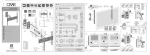
PARTS AND CONNECTORS
3
Please check the package for following items:
•
•
•
•
1
1
1
1
x
x
x
x
USB - adapter box for 5,25" HD trays
adapter cable USB / IDE
power supply 230VAC / 5VDC / 12VDC
manual
1
IDE - socket
Cooler fan
Power switch
DC power socket
5.
6.
7.
8.
9
9. USB - plug
10. Smart - IDE - plug
10
HD slot
LED HD active
LED power HD
Locking switch
INSTALLATION
1.
2.
3.
Connect the power supply to the HD - adapter and mains power.
Switch on the unit with switch (3).
Connect the HD adapter with the adapter cable to the USB-port at
the rear side of EPS-3000.
ATTENTION: Please use only the USB ports on the rear side of
EPS-3000 PowerCon - Station.
4.
Plug in the Hard Disk tray in the HD slot (5).
ATTENTION: Please take care for correct version of the Player
Kit:
Player Kit 1: for HD tray EDA-995 (from EDR400 / EDR1600
in plastic - tray)
Playerkit 2: for HD tray EDA-996 ( from EDA800 in metal tray)
Plugging in a wrong tray may cause damages on Hard Disk
and on the HD - adapter !
CAUTION!
This is a class A product. In a domestic environment this product
may cause radio interference in which case the user may required to
make adequate measures.
4
8
1.
2.
3.
4.
SAFETY
Do not place this unit directly on hot equipment, because
this may increase its operating temperature. This unit
should not be placed in build-in installations unless proper
ventilation is provided.
Do not place this unit near water or in unprotected outdoor installations, or any area that is classified as a wet
location.
Unplug the unit from power supply and USB before cleaning. Use a damp cloth for cleaning. Do not use liquid
cleaners or aerosol cleaners.
Do only use the special power supply of the units manufacturer.
There is no user-serviceable parts. Do not remove the
cover as this may expose you to dangerous voltages or
other hazards. Refer all servicing to qualified service personnel.
2
6 7
5
5.
Switch on the locking switch.
The Player Kit may be connected to the USB - port of operating or switched off EPS-3000.
When connecting to the EPS-3000, the power supply of the Player Kit
should be switched on.