1
Setting Up a Console Connection to the
Server
In order to communicate with the server you must connect a console to it. You can
use either a Sun workstation or an ASCII terminal as a console. Whichever type of
device you use, make the physical connection to the server by connecting to the
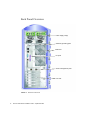
appropriate port on the console and to the SERIAL MGT port on the back of the
server.
▼
To Connect to the Server Using a Sun
Workstation
1. Connect to the server using an RJ-45 patch cable.
2. Use the tip command to connect to the terminal session:
# tip /dev/term/a -9600
The tip command above is for a workstation that is using its ttya serial port to
connect to the server. If you later configure your workstation to use ttyb, type the
following to set up a tip session:
# tip /dev/term/b -9600
Note – The commands given here will change if the serial connection settings have
been reconfigured.
▼
To Connect to the Server Using an ASCII
Terminal
1. Set up a connection between the terminal and the Sun Fire V250 server.
For the General terminal settings, refer to the terminal’s operating manual.
22
Sun Fire V250 Server Installation Guide • September 2003