1
D:\TV's JOB\SONY TV\SY120019_V2 (Rev-7)\4268265171_GB\GB04SAF.fm
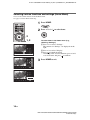
Selecting various functions and settings (Home Menu)
You can select all the features from the Home menu.
See page 17 for the Home menu map.
1
Press HOME.
2
Press F/f/G/g/
to select items.
2
1, 3
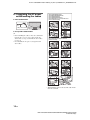
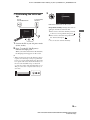
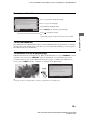
To select items in the Home menu (e.g.,
selecting “Settings”)
1 Press G/g to select “Settings”.
The contents of “Settings” are displayed on the
right.
2 Press F/f to select “Display”.
3 Press to launch the menu.
According to the screen instruction, press F/f/G/
g to select items and press to confirm.
3
Press HOME to exit.
16 GB
KDL-EX723/EX720/EX523/EX520/EX423/EX420/CX523/CX520
4-268-265-17(1)