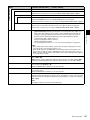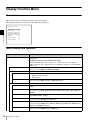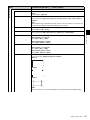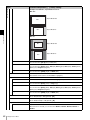
1
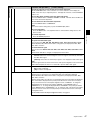
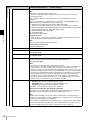
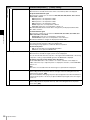
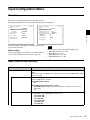
LCD VIDEO MONITOR
BVM-L230
OPERATION MANUAL [English]
1st Edition (Revised 4)
WARNING
This apparatus shall not be used in the residential area.
To reduce the risk of fire or electric shock, do not
expose this apparatus to rain or moisture.
For the customers in Europe, Australia and New
Zealand
To avoid electrical shock, do not open the
cabinet. Refer servicing to qualified personnel
only.
WARNING
This is a Class A product. In a domestic environment, this
product may cause radio interference in which case the
user may be required to take adequate measures.
THIS APPARATUS MUST BE EARTHED.
Attention-when the product is installed in Rack:
Using this unit at a voltage other than 120 V may require
the use of a different line cord or attachment plug, or both.
To reduce the risk of fire or electric shock, refer servicing
to qualified service personnel.
1.Prevention against overloading of branch
circuit
When this product is installed in a rack and is supplied
power from an outlet on the rack, please make sure that the
rack does not overload the supply circuit.
For the customers in the U.S.A.
This equipment has been tested and found to comply with
the limits for a Class A digital device, pursuant to Part 15
of the FCC Rules. These limits are designed to provide
reasonable protection against harmful interference when
the equipment is operated in a commercial environment.
This equipment generates, uses, and can radiate radio
frequency energy and, if not installed and used in
accordance with the instruction manual, may cause
harmful interference to radio communications. Operation
of this equipment in a residential area is likely to cause
harmful interference in which case the user will be
required to correct the interference at his own expense.
You are cautioned that any changes or modifications not
expressly approved in this manual could void your
authority to operate this equipment.
All interface cables used to connect peripherals must be
shielded in order to comply with the limits for a digital
device pursuant to Subpart B of Part 15 of FCC Rules.
For the customers in Europe
This product with the CE marking complies with both the
EMC Directive and the Low Voltage Directive issued by
the Commission of the European Community.
Compliance with these directives implies conformity to
the following European standards:
• EN60950-1:Product Safety
• EN55103-1: Electromagnetic Interference (Emission)
• EN55103-2: Electromagnetic Susceptibility (Immunity)
This product is intended for use in the following
Electromagnetic Environment: E4 (controlled EMC
environment, ex. TV studio)
The manufacturer of this product is Sony Corporation, 17-1 Konan, Minato-ku, Tokyo, Japan.
The Authorized Representative for EMC and product
safety is Sony Deutschland GmbH, Hedelfinger Strasse
61, 70327 Stuttgart, Germany. For any service or
guarantee matters please refer to the addresses given in
separate service or guarantee documents.
2
2.Providing protective earth
When this product is installed in a rack and is supplied
power from an outlet on the rack, please confirm that the
outlet is provided with a suitable protective earth
connection.
3.Internal air ambient temperature of the rack
When this product is installed in a rack, please make sure
that the internal air ambient temperature of the rack is
within the specified limit of this product.
4.Prevention against achieving hazardous
condition due to uneven mechanical loading
When this product is installed in a rack, please make sure
that the rack does not achieve hazardous condition due to
uneven mechanical loading.
5.Install the equipment while taking the operating
temperature of the equipment into consideration
For the operating temperature of the equipment, refer to
the specifications of the Operation Manual.
6.When performing the installation, keep the
following space away from walls in order to
obtain proper exhaust and radiation of heat.
Lower, Upper: 4.4 cm (13/4 inches) or more
For the customers in Norway
This equipment can be connected to IT power distribution
system.
For kundene i Norge
Dette utstyret kan kobles til et IT-strømfordelingssystem.
AVERTISSEMENT
Afin de réduire les risques d’incendie ou
d’électrocution, ne pas exposer cet appareil à la
pluie ou à l’humidité.
Afin d’écarter tout risque d’électrocution, garder
le coffret fermé. Ne confier l’entretien de
l’appareil qu’à un personnel qualifié.
CET APPAREIL DOIT ÊTRE RELIÉ À LA TERRE.
Pour les clients Europe
Ce produit portant la marque CE est conforme à la fois à la
Directive sur la compatibilité électromagnétique (EMC) et
à la Directive sur les basses tensions émises par la
Commission de la Communauté Européenne.
La conformité à ces directives implique la conformité aux
normes européennes suivantes:
• EN60950-1: Sécurité des produits
• EN55103-1: Interférences électromagnétiques
(émission)
• EN55103-2: Sensibilité électromagnétique (immunité)
Ce produit est prévu pour être utilisé dans l’environnement
électromagnétique suivants: E4 (environnement EMC
contrôlé, ex. studio de télévision).
Le fabricant de ce produit est Sony Corporation, 1-7-1
Konan, Minato-ku, Tokyo, Japon.
Le représentant autorisé pour EMC et la sécurité des
produits est Sony Deutschland GmbH, Hedelfinger Strasse
61, 70327 Stuttgart, Allemagne. Pour toute question
concernant le service ou la garantie, veuillez consulter les
adresses indiquées dans les documents de service ou de
garantie séparés.
Ne pas utiliser cet appareil dans une zone résidentielle.
• EN55103-2: Elektromagnetische Verträglichkeit
(Störfestigkeit)
Für die folgenden elektromagnetischen Umgebungen: E4
(kontrollierter EMV-Bereich, z.B. Fernsehstudio)
Der Hersteller dieses Produkts ist Sony Corporation, 1-7-1
Konan, Minato-ku, Tokyo, Japan.
Der autorisierte Repräsentant für EMV und
Produktsicherheit ist Sony Deutschland GmbH,
Hedelfinger Strasse 61, 70327 Stuttgart, Deutschland. Bei
jeglichen Angelegenheiten in Bezug auf Kundendienst
oder Garantie wenden Sie sich bitte an die in den separaten
Kundendienst- oder Garantiedokumenten aufgeführten
Anschriften.
Dieser Apparat darf nicht im Wohnbereich verwendet
werden.
Für Kunden in Europa, Australien und
Neuseeland
WARNUNG
Dies ist eine Einrichtung, welche die Funk-Entstörung
nach Klasse A besitzt. Diese Einrichtung kann im
Wohnbereich Funkstörungen verursachen; in diesem Fall
kann vom Betreiber verlangt werden, angemessene
Maßnahmen durchzuführen und dafür aufzukommen.
Pour les clients en Europe, Australie et NouvelleZélande
AVERTISSEMENT
Il s’agit d’un produit de Classe A. Dans un environnement
domestique, cet appareil peut provoquer des interférences
radio, dans ce cas l’utilisateur peut être amené à prendre
des mesures appropriées.
WARNUNG
Um die Gefahr von Bränden oder elektrischen
Schlägen zu verringern, darf dieses Gerät nicht
Regen oder Feuchtigkeit ausgesetzt werden.
Um einen elektrischen Schlag zu vermeiden, darf
das Gehäuse nicht geöffnet werden. Überlassen
Sie Wartungsarbeiten stets nur qualifiziertem
Fachpersonal.
DIESES GERÄT MUSS GEERDET WERDEN.
Für Kunden in Europa
Dieses Produkt besitzt die CE-Kennzeichnung und erfüllt
die EMV-Richtlinie sowie die Niederspannungsrichtlinie
der EGKommission.
Angewandte Normen:
• EN60950-1: Sicherheitsbestimmungen
• EN55103-1: Elektromagnetische Verträglichkeit
(Störaussendung)
3
Table of Contents
Chapter 1 Overview
Precautions ........................................................................... 7
On Safety .................................................................................... 7
On Installation ............................................................................ 7
Handling the LCD Screen .......................................................... 7
On Cleaning................................................................................ 7
On Repacking .............................................................................8
On Rack Mounting ..................................................................... 8
Functions Supported in Software Version 1.3 ................... 9
Features ............................................................................... 10
Options ................................................................................ 12
Input/Output Connector and Adaptor ....................................... 13
Location and Function of Parts ......................................... 14
Front Panel................................................................................ 14
Rear Panel/Left Side Panel ....................................................... 16
Chapter 2 Preparations
Environments of the Installation Location ....................... 18
Installing an Input Adaptor ................................................ 19
Attaching the Cable Holder ................................................ 20
Changing the Aspect Ratio of the Screen ........................ 21
Attaching the Bracket ......................................................... 22
Connections ........................................................................ 23
Connecting the Controller (BKM-16R).................................... 24
Connecting the Multiple Units with the LAN .......................... 24
Turning on the Power ......................................................... 26
Connecting the AC Power Cord ............................................... 26
Turning on the Monitor ............................................................ 26
Settings ................................................................................ 27
Selecting the Area.....................................................................27
Setting for the LAN to Connect the Multiple Units ................. 28
Selecting the Monitor (Designation of the Monitor or Group ID
Number).....................................................................29
Assigning the Input Signal to the Channel ............................... 29
Setting the Display Mode of the Picture................................... 30
Adjusting ............................................................................. 30
Chroma/Phase Adjustment ....................................................... 30
4
Table of Contents
Color Temperature (White Balance) Adjustment.....................31
Brightness/Contrast Adjustment ...............................................31
Chapter 3 Menu
Basic Menu Operations.......................................................33
Menu Operation Buttons...........................................................33
Displaying the Menu.................................................................34
Setting or Adjusting in the Menu Operation.............................34
Entering the Channel Number ..................................................36
Aborting Menu Operation.........................................................36
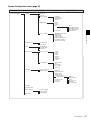
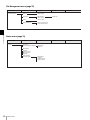
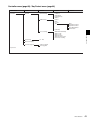
Menu Structure ....................................................................37
Adjustment Menu.................................................................44
Overview...................................................................................44
Menu Function and Operation ..................................................44
Input Configuration Menu ...................................................51
Overview...................................................................................51
Menu Function and Operation ..................................................51
Display Setting Menu ..........................................................57
Overview...................................................................................57
Menu Function and Operation ..................................................57
Display Function Menu .......................................................60
Overview...................................................................................60
Menu Function and Operation ..................................................60
System Configuration Menu ...............................................70
Overview...................................................................................70
Menu Function and Operation ..................................................70
File Management Menu .......................................................76
Overview...................................................................................76
Menu Function and Operation ..................................................76
Status Menu .........................................................................78
Overview...................................................................................78
Menu Function and Operation ..................................................78
Controller Menu ...................................................................80
Overview...................................................................................80
Menu Function and Operation ..................................................80
Key Protect Menu ................................................................84
Overview...................................................................................84
Menu Function and Operation ..................................................84
Chapter 4 Operations
Selecting Display Mode.......................................................85
Setting the Display of Native Scan Mode ..........................86
Table of Contents
5
Selecting the Native Scan/Scan Mode .............................. 87
Displaying Two Signals on One Screen
(Picture&Picture) .................................................... 88
Magnifying the Picture (Pixel Zoom) ................................. 89
Displaying the Picture in Black Detail Mode .................... 90
Capturing the Picture of the HD Signal
(HD Frame Capture) ............................................... 91
Displaying the Area Marker or Aspect Marker ................. 92
Copying the Setting or Adjustment Value to Another
Monitor .................................................................... 93
Assigning the Function on the Function Button.............. 94
Upgrading the Monitor and Controller .............................. 94
Saving the upgrade data in a “Memory Stick PRO” ................ 94
Upgrading the monitor .............................................................95
Upgrading the controller........................................................... 95
Appendixes
Specifications...................................................................... 97
Input Signals and Adjustable/Setting Items ..................... 99
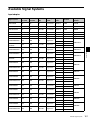
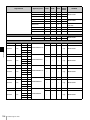
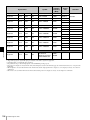
Available Signal Systems................................................. 101
Available Signal Formats ................................................. 103
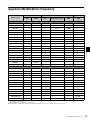
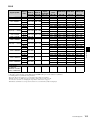
Aperture Modification Frequency.................................... 107
Picture Display Size .......................................................... 108
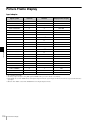
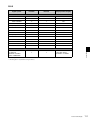
Picture·Frame Display ...................................................... 110
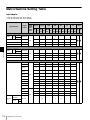
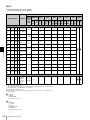
Matrix/Gamma Setting Table............................................ 112
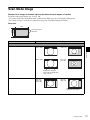
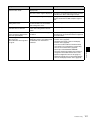
Scan Mode Image.............................................................. 117
Troubleshooting................................................................ 120
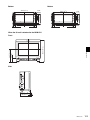
Dimensions........................................................................ 122
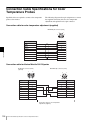
Connection Cable Specifications for Color Temperature
Probes ................................................................... 124
Inserting/Ejecting the “Memory Stick” ........................... 126
Notes on “Memory Stick” ......................................................126
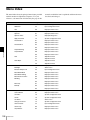
Menu Index
6
Table of Contents
128
Chapter
Precautions
On Safety
•
• Operate the unit only with a power source as specified
in the “Specifications” section.
• A nameplate indicating operating voltage, power
consumption, etc., is located on the rear panel.
• Should any solid object or liquid fall into the cabinet,
unplug the unit and have it checked by qualified
personnel before operating it any further.
• Do not drop or place heavy objects on the power cord.
If the power cord is damaged, turn off the power
immediately. It is dangerous to use the unit with a
damaged power cord.
• Unplug the unit from the wall outlet if it is not to be used
for several days or more.
• Disconnect the power cord from the AC outlet by
grasping the plug, not by pulling the cord.
• The socket-outlet shall be installed near the equipment
and shall be easily accessible.
On Installation
• Allow adequate air circulation to prevent internal heat
build-up.
Do not place the unit on surfaces (rugs, blankets, etc.) or
near materials (curtains, draperies) that may block the
ventilation holes.
• Do not install the unit in a location near heat sources
such as radiators or air ducts, or in a place subject to
direct sunlight, excessive dust, mechanical vibration or
shock.
Handling the LCD Screen
• The LCD panel fitted to this unit is manufactured with
high precision technology, giving a functioning pixel
ratio of at least 99.99%. Thus a very small proportion
•
•
•
•
1
Chapter 1 Overview
Overview
of pixels may be “stuck”, either always off (black),
always on (red, green, or blue), or flashing. In addition,
over a long period of use, because of the physical
characteristics of the liquid crystal display, such “stuck”
pixels may appear spontaneously. These problems are
not a malfunction.
Do not leave the LCD screen facing the sun as it can
damage the LCD screen. Take care when you place the
unit by a window.
Do not push or scratch the LCD monitor’s screen. Do
not place a heavy object on the LCD monitor’s screen.
This may cause the screen to lose uniformity.
If the unit is used in a cold place, horizontal lines or a
residual image may appear on the screen. This is not a
malfunction. When the monitor becomes warm, the
screen returns to normal.
If a fixed picture such as a frame of a divided picture or
time code, or a still picture is displayed for a long time,
an image may remain on the screen and be
superimposed as a ghosting image.
The screen and the cabinet become warm during
operation. This is not a malfunction.
On Cleaning
Before cleaning
Be sure to disconnect the AC power cord from the AC
outlet.
On cleaning the monitor screen
The monitor screen surface is especially treated to reduce
reflection of light.
As incorrect maintenance may impair the performance of
the monitor, take care with respect to the following:
• Wipe the screen gently with a soft cloth such as a
cleaning cloth or glass cleaning cloth.
If you wipe the screen using too much force, the screen
surface may lose uniformity or the LCD panel may
malfunction.
Never use tissue as it may scar the surface of the screen.
• Stubborn stains may be removed with a soft cloth such
as a cleaning cloth or glass cleaning cloth lightly
dampened with water.
Precautions
7
• Never use solvent such as alcohol, benzene or thinner, or
acid, alkaline or abrasive detergent, or chemical cleaning
cloth, as they will damage the screen surface.
Chapter 1 Overview
On cleaning the cabinet
• Clean the cabinet gently with a soft dry cloth. Stubborn
stains may be removed with a cloth lightly dampened
with mild detergent solution, followed by wiping with a
soft dry cloth.
• Use of alcohol, benzene, thinner or insecticide may
damage the finish of the cabinet or remove the
indications on the cabinet. Do not use these chemicals.
• If you rub on the cabinet with a stained cloth, the cabinet
may be scratched.
• If the cabinet is in contact with a rubber or vinyl resin
product for a long period of time, the finish of the cabinet
may deteriorate or the coating may come off.
On Repacking
Do not throw away the carton and packing materials. They
make an ideal container which to transport the unit.
On Rack Mounting
When the monitor is mounted on a rack, the temperature
around the monitor may rise due to heat generated from
other equipment and reduced air circulation, causing
damage to the monitor. To prevent this, keep the space
around the monitor (1U or more space above and below the
monitor), and install a ventilation fan or take other
effective countermeasures so that the temperature around
the monitor is within the specified range: operating
temperature range of 0 to 35 °C (32 to 95°F).
If you have any questions about this unit, please contact
your Sony service representative.
8
Precautions
Functions Supported in Software Version 1.3
Supported function
User LUT
(in the Color Gamut menu of the Display Setting
menu)
The user LUT data are applied as the setting of the color 57
gamut (color space and gamma).
Reference page
Aspect Correction
(in the Native Scan Mode menu of the Display
Setting menu)
An SD signal of non-square pixels (the number of H
59, 108
pixels of the signal system is 720 or 1440) or a 640 ×
480 SD signal of DVI video is displayed correctly by
scaling processing of doubling for the V direction and
correct aspect ratio for the H direction, and the picture is
also optimized and displayed by modifying the aperture
coefficient value, filter coefficient value, etc.
Peak White Control
(in the Display Setting menu)
The signal gain is controlled automatically according to
the setting value for brightness, to prevent clipping.
59
• Black Detail Setting
(in the Display Function menu)
• Black Detail Mode
(in the Function Switch menu of the Display
Function menu)
The display mode to reduce to dull black color by
backlight leaking and assess any parts with low color
gradation precisely (black detail mode display)
11, 65, 69, 90
Monitor Upgrade
(in the System Configuration menu)
The monitor is upgraded.
75
Controller Upgrade
(in the Controller menu)
The controller is upgraded.
83
Functions Supported in Software Version 1.3
Chapter 1 Overview
Menu
9
Features
Chapter 1 Overview
The BVM-L230 is 23-inch LCD Video Monitor. This is
suitable for television stations or video production houses,
where precise image reproduction is required.
The BVM-L230 features flat panel and “TRIMASTER*”,
which is a new technology developed for three elements,
“accurate color reproduction”, “precision imaging” and
“quality picture consistency,” that are in demand for
professional use. “TRIMASTER” decreases the viewing
difference that occurs due to the individuality of each
panel. Also, the BVM-L230 realizes the high picture
quality and high-trust required for the master monitor by
the color management system with its wide color gamut
device, high-resolution/precise gradation display,
animation improvement technology and signal processing
of high accuracy/calibration/feedback system.
* TRIMASTER is a trademark of Sony Corporation.
23-inch LCD panel developed for the BVM-L230
The 23-inch (22.5 inch) LCD panel was developed for the
BVM-L230 and supports the full HD signal.
It offers a 10-bit driver, high-speed response, high
resolution and high color gradation.
Backlight system by LED with high-purity
technology
High-purity LEDs enable the wider color space. The
precision backlight system also incorporates a uniformity
control function and a color feedback system.
12-bit precision display engine for professional
use
The panel is equipped with a unique signal process engine
developed for the professional use monitor. This engine
incorporates 12-bit output accuracy at each process, and
provides a high-quality I/P conversion algorithm, scaling
processing, panel driving and a highly accurate color
management system.
Multi color space
A backlight system with high-precision technology and
color management system which uses the unique 3D LUT
(Look Up Table) reproduces the color space that complies
with the broadcast standard ITU-R BT.709, EBU and
SMPTE-C accurately. A wider color space* allows digital
cinema reproductions.
* The RGB chromaticity of SMPTE RP 431-2 is not
covered in full.
High-quality I/P conversion processing
A high-quality picture near the original one, in which
jagged lines and conversion errors are decreased by
detecting the feature of the picture inside the subdivided
block and processing properly, is reproduced.
10
Features
The signal delay is decreased by judging the animation or
still picture from the past video signal. Film cadence
processing, which converts the signal composed of 2-2·23·2-3-3-2 pull down to the I/P signal closely following the
original, is also selectable.
Interlace display mode
The interlace signal is displayed as the interlace picture by
inserting the black line without I/P conversion processing.
A picture faithful to the original signal and with the same
feel as a CRT is gained.
For setting the display, see “Selecting Display Mode” on
page 85.
Black frame insertion display mode
Motion blur caused by the holding-type display of the LCD
is decreased by inserting the black frame between the
picture frames in double frame rate (100/120Hz) operation
of the LCD panel.
For setting the display, see “Selecting Display Mode” on
page 85.
Available to a multi signal format
The monitor supports various input signals such as 720 ×
576/50i to 1920 × 1080/50P, 60P, digital cinema (D-Cine)
2048 × 1080/24P and variable computer signals up to
WUXGA (1920 × 1200). A DVI-D (HDCP
correspondence) and four option slots are equipped as the
interface and the monitor supports HD-SDI, SDI, RGB,
YPbPr, Y/C, composite and Dual-link HD-SDI signal
input.
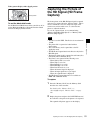
HD frame capture function
The frame of the HD-SDI input signal is captured and
saved as a picture file in the “Memory Stick”. This is used
to confirm the color tone and picture angle of the current
scene and recorded scene by using the multi display
(Picture&Picture) function.
* As the frame of the input signal is captured, the data and
marker set by the monitor is not reflected.
For the operation, see “Capturing the Picture of the HD
Signal (HD Frame Capture)” on page 91.
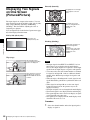
Multi display function
Two kinds of input signals are output on the monitor. You
can select from side by side, wipe, butterfly and blending
mode. This is useful for adjusting the color or comparing
two pictures.
For the operation, see “Displaying Two Signals on One
Screen (Picture&Picture)” on page 88.
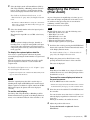
Pixel zoom function
As part of the picture is magnified up to 8 times without
scaling processing, this is convenient for confirming a
minute part of the signal.
Safe area marker and aspect marker functions
The monitor is equipped with two area markers and center
marker as the safe area marker and aspect marker for
confirming the picture angle.
For the operation, see “Displaying the Area Marker or
Aspect Marker” on page 92.
Scan selection/Native scan display function
You can select from under scan (–3%), normal scan (0%)
and over scan (mask of the 5% over scan portion in the
normal scan) for the picture display.
The monitor is equipped with a native scan display
function which maps the pixel of the signal to the panel in
one-to-one mode. You can select the mode from ×1, ×2 or
Aspect Correction to display a signal in native mode. An
SD signal of non-square pixels (the number of H pixels of
the signal system is 720 or 1440) or a 640 × 480 SD signal
of DVI video is displayed correctly by scaling processing
of doubling for the V direction and correct aspect ratio for
the H direction, and the picture is also optimized and
displayed by modifying the aperture coefficient value,
filter coefficient value, etc. in Aspect Correction mode.
For the operation, see “Selecting the Native Scan/Scan
Mode” on page 87.
Gamut error function
The signal outside the specified range (gamut error) caused
by the conversion of the format or during CG/CM
production is displayed in a zebra pattern.
Remote control function (Ethernet control)
The controller controls up to 32 monitors by the Ethernet
(10BASE-T/100BASE-TX) connection. Up to four
controllers are connected to one monitor in single mode.
You can control individual monitors or monitor groups
simply by entering the monitor ID number or group ID
number. You can also execute the same operation on all
connected monitors, or put all connected monitors into the
same setup and adjustment state.
Chapter 1 Overview
For the operation, see “Magnifying the Picture (Pixel
Zoom)” on page 89.
* When the aspect ratio is set to 2.39:1, the resolution is
reduced.
Closed caption display function
EIA/CEA-608 or EIA/CEA-708 standard closed caption
signals superimposed on the SDI signals are displayed by
installing the optional input adaptor (BKM-244CC).
Variable picture adjustment functions
Auto chroma, phase and matrix adjustment function are
equipped. The white balance is automatically adjusted by
using a commercially available probe (Konica Minolta
CA-210, DK-Technologies PM5639/06, X-Rite Eye-One
Pro).
Other features
• The color temperature is selectable from D65, D93, D61,
D56, D-Cine and User.
• Built-in test pattern for 100% white signal, 20% gray
signal, 0% black signal, PLUGE (Picture Line Up
Generation Equipment) signal, color-bar signal, 5 step
gray scale signal and ramp signal.
• Chroma Up function that increases the chroma setting by
12 dB.
• Blue only function and RGB cut off function to monitor
signal noise.
• A parallel remote of the contact point control connector
is equipped.
Black detail mode display function
You can reduce to dull black color by backlight leaking and
precisely assess any parts with low color gradation.
You can decrease the black level up to 40% of the normal
display (100 cd/m2 at 100% signal). The parts with high
color gradation (higher than 75 IRE) are clipped by the
dynamic range of the circuit, but a zebra pattern
(selectable) is displayed in the clipped portions.
For the operation, see “Displaying the Picture in Black
Detail Mode” on page 90.
Aspect selectable function
A squeezed and recorded signal is displayed with the
correct angle. You can select from 4:3, 16:9, 1.896:1 and
2.39:1* aspect modes.
Features
11
Options
For external control
Chapter 1 Overview
BKM-16R Monitor Control Unit
The BKM-16R is a controller of the BVM-L230 and you
can control multiple monitors from one controller.
In this manual, the BKM-16R is referred to as the
controller.
Note
The signal from the MONITOR OUT connector of the
BKM-220D does not satisfy the ON-LINE signal
specifications.
BKM-227W NTSC/PAL Input Adaptor
Includes a decoder for NTSC/PAL/PAL-M/SECAM
signals. Input/output connectors for each one composite
signal channel and Y/C signal channel are equipped.
For installation
BKM-229X Analog Component Input Adaptor
Includes a decoder for analog component signals and
analog RGB signals. Input connector for one channel is
equipped.
BKM-37H Controller Attachment Stand
Used to join a BKM-16R and the BVM-L230.
When the stand is attached to the BVM-L230, you can
adjust the monitor angle up or down.
BKM-243HS HD/D1-SDI Input Adaptor
Includes a decoder for serial digital component signals.
Input/output connectors for two serial digital channels and
output connector for one monitor channel are equipped.
SMF-700 Monitor Interface Cable
Used to connect the BVM-L230 to the BKM-16R.
BKM-23M Monitor Protection Panel
The BKM-23M is a panel to protect the LCD panel of the
BVM-L230.
Input adaptors
The input connector panel is composed by installing the
optional input adaptor into the input option slot at the left
side of the monitor. Up to four adaptors can be installed to
the monitor.
The input signal type for each connector of the adaptor is
set with the Input Configuration menu, in accordance with
the configuration of the connector panel.
Note
The signal from the MONITOR OUT connector of the
BKM-243HS does not satisfy the ON-LINE signal
specifications.
BKM-244CC HD/SD-SDI Closed Caption
Adaptor
Includes a decoder for serial digital component signals.
EIA/CEA-608 or EIA/CEA-708 standard closed caption
signals superimposed on the SDI signals are decoded and
displayed. Input/output connectors for two serial digital
channels and output connector for one monitor channel are
equipped.
Note
Note
When installing the adaptor, be sure to perform the
necessary input signal setup with the Input Configuration
menu. If the setup is not performed, the adaptors may not
function correctly.
For information about the Input Configuration menu, see
page 51.
For details of each input adaptor, refer to the operating
instructions of each model.
BKM-220D SDI 4:2:2 Input Adaptor
Includes a decoder for serial digital signals (525/625
component). Input/output connectors for two serial digital
channels and output connector for one monitor channel are
equipped.
12
Options
The signal from the MONITOR OUT connector of the
BKM-244CC does not satisfy the ON-LINE signal
specifications.
Caution
When you install the following input adaptors to this
equipment, use those with the serial numbers given below.
• BKM-220D with serial number 2100001 or higher
• BKM-229X with serial number 2200001 or higher
• BKM-243HS with serial number 2108355 or higher
BKM-220D: This equipment may not meet the
requirements of the electromagnetic interference standard
if designated input adaptors are not installed.
BKM-229X: This equipment may not work correctly or
you may not be satisfied with the performance if
designated input adaptors are not installed.
BKM-243HS: This equipment may not meet the
requirements of the electromagnetic interference standard
or work correctly, or you may not be satisfied with the
performance if designated input adaptors are not installed.
Input/Output Connector and Adaptor
Input signal
Number of analog inputs
–
1
1
–
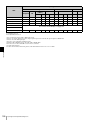
a: Signal can be reproduced.
a(2): Two adaptors are used.
For details, see “Available Signal Formats” on page 103.
For information about the Input Configuration menu, see
page 51.
Chapter 1 Overview
By adding the optional input expansion adaptors, the input/
output connector panel can be assembled in a wide variety
of configurations. The signals that each of the adaptors’
connectors supports are given in the following table. The
type of signal to be applied to each input/output connector
is set with the Input Configuration menu.
Input adaptor BKM- BKM- BKM- BKM220D 227W 229X 243HS/
244CC
Analog input
Serial digital
input
Input adaptor BKM- BKM- BKM- BKM220D 227W 229X 243HS/
Input signal
244CC
Component 525/
625
a
a
a
Single-link HD-SDI
Dual-link HD-SDI
a(2)
Composite NTSC
a
Composite PAL
a
Composite PAL-M
a
Composite
SECAM
a
Y/C NTSC
a
Y/C PAL
a
Y/C PAL-M
a
Y/C SECAM
a
YPbPr 525i/625i
a
RGB 525i/625i
a
YPbPr/RGB
1080/24PsF
a
YPbPr/RGB
1080/24P
a
YPbPr/RGB
1080/50i (25PsF)
a
YPbPr/RGB
1080/25P
a
YPbPr/RGB
576/50P
a
YPbPr/RGB
480/60P
a
YPbPr/RGB
1080/60i (30PsF)
a
YPbPr/RGB
1080/30P
a
YPbPr/RGB
720/50P
a
YPbPr/RGB
720/60P
a
Number of digital inputs
2
–
–
2
Options
13
Location and Function of Parts
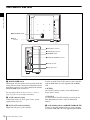
Front Panel
Chapter 1 Overview
1 Tally lamp
6 OPTION B
connector
2 OPERATE lamp
3 STATUS lamp
5 OPTION A
connector
4 OVER RANGE lamp
a Tally lamp
With factory settings, the tally lamp lights when pins No. 8
and No. 9 of the PARALLEL REMOTE connector on the
left side panel are shorted. By changing the setting in the
Parallel Remote menu, different pins on the PARALLEL
REMOTE connector can be used to control the tally lamp.
For information about the Parallel Remote menu, see
“Parallel Remote” (page 71) of the System Configuration
Menu.
b OPERATE lamp
Lights in red when the monitor is in standby mode. The
monitor will be in standby mode under the following
conditions:
• Standby Mode is set to On in the Power menu of the
System Configuration menu and the MAIN POWER
switch (on the rear panel) is turned on. (The OPERATE
lamp will flash for initialization after the switch is turned
on, then will light.)
• The monitor is changed from operation mode to standby
mode by external control.
Lights in green when the monitor is put into operation
mode from standby mode by pressing the MONITOR I/1
switch of the controller.
For information about the Power menu, see “Power”
(page 72) of the System Configuration Menu.
14
Location and Function of Parts
Notes
• When the lamp is flashing in red, the monitor cannot be
put into operation mode. (Internal data initialization is
taking place.) Wait until the lamp is steadily lit.
• The lamp may show the error, warning or operation
mode.
For details, see “Error/warning/operation mode display
by the lamp” on page 15.
c STATUS lamp
Lights in blue when the gamut error is detected.
Set the method to clear the error display with Notification
Reset (page 64) in the Gamut Error Display menu of the
Display Function menu.
Note
The lamp may show the error, warning or operation mode.
For details, see “Error/warning/operation mode display
by the lamp” on page 15.
d OVER RANGE lamp
Lights in orange when the picture is displayed in black
detail mode or when the dynamic range of the following
item is exceeded.
OVER
RANGE
lamp
STATUS
lamp
OPERATE
lamp
Symptoms
For details of the black detail mode display, see
“Displaying the Picture in Black Detail Mode” on page
90.
Goes out
Lights in
blue
Flashes in
green
LED disconnection of the
LED backlight part.
Note
The lamp may show the error, warning or operation mode.
For details, see “Error/warning/operation mode display
by the lamp” on page 15.
Warning/operation mode display
OVER
RANGE
lamp
Flashes
in orange
STATUS
lamp
OPERATE
lamp
Symptoms
–
The luminance is reduced
to protect the circuit from
an increase of
temperature in the LED
backlight part.
g Please contact your
Sony representative.
–
• The dynamic range of
the LED backlight part
is exceeded.
g Please contact your
Sony representative.
• The dynamic range is
exceeded when
contrast is adjusted.
g Reduce the contrast
setting.
• When the picture is
displayed in black detail
mode
–
e OPTION A connector
Used to connect a probe for automatic adjustment.
f OPTION B connector
Used for future expansion.
The cover is attached at the factory.
Error/warning/operation mode display by
the lamp
Lights in
orange
–
The OVER RANGE lamp, STATUS lamp or OPERATE
lamp on the front panel may show an error, warning or
operation mode while the monitor is being operated.
Error display
If the error is shown, please contact your Sony
representative.
OVER
RANGE
lamp
STATUS
lamp
OPERATE
lamp
Lights in
orange
Goes out
Flashes in
red
The power in the LED
backlight part is
overcurrent.
Flashes
in orange
Goes out
Flashes in
red
The power in the LED
backlight part is
overvoltage.
Goes out
Lights in
blue
Flashes in
red
The LED temperature of
the LED backlight part is
unusual.
Goes out
Flashes in Flashes in
blue
red
The LED driver
temperature of the LED
backlight part is unusual.
Goes out
Flashes in Flashes in
blue
green
The temperature sensor
is unusual.
Lights in
orange
Lights in
blue
Flashes in
red
The temperature of the
LCD panel is unusual.
Lights in
orange
Goes out
Flashes in
green
The RGB sensor of the
LED backlight part is
unusual.
Flashes
in orange
Goes out
Flashes in
green
Chapter 1 Overview
• Contrast (contrast)
Flashes when the luminance is decreased to protect the
monitor from a rise in temperature.
–: Status except for error display.
Symptoms
Fan error.
Location and Function of Parts
15
Rear Panel/Left Side Panel
Chapter 1 Overview
1 MAIN POWER switch
2 AC IN
connector
3 DC 5V OUT connector
4 LAN (10/100) connector
5 NETWORK switch
6 PARALLEL REMOTE connector
7 DVI-D connector
8 Input option slots
a MAIN POWER switch
When turned on (?), the monitor enters operation mode. By
setting in Power menu of the System Configuration menu,
the monitor can also be set to enter standby mode when the
MAIN POWER switch is turned on.
For information about the Power menu, see “Power”
(page 72) of the System Configuration Menu.
b AC IN connector (3-pin)
Connects the monitor to an AC power source, via the
supplied AC power cord.
c DC 5V OUT connector (female)
Supplies the DC power to the controller.
16
Location and Function of Parts
Connect to the DC 5V/12V IN connector of the controller
with the SMF-700 or the cable supplied with the BKM37H.
CAUTION
DC 5V OUT connector (female) is non LPS (Limited
Power Source) circuit.
ATTENTION
Le connecteur DC 5V OUT (femelle) est un circuit non
LPS (Limited Power Source, source d’alimentation
limitée).
d LAN (10/100) connector (10BASE-T/100BASE-TX)
Connect to the LAN (10/100) connector of the controller
by using the SMF-700 or the cable supplied with the BKM-
37H. Or connect to the network or the LAN (10/100)
connector of the controller by using a 10BASE-T/
100BASE-TX LAN cable (shielded-type, optional).
ATTENTION
Par mesure de sécurité, ne raccordez pas le connecteur pour
le câblage de périphériques pouvant avoir une tension
excessive à ce port. Suivez les instructions pour ce port.
ACHTUNG
Aus Sicherheitsgründen nicht mit einem PeripheriegerätAnschluss verbinden, der zu starke Spannung für diese
Buchse haben könnte. Folgen Sie den Anweisungen für
diese Buchse.
e NETWORK switch
LAN: To connect to the network.
PEER TO PEER: To connect to the LAN (10/100)
connector of the controller in 1 to 1 connection.
f PARALLEL REMOTE connector (D-sub 9-pin,
female)
Forms a parallel switch and controls the monitor
externally. The pin assignment and factory setting
function assigned to each pin are given below.
5
9
Function
4
Selects whether monochrome image is
displayed or the monitor switches the
display mode automatically between
color image and monochrome image
depending on the input signal (MONO
button function).
5
Marker (set in the Marker Setting
menu) On/Off (MARKER button
function).
6, 7
Not connected
8
Tally lamp On/Off
9
Ground
Chapter 1 Overview
CAUTION
• For safety, do not connect the connector for peripheral
device wiring that might have excessive voltage to this
port. Follow the instructions for this port.
• When you connect the LAN cable of the unit to
peripheral device, use a shielded-type cable to prevent
malfunction due to radiation noise.
• To connect the monitor to the LAN (10/100) connector
of the controller in 1 to 1 connection (NETWORK switch
is set to PEER TO PEER), use a straight (shielded-type)
cable.
• The connection speed may be affected by the network
system.
Pin number
All pin function assignments can be changed with the
Parallel Remote menu.
For information about the Parallel Remote menu, see
“Parallel Remote” (page 71) of the System Configuration
Menu.
To switch each function between On and Off or between
enable and disable, change pin connections in the
following way.
On or enabled: Short each pin and pin 9 together.
Off or disabled: Leave each pin open.
g DVI-D (digital DVI) input connector
Inputs DVI Rev.1.0 applicable Single-link digital RGB
signal.
To monitor the DVI signal of SXGA or higher resolution,
use the cable within 3 m (118 1/8 inches) in length.
h Input option slots
Used to install the optional input adaptors.
For installing the input adaptor, see page 19.
For the input signals, see “Input/Output Connector and
Adaptor” on page 13.
1
6
Pin number
Function
1
Sets input signal channel 1 (numeric
keypad function).
2
Sets input signal channel 2 (numeric
keypad function).
3
Selects sync signal (SYNC button
function).
Location and Function of Parts
17
Preparations
Chapter 2 Preparations
18
Chapter
2
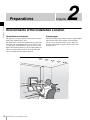
Environments of the Installation Location
Illumination environments
Viewing angle
The apparent color reproduction on the monitor is greatly
affected by ambient light or glare.
The LCD device controls the brightness by moving LCD
molecules with the backlight always lit. For this reason,
in a dark place, an LCD monitor screen shows very dim
light leaks from the black image. We recommend that you
adjust the ambient light and use in an environment that
does not degrade the reproduction of black.
The ideal viewing angle is within 5 degrees (up/down/left/
right) off the center of the monitor screen when the
operator views the entire monitor screen. Keep the
viewing angle within 15 degrees off the center of the
monitor screen.
Environments of the Installation Location
Installing an Input
Adaptor
Board
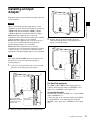
Each input adaptor can be installed in any input option slot
on the side panel.
Caution
3
Chapter 2 Preparations
When you install the following input adaptors to this
equipment, use those with the serial numbers given below.
• BKM-220D with serial number 2100001 or higher
• BKM-229X with serial number 2200001 or higher
• BKM-243HS with serial number 2108355 or higher
BKM-220D: This equipment may not meet the
requirements of the electromagnetic interference standard
if designated input adaptors are not installed.
BKM-229X: This equipment may not work correctly or
you may not be satisfied with their performance if
designated input adaptors are not installed.
BKM-243HS: This equipment may not meet the
requirements of the electromagnetic interference standard
or work correctly, or you may not be satisfied with the
performance if designated input adaptors are not installed.
Push the adaptor in until it is firmly fit into the
connector inside the monitor, then tighten the two
screws to secure the adaptor.
Note
Turn off the MAIN POWER switch of the monitor and
disconnect the AC power cord before installing or
removing adaptors.
1
Loosen two screws and remove the cover of an input
option slot on the side panel of the monitor.
For Dual-link operation
Two BKM-243HS or BKM-244CC input adaptors are
required. Install the input adaptors in OPTION 1 and 2
option slots, or OPTION 3 and 4 option slots.
Make sure the MAIN
POWER switch is turned
off, and disconnect the
AC power cord.
2
Cover of an
input option slot
To connect the cable
Input the Link A signal to OPTION 1 or 3, and the Link B
signal to OPTION 2 or 4.
Connect the cable to the same input number (both INPUT
1 or both INPUT 2) of the input adaptors installed in
OPTION 1 and 2 option slots, or OPTION 3 and 4 option
slots.
Insert the adaptor facing the board as shown below.
Installing an Input Adaptor
19
Example of dual-link
cable connection
Attaching the Cable
Holder
INPUT 1
INPUT 2
The cables connected to the input adaptors can be gathered
together in the supplied cable holder.
Chapter 2 Preparations
1
Remove the screw.
2
Attach the cable holder to the monitor with the
removed screw.
INPUT 1
INPUT 2
OPTION 1 and 2
OPTION 3 and 4
Cable holder (supplied)
20
Attaching the Cable Holder
3
Gather the cables together in the cable holder.
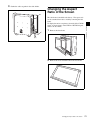
Changing the Aspect
Ratio of the Screen
1
Remove the front frame.
2
Remove 10 screws and then remove the 16:9 frame.
Changing the Aspect Ratio of the Screen
Chapter 2 Preparations
The 16:9 frame is installed at the factory. The aspect ratio
can be switched from 16:9 to 16:10 by removing the 16:9
frame.
To display the native scan picture (×2 mode) of the 576/50i
signal, or whole picture of the UXGA or WUXGA signal,
remove the 16:9 frame.
21
3
Replace the front frame by pressing it until it clicks.
Attaching the Bracket
You can prevent falling of the monitor by using the
supplied bracket.
1
Chapter 2 Preparations
Attaching the 16:9 frame
1
Remove the front frame.
2
Replace the 16:9 frame and secure it with 10 screws.
3
Replace the front frame by pressing it until it clicks.
Bracket (supplied)
2
22
Remove three screws from the bracket.
Attaching the Bracket
Attach the bracket on the rear panel of the monitor with
the three removed screws.
3
Attach a piece of string, etc. to the bracket and secure
it to the floor or wall.
Bracket
String, etc.
Connections
Note on connecting the cable to the DC 5V OUT
connector
Be sure to plug the male connector of the cable into the DC
5V OUT connector of the monitor.
Insert the connector so as to fit the shape of the DC 5V
OUT connector.
Chapter 2 Preparations
Plug the male
connector into the
monitor.
Connections
23
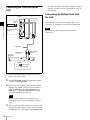
Connecting the Controller (BKM16R)
Monitor
DC 5V OUT
connector
PEER TO
PEER
Connecting the Multiple Units with
the LAN
The controller controls up to 32 monitors. Up to four
controllers are connected to one monitor in single mode.
NETWORK
Chapter 2 Preparations
LAN
Note
Set to PEER TO
PEER.
The controller cannot control monitors in another
subnetwork.
LAN (10/100) connector
SMF-700, etc.
Controller
(BKM-16R)
DC 5V/12V IN
connector
LAN (10/100)
connector
NETWORK
LAN
PEER TO PEER
Set to PEER TO PEER.
1
Turn off the MAIN POWER switch of the monitor
before connecting the units.
2
Set the NETWORK switches of the monitor and the
controller to PEER TO PEER.
3
Connect the LAN (10/100) connector of the monitor
and the LAN (10/100) connector of the controller by
using the SMF-700 or the cable supplied with the
BKM-37H, or a 10BASE-T/100BASE-TX straight
LAN cable (shielded-type, optional).
Note
When an optional LAN cable is connected, use a
shielded-type cable to prevent a malfunction due to
noises.
4
24
Or connect the output cable of the AC adaptor supplied
with the controller to the DC 5V/12V IN connector of
the controller.
Connect the DC 5V OUT connector of the monitor and
the DC 5V/12V IN connector of the controller by using
the SMF-700 or the cable supplied with the BKM-37H.
Connections
of a straight/cross cable.
When the switching hub without auto selection
function is used, connect the monitor and switching
hub with the straight cable, and the controller and
switching hub with the cross cable.
PEER TO
PEER
NETWORK
LAN
3
Set to LAN.
Monitor
Monitor
Note
When the multiple units are connected, set for the LAN
before setting the NETWORK switch to LAN (page
28).
4
Set the NETWORK switches of each monitor and the
controller to LAN.
Chapter 2 Preparations
LAN (10/100)
connector
Connect the output cable on the AC adaptor supplied
with controller to the DC 5V/12V IN connector of the
controller.
LAN (10/100)
connector
AC adaptor (supplied
with the BKM-16R)
Switching hub
(recommended: with
AUTO MDI/MDI-X
function)
DC 5V/12V IN
connector
LAN (10/100)
connector
Controller
(BKM-16R)
NETWORK
LAN
PEER TO PEER
Set to LAN.
1
Turn off the MAIN POWER switch of the monitor
before connecting the units.
2
Connect to the network by using a 10BASE-T/
100BASE-TX cable (shielded-type, optional).
Notes
• When an optional LAN cable is connected, use a
shielded-type cable to prevent a malfunction due to
noises.
• We recommend to use an optional switching hub
with auto selection function (AUTO MDI/MDI-X)
Connections
25
Turning on the Power
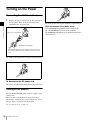
Connecting the AC Power Cord
1
Plug the AC power cord into the AC IN connector on
the rear panel. Then, attach the AC plug holder
(supplied) to the AC power cord.
Chapter 2 Preparations
AC power cord (supplied)
AC plug holder (supplied)
Attach the AC plug holder to the AC power cord, and connect
the cord to the AC IN connector so that the cord does not come
loose.
2
Slide the AC plug holder over the cord until it locks.
To disconnect the AC power cord
Pull out the AC plug holder while pressing the lock levers.
Turning on the Monitor
Press the MAIN POWER switch on the rear panel to turn
on the power.
When you turn on the monitor for the first time after
purchasing it, the Select Area screen is displayed. Select
the area where you intend to use this monitor.
For selecting the area, see page 27.
26
Turning on the Power
The warm-up time is more than 30 minutes, approximately.
When the monitor is in standby mode
As the OPERATE lamp lights in red in standby mode,
press the MONITOR I/1 switch of the controller.
The OPERATE lamp lights in green and the monitor enters
operation mode.
Settings
Selecting the Area
When you turn on the monitor for the first time after
purchasing it, select the area where you intend to use this
monitor from among the options.
When the area is selected, the menu item settings suitable
for the selected area are applied.
ENTER button
UP/DOWN buttons
Default value for each area
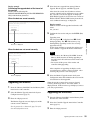
1
3
5
3
NTSC&PALM Area
5Japan
3 Africa
Australia/New Zealand
Europe/Russia
Color
Gamut
Emulation
Middle East
4 Asia Except Japan
5 Japan
7.5%
Betacam
BVM
SMPTE-C
Argentina
D65
0%
SMPTE/
EBU-N10
BVM EBU
Paraguay
D65
0%
SMPTE/
EBU-N10
BVM EBU
Uruguay
D65
0%
SMPTE/
EBU-N10
BVM EBU
Other Area
D65
7.5%
Betacam
BVM
SMPTE-C
If you select either Latin America or Asia Except
Japan, one of the following screens appears.
D65
0%
SMPTE/
EBU-N10
BVM EBU
If 2 Latin America is selected:
NTSC Area
D65
7.5%
Betacam
BVM
SMPTE-C
PAL Area
D65
0%
SMPTE/
EBU-N10
BVM EBU
D93
0%
SMPTE/
EBU-N10
BVM EBU
3Africa
Australasia
Europe
Middle-East
4Asia Except
Japan
Component
Level
B
B
B
B
B
B
B
B
D65
1North America
PAL&PAL-N
Area
North America
Latin America
Africa
Australasia
Europe
Middle-East
Asia Except Japan
Japan
2
Setup
Level
1 North America
2 Latin America
Select Area
3
Color
Temp
2Latin America
The Select Area screen appears.
1
4
Turn on the monitor with the MAIN POWER switch.
Chapter 2 Preparations
Ent button
2
Press the UP or DOWN button of the controller to
select the area where you intend to use the monitor and
press the ENTER (Ent) button.
Select Area
PAL&PAL-N area
Latin America
PAL & PAL-N Area
B
NTSC & PAL-M Area B
NTSC&PAL-M area
Select PAL & PAL-N or NTSC & PAL-M and press
the ENTER (Ent) button.
Settings
27
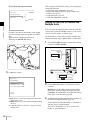
If 4 Asia Except Japan is selected:
Select Area
Asia Except Japan
NTSC Area
PAL Area
NTSC area
B
B
After saving and reflecting the setting, you can change the
setting with the menu.
• Color Temp (color temperature) (page 53)
• Setup Level (NTSC Setup Level: page 55, Betacam
Setup Level: page 55)
• Component Level (page 55)
• Color Gamut Emulation (page 57)
PAL area
Setting for the LAN to Connect the
Multiple Units
Chapter 2 Preparations
Customers who will use this monitor in the shaded
areas shown in the map below should select NTSC
Area.
Other customers should select PAL Area.
Then press the ENTER (Ent) button.
You can control the multiple monitors using the controller
connected via each LAN (10/100) connector. You can also
control a specific monitor or monitor group.
Set an IP address to the monitors and the controller and a
monitor ID number and group ID number to each monitor.
1
Set the NETWORK switches of each monitor and the
controller to PEER TO PEER.
PEER TO
PEER
NETWORK
LAN
3
Confirm the settings.
NETWORK
LAN
PEER TO PEER
Select Area
XXXXXXXXXX
Color Temp:
xx
Setup Level:
xx
Component Level:
xx
Color Gamut Emulation: xx
2
Monitor: Set the IP address in the Network Setting
menu of the System Configuration menu (page 70).
Controller: Set the IP address in the Network Setting
menu of the Controller menu (page 80).
Cancel
Confirm
Cancel: Select to cancel the setting and return to the
Select Area screen.
Confirm: Select to save the setting and end selecting
the area.
See “Default value for each area” on page 27 on the
setting value.
28
Settings
Set the different IP address to each monitor and the
controller.
3
Set Monitor ID and Group ID in the Network menu of
the System Configuration menu (page 70).
Set the different monitor ID number to each monitor
and if necessary, group ID number.
You can use the numbers 1 to 99 as a monitor ID
number or group ID number.
4
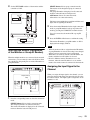
GROUP button: Selects group connection mode.
The monitor of the designated group is connected
remotely.
The group ID number is displayed on all connected
monitors when the button is held pressed.
ALL button: Selects all connection mode.
All monitors are connected remotely.
Set the NETWORK switches of the monitor and the
controller to LAN.
PEER TO
PEER
NETWORK
LAN
The lamp corresponding the pressed button flashes and
lights after recognizing the monitor.
Select the monitor ID number for the single connection
mode or group ID number for the group connection
mode by pressing the UP/DOWN or numeric button.
Up to 99 is entered as the monitor ID or group ID
number.
3
NETWORK
LAN
PEER TO PEER
Press the ENTER or Ent button to confirm the setting.
Chapter 2 Preparations
2
The monitor ID number, group ID number or ALL is
displayed in the display window.
Notes
Selecting the Monitor (Designation
of the Monitor or Group ID Number)
When the multiple monitors are connected by the network
connections, you can remotely connect the monitors from
the controller by designating the set monitor ID number or
group ID number.
• When the monitor with no assigned monitor ID number
or group ID number is selected, the setting is not changed
and the previous connection status is maintained.
• When there are monitors with the same ID number, the
monitor with the lower IP address is selected.
• Even if a different monitor ID number is set to the
monitors, when the same IP address is set to another
monitor, the monitor cannot be connected to the network.
Assigning the Input Signal to the
Channel
When you assign the input signal to the channel, you can
select the channel and change the input signal by pressing
the numeric button. The input signal is assigned to one of
channels 1 to 30.
Display window
Lamp
3
2
1
1
2
3
Press the corresponding button to select the connection
mode.
SINGLE button: Selects single connection mode.
The designated monitor is connected remotely.
The monitor ID number is displayed on all connected
monitors when the button is held pressed.
1
Settings
29
1
Select the channel (CH1 to CH30) to be assigned by
pressing the numeric button of the controller.
To assign to a channel number from 1 to 9, press the
appropriate one-digit channel number on the numeric
keypad.
To assign to a channel number from 10 to 30, press the
0 button, then press the appropriate two-digit channel
number.
2
Chapter 2 Preparations
Set the input signal for the selected channel in Input
Configuration menu (page 51).
The required setting is different due to the input signal
or picture quality to be displayed.
For details of the setting, see the Input Configuration
menu (page 51).
Setting the Display Mode of the
Picture
Set the display mode condition of the input signal to
display on the screen. The setting items are following.
• Setting Matrix/Gamma (transmission matrix and
transmission gamma)
• Selecting the color gamut (color space and gamma)
1
Set Matrix/Gamma in the Matrix/Gamma menu (page
53) of the Input Configuration menu.
2
Select the color gamut (color space and gamma) in the
Emulation menu (page 57) of the Display Setting
menu.
Adjusting
Before adjusting
The monitor must be warmed up sufficiently.
To perform stable color reproduction, turn on the power of
the monitor, display the white signal and leave it in this
state for more than 30 minutes.
About monitor adjustment
The monitor is used as a measuring instrument and is
required to faithfully reproduce the input signal. To
measure the signal accurately, the monitor must be
calibrated correctly using a reference signal.
To calibrate, adjust the following items in sequence.
1 Chroma/phase adjustment
You can save the adjustment value in Preset1 to
Preset5 and Preset (D-Cine). The data of Preset1 to
Preset5 or Preset (D-Cine) is set to the channel in the
Picture Preset menu (page 53) of the Input
Configuration menu.
Adjust the picture automatically with the auto chroma/
phase/matrix function for every signal format and
signal system to display the composite signal or Y/C
signal from the BKM-227W, or analog component
signal or analog RGB signal from the BKM-229X. If
the picture is not adjusted, the picture may not be
displayed correctly.
2 Color Temperature (white balance) adjustment
You can adjust the data set to the channel in the Color
Temp menu (page 53) of the Input Configuration
menu.
You can adjust D93, D65, D61, D56, D-Cine or User1
to User5 except for the XYZ format signal and D-Cine
XYZ or User XYZ1 to User XYZ5 for the XYZ format
signal.
3 Brightness/Contrast adjustment
You can save the adjustment value in Preset1 to
Preset5 and Preset (D-Cine). The data of Preset1 to
Preset5 or Preset (D-Cine) is set to the channel in the
Picture Preset menu (page 53) of the Input
Configuration menu.
Chroma/Phase Adjustment
Automatic adjustment (with auto chroma/phase/matrix
function) is required for each signal format, signal system
and matrix to display the composite or Y/C signal from the
BKM-227W, or the analog component or analog RGB
signal from the BKM-229X.
As you can automatically adjust the chroma, phase, matrix
and also 100% (white) and 0% (black) levels of the monitor
to the same as those of the reference signal by performing
30
Adjusting
the automatic adjustment, the automatic adjustment is also
effective for the RGB signal.
Perform the manual adjustment of chroma and phase to
adjust them further after automatic adjustment or the
digital signal from the BKM-220D, BKM-243HS or BKM244CC.
5
Automatic adjustment (recommended)
You can adjust manually or automatically with a specified
color temperature probe.
1
Input the reference color-bar signal to the monitor.
2
Select Auto in the Picture Adj menu of the Adjustment
menu and perform the automatic adjustment of the
chroma, phase and matrix in Auto Adjust (page 44).
Set the BLUE ONLY button to off.
Color Temperature (White Balance)
Adjustment
Note
1
Input the multi format color-bar signal or SMPTE
color-bar signal to the monitor.
Automatic adjustment
Use one of the following probes.
• Konica Minolta CA-210
• DK-Technologies PM5639/06
• X-Rite Eye-One Pro
2
Set the BLUE ONLY button to on.
1
Red and green signals are cut, and only the blue signal
is displayed as a monochrome picture.
The following is the example of the adjustment when the
multi format color-bar signal is used.
3
Select the Manual Adjust menu (page 45) in the Picture
Adj menu of the Adjustment menu and adjust the
levels with the CHROMA or PHASE knob of the
controller while tracking so that the brightness of bars
“a” (Blue part) and “b” (75% White part) (in the
following illustration) are the same.
For the composite and Y/C signals
Adjust the levels with the CHROMA and PHASE
knob.
For the component signal
Adjust the levels with the CHROMA knob.
Chapter 2 Preparations
Manual adjustment
The following is the example of the method to perform the
manual adjustment of the chroma and phase.
When the XYZ or DVI Computer signal is displayed, the
color temperature cannot be adjusted automatically.
Perform the manual adjustment of the color temperature.
Connect the color temperature probe.
For the cable to connect the color temperature probe,
see page 124.
2
Select Auto Adjust (page 48) in the Color Temp Adj
menu of the Adjustment menu and adjust the color
temperature.
Manual adjustment
1
Select Manual Adjust (page 46) in Manual of the Color
Temp Adj menu of the Adjustment menu.
2
Adjust the color as desired with the PHASE,
CHROMA or BRIGHT knob.
3
Press the ENTER or Ent button.
The adjusted data is confirmed.
a (Blue)
Brightness/Contrast Adjustment
b (75% White)
4
As an image on a color video monitor is seen differently
according to the ambient light (environmental brightness),
adjust the brightness (black level) according to the ambient
light and the black level of the image to be reproduced and
adjust the contrast (white level) according to the ambient
light.
Adjust the brightness/contrast with an external reference
signal of a multi format color-bar signal or SMPTE colorbar signal.
Press the ENTER or Ent button.
The adjusted data is confirmed.
Adjusting
31
Note
When the XYZ signal is displayed, the brightness cannot
be adjusted.
1
Input the multi format color-bar signal or SMPTE
color-bar signal to the monitor.
The following are explained as the example when the
multi format color-bar signal is used for adjustment.
Chapter 2 Preparations
2
Select the Manual Adjust menu (page 45) in the Picture
Adj menu of the Adjustment menu.
3
Adjust the –2%, 0% and +2% ranges or the 0%, +2%
and +4% ranges of the PLUGE signal section of the
color-bar with the BRIGHT knob.
HD signal
Adjust so that the –2% and 0% ranges are seen as equal
and the +2% and 0% ranges are more distinctive.
SD signal
Adjust so that the 0% and +2% ranges are seen as equal
and the +2% and +4% ranges are more distinctive.
HD
SD
+4%
0%
+2%
-2%
0%
4
Adjust so that the luminance of the 100% white signal
of the color-bar is set to the desired value with the
CONTRAST knob.
We recommend adjusting the luminance to 100 [cd/
m2] when Preset1 to Preset5 is selected in the Picture
Preset menu of the Input Configuration menu and to 48
[cd/m2] when Preset (D-Cine) is selected in the Picture
Preset menu of the Input Configuration menu.
5
As the brightness and contrast adjustments affect each
other, repeat the adjustments of step 3 and 4.
Note
When the contrast of this unit is adjusted, the luminance of
the backlight is adjusted for a picture of luminance 40 [cd/
32
Adjusting
m2] (20 [cd/m2] in black frame insertion or interlace
display mode) or higher, and the contrast is adjusted by the
signal level for a picture of luminance lower than 40 [cd/
m2] (20 [cd/m2] in black frame insertion or interlace
display mode).
Menu
Chapter
3
Basic Menu Operations
Chapter 3 Menu
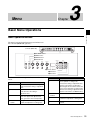
Menu Operation Buttons
The menu is operated using the menu operation buttons on
the controller (BKM-16R, optional).
Controller (BKM-16R)
1 UP/DOWN buttons
2 MENU button
3 ENTER button
4 PHASE knob
REMOTE
UP
MENU
PHASE
CHROMA
BRIGHT
CONTRAST
INPUT
SINGLE
1
2
3
Del
4
5
6
0
7
8
9
Ent
GROUP
DOWN
ENTER
MANUAL
MANUAL
MANUAL
MANUAL
ALL
SINGLE
GROUP
ALL
5 Numeric buttons
6 Ent button
7 Del button
The functions of the menu operation buttons are described
below.
Button
Function
4 PHASE knob
By turning this knob clockwise, the cursor
moves upward. In setting mode,
increases the setting or adjustment value
(has the same function as UP button).
By turning this knob counterclockwise, the
cursor moves downward. In setting mode,
decreases the setting or adjustment value
(has the same function as DOWN button).
5 Numeric
buttons
Enters the numerical values.
menu of the upper level. (On the main
menu, goes back to the normal picture.)
6 Ent button
Changes the item. In setting mode,
confirms the adjustment or setting value.
Changes the item. In setting mode,
confirms the adjustment or setting value.
7 Del button
Deletes the values and characters
entered.
Button
Function
1 UP button
Moves the cursor upward. In setting
mode, increases the setting or adjustment
value.
1 DOWN button Moves the cursor downward. In setting
mode, decreases the setting or
adjustment value.
2 MENU button Displays the menu. Goes back to the
3 ENTER
button
Basic Menu Operations
33
The current settings are displayed in place of the x
marks on the illustrations of the menu screen.
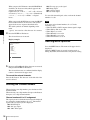
Displaying the Menu
Press the MENU button.
The main menu is displayed on the screen.
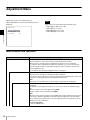
iInput Configuration
CH01
Format
B
Slot No:
xxxxx
Input No:
xxxxx
Screen Aspect
B
Sync Mode:
xxx
MENU
Adjustment
B
Input Configuration B
Display Setting
B
Display Function
B
System ConfigurationB
File Management
B
Status
B
Controller
B
Key Protect:
v
V
xxx
xxxxx
Color Temp:
Picture Preset:
Matrix/Gamma
B
xxx
Chapter 3 Menu
4
When you select one item on the main menu, the level 1
menu of the selected item appears.
For the items on the menu, see “Menu Structure” on page
37.
Notes
• Menu items displayed in gray cannot be selected.
• This menu is not displayed when Pixel Zoom is set to on.
Setting or Adjusting in the Menu
Operation
1
1/2
Repeat steps 2 and 3 until the desired menu is
displayed.
For more information about setting and adjustments,
see below.
Display example
iInput Configuration
CH01
Format
B
Slot No:
xxxxx
Input No:
xxxxx
Screen Aspect
B
Sync Mode:
xxx
Color Temp:
Picture Preset:
Matrix/Gamma
1/2
v
V
Indicates that
the menu
continues onto
next page.
Chooses the
setting value.
xxx
xxxxx
B
Indicates that
this item has
sub-list. You
can go to the
lower level.
Press the MENU button.
The main menu is displayed.
2
Using the UP or DOWN button or PHASE knob, select
the desired item. (Example: select the Input
Configuration menu by pressing the DOWN button.)
MENU
Adjustment
B
Input Configuration B
Display Setting
B
Display Function
B
System ConfigurationB
File Management
B
Status
B
Controller
B
Key Protect:
iInput Configuration
CH01
H Shift Offset:
xxx
Channel Name
B
NTSC Setup Level::
xx
Component Level:
xxxxx
Betacam Setup Level:: xxx
RGB Range:
B
1080I/PsF
B
Film Cadence::
xxx
Copy From
2/2
v
V
Indicates that
the menu is
continued from
previous page.
Enters
numerical
values.
B
xxx
Choosing the setting value
3
Press the ENTER or Ent button.
The level 1 of the selected menu is displayed.
34
Basic Menu Operations
The method for selecting the value is different due to the
menu item.
• Selecting in setting mode
• Selecting from the setting list
When selecting in setting mode
1
The cursor moves to the setting value and the monitor
enters in setting mode.
Using the UP or DOWN button or PHASE knob, select
the desired item and press the ENTER or Ent button.
Display example
The cursor moves to the setting value and the monitor
enters in setting mode.
iInput Configuration
CH01
H Shift Offset:
xxx
Channel Name
B
NTSC Setup Level::
xx
Component Level:
xxxxx
Betacam Setup Level:: xxx
RGB Range:
B
1080I/PsF
B
Film Cadence::
xxx
Display example
iInput Configuration
CH01
Format
B
Slot No:
xxxxx
Input No:
xxxxx
Screen Aspect
B
Sync Mode:
xxx
v
V
Copy From
B
Cursor
Set: ENTER Cancel: MENU
xxx
xxxxx
B
2
Set: ENTER Cancel: MENU
2
Using the UP or DOWN button or PHASE knob, select
the setting value.
3
Press the ENTER or Ent button.
3
When selecting from the setting list
Using the UP or DOWN button or PHASE knob, select
the desired item in the setting list.
Select the value in one of the following three ways:
• Enter the value directly using the numeric buttons
and press the ENTER or Ent button. (only the item
whose the value of setting range is over 0)
• Select the value using the UP or DOWN button.
• Select the value using the PHASE knob.
The setting is confirmed and the cursor returns to the
item.
1
v
V
Chapter 3 Menu
Color Temp:
Picture Preset:
Matrix/Gamma
1/2
2/2
Press the ENTER or Ent button.
The setting is confirmed and the cursor returns to the
item.
Entering characters
1
Using the UP or DOWN button or PHASE knob, select
New Name or the existing name.
Display example
iiiParallel Remote
1 Pin
CH:
--Under Scan
Over Scan
Native Scan
16 : 9
H Delay
V Delay
External Sync
Comb
2
1/4
The “---“ means that one or more characters can be
entered in sequence after the existing name.
v
V
01
Press the ENTER or Ent button.
The setting is confirmed and the display returns to the
menu of the upper level.
2
Press the ENTER or Ent button.
3
Using the UP or DOWN button or PHASE knob, select
the characters that you wish to enter.
Display example
iiChannel Name
CH01
PROG___
EDIT___
CAM___
VTR___
PREV___
New Name
Entering numerical values
1
Using the UP or DOWN button or PHASE knob, select
the desired item and press the ENTER or Ent button.
Basic Menu Operations
35
When you press the UP button or turn the PHASE knob
clockwise, the characters and symbols appear in the
sequence shown below.
Capital letters (A t B t ....... t Y t Z) t Lowercase letters (a t b t ....... t y t z) t Numbers (0
t 1 t ....... t 8 t 9) t Marks t Capital
letters...
When you press the DOWN button or turn the PHASE
knob counterclockwise, the characters and symbols
appear in the reverse sequence described above.
The usable symbols are limited depending on the
menu.
“(space)” is not used as a first character of a sentence.
Chapter 3 Menu
4
Press the ENTER or Ent button.
The selected character is entered.
To cancel the internal signal, select one from the channel
numbers 1 to 30.
Note
You cannot select channel numbers 91 to 97 in the
following cases:
• When the XYZ or DVI Computer format signal is input
• When Side by Side is set to On
• When Wipe is set to On
• When Butterfly is set to On
• When Blending is set to On
• When Pixel Zoom is set to on
Display example
Aborting Menu Operation
iiChannel Name
CH01
PROG___
EDIT___
CAM___
VTR___
PREV___
New Name
C
5
Repeat steps 3 and 4 until all the characters are entered,
then press the ENTER or Ent button.
The selected characters are confirmed and the display
returns to the menu of the upper level.
To correct the entered character
Press the Del button. The character on the left side of the
cursor is deleted.
Entering the Channel Number
When selecting a one-digit number, press the button of the
channel number.
When selecting a two-digit number, first press the 0 button,
then press a two-digit channel number.
Channel numbers 91 to 97 assignment
The signal systems to which the internal signal is displayed
are assigned to channel numbers 91 to 97. The internal
signal of the last signal system is displayed.
091: PLUGE signal
092: 20% gray signal
093: 100% white signal
36
094: Five-step gray scale signal
095: Ramp signal
096: color-bar signal
097: 0% black signal
Basic Menu Operations
Press the MENU button. The menu of the upper level is
displayed.
When the MENU button is pressed in setting mode or
during adjustment, the menu returns to the previous setting.
Menu Structure
For details of each menu, see the page in parentheses.
Adjustment menu (page 44)
Main menu
Adjustment
Level 1
Picture Adj
Level 2
Auto
Color Temp Adj
Level 4
Auto Adjust
Color Bar
Restore Factory Data
Status
Slot No
Format
Matrix
Preset Value
Other Monitor
Memory Stick
Manual
Manual Adjust
Original Value
Signal
Contrast Hold
Auto
Auto Adjust
Target Color Temp
x
y
Target Luminance
Probe
Contrast Hold
Copy From
Preset Value
Other Monitor
Memory Stick
Chapter 3 Menu
Manual Adjust
Copy From
Level 3
Monitor ID
Monitor ID
Restore Factory Data
Position Adj
H Shift
V Shift
Menu Structure
37
Input Configuration menu (page 51)
Main menu
Level 1
Level 2
Input Configuration
Format
SDI/HD-SDI
Dual Link HD-SDI
Composite
YC
Component
DVI
Slot No
Input No
Screen Aspect
Sync Mode
Level 3
Level 4
HD
SD
DC 2048 × 1080
Color Temp
Picture Preset
Matrix/Gamma
H Shift Offset
Chapter 3 Menu
Channel Name
NTSC Setup Level
Component Level
Betacam Setup Level
RGB Range
1080I/PsF
Film Cadence
Copy From
HD
SD
DC 2048 × 1080 RGB
DC 2048 × 1080 XYZ
DVI Computer
DVI Video
DVI Computer
24PsF
25PsF/50I
30PsF/60I
Other CH
Other Monitor
Memory Stick
Monitor ID
Level 3
Display Setting menu (page 57)
Main menu
Level 1
Level 2
Display Setting
Color Gamut
Emulation
User LUT
User LUT Data
File
Emulation
Load LUT
Delete LUT
User Matrix/Gamma
User Data
Matrix
Gamma
Copy From
Native Scan Mode
Aperture Value
NTSC Comb Filter
Filter Switch
Peak White Control
38
Menu Structure
Preset Value
Other Monitor
Memory Stick
Level 4
Monitor ID
Display Function menu (page 60)
Main menu
Display Function
Level 1
Marker Setting
Level 2
Marker Preset
Aspect Blanking
Aspect Marker
Aspect Mode
Aspect
Line
Color
Bright
Area Marker 1
Area Marker 1
Aspect Mode
Aspect
Area Size
Width
Height
Mode
Line
Color
Bright
Area Marker 2
Area Marker 2
Aspect Mode
Aspect
Area Size
Width
Height
Mode
Line
Color
Bright
Center Marker
Center Marker
Mode
Color
Bright
Preset Value
Other Monitor
Memory Stick
Side by Side
Line Display
Line Color
Line Bright
Wipe
Line Display
Line Color
Line Bright
Position
Butterfly
Line Display
Line Color
Line Bright
Position
Blending
Blending Ratio
Chapter 3 Menu
Pixel Zoom Setting
Level 4
Aspect Blanking
Mode
Aspect Marker
H Position
V Position
Copy From
P&P Setting
Level 3
Monitor ID
Line Color
Menu Structure
39
Main menu
Level 1
Level 2
Gamut Error Display
Gamut Error Display
Notification
Notification Reset
Input Detection
Post-Process Detection
Chapter 3 Menu
Zebra Pattern
Black Detail Setting
Capture
Clip Indicator
Zebra Pattern
Load
Rename
Delete
Internal Signal
Function Switch
40
Menu Structure
Scan Mode
Native Scan
16:9
H Delay
V Delay
External Sync
Comb
Aperture
Mono
Blue Only
R Off
G Off
B Off
Chroma Up
Black Frame Insertion
Interlace
Marker
Aspect Marker
Area Marker 1
Area Marker 2
Side by Side
Wipe
Butterfly
Blending
Error Notify Clear
Black Detail Mode
Level 3
Detection
Pixel Threshold
Signal Level
D1/HD-SDI YPbPr 10bit
Level 4
Upper Limit Y/Pb/Pr
Lower Limit Y/Pb/Pr
HD-SDI RGB 10bit
Upper Limit G/B/R
Lower Limit G/B/R
HD-SDI YPbPr 12bit
Upper Limit Y/Pb/Pr
Lower Limit Y/Pb/Pr
HD-SDI RGB 12bit
Upper Limit G/B/R
Lower Limit G/B/R
Detection
Pixel Threshold
Signal Level
Line
Modulation
Line
Modulation
Upper Limit
Lower Limit
System Configuration menu (page 70)
Main menu
System Configuration
Level 1
Level 2
Network
Monitor ID
Group ID
Network Setting
SNMP Setting
Level 3
IP Address
Subnet Mask
Default Gateway
Address
Contact
Name
Location
Trap
Community
Protocol Setting
Power
Standby Mode
Power On Status
Default CH
On Screen Set
Input Information
Format
Position
CH No
Position
CH Name
Position
Scan Mode
Position
Closed Caption
Closed Caption
Type
Service 708
Service 608
OSD Level
Adjustment
Input Configuration
Display Setting
Display Function
System Configuration
Individual Item
File Management
Controller
Key Protect
Chapter 3 Menu
Parallel Remote
1 Pin - 8 Pin
Change Password
Apply Password
Mode
Trap Address Setting
Trap Address Status
Reset Mode/Address
Authentication
SDCP/SDAP Community
SDCP Port No
SDAP Port No
SDAP Broadcast
SDAP Broadcast Period
Acceptable IP Address
Reset Protocol Setting
Parallel Remote
Password
Level 4
Network
Parallel Remote
Power
On Screen Set
Date/Time
Scan Mode Skip
Date/Time
Scan Mode Skip
Monitor Upgrade
Software Upgrade
Kernel Upgrade
FPGA Upgrade
Maintenance
Menu Structure
41
File Management menu (page 76)
Main menu
Level 1
Level 2
File Management
Save To
Memory Stick
Copy From
Other Monitor
Memory Stick
Delete
Memory Stick
Data Maintenance
Back Up System Data
Restore System Data
Level 4
Monitor ID
Chapter 3 Menu
Status menu (page 78)
Main menu
Level 1
Status
CH Status
Slot Status Option1-Option4
Model Name
Serial No
Software Version
Operation Time
Backlight
Network Switch
Controller Status
42
Level 3
Menu Structure
Level 2
Model Name
Serial No
Model Name
Serial No
Software Version
Network Switch
Level 3
Level 4
Controller menu (page 80) / Key Protect menu (page 84)
Main menu
Level 1
Level 2
Level 3
Controller
Network
Network Setting
IP Address
Subnet Mask
Default Gateway
Address
SNMP Setting
Contact
Name
Location
Trap
Level 4
Mode
Trap Address Setting
Trap Address Status
Reset Mode/Address
Authentication
Community
Protocol Setting
Chapter 3 Menu
Function Key
SDCP/SDAP Community
SDCP Port No
SDAP Port No
SDAP Broadcast
SDAP Broadcast Period
Reset Protocol Setting
F1 - F16
Monitor ID Display
Controller Upgrade
Software Upgrade
Kernel Upgrade
Key Protect
Menu Structure
43
Adjustment Menu
Overview
Adjusts the picture, color temperature, etc.
When Adjustment is selected, the following menu is
displayed.
iAdjustment
Chapter 3 Menu
Picture Adj
Color Temp Adj
B
B
Position Adj
B
Note
This menu is not selectable in the following cases:
• When Side by Side is set to On
• When Wipe is set to On
• When Butterfly is set to On
• When Blending is set to On
Menu Function and Operation
Menu
Function and operation ([
]: factory setting)
Picture Adj
Adjusts the chroma, phase, matrix and signal level automatically and contrast, brightness,
chroma and phase to set the preset value to picture adjustment preset data.
When the item is selected, the picture adjustment preset data to be set is displayed.
To change the picture adjustment preset data to be adjusted, you can select from Preset1,
Preset2, Preset3, Preset4, Preset5 and Preset (D-Cine) in the Picture Preset menu of the
Input Configuration menu.
For information about the Input Configuration menu, see page 51.
Auto
Sets the automatic adjustment of chroma, phase, matrix and signal level.
When the item is selected, the selected preset data is displayed.
You can select this item when the composite or Y/C signal from the BKM-227W, or the analog
component or analog RGB signal from the BKM-229X is displayed.
Note
This menu is not selectable when the internal signal or captured frame is displayed.
Auto Adjust
Starts automatic adjustment. (It may take some time until the automatic adjustment is
completed.)
An external color-bar signal for the reference is necessary for automatic adjustment (page
45).
The chroma data is reset to the default setting [1000].
The phase data is reset to the default setting [000].
Note
When the analog component signal or analog RGB signal is input, adjust the picture position
in the Position Adj menu (page 50) to perform the automatic adjustment in the Auto Adjust
menu. When the picture position does not fit, the adjustment will not be performed correctly
and this may cause a malfunction.
To cancel adjustment
Press the MENU button.
44
Adjustment Menu
Picture Adj
Menu
Function and operation ([
]: factory setting)
Sets the color-bar signal to input.
[Full Field 8]: 100% full-field 8-color bars (white, yellow, cyan, green, magenta, red, blue
and black)
SMPTE: SMPTE standard color bars
EIA: EIA standard color bars (effective for 480/60i and 575/50i signals only)
Multi Format: Color bars standardized by SMPTE RP219/ARIB STD-B28
Restore Factory Data
Resets the automatic adjustment data of chroma, phase, matrix and signal level to the default
setting.
You cannot select this when the setting is the default value.
The following message appears.
Restore factory data?
OK: To reset the data, press the ENTER (Ent) button.
Cancel: To cancel, press the MENU button.
Status
Displays the status of the automatic adjustment data of the chroma, phase, matrix and signal
level to be adjusted.
Not Adjusted: Displays when the data is not adjusted.
Adjusted: Displays when the data is adjusted.
Slot No
Displays the input option slot number of the automatic adjustment data to be adjusted.
Format
Displays the signal format and signal system of the automatic adjustment data to be adjusted.
Matrix
Displays the matrix of the automatic adjustment data to be adjusted.
Manual Adjust
Chapter 3 Menu
Color Bar
Adjusts values by turning the PHASE, CHROMA, BRIGHT, and/or CONTRAST knobs. After
adjustment, press the ENTER (Ent) button to confirm the adjusted values.
Phase: –150 to +150 [000]
Chroma: 0000 to 2000 [1000]
Bright: –500 to +500 [000]
Contrast: 0000 to 2500 [1000] (for Preset1 to Preset5), [0480] (for Preset (D-Cine))
To display no characters on the screen while adjusting manually
Set the CHAR OFF button to on. The characters disappear. To display characters, set the
CHAR OFF button to off.
To reset the setting to the default
Press the corresponding MANUAL button. The adjusted value is reset to the default.
To cancel adjustment
Press the MENU button. The adjustment data is cleared.
To confirm adjustment
Press the ENTER (Ent) button.
Copy From
Copies picture adjustment preset data.
Note
Automatic adjustment data is not copied.
Preset Value
Copies other data in this monitor.
When the item is selected, you can select from Preset1, Preset2, Preset3, Preset4, Preset5
or Preset (D-Cine).
Other Monitor
Monitor ID
Copies data from another monitor.
Enter the ID number of the source monitor.
When the NETWORK switch is set to PEER TO PEER, this is not selectable.
When the ID number is entered, you can select from Preset1, Preset2, Preset3, Preset4,
Preset5 or Preset (D-Cine).
Memory Stick
Copies data in the “Memory Stick”.
When the item is selected, the file names in the source “Memory Stick” are displayed.
When the file is selected, you can select from Preset1, Preset2, Preset3, Preset4, Preset5
or Preset (D-Cine).
Adjustment Menu
45
Menu
Function and operation ([
Color Temp Adj
Adjusts the color temperature.
]: factory setting)
When the item is selected, the color temperature data to be adjusted is displayed.
Except for the XYZ format signal
When D93, D65, D61, D56 or D-Cine data is changed, they are displayed as D93*, D65*,
D61*, D56* or D-Cine*.
To change the color temperature data to be adjusted, select D93, D65, D61, D56, D-Cine,
User1, User2, User3, User4 or User5 in the Color Temp menu of the Input Configuration
menu.
For the XYZ format signal
When D-Cine XYZ data is changed, it is displayed as D-Cine XYZ*.
To change the color temperature data to be adjusted, select D-Cine XYZ, User XYZ1, User
XYZ2, User XYZ3, User XYZ4 or User XYZ5 in the Color Temp menu of the Input
Configuration menu.
For information about the Input Configuration menu, see page 51.
Chapter 3 Menu
Manual
Adjusts the color temperature manually.
When the item is selected, the color temperature data to be set is displayed.
Except for the XYZ format signal
When D93, D65, D61, D56 or D-Cine data is changed, they are displayed as D93*, D65*,
D61*, D56* or D-Cine*.
For the XYZ format signal
When D-Cine XYZ data is changed, it is displayed as D-Cine XYZ*.
When Contrast Hold is set to Off, the color temperature data and contrast data are displayed.
The contrast data is displayed as the picture preset data Preset1 to Preset5 or Preset (DCine) set in Picture Preset of the Input Configuration menu, or MANUAL. To change the
displayed data from the picture preset data to MANUAL, set the MANUAL button of
CONTRAST to on. To change the displayed data from MANUAL to the picture preset data,
set the MANUAL button of CONTRAST to off. To change the type of the picture preset data,
select from Preset1 to Preset5 or Preset (D-Cine) in the Picture Preset menu of the Input
Configuration menu.
For information about the Input Configuration menu, see page 51.
Manual Adjust
Adjusts the color temperature with the adjustment knob.
Note
This menu is not selectable when the contrast is set to less than 400.
When the item is selected, the color temperature adjustment display appears and the x and y
values of the color temperature data to be adjusted are displayed.
Note
The displayed chromaticity coordinates x and y are reference values and are not guaranteed
as absolute values.
When Contrast Hold is set to On, the adjustable item and the relevant knobs are as follows.
To adjust Red (red): BRIGHT knob
To adjust Green (green): CHROMA knob
To adjust Blue (blue): PHASE knob
When Contrast Hold is set to Off, the adjustable item and the relevant knobs are as follows.
To adjust Red (red): BRIGHT knob
To adjust Green (green): CHROMA knob
To adjust Blue (blue): PHASE knob
To adjust Contrast (contrast): CONTRAST knob
46
Adjustment Menu
Menu
Function and operation ([
Color Temp Adj
]: factory setting)
To hide the characters on the monitor during manual adjustment
Set the CHAR OFF button of the controller to on. As the characters on the display are
hidden, it becomes easy to adjust the picture. To display the characters, set the CHAR OFF
button to off.
To reset Red, Green and Blue to the value before adjustment
Press the MANUAL button of BRIGHT, CHROMA or PHASE. The Red, Green and Blue are
reset to the value before adjustment.
To reset Contrast to the value before adjustment
Press the MANUAL button of CONTRAST.
Note
You cannot reset the setting after you press the ENTER (Ent) button.
To cancel adjustment
Press the MENU button. The adjustment data is cleared and the setting returns to the
previous value.
Original Value
Sets the initial value.
Except for the XYZ format signal
You can select from D93, D65, D61, D56, D-Cine, User1, User2, User3, User4 or User5.
When D93, D65, D61, D56 or D-Cine data is changed, they are displayed as D93*, D65*,
D61*, D56* or D-Cine*.
Chapter 3 Menu
To confirm adjustment
Press the ENTER (Ent) button.
For the XYZ format signal
You can select from D-Cine XYZ, User XYZ1, User XYZ2, User XYZ3, User XYZ4 or User
XYZ5.
When D-Cine XYZ data is changed, it is displayed as D-Cine XYZ*.
Signal
Sets the white signal to be used for adjustment.
Internal: Select when an internal signal is used. The signal is automatically switched to
the 100% white signal.
[External]: Select when an external input signal is used. Supply the 100% white signal.
Note
When the signal format set in the Format menu of the Input Configuration menu is 4:4:4 XYZ
12bit or DVI Computer, this menu is not selectable. Input the 100% white signal.
Contrast Hold
Auto
Sets whether or not to adjust the color temperature and contrast (backlight) at the same time.
Off: Contrast is adjusted.
[On]: Contrast is not adjusted.
Adjusts the color temperature automatically by using an optional probe.
When the item is selected, the color temperature data to be adjusted is displayed.
When D93, D65, D61, D56 or D-Cine data is changed, they are displayed as D93*, D65*,
D61*, D56* or D-Cine*.
When Contrast Hold is set to Off, the color temperature data and contrast data are displayed.
The contrast data is displayed as the picture preset data Preset1 to Preset5 or Preset (DCine) set in Picture Preset of the Input Configuration menu, or MANUAL. To change the
displayed data from the picture preset data to MANUAL, set the MANUAL button of
CONTRAST to on. To change the displayed data from MANUAL to the picture preset data,
set the MANUAL button of CONTRAST to off. To change the type of the picture preset data,
select from Preset1 to Preset5 or Preset (D-Cine) in the Picture Preset menu of the Input
Configuration menu.
For information about the Input Configuration menu, see page 51.
Adjustment Menu
47
Color Temp Adj
Menu
Function and operation ([
Auto Adjust
]: factory setting)
Starts adjustment.
Note
This menu is not selectable in the following case:
• When 4:4:4 XYZ 12bit or DVI Computer is selected in the Format menu of the Input
Configuration menu
Before automatic adjustment, select the value to use for the adjustment in following
sequence.
When you use the previously adjusted values for adjustment, select Auto Adjust to start
adjustment without performing step 1, step 2 and step 3.
1 Select the color temperature to be used in Target Color Temp.
When Any is selected, enter the values of the CIE color system x and y coordinates.
2 When Contrast Hold is set to Off, select Target Luminance and enter the value of the
luminance (cd/m2) when the 100% white signal is input.
3 Select the probe to be used in Probe.
4 Select Auto Adjust.
Chapter 3 Menu
The following message appears.
Set probe on cursor.
Attach the probe on the center of the display to start automatic adjustment. (It may take
some time until the automatic adjustment is completed.)
Note
First select the probe and then select Auto Adjust.
To cancel/stop the adjustment
Press the MENU button.
Target Color Temp
Sets the adjustment value to be used from D93, D65, D61, D56, D-Cine or Any.
x
Enters the CIE color system x coordinate.
Set to 0.280 to 0.345.
y
Enters the CIE color system y coordinate.
Set to 0.280 to 0.352.
Target Luminance
Enters the luminance (cd/m2) when the 100% white signal is input.
Adjust the luminance by the contrast adjustment (backlight adjustment).
Set to 40 to 250. [100]
Notes
• This menu is not selectable when Contrast Hold is set to On.
• The luminance is reduced to about half due to the principle of operation in the black frame
insertion mode or the interlace display mode. However, on this monitor the normal
luminance is set by the contrast adjustment (backlight adjustment). For this reason, as the
upper limit of Target Luminance becomes about 120 [cd/m2], set it to less than 120 [cd/m2].
• The luminance calibrated internally by the backlight does not guarantee an absolute value
and may be different from the luminance calibrated by the probe. When you set Target
Luminance near to the upper limit (250) or the lower limit (40), the setting value may
exceed the adjustment range and cause an error. If an adjustment error occurs, change
Target Luminance and perform the automatic adjustment again.
Probe
Selects the probe to be used for automatic adjustment of the color temperature.
[CA-210]: Select when Konica Minolta CA-210 is used.
PM 5639/06: Select when DK-Technologies PM 5639/06 is used.
Eye-One Pro: Select when X-Rite Eye-One Pro is used.
The cable to connect the probe and the monitor is required.
About the color temperature after automatic adjustment
The values of x and y displayed by the probe may be different from those set in Target Color
Temp because the x and y values of the probe is calibrated by the monitor.
Note
An external PC with USB connector and software for adjusting the color temperature are
required to use the Eye-One Pro. Before adjusting the color temperature automatically, start
the software for adjusting the color temperature.
For the software for adjusting the color temperature, please contact your Sony representative.
For more information about the cable specification required and about the connection, see
“Connection Cable Specifications for Color Temperature Probes” on page 124.
48
Adjustment Menu
Color Temp Adj
Menu
Function and operation ([
Contrast Hold
Copy From
Preset Value
]: factory setting)
Sets whether or not to adjust the color temperature and contrast (backlight) at the same time.
Off: Contrast is adjusted.
[On]: Contrast is not adjusted.
Copies the other color temperature.
Copies other data in this monitor.
For the XYZ format signal
When the item is selected, you can select from D-Cine XYZ, User XYZ1, User XYZ2, User
XYZ3, User XYZ4 or User XYZ5.
D-Cine XYZ: Copies the color temperature of D-Cine XYZ.
User XYZ1 to 5: Copies the color temperature of User XYZ1 to 5.
When D-Cine XYZ data is changed, it is displayed as D-Cine XYZ*.
Other Monitor
Monitor ID
Chapter 3 Menu
Except for the XYZ format signal
When the item is selected, you can select from D93, D65, D61, D56, D-Cine, User1, User2,
User3, User4 or User5.
D93: Copies the color temperature of D93.
D65: Copies the color temperature of D65.
D61: Copies the color temperature of D61.
D56: Copies the color temperature of D56.
D-Cine: Copies the color temperature of D-Cine.
User1 to 5: Copies the color temperature of User1 to 5.
When D93, D65, D61, D56 or D-Cine data is changed, they are displayed as D93*, D65*,
D61*, D56* or D-Cine*.
Copies data from another monitor.
Enter the ID number of the source monitor.
When the NETWORK switch is set to PEER TO PEER, this is not selectable.
Except for the XYZ format signal
When the ID number is entered, you can select from D93, D65, D61, D56, D-Cine, User1,
User2, User3, User4 or User5.
D93: Copies the color temperature of D93.
D65: Copies the color temperature of D65.
D61: Copies the color temperature of D61.
D56: Copies the color temperature of D56.
D-Cine: Copies the color temperature of D-Cine.
User1 to 5: Copies the color temperature of User1 to 5.
When D93, D65, D61, D56 or D-Cine data is changed, they are displayed as D93*, D65*,
D61*, D56* or D-Cine*.
For the XYZ format signal
When the ID number is entered, you can select from D-Cine XYZ, User XYZ1, User XYZ2,
User XYZ3, User XYZ4 or User XYZ5.
D-Cine XYZ: Copies the color temperature of D-Cine XYZ.
User XYZ1 to 5: Copies the color temperature of User XYZ1 to 5.
When D-Cine XYZ data is changed, it is displayed as D-Cine XYZ*.
Adjustment Menu
49
Color Temp Adj
Menu
Function and operation ([
Memory Stick
]: factory setting)
Copies data in the “Memory Stick”.
When the item is selected, the file names in the source “Memory Stick” are displayed.
Except for the XYZ format signal
When the file is selected, you can select from D93, D65, D61, D56, D-Cine, User1, User2,
User3, User4 or User5.
D93: Copies the color temperature of D93.
D65: Copies the color temperature of D65.
D61: Copies the color temperature of D61.
D56: Copies the color temperature of D56.
D-Cine: Copies the color temperature of D-Cine.
User1 to 5: Copies the color temperature of User1 to 5.
When D93, D65, D61, D56 or D-Cine data is changed, they are displayed as D93*, D65*,
D61*, D56* or D-Cine*.
Chapter 3 Menu
For the XYZ format signal
When the file is selected, you can select from D-Cine XYZ, User XYZ1, User XYZ2, User
XYZ3, User XYZ4 or User XYZ5.
D-Cine XYZ: Copies the color temperature of D-Cine XYZ.
User XYZ1 to 5: Copies the color temperature of User XYZ1 to 5.
When D-Cine XYZ data is changed, it is displayed as D-Cine XYZ*.
Restore Factory Data
Position Adj
Resets the color temperature to the default setting.
You cannot select this when the setting is the default value.
The following message appears to confirm the data reset operation.
Restore factory data?
OK: To reset the data, press the ENTER (Ent) button.
Cancel: To cancel, press the MENU button.
Adjusts the position of the picture when the analog signal is input.
When the item is selected, the signal system to be set is displayed.
You can select the item when the composite or Y/C signal from the BKM-227W, or the analog
component or analog component RGB signal from the BKM-229X is displayed.
To hide the characters on the monitor during adjustment
Set the CHAR OFF button of the controller to on. As the characters on the display are
hidden, it becomes easy to adjust the picture. To display the characters, set the CHAR OFF
button to off.
Note
This menu is not selectable when the internal signal or captured frame is displayed.
50
H Shift
Adjusts the horizontal position of the picture.
As the setting increases, the picture moves to the right, and as the setting decreases, the
picture moves to the left. [000]
Set in the H Shift Offset menu (page 55) of the Input Configuration menu when the difference
of the horizontal position is necessary to adjust for different input signals of the same signal
system, etc.
V Shift
Adjusts the vertical position of the picture.
As the setting increases, the picture moves up, and as the setting decreases, the picture
moves down. [000]
Adjustment Menu
Input Configuration Menu
Overview
This menu is used for pertaining data to the input signals.
When Input Configuration is selected, the following menus are displayed.
iInput Configuration
CH01
Format
B xxxxx
Slot No:
xxxxx
Input No:
xxxxx
Screen Aspect
B
Sync Mode:
xxx
v
V
xxx
xxxxx
iInput Configuration
CH01
H Shift Offset:
xxx
Channel Name
B
NTSC Setup Level::
xx
Component Level:
xxxxx
Betacam Setup Level:: xxx
RGB Range:
B
1080I/PsF
B
Film Cadence::
xxx
2/2
v
V
Chapter 3 Menu
Color Temp:
Picture Preset:
Matrix/Gamma
1/2
B
B
Copy From
The current channel is displayed. Perform the input setting
for the selected channel.
Before setting
Set the input signal for each channel. A channel number (1
to 30) is entered with the numeric buttons (page 36).
Note
This menu is not selectable in the following cases:
• When Side by Side is set to On
• When Wipe is set to On
• When Butterfly is set to On
• When Blending is set to On
Menu Function and Operation
Menu
Function and operation ([
Format
Sets the input signal type.
]: factory setting)
Note
The default setting is HD-SDI/D1 Auto. Set Format except for when the BKM-243HS or BKM244CC is installed.
SDI/HD-SDI
Sets the serial digital signal format (SDI or Single-link HD-SDI) when BKM-220D, BKM243HS or BKM-244CC is installed.
When BKM-220D is installed
D1
When BKM-243HS or BKM-244CC is installed
[HD-SDI/D1 Auto]: Changes the format automatically according to the format of the
input signal.
D1
Dual Link HD-SDI
Sets the Dual-link HD-SDI signal format when two BKM-243HS or BKM-244CC are installed
in the OPTION 1 and 2 or OPTION 3 and 4 option slots.
4:2:2 YPbPr 10bit
4:4:4 YPbPr 10bit
4:4:4 RGB 10bit
4:4:4 YPbPr 12bit
4:4:4 RGB 12bit
4:4:4 XYZ 12bit
Input Configuration Menu
51
Function and operation ([
Format
Chapter 3 Menu
Menu
]: factory setting)
Composite
Sets the composite signal format when BKM-227W is installed.
Auto: Changes automatically according to the format of the input signal.
It will take a few seconds to detect the format of an input signal. It is recommended that
a particular format be selected if it is determined.
NTSC
PAL
PAL-M
SECAM
YC
Sets the Y/C signal format when BKM-227W is installed.
Auto: Changes automatically according to the format of the input signal.
It will take a few seconds to detect the format of an input signal. It is recommended that
a particular format be selected if it is determined.
NTSC
PAL
PAL-M
SECAM
Component
Sets the analog component signal format or analog RGB signal format when BKM-229X is
installed.
You can select from YPbPr or RGB.
DVI
Sets the DVI signal format.
Video: Displays the CEA-861 signal.
Computer: Displays the computer output signal such as the VESA standard signal.
For each signal format to be displayed, see page 105.
Slot No
Enters the option slot number.
You can select from Option1 to Option4, Option1&2 or Option3&4.
Adaptor and the item to be selected
Option1 to Option4
• When the BKM-243HS or BKM-244CC is installed and Format is set to HD-SDI/D1 Auto
• When the BKM-220D, BKM-243HS or BKM-244CC is installed and Format is set to D1
• When the BKM-227W is installed and Format is set to Composite Auto, Composite
NTSC, Composite PAL, Composite PAL-M, Composite SECAM, YC Auto, YC NTSC, YC
PAL, YC PAL-M or YC SECAM
• When the BKM-229X is installed and Format is set to Component YPbPr or Component
RGB
Option1&2, Option3&4
• When two BKM-243HS or BKM-244CC are installed in the OPTION 1 and 2 or OPTION
3 and 4 option slots and Format is set to 4:2:2 YPbPr 10bit, 4:4:4 YPbPr 10bit, 4:4:4
RGB 10bit, 4:4:4 YPbPr 12bit, 4:4:4 RGB 12bit or 4:4:4 XYZ 12bit
Note
When the setting of Format and the installed adaptor do not match, the setting value may not
be changed. Set the Format correctly according to the installed adaptor.
Input No
Enters the input connector number.
You can select from [Input 1] or Input 2.
You can select when Format is set to HD-SDI/D1 Auto, D1, 4:2:2 YPbPr 10bit, 4:4:4 YPbPr
10bit, 4:4:4 RGB 10bit, 4:4:4 YPbPr 12bit, 4:4:4 RGB 12bit or 4:4:4 XYZ 12bit.
Note
When the setting of Format and the installed adaptor do not match, the setting value may not
be changed. Set the Format correctly according to the installed adaptor.
Screen Aspect
Selects the aspect ratio.
Note
This menu is not selectable when Format is set to DVI Computer.
52
HD
Sets the aspect ratio of the HD signal.
You can select from [16:9] or 2.39:1.
SD
Sets the aspect ratio of the SD signal.
You can select from [16:9] or 4:3.
DC 2048 × 1080
Sets the aspect ratio of the digital cinema signal (2048 × 1080).
You can select from [1.896:1] or 2.39:1.
Input Configuration Menu
Menu
Function and operation ([
]: factory setting)
Sync Mode
Sets the sync signal when the analog component signal or analog RGB signal is input.
You can select when Format is set to Component YPbPr or Component RGB.
[Internal]: Select when an internal sync signal is used.
External: Select when an external sync signal is used.
Color Temp
Sets the color temperature.
Except for the XYZ format signal
You can select from D93, D65, D61, D56, D-Cine, User1 to User5.
When D-Cine RGB is selected, the color temperature is set to x=0.314 and y=0.351 in the
CIE chromaticity coordinate.
When D93, D65, D61, D56 or D-Cine data is changed, they are displayed as D93*, D65*,
D61*, D56* or D-Cine*.
For the XYZ format signal
You can select from D-Cine XYZ or User XYZ1 to User XYZ5.
When D-Cine XYZ data is changed, it is displayed as D-Cine XYZ*.
Sets the picture adjustment preset.
Select from Preset1 to Preset5 or Preset (D-Cine).
Matrix/Gamma
Sets Matrix/Gamma data (transmission matrix and transmission gamma) depending on the
input signal format.
Matrix/Gamma data are seven data in which the transmission matrix and transmission
gamma have been preset and five user data in which the transmission matrix and
transmission gamma can be selected respectively (see below table).
Preset data: ITU-R BT.709, ITU-R BT.601, SMPTE 240M, D-Cine RGB, D-Cine XYZ,
xvYCC 709, xvYCC 601
Data set respectively: User1 to User5
The Matrix/Gamma data can be set for each type of the input signal (HD, SD, DC 2048 ×
1080 RGB, DC 2048 × 1080 XYZ or DVI Computer).
For the type of the input signal, see “Matrix/Gamma Setting Table” (page 112).
Matrix/Gamma
Matrix
(Transmission
matrix)
Gamma (Transmission
gamma)
ITU-R BT.709
ITU709
2.2
ITU-R BT.601
ITU601
2.2
SMPTE 240M
SMPTE240M
2.2
D-Cine RGB
ITU709
2.6 RGB
D-Cine XYZ
ITU709
2.6 XYZ
xvYCC 709
ITU709
xvYCC
xvYCC 601
ITU601
xvYCC
User1 to User5
ITU709
ITU601
SMPTE240M
Select above three
types.
2.2
2.6 RGB
2.6 XYZ
xvYCC
S-LOG Standard
S-LOG Full
Select above six types.
Input Configuration Menu
Chapter 3 Menu
Picture Preset
53
Menu
Function and operation ([
Matrix/Gamma
]: factory setting)
Matrix/Gamma data
ITU-R BT.709: Select when the signal of the ITU-R BT.709 standards format is input.
ITU-R BT.601: Select when the signal of the ITU-R BT.601 standards format is input.
SMPTE 240M: Select when the signal of the SMPTE-240M standards format is input.
D-Cine RGB: Select when 2048 × 1080 RGB format signal is input.
D-Cine XYZ: Select when XYZ format signal of SMPTE RP 431-2 standard is input.
xvYCC 709: Select when the IEC 61966-2-4 standards (xvYCC) and the transmission
matrix ITU-R BT.709 standards format signal is input.
xvYCC 601: Select when the IEC 61966-2-4 standards (xvYCC) and the transmission
matrix ITU-R BT.601 standards format signal is input.
User1 - User5: Select when the transmission matrix and transmission gamma is set
individually depending on the input signal format.
Chapter 3 Menu
Notes
• When you select xvYCC 709 or xvYCC 601, set Emulation (page 57) to L230 Native in the
Color Gamut menu of the Display Setting menu to display the extended color gamut area.
• For setting the user data (User1 to User5) of Matrix/Gamma, see the User Matrix/Gamma
menu (page 58) of the Display Setting menu.
Transmission matrix
ITU709: Matrix of ITU-R BT.709 standards
ITU601: Matrix of ITU-R BT.601 standards
SMPTE240M: Matrix of SMPTE-240M standards
Note
The internal fixed value applies to the transmission matrix of the RGB format or XYZ format.
Transmission gamma
2.2: Transmission gamma 2.2
2.6 RGB: Transmission gamma 2.6 for 2048 × 1080 RGB format
2.6 XYZ: Transmission gamma 2.6 for the XYZ format
xvYCC: Transmission gamma of IEC 61966-2-4 standards (xvYCC)
S-LOG Standard: Log gamma available with the F23 Digital Cinematography Camera.
Select to run the 100% output level of the F23 with the 100% level of the monitor for
confirmation.
S-LOG Full: Log gamma available with the F23.
Select to fit the full dynamic range of the F23 in the 100% level of the monitor for
confirmation.
Notes
• As 2.6 RGB is setting for 2048 × 1080 RGB format, the input signal of any other format is
not displayed correctly.
• When you select xvYCC, set Emulation (page 57) to L230 Native in the Color Gamut menu
of the Display Setting menu to display the extended color gamut area.
• When the quantization range of the DVI signal is Full, the internal fixed value of the
transmission gamma is applied.
54
HD
Sets Matrix/Gamma of the HD signal.
You can select from [ITU-R BT.709], ITU-R BT.601, SMPTE 240M, xvYCC 709, xvYCC 601
or User1 to User5.
SD
Sets Matrix/Gamma of the SD signal.
You can select from ITU-R BT.709, [ITU-R BT.601], SMPTE 240M, xvYCC 709, xvYCC 601
or User1 to User5.
DC 2048 × 1080 RGB
Sets Matrix/Gamma of the digital cinema signal (2048 × 1080) of the RGB format.
You can select from [D-Cine RGB] or User1 to User5.
DC 2048 × 1080 XYZ
Sets Matrix/Gamma of the digital cinema signal (2048 × 1080) of the XYZ format.
You can select from [D-Cine XYZ] or User1 to User5.
DVI Computer
Sets Matrix/Gamma of the DVI Computer signal.
You can select from [ITU-R BT.709], ITU-R BT.601, SMPTE 240M, xvYCC 709, xvYCC 601
or User1 to User5.
Input Configuration Menu
Menu
Function and operation ([
]: factory setting)
H Shift Offset
Sets the horizontal picture position when the analog signal is input.
You can select when Format is set to Composite Auto, Composite NTSC, Composite PAL,
Composite PAL-M, Composite SECAM, YC Auto, YC NTSC, YC PAL, YC PAL-M, YC
SECAM, Component YPbPr or Component RGB.
Set to –100 to +100*. [000]
*When the setting value is out of range, the display of the setting value is changed but the
horizontal position of the picture is not changed.
To hide the characters on the monitor during adjustment
Set the CHAR OFF button of the controller to on. As the characters on the display are
hidden, it becomes easy to adjust the picture. To display the characters, set the CHAR OFF
button to off.
Channel Name
Sets a channel name.
NTSC Setup Level
Sets the NTSC setup level.
You can select when Format is set to Composite Auto, Composite NTSC, YC Auto or YC
NTSC.
You can select from 0% or 7.5%.
Component Level
Sets the component level of the analog component 480/60i signal.
You can select when Format is set to Component YPbPr.
You can select from SMPTE/EBU-N10 or Betacam.
Betacam Setup Level
Sets the Betacam setup level when Component Level is set to Betacam.
You can select from 0% or 7.5%.
RGB Range
Sets the quantization range of the DVI input signal.
You can select when Format is set to DVI Video or DVI Computer.
DVI Video
Sets the display mode for the DVI Video signal.
Full: 0 (black level) to 255 (white level) (8bit)
[Limit]: 16 (black level) to 235 (white level) (8bit)
DVI Computer
Sets the display mode for the DVI Computer signal.
[Full]: 0 (black level) to 255 (white level) (8bit)
Limit: 16 (black level) to 235 (white level) (8bit)
1080I/PsF
Chapter 3 Menu
When the item is selected, you can select a preset name, or enter a new one.
PROG: Program signal
EDIT: Signal from an editor
CAM: Camera signal
VTR: Signal from a VTR
PREV: Preview monitor
New Name: Enter a new name. (Up to 20 characters can be entered.)
When the 1080i/PsF signal is input, select the display mode.
You can select when Format is set to HD-SDI/D1 Auto, 4:2:2 YPbPr 10bit, 4:4:4 YPbPr 10bit,
4:4:4 RGB 10bit, 4:4:4 YPbPr 12bit, 4:4:4 RGB 12bit, 4:4:4 XYZ 12bit, Component YPbPr or
Component RGB.
When 1080I is selected, the I/P conversion signal is displayed. When 1080PsF is selected,
the progressive conversion (PsF to P) signal is displayed.
When the 1080PsF signal is input and 1080I is selected, the display delay is shortened. The
signal converted from PsF to P is not displayed and the I/P conversion signal is displayed.
24PsF
Sets the display mode for the 1080/24PsF signal.
You can select from 1080I or [1080PsF].
25PsF/50I
Sets the display mode for the 1080/25PsF, 50i signal.
You can select from [1080I] or 1080PsF.
30PsF/60I
Sets the display mode for the 1080/30PsF, 60i signal.
You can select from [1080I] or 1080PsF.
Input Configuration Menu
55
Menu
Function and operation ([
]: factory setting)
Film Cadence
Sets the film cadence mode.
This menu is not selectable when Format is set to DVI Computer.
The progressive conversion signal is displayed according to the setting.
[Off]: The progressive conversion signal is not displayed in film cadence mode.
2-2: The progressive conversion signal is displayed when the interlace signal of 2-2 pulldown processing is input
2-3: The progressive conversion signal is displayed when the interlace signal of 2-3 pulldown processing is input
2-3-3-2: The progressive conversion signal is displayed when the interlace signal of 2-33-2 pull-down processing is input
Chapter 3 Menu
Notes
• When the 50i interlace signal is input, the mode is automatically set to 2-2, even when 2-3
or 2-3-3-2 is selected.
• The signal is not displayed in film cadence mode when 1080i interlace signal is input and
1080PsF is selected in the 1080I/PsF menu. Set to 1080I.
• As the signal is displayed in film cadence mode by cadence sequence detection based on
the pattern of the input signal, the signal may not be displayed correctly, because of the
pattern of the input signal.
• The signal is not displayed in film cadence mode in the following cases:
– When Side by Side is set to On
– When Wipe is set to On
– When Butterfly is set to On
– When Blending is set to On
Copy From
Copies signal setting data from other channel.
Other CH
Copies other data in this monitor.
When the item is selected, you can designate the channel to be copied.
Other Monitor
Copies data from other monitor.
Monitor ID
Enters the ID number of the source monitor.
When the NETWORK switch is set to PEER TO PEER, this is not selectable.
When the item is selected, you can designate the source monitor.
When the ID number is entered, you can designate the channel to be copied.
Memory Stick
Copies data in the “Memory Stick”.
When the item is selected, the file names in the source “Memory Stick” are displayed.
When the file is selected, you can enter the channel number in the selected file.
56
Input Configuration Menu
Display Setting Menu
Overview
This menu is used for setting the monitor condition such as the color reproduction or frame.
When Display Setting is selected, the following menu is displayed.
iDisplay Setting
Color Gamut
User Matrix/Gamma
xxx
xxx
xxx
xxx
xxx
Chapter 3 Menu
Native Scan Mode:
Aperture Value:
NTSC Comb Filter:
Filter Switch:
Peak White Control:
B
B
Menu Function and Operation
Menu
Function and operation ([
Color Gamut
As the BVM-L230 is equipped with the wider color space LED backlight, the signal can be
displayed (emulation) in the color gamut (color space and gamma) selected in the Emulation
menu.
Emulation
]: factory setting)
Sets the used color gamut (color space and gamma).
BVM SMPTE-C: Displays in the color gamut of BVM-A24 SMPTE-C phosphor CRT.
BVM EBU: Displays in the color gamut of BVM-A24 EBU phosphor CRT.
ITU-R BT.709: Displays in the color gamut of three primary colors chromaticity point
provided by ITU-R BT.709.
D-Cine*1: Displays in the color gamut of three primary colors chromaticity point provided
by SMPTE RP 431-2.
L230 Native: Displays in the color gamut of the BVM-L230 individual three primary
colors chromaticity point. This is the widest color space setting of the signal reproduced
by the BVM-L230.
S-GAMUT: Sets to display the color gamut of the wide color space mode S-GAMUT,
which is available for the F23 Digital Cinematography Camera.
*1Three primary colors chromaticity point provided by SMPTE RP 431-2 is not covered in full.
Note
When User LUT is set to Applied, you cannot set Emulation.
User LUT
Sets whether or not to apply the user data for the Emulation setting ([Not Applied] or
Applied).
If the user data are not prepared, you cannot set User LUT.
User LUT Data
Selects the user data.
You can select from User1, User2, User3, User4 or User5. [--- (no setting)]
Note
The user data without a LUT data file is not displayed and cannot be selected.
File
The read LUT data file name is displayed.
Emulation
The reference color gamut for making the LUT data are displayed.
When User LUT is set to Applied, Emulation is forcibly set to the color gamut displayed in this
menu inside the monitor.
Display Setting Menu
57
Menu
Function and operation ([
Color Gamut
Reads a LUT data file from a “Memory Stick”.
You can select from User1, User2, User3, User4 or User5.
When a LUT data file is read for the user data (User1 to User5), the file name is displayed
next to the user data.
Load LUT
]: factory setting)
When you select the user data, a list of LUT data files in the “Memory Stick” is displayed, and
you can select a file name.
Note
After converting the LUT data output from Grading Tool of another vendor to LUT data in the
Sony-unique format, convert the LUT data again with the coversion tool so that it can be read
by the monitor.
The Sony-unique format specifications for the LUT data to input to the conversion tool,
conversion tool and operation procedures for the conversion tool are scheduled for release in
February 2009. To obtain them, contact your Sony representative.
Delete LUT
Deletes the LUT data file read into the user data (User1 to User5).
Chapter 3 Menu
Note
When there are no user data with the LUT data file, you cannot select the user data.
When the item is selected, the user data with the LUT data file, file name and All are
displayed.
When a user data is selected to delete each user data (file) or All is selected to delete all user
data, the following message is displayed:
Delete this data?
OK: To delete the data, press the ENTER (Ent) button.
Cancel: To cancel, press the MENU button.
User Matrix/Gamma
Sets the user data (User1 to User5) of Matrix/Gamma (transmission matrix and transmission
gamma).
As the signal is processed internally by the data setting of Matrix/Gamma, the signal may not
be displayed correctly, if the signal is not set according to the transmission standards for the
input signal.
For the transmission gamma and the transmission matrix of Matrix/Gamma, see the Matrix/
Gamma menu (page 53) of the Input Configuration menu.
User Data
Selects the user data of Matrix/Gamma.
You can select from User1 to User5. [User1]
Matrix
Sets the transmission matrix.
[ITU709]: Matrix of ITU-R BT.709 standards
ITU601: Matrix of ITU-R BT.601 standards
SMPTE 240M: Matrix of SMPTE-240M standards
Note
The internal fixed value applies to the transmission matrix of the RGB format and XYZ format.
Gamma
Sets the transmission gamma.
[2.2]: Transmission gamma 2.2
2.6 RGB: Transmission gamma 2.6 for the RGB format
2.6 XYZ: Transmission gamma 2.6 for the XYZ format
xvYCC: Transmission gamma of IEC 61966-2-4 standards (xvYCC)
S-LOG Standard: Log gamma available with the F23 Digital Cinematography Camera.
Select to run the 100% output level of the F23 with the 100% level of the monitor for
confirmation.
S-LOG Full: Log gamma available with the F23.
Select to fit the full dynamic range of the F23 in the 100% level of the monitor for
confirmation.
Notes
• As 2.6 RGB is setting for 2048 × 1080 RGB format, the input signal of any other format is
not displayed correctly.
• When you select xvYCC, set Emulation (page 57) to L230 Native in the Color Gamut menu
of the Display Setting menu to display the extended color gamut area.
• When the quantization range of the DVI signal is Full, the internal fixed value of the
transmission gamma is applied.
58
Display Setting Menu
User Matrix/Gamma
Menu
Function and operation ([
Copy From
]: factory setting)
Copies the user data from the other Matrix/Gamma.
Preset Value
Copies other data in this monitor.
Other Monitor
Copies data from another monitor.
When the item is selected, you can select from User1, User2, User3, User4 or User5.
Monitor ID
Enter the ID number of the source monitor.
When the NETWORK switch is set to PEER TO PEER, this is not selectable.
When the ID number is entered, you can select from User1, User2, User3, User4 or User5.
Memory Stick
Copies data in the “Memory Stick”.
When the item is selected, the file names in the source “Memory Stick” are displayed.
When the file is selected, you can select from User1, User2, User3, User4 or User5.
Native Scan Mode
Chapter 3 Menu
Sets the native scan mode.
[Aspect Correction]: Displaying an SD signal of non-square pixels (the number of H
pixels of the signal system is 720 or 1440) or a 640 × 480 SD signal of DVI video by
scaling processing of doubling for the V direction and correct aspect ratio for the H
direction and also optimizing and displaying a picture by modifying the aperture
coefficient value, filter coefficient value, etc.
×1: Input signal display without conversion
×2: Input signal display doubled
For selecting Aspect Correction, ×1 or ×2, see “Picture Display Size” on page 108.
Notes
• When an HD signal or DVI computer signal is input, the signal is displayed in ×1 mode,
even if the mode is set to Aspect Correction or ×2.
• When an SD signal from the BKM-229X is input and the number of the H pixels of the
signal system is 1440, the signal is displayed in ×2 mode, even if the mode is set to ×1.
• When you select Aspect Correction and set Native Scan to On for SD signal input, Aperture
is set to On (factory setting).
Aperture Value
Sets the aperture modification value.
Sets to 000 to 200.
[090] (when the signal is displayed in Aspect Correction mode of the native display), [000]
(when the signal is displayed in mode other than Aspect Correction of the native display)
NTSC Comb Filter
Sets the type of NTSC filter.
You can select from [3Lines] or 3D.
When the BKM-227W is installed, you can select the item.
Filter Switch
Sets whether or not to turn on the Y/C separation filter ([Off] or On) when the picture is set to
monochrome mode.
When the BKM-227W is installed, you can select the item.
Peak White Control
When the brightness is increased, using the brightness adjustment, the picture may be
clipped, because of the dynamic range of the circuit. Sets whether or not to control the signal
gain automatically according to the setting value of the brightness, to prevent such clipping
(Off or [On]).
Note
Peak white control does not function with XYZ signals.
Display Setting Menu
59
Display Function Menu
Overview
This menu is used to set the function related to the picture display.
When Display Function is selected, the following menu is displayed.
iDisplay Function
Chapter 3 Menu
Marker Setting
B
P&P Setting
Pixel Zoom Setting
Gamut Error Display
Black Detail Setting
Capture
Internal Signal
B
B
B
B
B
B
Function Switch
B
Menu Function and Operation
Menu
Function and operation ([
]: factory setting)
Marker Setting
Sets whether or not to display the marker when the MARKER button is pressed, and the
display mode.
To hide the characters on the monitor during setting
Set the CHAR OFF button of the controller to on. As the characters on the display are
hidden, it becomes easy to adjust the picture. To display the characters, set the CHAR OFF
button to off.
Marker Preset
Sets the marker preset data.
You can select from Marker1 to Marker5. [Marker1]
Aspect Blanking
Sets the display of the blanking outside the area of the aspect marker.
Aspect Blanking
Sets whether or not to set the blanking.
[Off]: Blanking is released.
On: Blanking.
Mode
Sets the blanking mode when Aspect Blanking is set to On.
You can select from Black (blanking) or [Half] (half blanking).
Aspect Marker
60
Sets the aspect marker display.
Aspect Marker
Sets whether or not to display the aspect marker when the MARKER button is pressed ([Off]
or On).
Aspect Mode
Sets the aspect ratio of the aspect marker.
You can select from [16:9], 15:9, 14:9, 13:9, 4:3, 2.39:1, 2.35:1, 1.85:1, 1.66:1, 1.896:1 or
Variable.
Aspect
Sets the aspect ratio of the aspect marker when Variable is selected in Aspect Mode.
Set to 1.00:1 to 3.00:1. [1.78]:1
Line
Sets the thickness of the aspect marker.
You can select from [Thick] (thick) or Thin (thin).
Color
Sets the color of the aspect marker.
You can select from [White] (white), Red (red), Green (green), Blue (blue), Yellow (yellow),
Cyan (cyan) or Magenta (magenta).
Bright
Sets the luminance of the aspect marker.
You can select from [90IRE] (bright) or 40IRE (dark).
Display Function Menu
Marker Setting
Menu
Function and operation ([
Area Marker 1
]: factory setting)
Sets the area marker 1.
Area Marker 1
Sets whether or not to display the area marker 1 when the MARKER button is pressed (Off or
[On])*.
* Area Marker 2: ([Off], On)
Aspect Mode
Sets the aspect ratio of the area marker 1.
You can select from [16:9], 15:9, 14:9, 13:9, 4:3, 2.39:1, 2.35:1, 1.85:1, 1.66:1, 1.896:1 or
Variable.
Note
When Variable (dot) is selected in Area Size, the size of the area marker 1 is set in pixel unit
of the input signal and the Aspect Mode setting becomes invalid.
Sets the aspect ratio of the area marker 1 when Variable is selected in Aspect Mode.
Set to 1.00:1 to 3.00:1. [1.78]:1
Area Size
Sets the size of the area marker 1.
You can select from [80%], 88%, 90%, 93%, Variable (%) or Variable (dot).
Width
Sets the width of the area marker 1 when Area Size is set to Variable (%) or Variable (dot).
When Variable (%) is selected
Set to 050 to 100 (%). [080]
When Variable (dot) is selected
Set to 0360 to 2048 (dot). [0512]
Height
Chapter 3 Menu
Aspect
Sets the height of the area marker 1 when Area Size is set to Variable (%) or Variable (dot).
When Variable (%) is selected
Set to 050 to 100 (%). [080]
When Variable (dot) is selected
Set to 0240 to 1080 (dot). [0384]
Mode
Sets the shape of the area marker 1.
You can select from [Shape A], Shape B or Shape C.
Shape A
Shape B
Shape C
Note
The size of the area is as follows depending on the Aspect Mode and 16:9 On/Off setting.
Display Function Menu
61
Menu
Function and operation ([
Marker Setting
]: factory setting)
Example: Area Size 80%, Aspect Mode 16:9 or 4:3
With 16:9
80%
Aspect Mode 16:9
Chapter 3 Menu
80%
Aspect Mode 4:3
80%
Aspect Mode 16:9
80%
Aspect Mode 4:3
With 4:3
Line
Sets the thickness of the area marker 1.
You can select from [Thick] (thick) or Thin (thin).
Color
Sets the color of the area marker 1.
You can select from [White] (white), Red (red), Green (green), Blue (blue), Yellow (yellow),
Cyan (cyan) or Magenta (magenta).
Bright
Sets the luminance of the area marker 1.
You can select from [90IRE] (bright) or 40IRE (dark).
Area Marker 2
Sets the area marker 2.
The set items are the same as for Area Marker 1 (page 61).
Center Marker
Sets the center marker.
Center Marker
Sets whether or not to display the center marker ([Off] or On).
Mode
Sets the display mode of the center marker.
You can select from [Short] (short) or Long (long).
Color
Sets the color of the center marker.
You can select from [White] (white), Red (red), Green (green), Blue (blue), Yellow (yellow),
Cyan (cyan) or Magenta (magenta).
Bright
Sets the luminance of the center marker.
You can select from [90IRE] (bright) or 40IRE (dark).
H Position
Sets the horizontal position of the marker.
Set to –65 (leftward) to +65 (rightward). [00]
V Position
Sets the vertical position of the marker.
Set to –35 (downward) to +35 (upward). [00]
Copy From
Copies the other marker preset data.
Preset Value
Copies other data in this monitor.
When the item is selected, you can select from Marker1, Marker2, Marker3, Marker4 or
Marker5.
62
Display Function Menu
Marker Setting
Menu
Function and operation ([
Other Monitor
Monitor ID
]: factory setting)
Copies data from another monitor.
Enter the ID number of the source monitor.
When the NETWORK switch is set to PEER TO PEER, this is not selectable.
When the ID number is entered, you can select from Marker1, Marker2, Marker3, Marker4
or Marker5.
Memory Stick
Copies data in the “Memory Stick”.
When the item is selected, the file names in the source “Memory Stick” are displayed.
When the file is selected, you can select from Marker1, Marker2, Marker3, Marker4 or
Marker5.
P&P Setting
Side by Side
Sets the multi display setting.
Sets the side by side display.
Sets display mode of the boundary line.
[Off]: Not displayed.
On: Always displayed.
Line Color
Sets the boundary line color of two pictures.
You can select from [White] (white), Red (red), Green (green), Blue (blue), Yellow (yellow),
Cyan (cyan), Magenta (magenta) or Black (black).
Line Bright
Sets the luminance of the boundary line.
You can select from [90IRE] (bright) or 40IRE (dark).
Line Display
Sets display mode of the boundary line.
[Auto]: Appears when the position of the boundary line is set and disappears after a
while.
On: Always displayed.
Off: Not displayed.
Line Color
Sets the boundary line color.
You can select from [White] (white), Red (red), Green (green), Blue (blue), Yellow (yellow),
Cyan (cyan) or Magenta (magenta) or Black (black).
Line Bright
Sets the luminance of the boundary line.
You can select from [90IRE] (bright) or 40IRE (dark).
Position
Sets the position of the boundary line.
Set to –100 (leftward) to +100 (rightward). [000]
Wipe
Chapter 3 Menu
Line Display
Sets the wipe display.
Butterfly
Sets the butterfly display.
Line Display
Sets display mode of the boundary line.
Off: Not displayed.
[On]: Always displayed.
Line Color
Sets the boundary line color.
You can select from [White] (white), Red (red), Green (green), Blue (blue), Yellow (yellow),
Cyan (cyan) or Magenta (magenta) or Black (black).
Line Bright
Sets the luminance of the boundary line.
You can select from [90IRE] (bright) or 40IRE (dark).
Position
Sets the position of the boundary line.
Set to –100 to +100. [000]
Blending
Blending Ratio
Pixel Zoom Setting
Line Color
Sets the blending display.
Sets the blending ratio when two images are mixed.
Set to 000 (Signal A disappears.) to 100% (Signal B disappears). [050]
Sets the pixel zoom.
Sets the boundary line color.
You can select from [White] (white), Red (red), Green (green), Blue (blue), Yellow (yellow),
Cyan (cyan) or Magenta (magenta) or Black (black).
Display Function Menu
63
Menu
Function and operation ([
]: factory setting)
Gamut Error Display
Sets the gamut error display.
You can select when the BKM-220D, BKM-243HS or BKM-244CC is installed.
Notes
Chapter 3 Menu
• The gamut error display function is effective when D1 or HD-SDI (except 2048 × 1080 RGB
and XYZ) signal is input.
The gamut error display function does not work in the following cases:
- When the input signal has no sync signal
- When the internal signal is displayed
- When H Delay/V Delay is set to On
- When Side by Side is set to On
- When Wipe is set to On
- When Butterfly is set to On
- When Blending is set to On
- When Black Detail Mode is set to On
• In under scan mode, each one line of the upper and lower lines of the video signal is also
detected for gamut error display.
• In over scan mode, 5% mask portion is also detected for gamut error display. However, the
zebra pattern is not displayed on 5% mask portion.
Gamut Error Display
Sets whether or not to display the gamut error ([Off] or On).
Notification
Sets the error detection mode.
[LED]: The STATUS lamp lights when the error is detected.
LED&OSD: The STATUS lamp lights and the message of the error notification appears
on the screen when the error is detected.
Notification Reset
Sets the method to reset the error detection mode.
[Auto]: Resets automatically after detecting the error.
Manual: Resets manually. To reset the error detection, press the button to which the
Error Notify Clear function is assigned or set the pin of the PARALLEL REMOTE
connector to which the Error Notify Clear function is assigned to On.
For assignment to the function button, see page 81 and for assignment to the PARALLEL
REMOTE connector, see page 71.
Input Detection
Detection
Sets whether or not to detect the error of the input signal (Off or [On]).
Pixel Threshold
Sets the pixel number of the gamut error in the frame to notify the gamut error detection.
When the pixel number of the error is over the set pixel number, the detection is notified.
Set to 00000 to 65535. [00000]
Signal Level
Sets the upper and lower lines of every signal to detect the gamut error.
D1/HD-SDI YPbPr 10bit
HD-SDI RGB 10bit
64
Sets the error detection of the input signal.
Display Function Menu
Upper Limit (upper limit)
Y: 0000 to 1023 [0983]
Pb: 0000 to 1023 [1004]
Pr: 0000 to 1023 [1004]
Lower Limit (lower limit)
Y: 0000 to 1023 [0020]
Pb: 0000 to 1023 [0019]
Pr: 0000 to 1023 [0019]
When two BKM-243HS or BKM-244CC are installed in the OPTION 1 and 2 or OPTION 3
and 4 option slots, you can select this item.
Upper Limit (upper limit)
G: 0000 to 1023 [0983]
B: 0000 to 1023 [0983]
R: 0000 to 1023 [0983]
Lower Limit (lower limit)
G: 0000 to 1023 [0020]
B: 0000 to 1023 [0020]
R: 0000 to 1023 [0020]
Function and operation ([
Gamut Error Display
Menu
]: factory setting)
When two BKM-243HS or BKM-244CC are installed in the OPTION 1 and 2 or OPTION 3
and 4 option slots, you can select this item.
Upper Limit (upper limit)
Y: 0000 to 4095 [3935]
Pb: 0000 to 4095 [4019]
Pr: 0000 to 4095 [4019]
Lower Limit (lower limit)
Y: 0000 to 4095 [0080]
Pb: 0000 to 4095 [0077]
Pr: 0000 to 4095 [0077]
HD-SDI RGB 12bit
When two BKM-243HS or BKM-244CC are installed in the OPTION 1 and 2 or OPTION 3
and 4 option slots, you can select this item.
Upper Limit (upper limit)
G: 0000 to 4095 [3935]
B: 0000 to 4095 [3935]
R: 0000 to 4095 [3935]
Lower Limit (lower limit)
G: 0000 to 4095 [0080]
B: 0000 to 4095 [0080]
R: 0000 to 4095 [0080]
Post-Process Detection
Sets the error detection setting for the signal after YPbPr is converted to RGB.
Detection
Sets whether or not to detect the error of the input signal ([Off] or On).
Pixel Threshold
Sets the pixel number of the gamut error in the frame to notify the gamut error detection.
When the pixel number of the error is over the set pixel number, the detection is notified.
Set to 00000 to 65535. [00000]
Signal Level
Sets the upper and lower lines of the signal level.
The signal level to be set is black level 256 and white level 3760 in 12bit conversion value.
Upper Limit: 0000 to 4095 [3761]
Lower Limit: 0000 to 4095 [0255]
Zebra Pattern
Chapter 3 Menu
HD-SDI YPbPr 12bit
Sets the zebra pattern displayed by the gamut error detection.
Note
When the setting for the zebra pattern is changed, Zebra Pattern of Black Detail Setting is
also set to the same setting value.
Line
Sets the direction of the pattern.
[Diagonal Type1]: Right descending
Diagonal Type2: Left descending
Modulation
Sets the amplitude of the pattern display.
Set to 1 to 50. [16]
Black Detail Setting
Sets the black detail mode.
Clip Indicator
Sets whether or not to display a zebra pattern in the clipped portions with high color gradation
on the black detail mode display (Off or [On]).
Zebra Pattern
Sets the zebra pattern displayed in the clipped portions.
Note
When the setting for the zebra pattern is changed, Zebra Pattern of Gamut Error Display is
also set to the same setting value.
Capture
Load
Line
Sets the direction of the pattern.
[Diagonal Type1]: Right descending
Diagonal Type2: Left descending
Modulation
Sets the amplitude of the pattern display.
Set to 1 to 50. [16]
Captures the still picture for the standard of the color evaluation.
Loads the captured picture from the “Memory Stick”.
When the item is selected, you can select the file name to be loaded.
Display Function Menu
65
Menu
Function and operation ([
Capture
Changes a file name of the captured picture in the “Memory Stick”.
Rename
]: factory setting)
When the item is selected, the file names are displayed.
When the file name is selected, you can change the file name (1 to 20 characters).
Existing file name: Enter the existing file name.
New Name: Enter a new file name.
Note
The “.” must not be used as the first character.
Delete
Deletes the file of the captured picture in the “Memory Stick”.
When the item is selected, the file names in the “Memory Stick” are displayed.
When the file name is selected, the following message appears.
Delete this file?
OK: To delete the data, press the ENTER (Ent) button.
Cancel: To cancel, press the MENU button.
Internal Signal
Chapter 3 Menu
Selects the internal signal display.
You can select from PLUGE, Gray (20% gray signal), White (100% white signal), 5 step (5
step gray scale signal), Ramp, Color Bars or Black (0% black signal).
To cancel the internal signal, select one from the channel numbers 1 to 30 with the numeric
buttons of the controller.
Note
Internal Signal is not set in the following cases:
• When the XYZ or DVI Computer format signal is input
• When Side by Side is set to On
• When Wipe is set to On
• When Butterfly is set to On
• When Blending is set to On
Function Switch
Scan Mode
Sets the function to be assigned to the function button of the controller in the menu.
Sets the scan size of the picture.
[Normal Scan]: Normal scan
Under Scan: 3% under scan
Over Scan: Mask of 5% over scan portion in the normal scan
Note
The scan size is not selectable in the following cases:
• When Native Scan is set to On
• When the input signal has no sync signal
• When the internal signal is displayed
• When Side by Side is set to On
• When Wipe is set to On
• When Butterfly is set to On
• When Blending is set to On
Native Scan
Sets whether or not to display the native scan ([Off] or On).
Note
The native scan is not selectable in the following cases:
• When the input signal has no sync signal
• When Side by Side is set to On
• When Pixel Zoom is set to on
• When Format of the Input Configuration menu is set to DVI Computer (The native scan is
displayed regardless of the setting.)
• When a digital cinema signal (2048 × 1080) is input and the internal signal is displayed
(Native Scan is set to Off and the normal scan is displayed regardless of the setting.)
• When the signal system is the SD signal of 720 × 576 or 1440 × 576, Native Scan Mode is
set to Aspect Correction and the internal signal of the aspect ratio 16:9 is displayed (Native
Scan is set to Off and the normal scan is displayed regardless of the setting.)
16:9
Sets whether or not to display the aspect in 16:9 or 1.896:1 (digital cinema signal) (Off or
[On]).
Notes
• The aspect ratio is not selectable in the following cases:
- When Native Scan Mode is set to ×1 or ×2 and Native Scan is set to On
- When the input signal has no sync signal
• The aspect ratio may be fixed due to the signal format.
For details, see “Available Signal Formats” on page 103.
66
Display Function Menu
Menu
Function and operation ([
Function Switch
Sets whether or not to display in H delay ([Off] or On).
When the 720/24, 25, 30P signal is input, the display position is changed with the PHASE
knob.
H Delay
]: factory setting)
Note
The picture is not displayed in H delay in the following cases:
• When the input signal has no sync signal
• When the internal signal is displayed
• When Format of the Input Configuration menu is set to DVI Video or DVI Computer
• When Side by Side is set to On
• When Wipe is set to On
• When Butterfly is set to On
• When Blending is set to On
• When the captured frame is displayed
V Delay
Sets whether or not to display in V delay ([Off] or On).
Note
External Sync
Chapter 3 Menu
The picture is not displayed in V delay in the following cases:
• When the input signal has no sync signal
• When the internal signal is displayed
• When Format of the Input Configuration menu is set to DVI Video or DVI Computer
• When Side by Side is set to On
• When Wipe is set to On
• When Butterfly is set to On
• When Blending is set to On
• When the captured frame is displayed
Sets whether or not to select external sync mode ([Off] or On) when the analog component
signal or analog RGB signal format is input.
When On is selected, the signal to be displayed is synchronized with the sync signal input to
the SYNC connector (External Sync).
When Off is selected, the signal to be displayed is synchronized with the sync signal included
in the signals being monitored (Internal Sync).
Notes
• When Component is set to YPbPr or RGB in Format of the Input Configuration menu, you
can set the external sync.
• The external sync is not set in the following cases:
– When the internal signal is displayed
– When the captured frame is displayed
Comb
Sets whether or not to use the comb filter (Off or [On]).
When Off is selected, the trap · band-pass filter (Trap/BPF) is selected.
You can select the type of comb filter in NTSC Comb Filter menu (page 59) of the Display
Setting menu.
Notes
• When Composite is set to Auto, NTSC, PAL or PAL-M in Format of the Input Configuration
menu, you can set the comb filter.
• The comb filter is not set in the following cases:
– When the internal signal is displayed
– When the captured frame is displayed
Aperture
Sets whether or not to function the aperture modification (Off or On).
[Off] (when the signal is displayed in Aspect Correction mode of the native display), [On]
(when the signal is displayed in mode other than Aspect Correction of the native display)
Mono
Sets whether or not to display in monochrome mode ([Off] or On).
Note
When the displayed signal is XYZ, the signal is not displayed in monochrome mode.
Blue Only
Sets whether or not to display only the blue signal as a monochrome picture after cutting the
red and green signals ([Off] or On).
Note
When the displayed signal is XYZ, the signal is not displayed in blue only mode.
R Off
Sets whether or not to cut the red signal ([Off] or On).
Note
When the displayed signal is XYZ, the red signal is not cut.
Display Function Menu
67
Function Switch
Menu
G Off
Function and operation ([
]: factory setting)
Sets whether or not to cut the green signal ([Off] or On).
Note
When the displayed signal is XYZ, the green signal is not cut.
B Off
Sets whether or not to cut the blue signal ([Off] or On).
Note
When the displayed signal is XYZ, the blue signal is not cut.
Chroma Up
Sets whether or not to increase the chroma value by 12 dB ([Off] or On).
Note
The chroma value is not increased in the following cases:
• When the signal to be displayed is RGB or XYZ
• When the composite signal is automatically displayed in monochrome depending on the
color discrimination of the input adaptor
• When the internal signal is displayed
Black Frame Insertion
Sets whether or not to display in black frame insertion mode ([Off] or On).
Chapter 3 Menu
Note
The black frame is not inserted in the following cases:
• When Interlace is set to On
• When the 24P or 24PsF input signal is displayed
• When Format of the Input Configuration menu is set to DVI Computer
For details of this menu, see “Selecting Display Mode” on page 85.
Interlace
Sets whether or not to display in interlace mode ([Off] or On).
Notes
• Set Native Scan to On for the interlace display.
• The picture is not displayed in interlace mode in the following cases:
– When Side by Side is set to On
– When Wipe is set to On
– When Butterfly is set to On
– When Blending is set to On
– When Pixel Zoom is set to on
For details of this menu, see “Selecting Display Mode” on page 85.
Marker
Sets whether or not to display all markers ([Off] or On).
Note
The marker is not displayed in the following cases:
• When the input signal has no sync signal
• When the internal signal is displayed
• When Format of the Input Configuration menu is set to DVI Computer
• When H Delay/V Delay is set to On
• When Side by Side is set to On
• When Wipe is set to On
• When Butterfly is set to On
• When Blending is set to On
• When Pixel Zoom is set to on
Aspect Marker
Sets whether or not to display the aspect marker ([Off] or On).
Note
The aspect marker is not displayed in the following cases:
• When the input signal has no sync signal
• When the internal signal is displayed
• When Format of the Input Configuration menu is set to DVI Computer
• When H Delay/V Delay is set to On
• When Side by Side is set to On
• When Wipe is set to On
• When Butterfly is set to On
• When Blending is set to On
• When Pixel Zoom is set to on
68
Display Function Menu
Menu
Function and operation ([
Function Switch
Sets whether or not to display the area marker 1 ([Off] or On).
Area Marker 1
]: factory setting)
Note
The area marker 1 is not displayed in the following cases:
• When the input signal has no sync signal
• When the internal signal is displayed
• When Format of the Input Configuration menu is set to DVI Computer
• When H Delay/V Delay is set to On
• When Side by Side is set to On
• When Wipe is set to On
• When Butterfly is set to On
• When Blending is set to On
• When Pixel Zoom is set to on
Area Marker 2
Sets whether or not to display the area marker 2 ([Off] or On).
Note
Side by Side
Chapter 3 Menu
The area marker 2 is not displayed in the following cases:
• When the input signal has no sync signal
• When the internal signal is displayed
• When Format of the Input Configuration menu is set to DVI Computer
• When H Delay/V Delay is set to On
• When Side by Side is set to On
• When Wipe is set to On
• When Butterfly is set to On
• When Blending is set to On
• When Pixel Zoom is set to on
Sets whether or not to display in the side by side display ([Off] or On).
Note
The side by side display is not set in the following cases:
• When the internal signal is displayed
• When Pixel Zoom is set to on
Wipe
Sets whether or not to display in the wipe display ([Off] or On).
Note
The wipe display is not set in the following cases:
• When the internal signal is displayed
• When Pixel Zoom is set to on
Butterfly
Sets whether or not to display in the butterfly display ([Off] or On).
Note
The butterfly display is not set in the following cases:
• When the internal signal is displayed
• When Pixel Zoom is set to on
Blending
Sets whether or not to display in the blending display ([Off] or On).
Note
The blending display is not set in the following cases:
• When the internal signal is displayed
• When Pixel Zoom is set to on
Error Notify Clear
When the item is selected, the notification of the gamut error detection is cleared.
Black Detail Mode
Sets whether or not to display the signal in black detail mode ([Off] or On).
Note
The black detail mode is not set in the following cases:
• When Interlace is set to On
• When Black Frame Insertion is set to On
• When H Delay/V Delay is set to On
Display Function Menu
69
System Configuration Menu
Overview
This menu is used to set the system such as the network, parallel remote control function, etc.
When System Configuration is selected, the following menu is displayed.
iSystem Configuration
Chapter 3 Menu
Network
Parallel Remote
Power
On Screen Set
Password
Date/Time
Scan Mode Skip:
B
B
B
B
B
B
Monitor Upgrade
Maintenance
B
B
xxx
Menu Function and Operation
Menu
Function and operation ([
]: factory setting)
Network
Sets the remote control function of the network.
Monitor ID
Enter a monitor ID number.
Set to 01 to 99. [01]
Group ID
Enter a group ID number.
Set to 01 to 99. [01]
Network Setting
Sets the IP address, subnet mask and default gateway.
For the setting value, consult the network administrator.
IP Address
Sets the IP address. [192.168.000.001]
Note
When the NETWORK switch is set to PEER TO PEER, the IP address is set to “192.168.0.1”
regardless of the display.
When the NETWORK switch is set to LAN, the IP address is set to the displayed one.
Subnet Mask
Sets the subnet mask. [255.255.255.000]
Note
When the NETWORK switch is set to PEER TO PEER, the subnet mask is set to
“255.255.255.000” regardless of the display.
When the NETWORK switch is set to LAN, the subnet mask is set to the displayed one.
Default Gateway
Sets whether or not to set the default gateway ([Off] or On).
Address
Sets the address of the default gateway. [---.---.---.--- (no setting)]
Cancel
Cancels the changed or confirmed setting.
Confirm
Saves the changed or confirmed setting.
SNMP Setting
Contact
Sets SNMP.
For the setting value, consult the network administrator.
Sets the information of the administrator.
When the item is selected, you can enter a new name.
New Name: Enter a new name (up to 20 characters).
70
System Configuration Menu
Network
Menu
Function and operation ([
Name
]: factory setting)
Sets the information for the administration (device ID).
When the item is selected, you can enter a new name.
New Name: Enter a new name (up to 20 characters).
Location
Sets the location information.
When the item is selected, you can enter a new name.
New Name: Enter a new name (up to 20 characters).
Trap
Sets the address to send the information.
Mode
Sets the settings to send information manually or automatically ([Manual] or Auto).
Trap Address Setting
Sets the IP address to send the information. [000.000.000.000]
When Mode is set to Manual, you can select this item.
When the item is selected, you can set the IP address of Trap1 to Trap4.
Cancel: Cancels the changed or confirmed setting.
Confirm: Saves the changed or confirmed setting.
Displays the IP address to send the information.
When Mode is set to Auto, you can select this item.
When the item is selected, the IP address of Trap1 to Trap4 is displayed.
Reset Mode/Address
Resets the settings to send information manually or automatically and the IP address to the
factory setting.
Chapter 3 Menu
Trap Address Status
When the item is selected, the following message appears.
Are you sure?
OK: To reset the data, press the ENTER (Ent) button.
Cancel: To cancel, press the MENU button.
Authentication
Community
Sets whether or not to issue the authentication ([Disable] or Enable).
Sets the community name.
When the item is selected, you can enter the community name (up to 20 characters).
public: Initially, public is entered automatically. Enter any character after it.
New Name: Enter a community name.
Protocol Setting
SDCP/SDAP Community
Sets the required items for communications such as the port number.
For the setting value, consult the network administrator.
Sets the SDCP/SDAP community name.
When the item is selected, you can enter the community name (four characters).
SONY: SONY is entered as a community name.
New Name: Enter a new name.
SDCP Port No
Sets the SDCP port number.
Set to 53434 to 53534. [53484]
SDAP Port No
Sets the SDAP port number.
Set to 53812 to 53912. [53862]
SDAP Broadcast
Sets whether or not to issue the SDAP (Disable or [Enable]).
SDAP Broadcast Period
Sets the period (seconds) to issue the SDAP.
Set to 05 to 30. [15]
Acceptable IP Address
Sets the IP address to connect.
When the item is selected, you can set IP1 to IP4.
Cancel: Cancels the changed or confirmed setting.
Confirm: Saves the changed or confirmed setting.
Reset Protocol Setting
Resets the protocol setting.
When the item is selected, the following message appears.
Are you sure?
OK: To reset data, press the ENTER (Ent) button.
Cancel: To cancel, press the MENU button.
Parallel Remote
Parallel Remote
Sets the parallel remote function.
Selects whether or not to use the parallel remote functions. ([Off] or On)
System Configuration Menu
71
Menu
Function and operation ([
Parallel Remote
Assigns the function to each pin of the PARALLEL REMOTE connector when Parallel Remote
is set to On.
1 Pin: [CH01]
2 Pin: [CH02]
3 Pin: [External Sync]
4 Pin: [Mono]
5 Pin: [Marker]
6 Pin: [unused]
7 Pin: [unused]
8 Pin: [Tally]
You can change the assignment to the following functions for pins 1 to 8.
1 Pin to 8 Pin
]: factory setting)
Chapter 3 Menu
Parallel Remote (1/4)
CH01 to 30: Selects a channel number. Enter the desired channel number with the
numeric buttons.
----: Unused
Under Scan: The under scan function. When it is set to off, the scan mode is set to
Normal Scan.
Over Scan: The over scan function. When it is set to off, the scan mode is set to Normal
Scan.
Native Scan: The native scan function
16:9: The 16:9 or 1.896:1 (digital cinema signal 2048 × 1080) aspect ratio function.
When it is set to off, the aspect ratio is set to 4:3 or 2.39:1.
The aspect ratio may be fixed to 16:9 due to the signal format. For details, see “Available
Signal Formats” on page 103.
H Delay: The horizontal sync display function
V Delay: The vertical sync display function
External Sync: The synchronization function to external sync signals
Comb: The comb filter function. When it is set to off, the trap · band-pass filter (Trap/
BPF) is selected.
You can select the type of comb filter in NTSC Comb Filter menu (page 59) of the Display
Setting menu.
Parallel Remote (2/4)
Aperture: The aperture modification function
Mono: The monochrome display function
Blue Only: The function by which red and green signals are cut and only the blue signal
is displayed as a monochrome picture
R Off: The cutting function of red signals
G Off: The cutting function of green signals
B Off: The cutting function of blue signals
Chroma Up: 12 dB up function of the chroma setting value
Black Frame Insertion: The display function in black frame insertion mode
Interlace: The display function in interlace mode
Tally: The function to turn on the tally lamp
Parallel Remote (3/4)
Marker: The display function of all markers set in the Marker Setting menu
Aspect Marker: The display function of the aspect marker set in the Marker Setting
menu
Area Marker 1: The display function of the area marker 1 set in the Marker Setting menu
Area Marker 2: The display function of the area marker 2 set in the Marker Setting menu
Side by Side: The side by side function
Wipe: The wipe function
Butterfly: The butterfly function
Blending: The blending function
Error Notify Clear: The function to cancel the notification of the gamut error detection
Power Off: The monitor power function
Parallel Remote (4/4)
Black Detail Mode: The display function in black detail mode
For the pin assignment, see “PARALLEL REMOTE connector” in Location and Function of
Parts on page 17.
Power
72
System Configuration Menu
Sets the status of the monitor when the main power is turned on or the power is turned on by
remote operation.
Menu
Function and operation ([
Power
Standby Mode
Sets the status when the MAIN POWER switch is turned on.
[Off]: Operation mode
On: Standby mode
Power On Status
Sets the input channel when the power is turned on.
[Last]: Sets to the channel that was selected at the time the power was last turned off.
CH: Sets to the channel number specified in Default CH.
Default CH
Selects the channel (01 to 30) when the Power On Status is set to CH. [01]
On Screen Set
Input Information
]: factory setting)
Sets the items for the screen display.
Sets the display of the input information.
Sets the display mode of the signal system.
[Auto]: Disappears after being displayed for a while.
On: Always displayed.
Off: Not displayed.
Position
Sets the display position for the signal system.
You can select from Top Left (top left), Top Center (top center), Top Right (top right),
[Bottom Left] (bottom left), Bottom Center (bottom center) or Bottom Right (bottom right).
CH No
Sets the display mode of the channel number.
[Auto]: Disappears after being displayed for a while.
On: Always displayed.
Off: Not displayed.
Position
Sets the display position for the channel number.
You can select from Top Left (top left), Top Center (top center), [Top Right] (top right),
Bottom Left (bottom left), Bottom Center (bottom center) or Bottom Right (bottom right).
CH Name
Sets the display mode of the channel name.
[Auto]: Disappears after being displayed for a while.
On: Always displayed.
Off: Not displayed.
Position
Sets the display position for the channel name.
You can select from [Top Left] (top left), Top Center (top center), Top Right (top right),
Bottom Left (bottom left), Bottom Center (bottom center) or Bottom Right (bottom right).
Scan Mode
Sets the display mode of the scan mode.
[Auto]: Disappears after being displayed for a while.
On: Always displayed.
Off: Not displayed.
Position
Sets the display position for the scan mode.
You can select from Top Left (top left), Top Center (top center), Top Right (top right),
Bottom Left (bottom left), Bottom Center (bottom center) or [Bottom Right] (bottom right).
Closed Caption
Chapter 3 Menu
Format
Sets the items for the closed caption display.
When the BKM-244CC is installed, you can select the item.
The setting is effective for the input signal of the BKM-244CC.
Closed Caption
Sets whether or not to display closed caption signal ([Off] or On).
Type
Sets the closed caption type.
[708]: Select to display the closed caption signal of the EIA/CEA-708 standards.
608 (708): Select to display the closed caption signal of the EIA/CEA-608 standards
transmitted by EIA/CEA-708 standards.
608 (ANC): Select to display the closed caption signal of the EIA/CEA-608 standards
transmitted as the ancillary data
608 (VBI): Select to display the closed caption signal of the EIA/CEA-608 standards
transmitted by using the line 21.
Service 708
Sets Service when Type is set to 708.
You can select from Service1 to Service6. [Service1]
Service 608
Sets Service when Type is set to 608 (VBI), 608 (ANC) or 608 (708).
You can select from CC1 to CC4 or Text1 to Text4. [CC1]
OSD Level
Sets the luminance of the letter.
You can select from [100IRE] (bright), 50IRE or 30IRE (dark).
System Configuration Menu
73
Menu
Function and operation ([
Password
Sets the password for the menu.
Enter a four-digit number for the password. [9999]
Change Password
Changes the password.
Enter New Password: Enter a new password with the numeric buttons and press the
ENTER (Ent) button.
Re-Enter Password: Enter the new password again and press the ENTER (Ent) button.
The password is registered.
To change it, press the MENU button.
Apply Password
Sets whether or not to apply the password to each menu (Yes or [No]).
Chapter 3 Menu
Adjustment
Yes: Apply the password.
[No]: Not apply the password.
Input Configuration
Yes: Apply the password.
[No]: Not apply the password.
Display Setting
Yes: Apply the password.
[No]: Not apply the password.
Display Function
Yes: Apply the password.
[No]: Not apply the password.
System Configuration
Yes: Apply the password.
[No]: Not apply the password.
Individual Item
Sets whether or not to apply the password to the System Configuration menu.
Network
Yes: Apply the password.
[No]: Not apply the password.
Parallel Remote
Yes: Apply the password.
[No]: Not apply the password.
Power
Yes: Apply the password.
[No]: Not apply the password.
On Screen Set
Yes: Apply the password.
[No]: Not apply the password.
Date/Time
Yes: Apply the password.
[No]: Not apply the password.
Scan Mode Skip
Yes: Apply the password.
[No]: Not apply the password.
File Management
Yes: Apply the password.
[No]: Not apply the password.
Controller
Yes: Apply the password.
[No]: Not apply the password.
Key Protect
Yes: Apply the password.
[No]: Not apply the password.
Date/Time
When the item is selected, you can set or change the date and time.
Year
Sets the year.
Month
Sets the month.
Day
Sets the day.
Hour
Sets the hour (in 24-hour display).
Minute
Sets the minute.
Cancel
Cancels the setting.
Confirm
Executes the setting.
Second is set to 0.
Scan Mode Skip
74
]: factory setting)
System Configuration Menu
Sets the scan mode to be skipped when the SCAN button is pressed in the single mode
connection.
[None]: No scan is skipped.
Under Scan: The under scan is skipped.
Over Scan: The over scan is skipped.
Menu
Function and operation ([
Monitor Upgrade
Upgrades the monitor.
]: factory setting)
When the item is selected, the screen for inputting the password is displayed.
After the 4-digit password is entered, the current versions of Software Version, Kernel
Version, FPGA1 Version, FPGA2 Version, and FPGA Core Version are displayed.
For the password, see Password (page 74) of the System Configuration menu.
For details on upgrading the monitor, see “Upgrading the Monitor and Controller” on page 94.
Software Upgrade
Upgrades the software for the monitor.
Kernel Upgrade
Upgrades the kernel of the monitor.
FPGA Upgrade
Upgrades the FPGA data of the monitor.
Maintenance
The menu for the Sony service representative is displayed.
Chapter 3 Menu
System Configuration Menu
75
File Management Menu
Overview
The system data is saved, copied and deleted.
When File Management is selected, the following menu is
displayed.
Note
You cannot save, copy or delete a User LUT data file in this
menu.
iFile Management
Chapter 3 Menu
Save To
Copy From
Delete
B
B
B
Data Maintenance
B
Menu Function and Operation
Menu
Function and operation ([
Save To
Saves the data in the “Memory Stick”.
]: factory setting)
Note
Use the “Memory Stick” after formatting.
Memory Stick
Saves the data in the “Memory Stick”.
When the item is selected, you can select the file to save data, or create a new file name.
New Name: Enter a new name of the new file (1 to 20 characters).
Existed file name: Select the file to save data.
The following message appears.
Overwrite this file?
OK: To overwrite the data, press the ENTER (Ent) button.
Cancel: To cancel, press the ENTER (Ent) button.
Note
When a new name is entered, the “.” must not be used as the first character.
Copy From
Other Monitor
Monitor ID
Copies the data.
Selects the data of other monitor.
Enter the ID number of the source monitor.
When the NETWORK switch is set to PEER TO PEER, this is not selectable.
When the ID number is entered, you can select the data to be copied.
All: Copies all data.
Picture Preset: Copies the picture preset data.
Color Temp: Copies the color temperature data.
CH Memory: Copies the channel memory data.
Matrix/Gamma: Copies the user data of Matrix/Gamma (transmission matrix and
transmission gamma).
Marker: Copies the preset data of the marker.
System: Copies the system data.
76
File Management Menu
Menu
Function and operation ([
Copy From
Selects the data in the source “Memory Stick”.
Memory Stick
]: factory setting)
When the item is selected, the file names in the “Memory Stick” are displayed.
When the item is selected, you can select the data to be copied.
All: Copies all data.
Picture Preset: Copies the picture preset data.
Color Temp: Copies the color temperature data.
CH Memory: Copies the channel memory data.
Matrix/Gamma: Copies the user data of Matrix/Gamma (transmission matrix and
transmission gamma).
Marker: Copies the preset data of the marker.
System: Copies the system data.
Delete
Memory Stick
Deletes the file in the “Memory Stick”.
Deletes the file in the “Memory Stick”.
When the item is selected, the file names in the “Memory Stick” are displayed.
Data Maintenance
Chapter 3 Menu
When the file is selected, the following message appears.
Delete this file?
OK: To delete the data, press the ENTER (Ent) button.
Cancel: To cancel, press the MENU button.
Does maintenance the system data.
Back Up System Data
Writes the data to the “Memory Stick” as the backup data.
The “In progress x” is displayed and “x” flashes during data writing. (It may take some time
to write the data.)
Restore System Data
Reads the data from the “Memory Stick”.
When the item is selected, the following message appears.
All data will be restored
and monitor will restart
Are you sure?
OK: To continue, press the ENTER (Ent) button.
Reads the data from the “Memory Stick” and automatically restarts the monitor.
Cancel: To cancel, press the MENU button.
Returns to the Data Maintenance menu.
File Management Menu
77
Status Menu
Overview
This menu is used to view general data about the monitor status, current channel, etc.
When Status is selected, the following menus are displayed.
1/2
iStatus
Chapter 3 Menu
CH Status
B
Slot Status
Option1 HD-SDI/D1
Option2 D1
Option3 Composite
Option4 Component
B
B
B
B
v
V
2/2
iStatus
Model Name:
Serial No:
Software Version:
B xxxxx
B xxxxx
xxxxx
Operation Time:
Backlight:
xxxxx
xxxxx
Network Switch:
xxx
Controller Status
v
V
B
Menu Function and Operation
Menu
Function and operation ([
]: factory setting)
CH Status
Displays the information on the used channels.
The information of the internal signal assigned to the channel number is displayed on the
channels 91 to 97.
CH: Channel number
Op: Option slot number
In: Input connector number
Format: Input signal format
Name: Channel name
For details on the assigned signal, see “Channel numbers 91 to 97 assignment” on page 36.
Slot Status
Option1 to Option4
Displays the type of input adaptor installed in Option1 to Option4.
D1: When BKM-220D is installed
Composite: When BKM-227W is installed
Component: When BKM-229X is installed
HD-SDI/D1: When BKM-243HS or BKM-244CC is installed
Empty: When the adaptor is not installed
Unknown: When non-supported adaptor is installed
When the item is selected, the model name and serial number of the installed input adaptor
are displayed.
Model Name: Model name
Serial No: Serial number
Model Name
Displays the model name of the monitor.
Serial No
Displays the serial number of the monitor.
Software Version
Displays software version of the monitor.
Operation Time
Displays operation time (hours, in total) of the monitor.
Backlight
Displays brighten time (hours, in total) of the monitor backlight.
Network Switch
Displays the NETWORK switch setting.
Controller Status
Displays information on the controller.
Model Name
78
Status Menu
Displays the model name.
Controller Status
Menu
Function and operation ([
]: factory setting)
Serial No
Displays the serial number.
Software Version
Displays software version.
Network Switch
Displays the NETWORK switch setting.
Chapter 3 Menu
Status Menu
79
Controller Menu
Overview
This menu is for the network setting and assigning the function to the function button of the controller.
When Controller is selected, the following menu is displayed.
iController
Network
Function Key
Monitor ID Display:
B
B
Controller Upgrade
B
xxx
Chapter 3 Menu
Menu Function and Operation
Menu
Function and operation ([
Network
Sets the remote control function of the network.
For the setting value, consult the network administrator.
Network Setting
IP Address
]: factory setting)
Sets the IP address, subnet mask and default gateway.
Sets the IP address. [192.168.000.100]
Note
When the NETWORK switch is set to PEER TO PEER, the IP address is set to
“192.168.0.100” regardless of the display.
When the NETWORK switch is set to LAN, the IP address is set to the displayed one.
Subnet Mask
Sets the subnet mask. [255.255.255.000]
Note
When the NETWORK switch is set to PEER TO PEER, the subnet mask is set to
“255:255:255:000” regardless of the display.
When the NETWORK switch is set to LAN, the subnet mask is set to the displayed one.
Default Gateway
Sets whether or not to set the default gateway ([Off] or On).
Address
Sets the address of the default gateway. [---.---.---.--- (no setting)]
Cancel
Cancels the changed or confirmed setting.
Confirm
Saves the changed or confirmed setting.
SNMP Setting
Contact
Sets SNMP.
For the setting value, consult the network administrator.
Sets the information of the administrator.
When the item is selected, you can enter a new name.
New Name: Enter a new name (up to 20 characters).
Name
Sets the information for the administration (device ID).
When the item is selected, you can enter a new name.
New Name: Enter a new name (up to 20 characters).
80
Controller Menu
Network
Menu
Function and operation ([
Location
]: factory setting)
Sets the location information.
When the item is selected, you can enter a new name.
New Name: Enter a new name (up to 20 characters).
Trap
Sets the address to send the information.
Mode
Sets the settings to send information manually or automatically ([Manual] or Auto).
This item cannot be selected when the monitor is controlled with BKM-15R or BVM-A14F5.
Trap Address Setting
Sets the IP address to send the information. [000.000.000.000]
When Mode is set to Manual or the monitor is controlled with BKM-15R or BVM-A14F5, you
can select this item.
When the item is selected, you can set the IP address of Trap1 to Trap4.
When the monitor is controlled with BKM-15R or BVM-A14F5, you can set only the IP
address of Trap1 and Trap2.
Cancel: Cancels the changed or confirmed setting.
Confirm: Saves the changed or confirmed setting.
Displays the IP address to send the information.
When Mode is set to Auto, you can select this item.
This item cannot be selected when the monitor is controlled with BKM-15R or BVM-A14F5.
When the item is selected, the IP address of Trap1 to Trap4 is displayed.
Reset Mode/Address
Resets the settings to send information manually or automatically and the IP address to the
factory setting.
This item cannot be selected when the monitor is controlled with BKM-15R or BVM-A14F5.
Chapter 3 Menu
Trap Address Status
When the item is selected, the following message appears.
Are you sure?
OK: To reset the data, press the ENTER (Ent) button.
Cancel: To cancel, press the MENU button.
Authentication
Community
Sets whether or not to issue the authentication ([Disable] or Enable).
This item cannot be selected when the monitor is controlled with BKM-15R or BVM-A14F5.
Sets the community name.
This item cannot be selected when the monitor is controlled with BKM-15R or BVM-A14F5.
When the item is selected, you can enter the community name (up to 20 characters).
public: Initially, public is entered automatically. Enter any character after it.
New Name: Enter a community name.
Protocol Setting
SDCP/SDAP Community
Sets the required items for communications such as the port number.
This item cannot be selected when the monitor is controlled with BKM-15R or BVM-A14F5.
For the setting value, consult the network administrator.
Sets the SDCP/SDAP community name.
When the item is selected, you can enter the community name (four characters).
SONY: SONY is entered as a community name.
New Name: Enter a new name.
SDCP Port No
Sets the SDCP port number.
Set to 53434 to 53534. [53484]
SDAP Port No
Sets the SDAP port number.
Set to 53812 to 53912. [53862]
SDAP Broadcast
Sets whether or not to issue the SDAP (Disable or [Enable]).
SDAP Broadcast Period
Sets the period (seconds) to issue the SDAP.
Set to 05 to 30. [30]
Reset Protocol Setting
Resets the protocol setting.
When the item is selected, the following message appears.
Are you sure?
OK: To reset data, press the ENTER (Ent) button.
Cancel: To cancel, press the MENU button.
Function Key
Assigns the function to the function buttons.
This item cannot be selected when the monitor is controlled with BKM-15R or BVM-A14F5.
Controller Menu
81
Menu
Function and operation ([
Function Key
The following functions are assigned.
Scan Mode: Changes the scan mode of the picture.
Native Scan: Displays the picture in native scan mode.
16:9: Changes the aspect ratio to 16:9 or 1.896:1 (digital cinema signal), and when set to
Off, the aspect ratio changes to 4:3 or 2.39:1.
The aspect ratio of some signals is fixed to 16:9 depending on the signal format. For
details, see “Available Signal Systems” on page 101.
H Delay: The picture moves horizontally and a horizontal sync signal appears.
• Brightness of the picture increases automatically, and it makes it easy to check the
sync part.
• When V DELAY button is set to on in H delay mode, a pulse cross picture is displayed.
V Delay: The picture moves vertically and a vertical sync signal appears approximately
in the center of the screen.
• Brightness of the picture increases automatically, and it makes it easy to check the
sync part.
• When H DELAY button is set to on in V delay mode, a pulse cross picture is displayed.
External Sync: Sets whether or not to set to the external sync mode when the analog
component signal or analog RGB signal is input. When the button is set to on, the signal
to be displayed is synchronized with the sync signal input to the EXT SYNC connector
(External Sync). When set to off, the signal to be displayed is synchronized with the sync
signal included in the signals being monitored (Internal Sync).
F1 to F16
]: factory setting)
Chapter 3 Menu
Note
When the button is set to off (Internal Sync), a sync signal is added on the Y signal to
monitor the analog component signal and on the G signal to monitor the analog RGB
signal.
Comb: The comb filter is turned on.
When the button is set to off, the band-pass filter is selected.
When the displayed signal is NTSC, PAL or PAL-M, this functions.
You can select the kind of the comb filter in the NTSC Comb Filter menu (page 59) of the
Display Setting menu.
Char Off: The characters on the monitor screen hide during manual adjustment.
Color Temp: You can access directly the Manual Adjust menu of the color temperature.
Capture Load: Displays the menu to load the captured picture from the “Memory Stick”.
Aperture: When the function is set to on, the frequency response can be modified. The
degree of modification is set in the Aperture Value menu (page 59) of the Display Setting
menu.
For information about the aperture modification frequency for each signal system, see
“Aperture Modification Frequency” on page 107.
Mono: When the button is set to on, a monochrome picture is displayed. When the
button is set to off, the monitor switches automatically between color and monochrome
mode, depending on the color discrimination of the input adaptor.
Blue Only: Red and green signals are cut, and only the blue signal is displayed as a
monochrome picture. It makes it easy to adjust chroma and phase, and to check VTR
noise.
R Off: R (red) signals are cut respectively.
G Off: G (green) signals are cut respectively.
B Off: B (blue) signals are cut respectively.
Chroma Up: The chroma setting increases by 12 dB.
Black Frame Insertion: Displays in the black frame insertion mode.
Interlace: Displays in the interlace mode.
Pixel Zoom: The part of the picture is magnified up to 8 times.
Note
When Pixel Zoom is used, set Native Scan to On.
Marker: When the button is set to on, all markers are displayed on the screen.
The display mode of the marker is set in the Marker Setting menu (page 60) of the
Display Function menu.
Note
When External Sync is set to On, the marker may not be shown in the correct position.
82
Controller Menu
Function Key
Menu
Function and operation ([
]: factory setting)
Aspect Marker: An aspect marker is displayed on the screen.
The display mode of the aspect marker is set in Aspect Marker (page 60) of the Marker
Setting menu of the Display Function menu.
Note
When External Sync is set to On, the marker may not be shown in the correct position.
Area Marker1: An area marker 1 is displayed on the screen.
The display mode of the area marker 1 is set in Area Marker 1 (page 61) of the Marker
Setting menu of the Display Function menu.
Note
When External Sync is set to On, the marker may not be shown in the correct position.
Area Marker2: An area marker 2 is displayed on the screen.
The display mode of the area marker 2 is set in Area Marker 2 (page 62) of the Marker
Setting menu of the Display Function menu.
Note
Side by Side: The screen is displayed in the side by side display mode.
Wipe: The screen is displayed in the wipe display mode.
Butterfly: The screen is displayed in the butterfly display mode.
Blending: The screen is displayed in the blending display mode.
Error Notify Clear: Clears the notification detected in the gamut error detection.
Degauss: The CRT is degaussed (only for BVM-A series).
Black Detail Mode: The signal is displayed in black detail mode.
Monitor ID Display
Sets display mode of the display window.
[On]: Always displayed.
Auto: Displayed during operating by the remote connection and disappears
automatically after operation.
Off: Not displayed.
Controller Upgrade
Upgrades the controller.
Chapter 3 Menu
When External Sync is set to On, the marker may not be shown in the correct position.
When the item is selected, the screen for inputting the password is displayed.
After the 4-digit password is entered, the current versions of Software Version and Kernel
Version are displayed.
For the password, see Password (page 74) of the System Configuration menu.
For details on upgrading the controller, see “Upgrading the Monitor and Controller” on page
94.
Software Upgrade
Upgrades the software for the controller.
Kernel Upgrade
Upgrades the kernel of the controller.
Controller Menu
83
Key Protect Menu
Overview
This menu is used to lock the data so that the setting is not changed by an unauthorized user.
MENU
Chapter 3 Menu
Adjustment
B
Input Configuration B
Display Setting
B
Display Function
B
System ConfigurationB
File Management
B
Status
B
Controller
B
Key Protect:
Off
Menu Function and Operation
84
Menu
Function and operation ([
Key Protect
Sets the key protection.
On: The button on the controller (except the menu operation buttons and monitor
selection buttons) and the parallel remote do not function and other settings are not
changeable.
[Off]: Release the lock.
Key Protect Menu
]: factory setting)
Operations
Chapter
– When Blending is set to On
– When Pixel Zoom is set to on
Selecting Display Mode
1
Set Native Scan (page 66) to On in the Display
Function menu for interlace display.
2
Set Interlace and Black Frame Insertion in the
Function Switch menu (page 66) of the Display
Function menu.
2/4
iiFunction Switch
Aperture:
Mono:
Blue Only:
R Off:
G Off:
B Off:
Chroma Up:
Black Frame Insertion:
Interlace:
v
V
xxx
xxx
xxx
xxx
xxx
xxx
xxx
xxx
xxx
Chapter 4 Operations
This monitor applies high-contrast to the picture and
reproduces accurate color by displaying the interlace
signal in progressive mode by the I/P conversion or the
PsF·progressive signal in progressive mode without the
I/P conversion.
You can select following mode according to the input
signal or the object to evaluate the picture.
• Black frame insertion display mode: A black frame is
inserted between the picture frames. It is convenient to
confirm the picture with multi-action scenes or roll
telop as the motion blur caused by the holding-type
display of the LCD is decreased.
• Interlace display mode: The picture is displayed in
interlace mode without I/P conversion processing. The
picture near the original quality of the input signal is
monitored.
4
Notes
• The luminance is reduced due to the principle of
operation in the black frame insertion mode and the
interlace display mode. However, on this monitor the
normal luminance is set by setting up the value of the
backlight luminance. For this reason, the black level is
set higher than the normal setting level and the range of
the contrast adjustment (backlight adjustment) is
different from the normal level, and the luminance may
be reduced according to the setting of the contrast.
• You cannot use both the black frame insertion display
mode and interlace display mode. When the interlace
display is set to on, the black frame insertion display is
not set to on.
• The black frame is not inserted in the following cases:
– When Interlace is set to On
– When the 24P or 24PsF input signal is displayed
– When Format of the Input Configuration menu is set
to DVI Computer
• The picture is not displayed in interlace mode in the
following cases:
– When Side by Side is set to On
– When Wipe is set to On
– When Butterfly is set to On
Setting Interlace and Black Frame
Insertion
Display mode
Interlace
Black Frame
Insertion
Progressive (factory setting)
Off
Off
Black frame insertion display
Off
On
Interlace display
On
Off
For the input signal to display in black insertion mode and
interlace mode, see “Picture·Frame Display” on
page 110.
Selecting Display Mode
85
Setting the Display of
Native Scan Mode
About the native scan mode
Chapter 4 Operations
You can set the picture display type for the native scan
mode according to the input signal.
You can select ×1 or ×2, which differ in picture display
size, to map the pixels of the signal to the panel in one-toone mode, or Aspect Correction. An SD signal of nonsquare pixels (the number of H pixels of the signal system
is 720 or 1440) or a 640 × 480 SD signal of DVI video is
displayed correctly by scaling processing of doubling for
the V direction and correct aspect ratio for the H direction,
and the picture is also optimized and displayed by
modifying the aperture coefficient value, filter coefficient
value, etc. in Aspect Correction mode.
For details, see “Picture Display Size” on page 108.
Set the native scan mode in the Native Scan Mode menu
(page 59) of the Display Setting menu.
Display of the input signal system 2048 ×
1080
When the input signal system is 2048 × 1080 and the native
scan mode is selected, you can display no display area of
the left and right sides over the H size (1920) by sliding the
picture with the PHASE knob. You can restore the display
position to the center by pressing the MANUAL button of
PHASE of the controller.
Displayed by sliding the
picture with the PHASE knob
of the controller.
Notes
• The native scan is not selectable in the following cases:
– When the input signal has no sync signal
– When Side by Side is set to On
– When Pixel Zoom is set to on
– When Format of the Input Configuration menu is set
to DVI Computer (The native scan is displayed
regardless of the setting.)
– When a digital cinema signal (2048 × 1080) is input
and the internal signal is displayed (Native Scan is set
to Off and the normal scan is displayed regardless of
the setting.)
86
Setting the Display of Native Scan Mode
– When the signal system is the SD signal of 720 × 576
or 1440 × 576, Native Scan Mode is set to Aspect
Correction and the internal signal of the aspect ratio
16:9 is displayed (Native Scan is set to Off and the
normal scan is displayed regardless of the setting.)
• The set position of 2048 × 1080 is held even when the
system is changed to another input signal system.
Over Scan: Over mode
Selecting the Native
Scan/Scan Mode
You can select scan mode from a native scan, under scan (–
3%), normal scan (0%) and over scan (mask of 5% over
scan portion in the normal scan picture).
You can set scan mode with the NATIVE SCAN button or
SCAN button of the controller, or in the Function Switch
menu of the Display Function menu.
Setting with the NATIVE SCAN button or
SCAN button of the controller
For details on the Function Switch menu, see “Function
Switch” (page 66) in the Display Function menu.
Note
The scan mode is not selectable in the following cases:
• When Native Scan is set to On
• When the internal signal is displayed
• When Side by Side is set to On
• When Wipe is set to On
• When Butterfly is set to On
• When Blending is set to On
To set to the native scan mode
Set the NATIVE SCAN button to on. (The LED on the
button lights.)
1
Set the NATIVE SCAN button to off. (The LED on
the button is turned off.)
2
Press the SCAN button to select the scan mode.
Chapter 4 Operations
To select the scan mode
Scan mode is changed to normal, under and over scan
mode by each press of the button.
Setting in the menu
Set Scan Mode or Native Scan in the Function Switch
menu of the Display Function menu.
1/4
iiFunction Switch
Scan Mode:
Native Scan:
16:9:
H Delay:
V Delay:
External Sync::
Comb:
v
V
xxx
xxx
xxx
xxx
xxx
xxx
xxx
To set to the native scan mode
Set Native Scan to On.
To select the scan mode
1
Set Native Scan to Off.
2
Select Scan Mode, then select scan mode from the
following.
Normal Scan: Normal mode
Under Scan: Under mode
Selecting the Native Scan/Scan Mode
87
Butterfly (butterfly)
Displaying Two Signals
on One Screen
(Picture&Picture)
The right picture is a left-right
reversal picture of the left
picture.
Two input signals are output on the monitor. You can
select the display mode from Side by Side (side by side),
Wipe (wipe), Butterfly (butterfly) and Blending
(blending). This is useful for adjusting the color or
comparing two pictures.
You can input the file loaded in the Capture menu (page
65) of the Display Function menu.
The display range of the
picture is changed with the
PHASE knob of the
controller.
Signal A
Side by Side (side by side)
Signal B
Two pictures are
displayed side by side.
Blending (blending)
Chapter 4 Operations
Signal A
A picture that superimposes
signal A and signal B is
displayed.
The mixed ratio of two input
signals is changed with the
PHASE knob of the
controller.
Signal B
Signal A and Signal B
Wipe (wipe)
Left and right pictures
connected at the boundary
position are displayed.
The boundary line of the left
and right area is changed
with the PHASE knob of the
controller.
Signal A
Signal B
Notes
• The input signals from INPUT 1 and INPUT 2 of one
input adaptor are not displayed in the multi display.
Two or more input adaptors are required to use the input
signals from the input adaptor as signal A and signal B.
• You cannot select the same channel number as channels
for signal A and signal B. And set a different channel
number of the different input adaptor for signal A and
signal B.
• When the wipe or blending mode is used, signal A and
signal B should be genlocked to synchronize with each
other.
• When signal A and signal B are not the same signal
format and signal system, the pictures may not be
displayed correctly.
• The input of signal A is not changed in the multi display.
• The internal signal is not displayed in the multi display.
• The captured picture data is not used to display as signal
A and signal B at the same time.
• The signals are not displayed in the multi display mode
when Pixel Zoom is set to on.
Procedure
1
88
Displaying Two Signals on One Screen (Picture&Picture)
Select the channel number and set the input signal to
display as signal A.
2
Select the display mode of Picture&Picture (Side by
Side, Wipe, Butterfly or Blending) with the function
button* of the controller or in the Function Switch
menu of the Display Function menu and set it to On.
For details on the Function Switch menu, see the
“Function Switch” (page 66) of the Display Function
menu.
* Each function of Picture&Picture is assigned to each function
button of the controller in the Function Key menu (page 81)
of the Controller menu.
3
Select the channel number and set the input signal to
display as signal B.
The channel for signal B is set to CH01 at the factory
setting.
Note
To display the captured picture data file
You can use a captured picture other than the picture
selected by designating the channel number as signal A and
signal B.
Instead of setting the channel number in step1 or step3,
press the Capture Load button* or select Load in the
Capture menu.
As part of the picture is magnified up to 8 times (up to 4
times when the display magnification of the native scan is
×2) without scaling processing, this is convenient for
confirming a minute of the signal.
This functions in native scan mode.
Note
The Pixel Zoom is not set to on in the following cases:
• When Side by Side is set to On
• When Wipe is set to On
• When Butterfly is set to On
• When Blending is set to On
• When the internal signal is displayed
• When the input signal has no sync signal
1
For details on Native Scan, see “Function Switch”
(page 66) of the Display Function menu.
2
Display the picture and set Pixel Zoom to on by
pressing the Pixel Zoom button* of the controller.
The cursor is displayed.
For details on the Capture menu, see the “Capture” (page
65) of the Display Function menu.
Note
When Native Scan Mode is set to Aspect Correction
and Pixel Zoom is set to on for SD signal input, Native
Scan Mode is set to ×2.
* Captur Load is assigned to the controller in the Function Key menu
(page 81) of the Controller menu.
To cancel the cursor display and return to
the previous screen
Press the MENU button of the controller.
Note
When the captured picture data file is used in wipe or
blending mode, input an HD-SDI signal for another signal.
When a signal not available for capture other than the HDSDI signal is input, the picture will not be displayed
correctly.
Set Native Scan to On by pressing the NATIVE SCAN
button of the controller or in the Function Switch menu
of the Display Function menu.
Chapter 4 Operations
When the picture is displayed in wipe, butterfly or
blending mode, set signal A and signal B to the input
signal of the same signal format and signal system to
compare the picture correctly, and set to the native scan
mode (page 66).
Magnifying the Picture
(Pixel Zoom)
* Pixel Zoom is assigned to the function button of the controller
in the Function Key menu (page 81) of the Controller menu.
3
To end the multi display
Set Side by Side, Wipe, Butterfly or Blending to Off in
Function Switch menu (page 66) of the Display Function
menu, or set each function button of the controller to off.
Select the cursor size with the UP or DOWN button of
the controller.
You can select the cursor size from 1 to 8 (from 1 to 4
when the display magnification of the native scan is ×2
(page 59)).
The larger the number, the smaller the cursor.
4
Adjust the position of the cursor.
To move the leftward or rightward: Turn the
PHASE knob.
Magnifying the Picture (Pixel Zoom)
89
To move the upward or downward: Turn the
CHROMA knob.
5
Press the ENTER (Ent) button.
Part inside the cursor is magnified.
You can move the position of the magnified picture
with the PHASE knob or CHROMA knob. You can
change the magnification ratio with the UP or DOWN
button.
You can also change the boundary line color.
For details on changing the boundary line color, see
“Pixel Zoom Setting” (page 63) of the Display
Function menu.
Press the MENU button of the controller to return to
the cursor display.
Displaying the Picture in
Black Detail Mode
Black detail mode display function
You can reduce to dull black color by backlight leaking and
precisely assess any parts with low color gradation.
You can decrease the black level up to 40% of the normal
display (100 cd/m2 at 100% signal). The parts with high
color gradation (higher than 75 IRE) are clipped by the
dynamic range of the circuit, but a zebra pattern
(selectable) is displayed in the clipped portions.
For details on the zebra pattern display for the clipped
portion, see “Zebra Pattern” (page 65) in the Black Detail
Setting menu of the Display Function menu.
Chapter 4 Operations
Notes
To end the pixel zoom operation
When the cursor is displayed or the picture is magnified,
press the Pixel Zoom button of the controller.
• The setting is in effect when Gamma (transmission
gamma) of the Matrix/Gamma menu is set to 2.2 or 2.6
RGB.
• The contrast is not adjusted in black detail mode.
• The gamut error is not displayed in black detail mode.
• The signal is not displayed in black detail mode in the
following cases:
– When Interlace is set to On
– When Black Frame Insertion is set to On
– When H Delay/V Delay is set to On
For the Matrix/Gamma setting, see “Matrix/Gamma”
(page 53) of the Input Configuration menu.
To display the signal in black detail mode
Press the Black Detail Mode button* of the controller or set
Black Detail Mode to On in the Function Switch menu of
the Display Function menu (page 69).
The OVER RANGE lamp of the front panel is lit in black
detail mode.
* Black Detail Mode is assigned to the controller in the Function
Key menu (page 81) of the Controller menu.
Note
Use the controller with software version 1.3 or higher to
assign Black Detail Mode to the function button of the
controller.
90
Displaying the Picture in Black Detail Mode
Zebra pattern display of the clipped portion
Zebra pattern
To end the black detail mode
Set the Black Detail Mode button of the controller to off, or
set the Black Detail Mode to Off in the Function Switch
menu of the Display Function menu.
Capturing the Picture of
the HD Signal (HD Frame
Capture)
The frame picture of the HD-SDI input signal is captured
and saved as a picture file in the “Memory Stick”. This is
used to confirm the color tone and picture angle of the
current scene and recorded scene, or as the reference
picture to adjust the monitor.
To save the captured frame, we recommend using
“Memory Stick PRO (High-Speed)” or “Memory Stick
PRO Duo (High-Speed)”.
Notes
Chapter 4 Operations
• The file is saved in TIFF. The file size is a maximum of
13 MB.
• The picture file is captured or loaded without
deterioration.
• The saved file may not be opened due to the PC
application used.
• The HD Frame Capture function is effective only for the
HD-SDI signal.
• The interlace input signal is captured in each frame (first
field (F=0) and second field (F=1)).
• The frame is not captured in the following cases:
– When Side by Side is set to On
– When Wipe is set to On
– When Butterfly is set to On
– When Blending is set to On
– When Pixel Zoom is set to on
– When the internal signal is displayed
– When the input signal has no sync signal
– When the captured frame is displayed
• The HD Frame Capture function is not available on
BKM-15R and BVM-A14F5.
To capture
1
Insert the “Memory Stick” into the Memory Stick
insertion slot of the controller.
For details on the “Memory Stick”, see
“Inserting/Ejecting the “Memory Stick”” on page
126.
2
Display the picture and press the CAPTURE button of
the controller at the point on the picture to be captured.
The captured still picture appears on the display.
Capturing the Picture of the HD Signal (HD Frame Capture)
91
Displaying the Area
Marker or Aspect Marker
CAPTURE
Save: ENTER Cancel: MENU
To hide characters on the monitor, set the CHAR OFF
button to on. As the characters are hidden, it becomes
easy to confirm the still picture. To display the
characters, set the CHAR OFF button to off.
3
Press the ENTER (Ent) button.
Chapter 4 Operations
The display of the captured still picture is cleared and
saving in the “Memory Stick” of the captured frame
starts.
The “In progress x” is displayed and “x” flashes
during data saving. (It may take some time to write the
data.)
The file of the captured frame is automatically named
and the file name is displayed on the screen during file
saving.
Note
The monitor is not operated until the saving is
completed.
To load the captured frame
Press the Capture Load button* of the controller or select
Load in the Capture menu (page 65) of the Display
Function menu, and then the file name.
To cancel the captured frame display, select any one of
channel numbers 1 to 30.
* Capture Load is assigned to the function button of the controller in
the Function Key menu (page 81) of the Controller menu.
92
Displaying the Area Marker or Aspect Marker
The monitor is equipped with two area markers and center
marker as the safe area marker and aspect marker for
confirming the picture angle.
1
Set the marker to display to On in the Marker Setting
menu (page 60) of the Display Function menu.
2
Input the signal.
3
Press the function button of the controller.
When the MARKER button is set to on
All the markers that are set to On in the Marker Setting
menu of the Display Function menu are displayed.
The MARKER button lights.
To display the aspect marker, area marker 1 or
area marker 2
Set the button of the marker that you wish to display
(ASPECT MARKER, AREA MARKER 1 or AREA
MARKER 2) to on.
The MARKER button and the pressed button light.
To cancel the marker display
Set the MARKER button to off.
3
Copying the Setting or
Adjustment Value to
Another Monitor
You can save the setting or adjustment value in the
“Memory Stick” and copy it to another monitor.
1
Press the ENTER (Ent) button.
The data is saved in the “Memory Stick”.
Notes
• Data saving, copying and deleting using the “Memory
Stick” is not available on BKM-15R or BVM-A14F5.
• Data copying from the BVM-A series monitor is not
available.
Insert the “Memory Stick” into the Memory Stick
insertion slot of the controller.
For details on the “Memory Stick”, see
“Inserting/Ejecting the “Memory Stick”” on page
126.
2
Chapter 4 Operations
Select Memory Stick in the Save To menu (page 76) of
the File Management menu, and then select New Name
or the existing file name.
When you select New Name, the display to create a
new name appears.
Display example
iiiFile Management
Save to Memory Stick
New Name
File1
File2
File3
Enter a new name (1 to 20 characters).
When the existing file name is selected, the display to
confirm a file name appears.
Display example
iiiiFile Management
Save to Memory Stick
FileX
Overwrite this file?
OK: ENTER Cancel: MENU
Copying the Setting or Adjustment Value to Another Monitor
93
Assigning the Function
on the Function Button
Upgrading the Monitor
and Controller
You can assign a function other than the factory preset on
the function button of the controller.
You can upgrade the monitor and the controller with the
data saved in a “Memory Stick”.
You can upgrade the following data:
1
Select the Function Key menu in the Controller menu.
2
Select F1 to F16 button, and then the function assigned
on each button.
Monitor:
Chapter 4 Operations
The following functions are assigned.
Scan Mode
Native Scan
16 : 9
H Delay
V Delay
External Sync
Comb
Char Off
Color Temp
Capture Load
Aperture
Mono
Blue Only
R Off
G Off
B Off
Chroma Up
Black Frame Insertion
Interlace
Pixel Zoom
Marker
Aspect Marker
Area Marker 1
Area Marker 2
Side by Side
Wipe
Butterfly
Blending
Error Notify Clear
Degauss
Black Detail Mode
For details on the assigned function, see “Function Key”
(page 81) in the Controller menu.
94
Software program
Kernel
FPGA data
Controller: Software program
Kernel
Notes
• Upgrading of the software for the controller is available
for version 1.11 or later of the software for the controller,
and upgrading of the controller kernel is available for
version 1.2 or later.
• Use a “Memory Stick PRO” for upgrading.
If a “Memory Stick” other than “Memory Stick PRO” is
used, the upgrading may not be executed correctly.
• To initialize the “Memory Stick PRO”, use a machine
and application corresponding to “Memory Stick PRO”.
If Windows Explorer is used for initialization, the
upgrading may not be executed correctly.
To get the upgrade data
Contact your Sony representative.
Saving the upgrade data in a
“Memory Stick PRO”
Save the upgrade data (MSSONY folder) in a “Memory
Stick PRO”.
Save the whole MSSONY folder directly in the root
directory of the Memory Stick drive.
To confirm saving the data correctly
Double-click on the file including checksum.bat in the file
name.
• MSSONY/MONITOR/BVM_L/UPDATES/SOFT/BVM
_L230/checksum_soft.bat
• MSSONY/MONITOR/BVM_L/UPDATES/KERNEL/B
VM_L230/checksum_kernel.bat
• MSSONY/MONITOR/BVM_L/UPDATES/FPGA/BV
M_L230/checksum_fpga.bat
• MSSONY/MONITOR/BVM_L/UPDATES/SOFT/BKM
_16R/checksum_soft.bat
• MSSONY/MONITOR/BVM_L/UPDATES/KERNEL/B
KM_16R/checksum_kernel.bat
Assigning the Function on the Function Button / Upgrading the Monitor and Controller
Display example
Confirming the upgrade data of the kernel of
the monitor
Double-click the following file:
MSSONY/MONITOR/BVM_L/UPDATES/KERNEL/B
VM_L230/checksum_kernel.bat
4
After about 10 seconds, the old and new software
versions or kernel version, and the message to confirm
that you with to execute the upgrade are displayed.
When FPGA Upgrade is selected, the new versions of
FPGA1, FPGA2, FPGA CORE, starting from the left,
and a confirmation message are displayed.
When the data are saved correctly
E:\MSSONY\MONITOR\BVM_L\UPDATES\KERNEL\BVM_L230>check_data\\checksum -c check_da
ta\\checksum_table -f vxWorks_rom.bin -f version
Display example
Monitor software will be upgraded and monitor will
restart.
Are you sure?
*********************************
*
*
*
check 2 files Ok
*
*
*
*
Success
*
*
*
*********************************
E:\MSSONY\MONITOR\BVM_L\UPDATES\KERNEL\BVM_L230>pause
Select the item to upgrade from among Software
Upgrade, Kernel Upgrade, and FPGA Upgrade.
5
...
Confirm the data version and press the ENTER (Ent)
button.
“Success” is displayed.
When the data are not saved correctly
Notes
E:\MSSONY\MONITOR\BVM_L\UPDATES\KERNEL\BVM_L230>check_data\\checksum -c check_da
ta\\checksum_table -f vxWorks_rom.bin -f version
Chapter 4 Operations
Upgrading starts.
The “In progress x” is displayed and “x” flashes
during upgrading. The “x” indication may stop
flashing during upgrading, but the data are being
upgraded correctly.
It takes about 6 minutes to upgrade the software and
about 1 minute to upgrade the kernel or FPGA data.
• Do not remove the “Memory Stick PRO” from the
Memory Stick insertion slot during upgrading or
disconnect the LAN cable between the monitor and
controller.
• Do not turn off the power of the monitor and
controller during upgrading.
"vxWorks_rom.bin" check : Error!!!
*********************************
*
*
*
1 file error
*
*
*
*
Error
*
*
*
*********************************
E:\MSSONY\MONITOR\BVM_L\UPDATES\KERNEL\BVM_L230>pause
...
After completion of upgrading, the display on the
screen disappears, and the system is restarted. After
restarting, the previous screen is displayed.
“Error” is displayed.
Upgrading the monitor
1
Insert the “Memory Stick PRO” into the Memory Stick
insertion slot of the controller.
2
Select the Monitor Upgrade menu in the System
Configuration menu (page 75).
3
Enter the 4-digit password.
6
Select the Monitor Upgrade menu in the System
Configuration menu and confirm that the version of the
selected item has been upgraded.
When the upgrade sequence does not move forward
correctly, the message such as “Procedure failure” is
displayed in red. If this error message is displayed, contact
your Sony representative.
Upgrading the controller
1
Insert the “Memory Stick PRO” into the Memory Stick
insertion slot of the controller.
The Monitor Upgrade screen is displayed, and the
current version is indicated.
2
Select the Controller Upgrade menu in the Controller
menu (page 83).
For the password, see Password (page 74) of the
System Configuration menu.
3
Enter the 4-digit password.
Upgrading the Monitor and Controller
95
The Controller Upgrade screen is displayed, and the
current version is indicated.
4
REMOTE
For the password, see Password (page 74) of the
System Configuration menu.
SINGLE
Select the item to upgrade from Software Upgrade or
Kernel Upgrade.
GROUP
After about 10 seconds, the old and new software
versions or kernel version, and the message to confirm
that you wish to execute the upgrade are displayed.
ALL
SINGLE
Display example
Controller software will be upgraded and controller
will restart.
Are you sure?
5
Chapter 4 Operations
When a version earlier than 1.2 of the
software for the controller is upgraded
After completion of upgrading, the system is restarted.
The network between the monitor and controller is
reconnected, and you can operate the controller.
When upgrading starts, the dot (indicator) lights as
moving from left to right in the display window of the
controller. The dot may stop during upgrading, but the
data are being upgraded correctly.
It takes about 1 minute to upgrade the controller.
GROUP
ALL
SINGLE
GROUP
ALL
When version 1.2 or later of the
software for the controller is upgraded
When the upgrading starts, the indicator lights as
turning clockwise in the display window of the
controller. The indicator may stop during upgrading,
but the data are being upgraded correctly.
It takes about 1 minute to upgrade the controller. After
upgrading, all indicators light for about 1 second.
96
• Do not remove the “Memory Stick PRO” from the
Memory Stick insertion slot during upgrading or
disconnect the LAN cable between the monitor and
controller.
• Do not turn off the power of the monitor and
controller during upgrading.
Upgrading starts.
SINGLE
Upgrading the Monitor and Controller
ALL
Notes
Confirm the data version and press the ENTER (Ent)
button.
REMOTE
GROUP
When the upgrade sequence does not move forward
correctly, the error message “Err” is displayed in the
display window. If this error message is displayed,
contact your Sony representative.
6
Exit the Controller Upgrade menu, select the
Controller Upgrade menu again, and confirm that the
version of the selected item has been upgraded.
Appendixes
Specifications
Control
General
Input/Output
Option slot
PC input
Four slots
Signal format
Refer to “Available Signal Systems”
(page 101) and “Available Signal
Formats” (page 103).
DVI-D (HDCP correspondence) × 1
Signal format
Picture performance
Normal scan
Native scan
0% scan
Mapping the pixels of the signal to the
panel to one-to-one mode, or
displaying an SD signal of nonsquare pixels (the number of H
pixels of the signal system is 720 or
1440) or a 640 × 480 SD signal of
DVI video by scaling processing of
doubling for the V direction and
correct aspect ratio for the H
direction and also optimizing and
displaying a picture by modifying
the aperture coefficient value, filter
coefficient value, etc.
Under scan
3% under scan
Over scan
Mask of 5% over scan portion in the
normal scan
Color temperature
D56, D61, D65, D93, D-Cine*, (Setting
possible in other color temperature)
*D-Cine: x=0.314 y=0.351
Standard luminance
100 cd/m2 (Preset1 to Preset5)
48 cd/m2 (Preset (D-Cine))
(1.0 Vp-p reference signal, 100% white
signal input)
Color space (color gamut)
ITU-R BT.709, BVM EBU, BVM
SMPTE-C, D-Cine*1,
L230 Native*2,
S-GAMUT*3
*1 Chromaticity point of SMPTE RP 4312 is not covered in full.
Specifications
Appendixes
LCD panel
a-Si TFT Active Matrix
Picture size
22.5 inches
Display area
483.84 (H) × 302.4 (V)
Resolution
1920 (H) × 1200 (V) pixel
Backlight
High-purity LEDs
Panel drive
RGB 10 bit
Panel frame rate
96/100/120 Hz
Viewing angle 85º/85º/85º/85º
(up/down/left/right, contrast 10:1)
Pixel efficiency 99.99%
Warm-up time Approx. 30 minutes
Power consumption
Approx. 180 W (at maximum load, the
luminance compensation due to the
aged deterioration of the LED is
included.)
Approx. 130 W (the BKM-243HS is
attached, the default status)
Power requirements
100 to 240 V AC,
2.0 to 0.9 A, 50/60 Hz
Peak inrush current
(1) Power ON, current probe method:
20 A (100 V), 52 A (240V)
(2) Hot switching inrush current,
measured in accordance with
European standard EN55103-1: 25
A (230 V)
Mass
Approx. 22 kg (48 lb 8 oz)
Refer to “DVI-D” (page 105) of
“Available Signal Formats”.
OPTION A: Mini-DIN 8-pin (female) ×
1
OPTION B: USB (Type A) type × 1
LAN (10BASE-T/100BASE-TX): RJ45 × 1
PARALLEL REMOTE: D-sub 9-pin
(female) × 1
DC 5V OUT: Circle 4-pin (female) × 1
97
*2 The BVM-L230 individual chromaticity
points. The widest color space setting of
the signal reproduced by the BVM-L230
x
y
R
0.661
0.313
G
0.233
0.664
B
0.154
0.064
(Typical)
*3 For displaying the color gamut of the
wide color space mode S-GAMUT,
which is available for the F23 Digital
Cinematography Camera
Operating conditions
Temperature
0 °C to 35 °C (32 °F to 95 °F)
Optimum temperature
20 °C to 30 °C (68 °F to 86 °F)
Humidity
0% to 90% (no condensation)
Pressure
700 hPa to 1060 hPa
Storage and transport conditions
Appendixes
Temperature
Humidity
Pressure
–20 °C to +60 °C (–4 °F to +140 °F)
0% to 90%
700 hPa to 1060 hPa
Accessories supplied
AC power cord (1)
AC plug holder (1)
Cable holder (1)
Bracket (1)
Connection cable for color temperature adjustment (1)
Operation Manual (Japanese, English, each 1)
CD-ROM (1)
Using the CD-ROM Manual (1)
Optional accessories
BKM-16R Monitor Control Unit
BKM-37H Controller Attachment Stand
SMF-700 Monitor Interface Cable, Sony
BKM-23M Monitor Protection Panel
BKM-220D SDI 4:2:2 Input Adaptor (with serial number
2100001 or higher)
BKM-227W NTSC/PAL Input Adaptor
BKM-229X Analog Component Input Adaptor (with serial
number 2200001 or higher)
BKM-243HS HD/D1-SDI Input Adaptor (with serial
number 2108355 or higher)
BKM-244CC HD/SD-SDI Closed Caption Adaptor
Note
BKM-220D: This equipment may not meet the
requirement for the electromagnetic interference standard
98
Specifications
if an input adaptor with a serial number that is not
designated is installed.
BKM-229X: This equipment may not work correctly or
you may not be satisfied with the performance if an input
adaptor with a serial number that is not designated is
installed.
BKM-243HS: This equipment may not meet the
requirement for the electromagnetic interference standard
or work correctly, or you may not be satisfied with the
performance if an input adaptor with a serial number that is
not designated is installed.
Design and specifications are subject to change without
notice.
Notes
• Always make a test recording, and verify that it was
recorded successfully.
SONY WILL NOT BE LIABLE FOR DAMAGES
OF ANY KIND INCLUDING, BUT NOT
LIMITED TO, COMPENSATION OR
REIMBURSEMENT ON ACCOUNT OF
FAILURE OF THIS UNIT OR ITS RECORDING
MEDIA, EXTERNAL STORAGE SYSTEMS OR
ANY OTHER MEDIA OR STORAGE SYSTEMS
TO RECORD CONTENT OF ANY TYPE.
• Always verify that the unit is operating properly
before use. SONY WILL NOT BE LIABLE FOR
DAMAGES OF ANY KIND INCLUDING, BUT
NOT LIMITED TO, COMPENSATION OR
REIMBURSEMENT ON ACCOUNT OF THE
LOSS OF PRESENT OR PROSPECTIVE
PROFITS DUE TO FAILURE OF THIS UNIT,
EITHER DURING THE WARRANTY PERIOD
OR AFTER EXPIRATION OF THE
WARRANTY, OR FOR ANY OTHER REASON
WHATSOEVER.
Input Signals and Adjustable/Setting Items
Input signal
Analog
Item
SDI
Component
(YPbPr)
RGB
D1
Composite
Y/C
SD
HD
SD
HD
CONTRAST
a
a
a
a
a
a
BRIGHT
a
a
a
a
a
a
CHROMA
a
a
a
a
×
×
a
(NTSC)
a
(NTSC)
×
×
×
×
Picture Auto Adjust
a
a
a
a
a
Component Level
×
×
a
(480i)
×
NTSC Setup Level
a
(NTSC)
a
(NTSC)
×
Betacam Setup Level
×
×
PHASE
DVI-D
HD
YPbPr YPbPr RGB
Video Computer
XYZ
RGB
RGB
a
a
a
a
×
a
a
×
×
×
×
×
×
×
×
×
×
×
×
×
×
×
×
×
×
×
×
×
×
×
×
×
×
×
×
×
×
×
×
×
×
×
×
×
×
×
a
a
a
a
a
a
a
×
a
×
×
a
(480i)
a
a
a
a
a
a
×
×
×
×
×
×
×
×
×
×
×
×
a
a
a(*1)
×
×
×
Scan Mode
a
a
a
a
a
a
a
a
a
a
a
×
Native Scan (×1, ×2) (*2)
a
a
a
a
a
a
a
a
a
a
a
a
Native Scan (Aspect
Correction)
a
a
a
×
a
×
a
×
×
×
a (*7)
×
16 : 9
a
a
a
a
a
a
a
a (*3) a (*4) a (*4) a (*5)
×
H Delay
a
a
a
a
a
a
a
a
a
a
×
×
V Delay
a
a
a
a
a
a
a
a
a
a
×
×
External Sync
×
×
a
a
a
a
×
×
×
×
×
×
Comb
a
×
×
×
×
×
×
×
×
×
×
×
Degauss (*6)
×
×
×
×
×
×
×
×
×
×
×
×
Aperture
a
a
a
a
a
a
a
a
a
a
a
×
Mono
a
a
a
a
a
a
a
a
a
×
a
a
Blue Only
a
a
a
a
a
a
a
a
a
×
a
a
R Off
a
a
a
a
a
a
a
a
a
×
a
a
G Off
a
a
a
a
a
a
a
a
a
×
a
a
B Off
a
a
a
a
a
a
a
a
a
×
a
a
Chroma Up
a
a
a
a
×
×
a
a
×
×
×
×
Capture Load
a
a
a
a
a
a
a
a
a
a
a
a
Pixel Zoom
a
a
a
a
a
a
a
a
a
a
a
a
Marker
a
a
a
a
a
a
a
a
a
a
a
×
Aspect Marker
a
a
a
a
a
a
a
a
a
a
a
×
Area Marker 1
a
a
a
a
a
a
a
a
a
a
a
×
Area Marker 2
a
a
a
a
a
a
a
a
a
a
a
×
Side by Side
a
a
a
a
a
a
a
a
a
a
a
a
Wipe
a
a
a
a
a
a
a
a
a
a
a
a
Butterfly
a
a
a
a
a
a
a
a
a
a
a
a
Blending
a
a
a
a
a
a
a
a
a
a
a
a
Input Signals and Adjustable/Setting Items
Appendixes
Position Adj
Gamut Error Display
99
Input signal
Analog
Item
SDI
Component
(YPbPr)
RGB
D1
HD
Video Computer
Composite
Y/C
SD
HD
SD
HD
XYZ
RGB
RGB
Error Notify Clear
×
×
×
×
×
×
a
a
a
×
×
×
Char Off
a
a
a
a
a
a
a
a
a
a
a
a
Color Temp
a
a
a
a
a
a
a
a
a
a
a
a
Capture
×
×
×
×
×
×
×
a
a
a
×
×
a
a
a
a
Black Frame Insertion
Black Detail Mode (*8)
YPbPr YPbPr RGB
See “Picture·Frame Display” on page 110.
Interlace
a
a
a
a
a
a
a
a
a: Adjustable/can be set
×: Not adjustable/cannot be set
*1:Does not function when the 2048 × 1080 signal is input.
*2:Fixed to ×1 when the HD signal or DVI computer signal is input and ×2 when the SD signal is input from BKM-229X.
*3:Fixed to 16:9 with 720P input signal.
*4:Becomes 1.896:1 with 2048 × 1080 input signal.
*5:Excludes 640 × 480/60*P. Fixed to 16:9 with 1280 × 720/50P, 60*P.
*6:Becomes effective when the BVM-A series monitor is controlled.
*7:In effect with SD format
*8:In effect when Gamma (transmission gamma) of the Matrix/Gamma menu is set to 2.2 or 2.6 RGB
Appendixes
100
DVI-D
Input Signals and Adjustable/Setting Items
Available Signal Systems
Input adaptor
Signal system
Total lines
per frame
Active lines
per frame
Frame rate Scanning
(Hz)
format
Aspect
ratio
Standard
Display on the
monitor
720×576/50i
625
576
25
2:1 Interlace
16:9/4:3
Rec.ITU-R
BT.601
575/50I
1440×576/50i*
625
576
25
2:1 Interlace
16:9/4:3
720×487/59.94i
525
487
30/1.001
2:1 Interlace
16:9/4:3
1440×487/59.94i*
525
487
30/1.001
2:1 Interlace
16:9/4:3
480/60I
1440×576/50P*
625
576
50
Progressive
16:9/4:3
576/50P
1440×483/59.94P* 525
483
60/1.001
Progressive
16:9/4:3
480/60P
1920×1080/24PsF
1080
24
Progressive
1125
1125
1080
24/1.001
Progressive
1920×1080/25PsF
1125
1080
25
Progressive
1920×1080/30PsF
1125
1080
30
Progressive
1920×1080/
29.97PsF
1125
1080
30/1.001
Progressive
1920×1080/24P
1125
1080
24
Progressive
1920×1080/23.98P 1125
1080
24/1.001
Progressive
1920×1080/25P
1125
1080
25
Progressive
1920×1080/30P
1125
1080
30
Progressive
1920×1080/29.97P 1125
1080
30/1.001
Progressive
1920×1080/50i
1125
1080
25
2:1 Interlace
1920×1080/60i
1125
1080
30
2:1 Interlace
1920×1080/59.94i
1125
1080
30/1.001
2:1 Interlace
1920×1080/50P
1125
1080
50
Progressive
1920×1080/60P
1125
1080
60
Progressive
1920×1080/59.94P 1125
1080
60/1.001
Progressive
Rec.ITU-R
BT.601
480/60I
SMPTE-RP211
2.39:1
16:9
SMPTE-RP211
1080/24PsF
2.39:1
16:9
SMPTE-RP211
2.39:1
16:9
SMPTE-RP211
2.39:1
16:9
1080/25PsF
SMPTE-RP211
1080/30PsF
Appendixes
1920×1080/
23.98PsF
16:9
575/50I
2.39:1
16:9
SMPTE-274M
2.39:1
16:9
SMPTE-274M
1080/24P
2.39:1
16:9
SMPTE-274M
2.39:1
16:9
SMPTE-274M
2.39:1
16:9
1080/25P
SMPTE-274M
1080/30P
2.39:1
16:9
SMPTE-274M
2.39:1
16:9
SMPTE-274M
2.39:1
16:9
1080/50I
SMPTE-274M
1080/60I
2.39:1
16:9
SMPTE-274M
2.39:1
16:9
SMPTE-274M
2.39:1
16:9
1080/50P
SMPTE-274M
1080/60P
2.39:1
Available Signal Systems
101
Signal system
Total lines
per frame
Active lines
per frame
Frame rate Scanning
(Hz)
format
Aspect
ratio
Standard
1280×720/24P
750
720
24
Progressive
16:9
SMPTE-296M
1280×720/23.98P
750
720
24/1.001
Progressive
16:9
SMPTE-296M
1280×720/25P
750
720
25
Progressive
16:9
SMPTE-296M
1280×720/30P
750
720
30
Progressive
16:9
SMPTE-296M
1280×720/29.97P
750
720
30/1.001
Progressive
16:9
SMPTE-296M
1280×720/50P
750
720
50
Progressive
16:9
SMPTE-296M
1280×720/60P
750
720
60
Progressive
16:9
SMPTE-296M
1280×720/59.94P
750
720
60/1.001
Progressive
16:9
SMPTE-296M
2048×1080/24PsF
1125
1080
24
Progressive
2048×1080/
23.98PsF
1125
1080
24/1.001
Progressive
2048×1080/24P
1125
1080
24
Progressive
2048×1080/23.98P 1125
1080
24/1.001
Progressive
Appendixes
Available Signal Systems
720/24P
720/25P
720/30P
720/50P
720/60P
1.896:1
2.39:1
1.896:1
2048 × 1080/
24PsF
2.39:1
1.896:1
2.39:1
1.896:1
2.39:1
For Details on the available signal system for the DVI-D input signal, see “DVI-D” (page 105) of “Available Signal Formats”.
*: The analog component signal or analog RGB signal from BKM-229X is processed in 720 dots × 2 (1440 dots).
102
Display on the
monitor
2048 × 1080/
24P
Available Signal Formats
Input adaptor
BKM220D
BKM227W
BKM229X
BKM243HS/
244CC
487/59.94i
×
a
×
×
PAL
576/50i
×
a
×
×
PAL-M
487/59.94i
×
a
×
×
SECAM
576/50i
×
a
×
×
487/59.94i
×
a
×
×
PAL
576/50i
×
a
×
×
PAL-M
487/59.94i
×
a
×
×
SECAM
576/50i
×
a
×
×
1080/60*i
×
×
a
×
1080/50i
×
×
a
×
1080/24*PsF
×
×
a
×
1080/25PsF
×
×
a
×
1080/30*PsF
×
×
a
×
1080/24*P
×
×
a
×
1080/25P
×
×
a
×
1080/30*P
×
×
a
×
720/60*P
×
×
a
×
720/50P
×
×
a
×
483/59.94P
×
×
a
×
SMPTE-293M/Rec.ITUR BT.1358
576/50P
×
×
a
×
Rec.ITU-R BT.1358
576/50i
×
×
a
×
EBU N10
487/59.94i
×
×
a
×
1080/60*i
×
×
a
×
1080/50i
×
×
a
×
1080/24*PsF
×
×
a
×
1080/25PsF
×
×
a
×
1080/30*PsF
×
×
a
×
Signal format
Applied system
Standard
Analog Composite
NTSC
Setup
level
0
7.5
SMPTE-170M
Rec.ITU-R BT.470
Analog Y/C
NTSC
Setup
level
0
7.5
Analog Component
Appendixes
SMPTE-274M
SMPTE-RP211
SMPTE-274M
SMPTE-296M
SMPTE/EBU N10
Component
level
Betacam
0
7.5
Analog RGB
SMPTE-274M
SMPTE-RP 211
Available Signal Formats
103
Signal format
BKM220D
BKM227W
BKM229X
BKM243HS/
244CC
1080/24*P
×
×
a
×
1080/25P
×
×
a
×
1080/30*P
×
×
a
×
Applied system
Standard
SMPTE-274M
720/60*P
×
×
a
×
720/50P
×
×
a
×
483/59.94P
×
×
a
×
SMPTE-293M/Rec.ITUR BT.1358
576/50P
×
×
a
×
Rec.ITU-R BT.1358
487/59.94i
×
×
a
×
576/50i
×
×
a
×
720×487/59.94i
a
×
×
a
720×576/50i
a
×
×
a
×
×
×
a
SMPTE-292M
×
×
×
a(2)
SMPTE-372M
×
×
×
a
SMPTE-292M
×
×
×
a(2)
SMPTE-372M
×
×
×
a
SMPTE-292M
×
×
×
a(2)
SMPTE-372M
×
×
×
a
SMPTE-292M
×
×
×
a(2)
SMPTE-372M
×
×
×
a
SMPTE-292M
×
×
×
a(2)
SMPTE-372M
SMPTE-296M
EBU N10
D1
SMPTE-259M
HD-SDI
Single-link
Appendixes
Dual-link
4:4:4
Single-link
4:2:2
Dual-link
Single-link
Dual-link
Single-link
Dual-link
Single-link
Dual-link
104
4:2:2
4:4:4
4:2:2
4:4:4
4:2:2
4:4:4
4:2:2
4:4:4
Available Signal Formats
YPbPr
10bit
YPbPr
10bit
RGB
10bit
YPbPr
12bit
RGB
12bit
YPbPr
10bit
YPbPr
10bit
RGB
10bit
YPbPr
12bit
RGB
12bit
YPbPr
10bit
YPbPr
10bit
RGB
10bit
YPbPr
12bit
RGB
12bit
YPbPr
10bit
YPbPr
10bit
RGB
10bit
YPbPr
12bit
RGB
12bit
YPbPr
10bit
YPbPr
10bit
RGB
10bit
YPbPr
12bit
RGB
12bit
1920×1080/24*PsF
1920×1080/25PsF
1920×1080/30*PsF
1920×1080/24*P
1920×1080/25P
Signal format
Single-link
Dual-link
Single-link
Dual-link
Single-link
Dual-link
4:2:2
4:4:4
4:2:2
4:4:4
4:2:2
4:4:4
Applied system
YPbPr
10bit
YPbPr
10bit
RGB
10bit
YPbPr
12bit
RGB
12bit
YPbPr
10bit
YPbPr
10bit
RGB
10bit
YPbPr
12bit
RGB
12bit
YPbPr
10bit
YPbPr
10bit
RGB
10bit
YPbPr
12bit
RGB
12bit
1920×1080/30*P
1920×1080/50i
1920×1080/60*i
BKM220D
BKM227W
BKM229X
BKM243HS/
244CC
×
×
×
a
SMPTE-292M
×
×
×
a(2)
SMPTE-372M
×
×
×
a
SMPTE-292M
×
×
×
a(2)
SMPTE-372M
×
×
×
a
SMPTE-292M
×
×
×
a(2)
SMPTE-372M
4:2:2
YPbPr
10bit
1920×1080/50P
×
×
×
a(2)
Dual-link
4:2:2
YPbPr
10bit
1920×1080/60*P
×
×
×
a(2)
Single-link
4:2:2
YPbPr
10bit
1280×720/24*P
×
×
×
a
Single-link
4:2:2
YPbPr
10bit
1280×720/25P
×
×
×
a
Single-link
4:2:2
YPbPr
10bit
1280×720/30*P
×
×
×
a
Single-link
4:2:2
YPbPr
10bit
1280×720/50P
×
×
×
a
Single-link
4:2:2
YPbPr
10bit
1280×720/60*P
×
×
×
a
×
×
×
a(2)
×
×
×
a(2)
10bit**
RGB
4:4:4
12bit** 2048×1080/24*PsF
XYZ
Dual-link
12bit
10bit**
RGB
4:4:4
SMPTE-292M
Appendixes
Dual-link
Dual-link
Standard
12bit** 2048×1080/24*P
XYZ
12bit
a: Signal can be reproduced.
a(2): Two adaptors are used.
*: Also compatible with 1/1.001.
**: 2048 × 1080 4:4:4 RGB format input signal is compatible with the input code 4-1019 (10bit) and 16-4079 (12bit).
DVI-D
Signal format
System
Interface
sampling
frequency
[MHz]
Aspect
ratio
Standard
DVI Video
Single-link
4:4:4
RGB
8bit
640 × 480/60*P
25.200*
4:3
Single-link
4:4:4
RGB
8bit
720 × 480/60*P
27.027*
4:3/16:9
Single-link
4:4:4
RGB
8bit
1280 × 720/60*P
74.250*
16:9
Single-link
4:4:4
RGB
8bit
1920 × 1080/60*i
74.250*
16:9
CEA-861
CEA-861
2.39:1
Available Signal Formats
105
Signal format
System
Interface
sampling
frequency
[MHz]
Aspect
ratio
Single-link
4:4:4
RGB
8bit
720 (1440)*** × 480/60*i 27.027*
4:3/16:9
Single-link
4:4:4
RGB
8bit
720 × 576/50P
27.000*
4:3/16:9
Single-link
4:4:4
RGB
8bit
1280 × 720/50P
74.250
16:9
Single-link
4:4:4
RGB
8bit
1920 × 1080/50i
74.250
Single-link
4:4:4
RGB
8bit
720 (1440)*** × 576/50i 27.000
Single-link
4:4:4
RGB
8bit
1920 × 1080/60*P
148.500*
Single-link
4:4:4
RGB
8bit
1920 × 1080/50P
148.500
Single-link
4:4:4
RGB
8bit
1920 × 1080/24*P
74.250*
Single-link
4:4:4
RGB
8bit
1920 × 1080/25P
74.250
Single-link
4:4:4
RGB
8bit
1920 × 1080/30*P
74.250*
4:4:4
RGB
8bit
fH: 28-75 kHz
fV: 48-85 Hz
Maximum resolution:
1920×1200/59.95P
25.000 162.000
16:9
Standard
CEA-861
CEA-861
2.39:1
4:3/16:9
CEA-861
16:9
CEA-861
2.39:1
16:9
CEA-861
2.39:1
16:9
CEA-861
2.39:1
16:9
CEA-861
2.39:1
16:9
CEA-861
2.39:1
DVI Computer**
Appendixes
Single-link
*: Also compatible with 1/1.001.
**: Supports the progressive signal with square pixel structure. The interlace signal is not applicable.
***: Pixel Repetition = 2 (transmit the same pixel twice)
• The quantization range of the DVI input signal is set in the RGB Range menu (page 55).
• The picture is not displayed correctly when the item (Video/Computer) selected in the DVI menu (page 52) of the Format menu does not correspond to the
input signal.
• When Computer is selected in the DVI menu of the Format menu and the output signal from the computer, etc. is not displayed correctly, select Video for
confirmation.
• When Video is selected in the DVI menu of the Format menu and the picture is not displayed correctly, select Computer for confirmation.
106
Available Signal Formats
Aperture Modification Frequency
Serial digital input
Signal system
SDI
HD-SDI
Analog input
DVI-D input
Composite
(Y/C)
Component (YPbPr)
RGB
RGB
Input adaptor
576/50i
5 MHz
5 MHz
5 MHz
5 MHz
487/59.94i
5 MHz
5 MHz
5 MHz
5 MHz
576/50P
10 MHz
10 MHz
483/59.94P
10 MHz
10 MHz
25 MHz
25 MHz
25 MHz
1080/24*P
25 MHz
25 MHz
25 MHz
1080/50i (25PsF)
25 MHz
25 MHz
25 MHz
1080/25P
25 MHz
25 MHz
25 MHz
1080/60*i (30*PsF)
25 MHz
25 MHz
25 MHz
1080/30*P
25 MHz
25 MHz
25 MHz
25 MHz
720/24*P
25 MHz
720/25P
25 MHz
720/30*P
25 MHz
720/50P
25 MHz
25 MHz
25 MHz
720/60*P
25 MHz
2048×1080/24*PsF
25 MHz
25 MHz
2048×1080/24*P
25 MHz
25 MHz
1080/50P
50 MHz
1080/60*P
50 MHz
Appendixes
1080/24*PsF
25 MHz
DVI Video
640×480/60*P
10 MHz
720×480/60*P
10 MHz
1280×720/60*P
25 MHz
1920×1080/60*i
25 MHz
720 (1440)**×480/60*i
5 MHz
720×576/50P
10 MHz
1280×720/50P
25 MHz
1920×1080/50i
25 MHz
720 (1440)**×576/50i
5 MHz
1920×1080/60*P
50 MHz
1920×1080/50P
50 MHz
1920×1080/24*P
25 MHz
1920×1080/25P
25 MHz
1920×1080/30*P
25 MHz
*: Also compatible with 1/1.001
**: Pixel Repetition = 2 (transmit the same pixel twice)
Blank column: The signal cannot be input or the aperture modification does not operate for that signal even if it is input.
Aperture Modification Frequency
107
Picture Display Size
Input adaptor
Signal system
720 × 576/50i
1440 × 576/50i**
720 × 487/59.94i
1440 × 487/59.94i**
1440 × 576/50P**
1440 × 483/59.94P**
1920 × 1080/24*PsF
Appendixes
1920 × 1080/25PsF
1920 × 1080/30*PsF
1920 × 1080/24*P
1920 × 1080/25P
1920 × 1080/30*P
1920 × 1080/50i
1920 × 1080/60*i
1920 × 1080/50P
1920 × 1080/60*P
1280 × 720/24*P
1280 × 720/25P
1280 × 720/30*P
1280 × 720/50P
1280 × 720/60*P
2048 × 1080/24*PsF
2048 × 1080/24*P
108
Picture Display Size
Aspect
ratio
4:3
16:9
4:3
16:9
4:3
16:9
4:3
16:9
4:3
16:9
4:3
16:9
16:9
2.39:1
16:9
2.39:1
16:9
2.39:1
16:9
2.39:1
16:9
2.39:1
16:9
2.39:1
16:9
2.39:1
16:9
2.39:1
16:9
2.39:1
16:9
2.39:1
16:9
16:9
16:9
16:9
16:9
1.896:1
2.39:1
1.896:1
2.39:1
Native
Scan ×1
Native
Scan ×2
(H) × (V)
(H) × (V)
720 × 576 1440 × 1152
1440 × 1152
720 × 487 1440 × 974
1440 × 974
1440 × 1152
1440 × 966
1920 × 1080
1920 × 1080
1920 × 1080
1920 × 1080
1920 × 1080
1920 × 1080
1920 × 1080
1920 × 1080
1920 × 1080
1920 × 1080
1280 × 720
1280 × 720
1280 × 720
1280 × 720
1280 × 720
2048 × 1080
2048 × 1080
Native Scan
Aspect
Correction
(H) × (V)
1575 × 1152
2100 × 1152
1575 × 1152
2100 × 1152
1302 × 974
1736 × 974
1302 × 974
1736 × 974
1575 × 1152
2100 × 1152
1302 × 966
1736 × 966
Normal
Scan
Under Scan
Over Scan
Side by Side
(H) × (V)
1477 × 1080
1920 × 1053
1477 × 1080
1920 × 1053
1443 × 1080
1920 × 1077
1443 × 1080
1920 × 1077
1477 × 1080
1920 × 1053
1455 × 1080
1920 × 1069
1920 × 1080
1920 × 803
1920 × 1080
1920 × 803
1920 × 1080
1920 × 803
1920 × 1080
1920 × 803
1920 × 1080
1920 × 803
1920 × 1080
1920 × 803
1920 × 1080
1920 × 803
1920 × 1080
1920 × 803
1920 × 1080
1920 × 803
1920 × 1080
1920 × 803
1920 × 1080
1920 × 1080
1920 × 1080
1920 × 1080
1920 × 1080
1920 × 1013
1920 × 803
1920 × 1013
1920 × 803
(H) × (V)
1432 × 1048
1862 × 1022
1432 × 1048
1862 × 1022
1400 × 1048
1862 × 1045
1400 × 1048
1862 × 1045
1432 × 1048
1862 × 1022
1412 × 1048
1862 × 1037
1862 × 1048
1862 × 779
1862 × 1048
1862 × 779
1862 × 1048
1862 × 779
1862 × 1048
1862 × 779
1862 × 1048
1862 × 779
1862 × 1048
1862 × 779
1862 × 1048
1862 × 779
1862 × 1048
1862 × 779
1862 × 1048
1862 × 779
1862 × 1048
1862 × 779
1862 × 1048
1862 × 1048
1862 × 1048
1862 × 1048
1862 × 1048
1862 × 982
1862 × 779
1862 × 982
1862 × 779
(H) × (V)
1407 × 1029
1829 × 1003
1407 × 1029
1829 × 1003
1374 × 1029
1829 × 1026
1374 × 1029
1829 × 1026
1407 × 1029
1829 × 1003
1386 × 1029
1829 × 1018
1829 × 1029
1829 × 765
1829 × 1029
1829 × 765
1829 × 1029
1829 × 765
1829 × 1029
1829 × 765
1829 × 1029
1829 × 765
1829 × 1029
1829 × 765
1829 × 1029
1829 × 765
1829 × 1029
1829 × 765
1829 × 1029
1829 × 765
1829 × 1029
1829 × 765
1829 × 1029
1829 × 1029
1829 × 1029
1829 × 1029
1829 × 1029
1829 × 965
1829 × 765
1829 × 965
1829 × 765
(H) × (V)
960 × 702
960 × 527
960 × 702
960 × 527
960 × 718
960 × 539
960 × 718
960 × 539
960 × 702
960 × 527
960 × 712
960 × 534
960 × 540
960 × 402
960 × 540
960 × 402
960 × 540
960 × 402
960 × 540
960 × 402
960 × 540
960 × 402
960 × 540
960 × 402
960 × 540
960 × 402
960 × 540
960 × 402
960 × 540
960 × 402
960 × 540
960 × 402
960 × 540
960 × 540
960 × 540
960 × 540
960 × 540
960 × 506
960 × 402
960 × 506
960 × 402
DVI-D
Signal system
Aspect
ratio
Native
Scan ×1
(H) × (V)
DVI Video
640 × 480/60*P
640 × 480 1280 × 960 1280 × 960
1280× 960
720 × 480 1440 × 960
1707× 960
1280 × 720
1920 × 1080
1280 × 960
1707× 960
1536 × 1152
720 × 576 1440 × 1152
2048× 1152
1280 × 720
720 × 480 1440 × 960
1920 × 1080
720 × 576 1440 × 1152
1920 × 1080
1920 × 1080
1920 × 1080
1920 × 1080
1920 × 1080
1536 × 1152
2048× 1152
Normal
Scan
Under Scan
Over Scan
Side by Side
(H) × (V)
(H) × (V)
(H) × (V)
(H) × (V)
1440 × 1080
1440 × 1080
1920 × 1080
1920 × 1080
1920 × 1080
1920 × 803
1440 × 1080
1920 × 1080
1440 × 1080
1920 × 1080
1920 × 1080
1920 × 1080
1920 × 803
1440 × 1080
1920 × 1080
1920 × 1080
1920 × 803
1920 × 1080
1920 × 803
1920 × 1080
1920 × 803
1920 × 1080
1920 × 803
1920 × 1080
1920 × 803
1397 × 1048
1397 × 1048
1862 × 1048
1862 × 1048
1862 × 1048
1862 × 779
1397 × 1048
1862 × 1048
1397 × 1048
1862 × 1048
1862 × 1048
1862 × 1048
1862 × 779
1397 × 1048
1862 × 1048
1862 × 1048
1862 × 779
1862 × 1048
1862 × 779
1862 × 1048
1862 × 779
1862 × 1048
1862 × 779
1862 × 1048
1862 × 779
1371 × 1029
1371 × 1029
1829 × 1029
1829 × 1029
1829 × 1029
1829 × 765
1371 × 1029
1829 × 1029
1371 × 1029
1829 × 1029
1829 × 1029
1829 × 1029
1829 × 765
1371 × 1029
1829 × 1029
1829 × 1029
1829 × 765
1829 × 1029
1829 × 765
1829 × 1029
1829 × 765
1829 × 1029
1829 × 765
1829 × 1029
1829 × 765
960 × 720
960 × 720
960 × 540
960 × 540
960 × 540
960 × 402
960 × 720
960 × 540
960 × 720
960 × 540
960 × 540
960 × 540
960 × 402
960 × 720
960 × 540
960 × 540
960 × 402
960 × 540
960 × 402
960 × 540
960 × 402
960 × 540
960 × 402
960 × 540
960 × 402
Appendixes
4:3
4:3
720 × 480/60*P
16:9
1280 × 720/60*P
16:9
16:9
1920 × 1080/60*i
2.39:1
4:3
720(1440)*** × 480/60*i
16:9
4:3
720 × 576/50P
16:9
1280 × 720/50P
16:9
16:9
1920 × 1080/50i
2.39:1
4:3
720(1440)*** × 576/50i
16:9
16:9
1920 × 1080/60*P
2.39:1
16:9
1920 × 1080/50P
2.39:1
16:9
1920 × 1080/24*P
2.39:1
16:9
1920 × 1080/25P
2.39:1
16:9
1920 × 1080/30*P
2.39:1
DVI Computer
fH: 28-75 kHz
fV: 48-85 Hz
Maximum resolution:
1920 × 1200/59.95P
Native Scan
Aspect
Correction
(H) × (V)
(H) × (V)
Native
Scan ×2
*: Also compatible with 1/1.001
**: The analog component signal or analog RGB signal from BKM-229X is processed in 720 dots × 2 (1440 dots).
***: Pixel Repetition = 2 (transmit the same pixel twice)
· Over Scan: The area size where 5% over scan portion in the normal scan is masked.
· When the V size is over 1080, remove the 16:9 frame to change the aspect ratio to 16:10.
To remove the 16:9 frame, see “Changing the Aspect Ratio of the Screen” on page 21.
· When Native Scan Mode is set to Aspect Correction, the area over the H size (1920) is not displayed.
Picture Display Size
109
Picture·Frame Display
Input adaptor
Signal system
Black frame
insertion
Interlace
Display frame rate [Hz]
720 × 576/50i
a
a
100
1440 × 576/50i**
a
a
100
720 × 487/59.94i
a
a
120/1.001
1440 × 487/59.94i**
a
a
120/1.001
1440 × 576/50P**
a
×
100
1440 × 483/59.94P**
a
×
120/1.001
1920 × 1080/24*PsF
×
×
96*
1
1920 × 1080/25PsF
a
a*
100
1920 × 1080/30*PsF
a
a*1
120*
1920 × 1080/24*P
×
×
96*
1920 × 1080/25P
a
×
100
1920 × 1080/30*P
a
×
120*
2
Appendixes
1920 × 1080/50i
a
a*
100
1920 × 1080/60*i
a
a*2
120*
1920 × 1080/50P
a
×
100
1920 × 1080/60*P
a
×
120*
1280 × 720/24*P
×
×
96*
1280 × 720/25P
a
×
100
1280 × 720/30*P
a
×
120*
1280 × 720/50P
a
×
100
1280 × 720/60*P
a
×
120*
2048 × 1080/24*PsF
×
×
96*
2048 × 1080/24*P
×
×
96*
*: Also compatible with 1/1.001.
**: The analog component signal or analog RGB signal from BKM-229X is processed in 720 dots × 2 (1440 dots).
*1: When 1080I is selected in the 1080I/PsF menu of the Input Configuration menu, the signal is displayed in interlace mode in order to equate it with the interlace
signal input.
*2: Functions when 1080I is selected in the 1080I/PsF menu of the Input Configuration menu.
110
Picture·Frame Display
DVI-D
Black frame
insertion
Interlace
Display frame rate [Hz]
640 × 480/60*P
a
×
120*
720 × 480/60*P
a
×
120*
1280 × 720/60*P
a
×
120*
Signal system
DVI Video
1920 × 1080/60*i
a
a
120*
720(1440)** × 480/60*i
a
a
120*
720 × 576/50P
a
×
100
1280 × 720/50P
a
×
100
1920 × 1080/50i
a
a
100
720(1440)** × 576/50i
a
a
100
1920 × 1080/60*P
a
×
120*
1920 × 1080/50P
a
×
100
1920 × 1080/24*P
×
×
96*
1920 × 1080/25P
a
×
100
1920 × 1080/30*P
a
×
120*
×
×
DVI Computer
fV 48-60 Hz: 2 × fV
fV other than above:
Converted to 2 × 60 Hz
Appendixes
fH: 28-75 kHz
fV: 48-85 Hz
Maximum resolution:
1920 × 1200/59.95P
* : Also compatible with 1/1.001.
**: Pixel Repetition = 2 (transmit the same pixel twice)
Picture·Frame Display
111
Matrix/Gamma Setting Table
Input adaptor
• M in the following table shows Matrix.
• G in the following table shows Gamma.
Matrix/Gamma
Signal
system
Signal format
Matrix/
Gamma
data
setting
area
ITU-R
BT.709
M
ITU
709
G
2.2
ITU-R
BT.601
M
ITU
601
SMPTE
240M
M
G
G
SMPTE
2.2
2.2
240
D-Cine
RGB
D-Cine
XYZ
xvYCC
709
xvYCC
601
M
G
M
G
M
G
M
G
ITU 2.6 ITU 2.6 ITU xv ITU xv
709 RGB 709 XYZ 709 YCC 601 YCC
User1 User5
M
G
Analog Composite
NTSC
Setup 0
level 7.5
487/59.94i
a
×
×
a
×
×
PAL
576/50i
PAL-M
487/59.94i
a
×
×
SECAM
576/50i
a
×
×
487/59.94i
a
×
×
a
×
×
SD
A B
Analog Y/C
NTSC
Appendixes
Setup 0
level 7.5
PAL
576/50i
PAL-M
487/59.94i
a
×
×
SECAM
576/50i
a
×
×
SD
A B
Analog Component
1080/60*i
a
×
×
1080/50i
a
×
×
1080/
24*PsF
a
×
×
1080/
25PsF
a
×
×
a
×
×
1080/24*P
a
×
×
1080/25P
a
×
×
1080/30*P
a
×
×
720/60*P
a
×
×
720/50P
a
×
×
1080/
30*PsF
Component
level
112
HD
483/
59.94P
a
×
×
576/50P
a
×
×
576/50i
a
×
×
a
×
×
SD
SMPTE/
EBU N10
Betacam
0
7.5
Matrix/Gamma Setting Table
487/59.94i
A B
Matrix/Gamma
Signal format
Signal
system
Matrix/
Gamma
data
setting
area
ITU-R
BT.709
M
ITU
709
G
2.2
ITU-R
BT.601
M
ITU
601
SMPTE
240M
M
G
G
SMPTE
2.2
2.2
240
D-Cine
RGB
D-Cine
XYZ
xvYCC
709
xvYCC
601
M
G
M
G
M
G
M
G
ITU 2.6 ITU 2.6 ITU xv ITU xv
709 RGB 709 XYZ 709 YCC 601 YCC
User1 User5
M
G
Analog RGB**
1080/60*i
a
×
×
1080/50i
a
×
×
1080/24*PsF
a
×
×
1080/25PsF
a
×
×
a
×
×
1080/24*P
a
×
×
1080/25P
a
×
×
1080/30*P
a
×
×
720/60*P
a
×
×
720/50P
a
×
×
1080/30*PsF
HD
a
×
×
576/50P
a
×
×
487/59.94i
a
×
×
576/50i
a
×
×
a
×
×
a
×
×
SD
D1
720 × 487/
59.94i
SD
720 × 576/50i
A B
Appendixes
483/59.94P
A B
HD-SDI
Single-link 4:2:2 YPbPr 10bit
a
×
×
YPbPr 10bit
a
×
×
a
×
×
a
×
×
a
×
×
Single-link 4:2:2 YPbPr 10bit
a
×
×
YPbPr 10bit
a
×
×
a
×
×
a
×
×
a
×
×
Dual-link
1920 × 1080/
RGB** 10bit
24*PsF
4:4:4
YPbPr 12bit
RGB** 12bit
HD
Dual-link
1920 × 1080/
RGB** 10bit
25PsF
4:4:4
YPbPr 12bit
RGB** 12bit
A B
Matrix/Gamma Setting Table
113
Matrix/Gamma
Signal format
Signal
system
M
ITU
709
G
2.2
ITU-R
BT.601
M
ITU
601
SMPTE
240M
M
G
G
SMPTE
2.2
2.2
240
D-Cine
RGB
D-Cine
XYZ
a
×
×
YPbPr 10bit
a
×
×
a
×
×
RGB** 10bit 1920 × 1080/
30*PsF
4:4:4
YPbPr 12bit
a
×
×
RGB** 12bit
a
×
×
Single-link 4:2:2 YPbPr 10bit
a
×
×
YPbPr 10bit
a
×
×
a
×
×
a
×
×
RGB** 12bit
a
×
×
Single-link 4:2:2 YPbPr 10bit
a
×
×
YPbPr 10bit
a
×
×
a
×
×
a
×
×
RGB** 12bit
a
×
×
Single-link 4:2:2 YPbPr 10bit
a
×
×
YPbPr 10bit
a
×
×
a
×
×
a
×
×
Dual-link
Dual-link
Appendixes
Dual-link
RGB** 10bit 1920 × 1080/
24*P
4:4:4
YPbPr 12bit
1920 × 1080/
RGB** 10bit 25P
4:4:4
YPbPr 12bit
1920 × 1080/
RGB** 10bit
30*P
4:4:4
YPbPr 12bit
HD
RGB** 12bit
a
×
×
Single-link 4:2:2 YPbPr 10bit
a
×
×
YPbPr 10bit
a
×
×
RGB** 10bit 1920 × 1080/50i
a
×
×
YPbPr 12bit
a
×
×
RGB** 12bit
a
×
×
Single-link 4:2:2 YPbPr 10bit
a
×
×
YPbPr 10bit
a
×
×
a
×
×
a
×
×
a
×
×
Dual-link
Dual-link
4:4:4
RGB** 10bit 1920 × 1080/
60*i
4:4:4
YPbPr 12bit
RGB** 12bit
Dual-link
4:2:2 YPbPr 10bit 1920 × 1080/
50P
a
×
×
Dual-link
4:2:2 YPbPr 10bit
1920 × 1080/
60*P
a
×
×
a
×
×
× 720/
Single-link 4:2:2 YPbPr 10bit 1280
24*P
Matrix/Gamma Setting Table
xvYCC
709
xvYCC
601
M
G
M
G
M
G
M
G
ITU 2.6 ITU 2.6 ITU xv ITU xv
709 RGB 709 XYZ 709 YCC 601 YCC
Single-link 4:2:2 YPbPr 10bit
Dual-link
114
Matrix/
Gamma
data
setting
area
ITU-R
BT.709
User1 User5
M
G
A B
Matrix/Gamma
Signal
system
Signal format
Matrix/
Gamma
data
setting
area
ITU-R
BT.709
M
ITU
709
G
2.2
ITU-R
BT.601
M
ITU
601
SMPTE
240M
M
G
G
SMPTE
2.2
2.2
240
D-Cine
RGB
D-Cine
XYZ
×
a
×
Single-link 4:2:2 YPbPr 10bit 1280 × 720/50P
a
×
1280 × 720/
Single-link 4:2:2 YPbPr 10bit
60*P
a
×
Single-link 4:2:2 YPbPr 10bit 1280 × 720/
30*P
10bit***
RGB**
Dual-link
4:4:4
12bit*** 2048 × 1080/
24*PsF
XYZ** 12bit
10bit***
RGB**
Dual-link
4:4:4
12bit*** 2048 × 1080/
24*P
XYZ** 12bit
HD
DC 2048
× 1080
RGB
DC 2048
× 1080
XYZ
DC 2048
× 1080
RGB
DC 2048
× 1080
XYZ
xvYCC
601
M
G
M
G
M
G
M
G
ITU 2.6 ITU 2.6 ITU xv ITU xv
709 RGB 709 XYZ 709 YCC 601 YCC
a
Single-link 4:2:2 YPbPr 10bit 1280 × 720/25P
xvYCC
709
×
×
×
a
×
×
×
×
×
×
a
×
×
×
×
×
×
×
a
×
×
×
×
×
a
×
×
×
×
×
×
a
×
×
×
×
×
×
×
a
×
×
User1 User5
M
G
A B
Appendixes
*: Also compatible with 1/1.001.
**: The internal fixed value applies to the transmission matrix of the RGB format and XYZ format.
***: 2048 × 1080 4:4:4 RGB format input signal is compatible with the input code 4-1019 (10bit) and 16-4079 (12bit).
a: Selectable (the default setting)
Blank column: The signal is selectable but the display may not be correct due to the input signal.
×: Not selectable
A: 1. ITU709
2. ITU601
3. SMPTE240M
Selectable from above 1 to 3.
B: 1. 2.2
2. 2.6 RGB
3. 2.6 XYZ
4. xvYCC
5. S-LOG Standard
6. S-LOG Full
Selectable from above 1 to 6.
Matrix/Gamma Setting Table
115
DVI-D
• M in the following table shows Matrix.
• G in the following table shows Gamma.
Matrix/Gamma
Signal format
System
ITU-R
SMPTE
Matrix/ ITU-R BT.709
BT.601
240M
Gamma
data
M
M
M
G
G
G
setting ITU
ITU
SMPTE
2.2
2.2
2.2
area
709
601
240
D-Cine
RGB
D-Cine
XYZ
xvYCC
709
M
G
M
G
M
ITU 2.6 ITU 2.6 ITU
709 RGB 709 XYZ 709
xvYCC
601
G
M
G
xv ITU xv
YCC 601 YCC
User1 User5
M
G
DVI Video
Single4:4:4 RGB** 8bit 640 × 480/60*P
link
Single4:4:4 RGB** 8bit 720 × 480/60*P
link
Single1280 × 720/
4:4:4 RGB** 8bit
link
60*P
Single1920 × 1080/
4:4:4 RGB** 8bit 60*i
link
Single720 (1440)*** ×
4:4:4 RGB** 8bit
link
480/60*i
Single4:4:4 RGB** 8bit 720 × 576/50P
link
Single- 4:4:4 RGB** 8bit 1280 × 720/50P
link
Appendixes
Single- 4:4:4
RGB** 8bit 1920 × 1080/50i
link
Single720 (1440)*** ×
4:4:4 RGB** 8bit
link
576/50i
a
×
×
a
×
×
a
×
×
a
×
×
a
×
×
a
×
×
a
×
×
a
×
×
×
×
SD
HD
SD
A B
HD
a
SD
Single- 4:4:4 RGB** 8bit 1920 × 1080/
link
60*P
a
×
×
Single- 4:4:4
1920 × 1080/
RGB** 8bit
link
50P
a
×
×
a
×
×
Single- 4:4:4 RGB** 8bit 1920 × 1080/
link
25P
a
×
×
Single- 4:4:4
1920 × 1080/
RGB** 8bit
link
30*P
a
×
×
a
×
×
Single1920 × 1080/
4:4:4 RGB** 8bit
link
24*P
HD
DVI Computer
fH: 28-75 kHz
fV: 48-85 Hz
Single- 4:4:4
Maximum
RGB**
8bit
link
resolution:
1920 × 1200/
59.95P
DVI
Computer
*: Also compatible with 1/1.001.
**: The internal fixed value applies to the transmission matrix of the RGB format and XYZ format.
***: Pixel Repetition = 2 (transmit the same pixel twice)
a: Selectable (the default setting)
Blank column: The signal is selectable but the display may not be correct due to the input signal.
×: Not selectable
A: 1. ITU709
2. ITU601
3. SMPTE240M
Selectable from above 1 to 3.
B: 1. 2.2
2. 2.6 RGB
3. 2.6 XYZ
4. xvYCC
5. S-LOG Standard
6. S-LOG Full
Selectable from above 1 to 6.
116
Matrix/Gamma Setting Table
A B
Scan Mode Image
Example: Scan images of available signal system when the input adaptor is installed
For details of the picture display size, see page 108.
• For setting of the Native Scan Mode menu, see Native Scan Mode (page 59) of the Display Setting menu.
• For setting of Aspect, see the Screen Aspect menu (page 52) of the Input Configuration menu.
Panel size
1200
1080
1920
Scan mode
Area masked by the
16:9 frame
Input signal system and scan mode image
Native Scan
Native Scan Mode: ×1
1280 × 720
2048 × 1080
720 × 576
720 × 487
Appendixes
1920 × 1080
Displayed by sliding the
picture with the PHASE knob
of the controller.
Native Scan Mode: ×2
720 × 487
1440 × 487
1440 × 483
720 × 576
1440 × 576
Remove the 16:9 frame to
display the whole picture.
Scan Mode Image
117
Scan mode
Native Scan Mode: Aspect Correction
Aspect 4:3
Input signal system and scan mode image
720 × 487
1440 × 487
1440 × 483
720 × 576
1440 × 576
To display the whole picture,
remove the 16:9 frame.
Native Scan Mode: Aspect Correction
Aspect 16:9
720 × 487
1440 × 487
1440 × 483
720 × 576
1440 × 576
The area over the H size is not
displayed.
To display the whole picture of
the V direction, remove the
16:9 frame.
Appendixes
Normal Scan
Aspect: 16:9 (1.896:1*)
*When a 2048 × 1080 signal is input
Aspect: 2.39:1
Aspect: 4:3
1920 × 1080
1280 × 720
2048 × 1080
720 × 576
720 × 487
1440 × 576
1440 × 487
1440 × 483
1920 × 1080
2048 × 1080
720 × 576
720 × 487
1440 × 576
1440 × 487
1440 × 483
Under Scan
Aspect: 16:9 (1.896:1*)
*When a 2048 × 1080 signal is input
118
Scan Mode Image
1920 × 1080
1280 × 720
2048 × 1080
720 × 576
720 × 487
1440 × 576
1440 × 487
1440 × 483
Scan mode
Aspect: 2.39:1
Aspect: 4:3
Input signal system and scan mode image
1920 × 1080
2048 × 1080
720 × 576
720 × 487
1440 × 576
1440 × 487
1440 × 483
Over Scan
Aspect: 16:9 (1.896:1*)
*When a 2048 × 1080 signal is input
Aspect: 2.39:1
2048 × 1080
1920 × 1080
720 × 576
720 × 487
1440 × 576
1440 × 487
1440 × 483
5% mask portion
Appendixes
Aspect: 4:3
1920 × 1080
1280 × 720
2048 × 1080
720 × 576
720 × 487
1440 × 576
1440 × 487
1440 × 483
5% mask portion
5% mask portion
Scan Mode Image
119
Troubleshooting
This section may help you isolate the cause of a problem and as a result, eliminate the need to contact your Sony service
representative.
Symptom
Assumed causes
The picture that you wish to
display is not displayed.
The setting of the Input Configuration See the Status menu (page 78) to confirm the
menu does not correspond to the input setting.
signal.
When the setting is different from the input signal,
set in the Input Configuration menu (page 51).
The color is not displayed
correctly.
The color temperature is not set
correctly.
Set the color temperature in the Color Temp menu
(page 53) of the Input Configuration menu.
The setting of the emulation or the
Matrix/Gamma is not correct.
Set in the Color Gamut menu (page 57) of the
Display Setting menu or Matrix/Gamma menu
(page 53) of the Input Configuration menu.
Condensation occurs on the RGB
sensor surface of the LED backlight
part.
Turn off the power and allow the unit to dry.
The input signals of INPUT 1 and
INPUT 2 of one input adaptor are
selected.
Install two or more adaptors and use the different
input adaptor for signal A and signal B.
The reference signal is not input (No
Sync status).
Input the reference signal.
The internal signal is selected as
signal A.
The internal signal is selected as
signal B.
The internal signal is not displayed in the multi
display.
The phase of signal B in the multi
display slips.
The signal is not genlocked.
Genlock signal A and signal B to use the wipe
mode and blending mode.
The whole area is not displayed.
When the V (vertical) size of the
Remove the 16:9 frame to set the aspect ratio to
display is over 1080, the some area is 16:10 (page 21).
covered with the 16:9 frame.
The signal input from BKM-227W
or BKM-229X is not displayed
correctly.
The auto chroma/phase/matrix
adjustment has not been performed.
The signals are not displayed in
the multi display.
Remedy
Appendixes
Carry out the auto chroma/phase/matrix adjustment
to display the signal input from BKM-227W or BKM229X.
The pixel zoom does not function. The native scan mode is not selected. Set to the native scan mode (page 87).
The marker is not displayed.
The display is set in the multi display
or the pixel zoom display.
Set Side by Side, Wipe, Butterfly or Blending to Off
in the Function Switch menu (page 66) of the
Display Function menu. Set the Pixel Zoom button
to off.
The DVI Computer signal is displayed. The marker is not displayed when the DVI
Computer signal is input.
The signal is not displayed in
interlace mode.
The internal signal is displayed.
The marker is not displayed when the internal
signal is input.
The signal is displayed in H delay
mode or V delay mode.
The marker is not displayed in H delay mode or V
delay mode.
The interlace signal is not input.
Input the interlace signal.
The signal is set to 1080PsF in 1080I/ Set to 1080I.
PsF (page 55) of the Input
Configuration menu.
The native scan mode is not selected. Set to the native scan mode (page 87).
120
Troubleshooting
Symptom
Assumed causes
Remedy
The signal is not displayed in black The signal is displayed in the interlace Set Interlace to Off (page 68).
frame insertion mode.
display mode.
The 24P or 24PsF signal is displayed. The signal is not displayed in black frame insertion
mode when the 24P or 24PsF signal is input.
The DVI Computer signal is displayed. The signal is not displayed in the black frame
insertion mode when the DVI Computer signal is
input.
The setting is different from the
setting in the menu.
The setting has been changed with
the function button of the controller
after setting in the menu.
The last setting becomes effective.
The function button of the
controller does not function.
The setting has been changed in the
menu after setting with the function
button.
The last setting becomes effective.
The function of the function button Another function has been assigned to See the Function Key menu (page 81) of the
of the controller is different from
the button.
Controller menu to confirm the function assigned to
that of the panel display.
the function button.
The blue light of the STATUS lamp
does not go off.
The Gamut Error message does
not go off.
Troubleshooting
Appendixes
The gamut error is detected.
• Set Gamut Error Display to Off in the Display
Notification Reset is set to Manual and
Function menu (page 64).
the detected error information is
• Set Notification Reset to Auto in the Display
remained.
Function menu (page 64).
• Press the function button that the Error Notify
Clear function is assigned in the Function Key
menu of the Controller menu (page 83).
• Set the pin of the PARALLEL REMOTE
connector that the Error Notify Clear function is
assigned in the Parallel Remote menu of the
System Configuration menu to On (page 71).
• Select Error Notify Clear in the Function Switch
menu of the Display Function menu (page 69).
121
Rear
Dimensions
200 (7 7/8)
M4*
Unit: mm (inches)
Front
226.4 (9)
226.4 (9)
436.4 (17 1 /4 )
100 (4)
565.5 (22 3 /8 )
* When using this hole, use a screw which can be inserted into the monitor to
a depth of 6 to 8 mm (1/4 to 11/32 inches).
When the controller is attached with the
BKM-37H
270 (10 3 /4 )
When the tilt unit is removed from the BKM-37H
460 (18 1 /8 )
Front
Side
479.7 (19)
269.7 (10 5 /8 )
243.1 (9 5 /8 )
138.3 (5 1 /2 )
59.7 (2 3 /8 )
Appendixes
18.2 (23 /32 )
Side
Ø55
(2 1 /4 )
162.7 (6 1 /2 )
46
(1 13 /16 )
31 (1 1 /4 )
266 (10 1 /2 )
122
Dimensions
Bottom
Bottom
489.8 (19 3/8)
4-M5
4-M5
30 (1 3/16)
30 (1 3/16)
195 (7 3/4)
230 (9 1/8)
195 (7 3/4)
230 (9 1/8)
489.8 (19 3/8)
6-Ø8
30 (1 3/16)
30 (1 3/16)
6-Ø8
When the tilt unit is attached to the BKM-37H
495.7 (19 5 /8 )
75.7 (3)
Appendixes
285.7 (11 1 /4 )
Front
Side
31 (1 1 /4 )
266 (10 1 /2 )
Dimensions
123
Connection Cable Specifications for Color
Temperature Probes
Specified cables are required to connect color temperature
probes to the monitor.
The following diagrams show pin assignments to connect
the supplied connection cable for color temperature
adjustment and optional D-sub 9-pin connector.
Connection cable for color temperature adjustment (supplied)
Mini DIN 8-pin connector (male)
1
2
5
3
6
8
Color of cable core
Pin number
Appendixes
Red
1
White
2
Black
3
Yellow
4
Blue
5
Green
6
Brown
7
8
Gray
Cover
Shield
Connection cable for Konica Minolta CA-210 probe
D-sub 9-pin connector (male)
(optional)
1
5
Mini DIN 8-pin connector (male)
2
1
5
6
8
9
6
Pin number
Pin number
Signal
CD
1
1
N.C.
RXD
2
2
N.C.
TXD
3
3
RTS
DTR
4
4
GND
GND
5
5
N.C.
DSR
6
6
TXD
RTS
7
7
+5V
CTS
8
8
RXD
GND
9
Signal
Connection cable for color temperature
adjustment (supplied)
124
3
Connection Cable Specifications for Color Temperature Probes
Connection cable for DK-Technologies PM 5639/06 probe
D-sub 9-pin connector (male)
(optional)
1
5
Mini DIN 8-pin connector (male)
1
2
5
6
Signal
9
3
6
8
Pin number
Pin number
NC
1
1
NC
RXD
2
2
NC
TXD
3
3
RTS
NC
4
4
GND
GND
5
5
NC
NC
6
6
TXD
NC
7
7
+5V
NC
8
8
RXD
+5V
9
Signal
Connection cable for color temperature
adjustment (supplied)
Appendixes
Connection cable for X-Rite Eye-One Pro probe
D-sub 9-pin connector (female)
(optional)
5
1
Mini DIN 8-pin connector (male)
2
1
5
3
8
9
Pin number
Pin number
Signal
CD
1
1
N.C.
RXD
2
2
N.C.
TXD
3
3
RTS
DTR
4
4
GND
GND
5
5
N.C.
6
6
TXD
RTS
7
7
+5V
CTS
8
8
RXD
GND
9
Signal
PC
USByRS-232C
conversion cable
(commercially
available)
DSR
USB
Connect the probe.
Besides the connecting cable, an external PC is
required. When the PC is not equipped with a serial port,
a USByRS-232C conversion cable (commercially
available) is required.
Connect the probe to the USB connector of the external
PC.
6
6
Connection cable for color temperature
adjustment (supplied)
Connection Cable Specifications for Color Temperature Probes
125
To eject the “Memory Stick”
Inserting/Ejecting the
“Memory Stick”
The BKM-16R Monitor Control Unit has a slot that can
take both standard size and Duo size. All products with a
slot such as this are equipped with a system which
automatically measures the size of an inserted medium.
For this reason, both the standard-size “Memory Stick”/
“Memory Stick PRO” and smaller “Memory Stick Duo”/
“Memory Stick PRO Duo” can be used with this product
without a Memory Stick Duo adaptor.
When an M2 adaptor is attached, you can use a “Memory
Stick Micro” (“M2”)1).
Proceed as illustrated to insert and eject an optional
“Memory Stick”.
See each menu for information about operations on
“Memory Stick” data.
1) “M2” is an abbreviation for “Memory Stick Micro”.
Note
Appendixes
Do not eject the “Memory Stick” while data is being saved
or loaded.
To insert the “Memory Stick”
Memory Stick insertion slot
Insert the “Memory Stick” facing
the arrow mark upward.
Notes
• “Memory Stick Duo”/“Memory Stick PRO Duo” can be
used without a Memory Stick Duo adaptor.
• When you use a “Memory Stick Micro”, do so after
attaching the M2 adaptor (optional).
• When the “Memory Stick Micro” is inserted without the
M2 adaptor, the “Memory Stick Micro” may not be
removed from the unit.
• Be sure to insert the “Memory Stick” in the correct
direction. Forcing the “Memory Stick” in the wrong way
may damage it.
• Insert only the “Memory Stick” into the Memory Stick
insertion slot. Attempting to insert other objects into the
Memory Stick insertion slot may damage the product.
126
Inserting/Ejecting the “Memory Stick”
1 Confirm that the access lamp does
not flash.
2 Press the “Memory Stick”,
and it is ejected.
Notes on “Memory Stick”
What is “Memory Stick”?
“Memory Stick” is a compact, portable and versatile IC
(Integrated Circuit) recording medium with a data capacity
that exceeds that of a floppy disk. “Memory Stick” is
specially designed for exchanging and sharing digital data
among “Memory Stick”-compatible products. Because it
is removable, “Memory Stick” can also be used for
external data storage.
“Memory Stick” is available in three sizes: standard size,
compact “Memory Stick Duo” and “Memory Stick Micro”
size.
Available types of “Memory Stick”
• “Memory Stick”, “Memory Stick PRO”, “Memory Stick
Duo”, “Memory Stick PRO Duo” and “Memory Stick
Micro” are used for the BKM-16R.
• The data displayed on this unit is not protected by the
MagicGate copyright protection technology because the
BKM-16R is not compliant with the “MagicGate”
standard.
• Prepare “Memory Stick PRO (High-Speed)” or
“Memory Stick PRO Duo (High-Speed)” for using the
HD frame capture function (page 91).
• Although an operation check of this product has been
performed with a “Memory Stick” of up to 8 GB, please
note that operation is not guaranteed for every type of
“Memory Stick”.
Note on data read/write speed
Data read/write speed may vary depending on the
combination of the “Memory Stick” and “Memory Stick”
compliant product you use.
What is MagicGate?
MagicGate is copyright protection technology developed
by Sony Corporation.
Before using a “Memory Stick”/“Memory
Stick PRO”
Terminal
Write-protect tab
Labeling position
Rear
Front
Before using a “Memory Stick Duo”/
“Memory Stick PRO Duo”
Terminal
Rear
Front
Before using a “Memory Stick Micro”
Attach the M2 adaptor to the “Memory Stick Micro” to
insert into the slot of the controller.
Notes
• You cannot record or erase data when the write-protect
tab on the “Memory Stick” is set to LOCK.
• Image data may be damaged in the following cases:
– If you remove the “Memory Stick,” or turn the power
off when the access lamp is lit or flashing
– If you use a “Memory Stick” near static electricity or
a magnetic field
• When writing in the memory area, do not put strong
pressure on the pen.
• We recommend backing up important data.
• Do not attach anything other than the supplied label to
the “Memory Stick” labeling position.
• Attach the label so that it does not stick out beyond the
labeling position.
• Carry and store the “Memory Stick” in its case.
• Do not touch the connector of the “Memory Stick” with
anything, including your finger or metallic objects.
• Do not strike, bend, or drop the “Memory Stick.”
• Do not disassemble or modify the “Memory Stick.”
Appendixes
Write-protect tab
Use an object with
a pointed end to
set the switch.
• Do not allow the “Memory Stick” to get wet.
• Do not use or store the “Memory Stick” in a location that
is:
– Extremely hot, such as in a car parked in the sun
– Under direct sunlight
– Very humid or subject to corrosive substances
• Do not insert multiple “Memory Stick” cards at the same
time. This may cause damage to the product.
• When you use “Memory Stick Duo”/“Memory Stick
PRO Duo” with this product, be sure to insert it in the
right direction. Inserting it in the wrong direction may
cause damages to the product.
• “Memory Stick Duo”/“Memory Stick PRO Duo”/
“Memory Stick Micro” and M2 duo size adaptor should
be kept away from small children to prevent them from
accidentally swallowing it.
• If the “Memory Stick Micro” attached to the M2 adaptor
is attached to the Memory Stick Duo adaptor and inserted
in the slot, the “Memory Stick Micro” may not function.
• Up to 1000 files can be memorized in one “Memory
Stick”. When more than 1000 files are created, the
warning “Too many files” is displayed. Delete an unused
file in the Delete menu (page 77) of the File Management
menu.
• Up to 20 characters can be used for the file name. When
more than 20 characters are used for the file name, the
file is not displayed.
• Use the machine and application corresponding to the
“Memory Stick” for initialization of the “Memory
Stick”. When Windows Explorer is used for
initialization, a format error is caused and the “Memory
Stick” is not usable for the monitor.
• When the data in the folder for the application software
is copied or edited with the function of Windows, the
data may not be reproduced.
“Memory Stick”, “Memory Stick PRO”, “Memory Stick
Duo”, “Memory Stick PRO Duo”, “Memory Stick
Micro”, “M2” and
are trademarks or registered
trademarks of Sony Corporation.
Windows is a registered trademark of Microsoft
Corporation in the United States and/or other countries.
It is against the copyright law to use any audio or picture
you recorded without prior consent of the copyright
holder. Accordingly, “Memory Stick” with content
protected image or data can be only used within the law.
Inserting/Ejecting the “Memory Stick”
127
Menu Index
The menu index shows the principal menu items provided
with this monitor in alphabetical sequence. For your
reference, each menu item is followed by the page of this
Number
A
Menu Item
Page
Main menu
1 Pin to 8 Pin
72
System Configuration menu
1080I/PsF
55
Input Configuration menu
16:9
66
Display Function menu
Adjustment
44
Adjustment menu
Aperture
67
Display Function menu
Aperture Value
59
Display Setting menu
Apply Password
74
System Configuration menu
Area Marker 1
61
Display Function menu
69
Display Function menu
Area Marker 2
Appendixes
62
Display Function menu
69
Display Function menu
Aspect Blanking
60
Display Function menu
Aspect Marker
60
Display Function menu
Auto
Auto Adjust
B
C
128
Menu Index
manual on which the item is explained and the main menu
that the item belongs to.
68
Display Function menu
44
Adjustment menu
47
Adjustment menu
44
Adjustment menu
48
Adjustment menu
B Off
68
Display Function menu
Backlight
78
Status menu
Betacam Setup Level
55
Input Configuration menu
Black Detail Mode
69
Display Function menu
Black Detail Setting
65
Display Function menu
Black Frame Insertion
68
Display Function menu
Blending
63
Display Function menu
69
Display Function menu
Blue Only
67
Display Function menu
Butterfly
63
Display Function menu
69
Display Function menu
Capture
65
Display Function menu
Center Marker
62
Display Function menu
CH Name
73
System Configuration menu
CH No
73
System Configuration menu
CH Status
78
Status menu
Change Password
74
System Configuration menu
Channel Name
55
Input Configuration menu
Chroma Up
68
Display Function menu
Clip Indicator
65
Display Function menu
D
Menu Item
Page
Main menu
Closed Caption
73
System Configuration menu
Color Bar
45
Adjustment menu
Color Gamut
57
Display Setting menu
Color Temp
53
Input Configuration menu
Color Temp Adj
46
Adjustment menu
Comb
67
Display Function menu
Component Level
55
Input Configuration menu
Contrast Hold
47
Adjustment menu
49
Adjustment menu
Controller
80
Controller menu
Controller Status
78
Status menu
Controller Upgrade
83
Controller menu
Copy From
45
Adjustment menu
49
Adjustment menu
56
Input Configuration menu
59
Display Setting menu
62
Display Function menu
76
File Management menu
77
File Management menu
Data Maintenance
74
System Configuration menu
Default CH
73
System Configuration menu
Delete
66
Display Function menu
77
File Management menu
Delete LUT
58
Display Setting menu
Detection
64
Display Function menu
65
Display Function menu
60
Display Function menu
Display Function
E
Display Setting
57
Display Setting menu
Emulation
57
Display Setting menu
57
Display Setting menu
69
Display Function menu
Error Notify Clear
F
G
External Sync
67
Display Function menu
F1 to F16
82
Controller menu
File
57
Display Setting menu
File Management
76
File Management menu
Film Cadence
56
Input Configuration menu
Filter Switch
59
Display Setting menu
Format
51
Input Configuration menu
73
System Configuration menu
FPGA Upgrade
75
System Configuration menu
Function Key
81
Controller menu
Function Switch
66
Display Function menu
G Off
68
Display Function menu
Gamma
58
Display Setting menu
Gamut Error Display
64
Display Function menu
Appendixes
Date/Time
Menu Index
129
H
I
Menu Item
Page
Main menu
Group ID
70
System Configuration menu
H Delay
67
Display Function menu
H Position
62
Display Function menu
H Shift
50
Adjustment menu
H Shift Offset
55
Input Configuration menu
Input Configuration
51
Input Configuration menu
Input Detection
64
Display Function menu
Input Information
73
System Configuration menu
Input No
52
Input Configuration menu
Interlace
68
Display Function menu
Kernel Upgrade
75
System Configuration menu
83
Controller menu
Key Protect
84
Key Protect menu
L
Load LUT
58
Display Setting menu
M
Maintenance
75
System Configuration menu
Manual
46
Adjustment menu
Manual Adjust
45
Adjustment menu
46
Adjustment menu
60
Display Function menu
K
Marker Setting
Appendixes
N
Marker Preset
60
Display Function menu
Matrix
58
Display Setting menu
Matrix/Gamma
53
Input Configuration menu
Model Name
78
Status menu
Monitor ID
70
System Configuration menu
Monitor ID Display
83
Controller menu
Monitor Upgrade
75
System Configuration menu
Mono
67
Display Function menu
Native Scan
66
Display Function menu
Native Scan Mode
59
Display Setting menu
Network
70
System Configuration menu
80
Controller menu
Network Setting
O
P
130
Menu Index
70
System Configuration menu
80
Controller menu
Network Switch
78
Status menu
Notification
64
Display Function menu
Notification Reset
64
Display Function menu
NTSC Comb Filter
59
Display Setting menu
NTSC Setup Level
55
Input Configuration menu
On Screen Set
73
System Configuration menu
Operation Time
78
Status menu
Original Value
47
Adjustment menu
OSD Level
73
System Configuration menu
P&P Setting
63
Display Function menu
Parallel Remote
71
System Configuration menu
Password
74
System Configuration menu
Menu Item
Page
Main menu
Peak White Control
59
Display Setting menu
Picture Adj
44
Adjustment menu
Picture Preset
53
Input Configuration menu
Pixel Threshold
R
Display Function menu
Display Function menu
Pixel Zoom Setting
63
Display Function menu
Position Adj
50
Adjustment menu
Post-Process Detection
65
Display Function menu
Power
72
System Configuration menu
Power On Status
73
System Configuration menu
Preset Value
45
Adjustment menu
49
Adjustment menu
Probe
48
Adjustment menu
Protocol Setting
71
System Configuration menu
81
Controller menu
R Off
67
Display Function menu
Restore System Data
77
File Management menu
Rename
66
Display Function menu
Restore Factory Data
45
Adjustment menu
50
Adjustment menu
RGB Range
55
Input Configuration menu
Save To
76
File Management menu
Scan Mode
66
Display Function menu
73
System Configuration menu
Scan Mode Skip
74
System Configuration menu
Screen Aspect
52
Input Configuration menu
Serial No
78
Status menu
Service 608
73
System Configuration menu
Service 708
73
System Configuration menu
Side by Side
63
Display Function menu
69
Display Function menu
Signal
47
Adjustment menu
Signal Level
64
Display Function menu
65
Display Function menu
Slot No
52
Input Configuration menu
Slot Status Option 1 to Option 4
78
Status menu
SNMP Setting
70
System Configuration menu
80
Controller menu
75
System Configuration menu
Software Upgrade
83
Controller menu
Software Version
78
Status menu
Standby Mode
73
System Configuration menu
Status
78
Status menu
Sync Mode
53
Input Configuration menu
System Configuration
70
System Configuration menu
Appendixes
S
64
65
Menu Index
131
T
U
Page
Main menu
48
Adjustment menu
Target Luminance
48
Adjustment menu
Type
73
System Configuration menu
User Data
58
Display Setting menu
User LUT
57
Display Setting menu
User LUT Data
57
Display Setting menu
User Matrix/Gamma
58
Display Setting menu
V Delay
67
Display Function menu
V Position
62
Display Function menu
V Shift
50
Adjustment menu
W
Wipe
63
Display Function menu
69
Display Function menu
X
x
48
Adjustment menu
Y
y
48
Adjustment menu
Z
Zebra Pattern
65
Display Function menu
65
Display Function menu
V
Appendixes
132
Menu Item
Target Color Temp
Menu Index
The material contained in this manual consists of information
that is the property of Sony Corporation and is intended solely
for use by the purchasers of the equipment described in this
manual.
Sony Corporation expressly prohibits the duplication of any
portion of this manual or the use thereof for any purpose other
than the operation or maintenance of the equipment described
in this manual without the express written permission of Sony
Corporation.
Sony Corporation
3213826150
BVM-L230 (WW)
3-213-826-15(1)
Printed in Japan
2008.10.13
© 2007