1
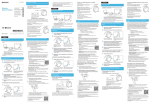
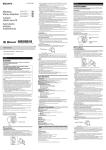
4-465-168-31(1) Listening and Calling Listening to music Wireless Stereo Headset Profile: A2DP, AVRCP Quick Start Guide GB The BLUETOOTH word mark and logos are owned by the Bluetooth SIG, Inc. and any use of such marks by Sony Corporation is under license. The N Mark is a trademark or registered trademark of NFC Forum, Inc. in the United States and in other countries. Android is a trademark of Google Inc. Other trademarks and trade names are those of their respective owners. Operate the unit after making BLUETOOTH connection with your BLUETOOTH device. Start playback on the BLUETOOTH device. 繁體中文 CT POWER 為本機充電 KR 使用隨附的micro-USB纜線連接本機與開機的電腦。 Play/pause: Press POWER. Volume: Press VOL +/−. Next/previous: Press VOL +/− until a beep sounds. Fast forward/fast reverse: Hold VOL +/− down. The sound quality is set to the standard mode (SBC high quality mode) before shipment. When you connect a BLUETOOTH device compatible with AAC, you can change the setting as described in the Help Guide to enjoy music playback at a higher level of sound quality. Making a call/Receiving a call 請使用隨附的micro-USB纜線。您不可以使用其他纜線對本機充電。 Profile: HSP, HFP Operate your mobile phone to make a call. POWER POWER button on the unit Press the when an incoming call arrives. Operate in the same way when an incoming call arrives while you are listening to the music. The music playback pauses during a call and resumes automatically when the call is over. MDR-AS700BT © 2013 Sony Corporation Printed in China To terminate a call, press the the unit. Micro-USB纜線(附件) 當本機與電腦連接後,即將開始充電,且指示燈(紅色)將亮起。 完成充電最多約需1.5小時,且指示燈(紅色)會自動熄滅。 與BLUETOOTH裝置配對及連接 配對前,請先為本機充電。 1 2 將BLUETOOTH裝置放置在距離本機1 m的位置內。 使本機進入配對模式。 POWER button on Volume for a call and listening to music can be adjusted independently. English 藍色 紅色 One-touch connection with a smartphone (NFC) Charging the unit 按住 Connect the unit and the computer booted using the micro-USB cable supplied. NFC (Near Field Communication) is a technology enabling short-range wireless communication between various devices, such as mobile phones and IC tags. Thanks to the NFC function, data communication can be achieved easily just by touching the relevant symbol or designated location on NFC compatible devices. By using the NFC function, the unit is turned on automatically and then paired and connected with a BLUETOOTH device. Compatible smartphones Smartphones with the NFC function built-in (OS: Android 2.3.3 or later, excluding Android 3.x) Micro-USB cable (supplied) Preparation on the smartphone When the unit and the computer are connected, charging starts and the indicator (red) lights up. Charging is completed in about 1.5 hours at most and the indicator (red) goes off automatically. 藍色 POWER按鈕約2秒。 聆聽與撥打 “NFC Easy Connect” is Sony’s original app for Android Phone available at Google Play Store. To find out more about the functions, search for “NFC Easy Connect” and download the free app. The App may not be available in some countries and/or regions. Red 按住 By the two-dimensional code: Use a two-dimensional code reader app. About “NFC Easy Connect” App Blue 1 開啟本機。 2 For details, refer to the instructions of the smartphone. Connecting with the paired device 1 Access the following Web site: https://play.google.com/store/apps/details?id=com. sony.easyconnect 2 Set the smartphone so that the NFC function can be used. the BLUETOOTH connection from the BLUETOOTH 4 Make device. 連接配對裝置 1 Download and install the app “NFC Easy Connect.” 1 Place the BLUETOOTH device within 1 meter of this unit. 2 Enter pairing mode on this unit. When the list of detected devices appears on the display of the BLUETOOTH device, select “MDR-AS700BT.” If passkey input is required on the display of a BLUETOOTH device, input “0000.” 自BLUETOOTH裝置進行BLUETOOTH連線。 If your smartphone has an NFC function, such as that of Android 4.1 or later, you may not need to install “NFC Easy Connect” to connect the unit with your smartphone by one touch. In that case, you do not need to perform step 1, below. The operation and specifications may be different from the description here. For details, refer to the manual supplied with your smartphone. Before pairing, charge this unit. the pairing procedure on the BLUETOOTH device 3 Perform to detect this unit. 在BLUETOOTH裝置上執行配對步驟,以偵測本機。 當BLUETOOTH裝置螢幕上出現偵測到的裝置清單時,請選擇“MDRAS700BT”。 若BLUETOOTH裝置螢幕上出現需要輸入金鑰,請輸入“0000”。 Tip Pairing and connecting with the BLUETOOTH device Make sure that the indicator flashes blue and red alternately after you release the button. 4 在您鬆開按鈕後,確認指示燈輪流閃爍 藍色和紅色。 An app for the NFC function needs to be installed on the smartphone. Use the micro-USB cable supplied. You may not be able to charge the unit with other cables. Press and hold the POWER button for more than 7 seconds. 3 POWER按鈕超過7秒。 在您鬆開按鈕後,確認指示燈閃爍藍色。 自BLUETOOTH裝置進行BLUETOOTH連線。 在與BLUETOOTH裝置建立BLUETOOTH連線後操作本機。 聆聽音樂 模式 :A2DP、AVRCP 開始在BLUETOOTH裝置上播放。 POWER Connecting with the smartphone by onetouch functions By touching the unit with the smartphone, the unit is turned on automatically and then proceeds to pairing and BLUETOOTH connection. 1 Unlock the screen of the smartphone. If you installed the app “NFC Easy Connect” in the smartphone, start the app “NFC Easy Connect.” 2 Touch this unit with the smartphone. Touch the smartphone on the N marked part of this unit. Refer to the manual of the smartphone for the designated location to be touched on the smartphone. Turn on the unit. POWER。 播放/暫停 :按一下 音量 :按一下VOL +/−。 下一首/前一首 :按一下VOL +/−,直到發出嗶聲。 快進/快退 :按住VOL +/−。 出貨前音質設定為標準模式(SBC高品質模式)。您可以在連接相容AAC的BLUETOOTH裝 置後,依說明指南中的描述變更設定,欣賞更高音質播放的音樂。 撥打/接聽電話 模式 :HSP、HFP POWER 操作您的行動電話以撥打電話。 有來電時,請按下本機上的 POWER按鈕。 聆聽音樂時若有來電,其操作方法相同。 通話期間音樂播放暫停,通話結束後自動恢復音樂播 放。 Blue 若要終止通話,請按一下本機上的 Press and hold the POWER button for about 2 seconds. Make sure that the indicator flashes blue after you release the button. the BLUETOOTH connection from the BLUETOOTH 2 Make device. Follow the on-screen instructions to complete the connection. To disconnect, touch the smartphone again. You can select the sound from other NFC compatible BLUETOOTH devices. For details, refer to the Help Guide. On how to operate the unit in detail, please read the Help Guide on your computer or smartphone. http://rd1.sony.net/help/mdr/ as700bt/e/ POWER按鈕。 通話和聆聽音樂的音量可以分別調節。 與智慧型手機的觸控連接(NFC) 한국어 스마트폰과 원터치 연결(NFC) 본 기기 충전하기 NFC(Near Field Communication)是一種可讓多種裝置(如行動電話和IC標 籤)進行短距離無線通訊的技術。有了NFC功能,資料通訊可輕鬆透過輕觸NFC 相容裝置上的相關符號或指定位置來達成。 使用NFC功能,本機將自動開啟,進行配對並與BLUETOOTH裝置連線。 부속된 micro-USB 케이블을 사용하여 본 기기와 부팅된 컴퓨터를 연결합니다. 相容的智慧型手機 NFC(Near Field Communication)는 휴대폰과 IC 태그 등 다양한 장치 간에 단거리 무선 통신을 하기 위한 기술입니다. NFC 기능을 사용하면 NFC 호환 장치에서 기호나 지정 위치를 터치해 데이터 통신을 간단히 실행할 수 있습니다. NFC 기능을 사용하면 본 기기 전원이 자동으로 켜지고 BLUETOOTH 장치와 페어링 및 연결됩니다. 內建有NFC功能的智慧型手機 (作業系統 :Android 2.3.3或更新版本,不包括 Android 3.x) 호환 스마트폰 NFC 기능이 탑재된 스마트폰 (OS: Android 2.3.3 이상, Android 3.x은 제외) 智慧型手機的準備 스마트폰에서의 준비 您必須在智慧型手機上安裝NFC功能的應用程式。 提示 如果您的智慧型手機有NFC功能,例如Android 4.1或更新版本,您可能不需要安 裝“NFC快速連線”,以便透過一觸連接本機和您的智慧型手機。若是該情況,您 不需要執行以下步驟1。操作與規格可能與上述的內容有所差異。有關詳情,請 參閱您智慧型手機的手冊。 1 下載並安裝“NFC快速連線”應用程式。 存取以下網站 : https://play.google.com/store/apps/ details?id=com.sony.easyconnect 透過二維條碼 : 使用二維條碼的讀取應用程式。 2 將智慧型手機設定為可以使用NFC功能。 有關詳情,請參閱智慧型手機的說明。 有關“NFC快速連線”應用程式 스마트폰에 NFC 기능용 앱을 설치해야 합니다. Micro-USB 케이블(부속) 팁 본 기기와 컴퓨터를 연결하면 충전이 시작되고 표시등(빨간색)이 켜집니다. 최대 약 1.5시간이면 충전이 끝나고 표시등(빨간색)이 자동으로 꺼집니다. 스마트폰이 Android 4.1 이상 등 NFC 기능이 탑재되어 있을 때에는 "NFC 간편 연결"을 설치하지 않아도 본 기기를 원터치해 스마트폰과 연결할 수 있는 경우가 있습니다. 그런 경우는 다음의 순서 1을 조작할 필요가 없습니다. 조작 및 주요 제원은 여기에 기재된 내용과 다른 경우가 있습니다. 자세한 내용은 스마트폰에 부속된 사용설명서를 참조하십시오. 부속된 micro-USB 케이블을 사용하십시오. 다른 케이블을 사용하면 본 기기를 충전할 수 없을 가능성이 있습니다. 1 "NFC 간편 연결" 앱을 다운로드하고 설치하십시오. 다음의 웹사이트에 액세스하십시오: https://play.google.com/store/apps/ details?id=com.sony.easyconnect BLUETOOTH 장치와 페어링 및 연결하기 페어링하기 전에 본 기기를 충전하십시오. 이차원 코드를 사용하는 경우: 이차원 코드 리더 앱을 사용하십시오. 1 본 기기로부터 1미터 이내에 BLUETOOTH 장치를 두십시오. 2 본 기기를 페어링 모드로 하십시오. 2 NFC 기능을 사용할 수 있도록 스마트폰을 설정하십시오. 자세한 내용은 스마트폰의 사용설명서를 참조하십시오. “NFC快速連線”是Sony的原創應用程式,可用於Android行動電話,並可在 Google Play Store取得。 若要瞭解功能詳情,請搜尋“NFC快速連線”,並下載免費的應用程式。 在某些國家或地區可能無法下載此應用程式。 "NFC 간편 연결" 앱에 대하여 파란색 使用觸控功能與智慧型手機連接 本機與智慧型手機接觸後,將自動開啟本機並開始進行配對與BLUETOOTH連線。 1 2 解除鎖定智慧型手機的螢幕。 如果智慧型手機安裝有“NFC快速連線”應用程式,請啟動“NFC快速連 線”應用程式。 以智慧型手機輕觸本機。 使用智慧型手機輕觸本機上的N字標示。 請參閱智慧型手機的手冊,以獲得要在智慧型手機上輕觸的指定位置。 "NFC 간편 연결"은 Android 스마트폰용 Sony 오리지널 앱으로 구글 플레이 스토어(Google Play Store)에서 구입할 수 있습니다. 자세한 기능에 대해서는 "NFC 간편 연결"을 검색하고 무료 앱을 다운로드하십시오. 이 응용 프로그램은 특정 국가나 지역에서 다운로드가 불가능할 수 있습니다. 빨간색 버튼을 놓은 후 표시등이 파란색과 빨간색으로 번갈아 깜박이는지 확인하십시오. POWER 버튼을 7초 이상 누르고 있으십시오. 기기를 감지하도록 BLUETOOTH 장치에서 페어링 절차를 3 본실행하십시오. BLUETOOTH 장치 디스플레이에 감지된 장치 목록이 나타나면 "MDR-AS700BT"를 선택하십시오. BLUETOOTH 장치 디스플레이에 암호를 입력해야 하는 경우는 "0000"를 입력하십시오. 원터치 기능으로 스마트폰에 연결하기 스마트폰으로 본 기기를 터치하면 본 기기 전원이 자동으로 켜진 다음에 페어링 및 BLUETOOTH 연결이 됩니다. 1 스마트폰 화면잠금을 해제하십시오. 스마트폰에 "NFC 간편 연결" 앱을 설치했을 때에는 "NFC 간편 연결" 앱을 시작하십시오. 2 스마트폰으로 본 기기를 터치하십시오. 스마트폰으로 본 기기의 N 마크를 터치하십시오. 스마트폰 쪽의 터치 위치는 스마트폰의 사용설명서를 참조하십시오. 4 BLUETOOTH 장치에서 BLUETOOTH 연결을 하십시오. 페어링한 장치와 연결하기 請依畫面上的指示操作,以完成連接。 若要中斷連接,請再次輕觸智慧型手機。 您可以選擇來自其他與NFC相容的BLUETOOTH裝置的聲音。如需詳細資訊, 請參閱說明指南。 1 본 기기 전원을 켜십시오. 有關如何操作本機的詳情,請參閱電腦或智慧型手機 上的說明指南。 화면의 지시에 따라 연결을 완료하십시오. 연결 해제하려면 스마트폰으로 다시 한 번 터치하십시오. 그 밖의 NFC 호환 BLUETOOTH 장치에서 사운드를 선택할 수 있습니다. 자세한 내용은 도움말 안내를 참조하십시오. 파란색 http://rd1.sony.net/help/mdr/as700bt/ e/ BLUETOOTH字樣與商標為Bluetooth SIG, Inc.所擁有 ;Sony Corporation針對此類 標示的使用已獲得授權。 N字標示為NFC Forum, Inc.在美國和其他國家的商標或註冊商標。 Android為Google Inc.的商標。 其他商標和商標名稱為其各自所有人擁有。 본 기기의 자세한 조작 방법은 사용 중인 컴퓨터나 스마트폰에서 도움말 안내를 참조하십시오. 버튼을 놓은 후 표시등이 파란색으로 깜박이는지 확인하십시오. POWER 버튼을 약 2초 정도 누르고 있으십시오. http://rd1.sony.net/help/mdr/ as700bt/e/ 2 BLUETOOTH 장치에서 BLUETOOTH 연결을 하십시오. 듣기와 전화 걸기 BLUETOOTH 장치와 BLUETOOTH 연결한 후에 본 기기를 조작하십시오. 음악 듣기 프로파일: A2DP, AVRCP BLUETOOTH 장치에서 재생을 시작하십시오. POWER 재생/일시정지: POWER를 누르십시오. 음량: VOL +/-를 누르십시오. 다음/이전: 조작음이 울릴 때까지 VOL +/-를 누르십시오. 빨리 앞으로/빨리 뒤로: VOL +/-를 누르고 있으십시오. 출하시의 음질은 표준 모드(SBC 고음질 모드)입니다. AAC와 호환성이 있는 BLUETOOTH 장치를 연결했을 때에는 도움말 안내의 설명처럼 설정을 변경하여 음악을 고음질로 재생할 수 있습니다. 전화 걸기/전화 받기 프로파일: HSP, HFP 전화를 걸려면 휴대폰에서 조작하십시오. 전화가 왔을 때에는 본 기기의 버튼을 누르십시오. POWER 음악을 듣고 있는 동안에 전화가 왔을 때에도 같은 조작을 하십시오. 통화 중에는 음악 재생이 일시정지하고 통화가 끝나면 자동으로 재생이 시작됩니다. 통화를 끝내려면 본 기기의 누르십시오. POWER 버튼을 통화 음량 및 음악 재생 음량은 따로따로 조절할 수 있습니다. POWER BLUETOOTH 워드마크 및 로고는 Bluetooth SIG, Inc.의 소유이며 Sony Corporation은 라이선스에 따라 사용하고 있습니다. N 마크는 미국 및 기타 국가에서 NFC Forum, Inc.의 상표 또는 등록 상표입니다. Android는 Google Inc.의 상표입니다. 그 밖의 상표 및 상표명은 해당 소유자의 상표 또는 상표명입니다.