1
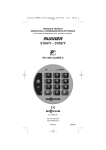
ELECTRONIC COMBINATION
“ DOUBLELOCK “
Prestigious Safes Since 1922
NORMAL MODEL
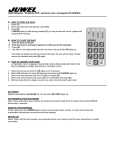
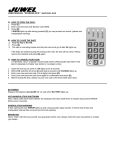
A) HOW TO OPEN
Press (C), digit the Opening Code (initially 0000) and press (E). If after having pressed (C), ERROR
lights up (see Manipulation Warning in General Notes), you can proceed all the same.
B) HOW TO CLOSE
Press (E). If an obstacle hinders the closing, ERROR blinks and the bolts open
themselves again. Remove the obstacle and press again (E).
C) HOW TO CHANGE THE OPENING CODE
OPEN DOOR, BOLTS WITHDRAWN OUTSIDE THE DOOR (closed lock).
1 - Open (as per point A). OK lights up for 6 sec.
2 - Before OK switches off, press (C) and HOLD PRESSED until CHANGE
lights up.
3 - Digit the New Code (from 3 to 8 digits) and press (E).
4 - Once again, for confirmation press: New Code, (E). OK lights up.
5 - Before closing the door, check the new code (close and open).
GENERAL NOTES
BATTERY - The safes are supplied without battery. The battery-holder lies in the small door placed in
the internal side of the door. The battery consists of 4 ALKALINE LR6 piles of 1,5 V. When the electric
charge goes below a certain level, BATTERY blinks after each opening or closing and it is necessary to
change the piles. However, at least 50 openings are still allowed and, furthermore, there is the
possibility of external energy supply (even in case of completely exhausted piles) by help of a small
cable supplied in the equipment.
ANTIMANIPULATION SHUTDOWN - After 3 attempts to open by wrong codes, the keyboard
switches itself off for 8 minutes, during wich ERROR blinks every 6 sec. An acoustic signal tells you
when you can operate again. But if you try again before 30 minutes have elapsed, then the keyboard
switches itself off again for 8 min. after each wrong attempt (EN and VdS Regulations).
MANIPULATION-WARNING - If by effecting an opening in the right way, ERROR lights up and you
can hear a long sound, this means that at least one manipulation-attempt has occurred since the last
opening .
ELECTRONIC KEYBOARD – Each push-button must be pressed within 15 sec. from the previous one,
otherwise the system switches itself off and you must repeat again from the beginning. In order to
cancel eventual digiting-errors, press (C) (=CLEAR).
JUWEL S.p.A.
Certified EN ISO 9001:2000 - Via I° Maggio 3/E - 20010 - Vanzago (MI) Italy
Tel +39 02/9347441 Fax +39 02/93570804 [email protected] www.juwel.it
P.IVA 00692460421
Prohibited partial reproduction also | © Juwel 2009
HOTEL MODEL - INSTRUCTIONS FOR THE HOTEL
Possibility to open by 2 different codes: Client Code and Master Code for the Hotel. For the client's
safeguard: if the safe is opened by Master Code, this fact will be pointed out at each opening of the
client by the blinking for 30 sec. of OK and ERROR (until the client code has not been changed). The
Hotel is in a position to change the client's combination-code in case he should prevent him from
opening. A NEW HOTEL-CLIENT CAN SET HIS OWN PERSONAL CODE VERY EASILY, without knowing
the pre-existing one (see Instruction for Hotel's Client), provided that he finds the lock open
(if not, the Hotel must open by Master Code).
A) HOW TO OPEN BY MASTER CODE
Press (C), digit the Master Code (initially 000.000.000) and press (E). If after having pressed (C),
ERROR lights up (see Manipulation Warning in General Notes), you can proceed all the same.
B) HOW TO CLOSE : Press (E).
If an obstacle hinders the closing, ERROR blinks and the bolts open themselves again.
Remove the obstacle and press again (E).
C) HOW TO CHANGE THE MASTER CODE
OPEN DOOR, BOLTS WITHDRAWN OUTSIDE THE DOOR (closed lock).
1
2
3
4
5
-
Open (as per point A). OK lights up for 6 sec.
Before OK switches itself off, press (C) and HOLD PRESSED until CHANGE lights up.
Digit the New Master Code (from 9 to 12 digits) and press (E).
Once again, for confirmation press: New Master Code, (E). OK lights up.
Before closing the door, check the new code (close and open).
HOTEL MODEL - INSTRUCTIONS FOR THE CLIENT
A) HOW TO MEMORIZE YOUR OWN COMBINATION-CODE
DOOR OPEN, BOLTS WITHDRAWN INTO THE DOOR
1 - Press (C), and HOLD PRESSED until CHANGE lights up.
2 - Digit the desired combination-code (from 3 to 8 digits) and press (E).
3 - Digit the same Combination-Code again and press (E). OK lights up.
B) HOW TO CLOSE : Press (E).
C) HOW TO OPEN
Press (C), digit the Combination-code and press (E). If ERROR is blinking, repeat over again.
After the 3rd error, the system locks itself for 8 minutes: please wait for the acoustic signal, which will
indicate you when the system will function again.
JUWEL S.p.A.
Certified EN ISO 9001:2000 - Via I° Maggio 3/E - 20010 - Vanzago (MI) Italy
Tel +39 02/9347441 Fax +39 02/93570804 [email protected] www.juwel.it
P.IVA 00692460421
Prohibited partial reproduction also | © Juwel 2009
TIME-DELAY MODEL
THE SAFE CAN BE OPENED ONLY AFTER A TIME OF DELAY PROGRAMMABLE FROM 00 TO 99
MINUTES. It is supplied with a time of delay of 1 minute.
A) HOW TO OPEN
1 - Press (C), digit the Opening Code (initially 0000) and press (E). If after having pressed (C),
ERROR lights up (see Manipulation Warning on the General Notes), you can proceed all the same.
If the time of delay is other than 00, the lock does not open. OK blinks, the system is blocked. After
the programmed delay-time has elapsed, OK stops blinking (it remains lit) and you can hear an
acoustic signal (beep) indicating that you can proceed.
2 - Within 2 ½ minutes, please repeat the opening-operation.
Press (C), digit the Opening Code and press (E).
B) HOW TO CLOSE : Press (E)
If an obstacle hinders the closing, ERROR blinks and the bolts open themselves again.
Remove the obstacle and press again (E).
C) HOW TO CHANGE THE OPENING CODE
OPEN DOOR, BOLTS WITHDRAWN OUTSIDE THE DOOR (closed lock).
1
2
3
4
5
- Open (as per point A). OK lights up for 6 sec.
- Before OK switches itself off, press (C) and HOLD PRESSED until CHANGE lights up.
- Digit the New Code (from 3 to 8 digits) and press (E).
- Once again, for confirmation press: New Code, (E). OK lights up.
- Before closing the door, check the new code (close and open).
If an obstacle hinders the closing, ERROR blinks and the bolts open themselves again.
Remove the obstacle and press again (E).
D) HOW TO PROGRAMME THE TIME OF DELAY
OPEN DOOR, BOLTS DRAWN OUTSIDE THE DOOR (closed lock).
1 - Open (as per point A). OK lights up for 6 sec.
2 - Before OK switches itself off, press (C) and HOLD IT PRESSED until CHANGE lights up.
3 - Press (E), digit the time of delay desired (always 2 digits: 00…99), and press (E). The 2 digits
from 00 to 99 indicate the minutes of delay.
JUWEL S.p.A.
Certified EN ISO 9001:2000 - Via I° Maggio 3/E - 20010 - Vanzago (MI) Italy
Tel +39 02/9347441 Fax +39 02/93570804 [email protected] www.juwel.it
P.IVA 00692460421
Prohibited partial reproduction also | © Juwel 2009
BLOCKING ELECTRONIC SYSTEM MODEL (Key + Keyboard)
THE ELECTRONIC COMBINATION-LOCK BLOCKS THE OPENING BY KEY.
A) HOW TO OPEN
1 - Press (C), digit the Opening Code (initially 0000) and press (E). If after having pressed (C),
ERROR lights up (see Manipulation Warning in General Notes), you can proceed all the same.
2 - Wait until OK lights up, then open by key.
B) HOW TO CLOSE
Close by the key, take it out and (if you want to block) press (E). OK lights up.
If , on the contrary, ERROR lights up, this means that the lock has not been previously closed.
C) HOW TO CHANGE THE OPENING CODE
OPEN DOOR, BOLTS WITHDRAWN OUTSIDE THE DOOR (closed lock).
1
2
3
4
5
- Open (as per point A). OK lights up for 6 sec.
- Before OK switches itself off, press (C) and HOLD PRESSED until CHANGE lights up.
- Digit the New Code (from 3 to 8 digits) and press (E).
- Once again, for confirmation press: New Code, (E). OK lights up.
- Before closing the door, check the new code (close and open).
RELEASE ELECTRONIC SYSTEM MODEL (Wheel + Keyboard)
THE ELECTRONIC COMBINATION-LOCK RELEASES THE MANUAL OPENING.
A) HOW TO OPEN
1 - Press (C), digit the Opening Code (initially 0000) and press (E). If after having pressed (C),
ERROR lights up (see Manipulation Warning in General Notes), you can proceed all the same.
2 - OK lights up and the wheel comes out: turn it right to open.
B) HOW TO CLOSE
Turn left completely the control wheel, press (E), and press the wheel until OK lights up. If , on the
contrary, ERROR lights up, this means that the door has not been correctly closed: repeat the
operation.
C) HOW TO CHANGE THE OPENING CODE
OPEN DOOR, BOLTS WITHDRAWN OUTSIDE THE DOOR (closed lock).
1
2
3
4
5
- Open (as per point A). OK lights up for 6 sec.
- Before OK switches itself off, press (C) and HOLD PRESSED until CHANGE lights up.
- Digit the New Code (from 3 to 8 digits) and press (E).
- Once again, for confirmation press: New Code, (E). OK lights up.
- Before closing the door, check the new code (close and open).
JUWEL S.p.A.
Certified EN ISO 9001:2000 - Via I° Maggio 3/E - 20010 - Vanzago (MI) Italy
Tel +39 02/9347441 Fax +39 02/93570804 [email protected] www.juwel.it
P.IVA 00692460421
Prohibited partial reproduction also | © Juwel 2009
STARTING INSTRUCTIONS
All the safes, except the key-lock ones, are supplied with the door open. Insert the battery.
Press (E): the lock closes and OK lights up. Memorize your own combination-code by effecting the
change of the initial combination-code 0000. (see point C, by Normal Model)
The safes with EMERGENCY-KEY are supplied with the door closed. By using the key, open the
door and close the lock again. From then on, the key will need to be used only in emergencies (failures
of the electronic system, or forgetfulness of the combination-code). Insert the battery. Memorize your
own combination-code by changing the initial code 0000 (see point C, by Normal Model).
The safes with BLOCKING electronic combination-system are supplied with the door closed. By
using the key open the door, close the lock and remove the key. Insert the battery. Memorize your
own combination-code by changing the initial code 0000 (see point C, by Normal Model).
The safes with the RELEASE electronic combination-system are supplied with the door open.
Turn right the control wheel, open, insert the battery and check the working by following the operation
instructions. Memorize your own combination-code by changing the initial code 0000 (see point C, by
Normal Model).
Before closing, it is advisable to try with the door open the closing and opening-operations.
Furthermore, with a view to an optimal functioning of the safe, it is advisable to change the battery
once in a year, even if the BATTERY signal is not lit.
WALL SAFES
Before putting the safe into the wall, as well as in the event of treatment on the wall (hanging
with tapestry or wall-paper, dyeing, wet cleaning), the whole front-part of the safe must be
covered in order to protect and not to damage the keyboard, and in order to prevent water or other
things from entering the (eventual) key-hole and the chink between door and frame.
After the installation into the wall, the safe must be kept for few days with the door open, in
order to prevent the humidity (coming from the wall) from damaging the mechanisms.
FREE-STANDING SAFES
It is essential that they are fixed very firmly.
JUWEL S.p.A.
Certified EN ISO 9001:2000 - Via I° Maggio 3/E - 20010 - Vanzago (MI) Italy
Tel +39 02/9347441 Fax +39 02/93570804 [email protected] www.juwel.it
P.IVA 00692460421
Prohibited partial reproduction also | © Juwel 2009