1
HP Color LaserJet 3800 series printer
3800 • 3800n • 3800dn • 3800dtn
hp
Easy color printing on the network and impressive
print quality—the right combination for business.
More color means more business
• Make a lasting impact with brilliant color at speed. See
bright, intense color and realistic images with new
HP ColorSphere toner and enhanced HP ImageREt 3600
color technology. At up to 22 pages-per-minute (ppm), this
sophisticated printer is ideally suited for work teams that
need high-impact color business documents in a flash.
• Show off your business. You demand color documents that
are as dynamic as your business. New HP ColorSphere
toner achieves high gloss results and works in concert with
enhanced HP ImageREt 3600. For optimal results, use HP
paper with HP’s five-layer coating technology.
• Make it easy on yourself. HP’s world-class engineers have
optimized this printer’s performance with new
HP ColorSphere toner and its precise mix of patented
additives to deliver consistent, reliable color print quality
without ever sacrificing speed. Just click Print, and rest
assured, you’ll see results that are delivered fast and
hassle free.
Effortless color
• Depend on simple interactions. Print cartridges are
preinstalled in new printers, and one convenient access
point in the printer makes cartridge replacement effortless.
There are only four print cartridges to manage. The
cartridge, HP ColorSphere toner, and imaging drum are
integrated into one supply, so you refresh the imaging
system and ensure consistent print quality when you
replace a cartridge.
• Do more in less time. HP’s simple, flexible printer
management tools offer industry-leading capabilities, such
as consolidated supplies reordering via HP SureSupply™, 1
color and device usage reporting, helpful alerts, and easy
1-click access to HP Instant Support. HP Web Jetadmin
helps IT professionals manage fleets of peripherals, while
HP Easy Printer Care Software 2 provides a simple client
software tool for anyone to manage up to 15 HP printers.
1
2
3
4
Accelerate business performance
• Need color but can’t afford to wait for it? HP understands.
The HP Color LaserJet 3800 series printer delivers fast
color and black-and-white pages—at speeds up to
22 ppm. In addition, Instant-on Technology reduces warmup time, allowing the printer to consume less energy and
realize less wear on the engine. The printer calibrates
intelligently to balance performance and obtain the best
print quality.
• Always get optimal results. The sophisticated engine
includes intelligent color calibration that works in concert
with HP Smart printing technology in HP cartridges to
make automatic adjustments that enhance print quality and
consistency. 3
• Share with multiple users and increase efficiency. Raise
work team and IT productivity: the HP Jetdirect Fast
Ethernet embedded print server delivers high-performance,
broad compatibility, proven reliability, and ease of use
with advanced security features, exceptional device
management tools, and award-winning service. 4
• Manage color usage. Color can make your business more
professional, effective, and profitable, but it’s important to
keep printing costs in check. With color access controls,
you can monitor color usage, assign color access by user
or application.
HP printing and imaging systems help you create powerful,
professional communications easily. Printers, supplies,
accessories, and services are designed together to work
together and are invented to meet or exceed your demanding
business needs.
For more information, visit www.hp.com/go/SureSupply.
For more information, visit www.hp.com/go/easyprintercare.
Using genuine HP supplies ensures availability of all HP printing features.
Standard and available features vary according to model. For more information, see “Series at a glance” on page 2.
HP Color LaserJet 3800 series printer
1
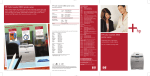
Intuitive, two-line display
with a built-in help
function
2
250-sheet top output bin
with long paper
extension
3
One-door access to the
preinstalled, easy-toreplace print cartridges
4
100-sheet multipurpose
tray enables automatic
and manual feeding for
specialty papers
5
250-sheet and 500-sheet
input trays for an 850sheet total input capacity
6
Built-in automatic twosided printing
7
On/off switch
8
EIO expansion slot for
optional networking,
storage, and connectivity
options
9
USB Hi-Speed port
provides simple
connections
10
A powerful 533 MHz
processor and 288 MB
memory, upgradeable to
544 MB
11
HP Jetdirect Fast Ethernet
embedded print server for
easy network sharing
HP Color LaserJet 3800dtn shown
2
1
6
7
3
8
9
10
4
11
5
Series at a glance
HP Color LaserJet 3800 printer
(Q5981A)
HP Color LaserJet 3800n printer
(Q5982A)
HP Color LaserJet 3800dn printer
(Q5983A)
HP Color LaserJet 3800dtn printer
(Q5984A)
• 100-sheet multipurpose tray and
Base model plus:
Base model plus:
Base model plus:
• Additional 64 MB RAM for a total
• Additional 192 MB RAM for a total
• Additional 500-sheet input tray 3 for
• HP Jetdirect Fast Ethernet embedded
• HP Jetdirect Fast Ethernet embedded
• Additional 192 MB RAM for a total
250-sheet input tray 2 for a
350-sheet capacity
• 96 MB RAM
160 MB RAM
print server
of 288 MB RAM
print server
• Built-in automatic two-sided printing
an 850-sheet capacity
of 288 MB RAM
• HP Jetdirect Fast Ethernet embedded
print server
• Built-in automatic two-sided printing
Depend on high-impact color and strong performance
printing for your work team.
Speedy, sophisticated printer
HP printer management tools
HP exceeds your printing demands: print documents quickly,
at up to 22 ppm, and print the first page in less than 12.5
seconds with Instant-on Technology. An input capacity of up
to 850 sheets and automatic two-sided printing mean that
you can easily print a lot of pages without having to restock
paper trays. Plus, the HP Jetdirect Fast Ethernet embedded
print server delivers high-performance networking to increase
your workgroup’s efficiency. 5
Who says you can’t do it all? With a little help, HP knows
you can. HP makes printer management and consolidated
supplies reordering trouble-free.
Superior HP print quality
The HP Color LaserJet 3800 series printer features an
enhanced version of HP ImageREt 3600, a suite of
innovative technologies HP developed to provide
professional, high-quality color documents and images.
The enhanced HP ImageREt 3600 system is designed to
deliver reliable print quality regardless of the printing
environment and includes a media type sensor, an
environmental sensor, and intelligent, automatic calibration.
Automatic internal color adjustment provides consistent color
over a range of environments.
The HP Color LaserJet 3800 series printer is designed
together with the new HP ColorSphere toner and HP papers
to provide optimized printing results. New HP ColorSphere
toner features gloss levels that are significantly improved over
previous HP color toners when printing on glossy paper. The
result is brilliant, intense colors and excellent photo quality
output for your business documents.
HP color access control solution
HP color access control solution makes color printing more
affordable than ever by helping you to control who uses
color and when they use it:
• Assign color access to specific users or workgroups.
Use either your printer’s embedded Web server or
HP Web Jetadmin’s fleet configuration capability to
designate who has access to color printing. That way,
people who truly need color—such as your sales team and
marketing department—can use it.
• Assign color access by application. Designate certain
applications for printing color and others for printing
black-and-white to ensure that users only print color on
their most important print jobs, and that other printouts—
such as Web pages—are always black-and-white.
• Shut down color completely or temporarily disable color
capability. Disable color printing on shared printers—
locking out all individuals and workgroups—so you can
save your color resources for special projects or seasonal
needs. HP Web Jetadmin’s Print Driver Pre-configuration
Plug-in lets IT Administrators set users’ print settings to
control color printing by print queue.
• View printer and supplies status, perform simple
troubleshooting, and manage printing functions for an
individual printer from your computer, rather than the
printer control panel, through the print driver Services tab
(for end users) or through the HP Embedded Web Server
(for IT professionals).
• Manage groups of printers from a single access point. For
IT professionals, HP Web Jetadmin helps you install,
configure, and remotely manage all of your network
peripherals through a simple Web interface.
• For end users and office managers, HP Easy Printer Care
Software helps you manage up to 15 HP printers from
your computer to keep them running at their best. You can
also proactively manage supplies and reorder online with
the click of a button.
HP Universal Print Driver for Windows
Improve productivity, increase satisfaction, and use valuable
resources more effectively with the HP Universal Print Driver
for Windows. The HP Universal Print Driver for Windows
includes separate HP PCL5 and HP postscript emulation
editions of a single driver that gives end-users access to
almost any HP printer—without the need to install separate
drivers. At the same time, it helps IT manage printer fleets
more effectively by providing features such as usage tracking
and the ability to easily create, import, and alter
HP Managed Printer Lists.
Free as a download, the HP Universal Print Driver for
Windows delivers functionality on par with HP’s premium
drivers—giving users access to features such as two-sided
printing, hard disk, input trays, output bins, stapling, and
more. Download the HP Universal Print Driver for Windows
at www.hp.com/go/universalprintdriver.
Award-winning HP support
HP’s expert knowledge will help you make the most of your
printer and ensure your equipment is running at peak
efficiency. Start with a one-year, next day, on-site, limited
hardware warranty, backed by free telephone and Web
support from the award-winning HP Customer Care (warranty
and availability vary according to region). To further
guarantee trouble-free operation, upgrade your printer with
extended service and support options.
• Track color use by job, by user, and by device. HP Web
Jetadmin’s Report Generation Plug-in generates real-time
and periodic usage reports that make it easy to track color
use by job, by user, and by device. Plus, it allows you to
easily allocate costs to individual departments. 6
5
6
Standard and available features vary according to model. For more information, see “Series at a glance” on page 2.
Billing solutions are an optional feature available at an additional cost through HP’s solution partners.
HP Color LaserJet 3800 series printer
Technical specifications
Print speed7
First page out
Image enhancement, resolution
Processor
Memory, standard
Available memory slots
Memory, maximum
Recommended monthly volume
Maximum monthly duty cycle
Paper
Input
Output
Duplex printing
Sizes
Weights8
Types
Connectivity
Interfaces
Network connectivity
Languages
Fonts
Client operating systems
Network operating systems9
Network protocols supported9
Dimensions (w by d by h)
Weight (includes print cartridge)
What’s in the box
HP Color LaserJet 3800
printer (Q5981A)
96 MB DDR SDRAM
HP Color LaserJet 3800n
printer (Q5982A)
HP Color LaserJet 3800dn
printer (Q5983A)
Up to 22 ppm
Less than 12.5 seconds
HP ImageREt 3600, 600 by 600 dpi
533 MHz (20KC MIPS embedded)
160 MB DDR SDRAM
One available DDR SDRAM slot
544 MB DDR SDRAM
1,500 to 5,000 pages per month
65,000 pages
100-sheet multipurpose tray, 250-sheet tray 2 for a total of 350 sheets, optional 500-sheet tray 3
HP Color LaserJet 3800dtn
printer (Q5984A)
288 MB DDR SDRAM
100-sheet multipurpose tray, 250-sheet tray
2, 500-sheet tray 3 for a total of 850 sheets
250-sheet top output bin
Manual two-sided printing
Built-in automatic two-sided embedded printing
Multipurpose tray: 3 by 5 in (76 by 127 mm) to 8.5 by 14 in (216 by 356 mm); letter, legal, executive, statement; envelopes (No. 10, Monarch); Automatic two-sided printing unit, 250-sheet
input tray, optional 500-sheet input tray: 5.8 by 8.3 in (148 by 210 mm) to 8.5 by 14 in (216 by 356 mm); letter, legal, executive
Multipurpose tray: 16 to 42 lb bond (60 to 160 g/m2) Automatic two-sided printing unit, 250-sheet and 500-sheet input trays: 16 to 32 lb bond (60 to 120 g/m 2)
Paper (plain, preprinted, letterhead, prepunched, bond, recycled, tough, color, glossy, rough), transparencies, labels, envelopes, cardstock, user-defined
Hi-Speed USB 2.0 port, one available EIO slot (for optional network adapters, IEEE 1284-B parallel port, or hard disk), 1 Host-USB accessory slots
HP Jetdirect Fast Ethernet embedded print server, optional Gigabit Ethernet, 802.11b/g Wireless LAN, and other networking accessories
HP PCL6, HP PCL5, HP postscript level 3 emulation, direct PDF printing (v 1.4) with at least 128 MB printer memory
80 HP font set (plus Greek, Hebrew, Cyrillic, Arabic)
Microsoft® Windows® 98, Me, 2000, XP®, Server 2003; Mac OS 9.1, 9.2, Mac OS X v10.2, v10.3, v10
Microsoft Windows 98, Me, 2000, XP, XP 64-Bit, Server 2003; Novell NetWare 3.2, 4.2, 5.x, 6.x (NDPS); Mac OS 9.1, 9.2, Mac OS X v10.2, v10.3, v10.4; Red Hat Linux® 6.x, 7.x; SuSE
Linux 6.x; HP UX 10.20, 11.x; Solaris 2.5x, 2.6, 7, 8 (SPARC systems only); IBM AIX 3.2.5 and later; MPE-iX; Citrix MetaFrame; Windows Terminal Services
Via HP Jetdirect print servers: TCP/IP (IP Direct mode; may require software from the NOS vendor or third party vendor: LPD, FTP, IPP), IPX/SPX, DLC/LLC, AppleTalk, Auto-IP,
Apple Bonjour compatible, NDS, Bindery, NCP, Telnet, SLP, IGMP, BOOTP/DHCP, WINS, SNMP (v 1, 2c, 3), HTTP
15.7 by 17.7 by 15.7 in
15.7 by 17.7 by 16.7 in
15.7 by 17.7 by 22.2 in
(400 by 450 by 400 mm)
(400 by 450 by 423 mm)
(400 by 450 by 563 mm)
59.6 lb (27.1 kg)
61.6 lb (28 kg)
74.1 lb (33.7 kg)
HP Color LaserJet 3800dn printer, 100-sheet
HP Color LaserJet 3800dtn printer, 100HP Color LaserJet 3800n printer, 100-sheet
HP Color LaserJet 3800 printer, 100-sheet
multipurpose tray, 250-sheet input tray,
sheet multipurpose tray, 250-sheet input
multipurpose tray, 250-sheet input tray,
multipurpose tray, 250-sheet input tray,
power cable, software drivers and
tray, 500-sheet input tray, power cable,
power cable, software drivers and
power cable, software drivers and
documentation on CD, in-box documentation
drivers and documentation CD, in-box
documentation on CD, in-box documentation
documentation on CD, in-box documentation
(Getting Started Guide), preinstalled fulldocumentation (Getting Started Guide),
(Getting Started Guide), preinstalled full(Getting Started Guide), preinstalled fullcapacity 6,000-page black, cyan, magenta,
preinstalled full-capacity 6,000-page black,
capacity 6,000-page black, cyan, magenta,
capacity 6,000-page black, cyan, magenta,
and yellow HP Color LaserJet print
cyan, magenta, and yellow HP Color
and yellow HP Color LaserJet print
and yellow HP Color LaserJet print
cartridges with HP ColorSphere Toner10,
LaserJet print cartridges with
cartridges with HP ColorSphere Toner10,
cartridges with HP ColorSphere Toner10,
HP ColorSphere Toner10, HP Jetdirect Fast
USB 2.0 Hi-Speed cable
HP Jetdirect Fast Ethernet embedded print
HP Jetdirect Fast Ethernet embedded print
server
server, built-in automatic two-sided printing
Ethernet embedded print server, built-in
automatic two-sided printing
Optional
Ordering information
Environmental ranges
Operating temperature
Relative humidity
Altitude
Acoustics11
Required input voltage
Operating: 50 to 81 degrees F (10 to 27 degrees C)
Recommended: 63 to 77 degrees F (17 to 25 degrees C)
Storage: 32 to 95 degrees F (0 to 35 degrees C)
Operating: 10 to 70 percent
Recommended: 20 to 60 percent
Non-operating: 10 to 90 percent
0 to 8530 ft (0 to 2600 m)
Power: active: 6.9 B(A); Ready: 5.3 B(A)
Pressure (bystander): active: 55 dB(A), standby: 39 d(B)A
110 to 127 V (±10 percent), 50/60 Hz (±2 Hz)
220 to 240 V (±10 percent), 50/60 Hz (±2 Hz)
Power consumption11
Active
435 watts
Ready
48 watts
Sleep
15 watts
Off
0.5 watts
ENERGY STAR® qualified models; see: http://www.hp.com/go/energystar
Power certifications
EMC: CISPR 22:1993/EN 55022:1994 Class B, EN 61000-3-2:2000, EN 61000-33:1995, EN 55024:1998, FCC Title 47 CFR, Part 15 Class B (USA), ICES-003, Issue 4,
(Canada), other EMC approvals as required by individual countries
Safety: IEC 60950-1 (International), IEC 60825-1, UL/cUL Listed (US/Canada), EN 608251 Class 1, 21 CFR Ch. 1/SubCh. J (Class 1 Laser/LED Device), GB4943-2001. Other
safety approvals as required by individual countries.
Warranty
One-year, next day, on-site limited hardware warranty with phone and e-mail support
HP SureSupply enabled
To learn more, please visit www.hp.com/go/SureSupply
Exact speed varies depending on the system configuration, software application, driver, and document complexity.
For optimum results, HP recommends the use of HP media designed for HP Color LaserJet printers between the weights of 75 g/m2 to 120 g/m2. For lighter
weight or heavier weight paper (60 g/m2 to 74 g/m2 and 121 to 220 g/m2), paper jam rate and optimal print quality performance may be impacted. Use the
correct driver and tray settings for best results. Test all paper before purchasing large volumes.
9
Not all protocol and operating system combinations are supported. For more information, go to: www.hp.com/support/net_printing.
10
All print cartridge page yields are based on five percent page coverage.
11
Values subject to change. See www.hp.com/support/clj3800 for current information. Power reported is the highest value measured using all standard
voltages.
7
8
© Copyright 2005-2007 Hewlett-Packard Development Company, L.P.
The information contained herein is subject to change without notice. The only warranties for HP products and services are set forth in the
express warranty statements accompanying such products and services. Nothing herein should be construed as constituting an additional
warranty. HP shall not be liable for technical or editorial errors or omissions contained herein.
ENERGY STAR and the ENERGY STAR mark are registered U.S. marks. Linux is a U.S. registered trademark of Linus Torvalds. HP and the invent
signature are trademarks of the Hewlett-Packard Company. Microsoft, Windows, Windows NT, and Windows XP are U.S. registered
trademarks of Microsoft Corporation.
Printed in U.S.A.
For more information visit our website at www.hp.com/go/color
4AA0-1440ENUC, 03/2007, Rev. 6
Product
Number
HP Color LaserJet 3800 printer
Q5981A
HP Color LaserJet 3800n printer
Q5982A
HP Color LaserJet 3800dn printer
Q5983A
HP Color LaserJet 3800dtn printer
Q5984A
Accessories
500-sheet paper input feeder and tray
Q5985A
HP Jetdirect 620n Fast Ethernet internal print server
J7934G
HP Jetdirect 630n EIO Print Server
J7997G
HP Jetdirect 635n IPv6/IPsec and Gigabit Ethernet internal print server
J7961G
HP Jetdirect en1700 USB 2.0 Print Server
J7988G
HP Jetdirect 175x Fast Ethernet external print server (USB)
J6035G
HP Jetdirect en3700 Fast Ethernet external print server (USB Hi Speed)
J7942G
HP Jetdirect ew2400 802.11g Wireless and Fast Ethernet external
J7951G
print server (USB Hi Speed)
HP 1284B Parallel EIO card
J7972G
HP Color LaserJet Print Cartridges with HP ColorSphere Toner10
Black Print Cartridge (6,000 pages)
Q6470A
Cyan Print Cartridge (6,000 pages)
Q7581A
Yellow Print Cartridge (6,000 pages)
Q7582A
Magenta Print Cartridge (6,000 pages)
Q7583A
Memory and storage
HP high-performance EIO hard disk
J6073G
128 MB DDR SDRAM
Q7721A
256 MB DDR SDRAM
Q7722A
512 MB DDR SDRAM
Q7723A
Cables
USB printer cable (2-meter [6.5-foot] standard)
C6518A
Service and support
On-site installation and network configuration
H3110E
3-year, next day on-site
U8037E
3-year, 9x5 same day on-site
U8054E
3-year, 13x5 same day onsite
U8038E
Paper
North America: www.hp.com/go/everydaypapers; USA: 1-800-477-5010
Printer software
HP Web Jetadmin: www.hp.com/go/webjetadmin
HP Easy Printer Care Software: www/hp.com/go/easyprintercare
HP Universal Print Driver for Windows: www.hp.com/go/universalprintdriver
HP Install Network Printer Wizard: www.hp.com/go/inpw_sw
Third-party solutions
www.hp.com/go/gsc