1
3-238-719-11 (1)
FM/AM
Compact Disc
Player
Operating Instructions
US
Mode d’emploi
FR
Owner’s Record
The model and serial numbers are located on the bottom of the unit.
Record these numbers in the space provided below.
Refer to these numbers whenever you call upon your Sony dealer regarding this
product.
Model No. CDX-CA400 Serial No.
For installation and connections, see the supplied installation/connections
manual.
En ce qui concerne l’installation et les connexions, consulter le manuel
d’installation/raccordement fourni.
CDX-CA400
© 2002 Sony Corporation
Warning
Welcome !
This equipment has been tested and found to
comply with the limits for a Class B digital
device, pursuant to Part 15 of the FCC Rules.
These limits are designed to provide
reasonable protection against harmful
interference in a residential installation. This
equipment generates, uses, and can radiate
radio frequency energy and, if not installed
and used in accordance with the instructions,
may cause harmful interference to radio
communications. However, there is no
guarantee that interference will not occur in a
particular installation. If this equipment does
cause harmful interference to radio or
television reception, which can be determined
by turning the equipment off and on, the user
is encouraged to try to correct the interference
by one or more of the following measures:
— Reorient or relocate the receiving antenna.
— Increase the separation between the
equipment and receiver.
— Connect the equipment into an outlet on a
circuit different from that to which the
receiver is connected.
— Consult the dealer or an experienced radio/
TV technician for help.
Thank you for purchasing this Sony Compact
Disc Player. You can enjoy its various features
even more with:
•Optional CD/MD units (both changers and
players)*.
•Supplied controller accessory
Card remote commander RM-X115
You are cautioned that any changes or
modifications not expressly approved in this
manual could void your authority to operate
this equipment.
CAUTION
The use of optical instruments with this
product will increase eye hazard.
2
* Only one optional Sony CD/MD unit can be
connected.
Table of Contents
Location of controls .................................................. 4
Precautions ................................................................ 6
Notes on discs ........................................................... 6
Getting Started
Resetting the unit ................................................. 7
Detaching the front panel ................................... 8
Setting the clock ................................................... 9
CD Player
CD/MD Unit (optional)
Playing a disc ........................................................ 9
Display items ...................................................... 10
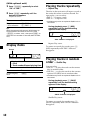
Playing tracks repeatedly
— Repeat Play ............................................... 10
Playing tracks in random order
— Shuffle Play ............................................... 10
Other Functions
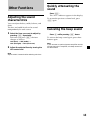
Adjusting the sound characteristics ................ 13
Quickly attenuating the sound ........................ 13
Canceling the beep sound ................................. 13
Selecting the sound position
— “My Best sound Position (MBP)” .......... 14
Boosting the bass sound
— D-bass ........................................................ 14
Additional Information
Maintenance ........................................................ 15
Removing the unit ............................................. 16
Specifications ...................................................... 17
Troubleshooting .................................................. 18
Error displays ..................................................... 19
Radio
Display items ...................................................... 11
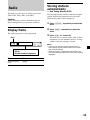
Storing stations automatically
— Best Tuning Memory (BTM) ................... 11
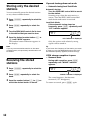
Storing only the desired stations ..................... 12
Receiving the stored stations ............................ 12
3
Location of controls
MODE
SEL
MBP
DSPL
BTM
SOURCE
D-BASS
–
RELEASE
ATT
DISC
1
+
REP
SHUF
2
3
4
5
6
SENS
OFF
CDX-CA400
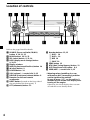
Refer to the pages listed for details.
1 SOURCE (Power on/Radio/CD/MD)
button 9, 10, 11, 12
2 MODE button 10, 11, 12
3 SEL (select) button 9, 13, 14
4 DSPL (display mode change) button
9, 10, 11
5 Display window
6 MBP (My Best sound Position) button 14
7 Z (eject) button 9
8 D-BASS button 14
9 VOL (volume) –/+ control dial 9, 13
0 RELEASE (front panel release) button 8
qa Receptor for the card remote
commander
qs RESET button (located on the front side of
the unit, behind the front panel) 7
qd ATT (attenuate) button 13
4
qf Number buttons 12, 13
(1) DISC – 10
(2) DISC + 10
(3) REP 10
(4) SHUF 10
qg SENS button 12
qh BTM (Best Tuning Memory) button 11
qj OFF (Stop/Power off) button* 8, 9
qk SEEK/AMS –/+ control dial 9, 12
* Warning when installing in a car
without an ACC (accessory) position
on the ignition key switch
Be sure to press (OFF) on the unit for 2
seconds to turn off the clock display after
turning off the engine.
Otherwise, the clock display does not turn
off and this causes battery drain.
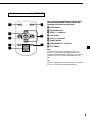
Card remote commander RM-X115
DSPL
MODE
The corresponding buttons of the card
remote commander control the same
functions as those on this unit.
1 DSPL button
2 SOURCE button
+
PRESET
SEEK–
SOURCE
3 SEEK (–/+) buttons
SEEK+
4 OFF button
5 VOL (+/–) buttons
PRESET
6 MODE button
–
OFF
+
VOL
–
ATT
7 DISC/PRESET (+/–) buttons
8 ATT button
Note
If the unit is turned off by pressing (OFF) for 2
seconds, it cannot be operated with the card
remote commander unless (SOURCE) on the unit is
pressed, or a disc is inserted to activate the unit
first.
Tip
Refer to “Replacing the lithium battery” for details
on how to replace the batteries (page 15).
5
Precautions
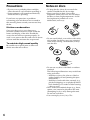
Notes on discs
•If your car was parked in direct sunlight,
allow the unit to cool off before operating it.
•Power antennas will extend automatically
while the unit is operating.
•To keep the disc clean, do not touch the
surface. Handle the disc by its edge.
•Keep your discs in their cases or disc
magazines when not in use. Do not subject
the discs to heat/high temperature. Avoid
leaving them in parked cars or on
dashboards/rear trays.
If you have any questions or problems
concerning your unit that are not covered in
this manual, please consult your nearest Sony
dealer.
Moisture condensation
On a rainy day or in a very damp area,
moisture condensation may occur inside the
lenses and display of the unit. Should this
occur, the unit will not operate properly. In
such a case, remove the disc and wait for about
an hour until the moisture has evaporated.
To maintain high sound quality
Be careful not to splash juice or other soft
drinks onto the unit or discs.
•Do not attach labels, or use discs with sticky
ink/residue. Such discs may stop spinning
when used, causing a malfunction, or may
ruin the disc.
•Do not use any discs with labels or stickers
attached.
The following malfunctions may result from
using such discs:
– Inability to eject a disc (due to a label or
sticker peeling off and jamming the eject
mechanism).
– Inability to read audio data correctly (e.g.,
playback skipping, or no playback) due to
heat shrinking of a sticker or label causing
a disc to warp.
•Discs with non-standard shapes (e.g., heart,
square, star) cannot be played on this unit.
Attempting to do so may damage the unit.
Do not use such discs.
•You cannot play 8 cm (3 in.) CDs.
6
•Before playing, clean the discs with a
commercially available cleaning cloth. Wipe
each disc from the center out. Do not use
solvents such as benzine, thinner,
commercially available cleaners, or antistatic
spray intended for analog discs.
Getting Started
Resetting the unit
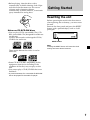
Notes on CD-R/CD-RW discs
Before operating the unit for the first time or
after replacing the car battery, you must reset
the unit.
Remove the front panel and press the RESET
button with a pointed object, such as a ballpoint pen.
•You can play CD-Rs (recordable CDs)/CDRWs (rewritable CDs) designed for audio use
on this unit.
Look for these marks to distinguish CD-Rs/
CD-RWs for audio use.
RESET button
These marks denote that a disc is not for
audio use.
Note
Pressing the RESET button will erase the clock
setting and some stored contents.
•Some CD-Rs/CD-RWs (depending on the
equipment used for its recording or the
condition of the disc) may not play on this
unit.
•You cannot play a CD-R/CD-RW that is not
finalized*.
* A process necessary for a recorded CD-R/CD-RW
disc to be played on the audio CD player.
7
Detaching the front panel
You can detach the front panel of this unit to
protect the unit from being stolen.
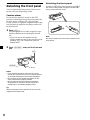
Attaching the front panel
Attach part A of the front panel to part B of
the unit as illustrated and push the left side
into position until it clicks.
Caution alarm
If you turn the ignition switch to the OFF
position without removing the front panel, the
caution alarm will beep for a few seconds.
If you connect an optional amplifier and do not
use the built-in amplifier, the beep sound will
be deactivated.
1
Press (OFF)*.
CD/MD playback or radio reception stops
(the key illumination and display remain
on).
* If your car has no ACC position on the
ignition switch, be sure to turn the unit off by
pressing (OFF) for 2 seconds to avoid car
battery drain.
2
Press (RELEASE), then pull it off towards
you.
(OFF)
(RELEASE)
Notes
• If you detach the panel while the unit is still
turned on, the power will turn off automatically
to prevent the speakers from being damaged.
• Do not drop or put excessive pressure on the
front panel and its display window.
• Do not subject the front panel to heat/high
temperature or moisture. Avoid leaving it in
parked cars or on dashboards/rear trays.
Tip
When carrying the front panel with you, use the
supplied front panel case.
8
A
B
Note
Do not put anything on the inner surface of the
front panel.
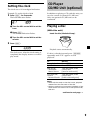
Setting the clock
The clock uses a 12-hour digital indication.
Example: To set the clock to 10:08
1
Press (DSPL) for 2 seconds.
The hour indication flashes.
1 Turn the VOL control dial to set the
hour.
2 Press (SEL).
The minute indication flashes.
CD Player
CD/MD Unit (optional)
In addition to playing a CD with this unit, you
can also control an external CD/MD unit.
Only one optional CD/MD unit can be
connected.
Playing a disc
(With this unit)
Insert the disc (labeled side up).
3 Turn the VOL control dial to set the
minute.
2
Press (DSPL).
Playback starts automatically.
The clock starts. After the clock setting is
completed, the display returns to normal
play mode.
If a disc is already inserted, press (SOURCE)
repeatedly until “CD” appears to start
playback.
To
Stop playback
Eject the disc
Skip tracks
– Automatic
Music Sensor
Fast-forward/
reverse
– Manual Search
Do this
Press (OFF).
Press Z.
Turn the SEEK/AMS
control dial.
[once for each track]
Turn the SEEK/AMS
control dial.
[hold to desired point]
Notes
• When the last track on the disc is over, playback
restarts from the first track of the disc.
• With an optional unit connected, playback of the
same source will continue on to the optional CD/
MD unit.
continue to next page t
9
(With optional unit)
1
Press (SOURCE) repeatedly to select
“CD” or “MD.”
2
Press (MODE) repeatedly until the
desired unit appears.
Playback starts.
To
Skip discs
– Disc selection
Press
(1) (DISC –) or
(2) (DISC +)
Tip
With the optional MG Memory Stick System-up
Player MGS-X1 connected to this unit, press
(SOURCE) to select “MD,” then press (MODE) to
select the unit number of the MD (MD1 or MD2,
etc.).
Playing tracks repeatedly
— Repeat Play
The disc in the main unit will repeat a track or
the entire disc when it reaches the end. For
repeat play, you can select:
•REP 1 — to repeat a track.
•REP 2* — to repeat a disc.
* Available only when an optional CD/MD unit is
connected.
During playback, press (3) (REP)
repeatedly until the desired setting
appears in the display.
“REP” indicator is displayed.
Repeat Play starts.
Display items
Source
Displayable items
• Clock
• Track number/Elapsed playing time
To
Switch display
item
Press
(DSPL)
To return to normal play mode, press (3)
(REP) repeatedly until “REP” indicator
disappears.
Playing tracks in random
order — Shuffle Play
You can select:
•SHUF 1 — to play the tracks on the current
disc in random order.
•SHUF 2* — to play the tracks in the current
optional CD (MD) unit in random order.
* Available only when an optional CD/MD unit is
connected.
During playback, press (4) (SHUF)
repeatedly until the desired setting
appears in the display.
“SHUF” indicator is displayed.
Shuffle Play starts.
To return to normal play mode, press (4)
(SHUF) repeatedly until “SHUF” indicator
disappears.
10
Storing stations
automatically
Radio
— Best Tuning Memory (BTM)
The unit can store up to 6 stations per band
(FM1, FM2, FM3, AM1, and AM2).
Caution
When tuning in stations while driving, use
Best Tuning Memory to prevent accidents.
Display items
The following items can be displayed.
Band
Displayable items
• Clock
• Preset number/Frequency
To
Switch display
item
The unit selects the stations with the strongest
signals within the selected band, and stores
them in the order of their frequency.
1
Press (SOURCE) repeatedly to select the
radio.
2
Press (MODE) repeatedly to select the
band.
3
Press (BTM) for 2 seconds.
The unit stores stations in the order of their
frequencies on the number buttons. A beep
sounds when the setting is stored.
Notes
• If only a few stations can be received due to
weak signals, some number buttons will retain
their former settings.
• When a number is indicated in the display, the
unit starts storing stations from the one currently
displayed.
Press
(DSPL)
11
Storing only the desired
stations
You can manually preset the desired stations
on any chosen number button.
1
Press (SOURCE) repeatedly to select the
radio.
2
Press (MODE) repeatedly to select the
band.
3
Turn the SEEK/AMS control dial to tune
in the station that you want to store.
4
Press the desired number button ((1) to
(6)) until “MEM” appears.
The number button indication appears in
the display.
Note
If you try to store another station on the same
number button, the previously stored station will
be erased.
If preset tuning does not work
— Automatic tuning/Local Seek Mode
Automatic tuning:
Turn the SEEK/AMS control dial to search
for the station.
Scanning stops when the unit receives a
station. Turn the SEEK/AMS control dial
until the desired station is received.
Local Seek Mode:
If the automatic tuning stops too
frequently, press (SENS) repeatedly until
“LCL” indicator appears.
“LCL” indicator is displayed.
Only the stations with relatively strong
signals will be tuned in.
Tip
If you know the frequency of the station you want
to listen to, turn the SEEK/AMS control dial until
the desired frequency appears (manual tuning).
If FM stereo reception is poor
— Monaural Mode
Receiving the stored
stations
1
Press (SOURCE) repeatedly to select the
radio.
2
Press (MODE) repeatedly to select the
band.
3
12
Press the number button ((1) to (6)) on
which the desired station is stored.
During radio reception, press (SENS)
repeatedly until “MONO” indicator
appears.
“MONO” indicator is displayed.
The sound improves, but becomes
monaural (“ST” disappears).
To return to normal, press (SENS) again.
Other Functions
Quickly attenuating the
sound
Press (ATT).
The “ATT” indicator appears in the display.
Adjusting the sound
characteristics
To restore the previous volume level, press
(ATT) again.
You can adjust the bass, treble, balance, and
fader.
The bass and treble levels can be stored
independently for each source.
Canceling the beep sound
1
Select the item you want to adjust by
pressing (SEL) repeatedly.
Each time you press (SEL), the item
changes as follows:
BAS (bass) t TRE (treble) t
BAL (left-right) t FAD (front-rear)
2
Adjust the selected item by turning the
VOL control dial.
Press (6) while pressing (SEL) down.
To activate the beep sound again, press these
buttons again.
Note
If you connect an optional power amplifier and do
not use the built-in amplifier, the beep sound will
be deactivated.
Note
Adjust within 3 seconds after selecting the item.
13
Selecting the sound
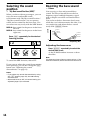
position
Boosting the bass sound
— “My Best sound Position (MBP)”
You can enjoy a clear and powerful bass
sound. The D-bass function boosts the low
frequency signal and high frequency signal
with a sharper curve than conventional bass
boost.
You can hear the bass line more clearly even
while the vocal volume remains the same. You
can emphasize and adjust the bass sound
easily with (D-BASS) button.
MBP-A: best suited for the person in the frontleft seat.
MBP-B: best suited for the person in the frontright seat.
Level
When you drive without passengers, you can
enjoy the most comfortable sound
environment with “My Best sound Position.”
“My Best sound Position” has two presets,
which are best suited for the front seats. You
can select one very easily with the MBP button.
— D-bass
D.BASS-3
D.BASS-2
D.BASS-3
D.BASS-1
D.BASS-2
Press (MBP) repeatedly for the desired
listening position.
D.BASS-1
0dB
Frequency (Hz)
Adjusting the bass curve
Press (D-BASS) repeatedly to select the
desired bass curve.
As the D-BASS number increases so does
the effect.
MBP-A
MBP-B
OFF
To cancel the MBP function, select OFF.
If you want to adjust the sound characteristics
more precisely, you can do it using the (SEL)
button (see “Adjusting the sound
characteristics” on page 13).
Notes
• If you adjust any sound characteristics by using
the (SEL) button (page 13), the MBP setting
returns to OFF.
• When MBP is set to OFF, the sound setting you
adjusted (page 13) is activated.
14
Note
The bass sound may distort at same volume. If the
bass sound distorts, select less effective bass curve.
Additional
Information
Notes
• For safety, turn off the ignition before cleaning
the connectors, and remove the key from the
ignition switch.
• Never touch the connectors directly with your
fingers or with any metal device.
Replacing the lithium battery
Maintenance
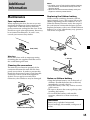
Fuse replacement
When replacing the fuse, be sure to use one
matching the amperage rating stated on the
original fuse. If the fuse blows, check the
power connection and replace the fuse. If the
fuse blows again after replacement, there may
be an internal malfunction. In such a case,
consult your nearest Sony dealer.
Under normal conditions, batteries will last
approximately 1 year. (The service life may be
shorter, depending on the conditions of use.)
When the battery becomes weak, the range of
the card remote commander becomes shorter.
Replace the battery with a new CR2025 lithium
battery. Use of any other battery may present a
risk of fire or explosion.
Fuse (10 A)
x
Warning
Never use a fuse with an amperage rating
exceeding the one supplied with the unit as
this could damage the unit.
+ side up
Cleaning the connectors
The unit may not function properly if the
connectors between the unit and the front
panel are not clean. In order to prevent this,
detach the front panel (page 8) and clean the
connectors with a cotton swab dipped in
alcohol. Do not apply too much force.
Otherwise, the connectors may be damaged.
Main unit
Notes on lithium battery
• Keep the lithium battery out of the reach of
children. Should the battery be swallowed,
immediately consult a doctor.
• Wipe the battery with a dry cloth to assure a
good contact.
• Be sure to observe the correct polarity when
installing the battery.
• Do not hold the battery with metallic
tweezers, otherwise a short-circuit may
occur.
WARNING
Back of the front panel
Battery may explode if mistreated.
Do not recharge, disassemble, or dispose of
in fire.
15
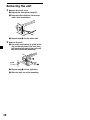
Removing the unit
1
Remove the front cover
1 Detach the front panel (page 8).
2 Press the clip inside the front cover
with a thin screwdriver.
3 Repeat step 2 for the other side.
2
Remove the unit
1 Use a thin screwdriver to push in the
clip on the left side of the unit, then
pull out the left side of the unit until
the catch clears the mounting.
4 mm
(3/16 in.)
2 Repeat step 1 for the right side.
3 Slide the unit out of its mounting.
16
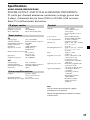
Specifications
AUDIO POWER SPECIFICATIONS
POWER OUTPUT AND TOTAL HARMONIC DISTORTION
23 watts per channel minimum continuous average power into
4 ohms, 4 channels driven from 20 Hz to 20 kHz with no more
than 5% total harmonic distortion.
CD player section
Signal-to-noise ratio
Frequency response
Wow and flutter
90 dB
10 – 20,000 Hz
Below measurable limit
Tuner section
General
Outputs
Tone controls
FM
Tuning range
Antenna terminal
Intermediate frequency
Usable sensitivity
Selectivity
Signal-to-noise ratio
87.5 – 107.9 MHz
External antenna connector
10.7 MHz
11 dBf
75 dB at 400 kHz
65 dB (stereo),
68 dB (mono)
Harmonic distortion at 1 kHz
0.7 % (stereo),
0.5 % (mono)
Separation
33 dB at 1 kHz
Frequency response
30 – 15,000 Hz
Power requirements
Dimensions
Mounting dimensions
Mass
Supplied accessories
AM
Tuning range
Antenna terminal
Intermediate frequency
Sensitivity
530 – 1,710 kHz
External antenna connector
10.7 MHz/450 kHz
30 µV
Power amplifier section
Outputs
Speaker outputs
(sure seal connectors)
Speaker impedance
4 – 8 ohms
Maximum power output 50 W × 4 (at 4 ohms)
Optional accessories
Optional equipment
Audio outputs
Power antenna relay
control lead
Power amplifier control
lead
Bass ±10 dB at 20 Hz
Treble ±10 dB at 20 kHz
12 V DC car battery
(negative ground)
Approx. 178 × 50 × 177 mm
(7 1/8 × 2 × 7 in.)
(w/h/d)
Approx. 182 × 53 × 161 mm
(7 1/4 × 2 1/8 × 6 3/8 in.)
(w/h/d)
Approx. 1.2 kg
(2 lb 10 oz)
Parts for installation and
connections (1 set)
Front panel case (1)
Card remote commander
RM-X115
BUS cable (supplied with
an RCA pin cord)
RC-61 (1 m), RC-62 (2m)
CD changer (10 discs)
CDX-656
CD changer (6 discs)
CDX-T69
MD changer (6 discs)
MDX-66XLP
MG Memory Stick
System-up Player
MGS-X1
Note
This unit cannot be connected to a digital
preamplifier or an equalizer.
Design and specifications are subject to change
without notice.
17
Troubleshooting
The following checklist will help you remedy
problems you may encounter with your unit.
Before going through the checklist below,
check the connection and operating
procedures.
General
No sound.
•Turn the VOL control dial clockwise to
adjust the volume.
•Cancel the ATT function.
•Set the fader control to the center position
for a 2-speaker system.
The contents of the memory have been
erased.
•The RESET button has been pressed.
t Store again into the memory.
•The power cord or battery has been
disconnected.
•The power connecting cord is not
connected properly.
No beep sound.
•The beep sound is canceled (page 13).
•An optional power amplifier is connected
and you are not using the built-in
amplifier.
Indications disappear from/do not appear in
the display.
•The clock display disappears if you press
(OFF) for 2 seconds.
t Press (OFF) again for 2 seconds to
display the clock.
•Remove the front panel and clean the
connectors. See “Cleaning the connectors”
(page 15) for details.
Stored stations and correct time are erased.
The fuse has blown.
Makes noise when the ignition key is in the
ON, ACC, or OFF position.
The leads are not matched correctly with the
car’s accessory power connector.
No power is being supplied to the unit.
•Check the connection. If everything is in
order, check the fuse.
•The car does not have an ACC position.
t Press (SOURCE) (or insert a disc) to
turn on the unit.
The power is continuously supplied to the
unit.
The car does not have an ACC position.
18
The power antenna does not extend.
The power antenna does not have a relay
box.
CD/MD playback
A disc cannot be loaded.
•Another CD is already loaded.
•The CD is forcibly inserted upside down or
in the wrong way.
Playback does not begin.
•Defective MD or dirty CD.
•CD-R/CD-RW that is not finalized.
•You tried to playback a CD-R/CD-RW not
designed for audio use.
•Some CD-Rs/CD-RWs may not play due
to its recording equipment or the disc
condition.
A disc is automatically ejected.
The ambient temperature exceeds 50°C
(122°F).
CD will not be ejected.
The operation buttons do not function.
Press the RESET button.
The sound skips from vibration.
•The unit is installed at an angle of more
than 60°.
•The unit is not installed in a sturdy part of
the car.
The sound skips.
Dirty or defective disc.
Radio reception
Preset tuning is not possible.
•Store the correct frequency in the memory.
•The broadcast signal is too weak.
The stations cannot be received.
The sound is hampered by noises.
•Connect a power antenna control lead
(blue) or accessory power supply lead
(red) to the power supply lead of a car’s
antenna booster. (Only when your car has
built-in FM/AM antenna in the rear/side
glass.)
•Check the connection of the car antenna.
•The auto antenna will not go up.
t Check the connection of the power
antenna control lead.
•Check the frequency.
Automatic tuning is not possible.
•The local seek mode is set to “ON.”
t Set the local seek mode to “OFF”
(page 12).
•The broadcast signal is too weak.
t Perform manual tuning.
The “ST” indication flashes.
•Tune in the frequency accurately.
•The broadcast signal is too weak.
t Set to the monaural reception mode
(page 12).
A program broadcast in stereo is heard in
monaural.
The unit is in monaural reception mode.
t Cancel monaural reception mode
(page 12).
Error displays
(For this unit and optional CD/MD changers)
The following indications will flash for a
while.
Err01
The disc magazine is not inserted in the CD/
MD unit.
t Insert the magazine in the CD/MD unit.
Err02
No disc is inserted in the CD/MD unit.
t Insert discs in the CD/MD unit.
Err03
A CD/MD cannot play because of some
problem.
t Insert another CD/MD.
Err04
A CD is dirty or inserted upside down.
t Clean or insert the CD correctly.
Err05
No tracks have been recorded on an MD.
t Play an MD with recorded tracks on it.
Err99
The CD/MD unit cannot be operated
because of some problem.
t Press the RESET button on the unit.
If these solutions do not help improve the
situation, consult your nearest Sony dealer.
19
Félicitations !
Nous vous remercions d’avoir fait l’acquisition
d’un lecteur de disques compacts Sony. Vous
pourrez exploiter les multiples fonctions
d’utilisation de cet appareil à l’aide des
accessoires ci-dessous:
•Lecteurs CD/MD en option (changeurs et
lecteurs)*.
•Accessoire de commande fourni
Télécommande à carte RM-X115
* Un seul lecteur CD/MD de Sony en option peut
être raccordé.
2
Table des matières
Emplacement des commandes ............................... 4
Précautions ................................................................ 6
Remarques sur les disques ...................................... 6
Préparation
Réinitialisation de l’appareil ............................... 7
Dépose de la façade ............................................. 8
Réglage de l’horloge ............................................ 9
Lecteur CD
Appareil CD/MD (en option)
Lecture d’un disque ............................................. 9
Rubriques d’affichage ........................................ 10
Lecture de plages répétée
— Lecture répétée ......................................... 10
Lecture de plages dans un ordre quelconque
— Lecture aléatoire ....................................... 10
Autres fonctions
Réglage des caractéristiques du son ................
Mise en sourdine rapide du son ......................
Désactivation du bip sonore .............................
Sélection de la position du son
— “My Best sound Position (MBP)” ..........
Renforcement des graves
— D-bass ........................................................
13
13
13
14
14
Informations complémentaires
Entretien ..............................................................
Démontage de l’appareil ...................................
Caractéristiques techniques ..............................
Dépannage ..........................................................
Affichages d’erreur ............................................
15
16
17
18
19
Radio
Rubriques d’affichage ........................................ 11
Mémorisation automatique des stations
— Best Tuning Memory (BTM) ................... 11
Mémorisation des stations de votre choix
uniquement .................................................... 12
Réception des stations mémorisées ................. 12
3
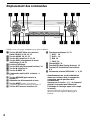
Emplacement des commandes
MODE
SEL
MBP
DSPL
BTM
SOURCE
D-BASS
–
RELEASE
ATT
1
DISC
+
REP
SHUF
2
3
4
5
6
SENS
OFF
CDX-CA400
Référez-vous aux pages indiquées pour plus de détails.
1 Touche SOURCE (Mise sous tension/
Radio/CD/MD) 9, 10, 11, 12
2 Touche MODE 10, 11, 12
3 Touche SEL (sélection) 9, 13, 14
4 Touche DSPL (changement de mode
d’affichage) 9, 10, 11
5 Fenêtre d’affichage
6 Touche MBP (My Best sound Position) 14
7 Touche Z (éjection) 9
8 Touche D-BASS 14
9 Commande rotative VOL (volume) –/+
9, 13
0 Touche RELEASE (pour enlever la
façade) 8
qa Récepteur de télécommande à carte
qs Touche RESET (située à l’avant de
l’appareil, derrière le panneau frontal) 7
qd Touche ATT (mise en sourdine) 13
4
qf Touches numériques 12, 13
(1) DISC – 10
(2) DISC + 10
(3) REP 10
(4) SHUF 10
qg Touche SENS 12
qh Touche BTM (Best Tuning Memory) 11
qj Touche OFF (Arrêt/Mise hors tension)*
8, 9
qk Commande rotative SEEK/AMS –/+ 9, 12
* Avertissement en cas d’installation
dans une voiture dont le contact ne
comporte pas de position ACC
(accessoires)
Appuyez sur la touche (OFF) de l’appareil
pendant 2 secondes pour désactiver
l’affichage de l’horloge après avoir coupé
le moteur.
Sinon l’affichage de l’horloge n’est pas
désactivé et cela risque de décharger la
batterie.
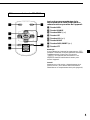
Télécommande à carte RM-X115
DSPL
MODE
Les touches correspondantes de la
télécommande à carte remplissent la
même fonction que celles de l’appareil.
1 Touche DSPL
2 Touche SOURCE
+
PRESET
SEEK–
SOURCE
3 Touches SEEK (–/+)
SEEK+
4 Touche OFF
5 Touches VOL (+/–)
PRESET
6 Touche MODE
–
OFF
+
VOL
–
ATT
7 Touches DISC/PRESET (+/–)
8 Touche ATT
Remarque
Si vous désactivez l’appareil en appuyant sur (OFF)
pendant 2 secondes, il ne peut plus être activé avec
la télécommande à carte, sauf si la touche
(SOURCE) de l’appareil est enfoncée ou si un
disque est d’abord inséré dans le lecteur pour
activer l’appareil.
Conseil
Reportez-vous à la section “Remplacement de la
pile au lithium” pour obtenir des informations
détaillées sur le remplacement de la pile (page 15).
5
Précautions
Remarques sur les disques
•Si votre voiture est restée garée en plein
soleil, laissez refroidir l’appareil avant de
l’utiliser.
•Les antennes électriques se déploient
automatiquement pendant le fonctionnement
de l’appareil.
•Ne touchez pas la surface des disques pour
ne pas les salir. Saisissez le disque par les
bords.
•Laissez vos disques dans leur boîtier ou dans
leur étui de rangement lorsqu’ils ne sont pas
utilisés. N’exposez pas les disques à la
chaleur ou à des températures élevées. Évitez
de les laisser dans une voiture en
stationnement, sur le tableau de bord ou la
plage arrière.
Si vous avez des questions ou des problèmes
concernant le fonctionnement de cet appareil
qui ne sont pas abordés dans le présent mode
d’emploi, veuillez consulter votre détaillant
Sony.
Condensation d’humidité
Par temps de pluie ou dans des régions très
humides, de l’humidité risque de se condenser
sur les lentilles et dans la fenêtre d’affichage de
l’appareil. Si cela se produit, l’appareil ne
fonctionnera pas correctement. Si c’est le cas,
retirez le disque et attendez environ une heure
que l’humidité se soit évaporée.
Pour conserver un son de haute
qualité
•Ne collez pas d’étiquettes sur les disques et
n’utilisez pas de disques rendus collants par
de l’encre/des résidus. Ces disques risquent
de s’arrêter en cours de lecture, en créant un
dysfonctionnement ou être définitivement
endommagés.
Veillez à ne pas renverser de jus de fruit ou de
boissons sucrées sur l’appareil ni sur les
disques.
•N’utilisez pas de disques qui portent des
étiquettes ou des autocollants.
Cela risque d’entraîner les problèmes de
fonctionnement suivants :
– Impossibilité d’éjecter un disque (parce que
l’étiquette ou l’autocollant se décolle et
bloque le mécanisme d’éjection).
– Impossibilité de lire correctement les
données audio (p. ex : saute de lecture ou
pas de lecture), parce que la chaleur a fait
rétrécir l’autocollant ou l’étiquette, ce qui
entraîne une déformation du disque.
•Les disques de forme non standard (par ex.
en forme de cœur, de carré, d’étoile) ne
peuvent pas être lus sur cet appareil. Vous
risquez d’ endommager votre appareil si
vous essayez de le faire. N’ utilisez pas de
tels disques.
• Vous ne pouvez pas écouter de CD de 8 cm
(3 po.).
6
•Avant la lecture, nettoyez les disques avec un
chiffon de nettoyage disponible dans le
commerce. Essuyez chaque disque en partant
du centre vers l’extérieur. N’utilisez pas de
solvants tels que la benzine, les diluants, les
produits de nettoyage vendus dans le
commerce ou les sprays antistatiques
destinés aux disques analogiques.
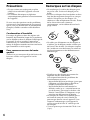
Remarques sur les disques CD-R/CDRW
•Vous pouvez écouter avec cet appareil des
CD-R (CD enregistrables)/CD-RW (CD
réinscriptibles) conçus pour une utilisation
audio.
Ces symboles permet de distinguer les CDR/CD-RW conçus pour une utilisation audio.
Préparation
Réinitialisation de
l’appareil
Avant la première mise en service de l’appareil
ou après avoir remplacé la batterie de la
voiture, vous devez réinitialiser l’appareil.
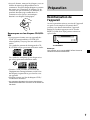
Retirez la façade et appuyez sur la touche
RESET à l’aide d’un objet pointu comme un
stylo à bille.
Touche RESET
Remarque
Une pression sur la touche RESET efface l’heure et
certaines fonctions mémorisées.
Ces symboles indiquent qu’un disque n’est
pas conçu pour une utilisation audio.
•Certains CD-R/CD-RW (en fonction de
l’équipement d’enregistrement ou de l’état
du disque) risquent de ne pas être lus avec
cet appareil.
•Vous ne pouvez pas lire de disques CD-R/
CD-RW non finalisés*.
* Un processus nécessaire à la lecture des disques
CD-R/CD-RW destinés à la lecture sur le lecteur de
CD audio.
7
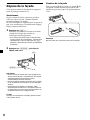
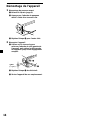
Dépose de la façade
Vous pouvez retirer la façade de cet appareil
pour le protéger contre le vol.
Fixation de la façade
Fixez la partie A de la façade à la partie B de
l’appareil comme illustré et poussez le côté
gauche en position jusqu’à ce qu’il émette un
“clic”.
Avertisseur
Si vous mettez la clé de contact en position
OFF sans ôter la façade, l’alarme retentira
pendant quelques secondes.
Si vous raccordez un amplificateur en option et
que vous n’utilisez pas l’amplificateur intégré,
le bip sonore est désactivé.
1
A
Appuyez sur (OFF)*.
La lecture CD/MD ou l’écoute de la radio
s’arrête (l’éclairage des touches et
l’affichage restent apparents).
* Si le contact de votre voiture n’est pas doté
d’une position ACC (accessoire) , assurez-vous
de désactiver l’unité en appuyant sur (OFF)
pendant 2 secondes pour éviter de décharger
la batterie.
2
Appuyez sur (RELEASE), puis tirez la
façade vers vous.
(OFF)
(RELEASE)
Remarques
• Si vous retirez la façade alors que l’appareil est
toujours sous tension, l’alimentation est coupée
automatiquement de manière à éviter
d’endommager les haut-parleurs.
• N’exercez pas de pression excessive sur la façade
ni sur la fenêtre d’affichage et ne les faites pas
tomber.
• N’exposez pas la façade à la chaleur, à des
températures élevées ou à l’humidité. Evitez de
la laisser dans une voiture en stationnement, sur
le tableau de bord ou la plage arrière.
Conseil
Lorsque vous emmenez la façade, glissez-la dans
l’étui spécial fourni.
8
B
Remarque
Ne rien poser sur la surface interne de la façade.
Réglage de l’horloge
L’horloge à affichage numérique fonctionne
suivant un cycle de 12 heures.
Lecteur CD
Appareil CD/MD
(en option)
Exemple : Pour régler l’horloge sur 10:08
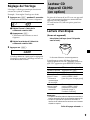
1
Appuyez sur (DSPL) pendant 2 secondes.
L’indication des heures se met à clignoter.
1 Réglez l’heure à l’aide de la
commande rotative VOL.
2 Appuyez sur (SEL).
L’indication des minutes se met à
clignoter.
3 Réglez les minutes à l’aide de la
commande rotative VOL.
2
En plus de la lecture d’un CD avec cet appareil
seul, vous pouvez également commander des
appareil CD/MD externes.
Un seul lecteur CD/MD en option peut être
raccordé.
Lecture d’un disque
(Avec cet appareil)
Introduisez le disque (avec l’étiquette
vers le haut).
Appuyez sur (DSPL).
L’horloge démarre. Après que le réglage de
l’horloge est terminé, l’affichage revient au
mode de lecture normal.
La lecture démarre automatiquement.
Si un disque se trouve déjà dans l’appareil,
appuyez plusieurs fois sur (SOURCE) jusqu’à ce
que “CD” apparaisse pour démarrer la lecture.
Pour
Arrêter la lecture
Ejecter le disque
Passer d’une
piste à l’autre
– Détecteur
automatique
de musique
Avance/
retour rapide
– Recherche
manuelle
Effectuez cette opération
Appuyez sur (OFF).
Appuyez sur Z.
Tournez la commande
rotative SEEK/AMS.
[une fois pour chaque piste]
Tournez la commande
rotative SEEK/AMS.
[maintenir la touche
enfoncée jusqu’à
l’endroit souhaité]
Remarques
• Lorsque la dernière piste du disque est terminée, la
lecture reprend à partir de la première piste du CD.
• Lorsqu’un appareil en option est raccordé, la
lecture de la même source continue sur le lecteur
CD/MD en option.
Suite à la page suivante t
9
(Avec l’appareil en option)
1
Appuyez plusieurs fois sur (SOURCE)
pour sélectionner “CD” ou “MD”.
2
Appuyez plusieurs fois sur (MODE)
jusqu’à ce que le lecteur désirée
apparaisse.
La lecture commence.
Pour
Passer d’un disque
à l’autre
– Sélection du
disque
Appuyez sur
(1) (DISC –) ou
(2) (DISC +)
Conseil
Avec le MG Memory Stick System-up Player MGSX1 en option raccordé à cet appareil, appuyez sur
la touche (SOURCE) pour sélectionner “MD“, puis
appuyez sur la touche (MODE) pour sélectionner le
numéro de lecteur du MD (MD1 ou MD2, etc.).
Lecture de plages répétée
— Lecture répétée
La lecture du disque ou d’une plage du disque
de l’appareil principal se répète
automatiquement à la fin du disque. Pendant
la lecture répétée, vous pouvez sélectionner :
•REP 1 — pour répéter une plage.
•REP 2* — pour répéter un disque.
* Disponible uniquement lorsqu’un lecteur CD/MD
en option est raccordé.
En cours de lecture, appuyez plusieurs
fois sur (3) (REP) jusqu’à ce que le
réglage désiré apparaisse dans
l’affichage.
L’indication “REP” est affichée.
La lecture répétée démarre.
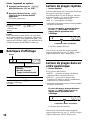
Rubriques d’affichage
Source
Rubriques affichables
• Horloge
• Numéro de plage/
Temps de lecture écoulé
Pour
Appuyez sur
Passer d’une
(DSPL)
rubrique d’affichage
à l’autre
Pour revenir au mode de lecture normale,
appuyez plusieurs fois sur (3) (REP), jusqu’à
ce que l’indicateur “REP” disparaisse.
Lecture de plages dans un
ordre quelconque
— Lecture aléatoire
Vous pouvez sélectionner:
•SHUF 1 — pour lire les plages du disque
sélectionné dans un ordre aléatoire.
•SHUF 2* — pour lire les plages dans
l’appareil CD (MD) en option actuellement
inséré dans un ordre aléatoire.
* Disponible uniquement lorsqu’un lecteur CD/MD
en option est raccordé.
En cours de lecture, appuyez plusieurs
fois sur (4) (SHUF) jusqu’à ce que le
réglage désiré apparaisse dans
l’affichage.
L’indication “SHUF” est affichée.
La lecture aléatoire démarre.
10
Pour revenir au mode de lecture normale,
appuyez plusieurs fois sur (4) (SHUF), jusqu’à
ce que l’indicateur “SHUF” disparaisse.
Radio
Mémorisation
automatique des stations
— Best Tuning Memory (BTM)
L’appareil peut mémoriser jusqu’à 6 stations
pour chaque bande (FM1, FM2, FM3, AM1 et
AM2).
Attention
Pour syntoniser des stations pendant que vous
conduisez, nous vous conseillons d’utiliser la
fonction de mémorisation du meilleur accord
(BTM) de façon à éviter les accidents.
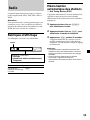
Rubriques d’affichage
Les rubriques suivantes sont affichables :
Bande
Rubriques affichables
• Horloge
• Numéro de station présélectionnée/
Fréquence
L’appareil sélectionne les stations émettant les
signaux les plus puissants pour la bande
sélectionnée et les mémorise selon l’ordre des
fréquences.
1
Appuyez plusieurs fois sur (SOURCE)
pour sélectionner la radio.
2
Appuyez plusieurs fois sur (MODE) pour
sélectionner la bande de fréquence.
3
Appuyez sur (BTM) pendant 2 secondes.
L’appareil mémorise les stations sous les
touches numériques dans l’ordre de leur
fréquence. Un bip retentit lorsque le réglage
est mémorisé.
Remarques
• Si quelques stations seulement peuvent être
captées en raison de faibles signaux, certaines
touches numériques conserveront leur réglage
préalable.
• Si un numéro est indiqué dans la fenêtre
d’affichage, l’appareil commence la
mémorisation des stations à partir de la station
affichée.
Pour
Appuyez sur
Passer d’une
(DSPL)
rubrique d’affichage
à l’autre
11
Mémorisation des stations
de votre choix
uniquement
Vous pouvez présélectionner manuellement
les stations souhaitées sur n’importe quelle
touche de votre choix.
1
Appuyez plusieurs fois sur (SOURCE)
pour sélectionner la radio.
2
Appuyez plusieurs fois sur (MODE) pour
sélectionner la bande de féquence.
3
Syntonisez la station que vous souhaitez
mémoriser à l’aide de la commande
rotative SEEK/AMS.
4
Appuyez sur la touche numérique ((1) à
(6)) jusqu’à ce que l’indication “MEM”
apparaisse.
Le numéro de la touche numérique de
présélection apparaît dans la fenêtre
d’affichage.
Si l’accord prédéfini ne fonctionne
pas
— Syntonisation automatique/Mode
recherche locale
Syntonisation automatique :
Recherchez la station en tournant la
commande rotative SEEK/AMS.
Le balayage s’interrompt lorsque l’appareil
capte une station. Tournez la commande
rotative SEEK/AMS jusqu’à ce que vous
captiez la station souhaitée.
Mode recherche locale :
Remarque
Si vous essayez de mémoriser une autre station
sous une touche numérique déjà utilisée, la station
précédemment mémorisée est supprimée.
Réception des stations
mémorisées
1
Appuyez plusieurs fois de suite sur
(SOURCE) pour sélectionner la radio.
2
Appuyez plusieurs fois sur (MODE) pour
sélectionner la bande de fréquence.
3
Appuyez sur la touche numérique ((1) à
(6)) sous laquelle la station désirée est
mémorisée.
Si la recherche automatique des
fréquences s’arrête trop souvent, pressez
la touche (SENS) de façon répétée
jusqu’à ce que “LCL” s’affiche.
L’indication “LCL” est affichée.
Seules les stations dont les signaux sont
suffisamment puissants seront accordées.
Conseil
Si vous connaissez la fréquence de la station que
vous souhaitez écouter, tournez la commande
rotative SEEK/AMS jusqu’à ce que la fréquence
souhaitée s’affiche (syntonisation manuelle).
Si la réception FM est faible
— Mode monaural
Au cours de la réception radio, appuyez
sur (SENS) plusieurs fois jusqu’à
l’affichage de l’indication “MONO”.
L’indication “MONO” est affichée.
La qualité sonore s’en trouve améliorée,
mais le son est diffusé en mode monaural
(l’indication “ST” disparaît).
Pour revenir au mode normal, ré-appuyez sur
(SENS).
12
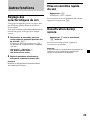
Autres fonctions
Mise en sourdine rapide
du son
Appuyez sur (ATT).
L’indication “ATT” s’affiche.
Réglage des
caractéristiques du son
Pour restaurer le niveau précédent du volume,
appuyez à nouveau sur (ATT).
Vous pouvez régler les graves, les aigus ainsi
que la balance gauche-droite et la balance
avant-arrière.
Vous pouvez mémoriser indépendemment les
niveaux de graves et d’aigus pour chaque
source.
Désactivation du bip
sonore
1
Sélectionnez le paramètre que vous
voulez régler en appuyant plusieurs fois
de suite sur (SEL).
Chaque fois que vous appuyez sur (SEL),
les paramètres changent selon la séquence
suivante :
BAS (graves) t TRE (aigus) t
BAL (balance gauche-droite) t
FAD (balance avant-arrière)
2
Appuyez sur (6) tout en maintenant
(SEL) enfoncé.
Pour réactiver le bip sonore, appuyez à
nouveau sur ces touches.
Remarque
Si vous raccordez un amplificateur de puissance en
option et si vous n'utilisez pas l'amplificateur
intégré, le signal sonore est désactivé.
Réglez le paramètre sélectionné en
tournant la commande rotative VOL.
Remarque
Effectuez le réglage dans les 3 secondes après
avoir sélectionné l’option.
13
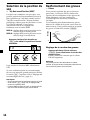
Sélection de la position du
son
Renforcement des graves
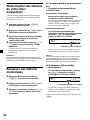
— “My Best sound Position (MBP)”
Vous pouvez exploiter des graves claires et
puissantes. La fonction D-bass renforce les
signaux de basse fréquence et les signaux de
haute fréquence avec une courbe plus
accentuée qu’une fonction d’accentuation
classique.
Vous entendez plus distinctement les graves,
même si le volume de la partie vocale reste au
même niveau. Vous pouvez renforcer et ajuster
les graves à l’aide de la touche (D-BASS).
Niveau
Lorsque vous conduisez sans passager, vous
pouvez profiter de l’environnement sonore le
plus agréable avec “My Best sound Position”.
“My Best sound Position” dispose de deux
préréglages, idéaux pour les personnes assises
à l’avant du véhicule. Vous pouvez
sélectionner l’un de ces réglages très
facilement avec la touche MBP.
MBP-A : réglage idéal pour la personne assise
dans le siège avant de gauche.
MBP-B : réglage idéal pour la personne assise
dans le siège avant de droite.
— D-bass
D.BASS-3
D.BASS-2
D.BASS-1
D.BASS-3
D.BASS-2
D.BASS-1
Appuyez plusieurs fois de suite sur
(MBP) pour obtenir la position d’écoute
souhaitée.
0dB
Fréquence (Hz)
Réglage de la courbe des graves
Appuyez plusieurs fois de suite sur
(D-BASS) pour sélectionner la courbe des
graves voulue.
L’effet s’intensifie à mesure que la valeur
D-BASS augmente.
MBP-A
MBP-B
OFF
Pour annuler la fonction MBP, sélectionnez
OFF.
Si vous souhaitez ajuster les caractéristiques
du son avec une plus grande précision, utilisez
la touche (SEL). (reportez-vous à “Réglage des
caractéristiques du son”, page 13.)
Remarques
• Si vous ajustez une caractéristique du son à l’aide
de la touche (SEL) (page 13), le réglage MBP
revient à la position OFF.
• Lorsque MBP est réglé sur OFF, le réglage du son
que vous avez effectué (page 13) est activé.
14
Remarque
Les graves peuvent être distordues au même
volume. Si les graves sont distordues, sélectionnez
une courbe de graves moins efficace.
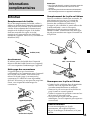
Informations
complémentaires
Remarques
• Pour plus de sécurité, coupez le contact avant de
nettoyer les connecteurs et retirez la clé de
contact.
• Ne touchez jamais les connecteurs directement
avec les doigts ou avec un appareil métallique.
Remplacement de la pile au lithium
Entretien
Remplacement du fusible
En cas de remplacement du fusible, veillez à
utiliser un fusible dont l’intensité correspond à
celle inscrite sur le fusible. Si le fusible fond,
vérifiez le branchement de l’alimentation et
remplacez le fusible d’origine. Si le fusible
fond une nouvelle fois après avoir été
remplacé, cela peut révéler une défaillance
interne de l’appareil. Dans ce cas, consultez un
détaillant Sony.
Dans les conditions d’utilisation normales, les
piles durent environ un an. (La durée de
fonctionnement peut être plus courte, en
fonction des conditions d’utilisation.)
Lorsque la pile s’affaiblit, la portée efficace de
la télécommande à carte se raccourcit.
Remplacez la pile par une nouvelle pile au
lithium CR2025. L’utilisation d’un autre type
de pile peut entraîner un risque d’incendie ou
d’explosion.
Fusible (10 A)
Avertissement
N’utilisez jamais de fusible dont l’intensité
dépasse celle du fusible fourni avec l’appareil,
car vous risqueriez d’endommager l’appareil.
x
côté + vers le haut
Nettoyage des connecteurs
L’appareil peut ne pas fonctionner
correctement si les connecteurs entre l’appareil
et la façade sont souillés. Pour éviter cela,
enlevez la façade (page 8) et nettoyez les
connecteurs à l’aide d’un coton-tige imbibé
d’alcool. N’exercez pas une pression trop forte.
Sinon, vous risquez d’endommager les
connecteurs.
Appareil principal
Remarques sur la pile au lithium
• Gardez la pile au lithium hors de portée des
enfants. En cas d’ingestion de la pile,
consultez immédiatement un médecin.
• Nettoyez la pile au moyen d’un chiffon sec
pour assurer un contact optimal.
• Veillez à respecter les polarités correctes lors
de la mise en place de la pile.
• Ne saisissez pas la pile avec des pinces
métalliques, car cela risque de provoquer un
court-circuit.
AVERTISSEMENT
Arrière de la façade
Si vous ne manipulez pas la pile
correctement, elle risque d’exploser.
Ne pas la recharger, la démonter, ni la jeter
au feu.
15
Démontage de l’appareil
1
Démontage du panneau avant
1 Enlevez la façade (page 8).
2 Appuyez sur l’attache du panneau
avant à l’aide d’un tournevis fin.
3 Répétez l’étape 2 pour l’autre côté.
2
Démontez l’appareil
1 Utilisez un fin tournevis pour
enfoncer l’attache du côté gauche de
l’appareil, puis retirez le côté gauche
de l’appareil jusqu’à son dégagement
complet.
4 mm
(3/16 po.)
2 Répétez l’étape 1 du côté droit.
3 Sortez l’appareil de son emplacement.
16
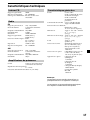
Caractéristiques techniques
Lecteur CD
Rapport signal-bruit
90 dB
Réponse en fréquence
10 – 20.000 Hz
Pleurage et scintillement En dessous du seuil
mesurable
Radio
FM
Plage de syntonisation
Borne d’antenne
87,5 – 107,9 MHz
Connecteur d’antenne
externe
Fréquence intermédiaire 10,7 MHz
Sensibilité utile
11 dBf
Sélectivité
75 dB à 400 kHz
Rapport signal-bruit
65 dB (stéréo),
68 dB (mono)
Distorsion harmonique à 1 kHz
0,7 % (stéréo),
0,5 % (mono)
Séparation
33 dB à 1 kHz
Réponse en fréquence
30 – 15.000 Hz
AM
Plage de syntonisation
Borne d’antenne
530 – 1.710 kHz
Connecteur d’antenne
externe
Fréquence intermédiaire 10,7 MHz/450 kHz
Sensibilité
30 µV
Amplificateur de puissance
Sorties
Sorties pour haut-parleurs
(connecteurs de sécurité)
Impédance de haut-parleurs
4 – 8 ohms
Puissance utile maximum 50 W × 4 (à 4 ohms)
Caractéristiques générales
Sorties
Sorties audio
Fil de commande de relais
d’antenne électrique
Fil de commande
d’amplificateur de
puissance
Commandes de tonalité Graves ±10 dB à 20 Hz
Aigus ±10 dB à 20 kHz
Puissance de raccordement
Batterie de voiture
12 V CC (masse négative)
Dimensions
Approx. 178 × 50 × 177 mm
(7 1/8 × 2 × 7 po.)
(l/h/p)
Dimensions de montage Approx. 182 × 53 × 161 mm
(7 1/4 × 2 1/8 × 6 3/8 po.)
(l/h/p)
Poids
Approx. 1,2 kg
(2 lb 10 oz)
Accessoires fournis
Éléments d’installation et
de raccordement (1 jeu)
Étui pour la façade (1)
Télécommande à carte
RM-X115
Accessoires en option
Câble BUS (fourni avec un
cordon à broche RCA)
RC-61 (1 m), RC-62 (2 m)
Appareils en option
Changeur de CD
(10 disques)
CDX-656
Changeur de CD
(6 disques)
CDX-T69
Changeur MD (6 disques)
MDX-66XLP
Lecteur du système
MG-MS
MGS-X1
Remarque
Cet appareil ne peut pas être branché sur un
préamplificateur ou un égaliseur numérique.
La conception et les caractéristiques techniques
sont sujettes à modifications sans préavis.
17
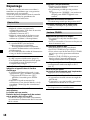
Dépannage
La liste de contrôle suivante vous aidera à
remédier aux problèmes que vous pourriez
rencontrer avec cet appareil.
Avant de passer en revue la liste de contrôle
ci-dessous, vérifiez les procédures de
raccordement et d’utilisation.
Généralités
Pas de son.
•Réglez le volume en tournant la
commande rotative VOL dans le sens des
aiguilles d’une montre.
•Annulez la fonction ATT.
•Réglez la commande de balance avantarrière sur la position centrale, si vous
utilisez un système à 2 haut-parleurs.
Le contenu de la mémoire a été effacé.
•La touche RESET a été enfoncée.
t Recommencez la procédure
d’enregistrement dans la mémoire.
•Le cordon d’alimentation ou la batterie a
été déconnecté.
•Le raccordement du cordon d’alimentation
n’est pas réalisé correctement.
Aucun bip sonore.
•Le bip sonore a été désactivé (page 13).
•Un amplificateur de puissance en option
est raccordé et vous n’employez pas
l’amplificateur intégré.
Les indications disparaissent/Aucune
indication n’apparaît dans la fenêtre
d’affichage.
•L’affichage de l’heure disparaît si vous
appuyez sur (OFF) pendant 2 secondes.
t Appuyez de nouveau sur (OFF)
pendant 2 secondes pour afficher
l’heure.
•Déposez la façade et nettoyez les
connecteurs. Pour plus de détails, voir la
procédure “Nettoyage des connecteurs”
(page 15).
Les stations mémorisées et l’heure correcte
sont effacées.
Le fusible est hors-service.
Émission de bruit lorsque la clé de contact
est en position ON, ACC ou OFF.
Les fils ne sont pas raccordés correctement
au connecteur d’alimentation de l’accessoire
de la voiture.
18
L’appareil n’est pas alimenté.
•Vérifiez le raccordement. Si tout est en
ordre, vérifiez le fusible.
•La voiture ne possède pas de position
ACC.
t Appuyez sur (SOURCE) (ou insérez un
disque) pour mettre l’appareil sous
tension.
L’appareil est alimenté en continu.
La voiture ne possède pas de position ACC.
L’antenne électrique ne se déploie pas.
L’antenne électrique ne possède pas de
relais.
Lecture CD/MD
Impossible d’introduire un disque.
•Un autre CD a déjà été introduit dans
l’appareil.
•Le CD est introduit à l’envers en forçant ou
dans le mauvais sens.
La lecture ne démarre pas.
•MD défectueux ou CD poussièreux.
•Le CD-R/CD-RW n’est pas finalisé.
•Vous avez essayé de lire un CD-R/CD-RW
qui n’est pas conçu pour une utilisation
audio.
•Certains CD-R/CD-RW ne peuvent pas
être lus selon l’appareil utilisé pour
l’enregistrement ou l’état du disque.
Un disque est éjecté automatiquement.
La température ambiante dépasse 50 °C
(122 °F).
Le CD n’est pas éjecté.
Les touches de commande sont inopérantes.
Appuyez sur la touche RESET.
Le son saute à la suite de vibrations.
•L’appareil est installé suivant un angle de
plus de 60˚.
•L’appareil n’a pas été installé à un endroit
suffisamment stable de la voiture.
Le son saute.
Un disque encrassé ou défectueux.
Réception radio
Impossible de syntoniser une présélection.
•Mémorisez la fréquence correcte.
•Le signal d’émission est trop faible.
Impossible de recevoir les stations.
Le son comporte des parasites.
•Raccordez un fil de commande d’antenne
électrique (bleu) ou un fil d’alimentation
d’accessoire (rouge) au câble
d’alimentation de l’amplificateur
d’antenne de la voiture. (Uniquement si
votre voiture est équipée d’une antenne
FM/AM intégrée dans la vitre arrière/
latérale.)
•Vérifiez le raccordement de l’antenne de la
voiture.
•L’antenne automatique ne se déploie pas.
t Vérifiez le raccordement du fil de
commande de l’antenne électrique.
•Vérifiez la fréquence.
La syntonisation automatique est
impossible.
•Le mode de recherche local est réglé sur
“ON”.
t Réglez le mode de recherche local sur
“OFF” (page 12).
•Le signal d’émission est trop faible.
t Utilisez la syntonisation manuelle.
L’indication “ST” clignote.
•Accordez la fréquence avec précision.
•Le signal d’émission est trop faible.
t Activez le mode de réception monaural
(page 12).
Une émission de programme stéréo est
captée en monaural.
L’appareil est en mode de réception
monaural.
t Désactivez le mode de réception
monaural (page 12).
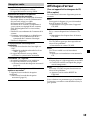
Affichages d’erreur
(Pour cet appareil et les changeurs de CD/
MD en option)
Les indications suivantes clignotent pour un
moment.
Err01
Le magasin à disques n’a pas été introduit
dans le lecteur CD/MD.
t Introduisez le magasin dans l’appareil
CD/MD.
Err02
Il n’y a aucun disque dans le lecteur CD/
MD.
t Introduisez des disques dans le lecteur
CD/MD.
Err03
Un CD/MD ne peut pas être reproduit en
raison d’un problème.
t Introduisez un autre CD/MD.
Err04
Un CD est souillé ou a été introduit à
l’envers.
t Nettoyez ou introduisez correctement le
CD.
Err05
Aucune plage n’a été enregistrée sur un MD.
t Choisissez un MD sur lequel des plages
ont été enregistrées.
Err99
Le lecteur CD/MD ne peut fonctionner en
raison d’un problème.
t Appuyez sur la touche RESET de
l’appareil.
Si ces solutions ne permettent pas d’améliorer
la situation, consultez votre détaillant Sony le
plus proche.
19
Sony Corporation Printed in Korea