1
Use this simple and quick way to watch your favorite
DVD movie and enjoy your Home Cinema experience!
Quick Use
Guide
Front Speaker (Right)
Rear of TV
75 ⍀
T
SPEAKER CONNECTIONS
S-VIDEO
IN
R
x5
75 ⍀
1a
AVIN
AUDIO
OUT
L
R
HELPFUL HINTS
b. • Connect the Surround Right (rear speaker) wires to
the SR (Gray +,- ) speaker terminals.
• Connect the Surround Left (rear speaker) wires to
the SL (Blue +,- ) speaker terminals.
Your TV capability determines which
type of video connection you can make
with the DVD Receiver.
c. • Connect the Subwoofer speaker AUDIO INPUT
jack to the WOOFER LINE OUT jack on the receiver. Use the supplied black cable with RCA connectors on each end.
If your TV only has a single Antenna In
jack, you will need an accessory RF
Modulator to view DVD playback on your
TV. The RF Modulator converts the video from
the Receiver so it can play through the TV’s
Antenna connector.
See your electronics retailer or contact Philips for
details on RF Modulator availability.
If you use an RF modulator, set the TV to channel
3 or 4. Set the RF modulator’s 3/4 switch to the
same channel.
2
AV IN
L
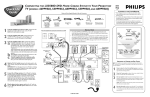
a. • Connect the Front Right (+,-) speaker wires to
the FR (Red +,-) speaker terminals on the Receiver.
• Connect the Front Left (+,-) speaker wires to the
FL (White +,-) speaker terminals.
• Connect the Center speaker wires to the C (Green
+,-) speaker terminals.
VIDEO CONNECTION
Front Speaker (Left)
AUDIO
OUT
o connect your LX3500 Home
Cinema Surround Receiver:
1
Center Speaker
x1
• Connect the yellow VIDEO OUT jack on the
Receiver to the matching VIDEO IN jack on the TV.
2
75
COMPONENT
VIDEO OUT
PrCr
CENTER
LINE OUT
AUDIO OU
OFF
AUDIO IN
FR
ON
S-VIDEO
OUT
SR
+
VIDEO
OUT
+
DIGITAL OUT
-
Y
In order to listen to normal TV broadcast channels
through the Home Cinema Surround Receiver (if your
TV has AUDIO OUT jacks) you must make an audio
connection.
-
R
AM/FM
ANTENNA
WOOPER
LINE OUT
AUX
SPEAKER
OPTICAL
4
CLASS 1
LASER PRODUCT
COAXIAL
Rear Speaker
(Surround Right)
Rear Speaker
(Surround Left)
Back of RF Modulator
(example only)
ANT IN
TO TV
VIDEO
IN
AUDIO
R
IN
L
CH3 CH4
IMPORTANT! The Receiver will use all surround
sound speakers only if the TV broadcast is in a surround
sound format (Dolby Digital, DTS, Dolby Pro Logic). If
the broadcast is in stereo only, some of the surround
speakers will not be active.
NOTE: When listening to TV programs, the Receiver
must be set to the AUX mode for the sound to be heard.
Y
P-SCAN
OPTIONAL TV Audio Connection
• Connect the red and white pair of audio cables from
the TV AUDIO IN (Left & Right) jacks on the
Receiver to the AUDIO OUT (Left & Right) jacks on
the TV.
PbCb
AM
ANTENNA IN
Antenna or Cable TV Signal
1c
To DVD Receiver
S-VIDEO
IN
Y
If your TV has S-Video or
Component (PB PR Y) jacks
you can connect the receiver using
one of these for a higher quality connection. See
your instruction manual for details.
Pr/Cr
Pb/Cb
Subwoofer
Connecting Speaker Cable
Note: You must turn on the
power switch on the front
of Subwoofer when in
operation.
.0
(1247"
mm
)
PU
SH
IN
PUSH
DOWN
Y
a
b
c
Flip the page to start DVD playback and arrange the surround speakers.
1b
Quick Use
Guide
AV IN*
(Do n
on theot use CH.3 or
DVD R TV with you 4
eceiver
r
.)
DVD VIDEO DIGITAL SURROUND SYSTEM
VOLUME
SOURCE
/PA
AY USE
PL
PROGRAM
NEXT
PREV
OPEN/CLOSE
STOP
STANDBY
ON
PROGRESSIVE SCAN
Surround Sound Speaker Setup
Front
Speaker
(Left)
Subwoofer
Center Speaker
Above TV
Front
Speaker
(Right)
Playing a DVD
o play a DVD movie using the DVD Receiver, follow these
steps:
T
VIEWING AREA
Rear Speaker
(Left Surround)
1
Rear Speaker
(Right Surround)
2
PLACING SPEAKERS
1
2
3
4
Place the Front Left and Right speakers at equal distances from the TV. Turn the speakers to an approximate
45 degree angle from the listening position.
Place the Center speaker above (or below) the TV to
localize the center channel sound.
●
Turn on your TV. Select the correct Video In mode (AV1,
VIDEO, etc.) on the TV.
You should see the DVD screen saver on the TV (if no Disc
is in the Receiver).
3
4
Press OPEN•CLOSE on the front of the Receiver to open
the disc tray.
5
Playback may start automatically. If not, press
PLAY•PAUSE on the Receiver or remote.
Place the Subwoofer on the floor near the TV.
6
●
Load your Disc in the tray, with the label facing up.
If your TV has a video in jack, it should
have a special setting or channel for video
input. Usually these channels are between
the lowest and highest channels and may be
called FRONT, A/V IN, or VIDEO. See
your TV instruction book for more specific
instructions.
FRONT
A/V IN
If you only have a single antenna jack on the TV, you
will need an RF modulator to connect the Receiver to your
TV. The RF Modulator converts the Video from the
Receiver so it can play through the TV’s Antenna connector. When using an RF Modulator, you view DVD playback on TV channel 3 or 4 (like a VCR).
VIDEO
Back of RF Modulator
(example only)
ANT IN
TO TV
VIDEO
IN
AUDIO
R
IN
L
CH3 CH4
Antenna or Cable TV Signal
To DVD Receiver
See your electronics retailer or contact Philips for details on RF Modulator
availability.
If the Disc (DVD) is two-sided, make sure the label for the
side you want to play is facing up. Press OPEN•CLOSE
again to close the tray.
If a Disc menu appears, use the remote’s direction arrows
98; : and OK button (or Number buttons) to select features or start playback from a menu. Follow the instructions
in the Disc menu.
See the owner’s manual for additional playback features and
their use.
Place the Surround speakers at normal listening ear level,
facing each other or mounted on the wall.
NOTES:
• To avoid magnetic interference, do not position the Front
speakers too close to your TV.
• If the Rear Surround speakers are installed farther away
from the listening position than the front and center
speakers, it will weaken the Surround effect.
• All speakers should be securely installed to prevent accidents and improve sound quality.
*Selecting Video Input on the TV
Note: Your TV might have only a single connection for an
antenna or VCR. If so, you will need an RF Modulator. See
the reverse page of this guide for details. Set the TV to
channel 3 or 4 if you use an RF Modulator.
A
fter the speaker connections are complete, place all the speakers
in their proper locations.The speaker arrangement is what allows
you to enjoy a Surround Sound experience in your own home.You will
now be able to hear theater sound realism with audio signal separation and pinpoint sound placement.
Press STANDBY ON on the front of the Receiver to
turn on the power.
You also can turn on the Receiver using the DISC button on the
remote control (only if the STANDBY•ON button on the front
of the Receiver is depressed).
Playable Discs
This DVD Receiver will play the following types of Discs: prerecorded Audio CDs, finalized Audio CD-R and
Audio CD-RW discs, Video CDs, Super VCDs, DVDs, and MP3-CDs (CD with MP3 tracks)
Region Codes
1
DVDs must be labeled for ALL regions or for Region 1 in order to play on this Home Cinema system.
You cannot play Discs that are labeled for other regions. If one of these logos appears on your DVD or
its case, it should play on this DVD Receiver.
To stop playing the Disc, press the STOP C button.
To Load Remote Batteries:
• Open and remove compartment door.
• Place batteries in case as marked.
(Aligned +,- properly).
• Replace and close compartment door.