1
NATURAL SOUND
CINEMA DSP 7ch
AV RECEIVER RX–V2092
DIGITAL/
PRO LOGIC
ENHANCED
MOVIE
THEATER
TV
SPORTS
STADIUM
DISCO
ROCK
CONCERT
JAZZ CLUB
CHURCH
CONCERT
HALL
EFFECT
VOLUME
l6
VCR 2
VCR 1
20
DVD/LD
l2
28
8
POWER
A/B/C/D/E
1
2
3
4
5
6
VIDEO AUX
TAPE (MD)
TV/DBS
TUNER
PHONO
CD
4
40
2
60
8
7
0
–dB
l
ON
OFF
0
l
2
3
4
A
PHONES
SPEAKERS
4
5
B
BASS
TONE
EXTENSION BYPASS
l
2
3
5
0
l
2
l
2
3
3
4
4
5
5
0
SOURCE
DVD/LD
l
2
2
3
3
4
4
L5
5R
TAPE (MD)
TV/DBS
TUNER
VCR 1
CD
VCR 2
FM/AM
MAN’L/AUTO FM
TREBLE
BALANCE
SET
MENU
VIDEO AUX
MEMORY
BASS
DELAY/C/R
DOWN TUNING UP
/F/SWFR
AUTO/MAN’L MONO
PHONO
REC OUT
Natural Sound AV Receiver
Récepteur audiovisuel “Son Naturel”
EDIT
TUNING
MODE
S VIDEO
VIDEO
L AUDIO R
VIDEO AUX
OWNER’S MANUAL
MODE D’EMPLOI
SAFETY INSTRUCTIONS
CAUTION
RISK OF ELECTRIC SHOCK
DO NOT OPEN
CAUTION: TO REDUCE THE RISK OF
ELECTRIC SHOCK, DO NOT REMOVE
COVER (OR BACK), NO USER-SERVICEABLE
PARTS INSIDE, REFER SERVICING TO
QUALIFIED SERVICE PERSONNEL.
• Explanation of Graphical Symbols
The lightning flash with arrowhead
symbol, within an equilateral triangle,
is intended to alert you to the
presence of uninsulated “dangerous
voltage” within the product’s
enclosure that may be of sufficient
magnitude to constitute a risk of
electric shock to persons.
The exclamation point within an
equilateral triangle is intended to alert
you to the presence of important
operating and maintenance
(servicing) instructions in the
literature accompanying the
appliance.
WARNING
TO REDUCE THE RISK OF FIRE OR
ELECTRIC SHOCK, DO NOT EXPOSE
THIS UNIT TO RAIN OR MOISTURE.
1 Read Instructions – All the safety
and operating instructions should be read
before the unit is operated.
2 Retain Instructions – The safety and
operating instructions should be retained
for future reference.
3 Heed Warnings – All warnings on the
unit and in the operating instructions
should be adhered to.
4 Follow Instructions – All operating
and other instructions should be followed.
5 Water and Moisture – The unit
should not be used near water – for
example, near a bathtub, washbowl,
kitchen sink, laundry tub, in a wet
basement, or near a swimming pool, etc.
6
Carts and Stands – The unit should
be used only with a cart or stand that is
recommended by the manufacturer.
6A A unit and cart
combination should be
moved with care. Quick
stops, excessive force, and
uneven surfaces may cause
the unit and cart combination to overturn.
7 Wall or Ceiling Mounting – The unit
should be mounted to a wall or ceiling
only as recommended by the
manufacturer.
8 Ventilation – The unit should be
situated so that its location or position
does not interfere with its proper
ventilation. For example, the unit should
not be situated on a bed, sofa, rug, or
similar surface, that may block the
ventilation openings; or placed in a builtin installation, such as a bookcase or
cabinet that may impede the flow of air
through the ventilation openings.
9 Heat – The unit should be situated
away from heat sources such as
radiators, stoves, or other appliances that
produce heat.
10 Power Sources – The unit should be
connected to a power supply only of the
type described in the operating
instructions or as marked on the unit.
11 Power-Cord Protection – Powersupply cords should be routed so that
they are not likely to be walked on or
pinched by items placed upon or against
them, paying particular attention to cords
at plugs, convenience receptacles, and
the point where they exit from the unit.
14 Object and Liquid Entry – Care
should be taken so that objects do not fall
into and liquids are not spilled into the
inside of the unit.
15 Damage Requiring Service – The
unit should be serviced by qualified
service personnel when:
A. The power-supply cord or the plug
has been damaged;
or
B. Objects have fallen, or liquid has
been spilled into the unit;
or
C. The unit has been exposed to rain;
or
D. The unit does not appear to operate
normally or exhibits a marked change in
performance;
or
E. The unit has been dropped, or the
cabinet damaged.
16 Servicing – The user should not
attempt to service the unit beyond those
means described in the operating
instructions. All other servicing should be
referred to qualified service personnel.
12 Cleaning – The unit should be
cleaned only as recommended by the
manufacturer.
17 Power Lines – An outdoor antenna
13 Nonuse Periods – The power cord of
18 Grounding or Polarization –
the unit should be unplugged from the
outlet when left unused for a long period
of time.
should be located away from power lines.
Precautions should be taken so that the
grounding or polarization is not defeated.
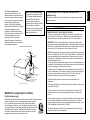
Outdoor Antenna Grounding – If an
outside antenna is connected to this unit,
be sure the antenna system is grounded
so as to provide some protection against
voltage surges and built-up static
charges. Article 810 of the National
Electrical Code, ANSI/NFPA 70, provides
information with regard to proper
grounding of the mast and supporting
structure, grounding of the lead-in wire to
an antenna discharge unit, size of
grounding conductors, location of
antenna discharge unit, connection to
grounding electrodes, and requirements
for the grounding electrode.
Note to CATV system installer:
This reminder is provided to call the
CATV system installer’s attention to
Article 820-40 of the NEC that
provides guidelines for proper
grounding and, in particular, specifies
that the cable ground shall be
connected to the grounding system of
the building, as close to the point of
cable entry as practical.
ANTENNA
LEAD IN
WIRE
GROUND
CLAMP
ANTENNA
DISCHARGE UNIT
(NEC SECTION 810–20)
ELECTRIC
SERVICE
EQUIPMENT
This device is a composite system. The digital device component may not cause
harmful interference.
FCC INFORMATION (for US customers only)
1. IMPORTANT NOTICE : DO NOT MODIFY THIS UNIT!
This product, when installed as indicated in the instructions contained in this
manual, meets FCC requirements. Modifications not expressly approved by
Yamaha may void your authority, granted by the FCC, to use the product.
2. IMPORTANT : When connecting this product to accessories and/or another
product use only high quality shielded cables. Cable/s supplied with this product
MUST be used. Follow all installation instructions. Failure to follow instructions
could void your FCC authorization to use this product in the USA.
EXAMPLE OF ANTENNA GROUNDING
MAST
SPECIAL NOTES FOR FCC COMPOSITE DEVICE (for US
customers only)
GROUNDING CONDUCTORS
(NEC SECTION 810–21)
3. NOTE : This product has been tested and found to comply with the requirements
listed in FCC Regulations, Part 15 for Class “B” digital devices. Compliance with
these requirements provides a reasonable level of assurance that your use of
this product in a residential environment will not result in harmful interference
with other electronic devices.
This equipment generates/uses radio frequencies and, if not installed and used
according to the instructions found in the users manual, may cause interference
harmful to the operation of other electronic devices.
Compliance with FCC regulations does not guarantee that interference will not
occur in all installations. If this product is found to be the source of interference,
which can be determined by turning the unit “OFF” and “ON”, please try to
eliminate the problem by using one of the following measures:
GROUND CLAMPS
POWER SERVICE GROUNDING
ELECTRODE SYSTEM
(NEC ART 250. PART H)
NEC – NATIONAL ELECTRICAL CODE
We Want You Listening For A Lifetime
(for US customers only)
YAMAHA and the Electronic Industries Association’s Consumer Electronics Group
want you to get the most out of your equipment by playing it at a safe
level. One that lets the sound come through loud and clear without
annoying blaring or distortion – and, most importantly, without affecting
your sensitive hearing. Since hearing damage from loud sounds is often
undetectable until it is too late, YAMAHA and the Electronic Industries
Association’s Consumer Electronics Group recommend you to avoid
prolonged exposure from excessive volume levels.
Relocate either this product or the device that is being affected by the
interference.
Utilize power outlets that are on different branch (circuit breaker or fuse) circuits
or install AC line filter/s.
In the case of radio or TV interference, relocate/reorient the antenna. If the
antenna lead-in is 300 ohm ribbon lead, change the lead-in to coaxial type
cable.
If these corrective measures do not produce satisfactory results, please contact
the local retailer authorized to distribute this type of product. If you can not
locate the appropriate retailer, please contact Yamaha Electronics Corp., U.S.A.
6660 Orangethorpe Ave, Buena Park, CA 90620.
The above statements apply ONLY to those products distributed by Yamaha
Corporation of America or its subsidiaries.
English
19 For US customers only:
Congratulations!
You are the proud owner of a Yamaha Digital Sound Field Processing (DSP) System—an
extremely sophisticated audio component. The DSP system takes full advantage of Yamaha’s
undisputed leadership in the field of digital audio processing to bring you a whole new world of
listening experiences. Follow the instructions in this manual carefully when setting up your system,
and the DSP system will sonically transform your room into a wide range of listening
environments—anything from a famous concert hall to a cozy jazz club. In addition, you get
incredible realism from Dolby-Surround encoded video sources using the built-in Dolby Pro Logic
Surround Decoder and Dolby Digital (AC-3) Decoder.
Seven built-in channels of amplification on this model mean that no additional amplifiers are
required to enjoy advanced digital sound field processing.
Rather than tell you about the wonders of digital sound field processing, however, let’s get right
down to the business of setting up the system and trying out its many capabilities. Please read this
operation manual carefully and store it in a safe place for later reference.
PRECAUTIONS
8. USE THIS UNIT PROPERLY
To assure the finest performance, please read this
manual carefully. Keep it in a safe place for future
reference.
Do not use force on switches, controls or connection
wires. When moving the unit, first disconnect the
power plug and the wires connected to other
equipment. Never pull the wires themselves.
2. AVOID EXCESSIVE HEAT, HUMIDITY, DUST
AND VIBRATION
Keep the unit away from locations where it is likely to be
exposed to high temperatures or humidity—such as
near radiators, stoves, etc. Also avoid locations which
are subject to excessive dust accumulation or vibration
which could cause mechanical damage.
3. INSTALL THE UNIT IN WELL-VENTILATED
CONDITION
The openings on the cabinet assure proper ventilation
of the unit. If these openings are obstructed, the
temperature inside the cabinet will rise rapidly.
Therefore, avoid placing objects against these
openings, and install the unit in well-ventilated
condition. Make sure to allow a space of at least 10
cm behind, 20 cm on the both sides and 30 cm above
the top panel of the unit. Otherwise it may not only
damage the unit, but also cause fire.
4. KEEP THE AC POWER PLUG
DISCONNECTED DURING VACATION ETC.
When not planning to use this unit for long periods of
time (ie., vacation, etc.), disconnect the AC power
plug from the wall outlet.
5. AVOID PHYSICAL SHOCKS
Strong physical shocks to the unit can cause damage.
Handle it with care.
6. DO NOT OPEN THE UNIT OR ATTEMPT
REPAIRS OR MODIFICATIONS YOURSELF
9. TAKE CARE OF THE VOLUME CONTROL
SETTING
Voltage Selector (General Model only)
The voltage selector on the rear panel of this unit
must be set for your local mains voltage
BEFORE plugging into the AC mains supply.
Voltages are 110/120/220/240 AC, 50/60 Hz.
Always set the VOLUME control to “– ∞” before
starting the audio source play. Increase the volume
gradually to an appropriate level after playback has
been started.
WARNING
10. HANDLE CABLES CAREFULLY
CAUTION (FOR CANADA MODEL)
TO PREVENT ELECTRIC SHOCK, MATCH WIDE
BLADE OF PLUG TO WIDE SLOT AND FULLY
INSERT.
Always plug and unplug cables—including the AC
cord—by gripping the connector, not the cord.
11. PREVENT LIGHTNING DAMAGE
To prevent lightning damage, disconnect the AC
power plug and disconnect the antenna cable when
there is an electrical storm.
English
1. PLEASE READ THIS MANUAL CAREFULLY
To reduce the risk of fire or electric shock, do not
expose this unit to rain or moisture.
FOR CANADIAN CUSTOMER
THIS CLASS B DIGITAL APPARATUS MEETS ALL
REQUIREMENTS OF THE CANADIAN INTERFERENCECAUSING EQUIPMENT REGULATIONS.
12. CLEAN WITH A SOFT DRY CLOTH
Never use solvents such as benzine or thinner to clean
the unit. Wipe clean with a soft, dry cloth.
The apparatus is not disconnected from the AC
power source as long as it is connected to the wall
outlet, even if the apparatus itself is turned off.
13. USE THIS UNIT WITH THE CORRECT
VOLTAGE
The voltage to be used must be the same as that
specified on this unit. Using this unit with a higher
voltage than that which is specified is dangerous and
may result in a fire or other type of accident causing
damage. YAMAHA will not be held responsible for any
damage resulting from use of this unit with a voltage
other than that which is specified.
This product contains no user-serviceable parts. Refer
all maintenance to qualified Yamaha service personnel.
Opening the unit and/or tampering with the internal
circuitry will make servicing difficult and will endanger
you and your unit.
IMPORTANT!
7. MAKE SURE POWER IS OFF BEFORE
MAKING OR REMOVING CONNECTIONS
Serial No.:
Always turn power OFF prior to connecting or
disconnecting cables. This is important to prevent
damage to the unit itself as well as other connected
equipment.
The serial number is located on the rear of the unit.
Retain this Owner’s Manual in a safe place for future
reference.
Please record the model and serial number of your
unit in the space below.
WARNING
Do not change the IMPEDANCE SELECTOR
switch setting while the power to this unit is
on, otherwise this unit may be damaged.
IF THIS UNIT FAILS TO TURN ON WHEN THE
POWER SWITCH IS PRESSED
The IMPEDANCE SELECTOR switch may not be
set to either end closely. If so, set the switch to
either end closely.
VOLTAGE SELECTOR
Model:
AC OUTLETS
SWITCHED
I20V
60Hz
I00W
MAX.
TOTAL
IMPEDANCE SELECTOR
A
B
CENTER C OR D: 4ΩMIN./ SPEAKER
SET SPEAKER MODE
C D: 4ΩMIN./ SPEAKER
SET SPEAKER MODE
REAR
6ΩMIN./ SPEAKER
MAIN A OR B: 4ΩMIN./ SPEAKER
A B: 8ΩMIN./ SPEAKER
FRONT EFFECT: 6ΩMIN./ SPEAKER
CENTER C OR D: 8ΩMIN./ SPEAKER
SET SPEAKER MODE
C D: 4ΩMIN./ SPEAKER
SET SPEAKER MODE
REAR
8ΩMIN./ SPEAKER
MAIN A OR B: 8ΩMIN./ SPEAKER
A B: 6ΩMIN./ SPEAKER
FRONT EFFECT: 8ΩMIN./ SPEAKER
IMPEDANCE
SELECTOR
(General model)
1
CONTENTS
SAFETY INSTRUCTIONS...........................................Inside the cover
PRECAUTIONS ...................................................................................1
GETTING STARTED ...........................................................................3
FEATURES ..........................................................................................5
SPEAKER SETUP.............................................................................10
CONTROLS & THEIR FUNCTIONS .................................................13
FRONT PANEL................................................................................13
DISPLAY PANEL .............................................................................16
CONNECTIONS.................................................................................18
REAR PANEL PARTS AND THEIR FUNCTIONS..........................18
REAR PANEL SWITCH AND CONTROL SETTINGS...................22
GENERAL INSTRUCTIONS FOR CONNECTIONS .....................22
CONNECTING AUDIO/VIDEO SOURCE EQUIPMENT
TO THIS UNIT .................................................................................23
ANTENNA CONNECTIONS...........................................................27
CONNECTING SPEAKER SYSTEMS...........................................30
SELECTING THE OUTPUT MODES SUITABLE FOR YOUR
SPEAKER SYSTEM .......................................................................35
CONNECTING AND CONTROLLING ROOM 2 EQUIPMENT.......38
CONNECTIONS..............................................................................38
ROOM 2 REMOTE CONTROL UNIT .............................................39
SPEAKER BALANCE ADJUSTMENT ............................................41
ADJUSTMENTS IN THE “SET MENU” MODE................................43
GENERAL OPERATION ...................................................................46
PLAYING A SOURCE .....................................................................46
RECORDING A SOURCE TO AUDIO/VIDEO TAPE
(OR DUBBING FROM A TAPE TO ANOTHER).............................48
2
TUNING OPERATIONS.....................................................................50
AUTOMATIC TUNING .....................................................................50
MANUAL TUNING...........................................................................50
PRESET TUNING ..............................................................................51
MANUAL PRESET TUNING...........................................................51
AUTOMATIC PRESET TUNING .....................................................52
EXCHANGING PRESET STATIONS..............................................53
SELECTING SOUND FIELD PROGRAMS......................................54
CANCELING THE EFFECT SOUND .............................................55
DESCRIPTIONS OF THE SOUND FIELD PROGRAMS ..............56
ADJUSTING DELAY TIME AND EACH SPEAKER OUTPUT
LEVEL..............................................................................................59
SETTING THE SLEEP TIMER...........................................................61
REMOTE CONTROL UNIT ...............................................................62
BASIC OPERATIONS (When the lid is open) ................................62
LEARNING NEW CONTROL FUNCTIONS (When the lid is open)
.........................................................................................................64
USING OPERATION CONTROL KEYS (When the lid is closed)
.........................................................................................................67
MACRO OPERATIONS (When the lid is closed) ...........................70
LEARNING A NEW FUNCTION.....................................................73
MAKING A NEW MACRO...............................................................75
CLEARING LEARNED FUNCTIONS.............................................76
TROUBLESHOOTING ......................................................................78
SPECIFICATIONS .............................................................................81
GETTING STARTED
Installing the Remote Control Unit Batteries
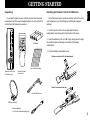
If you haven’t already done so, carefully remove this unit and its
accessories from the box and wrapping material.You should find the
unit itself and the following accessories.
Since the remote control unit will be used for many of this unit’s
control operations, you should begin by installing the supplied
batteries.
English
Unpacking
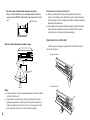
1. Turn the remote control unit over and slide the battery
compartment cover downward in the direction of the arrow.
Batteries
2. Insert the batteries (LR6, AA, UM-3 type), being careful to align
them with the polarity markings on the inside of the battery
compartment.
3. Close the battery compartment cover.
Remote control unit (for the main room)
User function stickers
Remote control (for
the main room)
Room 2 remote
control unit
2
1
3
Room 2 remote control unit
Indoor FM antenna
2
AM loop antenna
Antenna adapter
(U.S.A. and Canada models only)
1
3
3
*
For the remote control unit for the main room only
After you insert batteries (or you exchange batteries with new
ones), press the RESET button before using the remote control
unit.
RESET button
Notes about the Remote Control Unit
● When you notice that remote control operation has become
erratic, or the distance from which the remote control will function
has decreased, it’s time to replace the batteries. Always replace all
batteries at the same time.
● This remote control uses an advanced, highly directional infrared
beam. Be sure to aim the remote control directly at the remote
control sensor on the main unit when operating.
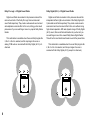
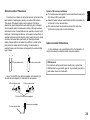
Open/close the control door
Remote control transmitter operation range
When it is not necessary to operate controls inside the control
door, close the door.
To open the door
Remote control
sensor
Within approximately
6 m (19.7 feet)
30°
30°
To close the door
Notes
●
There should be no large obstacles between the remote control
unit and the main unit.
●
If the remote control sensor is directly illuminated by strong
lighting (especially an inverter type of fluorescent lamp etc.), it
might cause the remote control unit to work incorrectly. In this
case, reposition the main unit to avoid direct lighting.
4
FEATURES
In addition, this unit incorporates a Dolby Pro Logic Surround
decoder and Dolby Digital (AC-3) decoder for multi-channel sound
reproduction of Dolby Surround encoded video sources. The
operation of the Dolby Pro Logic Surround or Dolby Digital (AC-3)
decoder can be controlled by selecting a corresponding DSP
program including combined operations of the Yamaha DSP and
the Dolby Pro Logic Surround or Dolby Digital (AC-3) decoder.
Digital Sound Field Processing
What is it that makes live music so good? Today’s advanced
sound reproduction technology lets you get extremely close to the
sound of a live performance, but chances are you’ll still notice
something missing, the acoustic environment of the live concert
hall. Extensive research into the exact nature of the sonic
reflections that create the ambience of a large hall has made it
possible for Yamaha engineers to bring you this same sound in
your own listening room, so you’ll feel all the sound of a live
concert. What’s more, our technicians, armed with sophisticated
measuring equipment, have even made it possible to capture the
acoustics of a variety of actual concert halls, jazz clubs, theaters,
etc. from around the world, to allow you to accurately recreate any
one of these live performance environments, all in your own home.
English
This unit incorporates a sophisticated, multi-program digital
sound field processor. The processor allows you to electronically
expand and change the shape of the audio sound field from both
audio and video sources, creating a theater-like experience in your
listening room. This unit has a total of 10 digital sound field
processor (DSP) modes. You can create an excellent audio sound
field by selecting a suitable sound field (this will, of course, depend
on what you will be listening to), and adding desired adjustments.
5
6
Dolby Pro Logic Surround
Dolby Digital (AC-3)
This unit employs a Dolby Pro Logic Surround decoder similar
to professional Dolby Stereo decoders used in many movie
theaters. By using the Dolby Pro Logic Surround decoder, you can
experience the dramatic realism and impact of Dolby Surround
movie theater sound in your own home. Dolby Pro Logic employs a
four channel five speaker system. The Pro Logic Surround system
divides the input signal into four levels: the left and right main
channels, the center channel (used for dialog), and the rear
surround sound channels (used for sound effects, background
noise, and other ambient noises). The center channel allows
listeners seated in even less-than-ideal positions to hear the dialog
originating from the action on the screen while experiencing good
stereo imaging. Dolby Surround is encoded on the sound track of
pre-recorded video tapes, laser discs, and some TV/cable
broadcasts. When you play a source encoded with Dolby Surround
on this unit, the Dolby Pro Logic Surround decoder decodes the
signal and distributes the surround-sound effects.
The built-in Dolby Digital (AC-3) Decoder leads you into a
totally new sound experiences.
This Dolby Pro Logic Surround Decoder employs a digital
signal processing system. This system improves the stability of
sound at each channel and crosstalk between channels, so that
positioning of sounds around the room is more accurate compared
with conventional analog signal processing systems.
Compared to Dolby Pro Logic that is referred to a “3/1” system
(left front, center, right front and just one surround channel), Dolby
Digital (AC-3) features two surround channels, called stereo or
split surrounds, each offering the same full range fidelity as the
three front channels.
In addition, this unit features a built-in automatic input balance
control. This always assures you the best performance without
manual adjustment.
Sound of wide dynamic range reproduced by the five full range
channels presents listeners much excitement that has never been
experienced before. Precise sound orientation by the discrete
digital sound processing expands realism that the original movie
possesses.
Dolby Digital (AC-3) is a new generation of multi-channel digital
audio technology, or the newest spatial sound processing format
developed for 35 mm film-movies by employing a new kind of low
bit-rate audio coding.
Dolby Digital (AC-3) is a digital surround sound system that
provides completely independent multi-channel audio to
consumers. In multi-channel form, Dolby Digital (AC-3) provides
five full range channels in what is sometimes referred to as a “3/2”
configuration: three front channels (left, center and right), plus two
surround channels. A sixth bass-only effect channel is also
provided for output of LFE (low frequency effect), or low bass
effects that are independent of other channels. This channel is
counted as 0.1, thus giving rise to the term 5.1 channels in total.
Manufactured under license from Dolby Laboratories Licensing
Corporation. “Dolby”, “AC-3”, “Pro Logic”, and the double-D symbol
are trademarks of Dolby Laboratories Licensing Corporation.
Copyright 1992 Dolby Laboratories, Inc. All rights reserved.
The following original functions make the surround-sound effect
of Dolby Digital (AC-3) become the most suitable for your audio
system and the listening conditions.
Dolby Surround + DSP (CINEMA DSP)
Dolby Surround sound system shows its full ability in a large
movie theater, because movie sounds are originally designed to be
reproduced in a large movie theater using many speakers. It is
difficult to create a sound environment similar to that of a movie
theater in your listening room, because the room size, materials of
inside walls, the number of speakers, etc. of your listening room is
much different from those of a movie theater.
English
Laser Disc is a home audio format that could benefit from
Dolby Digital (AC-3). In the near future, Dolby Digital (AC-3) will
also be applied to DBS, CATV, DVD and HDTV. The ongoing
release of Dolby Stereo Digital theatrical films now underway will
provide an immediate source of Dolby Digital (AC-3) encoded
video software.
Yamaha DSP technology made it possible to present you with
nearly the same sound experience as that of a large movie theater
in your listening room by compensating for lack of presence and
dynamics in your listening room with its original digital sound fields
combined with Dolby Surround sound field.
CINEMA DSP 7ch
●
●
●
Dynamic range (sound scale) of source can be changed so
that it will be suitable for the listening conditions.
Output of low bass from any channel can be assigned to
either the MAIN SPEAKERS terminals or SUBWOOFER
terminals to maximize system performance.
Output of LFE can be assigned to either the MAIN
SPEAKERS terminals or SUBWOOFER terminals to
maximize system performance.
The YAMAHA “CINEMA DSP” logo indicates those programs
are created by the combination of Dolby Surround and YAMAHA
DSP technology.
7
Dolby Pro Logic + 2 Digital Sound Fields
Dolby Digital (AC-3) + 3 Digital Sound Fields
Digital sound fields are created on the presence side and the
rear surround side of the Dolby Pro Logic Surround-decoded
sound field respectively. They create a wide acoustic environment
and emphasize surround-effect in the room, letting you feel much
presence as if you are watching a movie in a popular Dolby Stereo
theater.
Digital sound fields are created on the presence side and the
independent left and right surround sides of the Dolby Digital (AC3)-decoded sound field respectively. They create a wide acoustic
environment and much surround effect in the room without losing
high channel separation. With wide dynamic range of Dolby Digital
(AC-3) sound, this sound field combination lets you feel as if you
are watching a movie in the newest Dolby Stereo Digital theater.
This will be the most ideal home theater sound at the present time.
This combination is available when the sound field program No.
2, No. 3 or No. 4 is selected, and the input signal of source is
analog, PCM audio or encoded with the Dolby Digital (AC-3) in 2channels.
8
This combination is available when the sound field program No.
2, No. 3 or No. 4 is selected, and the input signal of source is
encoded with the Dolby Digital (AC-3) (except in 2-channels).
If you connect your video cassette recorder, LD player, video
monitor, etc. to this unit, you can take advantage of this unit’s
capability to display program titles and information for various
setting changes and adjustments on your video monitor’s screen.
This information will be superimposed over the video image.
English
Video superimpose
If there is no video source connected or it is turned off, the
information will be displayed over a blue colored background.
TEST DSP
EFFECT LEVEL
/
FRONT
0dB
NOTE: The program titles and other information are also displayed
on the display panel of this unit.
SPEAKERS
A
DSP
9
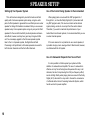
SPEAKER SETUP
Setting Up Your Speaker System
Use of the Center Dialog Speaker Is Recommended
This unit has been designed to provide the best sound field
quality with a full seven-speaker system setup, using two extra
pairs of effect speakers to generate the sound field plus one center
speaker for dialog. We therefore recommend that you use a sevenspeaker setup. A four-speaker system using only one pair of effect
speakers for the sound field will still provide impressive ambience
and effects, however, and may be a good way to begin with this
unit. You can always upgrade to the full seven speaker system
later. In the 4 or 5 speaker system, the Digital Sound Field
Processing is still performed, but the main speakers are used for
both the main channels and the front effect channels.
When playing back a source with the DSP programs No. 1
through No. 4, or when the Dolby Digital (AC-3) is decoded with
any DSP program used, if the source contains center-channel
signals, dialog, vocals etc. are output from the center channel.
Therefore, if you want to maximize the performance of your
Audio/Video home theater system, it is recommended that you use
a center channel speaker.
If for some reason it is not practical to use a center speaker, it
is possible to enjoy movie viewing without it. Best results, however,
are obtained with the full system.
Use of a Subwoofer Expands Your Sound Field
It is also possible to further expand your system with the
addition of a subwoofer and amplifier. The use of a subwoofer is
effective not only for reinforcing bass frequencies from any or all
channels, but also for reproducing the LFE (low frequency effect)
sound with high fidelity when playing back a source with the Dolby
Digital (AC-3) decoded. You may wish to choose the convenience
of a Yamaha Active Servo Processing Subwoofer System, which
has its own built-in power amplifier.
10
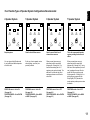
4 Speaker System
5 Speaker System
6 Speaker System
7 Speaker System
Simplest system.
Good for Audio/Video sources.
Good for sound fields from 2channel stereo sources.
This is the recommended speaker
system, providing the best sound
effects.
You can enjoy widely diffused sound
by only adding two additional speaker
units at the rear.
By the use of center speaker, center
sounds (dialog, vocals etc.) are
precisely localized.
When a normal stereo source is
played back with the sound field
programs No. 5 through No. 10, a
sound effect matching that of a 7speaker system can be obtained. The
addition of front left and right effect
speakers produces a more effective
sound field.
When a normal stereo source is
played back with the sound field
programs No. 5 through No. 10, using
both sets of effect speakers (front and
rear), reproduces the most effective
sound field. When using the sound
field programs No. 1 through No. 4 or
when using any program with the
Dolby Digital (AC-3) decoded, the
center speaker provides precise center
localization.
FRONT MIX switch—Set to ON.
(See page 22.)
CENTER SPEAKER—Set to PHNTM.
(See page 35.)
FRONT MIX switch—Set to ON.
(See page 22.)
CENTER SPEAKER—Set to NRML
or WIDE. (See page 35.)
FRONT MIX switch—Set to OFF.
(See page 22.)
CENTER SPEAKER—Set to PHNTM.
(See page 35.)
FRONT MIX switch—Set to OFF.
(See page 22.)
CENTER SPEAKER—Set to NRML
or WIDE. (See page 35.)
English
Four Possible Types of Speaker System Configurations Recommended
11
Speakers and Speaker Placement
Your full seven-speaker system will require three speaker pairs:
the MAIN SPEAKERS (your normal stereo speakers), the FRONT
EFFECT SPEAKERS and the REAR SPEAKERS, plus the
CENTER SPEAKER. You may also be using a subwoofer.
The MAIN SPEAKERS should be high performance models
and have enough power handling capacity to accept the maximum
output of your audio system.
Other speakers do not have to be equal to the MAIN
SPEAKERS. For precise sound localization, however, it is ideal to
use high performance models that can reproduce sounds in full
range for the CENTER SPEAKER and the FRONT EFFECT and
REAR SPEAKERS.
Place the MAIN SPEAKERS in the normal position.
Place the FRONT EFFECT SPEAKERS further apart than the
MAIN SPEAKERS, on either side of and a few feet behind and
above the MAIN SPEAKER pair.
Main speaker
Place the REAR SPEAKERS behind your listening position.
They should be nearly six feet up from the floor.
Subwoofer
Place the CENTER SPEAKER precisely between the two MAIN
SPEAKERS. (To avoid interference, keep the speaker above or
below the television monitor, or use a magnetically shielded
speaker.)
If using a SUBWOOFER, such as a Yamaha Active Servo
Subwoofer System, the position of the speaker is not so critical
because low bass tones are not highly directional.
12
Front effect speaker
Rear speaker
Center speaker
CONTROLS & THEIR FUNCTIONS
1
2 3
NATURAL SOUND
4
5
6
7
8
English
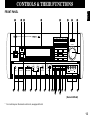
FRONT PANEL
CINEMA DSP 7ch
AV RECEIVER RX–V2092
DIGITAL/
PRO LOGIC
ENHANCED
DISCO
ROCK
CONCERT
MOVIE
THEATER
JAZZ CLUB
TV
SPORTS
STADIUM
CHURCH
CONCERT
HALL
EFFECT
VOLUME
l6
VCR 2
VCR 1
20
DVD/LD
l2
28
8
POWER
A/B/C/D/E
1
2
3
4
5
6
7
VIDEO AUX
TAPE (MD)
TV/DBS
TUNER
PHONO
CD
4
40
2
60
8
0
–dB
l
ON
OFF
0
l
2
3
4
A
PHONES
9
0
BASS
TONE
EXTENSION BYPASS
AB
C
0
l
2
3
4
5
l
2
3
4
5
B
SPEAKERS
l
2
3
DVD/LD
l
2
3
4
4
5
SOURCE
0
2
3
4
L5
5
TAPE (MD)
TV/DBS
TUNER
VCR 1
CD
FM/AM
MAN’L/AUTO FM
TREBLE
D
BALANCE
E
SET
MENU
VIDEO AUX
5R
MEMORY
BASS
DELAY/C/R
DOWN TUNING UP
/F/SWFR
AUTO/MAN’L MONO
PHONO
VCR 2
F
EDIT
TUNING
MODE
REC OUT
G HI K L N O
J
M
S VIDEO
VIDEO
L AUDIO R
VIDEO AUX
P
Q
(General Model)
*
For control keys on the remote control unit, see pages 62 to 64.
13
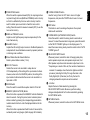
1 POWER Switch
Turns this unit on and off.
* When you press this switch to turn the power on, you will hear
a click and a sound of the built-in fan rotating for a moment.
2 Standby Indicator (Except U.S.A. and Canada models)
While the power of this unit is on, pressing the (SYSTEM
POWER) OFF key on the remote control unit switches this unit
to the standby mode. In this mode, the standby indicator is
illuminated.
3 Remote Control Sensor
Signals from the remote control unit are received here.
4 Display Panel
See pages 16 to 17.
5 DSP Program Selector Buttons
Select a DSP program. When a button is pressed, the name of
selected program lights up on the display panel.
6 Input Selector Buttons
Selects an input source that you want to listen to (and watch).
7 EFFECT Switch
Normally ON, this switch can be turned OFF to disable output
from the center and effect speakers so that the sound becomes
normal 2-channels.
* Even if this switch is off, when the Dolby Digital (AC-3) is
decoded, signals at all channels are distributed to the main
channels and output from the main speakers.
8 Master VOLUME Control
Simultaneously controls volume level at all outputs: front effect,
main, rear effect, center, and subwoofer. (This does not affect
REC OUT level.)
* When the volume is decreased by pressing the MUTE key on
the remote control unit, the indicator on the master VOLUME
control flashes on and off.
9 PHONES Jack
When you listen with headphones, connect the headphones to
the PHONES jack. You can listen to the sound to be output from
the main speakers through headphones.
When listening with headphones privately, set both the
SPEAKERS A and B switches to the OFF position and switch
off the digital sound field processor (so that no DSP program
name is illuminated on the display panel) by pressing the
EFFECT switch.
0 SPEAKERS Switches
Set the switch A or B (or both A and B) for the main speakers
(connected to this unit) you will use to the ON position. Set the
switch for the main speakers you will not use to the OFF
position. Selected main speakers are shown by the lighting of
“SPEAKERS A” and/or “SPEAKERS B” on the display panel.
A A/B/C/D/E Switch
Press this switch to select a desired group (A–E) of preset
stations.
B BASS EXTENSION Switch
When pressed inward (ON), boosts bass frequency response
at the main left and right channels while maintaining overall
tonal balance. If you do not have a subwoofer, the use of this
switch will be effective to reinforce the bass frequencies.
14
When this switch is pressed inward (ON), the input signal does
not pass through the tone (BASS and TREBLE) control circuitry
so that it is unaffected by the tone control circuitry. Use this
switch to obtain pure sound and to check the tone control
setting. Press this switch to release it outward (OFF) to use the
tone control circuitry.
D BASS and TREBLE Controls
Adjust low and high frequency response respectively for the
main channels only.
E BALANCE Control
Adjusts the left and right output volume to the Main Speakers to
compensate for sound imbalance caused by speaker positions
or listening room conditions.
F Preset Station Number Selector Buttons
Select a preset station number (1 to 8).
G REC OUT Selector
Selects the source to be recorded to a tape deck or
VCR independently of the setting of the input selector buttons.
However, when set to the SOURCE position, the setting of the
input selector buttons decides the source to be recorded to a
tape deck or VCR.
H FM/AM Switch
Press this switch to switch the reception band to FM or AM.
I MEMORY (MAN’L/AUTO FM) Button
When this button is pressed, the MEMORY indicator flashes for
about 5 seconds. During this period, select a desired preset
station number by pressing the corresponding preset station
number selector button to enter the displayed station into the
memory.
When this button is pressed and held for about 3 seconds, the
automatic preset tuning begins. (Refer to page 52 for details.)
J TUNING DOWN/UP Button
Used for tuning. Press the “UP” side to tune in to higher
frequencies, and press the “DOWN” side to tune in to lower
frequencies.
English
C TONE BYPASS switch
K EDIT Button
This button is used to exchange the places of two preset
stations with each other.
L TUNING MODE (AUTO/MAN’L MONO) Switch
Press this switch to switch the tuning mode to automatic or
manual. To select the automatic tuning mode, press this switch
so that “AUTO TUNING” lights up on the display panel. To
select the manual tuning mode, press this switch so that “AUTO
TUNING” goes off.
M DELAY/C/R/F/SWFR Switch
Whenever pressed, selects the item of changing delay time,
center speaker output level, rear speaker output level, front
effect speaker output level and subwoofer output level in turn.
* Depending on a mode of this unit, the number of selections is
reduced. For example, when the built-in digital sound field
processor (including the Dolby Pro Logic Decoder or the
Dolby Digital (AC-3) Decoder) is off, only the item for
changing subwoofer output level can be selected.
N –/+ Button
Adjusts the level of item selected by pressing the
DELAY/C/R/F/SWFR switch. Moreover, performs setting
changes and adjustments for functions selected by pressing
the SET MENU switch.
O SET MENU Switch
Whenever pressed, selects functions in the SET MENU mode.
15
P Auxiliary Input Jacks (VIDEO AUX)
Connect an auxiliary video or audio unit such as a camcorder to
these jacks. If the connected video unit has a S video output
terminal, connect it to the S VIDEO jack to obtain a high resolution
picture. The unit connected to these jacks can be selected by the
corresponding input selector button and REC OUT selector.
Q Control Door
See page 4 for how to open and close the control door.
DISPLAY PANEL
1
2
3
4
ROOM 2
AM
FM
PRESET
DIGITAL
kHz
MHz
ENHANCED
70 mm
mS dB
MEMORY
TAPE 2 MONITOR
AUTO TUNING
SPEAKERS SPEAKERS
A
B
ROOM 2 CONTROL
56
7
8
STEREO
PCM
0 20 40 60
9 0
1 Preset Station Number Display
Shows the selected preset station number (1 to 8) and its group
(A to E).
2 ROOM 2 Indicator
Lights up when you switch the input source for the second
room by using the Room 2 remote control unit in the main
room.
16
DIGITAL
DIGITAL
DSP
I00
A
B
PRO LOGIC
SLEEP
C
3 Input Source/Station Frequency Display
Shows the currently selected input source, or the currently
selected station frequency and the band (FM or AM) when this
unit is in the tuner input source mode.
4 Multi-informatiom Display
Shows the currently selected DSP program, or information for
several adjustments or setting changes made on this unit.
When the MEMORY button is pressed, this indicator flashes for
about 5 seconds. During this period, the displayed station can
be programmed to the memory by using the A/B/C/D/E switch
and the preset station number selector buttons.
0 Signal-level Meter
Indicates the signal level of the received station.
If multipath interference is detected, the indication decreases.
A Digital Audio Input Signal Indicators
When digital audio signals not encoded with the Dolby Digital
(AC-3) are input to this unit, “PCM DIGITAL” lights up.
When digital audio signals encoded with the Dolby Digital
(AC-3) are input to this unit, “
DIGITAL” lights up.
6 AUTO TUNING Indicator
Lights up when this unit is in the automatic tuning mode.
7 ROOM 2 CONTROL Indicator
Lights up momentarily when the Room 2 remote control unit is
used in the second room.
8 SPEAKERS A/B Indicators
The indicator A or B which corresponds to the currently
selected main speakers lights up. If both main speakers A or B
are selected, both indicators light up.
9 STEREO Indicator
Lights up when an FM stereo broadcast with sufficient signal
strength is received.
English
5 MEMORY Indicator
B
DIGITAL, DSP and
PRO LOGIC indicators
“
DIGITAL” lights up when the built-in Dolby Digital (AC-3)
Decoder is on and the signals of selected source encoded with
the Dolby Digital (AC-3) is not in 2-channels. “DSP” lights up
when the built-in digital sound field processor is on, and “
PRO LOGIC” lights up when the built-in Dolby Pro Logic
Surround Decoder is on. Depending on the selected DSP
program, both “
DIGITAL” and “DSP”, or both “DSP” and “
PRO LOGIC” will light up.
C SLEEP Indicator
Lights up while the built-in SLEEP timer is functioning.
17
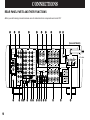
CONNECTIONS
REAR PANEL PARTS AND THEIR FUNCTIONS
Before you start making connections make sure all related electronic components are turned OFF.
1
2
3
4
5
6
7
8
9 0
(General Model)
FREQUENCY
STEP
AUDIO SIGNAL
AUDIO SIGNAL
VIDEO SIGNAL
S VIDEO
VIDEO
OUTPUT
SPEAKERS
CENTER
C
PHONO
FM
DVD/LD
DVD/LD
TV/DBS
TV/DBS
IN
IN
VOLTAGE SELECTOR
FRONT
EFFECT
C
AM
50kHz 9kHz
I00kHz I0kHz
1
D
AM
ANT
VCR 1
VCR 1
OUT
OUT
IN
IN
VCR 2
VCR 2
OUT
OUT
ROOM 2
OUT
MONITOR
OUT
D
C OR D
C D
I20V
60Hz
I00W
MAX.
TOTAL
3
GND
TAPE
PB
TAPE(MD)
4
FM
ANT
REC
OUT
PCM/
DIGITAL IN
(AC–3 DIGITAL IN)
75Ω
UNBAL.
DVD/LD
GND
TV/DBS
COAXIAL
CAUTION
REAR
SEE INSTRUCTION MANUAL
FOR CORRECT SETTING.
A
COUPLER
MAIN CH
PRE
MAIN
OUT
IN
MAIN
IMPEDANCE SELECTOR
A
CENTER C OR D: 4ΩMIN./ SPEAKER
SET SPEAKER MODE
C D: 4ΩMIN./ SPEAKER
SET SPEAKER MODE
REAR
6ΩMIN./ SPEAKER
MAIN A OR B: 4ΩMIN./ SPEAKER
A B: 8ΩMIN./ SPEAKER
FRONT EFFECT: 6ΩMIN./ SPEAKER
OUTPUT
SUB
WOOFER
FRONT
EFFECT
REAR
B
B
CENTER C OR D: 8ΩMIN./ SPEAKER
SET SPEAKER MODE
C D: 4ΩMIN./ SPEAKER
SET SPEAKER MODE
REAR
8ΩMIN./ SPEAKER
MAIN A OR B: 8ΩMIN./ SPEAKER
A B: 6ΩMIN./ SPEAKER
FRONT EFFECT: 8ΩMIN./ SPEAKER
OPTICAL
DVD/LD
IN
OUT
PAL NTSC MONITOR
OUT
REMOTE
CONTROL
A
18
B CD
E
ON OFF —I0dB 0dB
5ch 7ch
FRONT
MAIN
MIX
LEVEL
F G
To
AC outlet
AC OUTLETS
SWITCHED
CENTER
CD
H IJ KL
M
N
O
Connect the included indoor FM antenna to the FM ANT
terminal and connect the included AM loop antenna to the AM
ANT and GND terminals. To heighten safety and reduce
interference, connect the GND terminal to a good earth ground.
For improving reception quality, you can connect outdoor FM
and/or AM antenna to these terminals (See pages 27 to 29 for
details.)
2 FREQUENCY STEP Switch (General Model only)
Because the interstation frequency spacing differs in different
areas, set this switch to the position suitable for the frequency
spacing in your area.
Before sliding this switch, disconnect the AC power plug of this
unit from the AC outlet.
3 AUDIO SIGNAL Connection Jacks (for Audio Source
Equipment)
Connect the inputs and/or outputs of your audio equipment.
4 AUDIO/VIDEO SIGNAL Connection Jacks (for Video Source
Equipment)
Connect the audio and video inputs and/or outputs of your
video equipment. In place of the VIDEO jacks, the S VIDEO
jacks can be used for higher resolution and improved picture
quality if your VCR, monitor, etc. are equipped with S-VIDEO
connectors.
5 CENTER OUTPUT Jacks
Center-channel line outputs. Can be connected to input jack(s)
of one or two external power amplifier(s) to drive the center
speaker(s).
7 Center Speaker Switch
Set to “C + D” when using two center speakers, or to “C OR D”
when using only one center speaker.
English
1 Antenna Connection Terminals
8 FRONT EFFECT SPEAKERS Terminals
When using the built-in front effect-channel amplifier, connect
the front effect speakers here.
9 REAR SPEAKERS Terminals
When using the built-in rear-channel amplifier, connect the rear
speakers here.
0 VOLTAGE SELECTOR (General Model only)
Be sure to set to the line voltage in your area before applying
power. Consult your dealer if unsure of the correct setting.
A GND Terminal
Connects the ground wire of the turntable to produce minimum
hum. In some cases, however, better results may be obtained
with the ground wire disconnected.
B PCM/
DIGITAL IN (COAXIAL and OPTICAL) jacks
Can be connected with audio/video units that have a coaxial or
optical digital output jack. Connect a unit that is connected to
the DVD/LD AUDIO/VIDEO SIGNAL connection jacks to the
DVD/LD COAXIAL or OPTICAL jack.
Connect a unit that is connected to the TV/DBS AUDIO/VIDEO
SIGNAL connection jacks to the TV/DBS COAXIAL jack.
* If, for example, your LD player has an AC-3 RF output jack
and no digital output jack for AC-3 discrete audio signals,
connect the AC-3 RF output jack to the DVD/LD COAXIAL or
OPTICAL jack of this unit by way of an RF demodulator
(separate purchase).
6 CENTER SPEAKERS Terminals
When using the built-in center-channel amplifier, connect one
or two center speakers here.
19
C ROOM 2 OUT Jacks
These jacks output audio and video signals to the equipment in
the second room. The input source selection is made using the
Room 2 remote control unit. Refer to “CONNECTING AND
CONTROLLING ROOM 2 EQUIPMENT” on page 38.
D REMOTE CONTROL IN and OUT Jacks
The IN jack receives the commands from the Room 2 remote
control unit. The OUT jack outputs the commands at the IN jack
from the Room 2 remote control unit. Refer to “CONNECTING
AND CONTROLLING ROOM 2 EQUIPMENT” on page 38.
E Video NTSC/PAL Switch (General Model only)
Set this switch to the position corresponding to the standard
that your video equipment employs.
F FRONT MIX Switch
Set to “OFF (7ch)” when setting up a full 7 or 6 speaker system,
or to “ON (5ch)” when setting up a 5 or 4 speaker system.
G MAIN LEVEL Switch
Normally set to “0 dB”. If desired, you can decrease the mainchannel output level at the MAIN SPEAKERS terminals by 10
dB by setting this switch to “–10 dB”.
H PRE OUT Jacks
Main-channel line output. Connected with jumper bars to MAIN
IN jacks when the built-in amplifier is used. Connected to input
jacks of external stereo power amplifier (MAIN IN or TAPE
PLAY jacks of integrated amplifier or receiver) when using
external amplification.
I MAIN IN Jacks
Line input to built-in main-channel amplifier. Connected with
jumper bars to PRE OUT jacks when the built-in amplifier is
used. Not connected when using an external power amplifier.
J SUBWOOFER Jacks
When using one subwoofer, connect its amplifier input to either
of these jacks. When using two subwoofers, connect their
amplifiers to these jacks respectively.
Frequencies below 90 Hz distributed from the main, center
and/or rear channels are output to these jacks.
Signals of LFE (low frequency effect) generated when the
Dolby Digital (AC-3) is decoded are also output if they are
assigned to these jacks.
K FRONT EFFECT OUTPUT Jacks
Front-channel line output. Can be connected to input jacks of
an external stereo power amplifier driving the front effect
speakers.
20
Rear-channel line output. Can be connected to input jacks of an
external stereo power amplifier driving the rear speakers.
English
L REAR OUTPUT Jacks
M MAIN SPEAKERS Terminals
This unit is equipped with 2 sets of MAIN SPEAKERS terminals
to allow you to connect 2 main speaker systems to this unit.
When using this unit’s built-in main-channel amplifier, connect
the main speakers here. The jumper bars must be plugged in to
connect the MAIN IN jacks to the PRE OUT jacks.
N IMPEDANCE SELECTOR Switch
Select the position whose requirements your speaker system
meets.
O SWITCHED AC OUTLET(S)
You may plug other audio/video units into these sockets as long
as their combined power consumption does not exceed the
specified value shown. “Switched” means that these
components are turned on and off by this unit’s power switch.
21
REAR PANEL SWITCH AND CONTROL
SETTINGS
GENERAL INSTRUCTIONS FOR
CONNECTIONS
There are several switches and controls on the rear panel that
you’ll have to check before operating your system, and it’s a good
idea to do it before you connect cables. Locate the MAIN LEVEL
slide switch (G) and FRONT MIX slide switch (F). Make sure the
MAIN LEVEL switch is set to “0 dB” and the FRONT MIX switch is
set to “OFF” for 7 or 6 speaker driving.
Make sure that you have the left (L) and right (R) channels
correctly connected. That means that jacks marked “L” on this unit
must be connected to jacks marked “L” on other units. Likewise
with the “R” jacks. This is easy if you remember to always use the
red plug for the “R” jacks and the white plug for the “L” jacks.
In a 5 or 4 speaker system, set the FRONT MIX switch to “ON”.
For connections with audio/video source equipment, use RCA
type pin plug cables with the exception described later.
For General model only, set the NTSC/PAL switch (E) to the
position corresponding to the standard which your video
equipment employs and set the FREQUENCY STEP switch (2) to
the position suitable for the frequency spacing in your area.
For the setting of IMPEDANCE SELECTOR switch (N), see
page 34.
For the setting of the center speaker switch (7), see page 32.
22
With speaker connections you must also be sure that the
polarity is correct. For each amplifier and each channel, connect
the plus (+) terminal of the amplifier to the plus terminal of the
speaker, and connect the minus (–) terminal of the amplifier to the
minus terminal of the speaker. To keep track of polarity, use a
speaker cable that has one of the two wires marked by a stripe or
a different color.
English
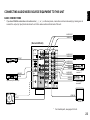
CONNECTING AUDIO/VIDEO SOURCE EQUIPMENT TO THIS UNIT
BASIC CONNECTIONS
*
If you have YAMAHA audio/video unit numbered as 1, 3 or 4 on the rear panel, connections can be made easily by making sure to
connect the output (or input) terminals of each unit to the same-numbered terminals of this unit.
AUDIO OUT
VIDEO OUT
LD (DVD) player
(General Model)
FREQUENCY
STEP
AUDIO SIGNAL
AUDIO SIGNAL
PHONO
FM
TV/DBS
TV/DBS
IN
IN
VCR 1
VCR 1
OUT
OUT
AUDIO OUT
VIDEO OUT
TV/Satellite tuner
AM
ANT
3
GND
TAPE
PB
TAPE(MD)
4
FM
ANT
LINE IN
DVD/LD
1
CD
OUTPUT
LINE OUT
DVD/LD
AM
50kHz 9kHz
I00kHz I0kHz
CD player
VIDEO SIGNAL
S VIDEO
VIDEO
REC
OUT
75Ω
UNBAL.
PCM/
DIGITAL IN
(AC–3 DIGITAL IN)
DVD/LD
GND
IN
IN
VCR 2
VCR 2
OUT
OUT
ROOM 2
OUT
MONITOR
OUT
TV/DBS
COAXIAL
Tape deck (MD recorder)
AUDIO OUT
VIDEO OUT
AUDIO IN
VIDEO IN
AUDIO OUT
VIDEO OUT
AUDIO IN
VIDEO IN
Video cassette
recorder 2
OPTICAL
DVD/LD
IN
OUT
REMOTE
CONTROL
PAL NTSC MONITOR
OUT
ON OFF —I0dB 0dB
5ch 7ch
FRONT
MAIN
MIX
LEVEL
GND
Video cassette
recorder 1
VIDEO IN
OUTPUT
Monitor TV
Turntable
*
For shaded parts, see pages 24 to 26.
23
CONNECTING TO DIGITAL (OPTICAL AND COAXIAL)
JACKS
LD (DVD) player
If your LD (DVD) player, TV/satellite tuner, etc. are equipped
with coaxial or optical digital audio signal output jacks, they can be
connected to this unit’s COAXIAL and/or OPTICAL digital signal
input jacks.
ANALOG OUT
OPTICAL
DIGITAL OUT
COAXIAL
DIGITAL OUT
FREQUENCY
STEP
AUDIO SIGNAL
AUDIO SIGNAL
PHONO
FM
DVD/LD
AM
50kHz 9kHz
I00kHz I0kHz
1
TV/DBS
CD
To make a connection between optical digital audio signal
jacks, remove the cover from each jack, and then connect them by
using a commercially available optical fiber cable that conforms to
EIAJ standards. Other cables might not function correctly.
Even if you connect an audio/video unit to the OPTICAL (or
COAXIAL) jack of this unit, you must keep the unit connected with
the same named analog audio signal jacks of this unit, because
digital signal cannot be recorded by a tape deck or VCR connected
to this unit, and digital signal also will not be output from the
AUDIO SIGNAL ROOM 2 OUT jacks. You can switch the selection
of input signals between “digital” and “analog” easily. (See page 47
for details.)
AM
ANT
IN
VCR 1
3
GND
OUT
TAPE
PB
TAPE(MD)
4
FM
ANT
IN
REC
OUT
75Ω
UNBAL.
VCR 2
PCM/
DIGITAL IN
(AC–3 DIGITAL IN)
DVD/LD
GND
OUT
TV/DBS
ROOM 2
OUT
COAXIAL
OPTICAL
DVD/LD
TV/Satellite tuner
COAXIAL
DIGITAL OUT
IN
OUT
PAL NTSC
REMOTE
CONTROL
ANALOG OUT
NOTE: When connecting an audio/video unit to both of the digital
and analog jacks of this unit, make sure to connect to both jacks of
the same name.
NOTE: Be sure to attach the cover when the OPTICAL jack is not
being used, in order to protect the jack from dust.
24
NOTE: All digital audio signal input jacks are applicable to the
sampling frequency of 32 kHz, 44.1 kHz and 48 kHz.
If your LD player has AC-3 RF signal output jack and no digital
signal output jack for AC-3 discrete audio signals, connect the AC3 RF signal output jack to this unit’s OPTICAL (or COAXIAL) digital
signal input jack by using an RF demodulator (separate purchase).
First, connect the AC-3 RF signal output jack of the LD player to
the AC-3 RF signal input jack of the RF demodulator. Next,
connect the optical (or coaxial) digital signal output jack of the RF
demodulator to the OPTICAL (or COAXIAL) digital signal input jack
of this unit.
This connection is necessary for inputting audio signals encoded
with the Dolby Digital (AC-3) on the LD player to this unit.
NOTES
●
If, for example, you play a CD on the LD player (which can play
a CD also), there is no input to the OPTICAL jack, so the
signals input to the COAXIAL jack take priority. In this case,
switch off the RF demodulator to listen to CD sound surely.
However, if your RF demodulator is the Yamaha model APD-1,
you do not have to switch it off.
●
When you want to play a source encoded with the Dolby Digital
(AC-3) without decoding the Dolby Digital (AC-3), you must
switch off the power to the RF demodulator.
English
Notes on connecting with an LD player equipped
with an AC-3 RF output
LD player
It is also necessary to connect the LD player to this unit’s
analog audio signal input jacks regardless of the AC-3 RF signal
connection, for playing back an LD source with the Dolby Pro Logic
Surround decoded or in normal stereo (or monaural).
ANALOG OUT
AC-3 RF
OUT
FREQUENCY
STEP
COAXIAL
DIGITAL OUT
AUDIO SIGNAL
PHONO
FM
DVD/LD
AM
50kHz 9kHz
I00kHz I0kHz
If desired, you can also connect the digital signal output jack
(for 2-channel audio signals) of the LD player to this unit. If you will
do so, connect it to the COAXIAL digital signal input jack of this
unit, and connect the RF demodulator to the OPTICAL digital
signal input jack of this unit.
By this connection, if the input mode of the DVD/LD source is in
“AUTO”, you can enjoy listening to sounds decoded with the Dolby
Digital (AC-3) when you play a disc encoded with the Dolby Digital
(AC-3) though signals are input to both OPTICAL and COAXIAL
digital signal input jacks of this unit simultaneously (because
signals input to the OPTICAL jack take priority of signals input to
the COAXIAL jack).
See page 47 for details about switching the input mode.
AUDIO SIGNAL
1
TV/DBS
CD
AM
ANT
IN
VCR 1
3
GND
OUT
TAPE
PB
TAPE(MD)
4
FM
ANT
AC-3 RF
IN
COAXIAL
DIGITAL OUT
OPTICAL
DIGITAL OUT
RF demodulator
(YAMAHA APD-1 etc.)
IN
REC
OUT
75Ω
UNBAL.
VCR 2
PCM/
DIGITAL IN
(AC–3 DIGITAL IN)
DVD/LD
GND
OUT
TV/DBS
ROOM 2
OUT
COAXIAL
OPTICAL
DVD/LD
IN
OUT
PAL NTSC
REMOTE
CONTROL
25
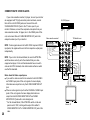
CONNECTING TO S VIDEO JACKS
LD (DVD) player
VIDEO
OUT
S-VIDEO
OUT
Video cassette recorder 1
TV/Satellite tuner
Notes about the Video superimpose
● If you watch a video source that is connected to both S VIDEO
and VIDEO input jacks of this unit, signals of screen display
information are output from only the S VIDEO MONITOR OUT
jack.
● When no video signal is input to either S VIDEO or VIDEO input
jacks of this unit, signals of screen display information are
output from both S VIDEO MONITOR OUT and VIDEO
MONITOR OUT jacks with a color background.
* For the General Model, if the NTSC/PAL switch on the rear
panel is set to “PAL”, nothing will be output from either S
VIDEO MONITOR OUT or VIDEO MONITOR OUT jack in this
case.
26
DVD/LD
DVD/LD
TV/DBS
TV/DBS
OUT
OUT
IN
IN
VCR 2
VCR 2
OUT
OUT
ROOM 2
OUT
MONITOR
OUT
S-VIDEO OUT
IN
VCR 1
VIDEO
OUT
VIDEO OUT
IN
VCR 1
S-VIDEO IN
S-VIDEO
OUT
VIDEO IN
S-VIDEO
OUT
VIDEO
OUT
VIDEO SIGNAL
S VIDEO
VIDEO
PAL NTSC MONITOR
OUT
S-VIDEO IN
NOTE: If your unit is the General Model, be sure the NTSC/PAL
switch has been correctly set to the standard that your video
equipment employs. U.S.A. and Canada models have no switch
and use the NTSC standard, while other models without a switch
use the PAL standard.
VIDEO IN
NOTE: If video signals are sent to both S VIDEO input and VIDEO
input jacks, the signals will be sent to their respective output jacks
independently.
S-VIDEO IN
AUDIO SIGNAL
VIDEO IN
If your video cassette recorder, LD player, etc. and your monitor
are equipped with “S” (high-resolution) video terminals, connect
them to this unit’s S VIDEO jacks, and connect this unit’s
S VIDEO MONITOR OUT jack to the “S” video input of your
monitor. Otherwise, connect the composite video jacks from your
video cassette recorder, LD player, etc. to the VIDEO jacks of this
unit, and connect this unit’s VIDEO MONITOR OUT jack to the
composite video input of your monitor.
Monitor TV
Video cassette recorder 2
●
●
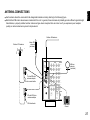
Each antenna should be connected to the designated terminals correctly, referring to the following figure.
Both AM and FM indoor antennas are included with this unit. In general, these antennas will probably provide sufficient signal strength.
Nevertheless, a properly installed outdoor antenna will give clearer reception than an indoor one. If you experience poor reception
quality, an outdoor antenna may result in improvement.
English
ANTENNA CONNECTIONS
Outdoor AM antenna
Outdoor FM antenna
Indoor FM
antenna
(included)
FREQUENCY
STEP
AUDIO SIGNAL
AUDIO SIGNAL
PHONO
FM
1
TV/DBS
CD
AM
ANT
75-ohm/300-ohm
antenna adapter
75-ohm coaxial cable
AM loop
antenna
(included)
DVD/LD
AM
50kHz 9kHz
I00kHz I0kHz
IN
VCR 1
3
GND
OUT
TAPE
PB
TAPE(MD)
4
FM
ANT
IN
REC
OUT
75Ω
UNBAL.
VCR 2
PCM/
DIGITAL IN
(AC–3 DIGITAL IN)
DVD/LD
GND
OUT
TV/DBS
ROOM 2
OUT
COAXIAL
OPTICAL
75-ohm/300-ohm
antenna adapter
DVD/LD
IN
OUT
PAL NTSC
REMOTE
CONTROL
300-ohm feeder
Ground
27
Connecting the indoor FM antenna
4. Attach the loop antenna to the antenna stand.
Connect the included indoor antenna to the 75Ω UNBAL. FM
ANT terminal.
NOTE
If you connect an outdoor FM antenna to this unit, do not connect
the indoor FM antenna to this unit.
Connecting the AM loop antenna
Loop antenna
Antenna stand
5. Tune to an AM station and then position the loop antenna for
best reception. Orient the AM loop antenna so that the best
reception is obtained. Try other stations, and find the position that
gives the best overall reception.
1. Press the tab and unlock the terminal hole.
2. Connect the AM loop antenna lead wires to the AM ANT and
GND terminals.
3. Return the tab back to the original position to lock the lead
wires. Lightly pull on the lead wires to confirm a good connection.
1
3
2
28
NOTES
● The AM loop antenna should be placed apart from the main
unit. The antenna may be hung on a wall.
● The AM loop antenna should be kept connected, even if an
outdoor AM antenna is connected to this unit.
Consult with your dealer or authorized service center about the
best method of selecting and erecting an outdoor FM antenna.
The choice of the feeder cable is also important. Flat ribbonshaped twin-lead cable performs well electrically, and is cheaper
and somewhat easier to handle when routing it through windows
and around rooms. Coaxial cable is more expensive, does a much
better job of minimizing interference, is less prone to the effects of
weather and close-by metal objects, and is nearly as good a signal
conductor as feeder cable, particularly for foam-type coaxial
cables. Coaxial cable is somewhat more difficult to install at the
point where the cable enters the building. If coaxial cable is
selected, make sure the antenna is designed to be used with that
type of cable.
300-ohm feeder cable
75-ohm coaxial cable
Notes for FM antenna installation
● To minimize automobile ignition noise, locate the antenna as far
from heavy traffic as possible.
● Keep the feeder cable or coaxial cable as short as possible. Do
not bundle or roll up excess cable.
● The antenna should be at least two meters (6.6 feet) from
reinforced concrete walls or metal structures.
English
Optional outdoor FM antenna
Optional outdoor AM antenna
In steel buildings or at a great distance from the transmitter, it
may be necessary to install an outside long wire antenna.
GND terminal
For maximum safety and minimum interference, connect the
GND terminal to a good earth ground. A good earth ground is a
metal stake driven into moist earth.
Use a 75-ohm/300-ohm antenna adapter (not included) or a
75-ohm antenna adapter (not included) for connections.
300-ohm feeder cable
75-ohm coaxial cable
75-ohm/300-ohm antenna adapter
75-ohm coaxial cable
75-ohm antenna adapter
29
CONNECTING SPEAKER SYSTEMS
Connect the SPEAKERS terminals to your speakers with wire
of the proper gauge, cut as short as possible. If the connections
are faulty, no sound will be heard from the speakers. Make sure
that the polarity of the speaker wires is correct, that is, + and –
markings are observed. If these wires are reversed, the sound will
be unnatural and will lack bass. Do not let the bare speaker wires
touch each other or any other metal part as this could damage this
unit and/or speakers.
NOTE: Use speakers with the specified impedance shown on the
rear of this unit.
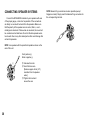
Red: positive (+)
Black: negative (–)
2
1
3
30
➀ Unscrew the knob.
➁ Insert the bare wire.
[Remove approx. 5mm (1/4”)
insulation from the speaker
wires.]
➂ Tighten the knob and
secure the wire.
NOTE: Banana Plug connections are also possible (except
Singapore model). Simply insert the Banana Plug connector into
the corresponding terminal.
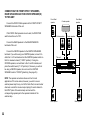
One or two sets of MAIN speakers can be connected to this
unit.
English
CONNECTING THE MAIN SPEAKERS TO THIS UNIT
Main speaker A
If you use two sets of MAIN speakers, connect one set to the
MAIN SPEAKERS A terminals, and connect another set to the B
terminals. If you use only one set of MAIN speakers, connect them
to either the MAIN SPEAKERS A or B terminals. Make sure that
the jumper bars between the PRE OUT and MAIN IN jacks on the
rear panel are in place.
Main speaker A
Power amplifier
INPUT
It is also possible to use an external power amplifier if more
power is desired. In this case, remove the jumper bars and connect
the PRE OUT jacks to the INPUT jacks of a stereo power amplifier
with a stereo pin cable—making sure to connect the left and right
channels correctly. Connect the MAIN speakers to the speaker
output terminals of the power amplifier.
PRE OUT
This unit
Set the SPEAKERS switch A or B (or both A and B) on the
front panel corresponding to the main speakers you will use to the
ON position. Set the switch for the main speakers you will not use
to the OFF position. Selected main speakers are shown by the
lighting of “SPEAKERS A” and/or “SPEAKERS B” on the display
panel.
Main speaker B
Main speaker B
31
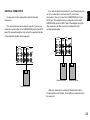
CONNECTING THE FRONT EFFECT SPEAKERS,
REAR SPEAKERS AND THE CENTER SPEAKER(S)
TO THIS UNIT
Connect the FRONT effect speakers to the FRONT EFFECT
SPEAKERS terminals of this unit.
If the FRONT effect speakers are not used, the FRONT MIX
switch should be set to “ON”.
Front effect
speaker
L
Front effect
speaker
Center speaker
Center speaker
Center speaker
R
Connect the REAR speakers to the REAR SPEAKERS
terminals of this unit.
Connect the CENTER speaker to the CENTER SPEAKERS
terminals. If you will be using one CENTER speaker, connect it to
either the C or D terminals and set the CENTER speaker switch so
that it is released outward (“C OR D” position). If using two
CENTER speakers, connect them to the C and D terminals, and
press the switch inward (“C +D” position). If, however, you will not
be using a CENTER speaker, be sure to set the CENTER
SPEAKER mode to “PHNTM” (phantom). (See page 35.)
This unit
NOTE: The speaker connections above are fine for most
applications. If for some reason, however, you wish to use an
external power amp for any or all of the front effect, rear and center
channels, connect the line level output jack(s) for each channel to
the INPUT jacks of the external amp and connect the
corresponding speaker pair to the speaker terminals of the
external amp.
L
Rear speaker
32
R
Rear speaker
You may wish to add a subwoofer to reinforce the bass
frequencies.
This unit provides line-level subwoofer outputs. If you use one
subwoofer, connect either of the SUBWOOFER jacks to the INPUT
jack of the subwoofer amplifier, and connect the speaker terminals
of the subwoofer amplifier to the subwoofer.
If you wish to obtain more presence in your listening room, the
use of two subwoofers is recommended. To connect two
subwoofers to this unit, connect one SUBWOOFER jack to the
INPUT jack of the amplifier driving a subwoofer, and the other
SUBWOOFER jack to the INPUT jack of the amplifier driving the
other subwoofer, and then connect each subwoofer to the
corresponding amplifier.
COUPLER
MAIN CH
PRE
MAIN
OUT
IN
COUPLER
MAIN CH
PRE
MAIN
OUT
IN
English
ADDING A SUBWOOFER
OUTPUT
SUB
WOOFER
FRONT
EFFECT
REAR
OUTPUT
SUB
WOOFER
FRONT
EFFECT
REAR
Subwoofer system
Subwoofer system
Subwoofer system
With some subwoofers, including the Yamaha Active Servo
Processing Subwoofer System, the amplifier and subwoofer are in
the same unit.
33
Switching the IMPEDANCE SELECTOR switch on the
rear panel
Select the position whose requirements your speaker system
meets. Be sure to switch this only when the power of this unit is
turned off.
VOLTAGE SELECTOR
AC OUTLETS
SWITCHED
I20V
60Hz
I00W
MAX.
TOTAL
IMPEDANCE SELECTOR
A
B
CENTER C OR D: 4ΩMIN./ SPEAKER
SET SPEAKER MODE
C D: 4ΩMIN./ SPEAKER
SET SPEAKER MODE
REAR
6ΩMIN./ SPEAKER
MAIN A OR B: 4ΩMIN./ SPEAKER
A B: 8ΩMIN./ SPEAKER
FRONT EFFECT: 6ΩMIN./ SPEAKER
CENTER C OR D: 8ΩMIN./ SPEAKER
SET SPEAKER MODE
C D: 4ΩMIN./ SPEAKER
SET SPEAKER MODE
REAR
8ΩMIN./ SPEAKER
MAIN A OR B: 8ΩMIN./ SPEAKER
A B: 6ΩMIN./ SPEAKER
FRONT EFFECT: 8ΩMIN./ SPEAKER
IMPEDANCE
SELECTOR
WARNING
Do not change the IMPEDANCE SELECTOR switch setting
while the power to this unit is on, otherwise this unit may be
damaged.
IF THIS UNIT FAILS TO TURN ON WHEN THE POWER
SWITCH IS PRESSED
The IMPEDANCE SELECTOR switch may not be set to either
end closely. If so, set the switch to either end closely.
(General model)
(Upper position)
Center: If you use one center speaker, the impedance of the
speaker must be 4Ω or higher.
If you use two center speakers, the impedance of each
speaker must be 4Ω or higher.
Center: If you use one center speaker, the impedance of the
speaker must be 8Ω or higher.
If you use two center speakers, the impedance of each
speaker must be 4Ω or higher.
Rear:
(U.S.A. and Canada models:)
The impedance of each speaker must be 4Ω or higher.
Rear:
The impedance of each speaker must be 8Ω or higher.
(Australia, Singapore and General models:)
The impedance of each speaker must be 6Ω or higher.
Main:
If you use one pair of main speakers, the impedance of
each speaker must be 8Ω or higher.
Main:
34
(Lower position)
If you use one pair of main speakers, the impedance of
each speaker must be 4Ω or higher.
If you use two pairs of main speakers, the impedance of
each speaker must be 8Ω or higher.
Front effect:
The impedance of each speaker must be 6Ω or higher.
(Except Canada model:)
If you use two pairs of main speakers, the impedance of
each speaker must be 16Ω or higher.
Front effect:
The impedance of each speaker must be 8Ω or higher.
This unit provides you the following four functions to determine the method of distributing output signals to speakers suitable for your audio
system. When speaker connections are all completed, select a proper position on each function to make the best use of your speaker
system.
English
SELECTING THE OUTPUT MODES SUITABLE FOR YOUR SPEAKER SYSTEM
4. CENTER SPEAKER
5. REAR SPEAKER
6. MAIN SPEAKER
7. LFE/BASS OUT
DESCRIPTION OF EACH FUNCTION
4. CENTER SPEAKER
5. REAR SPEAKER
Choices: NRML/WIDE/PHNTM
Preset position: NRML
Choices: SMALL/LARGE
Preset position: SMALL
NRML (Normal):
Select this position when you use a center speaker that is
smaller than the main speakers. In this position, low bass
signals (below 90 Hz) at the center channel are output
from the main speakers (or the SUBWOOFER jacks if the
SMALL position is selected on “6. MAIN SPEAKER” and
the SWFR position is selected on “7. LFE/BASS OUT”).
WIDE: Select this position when your center speaker is
approximately the same size as the main speakers.
PHNTM (Phantom):
Select this position when you do not have a center
speaker. The center channel sound will be output from the
left and right main speakers.
SMALL:
Select this position if your rear speakers do not have a
high ability for bass reproduction.
In this position, low bass signals (below 90 Hz) at the rear
channels are output from the SUBWOOFER jacks (or the
main speakers if the MAIN position is selected on “7.
LFE/BASS OUT”).
LARGE:
Select this position if your rear speakers have a high ability
for bass reproduction, or a subwoofer is connected to the
rear speaker in parallel.
In this position, full range signals are output from the rear
speakers.
35
6. MAIN SPEAKER
7. LFE/BASS OUT
Choices: SMALL/LARGE
Preset position: LARGE
Choices: MAIN/SWFR/BOTH
Preset position: SWFR
SMALL:
Select this position if your main speakers do not have a
high ability for bass reproduction. However, if your system
does not include a subwoofer, do not select this position.
In this position, low bass signals (below 90 Hz) at the main
channels are output from the SUBWOOFER jacks (if the
SWFR or BOTH position is selected on “7. LFE/BASS
OUT”).
LARGE:
Select this position if your main speakers have a high
ability for bass reproduction.
In this position, full range signals present at the main
channels are output from the main speakers.
36
MAIN: Select this position if your system does not include a
subwoofer.
In this position, full range signals present at the main
channels, signals from the LFE channel and other low
bass signals that are selected on “4. CENTER SPEAKER”
to “6. MAIN SPEAKER” to be distributed from other
channels are output from the main speakers.
SWFR/BOTH:
Select either the SWFR or BOTH position if your system
includes a subwoofer.
In either position, signals at LFE channel and other low
bass signals that are selected on “4. CENTER SPEAKER”
to “6. MAIN SPEAKER” to be distributed from other
channels are output from the SUBWOOFER jacks.
When the LARGE position is selected on “6. MAIN
SPEAKER”, in the SWFR position, no signal is distributed
from the main channels to the SUBWOOFER jacks,
however in the BOTH position, low bass signals from the
main channels are output to both of the main speakers and
the SUBWOOFER jacks.
Operations should be made watching information on this unit’s
display panel or the monitor screen.
3. Press “+” or “–” once or more so that the arrow points the
position you will select.
Remote control
Front panel
1. Turn the power of this unit on. (If you want to display
information on the monitor, turn the power of the monitor on.)
English
METHOD OF CHANGING SELECTIONS
or
Front panel
4. Press once or more until the title of another function on which
you will change the selection appears on the display.
POWER
Remote control
Front panel
If you will use the remote control unit, set the TIME/LEVEL·SET
MENU switch to the SET MENU position on the remote control
unit.
NOTE: Be sure to use the remote control unit with the lid open.
Remote control
or
5. Press “+” or “–” once or more so that the arrow points the
position you will select.
TIME/LEVEL
Remote control
Front panel
SET MENU
2. Press once or more until “4. CENTER SPEAKER” appears on
the display.
or
Remote control
Front panel
SET
MENU
SET
MENU
or
6. Repeat step 4 and 5 to change selections on other functions in
the same way.
37
CONNECTING AND CONTROLLING ROOM 2 EQUIPMENT
CONNECTIONS
To use the multi-room functions of this unit, you need the
following additional optional products:
● An infrared signal receiver for the second room
● An infrared emitter in the main room
This emitter transmits the infrared signals from the Room 2
remote control unit in the second room to the other components
in the main room (for example, CD player or LD player).
● An amplifier and speakers for the second room
● A video monitor for the second room
NOTE
Since there are so many ways to connect and use this unit in a
multi-room installation, we recommend that you consult with a
custom installation specialist for the Room 2 connections which
will best meet your requirements.
A Sample of system configuration and connections
Main Room
This unit
LD player etc.
*
1
REMOTE CONTROL OUT
AUDIO SIGNAL ROOM 2 OUT
VIDEO SIGNAL ROOM 2 OUT
REMOTE CONTROL IN
You can make up a multi-room audio/video system with this
unit. In this system, this unit and Yamaha audio/video units
connected to this unit in the main room can be controlled by using
the provided Room 2 remote control unit from the second room so
that this unit sends audio and video signals (different from ones
selected in the main room) to the amplifier, monitor TV, etc. in the
second room.
Infrared emitter
Second Room
Amplifier
Monitor TV
1
Yamaha models are able to connect directly to this unit
* :Some
via the REMOTE CONTROL OUT jacks. If you own these
products, the use of an infrared emitter may not be necessary.
Room 2 remote
control unit
Infrared signal receiver
38
This remote control unit makes input source selections on this
unit and controls Yamaha remote control-compatible CD player,
tape deck, LD player and/or tuner connected to this unit for the
second room independent of the input source selections for the
main room.
English
ROOM 2 REMOTE CONTROL UNIT
NAMES OF KEYS AND THEIR FUNCTIONS
1 LD player keys
Controls LD player.
ROOM 2 REMOTE CONTROLLER
1
– CHAPTER +
V–AUX
DIR A
VCR 2
LD
STOP PAUSE/STOP PLAY
VCR 1
A/B
–
PRESET
+
A/B/C/D/E
DISC
PLAY
4
TAPE
TUNER
7
CD
PHONO
OFF
5
2 Tape deck keys
PLAY
DIR B
2
3
TV/DBS DVD/LD
POWER ON VOLUME ROOM 2
6
Controls tape deck.
* DIR A, B and A/B are applicable only to double cassette tape
deck.
* For a single cassette deck with automatic reverse function,
pressing DIR A will reverse the direction of tape running.
3 Tuner keys
Controls tuner.
+: Selects higher preset station number.
–: Selects lower preset station number.
A/B/C/D/E: Selects the group (A – E) of preset station numbers.
4 CD player keys
Controls compact disc player.
* DISC is applicable only to compact disc changer.
39
5 POWER ON and OFF keys
(U.S.A. and Canada models)
Pressing the POWER ON key turns the power of this unit on and
pressing the OFF key turns the power off.
(Except U.S.A. and Canada models)
While the power is on, pressing the OFF key switches the unit from
the power-on mode to the standby mode, and pressing the
POWER ON key switches the unit from the standby mode to the
power-on mode. (In the standby mode, the standby indicator on the
front panel is illuminated.)
6 VOLUME ROOM 2 + (up) and – (down) keys
Increase or decrease the output level of signals sent to the
amplifier in the second room only.
7 Input selector keys
Selects input source.
Note on using the remote control units
If you use the Room 2 remote control unit (for the second room) in
the main room, the input selector keys of this remote control unit
affect the settings in the second room, not the main room. The
other keys on the remote control unit work the same in both the
main room and the second room.
40
Display panel information
1
2
ROOM 2
ROOM 2 CONTROL
SPEAKERS
A
1 Lights up when you switch the input source for the second
room by using the Room 2 remote control unit in the main
room. The name of selected source also lights up.
2 Lights up momentarily when the Room 2 remote control unit is
used in the second room.
CAUTION
In some cases, adjustments made using the Room 2 remote
control unit may not be evident on this unit. For example, if both
the main room and second room are set to the tuner, it is possible
for the person in the second room to change the station. This may
be a problem, especially when you are taping a source without
directly monitoring it.