1
DVD-S830.book
11 ページ 2002年10月4日 金曜日 午前11時7分
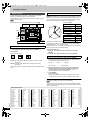
Using menus to play MP3 discs and CD text
[MP3]
This unit can play MP3 files recorded on CD-R/RW with a computer. Files
are treated as tracks and folders are treated as groups.
[CD] (CD text)
This unit reads and displays the information on CD text discs. You can
display disc titles, artist names and track titles.
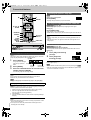
1
Press [TOP MENU].
2
Press [3,4] to
select the track
and press
[ENTER].
Play continues to the
last track in the last
group.
“0” indicates the track
currently playing.
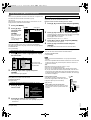
Finding a track to play
Enter part of a track title to make a search. Although the characters are
upper case, the unit also searches for lower case.
Example: search for tracks including the word “LOVE”.
1
Press [3, 4] to select “Find” and press [ENTER].
SELECT
NUMBER
Group name
e.g. MP3
MENU
G
1
T
1
Total 223
0
9
SELECT
NUMBER
SELECT
ENTER RETURN
No
1
2
3
4
5
6
7
8
9
10
Group: 001 My favorite
Tree
001 Both Ends Freezing
002 Lady Starfish
003 Life on Jupiter
004 Metal Glue
005 Paint It Yellow
006 Pyjamamama
007 Shrimps from Mars
008 Starperson
009 Velvet Cuppermine
010 Ziggy Starfish
Prev
Find
Next
SELECT
ENTER RETURN
2
6
7
8
9
10
Another Pineapple
Board The Golden Ship
Fall In The Frozen Season
Violet Sky
Pink Island
Prev A
Find Next
Find
Press [3, 4] to select “L” and press [ENTER].
Characters change in alphanumeric order each time you press [3].
≥Press [:, 9] to skip between A, E, I, O and U.
≥Press [2] to erase a character.
≥Repeat this step to enter “O”, “V”, and “E”.
3
Press [1] to select “Find” and press [ENTER].
The search results screen appears.
To show other pages
Press [3, 4, 2, 1] to select “Prev” or “Next” and press [ENTER].
After listing all the tracks in one group, the list for the next group appears.
To exit the file list
Press [TOP MENU].
Press [1
1] while a track is highlighted to display
the tree screen.
MENU
G
8
T
14
Total 123
0
9
SELECT
NUMBER
SELECT
ENTER RETURN
2
G 7/16
MP3 music
001 My favorite
001 Brazilian pops
002 Chinese pops
003 Czech pops
004 Hungarian pops
005 Liner notes
006 Japanese pops
007 Mexican pops
008 Philippine pops
009 Swedish pops
001 Momoko
002 Standard number
001 Piano solo
002 Vocal
You cannot select
groups that contain no
compatible files.
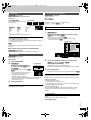
Press [3,4] to select a group and press
[ENTER].
To return to the list screen
Press [RETURN].
To show the text information for a track [CD] (CD text)
Contents
MENU
T 10 /14
Disc
Title/Artist
SHIPWRECKED
ORIGINAL SOUNDTRACK
SELECT
≥Discs must conform to ISO9660 level 1 or 2 (except for extended
formats).
≥This unit is compatible with multi-session but if there are a lot of sessions
it takes more time for play to start. Keep the number of sessions to a
minimum to avoid this.
[MP3]
≥MP3 files must have the extension “.MP3” or “.mp3”.
≥This unit is not compatible with ID3 tags.
≥This unit is not compatible with files with a sampling rate of 32 kHz.
≥If you play a MP3 track that includes still picture data, it will take some
time before the music itself starts playing and the elapsed time will not
be displayed during this time. Even after the track starts, the correct play
time will not be displayed.
Naming folders and files
At the time of recording, prefix folder and file
names with 3-digit numbers in the order you want
to play them (this may not work at times).
For your reference
Press [2, 1] to jump layers in the tree screen.
To return to the file list
Press [RETURN].
Press [3, 4] to
select a track.
Press [4] to show other tracks if there are more than fifteen.
[Note]
Tree
The file list for the group appears.
1
Press [3, 4] to select the track and press
[ENTER].
≥To search for the first word in a title, erase the asterisk (¢) first.
≥You can also enter numbers with the numbered buttons.
Using the tree screen to find a group [MP3]
1
4
Track 10
≥[CD] (CD text)
When making your own CD text discs
The unit plays the tracks in the order you record
them so you do not have to prefix the titles with
numbers.
e.g. MP3
root
001
001
001.mp3
002.mp3
003.mp3
002
003
001.mp3
002.mp3
003.mp3
004.mp3
001.mp3
002.mp3
003.mp3
Title/Artist
Pink Island
Long John Platinum
ENTER RETURN
2
Press [1] to show the text information.
To return to the list screen
Press [RETURN].
RQT6797
≥Press [2, 1] to select other tracks. Press [ENTER] to play tracks
selected here.
11