1
Getting Started
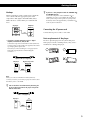
Hookups
z
When connecting an audio cord, be sure to match the
color-coded cord to the appropriate jacks on the
components: Red (right) to Red and White (left) to
White. Be sure to connect firmly to avoid hum and
noise.
L
L
R
R
INPUT
Connecting the AC power cord
CD
L
IN
Connect the component via the CONTROL A1 (or
CONTROL A1) jack. You can simplify the operations of
audio systems composed of separate Sony components.
For details, refer to the supplementary “CONTROL A1
Control System” instructions.
Amplifier
CD player
OUT
2ND CD
If you have a Sony component with the CONTROL A1
(or CONTROL A1) jack
Connect the AC power cord to a wall outlet.
R
ANALOG
Note on placement of the player
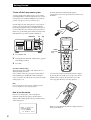
• If you have a digital component such as a digital
amplifier, D/A converter, DAT, or MD
Connect the component via the DIGITAL OUT (OPTICAL)
connector using an optical cable (not supplied). Take off the
cap and plug in the optical cable.
Note that you cannot use fading in or out (page 26) and
Time Fade (page 26) functions when making this
connection.
Be sure to place the player in a flat, horizontal place.
If the player is left in a slanted position, it may cause a
malfunction or damage the player.
Optical cable (not supplied)
CD player
Digital component
DIGITAL
INPUT
OPTICAL
OPTICAL
OUT
DIGITAL
Note
When you connect via the DIGITAL OUT (OPTICAL)
connector, noise may occur when you play CD software other
than music, such as a CD-ROM.
z
You can check the disc information by observing the
TV screen when you connect the player and your TV
with the video cable.
Video cord (supplied)
CD player
TV
INPUT
VIDEO
OUT
MONITOR
5