1
Shutter release
button
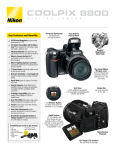
Key Features and Benefits
4.0 Effective Megapixels for
photo-quality prints up to 11 x 17
8.3x Optical Zoom-Nikkor ED
36-300mm Lens (35mm equivalent)
for a full range of incredibly sharp,
clear images from wide angle to
telephoto to close-up
15 Scene Modes automatically adjust
controls for great pictures instantly
Record
voice memo
Scene Assist guides you to take better
pictures in Portrait, Landscape, Sports
and Night Portrait modes
Actual size
Movie Mode allows the capture of live
action with sound
4.2”W x 2.6”H 2.2”D (only 9 oz.)
Built-in Flash
Close-up Shooting from less than
1/2 inch away
Electronic Viewfinder (EVF)
and Bright LCD Monitor provide
enhanced frame coverage and easy
viewing
AF Assist ensures accurate focus when
shooting in dark lighting situations
PictBridge Compatibility allows
direct printing to any PictBridge or USB
direct enabled printer
Everything you need to get started:
• Wrist Strap
• USB Cable
• Audio Video Cable
• EN-EL1 Li-ion Rechargeable Battery
• MH-53 Battery Charger
• PictureProject CD-ROM
Macro Lens
as close as 1/2 inch
8.3x Optical Zoom-Nikkor lens
for sharp clear images from 36mm to 300mm
PictureProject Software
Use Monitor Button
to switch from Electronic
Viewfinder to LCD viewing
13.5MB of internal memory
makes it possible to take pictures even
without an SD memory card (sold separately).
The Coolpix 4800 also makes it easy to copy
recorded shots between media as you like.
Mode
Dial
Zoom
Control
Nikon is proud to introduce the next
generation of imaging software, Nikon
PictureProject.
Nikon PictureProject™ is a fast and powerful tool for
organizing and working with your pictures easily
and intuitively.
PictureProject will let you transfer your pictures from
your camera seamlessly. You can then edit, remove
red-eye, enhance, crop, print, e-mail, post pictures to
the web or create a photo album.You
can even publish them to your PDA,
create slideshows with music or stitch
together a number of pictures to
create a stunning panorama.
With Nikon PictureProject you can
spend more time taking pictures
instead of managing them and then
easily store, organize and share your
memories.
PictureProject will work with
Windows® 98SE, 2000, ME & XP as
well as Mac OS® X (10.1.5 or later).
One-Touch Red-Eye Fix™
with PictureProject’s Auto Red-Eye you can
automatically remove most typical occurrences
of red-eye with the click of a mouse
BEFORE
Big, bright
TFT-LCD Monitor
for high visibility
even in daylight
Print directly from your camera
You can send images directly to print,
without the need of a PC, when using
PictBridge and USB Direct Print
compatible printers.
Instant
Playback
Delete
Hook directly to your TV
show friends and family the results
on a grand scale
AFTER
One Touch Upload to the Web
just touch the TRANSFER button once
to upload images to the site, then
enjoy exciting features such as easy
album creation, e-card personalization,
simple editing, and even gift shopping
15 Versatile Scene Modes (4 with Scene Assist):
Portrait
Night Portrait
Landscape
Sports
Party/Indoor
Beach/Snow
Sunset
(with Scene Assist) (with Scene Assist) (with Scene Assist) (with Scene Assist)
Night
Museum
Landscape
Fireworks
Show
Close Up
Copy
Back Light
Panorama
Assist
Dawn/Dusk
The COOLPIX 4800 features 15 specially programmed modes to automatically handle focus, exposure, white balance and other
adjustments that help you take great pictures at the press of a button. 4 of the 15 scene modes come with Scene Assist which offer a
selection of easy framing
assist options, to help you
compose your pictures with
the assistance of framing
guides displayed in the
monitor. Here is how it works:
1
Select mode on Mode Dial
PORTRAIT ASSIST MODE:
Helps you frame portraits. Your subject
comes out sharply focused with natural skin
tones against a soft, pleasant background.
Portrait:
(No guides are displayed in monitor.)
Camera focuses on subject in center of frame.
Portrait left:
Camera focuses on subject in
left half of frame.
Portrait right:
Camera focuses on subject in
right half of frame.
Portrait close-up:
Camera focuses on subject’s face in
top half of frame.
Portrait couple:
Camera focuses on two subjects
positioned side-by-side.
Portrait figure:
Use to compose a vertical portrait. Camera
focuses on subject’s face in top half of frame.
NIGHT PORTRAIT ASSIST MODE:
Helps you frame portraits taken at night.
Using Slow Sync with Red-Eye Reduction in a
scene with an illuminated background, your
subject is naturally exposed.
Night Portrait:
(No guides are displayed in monitor.)
Use to focus on subject in center of frame.
Night Portrait left:
Use to focus on subject in
left half of frame.
Night Portrait right:
Use to focus on subject in
right half of frame.
Night Portrait close-up:
Use to focus on subject’s face in
top half of frame.
Night Portrait couple:
Use to focus on two subjects
positioned side-by-side.
Night Portrait figure:
Use to compose a vertical portrait. Camera
focuses on subject’s face in top half of frame.
2
Scroll up or down to choose
a composition type and set
LANDSCAPE ASSIST MODE:
Helps you frame vivid landscape shots
that enhance outlines, colors, and contrast.
Landscape:
(No guides are displayed in monitor.)
Use to focus on distant objects through
foreground objects such as windows or a
screen of branches. Focus is fixed at infinity.
3
Position subject in framing
guide and shoot
SPORTS ASSIST MODE:
Is used for dynamic action shots that
capture moving objects. The assist menu lets
you freeze the action in a single shot or record
motion in a series of pictures.
Sports:
While shutter-release button is held down,
pictures are recorded at rate of about 3 frames
every 2 seconds. Focus, exposure and white
balance are determined by first shot in each
series. Camera focuses continuously, even when
shutter-release button is not pressed.
Scenic View:
Use to compose landscapes with sky in top
third of frame, distant objects in middle third,
and closer objects in bottom third.
Architecture:
Use to photograph buildings. A grid is displayed
in the monitor to help keep verticals and
horizontals aligned with the frame.
Group right:
Use to compose portraits with portrait subjects
to the right and landmark or other object in
background at left of frame. Both stay in focus.
Group left:
Use to compose portraits with portrait subjects
to the left and landmark or other object in
background at right of frame. Both stay in
focus.
Sports spectator:
Shutter-release button can be pressed in one
motion without pausing halfway to check
focus. Use at ranges of 3m (9’10”) or more
when subject is moving unpredictably, leaving
you no time to compose pictures. Camera
focuses continuously, even when shutterrelease button is not pressed.
Sports composite:
Each time shutter-release button is pressed,
camera takes 16 shots in about two seconds
and arranges them in four rows to form a
single picture. Focus, exposure and white
balance are determined by first shot
in each series.
If distant details matter, 8.3x optical zoom matters.
4-Megapixel Resolution
8.3x Zoom-Nikkor ED Lens
Lifelike Image Reproduction
The COOLPIX 4800 and
its newly developed CCD
offer 4.0 effective
megapixels for an
astounding high resolution
of 2,288 x 1,712 pixels. Incredible print
quality up to 11”x17”.
The 8.3x zoom gives
you the power of a
36-300mm (35mm
[135] equiv.) lens, while
Macro capability lets you
get as close as 1/2 in.
(1cm). This combination
is supported by Nikon’s
world-renowned optical
technology, with two Pro-Quality ED glass
elements delivering crisp, clear images while
minimizing chromatic abberation — all of
which helps realize the full potential of
4.0 effective megapixels
The COOLPIX 4800’s exclusive image
processing technology takes true-to-life
images a step closer to reality.
A 256-segment Matrix Metering
system enables optimal exposures in even the
most challenging lighting environments.
If the picture matters the camera matters
Nikon Coolpix 4800
®
Digital Camera Specifications
Supported languages:English/German/French/Spanish/Italian/Dutch/Swedish/Japanese/Simplified
Chinese/Traditional Chinese/Korean selectable in menu display
Type:
Digital camera E4800
Effective pixels:
4.0 million
CCD:
1/2.5-in. type (4.24 million total pixels)
Image modes
High (2288*), Normal (2288), Normal (1600), PC screen (1024), TV Screen (640)
Lens
8.3x Zoom-Nikkor; 6.0-50mm (35mm format equivalent to 36-300mm);
Digital zoom: up to 4x
LCD monitor:
1.8-in.; 118,000-dot low-temp. polysilicon TFT LCD with brightness adjustment
Storage media:
Internal memory: approx. 13.5 MB; SD memory card (optional)
Shooting modes:
Auto, Scene Assist (Portrait, Landscape, Sports, Night Portrait), Scene
(Party/Indoor, Beach/Snow, Sunset, Dusk/Dawn, Night landscape, Close up,
Museum, Fireworks show, Copy, Back light, Panorama assist)
Capture modes:
Single, Continuous (1.5 fps), Multi-shot 16 (16 frames 1/16 in size),
3 shot buffer (1 fps)
Movie with sound:
TV movie (640) at 15 fps, Small size (320) at 15 fps, Smaller size (160) at 15 fps
Number of frames:
(w/ Internal memory): High (2288*): approx. 7, Normal (2288): approx. 14,
Normal (1600): approx. 27
Built-in Speedlight:
Shooting range: approx. 1.4-14.1 ft /0.4-4.3m (W), approx. 3.3-8.6 ft./1.0-2.6m (T);
Flash modes: Auto, Red-eye Reduction, Flash Cancel (off), Anytime Flash (fill flash)
and Slow Sync.
Interface:
USB
Battery Life
Approx. 240 frames with one EN-EL1, approx. 360 frames with one 2CR5
Dimensions (WxHx D):Approx. 4.2 x 2.6 x 2.2 in. (106 x 66 x 54mm)
Weight:
Approx. 9.0 oz. (255g) (Without battery and SD memory card)
Supplied accessories: Strap, USB cable, Audio Video cable, EN-EL1 Rechargeable Li-ion Battery,
MH-53 Battery Charger, PictureProject CD-ROM
Optional accessories: EH-54 AC Adapter, Soft Case and SD memory card
PictureProject
OS: Mac® OS X (10.1.5 or later),
System requirements RAM: 64 MB or more recommended
Hard disk: 60 MB required for installation
for Macintosh
Display: 800 x 600 with 16-bit colors (full color recommended)
Others: CD-ROM drive required for installation
PictureProject
OS: Windows® 98SE, Windows® ME, Windows® 2000 Professional, Windows® XP
System requirements Home Edition, Windows® XP Professional pre-installed model
RAM: 64 MB or more recommended
for Windows
Hard disk: 60 MB required for installation
Display: 800 x 600 with 16-bit colors (full color recommended)
Others: CD-ROM drive required for installation
Product Number:
25520 UPC code: 018208255207
Power requirements: One EN-EL1 Rechargeable Li-ion Battery, One 2CR5/DL245 Lithium Battery
(optional), EH-54 AC Adapter (optional)
Coolpix 4800 Optional Accessories:
Additional accessories
can be found at
www.nikondigitalusa.com
on the Coolpix 4800 page
Coolpix
Soft Carrying Case
AC Adapter
MH-53 Battery Charger
(battery not included)
EN-EL1
Li-ion Rechargeable Battery
All products indicated by trademark symbols are trademarked and/or registered by their respective companies.
Specifications and equipment are subject to change without any notice or obligation on the part of the manufacturer. 9/04
Nikon Inc.,
1300 Walt Whitman Road, Melville, NY 11747
www.nikondigitalusa.com / 1-800-Nikon-UX
CDP-4800-01
©2004 NIKON INC.