1
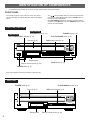
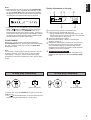
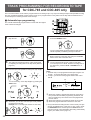
This unit can make a tape deck’s recording synchronized with CD play automatically. With this function, you can record a CD on
tape very easily and more precisely.
This recording method needs a YAMAHA tape deck compatible with this function. (Refer to the tape deck’s operation manual to
know whether it is compatible or not.)
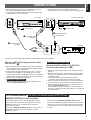
* This unit and the tape deck must be placed close to each other so that both of them can receive the signals from this unit’s
remote control transmitter at the same time.
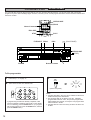
CDC-765, CDC-665
3
4
1
CDC-565
SYNCHRO
DIMMER
TIME
OPEN/
CLOSE
TAPE
CLEAR
PROG
1
2
3
4
5
6
+I0
7
8
9
0
DISC SCAN
MODE
REPEAT
RANDOM
OUTPUT LEVEL
3
+
PAUSE
SYNCHRO
DIMMER
SKIP
PLAY
4
2
3
4
5
6
7
8
9
0
DISC SCAN
MODE
REPEAT
RANDOM
INDEX
+I0
SEARCH
DISC SKIP
SKIP
STOP
4
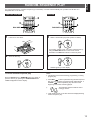
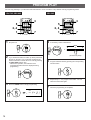
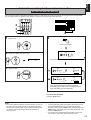
Select a disc.
PROG
1
1
4
5
OPEN/
CLOSE
TIME
CLEAR
INDEX
SEARCH
DISC SKIP
–
STOP
1
English
CD SYNCHRONIZED RECORDING
PAUSE
PLAY
4
5
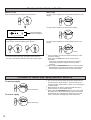
If desired, select the track to be recorded first.
5
SKIP
DISC SKIP
or
2
3
Load a tape on the tape deck.
* CDC-765 and CDC-665 only
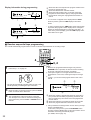
The peak level searching function of this unit is
useful for adjusting recording level on the tape deck.
(Refer to page 23.)
5
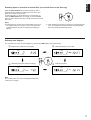
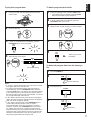
Both CD play and tape deck recording begin.
* CD play begins a little later than recording.
SYNCHRO
6
This unit enters into the pause mode, and the tape deck
enters into the REC/PAUSE mode.
* In this mode, the time display on this unit flashes on
and off.
PLAY
If you want to stop recording temporarily and restart
recording from a desired track, follow steps 3–5 again.
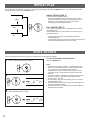
To cancel this function
Press the STOP button.
Notes
● To finish or stop the recording, press the “STOP” button on
the tape deck.
● Programmed sequence of tracks can also be recorded with
this function, instead of recording an entire disc. (Refer to
page 14–15 for the programming procedure.)
●
CDC-765 and CDC-665 only
This function can also be used together with the automatic
tape-programming function. (Refer to page 20–22.)
19