1
Settings During Playback
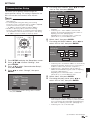
Function Control
This allows you to adjust various settings at once, like
subtitles, angle settings and the title selection for Direct
Playback. You can adjust the video and audio to suit
your preferences. The operations are the same for BD
and DVD.
Function control operation
procedure
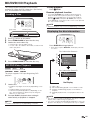
Function Control screen
BD-VIDEO
1
1/3
5 / 25
00 : 20 : 30
2 English
1
1
5 . 1c h
Off
2
1
Select
ENTER
Enter
Return
3
Press FUNCTION during playback.
• The Function Control screen is displayed on the TV.
2
Press a/b to select the desired setting, then
press ENTER.
• For a description of each setting, see “Functions
which can be set” (Page 36).
1 Playback status display
Shows the operation status and the disc type.
BD-VIDEO
2 Setting items
•
•
•
•
•
•
•
Title/Track Number (Direct Title/Track Skip)
Chapter Number (Direct Chapter Skip)
Playback Elapsed Time (Direct Time Skip)
Subtitle Language
Angle Number
Audio
Repeat
3
Press a/b/c/d to set, then press ENTER.
• Operations vary depending on the setting. Follow the
operation instructions on the screen.
3 Operation guide display
Provides help on remote control button operations.
Disc Playback
1/3
5 / 25
00 : 20 : 30
2 English
1
1
5 . 1c h
Off
Selects a title (or track) or chapter for playback, or performs
video/audio settings.
4
Press n RETURN or FUNCTION to close the
Function Control screen.
NOTE
• If “– –” is displayed for an option like title number or
subtitles, the disc has no titles or subtitles which can be
selected.
• The displayed items vary depending on the disc.
• If you access the Function Control screen during playback
of a BD/DVD video, it may be impossible to operate the
BD/DVD video playback. In cases like this, close the
Function Control screen.
35